front brake JAGUAR XFR 2010 1.G User Guide
[x] Cancel search | Manufacturer: JAGUAR, Model Year: 2010, Model line: XFR, Model: JAGUAR XFR 2010 1.GPages: 3039, PDF Size: 58.49 MB
Page 190 of 3039
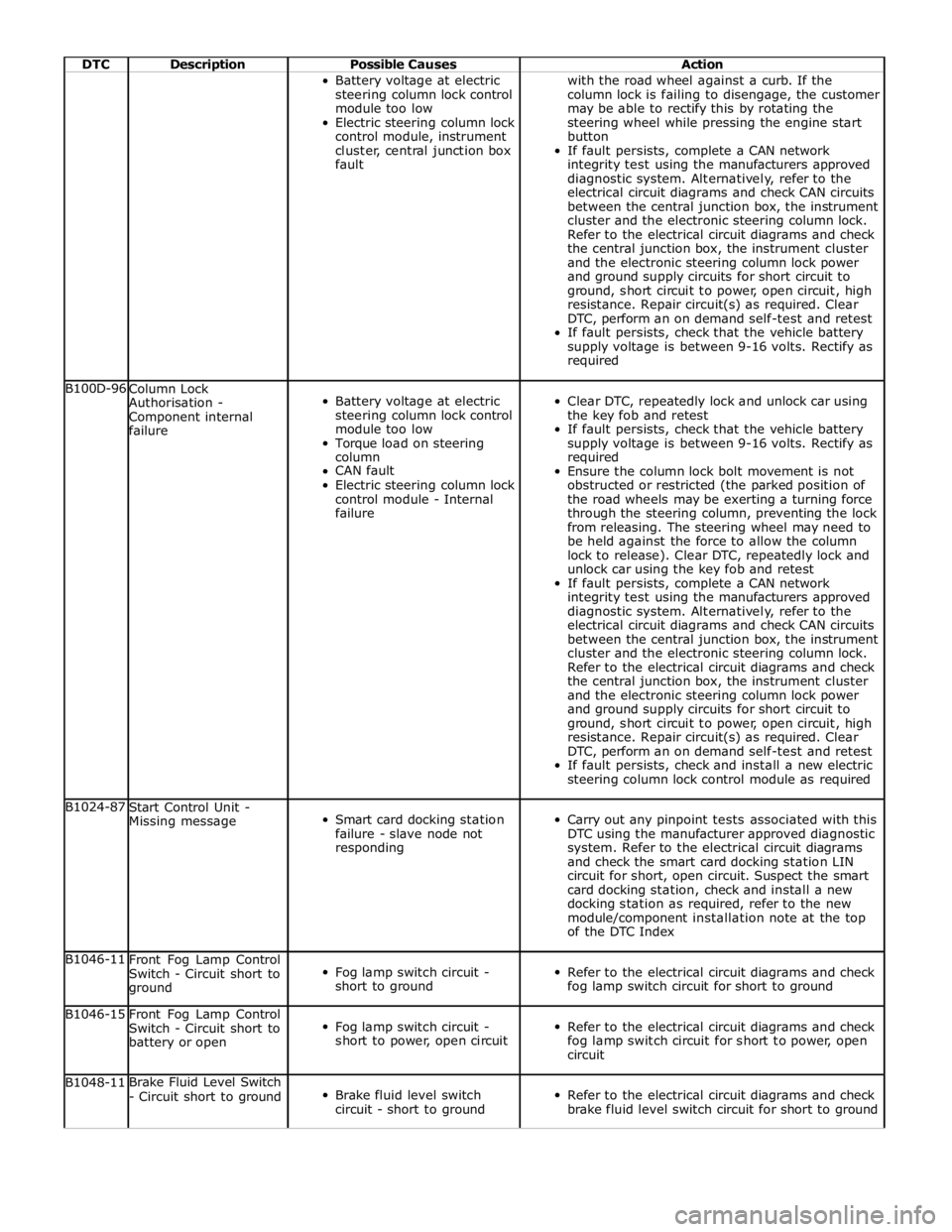
DTC Description Possible Causes Action Battery voltage at electric
steering column lock control
module too low
Electric steering column lock
control module, instrument
cluster, central junction box
fault with the road wheel against a curb. If the
column lock is failing to disengage, the customer
may be able to rectify this by rotating the
steering wheel while pressing the engine start
button
If fault persists, complete a CAN network
integrity test using the manufacturers approved
diagnostic system. Alternatively, refer to the
electrical circuit diagrams and check CAN circuits
between the central junction box, the instrument
cluster and the electronic steering column lock.
Refer to the electrical circuit diagrams and check
the central junction box, the instrument cluster
and the electronic steering column lock power
and ground supply circuits for short circuit to
ground, short circuit to power, open circuit, high
resistance. Repair circuit(s) as required. Clear
DTC, perform an on demand self-test and retest
If fault persists, check that the vehicle battery
supply voltage is between 9-16 volts. Rectify as
required B100D-96
Column Lock
Authorisation -
Component internal
failure
Battery voltage at electric
steering column lock control
module too low
Torque load on steering
column
CAN fault
Electric steering column lock
control module - Internal
failure
Clear DTC, repeatedly lock and unlock car using
the key fob and retest
If fault persists, check that the vehicle battery
supply voltage is between 9-16 volts. Rectify as
required
Ensure the column lock bolt movement is not
obstructed or restricted (the parked position of
the road wheels may be exerting a turning force
through the steering column, preventing the lock
from releasing. The steering wheel may need to
be held against the force to allow the column
lock to release). Clear DTC, repeatedly lock and
unlock car using the key fob and retest
If fault persists, complete a CAN network
integrity test using the manufacturers approved
diagnostic system. Alternatively, refer to the
electrical circuit diagrams and check CAN circuits
between the central junction box, the instrument
cluster and the electronic steering column lock.
Refer to the electrical circuit diagrams and check
the central junction box, the instrument cluster
and the electronic steering column lock power
and ground supply circuits for short circuit to
ground, short circuit to power, open circuit, high
resistance. Repair circuit(s) as required. Clear
DTC, perform an on demand self-test and retest
If fault persists, check and install a new electric
steering column lock control module as required B1024-87
Start Control Unit -
Missing message
Smart card docking station
failure - slave node not
responding
Carry out any pinpoint tests associated with this
DTC using the manufacturer approved diagnostic
system. Refer to the electrical circuit diagrams
and check the smart card docking station LIN
circuit for short, open circuit. Suspect the smart
card docking station, check and install a new
docking station as required, refer to the new
module/component installation note at the top
of the DTC Index B1046-11
Front Fog Lamp Control
Switch - Circuit short to
ground
Fog lamp switch circuit -
short to ground
Refer to the electrical circuit diagrams and check
fog lamp switch circuit for short to ground B1046-15
Front Fog Lamp Control
Switch - Circuit short to
battery or open
Fog lamp switch circuit -
short to power, open circuit
Refer to the electrical circuit diagrams and check
fog lamp switch circuit for short to power, open
circuit B1048-11 Brake Fluid Level Switch
- Circuit short to ground
Brake fluid level switch
circuit - short to ground
Refer to the electrical circuit diagrams and check
brake fluid level switch circuit for short to ground
Page 239 of 3039
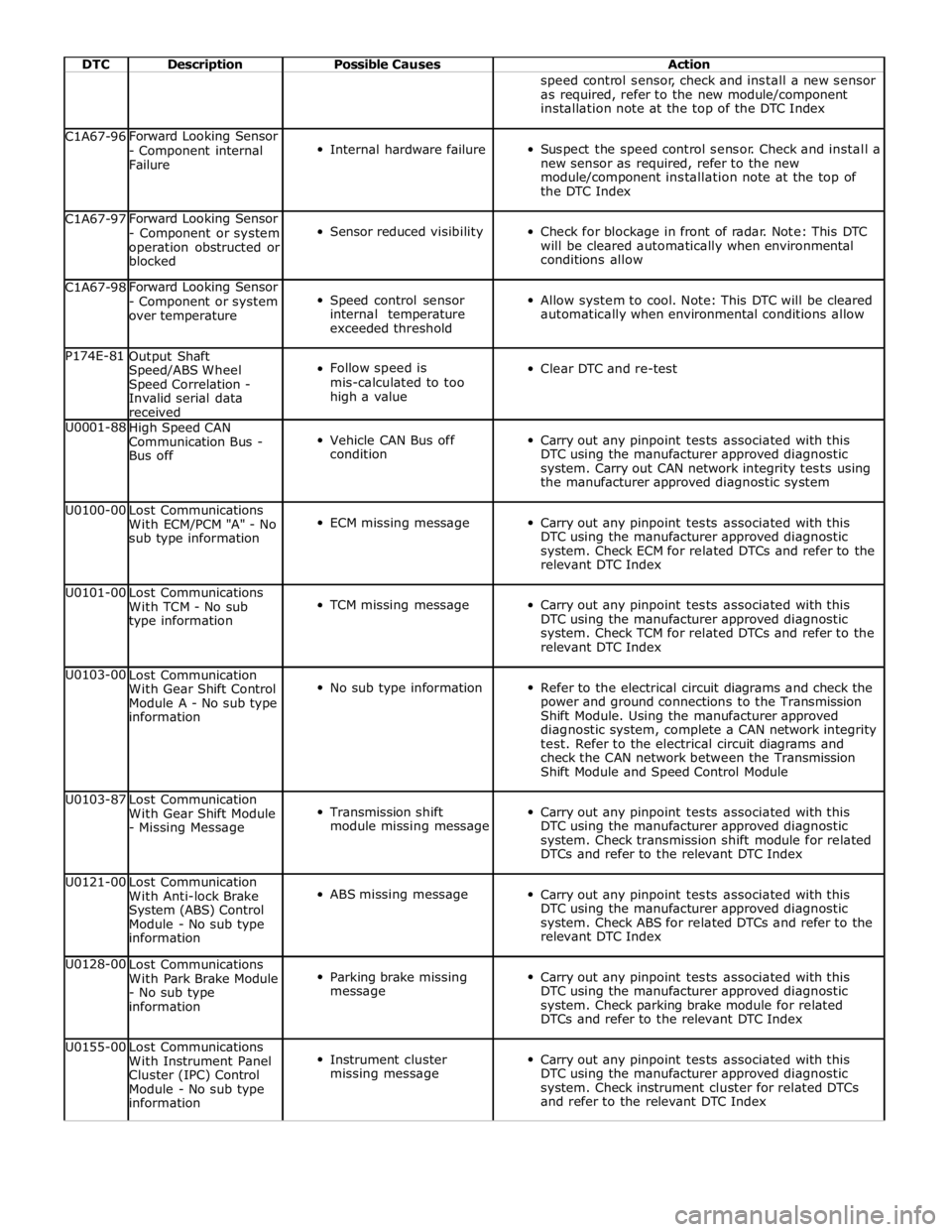
DTC Description Possible Causes Action speed control sensor, check and install a new sensor
as required, refer to the new module/component
installation note at the top of the DTC Index C1A67-96 Forward Looking Sensor
- Component internal
Failure
Internal hardware failure
Suspect the speed control sensor. Check and install a
new sensor as required, refer to the new
module/component installation note at the top of
the DTC Index C1A67-97 Forward Looking Sensor
- Component or system
operation obstructed or
blocked
Sensor reduced visibility
Check for blockage in front of radar. Note: This DTC
will be cleared automatically when environmental
conditions allow C1A67-98 Forward Looking Sensor
- Component or system
over temperature
Speed control sensor
internal temperature
exceeded threshold
Allow system to cool. Note: This DTC will be cleared
automatically when environmental conditions allow P174E-81
Output Shaft
Speed/ABS Wheel
Speed Correlation -
Invalid serial data
received
Follow speed is
mis-calculated to too
high a value
Clear DTC and re-test U0001-88
High Speed CAN
Communication Bus -
Bus off
Vehicle CAN Bus off
condition
Carry out any pinpoint tests associated with this
DTC using the manufacturer approved diagnostic
system. Carry out CAN network integrity tests using
the manufacturer approved diagnostic system U0100-00
Lost Communications
With ECM/PCM "A" - No
sub type information
ECM missing message
Carry out any pinpoint tests associated with this
DTC using the manufacturer approved diagnostic
system. Check ECM for related DTCs and refer to the
relevant DTC Index U0101-00
Lost Communications
With TCM - No sub
type information
TCM missing message
Carry out any pinpoint tests associated with this
DTC using the manufacturer approved diagnostic
system. Check TCM for related DTCs and refer to the
relevant DTC Index U0103-00
Lost Communication
With Gear Shift Control
Module A - No sub type
information
No sub type information
Refer to the electrical circuit diagrams and check the
power and ground connections to the Transmission
Shift Module. Using the manufacturer approved
diagnostic system, complete a CAN network integrity
test. Refer to the electrical circuit diagrams and
check the CAN network between the Transmission
Shift Module and Speed Control Module U0103-87
Lost Communication
With Gear Shift Module
- Missing Message
Transmission shift
module missing message
Carry out any pinpoint tests associated with this
DTC using the manufacturer approved diagnostic
system. Check transmission shift module for related
DTCs and refer to the relevant DTC Index U0121-00
Lost Communication
With Anti-lock Brake
System (ABS) Control
Module - No sub type
information
ABS missing message
Carry out any pinpoint tests associated with this
DTC using the manufacturer approved diagnostic
system. Check ABS for related DTCs and refer to the
relevant DTC Index U0128-00
Lost Communications
With Park Brake Module
- No sub type
information
Parking brake missing
message
Carry out any pinpoint tests associated with this
DTC using the manufacturer approved diagnostic
system. Check parking brake module for related
DTCs and refer to the relevant DTC Index U0155-00
Lost Communications
With Instrument Panel
Cluster (IPC) Control
Module - No sub type
information
Instrument cluster
missing message
Carry out any pinpoint tests associated with this
DTC using the manufacturer approved diagnostic
system. Check instrument cluster for related DTCs
and refer to the relevant DTC Index
Page 297 of 3039
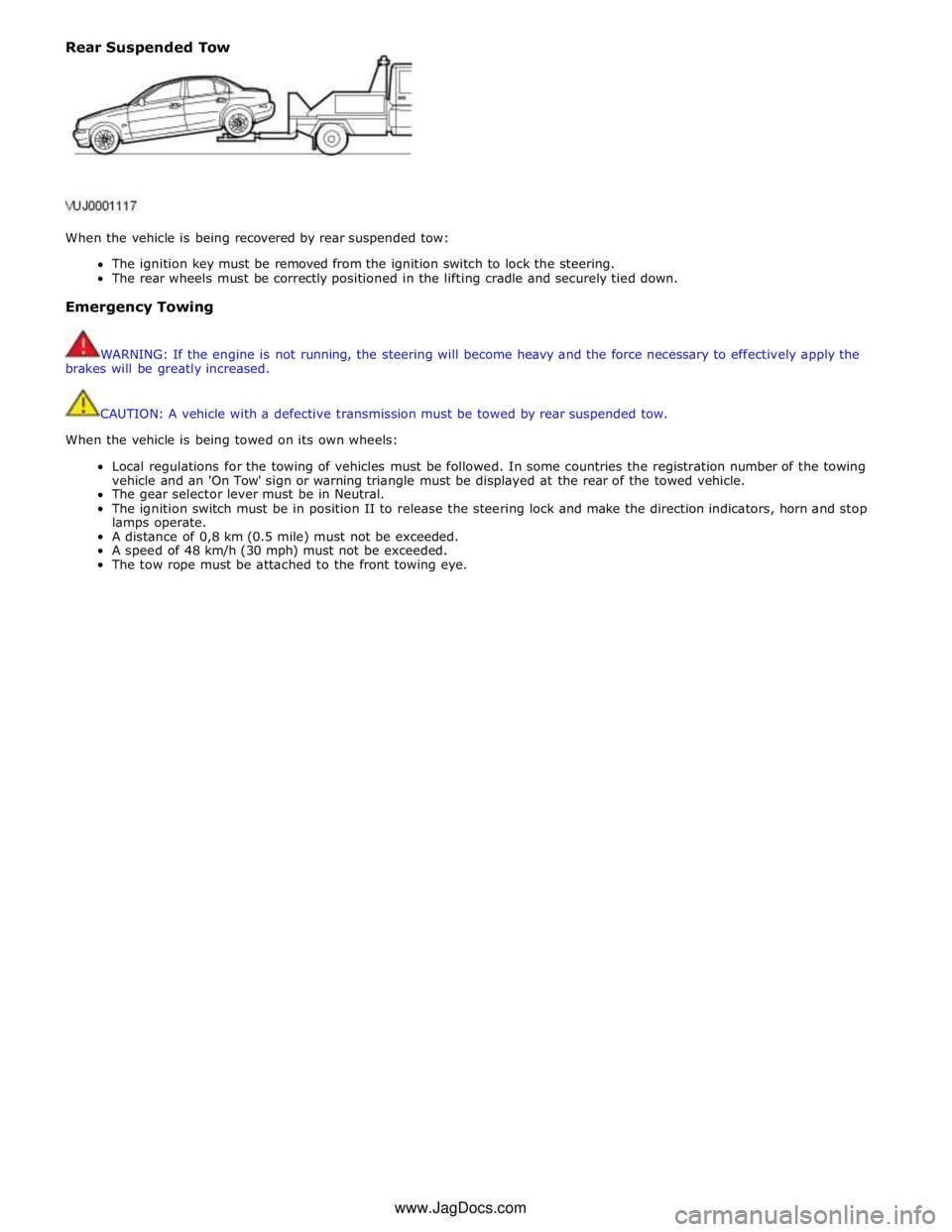
Rear Suspended Tow
When the vehicle is being recovered by rear suspended tow:
The ignition key must be removed from the ignition switch to lock the steering.
The rear wheels must be correctly positioned in the lifting cradle and securely tied down.
Emergency Towing
WARNING: If the engine is not running, the steering will become heavy and the force necessary to effectively apply the
brakes will be greatly increased.
CAUTION: A vehicle with a defective transmission must be towed by rear suspended tow.
When the vehicle is being towed on its own wheels:
Local regulations for the towing of vehicles must be followed. In some countries the registration number of the towing
vehicle and an 'On Tow' sign or warning triangle must be displayed at the rear of the towed vehicle.
The gear selector lever must be in Neutral.
The ignition switch must be in position II to release the steering lock and make the direction indicators, horn and stop
lamps operate.
A distance of 0,8 km (0.5 mile) must not be exceeded.
A speed of 48 km/h (30 mph) must not be exceeded.
The tow rope must be attached to the front towing eye. www.JagDocs.com
Page 300 of 3039
Noise Conditions
Gear noise is typically a howling or whining due to gear damage or incorrect bearing preload. It can occur at various
speeds and driving conditions, or it can be continuous
Chuckle is a particular rattling noise that sounds like a stick against the spokes of a spinning bicycle wheel. It occurs
while decelerating from approximately 64 km/h (40 miles/h) and can usually be heard all the way to a stop. The
frequency varies with vehicle speed
Knock is very similar to chuckle, though it may be louder and occurs on acceleration or deceleration. The tear down will
disclose what has to be corrected
Check and rule out tires, exhaust and trim items before disassembling the transmission to diagnose and correct gear noise.
The noises described under Road Test usually have specific causes that can be diagnosed by observation as the unit is
disassembled. The initial clues are the type of noise heard on the road test and the driving conditions.
Vibration Conditions
wear. NOTE: New Constant Velocity (CV) joints should not be installed unless disassembly and inspection revealed unusual
Clicking, popping or grinding noises may be caused by the following:
Cut or damaged CV joint boots resulting in inadequate or contaminated lubricant in the outboard or inboard CV joint
bearing housings
Loose CV joint boot clamps
Another component contacting the rear drive half shaft
Worn, damaged or incorrectly installed wheel bearing, suspension or brake component
Vibration at highway speeds may be caused by the following:
Out-of-balance front or rear wheels
Out-of-round tires
Driveline imbalance
Driveline run-out (alignment)
NOTE: Rear drive half shafts are not balanced and are not likely to contribute to rotational vibration disturbance.
Shudder or vibration during acceleration (including from rest) may be caused by the following:
Driveline alignment
Excessively worn or damaged outboard or inboard CV joint bearing housing
Excessively high CV joint operating angles caused by incorrect ride height. Check ride height, verify correct spring rate
and check items under Inoperative Conditions
Excessively worn driveshaft components
Leakage Conditions
1. Inspect the CV joint boots for evidence of cracks, tears or splits.
2. Inspect the underbody for any indication of grease splatter in the vicinity of the rear drive half shaft, outboard and
inboard CV joint boot locations, which is an indication of CV joint boot or CV joint boot clamp damage.
3. Inspect the inboard CV joint bearing housing seal for leakage.
Inoperative Conditions
If a CV joint or rear drive half shaft pull-out occurs, check the following:
suspension components for correct location, damage or wear
bushings for wear
subframe for damage
bent or worn components
- Stabilizer bar link
- Left-hand rear suspension lower arm and bushing
- Right-hand rear suspension lower arm and bushing
- Rear wheel hub and rear drive half shaft
Road Test
A gear-driven unit will produce a certain amount of noise. Some noise is acceptable and may be audible at certain speeds or
under various driving conditions as on a newly paved blacktop road. The slight noise is in no way detrimental and must be
considered normal.
The road test and customer interview (if available) provide information needed to identify the condition and give direction to
the correct starting point for diagnosis.
1. Make notes throughout the diagnosis routine. Make sure to write down even the smallest piece of information, because
Page 301 of 3039
it may turn out to be the most important.
2. Do not touch anything until a road test and a thorough visual inspection of the vehicle have been carried out. Leave the
tire pressures and vehicle load just where they were when the condition was first observed. Adjusting tire pressures,
vehicle load or making other adjustments may reduce the conditions intensity to a point where it cannot be identified
clearly. It may also inject something new into the system, preventing correct diagnosis.
3. Make a visual inspection as part of the preliminary diagnosis routine, writing down anything that does not look right.
Note tire pressures, but do not adjust them yet. Note leaking fluids, loose nuts and bolts, or bright spots where
components may be rubbing against each other. Check the luggage compartment for unusual loads.
4. Road test the vehicle and define the condition by reproducing it several times during the road test.
5. Carry out the Road Test Quick Checks as soon as the condition is reproduced. This will identify the correct diagnostic
procedure. Carry out the Road Test Quick Checks more than once to verify they are providing a valid result. Remember,
the Road Test Quick Checks may not tell where the concern is, but they will tell where it is not.
Road Test Quick Checks
1. 24-80 km/h (15-50 miles/h): With light acceleration, a moaning noise is heard and possibly a vibration is felt in the
front floor pan. It is usually worse at a particular engine speed and at a particular throttle setting during acceleration at
that speed. It may also produce a moaning sound, depending on what component is causing it. Refer to Tip-In Moan in
the Symptom Chart.
2. Acceleration/deceleration: With slow acceleration and deceleration, a shake is sometimes noticed in the steering
wheel/column, seats, front floor pan, front door trim panel or front end sheet metal. It is a low frequency vibration
(around 9-15 cycles per second). It may or may not be increased by applying brakes lightly. Refer to Idle Boom/Shake
/Vibration in the Symptom Chart.
3. High speed: A vibration is felt in the front floor pan or seats with no visible shake, but with an accompanying sound or
rumble, buzz, hum, drone or booming noise. Coast with the clutch pedal depressed or shift control selector lever in
neutral and engine idling. If vibration is still evident, it may be related to wheels, tires, front brake discs, wheel hubs
or front wheel bearings. Refer to High Speed Shake in the Symptom Chart.
4. Engine rpm sensitive: A vibration is felt whenever the engine reaches a particular rpm. It will disappear in neutral
coasts. The vibration can be duplicated by operating the engine at the problem rpm while the vehicle is stationary. It
can be caused by any component, from the accessory drive belt to the torque converter which turns at engine speed
when the vehicle is stopped. Refer to High Speed Shake in the Symptom Chart.
5. Noise/vibration while turning: Clicking, popping, or grinding noises may be due to a worn, damaged, or incorrectly
installed front wheel bearing, rear drive half shaft or CV joint.
6. Noise/vibration that is road speed relative: This noise/vibration can be diagnosed independent of engine speed or gear
selected (engine speed varies but torque and road speed remain constant). The cause may be a rear drive
axle/differential whine.
Road Conditions
An experienced technician will always establish a route that will be used for all NVH diagnosis road tests. The road selected
should be reasonably smooth, level and free of undulations (unless a particular condition needs to be identified). A smooth
asphalt road that allows driving over a range of speeds is best. Gravel or bumpy roads are unsuitable because of the additional
road noise produced. Once the route is established and consistently used, the road noise variable is eliminated from the test
results.
NOTE: Some concerns may be apparent only on smooth asphalt roads.
If a customer complains of a noise or vibration on a particular road and only on a particular road, the source of the concern
may be the road surface. If possible, try to test the vehicle on the same type of road.
Vehicle Preparation
Carry out a thorough visual inspection of the vehicle before carrying out the road test. Note anything which is unusual. Do not
repair or adjust any condition until the road test is carried out, unless the vehicle is inoperative or the condition could pose a
hazard to the technician.
After verifying the condition has been corrected, make sure all components removed have been installed.
Lift Test
After a road test, it is sometimes useful to do a similar test on a lift.
When carrying out the high-speed shake diagnosis or engine accessory vibration diagnosis on a lift, observe the following
precautions:
WARNING: If only one drive wheel is allowed to rotate, speed must be limited to 55 km/h (35 miles/h) indicated on the
speedometer since actual wheel speed will be twice that indicated on the speedometer. Speed exceeding 55 km/h (35 miles/h)
or allowing the drive wheel to hang unsupported could result in tire disintegration, differential failure, constant velocity joint
Page 308 of 3039
Front Suspension (204-01 Front Suspension, Description and Operation), Front Suspension (204-01 Front Suspension, Description and Operation), Rear Suspension (204-02 Rear Suspension, Description and Operation), Rear Suspension (204-02 Rear Suspension, Description and Operation), Rear Suspension (204-02 Rear Suspension, Description and Operation).
Inspection and Verification
1. Verify the customer concern by carrying out a road test on a smooth road. If any vibrations are apparent, refer to
section 100-04 Noise, Vibration and Harshness.
2. Visually inspect for obvious signs of damage and system integrity.
3. If an obvious cause for an observed or reported condition is found, correct the cause (if possible) before proceeding to
the next step.
4. If the fault is not visually evident, verify the symptom and refer to the following Symptom Chart.
Symptom Chart
Symptom Possible Sources Action Crabbing * Incorrect rear thrust angle. * Check the rear toe adjustment.
REFER to: Rear Toe Adjustment (204-00 Suspension System - General Information, General Procedures). * Front or rear suspension components.
* Inspect the front and rear suspension systems. Repair or
install new suspension components as necessary. * Drive axle damaged. * Install a new rear drive axle/differential.
REFER to: Axle Assembly - V6 3.0L Petrol (205-02 Rear Drive Axle/Differential, Removal and Installation). Drift/Pull * Unequal tire pressure.
* Check and adjust the tire pressures. Inspect the tire for
excessive wear.
REFER to: Specifications (204-04 Wheels and Tires, Specifications). * Incorrect wheel alignment.
* Check and adjust the wheel alignment. REFER to:
(204-00 Suspension System - General Information)
Front Toe Adjustment (General Procedures), Rear Toe Adjustment (General Procedures), Camber and Caster Adjustment (General Procedures). * Tires.
* Check and adjust the tire pressures. Inspect the tire for
excessive wear.
REFER to: Specifications (204-04 Wheels and Tires, Specifications). * Unevenly loaded or overloaded vehicle. * Notify the customer of incorrect vehicle loading. * Damaged steering components. * Check the steering system. * Brake drag. * Check the brakes.
REFER to: Brake System (206-00 Brake System - General Information, Diagnosis and Testing). Mechanical
Damaged tires
Wheel bearing(s)
Loose or damaged front or rear suspension components
Loose, damaged or missing suspension fastener(s)
Incorrect spring usage
Damaged or sagging spring(s)
Damaged or leaking shock absorber(s)
Damaged or leaking strut(s)
Worn or damaged suspension bushing(s)
Loose, worn or damaged steering system components
Damaged axle components Visual Inspection Chart
Page 310 of 3039
Shock Absorber and Spring Assembly (204-02 Rear Suspension, Removal and Installation). * Loose front stabilizer bar or rear
stabilizer bar. * Check and tighten the stabilizer bar to specification.
REFER to:
Specifications (204-01 Front Suspension, Specifications), Specifications (204-02 Rear Suspension, Specifications). * Worn lower suspension arm stabilizer
bar insulators. * Install new lower suspension arm stabilizer bar as
necessary. REFER to:
Front Stabilizer Bar - 2.7L Diesel (204-01, Removal and
Installation),
Front Stabilizer Bar - V6 3.0L Petrol (204-01 Front Suspension, Removal and Installation),
Front Stabilizer Bar - 4.2L (204-01, Removal and
Installation),
Rear Stabilizer Bar (204-02 Rear Suspension, Removal and Installation). * Shock absorber(s). * Check and install new shock absorber(s) as necessary.
REFER to:
Front Shock Absorber (204-01 Front Suspension, Removal and Installation),
Shock Absorber and Spring Assembly (204-02 Rear Suspension, Removal and Installation). Vehicle Leans to One
Side * Unevenly loaded or overloaded vehicle. * Notify the customer of incorrect vehicle loading. * Front or rear suspension components.
* Inspect the front and rear suspension systems. Repair or
install new suspension components as necessary. * Shock absorber(s). * Check and install new shock absorber(s) as necessary.
REFER to:
Front Shock Absorber (204-01 Front Suspension, Removal and Installation),
Shock Absorber and Spring Assembly (204-02 Rear Suspension, Removal and Installation). * Coil spring(s).
* Check and install new spring(s) as necessary. REFER to:
Front Shock Absorber (204-01 Front Suspension, Removal and Installation),
Shock Absorber and Spring Assembly (204-02 Rear Suspension, Removal and Installation). * Incorrect ride height. Lateral tilt out of
specification. * Check the ride height. Install new spring(s) as
necessary. REFER to:
Front Shock Absorber (204-01 Front Suspension, Removal and Installation),
Shock Absorber and Spring Assembly (204-02 Rear Suspension, Removal and Installation). Vibration/Noise * Tires/wheels.
* Wheel bearings.
* Wheel hubs.
* Brake components.
* Suspension components.
* Steering components. * Check and install new components as necessary. Wander * Unevenly loaded or overloaded vehicle. * Notify the customer of incorrect vehicle loading. * Ball joint(s). * Check the Ball Joint(s). * Front wheel bearing(s). * Check the wheel bearings. * Loose, worn or damaged suspension components. * Check and install new suspension components as necessary. * Loose suspension fasteners.
* Check and tighten the suspension fasteners to
specification.
REFER to: Specifications (204-00 Suspension System - General Information, Specifications). * Steering components. * Check and install new steering components. * Wheel alignment (excessive total front
toe-out). * Check and adjust the wheel alignment. REFER to:
(204-00 Suspension System - General Information)
Front Toe Adjustment (General Procedures), Rear Toe Adjustment (General Procedures), Camber and Caster Adjustment (General Procedures). Component Tests
Ball Joint Inspection
NOTE: The front suspension is shown in the following procedures. The inspection of the rear suspension upper ball joint
is similar.
1. Raise and support the vehicle. REFER to: (100-02 Jacking and Lifting)
Jacking (Description and Operation), Lifting (Description and Operation).
2. Prior to carrying out any inspection of the ball joints, inspect the front wheel bearings.
Page 321 of 3039
Published: 16-Oct-2013
Suspension System - General Information - Front Toe Adjustment
General Procedures
CAUTIONS:
Make sure the vehicle is on a flat level surface.
Make sure the tire pressures are within specification.
Make sure that only the manufacturers' recommended four wheel alignment equipment is used.
Make sure the steering is in the straight ahead position.
1. For wheel alignment information, refer to the suspension specification
section.
For additional information, refer to: Specifications (204-00 Suspension System - General Information, Specifications).
2. Check the tie rod ends, suspension joints, wheel bearings and wheels
and tires for damage, wear and free play.
Adjust or repair any worn, damaged or incorrectly adjusted
components.
3. Check and adjust tire pressures.
4. Position the vehicle on a 4 post lift.
5. Release the vehicle parking brake.
6. Vehicles with air suspension.
For additional information, refer to: Air Suspension Manual Tight
Tolerance Setting Mode (204-05, General Procedures).
7. For additional information, refer to: Air Suspension Manual Tight
Tolerance Setting Mode (204-05, General Procedures).
8. Using only four-wheel alignment equipment approved by Jaguar, check
the wheel alignment.
9. NOTE: LH illustration shown, RH is similar. To
adjust, loosen the tie rod end lock nuts.
Page 324 of 3039
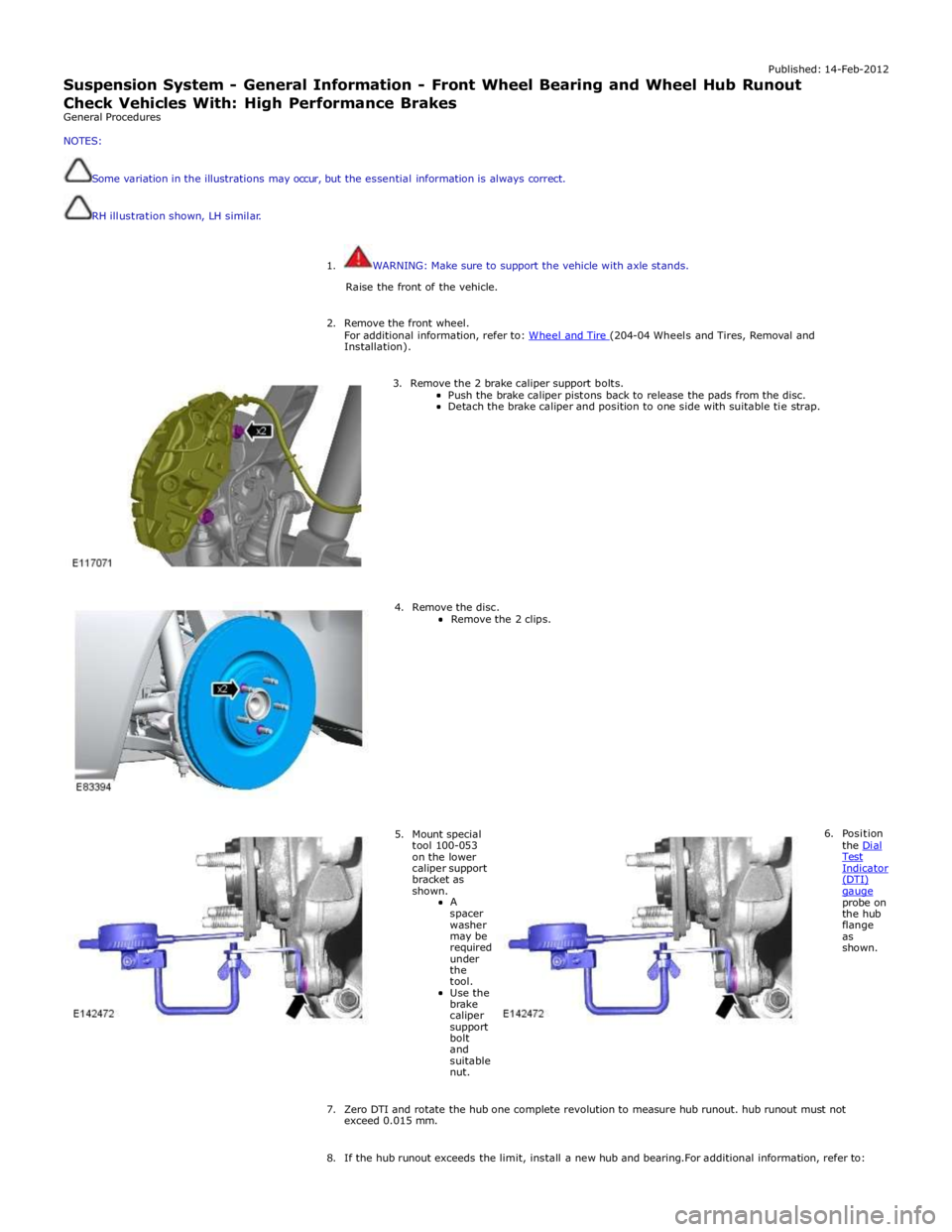
Published: 14-Feb-2012
Suspension System - General Information - Front Wheel Bearing and Wheel Hub Runout Check Vehicles With: High Performance Brakes
General Procedures
NOTES:
Some variation in the illustrations may occur, but the essential information is always correct.
RH illustration shown, LH similar.
1. WARNING: Make sure to support the vehicle with axle stands.
Raise the front of the vehicle.
2. Remove the front wheel.
For additional information, refer to: Wheel and Tire (204-04 Wheels and Tires, Removal and Installation).
3. Remove the 2 brake caliper support bolts.
Push the brake caliper pistons back to release the pads from the disc. Detach the brake caliper and position to one side with suitable tie strap.
4. Remove the disc.
Remove the 2 clips.
5. Mount special tool 100-053 on the lower caliper support bracket as shown.
A
spacer washer may be required under the tool.
Use the brake caliper support bolt and suitable nut. 6. Position
the Dial Test Indicator (DTI) gauge probe on the hub flange as shown.
7. Zero DTI and rotate the hub one complete revolution to measure hub runout. hub runout must not exceed 0.015 mm.
8. If the hub runout exceeds the limit, install a new hub and bearing.For additional information, refer to:
Page 325 of 3039

Front Wheel Bearing and Wheel Hub - TDV6 3.0L Diesel /V8 5.0L Petrol/V8 S/C 5.0L Petrol (Removal and Installation).
9. If the hub runout is within the limit install the removed components.
10. tighten the brake caliper bolts to 115 Nm.