front brake JAGUAR XFR 2010 1.G Repair Manual
[x] Cancel search | Manufacturer: JAGUAR, Model Year: 2010, Model line: XFR, Model: JAGUAR XFR 2010 1.GPages: 3039, PDF Size: 58.49 MB
Page 673 of 3039

1 LH (left-hand) front brake 2 RH (right-hand) rear brake 3 LH rear brake 4 RH front brake 5 Primary circuit inlet port 6 Secondary circuit inlet port The ABS module is located in the passenger side, rear engine bay and incorporates the HCU. The HCU is a four channel unit that modulates the supply of hydraulic pressure to the brakes under control of the ABS module.
The primary and secondary outlets of the master cylinder are connected to the primary and secondary circuits within the HCU. The primary circuit in the HCU has separate outlet ports to the RH front and LH rear brakes. The secondary circuit in the HCU has separate outlet ports to the LH front and RH rear brakes.
Page 675 of 3039

6 Pulsation damper 7 Separation valve 8 Damping chambers 9 Separation valve 10 Shuttle valve 11 Hydraulic pumps 12 Motor 13 Shuttle valve 14 Pressure sensor - all vehicles 15 Low pressure accumulator 16 Check valve 17 Low pressure accumulator 18 Inlet valve 19 Inlet valve 20 Inlet valve 21 Inlet valve 22 Outlet valve 23 Outlet valve 24 Outlet valve 25 Outlet valve 26 Pressure sensors - vehicles fitted with adaptive speed control only 27 RH front brake 28 LH rear brake 29 RH rear brake 30 LH front brake www.JagDocs.com
Page 679 of 3039
Hydraulic Brake Actuation - Brake Master Cylinder
Removal and Installation
Removal Published: 11-May-2011
1. WARNING: Make sure to support the vehicle with axle stands.
Raise and support the vehicle.
2. Remove the cowl vent screen.
For additional information, refer to: Cowl Vent Screen (501-02 Front End Body Panels, Removal and Installation).
3. CAUTION: Brake fluid will damage paint finished surfaces. If spilled,
immediately remove the fluid and clean the area with water.
Remove the brake fluid reservoir.
For additional information, refer to: Brake Fluid Reservoir (206-06 Hydraulic Brake Actuation, Removal and Installation).
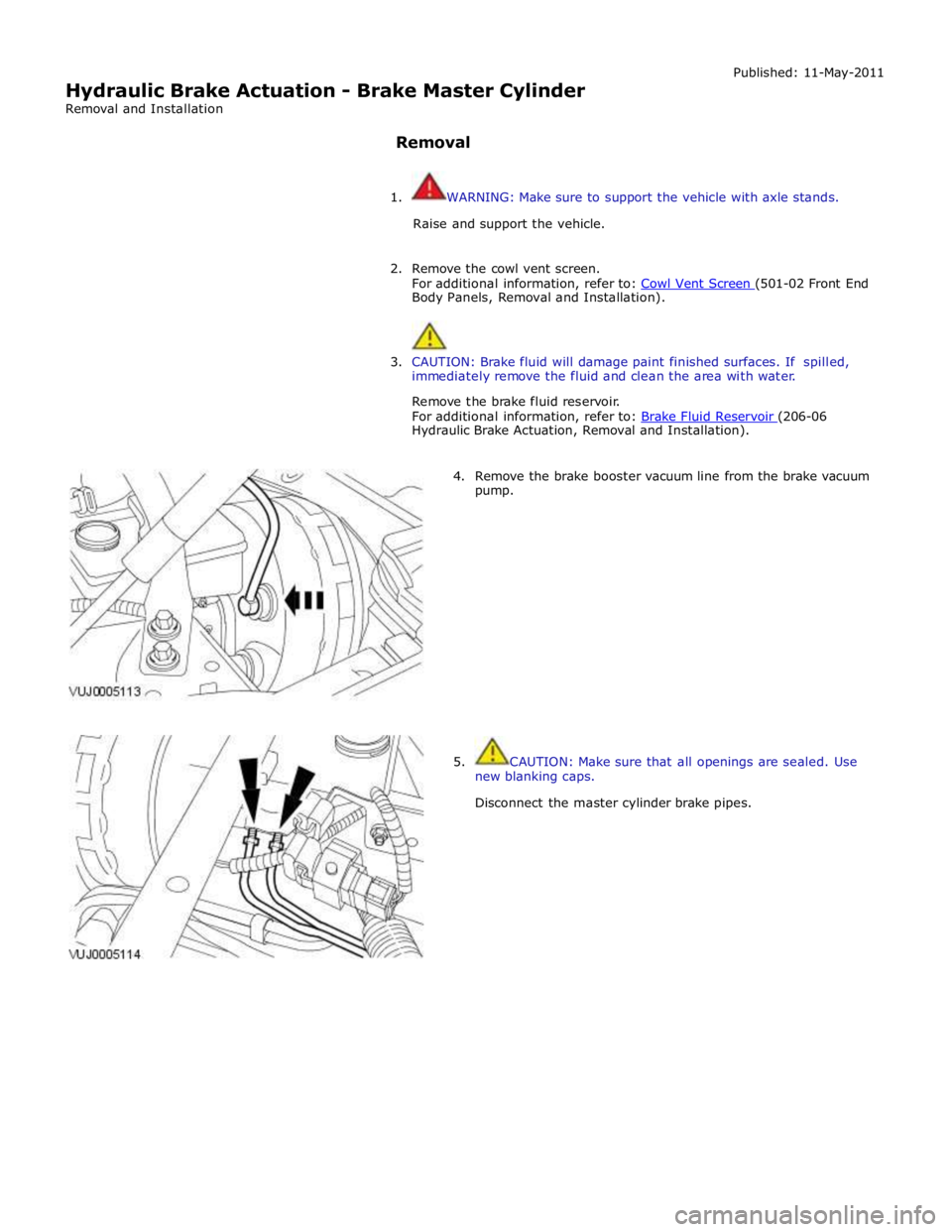
4. Remove the brake booster vacuum line from the brake vacuum
pump.
5. CAUTION: Make sure that all openings are sealed. Use
new blanking caps.
Disconnect the master cylinder brake pipes.
Page 691 of 3039

Published: 02-Sep-2011
Anti-Lock Control - Stability Assist - Anti-Lock Control - Stability Assist - Component Location
Description and Operation
NOTE: RHD (right-hand drive) installation shown, LHD (left-hand drive) installation similar.
Component Location
Item Description 1 ABS (anti-lock brake system) module 2 RH (right-hand) front wheel speed sensor 3 Instrument cluster 4 Steering angle sensor 5 Yaw rate and lateral acceleration sensor 6 RH rear wheel speed sensor 7 LH (left-hand) rear wheel speed sensor 8 LH front wheel speed sensor
Page 695 of 3039
Press and hold the DSC switch for less than 10 seconds.
The message center will temporarily display either Trac DSC or DSC ON.
The warning indicator in the instrument panel will illuminate while Trac DSC is selected.
The warning indicator will flash when DSC or Trac DSC is active.
NOTE: If cruise control is engaged, it will automatically disengage if DSC activates.
Refer to: Speed Control (310-03 Speed Control - 2.7L V6 - TdV6, Description and Operation).
Corner Brake Control
CBC (corner brake control) influences the brake pressures, below and within DSC and ABS thresholds, to counteract the yawing moment produced when braking in a corner. CBC produces a correction torque by limiting the brake pressure on one side of the
vehicle.
Electronic Brake Force Distribution
EBD (electronic brake force distribution) limits the brake pressure applied to the rear wheels. When the brakes are applied, the
weight of the vehicle transfers forwards, reducing the ability of the rear wheels to transfer braking effort to the road surface.
This may cause the rear wheels to slip and make the vehicle unstable.
EBD uses the ABS braking hardware to automatically optimize the pressure to the rear brakes, below the point where ABS is normally invoked.
NOTE: Only the rear brakes are controlled by the EBD function.
Electronic Traction Control
ETC (electronic traction control) attempts to optimize forward traction by reducing engine torque, or by applying the brake of a
spinning wheel until traction is regained.
ETC is activated if an individual wheel speed is above that of the vehicle reference speed (positive slip) and the brake pedal is
not pressed. The brake is applied to the spinning wheel, allowing the excess torque to be transmitted to the non-spinning
wheel through the drive line. If necessary, the ABS module also sends a high speed CAN bus message to the ECM to request a reduction in engine torque.
When the DSC function is selected off using the DSC switch, the braking and engine torque reduction features are both
disabled, except when the JaguarDrive control is in winter mode. When the JaguarDrive control is in winter mode, selecting the
DSC function off retains the braking and engine torque reduction features, but reduces intervention levels compared to DSC
and Trac DSC modes.
Emergency Brake Assist
EBA (emergency brake assist) assists the driver in emergency braking situations by automatically increasing the applied
braking effort. The ABS module invokes EBA when: The brake pedal is rapidly pressed.
The brake pedal is pressed hard enough to bring the front brakes into ABS operation.
When the brake pedal is rapidly pressed, the ABS module increases the hydraulic pressure to all of the brakes until the threshold for ABS operation is reached. This action applies the maximum braking effort for the available traction. The ABS module monitors for the sudden application of the brakes, using inputs from the brake pedal switch and from the pressure
sensor within the HCU (hydraulic control unit). With the brake pedal pressed, if the rate of increase of hydraulic pressure
exceeds the predetermined limit, the ABS module invokes emergency braking.
When the brake pedal is pressed hard enough to bring the front brakes into ABS operation, the ABS module increases the hydraulic pressure to the rear brakes up to the ABS threshold.
EBA operation continues until the driver releases the brake pedal, sufficiently for the hydraulic pressure in the HCU to drop below a threshold value stored in the ABS module.
Engine Drag-Torque Control
EDC (engine drag-torque control) prevents wheel slip caused by any of the following: A
sudden decrease in engine torque when the accelerator is suddenly released.
A downshift using the Jaguar sequential shift function on automatic transmission vehicles.
When the ABS module detects the onset of wheel slip without the brakes being applied, the ABS module signals the ECM via the high speed CAN bus to request a momentary increase in engine torque.
Understeer Control
Understeer Logic Control is a proactive system which monitors the vehicle for understeer by comparing signals from the yaw
rate and lateral acceleration sensor with signals from the steering angle sensor and wheel speed sensors. www.JagDocs.com
Page 702 of 3039
ABS Module
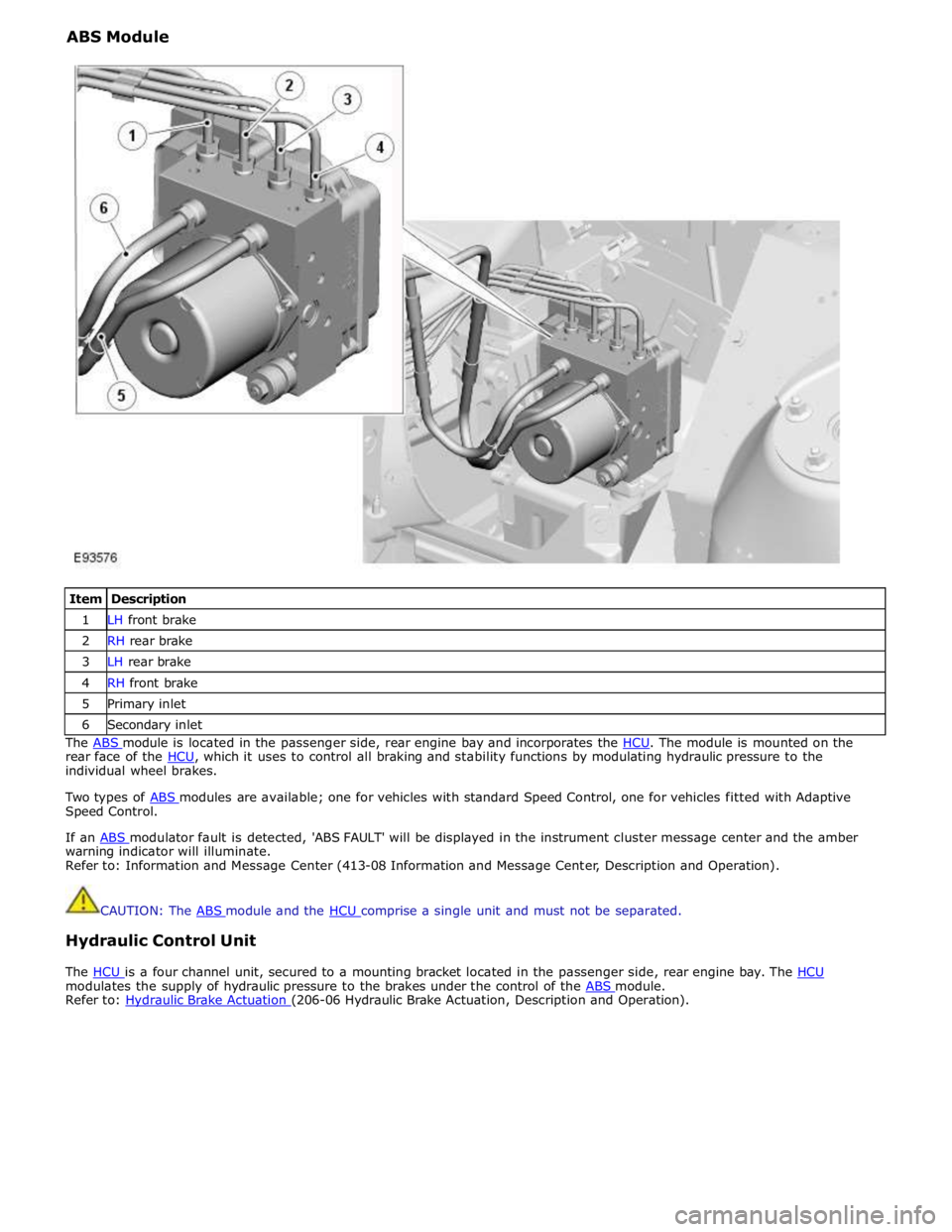
Item Description 1 LH front brake 2 RH rear brake 3 LH rear brake 4 RH front brake 5 Primary inlet 6 Secondary inlet The ABS module is located in the passenger side, rear engine bay and incorporates the HCU. The module is mounted on the rear face of the HCU, which it uses to control all braking and stability functions by modulating hydraulic pressure to the individual wheel brakes.
Two types of ABS modules are available; one for vehicles with standard Speed Control, one for vehicles fitted with Adaptive Speed Control.
If an ABS modulator fault is detected, 'ABS FAULT' will be displayed in the instrument cluster message center and the amber warning indicator will illuminate.
Refer to: Information and Message Center (413-08 Information and Message Center, Description and Operation).
CAUTION: The ABS module and the HCU comprise a single unit and must not be separated.
Hydraulic Control Unit
The HCU is a four channel unit, secured to a mounting bracket located in the passenger side, rear engine bay. The HCU modulates the supply of hydraulic pressure to the brakes under the control of the ABS module. Refer to: Hydraulic Brake Actuation (206-06 Hydraulic Brake Actuation, Description and Operation).
Page 708 of 3039
Published: 11-May-2011
Anti-Lock Control - Stability Assist - Hydraulic Control Unit (HCU)
Removal and Installation
Removal
All vehicles
1. Disconnect the battery ground cable.
For additional information, refer to: Battery Disconnect and Connect (414-01 Battery, Mounting and Cables, General Procedures).
Left-hand drive vehicles
2. Remove the secondary bulkhead RH panel.
For additional information, refer to: Secondary Bulkhead Panel RH - 3.0L NA V6 - AJ27 (501-02 Front End Body Panels, Removal and Installation).
Right-hand drive vehicles
3. Remove the secondary bulkhead LH panel.
For additional information, refer to: Secondary Bulkhead Panel LH - 3.0L NA V6 - AJ27 (501-02 Front End Body Panels, Removal and Installation).
All vehicles
4. WARNING: Do not work on or under a vehicle supported only by a
jack. Always support the vehicle on safety stands.
Raise and support the vehicle.
5. Connect brake bleed pipes and bottles to the left-hand front and the
left-hand rear brake caliper bleed nipples and loosen the brake caliper
bleed nipples.
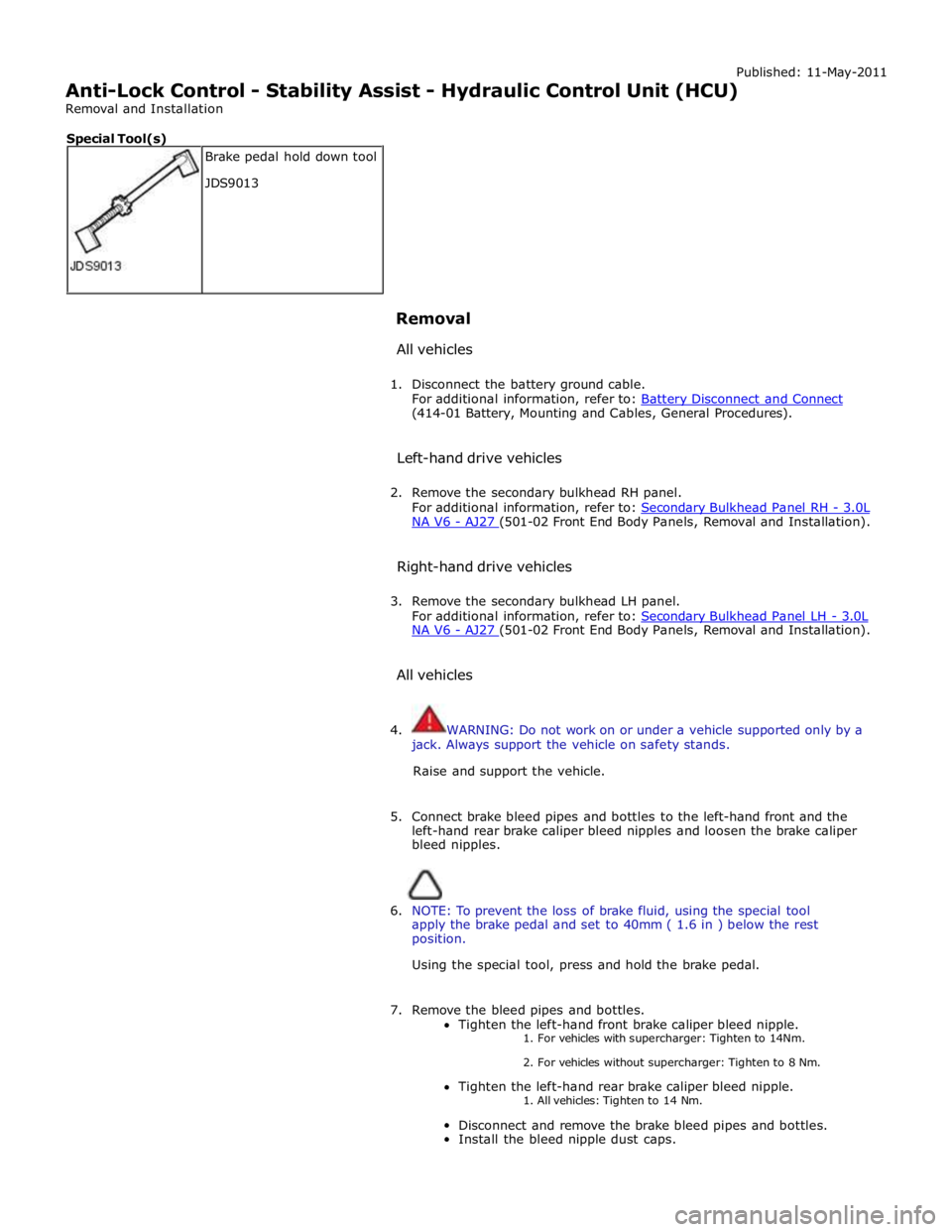
6. NOTE: To prevent the loss of brake fluid, using the special tool
apply the brake pedal and set to 40mm ( 1.6 in ) below the rest
position.
Using the special tool, press and hold the brake pedal.
7. Remove the bleed pipes and bottles.
Tighten the left-hand front brake caliper bleed nipple. 1. For vehicles with supercharger: Tighten to 14Nm.
2. For vehicles without supercharger: Tighten to 8 Nm.
Tighten the left-hand rear brake caliper bleed nipple.
1. All vehicles: Tighten to 14 Nm.
Disconnect and remove the brake bleed pipes and bottles.
Install the bleed nipple dust caps. Brake pedal hold down tool
JDS9013 Special Tool(s)
Page 720 of 3039
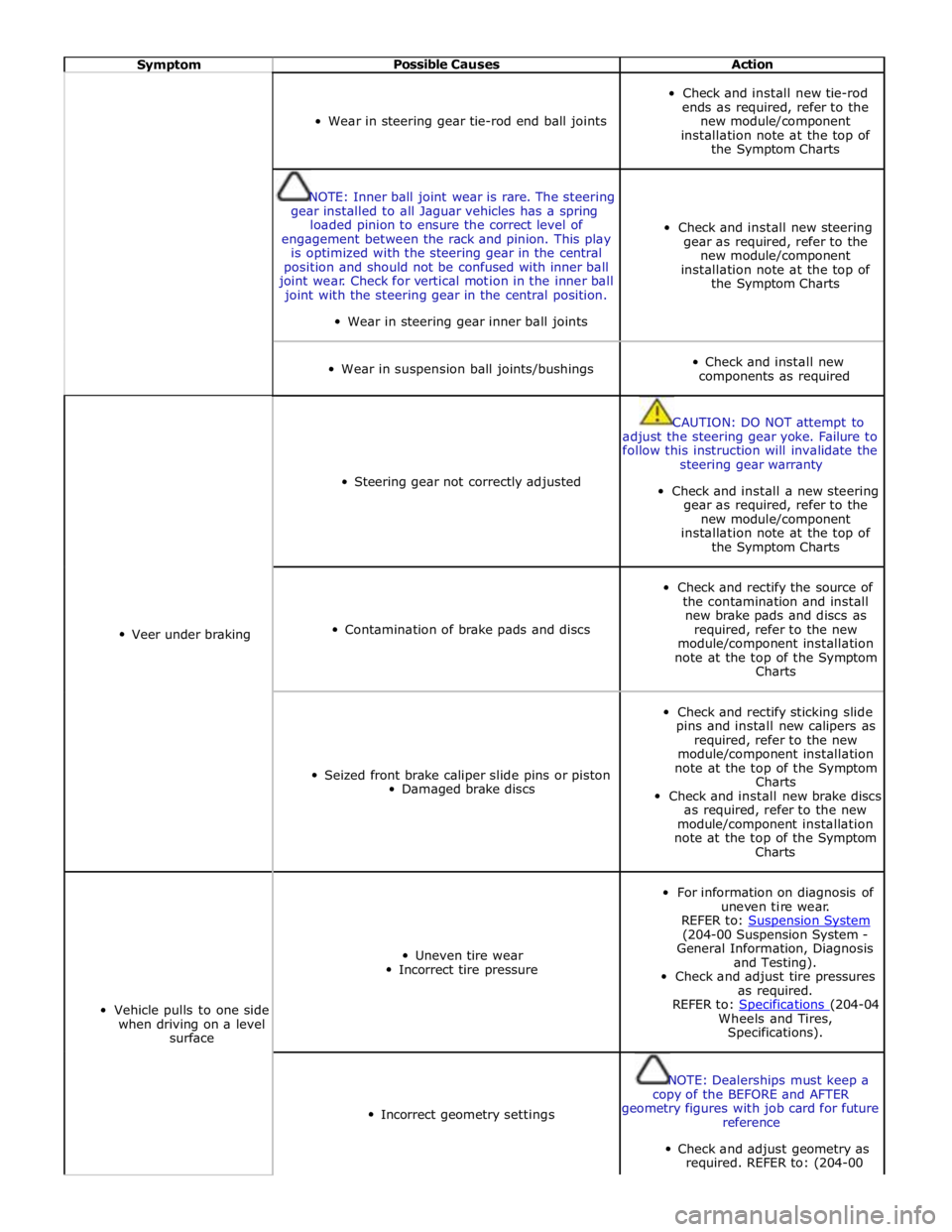
Symptom Possible Causes Action
Wear in steering gear tie-rod end ball joints
Check and install new tie-rod
ends as required, refer to the
new module/component
installation note at the top of
the Symptom Charts
NOTE: Inner ball joint wear is rare. The steering
gear installed to all Jaguar vehicles has a spring
loaded pinion to ensure the correct level of
engagement between the rack and pinion. This play
is optimized with the steering gear in the central
position and should not be confused with inner ball
joint wear. Check for vertical motion in the inner ball
joint with the steering gear in the central position.
Wear in steering gear inner ball joints
Check and install new steering
gear as required, refer to the
new module/component
installation note at the top of
the Symptom Charts
Wear in suspension ball joints/bushings
Check and install new
components as required
Veer under braking
Steering gear not correctly adjusted
CAUTION: DO NOT attempt to
adjust the steering gear yoke. Failure to
follow this instruction will invalidate the
steering gear warranty
Check and install a new steering
gear as required, refer to the
new module/component
installation note at the top of
the Symptom Charts
Contamination of brake pads and discs
Check and rectify the source of
the contamination and install
new brake pads and discs as
required, refer to the new
module/component installation
note at the top of the Symptom
Charts
Seized front brake caliper slide pins or piston
Damaged brake discs
Check and rectify sticking slide
pins and install new calipers as
required, refer to the new
module/component installation
note at the top of the Symptom
Charts
Check and install new brake discs
as required, refer to the new
module/component installation
note at the top of the Symptom
Charts
Vehicle pulls to one side
when driving on a level
surface
Uneven tire wear
Incorrect tire pressure
For information on diagnosis of
uneven tire wear.
REFER to: Suspension System (204-00 Suspension System -
General Information, Diagnosis
and Testing).
Check and adjust tire pressures
as required.
REFER to: Specifications (204-04 Wheels and Tires,
Specifications).
Incorrect geometry settings
NOTE: Dealerships must keep a
copy of the BEFORE and AFTER
geometry figures with job card for future
reference
Check and adjust geometry as
required. REFER to: (204-00
Page 721 of 3039
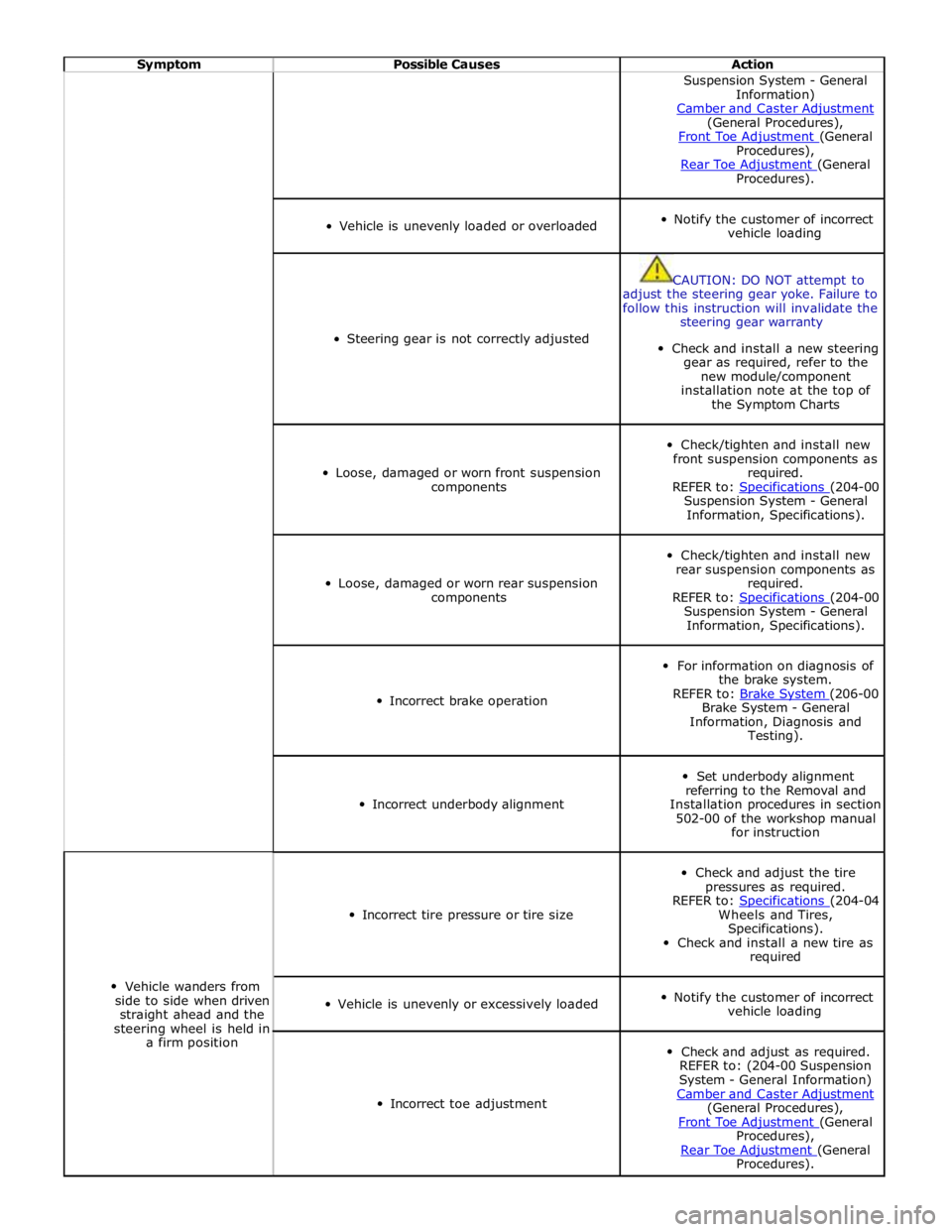
Symptom Possible Causes Action Suspension System - General
Information)
Camber and Caster Adjustment (General Procedures),
Front Toe Adjustment (General Procedures),
Rear Toe Adjustment (General Procedures).
Vehicle is unevenly loaded or overloaded
Notify the customer of incorrect
vehicle loading
Steering gear is not correctly adjusted
CAUTION: DO NOT attempt to
adjust the steering gear yoke. Failure to
follow this instruction will invalidate the
steering gear warranty
Check and install a new steering
gear as required, refer to the
new module/component
installation note at the top of
the Symptom Charts
Loose, damaged or worn front suspension
components
Check/tighten and install new
front suspension components as
required.
REFER to: Specifications (204-00 Suspension System - General
Information, Specifications).
Loose, damaged or worn rear suspension
components
Check/tighten and install new
rear suspension components as
required.
REFER to: Specifications (204-00 Suspension System - General
Information, Specifications).
Incorrect brake operation
For information on diagnosis of
the brake system.
REFER to: Brake System (206-00 Brake System - General
Information, Diagnosis and
Testing).
Incorrect underbody alignment
Set underbody alignment
referring to the Removal and
Installation procedures in section
502-00 of the workshop manual
for instruction
Vehicle wanders from
side to side when driven
straight ahead and the
steering wheel is held in
a firm position
Incorrect tire pressure or tire size
Check and adjust the tire
pressures as required.
REFER to: Specifications (204-04 Wheels and Tires,
Specifications).
Check and install a new tire as
required
Vehicle is unevenly or excessively loaded
Notify the customer of incorrect
vehicle loading
Incorrect toe adjustment
Check and adjust as required.
REFER to: (204-00 Suspension
System - General Information)
Camber and Caster Adjustment (General Procedures),
Front Toe Adjustment (General Procedures),
Rear Toe Adjustment (General Procedures).
Page 1295 of 3039
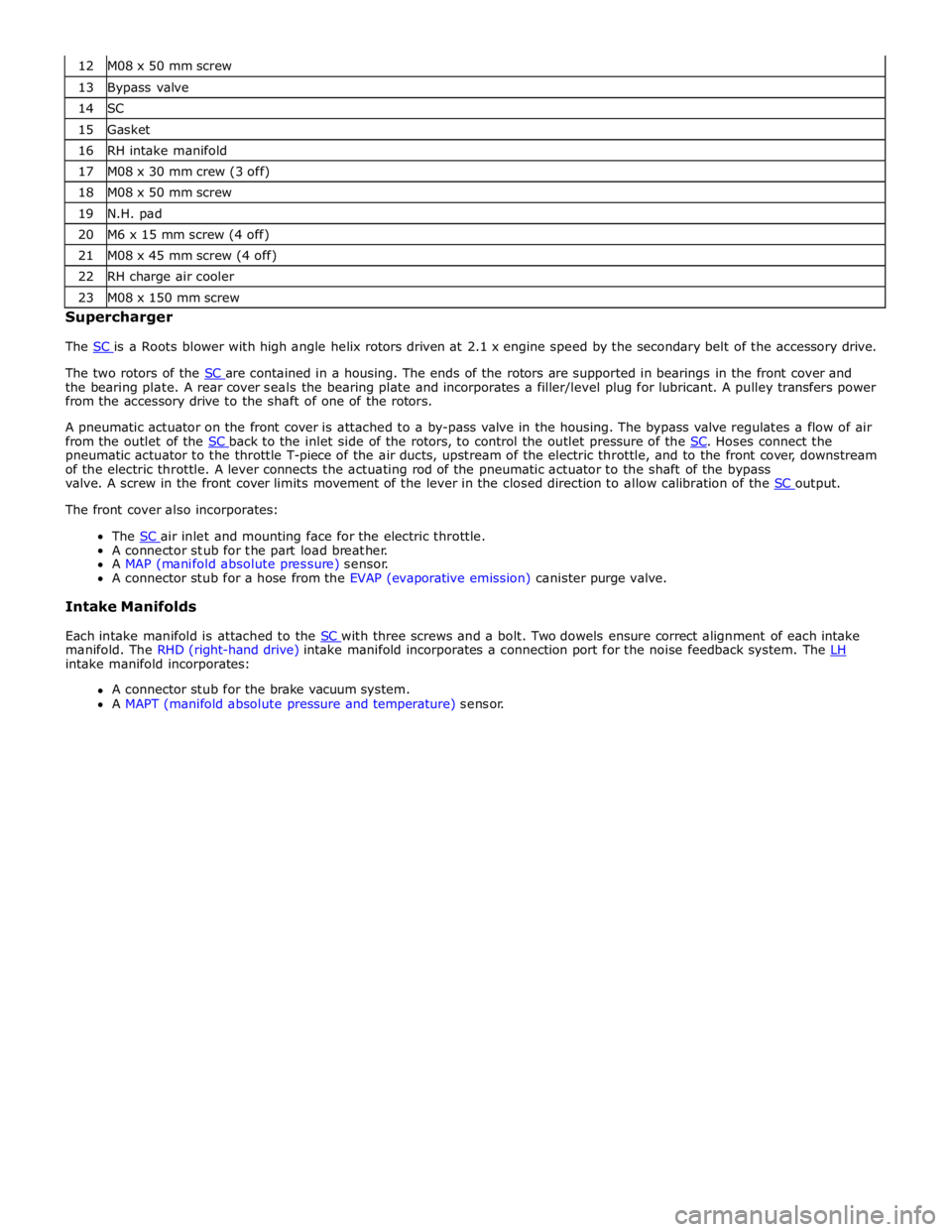
13 Bypass valve 14 SC 15 Gasket 16 RH intake manifold 17 M08 x 30 mm crew (3 off) 18 M08 x 50 mm screw 19 N.H. pad 20 M6 x 15 mm screw (4 off) 21 M08 x 45 mm screw (4 off) 22 RH charge air cooler 23 M08 x 150 mm screw Supercharger
The SC is a Roots blower with high angle helix rotors driven at 2.1 x engine speed by the secondary belt of the accessory drive.
The two rotors of the SC are contained in a housing. The ends of the rotors are supported in bearings in the front cover and the bearing plate. A rear cover seals the bearing plate and incorporates a filler/level plug for lubricant. A pulley transfers power
from the accessory drive to the shaft of one of the rotors.
A pneumatic actuator on the front cover is attached to a by-pass valve in the housing. The bypass valve regulates a flow of air
from the outlet of the SC back to the inlet side of the rotors, to control the outlet pressure of the SC. Hoses connect the pneumatic actuator to the throttle T-piece of the air ducts, upstream of the electric throttle, and to the front cover, downstream
of the electric throttle. A lever connects the actuating rod of the pneumatic actuator to the shaft of the bypass
valve. A screw in the front cover limits movement of the lever in the closed direction to allow calibration of the SC output. The front cover also incorporates:
The SC air inlet and mounting face for the electric throttle. A connector stub for the part load breather.
A MAP (manifold absolute pressure) sensor.
A connector stub for a hose from the EVAP (evaporative emission) canister purge valve.
Intake Manifolds
Each intake manifold is attached to the SC with three screws and a bolt. Two dowels ensure correct alignment of each intake manifold. The RHD (right-hand drive) intake manifold incorporates a connection port for the noise feedback system. The LH intake manifold incorporates:
A connector stub for the brake vacuum system.
A MAPT (manifold absolute pressure and temperature) sensor.