change time JEEP RENEGADE 2023 Owners Manual
[x] Cancel search | Manufacturer: JEEP, Model Year: 2023, Model line: RENEGADE, Model: JEEP RENEGADE 2023Pages: 364, PDF Size: 18.65 MB
Page 4 of 364

2
INTRODUCTION
SYMBOLS KEY ...........................................................9
ROLLOVER WARNING ...... ....................................... 9
VEHICLE MODIFICATIONS/ALTERATIONS ...... .... 10
SYMBOL GLOSSARY...... ........................................ 10
GETTING TO KNOW YOUR VEHICLE
KEYS ....................................................................... 14
Key Fob .............................................................14
SENTRY KEY ..... . ..................................................... 16
IGNITION SWITCH ...... ............................................ 17
Keyless Enter ‘n Go™ Ignition ...... ...................17
REMOTE START — IF EQUIPPED ..... . .................... 18
How To Use Remote Start ...... ..........................18
To Exit Remote Start Mode ..... . ........................19
Remote Start Front Defrost Activation —
If Equipped. .....
..................................................19
Remote Start Comfort Systems —
If Equipped . .....
.................................................19
Remote Start Windshield Wiper
De–Icer Activation — If Equipped . .....
..............20
Remote Start Cancel Message —
If Equipped. .....
..................................................20
VEHICLE SECURITY SYSTEM — IF EQUIPPED ..... 2 0
To Arm The System ...... ...................................20
To Disarm The System . ..
..
. ..............................21DOORS .....................................................................21
Manu a
l Door Locks ...... ....................................21
Power Door Locks ..... . .....................................22
Keyless Enter ‘n Go™ — Passive Entry
(If Equipped) . .....
...............................................22
Automatic Unlock On Exit Feature —
If Equipped. .....
..................................................24
Dead Lock Device — If Equipped. ..
..
. ...............25
Child Locks ..... . ................................................25
STEERING WHEEL ..... . ............................................26
Tilt/Telescoping Steering Column ...... .............26
Heated Steering Wheel — If Equipped ..... . .....26
SEATS . ....................................................................26
M a
n u
a
l Front Seats...... ....................................27
Manual Rear Seat Adjustment ..... . ..................27
Power Adjustment (Front) — If Equipped . ..
..
. ..29
Heated Seats — If Equipped . ..
..
. .....................30
Unfolding The Rear Armrest
40/20/40 . ........................................................31
Head R
estraints . ..
..
. .........................................31
UCONNECT VOICE RECOGNITION ..... . ..................33
Introducing Voice Recognition...... ...................33
Basic Voice Commands . ..
..
. .............................33
Get Started ..... . .................................................33
Additional Information . ..
..
. ...............................33MIRRORS ................................................................ 34
Insi d
e Rearview Mirror...... ............................... 34
Illuminated Vanity Mirrors — If Equipped ..... . 34
Outside Mirrors . ..
..
. .......................................... 35
Heated Mirrors — If Equipped ..... . ................... 36
EXTERIOR LIGHTS. ..
..
. ............................................ 36
Headlight Switch ...... ....................................... 36
Daytime Running Lights (DRLs) —
If Equipped . .....
................................................ 37
High Beams ..... . ............................................... 37
Automatic High Beam Headlamp Control —
If Equipped . .....
................................................ 37
Flash-To-Pass . ..
..
. ............................................. 37
Automatic Headlights — If Equipped ..... . ........ 38
Parking Lights ..... . ............................................. 38
Headlight Time Delay . ..
..
. ................................ 38
Front Fog Lights — If Equipped ..... . .................38
Turn Signals. ..
..
. ................................................ 39
Lane Change Assist..... . ....................................39
Courtesy Lights. ..
..
. ...........................................39
INTERIOR LIGHTS ..... . ........................................... 39
Front Map/Reading Lights ...... ........................ 39
Dimmer Controls ..... . ....................................... 40
Rear Lights . ..
..
. .................................................40
Dome Light Timing ..... . ..................................... 41
Page 10 of 364

8
INTRODUCTION
Dear Customer,
Congratulations on the purchase of your new Jeep® vehicle. Be assured that it represents precision workmanship, distinctive styling, and high quality.
This is a specialized utility vehicle. It can go places and perform tasks that are not intended for conventional passenger vehicles. It handles and maneuvers
d
iffer
ently from many passenger vehicles both on-road and off-road, so take time to become familiar with your vehicle. If equipped, the two-wheel drive version
of this vehicle was designed for on-road use only. It is not intended for off-road driving or use in other severe conditions suited for a four-wheel drive vehicle.
Before you start to drive this vehicle, read the Owner’s Manual. Be sure you are familiar with all vehicle controls, particularly those used for braking, steering,
transmission, and transfer case shifting. Learn how your vehicle handles on different road surfaces. Your driving skills will improve with experience. When driving
off-road, or working the vehicle, don’t overload the vehicle or expect the vehicle to overcome the natural laws of physics. Always observe federal, state, provincial
and local laws wherever you drive. As with other vehicles of this type, failure to operate this vehicle correctly may result in loss of control or a collision Ú page 130.
This Owner's Manual has been prepared with the assistance of service and engineering specialists to acquaint you with the operation and maintenance of your
vehic l
e. It is supplemented by customer-oriented documents. Within this information, you will find a description of the services that FCA US LLC offers to its
customers as well as the details of the terms and conditions for maintaining its validity. Please take the time to read all of these publications carefully before
driving your vehicle for the first time. Following the instructions, recommendations, tips, and important warnings in this manual will help ensure safe and
enjoyable operation of your vehicle.
This Owner's Manual describes all versions of this vehicle. Options and equipment dedicated to specific markets or versions are not expressly indicated in the
text.
Therefore, you should only consider the information that is related to the trim level, engine, and version that you have purchased. Any content introduced
throughout the Owner's Information, which may or may not be applicable to your vehicle, will be identified with the wording “If Equipped”. All data contained in
this publication are intended to help you use your vehicle in the best possible way. FCA US LLC aims at a constant improvement of the vehicles produced. For
this reason, it reserves the right to make changes to the model described for technical and/or commercial reasons. For further information, contact an authorized
dealer.
When it comes to service, remember that authorized dealers know your Jeep® vehicle best, have factory-trained technicians and genuine Mopar® parts, and
care a
bout your satisfaction.
Page 22 of 364

20 GETTING TO KNOW YOUR VEHICLE
Manual Temperature Control (MTC) — If Equipped
In ambient temperatures at 40°F (4.4°C) or
below, the climate settings will default to
maximum heat, with fresh air entering the
cabin. If the front defrost timer expires, the
vehicle will enter Mix Mode.
In ambient temperatures from 40°F (4.4°C) to
78°F (26°C), the climate settings will be based
on the last settings selected by the driver.
In ambient temperatures at 78°F (26°C) or
above, the climate settings will default to MAX
A/C, Bi-Level Mode, with Recirculation on.
For more information on ATC, MTC, and climate
control
settings, see Ú page 44.
NOTE:
These features will stay on through the duration of
Remote
Start until the ignition is placed in the ON/
RUN position. The climate control settings will
change if manually adjusted by the driver while the
vehicle is in Remote Start mode, and exit auto -
matic override. This includes the OFF button on the
clima t
e controls, which will turn the system off.
REMOTE START WINDSHIELD WIPER
D
E–ICER ACTIVATION — IF EQUIPPED
When Remote Start Is active and the outside
ambient temperature is less than 40°F (4.4°C),
the Windshield Wiper De-Icer will activate. Exiting
Remote Start will resume its previous operation. If the Windshield Wiper De-Icer was active, the timer
and operation will continue
Ú page 349.
REMOTE START CANCEL MESSAGE —
I
F EQUIPPED
The following messages will display in the
instrument cluster display if the vehicle fails to
remote start or exits Remote Start prematurely:
Remote Start Cancelled — Door Open
Remote Start Cancelled — Hood Open
Remote Start Cancelled — Fuel Low
Remote Start Cancelled — Liftgate Open
Remote Start Cancelled — Too Cold
Remote Start Cancelled — Time Expired
Remote Start Disabled — Start Vehicle To Reset
The message will stay active until the ignition is
p la
ce
d
in the ON/RUN position.
VEHICLE SECURITY SYSTEM — IF EQUIPPED
The Vehicle Security system monitors the vehicle
doors, hood, liftgate, and the Keyless Enter ‘n Go™
Ignition for unauthorized operation. While the
Vehicle Security system is armed, interior switches
for door locks and liftgate release are disabled. If
something triggers the system, the Vehicle Security
system will provide the following audible and
visible signals:
The horn will pulse
The turn signals will flash
The Vehicle Security Light in the instrument
cluster will flash
NOTE:
The Vehicle Security system is factory adjusted
to standards from different countries.
The Vehicle Security system is a complementary
security system developed to hinder the occur -
rence of vehicle theft and prevent vandalism. It
does not
prevent the theft of your vehicle; the
system is a deterrent.
The Vehicle Security system does not monitor
glass breakage or the movement of objects or
people inside the vehicle. The alarm does not
intervene in the case of vehicle tilt variations
when it is parked.
TO ARM THE SYSTEM
Follow these steps to arm the Vehicle Security
system:
1. Make sure the vehicle’s ignition is placed in the OF
F position.
2. Perform one of the following methods to lock the v
ehicle:
Push the lock button on the interior power
door lock switch with the driver and/or
passenger door open.
Page 32 of 364
30 GETTING TO KNOW YOUR VEHICLE
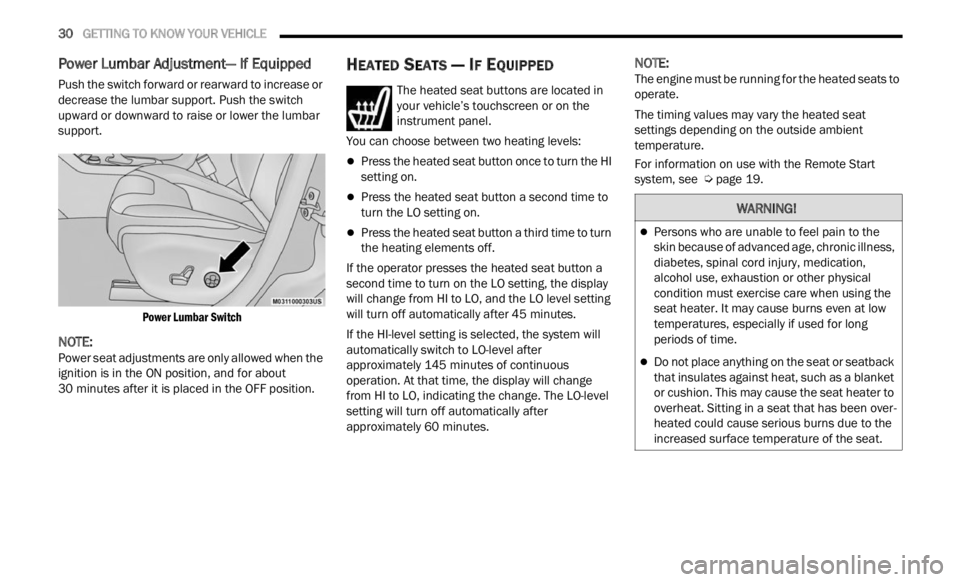
Power Lumbar Adjustment— If Equipped
Push the switch forward or rearward to increase or
decrease the lumbar support. Push the switch
upward or downward to raise or lower the lumbar
support.
Power Lumbar Switch
NOTE:
Power seat adjustments are only allowed when the
ignit i
on is in the ON position, and for about
30 minutes after it is placed in the OFF position.
HEATED SEATS — IF EQUIPPED
The heated seat buttons are located in
your vehicle’s touchscreen or on the
instr u
ment panel.
You can choose between two heating levels:
Press the heated seat button once to turn the HI
setting on.
Press the heated seat button a second time to
turn the LO setting on.
Press the heated seat button a third time to turn
the heating elements off.
If the operator presses the heated seat button a
second
time to turn on the LO setting, the display
will change from HI to LO, and the LO level setting
will turn off automatically after 45 minutes.
If the HI-level setting is selected, the system will
a utomat
ically switch to LO-level after
approximately 145 minutes of continuous
operati
on. At that time, the display will change
from HI to LO, indicating the change. The LO-level
setting will turn off automatically after
approximately 60 minutes.
NOTE:
The engine must be running for the heated seats to
operat e
.
The timing values may vary the heated seat
settin
gs depending on the outside ambient
temperature.
For information on use with the Remote Start
syste m
, see Ú page 19.
WARNING!
Persons who are unable to feel pain to the
skin because of advanced age, chronic illness,
diabetes, spinal cord injury, medication,
alcohol use, exhaustion or other physical
condition must exercise care when using the
seat heater. It may cause burns even at low
temperatures, especially if used for long
periods of time.
Do not place anything on the seat or seatback
that insulates against heat, such as a blanket
or cushion. This may cause the seat heater to
overheat. Sitting in a seat that has been over
-
heated could cause serious burns due to the
i ncrea
sed surface temperature of the seat.
Page 40 of 364
38 GETTING TO KNOW YOUR VEHICLE
AUTOMATIC HEADLIGHTS — IF EQUIPPED
This system automatically turns the headlights on
or off according to ambient light levels. To turn the
system on, rotate the headlight switch clockwise to
the last detent (AUTO position) for automatic
headlight operation. To turn the automatic system
off, move the headlight switch out of the AUTO
position.
NOTE:
The ignition must be in the ON/RUN or START
positi on
before the headlights will come on in the
automatic mode.
Dusk Sensor
There is an infrared LED sensor that works with the
rain sensor, located on the windshield. It detects
changes in light intensity outside the vehicle,
based on the sensitivity of light set by using the
menu on the display or on the Uconnect system.
The higher the sensitivity, the lesser the amount of
exter n
al light required for controlling the lighting.
To turn the dusk sensor on, rotate the headlight
switch
to the AUTO position. To turn it off, rotate the
headlight switch to a position other than AUTO.
NOTE:
The dusk sensor can only be activated with the
ignit i
on in the ON/RUN position.
PARKING LIGHTS
Rotate the headlight switch to the first detent to
turn on the parking lights. The parking light
indicator in the instrument cluster display will
illuminate.
HEADLIGHT TIME DELAY
This feature provides the safety of headlight
illumination for up to 90 seconds when leaving
your vehicle in an unlit area.
The time delay of the headlights is programmable
betwe e
n 0, 30, 60 and 90 seconds within
Uconnect Settings Ú page 133.
Headlight Delay Activation
To activate the delay feature, place the ignition in
t he OF
F position while the headlights are still on.
The delay interval begins when the headlight
switch is turned off from the low beam position.
If the headlight switch is in AUTO and the
headli
ghts were on before the ignition was turned
off, the delay interval begins automatically.
Headlight Delay Deactivation
The feature is disabled by turning on the
h eadli
ghts, the parking lights or by placing the
ignition in the RUN position.
If you shut off the lights before the ignition is
turne d
on, they will turn off in the normal manner.
NOTE:
The lights must be turned off within two minutes of
placi n
g the ignition in the OFF position to activate
this feature.
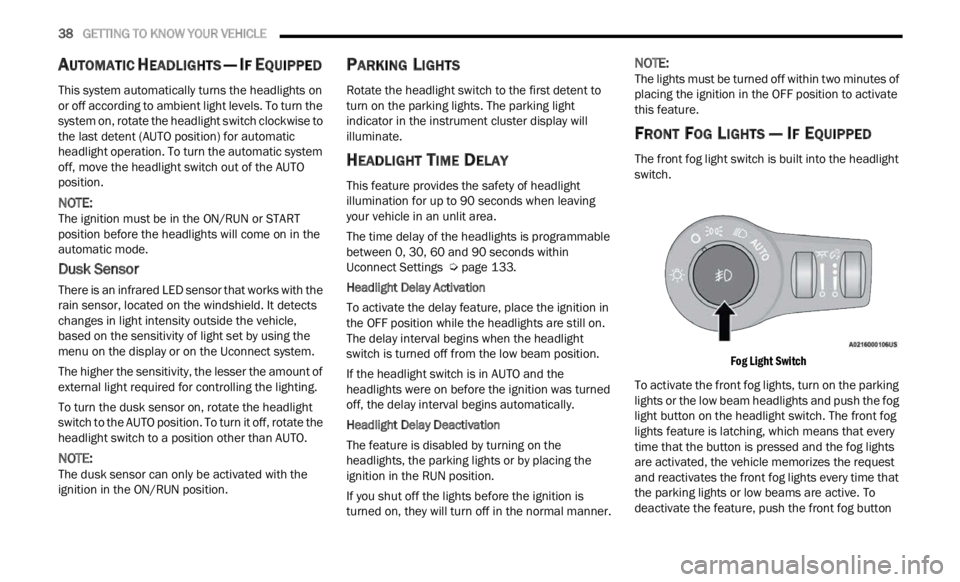
FRONT FOG LIGHTS — IF EQUIPPED
The front fog light switch is built into the headlight
switch.
Fog Light Switch
To activate the front fog lights, turn on the parking
light s
or the low beam headlights and push the fog
light button on the headlight switch. The front fog
lights feature is latching, which means that every
time that the button is pressed and the fog lights
are activated, the vehicle memorizes the request
and reactivates the front fog lights every time that
the parking lights or low beams are active. To
deactivate the feature, push the front fog button
Page 41 of 364
GETTING TO KNOW YOUR VEHICLE 39
again. The front fog lights are deactivated each
time the parking or low beam lights are
deactivated or the ignition is placed in the OFF
position.
An indicator light in the instrument cluster
illumi
nates when the fog lights are turned on.
NOTE:
The fog lights will operate with the low beam head -
lights or parking lights on. Selecting the high beam
h eadl i
ghts will turn off the fog lights.
Cornering Lights
The cornering lights are a feature to improve
visib i
lity at night while turning the vehicle. When
activated, a light incorporated in the front fog light
will illuminate on the side of the vehicle the
steering wheel is rotated or the turn signal
indicator is on. It can be activated through the
Uconnect system Ú page 133.
TURN SIGNALS
Move the multifunction lever up or down to
activate the turn signals. The arrows on each side
of the instrument cluster display flash to show
proper operation.
LANE CHANGE ASSIST
Lightly push the multifunction lever up or down,
without moving beyond the detent, and the turn
signal will flash five times then automatically turn
off.
COURTESY LIGHTS
The courtesy lights feature allows you to activate
the low beam, parking lights, and sidemarker lights
for 25 seconds when the vehicle is unlocked
(through the key fob or the Passive Entry door
handles [if equipped]). The courtesy lights feature
can be activated or deactivated through the
Uconnect Settings. When a door is open with the
feature active, the activation of the lights is
extended for five seconds. The feature is disabled
when the vehicle is locked or when the ignition is
placed in the ON/RUN position.
INTERIOR LIGHTS
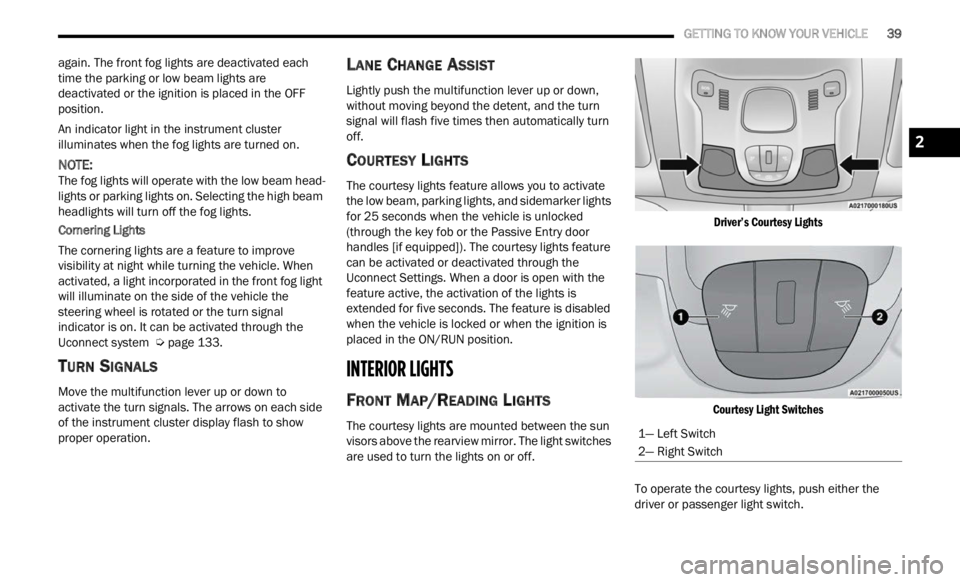
FRONT MAP/READING LIGHTS
The courtesy lights are mounted between the sun
visors above the rearview mirror. The light switches
are used to turn the lights on or off.
Driver’s Courtesy Lights
Courtesy Light Switches
To operate the courtesy lights, push either the
d rive
r
or passenger light switch.
1— Left Switch
2— Right Switch
2
Page 46 of 364
44 GETTING TO KNOW YOUR VEHICLE
Activation By Rear Defrost — The Windshield
Wiper De-Icer will be activated automatically
when the rear defrost is turned on and the
ambient temperature is below 40°F (4.4°C).
Activation By Remote Start Operation — When
Remote Start is active and the outside ambient
temperature is less than 40°F (4.4°C), the
Windshield Wiper De-Icer will activate. Exiting
Remote Start will resume its previous operation.
If the Windshield Wiper De-Icer was active, the
timer and operation will continue Ú page 133.
Auto-On Rear Window Defroster/Windshield Wiper
De-Ic e
r — If Equipped
When placing the vehicle’s ignition in the ON/RUN
position
, the Rear Window Defroster and
Windshield Wiper De-Icer will automatically turn on
when the outside ambient temperature is less than
40°F (4.4°C).
The Rear Window Defroster and Windshield Wiper
De-Ic e
r automatically turn off after approximately
20 minutes. To manually shut the defroster/
windsh
ield off, push the Rear Defrost button.
Auto On can be enabled or disabled through the
Uconnec
t Settings Ú page 133.
CLIMATE CONTROLS
The Climate Control system allows you to regulate
the temperature, air flow, and direction of air
circulating throughout the vehicle. The controls are located on the touchscreen (if equipped) and on
the instrument panel below the radio.
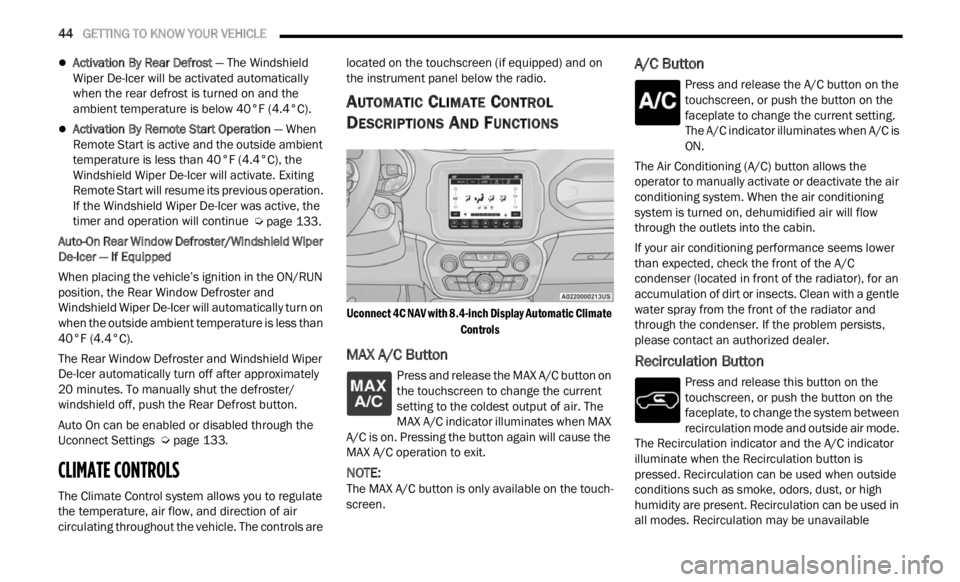
AUTOMATIC CLIMATE CONTROL
D
ESCRIPTIONS AND FUNCTIONS
Uconnect 4C NAV with 8.4-inch Display Automatic Climate
Controls
MAX A/C Button
Press and release the MAX A/C button on
the touchscreen to change the current
se t
ti
n
g to the coldest output of air. The
MAX A/C indicator illuminates when MAX
A/C is on. Pressing the button again will cause the
MAX A/C operation to exit.
NOTE:
The MAX A/C button is only available on the touch -
screen.
A/C Button
Press and release the A/C button on the
touchscreen, or push the button on the
facep l
ate to change the current setting.
The A/C indicator illuminates when A/C is
ON.
The Air Conditioning (A/C) button allows the
operator
to manually activate or deactivate the air
conditioning system. When the air conditioning
system is turned on, dehumidified air will flow
through the outlets into the cabin.
If your air conditioning performance seems lower
than e
xpected, check the front of the A/C
condenser (located in front of the radiator), for an
accumulation of dirt or insects. Clean with a gentle
water spray from the front of the radiator and
through the condenser. If the problem persists,
please contact an authorized dealer.
Recirculation Button
Press and release this button on the
touchscreen, or push the button on the
f a c
e p
l
ate, to change the system between
recirculation mode and outside air mode.
The Recirculation indicator and the A/C indicator
illuminate when the Recirculation button is
pressed. Recirculation can be used when outside
conditions such as smoke, odors, dust, or high
humidity are present. Recirculation can be used in
all modes. Recirculation may be unavailable
Page 49 of 364

GETTING TO KNOW YOUR VEHICLE 47
AUTOMATIC TEMPERATURE CONTROL
(ATC)
Automatic Operation
1. Push the AUTO button on the faceplate, or the
AUTO button on the touchscreen on the
Automatic Temperature Control (ATC) Panel.
2. Adjust the temperature you would like the syste
m to maintain, by adjusting the driver,
and passenger temperatures. Once the
desired temperature is displayed, the system
will achieve and automatically maintain that
comfort level.
3. When the system is set up for your comfort level
, it is not necessary to change the
settings. You will experience the greatest
efficiency by simply allowing the system to
function automatically.
NOTE:
It is not necessary to move the temperature
settings. The system automatically adjusts the
temperature, mode, and fan speed to provide
comfort as quickly as possible.
The temperature can be displayed in U.S. or
Metric units by selecting the U.S./Metric
customer programmable feature within
Uconnect Settings. To provide you with maximum comfort in the
automa
t
ic mode, during cold start-ups, the blower
fan will remain on low until the engine warms up.
The fan will engage immediately if the Defrost
mode is selected, or by changing the front blower
knob setting.
Manual Operation Override
This system offers a full complement of manual
override features. The AUTO symbol in the front
ATC display will be turned off when the system is
being used in the manual mode.
CLIMATE VOICE COMMANDS
Adjust vehicle temperatures hands-free and keep
everyone comfortable while you keep moving
ahead.
Push the VR button on the steering wheel. After the
beep,
say one of the following commands:
“Set the driver temperature to 70 degrees ”
“Set the passenger temperature to 70 degrees ”
Did You Know:
V oi
ce
Command for Climate may
only be used to adjust the interior temperature of
your vehicle. Voice Command will not adjust the
heated seats or steering wheel if equipped.
OPERATING TIPS
Refer to the chart at the end of this section for
suggested control settings for various weather
conditions.
Summer Operation
The engine cooling system must be protected with
a high-quality antifreeze coolant to provide proper
corrosion protection and to protect against engine
overheating. OAT coolant (conforming to
MS.90032) is recommended.
Winter Operation
To ensure the best possible heater and defroster
performance, make sure the engine cooling
system is functioning properly and the proper
amount, type, and concentration of coolant is
used. Use of the Air Recirculation mode during
Winter months is not recommended, because it
may cause window fogging.
Vacation/Storage
For information on maintaining the Climate Control
system when the vehicle is being stored for an
extended period of time, see Ú page 338.
Window Fogging
Vehicle windows tend to fog on the inside in mild,
rainy, and/or humid weather. To clear the
windows, select Defrost or Mix mode and increase
the front blower speed. Do not use the
Recirculation mode without A/C for long periods,
as fogging may occur.
Outside Air Intake
Make sure the air intake, located directly in front of
the windshield, is free of obstructions, such as
2
Page 67 of 364
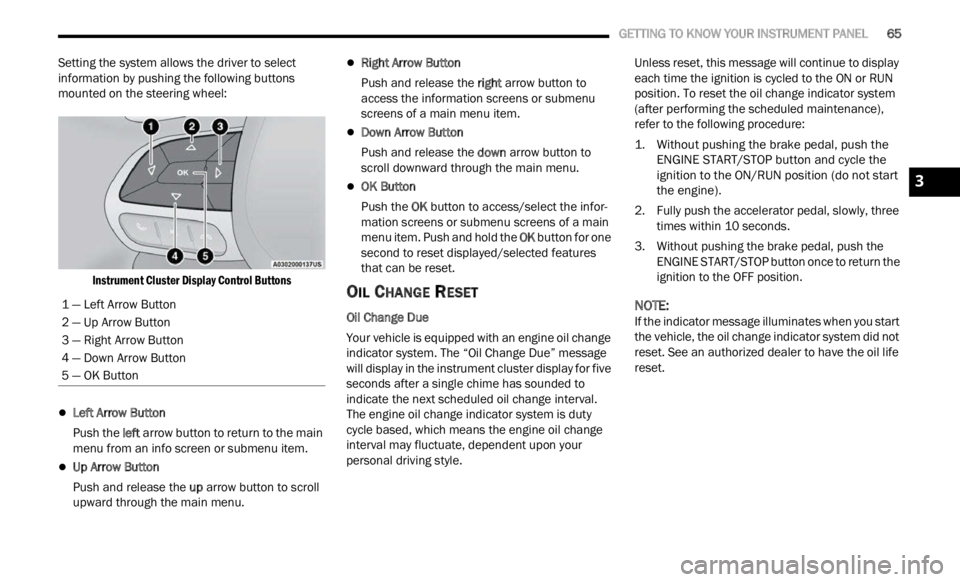
GETTING TO KNOW YOUR INSTRUMENT PANEL 65
Setting the system allows the driver to select
information by pushing the following buttons
mounted on the steering wheel:
Instrument Cluster Display Control Buttons
Left Arrow Button
Push the l
eft a
rr
ow
button to return to the main
menu from an info screen or submenu item.
Up Arrow Button
Push and release the u
p a
rr
ow
button to scroll
upward through the main menu.
Right Arrow Button
Push and release the right
arrow button to
access the information screens or submenu
screens of a main menu item.
Down Arrow Button
Push and release the d
ow n
a r
r
ow button to
scroll downward through the main menu.
OK Button
Push the O
K b
ut
t
on to access/select the infor -
mation screens or submenu screens of a main
menu i
tem. Push and hold the OK button for one
second to reset displayed/selected features
that can be reset.
OIL CHANGE RESET
Oil Change Due
Your vehicle is equipped with an engine oil change
indic a
tor system. The “Oil Change Due” message
will display in the instrument cluster display for five
seconds after a single chime has sounded to
indicate the next scheduled oil change interval.
The engine oil change indicator system is duty
cycle based, which means the engine oil change
interval may fluctuate, dependent upon your
personal driving style. Unless reset, this message will continue to display
each
t
ime the ignition is cycled to the ON or RUN
position. To reset the oil change indicator system
(after performing the scheduled maintenance),
refer to the following procedure:
1. Without pushing the brake pedal, push the ENGI N
E START/STOP button and cycle the
ignition to the ON/RUN position (do not start
the engine).
2. Fully push the accelerator pedal, slowly, three times
within 10 seconds.
3. Without pushing the brake pedal, push the ENGIN
E START/STOP button once to return the
ignition to the OFF position.
NOTE:
If the indicator message illuminates when you start
the v e
hicle, the oil change indicator system did not
reset. See an authorized dealer to have the oil life
reset.
1 — Left Arrow Button
2 — Up Arrow Button
3 — Right Arrow Button
4 — Down Arrow Button
5 — OK Button
3
Page 69 of 364

GETTING TO KNOW YOUR INSTRUMENT PANEL 67
Audio
Push and release the up or down arrow
button until the Audio menu title is displayed in the
instr u
ment cluster display.
Stored Messages
Push and release the up or down arrow
button until the Messages Menu Icon is highlighted
in th e
instrument cluster display. This feature
shows the number of stored warning messages.
Pushing the left
or right arrow button will
all ow
you to scroll through the stored messages.
Screen Setup
This menu item allows you to change the position
of the information on the display.
Display Gears (Vehicles With Reconfigurable
Multi-
Functional Display And Automatic
Transmission)
By selecting this item, you can select the display
mode, t
he particulars relating to the automatic
transmission, and choose between the following
options:
“Single digit”
The right side of the display will show the letter
concer n
ing the automatic transmission gear
selector (P,R,N or D) position. After approxi -
mately two seconds, the letter will be displayed
in a c
entral position.
“Full PRND”
The letters PRND will display on the right side,
the p o
sition assumed by the gear selector will
be highlighted in the display. During the opera -
tion in sequential mode (“AutoStick”), in place
of the
letter D, the gear will be will be displayed.
In The Upper Left/Top Right
The information relating to the following can be
displ a
yed:
External temperature
Ignition Button — If Equipped
Compass — If Equipped
Date (Month/Day)
Time (Hours/Minutes)
In the central area of the display, you can view all
of t
h e
information listed above as well as the
following:
Compass — If Equipped
Speed Display — If Equipped
Date (Day/Month/Year)
Time
Compass — If Equipped
Ignition Button — If Equipped
External Temp — If equipped
Menu Item
Distance Traveled A (Trip A)
Distance Traveled B (Trip B)
Restore Default Settings
Selecting this item, and you can reset and restore
t he de
fault settings.
Settings
This menu item allows you to change the settings
for the following:
Display
Units
Clock and Date
Security
Safety and Assistance
Lights
Doors and Locks
NOTE:
Some items may be displayed and managed
throug h
the Uconnect system.
Vehicles Equipped With Multi-functional Display
Reconfi
gurable:
The following menu/submenu items are available
in the
cluster display.
3