low KIA OPTIMA 2020 Features and Functions Guide
[x] Cancel search | Manufacturer: KIA, Model Year: 2020, Model line: OPTIMA, Model: KIA OPTIMA 2020Pages: 591, PDF Size: 14.1 MB
Page 367 of 591
5111
Driving your vehicle
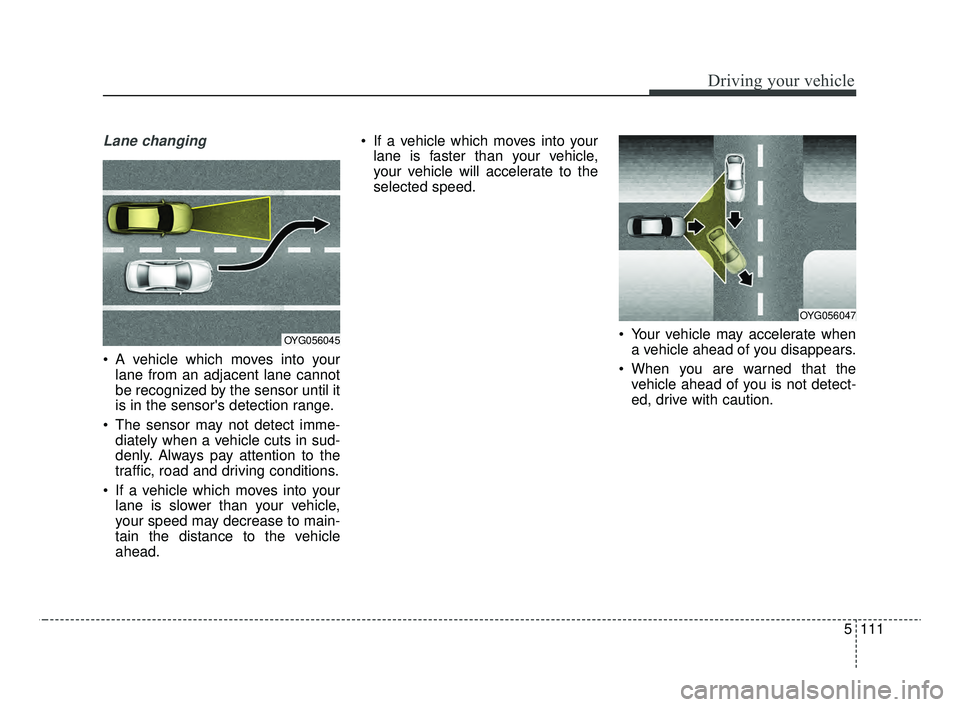
Lane changing
A vehicle which moves into yourlane from an adjacent lane cannot
be recognized by the sensor until it
is in the sensor's detection range.
The sensor may not detect imme- diately when a vehicle cuts in sud-
denly. Always pay attention to the
traffic, road and driving conditions.
If a vehicle which moves into your lane is slower than your vehicle,
your speed may decrease to main-
tain the distance to the vehicle
ahead. If a vehicle which moves into your
lane is faster than your vehicle,
your vehicle will accelerate to the
selected speed.
Your vehicle may accelerate whena vehicle ahead of you disappears.
When you are warned that the vehicle ahead of you is not detect-
ed, drive with caution.
OYG056045
OYG056047
JFa PE USA 5.QXP 5/15/2019 3:26 PM Page 111
Page 368 of 591
Driving your vehicle
112
5
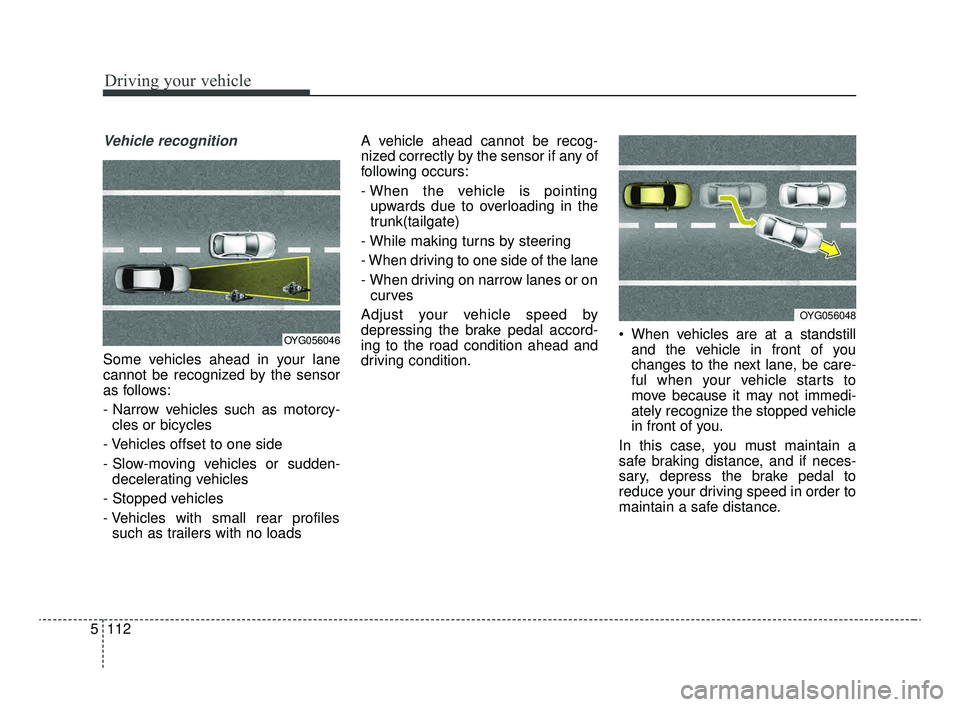
Vehicle recognition
Some vehicles ahead in your lane
cannot be recognized by the sensor
as follows:
- Narrow vehicles such as motorcy-
cles or bicycles
- Vehicles offset to one side
- Slow-moving vehicles or sudden- decelerating vehicles
- Stopped vehicles
- Vehicles with small rear profiles such as trailers with no loads A vehicle ahead cannot be recog-
nized correctly by the sensor if any of
following occurs:
- When the vehicle is pointing
upwards due to overloading in the
trunk(tailgate)
- While making turns by steering
- When driving to one side of the lane
- When driving on narrow lanes or on curves
Adjust your vehicle speed by
depressing the brake pedal accord-
ing to the road condition ahead and
driving condition. When vehicles are at a standstill
and the vehicle in front of you
changes to the next lane, be care-
ful when your vehicle starts to
move because it may not immedi-
ately recognize the stopped vehicle
in front of you.
In this case, you must maintain a
safe braking distance, and if neces-
sary, depress the brake pedal to
reduce your driving speed in order to
maintain a safe distance.
OYG056046
OYG056048
JFa PE USA 5.QXP 5/15/2019 3:27 PM Page 112
Page 369 of 591
5113
Driving your vehicle
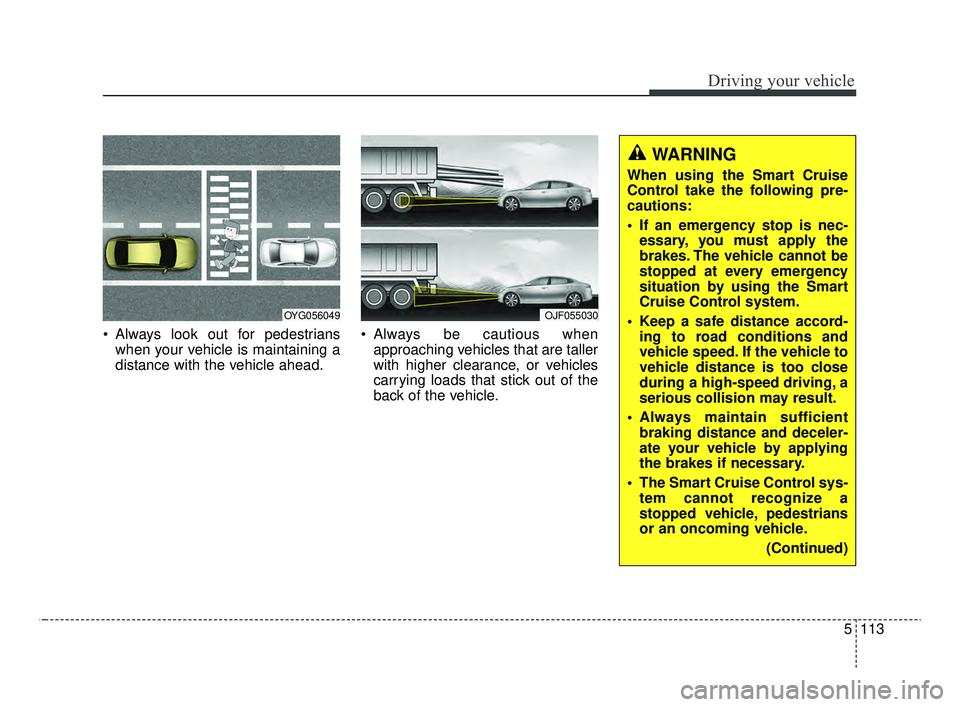
Always look out for pedestrianswhen your vehicle is maintaining a
distance with the vehicle ahead. Always be cautious when
approaching vehicles that are taller
with higher clearance, or vehicles
carrying loads that stick out of the
back of the vehicle.
OJF055030OYG056049
WARNING
When using the Smart Cruise
Control take the following pre-
cautions:
If an emergency stop is nec-essary, you must apply the
brakes. The vehicle cannot be
stopped at every emergency
situation by using the Smart
Cruise Control system.
Keep a safe distance accord- ing to road conditions and
vehicle speed. If the vehicle to
vehicle distance is too close
during a high-speed driving, a
serious collision may result.
Always maintain sufficient braking distance and deceler-
ate your vehicle by applying
the brakes if necessary.
The Smart Cruise Control sys- tem cannot recognize a
stopped vehicle, pedestrians
or an oncoming vehicle.
(Continued)
JFa PE USA 5.QXP 5/15/2019 3:27 PM Page 113
Page 370 of 591
Driving your vehicle
114
5
✽ ✽
NOTICE
The Smart Cruise Control System
may not operate temporarily due to:
• Electrical interference.
• Modifying the suspension.
• Differences of tire abrasion or tire
pressure.
• Installing different type of tires.(Continued)
The Smart Cruise Control sys-
tem may not recognize com-
plex driving situations so
always pay attention to driv-
ing conditions and control
your vehicle speed.
For safe operation, carefully read and follow the instruc-
tions in this manual before
use.(Continued)
Always look ahead cautiously
to prevent unexpected and
sudden situations from occur-
ring.
Vehicles moving in front of you with a frequent lane
change may cause a delay in
the system's reaction or may
cause the system to react to a
vehicle actually in an adjacent
lane.
Always drive cautiously to
pre-vent unexpected and sud-
den situations from occur-
ring.
Always be aware of the select- ed speed and vehicle to vehi-
cle distance. The driver
should not solely rely on the
system but always pay atten-
tion to driving conditions and
control your vehicle speed.
(Continued)
JFa PE USA 5.QXP 5/15/2019 3:27 PM Page 114
Page 371 of 591

5115
Driving your vehicle
This device complies with Part 15
of the FCC rules.
Operation is subject to the following
three conditions:
1. This device may not cause harm-ful interference, and
2. This device must accept any inter- ference received, including inter-
ference that may cause undesired
operation.
3. Changes or modifications not expressly approved by the party
responsible for compliance could
void the user’s authority to operate
the device. Radio frequency radiation expo-
sure information:
This equipment complies with FCC
radiation exposure limits set forth for
an uncontrolled environment.
This equipment should be installed
and operated with minimum distance
of 20 cm between the radiator
(antenna) and your body.
This transmitter must not be co-
located or operating in conjunction
with any other antenna or transmit-
ter.
JFa PE USA 5.QXP 5/15/2019 3:27 PM Page 115
Page 374 of 591

Driving your vehicle
118
5
Various driving situations, which you
may encounter in SMART mode
The driving mode automatically
changes to ECO mode after a cer-
tain period of time, when you gen-
tly depress the accelerator pedal
(Your driving is categorized to be
mild.).
The driving mode automatically changes from SMART ECO mode
to SMART COMFORT mode after
a certain period of time, when you
sharply or repetitively depress the
accelerator pedal.
The driving mode automatically changes to SMART COMFORT
mode with the same driving pat-
terns, when the vehicle starts to
drive on an upward slope of a cer-
tain angle. The driving mode auto-
matically returns to SMART ECO
mode, when the vehicle enters a
leveled road. The driving mode automatically
changes to SMART SPORT, when
you abruptly accelerate the vehicle
or repetitively operate the steering
wheel (Your driving is categorized
to be sporty.). In this mode, your
vehicle drives in a lower gear for
abrupt accelerating/decelerating
and increases the engine brake
performance.
You may still sense the engine brake performance, even when you
release the accelerator pedal in
SMART SPORT mode. It is
because your vehicle remains to
be in a lower gear over a certain
period of time for next acceleration.
Thus, it is a normal driving situa-
tion, not indicating any malfunc-
tion.
The driving mode automatically changes to SMART SPORT mode
only in harsh driving situations. In
most of the normal driving situa-
tions, the driving mode sets to be
either in SMART ECO mode or in
SMART COMFORT mode. Limitation of SMART mode
The SMART mode may be limited in
following situations. (The OFF indica-
tor illuminates in those situations.)
The driver manually moves the
shift lever : It deactivates SMART
mode. The vehicle drives, as the
driver manually moves the shift
lever.
The cruise control is activated : The cruise system may deactivate
the SMART mode. When a higher
system is set by the cruise system,
it starts to control vehicle speed
and deactivates SMART mode.
(SMART mode is not deactivated
just by activing the cruise system.)
The transmission oil temperature is either extremely low or extremely
high : The SMART mode can be
active in most of the normal driving
situations. However, an extremely
high/ low transmission oil tempera-
ture may temporarily deactivate the
SMART mode, because the trans-
mission condition is out of normal
operation condition.
JFa PE USA 5.QXP 5/15/2019 3:27 PM Page 118
Page 376 of 591

Driving your vehicle
120
5
When ECO mode is activated:
The acceleration response may be
slightly reduced if the accelerator
pedal is depressed moderately.
The air conditioner performance may be limited.
The shift pattern of the automatic transmission may change.
The engine noise may get louder.
The above situations are normal
conditions when ECO mode is acti-
vated to improve fuel efficiency. Limitation of ECO mode operation:
If the following conditions occur while
ECO mode is operating, the system
operation is limited even though
there is no change in the ECO indi-
cator.
When the coolant temperature is
low:
The system will be limited until
engine performance becomes nor-
mal.
When driving up a hill: The system will be limited to gain
power when driving uphill because
engine torque is restricted.
When driving the vehicle with the automatic transmission gear shift
lever in manual mode.
The system will be limited accord-
ing to the shift location.Drive mode (for Dual Clutch
Transmission)
SMART mode : SMART modeautomatically adjusts the driving
mode (COMFORT ↔ ECO ↔
SPORT) in accordance with the
driver's driving habits.
COMFORT mode : COMFORT mode provides smooth driving and
comfortable riding. When COM-
FORT mode is selected, it is not
displayed on the cluster.
SPORT mode : SPORT mode pro- vides sporty but firm riding.
JFa PE USA 5.QXP 5/15/2019 3:27 PM Page 120
Page 378 of 591

Driving your vehicle
122
5
Various driving situations, which you
may encounter in SMART mode
The driving mode automatically
changes to ECO mode after a cer-
tain period of time, when you gen-
tly depress the accelerator pedal
(Your driving is categorized to be
mild.).
The driving mode automatically changes from SMART ECO mode
to SMART COMFORT mode after
a certain period of time, when you
sharply or repetitively depress the
accelerator pedal.
The driving mode automatically changes to SMART COMFORT
mode with the same driving pat-
terns, when the vehicle starts to
drive on an upward slope of a cer-
tain angle. The driving mode auto-
matically returns to SMART ECO
mode, when the vehicle enters a
leveled road. The driving mode automatically
changes to SMART SPORT, when
you abruptly accelerate the vehicle
or repetitively operate the steering
wheel (Your driving is categorized
to be sporty.). In this mode, your
vehicle drives in a lower gear for
abrupt accelerating/decelerating
and increases the engine brake
performance.
You may still sense the engine brake performance, even when you
release the accelerator pedal in
SMART SPORT mode. It is
because your vehicle remains to
be in a lower gear over a certain
period of time for next acceleration.
Thus, it is a normal driving situa-
tion, not indicating any malfunc-
tion.
The driving mode automatically changes to SMART SPORT mode
only in harsh driving situations. In
most of the normal driving situa-
tions, the driving mode sets to be
either in SMART ECO mode or in
SMART COMFORT mode. Limitation of SMART mode
The SMART mode may be limited in
following situations. (The OFF indica-
tor illuminates in those situations.)
The driver manually moves the
shift lever : It deactivates SMART
mode. The vehicle drives, as the
driver manually moves the shift
lever.
The cruise control is activated : The cruise system may deactivate
the SMART mode. When a higher
system is set by the cruise system,
it starts to control vehicle speed
and deactivates SMART mode.
(SMART mode is not deactivated
just by activing the cruise system.)
The transmission oil temperature is either extremely low or extremely
high : The SMART mode can be
active in most of the normal driving
situations. However, an extremely
high/ low transmission oil tempera-
ture may temporarily deactivate the
SMART mode, because the trans-
mission condition is out of normal
operation condition.
JFa PE USA 5.QXP 5/15/2019 3:27 PM Page 122
Page 380 of 591
Driving your vehicle
124
5
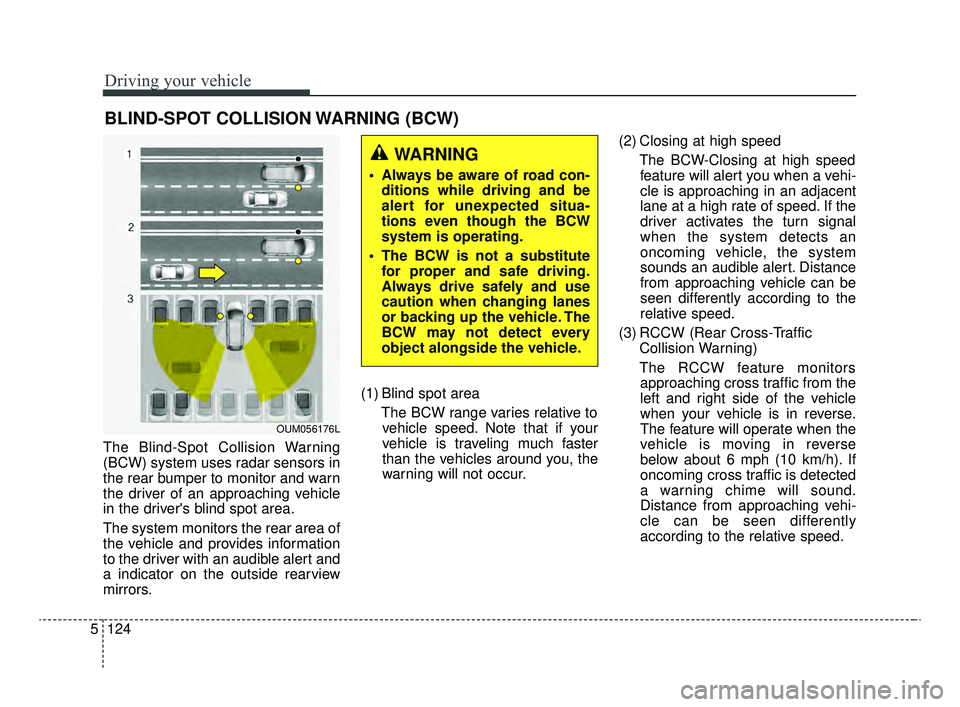
The Blind-Spot Collision Warning
(BCW) system uses radar sensors in
the rear bumper to monitor and warn
the driver of an approaching vehicle
in the driver's blind spot area.
The system monitors the rear area of
the vehicle and provides information
to the driver with an audible alert and
a indicator on the outside rearview
mirrors. (1) Blind spot area
The BCW range varies relative tovehicle speed. Note that if your
vehicle is traveling much faster
than the vehicles around you, the
warning will not occur. (2) Closing at high speed
The BCW-Closing at high speedfeature will alert you when a vehi-
cle is approaching in an adjacent
lane at a high rate of speed. If the
driver activates the turn signal
when the system detects an
oncoming vehicle, the system
sounds an audible alert. Distance
from approaching vehicle can be
seen differently according to the
relative speed.
(3) RCCW (Rear Cross-Traffic Collision Warning)
The RCCW feature monitors approaching cross traffic from the
left and right side of the vehicle
when your vehicle is in reverse.
The feature will operate when the
vehicle is moving in reverse
below about 6 mph (10 km/h). If
oncoming cross traffic is detected
a warning chime will sound.
Distance from approaching vehi-
cle can be seen differently
according to the relative speed.
BLIND-SPOT COLLISION WARNING (BCW)
WARNING
Always be aware of road con- ditions while driving and be
alert for unexpected situa-
tions even though the BCW
system is operating.
The BCW is not a substitute for proper and safe driving.
Always drive safely and use
caution when changing lanes
or backing up the vehicle. The
BCW may not detect every
object alongside the vehicle.
OUM056176L
JFa PE USA 5.QXP 5/15/2019 3:27 PM Page 124
Page 382 of 591

Driving your vehicle
126
5
Warning type
The system will activate when:
1.The system is on
2.Vehicle speed is above 20 mph (30
km/h)
3.Other vehicles are detected in the rear side
First stage alert
If a vehicle is detected within the
boundary of the system, a yellow
warning light will illuminate on the
outside rearview mirror.
Once the detected vehicle is no
longer within the blind spot area, the
warning will turn off according to the
driving conditions of the vehicle.
WARNING
Always check the road condi-tion while driving for unex-
pected situations even
though the Blind-Spot
Collision Warning System
(BCW) is operating.
The Blind-Spot Collision Warning System (BCW) is a
supplemental system to
assist you. Do not entirely rely
on the system. Always pay
attention, while driving, for
your safety.
(Continued)
(Continued)
The Blind-Spot CollisionWarning System (BCW) is not
a substitute for proper and
safe driving. Always drive
safely and use caution when
changing lanes or backing the
vehicle up. The Blind-Spot
Collision Warning System
(BCW) may not detect every
object alongside the vehicle.
OJF055213
1st stage
JFa PE USA 5.QXP 5/15/2019 3:27 PM Page 126