lock KIA Sorento 2007 1.G Owner's Guide
[x] Cancel search | Manufacturer: KIA, Model Year: 2007, Model line: Sorento, Model: KIA Sorento 2007 1.GPages: 325, PDF Size: 5.01 MB
Page 49 of 325
Knowing your vehicle40
3
Installing a child restraint system For safety reasons, we recommend that
the child restraint system be used in the
rear seats.
Never place a rear-facing child
restraint in the front passenger seat,
because of the danger that an inflat-
ing passenger side air bag could
impact the rear-facing child restraint
and kill the child.
Since all passenger safety belts move
freely under normal conditions and only
lock under extreme or emergency condi-
tions (emergency lock mode), you must
manually change these safety belts to
the auto lock mode to secure a child
restraint.
(Continued)
Never allow a child to stand up or
kneel while the vehicle is moving.
Never use an infant carrier or child seat that "hooks" over a
seatback. It will not provide ade-
quate protection in an accident.
Never allow a child to be held while they are in a moving vehi-
cle, as this could result in serious
injury to the child in the event of
an accident or a sudden stop.
Holding a child in a moving vehi-
cle does not provide the child
with any protection during an
accident, even if the person hold-
ing the child is wearing a seat
belt.
WARNING
- Child seat
installation
Before installing the childrestraint system, read the instruc-
tions supplied by the child
restraint system manufacturer.
If the safety belt does not operate as described in this section, have
the system checked immediately
by your authorized Kia dealer.
Failure to observe this manual's instructions regarding child
restraint system and the instruc-
tions provided with the child
restraint system could increase
the chance and/or severity of
injury in an accident.
Page 50 of 325
341
Knowing your vehicle
Placing a passenger safety belt intothe auto lock modeThe use of the auto lock mode will
ensure that the normal movement of the
child in the vehicle does not cause the
safety belt to be pulled out and loosen
the firmness of its hold on the child
restraint system. To secure a child
restraint system, use the following proce-
dure.
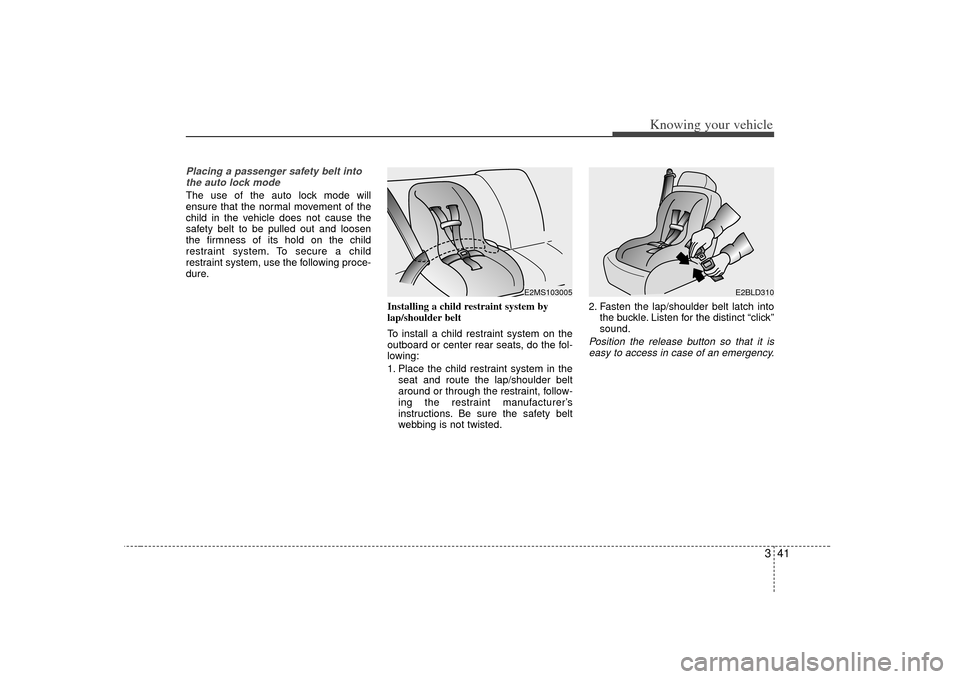
Installing a child restraint system by
lap/shoulder belt
To install a child restraint system on the
outboard or center rear seats, do the fol-
lowing:
1. Place the child restraint system in theseat and route the lap/shoulder belt
around or through the restraint, follow-
ing the restraint manufacturer’s
instructions. Be sure the safety belt
webbing is not twisted. 2. Fasten the lap/shoulder belt latch into
the buckle. Listen for the distinct “click”
sound.
Position the release button so that it iseasy to access in case of an emergency.
E2MS103005
E2BLD310
Page 51 of 325
Knowing your vehicle42
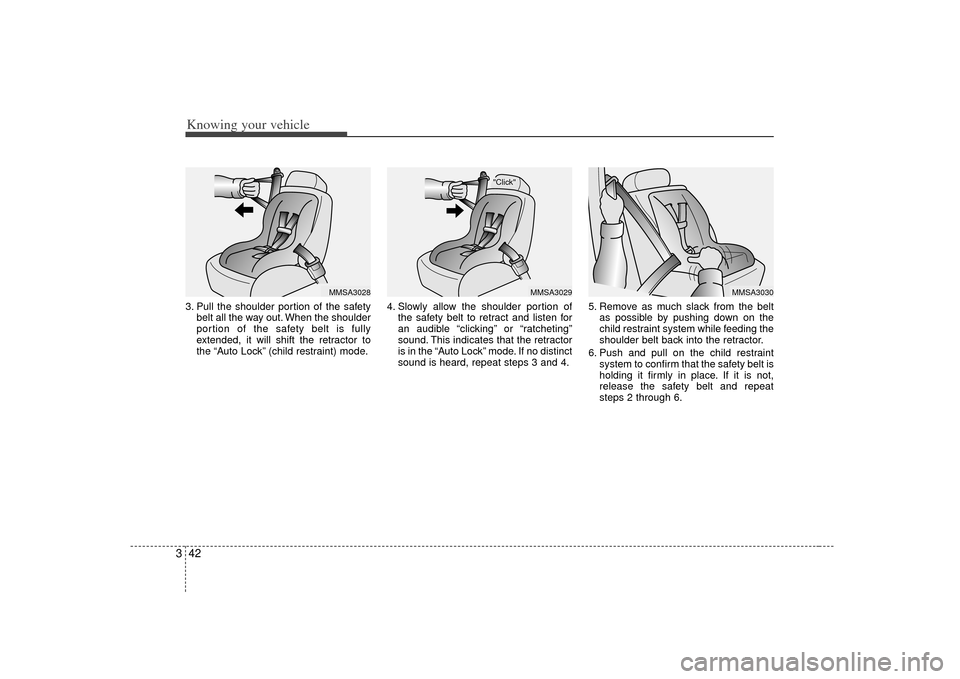
33. Pull the shoulder portion of the safety
belt all the way out. When the shoulder
portion of the safety belt is fully
extended, it will shift the retractor to
the “Auto Lock” (child restraint) mode. 4. Slowly allow the shoulder portion of
the safety belt to retract and listen for
an audible “clicking” or “ratcheting”
sound. This indicates that the retractor
is in the “Auto Lock” mode. If no distinct
sound is heard, repeat steps 3 and 4. 5. Remove as much slack from the belt
as possible by pushing down on the
child restraint system while feeding the
shoulder belt back into the retractor.
6. Push and pull on the child restraint system to confirm that the safety belt is
holding it firmly in place. If it is not,
release the safety belt and repeat
steps 2 through 6.
MMSA3028
"Click"
MMSA3029
MMSA3030
Page 52 of 325
343
Knowing your vehicle
7. Double check that the retractor is inthe “Auto Lock” mode by attempting to
pull more of the safety belt out of the
retractor. If you cannot, the retractor is
in the “Auto Lock” mode.
To remove the child restraint, press the
release button on the buckle and then
pull the lap/shoulder belt out of the
restraint and allow the safety belt to
retract fully.
When the safety belt is allowed to
retract to its fully stowed position, the
retractor will automatically switch
from the “Auto Lock” mode to the
emergency lock mode for normal
adult usage.
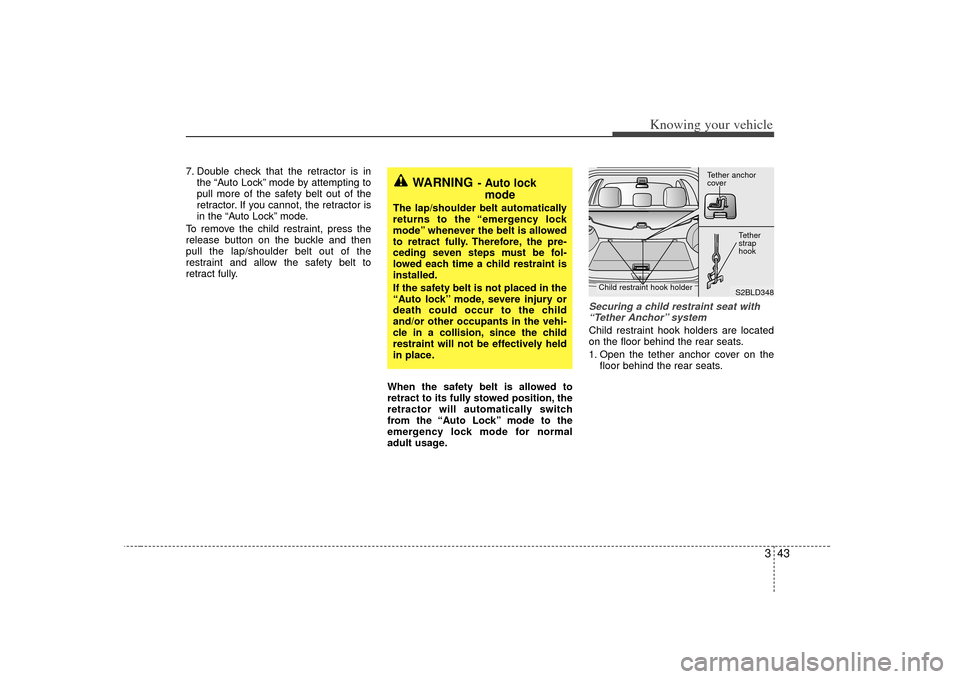
Securing a child restraint seat with“Tether Anchor” system Child restraint hook holders are located
on the floor behind the rear seats.
1. Open the tether anchor cover on the floor behind the rear seats.
WARNING
- Auto lockmode
The lap/shoulder belt automatically
returns to the “emergency lock
mode” whenever the belt is allowed
to retract fully. Therefore, the pre-
ceding seven steps must be fol-
lowed each time a child restraint is
installed.
If the safety belt is not placed in the
“Auto lock” mode, severe injury or
death could occur to the child
and/or other occupants in the vehi-
cle in a collision, since the child
restraint will not be effectively held
in place.
S2BLD348
Tether anchor
coverTether
strap
hook
Child restraint hook holder
Page 75 of 325
Knowing your vehicle66
3
Air bag warning lightThe purpose of air bag warning light in
your instrument panel is to alert you of a
potential problem with your air bag -
Supplemental Restraint System (SRS).
When the ignition switch is turned ON,
the indicator light should blink or illumi-
nate for approximately 6 seconds, then
go off.
Have the system checked if:
The light does not turn on briefly when
you turn the ignition ON.
The light stays on after the engine starts.
The light comes on while the vehicle is in motion.
Air bag (Supplemental Restraint
System) service Your Supplemental Restraint System is
virtually maintenance-free. There are no
parts which you can service.
You must have the system serviced
under the following circumstances:
If an air bag ever inflates, the air bagmust be replaced. Do not try to remove
or discard the air bag by yourself. This
must be done by an authorized Kia
dealer.
If the air bag warning indicator light alerts you to a problem, have the air
bag system checked as soon as possi-
ble. Otherwise, your air bag system
may be ineffective.
WARNING
Never put child restraint in thefront passenger seat. If the front
passenger air bag inflates, it may
cause severe or fatal injuries.
When children are seated in the rear outboard seats in which cur-
tain air bags are equipped, be
sure to put the child restraint sys-
tem as far away from the door
side as possible, and secure the
child restraint system to be
locked in position.
Inflation of curtain air bag could
cause severe injury or death due
to the expansion impact.
AIR
BAG
CAUTION
Do not modify any part of the air bag system. Modification could make the air bag system ineffectiveor could cause unnecessary deployment.
Page 79 of 325
Knowing your vehicle70
3Closing the hood1. Before closing the hood, check the fol-
lowing:
must be correctly installed.
bustible material must be removed
from the engine compartment.
2. Lower the hood halfway and push down to securely lock in place.
Make sure the hood is properly locked
before driving.
WARNING -
Hood
Before closing the hood, makesure that all engine parts and
tools have been removed from
the engine area and that no one’s
hands are near the hood opening.
Do not leave gloves, rags or any other combustible material in the
engine compartment. Doing so
may cause a heat-induced fire.
Page 80 of 325
371
Knowing your vehicle
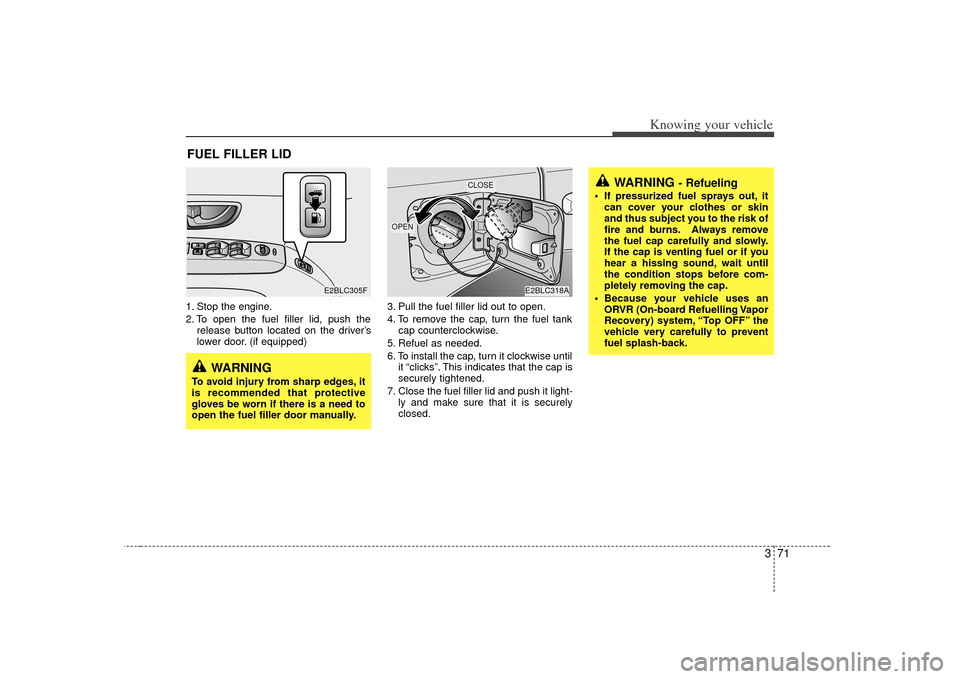
1. Stop the engine.
2. To open the fuel filler lid, push therelease button located on the driver’s
lower door. (if equipped) 3. Pull the fuel filler lid out to open.
4. To remove the cap, turn the fuel tank
cap counterclockwise.
5. Refuel as needed.
6. To install the cap, turn it clockwise until it “clicks”. This indicates that the cap is
securely tightened.
7. Close the fuel filler lid and push it light- ly and make sure that it is securely
closed.FUEL FILLER LID
WARNING
- Refueling
If pressurized fuel sprays out, itcan cover your clothes or skin
and thus subject you to the risk of
fire and burns. Always remove
the fuel cap carefully and slowly.
If the cap is venting fuel or if you
hear a hissing sound, wait until
the condition stops before com-
pletely removing the cap.
Because your vehicle uses an ORVR (On-board Refuelling Vapor
Recovery) system, “Top OFF” the
vehicle very carefully to prevent
fuel splash-back.
E2BLC305F
E2BLC318A
OPEN
CLOSE
WARNING
To avoid injury from sharp edges, it
is recommended that protective
gloves be worn if there is a need to
open the fuel filler door manually.
Page 89 of 325
Knowing your vehicle80
3Rolling code programmingTo train a garage door opener (or other
rolling code equipped devices) with the
rolling code feature, follow these instruc-
tions after completing the “Programming”
portion of this text. (A second person
may make the following training proce-
dures quicker & easier.)
4. Locate the “learn” or “smart” button on
the device’s motor head unit. Exact
location and color of the button may
vary by product brand. If there is diffi-
culty locating the “learn” or “smart” but-
ton, reference the device’s owner’s
manual or contact HomeLink at 1-800-
355-3515 or on the internet at
www.homelink.com.
5. Press and release the “learn” or “smart” button on the device’s motor
head unit. You have 30 seconds to
complete step number 6.
6. Return to the vehicle and firmly press and release the programmed
HomeLink button up to three times.
The rolling code equipped device
should now recognize the HomeLink
signal and activate when the
HomeLink button is pressed. The
remaining two buttons may now be
programmed if this has not previously
been done. Refer to the
“Programming” portion of this text.
Operating HomeLink To operate, simply press the pro-
grammed HomeLink button. Activation
will now occur for the trained product
(garage door, security system, entry door
lock, estate gate, or home or office light-
ing). For convenience, the hand-held
transmitter of the device may also be
used at any time. The HomeLink
Wireless Controls System (once pro-
grammed) or the original hand-held
transmitter may be used to activate the
device (e.g. garage door, entry door lock,
etc.). In the event that there are still pro-
gramming difficulties, contact HomeLink
at 1-800-355-3515 or on the internet at
www.homelink.com.
Erasing programmed HomeLink
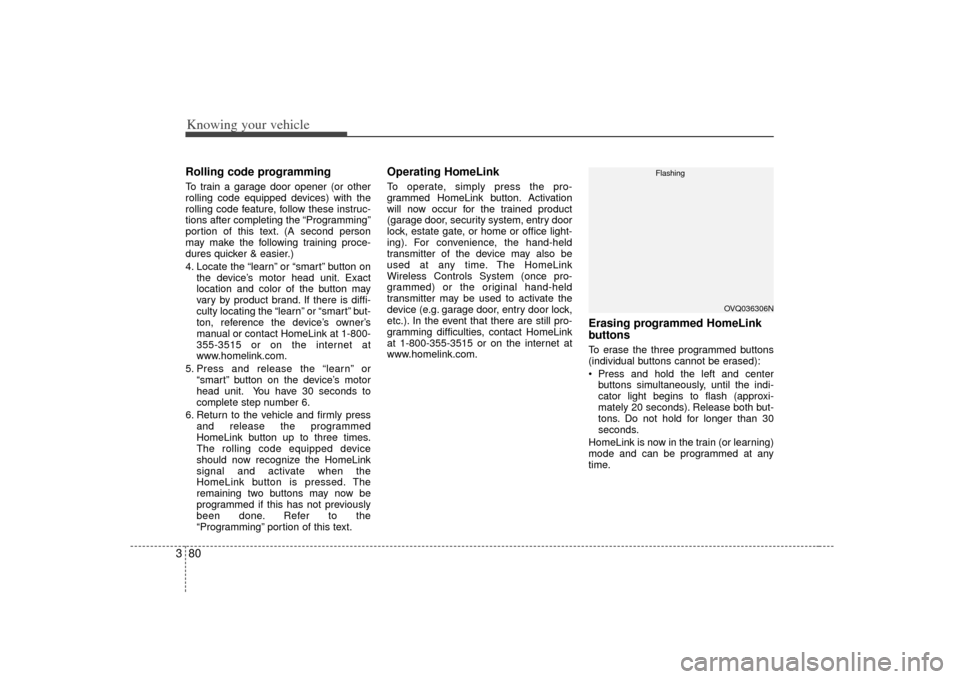
buttonsTo erase the three programmed buttons
(individual buttons cannot be erased):
Press and hold the left and centerbuttons simultaneously, until the indi-
cator light begins to flash (approxi-
mately 20 seconds). Release both but-
tons. Do not hold for longer than 30
seconds.
HomeLink is now in the train (or learning)
mode and can be programmed at any
time.
OVQ036306N
Flashing
Page 91 of 325

Knowing your vehicle82
3Room lightFront (map light)The lights are turned ON or OFF by
pressing the corresponding switch.
Center (dome light) /
Rear cargo area light(1) OFF
: The light stays off even when a dooris open. (2) DOOR/
: The light turns on when a door isopened or when a door is unlocked
by the transmitter (if equipped).
Interior light goes out slowly after 30
seconds if the doors including the
rear hatch and rear hatch window are
all closed. However if the ignition
switch is ON or all vehicle doors are
locked when the door is closed, inte-
rior light will turn off even within 30
seconds.
(3) ON
: The light turns on and stays on even when the doors are all closed.
INTERIOR LIGHTS
PUSHT IL TSLIDE
E2BLA430JE2BLA430E
OFF DOOR ON
E2BLA324
Type A
Center
Type B
OFF ON
ON
OFFE2BLA325
➀
➁
➂
➀
➁
➂
Rear
Page 93 of 325

Knowing your vehicle84
3Multi Box The multi box may be opened by pulling
it out by its handle grip. It can be used for
storing small items.
Center console storageThese compartments can be used to
store small items required by the driver
or front passenger.
To open the console storage compart-
ment, pull up on the locking tab.
Under tray (If equipped)The under tray is located under the front
passenger’s seat, and can be opened by
pulling it out.
E2BLA411A
E2BLA339B
S2BLA370