display KIA TELLURIDE 2020 Navigation System Quick Reference Guide
[x] Cancel search | Manufacturer: KIA, Model Year: 2020, Model line: TELLURIDE, Model: KIA TELLURIDE 2020Pages: 219, PDF Size: 9.16 MB
Page 95 of 219
5-19
Using the address book
After registering the current location or frequently visited places,
you can easily set any of them as a destination.
Registering a searched place as a
favorite place
You can search and register a desired place.
1 On the Navigation Menu screen, touch Address
Book.
Avoiding specific zones
You can resume routing after excluding the specified roads such
as congested roads or roads under construction.
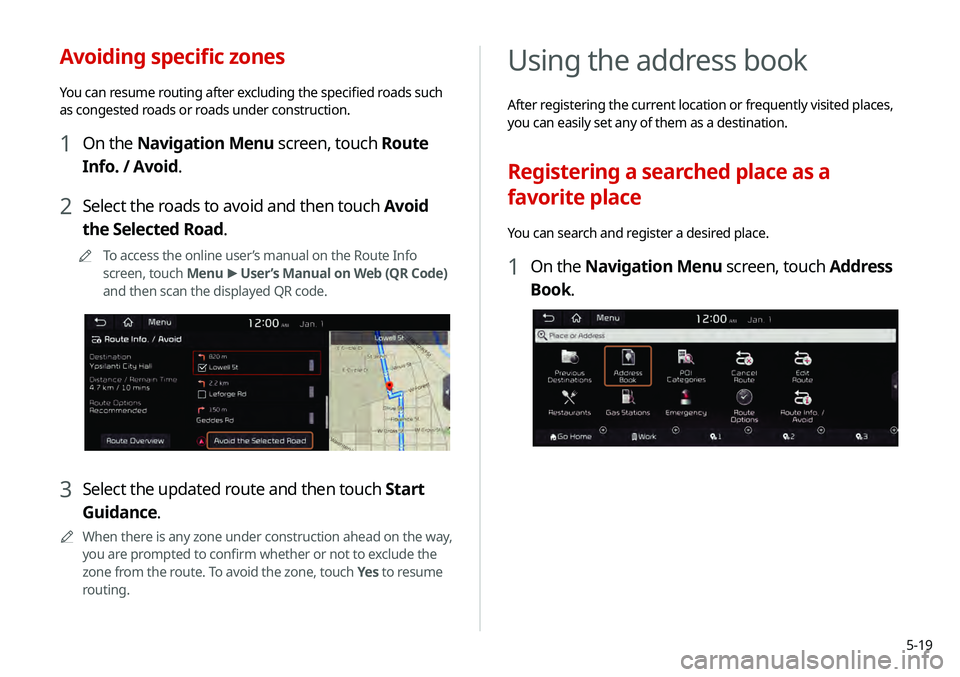
1 On the Navigation Menu screen, touch Route
Info. / Avoid.
2 Select the roads to avoid and then touch Avoid
the Selected Road.
0000
A
To access the online user’s manual on the Route Info
screen, touch Menu >
User’s Manual on Web (QR Code)
and then scan the displayed QR code.
3 Select the updated route and then touch Start
Guidance.
0000
A
When there is any zone under construction ahead on the way,
you are prompted to confirm whether or not to exclude the
zone from the route. To avoid the zone, touch Yes to resume
routing.
Page 96 of 219
5-20
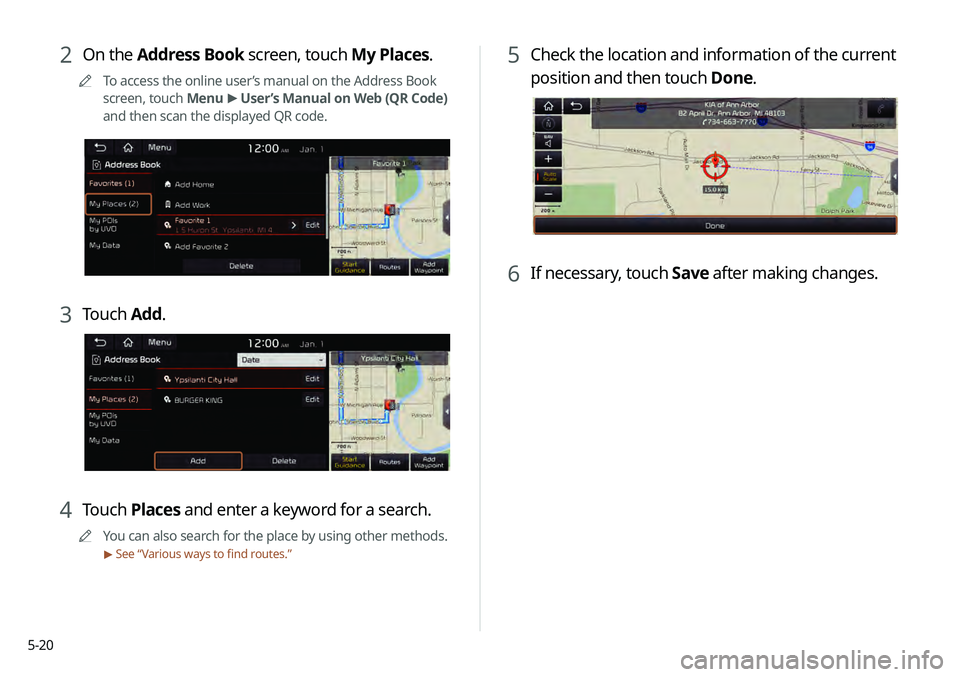
5 Check the location and information of the current
position and then touch Done.
6 If necessary, touch Save after making changes.
2 On the Address Book screen, touch My Places.
0000
A
To access the online user’s manual on the Address Book
screen, touch Menu >
User’s Manual on Web (QR Code)
and then scan the displayed QR code.
3 Touch Add.
4 Touch Places and enter a keyword for a search.
0000
A
You can also search for the place by using other methods.
> See “ Various ways to find routes.”
Page 97 of 219
5-21
Registering a frequently visited place as
a favorite place
You can register your home, office, or other frequently visited
place as a favorite.
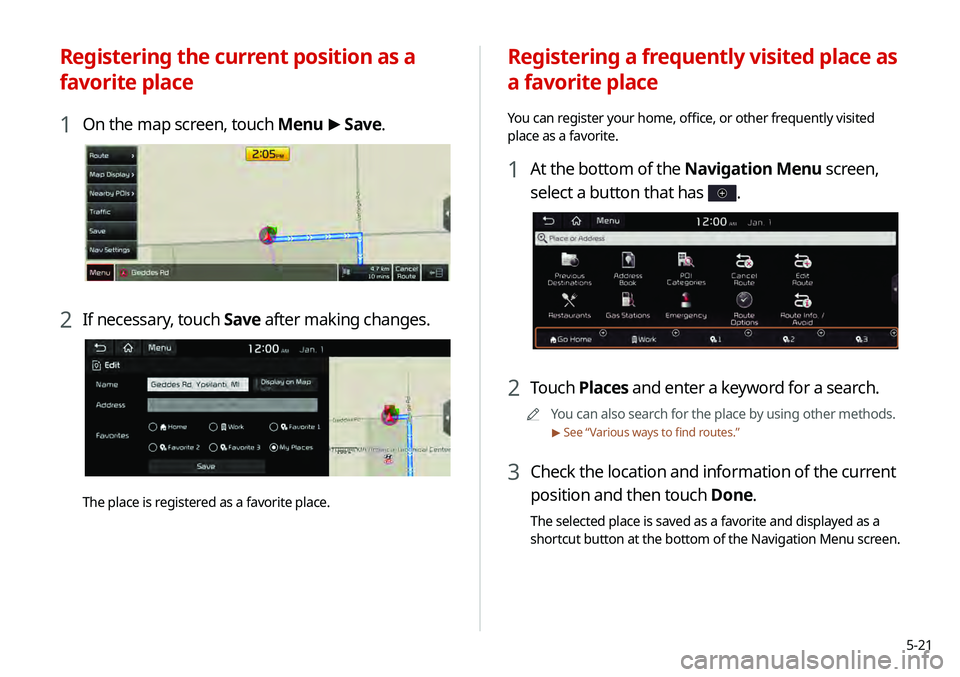
1 At the bottom of the Navigation Menu screen,
select a button that has
.
2 Touch Places and enter a keyword for a search.
0000
A
You can also search for the place by using other methods.
> See “ Various ways to find routes.”
3 Check the location and information of the current
position and then touch Done.
The selected place is saved as a favorite and displayed as a
shortcut button at the bottom of the Navigation Menu screen.
Registering the current position as a
favorite place
1 On the map screen, touch Menu >
Save.
2 If necessary, touch Save after making changes.
The place is registered as a favorite place.
Page 101 of 219
5-25
END USER LICENSE
AGREEMENT
PLEASE READ THIS END USER LICENSE AGREEMENT ("EULA")
CAREFULLY BEFORE USING THE NAVIGATION SYSTEM.
This is a license agreement between you and Hyundai MnSoft,
INC. including its affiliates ("COMPANY") regarding a copy of the
COMPANY navigable map database together with associated
software, media and explanatory printed documentation
published by COMPANY (jointly the "Product"). The Product is
provided for your personal, internal use only and not for resale.
It is protected by copyright and is subject to the following terms
which are agreed to by you, on the one hand, and COMPANY
and its licensors (and their licensors and suppliers) (collectively,
"Licensors") on the other hand.
By using the Product, you accept and agree to all terms and
conditions in this End User License Agreement ("EULA"). IF
YOU DO NOT AGREE TO THE TERMS OF THIS EULA, YOU MUST
PROMPTLY EXIT THE PRODUCT OPERATION PROGRAM AND DO
NOT USE OR ACCESS TO THE PRODUCT. YOU AGREE THAT YOUR
RIGHTS UNDER THIS EULA MAY BE TERMINATED AUTOMATICALLY
WITHOUT NOTICE IF YOU FAIL TO COMPLY WITH ANY TERM(S) OF
THIS EULA.
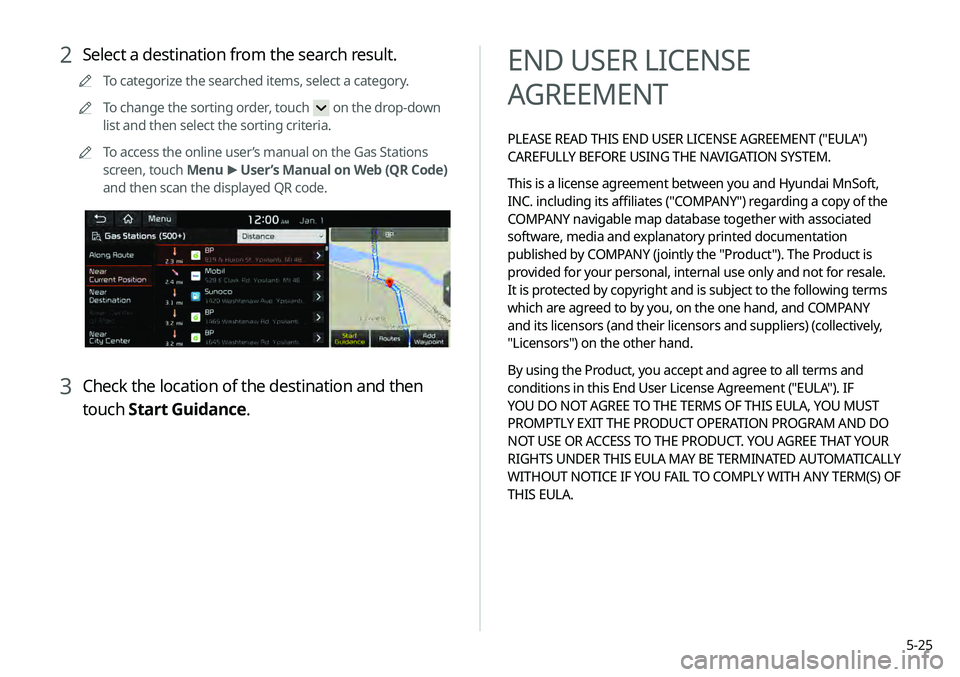
2 Select a destination from the search result.
0000
A
To categorize the searched items, select a category.
0000
A
To change the sorting order, touch
on the drop-down
list and then select the sorting criteria.
0000
A
To access the online user’s manual on the Gas Stations
screen, touch Menu >
User’s Manual on Web (QR Code)
and then scan the displayed QR code.
3 Check the location of the destination and then
touch Start Guidance.
Page 108 of 219
5-32Copyright for Brand Icon
The marks of companies displayed by this product to indicate
business locations are the marks of their respective owners. The
use of such marks in this product does not imply any sponsorship,
approval, or endorsement by such companies of this product.
Copyright for Junction View
Junction View Data provided by ZENRIN USA, INC. Copyright(C)
20XX, All rights Reserved.
About Map Updates
You can contact your KIA dealer or call at 1-888-757-0010.
The Data and all copyrights and intellectual
property or neighboring rights therein are
owned by HERE and Hyundai MnSoft Inc.
Importance Notice: This is protected by U.S.
copyright laws.
You may not extract or reutilize substantial parts
of the contents of the Data, nor reproduce,
copy, modify, adapt, translate, disassemble,
decompile or reverse engineer any portion
of the Data, except to the extent explicitly
permitted by mandatory laws.
© 1987-2018 HERE. All rights reserved.
Page 113 of 219
6-5
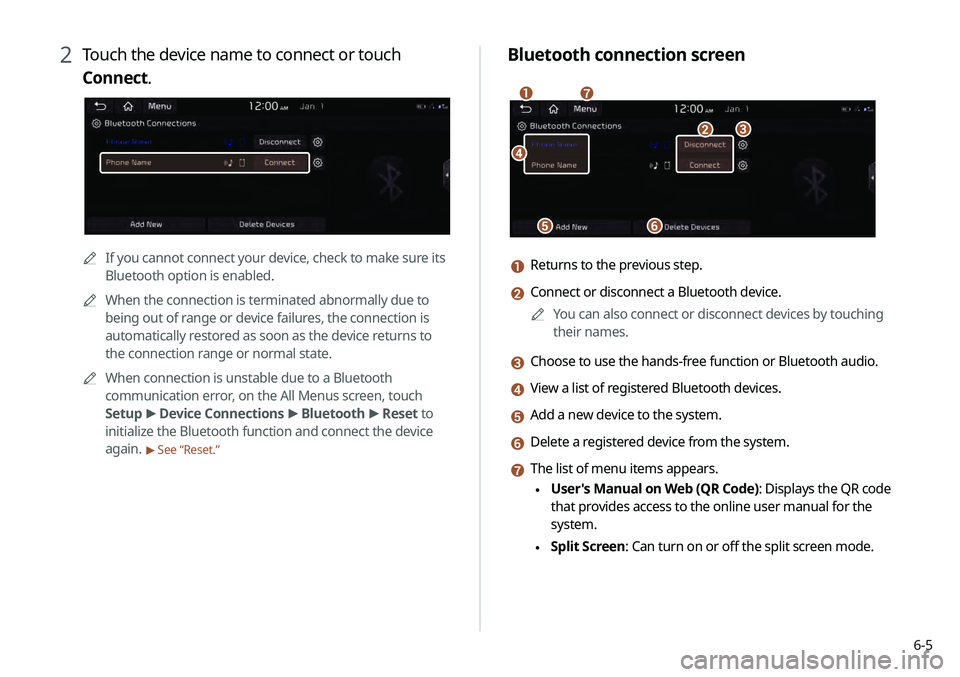
Bluetooth connection screen
\037
\036\035
\034\033
\032\031
a Returns to the previous step.
b Connect or disconnect a Bluetooth device.0000
A
You can also connect or disconnect devices by touching
their names.
c Choose to use the hands-free function or Bluetooth audio.
d View a list of registered Bluetooth devices.
e Add a new device to the system.
f Delete a registered device from the system.
g The list of menu items appears.
\225User's Manual on Web (QR Code): Displays the QR code
that provides access to the online user manual for the
system.
\225Split Screen: Can turn on or off the split screen mode.
2 Touch the device name to connect or touch
Connect.
0000A
If you cannot connect your device, check to make sure its
Bluetooth option is enabled.
0000
A
When the connection is terminated abnormally due to
being out of range or device failures, the connection is
automatically restored as soon as the device returns to
the connection range or normal state.
0000
A
When connection is unstable due to a Bluetooth
communication error, on the All Menus screen, touch
Setup >
Device Connections >
Bluetooth >
Reset to
initialize the Bluetooth function and connect the device
again.
> See “Reset.”
Page 116 of 219
6-8
Dialing from the favorites list
Make a list of frequently used phone numbers to call them quickly
in the future.
When you connect your mobile device and system over
Bluetooth, your contacts stored on the device will be downloaded
to the system, and you can add frequently used phone numbers
to the favorites list. Call your favorite contacts quickly and easily
by selecting them from the list.
1 Perform any of the following methods:
\225On the All Menus screen, touch Phone.
\225On the steering wheel, press the []
button.
2 On the Bluetooth Call screen, touch .
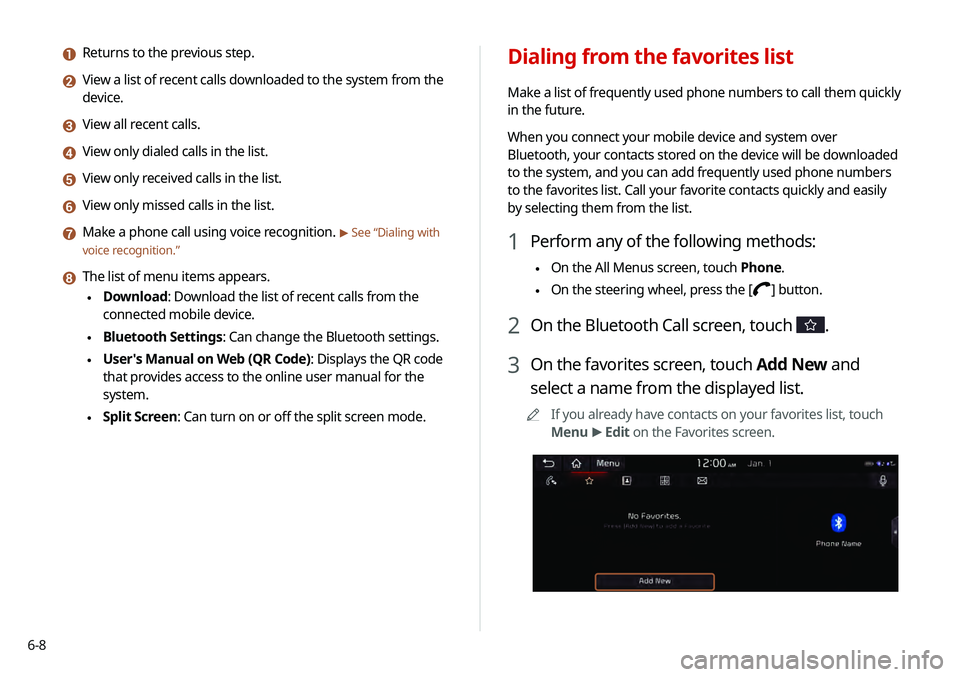
3 On the favorites screen, touch Add New and
select a name from the displayed list.
0000
A
If you already have contacts on your favorites list, touch
Menu >
Edit on the Favorites screen.
a Returns to the previous step.
b View a list of recent calls downloaded to the system from the
device.
c View all recent calls.
d View only dialed calls in the list.
e View only received calls in the list.
f View only missed calls in the list.
g Make a phone call using voice recognition. > See “Dialing with
voice recognition.”
h The list of menu items appears.
\225 Download: Download the list of recent calls from the
connected mobile device.
\225Bluetooth Settings: Can change the Bluetooth settings.
\225User's Manual on Web (QR Code): Displays the QR code
that provides access to the online user manual for the
system.
\225Split Screen: Can turn on or off the split screen mode.
Page 117 of 219
6-9
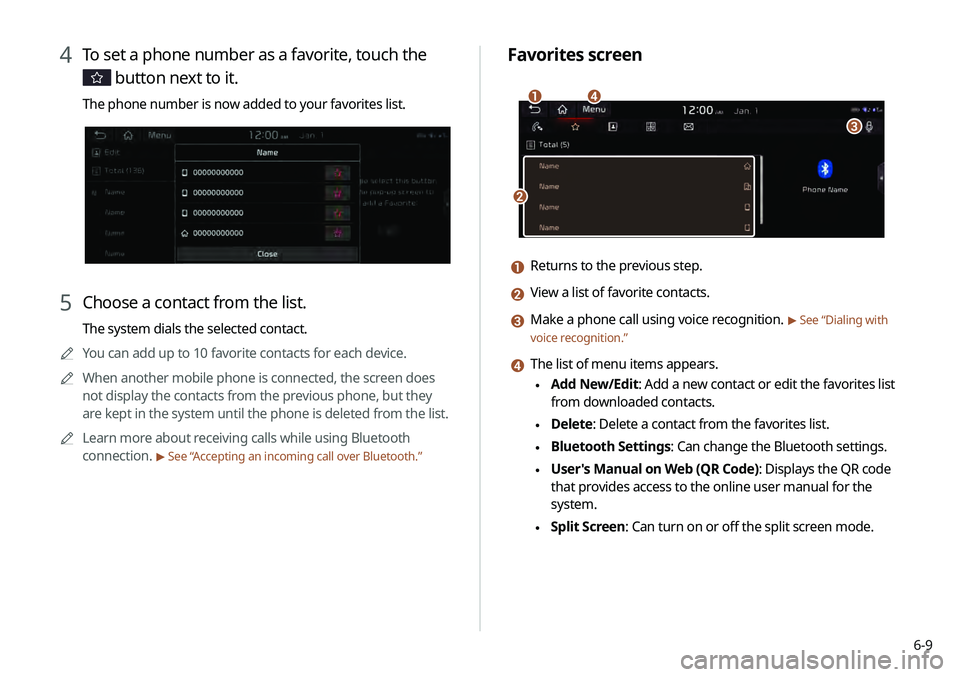
Favorites screen
\037
\036
\035\034
a Returns to the previous step.
b View a list of favorite contacts.
c Make a phone call using voice recognition. > See “Dialing with
voice recognition.”
d The list of menu items appears.
\225 Add New/Edit: Add a new contact or edit the favorites list
from downloaded contacts.
\225Delete: Delete a contact from the favorites list.
\225Bluetooth Settings: Can change the Bluetooth settings.
\225User's Manual on Web (QR Code): Displays the QR code
that provides access to the online user manual for the
system.
\225Split Screen: Can turn on or off the split screen mode.
4 To set a phone number as a favorite, touch the
button next to it.
The phone number is now added to your favorites list.
5 Choose a contact from the list.
The system dials the selected contact.
0000
A
You can add up to 10 favorite contacts for each device.
0000
A
When another mobile phone is connected, the screen does
not display the contacts from the previous phone, but they
are kept in the system until the phone is deleted from the list.
0000
A
Learn more about receiving calls while using Bluetooth
connection.
> See “ Accepting an incoming call over Bluetooth .”
Page 118 of 219
6-100000
A
You can download only the contacts that can be displayed on
the connected Bluetooth device. The contacts may not appear
in some applications.
0000
A
You can download up to 5,000 contacts for each device.
0000
A
The download may not work in some phone models.
0000
A
Contacts from both the mobile device and its SIM card are
downloaded at the same time. The system may not be able to
download SIM card contacts from all phone models.
0000
A
When speed dial numbers are set to contacts on the phone,
press and hold a speed dial number on the dial pad to make
a call easily. Some mobile phone models may not support the
speed dial function.
0000
A
You cannot download contacts when the download is
prohibited by the phone. Some phone models may require
approval for a download. When a successful download is not
made, check the phone screen or its settings.
0000
A
Depending on the phone model or operation status,
downloading may take longer than usual.
0000
A
When a new contacts list is downloaded, the previous records
are removed.
0000
A
The downloaded contacts cannot be edited or deleted from
the system.
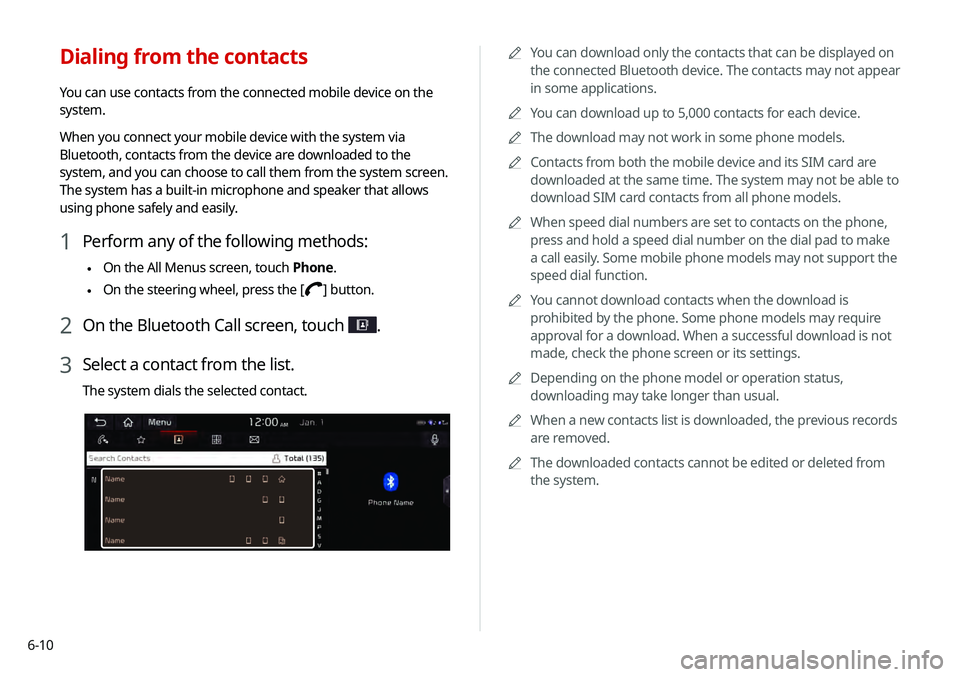
Dialing from the contacts
You can use contacts from the connected mobile device on the
system.
When you connect your mobile device with the system via
Bluetooth, contacts from the device are downloaded to the
system, and you can choose to call them from the system screen.
The system has a built-in microphone and speaker that allows
using phone safely and easily.
1 Perform any of the following methods:
\225On the All Menus screen, touch Phone.
\225On the steering wheel, press the []
button.
2 On the Bluetooth Call screen, touch .
3 Select a contact from the list.
The system dials the selected contact.
Page 119 of 219
6-11
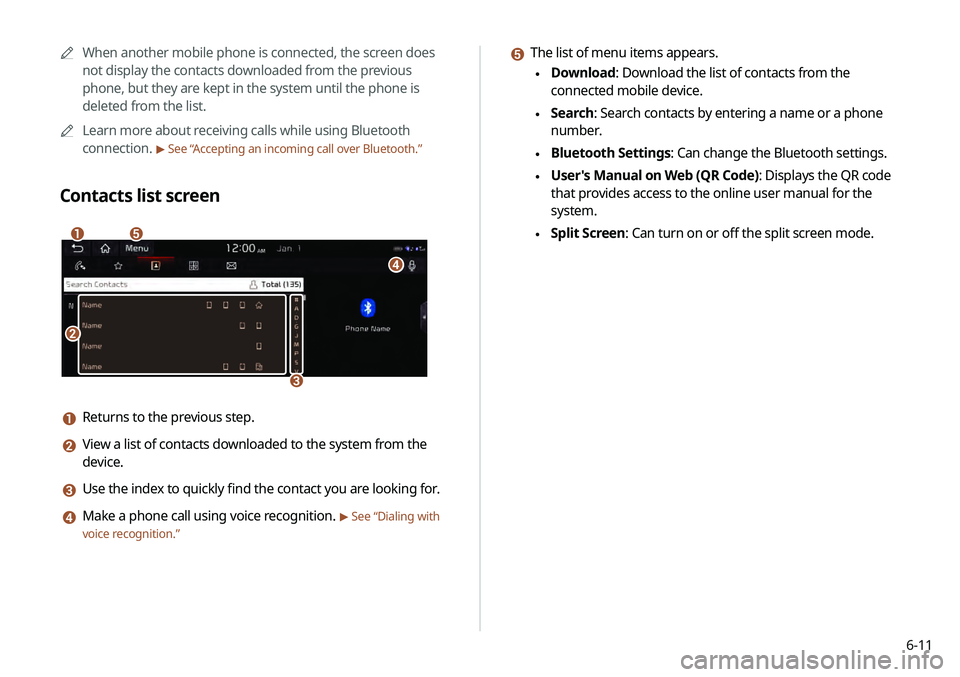
e The list of menu items appears.
\225Download: Download the list of contacts from the
connected mobile device.
\225Search: Search contacts by entering a name or a phone
number.
\225Bluetooth Settings: Can change the Bluetooth settings.
\225User's Manual on Web (QR Code): Displays the QR code
that provides access to the online user manual for the
system.
\225Split Screen: Can turn on or off the split screen mode.
0000
A
When another mobile phone is connected, the screen does
not display the contacts downloaded from the previous
phone, but they are kept in the system until the phone is
deleted from the list.
0000
A
Learn more about receiving calls while using Bluetooth
connection.
> See “ Accepting an incoming call over Bluetooth .”
Contacts list screen
\037
\036
\035
\034
\033
a Returns to the previous step.
b View a list of contacts downloaded to the system from the
device.
c Use the index to quickly find the contact you are looking for.
d Make a phone call using voice recognition. > See “Dialing with
voice recognition.”