tow LINCOLN MKZ 2013 User Guide
[x] Cancel search | Manufacturer: LINCOLN, Model Year: 2013, Model line: MKZ, Model: LINCOLN MKZ 2013Pages: 474, PDF Size: 3.79 MB
Page 82 of 474
WINDSHIELD WIPERS
Note:
Fully defrost the windshield
before switching on the windshield
wipers.
Note: Make sure the windshield wipers
are switched off before entering a car
wash.
Note: Clean the windshield and wiper
blades if they begin to leave streaks or
smears. If that doesn't resolve the
issue, install new wiper blades.
Note: Do not operate the wipers on a
dry windshield. This may scratch the
glass, damage the wiper blades or
cause the wiper motor to burn out.
Always use the windshield washers
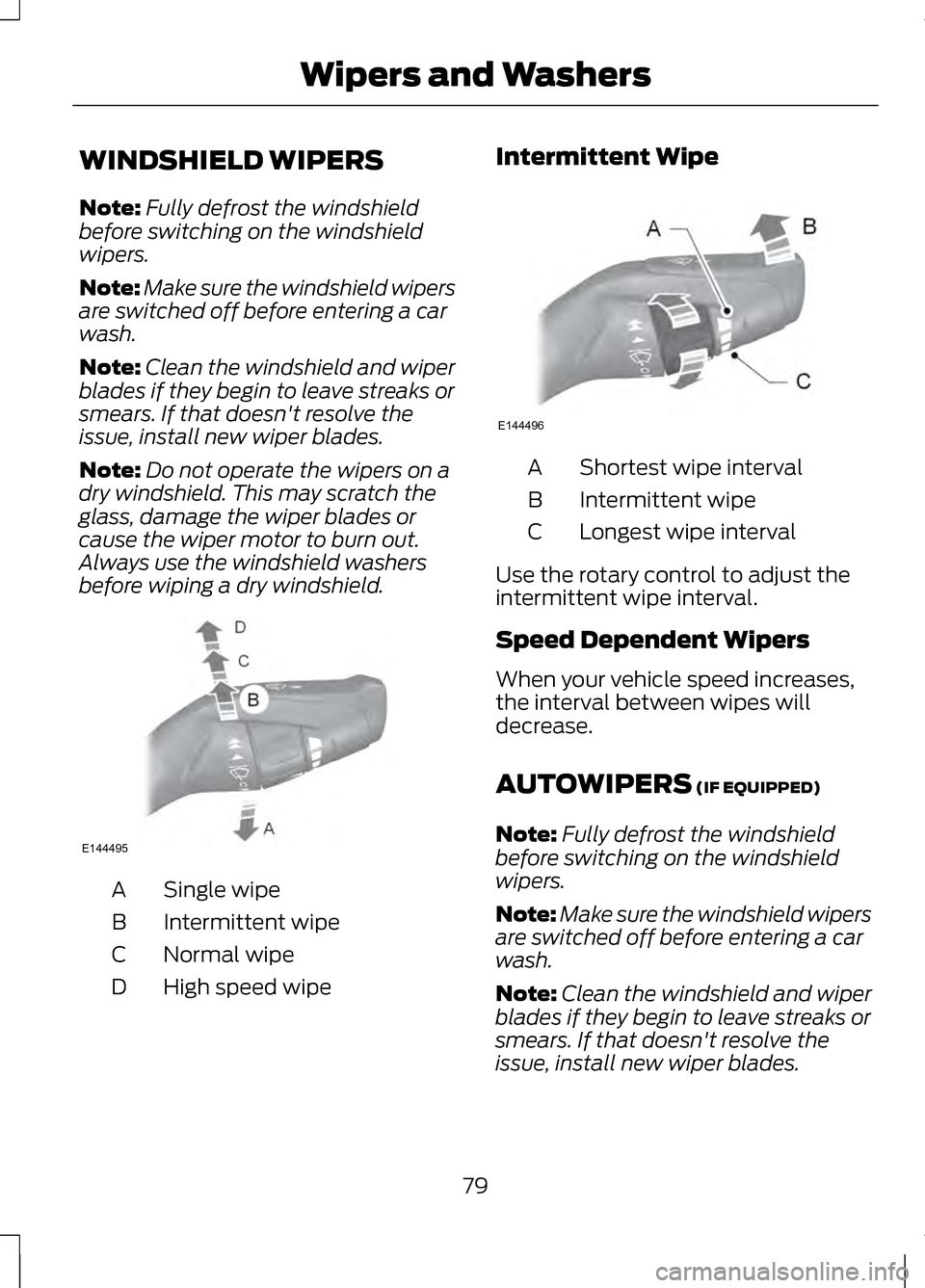
before wiping a dry windshield. Single wipe
A
Intermittent wipe
B
Normal wipe
C
High speed wipe
D Intermittent Wipe
Shortest wipe interval
A
Intermittent wipe
B
Longest wipe interval
C
Use the rotary control to adjust the
intermittent wipe interval.
Speed Dependent Wipers
When your vehicle speed increases,
the interval between wipes will
decrease.
AUTOWIPERS (IF EQUIPPED)
Note: Fully defrost the windshield
before switching on the windshield
wipers.
Note: Make sure the windshield wipers
are switched off before entering a car
wash.
Note: Clean the windshield and wiper
blades if they begin to leave streaks or
smears. If that doesn't resolve the
issue, install new wiper blades.
79
Wipers and WashersE144495 E144496
Page 83 of 474
Note:
If you switch autolamps on in
conjunction with autowipers, your low
beam headlamps will illuminate
automatically when the rain sensor
activates the windshield wipers
continuously.
Note: Wet road conditions can cause
unexpected wiping or smearing.
To reduce smearing we recommend
the following:
• Lower the sensitivity of the
autowipers.
• Switch to normal or high speed
wipe.
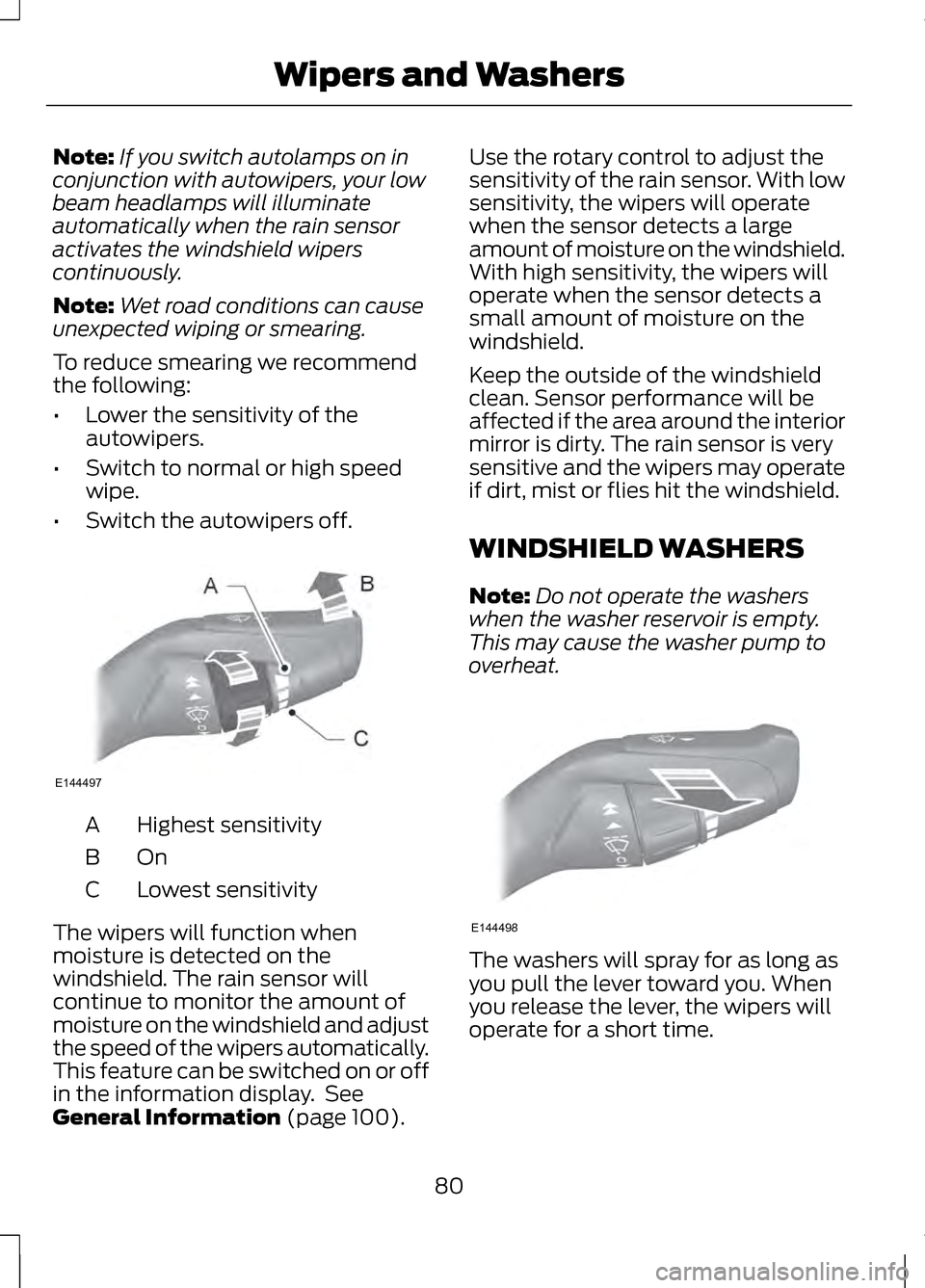
• Switch the autowipers off. Highest sensitivity
A
OnB
Lowest sensitivity
C
The wipers will function when
moisture is detected on the
windshield. The rain sensor will
continue to monitor the amount of
moisture on the windshield and adjust
the speed of the wipers automatically.
This feature can be switched on or off
in the information display. See
General Information (page 100). Use the rotary control to adjust the
sensitivity of the rain sensor. With low
sensitivity, the wipers will operate
when the sensor detects a large
amount of moisture on the windshield.
With high sensitivity, the wipers will
operate when the sensor detects a
small amount of moisture on the
windshield.
Keep the outside of the windshield
clean. Sensor performance will be
affected if the area around the interior
mirror is dirty. The rain sensor is very
sensitive and the wipers may operate
if dirt, mist or flies hit the windshield.
WINDSHIELD WASHERS
Note:
Do not operate the washers
when the washer reservoir is empty.
This may cause the washer pump to
overheat. The washers will spray for as long as
you pull the lever toward you. When
you release the lever, the wipers will
operate for a short time.
80
Wipers and WashersE144497 E144498
Page 85 of 474
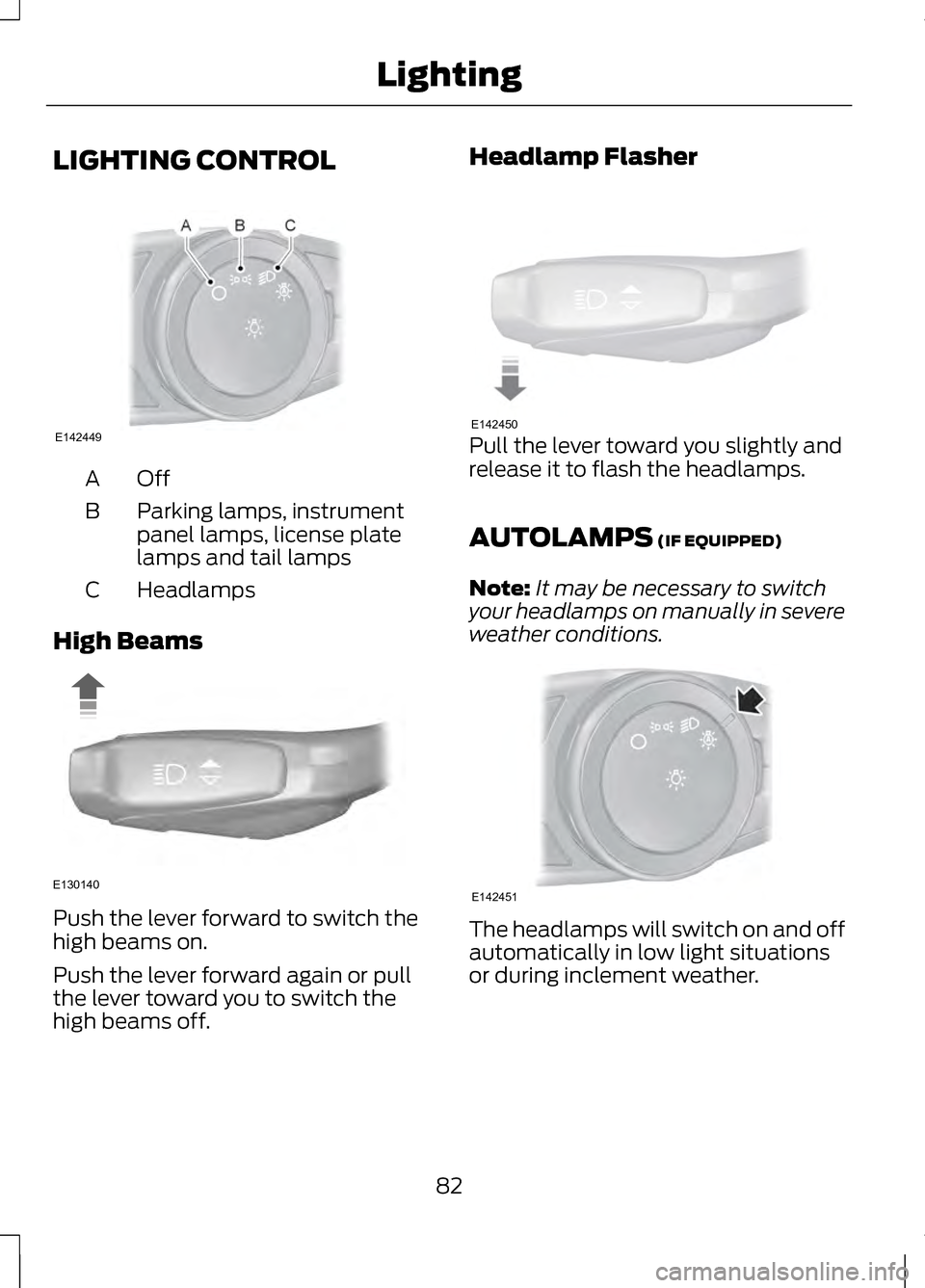
LIGHTING CONTROL
OffA
Parking lamps, instrument
panel lamps, license plate
lamps and tail lamps
B
Headlamps
C
High Beams Push the lever forward to switch the
high beams on.
Push the lever forward again or pull
the lever toward you to switch the
high beams off. Headlamp Flasher
Pull the lever toward you slightly and
release it to flash the headlamps.
AUTOLAMPS (IF EQUIPPED)
Note: It may be necessary to switch
your headlamps on manually in severe
weather conditions. The headlamps will switch on and off
automatically in low light situations
or during inclement weather.
82
LightingE142449 E130140 E142450 E142451
Page 86 of 474
The headlamps will remain on for a
period of time after you switch the
ignition off. You can adjust the time
delay using the information display
controls. See Information Displays
(page ?).
Note: If you switch autolamps on in
conjunction with autowipers, low beam
headlamps will illuminate
automatically when the rain sensor
activates the windshield wipers
continuously.
INSTRUMENT LIGHTING
DIMMER
Note: If you disconnect and connect
the battery, or fully discharge and
charge the battery, the illuminated
components will switch to the
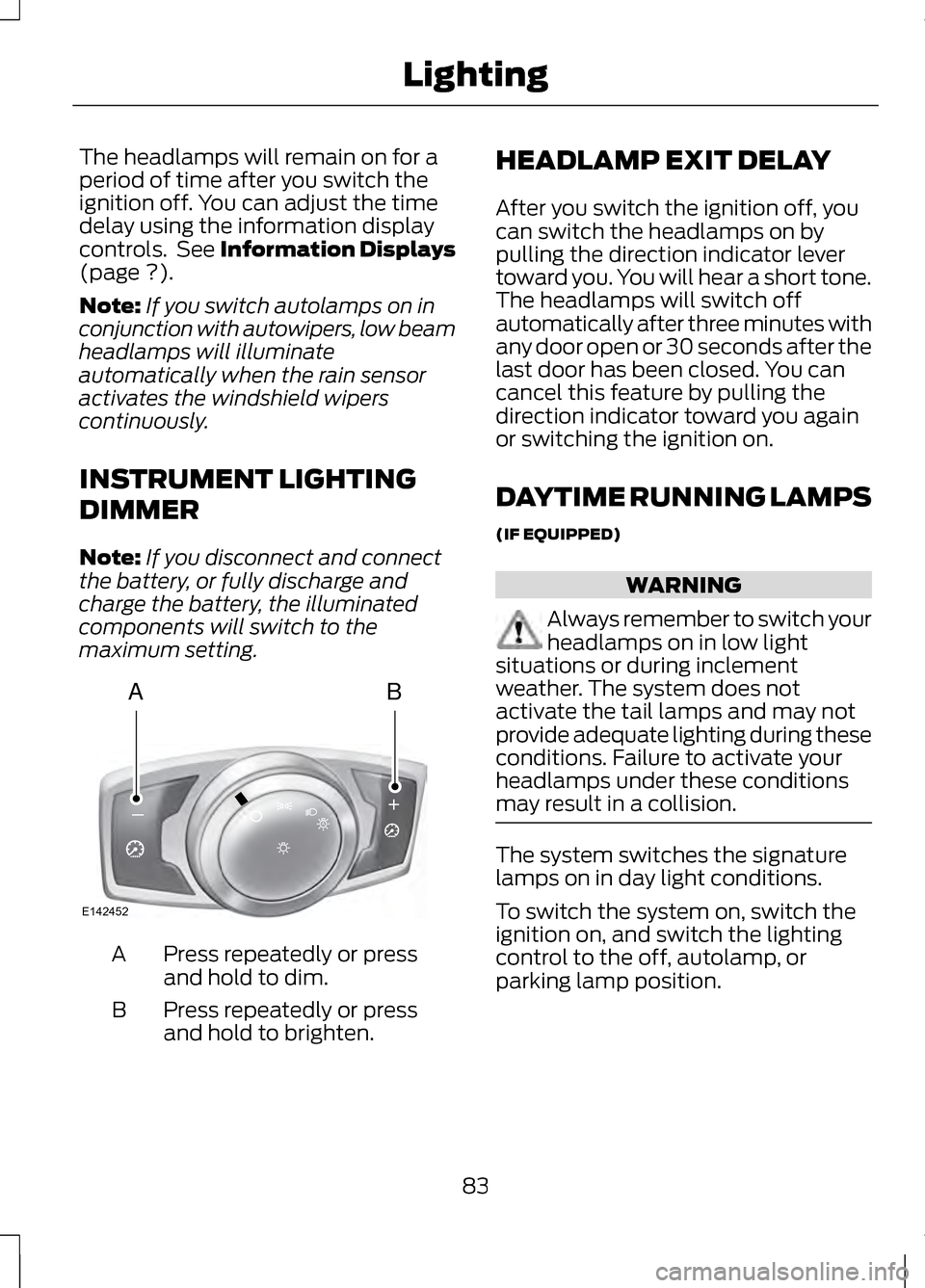
maximum setting. Press repeatedly or press
and hold to dim.
A
Press repeatedly or press
and hold to brighten.
B HEADLAMP EXIT DELAY
After you switch the ignition off, you
can switch the headlamps on by
pulling the direction indicator lever
toward you. You will hear a short tone.
The headlamps will switch off
automatically after three minutes with
any door open or 30 seconds after the
last door has been closed. You can
cancel this feature by pulling the
direction indicator toward you again
or switching the ignition on.
DAYTIME RUNNING LAMPS
(IF EQUIPPED)
WARNING
Always remember to switch your
headlamps on in low light
situations or during inclement
weather. The system does not
activate the tail lamps and may not
provide adequate lighting during these
conditions. Failure to activate your
headlamps under these conditions
may result in a collision. The system switches the signature
lamps on in day light conditions.
To switch the system on, switch the
ignition on, and switch the lighting
control to the off, autolamp, or
parking lamp position.
83
LightingAB
A
E142452
Page 92 of 474
Fold-Away Exterior Mirrors
Push the mirror toward the door
window glass. Make sure that you fully
engage the mirror in its support when
returning it to its original position.
Heated Exterior Mirrors
See Heated Windows and Mirrors
(page 128).
Memory Mirrors
You can save and recall the mirror
positions through the memory
function. See
Memory Function
(page 135).
Auto-Dimming Feature (If Equipped)
The driver ’s exterior mirror will
automatically dim when the interior
auto-dimming mirror is activated.
Signal Indicator Mirrors
The outer portion of the appropriate
mirror housing will blink when the turn
signal is activated.
Integrated Blind Spot Mirrors
(If Equipped) WARNING
Objects in the blind spot mirror
are closer than they appear.
Blind spot mirrors have an integrated
convex mirror built into the upper
outboard corner of the exterior
mirrors. They are designed to increase
your visibility along the side of your
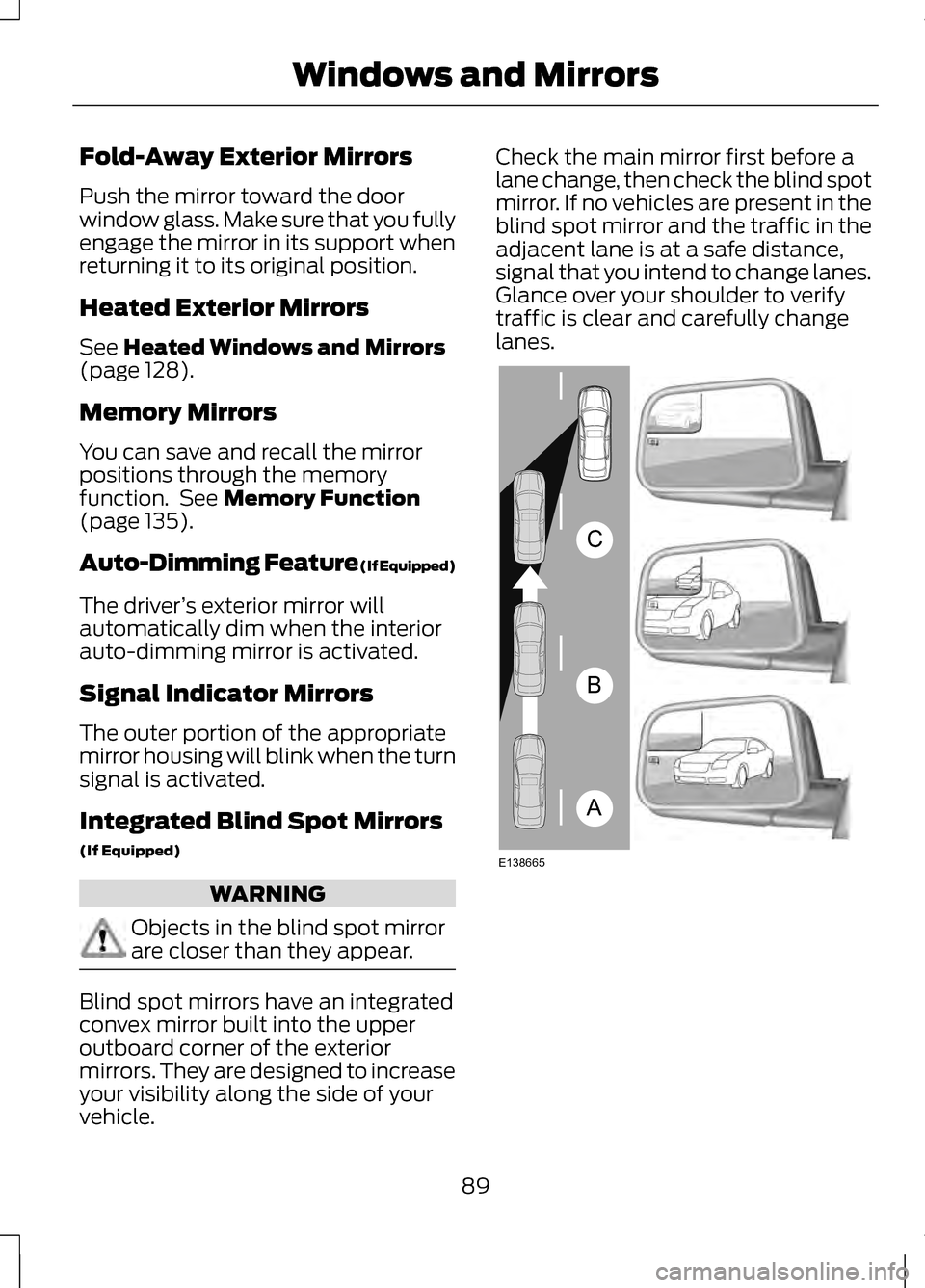
vehicle. Check the main mirror first before a
lane change, then check the blind spot
mirror. If no vehicles are present in the
blind spot mirror and the traffic in the
adjacent lane is at a safe distance,
signal that you intend to change lanes.
Glance over your shoulder to verify
traffic is clear and carefully change
lanes.
89
Windows and MirrorsA
B
C
E138665
Page 93 of 474
The image of the approaching vehicle
is small and near the inboard edge of
the main mirror when it is at a
distance. The image becomes larger
and begins to move outboard across
the main mirror as the vehicle
approaches (A). The image will
transition from the main mirror and
begin to appear in the blind spot
mirror as the vehicle approaches (B).
The vehicle will transition to your
peripheral field of view as it leaves the
blind spot mirror (C).
Blind Spot Monitor (If Equipped)
See
Blind Spot Monitor (page 212).
INTERIOR MIRROR WARNING
Do not adjust the mirror when
your vehicle is moving.
Note:
Do not clean the housing or
glass of any mirror with harsh
abrasives, fuel or other petroleum or
ammonia-based cleaning products.
You can adjust the interior mirror to
your preference. Some mirrors also
have a second pivot point. This lets
you move the mirror head up or down
and from side to side. Auto-Dimming Mirror
Note:
Do not block the sensors on the
front and back of the mirror. Mirror
performance may be affected. A rear
center passenger or raised rear center
head restraint may also block light
from reaching the sensor.
The mirror will dim automatically to
reduce glare when bright lights are
detected from behind your vehicle. It
will automatically return to normal
reflection when you select reverse
gear to make sure you have a clear
view when backing up.
SUN VISORS Rotate the sun visor toward the side
window and extend it rearward for
extra shade.
90
Windows and MirrorsE138666
Page 94 of 474
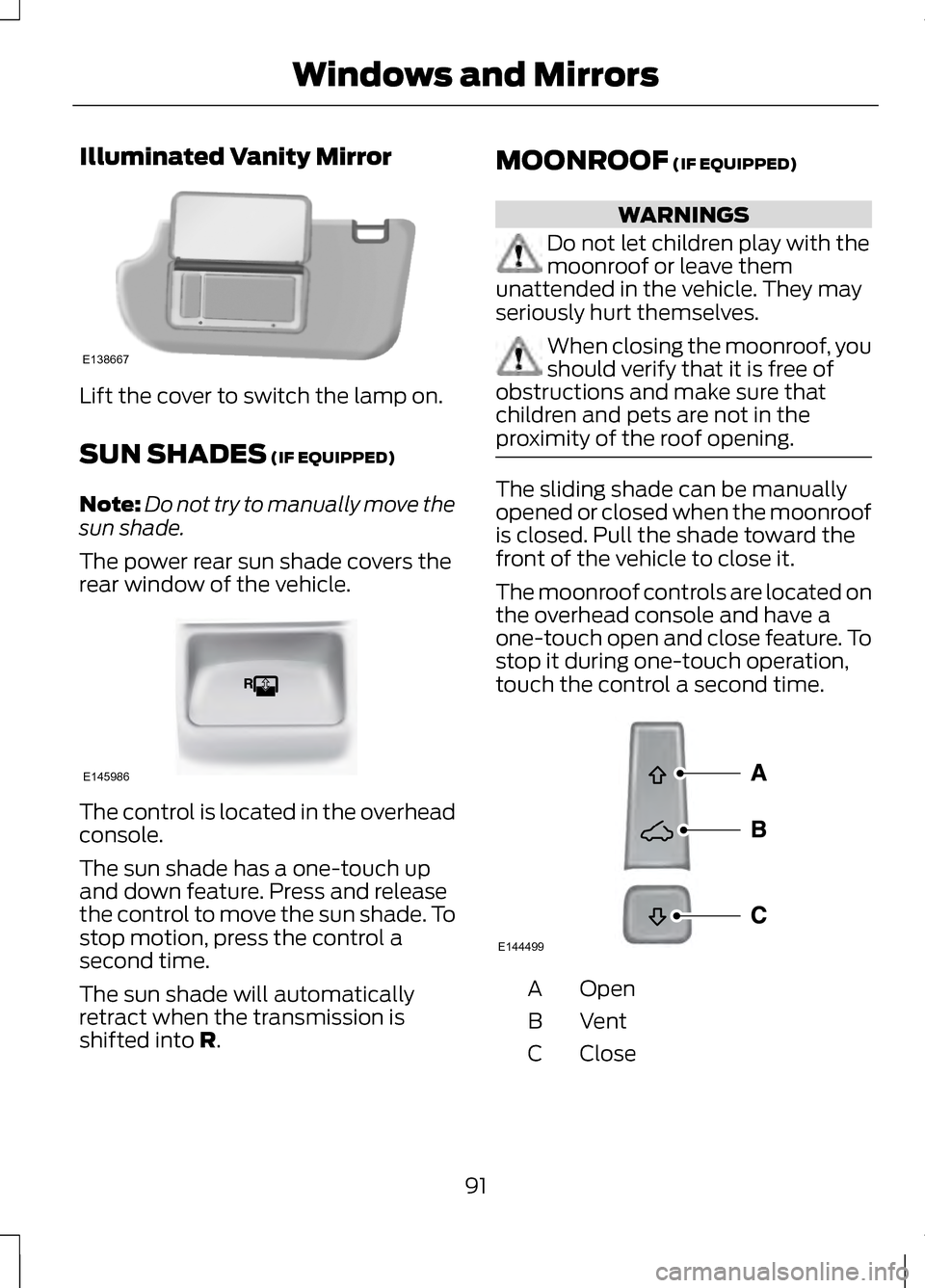
Illuminated Vanity Mirror
Lift the cover to switch the lamp on.
SUN SHADES (IF EQUIPPED)
Note: Do not try to manually move the
sun shade.
The power rear sun shade covers the
rear window of the vehicle. The control is located in the overhead
console.
The sun shade has a one-touch up
and down feature. Press and release
the control to move the sun shade. To
stop motion, press the control a
second time.
The sun shade will automatically
retract when the transmission is
shifted into
R. MOONROOF
(IF EQUIPPED) WARNINGS
Do not let children play with the
moonroof or leave them
unattended in the vehicle. They may
seriously hurt themselves. When closing the moonroof, you
should verify that it is free of
obstructions and make sure that
children and pets are not in the
proximity of the roof opening. The sliding shade can be manually
opened or closed when the moonroof
is closed. Pull the shade toward the
front of the vehicle to close it.
The moonroof controls are located on
the overhead console and have a
one-touch open and close feature. To
stop it during one-touch operation,
touch the control a second time.
Open
A
VentB
Close
C
91
Windows and MirrorsE138667 E145986 E144499
Page 106 of 474
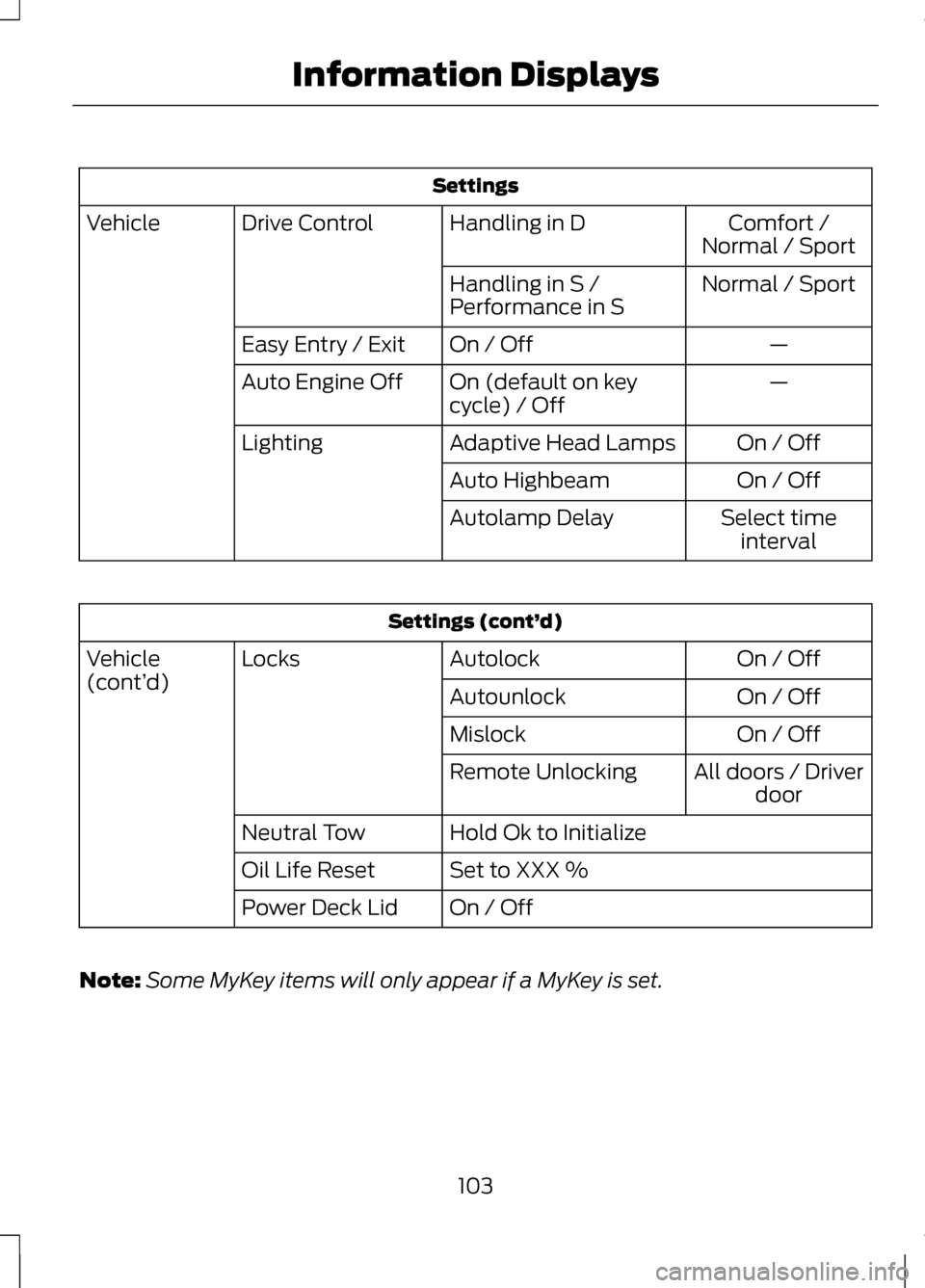
Settings
Comfort /
Normal / Sport
Handling in D
Drive Control
Vehicle
Normal / Sport
Handling in S /
Performance in S
—
On / Off
Easy Entry / Exit
—
On (default on key
cycle) / Off
Auto Engine Off
On / Off
Adaptive Head Lamps
Lighting
On / Off
Auto Highbeam
Select timeinterval
Autolamp Delay Settings (cont’
d)
On / Off
Autolock
Locks
Vehicle
(cont’ d)
On / Off
Autounlock
On / Off
Mislock
All doors / Driverdoor
Remote Unlocking
Hold Ok to Initialize
Neutral Tow
Set to XXX %
Oil Life Reset
On / Off
Power Deck Lid
Note: Some MyKey items will only appear if a MyKey is set.
103
Information Displays
Page 124 of 474
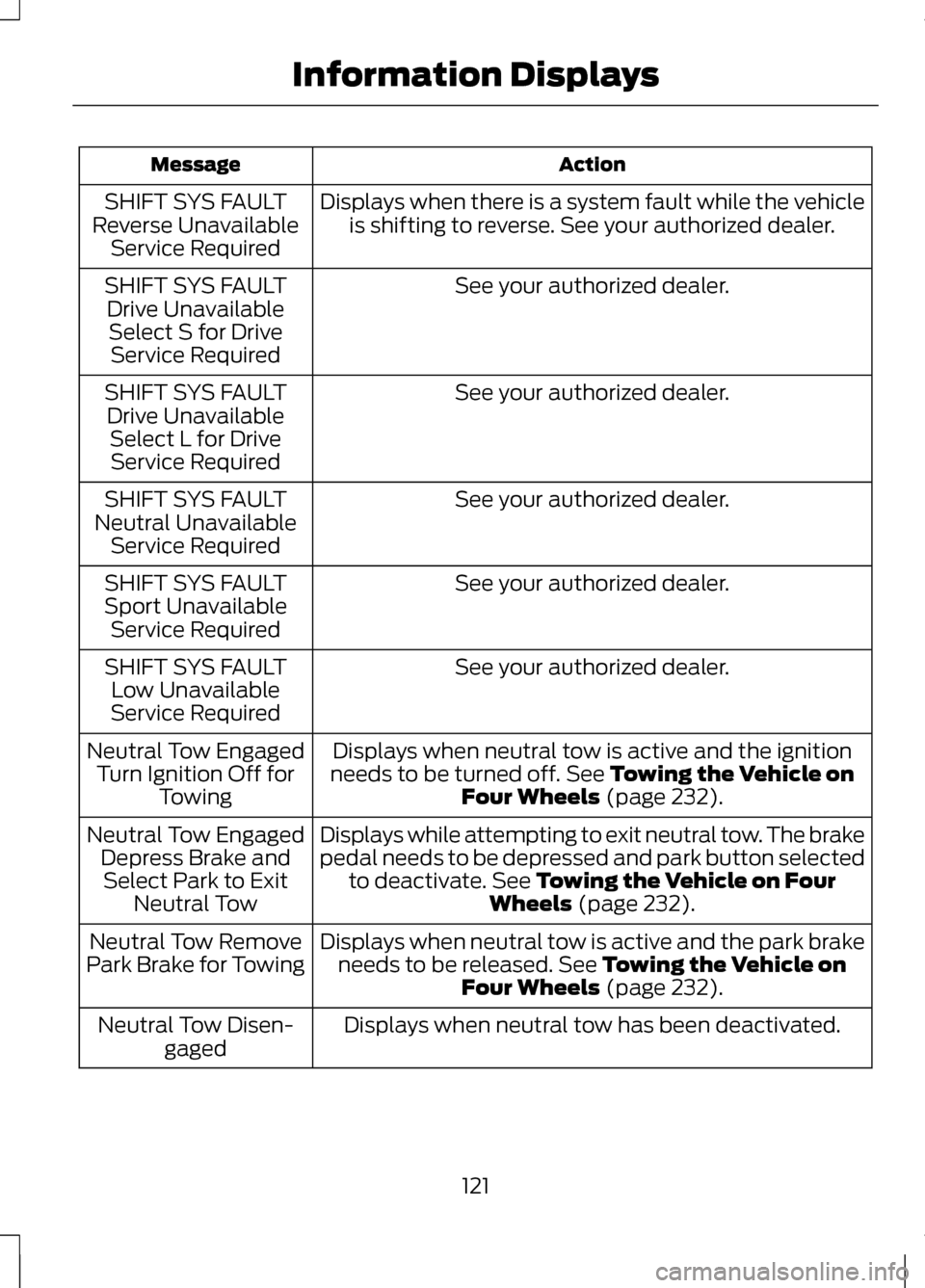
Action
Message
Displays when there is a system fault while the vehicleis shifting to reverse. See your authorized dealer.
SHIFT SYS FAULT
Reverse Unavailable Service Required
See your authorized dealer.
SHIFT SYS FAULT
Drive UnavailableSelect S for Drive Service Required
See your authorized dealer.
SHIFT SYS FAULT
Drive Unavailable Select L for DriveService Required
See your authorized dealer.
SHIFT SYS FAULT
Neutral Unavailable Service Required
See your authorized dealer.
SHIFT SYS FAULT
Sport Unavailable Service Required
See your authorized dealer.
SHIFT SYS FAULT
Low Unavailable
Service Required
Displays when neutral tow is active and the ignition
needs to be turned off. See Towing the Vehicle on
Four Wheels (page 232).
Neutral Tow Engaged
Turn Ignition Off for Towing
Displays while attempting to exit neutral tow. The brake
pedal needs to be depressed and park button selectedto deactivate.
See Towing the Vehicle on Four
Wheels (page 232).
Neutral Tow Engaged
Depress Brake andSelect Park to Exit Neutral Tow
Displays when neutral tow is active and the park brakeneeds to be released.
See Towing the Vehicle on
Four Wheels (page 232).
Neutral Tow Remove
Park Brake for Towing
Displays when neutral tow has been deactivated.
Neutral Tow Disen-
gaged
121
Information Displays
Page 125 of 474
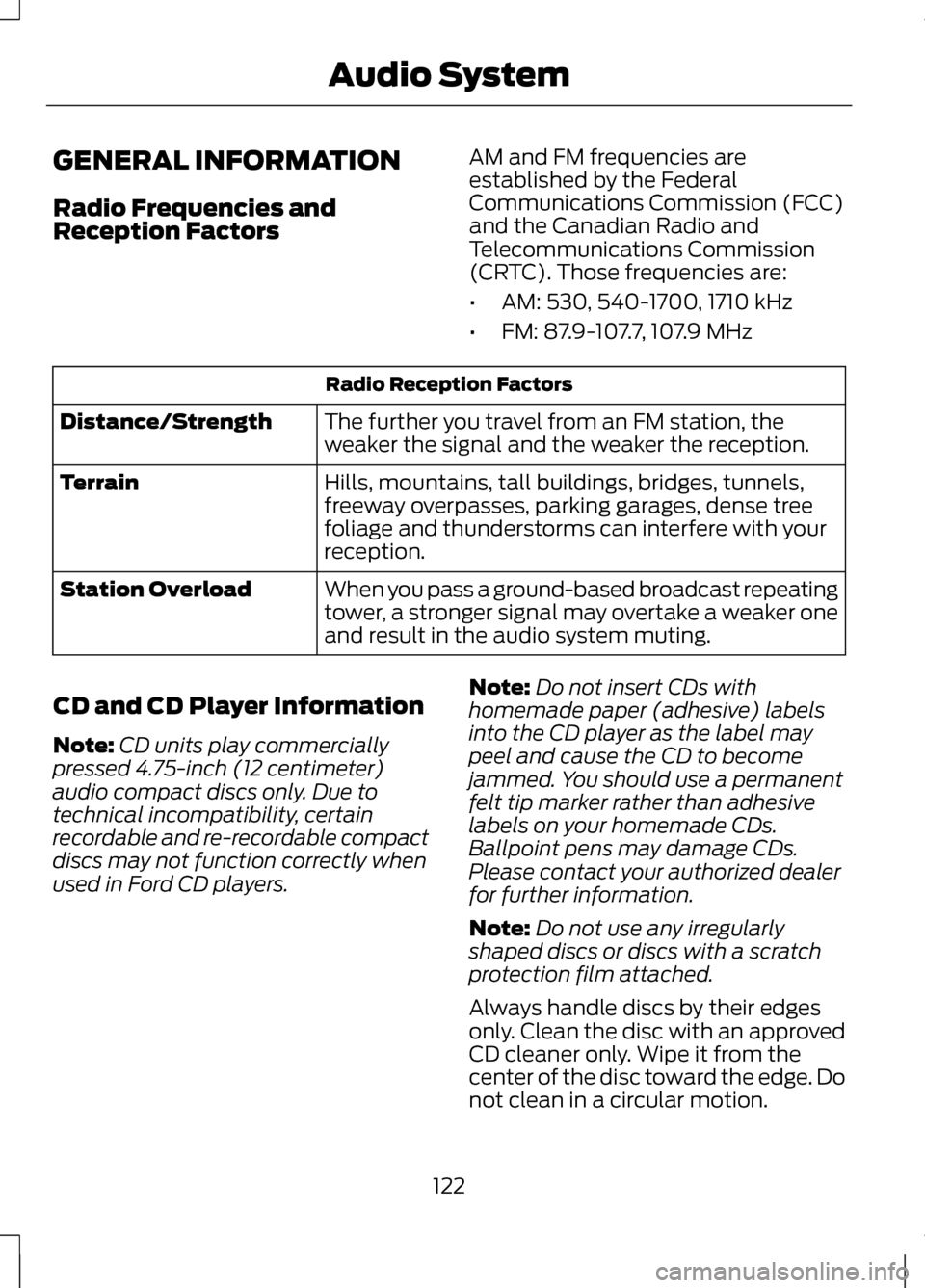
GENERAL INFORMATION
Radio Frequencies and
Reception Factors
AM and FM frequencies are
established by the Federal
Communications Commission (FCC)
and the Canadian Radio and
Telecommunications Commission
(CRTC). Those frequencies are:
•
AM: 530, 540-1700, 1710 kHz
• FM: 87.9-107.7, 107.9 MHz Radio Reception Factors
The further you travel from an FM station, the
weaker the signal and the weaker the reception.
Distance/Strength
Hills, mountains, tall buildings, bridges, tunnels,
freeway overpasses, parking garages, dense tree
foliage and thunderstorms can interfere with your
reception.
Terrain
When you pass a ground-based broadcast repeating
tower, a stronger signal may overtake a weaker one
and result in the audio system muting.
Station Overload
CD and CD Player Information
Note: CD units play commercially
pressed 4.75-inch (12 centimeter)
audio compact discs only. Due to
technical incompatibility, certain
recordable and re-recordable compact
discs may not function correctly when
used in Ford CD players. Note:
Do not insert CDs with
homemade paper (adhesive) labels
into the CD player as the label may
peel and cause the CD to become
jammed. You should use a permanent
felt tip marker rather than adhesive
labels on your homemade CDs.
Ballpoint pens may damage CDs.
Please contact your authorized dealer
for further information.
Note: Do not use any irregularly
shaped discs or discs with a scratch
protection film attached.
Always handle discs by their edges
only. Clean the disc with an approved
CD cleaner only. Wipe it from the
center of the disc toward the edge. Do
not clean in a circular motion.
122
Audio System