ESP LINCOLN MKZ 2013 Workshop Manual
[x] Cancel search | Manufacturer: LINCOLN, Model Year: 2013, Model line: MKZ, Model: LINCOLN MKZ 2013Pages: 474, PDF Size: 3.79 MB
Page 402 of 474
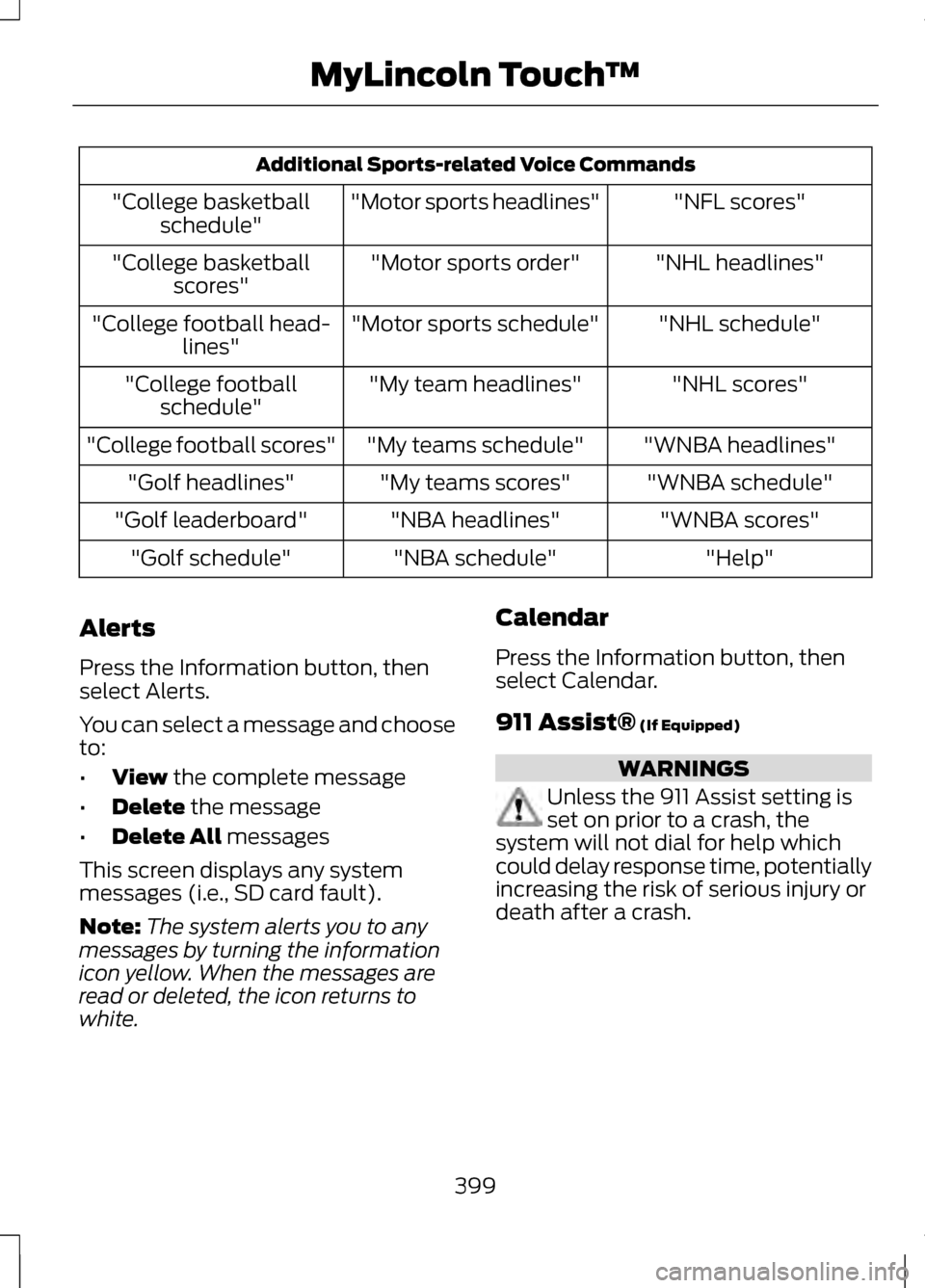
Additional Sports-related Voice Commands
"NFL scores"
"Motor sports headlines"
"College basketball
schedule"
"NHL headlines"
"Motor sports order"
"College basketball
scores"
"NHL schedule"
"Motor sports schedule"
"College football head-
lines"
"NHL scores"
"My team headlines"
"College football
schedule"
"WNBA headlines"
"My teams schedule"
"College football scores"
"WNBA schedule"
"My teams scores"
"Golf headlines"
"WNBA scores"
"NBA headlines"
"Golf leaderboard"
"Help"
"NBA schedule"
"Golf schedule"
Alerts
Press the Information button, then
select Alerts.
You can select a message and choose
to:
• View the complete message
• Delete
the message
• Delete All
messages
This screen displays any system
messages (i.e., SD card fault).
Note: The system alerts you to any
messages by turning the information
icon yellow. When the messages are
read or deleted, the icon returns to
white. Calendar
Press the Information button, then
select Calendar.
911 Assist®
(If Equipped) WARNINGS
Unless the 911 Assist setting is
set on prior to a crash, the
system will not dial for help which
could delay response time, potentially
increasing the risk of serious injury or
death after a crash.
399
MyLincoln Touch
™
Page 403 of 474
WARNINGS
Do not wait for 911 Assist to
make an emergency call if you
can do it yourself. Dial emergency
services immediately to avoid delayed
response time which could increase
the risk of serious injury or death after
a crash. If you do not hear 911 Assist
within five seconds of the crash, the
system or phone may be damaged or
non-functional. Always place your phone in a
secure location in the vehicle so
it does not become a projectile or get
damaged in a collision. Failure to do
so may cause serious injury to
someone or damage the phone which
could prevent 911 Assist from working
properly. Note:
The SYNC 911 Assist feature
must be set on prior to the incident.
Note: Before setting this feature on,
ensure that you read the 911 Assist
privacy notice later in this section for
important information.
Note: If 911 Assist is turned on or off by
any user, that setting applies for all
paired phones. If 911 Assist is turned
off, either a voice message plays or a
display message/icon comes on (or
both) when the vehicle is started after
a previously paired phone connects.
Note: Every phone operates differently.
While SYNC 911 Assist works with most
cellular phones, some may have
trouble using this feature. If a crash deploys an airbag or
activates the fuel pump shut-off, your
SYNC-equipped vehicle may be able
to contact emergency services by
dialing 911 through a paired and
connected Bluetooth-enabled phone.
For more information about 911 Assist,
visit www.SYNCMyRide.com,
www.SYNCMyRide.ca or
www.syncmaroute.ca.
See Supplementary Restraints
System (page 42). Important
information regarding airbag
deployment is in this chapter.
See
Roadside Emergencies (page
238). Important information regarding
the fuel pump shut-off is in this
chapter.
Setting 911 Assist On
Press the Information button, Apps,
911 Assist, then On.
You can also access 911 Assist by:
• Pressing the Settings icon,
Settings, Phone, then 911 Assist
• Pressing the Settings icon, Help,
911 Assist
To make sure that 911 Assist works
properly:
• SYNC must be powered and
working properly at the time of the
incident and throughout feature
activation and use.
• The 911 Assist feature must be set
on prior to the incident.
• A Bluetooth-enabled and
compatible phone has to be paired
and connected to SYNC.
400
MyLincoln Touch
™
Page 418 of 474
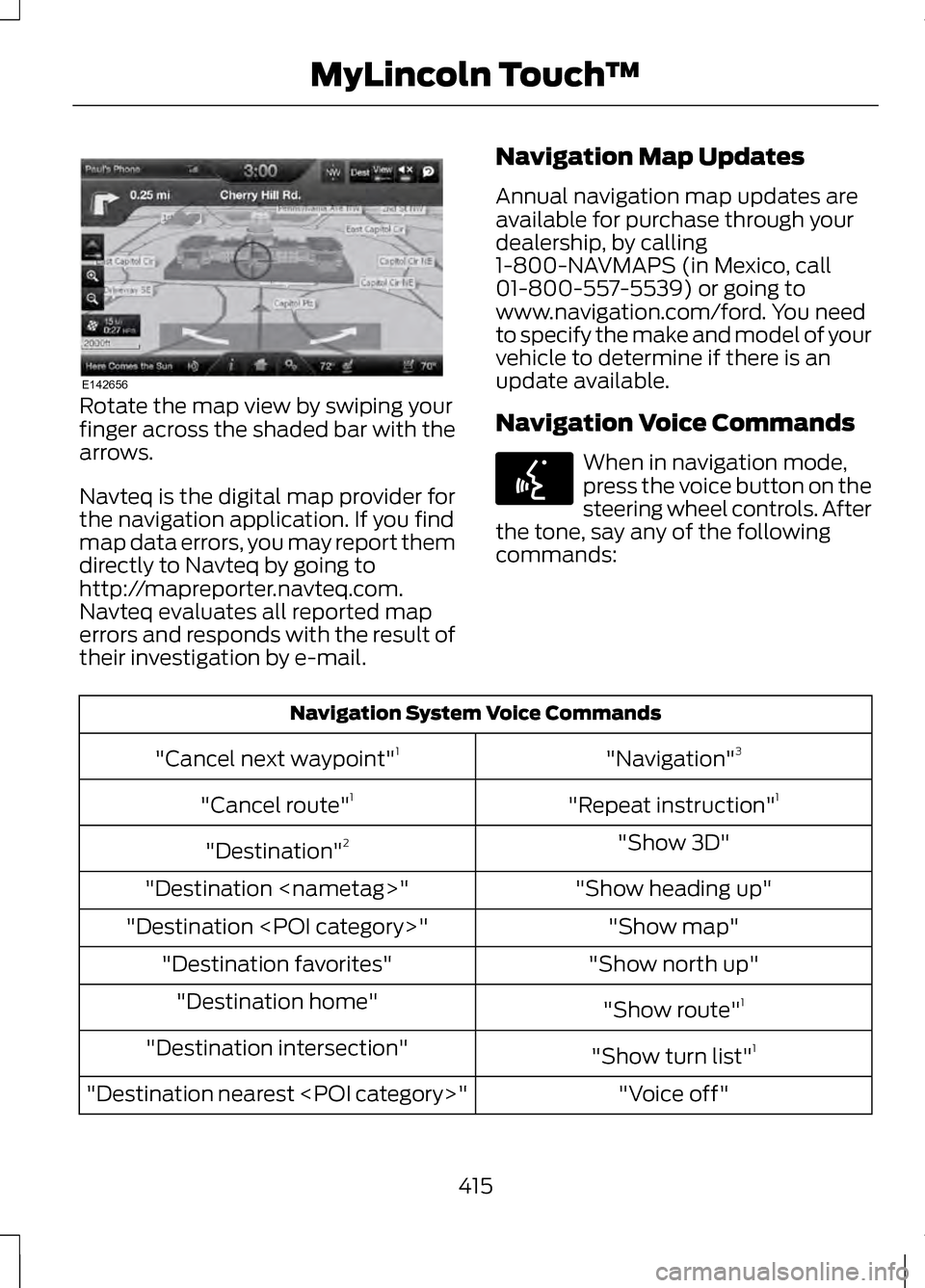
Rotate the map view by swiping your
finger across the shaded bar with the
arrows.
Navteq is the digital map provider for
the navigation application. If you find
map data errors, you may report them
directly to Navteq by going to
http://mapreporter.navteq.com.
Navteq evaluates all reported map
errors and responds with the result of
their investigation by e-mail.
Navigation Map Updates
Annual navigation map updates are
available for purchase through your
dealership, by calling
1-800-NAVMAPS (in Mexico, call
01-800-557-5539) or going to
www.navigation.com/ford. You need
to specify the make and model of your
vehicle to determine if there is an
update available.
Navigation Voice Commands When in navigation mode,
press the voice button on the
steering wheel controls. After
the tone, say any of the following
commands: Navigation System Voice Commands
"Navigation"3
"Cancel next waypoint" 1
"Repeat instruction" 1
"Cancel route" 1
"Show 3D"
"Destination" 2
"Show heading up"
"Destination
"Show map"
"Destination
"Show north up"
"Destination favorites"
"Show route"1
"Destination home"
"Show turn list"1
"Destination intersection"
"Voice off"
"Destination nearest
415
MyLincoln Touch
™E142656 E142599
Page 425 of 474
to you SOFTWARE updates,
supplements, add-on
components, or Internet-based
services components of the
SOFTWARE after the date you
obtain your initial copy of the
SOFTWARE ("Supplemental
Components").
If FORD MOTOR COMPANY or third
party software and services suppliers
provide or make available to you
Supplemental Components and no
other EULA terms are provided along
with the Supplemental Components,
then the terms of this EULA shall
apply.
If MS, Microsoft Corporation, their
affiliates and/or their designated
agent make available Supplemental
Components, and no other EULA
terms are provided, then the terms of
this EULA shall apply, except that the
MS, Microsoft Corporation or affiliate
entity providing the Supplemental
Component(s) shall be the licensor
of the Supplemental Component(s).
FORD MOTOR COMPANY, MS,
Microsoft Corporation, their affiliates
and/or their designated agent reserve
the right to discontinue without
liability any Internet-based services
provided to you or made available to
you through the use of the
SOFTWARE. •
Links to Third Party Sites: The
MS SOFTWARE may provide you
with the ability to link to third party
sites through the use of the
SOFTWARE. The third party sites
are not under the control of MS,
Microsoft Corporation, their
affiliates and/or their designated
agent. Neither MS nor Microsoft
Corporation nor their affiliates nor
their designated agent are
responsible for (i) the contents of
any third party sites, any links
contained in third party sites, or
any changes or updates to third
party sites, or (ii) webcasting or
any other form of transmission
received from any third party sites.
If the SOFTWARE provides links to
third party sites, those links are
provided to you only as a
convenience, and the inclusion of
any link does not imply an
endorsement of the third party site
by MS, Microsoft Corporation, their
affiliates and/or their designated
agent.
• Obligation to Drive
Responsibly:
You recognize your
obligation to drive responsibly and
keep attention on the road. You
will read and abide with the
DEVICE operating instructions
particularly as they pertain to
safety and assumes any risk
associated with the use of the
DEVICE.
422
Appendices
Page 426 of 474
UPGRADES AND RECOVERY
MEDIA: If the SOFTWARE is provided
by FORD MOTOR COMPANY separate
from the DEVICE on media such as a
ROM chip, CD ROM disk(s) or via web
download or other means, and is
labeled "For Upgrade Purposes Only"
or "For Recovery Purposes Only" you
may install one (1) copy of such
SOFTWARE onto the DEVICE as a
replacement copy for the existing
SOFTWARE, and use it in accordance
with this EULA, including any
additional EULA terms accompanying
the upgrade SOFTWARE.
INTELLECTUAL PROPERTY
RIGHTS: All title and intellectual
property rights in and to the
SOFTWARE (including but not limited
to any images, photographs,
animations, video, audio, music, text
and "applets" incorporated into the
SOFTWARE), the accompanying
printed materials, and any copies of
the SOFTWARE, are owned by MS,
Microsoft Corporation, FORD MOTOR
COMPANY, or their affiliates or
suppliers. The SOFTWARE is licensed,
not sold. You may not copy the
printed materials accompanying the
SOFTWARE. All title and intellectual
property rights in and to the content
which may be accessed through use
of the SOFTWARE is the property of
the respective content owner and may
be protected by applicable copyright
or other intellectual property laws and
treaties. This EULA grants you no
rights to use such content. All rights
not specifically granted under this
EULA are reserved by MS, Microsoft
Corporation, FORD MOTOR
COMPANY, third party software and
service providers, their affiliates and
suppliers. Use of any on-line services
which may be accessed through the
SOFTWARE may be governed by the
respective terms of use relating to
such services. If this SOFTWARE
contains documentation that is
provided only in electronic form, you
may print one copy of such electronic
documentation.
423
Appendices
Page 429 of 474
Volume Setting: Do not raise the
volume excessively. Keep the volume
at a level where you can still hear
outside traffic and emergency signals
while driving. Driving while unable to
hear these sounds could cause an
accident.
Use of Speech Recognition
Functions:
Speech recognition
software is inherently a statistical
process which is subject to errors. It is
your responsibility to monitor any
speech recognition functions included
in the system and address any errors.
Navigation Features: Any navigation
features included in the system are
intended to provide turn by turn
instructions to get you to a desired
destination. Please make certain all
persons using this system carefully
read and follow instructions and
safety information fully.
Distraction Hazard:
Any navigation
features may require manual
(non-verbal) setup. Attempting to
perform such set-up or insert data
while driving can seriously distract
your attention and could cause an
accident or other serious
consequences. Stop the vehicle in a
safe and legal manner before
attempting these operations. Let Your Judgment Prevail:
Any
navigation features are provided only
as an aid. Make your driving decisions
based on your observations of local
conditions and existing traffic
regulations. Any such feature is not a
substitute for your personal judgment.
Any route suggestions made by this
system should never replace any local
traffic regulations or your personal
judgment or knowledge of safe driving
practices.
Route Safety:
Do not follow the
route suggestions if doing so would
result in an unsafe or illegal maneuver,
if you would be placed in an unsafe
situation, or if you would be directed
into an area that you consider unsafe.
The driver is ultimately responsible for
the safe operation of the vehicle and
therefore, must evaluate whether it is
safe to follow the suggested
directions.
Potential Map Inaccuracy:
Maps
used by this system may be
inaccurate because of changes in
roads, traffic controls or driving
conditions. Always use good judgment
and common sense when following
the suggested routes.
Emergency Services: Do not rely on
any navigation features included in
the system to route you to emergency
services. Ask local authorities or an
emergency services operator for these
locations. Not all emergency services
such as police, fire stations, hospitals
and clinics are likely to be contained
in the map database for such
navigation features.
426
Appendices
Page 432 of 474
4. Disclaimers
To the fullest extent permissible
pursuant to applicable law, in no
event will TeleNav, its licensors and
suppliers, or agents or employees of
any of the foregoing, be liable for any
decision made or action taken by you
or anyone else in reliance on the
information provided by the TeleNav
Software. TeleNav also does not
warrant the accuracy of the map or
other data used for the TeleNav
Software. Such data may not always
reflect reality due to, among other
things, road closures, construction,
weather, new roads and other
changing conditions. You are
responsible for the entire risk arising
out of your use of the TeleNav
Software. For example but without
limitation, you agree not to rely on the
TeleNav Software for critical
navigation in areas where the
well-being or survival of you or others
is dependent on the accuracy of
navigation, as the maps or
functionality of the TeleNav Software
are not intended to support such high
risk applications, especially in more
remote geographical areas.
TELENAV EXPRESSLY DISCLAIMS
AND EXCLUDES ALL WARRANTIES
IN CONNECTION WITH THE TELENAV
SOFTWARE, WHETHER STATUTORY,
EXPRESS OR IMPLIED, INCLUDING
ALL WARRANTIES WHICH MAY
ARISE FROM COURSE OF DEALING,
CUSTOM OR TRADE AND INCLUDING,
BUT NOT LIMITED TO, THE IMPLIED
WARRANTIES OF
MERCHANTABILITY, FITNESS FOR A
PARTICULAR PURPOSE AND
NON-INFRINGEMENT OF THIRD
PARTY RIGHTS WITH RESPECT TO
THE TELENAV SOFTWARE. Certain
jurisdictions do not permit the
disclaimer of certain warranties, so
this limitation may not apply to you.
5. Limitation of Liability
TO THE EXTENT PERMITTED UNDER
APPLICABLE LAW, UNDER NO
CIRCUMSTANCES SHALL TELENAV
OR ITS LICENSORS AND SUPPLIERS
BE LIABLE TO YOU OR TO ANY THIRD
PARTY FOR ANY INDIRECT,
INCIDENTAL, CONSEQUENTIAL,
SPECIAL OR EXEMPLARY DAMAGES
(INCLUDING IN EACH CASE, BUT NOT
LIMITED TO, DAMAGES FOR THE
INABILITY TO USE THE EQUIPMENT
OR ACCESS DATA, LOSS OF DATA,
LOSS OF BUSINESS, LOSS OF
PROFITS, BUSINESS INTERRUPTION
OR THE LIKE) ARISING OUT OF THE
USE OF OR INABILITY TO USE THE
TELENAV SOFTWARE, EVEN IF
TELENAV HAS BEEN ADVISED OF
THE POSSIBILITY OF SUCH
DAMAGES.
429
Appendices
Page 434 of 474
7. Assignment
You may not resell, assign, or transfer
this Agreement or any of your rights
or obligations, except in totality, in
connection with your permanent
transfer of the TeleNav Software, and
expressly conditioned upon the new
user of the TeleNav Software agreeing
to be bound by the terms and
conditions of this Agreement. Any
such sale, assignment or transfer that
is not expressly permitted under this
paragraph will result in immediate
termination of this Agreement,
without liability to TeleNav, in which
case you and all other parties shall
immediately cease all use of the
TeleNav Software. Notwithstanding
the foregoing, TeleNav may assign this
Agreement to any other party at any
time without notice, provided the
assignee remains bound by this
Agreement.
8. Miscellaneous
8.1
This Agreement constitutes the entire
agreement between TeleNav and you
with respect to the subject matter
hereof.
8.2
Except for the limited licenses
expressly granted in this Agreement,
TeleNav retains all right, title and
interest in and to the TeleNav
Software, including without limitation
all related intellectual property rights.
No licenses or other rights which are
not expressly granted in this
Agreement are intended to, or shall
be, granted or conferred by
implication, statute, inducement,
estoppel or otherwise, and TeleNav
and its suppliers and licensors hereby
reserve all of their respective rights
other than the licenses explicitly
granted in this Agreement
8.3
By using the TeleNav Software, you
consent to receive from TeleNav all
communications, including notices,
agreements, legally required
disclosures or other information in
connection with the TeleNav
Software (collectively, "Notices")
electronically. TeleNav may provide
such Notices by posting them on
TeleNav's Website or by downloading
such Notices to your wireless device.
If you desire to withdraw your consent
to receive Notices electronically, you
must discontinue your use of the
TeleNav Software.
431
Appendices
Page 438 of 474
Disclaimer of Liability: NT AND ITS
LICENSORS (INCLUDING THEIR
LICENSORS AND SUPPLIERS) SHALL
NOT BE LIABLE TO YOU IN RESPECT
OF ANY CLAIM, DEMAND OR ACTION,
IRRESPECTIVE OF THE NATURE OF
THE CAUSE OF THE CLAIM, DEMAND
OR ACTION ALLEGING ANY LOSS,
INJURY OR DAMAGES, DIRECT OR
INDIRECT, WHICH MAY RESULT
FROM THE USE OR POSSESSION OF
THIS DATA; OR FOR ANY LOSS OF
PROFIT, REVENUE, CONTRACTS OR
SAVINGS, OR ANY OTHER DIRECT,
INDIRECT, INCIDENTAL, SPECIAL OR
CONSEQUENTIAL DAMAGES
ARISING OUT OF YOUR USE OF OR
INABILITY TO USE THIS DATA, ANY
DEFECT IN THIS DATA, OR THE
BREACH OF THESE TERMS OR
CONDITIONS, WHETHER IN AN
ACTION IN CONTRACT OR TORT OR
BASED ON A WARRANTY, EVEN IF
NT OR ITS LICENSORS HAVE BEEN
ADVISED OF THE POSSIBILITY OF
SUCH DAMAGES. Some States,
Territories and Countries do not allow
certain liability exclusions or damages
limitations, so to that extent the
above may not apply to you. Export Control: You agree not to
export from anywhere any part of the
Data or any direct product thereof
except in compliance with, and with
all licenses and approvals required
under, applicable export laws, rules
and regulations, including but not
limited to the laws, rules and
regulations administered by the Office
of Foreign Assets Control of the U.S.
Department of Commerce and the
Bureau of Industry and Security of the
U.S. Department of Commerce. To the
extent that any such export laws, rules
or regulations prohibit NT from
complying with any of its obligations
hereunder to deliver or distribute Data,
such failure shall be excused and shall
not constitute a breach of this
Agreement.
Entire Agreement:
These terms and
conditions constitute the entire
agreement between NT (and its
licensors, including their licensors and
suppliers) and you pertaining to the
subject matter hereof, and supersedes
in their entirety any and all written or
oral agreements previously existing
between us with respect to such
subject matter.
Severability:
You and NT agree that
if any portion of this agreement is
found illegal or unenforceable, that
portion shall be severed and the
remainder of the Agreement shall be
given full force and effect.
435
Appendices
Page 440 of 474
Gracenote® End User License
Agreement (EULA)
This device contains software from
Gracenote, Inc. of 2000 Powell Street
Emeryville, California 94608
("Gracenote").
The software from Gracenote (the
"Gracenote Software") enables this
device to do disc and music file
identification and obtain
music-related information, including
name, artist, track, and title
information ("Gracenote Data") from
online servers ("Gracenote Servers"),
and to perform other functions. You
may use Gracenote Data only by
means of the intended End User
functions of this device.
This device may contain content
belonging to Gracenote's providers. If
so, all of the restrictions set forth
herein with respect to Gracenote Data
shall also apply to such content and
such content providers shall be
entitled to all of the benefits and
protections set forth herein that are
available to Gracenote.
You agree that you will use the
content from Gracenote ("Gracenote
Content") , Gracenote Data, the
Gracenote Software, and Gracenote
Servers for your own personal,
non-commercial use only. You agree
not to assign, copy, transfer or
transmit the Gracenote Content,
Gracenote Software or any Gracenote
Data (except in a Tag associated with
a music file) to any third party. YOU
AGREE NOT TO USE OR EXPLOIT
GRACENOTE CONTENT,
GRACENOTE DATA, THE
GRACENOTE SOFTWARE, OR
GRACENOTE SERVERS, EXCEPT AS
EXPRESSLY PERMITTED HEREIN.
You agree that your non-exclusive
licenses to use the Gracenote
Content, Gracenote Data, the
Gracenote Software, and Gracenote
Servers will terminate if you violate
these restrictions. If your licenses
terminate, you agree to cease any and
all use of the Gracenote Content,
Gracenote Data, the Gracenote
Software, and Gracenote Servers.
Gracenote, respectively, reserve all
rights in Gracenote Data, the
Gracenote Software, and the
Gracenote Servers and Gracenote
Content, including all ownership
rights. Under no circumstances will
either Gracenote become liable for
any payment to you for any
information that you provide, including
any copyrighted material or music file
information. You agree that Gracenote
may enforce its respective rights,
collectively or separately, under this
agreement against you, directly in
each company's own name.
437
Appendices