wheel MAZDA 626 1987 Workshop Manual
[x] Cancel search | Manufacturer: MAZDA, Model Year: 1987, Model line: 626, Model: MAZDA 626 1987Pages: 1865, PDF Size: 94.35 MB
Page 1549 of 1865

13 REAR WHEEL ALIGNMENT
76G13X-033
86U13X-116
86U13X-117
86U13X-116
13-52
REAR WHEEL ALIGNMENT
PRE-INSPECTION
1. Check the tire inflation and bring to the recom-
mended pressure.
2. Inspect the wheel and tire runout.
3. The vehicle must be on level ground and have no
luggage or passenger load.
4. Check that the suspension is correctly adjusted.
5. The difference in height between the left and right
sides from the center of the wheel to the fender
rim should be within 10 mm (0.39 in).
Caution
a) Front and rear wheel alignments should be
checked simultaneously. If adjustment is
made to either the front or rear wheels,
recheck the alignment, particularly toe-in,
on all other wheels.
b) Check and adjust the steering angle trans-
fer shaft after adjusting the rear wheel align-
ment. (Refer to Section 10.)
TOE-IN
Inspection
1. Raise the rear of the vehicle until the wheels clear
the ground.
2. Turn the wheels by hand, mark a line in the center
of each tire tread using a scribing block.
3. Lower the vehicle.
4. Measure the distance between the marked lines
at the front and rear of the wheels.
Toe-in
0 ± 3 mm (0 ±0.12 in) 2WS
3 ± 3 mm (0.12 ±0.12 in) 4WS
Adjustment (2WS)
1. Loosen the adjusting rod lock nuts, then adjust the
toe-in.
2. To increase the toe-in, turn the adjusting rods as
follows:
Right rod — Turn counterclockwise
Left rod — Turn clockwise
To decrease the toe-in, turn the adjusting rods as
follows:
Right rod — Turn clockwise
Left rod — Turn counterclockwise
Caution
a) Both the left and right rods must be adjust-
ed by the same amount.
b) One turn of the adjusting rod (both sides)
changes the toe-in by about 11.6 mm (0.46
in).
3. Tighten the adjusting rod lock nuts to the speci-
fied torque.
Tightening torque:
55—80 N-m (5.6—8.2 m-kg, 41—59 ft-lb)
Page 1550 of 1865

REAR WHEEL ALIGNMENT 13
86U13X-119
Adjustment (4WS)
To adjust the toe-in, loosen the left and right tie-rod
locknuts, and turn the tie-rods by the same amount.
Caution
a) The left and right tie-rods are both right
threaded, so, to increase the toe-in, turn the
right tie-rod toward the front of the vehicle,
and turn the left tie-rod by the same amount
toward the rear.
b) One turn of the tie-rod (both sides) changes
the toe-in by about 7.8 mm (0.31 in).
c) Adjust the toe-in after adjusting the steer-
ing angle.
Tighten the tie-rod locknuts to the specified torque.
Tightening torque: 69—98 N-m
(7—10 m-kg, 51—72 ft-lb)
86U13X-120
CAMBER
Preparation
1. Remove the center caps from the wheels.
2. Uncrimp the locknut and remove it.
86U13X-121
Inspection
1. Install the SST to the driveshaft.
86U13X-122
13—53
Page 1551 of 1865

13 REAR WHEEL ALIGNMENT
2. Measure the camber angle with the caster/cam-
ber gauge.
Camber: -0°30' ± 45' (2WS)
0°00' ± 45' (4WS)
86U13X-123
Front
EAR TURNING ANGLE (4WS)
Place the rear wheels on a turning radius gauge.
Jack up the front of the vehicle.
Start the engine and let it idle.
Caution
If the engine is stopped while the steering
wheel is left turned to one side or the other,
the rear wheels will return to the straight-
ahead direction, and, when the engine is later
started once again, the direction of the rear
wheels will change. Be sure, therefore, to
check to be sure that the wheels are not
touching, or close to, anyone's hands or feet,
or any other object, when the engine is
stopped or started.
Turn the steering wheel fully left and right, and
measure the rear turning angle.
Rear turning angle Inner 5°00' ± 45'
Outer 5°00' ± 45'
If not within specification, adjust the rear turning
angle. (Refer to Section 10)
86U13X-125
13—54
Page 1624 of 1865

INSTRUMENT PANEL 1 4
INSTRUMENT PANEL
STRUCTURAL VIEW
1. Rear console
2. Upper plate.
3. Front console
4. Glove compartment
5. Side cover
6. Side cover
7. Box
8. Ashtray
9. Center panel
10. Heater control assembly
11. Steering wheel cap
12. Steering wheel
13. Column cover
14. Switch panel
76G14X-036
15. Cap
16. Meter hood
17. Duct
18. Duct and under cover
19. Under cover
20. Duct
21. Meter assembly
22. Instrument panel
14—73
Page 1627 of 1865

1 4 INSTRUMENT PANEL
6. Remove the steering wheel cap.
76G14X-026
7. Remove the steering wheel mounting nut.
76G14X-027
9. Remove the screws and remove the column covers
(upper and lower).
76G14X-028
14—76
Page 1631 of 1865

14 INSTRUMENT PANEL
INSTALLATION
Install in the reverse order of removal, noting the fol-
lowing.
1. Tightening torque:
.^Torque Bolt
N-m (m-kg,
ft-lb)
©
4.22-6.18 (0.43-0.63, 3.10-4.54)
®(D
8.8-14 (0.9—1.4, 6.5—10)
©(D
8.8—14 (0.9—1.4, 6.5—10)
©@
8.8-14 (0.9-1.4, 6.5-10)
Steering wheel 39-49 (4.0—5.0, 29—36)
86U14X-195
2. Air-mix door control wire
a. Set TEMP lever at MAX—COLD position.
b. Connect the control wire and clamp it with the
shutter lever on the heater unit all the way to the
right side.
Caution
Move the temperature control lever to check
that the wire is secured. Also, check that it
moves the full stroke between HOT and COLD.
69G14X-224
3. Mode control wire
a. Set MODE control lever to DEF position.
b. Connect the control wire and clamp it with the
shutter lever on the heater unit at its closest point.
Caution
Move the mode lever to check that the wire
is secured. Also, check that it moves the full
stroke between DEF and VENT.
69G14X-225
, REC-FRESH air selector wire
a. Set the selector lever to REC position.
b. Connect the control wire and clamp it with the
shutter lever on the blower unit at its closest
point.
Caution
Move the recirculate-fresh air switch lever to
check that the wire is secured. Also, check
that it moves the full stroke between REC and
FRESH.
69G14X-226
14—80
Page 1671 of 1865

1 5 COMBINATION SWITCH
Steering angle sensor
Terminal Steering wheel position Resistance value
AO
to
AR Turn the wheel
a
little
at
a
time from
the
straight-ahead posi-
tion 180° to the right.
Decreases from about
25 kfi to about 200
fl.
AO
to
AR Straight-ahead position About
25 kfi
AO
to
AR Turn the wheel
a
little at
a
time from
the
straight-ahead posi-tion 180°
to
the left.
Increases from about 25 kfl to about 50 kfl.
AL
to
AR Straight-ahead position About
50 kfi
86U15X-014
—
i 50kn k Resistance
25M?
2000
" 180° 0° 180° " To the left To the right
86U15X-015
Note
When the steering wheel is turned more than
the specified angle in the above test, the re-
sistance value will become as shown in the
table below.
Terminal Steering wheel position Resistance value
AO
to
AR When turned 180°
or
more to the right from the straight-ahead po-sition.
Resistance slowly and gradually decreases after there
is
once
an
indication of about 50 kfl.
AO
to
AR When turned 180°
or
more
to
the left from
the straight-ahead po-
sition.
Resistance slowly and gradually increases after there
is
once
an
indication
of
about 200
fl.
15—16
Page 1750 of 1865
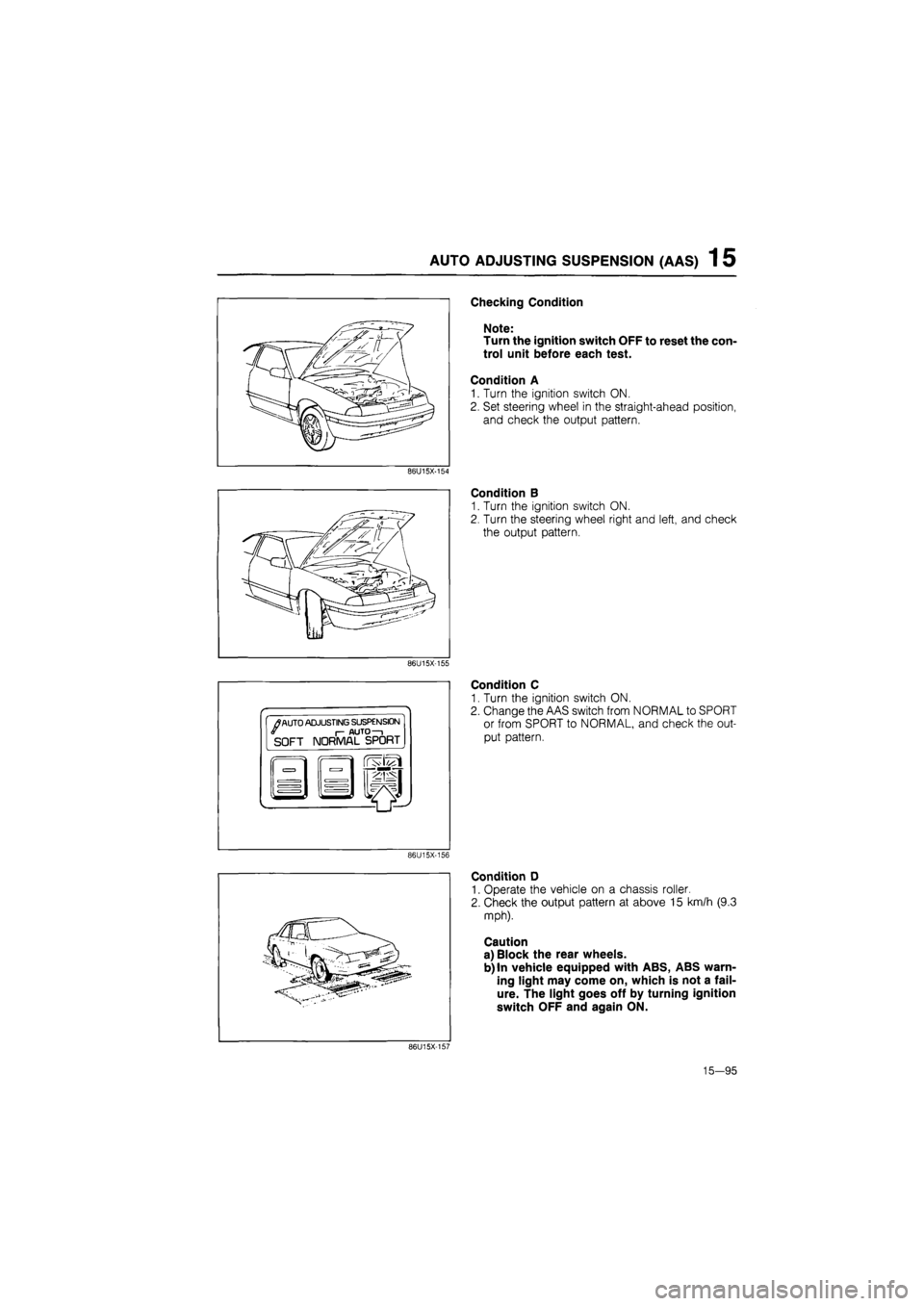
AUTO ADJUSTING SUSPENSION (AAS) 1 5
Checking Condition
Note:
Turn the ignition switch OFF to reset the con-
trol unit before each test.
Condition A
1. Turn the ignition switch ON.
2. Set steering wheel in the straight-ahead position,
and check the output pattern.
86U15X-154
Condition B
1. Turn the ignition switch ON.
2. Turn the steering wheel right and left, and check
the output pattern.
86U15X-155
•
/
AUTO ADJUSTING SUSPENSION I- AUTO—i SOFT NORMAL SPORT
Condition C
1. Turn the ignition switch ON.
2. Change the AAS switch from NORMAL to SPORT
or from SPORT to NORMAL, and check the out-
put pattern.
86U15X-156
Condition D
1. Operate the vehicle on a chassis roller.
2. Check the output pattern at above 15 km/h (9.3
mph).
Caution
a) Block the rear wheels.
b) In vehicle equipped with ABS, ABS warn-
ing light may come on, which is not a fail-
ure. The light goes off by turning ignition
switch OFF and again ON.
86U15X-157
15—95
Page 1751 of 1865

1 5 AUTO ADJUSTING SUSPENSION (AAS)
Condition Output pattern Malfunction Flow chart
No.
A
Set steering wheel
in
straight ahead position
0.5 sec
4.4V
n\/
2 sec
Vehicle speed sensor
or
wiring harness (Meter
—
Control unit)
AAS-1
Refer
to
page
15—98
A
Set steering wheel
in
straight ahead position
Vehicle speed sensor
or
wiring harness (Meter
—
Control unit)
AAS-1
Refer
to
page
15—98
A
Set steering wheel
in
straight ahead position
0.5 secO.!
4.4V
nv
i sec
2
sec
— <—i i— -
Steering wheel angle sen-
sor
or
wiring harness (An-
gle sensor
—
Control unit)
AAS-2
Refer
to
page
15-98
A
Set steering wheel
in
straight ahead position
-
Steering wheel angle sen-
sor
or
wiring harness (An-
gle sensor
—
Control unit)
AAS-2
Refer
to
page
15-98
A
Set steering wheel
in
straight ahead position
nv
Normal operation or wiring
harness (Fuse box
—
Con-
trol unit, control unit
—
Body ground)
AAS-3
Refer
to
page
15-99
A
Set steering wheel
in
straight ahead position
Normal operation or wiring
harness (Fuse box
—
Con-
trol unit, control unit
—
Body ground)
AAS-3
Refer
to
page
15-99
B
Turn the steering wheel
right and left
0.5 sec
4.4V
n\/
2 sec
—
Vehicle speed sensor
or
wiring harness (Meter
—
Control unit)
AAS-1
Refer
to
page
15-98
B
Turn the steering wheel
right and left
Vehicle speed sensor
or
wiring harness (Meter
—
Control unit)
AAS-1
Refer
to
page
15-98
B
Turn the steering wheel
right and left
0.5 sec 0
4.4V""-
.5 se c 2 se
-
Normal operation
—
B
Turn the steering wheel
right and left Normal operation
—
B
Turn the steering wheel
right and left
ov
Wiring harness (Fuse box
— Control unit, Control unit
— Body ground) See page
AAS-4
Refer
to
page
15—99
B
Turn the steering wheel
right and left
Wiring harness (Fuse box
— Control unit, Control unit
— Body ground) See page
AAS-4
Refer
to
page
15—99
C
Change the switch from
NORMAL to SPORT
or
from SPORT
to
NORMAL
0.5 sec
4.4V-""
_
n
Normal operation
—
C
Change the switch from
NORMAL to SPORT
or
from SPORT
to
NORMAL
Normal operation
—
C
Change the switch from
NORMAL to SPORT
or
from SPORT
to
NORMAL
0.5 sec 0
4.4V
nv
.5 se c
—
2 se
C
i—1 i—i
Front actuators
or
wiring
harness (Control unit
—
Front right
or
left actuator
AAS-5
Refer
to
page
15-100
C
Change the switch from
NORMAL to SPORT
or
from SPORT
to
NORMAL
Front actuators
or
wiring
harness (Control unit
—
Front right
or
left actuator
AAS-5
Refer
to
page
15-100
C
Change the switch from
NORMAL to SPORT
or
from SPORT
to
NORMAL
0.5 sec 0
4.4V*-
n\/
.5 se c
— r— —
2 sec
—1
Rear actuators
or
wiring
harness (Control unit
—
Rear right
or
left actuator
AAS-6
Refer
to
page
15-101
C
Change the switch from
NORMAL to SPORT
or
from SPORT
to
NORMAL
Rear actuators
or
wiring
harness (Control unit
—
Rear right
or
left actuator
AAS-6
Refer
to
page
15-101
15-96
Page 1752 of 1865

AUTO ADJUSTING SUSPENSION (AAS) 1 5
C
(Cont'd)
Operate
the
vehicle
at
above
15 km/h (9.3
mph) on
a
chassis roller
OV-
4.4V
0V-
4.4V
OV-
OV
AAS switch
or
wiring har-
ness (Fuse box
—
Control
box and AAS switch, AAS
switch
—
Control box and
Body ground)
Normal operation
Speed sensor
or
Steering
wheel angle sensor
or
wir-
ing harness (Control unit
—
Meter, Control unit
—
An-
gle sensor)
Speed sensor
or
Wiring
harness (Control unit
—
Meter, Fuse box
—
Control
unit, Control unit
—
Body
ground)
76G15X-080
15-97