display MERCEDES-BENZ CL COUPE 2009 Service Manual
[x] Cancel search | Manufacturer: MERCEDES-BENZ, Model Year: 2009, Model line: CL COUPE, Model: MERCEDES-BENZ CL COUPE 2009Pages: 421, PDF Size: 10.78 MB
Page 88 of 421
Overview of the video DVD menu
DVD-V II/M
M ¯
¯ Changer (for
DVD changer*
only) Sound
DVD functions Pauses play-
back
II Stops playback
¯ Media selection Treble
Brightness Continues play-
back
M Bass
Contrast Balance/fader
Colour Surround
sound*
16:9 optimised
4:3
Widescreen
Switching to video DVD mode
X Insert a DVD.
or
X Select VideoQDVD-Video.
or
X Press the Rfunction button once or
twice.
The number of times you have to press the
R function button depends on the oper-
ating mode currently selected. The function
button takes you directly to the previously set
disc mode (audio CD, audio DVD*, MP3 CD
or video DVD). Hiding or showing the control menu
X To show: slideZVÆ.
X To hide: slideZVÆ.
or
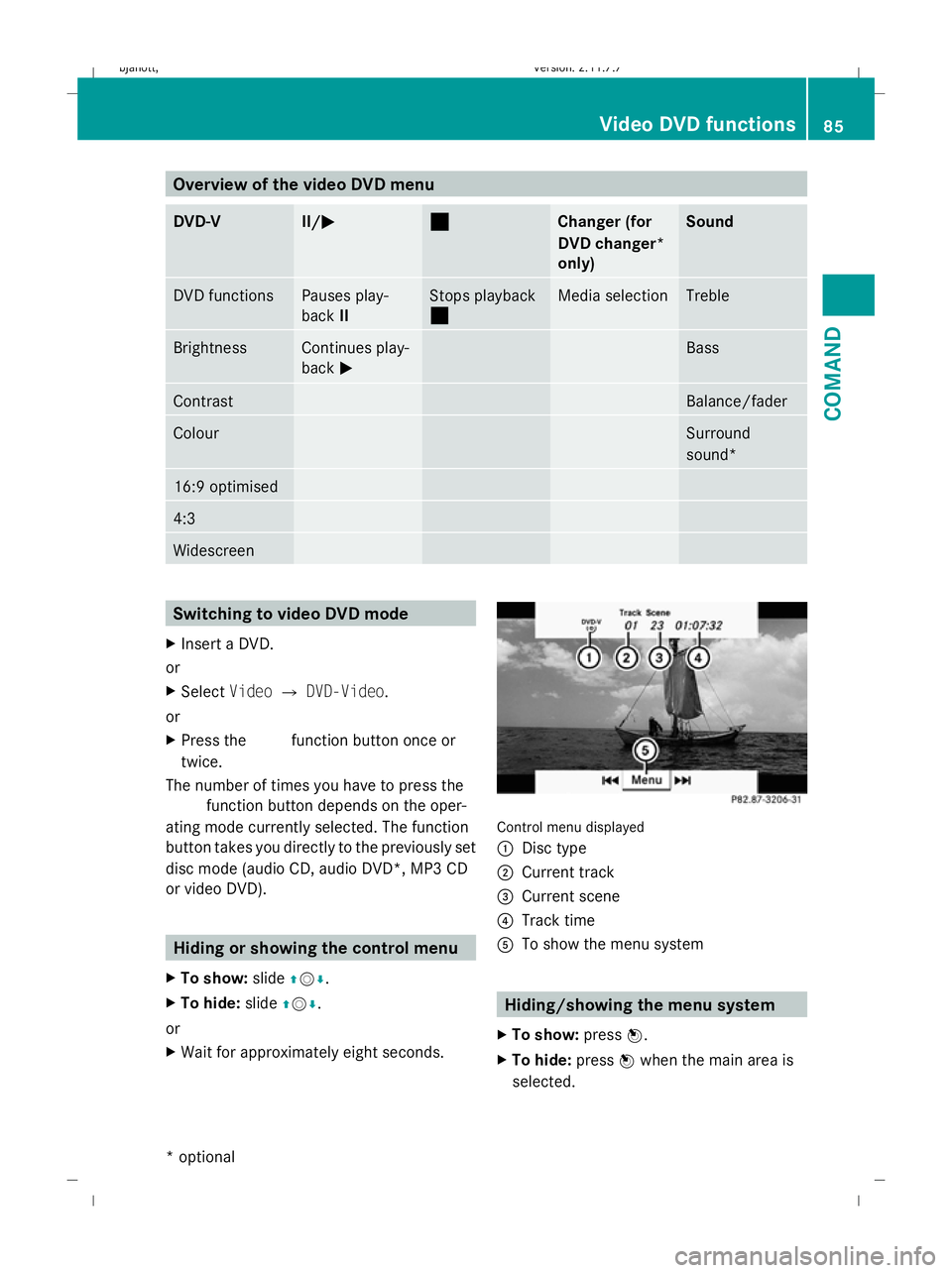
X Wait for approximately eight seconds. Control menu displayed
:
Disc type
; Current track
= Current scene
? Track time
A To show the menu system Hiding/showing the menu system
X To show: pressW.
X To hide: pressWwhen the main area is
selected. Video DVD functions
85COMAND
* optional
216_AKB; 2; 3, en-GB
bjanott,V
ersion: 2.11.7.7
2009-02-27T14:54:17+01:00 - Seite 85 Z
Dateiname: 6515230602_buchblock.pdf; erzeugt am 04. Mar 2009 11:15:01; WK
Page 89 of 421
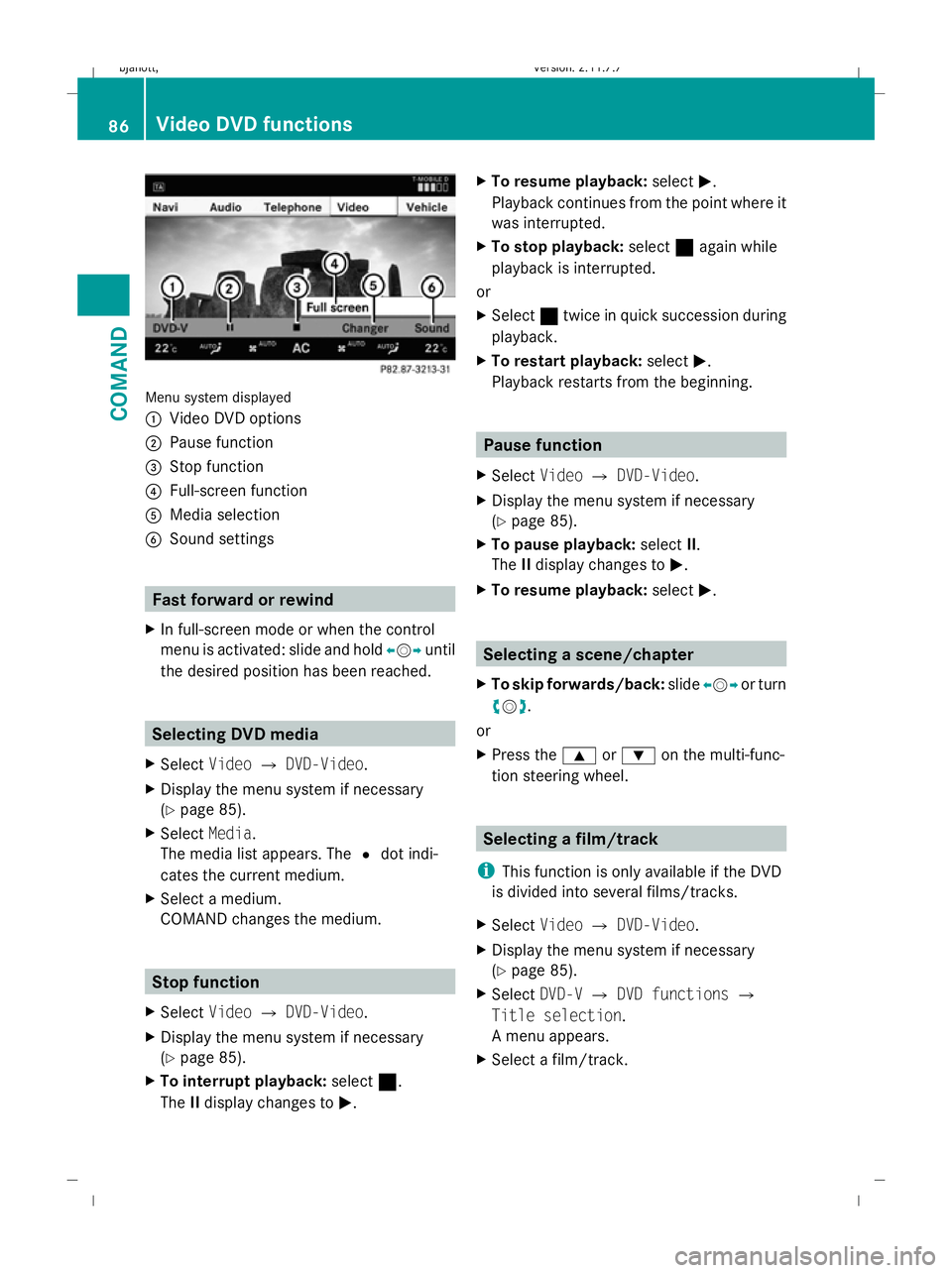
Menu system displayed
:
Video DVD options
; Pause function
= Stop function
? Full-screen function
A Media selection
B Sound settings Fast forward or rewind
X In full-screen mode or when the control
menu is activated: slide and hold XVYuntil
the desired position has been reached. Selecting DVD media
X Select VideoQDVD-Video.
X Display the menu system if necessary
(Y page 85).
X Select Media.
The media list appears. The #dot indi-
cates the current medium.
X Select a medium.
COMAND changes the medium. Stop function
X Select VideoQDVD-Video.
X Display the menu system if necessary
(Y page 85).
X To interrupt playback: select¯.
The IIdisplay changes to M. X
To resume playback: selectM.
Playback continues from the point where it
was interrupted.
X To stop playback: select¯again while
playback is interrupted.
or
X Select ¯twice in quick succession during
playback.
X To restart playback: selectM.
Playback restarts from the beginning. Pause function
X Select VideoQDVD-Video.
X Display the menu system if necessary
(Y page 85).
X To pause playback: selectII.
The IIdisplay changes to M.
X To resume playback: selectM. Selecting a scene/chapter
X To skip forwards/back: slideXVY or turn
cVd.
or
X Press the 9or: on the multi-func-
tion steering wheel. Selecting a film/track
i This function is only available if the DVD
is divided into several films/tracks.
X Select VideoQDVD-Video.
X Display the menu system if necessary
(Y page 85).
X Select DVD-VQDVD functions Q
Title selection.
A menu appears.
X Select a film/track. 86
Video DVD functionsCOMAND
216_AKB; 2; 3, en-GB
bjanott,V
ersion: 2.11.7.7
2009-02-27T14:54:17+01:00 - Seite 86
Dateiname: 6515230602_buchblock.pdf; erzeugt am 04. Mar 2009 11:15:01; WK
Page 90 of 421
Picture settings
Adjusting the brightness, contrast or
colour X
Select VideoQDVD-Video.
X Display the menu system if necessary
(Y page 85).
X Select DVD-VQBrightness orCon‐
trast orColour.
X To change the setting: slideZVÆ or turn
cVd until the desired setting is reached.
X To save the setting: pressW.
Changing the picture format X
Select VideoQDVD-Video.
X Display the menu system if necessary
(Y page 85).
X Select DVD-V.
The DVD-V menu appears. The #dot in
front of the 16:9 optimised ,4:3 orWide‐
screen menu item indicates the format
currently set.
X To change the format: slideÆVÆ or turn
cVd until the desired format is selected.
X To save the setting: pressW. DVD menu
The DVD menu is the menu stored on the DVD
itself. It is structured in various ways accord-
ing to the individual DVD and permits certain
actions and settings.
Calling up the DVD menu X
Select VideoQDVD-Video.
X Display the menu system if necessary
(Y page 85).
X Select DVD-VQDVD functions Q
Menu.
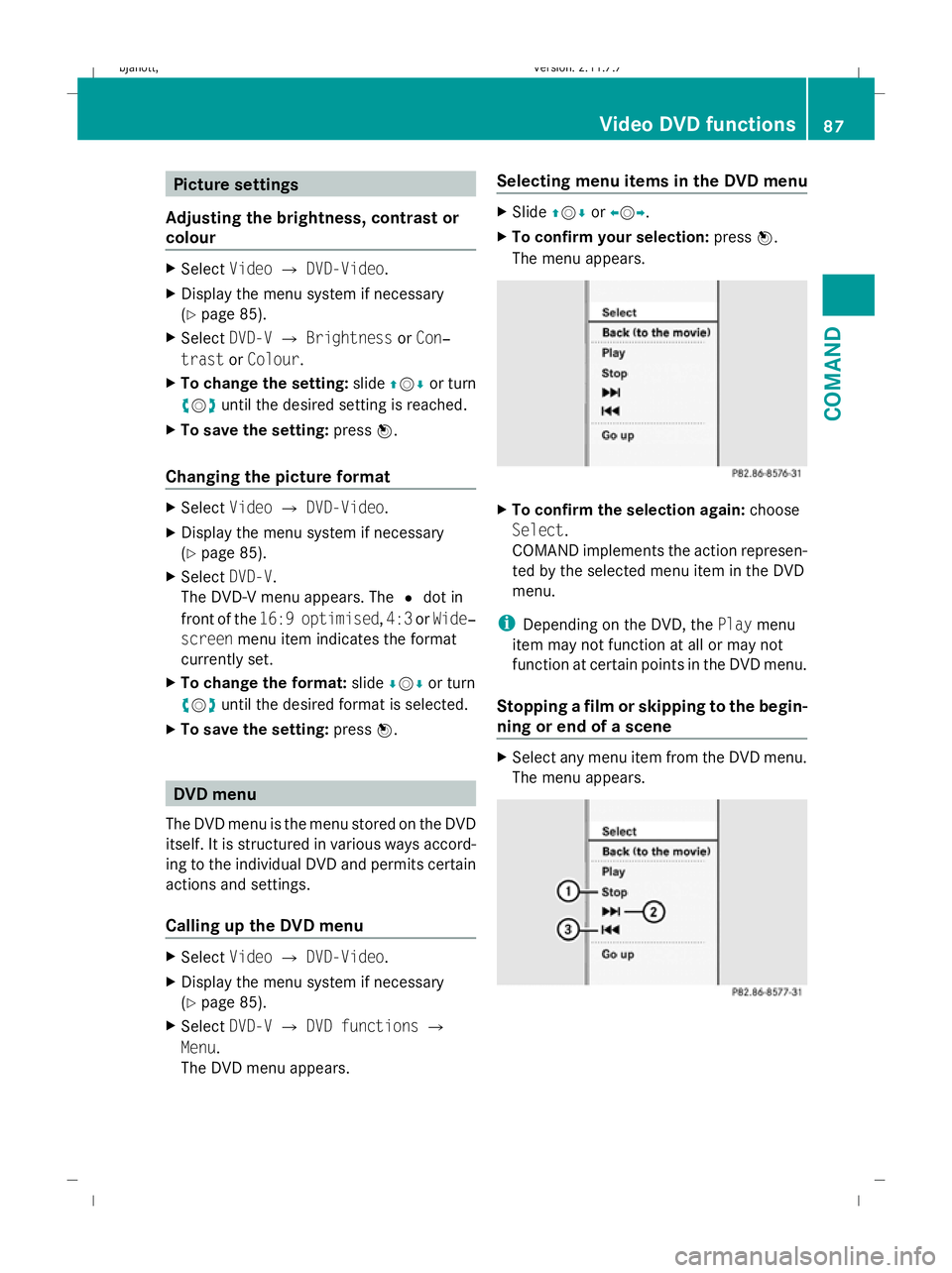
The DVD menu appears. Selecting menu items in the DVD menu X
Slide ZVÆ orXVY.
X To confirm your selection: pressW.
The menu appears. X
To confirm the selection again: choose
Select.
COMAND implements the action represen-
ted by the selected menu item in the DVD
menu.
i Depending on the DVD, the Playmenu
item may not function at all or may not
function at certain points in the DVD menu.
Stopping a film or skipping to the begin-
ning or end of a scene X
Select any menu item from the DVD menu.
The menu appears. Video DVD functions
87COMAND
216_AKB; 2; 3, en-GB
bjanott,V ersion: 2.11.7.7
2009-02-27T14:54:17+01:00 - Seite 87 Z
Dateiname: 6515230602_buchblock.pdf; erzeugt am 04. Mar 2009 11:15:01; WK
Page 91 of 421
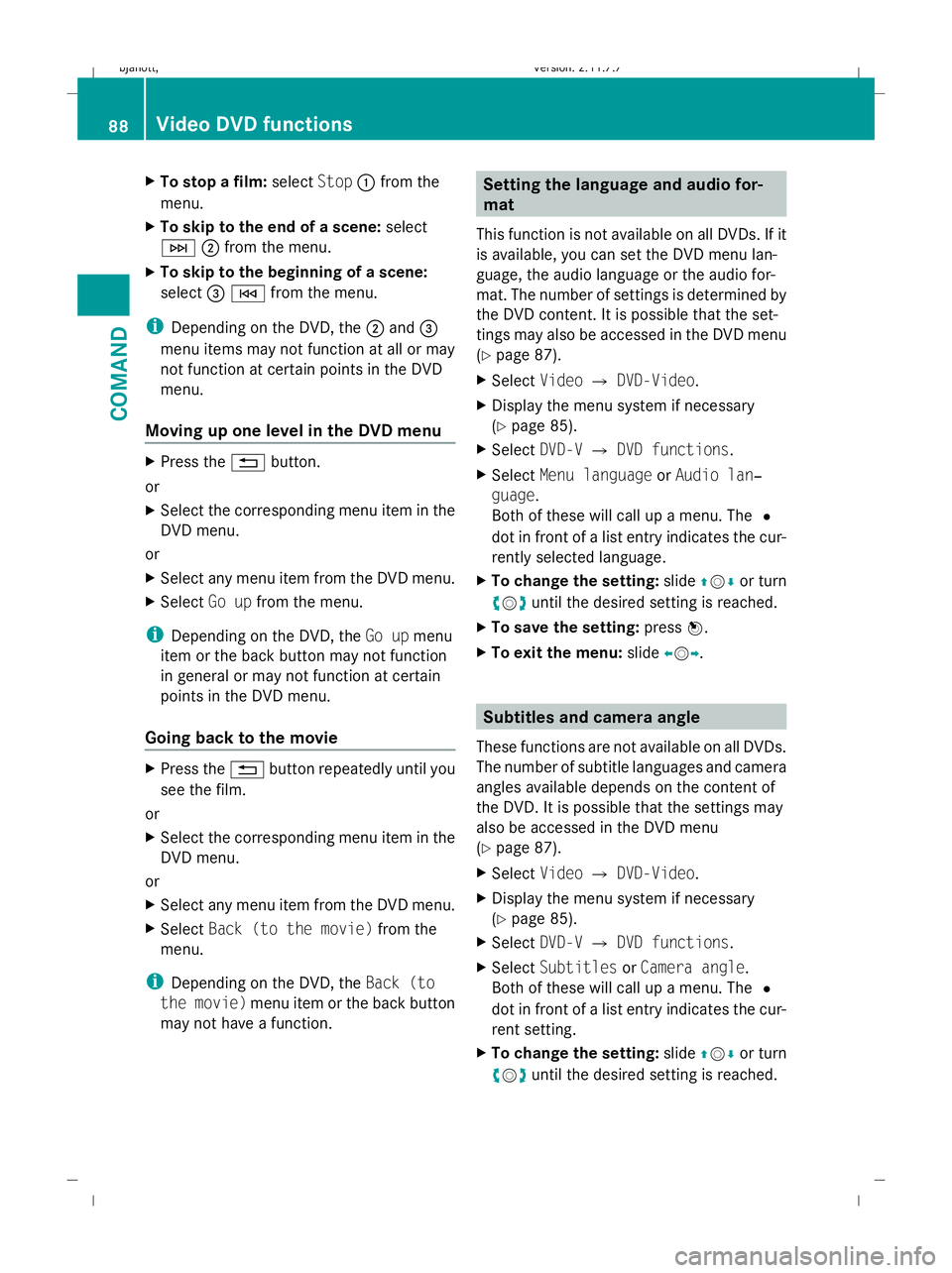
X
To stop a film: selectStop:from the
menu.
X To skip to the end of a scene: select
F ;from the menu.
X To skip to the beginning of a scene:
select =E from the menu.
i Depending on the DVD, the ;and =
menu items may not function at all or may
not function at certain points in the DVD
menu.
Moving up one level in the DVD menu X
Press the %button.
or
X Select the corresponding menu item in the
DVD menu.
or
X Select any menu item from the DVD menu.
X Select Go upfrom the menu.
i Depending on the DVD, the Go upmenu
item or the back button may not function
in general or may not function at certain
points in the DVD menu.
Going back to the movie X
Press the %button repeatedly until you
see the film.
or
X Select the corresponding menu item in the
DVD menu.
or
X Select any menu item from the DVD menu.
X Select Back (to the movie) from the
menu.
i Depending on the DVD, the Back (to
the movie) menu item or the back button
may not have a function. Setting the language and audio for-
mat
This function is not available on all DVDs. If it
is available, you can set the DVD menu lan-
guage, the audio language or the audio for-
mat. The number of settings is determined by
the DVD content. It is possible that the set-
tings may also be accessed in the DVD menu
(Y page 87).
X Select VideoQDVD-Video.
X Display the menu system if necessary
(Y page 85).
X Select DVD-VQDVD functions.
X Select Menu language orAudio lan‐
guage.
Both of these will call up a menu. The #
dot in front of a list entry indicates the cur-
rently selected language.
X To change the setting: slideZVÆ or turn
cVd until the desired setting is reached.
X To save the setting: pressW.
X To exit the menu: slideXVY. Subtitles and camera angle
These functions are not available on all DVDs.
The number of subtitle languages and camera
angles available depends on the content of
the DVD. It is possible that the settings may
also be accessed in the DVD menu
(Y page 87).
X Select VideoQDVD-Video.
X Display the menu system if necessary
(Y page 85).
X Select DVD-VQDVD functions.
X Select Subtitles orCamera angle.
Both of these will call up a menu. The #
dot in front of a list entry indicates the cur-
rent setting.
X To change the setting: slideZVÆ or turn
cVd until the desired setting is reached. 88
Video DVD functionsCOMAND
216_AKB; 2; 3, en-GB
bjanott,
Version: 2.11.7.7 2009-02-27T14:54:17+01:00 - Seite 88
Dateiname: 6515230602_buchblock.pdf; erzeugt am 04. Mar 2009 11:15:02; WK
Page 92 of 421
X
To save the setting: pressW.
X To exit the menu: slideXVY. Interactive content
DVDs can contain interactive content (e.g. a
video game). In a video game, you may be able
to influence events by selecting and trigger-
ing actions. The type and number of actions
depend on the DVD.
X To select an action: slideZVÆ orXVY .
X To trigger an action: pressW. TV*
General notes
The TV tuner is designed to receive analogue
terrestrial TV channels (all standards) and
digital TV channels conforming to the DVB-T
standard 8
.
Automatic picture shutoff If the vehicle is travelling faster than approx-
imately 6 km/h, the picture and teletext in TV
mode on the driver's side automatically
switch off. The following message appears in
the display:
In order not to distract
the driver, the picture is faded out
while the vehicle is in motion . As
soon as the vehicle speed drops below about
3 km/h, the picture switches back on again.
Switching off the picture and sound The constantly changing reception conditions
while the vehicle is in motion can interrupt the
signal. If the reception is too poor, COMAND
may switch off the sound and freeze or hide
the picture. In this case, you will see the
respective symbol in the display. TV menu overview
The following menus are available:
R TV Q Station, Save station, Channel
input, Brightness, Contrast, Colour, Auto,
16:9 optimised, 4:3, Widescreen, Channel
fix, TV standard, Audio 1, Audio 2
R Memory QAutostore, Channel preset list
R Info QInformation on current programme
(digital stations only)
R Teletext QSwitch on teletext
R Sound QTrebles, basses, balance/fader,
surround sound* Switching to TV mode
X Select VideoQTV. Hiding or showing the control menu
X To show: slideZVÆ.
X To hide: slideZVÆ.
or
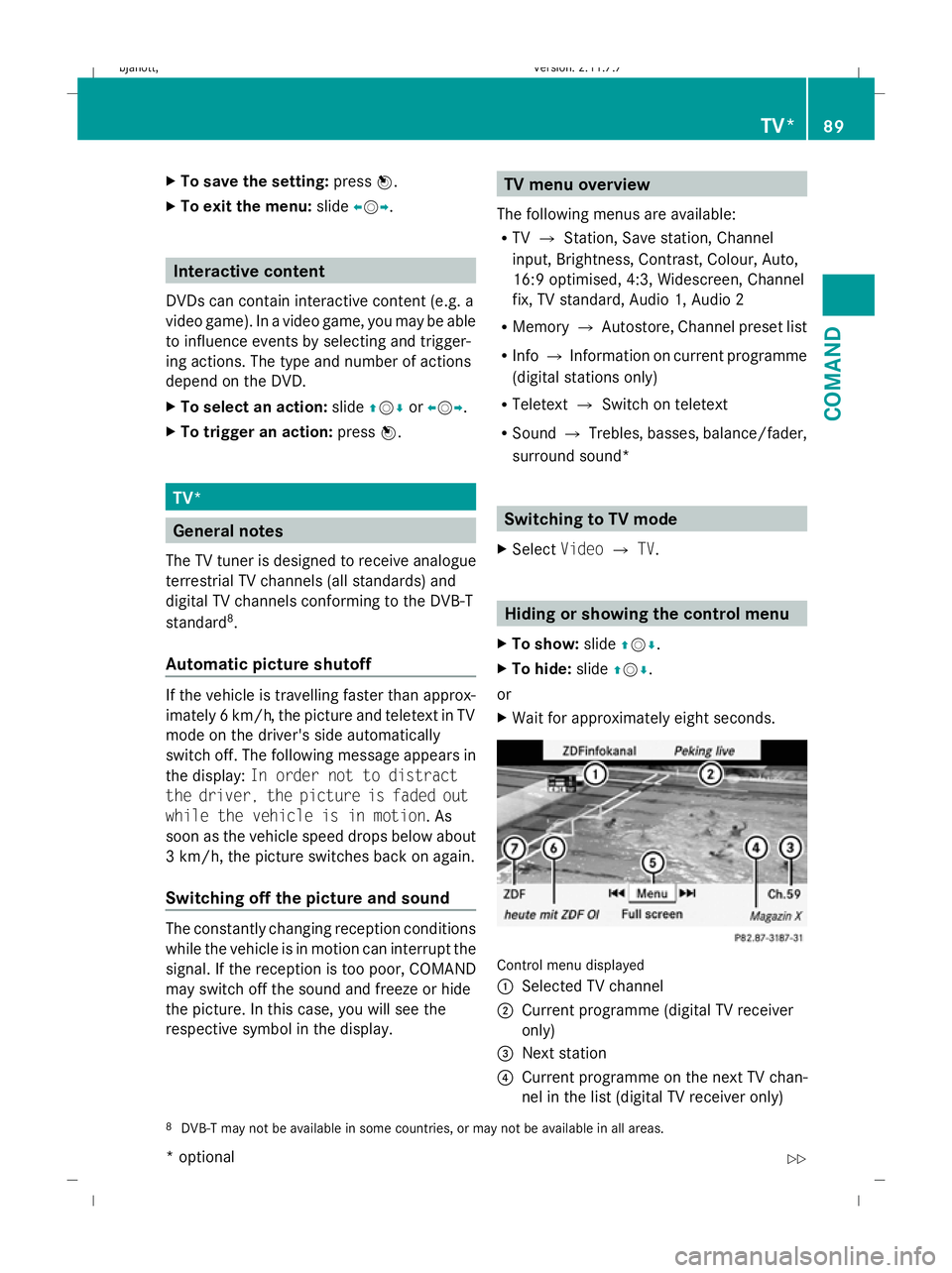
X Wait for approximately eight seconds. Control menu displayed
:
Selected TV channel
; Current programme (digital TV receiver
only)
= Next station
? Current programme on the next TV chan-
nel in the list (digital TV receiver only)
8 DVB-T may not be available in some countries, or may not be available in all areas. TV*
89COMAND
* optional
216_AKB; 2; 3, en-GB
bjanott,
Version: 2.11.7.7
2009-02-27T14:54:17+01:00 - Seite 89 Z
Dateiname: 6515230602_buchblock.pdf; erzeugt am 04. Mar 2009 11:15:02; WK
Page 93 of 421
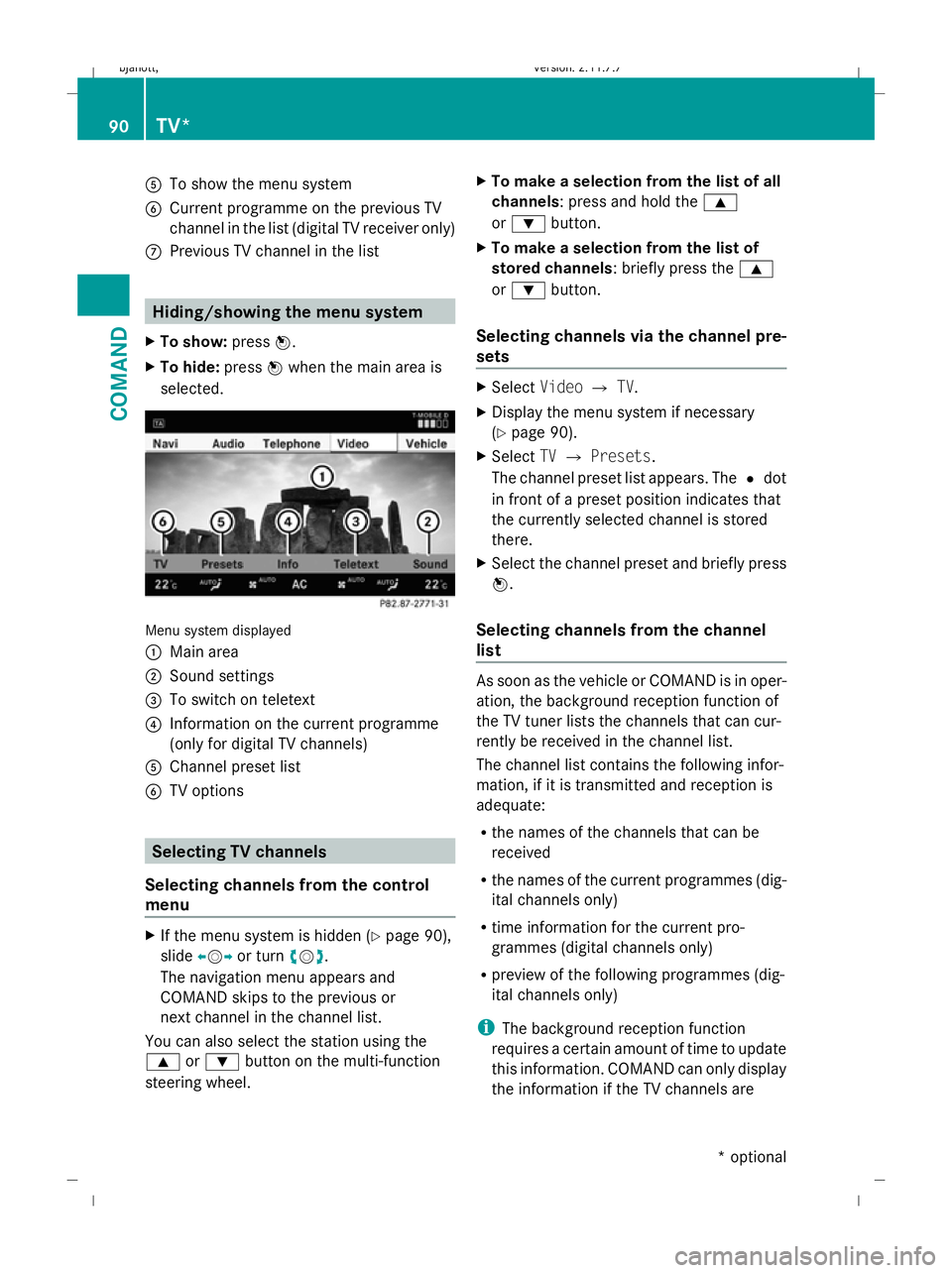
A
To show the menu system
B Current programme on the previous TV
channel in the list (digital TV receiver only)
C Previous TV channel in the list Hiding/showing the menu system
X To show: pressW.
X To hide: pressWwhen the main area is
selected. Menu system displayed
:
Main area
; Sound settings
= To switch on teletext
? Information on the current programme
(only for digital TV channels)
A Channel preset list
B TV options Selecting TV channels
Selecting channels from the control
menu X
If the menu system is hidden (Y page 90),
slide XVY or turn cVd.
The navigation menu appears and
COMAND skips to the previous or
next channel in the channel list.
You can also select the station using the
9 or: button on the multi-function
steering wheel. X
To make a selection from the list of all
channels: press and hold the 9
or : button.
X To make a selection from the list of
stored channels: briefly press the 9
or : button.
Selecting channels via the channel pre-
sets X
Select VideoQTV.
X Display the menu system if necessary
(Y page 90).
X Select TVQ Presets.
The channel preset list appears. The #dot
in front of a preset position indicates that
the currently selected channel is stored
there.
X Select the channel preset and briefly press
W.
Selecting channels from the channel
list As soon as the vehicle or COMAND is in oper-
ation, the background reception function of
the TV tuner lists the channels that can cur-
rently be received in the channel list.
The channel list contains the following infor-
mation, if it is transmitted and reception is
adequate:
R
the names of the channels that can be
received
R the names of the current programmes (dig-
ital channels only)
R time information for the current pro-
grammes (digital channels only)
R preview of the following programmes (dig-
ital channels only)
i The background reception function
requires a certain amount of time to update
this information. COMAND can only display
the information if the TV channels are 90
TV*COMAND
* optional
216_AKB; 2; 3, en-GB
bjanott,
Version: 2.11.7.7 2009-02-27T14:54:17+01:00 - Seite 90
Dateiname: 6515230602_buchblock.pdf; erzeugt am 04. Mar 2009 11:15:02; WK
Page 94 of 421
transmitting it and if the reception condi-
tions are adequate.
X Select VideoQTV.
X Display the menu system if necessary
(Y page 90).
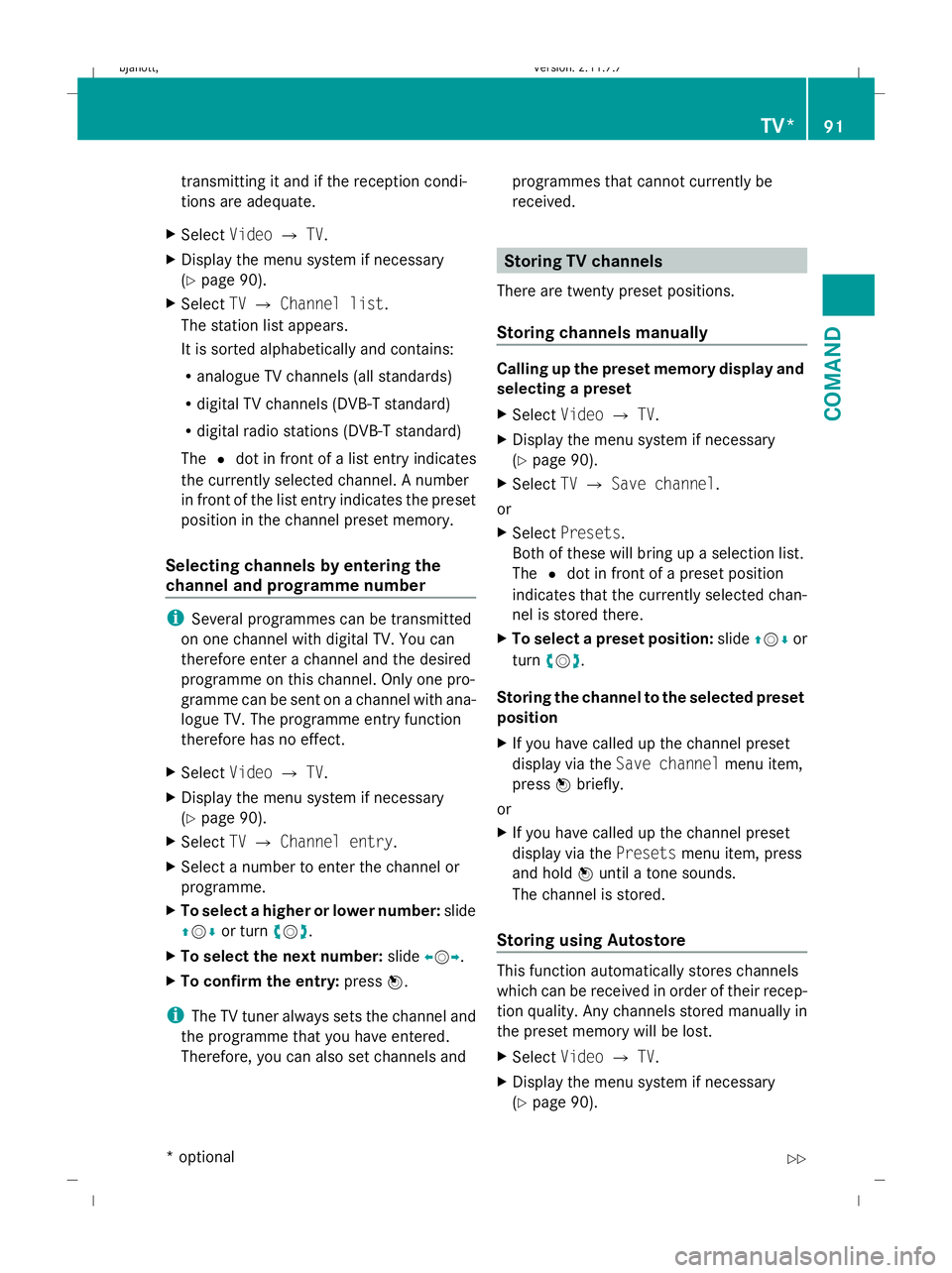
X Select TVQ Channel list.
The station list appears.
It is sorted alphabetically and contains:
R analogue TV channels (all standards)
R digital TV channels (DVB-T standard)
R digital radio stations (DVB-T standard)
The #dot in front of a list entry indicates
the currently selected channel. A number
in front of the list entry indicates the preset
position in the channel preset memory.
Selecting channels by entering the
channel and programme number i
Several programmes can be transmitted
on one channel with digital TV. You can
therefore enter a channel and the desired
programme on this channel. Only one pro-
gramme can be sent on a channel with ana-
logue TV. The programme entry function
therefore has no effect.
X Select VideoQTV.
X Display the menu system if necessary
(Y page 90).
X Select TVQ Channel entry.
X Select a number to enter the channel or
programme.
X To select a higher or lower number: slide
ZV Æor turn cVd.
X To select the next number: slideXVY.
X To confirm the entry: pressW.
i The TV tuner always sets the channel and
the programme that you have entered.
Therefore, you can also set channels and programmes that cannot currently be
received. Storing TV channels
There are twenty preset positions.
Storing channels manually Calling up the preset memory display and
selecting a preset
X
Select VideoQTV.
X Display the menu system if necessary
(Y page 90).
X Select TVQ Save channel.
or
X Select Presets.
Both of these will bring up a selection list.
The #dot in front of a preset position
indicates that the currently selected chan-
nel is stored there.
X To select a preset position: slideZVÆor
turn cVd.
Storing the channel to the selected preset
position
X If you have called up the channel preset
display via the Save channel menu item,
press Wbriefly.
or
X If you have called up the channel preset
display via the Presetsmenu item, press
and hold Wuntil a tone sounds.
The channel is stored.
Storing using Autostore This function automatically stores channels
which can be received in order of their recep-
tion quality. Any channels stored manually in
the preset memory will be lost.
X
Select VideoQTV.
X Display the menu system if necessary
(Y page 90). TV*
91COMAND
* optional
216_AKB; 2; 3, en-GB
bjanott,
Version: 2.11.7.7 2009-02-27T14:54:17+01:00 - Seite 91 Z
Dateiname: 6515230602_buchblock.pdf; erzeugt am 04. Mar 2009 11:15:02; WK
Page 95 of 421
X
Select Presets QAutostore .
or
X Select TVQ Save channel QAutos‐
tore.
COMAND searches for channels. The avail-
able channels are automatically stored in
the preset positions. Information about the current pro-
gramme
i This function is only available on digital TV
channels.
X Select VideoQTV.
X Display the menu system if necessary
(Y page 90).
X Select Info.
If the service is provided by the current TV
channel, you will see a field containing
information about the programme.
i It may take a few seconds for the infor-
mation to appear.
X To scroll the display: slideZVÆ or turn
cVd . Displaying the current programme or
programme preview
i This function is only available on digital TV
channels.
X Select VideoQTV.
X Display the menu system if necessary
(Y page 90).
X Select TVQ Channel list.
The channel list appears. It shows the cur-
rent programme on the digital TV channels
which have adequate reception. The #dot
in front of a list entry indicates the currently
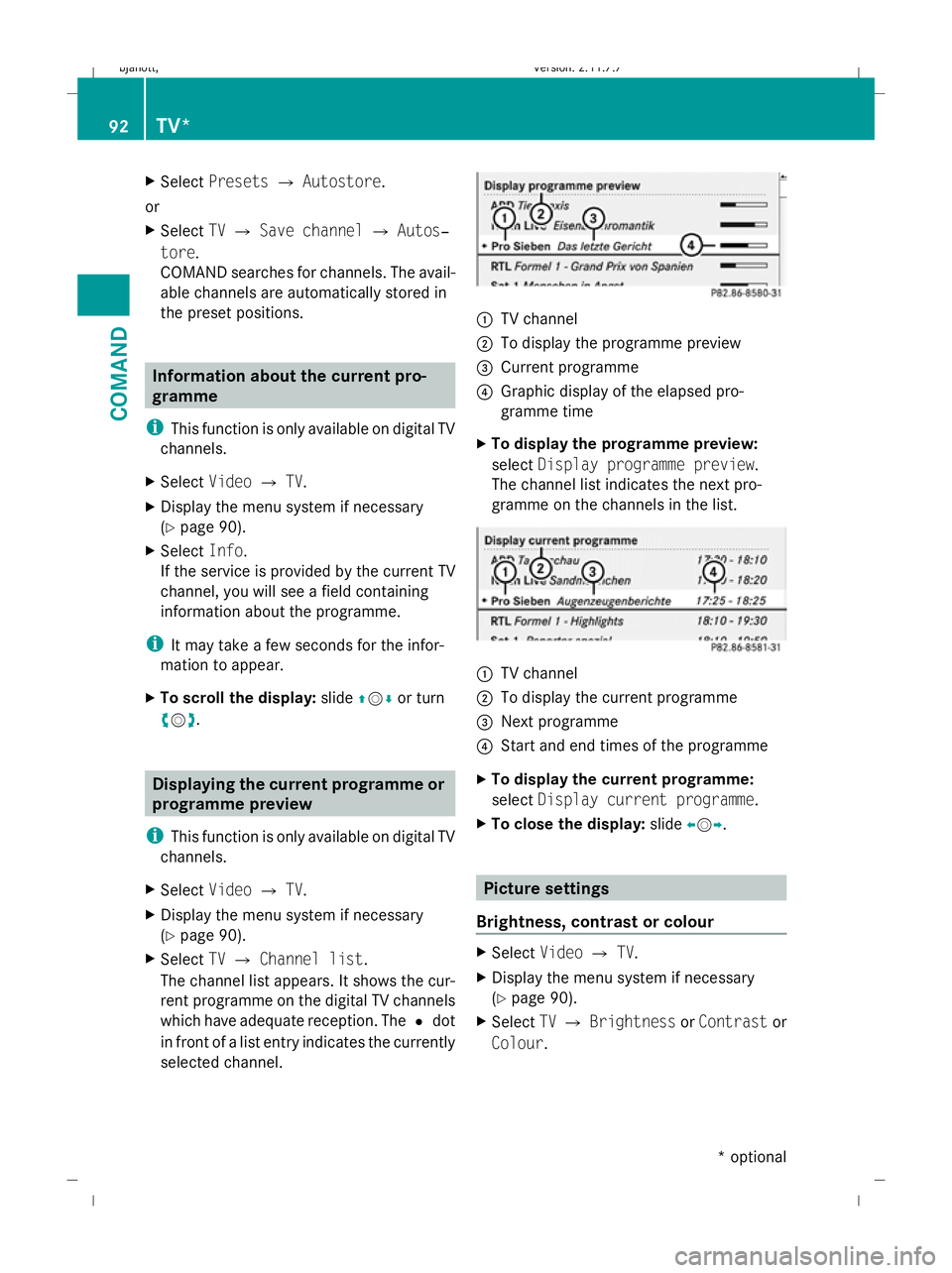
selected channel. :
TV channel
; To display the programme preview
= Current programme
? Graphic display of the elapsed pro-
gramme time
X To display the programme preview:
select Display programme preview.
The channel list indicates the next pro-
gramme on the channels in the list. :
TV channel
; To display the current programme
= Next programme
? Start and end times of the programme
X To display the current programme:
select Display current programme .
X To close the display: slideXVY. Picture settings
Brightness, contrast or colour X
Select VideoQTV.
X Display the menu system if necessary
(Y page 90).
X Select TVQ Brightness orContrast or
Colour . 92
TV*COMAND
* optional
216_AKB; 2; 3, en-GB
bjanott,
Version: 2.11.7.7 2009-02-27T14:54:17+01:00 - Seite 92
Dateiname: 6515230602_buchblock.pdf; erzeugt am 04. Mar 2009 11:15:03; WK
Page 96 of 421
X
To change the setting: slideZVÆ or turn
cVd until the desired setting is reached.
X To save the setting: pressW.
Changing the picture format X
Select VideoQTV.
X Display the menu system if necessary
(Y page 90).
X Select TV.
The TV menu appears. The #dot in front
of the Auto,16:9 optimised ,4:3 or
Widescreen menu item indicates the for-
mat currently set.
If you have switched Autooff, you can only
switch between the 16:9 and 4:3 formats.
X To change the format: slideZVÆ or turn
cVd until the desired format is selected.
X To save the format: pressW. Basic TV settings
Fixing the frequency The TV tuner may automatically switch to an
alternative channel with the same pro-
gramme content but better reception,
depending on reception quality. You can use
Channel fix to prevent this channel switch-
ing. This is useful, for example, when there is
a noticeable time offset between the frequen-
cies or if there is interference on a frequency.
X Select VideoQTV.
X Display the menu system if necessary
(Y page 90).
X Select TVQ Channel fix .
You have switched the function on or off. A
tick appears next to Channel fixwhen
the function is switched on. You will also
see the FIXdisplay in the main area.
X To exit the menu: slideXVY. Setting the reception region The correct reception region setting ensures
that analogue TV channels can be received
with the usual quality and functionality.
COMAND is set to the correct reception
region at the factory. If you are driving your
vehicle in a different country or region, you
should set COMAND accordingly. A
Mercedes-Benz Service Centre can help you
to select the correct reception region if nec-
essary.
X
Select VideoQTV.
X Display the menu system if necessary
(Y page 90).
X Select TVQ TV standard.
The reception region list appears. The #
dot in front of a list entry indicates the cur-
rently selected country.
X To select the reception region: slide
ZVÆ or turn cVduntil the desired region
is selected.
X To save the selection: pressW.
A message appears to inform you that if the
wrong country is set, correct reception will
not be possible.
X Select YesorNo.
If you select Yes, COMAND will switch to
the country setting you have selected.
If you select No, the country list will appear
again. Teletext
Switching teletext on or off i
Teletext can only be received if there is no
interference in the picture reception. The
teletext function receives all teletext
pages, with the exception of subpages, for
the channel currently set and saves them
in the system memory. When you set a dif-
ferent channel, the memory is cleared and
refilled. TV*
93COMAND
* optional
216_AKB; 2; 3, en-GB
bjanott,
Version: 2.11.7.7 2009-02-27T14:54:17+01:00 - Seite 93 Z
Dateiname: 6515230602_buchblock.pdf; erzeugt am 04. Mar 2009 11:15:03; WK
Page 97 of 421
X
Select VideoQTV.
X Display the menu system if necessary
(Y page 90).
X To switch on: selectTeletext.
X To switch off: press the%back button.
Selecting a teletext page X
To enter a page number directly: select
a number button.
X To select a higher or lower number: slide
ZVÆ or turn cVd.
Dynamic teletext page A dynamic teletext page consists of several
subpages. The display automatically changes
to the next page after a certain time. MUSIC REGISTER*
i This function is available if COMAND is
equipped with an integrated hard disk.
You can store music files in MP3 or WMA for-
mat in the MUSIC REGISTER. The memory has
a capacity of approximately 7 GB.
! Retain the original music files in a secure
location. An error in COMAND might result
in the loss of the music files stored in the
MUSIC REGISTER. Mercedes-Benz is not
liable for any loss of data. Menu overview
MUSIC REGISTER Search Media Sound
Normal track
sequence
Search functions Media selection via
media list Treble
Random media Bass
Random track list Balance/fader
Copying music files
Surround sound*
Deleting all music
files
Memory space info
Displaying title infor-
mation
TA (traffic announce-
ment)94
MUSIC REGISTER*COMAND
* optional
216_AKB; 2; 3, en-GB
bjanott,
Version: 2.11.7.7 2009-02-27T14:54:17+01:00 - Seite 94
Dateiname: 6515230602_buchblock.pdf; erzeugt am 04. Mar 2009 11:15:03; WK