brake MERCEDES-BENZ METRIS 2020 MY20 Operator’s Manual
[x] Cancel search | Manufacturer: MERCEDES-BENZ, Model Year: 2020, Model line: METRIS, Model: MERCEDES-BENZ METRIS 2020Pages: 320, PDF Size: 26.38 MB
Page 70 of 320
EBD (electronic brake force distribu-
tion)
General notes EBD monitors and controls the brake pressure
to the rear wheels. This enables EBD to
improve handling during braking.
Important safety notes Observe the important safety guidelines for
the driving safety system
(Y page 66).G
WARNING
If EBD is malfunctioning, the rear wheels can
lock, e.g. under full braking. This increases
the risk of skidding and an accident.
You should therefore adapt your driving
style to the different handling characteris-
tics. Have the brake system checked at a
qualified specialist workshop.
If EBD is malfunctioning, the $ warning
lamp
(Y page 229) lights up while the engine
is running and the display shows a message:
R on vehicles without steering wheel buttons
(Y page 199)
R on vehicles with steering wheel buttons
(Y page 213)
Other driving systems and driving safety sys-
tems then also fail. ESP
®
(Electronic Stability Program)
General notes ESP
®
monitors driving stability and detects a
tendency of the vehicle to understeer or over-
steer (skidding) in good time. If ESP ®
detects
that the vehicle is deviating from the direction
desired by the driver, one or more wheels are
braked to stabilize the vehicle. The engine out-
put is also modified to keep the vehicle on the
desired course within physical limits. ESP ®
can
also stabilize the vehicle during braking.
ESP ®
also monitors traction, i.e. power trans-
mission between the tires and the road sur-
face. The integrated traction control supports
you when pulling away or accelerating on wet,
slippery or slick roads. Should the drive
wheels spin, traction control brakes them indi- vidually. In addition, greater drive torque is
transmitted to the wheel or wheels with trac-
tion. If traction on the road surface is not suffi-
cient, even ESP
®
will not allow you to pull
away without difficulty. The type of tires and
total weight of the vehicle as well as the gradi-
ent of the road also play a crucial role. Trac-
tion control remains active if you deactivate
ESP ®
.
If the h warning lamp in the instrument
cluster goes out before beginning the journey,
ESP ®
is automatically active.
The h warning lamp in the instrument clus-
ter flashes when ESP ®
intervenes:
X do not deactivate ESP ®
under any circum-
stances.
X when driving off, apply as little throttle as
possible.
X adapt your speed and driving style to the
prevailing road conditions.
Important safety notes Observe the important safety guidelines for
the driving safety system (
Y page
66). G
WARNING
If ESP ®
is malfunctioning it will not provide
any vehicle stabilization. There is an
increased risk of skidding or of an accident.
Exercise caution when continuing to drive.
Have ESP ®
checked at a qualified specialist
workshop.
! Do not run the vehicle on a roller dyna-
mometer (e.g. for performance tests). If you
must operate the vehicle on a roller dyna-
mometer, please consult a qualified special-
ist workshop in advance. You could other-
wise damage the drive train or the brake
system.
If ESP ®
is malfunctioning, the h warning
lamp
(Y page 230) lights up continuously
while the engine is running and the display
shows a message.
R on vehicles without steering wheel buttons
(Y page 200)
R on vehicles with steering wheel buttons
(Y page 214) 68
Driving safety systems
Safety
Page 71 of 320
ESP
®
is deactivated if the å warning lamp
in the instrument cluster is lit when the engine
is running.
Only use wheels with the recommended tire
sizes. Only then will ESP ®
function properly.
Deactivating or activating ESP ®G
WARNING
If you deactivate ESP ®
, ESP ®
no longer sta-
bilizes the vehicle. There is an increased risk
of skidding and an accident.
Only deactivate ESP ®
in the situations
described in the following.
It may be best to deactivate ESP ®
in the fol-
lowing situations:
R when using snow chains
R in deep snow
R on sand or gravel
Activate ESP ®
as soon as the situations descri-
bed above no longer apply. Otherwise, ESP ®
assistance for stabilizing the vehicle will
remain significantly reduced, even if the vehi-
cle starts to skid.
If you deactivate ESP ®
:
R the å warning lamp in the instrument
cluster lights up
R the ÷ warning lamp in the instrument
cluster flashes if the wheels are spinning
R ESP ®
assistance for stabilizing the vehicle in
the lower speed range up to approximately
37 mph (60 km/h
) is significantly reduced
R engine torque is no longer limited and the
drive wheels are able to spin. The spinning
of the wheels results in a cutting action for
better traction on loose surfaces
R traction control is still activated
R ESP ®
still provides support when you brake
Depending on the equipment in the vehicle,
you can activate or deactivate ESP ®
when the
engine is running by using the å button or
by using the on-board computer:
R on vehicles without steering wheel buttons
(Y page 179)
R on vehicles with steering wheel buttons
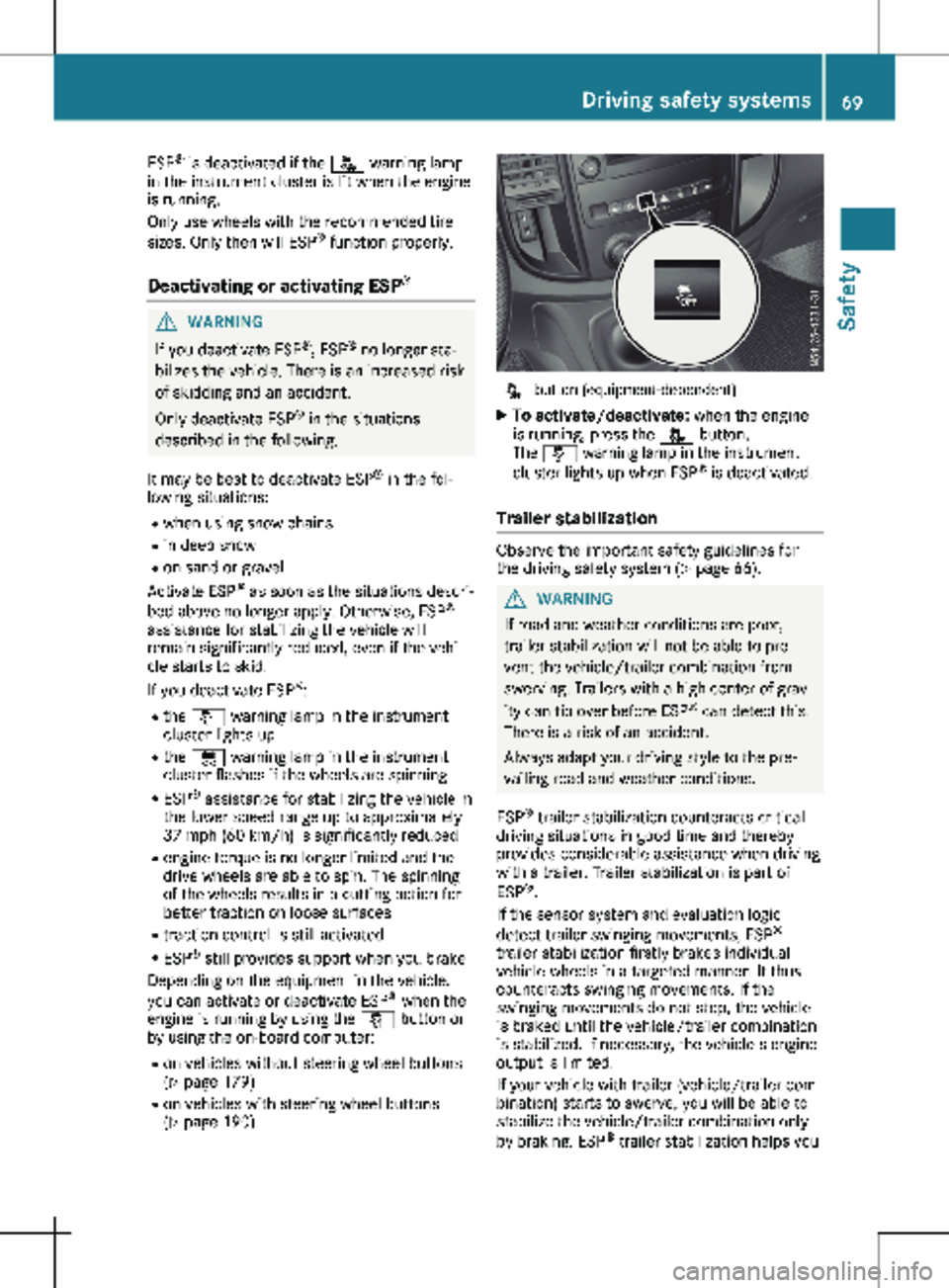
(Y page 190) å button (equipment-dependent)
X To activate/deactivate: when the engine
is running, press the å button.
The å warning lamp in the instrument
cluster lights up when ESP ®
is deactivated.
Trailer stabilization Observe the important safety guidelines for
the driving safety system (
Y page
66). G
WARNING
If road and weather conditions are poor,
trailer stabilization will not be able to pre-
vent the vehicle/trailer combination from
swerving. Trailers with a high center of grav-
ity can tip over before ESP ®
can detect this.
There is a risk of an accident.
Always adapt your driving style to the pre-
vailing road and weather conditions.
ESP ®
trailer stabilization counteracts critical
driving situations in good time and thereby
provides considerable assistance when driving
with a trailer. Trailer stabilization is part of
ESP ®
.
If the sensor system and evaluation logic
detect trailer swinging movements, ESP ®
trailer stabilization firstly brakes individual
vehicle wheels in a targeted manner. It thus
counteracts swinging movements. If the
swinging movements do not stop, the vehicle
is braked until the vehicle/trailer combination
is stabilized. If necessary, the vehicle's engine
output is limited.
If your vehicle with trailer (vehicle/trailer com-
bination) starts to swerve, you will be able to
stabilize the vehicle/trailer combination only
by braking. ESP ®
trailer stabilization helps you Driving safety systems
69
Safety Z
Page 73 of 320
Useful information
This Operator's Manual describes all models
as well as standard and optional equipment of
your vehicle that were available at the time of
going to print. Country-specific variations are
possible. Note that your vehicle may not be
equipped with all of the described functions.
This also applies to systems and functions rel-
evant to safety.
Read the information on qualified specialist
workshops (Y page
32).Key
Important safety notes
G
WARNING
If children are left unsupervised in the vehi-
cle, they could:
R open the doors, thus endangering other
people or road users.
R get out and disrupt traffic.
R operate the vehicle's equipment.
Additionally, children could set the vehicle in
motion if, for example, they:
R release the parking brake.
R shift the automatic transmission out of
park position P.
R start the engine.
There is a risk of an accident and injury.
When leaving the vehicle, always take the
SmartKey with you and lock the vehicle.
Never leave children or animals unattended
in the vehicle. Always keep the SmartKey
out of reach of children. G
WARNING
If you attach heavy or large objects to the
SmartKey, the SmartKey could be uninten-
tionally turned in the ignition lock. This
could cause the engine to be switched off.
There is a risk of an accident.
Do not attach any heavy or large objects to
the SmartKey. Remove any bulky key rings before inserting the SmartKey into the igni-
tion lock.
! Keep the key away from strong magnetic
fields. The remote control function may oth-
erwise be damaged.
Strong magnetic fields can occur in the
vicinity of powerful electrical installations.
Do not keep the key:
R with electronic devices, e.g. a mobile phone
or another key
R with metallic objects, e.g. coins or metal foil
R in metallic objects, e.g. metal cases
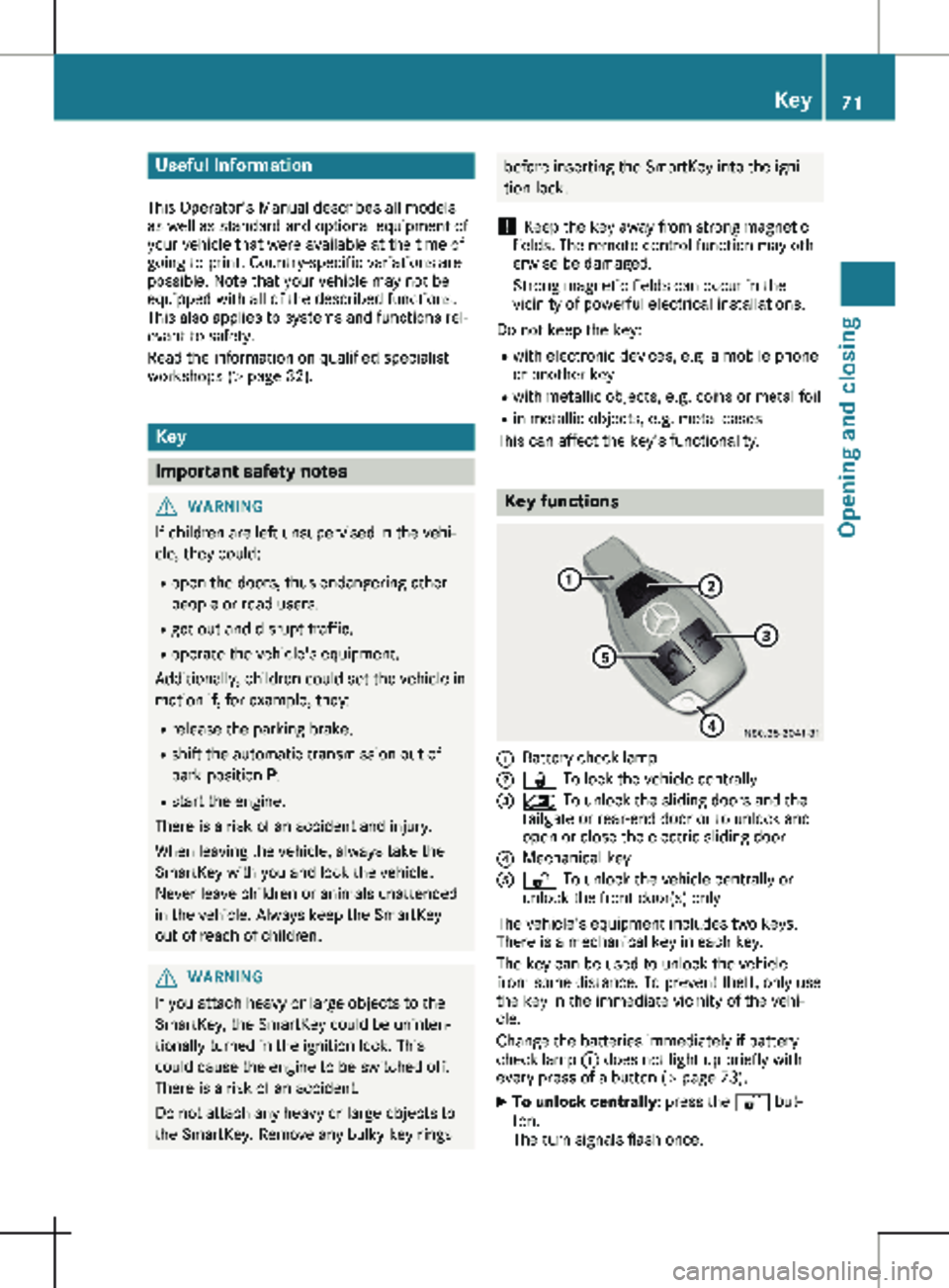
This can affect the key's functionality. Key functions
:
Battery check lamp
; & To lock the vehicle centrally
= 5 To unlock the sliding doors and the
tailgate or rear-end door or to unlock and
open or close the electric sliding door
? Mechanical key
A % To unlock the vehicle centrally or
unlock the front door(s) only
The vehicle's equipment includes two keys.
There is a mechanical key in each key.
The key can be used to unlock the vehicle
from some distance. To prevent theft, only use
the key in the immediate vicinity of the vehi-
cle.
Change the batteries immediately if battery
check lamp : does not light up briefly with
every press of a button (Y page
73).
X To unlock centrally: press the % but-
ton.
The turn signals flash once. Key
71
Opening and closing Z
Page 77 of 320
Problem
Possible causes/consequences and
M SolutionsIt is no longer possible
to lock or unlock the
vehicle using the Smart-
Key. The SmartKey battery is weak or discharged.
X Point the tip of the SmartKey at the driver's door handle from
very close range and press the % or & button.
If this does not work:
X Replace the SmartKey battery ( Y page 73).
or
X Lock or unlock the vehicle using the mechanical key ( Y page
73).The SmartKey is faulty.
X Lock the vehicle with the mechanical key (Y page
73).
X Have the SmartKey checked at a qualified specialist workshop. The engine cannot be
started using the Smart-
Key. The on-board voltage is too low.
X Switch off all non-essential consumers, such as interior lighting,
and try to start the engine again.
If this does not work:
X Check the starter battery and charge it if necessary
(Y page
262).
or
X Jump-start the vehicle ( Y page
272).
or
X Consult a qualified specialist workshop. You have lost a Smart-
Key. X
Have the SmartKey deactivated at a qualified specialist work-
shop.
X Report the loss immediately to the vehicle insurers.
X If necessary, have the mechanical locks replaced. You have lost the
mechanical key. X
Report the loss immediately to the vehicle insurers.
X If necessary, have the mechanical locks replaced. Central locking
Important safety notes
G
WARNING
If children are left unsupervised in the vehi-
cle, they could, in particular:
R open doors, thereby endangering other
persons or road users.
R get out and be struck by oncoming traffic.
R operate vehicle equipment and become
trapped, for example. In addition, children could set the vehicle in
motion, for example, if they:
R release the parking brake.
R change the transmission position.
R start the vehicle.
There is a risk of accident and injury.
Never leave children unsupervised in the
vehicle.
When leaving the vehicle, always take the
SmartKey with you and lock the vehicle.
Keep the SmartKey out of the reach of chil-
dren. Central locking
75
Opening and closing Z
Page 104 of 320
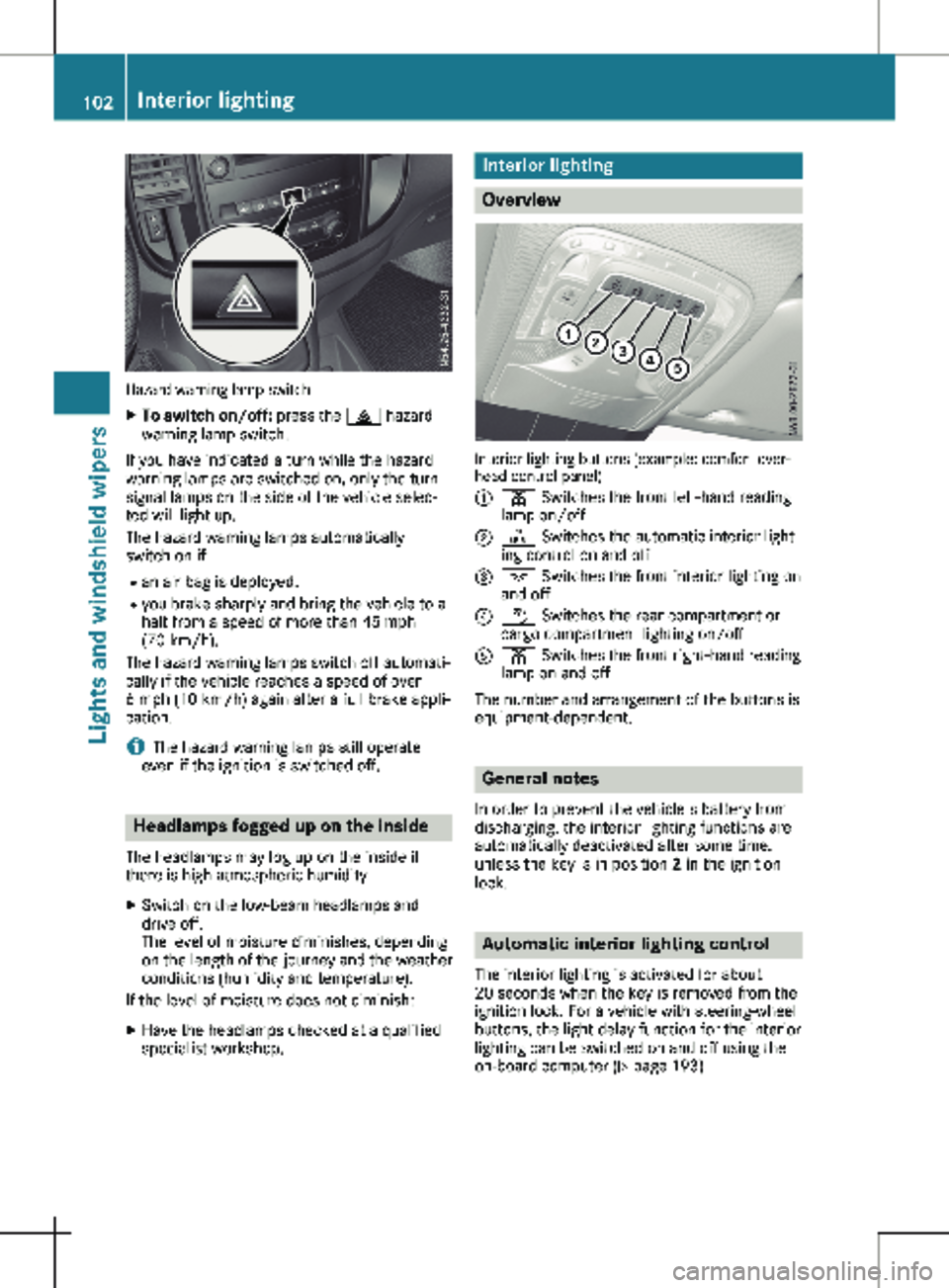
Hazard warning lamp switch
X
To switch on/off: press the £ hazard
warning lamp switch.
If you have indicated a turn while the hazard
warning lamps are switched on, only the turn
signal lamps on the side of the vehicle selec-
ted will light up.
The hazard warning lamps automatically
switch on if: R an air bag is deployed.
R you brake sharply and bring the vehicle to a
halt from a speed of more than 45 mph
(70 km/h
).
The hazard warning lamps switch off automati-
cally if the vehicle reaches a speed of over
6 mph (10 km/h) again after a full brake appli-
cation.
i The hazard warning lamps still operate
even if the ignition is switched off. Headlamps fogged up on the inside
The headlamps may fog up on the inside if
there is high atmospheric humidity.
X Switch on the low-beam headlamps and
drive off.
The level of moisture diminishes, depending
on the length of the journey and the weather
conditions (humidity and temperature).
If the level of moisture does not diminish:
X Have the headlamps checked at a qualified
specialist workshop. Interior lighting
Overview
Interior lighting buttons (example: comfort over-
head control panel)
:
p Switches the front left-hand reading
lamp on/off
; | Switches the automatic interior light-
ing control on and off
= c Switches the front interior lighting on
and off
? w Switches the rear compartment or
cargo compartment lighting on/off
A p Switches the front right-hand reading
lamp on and off
The number and arrangement of the buttons is
equipment-dependent. General notes
In order to prevent the vehicle's battery from
discharging, the interior lighting functions are
automatically deactivated after some time,
unless the key is in position 2 in the ignition
lock. Automatic interior lighting control
The interior lighting is activated for about
20 seconds
when the key is removed from the
ignition lock. For a vehicle with steering-wheel
buttons, the light delay function for the interior
lighting can be switched on and off using the
on-board computer ( Y page 193)102
Interior lighting
Lights and windshield wipers
Page 108 of 320
R
Have lamps with LED bulbs repaired at a
qualified specialist workshop only.
R Have the bulbs of the following lamps
replaced at a qualified specialist workshop
only:
- Additional brake lamps
- The license plate lighting
- Front fog lamp
- Side marker lamp
Please also observe the notes on the inte-
rior lights
(Y page 103).
If you require assistance changing bulbs, con-
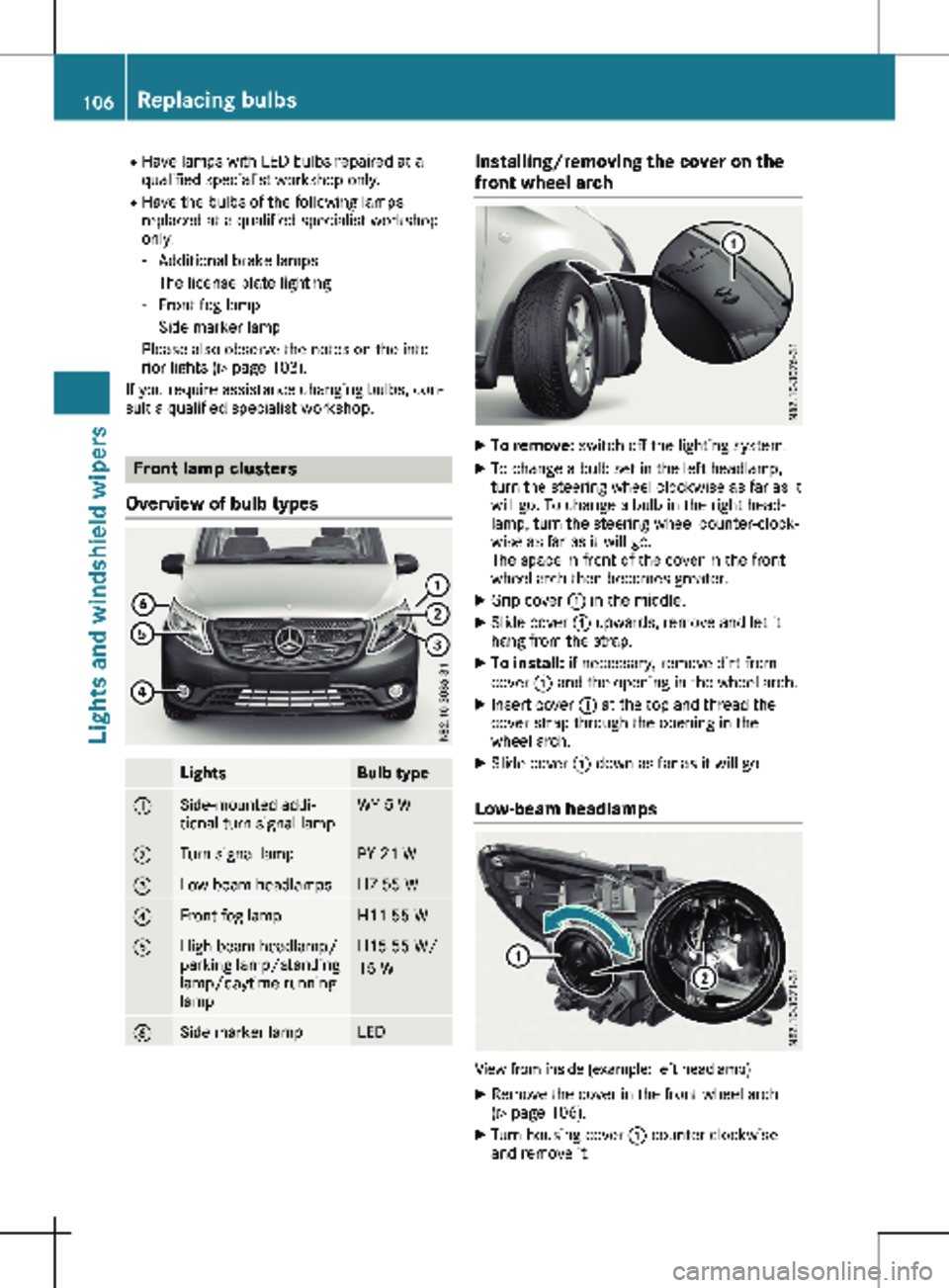
sult a qualified specialist workshop. Front lamp clusters
Overview of bulb types Lights Bulb type
:
Side-mounted addi-
tional turn signal lamp WY 5 W
;
Turn signal lamp PY 21 W
=
Low-beam headlamps H7 55 W
?
Front fog lamp H11 55 W
A
High-beam headlamp/
parking lamp/standing
lamp/daytime running
lamp H15 55 W/
15 W
B
Side marker lamp LED Installing/removing the cover on the
front wheel arch
X
To remove: switch off the lighting system.
X To change a bulb set in the left headlamp,
turn the steering wheel clockwise as far as it
will go. To change a bulb in the right head-
lamp, turn the steering wheel counter-clock-
wise as far as it will go.
The space in front of the cover in the front
wheel arch then becomes greater.
X Grip cover : in the middle.
X Slide cover : upwards, remove and let it
hang from the strap.
X To install: if necessary, remove dirt from
cover : and the opening in the wheel arch.
X Insert cover : at the top and thread the
cover strap through the opening in the
wheel arch.
X Slide cover : down as far as it will go.
Low-beam headlamps View from inside (example: left headlamp)
X Remove the cover in the front wheel arch
(Y page
106).
X Turn housing cover : counter-clockwise
and remove it. 106
Replacing bulbs
Lights and windshield wipers
Page 110 of 320

X
Press the new bulb into the socket and
screw it in clockwise.
X Attach additional turn signal : at the front
and engage. Replacing the rear lamp clusters
Overview of bulb types Tail lamps
Lights Bulb type
:
High-mounted brake
lamp LED
;
License plate lamp LED
=
Rear fog lamp (driver's
side) P 21 W
?
Backup lamp P 21 W
A
Brake lamp/tail lamp/
standing lamp/turn sig-
nal P 21 W
Side marker lamp LED
Tail lamps
Installing/removing the tail lamp
! Remove the tail lamps with care so as not
to damage the paintwork.
Because of the installation position,
Mercedes-Benz recommends that you have
the tail lamp bulbs changed at a qualified
specialist workshop. Tail lamps
X To remove: switch off the lighting system.
X Open the tailgate/rear-end door.
i The vehicle tool kit contains a screwdriver
( Y page
270).
X Unscrew two side screws :.
X Press tail lamp ; out as far as bolts =.
X Remove tail lamp ; out from bolts =.
X Pull the connector off the bulb holder of the
tail lamp.
X To install: press the connector into the bulb
holder of the tail lamp.
X Press the tail lamp sideways onto bolts =
and slide onto the vehicle.
X Tighten two side screws :.
Standard tail lamp X
Remove the tail lamp ( Y page
108).
X Unscrew three screws : and remove bulb
holder ; from the tail lamp.108
Replacing bulbs
Lights and windshield wipers
Page 111 of 320

Bulb holder
=
Turn signals/brake lamps/tail lamps/
standing lamps
? Backup lamp
A Rear fog lamp (driver's side only)
X Apply light pressure to the corresponding
bulb, turn it counter-clockwise and remove
it from the bulb holder.
X Press the new bulb into the socket and
screw it in clockwise.
X Insert bulb holder ; into the tail lamp and
tighten all three screws :.
X Install the tail lamp (Y page 108).Windshield wipers
Switching the windshield wiper
on/off
! Do not operate the windshield wipers
when the windshield is dry, as this could
damage the wiper blades. Moreover, dust
that has collected on the windshield can
scratch the glass if wiping takes place when
the windshield is dry.
If it is necessary to switch on the windshield
wipers in dry weather conditions, always use
washer fluid when operating the windshield
wipers.
! If the windshield wipers leave smears on
the windshield after the vehicle has been
washed in an automatic car wash, wax or
other residues may be the reason for this.
Clean the windshield using washer fluid
after washing the vehicle in an automatic
car wash.
! Intermittent wiping with rain sensor: due
to optical influences and the windshield becoming dirty in dry weather conditions,
the windshield wipers may be activated
inadvertently. This could then damage the
windshield wiper blades or scratch the wind-
shield.
For this reason, you should always switch
off the windshield wipers in dry weather. 1
$ Windshield wipers off
2 Ä Intermittent wipe, low (rain sensor
set to low sensitivity)
3 Å Intermittent wipe, high (rain sensor
set to high sensitivity)
4 ° Continuous wipe, slow
5 ¯ Continuous wipe, fast
B î 1st pressure point – single wipe; 2nd
pressure point – wipe with washer fluid
X Turn the key to position 1 or 2 in the igni-
tion lock.
X Turn the í wiper switch to the corre-
sponding position.
In the Ä or Å
positions, the appropriate
wiping frequency is set automatically accord-
ing to the intensity of the rain. In the Å
position, the rain sensor is more sensitive to
precipitation than in the Ä position, caus-
ing the windshield wipers to wipe more fre-
quently.
The windshield will no longer be wiped prop-
erly if the wiper blades are worn. This may pre-
vent you from observing the traffic conditions.
Information on replacing the wiper blades can
be found under "Replacing wiper blades"
( Y page 110). Windshield wipers
109
Lights and windshield wipers Z
Page 128 of 320
Useful information
This Operator's Manual describes all models
as well as standard and optional equipment of
your vehicle that were available at the time of
going to print. Country-specific variations are
possible. Note that your vehicle may not be
equipped with all of the described functions.
This also applies to systems and functions rel-
evant to safety.
Read the information on qualified specialist
workshops (Y page
32).Breaking-in notes
Important safety notes
In certain driving and driving safety systems,
the sensors adjust automatically while a cer-
tain distance is being driven after the vehicle
has been delivered or after repairs. Full system
effectiveness is not reached until the end of
this teach-in procedure.
New or replaced brake pads and brake discs
only reach their optimal braking effect after a
few hundred kilometers of driving. Until then,
compensate for this by applying greater force
to the brake pedal. The first 1000 miles (1500 km)
For the service life and economy of your vehi-
cle it is crucial that you break in the engine
with due care.
R Therefore, protect the engine for the first
1000 miles (1500 km
) by driving at varying
vehicle and engine speeds.
R Avoid overstraining the vehicle and high
engine speeds during this period, e.g. driv-
ing at full throttle. Do not exceed Ø of the
permissible maximum speed for each gear.
R Do not change down a gear manually in
order to brake.
R Try to avoid depressing the accelerator
pedal beyond the pressure point (kickdown).
After 1000 miles (1500 km), you can increase
the engine speed gradually and accelerate the
vehicle to full speed.
i You should also observe these notes on
breaking-in if the engine or parts of the drive
train on your vehicle have been replaced. Driving
Important safety notes
G
WARNING
Flammable materials introduced through
environmental influence or by animals can
ignite if in contact with the exhaust system
or parts of the engine that heat up. There is
a risk of fire.
Carry out regular checks to make sure that
there are no flammable foreign materials in
the engine compartment or in the exhaust
system. G
WARNING
If you switch off the ignition while driving,
safety-relevant functions are only available
with limitations, or not at all. This could
affect, for example, the power steering and
the brake boosting effect. You will require
considerably more effort to steer and brake.
There is a risk of an accident.
Do not switch off the ignition while driving. G
WARNING
If the parking brake has not been fully
released when driving, the parking brake
can:
R overheat and cause a fire
R lose its hold function.
There is a risk of fire and an accident.
Release the parking brake fully before driv-
ing off.
! Warm up the engine quickly. Do not use
the engine's full performance until it has
reached operating temperature.
Only shift the automatic transmission to the
desired drive position when the vehicle is
stationary.
Where possible, avoid spinning the drive
wheels when pulling away on slippery roads.
You could otherwise damage the drive train. 126
Driving
Driving and parking
Page 129 of 320
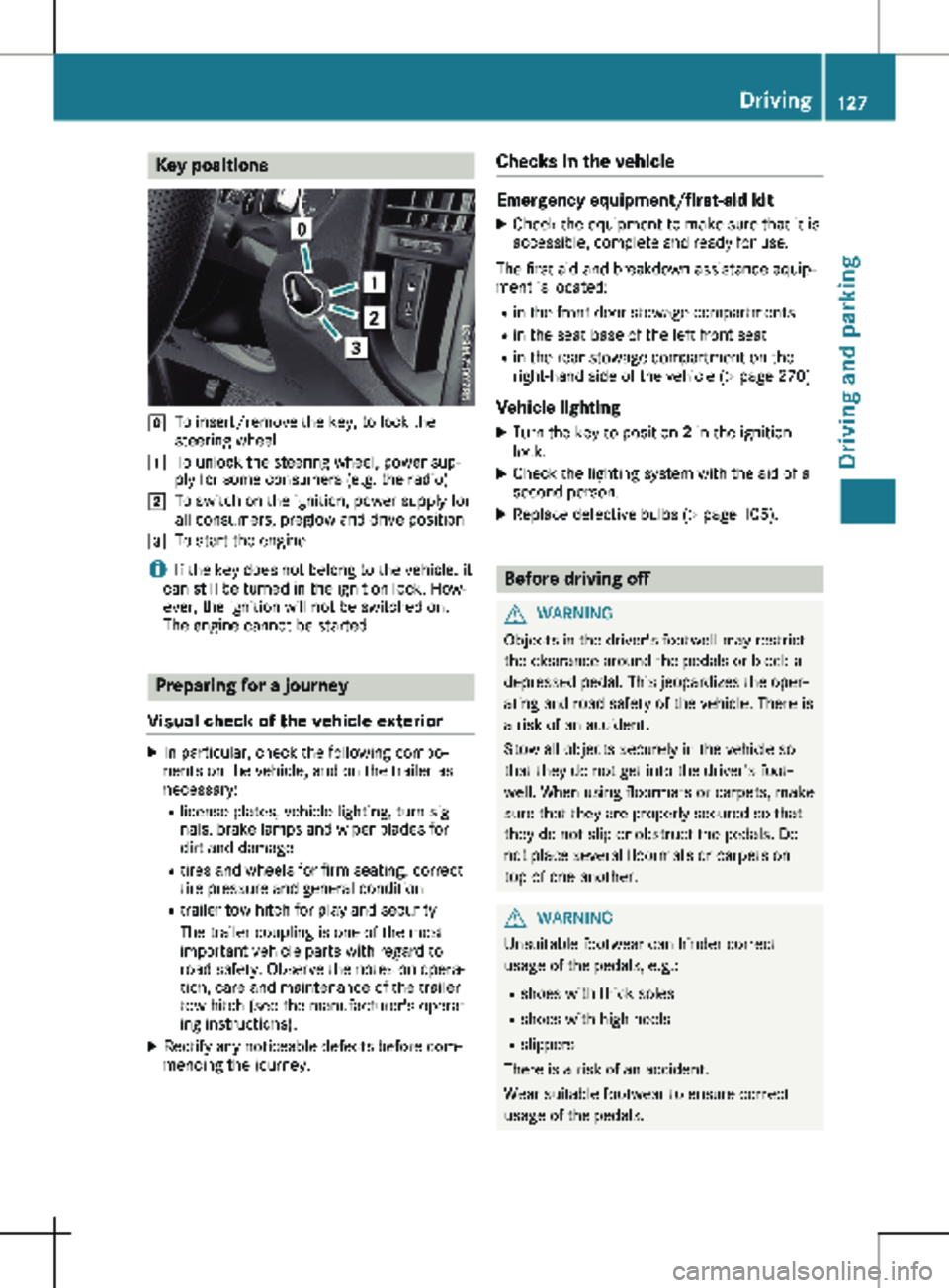
Key positions
g
To insert/remove the key, to lock the
steering wheel
1 To unlock the steering wheel, power sup-
ply for some consumers (e.g. the radio)
2 To switch on the ignition, power supply for
all consumers, preglow and drive position
3 To start the engine
i If the key does not belong to the vehicle, it
can still be turned in the ignition lock. How-
ever, the ignition will not be switched on.
The engine cannot be started. Preparing for a journey
Visual check of the vehicle exterior X
In particular, check the following compo-
nents on the vehicle, and on the trailer as
necessary:
R
license plates, vehicle lighting, turn sig-
nals, brake lamps and wiper blades for
dirt and damage
R tires and wheels for firm seating, correct
tire pressure and general condition
R trailer tow hitch for play and security
The trailer coupling is one of the most
important vehicle parts with regard to
road safety. Observe the notes on opera-
tion, care and maintenance of the trailer
tow hitch (see the manufacturer's operat-
ing instructions).
X Rectify any noticeable defects before com-
mencing the journey. Checks in the vehicle Emergency equipment/first-aid kit
X Check the equipment to make sure that it is
accessible, complete and ready for use.
The first aid and breakdown assistance equip-
ment is located:
R in the front door stowage compartments
R in the seat base of the left front seat
R in the rear stowage compartment on the
right-hand side of the vehicle
(Y page 270)
Vehicle lighting
X Turn the key to position 2 in the ignition
lock.
X Check the lighting system with the aid of a
second person.
X Replace defective bulbs (Y page
105). Before driving off
G
WARNING
Objects in the driver's footwell may restrict
the clearance around the pedals or block a
depressed pedal. This jeopardizes the oper-
ating and road safety of the vehicle. There is
a risk of an accident.
Stow all objects securely in the vehicle so
that they do not get into the driver's foot-
well. When using floormats or carpets, make
sure that they are properly secured so that
they do not slip or obstruct the pedals. Do
not place several floormats or carpets on
top of one another. G
WARNING
Unsuitable footwear can hinder correct
usage of the pedals, e.g.:
R shoes with thick soles
R shoes with high heels
R slippers
There is a risk of an accident.
Wear suitable footwear to ensure correct
usage of the pedals. Driving
127
Driving and parking Z