clock MERCEDES-BENZ SPRINTER 2005 Service User Guide
[x] Cancel search | Manufacturer: MERCEDES-BENZ, Model Year: 2005, Model line: SPRINTER, Model: MERCEDES-BENZ SPRINTER 2005Pages: 1232, PDF Size: 39.23 MB
Page 174 of 1232
Except for the indications provided within the
multi-function indicator LCD unit, each indicator in
the EMIC is illuminated by a dedicated LED that is
soldered onto the EMIC electronic circuit board.
Cluster illumination is accomplished by dimmable
LED back lighting, which illuminates the gauges for
visibility when the exterior lighting is turned on. The
cluster general illumination LED units are also sol-
dered onto the EMIC electronic circuit board. The
LED units are not available for service replacement
and, if damaged or faulty, the entire EMIC must be
replaced.
Hard wired circuitry connects the EMIC to the
electrical system of the vehicle. These hard wired cir-cuits are integral to the vehicle wire harnesses,
which are routed throughout the vehicle and retained
by many different methods. These circuits may be
connected to each other, to the vehicle electrical sys-
tem and to the EMIC through the use of a combina-
tion of soldered splices, splice block connectors, and
many different types of wire harness terminal con-
nectors and insulators. Refer to the appropriate wir-
ing information. The wiring information includes
wiring diagrams, proper wire and connector repair
procedures, further details on wire harness routing
and retention, as well as pin-out and location views
for the various wire harness connectors, splices and
grounds.
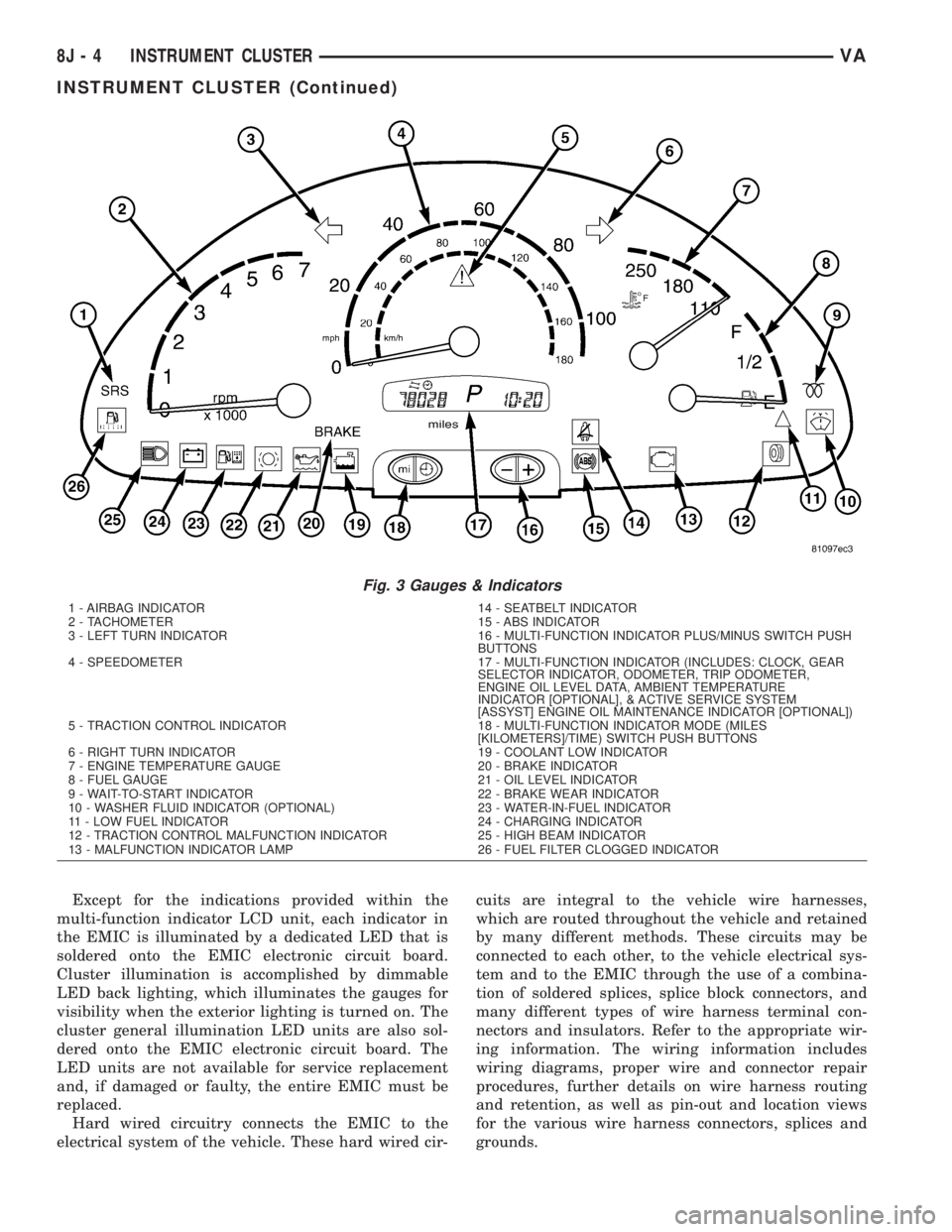
Fig. 3 Gauges & Indicators
1 - AIRBAG INDICATOR 14 - SEATBELT INDICATOR
2 - TACHOMETER 15 - ABS INDICATOR
3 - LEFT TURN INDICATOR 16 - MULTI-FUNCTION INDICATOR PLUS/MINUS SWITCH PUSH
BUTTONS
4 - SPEEDOMETER 17 - MULTI-FUNCTION INDICATOR (INCLUDES: CLOCK, GEAR
SELECTOR INDICATOR, ODOMETER, TRIP ODOMETER,
ENGINE OIL LEVEL DATA, AMBIENT TEMPERATURE
INDICATOR [OPTIONAL], & ACTIVE SERVICE SYSTEM
[ASSYST] ENGINE OIL MAINTENANCE INDICATOR [OPTIONAL])
5 - TRACTION CONTROL INDICATOR 18 - MULTI-FUNCTION INDICATOR MODE (MILES
[KILOMETERS]/TIME) SWITCH PUSH BUTTONS
6 - RIGHT TURN INDICATOR 19 - COOLANT LOW INDICATOR
7 - ENGINE TEMPERATURE GAUGE 20 - BRAKE INDICATOR
8 - FUEL GAUGE 21 - OIL LEVEL INDICATOR
9 - WAIT-TO-START INDICATOR 22 - BRAKE WEAR INDICATOR
10 - WASHER FLUID INDICATOR (OPTIONAL) 23 - WATER-IN-FUEL INDICATOR
11 - LOW FUEL INDICATOR 24 - CHARGING INDICATOR
12 - TRACTION CONTROL MALFUNCTION INDICATOR 25 - HIGH BEAM INDICATOR
13 - MALFUNCTION INDICATOR LAMP 26 - FUEL FILTER CLOGGED INDICATOR
8J - 4 INSTRUMENT CLUSTERVA
INSTRUMENT CLUSTER (Continued)
Page 181 of 1232
AMBIENT TEMPERATURE
INDICATOR
DESCRIPTION
An ambient temperature indicator is optional
equipment on all instrument clusters. In vehicles so
equipped, the ambient temperature indication can be
toggled with the clock indication on the right side of
the multi-function indicator Liquid Crystal Display
(LCD) located near the lower edge of the instrument
cluster, directly below the speedometer. The ambient
temperature indication consists of a numeric value
with a ª+º (plus) or ª2º (minus) prefix, and the unit
of measure is identified with the characters ªÉCº
(Canadian vehicles only) or ªÉFº (United States vehi-
cles only) located directly above the temperature
indication. The indications of the ambient tempera-
ture indicator are not visible when the LCD is not
illuminated. When illuminated the indications
appear as dark characters and icons silhouetted
against an amber field. When the exterior lighting is
turned Off, the display is illuminated at maximum
brightness. When the exterior lighting is turned On
the display illumination level can be adjusted in con-
cert with the cluster general illumination lighting
using the ª+º (plus) and ª2º (minus) multi-function
indicator push buttons. The ambient temperature
indicator is serviced as a unit with the instrument
cluster.
OPERATION
The optional ambient temperature indicator gives
an indication to the vehicle operator of the outside
air temperature. This indicator is controlled by the
instrument cluster microprocessor based upon cluster
programming and a hard wired input received by the
cluster from the ambient temperature sensor. The
ambient temperature indicator is completely con-
trolled by the instrument cluster logic circuit, and
that logic will allow this indicator to operate when-
ever the multi-function indicator Liquid Crystal Dis-
play (LCD) is activated. Therefore, the ambient
temperature indicator remains functional regardless
of the ignition switch position.
The vehicle operator can choose to have the ambi-
ent temperature indicator displayed instead of the
clock information, but the clock and ambient temper-
ature indicator cannot be displayed at the same time.
The clock or ambient temperature indicator display
option is selected using the multi-function indicator
clock switch on the instrument cluster circuit board.
This switch is actuated manually by depressing the
clock switch push button that extends through the
lower edge of the cluster lens below the left end of
the multi-function indicator. Actuating this switchmomentarily will toggle the display between the
clock and ambient temperature indicator modes.
Actuating this switch twice within about one second
will cause the display to toggle, but then automati-
cally revert to the originally selected mode after
about twenty seconds.
The ambient temperature sensor located below the
front bumper is a Negative Temperature Coefficient
(NTC) thermistor. The internal resistance of the sen-
sor is reduced as the ambient temperature rises. The
instrument cluster continually monitors the resis-
tance through the sensor to determine the tempera-
ture value to be displayed. The current value is
displayed immediately after the LCD is activated.
The display value will remain static regardless of
decreases in the sensor resistance (temperature ris-
ing) below vehicle speeds of 10 to 15 kilometers-per-
hour (6 to 9 miles-per-hour). Decreases in the sensor
resistance above 15 kilometers-per-hour (9 miles-per-
hour) and increases the sensor resistance (tempera-
ture falling) regardless of vehicle speed are displayed
subject to a sixty second delay.
The ambient temperature sensor is connected to
the instrument cluster in series between the ambient
temperature sensor return and sense circuits. The
ambient temperature sensor and the return and
sense circuits to the instrument cluster can be diag-
nosed using conventional diagnostic tools and meth-
ods. For proper diagnosis of the instrument cluster
circuitry that controls the ambient temperature indi-
cator, a DRBIIItscan tool is required. Refer to the
appropriate diagnostic information.
BRAKE/PARK BRAKE
INDICATOR
DESCRIPTION
A brake indicator is standard equipment on all
instrument clusters. The brake indicator is located
near the lower edge of the instrument cluster, to the
left of the multi-function indicator display. In vehi-
cles built for the United States market, the brake
indicator consists of stencil-like cutout of the word
ªBRAKEº in the opaque layer of the instrument clus-
ter overlay. In vehicles built for the Canadian mar-
ket, the brake indicator consists of the International
Control and Display Symbol icon for ªBrake Failureº
imprinted within a rectangular cutout in the opaque
layer of the instrument cluster overlay. In either
case, the dark outer layer of the overlay prevents the
indicator from being clearly visible when it is not
illuminated. A red Light Emitting Diode (LED)
behind the cutout in the opaque layer of the overlay
causes the ªBRAKEº text to appear in red, or the
icon to appear silhouetted against a red field through
VAINSTRUMENT CLUSTER 8J - 11
Page 183 of 1232
illuminated by the instrument cluster for about two
seconds as a bulb test.
²Brake Wear Sensor Input- Each time the
cluster detects ground on the brake wear sense cir-
cuit (brake wear sensor closed = brake lining wear
limit exceeded) while the ignition switch is in the On
position, the brake wear indicator is illuminated. The
indicator remains illuminated until the brake wear
sense input to the cluster is an open circuit (brake
wear sensor open = brake lining wear within limits),
or until the ignition switch is turned to the Off posi-
tion, whichever occurs first.
A brake wear sensor located at each wheel provides
a hard wired ground input to the instrument cluster
circuitry through the brake wear sense circuit when-
ever the brake linings for that wheel have exceeded
their wear limits. The four normally open brake wear
sensors are connected in parallel between ground and
instrument cluster. The brake wear sensors and their
input circuit to the instrument cluster can be diag-
nosed using conventional diagnostic tools and meth-
ods. For proper diagnosis of the instrument cluster
circuitry that controls the brake wear indicator, a
DRBIIItscan tool is required. Refer to the appropri-
ate diagnostic information.
CHARGING INDICATOR
DESCRIPTION
A charging indicator is standard equipment on all
instrument clusters. The charging indicator is located
near the lower edge of the instrument cluster, to the
left of the multi-function indicator display. The
charging indicator consists of the International Con-
trol and Display Symbol icon for ªBattery Charging
Conditionº imprinted within a rectangular cutout in
the opaque layer of the instrument cluster overlay.
The dark outer layer of the overlay prevents the indi-
cator from being clearly visible when it is not illumi-
nated. A red Light Emitting Diode (LED) behind the
cutout in the opaque layer of the overlay causes the
icon to appear silhouetted against a red field through
the translucent outer layer of the overlay when the
indicator is illuminated from behind by the LED,
which is soldered onto the instrument cluster elec-
tronic circuit board. The charging indicator is ser-
viced as a unit with the instrument cluster.
OPERATION
The charging indicator gives an indication to the
vehicle operator when the electrical system voltage is
too low. This indicator is controlled by a transistor on
the instrument cluster circuit board based upon clus-
ter programming and a hard wired input from the
generator. The charging indicator Light EmittingDiode (LED) is completely controlled by the instru-
ment cluster logic circuit, and that logic will only
allow this indicator to operate when the instrument
cluster detects that the ignition switch is in the On
position. Therefore, the LED will always be off when
the ignition switch is in any position except On. The
LED only illuminates when it is provided a path to
ground by the instrument cluster transistor. The
instrument cluster will turn on the charging indica-
tor for the following reasons:
²Bulb Test- Each time the ignition switch is
turned to the On position with the engine not run-
ning the charging indicator is illuminated by the
instrument cluster as a bulb test.
²Generator Input- Each time the cluster
detects that the voltage of the generator input is 12.7
volts or lower while the engine is running, the charg-
ing indicator will be illuminated. The indicator
remains illuminated until the cluster detects that the
voltage of the generator input is above 12.7 volts, or
until the ignition switch is turned to the Off position,
whichever occurs first.
The generator provides a hard wired input to the
instrument cluster circuitry on the engine running
(D+) circuit. If the instrument cluster turns on the
indicator while the engine is running, it may indicate
that the charging system requires service. The gener-
ator input circuit to the instrument cluster can be
diagnosed using conventional diagnostic tools and
methods. For proper diagnosis of the charging sys-
tem, or the instrument cluster circuitry that controls
the charging indicator, a DRBIIItscan tool is
required. Refer to the appropriate diagnostic infor-
mation.
CLOCK
DESCRIPTION
An electronic digital clock is standard equipment
on all instrument clusters. In vehicles equipped with
the optional ambient temperature indicator, the clock
indication can be toggled with the ambient tempera-
ture indication on the right side of the multi-function
indicator Liquid Crystal Display (LCD) located near
the lower edge of the instrument cluster, directly
below the speedometer. The clock provides a 12 hour-
based, digital indication of the current hours and
minutes. The indications of the clock are not visible
when the LCD is not illuminated. When illuminated
the indications appear as dark characters silhouetted
against an amber field. When the exterior lighting is
turned Off, the display is illuminated at maximum
brightness. When the exterior lighting is turned On
the display illumination level can be adjusted in con-
cert with the cluster general illumination lighting
VAINSTRUMENT CLUSTER 8J - 13
BRAKE WEAR INDICATOR (Continued)
Page 184 of 1232
using the ª+º (plus) and ª2º (minus) multi-function
indicator push buttons. The clock is serviced as a
unit with the instrument cluster.
OPERATION
The clock gives an indication to the vehicle opera-
tor of the current time. The electronic digital clock is
controlled by the instrument cluster microprocessor
based upon cluster programming. The clock display is
completely controlled by the instrument cluster logic
circuit, and that logic will only allow this indication
to be viewed when the multi-function indicator Liq-
uid Crystal Display (LCD) is activated. However, the
clock remains functional regardless of the ignition
switch position.
The vehicle operator can choose to have the
optional ambient temperature indicator displayed
instead of the clock information, but the clock and
ambient temperature indicator cannot be displayed
at the same time. The clock or ambient temperature
indicator display option is selected using the multi-
function indicator clock switch on the instrument
cluster circuit board. This switch is actuated manu-
ally by depressing the clock switch push button that
extends through the lower edge of the cluster lens
below the left end of the multi-function indicator.
Actuating this switch momentarily will toggle the
display between the clock and ambient temperature
indicator modes. Actuating this switch twice within
about one second will cause the display to toggle, but
then automatically revert to the originally selected
mode after about twenty seconds.
See the owner's manual in the vehicle glove box for
more information on the features, use, operation and
setting procedures for the clock. For proper testing of
the instrument cluster circuitry that controls the
clock functions, a DRBIIItscan tool is required.
Refer to the appropriate diagnostic information.
COOLANT LOW INDICATOR
DESCRIPTION
A coolant low indicator is standard equipment on
all instrument clusters. The coolant low indicator is
located near the lower edge of the instrument cluster,
to the left of the multi-function indicator display. The
coolant low indicator consists of the International
Control and Display Symbol icon for ªLow Engine
Coolantº imprinted within a rectangular cutout in
the opaque layer of the instrument cluster overlay.
The dark outer layer of the overlay prevents the indi-
cator from being clearly visible when it is not illumi-
nated. A red Light Emitting Diode (LED) behind the
cutout in the opaque layer of the overlay causes the
icon to appear silhouetted against a red field throughthe translucent outer layer of the overlay when the
indicator is illuminated from behind by the LED,
which is soldered onto the instrument cluster elec-
tronic circuit board. The coolant low indicator is ser-
viced as a unit with the instrument cluster.
OPERATION
The coolant low indicator gives an indication to the
vehicle operator when the engine coolant level is low.
This indicator is controlled by a transistor on the
instrument cluster circuit board based upon cluster
programming and a hard wired input received by the
cluster from the engine coolant level switch. The cool-
ant low indicator Light Emitting Diode (LED) is com-
pletely controlled by the instrument cluster logic
circuit, and that logic will only allow this indicator to
operate when the instrument cluster detects that the
ignition switch is in the On position. Therefore, the
LED will always be off when the ignition switch is in
any position except On. The LED only illuminates
when it is provided a path to ground by the instru-
ment cluster transistor. The instrument cluster will
turn on the coolant low indicator for the following
reasons:
²Bulb Test- Each time the ignition switch is
turned to the On position the coolant low indicator is
illuminated for about two seconds as a bulb test.
²Engine Coolant Level Switch Input- Each
time the cluster detects an appropriate input on the
low coolant fluid level sense circuit (engine coolant
level switch resistance low = engine coolant level low)
while the ignition switch is in the On position, the
coolant low indicator will be illuminated. The indica-
tor remains illuminated until the low coolant fluid
level sense input to the cluster changes (engine cool-
ant level switch resistance high = engine coolant
level full), or until the ignition switch is turned to
the Off position, whichever occurs first. The engine
coolant level switch also features a diagnostic resis-
tor connected in parallel between the switch input
and output to provide the cluster with verification
that the low coolant fluid level sense circuit is not
open or shorted.
The engine coolant level switch integral to the cool-
ant bottle provides a hard wired input to the instru-
ment cluster circuitry through the low coolant fluid
level sense circuit. The engine coolant level switch
and the low coolant fluid level sense circuit to the
instrument cluster can be diagnosed using conven-
tional diagnostic tools and methods. For proper diag-
nosis of the instrument cluster circuitry that controls
the coolant low indicator, a DRBIIItscan tool is
required. Refer to the appropriate diagnostic infor-
mation.
8J - 14 INSTRUMENT CLUSTERVA
CLOCK (Continued)
Page 189 of 1232
ule (ECM) over the Controller Area Network (CAN)
data bus. The low oil level indicator Light Emitting
Diode (LED) is completely controlled by the instru-
ment cluster logic circuit, and that logic will only
allow this indicator to operate when the instrument
cluster detects that the ignition switch is in the On
position. Therefore, the LED will always be off when
the ignition switch is in any position except On. The
LED only illuminates when it is provided a path to
ground by the instrument cluster transistor. The
instrument cluster will turn on the low oil level indi-
cator for the following reasons:
²Bulb Test- Each time the ignition switch is
turned to the On position the low oil level indicator
is illuminated for about two seconds as a bulb test.
²Engine Oil Level Low Message- Once the
engine has been started, each time the cluster
receives a message from the ECM indicating that the
engine oil level is at or near the ªMinimumº mark on
the dipstick, the low oil level indicator is illuminated.
The indicator remains illuminated briefly at first, but
will remain illuminated for longer periods as subse-
quent messages indicate that the oil level has
dropped further. Eventually, the indicator will
remain illuminated solid until the engine oil level is
corrected, or until the ignition switch is turned to the
Off position, whichever occurs first.
The instrument cluster also supplements the oil level
indicator by displaying an engine oil icon along with
alpha-numeric messages in the multi-function indicator
Liquid Crystal Display (LCD) advising the vehicle oper-
ator how much oil is required to correct the engine oil
level, and when the ªMaximumº engine oil level has
been exceeded. See the owner's manual in the vehicle
glove box for more information on this feature.
The ECM continually monitors the engine oil level
and temperature sensor to determine the engine oil
level. The ECM then sends the proper engine oil
level messages to the instrument cluster. If the
instrument cluster turns on the indicator after the
bulb test, even after the engine oil level is sufficient,
it may indicate that the engine or the engine oiling
system requires service. For proper diagnosis of the
engine oil level and temperature sensor, the ECM,
the CAN data bus, or the electronic message inputs
to the instrument cluster that control the low oil
level indicator, a DRBIIItscan tool is required. Refer
to the appropriate diagnostic information.
MAINTENANCE INDICATOR
DESCRIPTION
An Active Service SYSTem (ASSYST) engine oil main-
tenance indicator is optional equipment on all instru-
ment clusters. In vehicles so equipped, a second,dedicated ASSYST microprocessor is integral to the
cluster electronic circuit board. The ASSYST indications
are displayed and can be toggled with the clock indica-
tion on the right side of the multi-function indicator
Liquid Crystal Display (LCD) located near the lower
edge of the instrument cluster, directly below the speed-
ometer. The ASSYST displays include numeric values
combined with several icons to indicate actual engine oil
level, and reminders in time (days) or distance (miles or
kilometers) until the next required engine oil mainte-
nance is anticipated. ASSYST also provides several
audible indications using the electronic tone generator
on the instrument cluster circuit board to supplement
these visual displays.
The indications of the ASSYST engine oil mainte-
nance indicator are not visible when the LCD is not illu-
minated. When illuminated, the ASSYST indications
appear as dark characters and icons silhouetted against
an amber field. When the exterior lighting is turned Off,
the display is illuminated at maximum brightness.
When the exterior lighting is turned On, the display
illumination level can be adjusted in concert with the
cluster general illumination lighting using the ª+º (plus)
and ª2º (minus) multi-function indicator push buttons.
The ASSYST engine oil maintenance indicator is ser-
viced as a unit with the instrument cluster.
OPERATION
The ASSYST engine oil maintenance indicator micro-
processor uses numerous criteria besides time and mile-
age to evaluate vehicle maintenance requirements. Time
data is taken from the electronic digital clock integral to
the instrument cluster. Vehicle distance data is obtained
from the Controller Antilock Brake (CAB) over the Con-
troller Area Network (CAN) data bus. Coolant tempera-
ture, engine oil temperature, engine oil level, engine oil
quality, engine speed, and engine load data are obtained
from the Engine Control Module (ECM) over the CAN
data bus. Using all of the available data and internal
programming, the ASSYST microprocessor then calcu-
lates the estimated time and distance to the next
required engine oil maintenance interval. The ASSYST
uses the multi-function indicator LCD to display that
data and, when necessary, issues audible alerts to the
vehicle operator through the electronic tone generator
on the cluster circuit board.
See the owner's manual in the vehicle glove box for
more information on the features, use, operation and
resetting procedures for the ASSYST maintenance
computer. Proper diagnosis and testing of the
ASSYST engine oil maintenance computer, the CAN
data bus and the electronic data bus message inputs
to the EMIC that are used by the ASSYST computer
for its calculations requires the use of a DRBIIIt
scan tool. Refer to the appropriate diagnostic infor-
mation.
VAINSTRUMENT CLUSTER 8J - 19
LOW OIL LEVEL INDICATOR (Continued)
Page 190 of 1232
MALFUNCTION INDICATOR
LAMP (MIL)
DESCRIPTION
A Malfunction Indicator Lamp (MIL) is standard
equipment on all instrument clusters. The MIL is
located near the lower edge of the instrument cluster, to
the right of the multi-function indicator display. The
MIL consists of the International Control and Display
Symbol icon for ªEngineº imprinted within a rectangu-
lar cutout in the opaque layer of the instrument cluster
overlay. The dark outer layer of the overlay prevents
the indicator from being clearly visible when it is not
illuminated. An amber Light Emitting Diode (LED)
behind the cutout in the opaque layer of the overlay
causes the icon to appear silhouetted against an amber
field through the translucent outer layer of the overlay
when the indicator is illuminated from behind by the
LED, which is soldered onto the instrument cluster elec-
tronic circuit board. The MIL is serviced as a unit with
the instrument cluster.
OPERATION
The Malfunction Indicator Lamp (MIL) gives an indi-
cation to the vehicle operator when the Engine Control
Module (ECM) has recorded a Diagnostic Trouble Code
(DTC) for an On-Board Diagnostics II (OBDII) emissions-
related circuit or component malfunction. The MIL is
controlled by a transistor on the instrument cluster cir-
cuit board based upon cluster programming and elec-
tronic messages received by the cluster from the ECM
over the Controller Area Network (CAN) data bus. The
MIL Light Emitting Diode (LED) is completely controlled
by the instrument cluster logic circuit, and that logic will
only allow this indicator to operate when the instrument
cluster detects that the ignition switch is in the On posi-
tion. Therefore, the LED will always be off when the
ignition switch is in any position except On. The LED
only illuminates when it is provided a path to ground by
the instrument cluster transistor. The instrument cluster
will turn on the MIL for the following reasons:
²Bulb Test- Each time the ignition switch is
turned to the On position the MIL is illuminated as a
bulb test. The indicator will remain illuminated until
the engine is started, or until the ignition switch is
turned to the Off position, whichever occurs first.
²MIL Lamp-On Message- Each time the clus-
ter receives a MIL lamp-on message from the ECM,
the indicator will be illuminated. The indicator will
remain illuminated until the detected fault is
repaired, or until the ignition switch is turned to the
Off position, whichever occurs first. For more infor-
mation on the ECM and the DTC set and reset
parameters, (Refer to 25 - EMISSIONS CONTROL -
OPERATION).²Communication Error- If the cluster receives
no lamp-on or lamp-off message from the ECM, the
MIL is illuminated by the instrument cluster. The
indicator remains controlled and illuminated by the
cluster until a valid lamp-on or lamp-off message is
received from the ECM.
The ECM continually monitors the fuel and emis-
sions system circuits and sensors to decide whether
the system is in good operating condition. The ECM
then sends the proper lamp-on or lamp-off messages
to the instrument cluster. If the instrument cluster
turns on the MIL after the bulb test, it may indicate
that a malfunction has occurred and that the fuel
and emissions systems may require service. For
proper diagnosis of the fuel and emissions systems,
the ECM, the CAN data bus, or the electronic mes-
sage inputs to the instrument cluster that control the
MIL, a DRBIIItscan tool is required. Refer to the
appropriate diagnostic information.
MULTI-FUNCTION INDICATOR
DESCRIPTION
A multi-function indicator is standard equipment on
all instrument clusters. The multi-function indicator is
located near the lower edge of the instrument cluster,
directly below the speedometer. The multi-function indi-
cator consists of a Liquid Crystal Display (LCD) unit
and four push button-controlled switches that are sol-
dered onto the instrument cluster electronic circuit
board. The LCD is visible through a large rectangular
cutout in the instrument cluster overlay, while the four
switch push buttons extend through a black plastic
switch bezel located on the cluster lens directly below
the LCD. The four multi-function indicator push buttons
allow the vehicle operator to configure and adjust sev-
eral of the display features. The buttons are labeled
from left to right: ªmiº (miles) or ªkmº (kilometers), an
icon depicting an analog clock face (clock), ª2º (minus),
and ª+º (plus).
The multi-function indicator LCD displays both
alpha-numeric characters and numerous icons to pro-
vide information to the vehicle operator. The indications
of the multi-function indicator are not visible when the
LCD is not illuminated. When illuminated the indica-
tions appear as dark characters and icons silhouetted
against an amber field. When the exterior lighting is
turned Off, the display is illuminated at maximum
brightness. When the exterior lighting is turned On the
display illumination level can be adjusted in concert
with the cluster general illumination lighting using the
ª+º (plus) and ª2º (minus) multi-function indicator push
buttons. The multi-function indicator LCD unit and
push button switches are serviced as a unit with the
instrument cluster.
8J - 20 INSTRUMENT CLUSTERVA
Page 191 of 1232
OPERATION
The multi-function indicator has several display
capabilities including odometer, trip odometer, clock,
engine oil level data, gear selector indicator
(PRNDL), certain diagnostic information and, on
vehicles so equipped, an optional Active Service SYS-
Tem (ASSYST) engine oil maintenance indicator and
an optional outside ambient temperature indicator.
The multi-function indicator is completely controlled
by the instrument cluster logic circuit, and that logic
will allow this indication to be viewed whenever the
multi-function indicator Liquid Crystal Display
(LCD) is activated. Therefore, the indicator remains
functional regardless of the ignition switch position.
With the ignition switch in the Off or Accessory posi-
tions and the key removed from the ignition lock cyl-
inder, the display is activated when the park lamps
are turned On or, for about thirty seconds after any
one of the multi-function indicator switch push but-
tons is depressed. Otherwise, the display unit is
active for about thirty seconds after the key is
inserted into the ignition lock cylinder, and inactive
about thirty seconds after the key is removed from
the ignition lock cylinder.
The multi-function indicator ªmiº (miles) or
ªkmº(kilometers) switch push button is used to con-
trol the odometer/trip odometer display modes. The
multi-function indicator clock switch push button is
used to control the clock/outside temperature display
modes. The multi-function indicator ª+º (plus) and
ª2º (minus) switch push buttons are used to adjust
the cluster general illumination dimming level, the
clock, and other cluster settings. See the owner's
manual in the vehicle glove box for more information
on the features, use, operation and setting proce-
dures for the various standard and optional multi-
function indicator displays.
Proper testing of the multi-function indicator LCD
unit, the CAN data bus and the electronic data bus
message inputs to the instrument cluster that control
some of the multi-function indicator functions
requires the use of a DRBIIItscan tool. Refer to the
appropriate diagnostic information. Additional details
for the odometer/trip odometer, the clock, the gear
selector indicator, the ambient temperature indicator
and the ASSYST warning and reminder functions of
the multi-function indicator may be found elsewhere
in this service information.
ODOMETER
DESCRIPTION
An odometer and trip odometer are standard
equipment in all instrument clusters. The odometer
and trip odometer values are displayed on the leftside of the multi-function indicator Liquid Crystal
Display (LCD). The LCD is soldered onto the cluster
electronic circuit board and is visible through a win-
dow with a clear lens located near the lower edge of
the instrument cluster, directly below the speedome-
ter. However, the odometer and trip odometer infor-
mation are not displayed simultaneously. The ªmiº
(miles) or ªkmº (kilometers) switch on the instrument
cluster circuit board toggles the display between
odometer and trip odometer modes by depressing the
switch push button that extends through the lower
edge of the cluster lens, directly below the multi-
function indicator LCD.
The odometer and trip odometer information is
stored in the instrument cluster memory. This infor-
mation can be increased when the proper inputs are
provided to the instrument cluster, but the informa-
tion cannot be decreased. The odometer can display
values up to 999,999 kilometers (999,999 miles). The
odometer latches at these values, and will not roll
over to zero. The trip odometer can display values up
to 999.9 kilometers (999.9 miles) before it rolls over
to zero. The odometer display does not have a deci-
mal point and will not show values less than a full
unit (kilometer or mile), while the trip odometer dis-
play does have a decimal point and will show tenths
of a unit (kilometer or mile). The unit of measure
(kilometers or miles) for the odometer and trip odom-
eter display is imprinted on the cluster overlay below
the left end of the LCD. The unit of measure for the
instrument cluster odometer/trip odometer is selected
at the time that it is manufactured, and cannot be
changed.
The indications of the odometer/trip odometer are
not visible when the LCD is not illuminated. When
illuminated the indications appear as dark charac-
ters silhouetted against an amber field. When the
exterior lighting is turned Off, the display is illumi-
nated at maximum brightness. When the exterior
lighting is turned On the display illumination level
can be adjusted in concert with the cluster general
illumination lighting using the plus and minus multi-
function indicator push buttons. The odometer has a
ªRental Carº mode, which will activate the multi-
function indicator LCD and illuminate the odometer
information for about thirty seconds after one of the
multi-function indicator push buttons is momentarily
depressed, or after the key is inserted into the igni-
tion switch lock cylinder with the ignition switch in
the Off position.
The odometer/trip odometer and the miles/kilome-
ters switch, and the miles/kilometers switch push
button are serviced as a unit with the instrument
cluster.
VAINSTRUMENT CLUSTER 8J - 21
MULTI-FUNCTION INDICATOR (Continued)
Page 204 of 1232
INSTALLATION
(1) Install the backup lamp bulb into the tail lamp
socket plate (Fig. 3).
(2) Align the socket plate with the mounting hole
in the inner rear pillar.
(3) Using hand pressure, push the socket plate
gently and evenly into the inner rear pillar mounting
hole until both latch tabs are fully engaged (Fig. 2).
(4) If the vehicle is so equipped, reinstall the trim
onto the inside of the right or left rear corner pillar.
(5) Reconnect the battery negative cable.
BRAKE LAMP SWITCH
REMOVAL
(1) Disconnect and isolate the battery negative
cable.
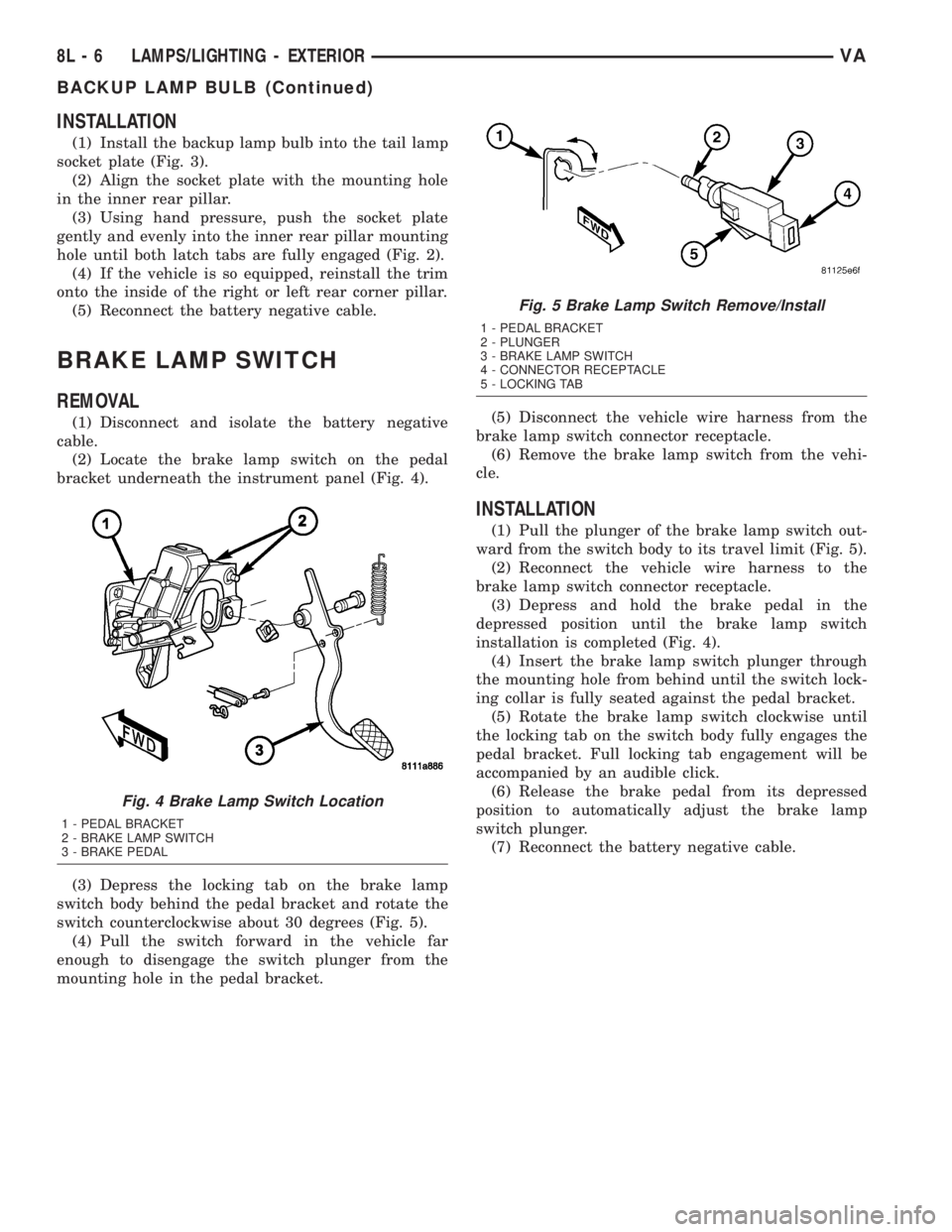
(2) Locate the brake lamp switch on the pedal
bracket underneath the instrument panel (Fig. 4).
(3) Depress the locking tab on the brake lamp
switch body behind the pedal bracket and rotate the
switch counterclockwise about 30 degrees (Fig. 5).
(4) Pull the switch forward in the vehicle far
enough to disengage the switch plunger from the
mounting hole in the pedal bracket.(5) Disconnect the vehicle wire harness from the
brake lamp switch connector receptacle.
(6) Remove the brake lamp switch from the vehi-
cle.
INSTALLATION
(1) Pull the plunger of the brake lamp switch out-
ward from the switch body to its travel limit (Fig. 5).
(2) Reconnect the vehicle wire harness to the
brake lamp switch connector receptacle.
(3) Depress and hold the brake pedal in the
depressed position until the brake lamp switch
installation is completed (Fig. 4).
(4) Insert the brake lamp switch plunger through
the mounting hole from behind until the switch lock-
ing collar is fully seated against the pedal bracket.
(5) Rotate the brake lamp switch clockwise until
the locking tab on the switch body fully engages the
pedal bracket. Full locking tab engagement will be
accompanied by an audible click.
(6) Release the brake pedal from its depressed
position to automatically adjust the brake lamp
switch plunger.
(7) Reconnect the battery negative cable.
Fig. 4 Brake Lamp Switch Location
1 - PEDAL BRACKET
2 - BRAKE LAMP SWITCH
3 - BRAKE PEDAL
Fig. 5 Brake Lamp Switch Remove/Install
1 - PEDAL BRACKET
2 - PLUNGER
3 - BRAKE LAMP SWITCH
4 - CONNECTOR RECEPTACLE
5 - LOCKING TAB
8L - 6 LAMPS/LIGHTING - EXTERIORVA
BACKUP LAMP BULB (Continued)
Page 205 of 1232
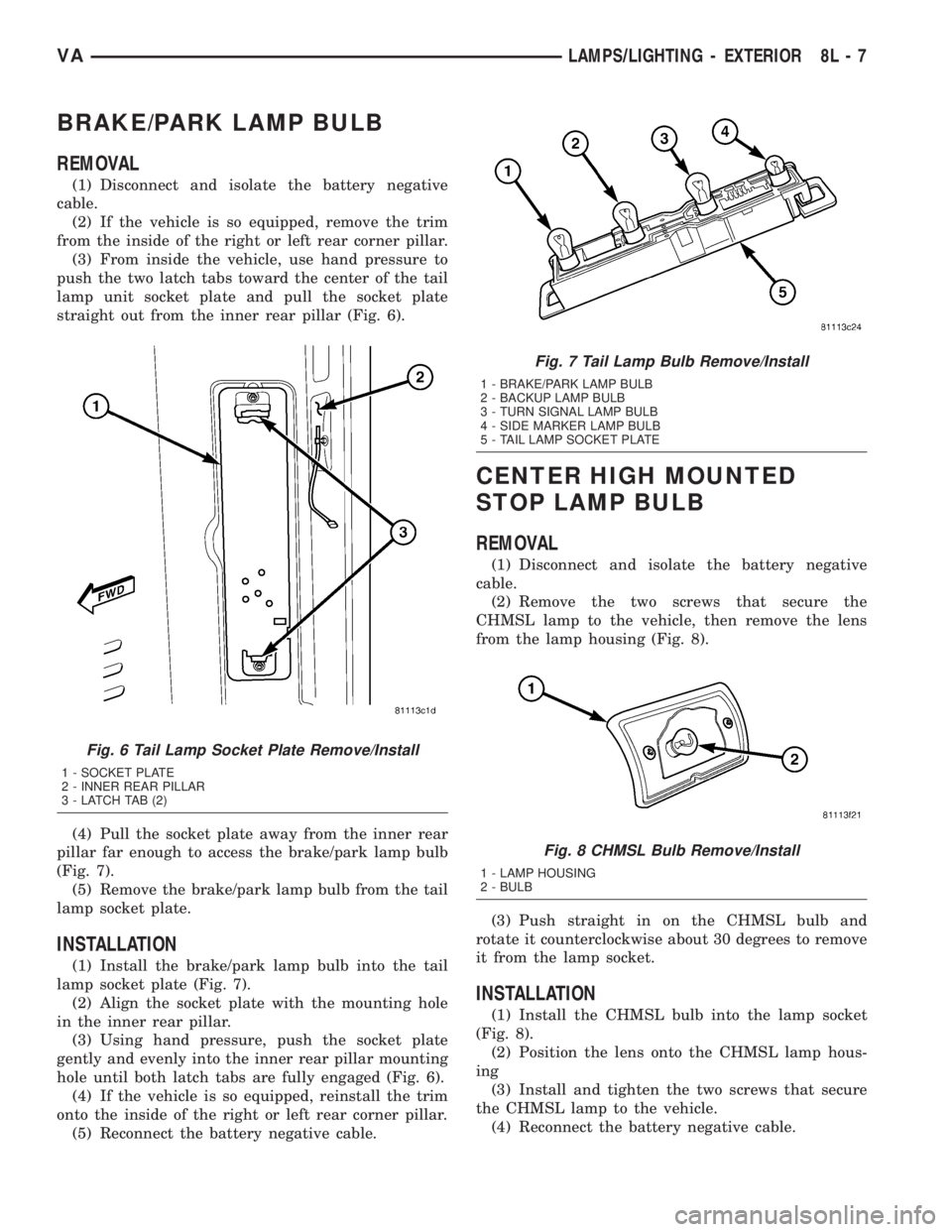
BRAKE/PARK LAMP BULB
REMOVAL
(1) Disconnect and isolate the battery negative
cable.
(2) If the vehicle is so equipped, remove the trim
from the inside of the right or left rear corner pillar.
(3) From inside the vehicle, use hand pressure to
push the two latch tabs toward the center of the tail
lamp unit socket plate and pull the socket plate
straight out from the inner rear pillar (Fig. 6).
(4) Pull the socket plate away from the inner rear
pillar far enough to access the brake/park lamp bulb
(Fig. 7).
(5) Remove the brake/park lamp bulb from the tail
lamp socket plate.
INSTALLATION
(1) Install the brake/park lamp bulb into the tail
lamp socket plate (Fig. 7).
(2) Align the socket plate with the mounting hole
in the inner rear pillar.
(3) Using hand pressure, push the socket plate
gently and evenly into the inner rear pillar mounting
hole until both latch tabs are fully engaged (Fig. 6).
(4) If the vehicle is so equipped, reinstall the trim
onto the inside of the right or left rear corner pillar.
(5) Reconnect the battery negative cable.
CENTER HIGH MOUNTED
STOP LAMP BULB
REMOVAL
(1) Disconnect and isolate the battery negative
cable.
(2) Remove the two screws that secure the
CHMSL lamp to the vehicle, then remove the lens
from the lamp housing (Fig. 8).
(3) Push straight in on the CHMSL bulb and
rotate it counterclockwise about 30 degrees to remove
it from the lamp socket.
INSTALLATION
(1) Install the CHMSL bulb into the lamp socket
(Fig. 8).
(2) Position the lens onto the CHMSL lamp hous-
ing
(3) Install and tighten the two screws that secure
the CHMSL lamp to the vehicle.
(4) Reconnect the battery negative cable.
Fig. 6 Tail Lamp Socket Plate Remove/Install
1 - SOCKET PLATE
2 - INNER REAR PILLAR
3 - LATCH TAB (2)
Fig. 7 Tail Lamp Bulb Remove/Install
1 - BRAKE/PARK LAMP BULB
2 - BACKUP LAMP BULB
3 - TURN SIGNAL LAMP BULB
4 - SIDE MARKER LAMP BULB
5 - TAIL LAMP SOCKET PLATE
Fig. 8 CHMSL Bulb Remove/Install
1 - LAMP HOUSING
2 - BULB
VALAMPS/LIGHTING - EXTERIOR 8L - 7
Page 206 of 1232
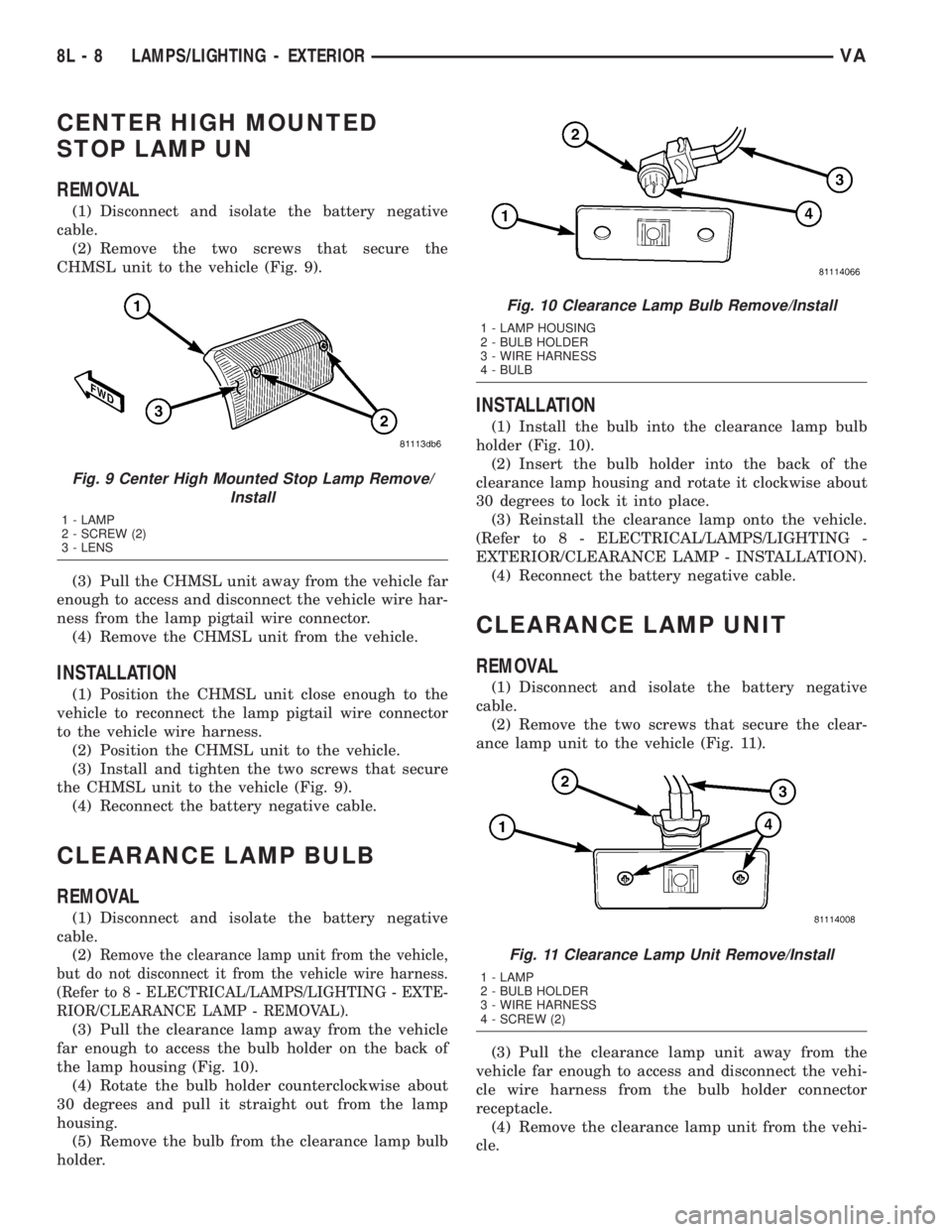
CENTER HIGH MOUNTED
STOP LAMP UN
REMOVAL
(1) Disconnect and isolate the battery negative
cable.
(2) Remove the two screws that secure the
CHMSL unit to the vehicle (Fig. 9).
(3) Pull the CHMSL unit away from the vehicle far
enough to access and disconnect the vehicle wire har-
ness from the lamp pigtail wire connector.
(4) Remove the CHMSL unit from the vehicle.
INSTALLATION
(1) Position the CHMSL unit close enough to the
vehicle to reconnect the lamp pigtail wire connector
to the vehicle wire harness.
(2) Position the CHMSL unit to the vehicle.
(3) Install and tighten the two screws that secure
the CHMSL unit to the vehicle (Fig. 9).
(4) Reconnect the battery negative cable.
CLEARANCE LAMP BULB
REMOVAL
(1) Disconnect and isolate the battery negative
cable.
(2)
Remove the clearance lamp unit from the vehicle,
but do not disconnect it from the vehicle wire harness.
(Refer to 8 - ELECTRICAL/LAMPS/LIGHTING - EXTE-
RIOR/CLEARANCE LAMP - REMOVAL).
(3) Pull the clearance lamp away from the vehicle
far enough to access the bulb holder on the back of
the lamp housing (Fig. 10).
(4) Rotate the bulb holder counterclockwise about
30 degrees and pull it straight out from the lamp
housing.
(5) Remove the bulb from the clearance lamp bulb
holder.
INSTALLATION
(1) Install the bulb into the clearance lamp bulb
holder (Fig. 10).
(2) Insert the bulb holder into the back of the
clearance lamp housing and rotate it clockwise about
30 degrees to lock it into place.
(3) Reinstall the clearance lamp onto the vehicle.
(Refer to 8 - ELECTRICAL/LAMPS/LIGHTING -
EXTERIOR/CLEARANCE LAMP - INSTALLATION).
(4) Reconnect the battery negative cable.
CLEARANCE LAMP UNIT
REMOVAL
(1) Disconnect and isolate the battery negative
cable.
(2) Remove the two screws that secure the clear-
ance lamp unit to the vehicle (Fig. 11).
(3) Pull the clearance lamp unit away from the
vehicle far enough to access and disconnect the vehi-
cle wire harness from the bulb holder connector
receptacle.
(4) Remove the clearance lamp unit from the vehi-
cle.
Fig. 9 Center High Mounted Stop Lamp Remove/
Install
1 - LAMP
2 - SCREW (2)
3 - LENS
Fig. 10 Clearance Lamp Bulb Remove/Install
1 - LAMP HOUSING
2 - BULB HOLDER
3 - WIRE HARNESS
4 - BULB
Fig. 11 Clearance Lamp Unit Remove/Install
1 - LAMP
2 - BULB HOLDER
3 - WIRE HARNESS
4 - SCREW (2)
8L - 8 LAMPS/LIGHTING - EXTERIORVA