wheel MERCEDES-BENZ SPRINTER 2011 MY11 Operator’s Manual
[x] Cancel search | Manufacturer: MERCEDES-BENZ, Model Year: 2011, Model line: SPRINTER, Model: MERCEDES-BENZ SPRINTER 2011Pages: 292, PDF Size: 6.75 MB
Page 64 of 292
X
To arm: close all doors.
X Lock the vehicle using the 0037 button on
the key.
The indicator lamp in the upper central
locking button ( Y
page 55) flashes.
X To deactivate: unlock the
vehicle using the
0036 button on the remote control.
The indicator lamp in the upper central
locking button (Y page 55) goes out.
i Cargo van and passenger van only:
Unless you open
a door within 40 seconds
after unlocking the vehicle:
R the vehicle will be locked again.
R the anti-theft alarm system will be re-
armed.
i The alarm system will be triggered if the
vehicle was previously locked with the key
and is then unlocked from the inside.
X To stop the alarm: insert the key into the
ignition lock.
or
X Press the 0036 button on the remote
control.
The alarm is switched off. Tow-away alarm
A visual and audible alarm is triggered if the
inclination of the vehicle changes when tow-
away protection is armed.
i The alarm signal
is triggered, for example
if the vehicle is being jacked up on one side,
shortly before the wheel leaves the ground.
Tow-away protection is automatically armed
approximately 20 seconds after you lock the
vehicle.
Tow-away protection is automatically
deactivated when you unlock the vehicle.
Deactivate tow-away protection if the vehicle
is being transported or loaded onto another
vehicle. This will prevent a false alarm. X
To deactivate when transporting the
vehicle: turn the key to position 0 or 1 in
the ignition lock or remove the key.
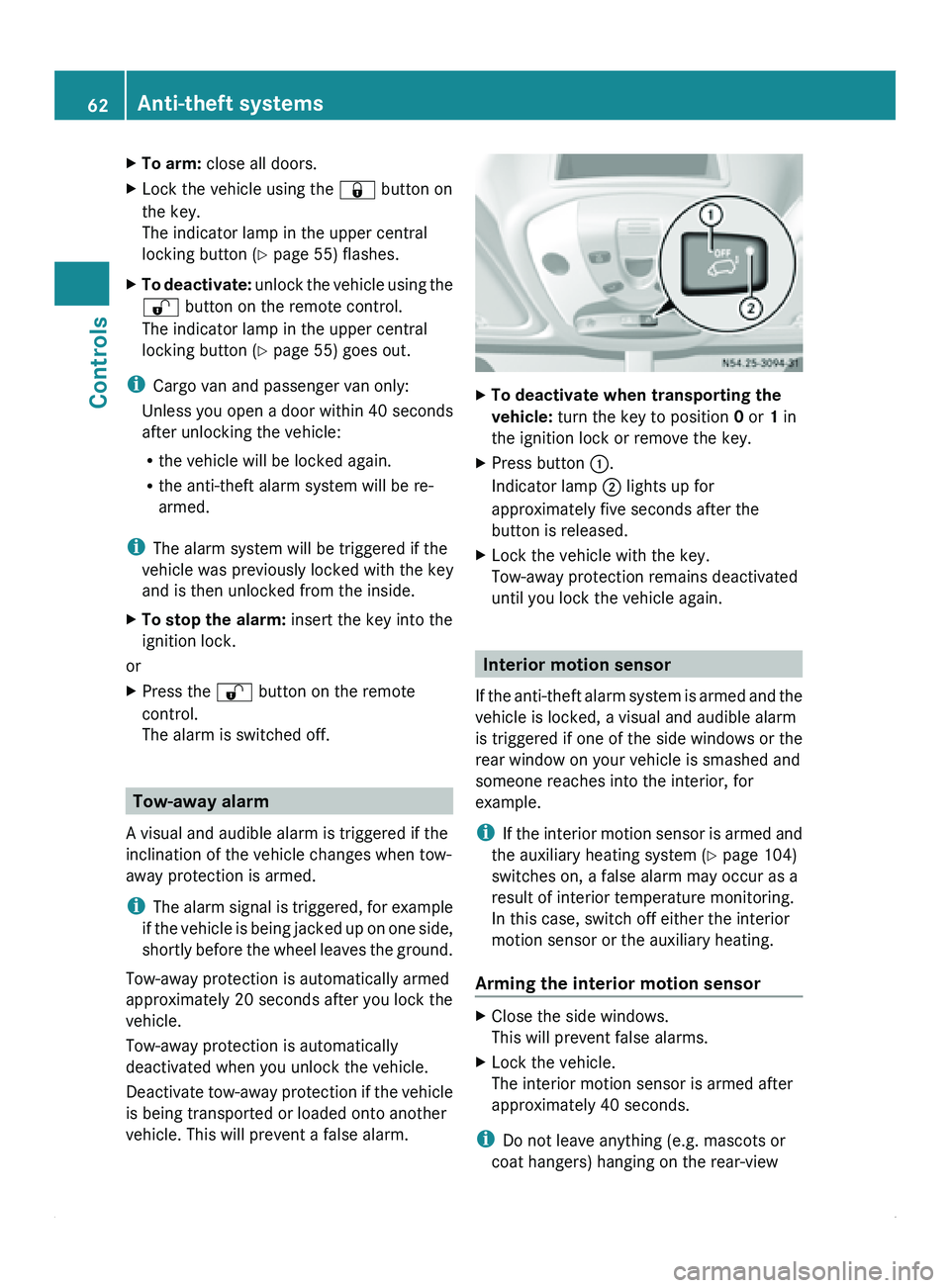
X Press button 0046.
Indicator lamp 0047 lights up for
approximately five seconds after the
button is released.
X Lock the vehicle with the key.
Tow-away protection remains deactivated
until you lock the vehicle again. Interior motion sensor
If the anti-theft
alarm system is armed and the
vehicle is locked, a visual and audible alarm
is triggered if one of the side windows or the
rear window on your vehicle is smashed and
someone reaches into the interior, for
example.
i If the interior motion sensor is armed and
the auxiliary heating system (Y page 104)
switches on, a false alarm may occur as a
result of interior temperature monitoring.
In this case, switch off either the interior
motion sensor or the auxiliary heating.
Arming the interior motion sensor X
Close the side windows.
This will prevent false alarms.
X Lock the vehicle.
The interior motion sensor is armed after
approximately 40 seconds.
i Do not leave anything (e.g. mascots or
coat hangers) hanging on the rear-view 62
Anti-theft systems
Controls
Page 65 of 292
mirror or on the grab handles on the
headliner. This will prevent a false alarm.
Deactivating the interior
motion sensorDeactivate the interior motion sensor if
people or
animals
remain in the vehicle or you
are having the vehicle transported, e.g. by
ferry. This will prevent a false alarm. X
Turn the key to position 0 or 1
in the ignition
lock or remove the key.
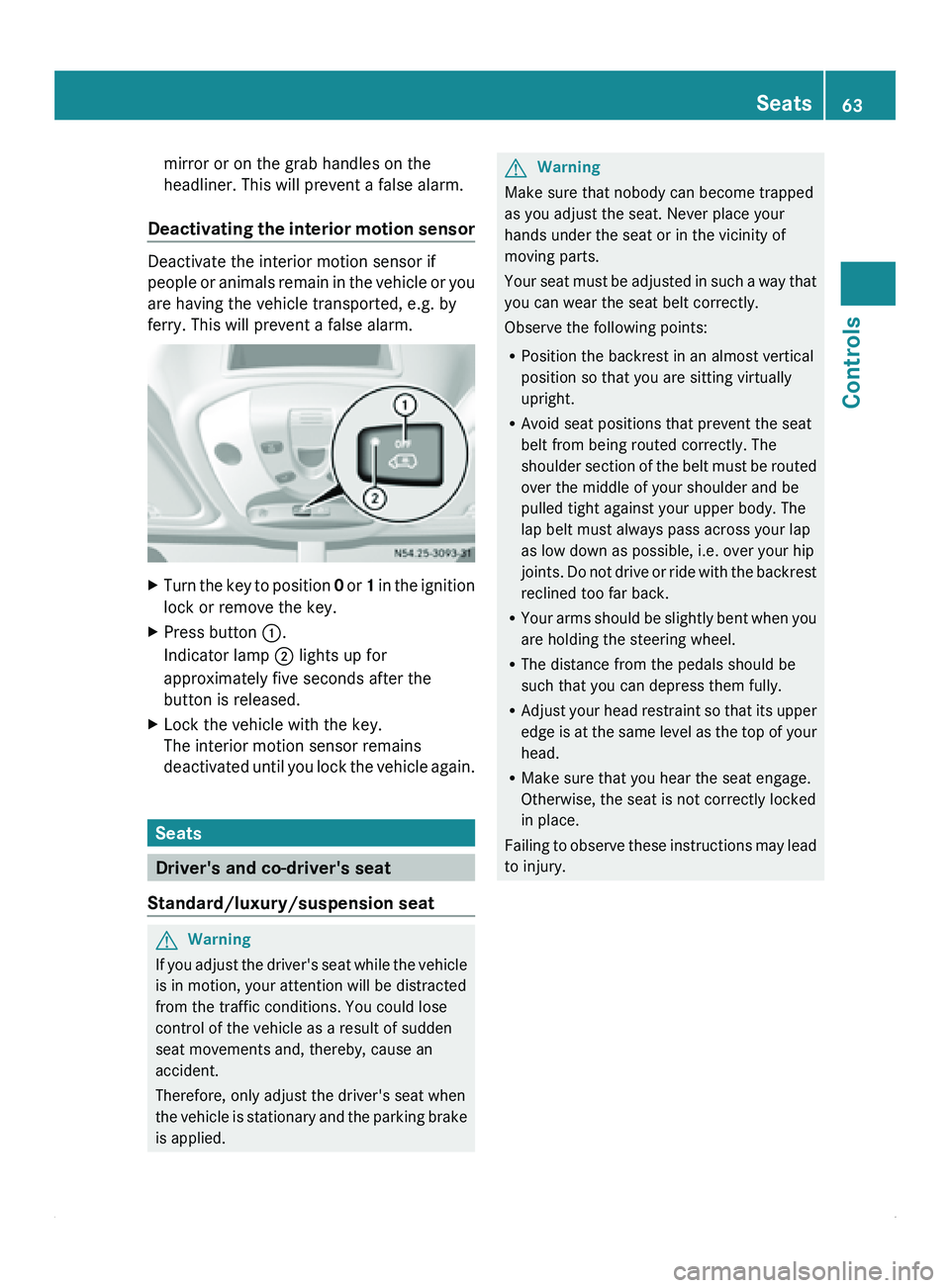
X Press button 0046.
Indicator lamp 0047 lights up for
approximately five seconds after the
button is released.
X Lock the vehicle with the key.
The interior motion sensor remains
deactivated until
you
lock the vehicle again.Seats
Driver's and co-driver's seat
Standard/luxury/suspension seat G
Warning
If you adjust the driver's seat while the vehicle
is in motion, your attention will be distracted
from the traffic conditions. You could lose
control of the vehicle as a result of sudden
seat movements and, thereby, cause an
accident.
Therefore, only adjust the driver's seat when
the vehicle is
stationary and the parking brake
is applied. G
Warning
Make sure that nobody can become trapped
as you adjust the seat. Never place your
hands under the seat or in the vicinity of
moving parts.
Your seat must
be adjusted in such a way that
you can wear the seat belt correctly.
Observe the following points:
R Position the backrest in an almost vertical
position so that you are sitting virtually
upright.
R Avoid seat positions that prevent the seat
belt from being routed correctly. The
shoulder section of the belt must be routed
over the middle of your shoulder and be
pulled tight against your upper body. The
lap belt must always pass across your lap
as low down as possible, i.e. over your hip
joints. Do not drive or ride with the backrest
reclined too far back.
R Your arms should be slightly bent when you
are holding the steering wheel.
R The distance from the pedals should be
such that you can depress them fully.
R Adjust your head restraint so that its upper
edge is at the same level as the top of your
head.
R Make sure that you hear the seat engage.
Otherwise, the seat is not correctly locked
in place.
Failing to observe these instructions may lead
to injury. Seats
63
Controls Z
Page 66 of 292
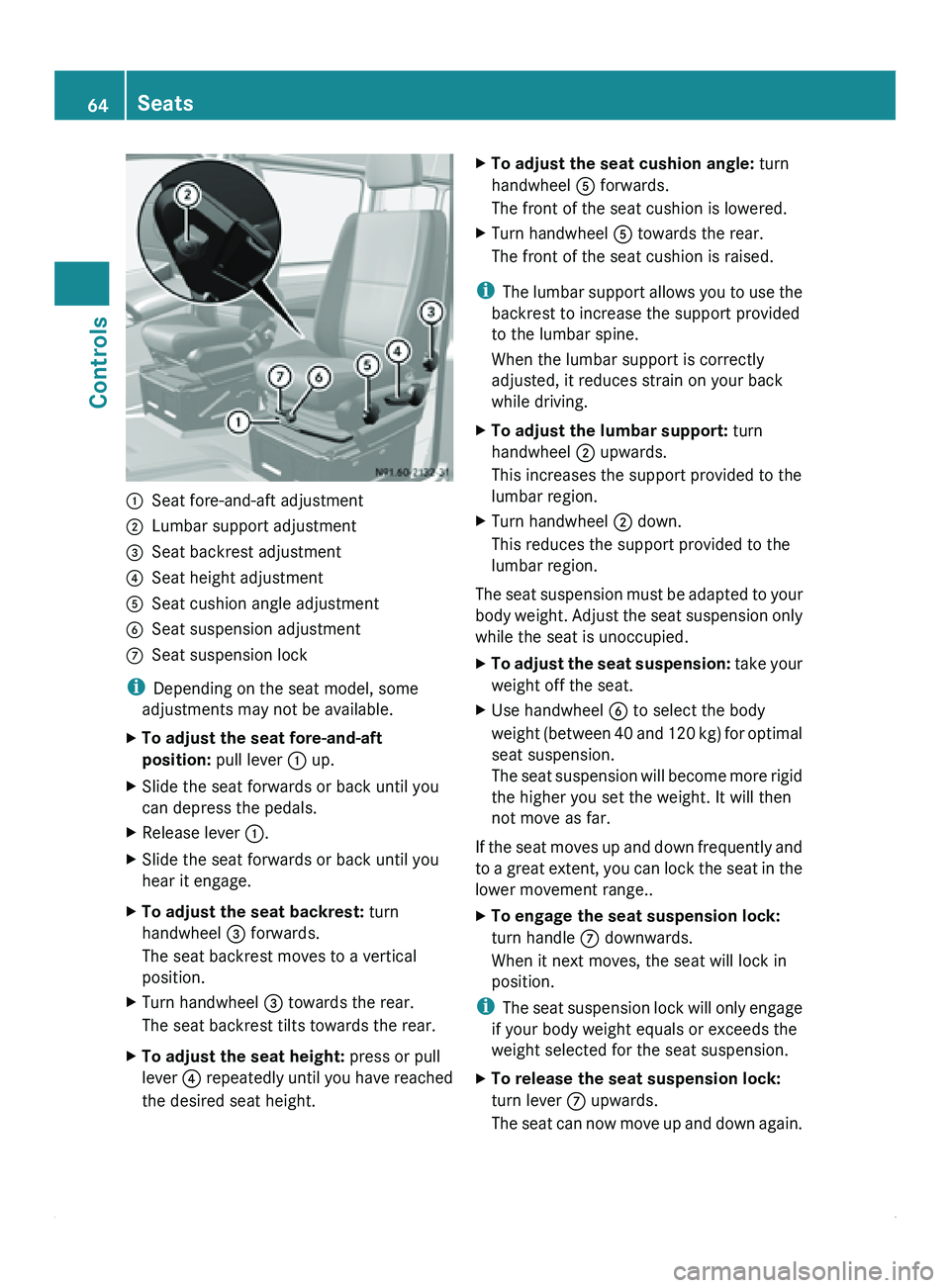
0046
Seat fore-and-aft adjustment
0047 Lumbar support adjustment
008A Seat backrest adjustment
0088 Seat height adjustment
0086 Seat cushion angle adjustment
0087 Seat suspension adjustment
006E Seat suspension lock
i Depending on the seat model, some
adjustments may not be available.
X To adjust the seat fore-and-aft
position: pull lever 0046 up.
X Slide the seat forwards or back until you
can depress the pedals.
X Release lever 0046.
X Slide the seat forwards or back until you
hear it engage.
X To adjust the seat backrest: turn
handwheel 008A forwards.
The seat backrest moves to a vertical
position.
X Turn handwheel 008A towards the rear.
The seat backrest tilts towards the rear.
X To adjust the seat height: press or pull
lever 0088 repeatedly
until
you have reached
the desired seat height. X
To adjust the seat cushion angle: turn
handwheel 0086 forwards.
The front of the seat cushion is lowered.
X Turn handwheel 0086 towards the rear.
The front of the seat cushion is raised.
i The lumbar
support
allows you to use the
backrest to increase the support provided
to the lumbar spine.
When the lumbar support is correctly
adjusted, it reduces strain on your back
while driving.
X To adjust the lumbar support: turn
handwheel 0047 upwards.
This increases the support provided to the
lumbar region.
X Turn handwheel 0047 down.
This reduces the support provided to the
lumbar region.
The seat suspension must be adapted to your
body weight.
Adjust
the seat suspension only
while the seat is unoccupied.
X To adjust the seat suspension: take your
weight off the seat.
X Use handwheel 0087
to select the body
weight (between 40
and 120 kg) for optimal
seat suspension.
The seat suspension will become more rigid
the higher you set the weight. It will then
not move as far.
If the seat moves up and down frequently and
to a great
extent, you can lock the seat in the
lower movement range..
X To engage the seat suspension lock:
turn handle 006E downwards.
When it next moves, the seat will lock in
position.
i The seat
suspension
lock will only engage
if your body weight equals or exceeds the
weight selected for the seat suspension.
X To release the seat suspension lock:
turn lever 006E upwards.
The seat can
now move up and down again.64
Seats
Controls
Page 67 of 292
Swiveling front seats
G
Warning
Do not start the engine unless the driver's and
co-driver's seats are facing in the direction of
travel and are locked in position. Only adjust
the seats when the vehicle is stationary and
the parking brake is applied. You could
otherwise lose control of the vehicle as a
result of sudden seat movements and thereby
cause an accident.
The safety systems only work when the
driver's and co-driver's seats are facing in the
direction of travel.
The driver's seat and co-driver's seat can be
rotated through 180°.
The seats engage when facing in the direction
of travel as well as when facing in the opposite
direction and also engage at an angle of 50°
to the door.
! When rotating the seats, make sure that
there is sufficient space to do so.
Move the seat forward or back first. This
will help to avoid contact with other parts
of the interior.
Push the handbrake lever down to the stop.
The parking brake or handbrake lever could
otherwise be damaged.
i Always slide the co-driver's seat forwards
before rotating it (Y page 64).
X Make sure that the parking brake has been
engaged and that the handbrake lever has
been pushed down to the stop
(Y page 112).
X Adjust the steering wheel to provide the
necessary space to rotate and adjust the
driver's seat ( Y
page 69). G
Warning
When releasing and rotating the seats, make
sure that you do not trap yourself or others.
Never place your hands under the seat or in
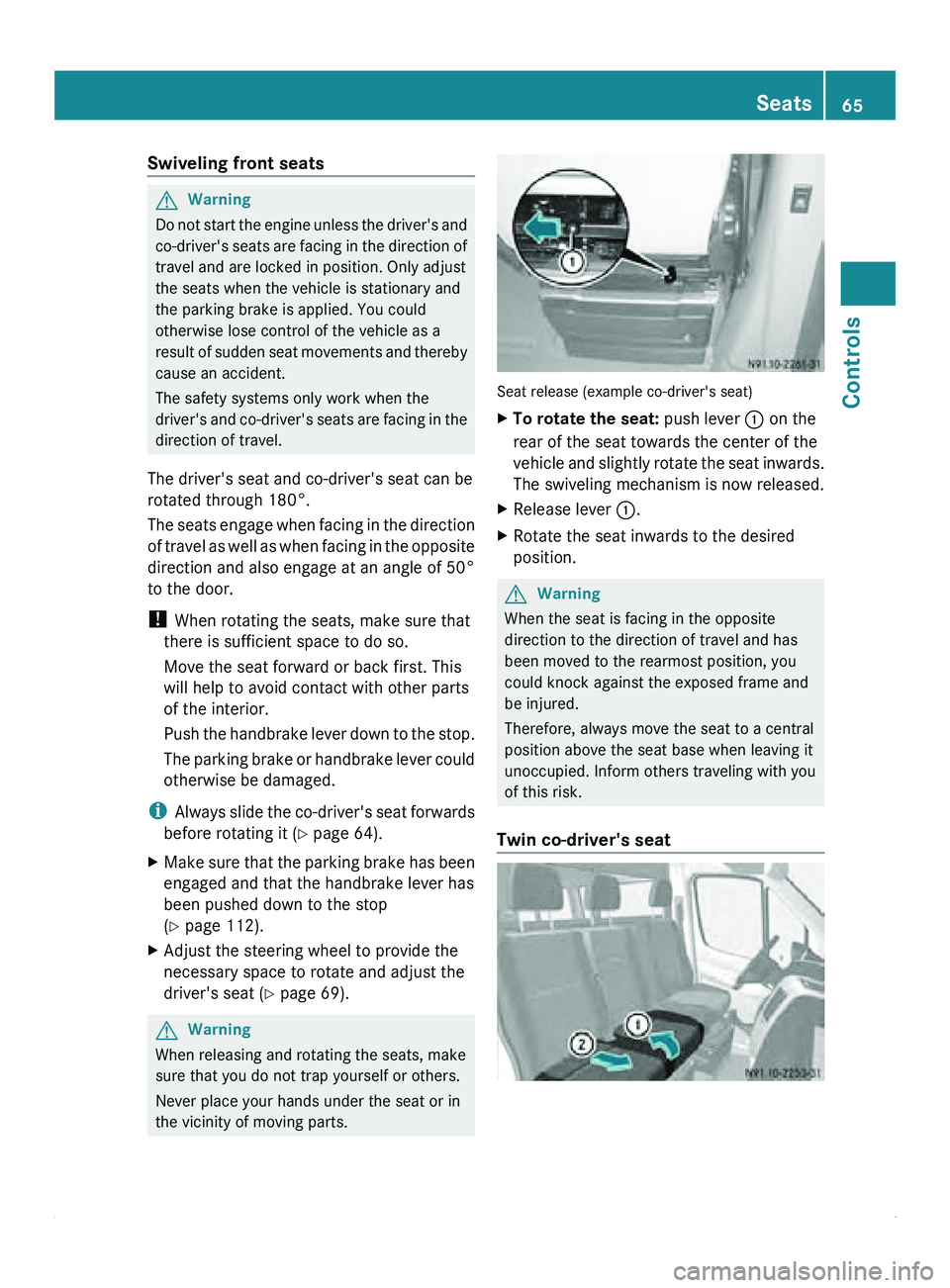
the vicinity of moving parts. Seat release (example co-driver's seat)
X
To rotate the seat: push lever 0046 on the
rear of the seat towards the center of the
vehicle and
slightly rotate the seat inwards.
The swiveling mechanism is now released.
X Release lever 0046.
X Rotate the seat inwards to the desired
position. G
Warning
When the seat is facing in the opposite
direction to the direction of travel and has
been moved to the rearmost position, you
could knock against the exposed frame and
be injured.
Therefore, always move the seat to a central
position above the seat base when leaving it
unoccupied. Inform others traveling with you
of this risk.
Twin co-driver's seat Seats
65Controls Z
Page 71 of 292
The three red indicator lamps in button 0046
show the activated heating level
1 to 3.
The system automatically switches down
from level 3
to level 2 after approximately five
minutes.
The system automatically switches down
from level 2 to level 1 after approximately ten
minutes.
! When you leave your seat, do not place
anything on the seat and switch off the seat
heating. Do not switch the seat heating on
when the seat is not occupied, e.g. when
driving without a co-driver. The seat
heating may otherwise overheat, causing
damage to the seat.
At level 1, the seat heating remains in
continuous operation.
X To switch on: make sure
that the key is in
position 1 in the ignition lock.
X Press button 0046 repeatedly until the
desired heating level is set.
X To switch off: press button 0046 repeatedly
until all indicator lamps go out. Steering wheel
G
Warning
Only adjust the steering wheel when the
vehicle is stationary. Only drive with the
steering wheel locked in position.
An incorrectly secured steering wheel could
make it more difficult to steer the vehicle
safely since the steering wheel could move
unexpectedly when turned. This could result
in you losing control of the vehicle and
causing an accident, thereby endangering
yourself and others. G
Warning
Never leave children unsupervised in the
vehicle. They could
become trapped if they try
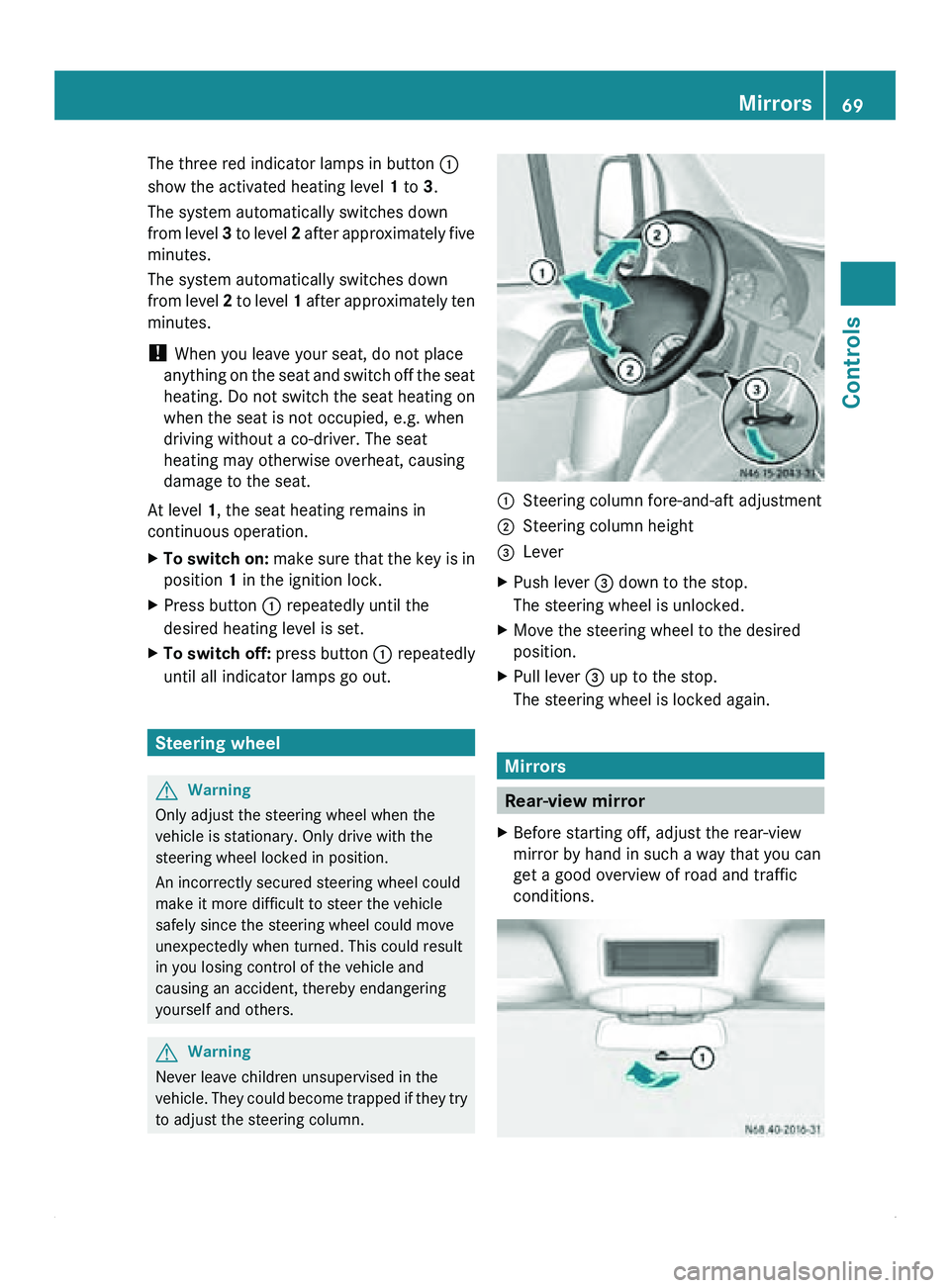
to adjust the steering column. 0046
Steering column fore-and-aft adjustment
0047 Steering column height
008A Lever
X Push lever 008A down to the stop.
The steering wheel is unlocked.
X Move the steering wheel to the desired
position.
X Pull lever 008A up to the stop.
The steering wheel is locked again. Mirrors
Rear-view mirror
X Before starting off, adjust the rear-view
mirror by hand in such a way that you can
get a good overview of road and traffic
conditions. Mirrors
69
Controls Z
Page 72 of 292
X
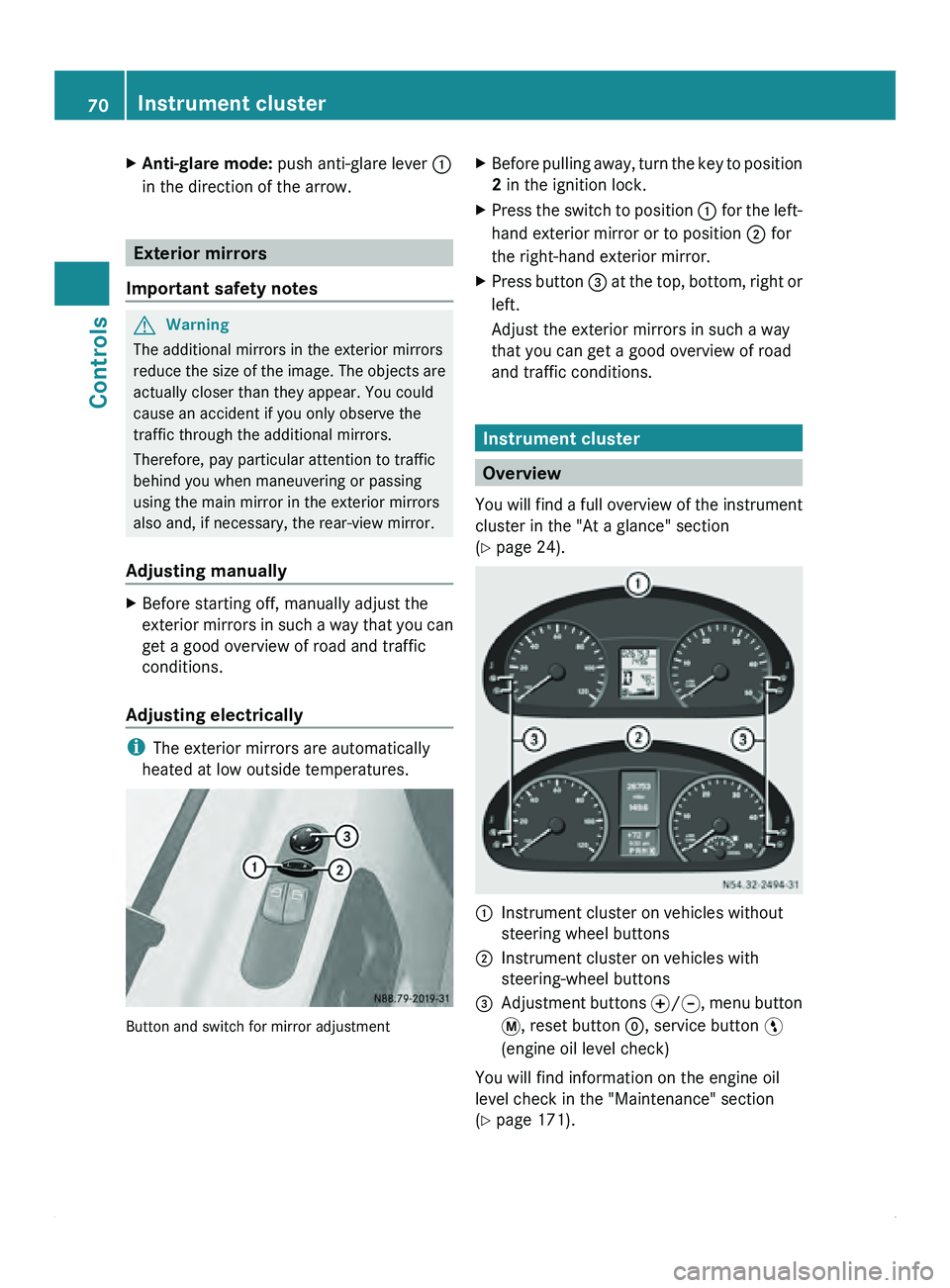
Anti-glare mode: push anti-glare lever 0046
in the direction of the arrow. Exterior mirrors
Important safety notes G
Warning
The additional mirrors in the exterior mirrors
reduce the size
of the image. The objects are
actually closer than they appear. You could
cause an accident if you only observe the
traffic through the additional mirrors.
Therefore, pay particular attention to traffic
behind you when maneuvering or passing
using the main mirror in the exterior mirrors
also and, if necessary, the rear-view mirror.
Adjusting manually X
Before starting off, manually adjust the
exterior mirrors in
such a way that you can
get a good overview of road and traffic
conditions.
Adjusting electrically i
The exterior mirrors are automatically
heated at low outside temperatures. Button and switch for mirror adjustment X
Before pulling away, turn the key to position
2 in the ignition lock.
X Press the switch to position 0046 for the
left-
hand exterior mirror or to position 0047 for
the right-hand exterior mirror.
X Press button 008A at
the
top, bottom, right or
left.
Adjust the exterior mirrors in such a way
that you can get a good overview of road
and traffic conditions. Instrument cluster
Overview
You will find
a full overview of the instrument
cluster in the "At a glance" section
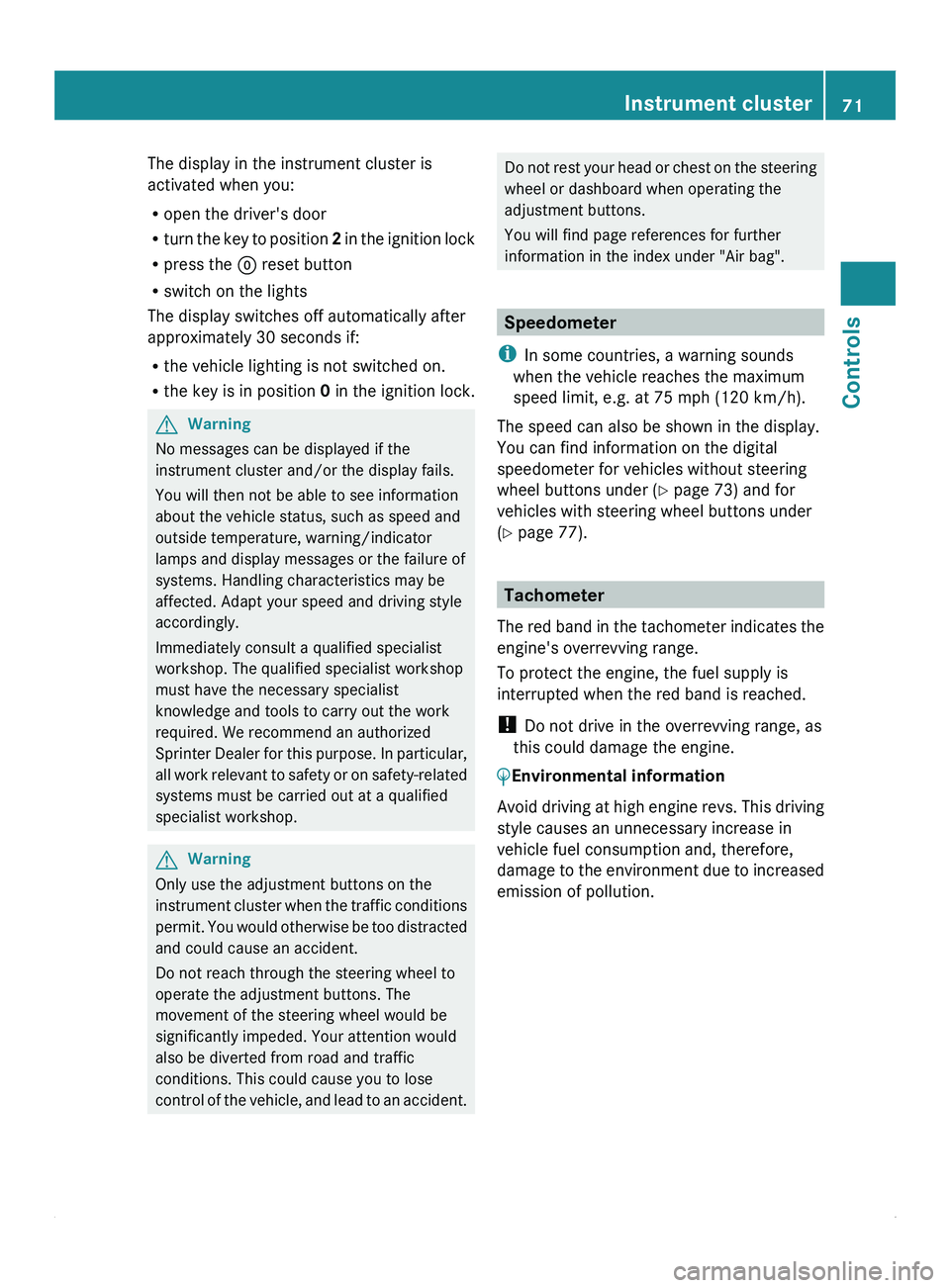
(Y page 24). 0046
Instrument cluster on vehicles without
steering wheel buttons
0047 Instrument cluster on vehicles with
steering-wheel buttons
008A Adjustment buttons 0069/006A, menu button
007B
, reset button 0048, service button 00A4
(engine oil level check)
You will find information on the engine oil
level check in the "Maintenance" section
(Y page 171). 70
Instrument cluster
Controls
Page 73 of 292
The display in the instrument cluster is
activated when you:
R
open the driver's door
R turn the key
to position 2 in the ignition lock
R press the 0048 reset button
R switch on the lights
The display switches off automatically after
approximately 30 seconds if:
R the vehicle lighting is not switched on.
R the key is in position 0 in the ignition lock.G
Warning
No messages can be displayed if the
instrument cluster and/or the display fails.
You will then not be able to see information
about the vehicle status, such as speed and
outside temperature, warning/indicator
lamps and display messages or the failure of
systems. Handling characteristics may be
affected. Adapt your speed and driving style
accordingly.
Immediately consult a qualified specialist
workshop. The qualified specialist workshop
must have the necessary specialist
knowledge and tools to carry out the work
required. We recommend an authorized
Sprinter Dealer for
this purpose. In particular,
all work relevant to safety or on safety-related
systems must be carried out at a qualified
specialist workshop. G
Warning
Only use the adjustment buttons on the
instrument cluster when
the traffic conditions
permit. You would otherwise be too distracted
and could cause an accident.
Do not reach through the steering wheel to
operate the adjustment buttons. The
movement of the steering wheel would be
significantly impeded. Your attention would
also be diverted from road and traffic
conditions. This could cause you to lose
control of the vehicle, and lead to an accident. Do not rest your head or chest on the steering
wheel or dashboard when operating the
adjustment buttons.
You will find page references for further
information in the index under "Air bag".
Speedometer
i In some countries, a warning sounds
when the vehicle reaches the maximum
speed limit, e.g. at 75 mph (120 km/h).
The speed can also be shown in the display.
You can find information on the digital
speedometer for vehicles without steering
wheel buttons under ( Y page 73) and for
vehicles with steering wheel buttons under
(Y page 77). Tachometer
The red band
in the tachometer indicates the
engine's overrevving range.
To protect the engine, the fuel supply is
interrupted when the red band is reached.
! Do not drive in the overrevving range, as
this could damage the engine.
0040Environmental information
Avoid driving at high engine revs. This driving
style causes an unnecessary increase in
vehicle fuel consumption and, therefore,
damage to the
environment due to increased
emission of pollution. Instrument cluster
71
Controls Z
Page 74 of 292
Fuel gauge
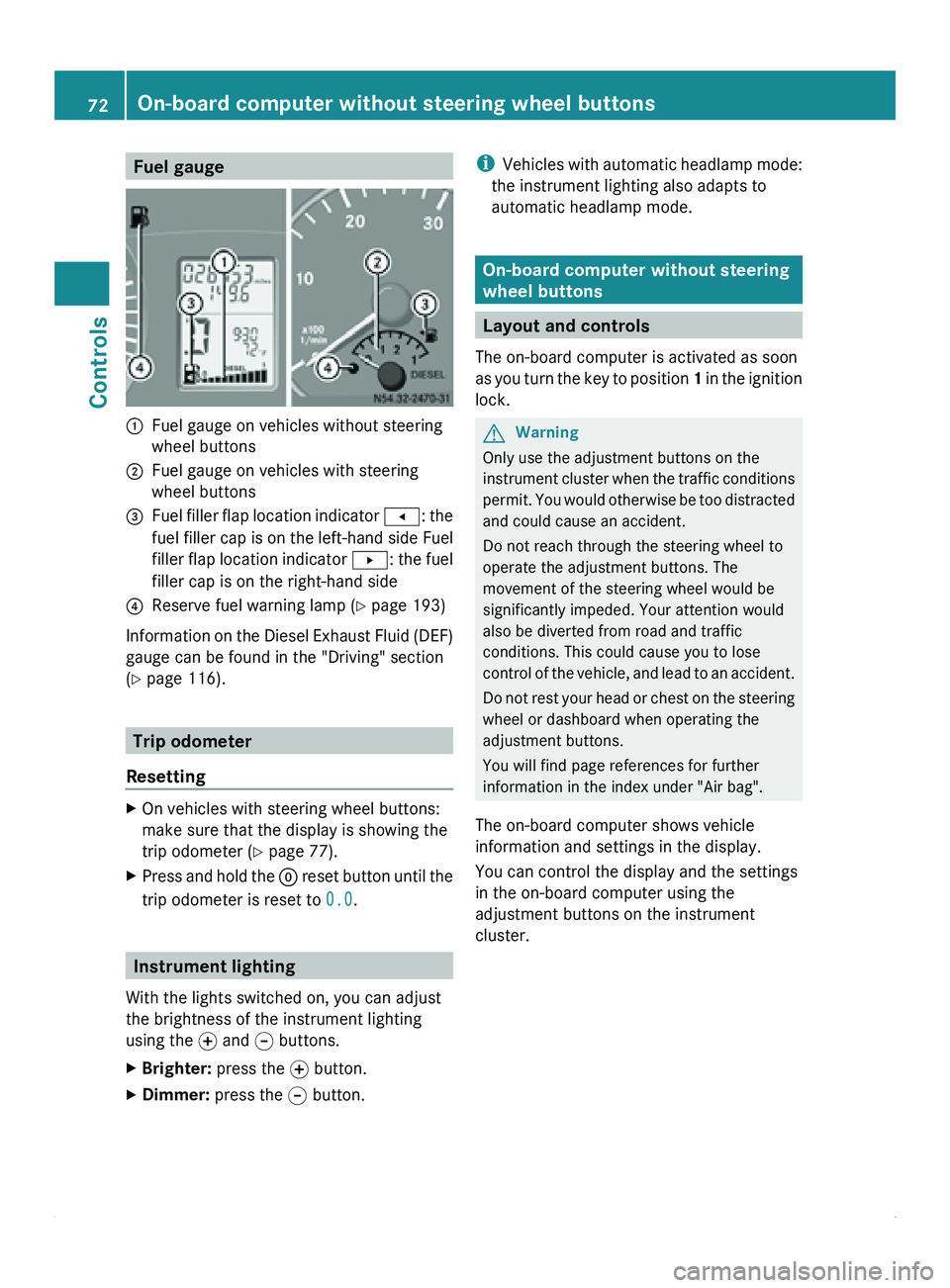
0046
Fuel gauge on vehicles without steering
wheel buttons
0047 Fuel gauge on vehicles with steering
wheel buttons
008A Fuel filler flap location indicator
0081: the
fuel filler
cap is on the left-hand side Fuel
filler flap location indicator 0082: the fuel
filler cap is on the right-hand side
0088 Reserve fuel warning lamp ( Y page 193)
Information on the Diesel Exhaust Fluid (DEF)
gauge can be found in the "Driving" section
(Y page 116). Trip odometer
Resetting X
On vehicles with steering wheel buttons:
make sure that the display is showing the
trip odometer (Y
page 77).
X Press and hold the 0048 reset button
until the
trip odometer is reset to 0.0.Instrument lighting
With the lights switched on, you can adjust
the brightness of the instrument lighting
using the 0069
and 006A buttons.
X Brighter: press the 0069 button.
X Dimmer: press the 006A button. i
Vehicles with automatic
headlamp mode:
the instrument lighting also adapts to
automatic headlamp mode. On-board computer without steering
wheel buttons
Layout and controls
The on-board computer is activated as soon
as you turn
the key to position 1 in the ignition
lock. G
Warning
Only use the adjustment buttons on the
instrument cluster when
the traffic conditions
permit. You would otherwise be too distracted
and could cause an accident.
Do not reach through the steering wheel to
operate the adjustment buttons. The
movement of the steering wheel would be
significantly impeded. Your attention would
also be diverted from road and traffic
conditions. This could cause you to lose
control of the vehicle, and lead to an accident.
Do not rest your head or chest on the steering
wheel or dashboard when operating the
adjustment buttons.
You will find page references for further
information in the index under "Air bag".
The on-board computer shows vehicle
information and settings in the display.
You can control the display and the settings
in the on-board computer using the
adjustment buttons on the instrument
cluster. 72
On-board computer without steering wheel buttons
Controls
Page 75 of 292
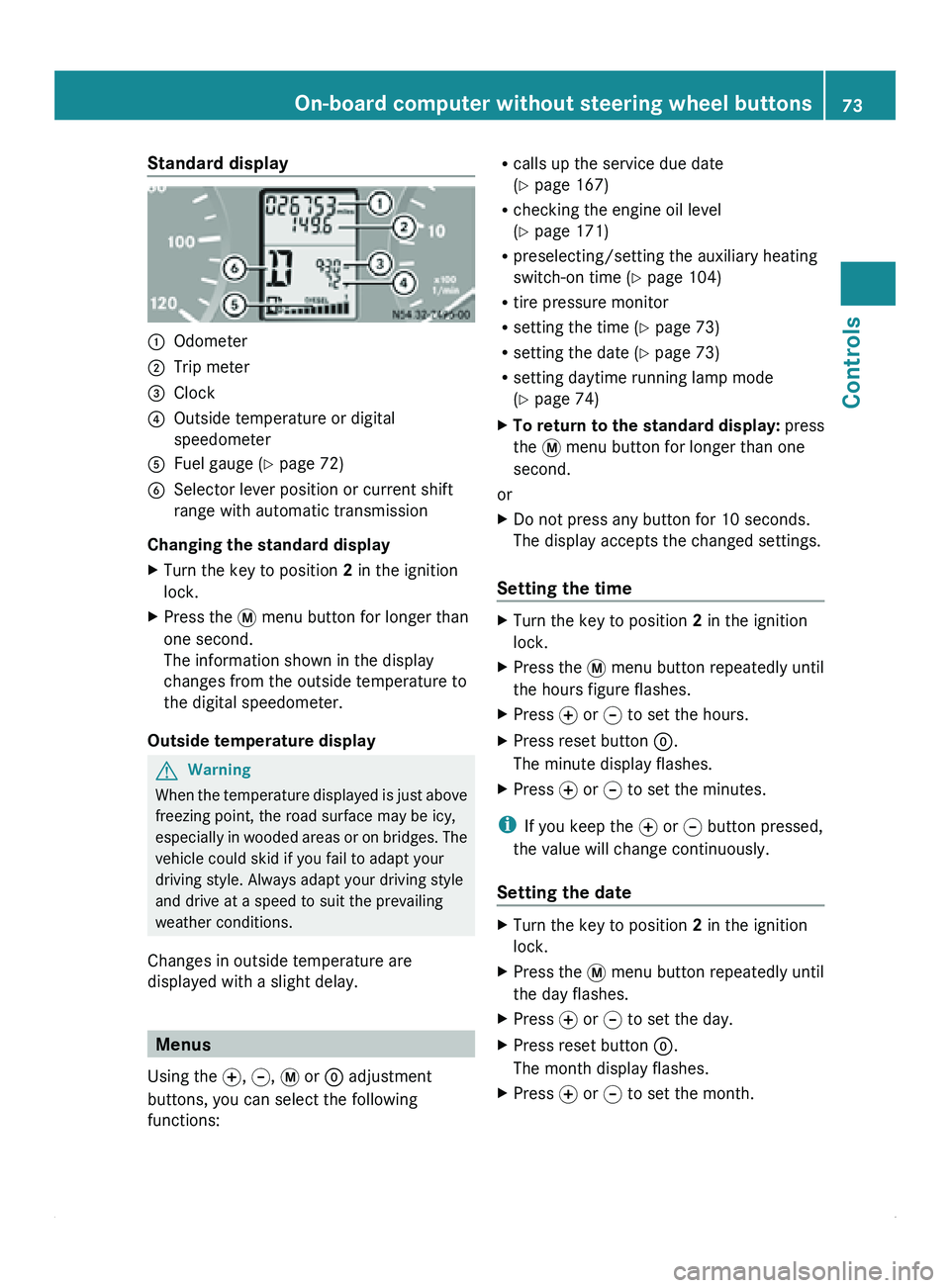
Standard display
0046
Odometer
0047 Trip meter
008A Clock
0088 Outside temperature or digital
speedometer
0086 Fuel gauge ( Y page 72)
0087 Selector lever position or current shift
range with automatic transmission
Changing the standard display
X Turn the key to position 2 in the ignition
lock.
X Press the 007B menu button for longer than
one second.
The information shown in the display
changes from the outside temperature to
the digital speedometer.
Outside temperature display G
Warning
When the temperature displayed is just above
freezing point, the road surface may be icy,
especially in wooded
areas or on bridges. The
vehicle could skid if you fail to adapt your
driving style. Always adapt your driving style
and drive at a speed to suit the prevailing
weather conditions.
Changes in outside temperature are
displayed with a slight delay. Menus
Using the 0069, 006A, 007B or 0048 adjustment
buttons, you can select the following
functions: R
calls up the service due date
(Y page 167)
R checking the engine oil level
(Y page 171)
R preselecting/setting the auxiliary heating
switch-on time ( Y page 104)
R tire pressure monitor
R setting the time (Y
page 73)
R setting the date ( Y page 73)
R setting daytime running lamp mode
(Y page 74)
X To return to the standard display: press
the 007B menu button for longer than one
second.
or
X Do not press any button for 10 seconds.
The display accepts the changed settings.
Setting the time X
Turn the key to position 2 in the ignition
lock.
X Press the 007B menu button repeatedly until
the hours figure flashes.
X Press 0069 or 006A to set the hours.
X Press reset button 0048.
The minute display flashes.
X Press 0069 or 006A to set the minutes.
i If you keep the 0069 or 006A button pressed,
the value will change continuously.
Setting the date X
Turn the key to position 2 in the ignition
lock.
X Press the 007B menu button repeatedly until
the day flashes.
X Press 0069 or 006A to set the day.
X Press reset button 0048.
The month display flashes.
X Press 0069 or 006A to set the month. On-board computer without steering wheel buttons
73
Controls Z
Page 76 of 292
X
Press reset button 0048.
The year display flashes.
X Press 0069 or 006A to set the year.
i If you keep the 0069 or 006A button pressed,
the value will change continuously.
Setting daytime running lamp mode If you have switched daytime running lamp
mode on and the light switch is in the 0027
position, the following light up automatically
when the engine is running: the parking
lamps, the low-beam headlamps, the tail
lamps and the license plate lamps.
For safety reasons, it is only possible to
change this setting when the vehicle is
stationary. The factory setting is ON in
countries in which daytime running lamp
mode is mandatory.
X
Turn the key to position 2 in the ignition
lock.
X Press the 007B menu button repeatedly until
the 0064 indicator lamp in the instrument
cluster flashes and the message ON or
OFF appears in the display.
X Press 0069 or 006A to activate or deactivate
daytime running lamp mode.
i USA only:
If you turn the light switch to 006C or
0064, the corresponding light is switched
on. Daytime running lamp mode remains
activated if the light switch is turned to
005A.
Canada only:
If you turn
the light switch to 0064, the low-
beam headlamps are switched on. Daytime
running lamp mode remains activated if the
light switch is turned to 006C or 005A. On-board computer with steering
wheel buttons
Layout and controls
The on-board computer is activated as soon
as you turn
the key to position 1 in the ignition
lock. G
Warning
Only use the on-board computer when road
and traffic conditions permit. You would
otherwise be distracted and unable to
concentrate properly on driving, and could
cause an accident.
The on-board computer shows vehicle
information and settings in the display.
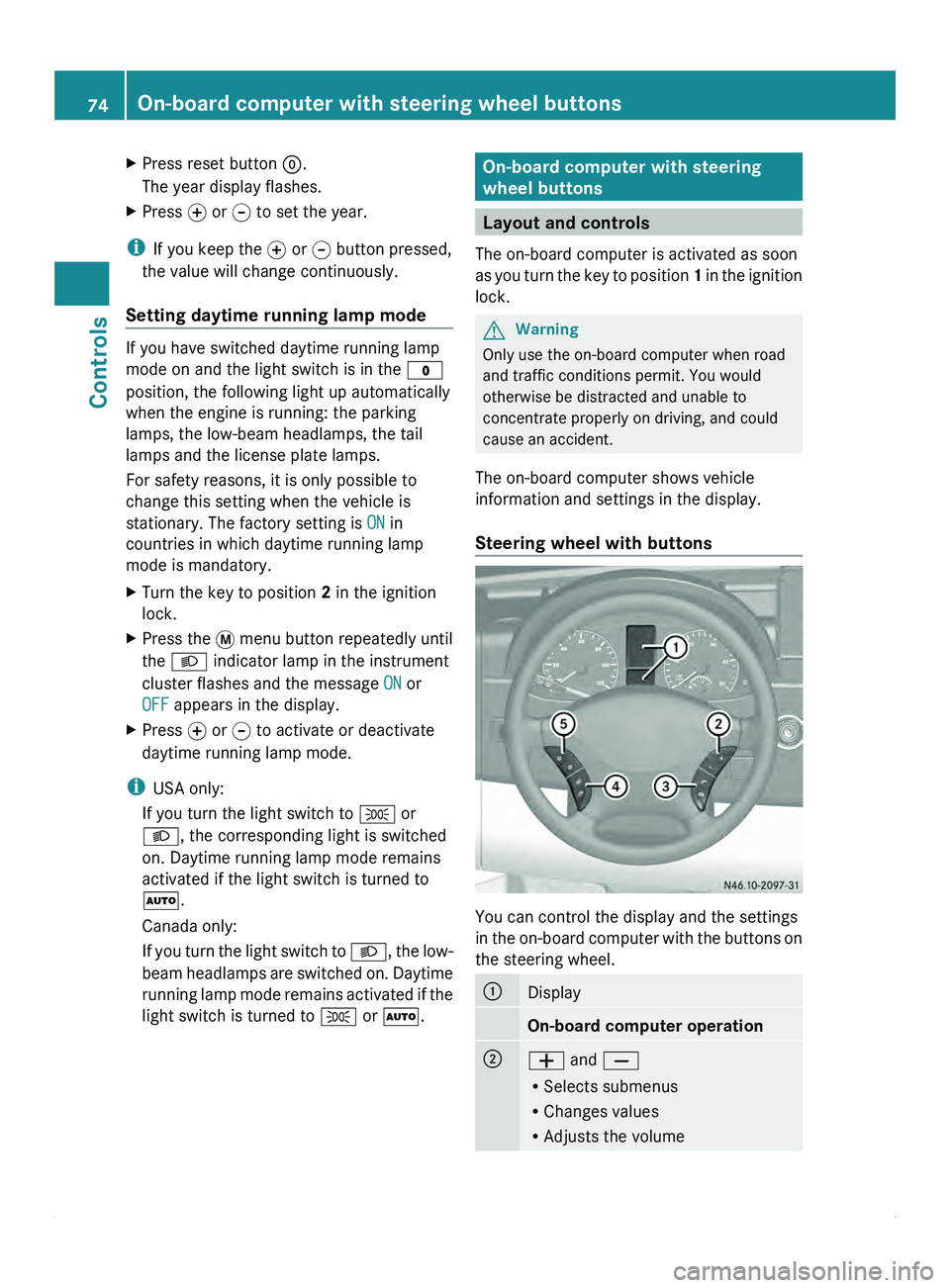
Steering wheel with buttons You can control the display and the settings
in the
on-board
computer with the buttons on
the steering wheel. 0046
Display
On-board computer operation
0047
005A and 005B
R
Selects submenus
R Changes values
R Adjusts the volume74
On-board computer with steering wheel buttons
Controls