ECO mode MERCEDES-BENZ SPRINTER 2013 MY13 Operator’s Manual
[x] Cancel search | Manufacturer: MERCEDES-BENZ, Model Year: 2013, Model line: SPRINTER, Model: MERCEDES-BENZ SPRINTER 2013Pages: 334, PDF Size: 3.88 MB
Page 123 of 334
Operation with the remote control
Important information You can switch the auxiliary heating on/off
and set the operating duration using the
remote control. You can use up to 4 remote
control units on the vehicle. These must be
synchronized for the receiver in your vehicle
(Y page 122).
The remote control has a maximum range of
approximately 600 meters. This range is
reduced by:
R sources of interference
R solid objects between the remote control
and the vehicle
R the remote control being in an unfavorable
position in relation to the vehicle
R transmitting from an enclosed space
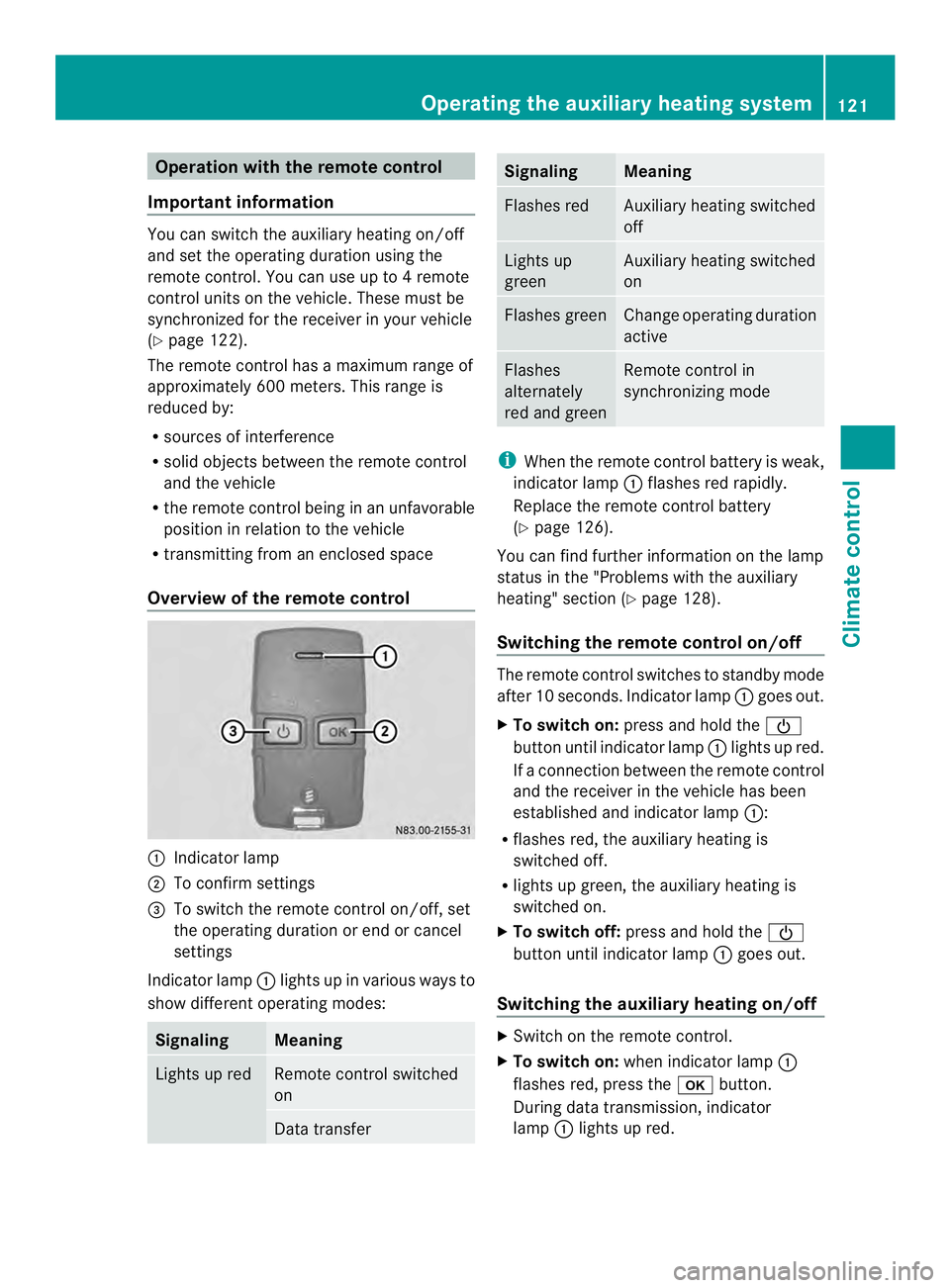
Overview of the remote control 0005
Indicator lamp
0006 To confirm settings
0026 To switch the remote control on/off, set
the operating duration or end or cancel
settings
Indicator lamp 0005lights up in various ways to
show differen toperating modes: Signaling Meaning
Lights up red Remote control switched
on
Data transfer Signaling Meaning
Flashes red Auxiliary heating switched
off
Lights up
green Auxiliary heating switched
on
Flashes green Change operating duration
active
Flashes
alternately
red and green Remote control in
synchronizing mode
i
When the remote control battery is weak,
indicator lamp 0005flashes red rapidly.
Replace the remote control battery
(Y page 126).
You can find further information on the lamp
status in the "Problems with the auxiliary
heating" section (Y page 128).
Switching the remote control on/off The remote control switches to standby mode
after 10 seconds. Indicator lamp
0005goes out.
X To switch on: press and hold the 0002
button until indicator lamp 0005lights up red.
If ac onnection between the remote control
and the receiver in the vehicle has been
established and indicator lamp 0005:
R flashes red, the auxiliary heating is
switched off.
R lights up green, the auxiliary heating is
switched on.
X To switch off: press and hold the 0002
button until indicator lamp 0005goes out.
Switching the auxiliary heating on/off X
Switch on the remote control.
X To switch on: when indicator lamp 0005
flashes red, press the 000Abutton.
During data transmission, indicator
lamp 0005lights up red. Operating the auxiliary heating system
121Climate control Z
Page 124 of 334
When indicato
rlamp 0005lights up green, the
auxiliary heating is switched on.
X To switch off: when indicator lamp 0005
lights up green, press the 000Abutton.
During data transmission, indicator
lamp 0005lights up red.
When indicator lamp 0005flashes red, the
auxiliary heating is switched off.
Changing the operating duration X
Switch on the remote control.
X When indicator lamp 0005flashes red, press
0002 and000A simultaneously.
Indicato rlamp 0005flashes green.
X Press the 0002buttonrepeatedly until the
desired operating duration is shown.
R 20 minutes
Indicator lamp 0005flashes green twice.
R 30 minutes
Indicator lamp 0005flashes green three
times.
R 40 minutes
Indicator lamp 0005flashes green four
times.
R 60 minutes
Indicator lamp 0005flashes green six
times.
X Press the 000Abutton.
During data transmission, indicator
lamp 0005lights up red.
If indicator lamp 0005emits two long, green
flashes, the selected operatin gduration is
stored.
i If no adjustmen tis made, indicator
lamp 0005flashes six times and the remote
control goes into standby mode. Synchronizing the remote control X
Press the 0020auxiliary heating button in
the control panel (Y page 119) for longer
than 10 seconds.
When you press and hold the 0020button,
the red indicator lamp lights up in the
button.
When the red indicator lamp in the 0020
button flashes, the receiver in the vehicle
is ready for synchronizing.
X Press and hold the 0002remote control
button until indicator lamp 0005lights up red.
If there is an active connection between the
remote control and the receiver, indicator
lamp 0005flashes alternately red and green.
The remote control is in synchronizing
mode.
i If you press the 0002button againont he
remote control after starting
synchronization, you will only synchronize
this remote control unit with the receiver.
Any other remote control units that were
synchronized will be cleared. Indicator
lamp 0005flashes alternately red and green
(very slowly).
X Press the 000Abutton on the remote
control.
During data transmission, indicator
lamp 0005lights up red.
When remote control indicator lamp 0005
emits two long green flashes, the selected
operating time is synchronized. The
indicator lamp in the 0020auxiliary heating
button goes out. Operation with the timer
Important safety notes This is only for vehicles with a hot-water
auxiliary heater.
G
DANGER
If a switch-on time has been selected, the
auxiliary heating switches on automatically. 122
Operating the auxiliary heating systemClimate control
Page 125 of 334
R
If the ventilation is insufficient, poisonous
exhaust gases can collect, in particular
carbon monoxide. This is the case in
enclosed spaces, for example .There is a
risk of fatal injuries.
R If highly flammable substances or
flammable materials are nearby, there is a
risk of a risk of fire and explosion.
Always deactivate the preselected switch-on
times if you stop the vehicle in such or similar
situations.
Use the timer to:
R activate/deactivate immediate heating
mode
R set up to three switch-on times
R set the operating duration from 10to
120 minutes or to continuous operation
R set the heating level (preselected
temperature) to a range between 10 and 30
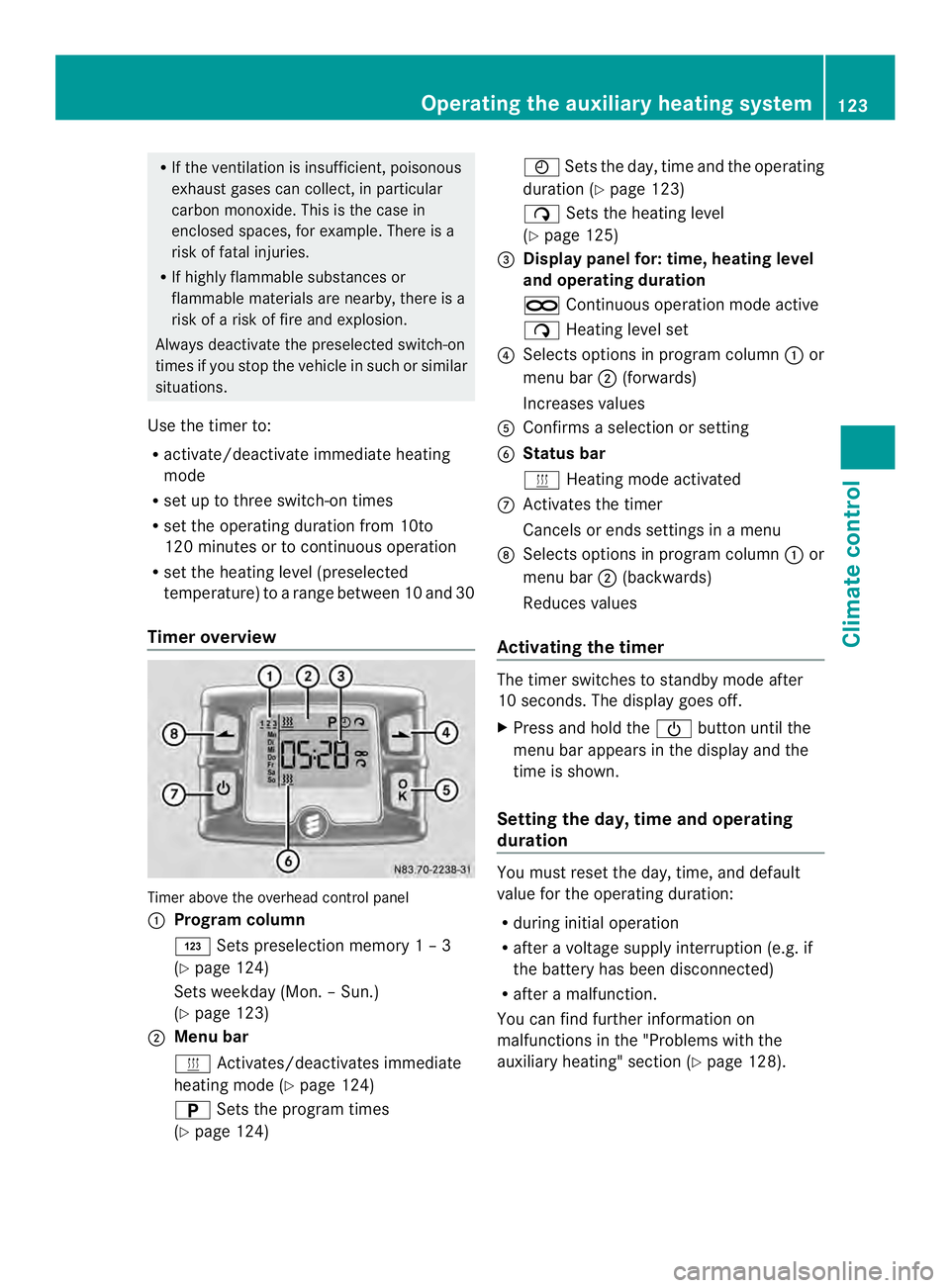
Timer overview Timer above the overhead control panel
0005
Program column
0001 Sets preselection memory 1 – 3
(Y page 124)
Sets weekday (Mon. – Sun.)
(Y page 123)
0006 Menu bar
0020 Activates/deactivates immediate
heating mode (Y page 124)
0002 Sets the program times
(Y page 124) 0001
Sets the day, time and the operating
duration (Y page 123)
0004 Sets the heating level
(Y page 125)
0026 Display panel for: time, heating level
and operating duration
0005 Continuous operation mode active
0004 Heating level set
0025 Selects options in program column 0005or
menu bar 0006(forwards)
Increases values
0023 Confirms a selection or setting
0024 Status bar
0020 Heating mode activated
0018 Activates the timer
Cancels or ends settings in a menu
0019 Selects options in program column 0005or
menu bar 0006(backwards)
Reduces values
Activating the timer The timer switches to standby mode after
10 seconds. The display goes off.
X
Press and hold the 0002button until the
menu bar appears in the display and the
time is shown.
Setting the day, time and operating
duration You must reset the day, time, and default
value for the operating duration:
R
during initial operation
R after a voltage supply interruption (e.g. if
the battery has been disconnected)
R after a malfunction.
You can find further information on
malfunctions in the "Problems with the
auxiliary heating" section (Y page 128). Operating the auxiliary heating system
123Climate control Z
Page 134 of 334
Useful information
This Operator's Manual describes all models
as well as standard and optional equipment
of your vehicle that were available at the time
of going to print. Country-specific variations
are possible. Note that your vehicle may not
be equipped with all of the described
functions. This also applies to systems and
functions relevant to safety.
Read the information on qualified specialist
workshops (Y page 26). Breaking-in notes
The first 1,000 miles (1,500 km)
New or replaced brake pads and brake disks
only reach their optimum braking effec tafter
100 miles (a few hundred kilometers). Until
then, compensate for this by applying greater
force to the brake pedal.
For the service life and economy of your
vehicle it is crucial that you brea kinthe
engine with due care.
R Therefore, protect the engine for the first
1,000 miles (1,500 km) by driving at
varying vehicle and engine speeds.
R Avoid overstraining the vehicle and high
engine speeds during this period, e.g.
driving at full throttle. Do not exceed 0001of
the maximum speed for each gear.
R Do not change down a gear manually in
order to brake.
R Try to avoid depressing the accelerator
pedal beyond the point of resistance
(kickdown).
R The shift ranges 3,2or 1should only be
engaged when driving slowly, e.g. when
driving in mountainous terrain.
After 1,000 miles (1,500 km), you can
increase the engine speed gradually and
accelerate the vehicle up to full speed.
i You should also observe these notes on
breaking-in if the engine or parts of the drive train on your vehicle have been
replaced. Driving
Important safety notes
G
WARNING
If you switch off the ignition while driving,
safety-relevant functions are only available
with limitations, or not at all. This could affect,
for example, the power steering and the brake
boosting effect.Y ou will require considerably
more effort to steer and brake. There is a risk
of an accident.
Do not switch off the ignition while driving. G
WARNING
If the parking brake has not been fully
released when driving, the parking brake can:
R overheat and cause a fire
R lose its hold function.
There is a risk of fire and an accident .Release
the parking brake fully before driving off. Battery isolating switch
Important safety notes !
Make sure that the key is in position 0in
the ignition lock and wait at least
20 seconds before disconnecting or
connecting the battery isolating switch.
You could otherwise damage electrical
system components.
You can use the battery isolating switch to
disconnect the power supply to all your
vehicle's consumers. This will prevent
uncontrolled battery discharge caused by off-
load curren tconsumption.
If your vehicle is equipped with an auxiliary
battery in the engine compartment, you will
need to disconnect both batteries. Only then
is the electrical system fully disconnected
from the power supply. 132
DrivingDriving and parking
Page 143 of 334
Problems with the transmission
Problem Possible causes/consequences and
0004 Solutions
The transmission
malfunctions when
shifting gear. The transmission is losing oil.
X
Have the transmission checked immediately at a qualified
specialist workshop. The acceleration
characteristics have
deteriorated
noticeably.
The transmission does
not shift. The transmission is in emergency mode.
It is only possible to shift into second gear or reverse gear
R.
X Stop the vehicle.
X Depress the brake pedal.
X Move the selector lever to position P.
X Switch off the engine.
X Wait at least 10 seconds before restarting the engine.
X Depress the brake pedal.
X Move the selector lever to position Dor R.
In position D, the transmission shifts into second gear; in
position R, the transmission shifts into reverse gear.
X Have the transmission checked immediately at a qualified
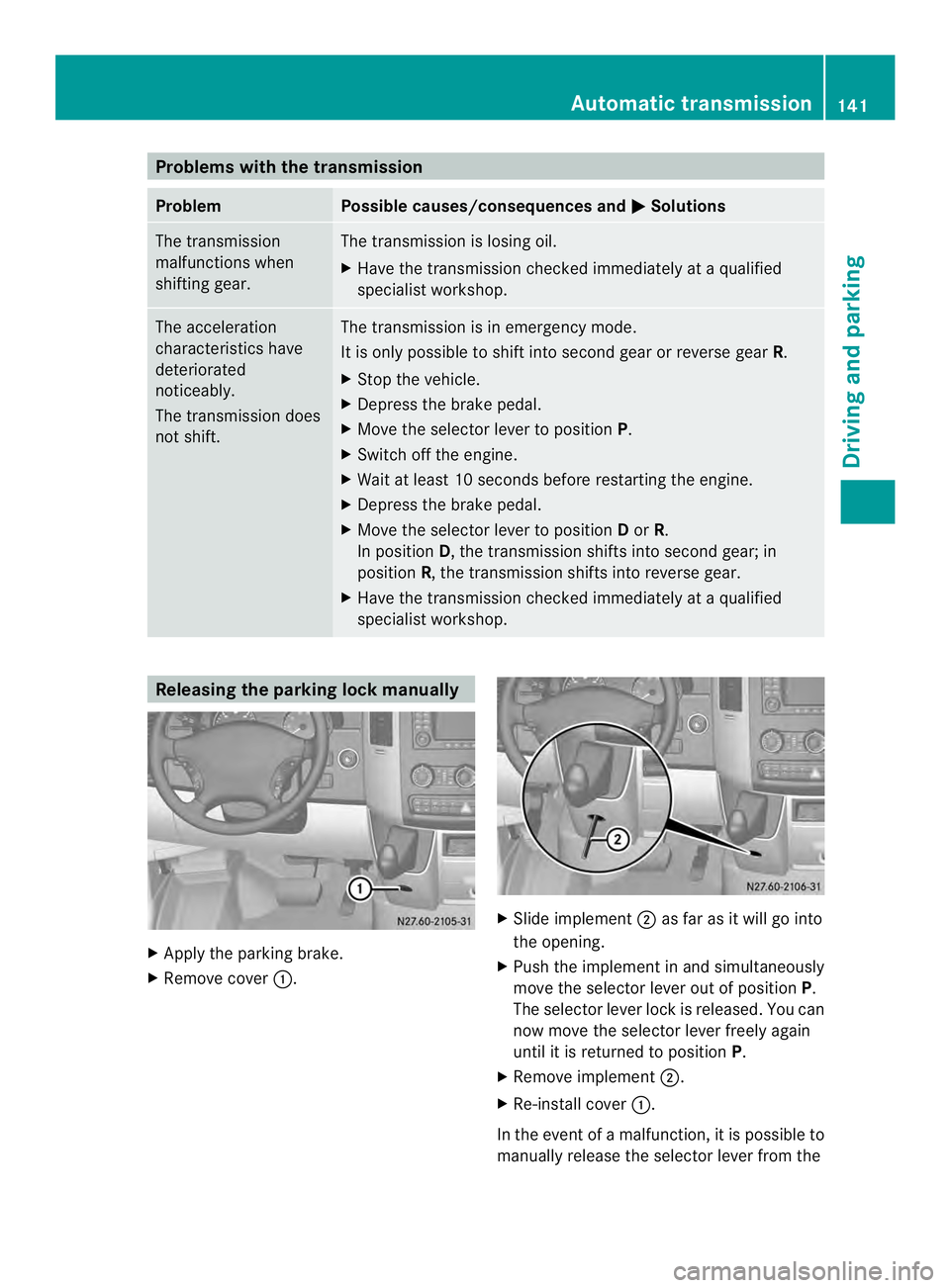
specialist workshop. Releasing the parking lock manually
X
Apply the parking brake.
X Remove cover 0005. X
Slide implement 0006as far as it will go into
the opening.
X Push the implement in and simultaneously
move the selector lever out of position P.
The selector lever lock is released. You can
now move the selector lever freely again
until it is returned to position P.
X Remove implement 0006.
X Re-install cover 0005.
In the event of a malfunction, it is possible to
manually release the selector lever from the Automatic transmission
141Driving and parking Z
Page 150 of 334
Bear in mind that at a speed of just 30 mph
(approximately 50 km/h), your vehicle covers
a distance of 44 feet (approximatel
y14 m)
every second. G
WARNING
If you switch off the ignition while driving,
safety-relevant functions are only available
with limitations, or not at all. This could affect,
for example, the power steering and the brake
boosting effect. You will require considerably
more effort to steer and brake .There is a risk
of an accident.
Do not switch off the ignition while driving.
! Always observe the ground clearance of
the vehicle and avoid obstacles. On
vehicles with a step, ground clearance is
further restricted. Obstacles can damage
the vehicle.
If you must drive over obstacles, drive
especially slowly and carefully. If
necessary, have another person direct you.
Drive sensibly–s ave fuelIn orde
rto save fuel, observe the following
tips:
X The tires should always be inflated to the
recommended tire pressure.
X Remove unnecessary loads.
X Remove roof carriers when they are not
needed.
X Warm up the engine at low engine speeds.
X Avoid frequent acceleration or braking.
X Have all maintenance work carried out as
indicated by the service intervals in the
Maintenance Booklet or by the service
interval display.
Fuel consumption also increases when
driving in cold weather, in stop-start traffic
and in mountainous terrain. Overrun cutoff If you are in overrun mode and take your foot
off the accelerator pedal, the fuel supply is
cut off when the engine speed is out of the
idle speed control range.
Drinking and driving
G
WARNING
Drinking and driving and/or taking drugs and
driving are very dangerous combinations.
Even a small amount of alcohol or drugs can
affect your reflexes, perceptions and
judgment.
The possibility of a serious or even fatal
accident are greatly increased when you drink
or take drugs and drive.
Do not drink or take drugs and drive or allow
anyone to drive who has been drinking or
taking drugs.
Emission control G
WARNING
Combustion engines emit poisonous exhaust
gases such as carbon monoxide. Inhaling
these exhaust gases leads to poisoning. There
is a risk of fatal injury. Therefore never leave
the engine running in enclosed spaces
without sufficient ventilation.
Certain engine systems are designed to keep
the level of poisonous substances in exhaust
fumes within legal limits.
These systems only work optimally if they are
maintained exactly in accordance with the
manufacturer's specifications. Any work on
the engine should therefore be carried out by
qualified and authorized technicians at a
Sprinter dealer.
The engine settings must not be changed
under any circumstances. In addition, all
specific maintenance work must be carried
out at regular intervals and in accordance
with the service requirements of the dealer 148
Driving tipsDriving and parking
Page 151 of 334
listed here on the inside title page. Details can
be found in the Maintenance Booklet. Short journey
! If the vehicle is predominantly used for
short-distance driving, this could lead to a
malfunction in the automatic cleaning
function for the diesel particle filter. As a
result, fuel may accumulate in the engine
oil and cause engine failure.
Therefore, if you mainly drive short
distances, you should drive on a highway or
on rural roads for 20 minutes every
310 miles (50 0km). This ensures sufficient
regeneration of the diesel particle filter.
Therefore, if you mainl ydrive short distances,
drive on a freeway or an inter-urban road for
20 minutes every 300 miles (500 km). This
facilitates the diesel particl efilter's burn-off
process. Speed limiter
G
WARNING
Exceeding the stated tir eload-bearing
capacity and the approved maximum speed
could lead to tire damage or the tire bursting.
There is a risk of accident.
Therefore, only use tire types and sizes
approved for your vehicle model. Observe the
tire load rating and speed rating required for
your vehicle.
As the driver, you must find out about the
maximum speed of the vehicle and the
resulting permissible maximum speed of the
tires (tire and tire pressure). In particular, also
observe the tire approval regulations for each
country.
You must not exceed the speed limit for the
tires listed in the tire pressure tables. You can
find information on tire pressures in the
"Wheels and tires" section (Y page 278).You can permanently limit the maximum
speed of your vehicle to 75 mph (120 km/h).
We recommend that you use an authorized
Sprinter Dealer for the programming of the
maximum speed.
Before overtaking, take into consideration
that the engine speed limiter prevents the
speed increasing beyond the programmed
maximum speed. Driving abroad
Service An extensive network of authorized Sprinter
Dealers is also at your disposal when you are
traveling abroad. Nevertheless, please bear
in mind that service facilities or replacement
parts may not always be immediately
available. You can obtain
alist of workshops
at any authorized Sprinter Dealer.
Fuel In some countries, only fuels with a higher
sulfur conten
tare available.
Unsuitable fuel can cause engine damage.
You will find information on fuels in the
"Service products and capacities" section
(Y page 317).
Low-beam headlamps If you are traveling in countries where
vehicles are drive
nonthe opposite side of the
road to that in which the vehicle is registered,
you will need to:
R have the halogen headlamps partially
masked
R have the Bi-Xenon headlamps set to
symmetrical low beam
This prevents glare to oncoming traffic and no
longer illuminates the edge of the road to the
same height and distance.
Have the headlamps masked or adjusted at a
qualified specialist workshop before you Driving tips
149Driving and parking Z
Page 178 of 334
Useful information
This Operator's Manual describes all models
as well as standard and optional equipment
of your vehicle that were available at the time
of going to print. Country-specific variations
are possible. Note that your vehicle may not
be equipped with all of the described
functions. This also applies to systems and
functions relevant to safety.
Read the information on qualified specialist
workshops (Y page 26). Important safety notes
G
WARNING
If you are driving and reach through the
steering wheel to operate the adjustment
knob, you could lose control of the vehicle.
There is a risk of an accident and injury.
Only operate the adjustment knobs when the
vehicle is stationary. Do not reach through the
steering wheel when driving. G
WARNING
If you operate information systems and
communication equipment integrated in the
vehicle while driving, you will be distracted
from traffic conditions. You could also lose
control of the vehicle. There is a risk of an
accident.
Only operate the equipment when the traffic
situatio npermits .Ifyou are not sure that this
is possible, park the vehicle paying attention
to traffic conditions and operate the
equipment when the vehicle is stationary. G
WARNING
If the instrument cluster has failed or
malfunctioned, you may not recognize
function restrictions in systems relevant to
safety. The operating safety of your vehicle
may be impaired. There is a risk of an
accident. Drive on carefully. Have the vehicle checked
at a qualified specialist workshop
immediately.
If uncertainties regarding the operating safety
of the vehicle arise when continuing the
journey, stop the vehicle, paying attention to
road and traffic conditions.
You must observe the legal requirements for
the country in which you are currently driving
when operating COMAND. Instrument cluster
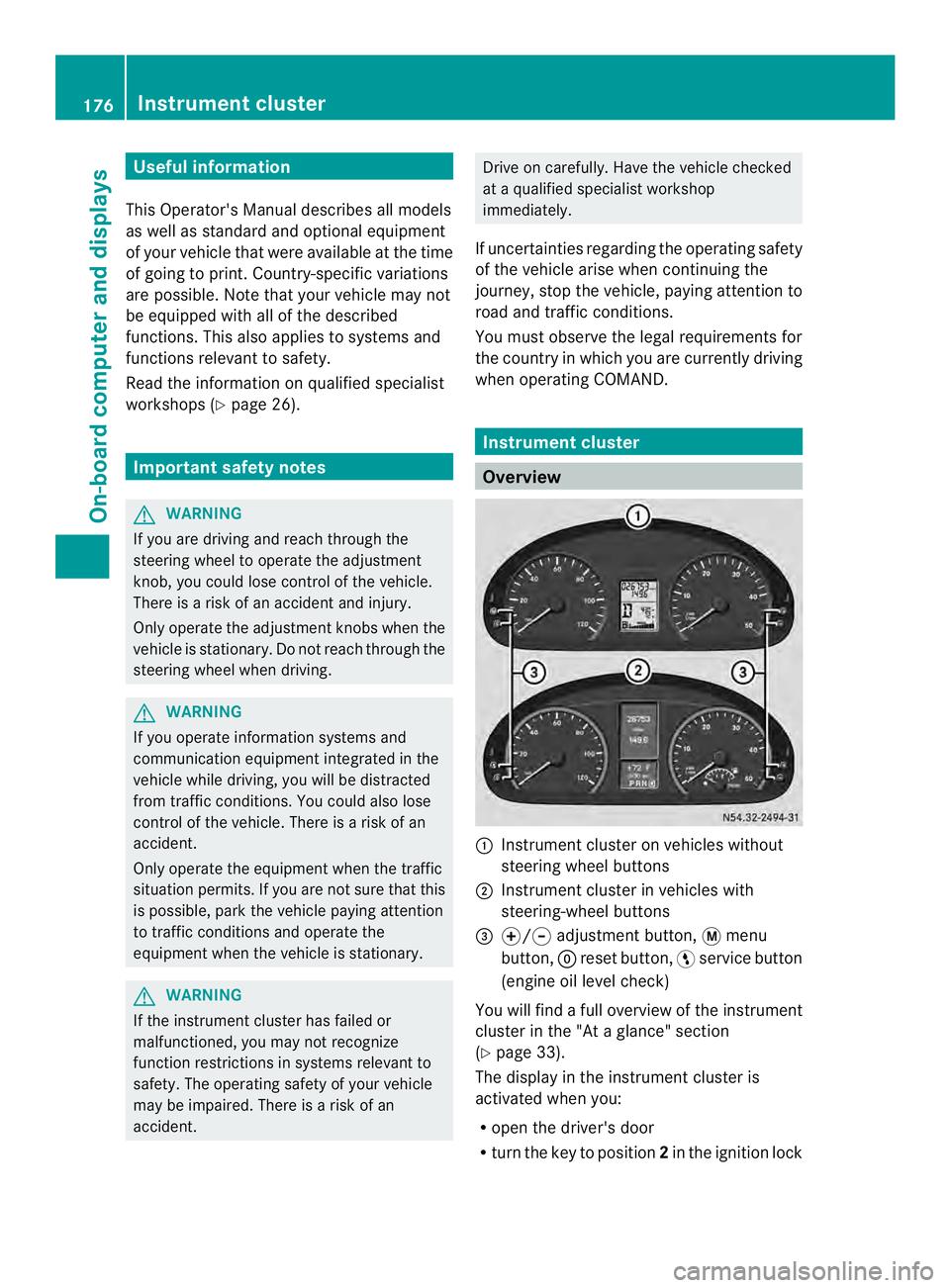
Overview
0005
Instrument cluster on vehicles without
steering wheel buttons
0006 Instrument cluster in vehicles with
steering-wheel buttons
0026 000E/000F adjustment button, 0004menu
button, 0007reset button, 0012service button
(engine oil level check)
You will find a full overview of the instrument
cluster in the "At a glance" section
(Y page 33).
The display in the instrument cluster is
activated when you:
R open the driver's door
R turn the key to position 2in the ignition lock 176
Instrument clusterOn-board computer and displays
Page 179 of 334
R
press the 0007reset button
R switch on the lights
The display switches off automatically after
approximately 30 seconds if:
R the vehicle lighting is not switched on.
R the key is in position 0in the ignition lock. Instrument lighting
When the lights are switched on, you can
adjust the brightness of the instrument
cluster lighting using the 000Eand 000Fbuttons.
X To brighten: press the000Ebutton.
X To dim: press the 000Fbutton.
i Vehicles with automatic headlamp mode:
the instrument lighting also adapts to
automatic headlamp mode. Tachometer
! Do not drive in the overrevving range, as
this could damage the engine. H
Environmental note
Avoid driving at high engine speeds. This
unnecessarily increases the fuel consumption
of your vehicle and harms the environmen tas
a result of increased emissions.
The red band in the tachometer indicates the
engine's overrevving range.
To protect the engine, the fuel supply is
interrupted when the red band is reached. Outside temperature
You should pay special attention to road
conditions when temperatures are around
the freezing point.
On vehicles without steering wheel buttons
(Y page 178) and on vehicles with steering
wheel buttons (Y page 182), the outside
temperature display is in the display. Changes in the outside temperature are
displayed after a shor
tdelay. Speedometer
The speed can also be shown in the display.
You can find information on the digital
speedometer for vehicles without steering
wheel buttons under (Y page 178) and for
vehicles with steering wheel buttons under
(Y page 182).
i In some countries, a warning sounds
when the vehicle reaches the maximum
speed limit, e.g. at 75 mph ( 120 km/h). Trip odometer
X To reset: make sure that the display is
showing the trip odometer if you have a
vehicle with steering wheel buttons
(Y page 182).
X Press and hold the 0007reset button until the
trip odometer is reset to 0.0 .
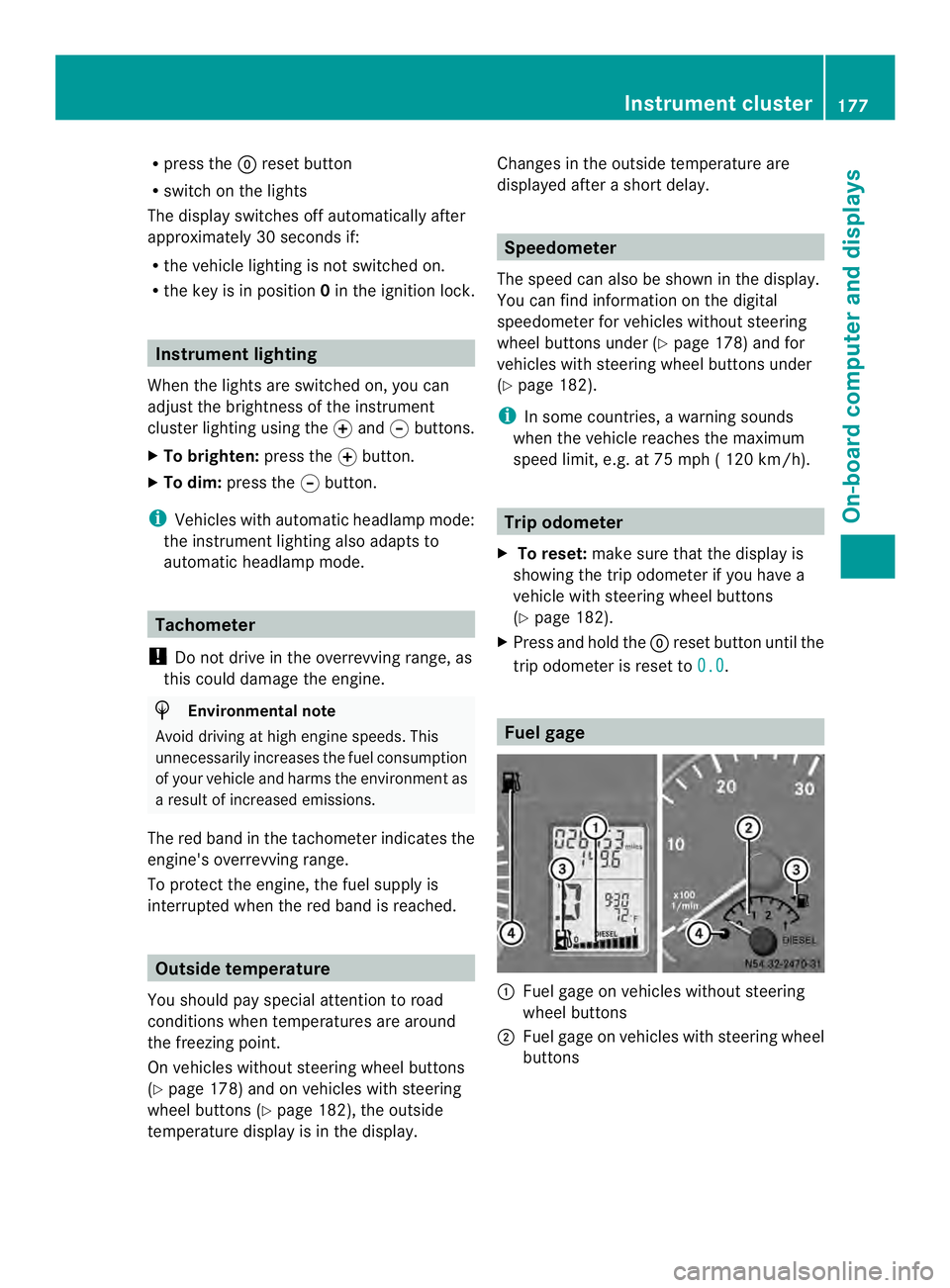
Fuel gage
0005
Fuel gage on vehicles without steering
wheel buttons
0006 Fuel gage on vehicles with steering wheel
buttons Instrument cluster
177On-board computer and displays Z
Page 181 of 334
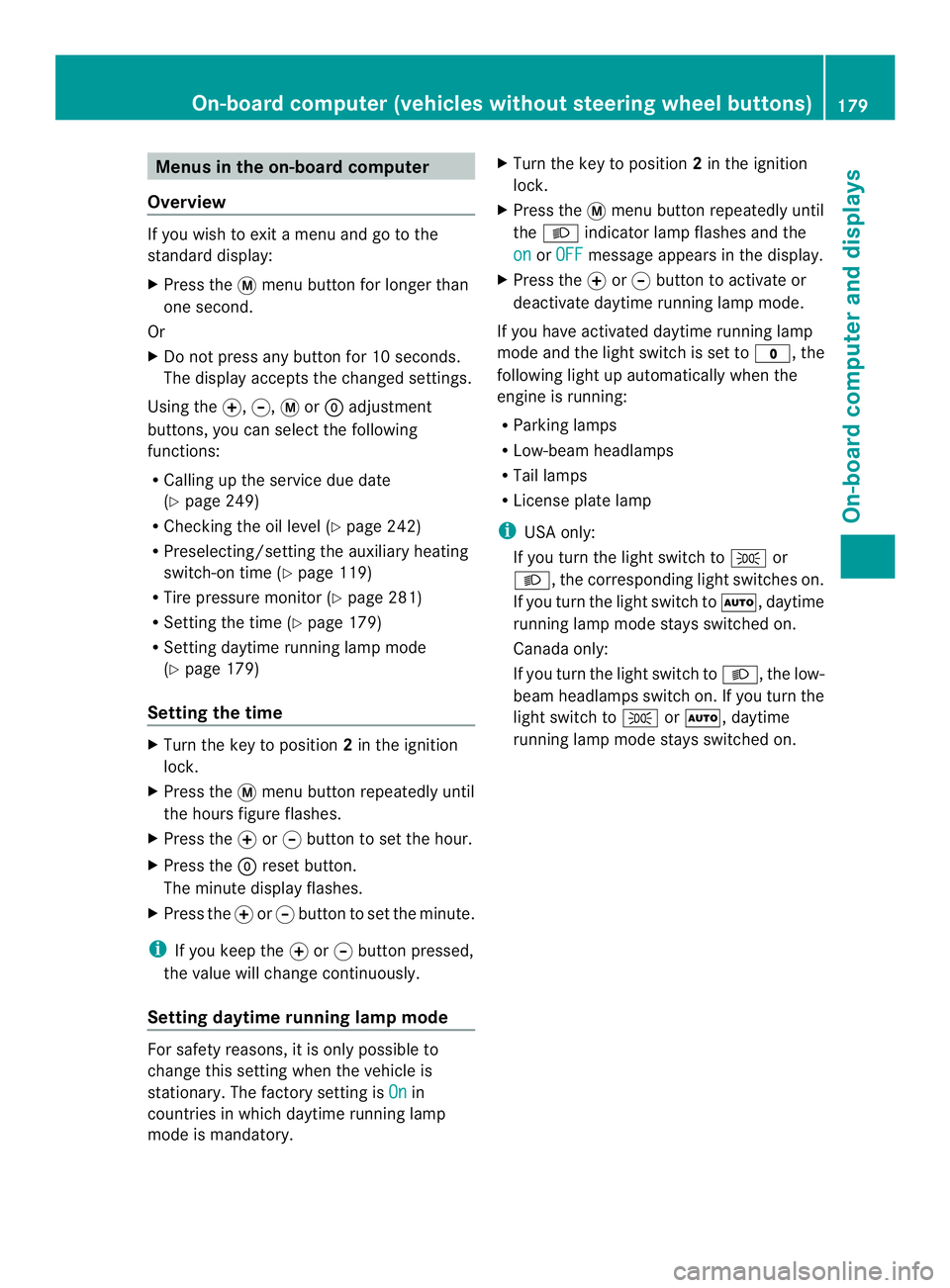
Menus in the on-board computer
Overview If you wish to exit a menu and go to the
standard display:
X Press the 0004menu button for longer than
one second.
Or
X Do not press any button for 10 seconds.
The display accepts the changed settings.
Using the 000E,000F,0004or0007 adjustment
buttons, you can select the following
functions:
R Calling up the service due date
(Y page 249)
R Checking the oil level (Y page 242)
R Preselecting/setting the auxiliary heating
switch-on time ( Ypage 119)
R Tire pressure monitor (Y page 281)
R Setting the time (Y page 179)
R Setting daytime running lamp mode
(Y page 179)
Setting the time X
Turn the key to position 2in the ignition
lock.
X Press the 0004menu button repeatedly until
the hours figure flashes.
X Press the 000Eor000F button to set the hour.
X Press the 0007reset button.
The minute display flashes.
X Press the 000Eor000F button to set the minute.
i If you keep the 000Eor000F button pressed,
the value will change continuously.
Setting daytime running lamp mode For safety reasons, it is only possible to
change this setting when the vehicle is
stationary. The factory setting is
On in
countries in which daytime running lamp
mode is mandatory. X
Turn the key to position 2in the ignition
lock.
X Press the 0004menu button repeatedly until
the 0004 indicator lamp flashes and the
on or
OFF message appears in the display.
X Press the 000Eor000F button to activate or
deactivate daytime running lamp mode.
If you have activated daytime running lamp
mode and the light switch is set to 000C, the
following light up automatically when the
engine is running:
R Parking lamps
R Low-beam headlamps
R Tail lamps
R License plate lamp
i USA only:
If you turn the light switch to 000Bor
0004, the corresponding light switches on.
If you turn the light switch to 0007, daytime
running lamp mode stays switched on.
Canada only:
If you turn the light switch to 0004, the low-
beamh eadlamps switch on. If you turn the
light switch to 000Bor0007, daytime
running lamp mode stays switched on. On-boar
dcomputer (vehicles without steering wheel buttons)
179On-board computer and displays Z