phone MERCEDES-BENZ SPRINTER 2013 MY13 Operator’s Manual
[x] Cancel search | Manufacturer: MERCEDES-BENZ, Model Year: 2013, Model line: SPRINTER, Model: MERCEDES-BENZ SPRINTER 2013Pages: 334, PDF Size: 3.88 MB
Page 182 of 334
On-boar
dcomputer (vehicles with
steering wheel buttons) Operating the on-board computer
Overview X
To activat ethe on-board computer: turn
the key to position 1in the ignition lock.
The on-board computer is activated as soon
as you turn the key to position 1in the ignition
lock.
The on-board computer shows vehicle
information and settings in the display.
You can control the displaya nd the settings
in the on-board compute rwith the buttons on
the steering wheel.
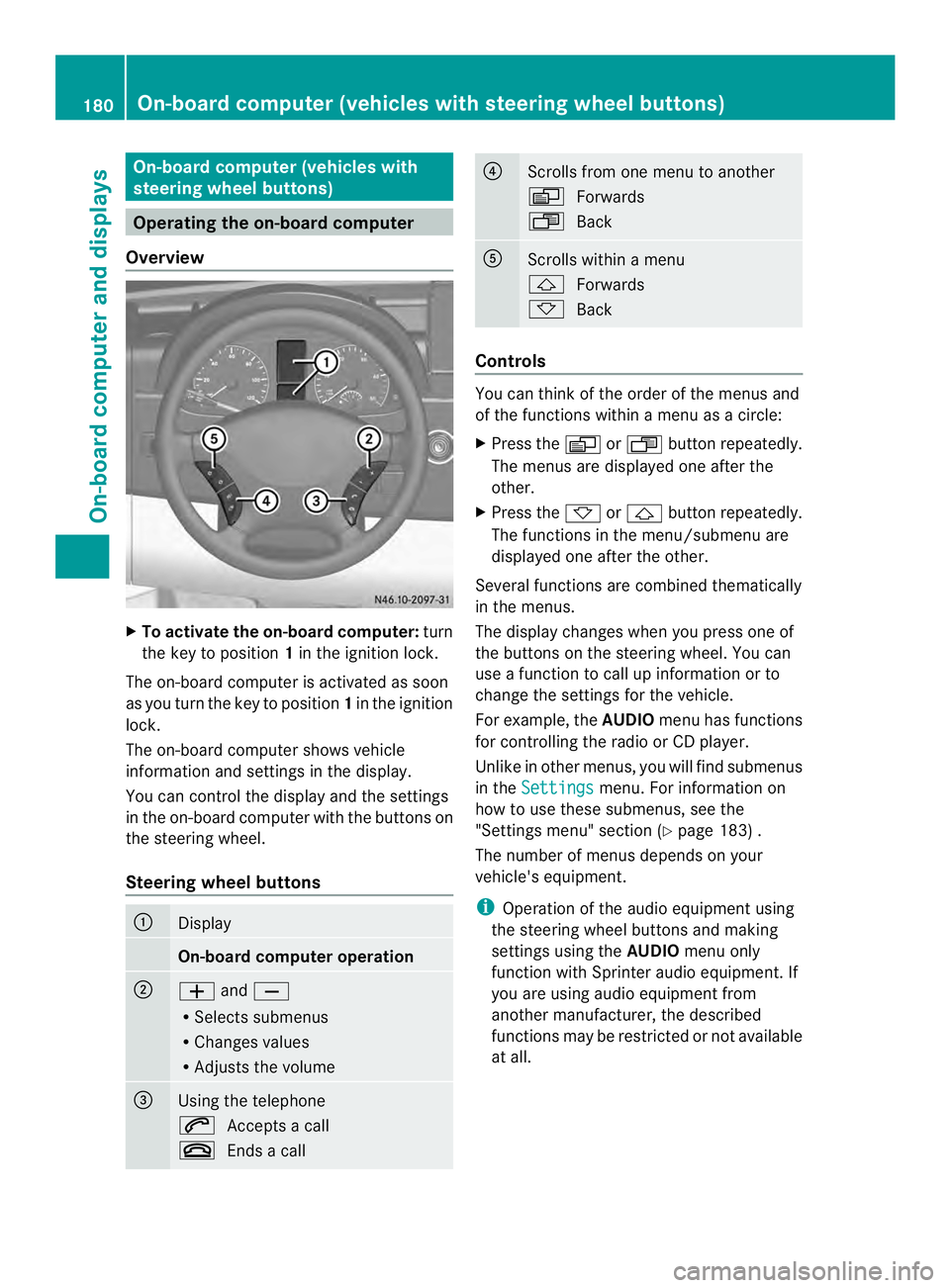
Steering wheel buttons 0005
Display
On-board computer operation
0006
0011
and0012
R Selects submenus
R Changes values
R Adjusts the volume 0026
Using the telephone
0001
Accepts a call
0005 Ends a call 0025
Scrolls from one menu to another
0010
Forwards
0007 Back 0023
Scrolls within a menu
0001
Forwards
0009 Back Controls
You can think of the order of the menus and
of the functions within a menu as a circle:
X
Press the 0010or0007 button repeatedly.
The menus are displayed one after the
other.
X Press the 0009or0001 button repeatedly.
The functions in the menu/submenu are
displayed one after the other.
Several functions are combined thematically
in the menus.
The display changes when you press one of
the buttons on the steering wheel. You can
use a function to call up information or to
change the settings for the vehicle.
For example, the AUDIOmenu has functions
for controlling the radio or CD player.
Unlike in other menus, you will find submenus
in the Settings menu. For information on
how to use these submenus, see the
"Settings menu" section (Y page 183) .
The number of menus depends on your
vehicle's equipment.
i Operation of the audio equipmen tusing
the steering wheel buttons and making
settings using the AUDIOmenu only
function with Sprinter audio equipment. If
you are using audio equipment from
another manufacturer, the described
functions may be restricted or not available
at all. 180
On-board computer (vehicles with steering wheel buttons)On-board computer and displays
Page 183 of 334
Menu Overview
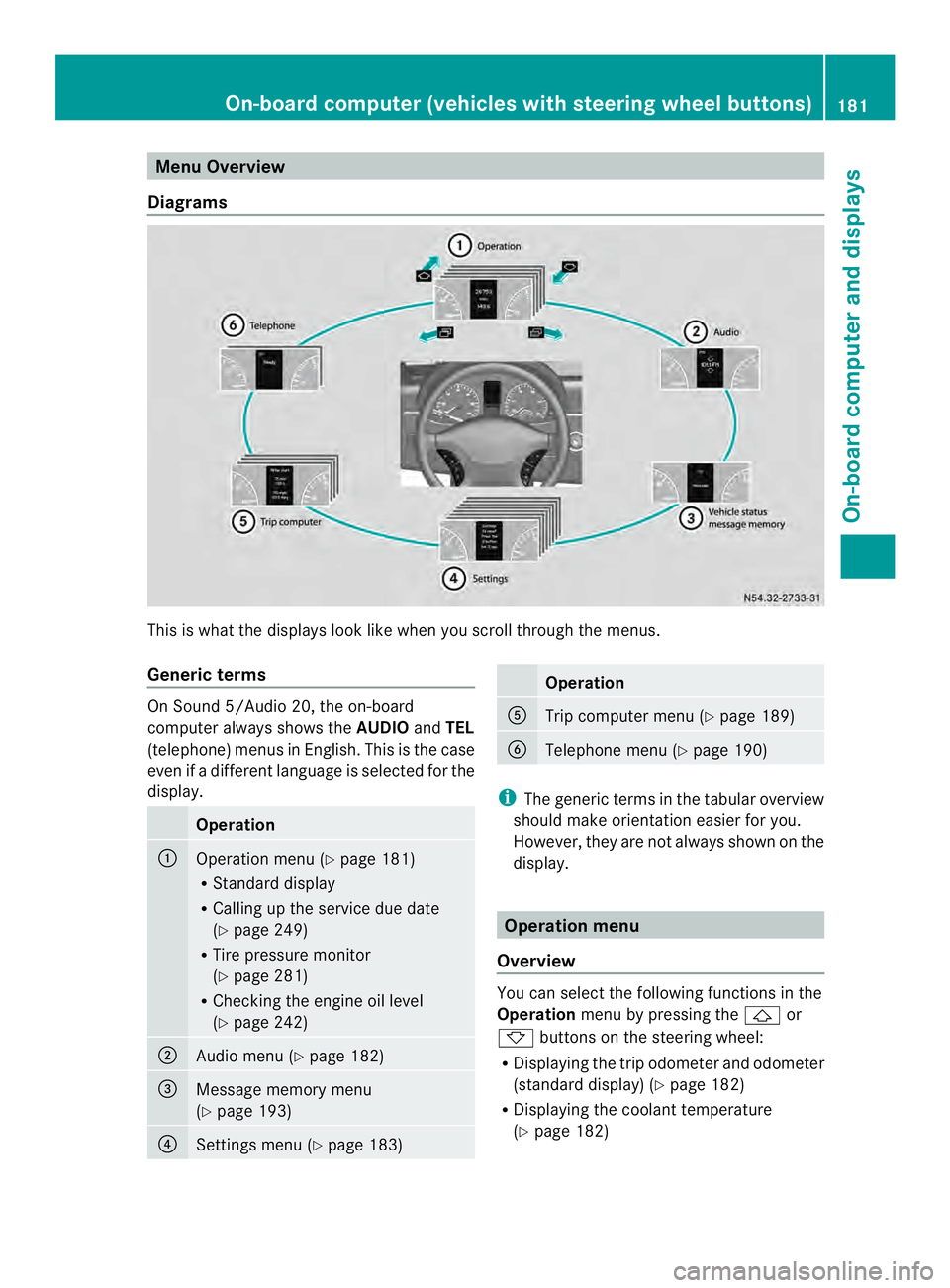
Diagrams This is whatt
he displays look like when you scroll through the menus.
Generic terms On Sound 5/Audio 20, the on-board
computer always shows the
AUDIOandTEL
(telephone) menus in English. This is the case
even if a different language is selected for the
display. Operation
0005
Operation menu (Y
page 181)
R Standard display
R Calling up the service due date
(Y page 249)
R Tire pressure monitor
(Y page 281)
R Checking the engine oil level
(Y page 242) 0006
Audio menu (Y
page 182) 0026
Message memory menu
(Y
page 193) 0025
Settings menu (Y
page 183) Operation
0023
Trip computer menu (Y
page 189) 0024
Telephone menu (Y
page 190) i
The generic terms in the tabular overview
should make orientation easier for you.
However, they are not always shown on the
display. Operation menu
Overview You can select the following functions in the
Operation
menu by pressing the 0001or
0009 buttons on the steering wheel:
R Displaying the trip odometer and odometer
(standard display) (Y page 182)
R Displaying the coolant temperature
(Y page 182) On-board computer (vehicles with steering wheel buttons)
181On-board computer and displays Z
Page 192 of 334
i
When you call up the trip computer again,
it displays the last function called up.
The units of the statistical information
displayed are set permanently for each
specific country, and are therefore
independen tofthe units selected in the
Settings menu.
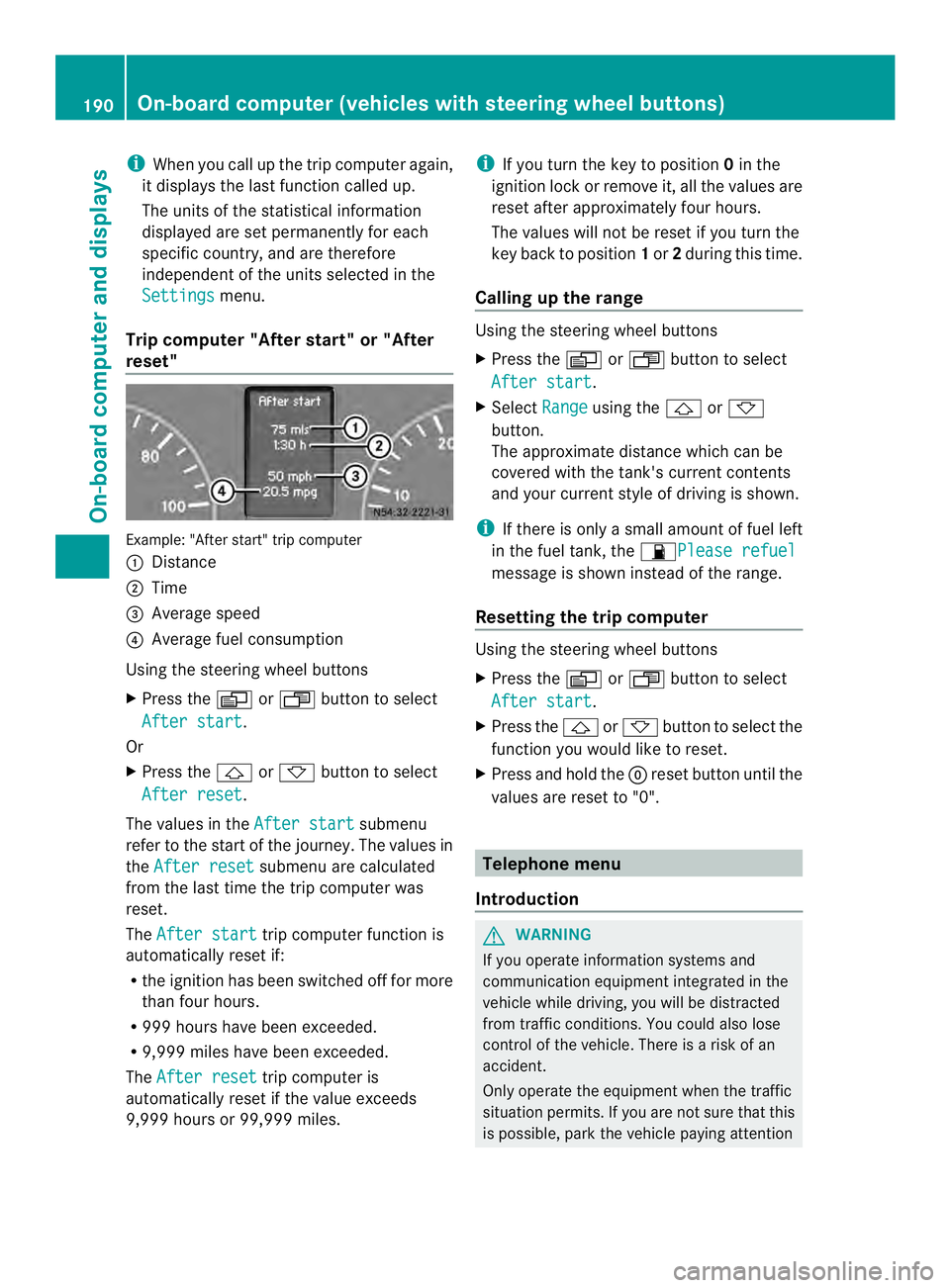
Trip computer "After start" or "After
reset" Example: "After start" trip computer
0005
Distance
0006 Time
0026 Average speed
0025 Average fuel consumption
Using the steering wheel buttons
X Press the 0010or0007 button to select
After start .
Or
X Press the 0001or0009 button to select
After reset .
The values in the After start submenu
refer to the start of the journey. The values in
the After reset submenu are calculated
from the last time the trip computer was
reset.
The After start trip computer function is
automatically reset if:
R the ignition has been switched off for more
than four hours.
R 999 hours have been exceeded.
R 9,999 miles have been exceeded.
The After reset trip computer is
automatically reset if the value exceeds
9,999 hours or 99,999 miles. i
If you turn the key to position 0in the
ignition lock or remove it, all the values are
reset after approximately four hours.
The values will not be reset if you turn the
key back to position 1or 2during this time.
Calling up the range Using the steering wheel buttons
X
Press the 0010or0007 button to select
After start .
X Select Range using the
0001or0009
button.
The approximate distance which can be
covered with the tank's current contents
and your current style of driving is shown.
i If there is only a small amount of fuel left
in the fuel tank, the 0016Please refuel message is shown instead of the range.
Resetting the trip computer Using the steering wheel buttons
X
Press the 0010or0007 button to select
After start .
X Press the 0001or0009 button to select the
function you would like to reset.
X Press and hold the 0007reset button until the
values are reset to "0". Telephone menu
Introduction G
WARNING
If you operate information systems and
communication equipment integrated in the
vehicle while driving, you will be distracted
from traffic conditions. You could also lose
control of the vehicle. There is a risk of an
accident.
Only operate the equipment when the traffic
situation permits. If you are not sure that this
is possible, park the vehicle paying attention 190
On-board computer (vehicles with steering wheel buttons)On-board computer and displays
Page 193 of 334
to traffic conditions and operate the
equipment when the vehicle is stationary.
You must observe the legal requirements for
the country in which you are currently driving
when operating a mobile phone in the vehicle.
If it is permitted to operate a mobile phone
while the vehicle is in motion, only operate it
when road and traffic conditions permit.
If you have connected amobile phone to the
Sprinter hands-free system, you can operate
it using the functions in the TEL menu.
X Switch on the mobile phone (see the
separate operating instructions).
X Switch on the audio equipment (see the
separate operating instructions).
X Establish a Bluetooth ®
connection
between the mobile phone and the audio
equipment (see the separate operating
instructions).
X Press the 0010or0007 button on the
steering wheel to select the TEL menu.
X When TEL PIN appears in the display, enter
the PIN using the mobile phone or audio
equipment.
The mobile phone searches for a network.
The display remains blank during this time.
You will see the mobile phone operational
readiness display once the mobile phone
has found a network.
i You can obtain further information about
suitable mobile phones and connecting
mobile phones via Bluetooth ®
at any
qualified specialist workshop.
i If the mobile phone operational readiness
symbol goes out, your vehicle is outside of
the transmission and reception range.
Accepting acall X
Press the 0001button on the steering
wheel to accep tanincoming call.
The display shows the call duration. Rejecting or ending
acall X
Press the 0005button on the steering
wheel to reject or end acall.
The calle rthen hears the engaged tone.
The display shows the mobile phone
operational readiness symbol again.
Dialing a number from the phone book You can use the mobile phone to enter new
telephone numbers into the phone book (see
the separate operating instructions). If your
mobile phone is able to receive calls, you can
search for and dial a number from the phone
book.
Using the steering wheel buttons
X
Use the 0010or0007 buttons to select the
TEL menu.
The display shows the mobile phone
operational readiness symbol.
X Press the 0001or0009 buttons to switch
to the phone book.
The on-board computer reads the phone
book stored on the SIM card or in the
mobile phone. This may take more than a
minute. The Processing (Audio 20)
message appears in the display.
When the message is no longer displayed,
reading has ended.
X Press the 0001or0009 button to select the
desired name.
Or
X To start rapid scrolling: press and hold
the 0001 or0009 button longer than
1s econd.
Rapid scrolling stops when you release the
button or reach the end of the list.
Using the steering wheel buttons
X To start dialing: press the0001button.
The on-board computer dials the
corresponding phone number. The
Dialing (Audio 20) message appears in
the display. On-boar
dcomputer (vehicles with steering wheel buttons)
191On-board computer and displays Z
Page 194 of 334
When a connection is established, the
name of the other person and/or the call
duration appear in the display.
X To exit the telephone book: press the
0005 button.
Redialing The on-board computer saves the last names
or numbers dialed in the redial memory.
Using the steering wheel buttons
X Use the 0010or0007 buttons to select the
TEL menu.
The display shows the mobile phone
operational readiness symbol.
X Press the 0001button.
The display shows the most recently dialed
numbers or names in the redial memory.
X Press the 0001or0009 button to select the
desired name or number.
X To start dialing: press the0001button.
The on-board computer dials the
corresponding phone number. The
Dialing (Audio 20) message appears in
the display.
When a connection is established, the
name of the other person and/or the call
duration appear in the display.
Or
X To exit the redial memory: press the
0005 button. Display messages
Notes on displa
ymessages
Important safety notes G
WARNING
No informatio nwill be displayed if either the
instrumen tcluster or the display is
inoperative.
As a result, you will not be able to see warning
and indicator lamps or information about the
driving conditions, such as speed or outside temperature. Driving characteristics may be
impaired
.Adjust your driving style and vehicle
speed accordingly.
Contac taqualified specialist workshop
immediately. G
WARNING
If service work is not carried out correctly, the
operating safety of your vehicle may be
affected. This could cause you to lose control
of your vehicle and cause an accident.
Moreover, the safety systems may no longer
be able to protect you or others as they are
designed to do.
Always have service work carried out at a
qualified specialist workshop.
i If you turn the key to position 2in the
ignition, a display chec kis performed. All
warning/indicator lamps (except the turn
signal indicator lamps) and the display are
activated. Before starting the journey,
check that the warning and indicator lamps
are operating correctly.
Vehicles without steering wheel
buttons Warnings, malfunctions or additional
information may also be shown in the display.
The following tables show all the display
messages.
Awarning tone sounds with
certain display messages.
Vehicles with steering wheel buttons The on-board computer shows warnings,
malfunctions or additional informatio
ninthe
display. Awarning tone sounds with certain
display messages .Display messages of a high
priority are shown in red.
Please respond in accordance with the
display messages and follow the additional
notes in this Operator's Manual.
You can hide low-priority display messages by
pressing the 0010,0007,0001or0009 192
Display messagesOn-board computer and displays
Page 211 of 334
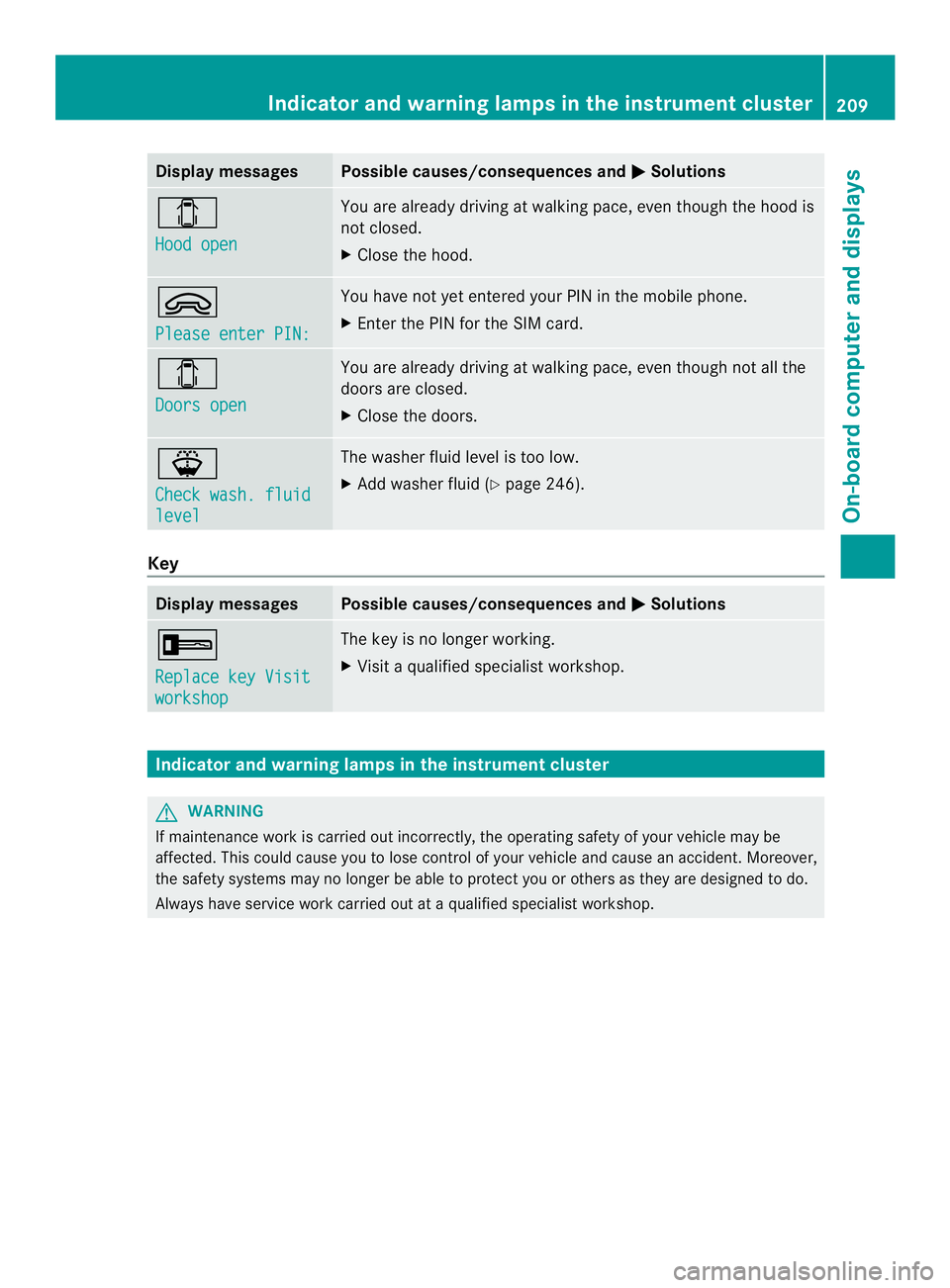
Display messages Possible causes/consequences and
0004 Solutions
0004
Hood open You are already driving at walking pace, eve
nthough the hood is
not closed.
X Close the hood. 0002
Please enter PIN: You have not yet entered your PIN in the mobile phone.
X
Enter the PIN for the SIM card. 0004
Doors open You are already driving at walking pace, even though not all the
doors are closed.
X
Close the doors. 000F
Check wash. fluid
level The washer fluid level is too low.
X
Add washer fluid (Y page 246).Key
Display messages Possible causes/consequences and
0004 Solutions
0005
Replace key Visit
workshop The key is no longer working.
X
Visit a qualified specialist workshop. Indicator and warning lamps in the instrument cluster
G
WARNING
If maintenance work is carried out incorrectly, the operating safety of your vehicle may be
affected. This could cause you to lose control of your vehicle and cause an accident. Moreover,
the safety systems may no longer be able to protect you or others as they are designed to do.
Always have service work carried out at a qualified specialist workshop. Indicator and warning lamps in the instrument cluster
209On-board computer and displays Z
Page 223 of 334
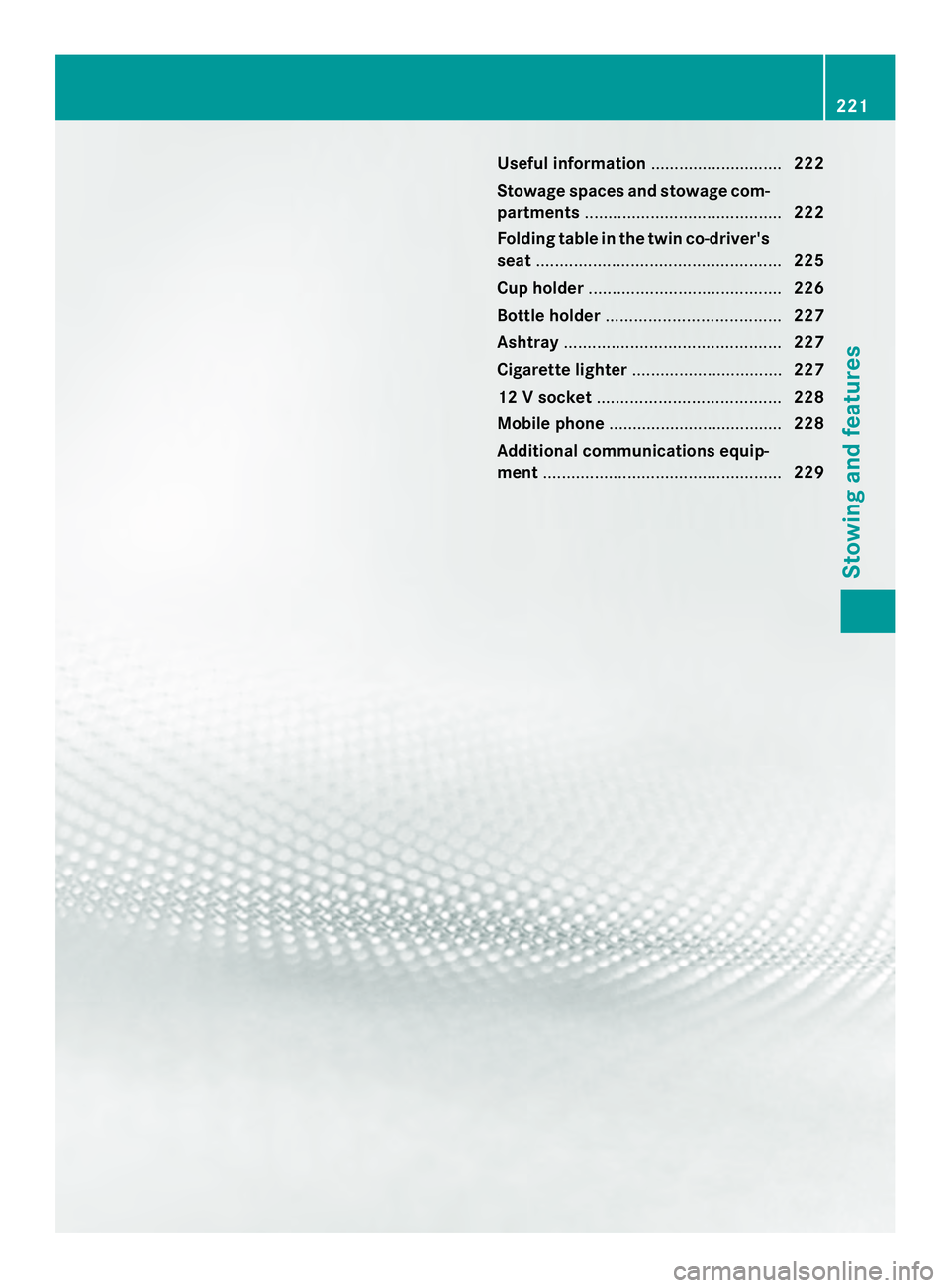
Useful information
............................222
Stowage spaces and stowage com-
partments .......................................... 222
Folding table in the twin co-driver's
seat .................................................... 225
Cup holder ......................................... 226
Bottle holder ..................................... 227
Ashtray .............................................. 227
Cigarette lighter ................................ 227
12 Vsocket ....................................... 228
Mobile phone ..................................... 228
Additional communications equip-
ment ................................................... 229 221Stowing and features
Page 230 of 334
X
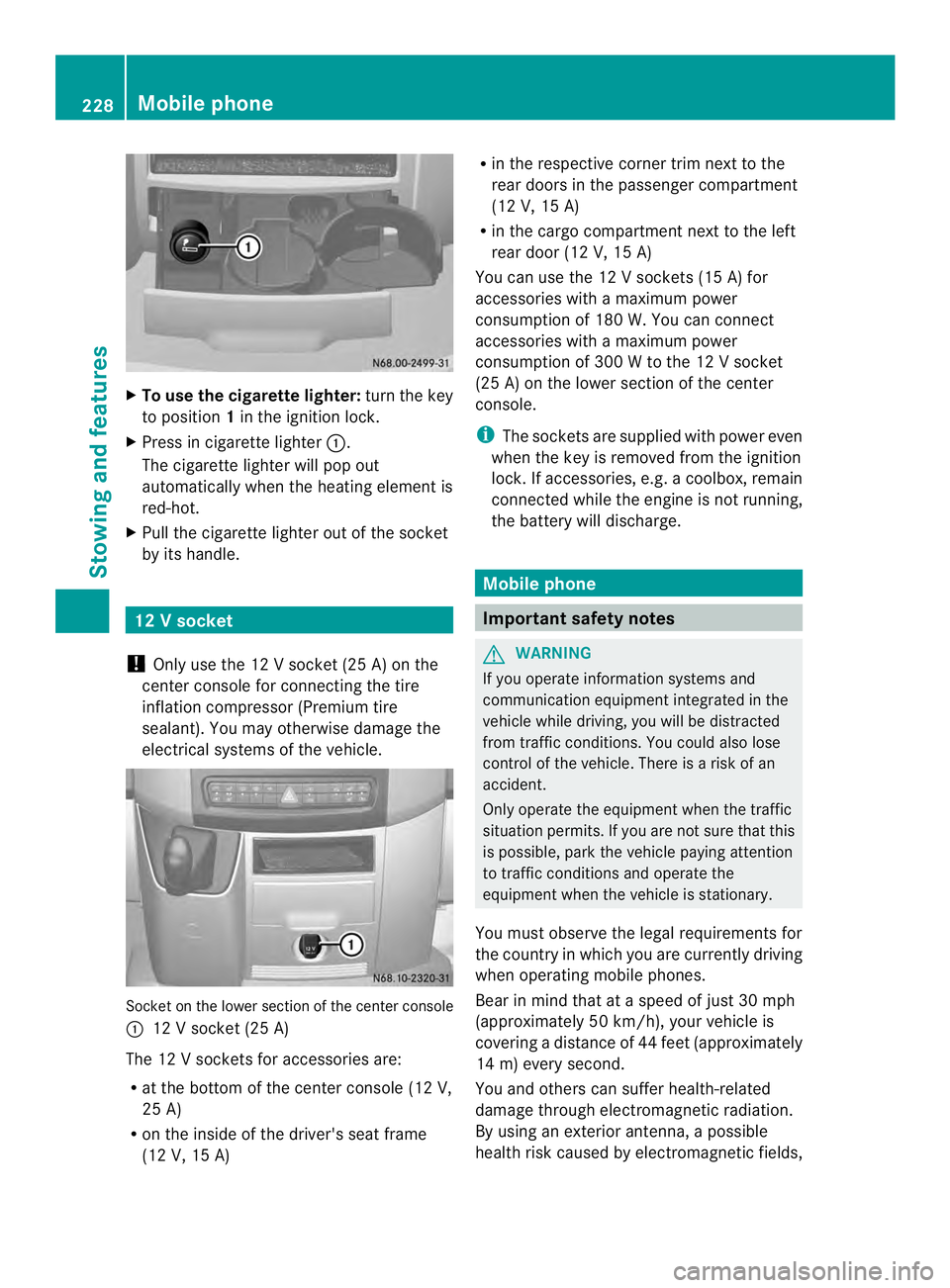
To use the cigarette lighter: turn the key
to position 1in the ignition lock.
X Press in cigarette lighter 0005.
The cigarette lighte rwill pop out
automatically when the heatin gelemen tis
red-hot.
X Pull the cigarette lighter out of the socket
by its handle. 12
Vsocket
! Only use the 12 V socket (25 A) on the
center console for connecting the tire
inflatio ncompressor (Premium tire
sealant). You may otherwise damage the
electrical systems of the vehicle. Socket on the lower section of the center console
0005 12 V socket (25 A)
The 12 Vsockets for accessories are:
R at the bottom of the center console (12 V,
25 A)
R on the inside of the driver's seat frame
(12 V, 15 A) R
in the respective corner trim next to the
rear doors in the passenger compartment
(12 V, 15 A)
R in the cargo compartment next to the left
rear door (12 V, 15 A)
You can use the 12 V sockets (15 A) for
accessories with a maximu mpower
consumption of 180 W. You can connect
accessories with a maximum power
consumption of 300 W to the 12 V socket
(25 A) on the lower section of the center
console.
i The sockets are supplied with power even
when the key is removed from the ignition
lock. If accessories, e.g. a coolbox, remain
connected while the engine is not running,
the battery will discharge. Mobile phone
Important safety notes
G
WARNING
If you operate information systems and
communication equipment integrated in the
vehicle while driving, you will be distracted
from traffic conditions. You could also lose
control of the vehicle. There is a risk of an
accident.
Only operate the equipment when the traffic
situation permits. If you are not sure that this
is possible, park the vehicle paying attention
to traffic conditions and operate the
equipment when the vehicle is stationary.
You must observe the legal requirements for
the country in which you are currently driving
when operating mobile phones.
Bear in mind that at a speed of just 30 mph
(approximately 50 km/h), your vehicle is
covering a distance of 44 feet (approximately
14 m) every second.
You and others can suffer health-related
damage through electromagnetic radiation.
By using an exterior antenna, a possible
health risk caused by electromagnetic fields, 228
Mobile phoneStowing and features
Page 231 of 334
as discussed in scientific circles, is taken into
account. Only have the exterior antenna
installed by a qualified specialist workshop.
We recommend the use of an approved
exterior antenna for operating the mobile
phone. Only in this way can optimal mobile
phone reception quality in the vehicle be
ensured and mutual interference between the
vehicle electronics and mobile phones
minimized.
Observe the legal requirements for each
individual country. Mobile phone pre-installation
The mobile phone pre-installatio nincludes a
hands-free system integrated into the
vehicle. The microphone for the hands-free
system is installed in the overhead control
panel or in the overhead stowage
compartment together with the front interior
light.
In order to use the hands-free system, you will
need a special bracket. The Sprinter
accessories include brackets for various
mobile phone models.
i Mobile phone brackets which are
available from various manufacturers on
the open market are not compatible with
the Sprinter telephone system .You can
recognize suitable holders for your mobile
phone by the imprinted star and the B6
spare part number on the back of the
bracket.
Detailed instructions for use can be found in
the operating instructions for the mobile
phone bracket and in the separate operating
instructions for the mobile phone pre-
installation.
i The mobile phone battery is charged
depending on the condition of charge and
the position of the key in the ignition lock.
The mobile phone display indicates the
charging process. Additional communications
equipment
G
WARNING
Always pay attention to road and traffic
conditions.
Only operate electronic equipment when road
and traffic conditions permit. Bear in mind
that at a speed of only 30 mph (approximately
50 km/h), your vehicle covers about 44 ft
(approximately 14 m) every second.
An avigation system does no tsupply
informatio nonthe load-bearing capacity of
bridges or the overhead clearance of
underpasses.
The driver remains responsible for the safety
of the vehicle at all times.
Observe legal requirements.
Telephones, two-way radios and fax machines
without an exterior antenna could interfere
with the vehicle electronicsa nd thus
compromise the operational safety of the
vehicle. There is an increased ris kofaccident.
Do not use this equipment while the vehicle
is in motion. G
WARNING
You and others may damage your health due
to excessive electromagnetic radiation. By
using an external antenna, the possible health
risks of electromagnetic fields, which are
under discussion among the scientific
community, should be largel yprevented.
Therefore, only have the exterior antenna
installed at a qualified specialist workshop.
You will find information on retrofitting
electrical or electronic equipment in the
“Vehicle electronics” section (Y page 314). Additional communications equipment
229Stowing and features Z
Page 246 of 334
X
Insert oil dipstick 0005back into the guide
tube as far as it will go and remove it again.
If the level is between minimum mark 0026
and maximum mark 0006, the oil level is
correct.
X If the oil level has droppe dto or below
minimum mark 0026, open cap0025and add
engine oil (Y page 244).
The difference in quantity between
marks 0006and 0026is approximately
2 US quarts (2 l).
X Close the hood.
OM651 4-cylinder diesel engine:
At outside temperatures between 32 ‡
(–0 †) and 86 ‡(30 †) you can measure the
oil level whe ncold.
Measuring the engine oil when the engine is
cold is less precise than measuring when the
engine is at normal operating temperature.
When the appropriate warning is shown in the
display
X Adding engine oil (Y page 244)
Or
X Have engine oil siphoned off.
Adding engine oil G
WARNING
If engine oil comes into contact with hot
components in the engine compartment, it
may ignite. There is a risk of fire and injury.
Make sure that engine oil is not spilled next
to the filler neck. Let the engine cool down
and thoroughly clean the engine oil off the
components before starting the engine.
! The alternator is located below the engine
oil filler neck.Ife ngine oil spills onto the
alternator, there is a dange rofalternator
damage. Be very careful when adding
engine oil. H
Environmental note
When adding oil, take care not to spill any. If
oil enters the soil or waterways, it is harmful
to the environment.
! Do not add too much oil. adding too much
engine oil can result in damage to the
engine or to the catalytic converter. Have
excess engine oil siphoned off.
! Do not use any additives in the engine oil.
This could damage the engine.
X Open the hood (Y page 240).
X Unscrew and remove cap 0025.
X Add engine oil.
X Place cap 0005on the filler nec kand tighten.
Whe ndoing so, make sure that the cap
engages correctly.
X Check the oil level with the oil dipstick
(Y page 243) or on the display
(Y page 242).
X Close the hood. Coolant
G
WARNING
The engine cooling system is pressurized,
particularly when the engine is warm. When
opening the cap, you could be scalded by hot
coolant spraying out. There is a risk of injury.
Let the engine cool down before opening the
cap. Wear eye and hand protection when
opening the cap. Open the cap slowly half a
turn to allow pressure to escape.
Only check the coolant level and/or fill the
coolant if the vehicle is on a level surface and
the engine has cooled down. The coolant
temperature must be below 122 ‡ (50 †).
! Check the engine cooling and heating
system regularly for leaks.
If a large quantity of coolant is lost, have
the cause traced and rectified at a qualified
specialist workshop. 244
Engine compartmentMaintenance and care