oil MERCEDES-BENZ SPRINTER 2013 MY13 Operator’s Manual
[x] Cancel search | Manufacturer: MERCEDES-BENZ, Model Year: 2013, Model line: SPRINTER, Model: MERCEDES-BENZ SPRINTER 2013Pages: 334, PDF Size: 3.88 MB
Page 243 of 334
X
Secure the vehicle to prevent it from rolling
away.
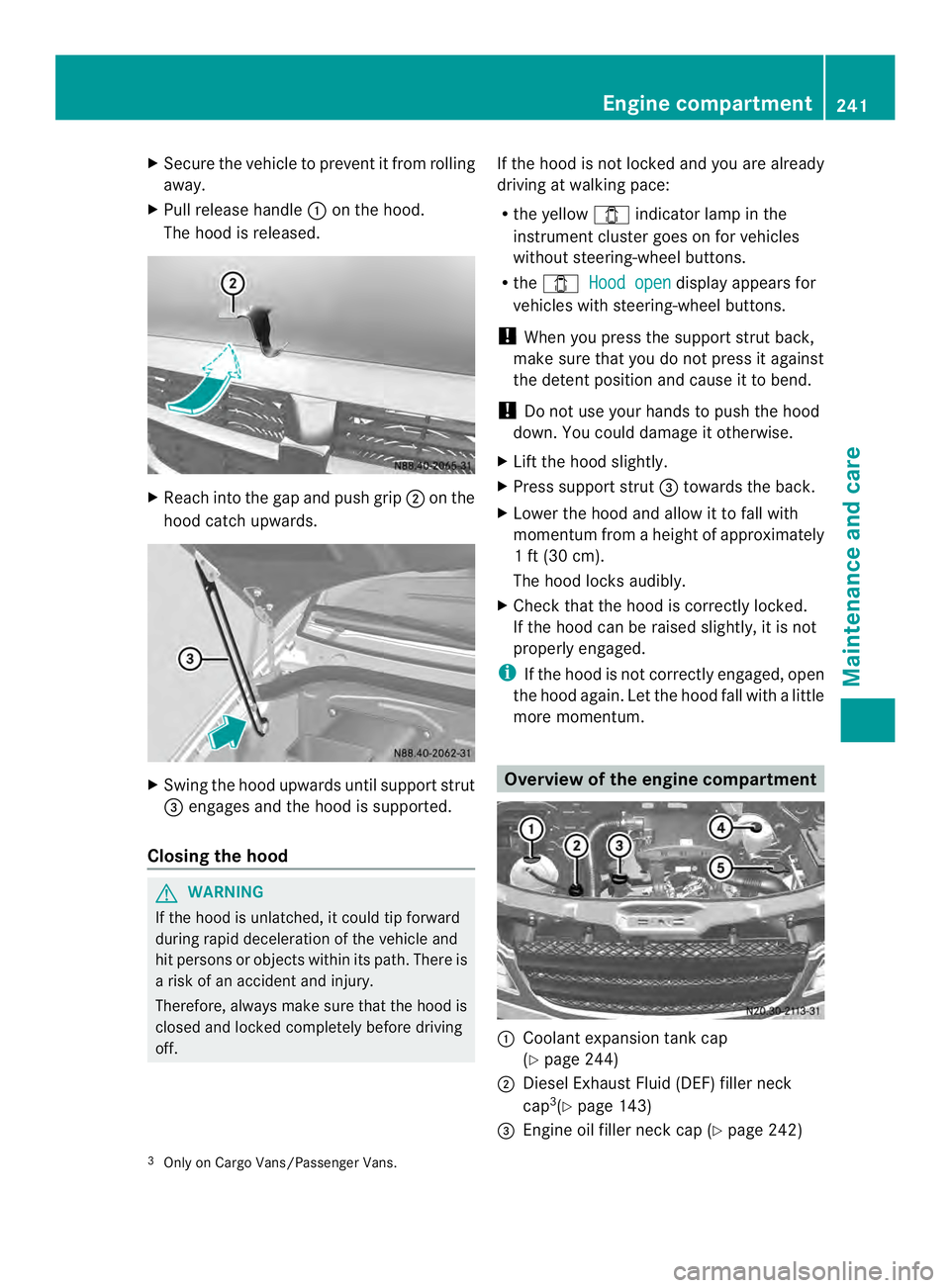
X Pull release handle 0005on the hood.
The hood is released. X
Reach into the gap and push grip 0006on the
hood catch upwards. X
Swing the hood upwards unti lsuppor tstrut
0026 engages and the hood is supported.
Closing the hood G
WARNING
If the hood is unlatched, it could tip forward
during rapid deceleratio nofthe vehicle and
hit persons or objects within its path. There is
a risk of an accident and injury.
Therefore, always make sure that the hood is
closed and locked completely before driving
off. If the hood is not locked and you are already
driving at walking pace:
R
the yellow 0004indicator lamp in the
instrumentc luster goes on for vehicles
without steering-wheel buttons.
R the 0004 Hood open display appears for
vehicles with steering-wheel buttons.
! When you press the support strut back,
make sure that you do not press it against
the detent position and cause it to bend.
! Do not use your hands to push the hood
down. You could damage it otherwise.
X Lift the hood slightly.
X Press support strut 0026towards the back.
X Lower the hood and allow it to fall with
momentum fro maheight of approximately
1 ft (30 cm).
The hood locks audibly.
X Check that the hood is correctly locked.
If the hood can be raised slightly, it is not
properly engaged.
i If the hood is not correctly engaged, open
the hood again. Let the hood fall with a little
more momentum. Overview of the engine compartment
0005
Coolant expansion tank cap
(Ypage 244)
0006 Diesel Exhaust Fluid (DEF) filler neck
cap 3
(Y page 143)
0026 Engine oil filler neck cap (Y page 242)
3 Only on Cargo Vans/Passenger Vans. Engine compartment
241Maintenance and care Z
Page 244 of 334
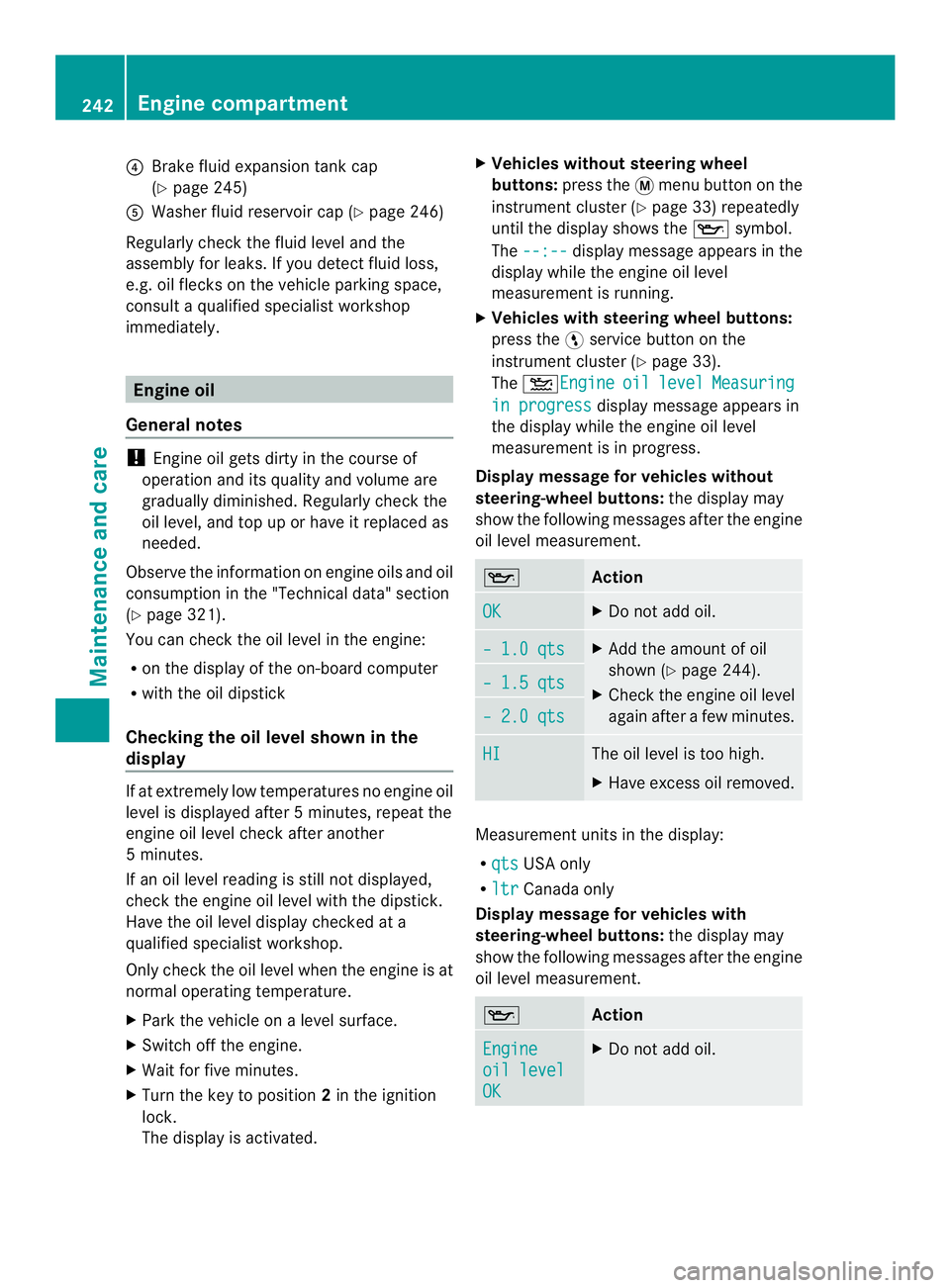
0025
Brake fluid expansion tank cap
(Ypage 245)
0023 Washe rfluid reservoir cap (Y page 246)
Regularly chec kthe fluid level and the
assembly for leaks. If you detect fluid loss,
e.g. oil flecks on the vehicle parking space,
consult a qualified specialist workshop
immediately. Engine oil
General notes !
Engine oil gets dirty in the course of
operation and its quality and volume are
gradually diminished. Regularly check the
oil level, and top up or have it replaced as
needed.
Observe the information on engine oils and oil
consumption in the "Technical data" section
(Y page 321).
You can check the oil level in the engine:
R on the display of the on-board computer
R with the oil dipstick
Checking the oil level shown in the
display If at extremely low temperatures no engine oil
level is displayed after
5minutes, repeat the
engine oil level chec kafter another
5 minutes.
If an oil level reading is still not displayed,
check the engine oil level with the dipstick.
Have the oil level display checked at a
qualified specialist workshop.
Only check the oil leve lwhen the engine is at
normal operating temperature.
X Park the vehicle on a level surface.
X Switch off the engine.
X Wait for five minutes.
X Turn the key to position 2in the ignition
lock.
The display is activated. X
Vehicles without steering wheel
buttons: press the 0004menu button on the
instrument cluster (Y page 33) repeatedly
until the display shows the 0015symbol.
The --:-- display message appears in the
display while the engine oil level
measurement is running.
X Vehicles with steering wheel buttons:
press the 0012service button on the
instrument cluster (Y page 33).
The 001DEngine oil level Measuring
in progress display message appears in
the display while the engine oil level
measurement is in progress.
Display message for vehiclesw ithout
steering-wheel buttons: the display may
show the following messages afte rthe engine
oil level measurement. 0015
Action
OK X
Do not add oil. – 1.0 qts X
Add the amount of oil
shown (Y page 244).
X Check the engine oil level
again after a few minutes. – 1.5 qts
– 2.0 qts
HI The oil level is too high.
X
Have excess oil removed. Measurement units in the display:
R
qts USA only
R ltr Canada only
Display message for vehiclesw ith
steering-wheel buttons: the display may
show the following messages afte rthe engine
oil level measurement. 0015
Action
Engine
oil level
OK X
Do not add oil. 242
Engine compartmentMaintenance and care
Page 245 of 334
Engine
oil Add
1.0quart X
Add the amount of oil
shown (Y page 244).
X Check the engine oil level
againa fter a few minutes. Engine
oil Add
1.5quart
Engine
oil Add
2.0quart
Engine
oil level
Reduce
oil level The oil level is too high.
X
Have excess oil removed. Eng. oil
lev. Turn
ignition
on for
level X
Turn the key to
position 2in the ignition
lock. Observe
wait.
period X
Repeat the engine oil
measurement after about
5 minutes if the engine is
at normal operating
temperature.
X Repeat the engine oil
measurement after about
30 minutes if the engine
is not at normal operating
temperature. Engine
oil level
Not when
eng.
running X
Switch off the engine and
wait for approximately
5 minutes if the engine is
at normal operating
temperature. Then,
perform the engine oil
measurement. Measurement units in the display:
R
qts USA only
R ltr Canada only Checking the oil level using the oil
dipstick
For vehicles with a red oil dipstick, only check
the oil level whe
nthe engine is at normal
operating temperature:
X Stop your vehicle as far away from traffic
as possible on level ground.
X Secure the vehicle to prevent it from rolling
away.
X Switch off the engine.
X Wait for five minutes.
For vehicles with a yellow oil dipstick, only
check the oil level when the engine is cold.
X Stop your vehicle as far away from traffic
as possible on level ground.
X Secure the vehicle to prevent it from rolling
away.
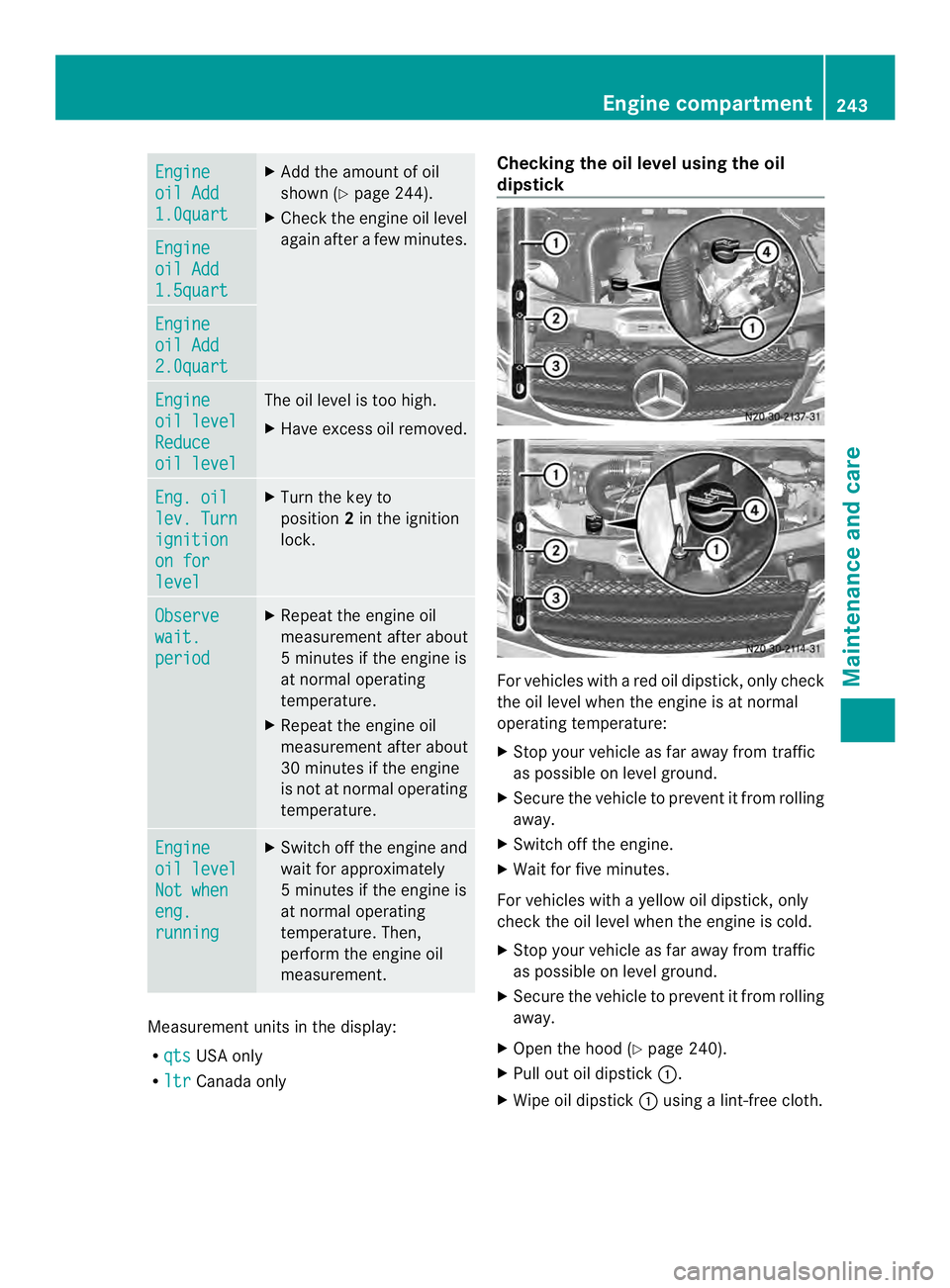
X Open the hood (Y page 240).
X Pull out oil dipstick 0005.
X Wipe oil dipstick 0005using a lint-free cloth. Engine compartment
243Maintenance and care Z
Page 246 of 334
X
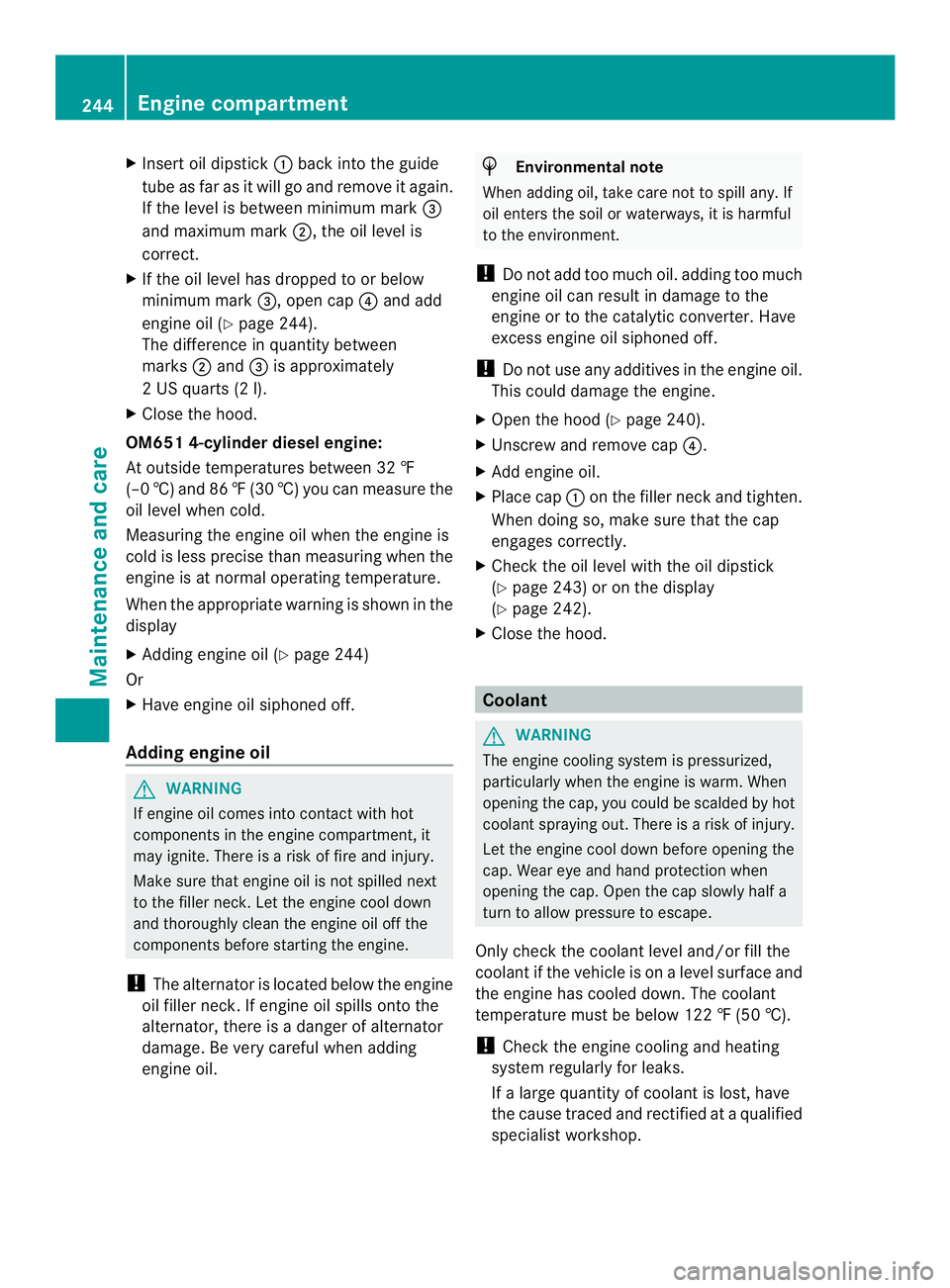
Insert oil dipstick 0005back into the guide
tube as far as it will go and remove it again.
If the level is between minimum mark 0026
and maximum mark 0006, the oil level is
correct.
X If the oil level has droppe dto or below
minimum mark 0026, open cap0025and add
engine oil (Y page 244).
The difference in quantity between
marks 0006and 0026is approximately
2 US quarts (2 l).
X Close the hood.
OM651 4-cylinder diesel engine:
At outside temperatures between 32 ‡
(–0 †) and 86 ‡(30 †) you can measure the
oil level whe ncold.
Measuring the engine oil when the engine is
cold is less precise than measuring when the
engine is at normal operating temperature.
When the appropriate warning is shown in the
display
X Adding engine oil (Y page 244)
Or
X Have engine oil siphoned off.
Adding engine oil G
WARNING
If engine oil comes into contact with hot
components in the engine compartment, it
may ignite. There is a risk of fire and injury.
Make sure that engine oil is not spilled next
to the filler neck. Let the engine cool down
and thoroughly clean the engine oil off the
components before starting the engine.
! The alternator is located below the engine
oil filler neck.Ife ngine oil spills onto the
alternator, there is a dange rofalternator
damage. Be very careful when adding
engine oil. H
Environmental note
When adding oil, take care not to spill any. If
oil enters the soil or waterways, it is harmful
to the environment.
! Do not add too much oil. adding too much
engine oil can result in damage to the
engine or to the catalytic converter. Have
excess engine oil siphoned off.
! Do not use any additives in the engine oil.
This could damage the engine.
X Open the hood (Y page 240).
X Unscrew and remove cap 0025.
X Add engine oil.
X Place cap 0005on the filler nec kand tighten.
Whe ndoing so, make sure that the cap
engages correctly.
X Check the oil level with the oil dipstick
(Y page 243) or on the display
(Y page 242).
X Close the hood. Coolant
G
WARNING
The engine cooling system is pressurized,
particularly when the engine is warm. When
opening the cap, you could be scalded by hot
coolant spraying out. There is a risk of injury.
Let the engine cool down before opening the
cap. Wear eye and hand protection when
opening the cap. Open the cap slowly half a
turn to allow pressure to escape.
Only check the coolant level and/or fill the
coolant if the vehicle is on a level surface and
the engine has cooled down. The coolant
temperature must be below 122 ‡ (50 †).
! Check the engine cooling and heating
system regularly for leaks.
If a large quantity of coolant is lost, have
the cause traced and rectified at a qualified
specialist workshop. 244
Engine compartmentMaintenance and care
Page 248 of 334
Store brake fluid only in the original closed
container and keep it out of the reach of
children. Comply with safety regulations
when handling brake fluid.
! Brake fluid corrodes paint, plastic and
rubber .Ifpaint, plastic or rubbe rhas come
into contact with brake fluid, rinse with
wate rimmediately. G
WARNING
The brake fluid constantly absorbs moisture
from the air. This lowers the boiling point of
the brake fluid. If the boiling point of the brake
fluid is too low, vapo rpockets may form in the
brake system when the brakes are applied
hard. This would impair braking efficiency.
There is a risk of an accident.
You should have the brake fluid renewed at
the specified intervals.
! If the brake fluid level in the brake fluid
reservoir has fallen to the MIN mark or
below, check the brake system
immediately for leaks. Also check the
thickness of the brake linings. Visit a
qualified specialist workshop immediately.
Do not add brake fluid. This does not
correct the malfunction.
Have the brake fluid renewed every two
years.
Observe the information on brake fluid in the
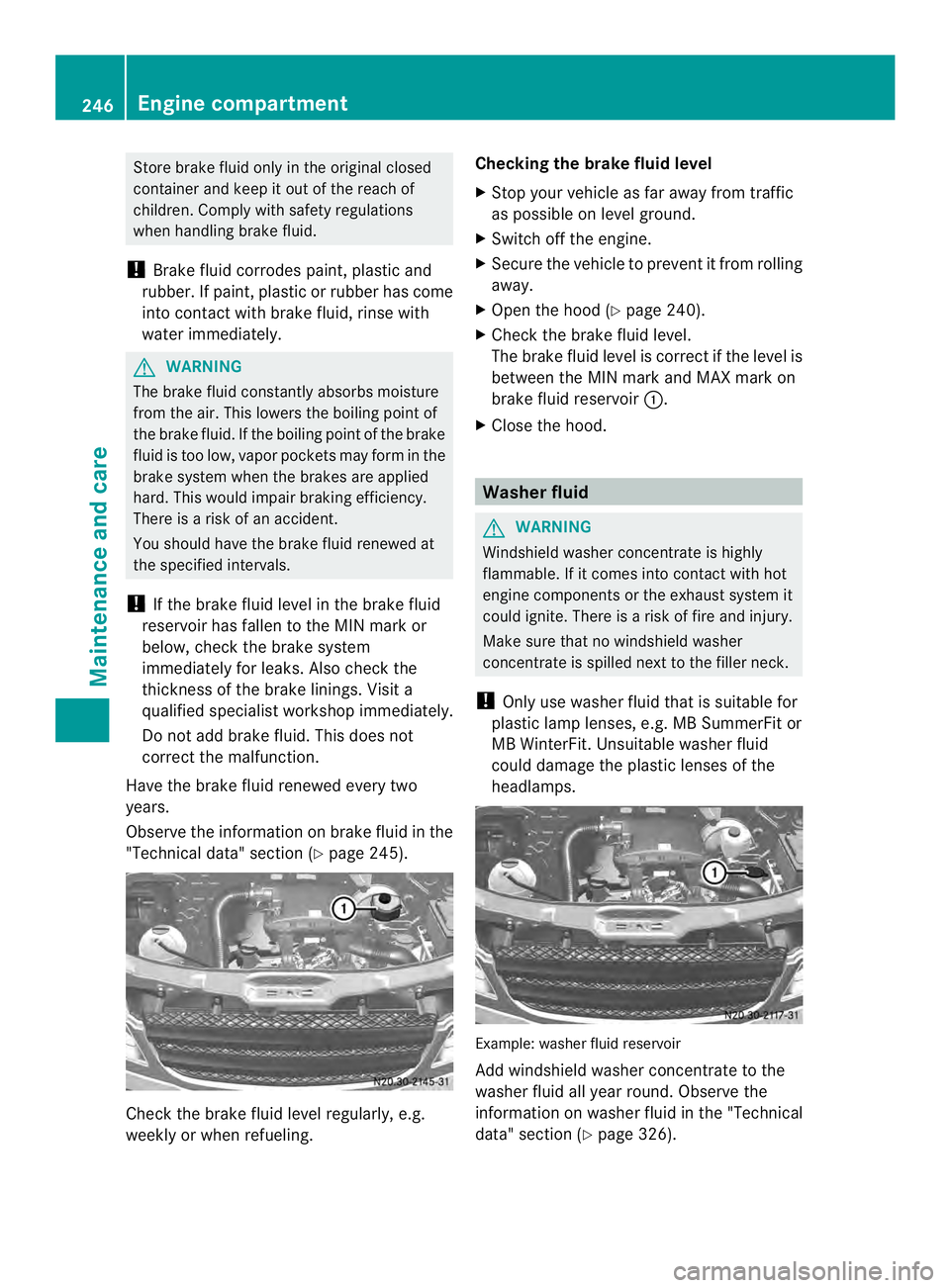
"Technical data" section ( Ypage 245). Check the brake fluid level regularly, e.g.
weekly or when refueling. Checking the brake fluid level
X
Stop your vehicle as far away from traffic
as possible on level ground.
X Switch off the engine.
X Secure the vehicle to prevent it from rolling
away.
X Open the hood (Y page 240).
X Check the brake fluid level.
The brake fluid level is correc tifthe level is
between the MIN mark and MAX mark on
brake fluid reservoir 0005.
X Close the hood. Washer fluid
G
WARNING
Windshield washer concentrate is highly
flammable. If it comes into contact with hot
engine components or the exhaust system it
could ignite. There is a risk of fire and injury.
Make sure that no windshield washer
concentrate is spilled next to the filler neck.
! Only use washer fluid that is suitable for
plastic lamp lenses, e.g. MB SummerFit or
MB WinterFit. Unsuitable washer fluid
could damage the plastic lenses of the
headlamps. Example: washer fluid reservoir
Add windshield washer concentrate to the
washer fluid all year round. Observe the
information on washer fluid in the "Technical
data" section (Y
page 326).246
Engine compartmentMaintenance and care
Page 250 of 334
Vehicle interior
Air filter for the rear-compartment air
conditioning
! Regularly check the ai rfilters for visible
dirt .Clean or replace a dirty filter mat .The
dirt may otherwise lead to damage to the
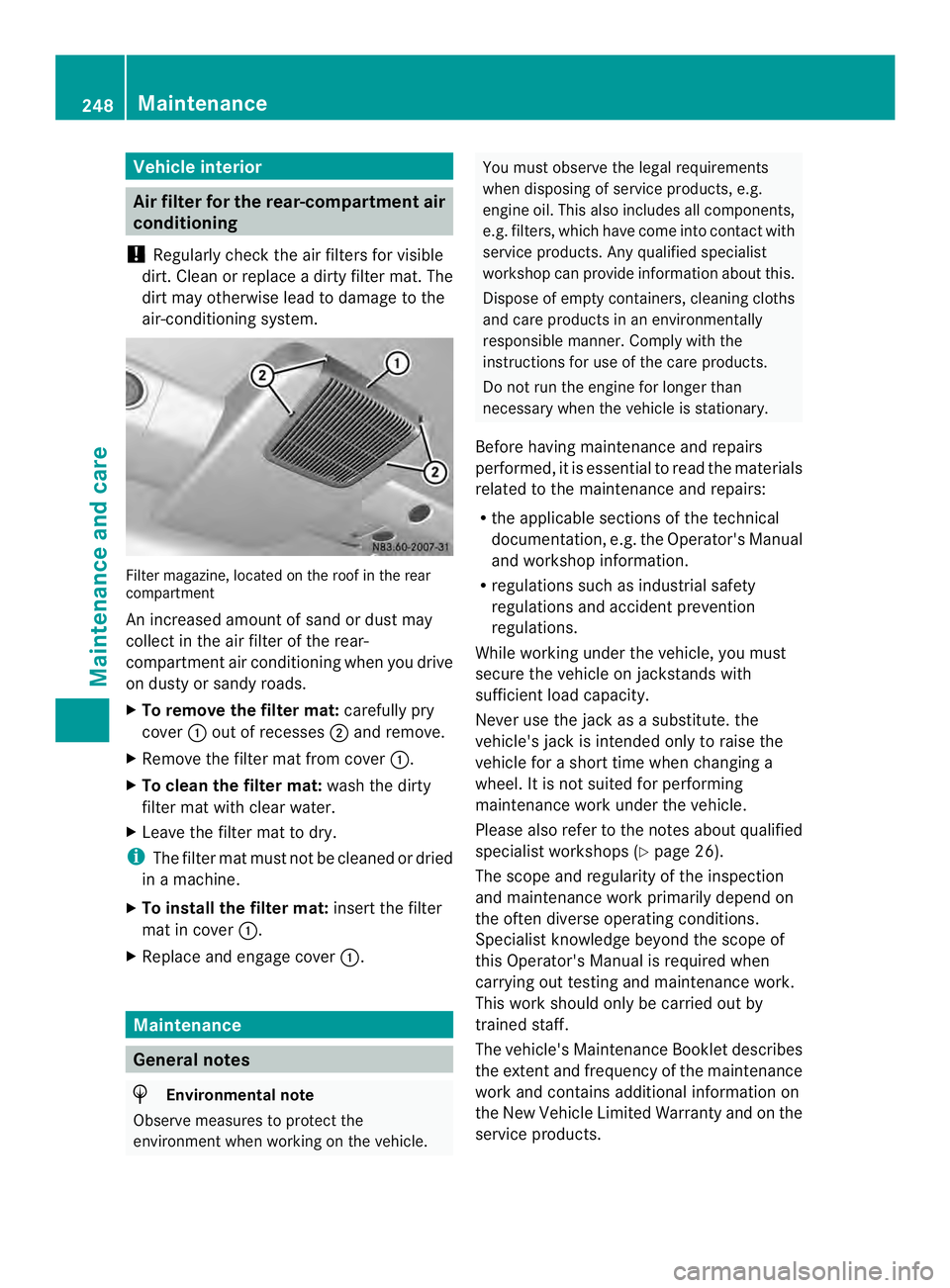
air-conditioning system. Filter magazine, located on the roof in the rear
compartment
An increased amount of sand or dust may
collect in the air filter of the rear-
compartmenta
ir conditioning when you drive
on dusty or sandy roads.
X To remove the filter mat: carefully pry
cover 0005out of recesses 0006and remove.
X Remove the filter mat from cover 0005.
X To clean the filter mat: wash the dirty
filter mat with clear water.
X Leave the filter mat to dry.
i The filter mat must not be cleaned or dried
in a machine.
X To install the filter mat: insert the filter
mat in cover 0005.
X Replace and engage cover 0005.Maintenance
General notes
H
Environmental note
Observe measures to protect the
environment when working on the vehicle. You must observe the legal requirements
when disposing of service products, e.g.
engine oil. This also includes all components,
e.g. filters, which have come into contac twith
service products. Any qualified specialist
workshop can provide information about this.
Dispose of empty containers, cleaning cloths
and care products in an environmentally
responsible manner. Comply with the
instructions for use of the care products.
Do not run the engine for longer than
necessary when the vehicle is stationary.
Before having maintenance and repairs
performed, it is essential to read the materials
related to the maintenance and repairs:
R the applicable sections of the technical
documentation, e.g. the Operator's Manual
and workshop information.
R regulations such as industrial safety
regulations and accident prevention
regulations.
While working under the vehicle, you must
secure the vehicle on jackstands with
sufficient load capacity.
Never use the jac kasas ubstitute .the
vehicle's jack is intended only to raise the
vehicle for a short time when changing a
wheel. It is not suited for performing
maintenance work under the vehicle.
Please also refer to the notes about qualified
specialist workshops (Y page 26).
The scope and regularity of the inspection
and maintenance work primarily depend on
the often diverse operating conditions.
Specialist knowledge beyond the scope of
this Operator's Manual is required when
carrying out testing and maintenance work.
This work should only be carried out by
trained staff.
The vehicle's Maintenance Booklet describes
the extenta nd frequency of the maintenance
work and contains additional informatio non
the New Vehicle Limited Warranty and on the
service products. 248
MaintenanceMaintenance and care
Page 251 of 334
i
Maintenance services must be carried out
in accordance with the provisions and
recommendations in the Maintenance
Booklet.
Not doing so could void the warranty claim
and lead to refusal of goodwill gestures
after the manufacturer has submitted a
damage report.
i Observe the information on Sprinter
original parts in the "Technical data"
section (Y page 314). Service interval display
General notes As
ervice that is due is displayed in the service
interval display about 1monthi nadvance. A
message is then displayed while the vehicle
is in motion or when the ignition is switched
on.
i The service interval display does not
provide information about the oil level. The
service interval display should therefore
not be confused with the 001Cengine oil
level display.
The service due date is displayed in days or
miles (kilometers), depending on the total
distance driven.
The symbols or letters on the service display
show the type of service that is due.
0002 orA for a minor service
0003 orB for a major service
Service due date display Vehicles with steering wheel buttons:
the
following messages may be displayed.
R 0002 Service A due in ... days R
0002 Service A due in ... mi (km )
R 0002 Service A Carry out now Vehicles without steering wheel buttons:
the following messages may be displayed.
R
0002 for service A
R 0003 for Service B
Additionally, you will see the remaining
distance in miles ( mi ) or kilometers (km ) or the
remaining time in days ( d ).
Service due date has been exceeded Vehicles with steering wheel buttons:
if
you have missed the service due date, one of
the following messages appears in the display
and warning tone also sounds.
R 0002 Service A overdue by ... days R
0002 Service A overdue by ... mi (km )
Vehicles without steering wheel buttons:
if you have missed the service due date, the
0002 or0003 symbol for the service flashes
for 10 seconds after the ignition is switched
on. A minus sign also appears in front of the
service due date.
Calling up the service due date X
Turn the key to position 2in the ignition
lock.
The display is activated.
Vehicles without steering wheel buttons
X Press the 0004menu button on the
instrument cluster repeatedly until the
0002 or0003 symbol for the service
appears in the display.
Additionally, you will see the remaining
distance in miles ( mi ) or kilometers (
km ) or
the remaining time in days (d ).
Vehicles with steering wheel buttons
X Press the 0010or0007 button on the
steering wheel until the standard display
(Y page 182) appears in the display.
X Press the 0001or0009 button on the
steering wheel repeatedly until the service Maintenance
249Maintenance and care Z
Page 259 of 334
When using the vehicle in winter, remove all
traces of road salt deposits carefully and as
soon as possible.
High-pressure cleaning equipment
G
WARNING
The water jet from a circular jet nozzle (dirt
blasters) can cause invisible exterior damage
to the tires or chassis components.
Components damaged in this way may fail
unexpectedly. There is a risk of an accident.
Do not use power washers with circular jet
nozzles to clean the vehicle. Have damaged
tires or chassis componentsr eplaced
immediately.
! Observe the minimum distance to be
maintained between the nozzle of the
power washer and objec ttobe cleaned, as
outlined below:
R approximately 2.2 ft(70 cm) when using
round-jet nozzles
R approximately 1ft(30 cm) whe nusing
25°flat-spray jets and dirt blasters
Keep the water jet moving while cleaning.
To avoid causing damage, do not point the
water jet directly at:
R door joints
R brake hoses
R electrical components
R electrical connections
R seals
R drive train, especially not at the
intermediate bearing of the propeller
shaft
R rear view camera (camera lens and
microphone opening on the bottom)
Keep a minimum distance of
1.6 ft(50 cm).
Cleaning the engine !
Water must not enter intake or ventilation
openings. When cleaning with high
pressure water or steam cleaners, the spray must not be aimed directly at
electrical components or the terminals of
electrical lines.
Preserve the engine after the engine has
been cleaned. Protect the belt drive system
from exposure to the preservative agent.
Also observe the information in the section
"Powerw asher" (Y page 257).
Cleaning the paintwork !
Do not affix:
R stickers
R films
R magnetic plates or similar items
to painted surfaces .You could otherwise
damage the paintwork.
Scratches, corrosive deposits, areas affected
by corrosion and damage caused by
inadequate care cannot always be completely
repaired. In such cases, visit a qualified
specialist workshop.
X Remove impurities immediately, where
possible, whilst avoiding rubbing too hard.
X Soak insect remains with insect remover
and rinse off the treated areas afterwards.
X Soak bird droppings with water and rinse
off the treated areas afterwards.
X Remove coolant, brake fluid, tree resin,
oils, fuels and greases by rubbing gently
with a cloth soaked in petroleum ether or
lighter fluid.
X Use tar remover to remove tar stains.
X Use silicone remover to remove wax.
Cleaning the windows G
WARNING
You could become trapped by the windshield
wipers if they start moving while cleaning the
windshield or wiper blades. There is a risk of
injury.
Always switch off the windshield wipers and
the ignition before cleaning the windshield or
wiper blades. Care
257Maintenance and care Z
Page 261 of 334
cleaning cloths could scratch or damage
the plastic light lenses.
X Clea nthe plastic covers of the exterior
lighting with a damp sponge and a mild
cleaning agent, e.g. car shampoo for
Sprinter vehicles, or with cleaning cloths.
Cleaning the mirror turns ignal!
Only use cleaning agents or cleaning
cloths that are suitable for plastic lenses.
Unsuitable cleaning agents or cleaning
cloths could scratch or damage the plastic
lenses of the mirror turn signals.
X Clean the plastic lenses of the mirror turn
signals in the exterior mirror housing using
a wet sponge and mild cleaning agent, e.g.
car shampoo or cleaning cloths.
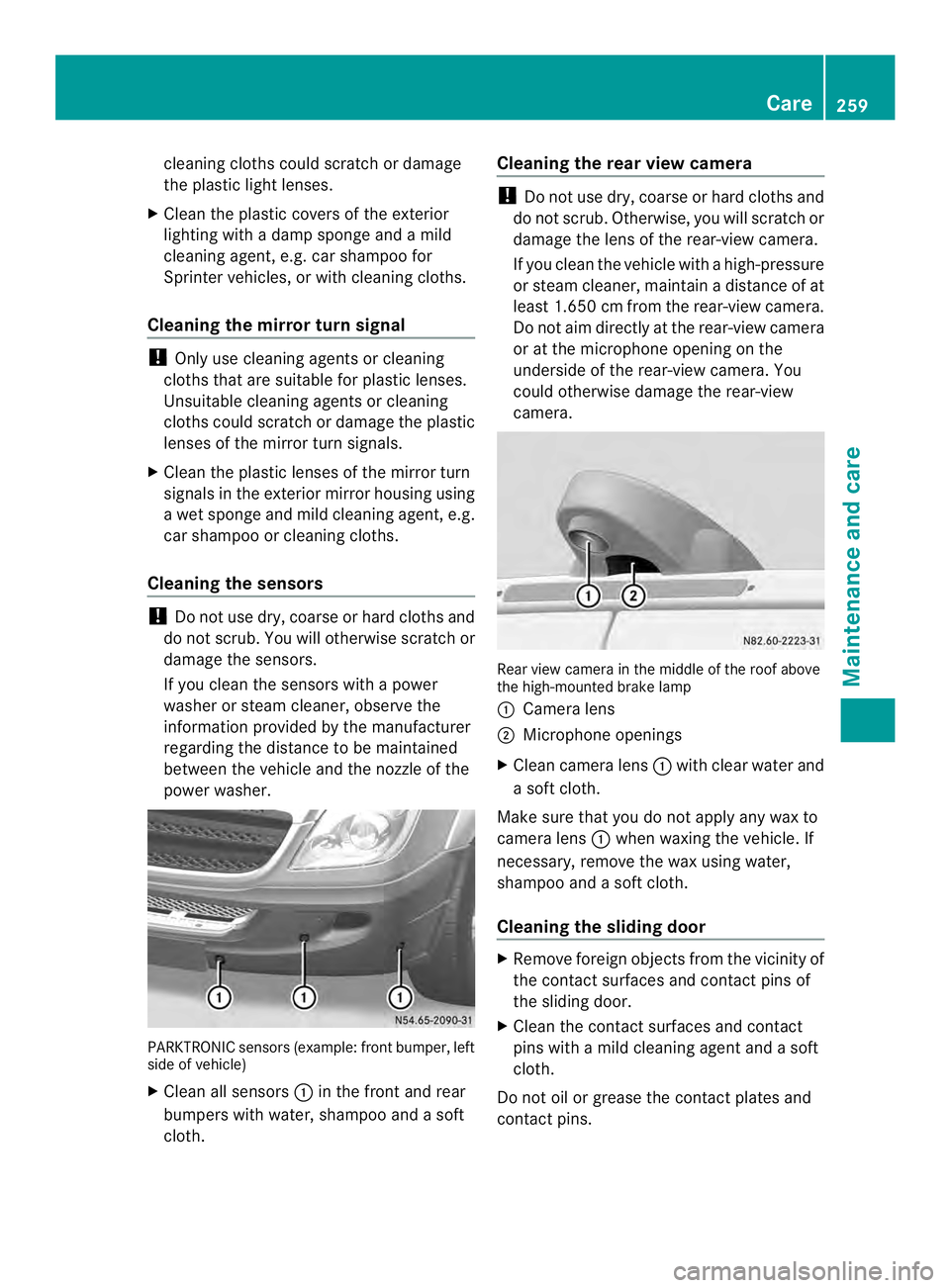
Cleaning the sensors !
Do not use dry, coarse or hard cloths and
do not scrub. You will otherwise scratch or
damage the sensors.
If you clean the sensors with a power
washer or steam cleaner, observe the
information provided by the manufacturer
regarding the distance to be maintained
betwee nthe vehicle and the nozzle of the
power washer. PARKTRONIC sensors (example: front bumper, left
side of vehicle)
X Cleana ll sensors 0005in the front and rear
bumpers with water, shampoo and a soft
cloth. Cleaning the rea
rview camera !
Do not use dry, coarse or hard cloths and
do not scrub. Otherwise, you will scratch or
damage the lens of the rear-view camera.
If you clean the vehicle with a high-pressure
or steam cleaner, maintain a distance of at
least 1.650 cm from the rear-view camera.
Do not aim directly at the rear-view camera
or at the microphone opening on the
underside of the rear-view camera. You
could otherwise damage the rear-view
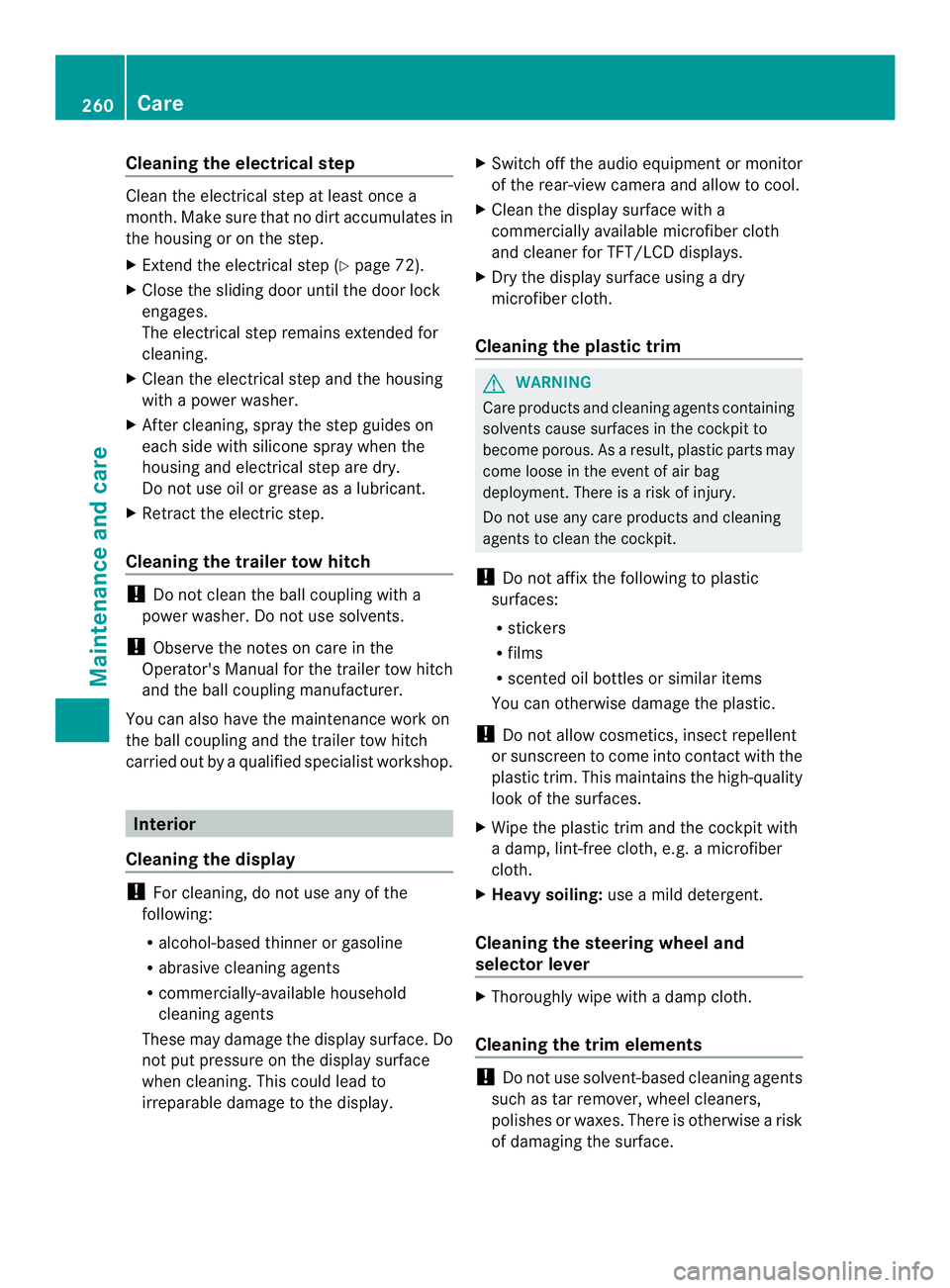
camera. Rear view camera in the middle of the roof above
the high-mounted brake lamp
0005
Camera lens
0006 Microphone openings
X Clean camera lens 0005with clear water and
a soft cloth.
Make sure that you do not apply any wax to
camera lens 0005when waxing the vehicle. If
necessary, remove the wax using water,
shampoo and a soft cloth.
Cleaning the sliding door X
Remove foreign objects from the vicinity of
the contact surfaces and contact pins of
the sliding door.
X Clean the contact surfaces and contact
pins with a mild cleaning agent and a soft
cloth.
Do not oil or grease the contac tplates and
contact pins. Care
259Maintenance and care Z
Page 262 of 334
Cleaning the electrical step
Clean the electrical step at least once a
month
.Make sure that no dirt accumulates in
the housing or on the step.
X Extend the electrical step (Y page 72).
X Close the sliding door until the door lock
engages.
The electrical step remains extended for
cleaning.
X Clean the electrical step and the housing
with a power washer.
X Afte rcleaning, spray the step guides on
each side with silicone spray when the
housing and electrical step are dry.
Do not use oil or grease as a lubricant.
X Retract the electric step.
Cleaning the trailer tow hitch !
Do not clean the ball coupling with a
power washer. Do not use solvents.
! Observe the notes on care in the
Operator's Manual for the trailer tow hitch
and the ball coupling manufacturer.
You can also have the maintenance work on
the ball coupling and the trailer tow hitch
carried out by a qualified specialist workshop. Interior
Cleaning the display !
For cleaning, do not use any of the
following:
R alcohol-based thinner or gasoline
R abrasive cleaning agents
R commercially-available household
cleaning agents
These may damage the display surface. Do
not put pressure on the display surface
when cleaning. This could lead to
irreparable damage to the display. X
Switch off the audio equipmen tormonitor
of the rear-view camera and allow to cool.
X Clean the display surface with a
commercially available microfiber cloth
and cleaner for TFT/LCD displays.
X Dry the display surface using a dry
microfiber cloth.
Cleaning the plastic trim G
WARNING
Care products and cleaning agents containing
solvents cause surfaces in the cockpit to
become porous. As a result, plastic parts may
come loose in the event of air bag
deployment. There is a risk of injury.
Do not use any care products and cleaning
agents to clean the cockpit.
! Do not affix the following to plastic
surfaces:
R stickers
R films
R scented oil bottles or similar items
You can otherwise damage the plastic.
! Do not allow cosmetics, insect repellent
or sunscreen to come into contact with the
plastic trim. This maintains the high-quality
look of the surfaces.
X Wipe the plastic trim and the cockpit with
a damp, lint-free cloth, e.g. a microfiber
cloth.
X Heavy soiling: use a mild detergent.
Cleaning the steering wheel and
selector lever X
Thoroughly wipe with a damp cloth.
Cleaning the trim elements !
Do not use solvent-based cleaning agents
such as tar remover, wheel cleaners,
polishes or waxes. There is otherwise a risk
of damaging the surface. 260
CareMaintenance and care