ignition MERCEDES-BENZ SPRINTER 2013 MY13 Operator’s Manual
[x] Cancel search | Manufacturer: MERCEDES-BENZ, Model Year: 2013, Model line: SPRINTER, Model: MERCEDES-BENZ SPRINTER 2013Pages: 334, PDF Size: 3.88 MB
Page 144 of 334
lock in parking position
P, e.g. to have the
vehicle towed away. Refueling
Important safety notes
G
WARNING
Fuel is highly flammable. Improper handing of
fuel creates a risk of fire and explosion.
Avoid fire, open flames ,smoking and creating
sparks under all circumstances. Switch off the
engine and, if applicable, the auxiliary heating
before refueling. G
WARNING
Fuel is poisonous and hazardous to health.
There is a risk of injury.
You must make sure that fuel does not come
into contact with your skin, eyes or clothing
and that it is not swallowed. Do not inhale fuel
vapors .Keep fuel away from children.
If you or others come into contact with fuel,
observe the following:
R Wash away fuel from skin immediately
using soap and water.
R If fuel comes into contact with your eyes,
immediately rinse them thoroughly with
clean water. Seek medical assistance
without delay.
R If fuel is swallowed, seek medical
assistance without delay. Do not induce
vomiting.
R Immediately change out of clothing which
has come into contact with fuel. G
WARNING
If you mix diesel fuel with gasoline, the flash
point is lower than that of pure diesel fuel.
When the engine is running, exhaust system
components could overheat without being
noticed. There is a risk of fire.
Never refuel with gasoline. Never mix gasoline
with diesel fuel. H
Environmental note
If fuels are handled improperly, they pose a
danger to persons and the environment. Do
not allow fuels to run into the sewage system,
the surface waters, the ground water or into
the ground.
! Do not use gasoline to refuel vehicles with
a diesel engine. Even small amounts of
gasoline will cause damage to the fuel
system and engine.
! Do not switch on the ignition if you
accidentally refuel with the wrong fuel.
Otherwise, the fuel will enter the fuel lines.
Notify a qualified specialist workshop and
have the fuel tank and fuel lines drained
completely.
! Overfilling the fuel tank could damage the
fuel system.
! Take care not to spill any fuel on painted
surfaces. You could otherwise damage the
paintwork.
! Filter the fuel before transferring it to the
vehicle if you are refueling the vehicle from
barrels or containers.
This will preven tmalfunctions in the fuel
system due to contaminate dfuel.
Further information on fuel and on fuel grades
can be found in the "Technical data" section
(Y page 317). Refueling procedure142
RefuelingDriving and pa
rking
Page 145 of 334
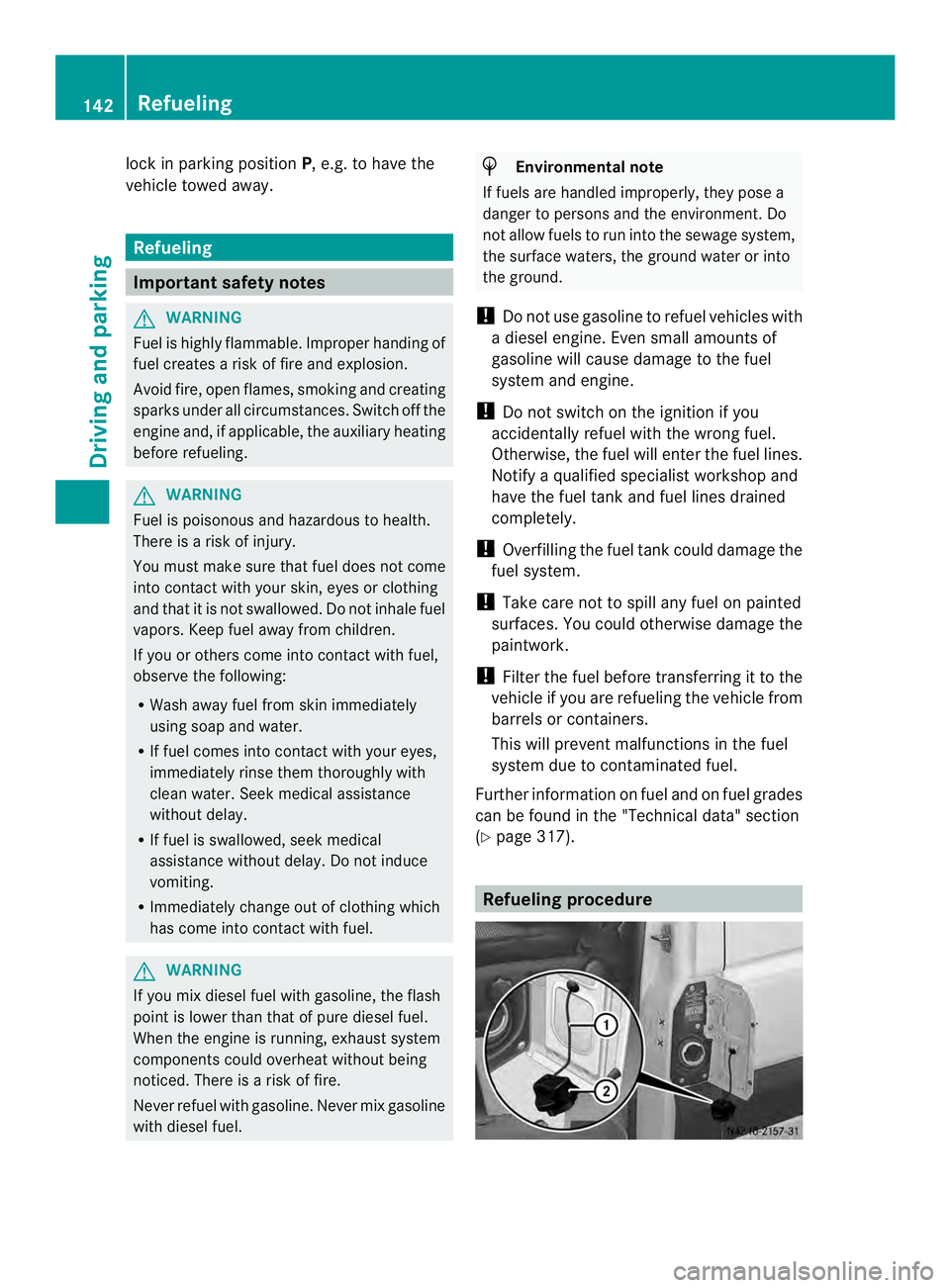
The fuel filler flap is beside the frontl
eft-hand
door when viewed in the direction of travel. It
is only possible to open the fuel filler flap
when the fron tdoor is open.
X Remove the key from the ignition lock.
X Switch off the auxiliary heating system
(Y page 118).
X Open the front left-hand door first, and then
the fuel filler flap.
X Close all vehicle doors to prevent fuel
vapors from entering the vehicle.
X Turn fuel filler cap 0006counter-clockwise,
remove it and let it hang from strap 0005.
X Completely insert the filler neck of the fuel
pump nozzle into the tank and refuel.
X Only fill the tank until the pump nozzle
switches off. Fuel may otherwise leak out.
X Replace tank filler cap 0006and turn
clockwise.
You will hear a click when the fuel filler cap
is closed fully.
X Open the front left-hand door first, and then
close the filler flap. Problems with the fuel and fuel tank
If your vehicle is losing fuel, the fuel lines or
the fuel tank are defective.
X Turn the key to position 0in the ignition
lock immediately and remove it.
X Do not restart the engine under any
circumstances.
X Consult a qualified specialist workshop. Diesel Exhaust Fluid (DEF)
Important safety notes H
Environmental note
Dispose of DEF in an environmentally
responsible manner.
! Only use DEF in accordance with
ISO 22241. Never mix DEF with additives or thin it with tap water. The exhaust gas
aftertreatmen
tmay otherwise be
damaged.
Observe the MB Specifications for Service
Products, Sheet 352.0.
Damage that results from the use of
additives or tap wate rleads to the loss of
the New Vehicle Limited Warranty.
! If DEF comes into contact with a painted
or aluminum surface, wash the surface off
immediately with plenty of water.
! DEFi s not a diesel additive and must not
be mixed with fuel in the tank. Even small
amounts of DEF can cause engine damage.
Damage that results from the blending of
DEF will not be covered by the New Vehicle
Limited Warranty.
The exhaust gas aftertreatmentr equires a
reducing agent, Diesel Exhaust Fluid (DEF), in
order to function correctly.
When opening the DEF tank filler cap at high
outside temperatures, ammonia vapors may
escape.
Ammonia vapors have a pungent smell and
primarily cause irritation of the:
R skin
R mucous membranes
R eyes
You may experience a burning sensation in
your eyes, nose and throat, as well as
coughing and watering of the eyes.
Do not inhale ammonia vapors. Avoid contact
with DEF.
Do not allow DEF to come intod irectcontact
with your skin; it is hazardous to your health.
Rinse any affected areas off with plenty of
clean water. Consult a doctor if necessary.
i If the DEFr eserve has fallen below the
reserve range, add at least 2.0 US gal
(7.6 l) of DEF at the latest after receiving
the second warning message
(Y page 178). Refueling
143Driving and parking Z
Page 146 of 334
i
If you switch off the engine at a low
outside temperature and add DEF, restart
the engine after refueling. If you leave the
vehicle parked withou trestarting the
engin eand the DEF freeze sin the DEF tank,
the on-board compute rwill only be able to
register the new fill level after a defrosting
period of up to 60 minutes. During this
time, you may not be able to start the
engine.
You will find further information on DE Finthe
"Service products" section (Y page 317).
Refueling procedure DEF filler neck in the engine compartment
X
Remove the key from the ignition lock.
X Switch off the auxiliary heating system
(Y page 125).
X Open the hood.
X Close all vehicle doors so that no ammonia
vapors can enter the vehicle.
i Do not inhale any ammonia vapor which
may escape when you unscrew cap 0005.
Ammonia vapors have a pungent odor.
However, they are neither toxic nor
hazardous to health in this concentration.
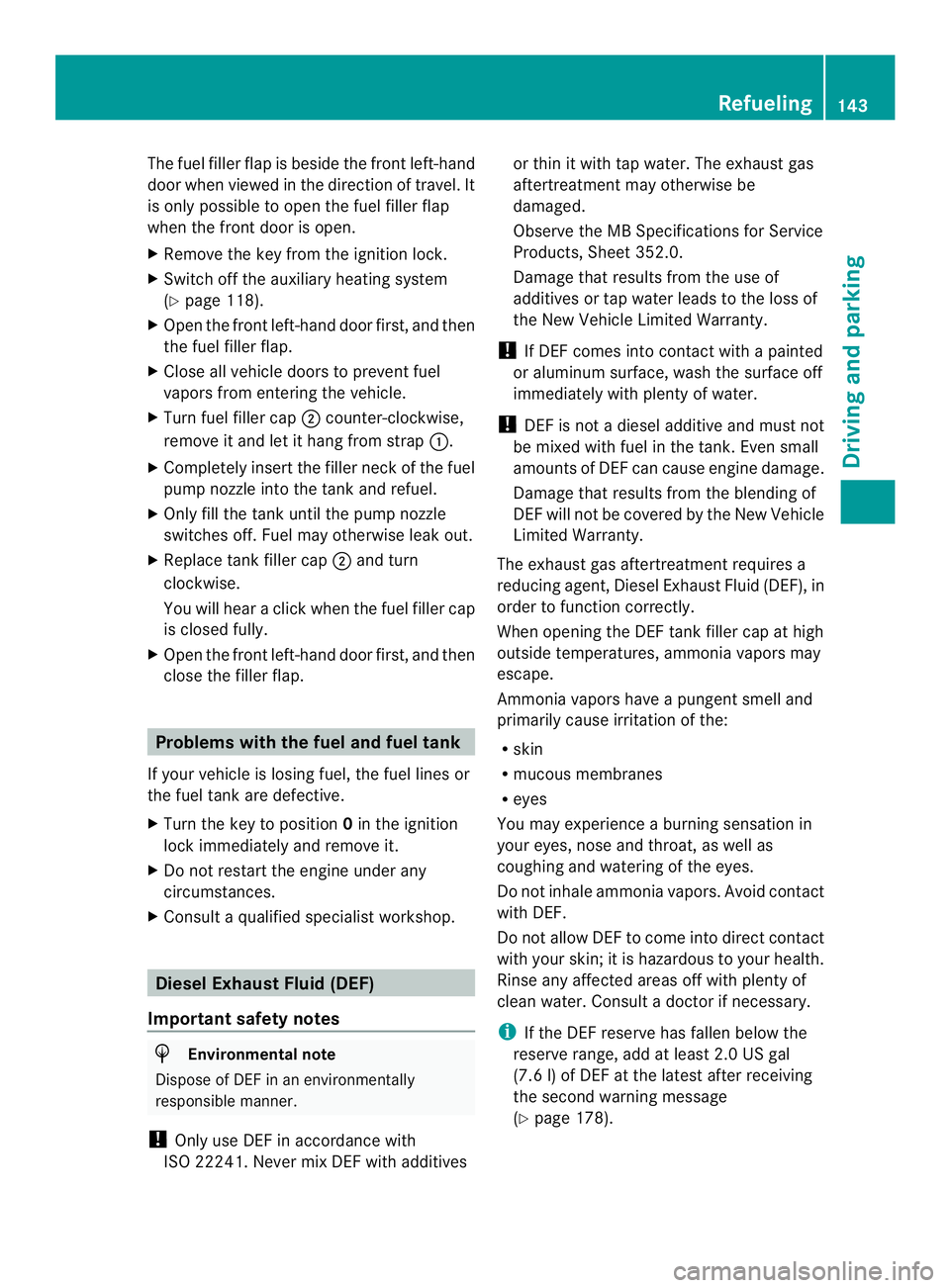
X Turn cap 0005counter-clockwise and remove
it.
X Only fill up the DEF tank until the DEF level
is visible in the filler neck.
X Replace DEF filler neck cap 0005on the filler
neck and turn clockwise. You will hear a click when cap
0005is fully
closed.
DEF filler neck on the right-hand vehicle
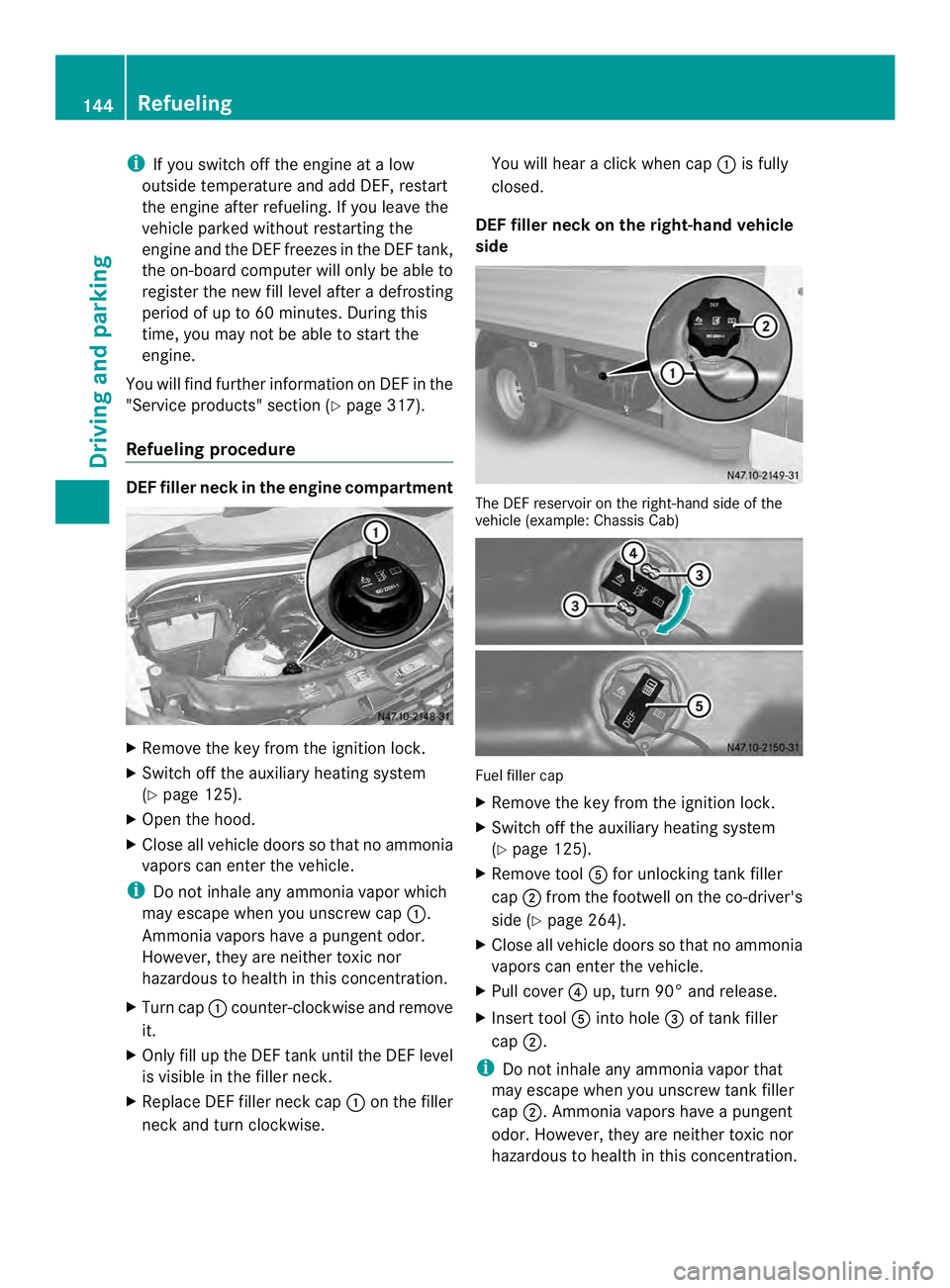
side The DEF reservoir on the right-hand side of the
vehicle (example: Chassis Cab)
Fuel filler cap
X
Remove the key from the ignition lock.
X Switch off the auxiliary heating system
(Y page 125).
X Remove tool 0023for unlocking tank filler
cap 0006from the footwell on the co-driver's
side (Y page 264).
X Close all vehicle doors so that no ammonia
vapors can enter the vehicle.
X Pull cover 0025up, turn 90° and release.
X Insert tool 0023into hole 0026of tank filler
cap 0006.
i Do not inhale any ammonia vapor that
may escape when you unscrew tank filler
cap 0006.A mmonia vapors have apungent
odor .However, they are neither toxic nor
hazardous to health in this concentration. 144
RefuelingDriving and parking
Page 147 of 334
X
Turn tank filler cap 0006counter-clockwise,
remove it and let it hang from strap 0005.
Make sure that tool 0023remains in tank filler
cap 0006while doing so.
X Only fill up the DEFt ank until the DEFlevel
is visible for the first time in the filler neck.
X Replace tank filler cap 0006and turn
clockwise.
X Pull tool 0023out of tank filler cap 0006and
stow with the vehicle tool kit in the footwell
on the co-driver's side.
X Pull cover 0025up over hole 0026of tank filler
cap 0006, turn and release.
X Turn tank filler cap 0006.
If tank filler cap 0006turns freely, the DEF
tank is closed. Parking
Important safety notes
G
WARNING
Flammable materials, e.g. leaves, grass or
twigs, may ignite if they come into contact
with hot parts of the exhaust system or
exhaust gases for extended periods. There is
a risk of fire.
Park the vehicle so that no flammable
materials come into contact with hot parts of
the vehicle. In particular, do not park on dry
areas of grass or harvested grainfields. G
WARNING
If you switch off the ignition while driving,
safety-relevant function sare only available
with limitations, or not at all.T his could affect,
for example, the power steering and the brake
boosting effect.Y ou will require considerably
more effort to steer and brake. There is a risk
of an accident.
Do not switch off the ignition while driving. G
WARNING
If you leave children unsupervised in the
vehicle, they could set it in motion by, for
example:
R releasing the parking brake
R shifting the automatic transmission out of
the parking position P
R starting the engine.
They could also operate the vehicle's
equipment. There is a risk of an accident and
injury.
When leaving the vehicle, always take the
SmartKey with you and lock the vehicle. Never
leave children unsupervised in the vehicle.
! Am oving vehicle can lead to damage to
the vehicle or damage to the drive train.
! When the vehicle is parked, always
remove the key to prevent the battery from
becoming discharged.
On vehicles with a battery isolating switch,
switch off the power supply if the vehicle is
to be out of use for a longer period of time.
Always park your vehicle safely and according
to legal requirements and secure it against
rolling away.
To ensure that the vehicle is properly secured
against rolling away unintentionally:
R the parking brake must be firmly applied
R the selector lever must be in position Pand
the key must be removed from the ignition
lock
R
R on steep uphill or downhill gradients, the
front wheels must be turned towards the
curb
R on steep uphill or downhill gradients, the
empty vehicle must be secured at the front
axle, e.g. with a wheel chock or similar
object
R on steep uphill or downhill gradients, the
laden vehicle must also be secured at the
rear axle, e.g. with a wheel chock or similar
object Parking
145Driving and parking Z
Page 149 of 334
X
Apply the parking brake.
X Turn the key to position 0in the ignition
lock and remove it.
The immobilize ris activated.
X Secure the vehicle to prevent it from rolling
away (Y page 145). Wheel chock
Use the wheel chock or asimilar object to
prevent the vehicle fro mrolling away, e.g.
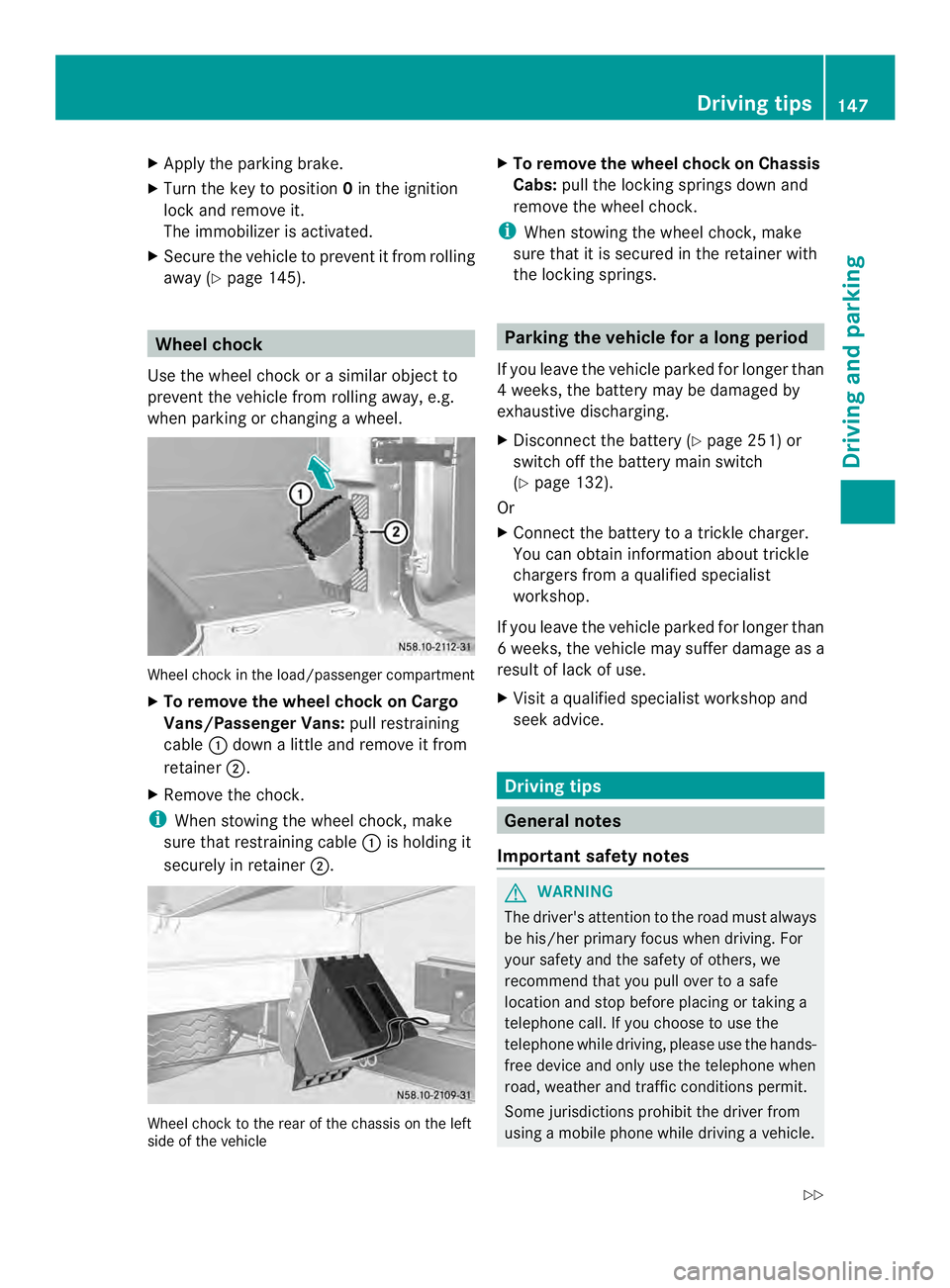
when parking or changing awheel. Wheel chock in the load/passenger compartment
X To remove the wheel chock on Cargo
Vans/Passenger Vans: pull restraining
cable 0005down a little and remove it from
retainer 0006.
X Remove the chock.
i When stowing the wheel chock, make
sure that restraining cable 0005is holding it
securely in retainer 0006. Wheel chock to the rear of the chassis on the left
side of the vehicle X
To remove the wheel chock on Chassis
Cabs: pull the locking springs down and
remove the wheel chock.
i When stowing the wheel chock, make
sure that it is secured in the retainer with
the locking springs. Parking the vehicle for
along period
If you leave the vehicle parked for longer than
4w eeks, the battery may be damaged by
exhaustive discharging.
X Disconnect the batter y(Ypage 251) or
switch off the battery main switch
(Y page 132).
Or
X Connect the battery to a trickle charger.
You can obtain information about trickle
chargers from a qualified specialist
workshop.
If you leave the vehicle parked for longer than
6w eeks, the vehicle may suffer damage as a
result of lack of use.
X Visit a qualified specialist workshop and
seek advice. Driving tips
General notes
Important safety notes G
WARNING
The driver's attention to the road must always
be his/her primary focus when driving. For
your safety and the safety of others, we
recommend that you pull over to a safe
location and stop before placing or taking a
telephone call. If you choose to use the
telephone while driving, please use the hands-
free device and only use the telephone when
road, weather and traffic conditions permit.
Some jurisdictions prohibit the driver from
using a mobile phone while driving a vehicle. Driving tips
147Driving and parking
Z
Page 150 of 334
Bear in mind that at a speed of just 30 mph
(approximately 50 km/h), your vehicle covers
a distance of 44 feet (approximatel
y14 m)
every second. G
WARNING
If you switch off the ignition while driving,
safety-relevant functions are only available
with limitations, or not at all. This could affect,
for example, the power steering and the brake
boosting effect. You will require considerably
more effort to steer and brake .There is a risk
of an accident.
Do not switch off the ignition while driving.
! Always observe the ground clearance of
the vehicle and avoid obstacles. On
vehicles with a step, ground clearance is
further restricted. Obstacles can damage
the vehicle.
If you must drive over obstacles, drive
especially slowly and carefully. If
necessary, have another person direct you.
Drive sensibly–s ave fuelIn orde
rto save fuel, observe the following
tips:
X The tires should always be inflated to the
recommended tire pressure.
X Remove unnecessary loads.
X Remove roof carriers when they are not
needed.
X Warm up the engine at low engine speeds.
X Avoid frequent acceleration or braking.
X Have all maintenance work carried out as
indicated by the service intervals in the
Maintenance Booklet or by the service
interval display.
Fuel consumption also increases when
driving in cold weather, in stop-start traffic
and in mountainous terrain. Overrun cutoff If you are in overrun mode and take your foot
off the accelerator pedal, the fuel supply is
cut off when the engine speed is out of the
idle speed control range.
Drinking and driving
G
WARNING
Drinking and driving and/or taking drugs and
driving are very dangerous combinations.
Even a small amount of alcohol or drugs can
affect your reflexes, perceptions and
judgment.
The possibility of a serious or even fatal
accident are greatly increased when you drink
or take drugs and drive.
Do not drink or take drugs and drive or allow
anyone to drive who has been drinking or
taking drugs.
Emission control G
WARNING
Combustion engines emit poisonous exhaust
gases such as carbon monoxide. Inhaling
these exhaust gases leads to poisoning. There
is a risk of fatal injury. Therefore never leave
the engine running in enclosed spaces
without sufficient ventilation.
Certain engine systems are designed to keep
the level of poisonous substances in exhaust
fumes within legal limits.
These systems only work optimally if they are
maintained exactly in accordance with the
manufacturer's specifications. Any work on
the engine should therefore be carried out by
qualified and authorized technicians at a
Sprinter dealer.
The engine settings must not be changed
under any circumstances. In addition, all
specific maintenance work must be carried
out at regular intervals and in accordance
with the service requirements of the dealer 148
Driving tipsDriving and parking
Page 159 of 334
Deactivating cruise control
There are various ways to deactivate cruise
control:
X Briefly press the cruise control lever
forwards 0025.
Or
X Apply the brakes.
The last speed set remains stored. The last
speed stored is deleted when you switch off
the engine.
Cruise control is deactivated automatically
when:
R you apply the brakes
R you apply the parking brake and the 000B
indicator lamp in the instrument cluster
lights up
R you are driving slower than 20 mph
(30 km/h)
R you shift the automatic transmissio nto
neutral position Nwhile the vehicle is in
motion
R ESP ®
or ASR intervenes
R there is a malfunction in the ESP ®
, ASR or
ABS system
Problems with cruise control On vehicles with steering wheel buttons, the
speed canno
tbe set when cruise control is
activated.
The display is showing a message of high
priority and cannot therefore show a change
in speed.
X Proceed as instructed by the message in
the display.
X Deactivate cruise control PARKTRONIC
Important safety notes PARKTRONIC is only an aid. It cannot replace
your own awareness of the immediate
surroundings. You are responsible for safe maneuvering, parking and pulling away. When
maneuvering, parking and pulling away, make
sure that there are no persons, animals or
objects in the maneuverin
garea.
PARKTRONIC does not account for obstacles
that are:
R beneath its detection range, e.g. persons,
animals or objects
R above its detection range, e.g. overhanging
loads, overhangs or truck loading ramps
PARKTRONIC is an electronic parking aid with
ultrasonic sensors. It indicates the distance
between yourv ehicle and an objec tvisually
and audibly.
Your vehicle features two separate sound
emitters with different frequencies for the
warning tones. The warning ranges in front of
and behind the vehicle are indicated by
different warning tones.
PARKTRONIC is activated automatically when
you:
R tur nthe key to position 2in the ignition lock
R release the parking brake and
R move the selector lever to D,Nor R.
PARKTRONIC is deactivated at speeds above
11 mph (18 km/h). PARKTRONIC is
reactivated at speeds below 10 mph
(16 km/h).
PARKTRONIC monitors the area around your
vehicle with sensors in the front and rear
bumpers.
Range of the sensors !
Pay particular attention to obstacles
above or below the sensors when parking,
such as flower pots or trailer towbars.
PARKTRONIC does not recognize such
objects when they are in the immediate
vicinity of the vehicle. You could damage
the vehicle or objects. Driving systems
157Driving and parking Z
Page 163 of 334
Problems with PARKTRONIC
Problem Possible causes/consequences and
0004 Solutions
Only the red segments
in the PARKTRONIC
warning displays are lit.
Aw
arning tone also
sounds for
approximately
2s econds.
PARKTRONIC is
deactivated after
approximately
20 seconds.
The indicator lamp of
the 000C button lights
up and the red
segments in the
PARKTRONIC warning
display go out. PARKTRONIC has malfunctioned and has switched itself off.
X
If problems persist, have PARKTRONIC checked at a qualified
specialist workshop. The PARKTRONIC
warning displays
implausible distances.
For example, all the
segments may be lit
even though there is no
obstacle present. The PARKTRONIC sensors are dirty or iced up.
X
Clean the PARKTRONIC sensors (Y page 259).
X Turn the key to position 2again in the ignition lock. The license plate or other parts attached near the sensors may
not be secured correctly.
X
Check the license plate and attachment parts near the sensors
for correct seating. An external radio or ultrasonic source may be causing
interference.
X
Check PARKTRONIC functions in a different location. Rear view camera
Important safety notes !
Objects that are not at ground level
appear further away than they actually are,
for example:
R the bumper of the vehicle parked behind
R the drawbar of a trailer
R the ball coupling of a trailer tow hitch R
the tail-end of a truck
R slanted posts
Only use the camera guide lines for
orientation. Do not get any closer to
objects than the lowest horizontal guide
line. You may otherwise damage your
vehicle and/or the object.
The rear view camera is only an aid. It cannot
replace your own awareness of the
immediate surroundings. You are responsible Driving systems
161Driving and parking Z
Page 178 of 334
Useful information
This Operator's Manual describes all models
as well as standard and optional equipment
of your vehicle that were available at the time
of going to print. Country-specific variations
are possible. Note that your vehicle may not
be equipped with all of the described
functions. This also applies to systems and
functions relevant to safety.
Read the information on qualified specialist
workshops (Y page 26). Important safety notes
G
WARNING
If you are driving and reach through the
steering wheel to operate the adjustment
knob, you could lose control of the vehicle.
There is a risk of an accident and injury.
Only operate the adjustment knobs when the
vehicle is stationary. Do not reach through the
steering wheel when driving. G
WARNING
If you operate information systems and
communication equipment integrated in the
vehicle while driving, you will be distracted
from traffic conditions. You could also lose
control of the vehicle. There is a risk of an
accident.
Only operate the equipment when the traffic
situatio npermits .Ifyou are not sure that this
is possible, park the vehicle paying attention
to traffic conditions and operate the
equipment when the vehicle is stationary. G
WARNING
If the instrument cluster has failed or
malfunctioned, you may not recognize
function restrictions in systems relevant to
safety. The operating safety of your vehicle
may be impaired. There is a risk of an
accident. Drive on carefully. Have the vehicle checked
at a qualified specialist workshop
immediately.
If uncertainties regarding the operating safety
of the vehicle arise when continuing the
journey, stop the vehicle, paying attention to
road and traffic conditions.
You must observe the legal requirements for
the country in which you are currently driving
when operating COMAND. Instrument cluster
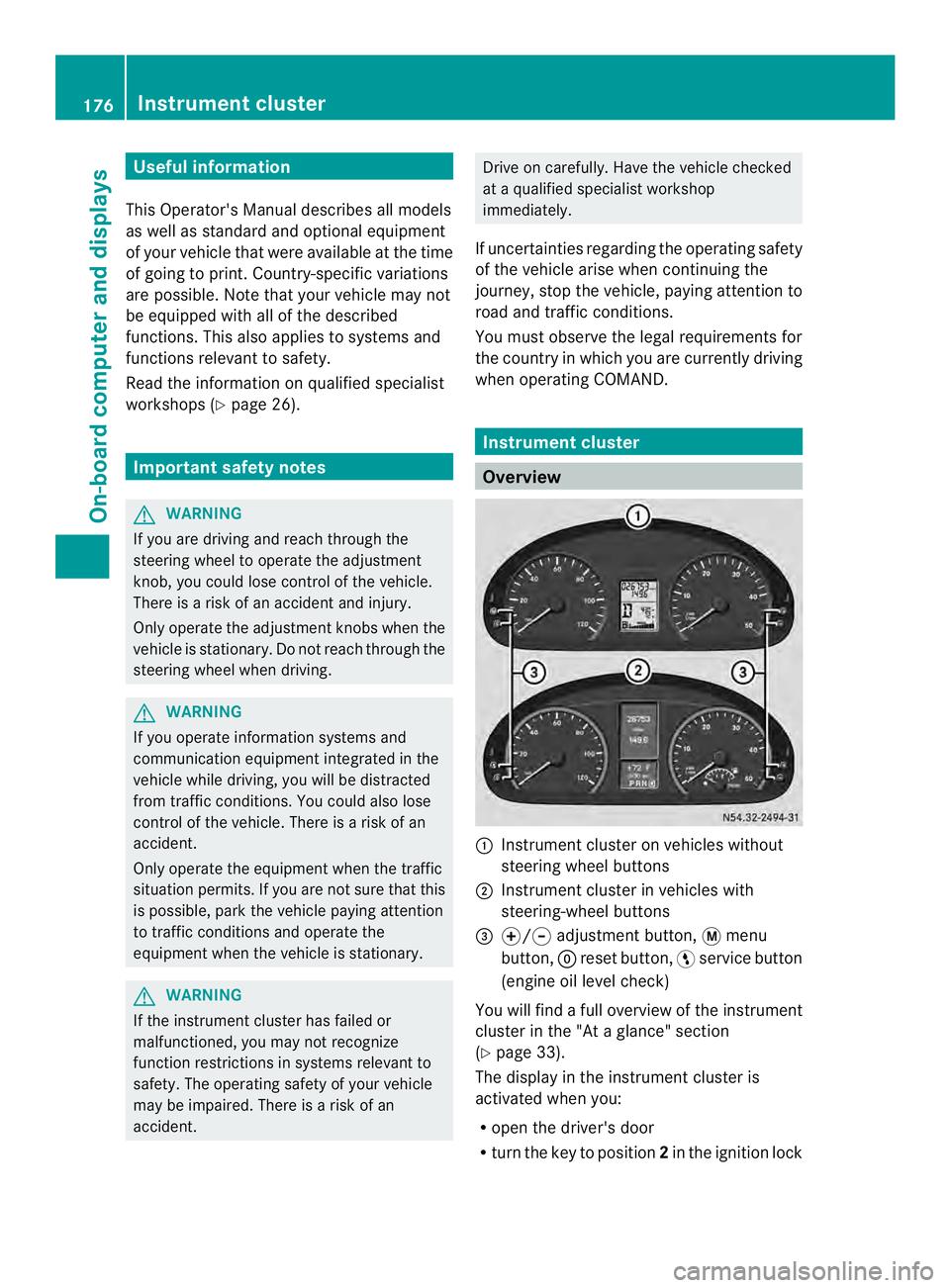
Overview
0005
Instrument cluster on vehicles without
steering wheel buttons
0006 Instrument cluster in vehicles with
steering-wheel buttons
0026 000E/000F adjustment button, 0004menu
button, 0007reset button, 0012service button
(engine oil level check)
You will find a full overview of the instrument
cluster in the "At a glance" section
(Y page 33).
The display in the instrument cluster is
activated when you:
R open the driver's door
R turn the key to position 2in the ignition lock 176
Instrument clusterOn-board computer and displays
Page 179 of 334
R
press the 0007reset button
R switch on the lights
The display switches off automatically after
approximately 30 seconds if:
R the vehicle lighting is not switched on.
R the key is in position 0in the ignition lock. Instrument lighting
When the lights are switched on, you can
adjust the brightness of the instrument
cluster lighting using the 000Eand 000Fbuttons.
X To brighten: press the000Ebutton.
X To dim: press the 000Fbutton.
i Vehicles with automatic headlamp mode:
the instrument lighting also adapts to
automatic headlamp mode. Tachometer
! Do not drive in the overrevving range, as
this could damage the engine. H
Environmental note
Avoid driving at high engine speeds. This
unnecessarily increases the fuel consumption
of your vehicle and harms the environmen tas
a result of increased emissions.
The red band in the tachometer indicates the
engine's overrevving range.
To protect the engine, the fuel supply is
interrupted when the red band is reached. Outside temperature
You should pay special attention to road
conditions when temperatures are around
the freezing point.
On vehicles without steering wheel buttons
(Y page 178) and on vehicles with steering
wheel buttons (Y page 182), the outside
temperature display is in the display. Changes in the outside temperature are
displayed after a shor
tdelay. Speedometer
The speed can also be shown in the display.
You can find information on the digital
speedometer for vehicles without steering
wheel buttons under (Y page 178) and for
vehicles with steering wheel buttons under
(Y page 182).
i In some countries, a warning sounds
when the vehicle reaches the maximum
speed limit, e.g. at 75 mph ( 120 km/h). Trip odometer
X To reset: make sure that the display is
showing the trip odometer if you have a
vehicle with steering wheel buttons
(Y page 182).
X Press and hold the 0007reset button until the
trip odometer is reset to 0.0 .
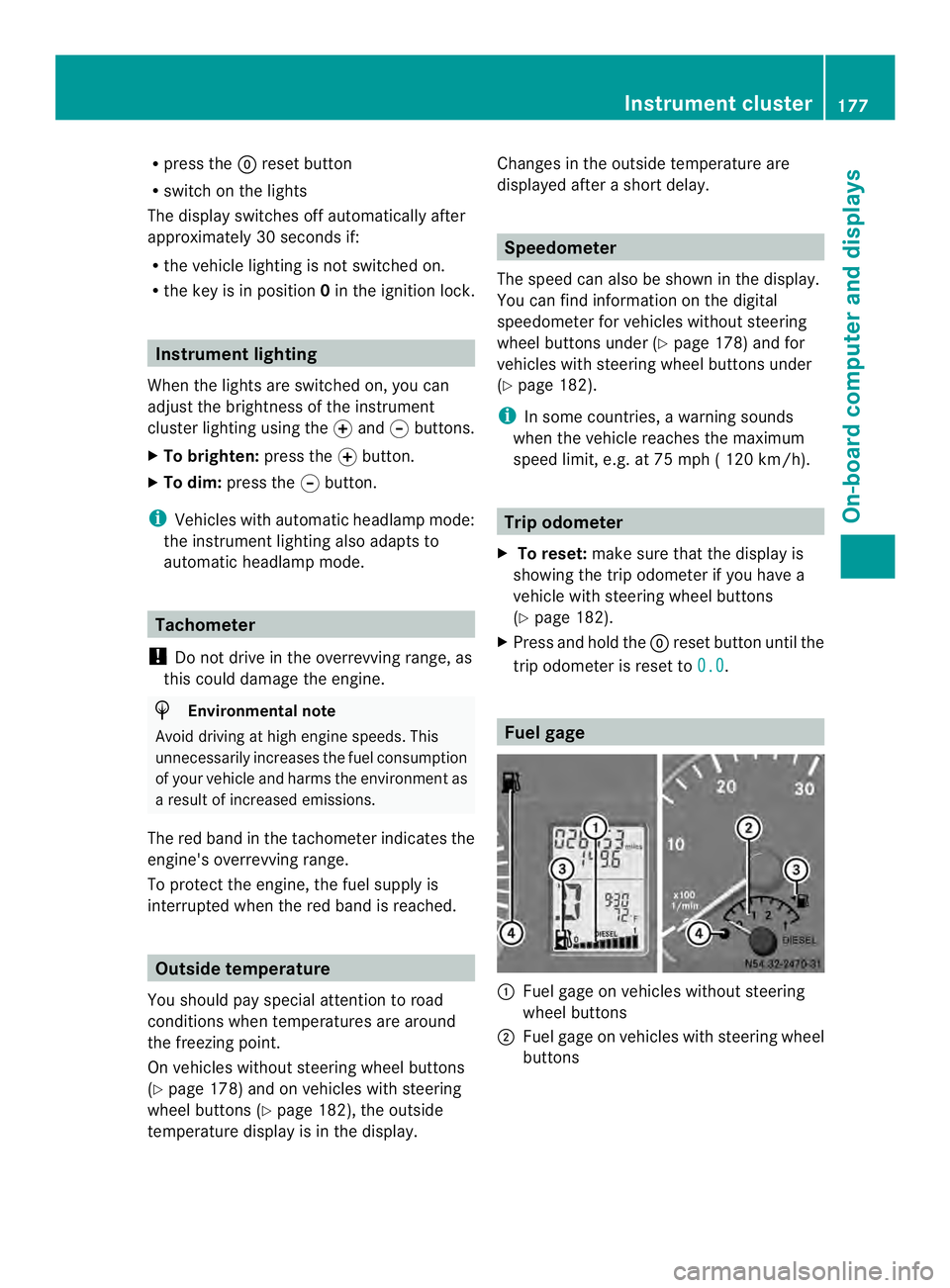
Fuel gage
0005
Fuel gage on vehicles without steering
wheel buttons
0006 Fuel gage on vehicles with steering wheel
buttons Instrument cluster
177On-board computer and displays Z