warning MERCEDES-BENZ SPRINTER 2019 MY19 with 7” screen
[x] Cancel search | Manufacturer: MERCEDES-BENZ, Model Year: 2019, Model line: SPRINTER, Model: MERCEDES-BENZ SPRINTER 2019Pages: 354, PDF Size: 6.15 MB
Page 210 of 354
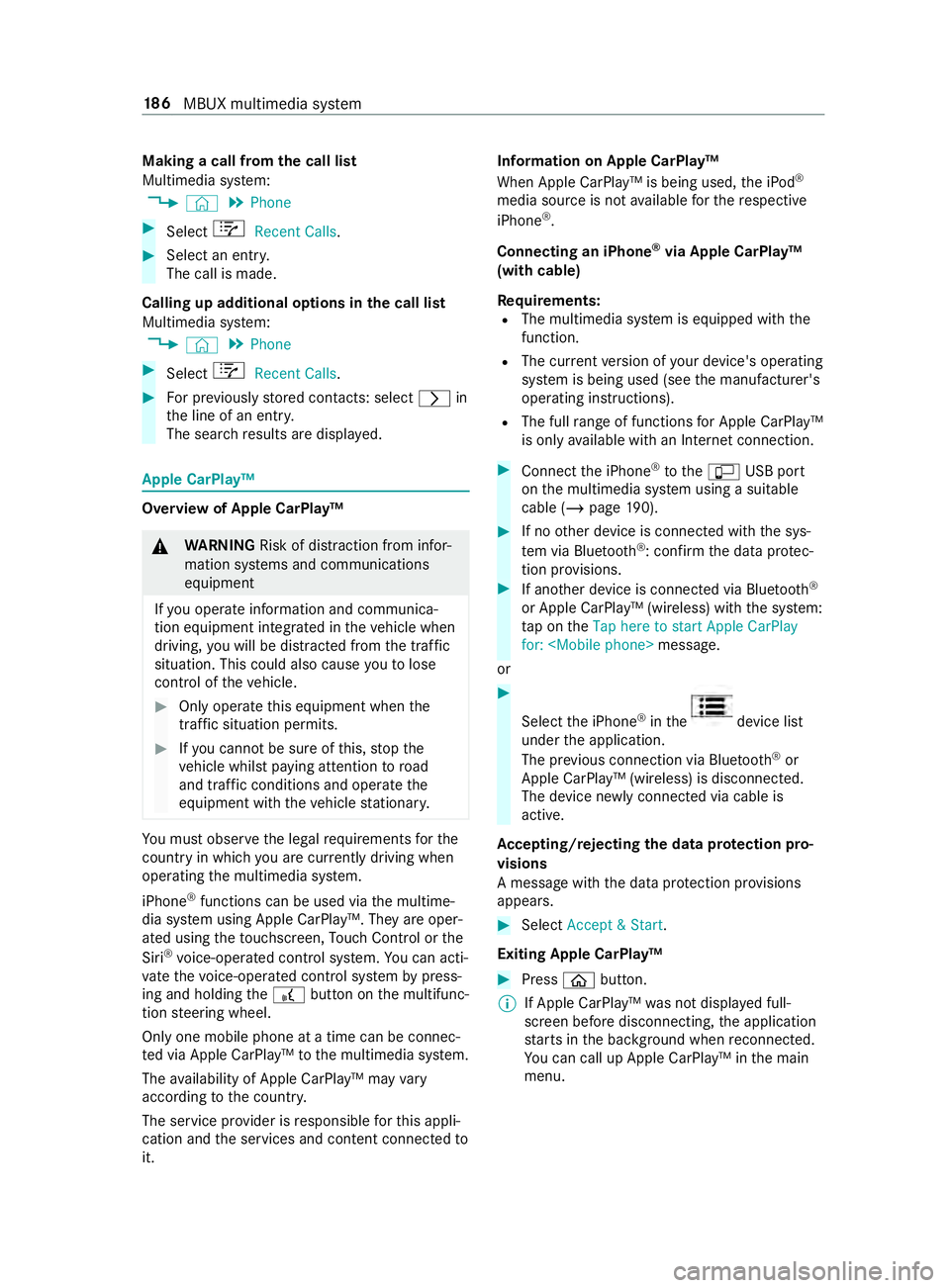
Making a call from
the call list
Multimedia sy stem:
4 © 5
Phone #
Select +Recent Calls. #
Select an entry.
The call is made.
Calling up additional options in the call list
Multimedia sy stem:
4 © 5
Phone #
Select +Recent Calls. #
For pr eviously stored contacts: select 0048in
th e line of an entry.
The sear chresults are displa yed. Apple CarPlay™
Overview of Apple CarPlay™
&
WARNING Risk of distraction from infor‐
mation sy stems and communications
equipment
If yo u operate information and communica‐
tion equipment integ rated in theve hicle when
driving, you will be distracted from the tra ffic
situation. This could also cause youto lose
control of theve hicle. #
Only operate this equipment when the
traf fic situation permits. #
Ifyo u cannot be sure of this, stop the
ve hicle whilst paying attention toroad
and traf fic conditions and ope rate the
equipment with theve hicle stationar y. Yo
u must obse rveth e legal requirements forthe
country in whi chyou are cur rently driving when
ope rating the multimedia sy stem.
iPhone ®
functions can be used via the multime‐
dia sy stem using Apple CarPlay™. They are oper‐
ated using theto uchsc reen, Touch Control or the
Siri ®
vo ice-operated control sy stem. You can acti‐
va te thevo ice-opera ted control sy stem bypress‐
ing and holding the£ button on the multifunc‐
tion steering wheel.
Only one mobile phone at a time can be connec‐
te d via Apple CarPlay™ tothe multimedia sy stem.
The availability of Apple CarPlay™ may vary
according tothe count ry.
The service pr ovider is responsible forth is appli‐
cation and the services and content connected to
it. Information on Apple CarPlay™
When Apple CarPlay™ is being used,
the iPod ®
media source is not available forth ere spective
iPhone ®
.
Connecting an iPhone ®
via Apple CarPlay™
(with cable)
Re quirements:
R The multimedia sy stem is equipped with the
function.
R The cur rent version of your device's operating
sy stem is being used (see the manufacturer's
operating instructions).
R The full range of functions for Apple CarPlay™
is only available with an In tern et connection. #
Connect the iPhone ®
to the00C2 USB port
on the multimedia sy stem using a suitable
cable (/ page190). #
Ifno other device is connected with the sys‐
te m via Blue tooth®
: confirm the data pr otec‐
tion pr ovisions. #
If ano ther device is connected via Blue tooth®
or Apple CarPlay™ (wireless) with the sy stem:
ta p on theTap here to start Apple CarPlay
for:
or #
Select the iPhone ®
in the device list
under the application.
The pr evious connection via Blue tooth®
or
Apple CarPlay™ (wireless) is disconnected.
The device newly connected via cable is
active.
Ac cepting/rejecting the data pr otection pro‐
visions
A message with the data pr otection pr ovisions
appears. #
Select Accept & Start.
Exiting Apple CarPlay™ #
Press 00E2button.
% If Apple CarPlay™
was not displa yed full-
screen before disconnecting, the application
st arts in the bac kground when reconnected.
Yo u can call up Apple CarPlay™ in the main
menu. 18 6
MBUX multimedia sy stem
Page 211 of 354
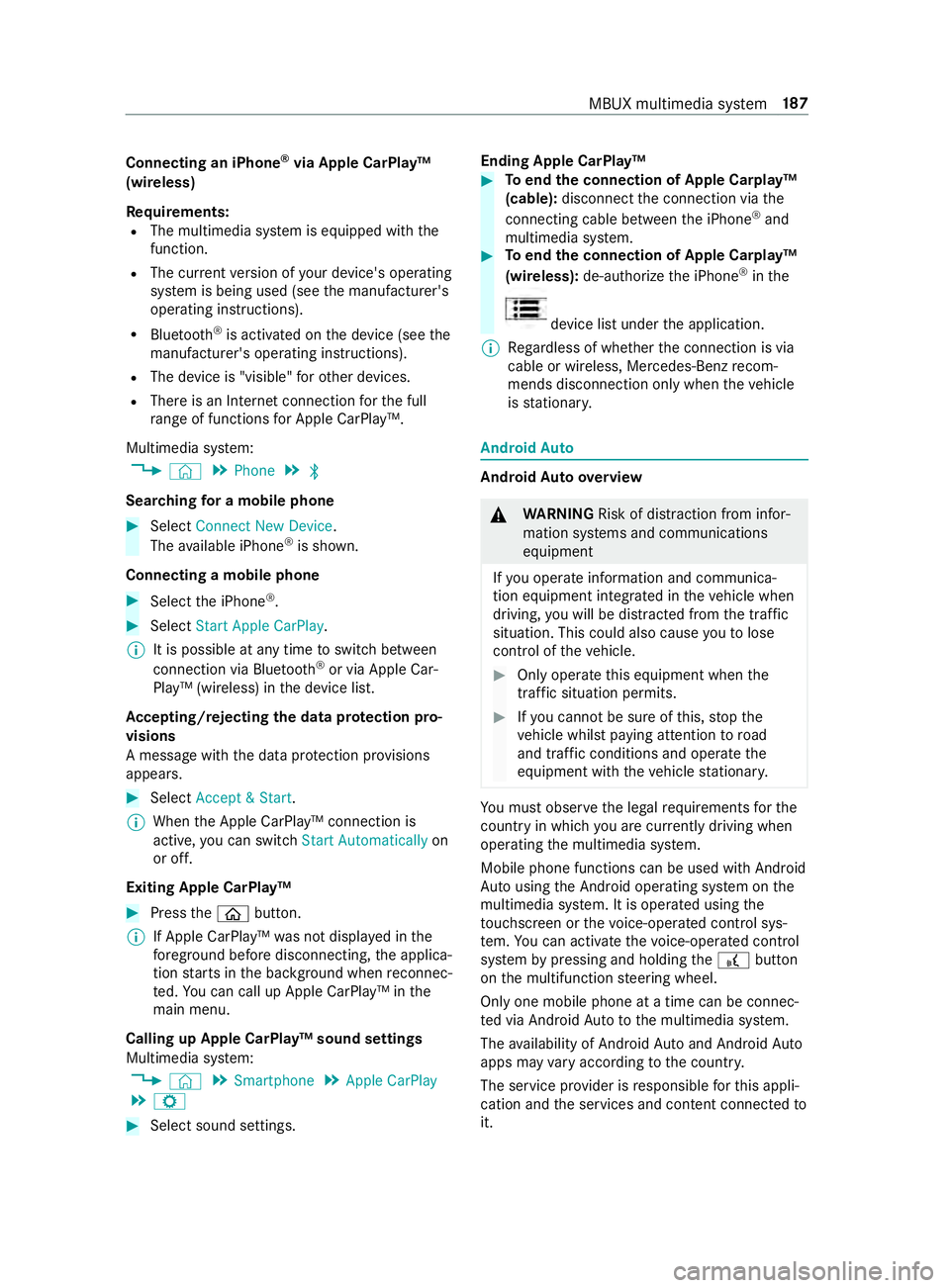
Connecting an iPhone
®
via Apple CarPlay™
(wireless)
Requ irements:
R The multimedia sy stem is equipped with the
function.
R The cur rent version of your device's operating
sy stem is being used (see the manufacturer's
operating instructions).
R Blue tooth ®
is activated on the device (see the
manufacturer's operating instructions).
R The device is "visible" forot her devices.
R There is an Internet connection forth e full
ra nge of functions for Apple CarPlay™.
Multimedia sy stem:
4 © 5
Phone 5
00A5
Sear ching for a mobile phone #
Select Connect New Device.
The available iPhone ®
is shown.
Connecting a mobile phone #
Select the iPhone ®
. #
Select Start Apple CarPlay.
% It is possible at any time
toswitch between
connection via Blue tooth®
or via Apple Car‐
Play™ (wireless) in the device list.
Ac cepting/rejecting the data pr otection pro‐
visions
A message with the data pr otection pr ovisions
appears. #
Select Accept & Start.
% When
the Apple CarPlay™ connection is
active, you can swit chStart Automatically on
or off.
Exiting Apple CarPlay™ #
Press the00E2 button.
% If Apple CarPlay™
was not displa yed in the
fo re ground before disconnecting, the applica‐
tion starts in the bac kground when reconnec‐
te d. You can call up Apple CarPlay™ in the
main menu.
Calling up Apple CarPlay™ sound settings
Multimedia sy stem:
4 © 5
Smartphone 5
Apple CarPlay
5 Z #
Select sound settings. Ending Apple CarPlay™ #
Toend the connection of Apple Carplay™
(cable): disconnect the connection via the
connecting cable between the iPhone ®
and
multimedia sy stem. #
Toend the connection of Apple Carplay™
(wireless): de-authorize the iPhone ®
in the device list under
the application.
% Re
gardless of whe ther the connection is via
cable or wireless, Mercedes-Benz recom‐
mends disconnection only when theve hicle
is stationar y. Android
Auto Android
Autoove rview &
WARNING Risk of distraction from infor‐
mation sy stems and communications
equipment
If yo u operate information and communica‐
tion equipment integ rated in theve hicle when
driving, you will be distracted from the tra ffic
situation. This could also cause youto lose
control of theve hicle. #
Only operate this equipment when the
traf fic situation permits. #
Ifyo u cannot be sure of this, stop the
ve hicle whilst paying attention toroad
and traf fic conditions and ope rate the
equipment with theve hicle stationar y. Yo
u must obse rveth e legal requirements forthe
country in whi chyou are cur rently driving when
ope rating the multimedia sy stem.
Mobile phone functions can be used with Android
Au tousing the Android operating sy stem on the
multimedia sy stem. It is operated using the
to uchsc reen or thevo ice-operated control sys‐
te m. You can activate thevo ice-opera ted control
sy stem bypressing and holding the£ button
on the multifunction steering wheel.
Only one mobile phone at a time can be connec‐
te d via Android Auto to the multimedia sy stem.
The availability of Android Autoand Android Auto
apps may vary according tothe count ry.
The service pr ovider is responsible forth is appli‐
cation and the services and content connected to
it. MBUX multimedia sy
stem 187
Page 213 of 354
Media
Information about media mode
Information about suppor
tedfo rm ats and
data storage media &
WARNING Risk of distraction when han‐
dling da tastorage media
If yo u handle a data storage medium while
driving, your attention is diver ted from the
traf fic conditions. This could also cause you
to lose control of theve hicle. #
Only handle a data storage medium
when theve hicle is stationar y. The multimedia sy
stem supports thefo llow‐
ing form ats and data media:
Pe rm issible
fi le sy stems FA
T32, exFA T,NTFS
Pe rm issible
data car riers USB devices, iPod
®
/iPhone ®
,
MTP devices, Blue tooth®
audio
equipment
Suppor ted
fo rm ats: Au
dio: MP3, WMA, AAC, WAV,
FL AC , AL AC R
The multimedia sy stem supports a total of up
to 50,000 files.
R Data storage media up to2 TB are suppor ted
(32‑bit address space).
% Obser vethefo llowing no tes:
R Due tothe wide range of USB devices
av ailable on the mar ket, pl ayback cann ot
be guaranteed for all USB devices.
R MP3 pla yers must support Media Trans fer
Pr otocol (MTP).
Information on copyright pr otection and
tradema rks
Au dio files that you create or reproduce yourself
fo r playback aregeneral lysubject tocopyright
pr otection. In many count ries, reproductions,
eve nfo r private use, are not permitted without
th e prior consent of the copyright holder. Make
sure that you kn owabout the applicable copy‐
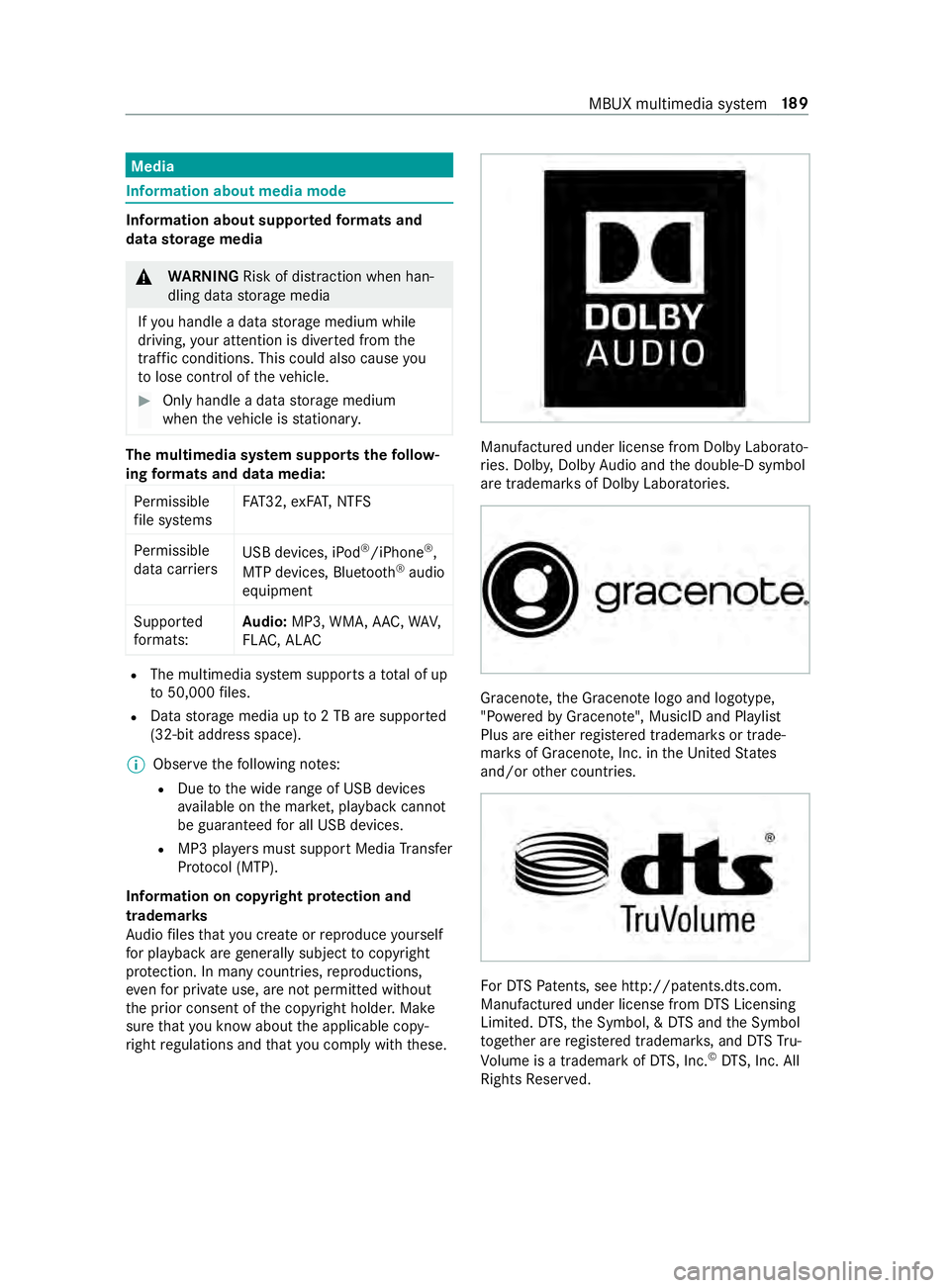
ri ght regulations and that you comply with these. Manufactured under license from Dolby Laborato‐
ri
es. Dolb y,Dol byAudio and the double-D symbol
are trademar ksof Dolby Laboratories. Graceno
te,th e Graceno telogo and logotype,
"P ow ered byGracen ote", MusicID and Pla ylist
Plus are either regis tere d trademar ksor trade‐
mar ksof Graceno te, Inc. in theUn ited States
and/or other countries. Fo
rDT SPa tents, see http://pa tents.dts.com.
Manufactu red under license from DTS Licensing
Limi ted. DT S,the Symbol, & DTS and the Symbol
to ge ther are regis tere d trademar ks, and DTSTru‐
Vo lume is a trademark of DTS, Inc. ©
DT S, Inc. All
Rights Reser ved. MBUX multimedia sy
stem 18 9
Page 218 of 354
Showing accident
reports Multimedia sy
stem:
4 © 5
Radio 5
Z
% The
availability of the function is dependent
on the count ry. #
Switch Display Emergency Warnings on or
off. Displaying
radio text Multimedia sy
stem:
4 © 5
Radio 5
Z #
Switch Display Radio Text Information on or
off. Sound
Sound settings
Information about
the sound sy stem
The sound sy stem is available for all functions in
th era dio and media modes. The settings, for
ex ample forth e equalizer, ef fect the playback of
all media sources.
Calling up the sound menu
Multimedia sy stem:
4 © 5
Media 5
Z 5
Sound
The following functions are available:
R Equalizer
R Balance and Fader
R Autom. Volume Adjustment #
Select a sound menu.
Ad justing treble, mid-range and bass settings
Multimedia sy stem:
4 © 5
Media 5
Z 5
Sound #
Set TREBLE, MIDorBASS .
Ac tivating/deactivating automatic volume
adjustment
Multimedia sy stem:
4 © 5
Media 5
Z 5
Sound
Au tomatic volume adjustment compensates for
dif fering volumes when changing between audio
sources. #
Swit chAutom. Volume Adjustment on or off.
Ad justing the balance/ fader
The availability of this function depends on the
ve hicle equipment. Multimedia sy
stem:
4 © 5
Media 5
Z 5
Sound #
Adjust the balance and fader. 194
MBUX multimedia sy stem
Page 219 of 354
Note
s on loading guidelines &
DANG ER Risk of poisoning from exhaust
ga ses
Combustion engines emit poisonous exhaust
ga ses, such as carbon monoxide. Exhaust
ga ses can enter theve hicle interior if the
re ar-end door is open when the engine is run‐
ning, especially if theve hicle is in motion. #
Always switch off the engine before
opening there ar-end door. #
Never drive with there ar-end door
open. &
WARNING Risk of inju ryfrom unsecu red
objects in theve hicle
When objects are unsecured or inadequately
secured, they can slip, tip over or be thro wn
about, striking vehicle occupants.
This also applies to:
R Luggage or loads
R Seats which ha vebeen remo ved and are
being transpor ted in theve hicle in an
ex ceptional case
The reis a risk of injur y,particular lyin the
eve nt of braking maneuvers or ab rupt
ch anges in direction. #
Alwaysstow objects in such a wayth at
th ey cannot be tossed about. #
Before tr aveling, secure objects, lug‐
ga ge or load topreve ntthem slipping or
tipping over. #
When a seat is remo ved, keep it prefera‐
bly outside theve hicle. &
WARNING Risk of inju rydue toobjects
being stowed incor rectly
If yo u do not adequately stowobjects in the
ve hicle interior, they could slip or be tossed
around and thereby strike vehicle occupants.
In addition, cup holders, open stowage
spaces and mobile phone brac kets cannot
al wa ys restra in the objects they contain in the
eve nt of an accident.
The reis a risk of injur y,particular lyin the
eve nt of sudden braking or a sudden change
in direction. #
Alwaysstow objects in such a wayth at
th ey cannot be tossed about in these or
similar situations. #
Always make sure that objects do not
project from stowage spaces, parcel
nets or stowage nets. #
Close the loc kable stow age spaces
before starting a journe y. #
Stow and secure objects that are heavy,
hard, poin ted, sharp-edged, fragile or
to o lar geinthe cargo compartment. &
WARNING Risk of bu rning from theta il‐
pipe or tailpipe trim
The tailpipe and tailpipe trim can become
ve ry hot. If you come into con tact wi th these
car parts, you could burn yourself. #
Always be particularly careful when in
th e vicinity of theta ilpipe and tailpipe
trims and supervise children very
closely when in this area. #
Before any con tact, allow the car parts
to cool down. If
yo u are using a roof rack , please no tethe maxi‐
mum roof load and the maximum load capacity of
th ero of rack.
Yo u will find information about the maximum roof
load in the "Technical data" chap ter and informa‐
tion about roof rack s in the "Car rier sy stems"
section .
Camera-based driving sy stems and the sensor
functions of the inside rearview mir ror may be
impaire d ifyou are transpo rting a load on the
ro of and it pr otru des more than 16 in (40 cm)
ove rth e edge of thero of. Therefore, make sure
th at the load does not overhang bymore than
16 in (40 cm).
The handling characteristics of your vehicle are
dependent on the load distribution. Therefore,
please obser vethefo llowing no tes when loading:
R when transporting a load, ne verex ceed the
permissible gross mass or the gross axle
we ight rating forth eve hicle (including occu‐
pants). The values are specified on theve hi‐
cle identification plate on the B-pillar.
R the load must not pr otru de abo vethe upper
edge of the seat backrests.
R if possible, alw ays transport the load in the
cargo compa rtment. Tr
ansporting 19 5
Page 220 of 354
R
fastenthe load tothe tie-down eyes and
spread the load as evenly as possible.
R use tie-down eyes and fastening components
which are suitable forth ewe ight and size of
th e load. Load distribution
* NO
TERisk of damage tothefloor co ver‐
ing Excessive point loading on
the cargo com‐
partment floor or on the load area can nega‐
tively af fect the driving characteristics and
could damage thefloor co vering. #
Vehicles with rear-wheel drive: dis‐
tribu tethe load uniformly. When doing
so, ensure that theove rall cen ter of
gr av ity of the load is alw ays as low and
close tothe center as possible and
between the axles near there ar axle. #
Vehicles with all-wheel drive: distrib‐
ute the load uniforml y.When doing so,
ensure that theove rall cen ter of gr avity
of the load is alw ays as low and close to
th e center as possible and between the
axles. Excessive point loading on
the cargo compart‐
ment floor or on the load area can negatively
af fect the driving characteristics and could dam‐
age thefloor co vering.
On Cargo Van and Passenger Van:
R alwa ys transpo rtthe load in the cargo com‐
partment.
R alwaysfast enthe load tothere ar ben chseat
backrests.
R movelarge and heavy loads as farto wa rds
th e front of theve hicle as possible against
th ere ar ben chseat. Stow loads flush with the
re ar ben chseat.
R always additionally secure the load with suita‐
ble load securing aids or tie downs.
R the load must not pr otru de abo vethe upper
edge of the seat backrests.
R transport loads behind seats that are not
occupied.
R ifth ere ar ben chseat is not occupied, insert
th e seat belts crosswise into the buckle of the
opposite seat belt. Securing loads
Note
s on load securing &
WARNING Risk of accident and injury
due toincor rect use of the lashing stra ps
If yo u attach the lashing stra p incor rectly
when secu ring loads, thefo llowing may occur
in theev ent of abrupt changes in direction,
braking maneuver or an acciden t:
R The tie-down eyes may become de tach ed
or the lashing stra p may tear if the per‐
missible load is exceeded.
R The load cann otbe restra ined.
This may cause the load toslip, tip over or be
fl ung about, striking vehicle occupants. #
Alwayste nsion the lashing stra ps in the
proper manner and only between the
described tie-down eyes. #
Always use lashing stra ps designed spe‐
cifically forth e loads. %
Obser
vethe information relating tothe maxi‐
mum loading capacity of the individual cargo
tie-down point. If you combine various cargo
tie-down points tosecure a load, alw aysta ke
th e maximum loading capacity of thewe ak‐
est cargo tie-down point into account. During
maximum full- stop braking, forc es may act
which can multiply thewe ight of the load.
Alw ays use se veral cargo tie-down points to
distribute and spread the load. Spread the
load evenly between the cargo tie-down
points or tie-down eyes.
Alw ays obser vethe operating instructions or the
lashing stra p manufacturer's instructions forthe
operation of the lashing stra p.
Obser vethe information relating tothe maximum
loading capacity of the cargo tie-down points
(/ page 275).
As the driver, you are responsible for ensuring the
fo llowing:
R The load is secured against slipping, tipping,
rolling or falling off.
Ta ke usual traf fic conditions as well as swerv‐
ing or full brake application and bad roads
into account.
R The applicable requ irements and guidelines
re lating toload-securing practices are met.
If th is is not the case, this may con stitute a
punishable of fense, depending on local legis‐ 19 6
Transporting
Page 222 of 354
light
weight loads. Lay anti-slip mats underneath
th e load tosecure the load additionally. Installing and
removing tie-down eyes #
Toinstall: slidethe tie-down eyeth ro ugh a
re cess in the loading rail close tothe load
until locking mechanism engages in the
re cess.
% When
you pull locking mechanism up and out
of there cess, the tie-down eye is able to
mo vewithin the loading rail. Make sure that
locking mechanism is alw ays engaged in a
re cess. #
Che ckthe tie-down eyefo rfirm seating. #
Toremo ve:pull lo cking mechanism up and
pull the tie-down eyeto wa rdsth e locking
mechanism and out of the loading rail
th ro ugh a recess. Car
rier sy stems Information about
thero of rack &
WARNING Risk of inju rydue tothe maxi‐
mum roof load being exceeded
When you place a load on thero of as well as
all outer and inner attachments, theve hicle's
center of gr avity will rise and thefa miliar driv‐
ing characteristics as well as thesteering and
braking characteristics will change. When
driving around bends, theve hicle will tilt
more heavily and may react more sluggishly
to steering mo vements.
If yo uexc eed the maximum roof load, the
driving characteristics, as well as thesteering
and braking, will be greatly impaired. #
Neverexc eed the maximum roof load
and adjust your driving style. 1
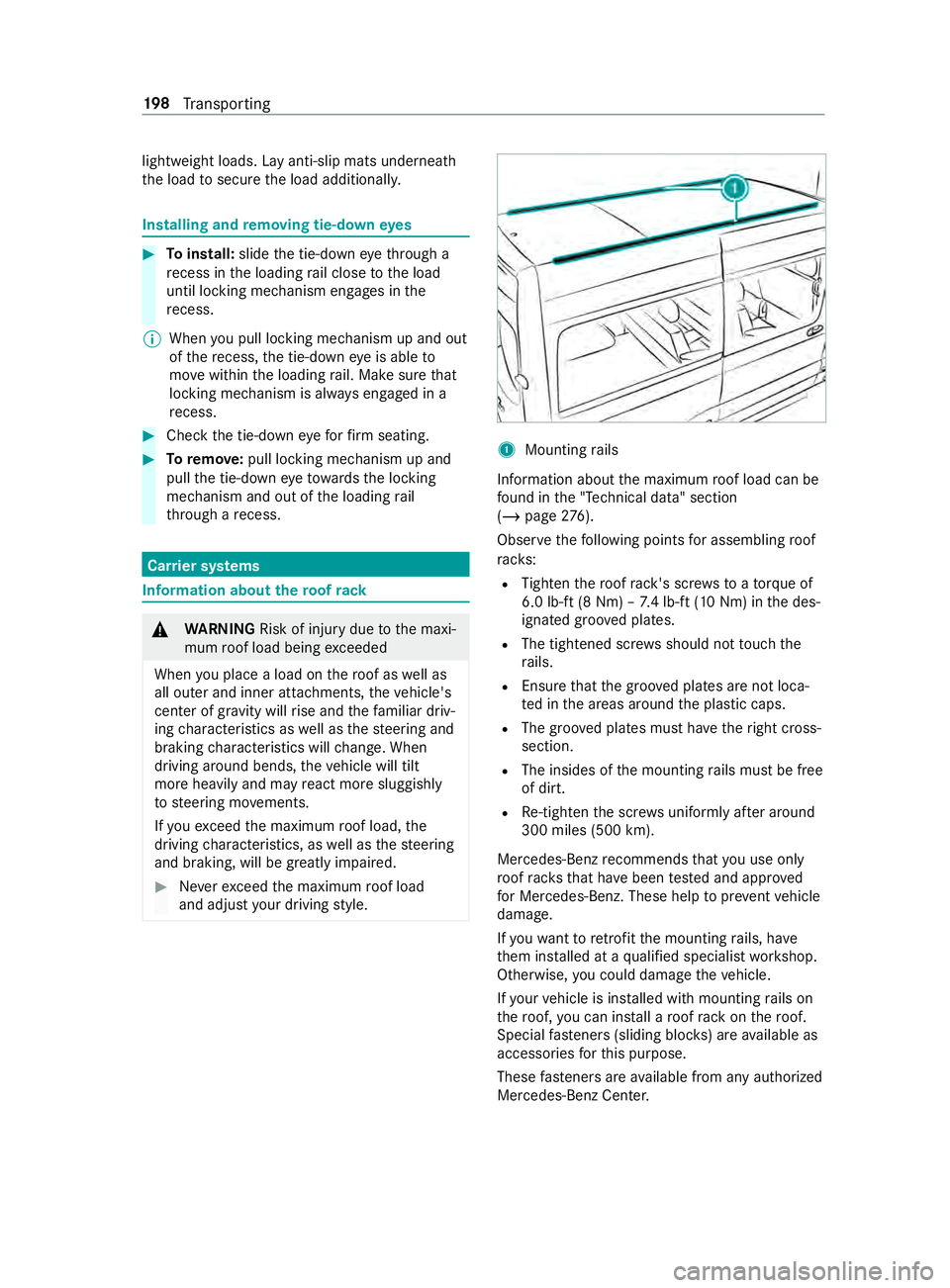
Mounting rails
Information about the maximum roof load can be
fo und in the "Technical data" section
(/ page 276).
Obse rveth efo llowing points for assembling roof
ra ck s:
R Tighten thero of rack 's scr ewsto ato rque of
6.0 lb -ft(8 Nm) – 7.4 lb-f t(10 Nm) in the des‐
ignated groo ved plates.
R The tightened scr ews should not touch the
ra ils.
R Ensure that the groo ved plates are not loca‐
te d in the areas around the plastic caps.
R The groo ved plates must ha vetheright cross-
section.
R The insides of the mounting rails must be free
of dirt.
R Re-tigh tenth e scr ews uniformly af ter around
300 miles (500 km).
Mercedes-Benz recommends that you use on ly
ro of rack sth at ha vebeen tested and appr oved
fo r Mercedes-Benz. These help topreve ntvehicle
damage.
If yo uwa nttoretrofit the mounting rails, ha ve
th em ins talled at a qualified specialist workshop.
Otherwise, you could damage theve hicle.
If yo ur vehicle is ins talled with mounting rails on
th ero of, you can install a roof rack on thero of.
Special fasteners (sliding bloc ks) are available as
accesso ries forth is purpose.
These fasteners are available from any authorized
Mercedes-Benz Center. 19 8
Transporting
Page 223 of 354
Using the interior
roof car rier sy stem &
WARNING Risk of inju rydue tounse‐
cured loads
When you secure or loosen a load, the load
may fall down and injure vehicle occupants. #
When securing or loosening a load, do
not stand under the load. *
NO
TERisk of damage tothe belt stra ps
and slider Excessive point loading on
the belt stra ps and
sliders may cause the belt stra ps totear or cause
the sliders tobreak off from thera ck
ra il. #
Distribute the load evenly. When doing
so, ensure that theove rall cen ter of
gr av ity of the load is alw ays as close to
th e center as possible and between the
ro of rails and between thera ck rails. Yo
u can use the interior roof rack system to
secure loads. It is also suitable for securing long
loads.
% The interior
roof rack system may be subjec‐
te dto a maximum load of 110 lbs (50 kg).
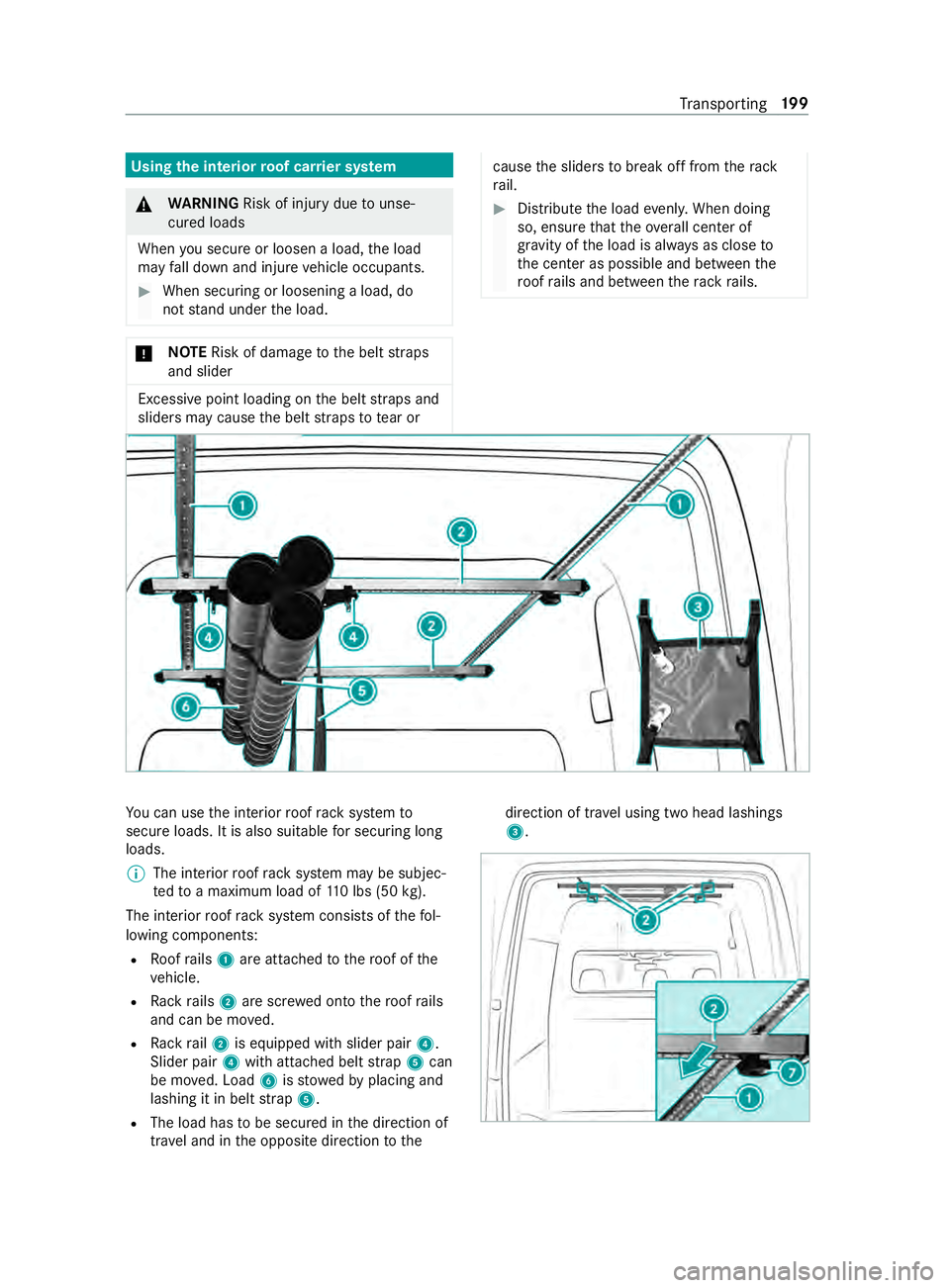
The interior roof rack system consists of thefo l‐
lowing components:
R Roofrails 1 are attached tothero of of the
ve hicle.
R Rack rails 2 are scr ewed onto thero of rails
and can be mo ved.
R Rack rail2 is equipped with slider pair 4.
Slider pair 4with attached belt stra p5 can
be mo ved. Load 6isstowe dby placing and
lashing it in belt stra p5.
R The load has tobe secured in the direction of
tra vel and in the opposite direction tothe direction of tra
vel using two head lashings
3. Tr
ansporting 19 9
Page 224 of 354
#
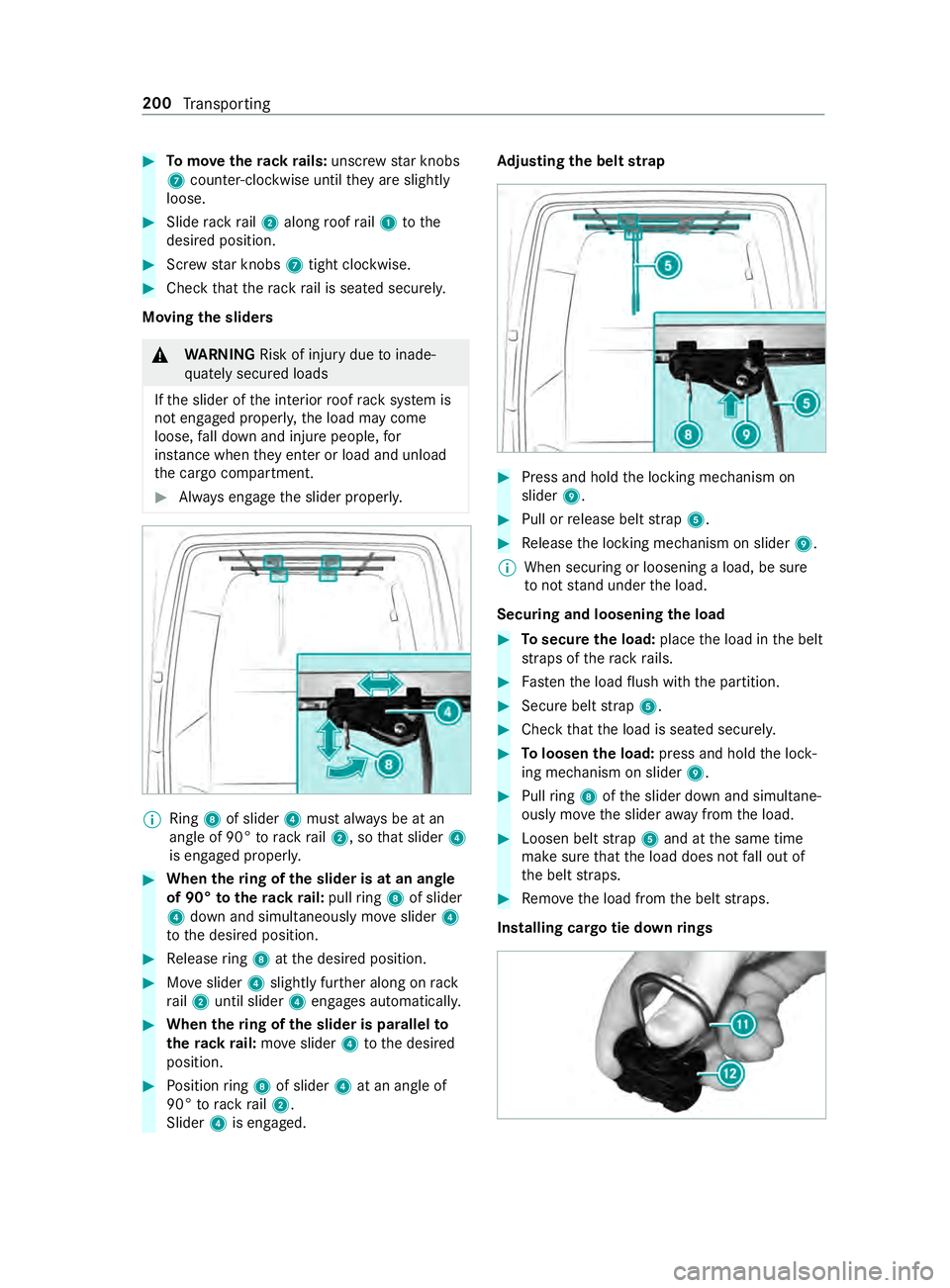
Tomo vetherack ra ils:unsc rew star knobs
7 coun ter-clockwise until they are slightly
loose. #
Slide rack rail2 along roof rail1 tothe
desired position. #
Screw star knobs 7tight clo ckwise. #
Check that thera ck rail is seated securely.
Moving the sliders &
WARNING Risk of inju rydue toinade‐
qu ately secured loads
If th e slider of the interior roof rack system is
not engaged proper ly,th e load may come
loose, fall down and injure people, for
ins tance when they enter or load and unload
th e cargo compartment. #
Always engage the slider properly. %
Ring
8of slider 4must alw ays be at an
angle of 90° torack rail2, so that slider 4
is engaged proper ly. #
When thering of the slider is at an angle
of 90° totherack ra il:pull ring 8 of slider
4 down and simul taneously mo veslider 4
to the desired position. #
Release ring 8 atthe desired position. #
Moveslider 4slightly fur ther along on rack
ra il2 until slider 4engages automaticall y. #
When thering of the slider is pa rallel to
th erack ra il:mo veslider 4tothe desired
position. #
Position ring 8 of slider 4at an angle of
90° torack rail2.
Slider 4is engaged. Ad
justing the belt strap #
Press and hold the locking mechanism on
slider 9. #
Pull or release belt stra p5. #
Release the locking mechanism on slider 9.
% When securing or loosening a load, be sure
to not stand under the load.
Securing and loosening the load #
Tosecure the load: placethe load in the belt
st ra ps of thera ck rails. #
Fasten the load flush with the partition. #
Secure belt stra p5. #
Check that the load is seated securel y. #
Toloosen the load: press and hold the lock‐
ing mechanism on slider 9. #
Pull ring 8 ofthe slider down and simultane‐
ously mo vethe slider away from the load. #
Loosen belt stra p5 and at the same time
make sure that the load does not fall out of
th e belt stra ps. #
Remo vethe load from the belt stra ps.
Installing cargo tie down rings 200
Transporting
Page 225 of 354
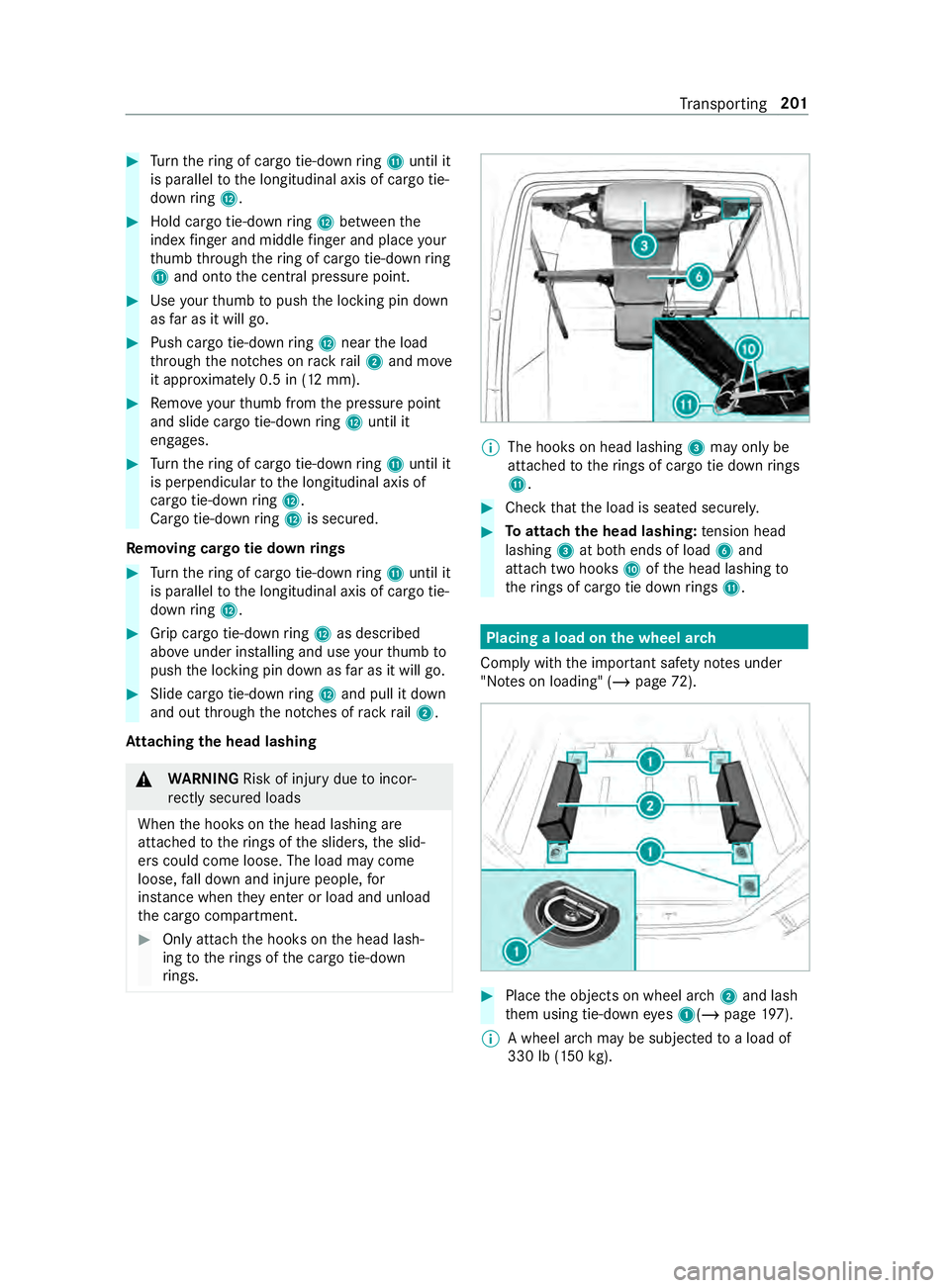
#
Turn thering of cargo tie-down ring B until it
is pa rallel tothe longitudinal axis of cargo tie-
down ring C. #
Hold cargo tie-down ring C between the
index finger and middle finger and place your
th umb thro ugh thering of cargo tie-down ring
B and onto the cent ral pressure point. #
Use your thumb topush the locking pin down
as far as it will go. #
Push cargo tie-down ring C near the load
th ro ugh the notches on rack rail2 and mo ve
it appr oximately 0.5 in (12 mm). #
Remo veyour thumb from the pressure point
and slide cargo tie-down ring C until it
engages. #
Turn thering of cargo tie-down ring B until it
is pe rpendicular tothe longitudinal axis of
cargo tie-down ring C.
Cargo tie-down ring C is secu red.
Re moving cargo tie down rings #
Turn thering of cargo tie-down ring B until it
is pa rallel tothe longitudinal axis of cargo tie-
down ring C. #
Grip cargo tie-down ring C as described
ab ove under ins talling and use your thumb to
push the locking pin down as far as it will go. #
Slide cargo tie-down ring C and pull it down
and out thro ugh the notches of rack rail2.
At taching the head lashing &
WARNING Risk of inju rydue toincor‐
re ctly secu red loads
When the hooks on the head lashing are
attached totherings of the sliders, the slid‐
ers could come loose. The load may come
loose, fall down and injure people, for
ins tance when they enter or load and unload
th e cargo compartment. #
Only atta chthe hooks on the head lash‐
ing totherings of the cargo tie-down
ri ngs. %
The hoo
kson head lashing 3may only be
attached totherings of cargo tie down rings
B. #
Check that the load is seated securel y. #
Toattach the head lashing: tension head
lashing 3at bo thends of load 6and
attach two hooks Aofthe head lashing to
th erings of cargo tie down rings B. Placing a load on the wheel ar
ch
Comply with the impor tant sa fety no tes under
"No tes on loading" (/ page72). #
Place the objects on wheel ar ch2 and lash
th em using tie-down eyes 1(/ page197).
% A wheel ar
chmay be subjected toa load of
330 lb (150 kg). Tr
ansporting 201