warning MERCEDES-BENZ SPRINTER 2019 MY19 with 7” screen
[x] Cancel search | Manufacturer: MERCEDES-BENZ, Model Year: 2019, Model line: SPRINTER, Model: MERCEDES-BENZ SPRINTER 2019Pages: 354, PDF Size: 6.15 MB
Page 182 of 354
designed
forth e trailer operation
re qu irements. #
Do not modify the ball coupling or the
trailer hitch. &
WARNING Risk of accident and inju ry
due toan incor rectly ins talled ball cou‐
pling
If th e ball coupling is not ins talled and
engaged cor rectly, it may become de tach ed
during tr avel and endanger other road users.
There is a risk of fata l injur y. #
Install and secure the ball coupling as
described in the ball coupling manufac‐
turer's ins tallation instructions. #
When the ball coupling has been ins tal‐
led, ensure that it is cor rectly secu red
before every trip. &
WARNING Risk of accident due toan
incor rectly ins talled and secured ball
neck
If th e ball neck is not cor rectly ins talled and
secured, the trailer can become de tach ed. #
Install and secure the ball neck as
described in the ball neck manufactur‐
er's ins tallation instructions. #
When the ball neck has been ins talled,
ensure that it is cor rectly secu red
before every trip *
NO
TEWearing out the brake linings by
continuously dep ressing the brake pedal #
Do not depress the brake pedal continu‐
ously whilst driving. #
Touse the braking ef fect of the engine,
shift toa lo werge ar in good time. Alw
ays comply with the operating instructions of
th e manufacturer of the trailer coupling and the
ball nec k.
Place your vehicle/trailer combination on sur fa‐
ces that are as even as possible and secu reit
against rolling away ( /page 132). Couple and
uncouple the trailer carefully.
When backing up theto wing vehicle, ensure that
th ere is no-one between theve hicle and the
traile r. If
yo u do not connect the trailer totheto wing
ve hicle cor rectly, the trailer may become
de tach ed. Once it has been connected and is
ro adwor thy, the trailer must be in a horizontal
position behind theto wing vehicle.
No tethefo llowing rega rding theto ngue weight:
R Make full use of the maximum tongue weight,
where possible
R Do not exceed or fall below the permitted
to ngue weight
Do not exceed thefo llowing values:
R Perm itted braked or unbraked towing capa‐
city
The maximum permissible towing capacity for
traile rswithout a separate braking sy stem is
1, 653 lbs (750 kg).
R Perm issible rear axle load of theto wing vehi‐
cle
R Perm issible gross mass of theto wing vehicle
R Perm issible gross mass of the trailer
R Perm issible gross towing mass
R Maximum permissible speed of the trailer
The releva nt pe rmitted values, which must not be
exc eeded, can be found in thefo llowing places:
R Inyour vehicle documents
R Onthe identification plate of the trailer hitch
R Onthe trailer's identification plate
R Ontheve hicle identification plate
If th ere are discrepancies between theva lues, the
lo we stone shall appl y.
Before driving off, ensu rethefo llowing:
R The tire pressure on there ar axle of theto w‐
ing vehicle has been set forth e maximum
load.
R The headlamps ha vebeen set cor rectly.
Va lues appr ovedby the manufacturer can be
fo und on the identification plates and in the sec‐
tion forth eto wing vehicle (/ page 235).
Yo ur vehicle will act dif fere ntly wi tha trailer rela‐
tive towithout a trailer:
R The vehicle/trailer combination will be heav‐
ier.
R The vehicle/trailer combination will be
re stricted in its acceleration and climbing
ability. 15 8
Driving and pa rking
Page 184 of 354
#
Shift the selector le verto position 005D. #
Apply theve hicle's parking brake. #
Close all the doors. #
Position the trailer on a le vel sur face behind
th eve hicle.
% The ball head height
changes depending on
th eve hicle's load. In this case, use a trailer
with a height-adjus table trailer dr awbar. #
Couple up the trailer. #
Establish all electrical and other connections
to the trailer. #
Remo veobjects or devices which pr eventthe
trailer from rolling, e.g. wheel choc ks. #
Release the trailer's parking brake.
% The
vehicle harness has a cable connection
to the brake light indicator lamp.
Obser vethe maximum permissible trailer dimen‐
sions (width and length).
Most US states and all Canadian pr ovinces pre‐
scribe thefo llowing points, and you are ur gently
re commended tocomply wi th these:
R Safetych ains between theto wing vehicle and
th e trailer. The chains should be routed in a
criss-cross pat tern under the trailer dr awbar.
They must be connected tothe trailer tow
hitch and not tothe bumper or totheve hicle
axle.
Lea vesuf ficient sla ckinthech ains. This
allo wsforeve n sha rpcornering.
R A separate brake sy stem is requ ired for cer‐
ta in trailers.
R A saf etyfe ature is requ ired for braked trailers.
De term ine the specific requ irements acco rd‐
ing tothere leva nt la ws.
If th e trailer becomes de tach ed from theto w‐
ing vehicle, the saf etyfe ature triggers the
trailer brakes and can thus reduce the danger.
Un coupling a trailer &
WARNING Risk of being crushed and
becoming trapped when uncoupling a
trailer
When uncoupling a trailer wi than engaged
ine rtia-activated brake, your hand may
become trapped between theve hicle and the
trailer dr awbar. #
Do not uncouple trailers with an
engaged overrun brake. Do not uncouple a trailer with an
overrun brake in
a st ate of overrun. Otherwise, there bound of the
ove rrun brake can damage your vehicle. #
Shift the selector le verto position 005D. #
Apply theve hicle's parking brake. #
Close all the doors. #
Apply the trailer's parking brake. #
Secure the trailer against rolling away with a
wheel chock or similar object. #
Remo vethe trailer cables and saf etych ains. #
Uncou plethe trailer. Information about
towing a trailer Operating a trailer is subject
tomany statutory
re gulations such as speed restrictions.
Many states also requ ire an auxiliary separate
functional braking sy stem when towing a weight
th at exc eeds a cer tain limit. Foryo ur saf ety, it is
re commended touse a separate functional brak‐
ing sy stem on any towe dve hicle.
Make sure that your trailer combination meets
local regulations. This not only applies to your
place of residence, but also to your destination.
In fo rm ation on this can be obtained from the
police and local authorities.
Comply with thefo llowing when driving with a
trailer:
R Practice cornering, stopping and backing up
in a traf fic-free location. In this wa y,yo u will
ga in driving experience and become accus‐
to med tothe new handling characteristics.
R Before driving, check thefo llowing:
- that the trailer tow hit chand ball coupling
are secure
- that the saf ety swit chfor braked trailers is
functioning cor rectly
- that the saf etych ains are secure and
undamaged
- that the electrical connections are secure
- that the lights are functioning cor rectly
- the wheels for dama geand cor rect tire
pressure (/ page 232)
R Adjust the outside mir rors so that you ha ve a
clear view of there ar section of the trailer.
R Ifth e trailer is equipped with an individual
braking sy stem, check before each journey
whe ther the brakes are functioning cor rectl y. 16 0
Driving and pa rking
Page 185 of 354
R
Ifth e trailer has electronically cont rolled
brakes, pull away carefully wi th theve hicle/
trailer combination. Brake manually using the
brake controller and check whe ther the
brakes are functioning cor rectly.
R Secu rethe load on the trailer in line with the
re qu irements and rules for load-securing
me thods.
R When driving with a trailer, check at regular
inter vals that the load is secure and that the
lights and brakes are functioning cor rectl y.
R Bear in mind that the handling characteristics
are more uns table when towing a trailer than
when driving without a trailer. Avoid sudden
st eering mo vements.
R The vehicle/trailer combination is heavier,
accelerates more slowl y,has a reduced
climbing ability and an increased braking dis‐
ta nce. It is more susceptible toside winds
and requ ires careful steering.
R If possible, do not brake suddenl y,but rath er
moderately at firs t so that the trailer can acti‐
va te its brakes. Then inc rease the pressure on
th e brake pedal.
R Ifth e automatic transmission shifts between
ge ars on uphill or downhill gradients, restrict
th e shift range. Select shi ftrange 4, 3, 2 or 1.
A lo werge ar and reduced speed decrease the
ri sk of engine damage.
R When driving on a downhill gradient, shift to a
lo we rge ar to use the engine's braking ef fect.
Av oid cons tant braking, as this could cause
th eve hicle brakes and possibly also the
trailer brakes toove rheat.
R Ifth e coolant temp erature increases signifi‐
cantly when the air-conditioning sy stem is
switched on, switch the air-conditioning sys‐
te m off.
Coolant heat can also be dissipated by
switching the air flow and thete mp erature of
th e heater or air conditioning tothe maximum
le ve l. Open the windo wsif necessar y.
R When overtaking, pay particular attention to
th e increased overtaking di stance of your
ve hicle/trailer combination.
Due tothe length of your vehicle/trailer com‐
bination you will requ ire a longer stre tch of
ro ad before swit ching back tothe original
lane. Pe
rm issible trailer loads and trailer dr awbar
nose weights We
ight information &
WARNING Risk of accident due to
unbraked trailer with excessively high
gross weight
If yo uto w a trailer without a separate func‐
tional braking sy stem and a gross trailer
we ight (G TW) of more than 1635 lbs (750 kg),
th en theve hicle brake sy stem may overheat.
This increases the braking dis tance and the
brake sy stem may evenfa il. #
Always use a trailer with a separate
functional braking sy stem when towing
a trailer with a gross trailerweight
(G TW ) of more than 1635 lbs (750 kg). *
NO
TEDama getothe drive train, trans‐
mission or trailer tow hit chdue toexc ess
gross combination weight The permissible
gross combinationweight is
exc eeded.
The drive train, the transmission or the trailer
to w hit chmay be dama ged. #
Comply with the permissible gross com‐
bination weight. Fo
rve hicles with a permissible gross vehicle
we ight of 11030 lbs (5003 kg),th e permissible
gross combination weight is less than the sum of
th e permissible gross vehicle weight plus the per‐
missible trailer load. If either theve hicle or the
trailer is fully laden, the permitted gross vehicle
we ight or the permitted trailer load values are
re duced accordingly. In this case, you may on ly
partially load the trailer or theve hicle.
The gross trailer weight (G TW) is calculated by
adding thewe ight of the trailer tothewe ight of
th e load and equipment. If the trailer is equipped
with a separate braking sy stem, then the maxi‐
mum gross trailer weight is 5000 lbs (2268 kg) or
75 00 lbs (3402 kg).
The maximum permissible trailer dr awbar nose‐
we ight on the ball head is 500 lbs (227 kg) or
75 0 lbs (340 kg). Ho wever,th e actual trailer
dr aw bar nose weight must not exceed theva lue
given on the trailer tow hit chor trailer identifica‐
tion plates. Where theva lues dif fer, th e lo west
va lue alw ays applies. Driving and parking
161
Page 187 of 354
Overview of Instrument Display
&
WARNING Risk of accident due toan
instrument display malfunction
If th e Instrument Display has failed or mal‐
functioned, you may not recognize function
re strictions applying tosaf etyre leva nt sys‐
te ms.
The operating saf ety of your vehicle may be
impaired. #
Drive on carefull y. #
Have theve hicle checked immediately
at a qualified specialist workshop. If
yo ur vehicle's operational saf ety is impaired,
park theve hicle in a safe location immediatel y.
Inform a qualified specialist workshop.
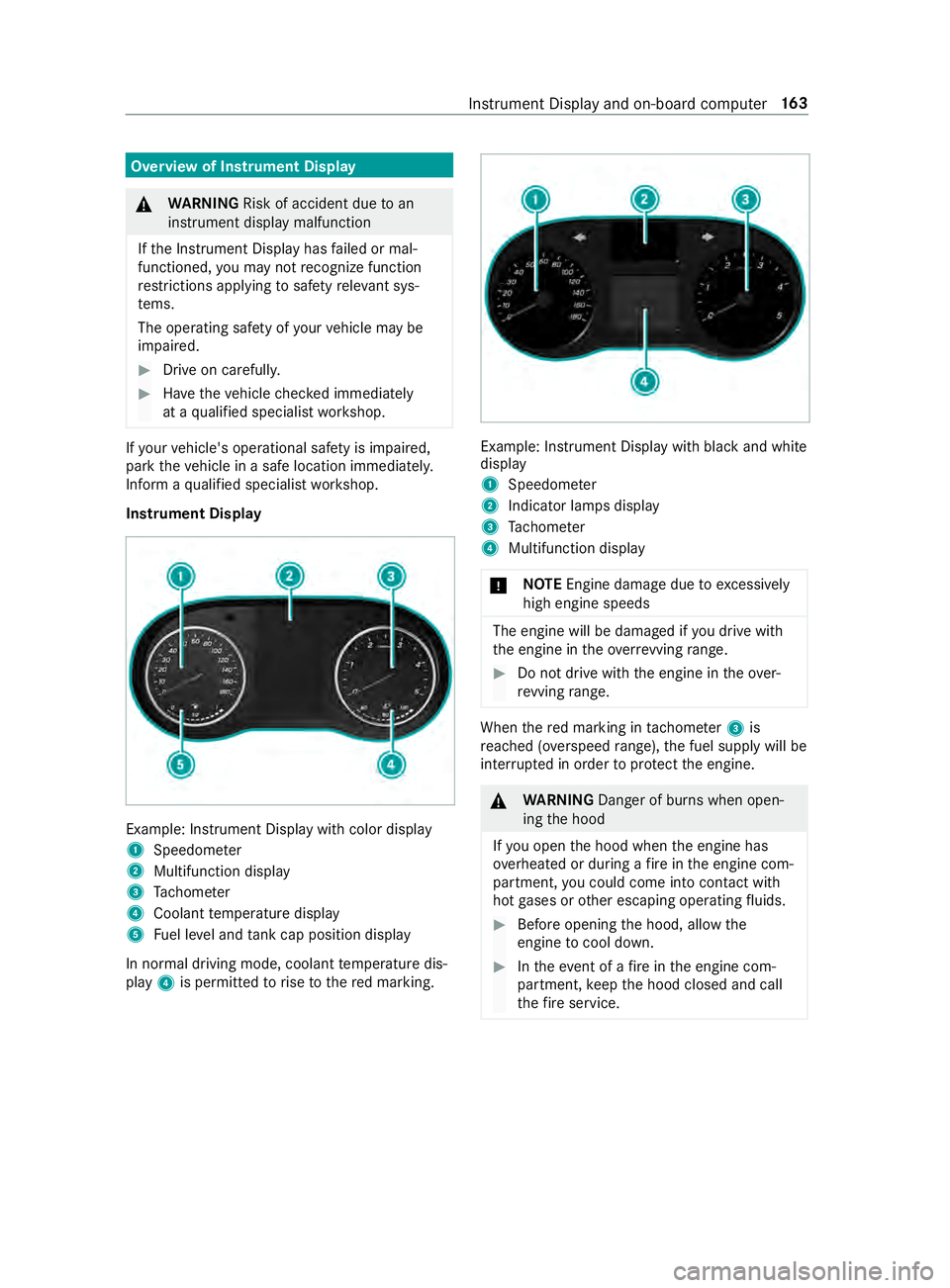
Instrument Display Example: Instrument Display with color display
1
Speedome ter
2 Multifunction display
3 Tach ome ter
4 Coolant temp erature display
5 Fuel le vel and tank cap position displ ay
In normal driving mode, coolant temp erature dis‐
play 4is permitted torise tothere d marking. Example: Instrument Display with black and white
display
1
Speedome ter
2 Indicator lamps display
3 Tach ome ter
4 Multifunction display
* NO
TEEngine damage due toexc essively
high engine speeds The engine will be damaged if
you drive with
th e engine in theov errevving range. #
Do not drive wi th the engine in theove r‐
re vving range. When
there d marking in tach ome ter3 is
re ached (o verspeed range), the fuel supply will be
inter rupte d in order toprotect the engine. &
WARNING Danger of bu rns when open‐
ing the hood
If yo u open the hood when the engine has
ove rheated or during a fire inthe engine com‐
partment, you could come into con tact wi th
hot gases or other escaping operating fluids. #
Before opening the hood, allow the
engine tocool down. #
Intheeve nt of a fire inthe engine com‐
partment, keep the hood closed and call
th efire service. Instrument Display and on-board computer
16 3
Page 188 of 354
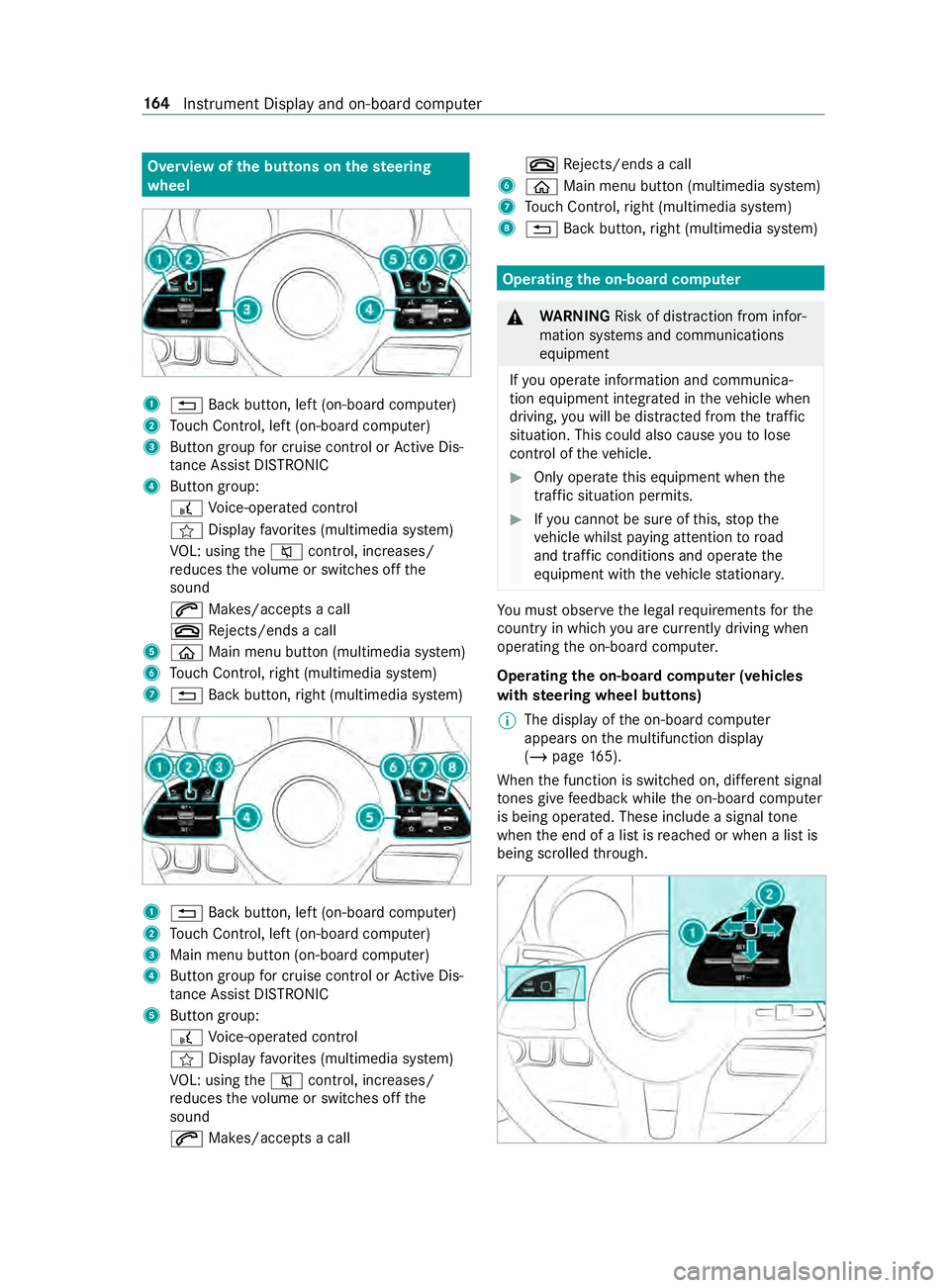
Overview of
the but tons on thest eering
wheel 1
0038 Back button, left (on-board computer)
2 Touch Control, left (on-board computer)
3 Button group for cruise control or Active Dis‐
ta nce Assi stDISTRONIC
4 Button group:
£ Voice-opera ted control
004B Display favo rite s (multimedia sy stem)
VO L: using the0063 control, inc reases/
re duces thevo lume or switches off the
sound
0061 Makes/accepts a call
0076 Rejects/ends a call
5 00E2 Main menu button (multimedia sy stem)
6 Touch Control, right (multimedia sy stem)
7 0038 Back button, right (multimedia sy stem) 1
0038 Back button, left (on-board computer)
2 Touch Control, left (on-board computer)
3 Main menu button (on-board computer)
4 Button group for cruise control or Active Dis‐
ta nce Assi stDISTRONIC
5 Button group:
£ Voice-opera ted control
004B Display favo rite s (multimedia sy stem)
VO L: using the0063 control, inc reases/
re duces thevo lume or switches off the
sound
0061 Makes/accepts a call 0076
Rejects/ends a call
6 00E2 Main menu button (multimedia sy stem)
7 Touch Control, right (multimedia sy stem)
8 0038 Back button, right (multimedia sy stem) Operating
the on-boa rdcompu ter &
WARNING Risk of distraction from infor‐
mation sy stems and communications
equipment
If yo u operate information and communica‐
tion equipment integ rated in theve hicle when
driving, you will be distracted from the tra ffic
situation. This could also cause youto lose
control of theve hicle. #
Only operate this equipment when the
traf fic situation permits. #
Ifyo u cannot be sure of this, stop the
ve hicle whilst paying attention toroad
and traf fic conditions and ope rate the
equipment with theve hicle stationar y. Yo
u must obse rveth e legal requirements forthe
country in whi chyou are cur rently driving when
ope rating the on-board computer.
Operating the on-boa rdcompu ter (vehicles
with steering wheel but tons)
% The display of
the on-board computer
appears on the multifunction display
(/ page 165).
When the function is switched on, dif fere nt signal
to nes gi vefeedback while the on-board computer
is being operated. These include a signal tone
when the end of a list is reached or when a list is
being scrolled thro ugh. 16 4
Instrument Display and on-board computer
Page 191 of 354
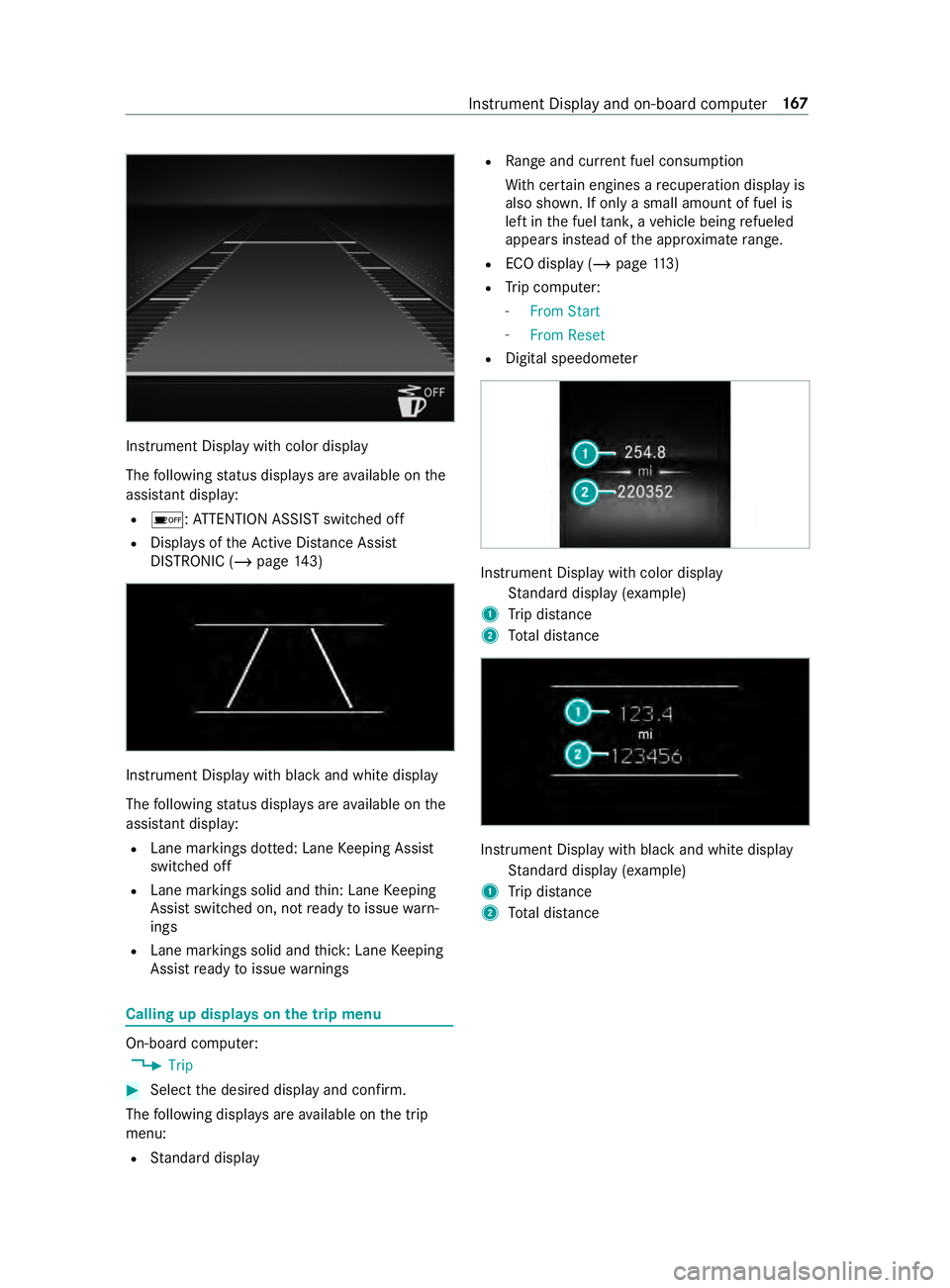
Instrument Display with color display
The
following status displa ysare available on the
assis tant displ ay:
R 00D7 :AT TENTION ASSIST switched off
R Displa ysoftheAc tive Dis tance Assi st
DISTRONIC (/ page 143) In
stru ment Display with black and white display
The following status displa ysare available on the
assis tant displ ay:
R Lane markings dotted: Lane Keeping Assist
switched off
R Lane markings solid and thin: Lane Keeping
Assist switched on, not ready toissue warn‐
ings
R Lane markings solid and thick: Lane Keeping
Assist ready toissue warnings Calling up displa
yson the trip menu On-board computer:
4 Trip #
Select the desired display and confirm.
The following displa ysare available on the trip
menu:
R Standard display R
Range and cur rent fuel consu mption
Wi th cer tain engines a recuperation display is
also shown. If only a small amount of fuel is
left in the fuel tank, a vehicle being refueled
appears ins tead of the appr oximate range.
R ECO displ ay (/page 113)
R Trip computer:
- From Start
- From Reset
R Digital speedom eter Instrument Display with color display
Standard display (e xamp le)
1 Trip dis tance
2 Total dis tance Instrument Display wi
thblack and white display
St andard display (e xamp le)
1 Trip dis tance
2 Total dis tance Instrument Display and on-board compu
ter167
Page 193 of 354
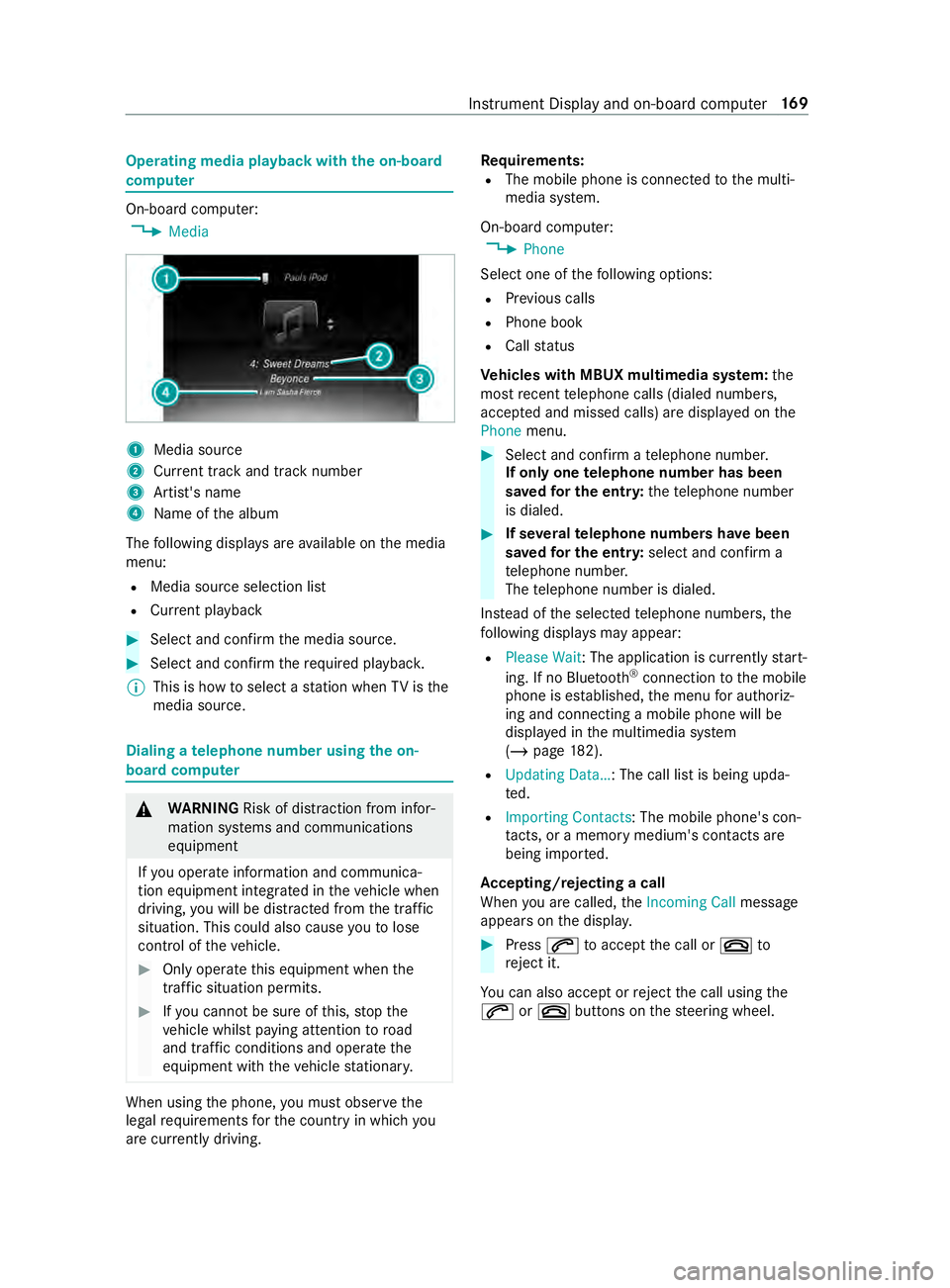
Operating media playback with
the on-boa rd
compu ter On-board computer:
4 Media 1
Media source
2 Current track and track number
3 Artist's name
4 Name of the album
The following displa ysare available on the media
menu:
R Media source selection list
R Current pl ayback #
Select and con firm the media source. #
Select and confirm there qu ired playbac k.
% This is how
toselect a station when TVisthe
media source. Dialing a
telephone number using the on-
board compu ter &
WARNING Risk of distraction from infor‐
mation sy stems and communications
equipment
If yo u operate information and communica‐
tion equipment integ rated in theve hicle when
driving, you will be distracted from the tra ffic
situation. This could also cause youto lose
control of theve hicle. #
Only operate this equipment when the
traf fic situation permits. #
Ifyo u cannot be sure of this, stop the
ve hicle whilst paying attention toroad
and traf fic conditions and ope rate the
equipment with theve hicle stationar y. When using
the phone, you must obse rvethe
legal requirements forth e count ryin which you
are cur rently driving. Re
quirements:
R The mobile phone is connec tedto the multi‐
media sy stem.
On-board computer: 4 Phone
Select one of thefo llowing options:
R Prev ious calls
R Phone book
R Call status
Ve hicles with MBUX multimedia sy stem: the
most recent telephone calls (dialed numbe rs,
accep ted and missed calls) are displa yed on the
Phone menu. #
Select and confirm a telephone numbe r.
If only one telephone number has been
sa ve dfo r the entr y:thete lephone number
is dialed. #
If se veralte lephone numbers ha vebeen
sa ve dfo r the entr y:select and confirm a
te lephone numbe r.
The telephone number is dialed.
Ins tead of the selected telephone numbe rs,the
fo llowing displa ysmay appear:
R Please Wait : The application is cur rently start‐
ing. If no Blue tooth®
connection tothe mobile
phone is es tablished, the menu for authoriz‐
ing and connecting a mobile phone will be
displa yed in the multimedia sy stem
(/ page 182).
R Updating Data…: The call list is being upda‐
ted.
R Importing Contacts: The mobile phone's con‐
ta cts, or a memo rymedium's contacts are
being impor ted.
Ac cepting/rejecting a call
When you are called, theIncoming Call message
appears on the displa y. #
Press 0061toaccept the call or 0076to
re ject it.
Yo u can also accept or reject the call using the
0061 or0076 buttons on thesteering wheel. Instrument Display and on-board computer
16 9
Page 197 of 354
Overview and operation
Overview of
the MBUX multimedia sy stem &
WARNING Risk of distraction from infor‐
mation sy stems and communications
equipment
If yo u operate information and communica‐
tion equipment integ rated in theve hicle when
driving, you will be distracted from the tra ffic
situation. This could also cause youto lose
control of theve hicle. #
Only operate this equipment when the
traf fic situation permits. #
Ifyo u cannot be sure of this, stop the
ve hicle whilst paying attention toroad
and traf fic conditions and ope rate the
equipment with theve hicle stationar y. Yo
u must obse rveth e legal requirements forthe
country in whi chyou are cur rently driving when
ope rating the multimedia sy stem.
MBUX stands for Mercedes-Benz User Experi‐
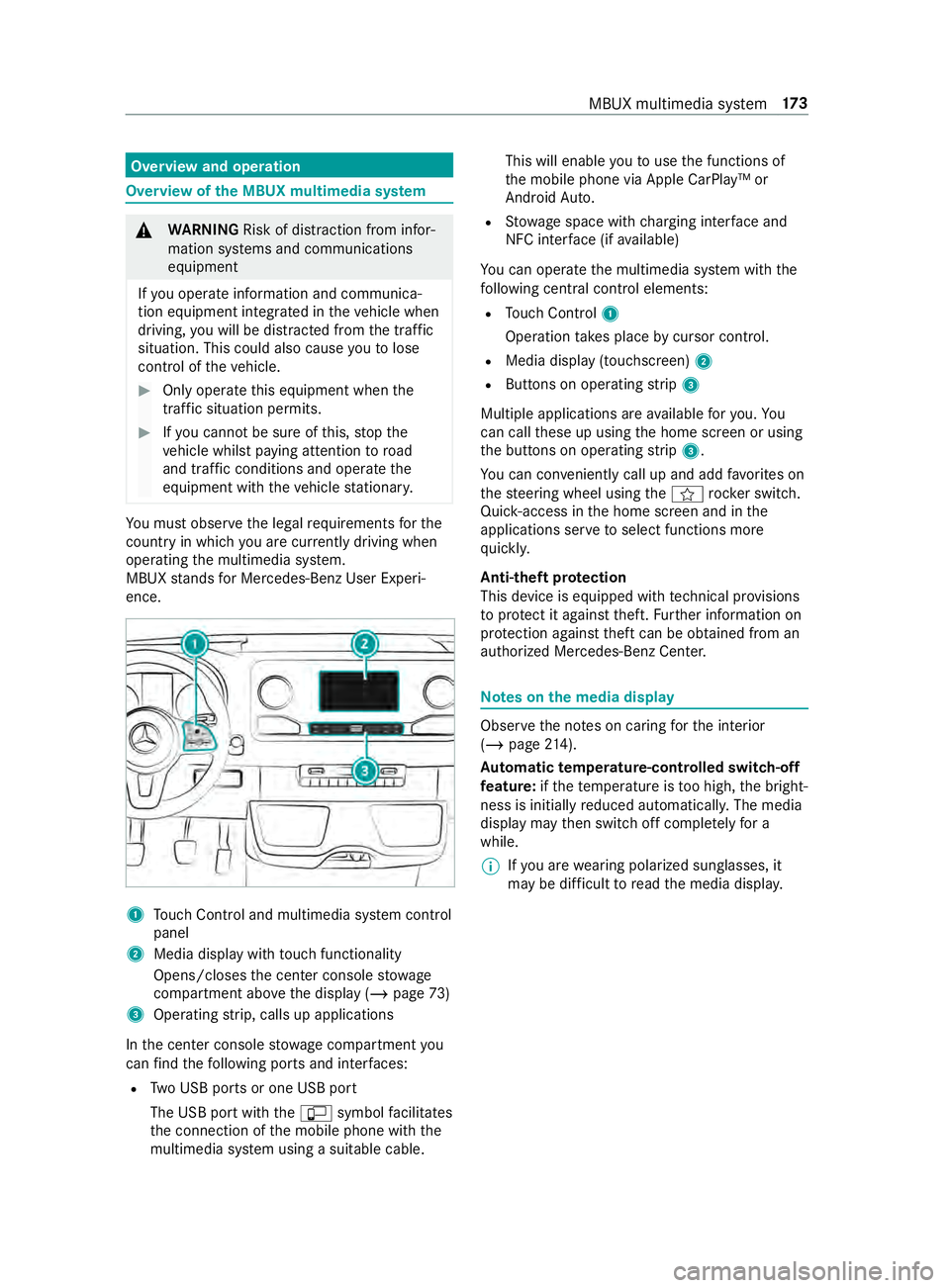
ence. 1
Touch Control and multimedia sy stem cont rol
panel
2 Media display with touch functionality
Opens/closes the center console stowage
compartment abo vethe display (/ page73)
3 Operating strip, calls up applications
In the center console stowage compartment you
can find thefo llowing ports and inter faces:
R Two USB ports or one USB port
The USB port with the00C2 symbol facilitates
th e connection of the mobile phone with the
multimedia sy stem using a suitable cable. This will enable
youto use the functions of
th e mobile phone via Apple CarPlay™ or
Android Auto.
R Stow age space with charging inter face and
NFC inter face (if available)
Yo u can operate the multimedia sy stem with the
fo llowing central control elements:
R Touch Control 1
Operation takes place bycursor control.
R Media display (tou chscreen) 2
R Buttons on operating strip 3
Multiple applications are available foryo u. Yo u
can call these up using the home screen or using
th e buttons on operating strip 3.
Yo u can con veniently call up and add favo rite s on
th esteering wheel using the004B rock er switch.
Quic k-access in the home screen and in the
applications ser vetoselect functions more
qu ickl y.
Anti-theft pr otection
This device is equipped with tech nical pr ovisions
to protect it against theft. Further information on
pr otection against theft can be obtained from an
authorized Mercedes-Benz Center. Note
s onthe media display Obser
vethe no tes on caring forth e interior
(/ page 214).
Au tomatic temperature-cont rolled switch-off
fe ature: ifth ete mp erature is too high, the bright‐
ness is initially reduced automaticall y.The media
display may then switch off comple tely for a
while.
% If
yo u are wearing polarized sun glasses, it
may be dif ficult toread the media displa y. MBUX multimedia sy
stem 17 3
Page 202 of 354
#
Press on a phone number until theOPTIONS
menu is shown. #
Select Save as Favorite.
The contact is added as a favo rite. #
Tosto reara dio station as a global favo r‐
ite: set a radio station (/ page193). #
Press on thera dio station until theOPTIONS
menu is shown. #
Select Save as Favorite.
The radio station is added as a favo rite.
Re naming favo rites #
Tap on © inthe media displa y.
The home screen is shown. #
Swipe up until FAVORITESis shown. #
Press on a favo rite until theOPTIONS menu is
shown. #
Select Rename . #
Ente rth e name. #
Select OK.
Moving favo rites
Moving favo rite s in thefa vo rite s menu #
Tap on © inthe media displa y.
The home screen is shown. #
Swipe up until FAVORITESis shown. #
Press on a favo rite until theOPTIONS menu is
shown. #
Select Move. #
Movethefa vo rite to the new position. #
Tap on 00FB.
Deleting favo rites #
Tap on © inthe media displa y.
The home screen is shown. #
Swipe up until FAVORITESis shown. #
Press on a favo rite until theOPTIONS menu is
shown. #
Select Delete. #
Select Yes. Entering
characters Using
thech aracter input function &
WARNING Risk of distraction from infor‐
mation sy stems and communications
equipment
If yo u operate information and communica‐
tion equipment integ rated in theve hicle when
driving, you will be distracted from the tra ffic
situation. This could also cause youto lose
control of theve hicle. #
Only operate this equipment when the
traf fic situation permits. #
Ifyo u cannot be sure of this, stop the
ve hicle whilst paying attention toroad
and traf fic conditions and ope rate the
equipment with theve hicle stationar y. Yo
u must obse rveth e legal requirements forthe
country in whi chyou are cur rently driving when
ope rating the multimedia sy stem.
Character entry can be carried out with these
cont rol elements:
R Touch Control
R Touchsc reen (media display)
Character entry take s place bycursor control
when using theTo uch Control.
Character input can be star ted with a control ele‐
ment and resumed with ano ther. #
When theke yboard is shown, en terth ech ar‐
acters on the cont rol element byswiping and
pressing or bytapping (touchscreen).
or #
Write thech aracter on theto uchsc reen.
Examples of character ent ry:
R Renaming a favo rite
R Enter a telephone number 17 8
MBUX multimedia sy stem
Page 206 of 354
Te
lephone Te
lephony Te
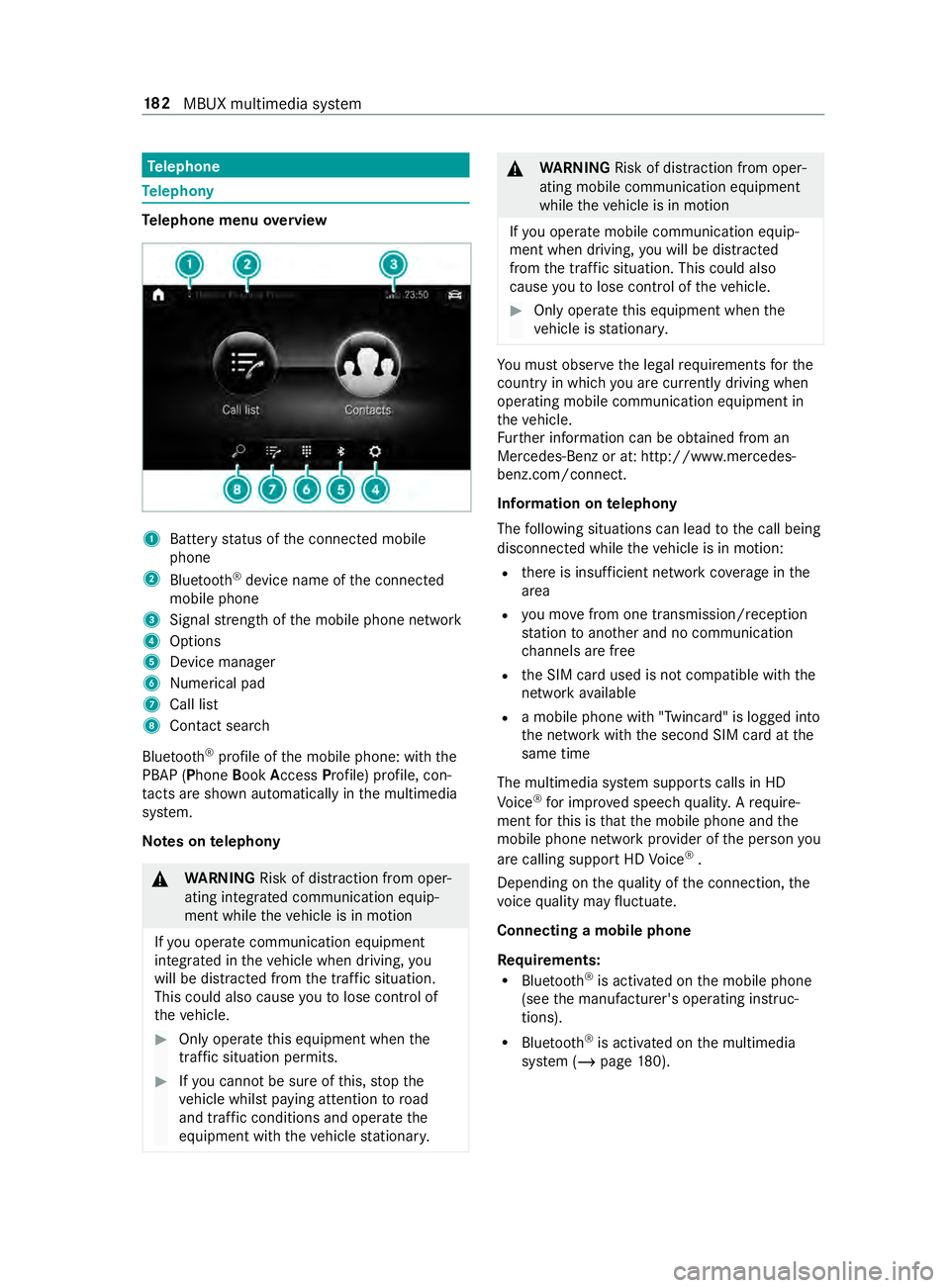
lephone menu overview 1
Battery status of the connected mobile
phone
2 Blue tooth ®
device name of the connected
mobile phone
3 Signal stre ngth of the mobile phone network
4 Options
5 Device manager
6 Nume rical pad
7 Call li st
8 Contact sea rch
Blu etoo th®
profile of the mobile phone: with the
PBAP (Phone BookAccess Profile) profile, con‐
ta cts are shown au tomatically in the multimedia
sy stem.
Note s ontelephony &
WARNING Risk of distraction from oper‐
ating integrated communication equip‐
ment while theve hicle is in motion
If yo u operate communication equipment
integ rated in theve hicle when driving, you
will be distracted from the tra ffic situation.
This could also cause youto lose control of
th eve hicle. #
Only operate this equipment when the
traf fic situation permits. #
Ifyo u cannot be sure of this, stop the
ve hicle whilst paying attention toroad
and traf fic conditions and ope rate the
equipment with theve hicle stationar y. &
WARNING Risk of distraction from oper‐
ating mobile communication equipment
while theve hicle is in motion
If yo u operate mobile communication equip‐
ment when driving, you will be distracted
from the traf fic situation. This could also
cause youto lose control of theve hicle. #
Only operate this equipment when the
ve hicle is stationar y. Yo
u must obse rveth e legal requirements forthe
country in whi chyou are cur rently driving when
ope rating mobile communication equipment in
th eve hicle.
Fu rther information can be obtained from an
Mercedes-Benz or at: http://www.mercedes-
benz.com/connect.
Information on telephony
The following situations can lead tothe call being
disconnected while theve hicle is in motion:
R there is insuf ficient network co verage inthe
area
R you mo vefrom one transmission/reception
st ation toano ther and no communication
ch annels are free
R the SIM card used is not compatible with the
network available
R a mobile phone with "Twincard" is logged into
the network with the second SIM card at the
same time
The multimedia sy stem supports calls in HD
Vo ice ®
for impr oved speech quality. A require‐
ment forth is is that the mobile phone and the
mobile phone network pr ovider of the person you
are calling support HD Voice ®
.
Depending on thequ ality of the connection, the
vo ice quality may fluctuate.
Connecting a mobile phone
Re quirements:
R Blue tooth ®
is activated on the mobile phone
(see the manufacturer's operating instruc‐
tions).
R Blue tooth ®
is activated on the multimedia
sy stem (/ page180). 18 2
MBUX multimedia sy stem