battery MERCEDES-BENZ SPRINTER 2019 MY19 with 7” screen
[x] Cancel search | Manufacturer: MERCEDES-BENZ, Model Year: 2019, Model line: SPRINTER, Model: MERCEDES-BENZ SPRINTER 2019Pages: 354, PDF Size: 6.15 MB
Page 103 of 354
Exterior lighting
Note
s onchanging the lights when driving
abroad Ve
hicles with halogen or static LED head‐
lamps: Changing the headlamps is not neces‐
sar y.The legal requ irements will also be fulfilled
in countries with left and right-hand traf fic. In
fo rm ation about lighting sy stems and your
re sponsibility The
vehicle's various lighting sy stems are only
aids. The vehicle driver is responsible for adjust‐
ing theve hicle's lighting tothe pr evailing light,
visibilit y,statutory conditions and traf fic condi‐
tions. Light switch
Operating the light switch
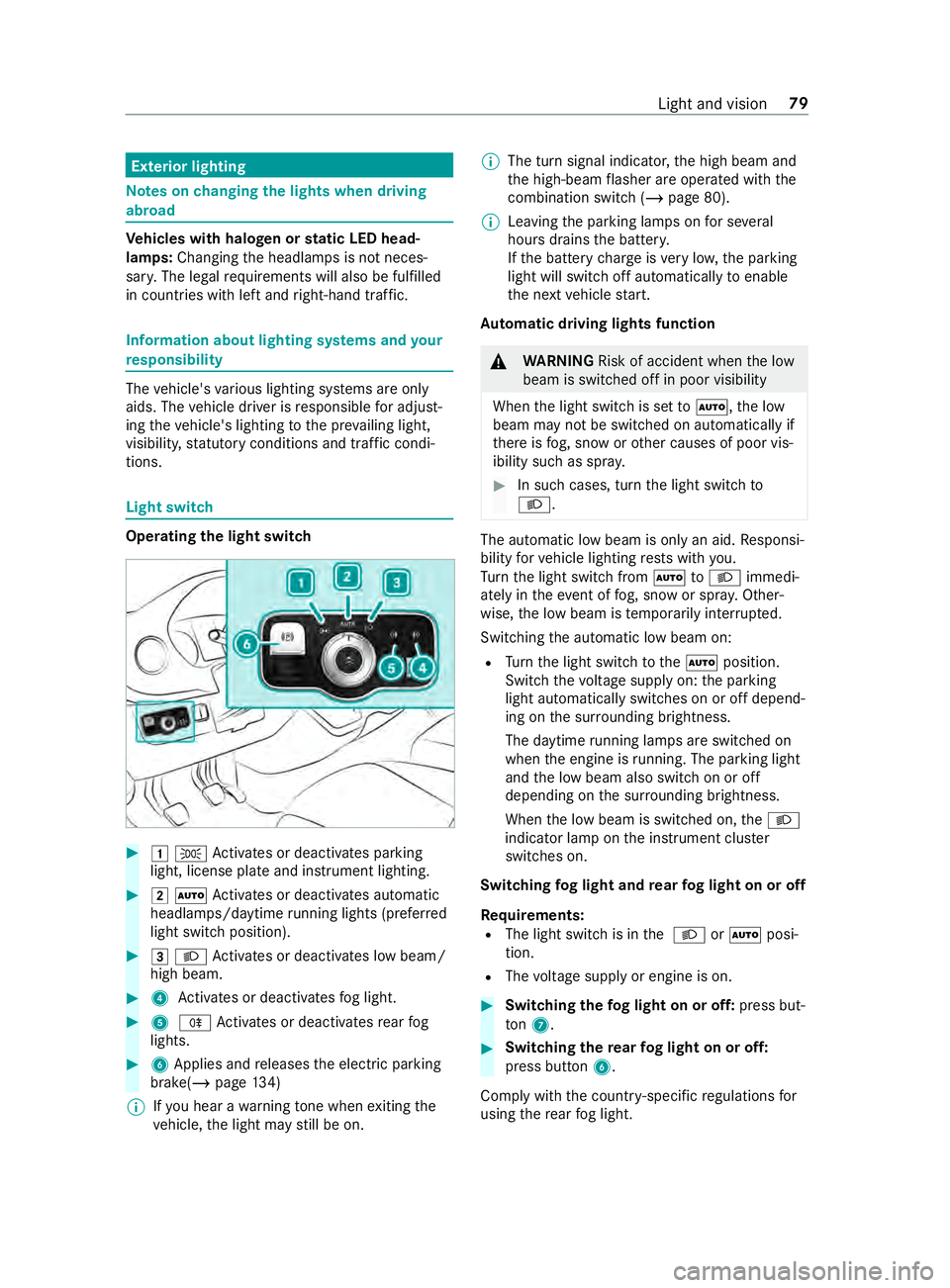
#
00470060 Activates or deacti vates parking
light, license plate and instrument lighting. #
00480058 Activates or deacti vates automatic
headlamp s/daytime running lights (p referred
light switch position). #
00490058 Activates or deacti vates low beam/
high beam. #
4 Activates or deacti vatesfo g light. #
5 005E Activates or deacti vatesre ar fog
lights. #
6Applies and releases the electric parking
brake(/ page134)
% If
yo u hear a warning tone when exiting the
ve hicle, the light may still be on. %
The turn signal indicator,
the high beam and
th e high-beam flasher are operated with the
combination switch (/ page 80).
% Leaving
the parking lamps on for se veral
hours drains the batter y.
If th e battery charge isvery low, the parking
light will switch off automatically toenable
th e next vehicle start.
Au tomatic driving lights function &
WARNING Risk of accident when the low
beam is switched off in poor visibility
When the light switch is set to0058 ,th e low
beam may not be switched on automatically if
th ere is fog, snow or other causes of poor vis‐
ibility such as spr ay. #
In such cases, turn the light switch to
0058 . The automatic low beam is only an aid.
Responsi‐
bility forve hicle lighting rests with you.
Tu rn the light switch from 0058to0058 immedi‐
ately in theev ent of fog, snow or spr ay. Other‐
wise, the low beam is temp orarily inter rupte d.
Switching the automatic low beam on:
R Turn the light switch tothe0058 position.
Switch thevo ltage supply on: the parking
light automatically switches on or off depend‐
ing on the sur rounding brightness.
The daytime running la mps are switched on
when the engine is running. The pa rking light
and the low beam also switch on or off
depending on the sur rounding brightness.
When the low beam is switched on, the0058
indicator lamp on the instrument clus ter
switches on.
Switching fog light and rear fog light on or off
Requ irements:
R The light switch is in the 0058 or0058 posi‐
tion.
R The voltage supply or engine is on. #
Switching thefo g light on or off: press but‐
to n7. #
Switching the rear fog light on or off:
press button 6.
Comply with the count ry-specific regulations for
using there ar fog light. Light and vision
79
Page 107 of 354
#
1004A Activates/deacti vates interior light‐
ing Re
ar interior lighting #
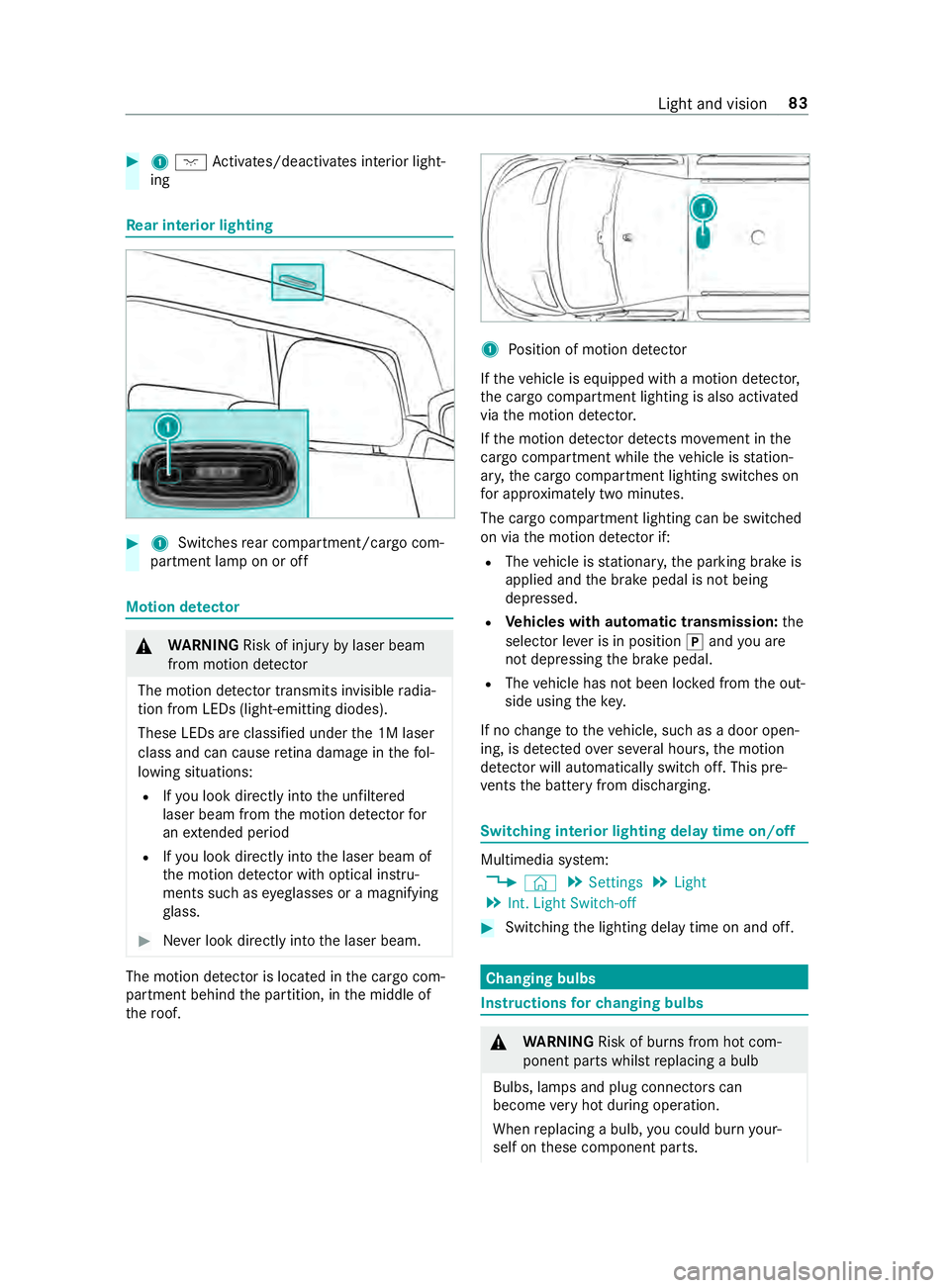
1 Switches rear compartment/cargo com‐
partment lamp on or off Motion de
tector &
WARNING Risk of inju ryby laser beam
from motion de tector
The motion de tector transmits invisible radia‐
tion from LEDs (light-emitting diodes).
These LEDs are classified under the 1M laser
class and can cause retina dama geinthefo l‐
lowing situations:
R Ifyo u look directly into the unfiltered
laser beam from the motion de tector for
an extended pe riod
R Ifyo u look direct lyinto the laser beam of
th e motion de tector wi thoptical instru‐
ments such as eyeglasses or a magnifying
gl ass. #
Never look directly into the laser beam. The motion de
tector is loca ted in the cargo com‐
partment behind the partition, in the middle of
th ero of. 1
Position of motion de tector
If th eve hicle is equipped with a motion de tector,
th e cargo compartment lighting is also activated
via the motion de tector.
If th e motion de tector de tects mo vement in the
cargo compa rtment while theve hicle is station‐
ar y, the cargo compartment lighting switches on
fo r appro ximately two minu tes.
The cargo compartment lighting can be switched
on via the motion de tector if:
R The vehicle is stationar y,the parking brake is
applied and the brake pedal is not being
depressed.
R Vehicles with automatic transmission: the
selector le ver is in position 005Dand you are
not depressing the brake pedal.
R The vehicle has not been loc ked from the out‐
side using thekey.
If no change totheve hicle, such as a door open‐
ing, is de tected over se veral hours, the motion
de tector will au tomatically switch off. This pre‐
ve nts the battery from discharging. Switching interior lighting delay time on/off
Multimedia sy
stem:
4 © 5
Settings 5
Light
5 Int. Light Switch-off #
Switching the lighting delay time on and off. Changing bulbs
Instructions
forch anging bulbs &
WARNING Risk of bu rns from hot com‐
ponent parts whilst replacing a bulb
Bulbs, lamps and plug connectors can
become very hot during operation.
When replacing a bulb, you could burn your‐
self on these component parts. Light and vision
83
Page 122 of 354
#
Vehicles with windshield heating: press
th e button.
#
Close the center air vent (/ page 98) and
air vents forth e headroom (/ page 99) and
re ar compartment (/ page 99).
Misting on the outside of windo ws #
Switch on the windshield wiper (/ page 88).Switching air-recirculation mode on and off
#
Press the0089 button.
The interior air is recirculated.
The ai r-re circulation mode switches off au tomati‐
cally.
% When air-recirculation mode is switched off,
th
e windo wsmay fog up more quickl y.Switch
on ai r-re circulation mode only briefly.
Air-recirculation mode au tomatical lyswitches on
in thefo llowing cases:
R at high outside temp eratures
R while theve hicle is driving in a tunnel (only
ve hicles with 3-zone automatic climate con‐
trol)
R when the windshield wipers are switched on
(/ page 88)
The indicator lamp on the0089 button will not
light up in this case. Af ter a maximum of
30 minutes, outside air is automatically intro‐
duced again. Switching
the windshield heating on and off %
In
theeve nt of high outside temp eratures,
th e windshield heating may not turn on. #
Press the button forth e windshield heating.
If th e indicator lamp lights up, the windshield
heating is switched on.
% The windshield heating switches off automat‐
ically af ter a few minutes.
% If
th e battery voltage is too lo w,it may not be
possible toswitch the windshield heating on.
If th e battery voltage becomes too low while
th e windshield heating is in operation, the
windshield heating will swit choff automati‐
cally. Switching
there ar window defros ter on or off #
Press the006C button.
If th e indicator lamp lights up, there ar win‐
dow defros ter is switched on. Operating air
vents Ad
justing the front-compartment air vents &
WARNING ‑ Danger of bu rns or frostbite
due tobeing too close tothe air vents
Ve ry hot or very cold air can flow from the air
ve nts.
This could result in burns or frostbite in the
immediate vicinity of the air vents. #
Makesure that all vehicle occupants
alw ays maintain a suf ficient dis tance to
th e air vents. #
If necessa ry, direct the air flow to
ano ther area of theve hicle interior. #
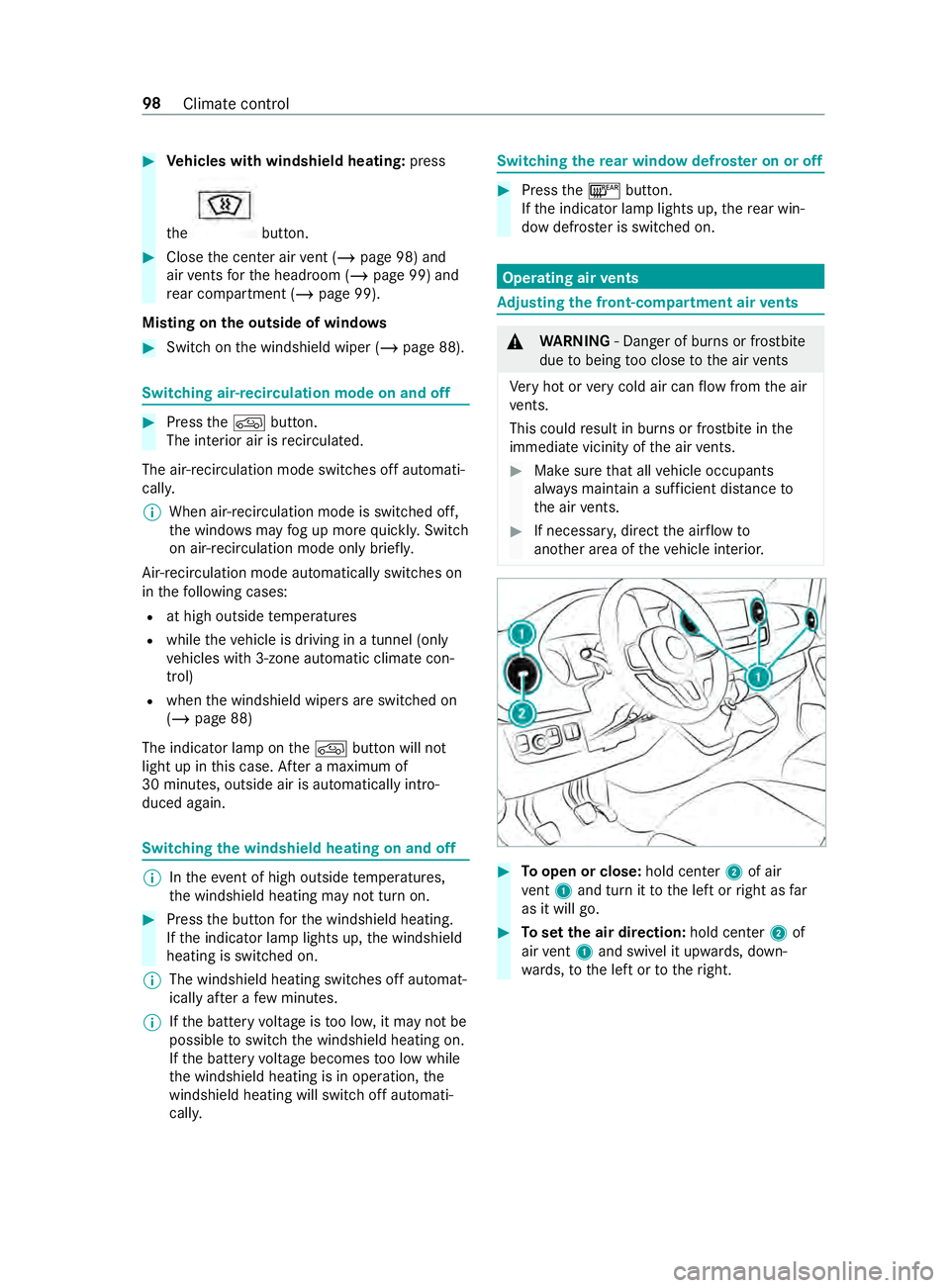
Toopen or close: hold center2 of air
ve nt 1 and turn it tothe left or right as far
as it will go. #
Toset the air direction: hold center2 of
air vent 1 and swivel it up wards, down‐
wa rds, to the left or totheright. 98
Climate control
Page 125 of 354
Switching auxiliary heating on and off
#
Toswitch on: pressthe003B button. #
Toswitch off: pressthe003B button.
Switching on the specified temperature #
Swit chon the ignition. #
Toswitch on: pressthe003B button. #
Toswitch off: pressthe003B button. #
Set thete mp erature using the0082 button. #
Press the 003B button.
The red or blue indicator lamp on the003B
button goes on or off.
Colors of the indicator lamp:
R Blue: auxiliary ventilation has been switched
on.
R Red:auxilia ryheating has been switched on.
R Yello w: departure time has been pre-selec‐
te d.
Au xilia ryheating or ventilation switches off af ter
a maximum of 50 minutes.
Swit ching heater boos ter mode on and off #
Toswitch on: start the engine. #
Press the 003B button. #
Toswitch off: pressthe003B button.
Heater boos ter mode will be switched on at
an outside temp erature of less than 32 °F
(0 °C) when necessar y.
% Heater boo
ster mode is available only for
ve hicles with hot-water auxiliary heatings.Ad
justing the hot-water auxiliary hea ter with
the on-board co mputer
Re quirements:
R The fuel tank is filled abo vethere ser vefuel
le ve l.
R The ignition is switched on.
On-board computer: 4 Settings 5
Heating
Setting the switch-on time #
Select Settings. #
Select the desired departure time.
Ac tivating the departure time #
Activate the departure time byticking the
box.
% Ensure
that A, B and C ea chcor respond to a
programmed departure time.
% The programmed time
remains set only until
th e next time the engine is star ted.
Selecting prog rammed time #
Set therequ ired programmed time A,B or C.
% The
requ ired prog rammed time A,B or C will
appear only if the box toactivate the depar‐
ture time is tic ked. #
Select there qu ired prog rammed time by
swiping left or right, e.g. A,B or C.
Problems with hot water auxiliary heating Problem
Possible causes/consequences and 0050 0050Solutions
FA IL00A3 Signal transmission between transmitter and
vehicle is malfunctioning. #
Change your position in relation totheve hicle, moving closer if nec‐
essar y.
FA IL Thestar ter battery is not suf ficiently charge d. #
Charge thest ar ter batter y.
The fuel tank is not filled up tothere ser veleve l. #
Refuel at the nearest gasst ation.
FA IL0099 Au
xilia ryheating is malfunctioning. #
Have the auxiliary heating checked at a qualified specialist work‐
shop. Climate
control 101
Page 138 of 354
Diesel pa
rticulate filter Note
s onrege neration &
DANG ER Risk of fata l injuries due to
ex haust gases
Combustion engines emit poisonous exhaust
ga ses such as carbon monoxide. Inhaling
th ese exhaust gases is hazardous tohealth
and can lead topoisoning. #
Never lea vethe engine running in an
enclosed space wi thout suf ficient venti‐
lation. &
WARNING Risk offire caused byhot
ex haust sy stem parts
Flammable material such as lea ves, grass or
twigs may ignite if they come into contact
wi th hot parts of theex haust sy stem or
ex haust gasflow. #
Park theve hicle so that no flammable
material can come into con tact wi thhot
ve hicle components. #
In particular, do not park on dry grass‐
land or har vested grain fields. If
th eve hicle is predominantly used for short dis‐
ta nce driving or extended non-operational times,
th is could lead toa malfunction in the automatic
cleaning function forth e diesel particulate filter.
As a result, permanent blocking of the diesel par‐
ticulate filter may occur and fuel may also accu‐
mulate in the engine oil and cause engine failure.
If yo u main lydrive short dis tances, you should
drive on a free way or go for a country drive for 20
minutes every500 km (300 miles). This facili‐
ta testh e diesel particulate filter's burn-off proc‐
ess.
* NO
TEDama gedue tohot exhaust gases During
rege neration, extremely hot exhaust
ga ses escape from theta ilpipe. #
During rege neration, maintain a mini‐
mum di stance of 7 ft(2 m) from other
objects, e.g. par kedve hicles. Battery main switch
Note
s onthe bat tery main switch *
NO
TEDama getothe electrical sy stem If
yo ure mo veor disconnect the battery main
switch, it could lead tothe electrical sy stem
becoming damaged. #
Make sure that the ignition is switched
off and that at least 15minutes ha ve
passed before removing or reconnecting
th e battery main switch. Otherwise,
electrical sy stem components could be
damaged. Yo
u can use the battery main switch todiscon‐
nect the cur rent toall your vehicle's consumers.
This will pr event uncontrolled battery discha rge
caused byquiescent cur rent consumers.
If yo ur vehicle is equipped with an auxiliary bat‐
te ry inthe engine compartment or in the base of
th e front-passen ger seat, you must disconnect
bo th batteries. Only then is the electrical sy stem
fully disconnected from the po wer supply.
% Only disconnect theve hicle from the po wer
supply using the battery main switch in the
fo llowing situations:
R The vehicle is stationary for a long time
R It is absolutely necessary todisconnect
th eve hicle from the po wer supply
Af ter switching on the po wer supp ly,yo u will
need toreset the side windo ws (/page 53)
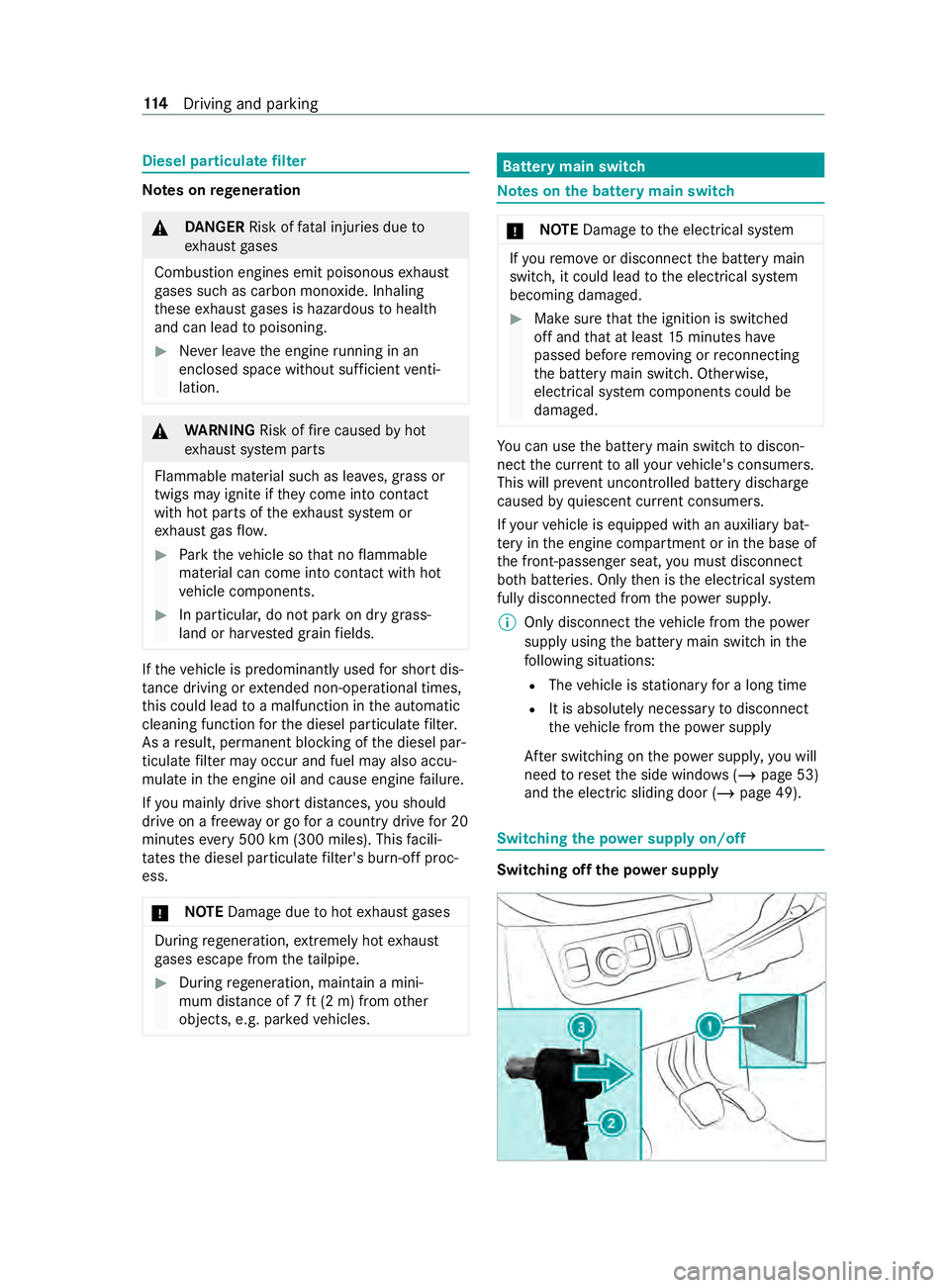
and the electric sliding door (/ page 49). Switching
the po wer supply on/o ff Switching off
the po wer supply 11 4
Driving and pa rking
Page 139 of 354
#
Switch off the ignition and wait at least
15 minutes. #
Remo vecover1. #
Press and hold button 3.#
Pull plug 2out of the ground pin. #
Push plug 2asfar as possible in the direc‐
tion of the ar row sothat it cannot make con‐
ta ct wi th the ear thpin.
All star ter battery consumers are disconnec‐
te d from the po wer supp ly.
Switching on the po wer supply #
Press plug 2onto the ground pin until you
fe el it engage and plug 2is in full contact
with the ground pin.
All star ter battery consumers are reconnec‐
te dto the po wer supply. #
Fasten co ver1. Au
tomatic transmission DIRECT SELECT le
verFu
nction of the DIRECT SELECT le ver&
WARNING Risk of accident and inju ry
due tochildren left unat tended in the
ve hicle
If ch ildren are left unat tended in theve hicle,
th ey could:
R open doo rs,th ereby endangering other
persons or road users.
R get out of theve hicle and be hit by
oncoming traf fic. R
operate ve hicle equipment and become
trapped, forex ample.
In addition, children could also set theve hicle
in motion, forex ample, by:
R releasing the parking brake.
R shifting the automatic transmission out of
park position 005D.
R starting the engine #
Never lea vechildren and animals unat‐
te nded in theve hicle. #
When leaving theve hicle, alw aysta ke
th e SmartK eywith you and lock the
ve hicle. #
Keep the SmartK eyout of there ach of
ch ildren. &
WARNING Risk of accident due toincor‐
re ct gearshifting
If th e engine speed is higher than the idle
speed and you engage the transmission posi‐
tion 005Bor005E, theve hicle may accelerate
sharply. #
Ifyo u engage the transmission position
005B or005E always depress the brake
pedal firm lyand do not accelerate at
th e same time. Yo
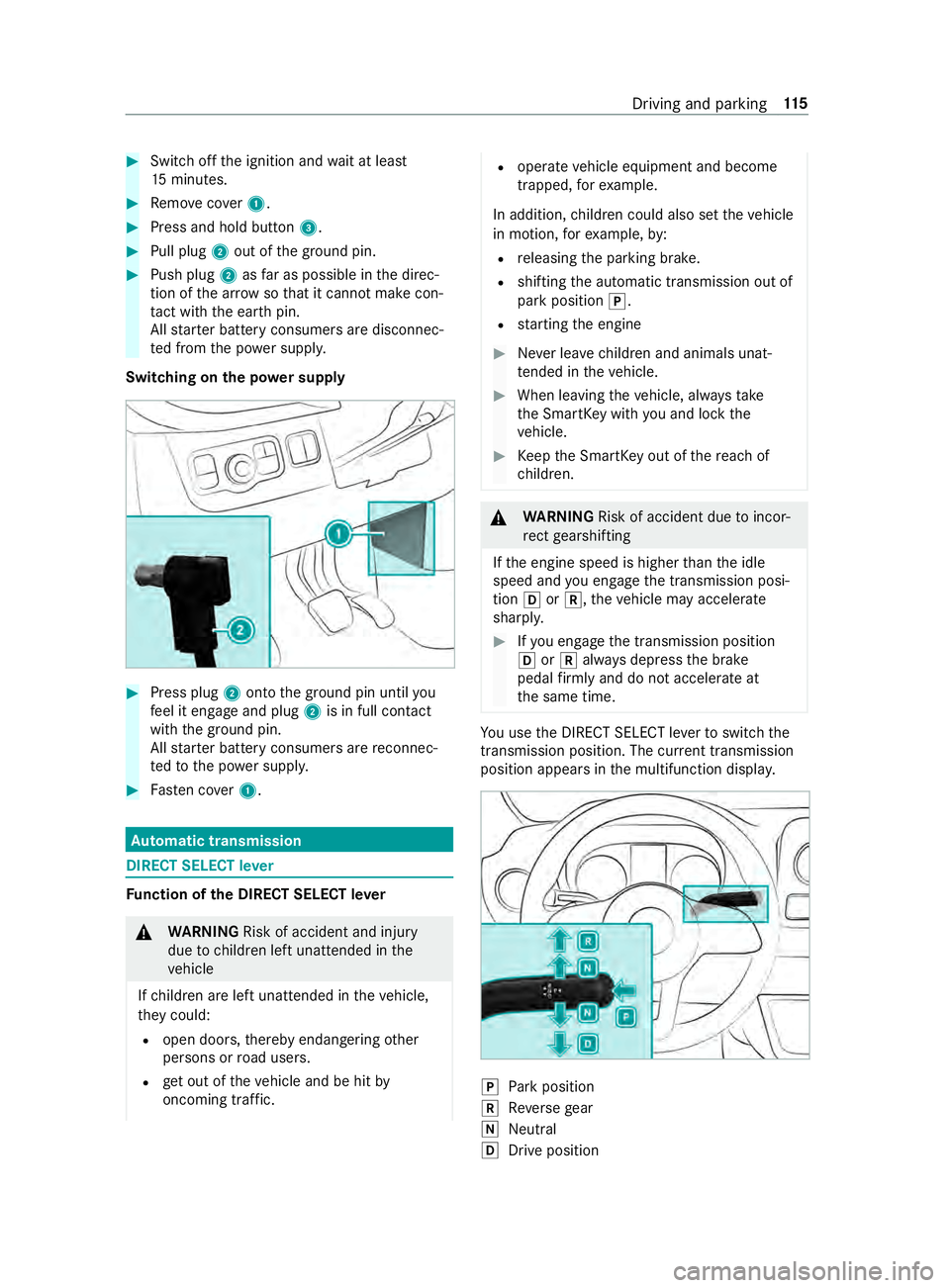
u use the DIRECT SELECT le verto switch the
transmission position. The cur rent transmission
position appears in the multifunction displa y. 005D
Park position
005E Reversege ar
005C Neut ral
005B Drive position Driving and pa
rking 11 5
Page 160 of 354
Emer
gency braking In
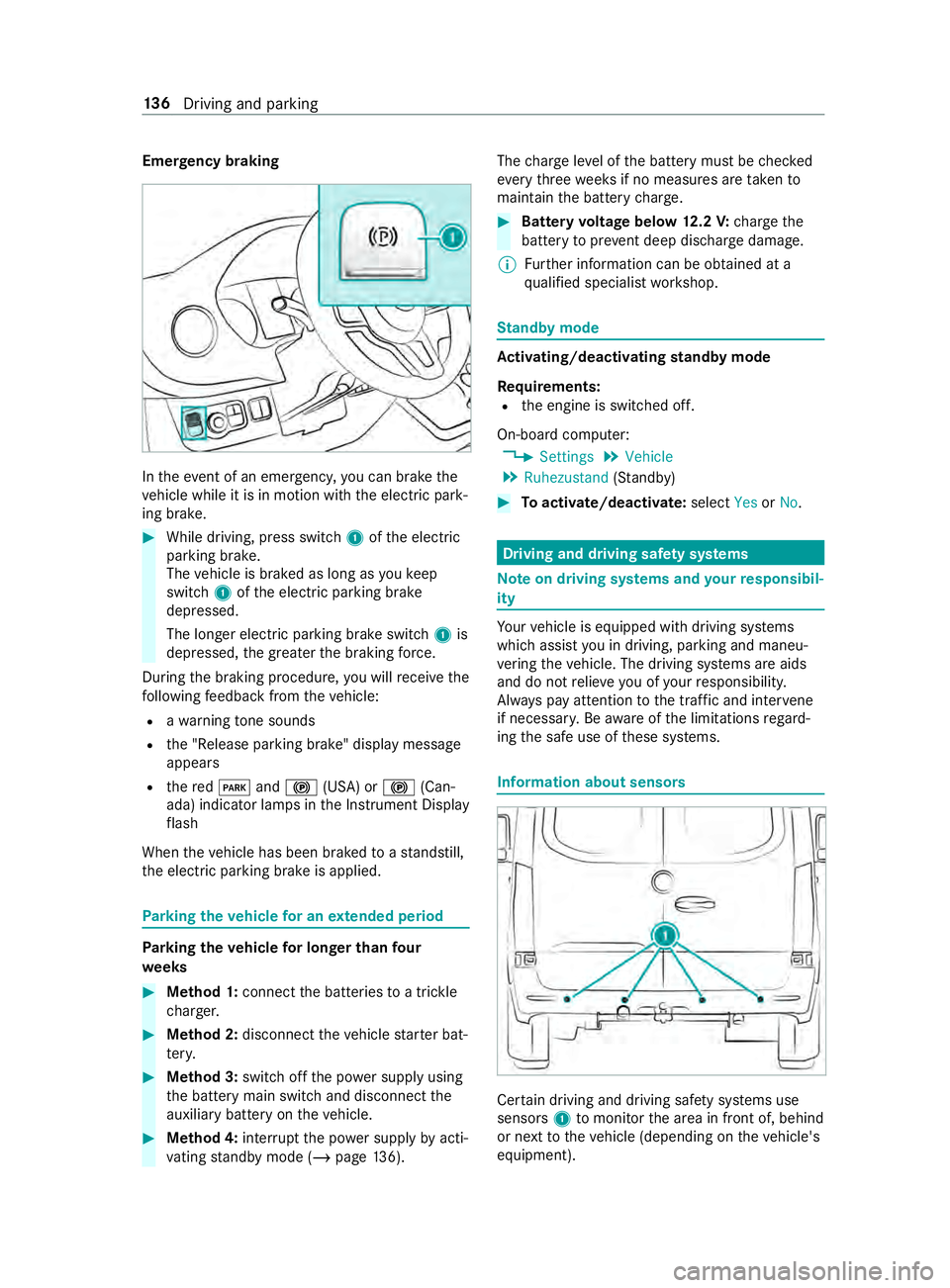
theeve nt of an emergency, you can brake the
ve hicle while it is in motion with the electric park‐
ing brake. #
While driving, press switch 1ofthe electric
parking brake.
The vehicle is braked as long as youke ep
switch 1ofthe electric parking brake
depressed.
The longer electric parking brake switch 1is
depressed, the greater the braking forc e.
During the braking procedure, you will receive the
fo llowing feedback from theve hicle:
R awa rning tone sounds
R the "Release parking brake" display message
appears
R there d0049 and0024 (USA) or 0024(Can‐
ada) indicator lamps in the Instrument Display
fl ash
When theve hicle has been braked toast andstill,
th e electric parking brake is applied. Pa
rking theve hicle for an extended period Pa
rking theve hicle for longer than four
we eks #
Method 1: connect the batteries toa trickle
ch arge r. #
Method 2: disconnect theve hicle star ter bat‐
te ry. #
Method 3: switchoff the po wer supply using
th e battery main switch and disconnect the
auxiliary battery on theve hicle. #
Method 4: interrupt the po wer supply byacti‐
va ting standby mode (/ page136). The
charge leve l of the battery must be checked
eve rythre ewe eks if no measures are take nto
maintain the battery charge. #
Battery voltage below 12.2 V: charge the
battery topreve nt deep discharge damage.
% Fu
rther information can be obtained at a
qu alified specialist workshop. St
andby mode Ac
tivating/deactivating standby mode
Re quirements:
R the engine is switched off.
On-board computer: 4 Settings 5
Vehicle
5 Ruhezustand (Stan dby) #
Toactivate/deactivate: selectYesorNo. Driving and driving saf
ety sy stems Note
on driving sy stems and your responsibil‐
ity Yo
ur vehicle is equipped with driving sy stems
which assist you in driving, parking and maneu‐
ve ring theve hicle. The driving sy stems are aids
and do not relie ve you of your responsibility.
Alw ays pay attention tothe tra ffic and inter vene
if necessa ry. Be aware of the limitations rega rd‐
ing the safe use of these sy stems. Information about sensors
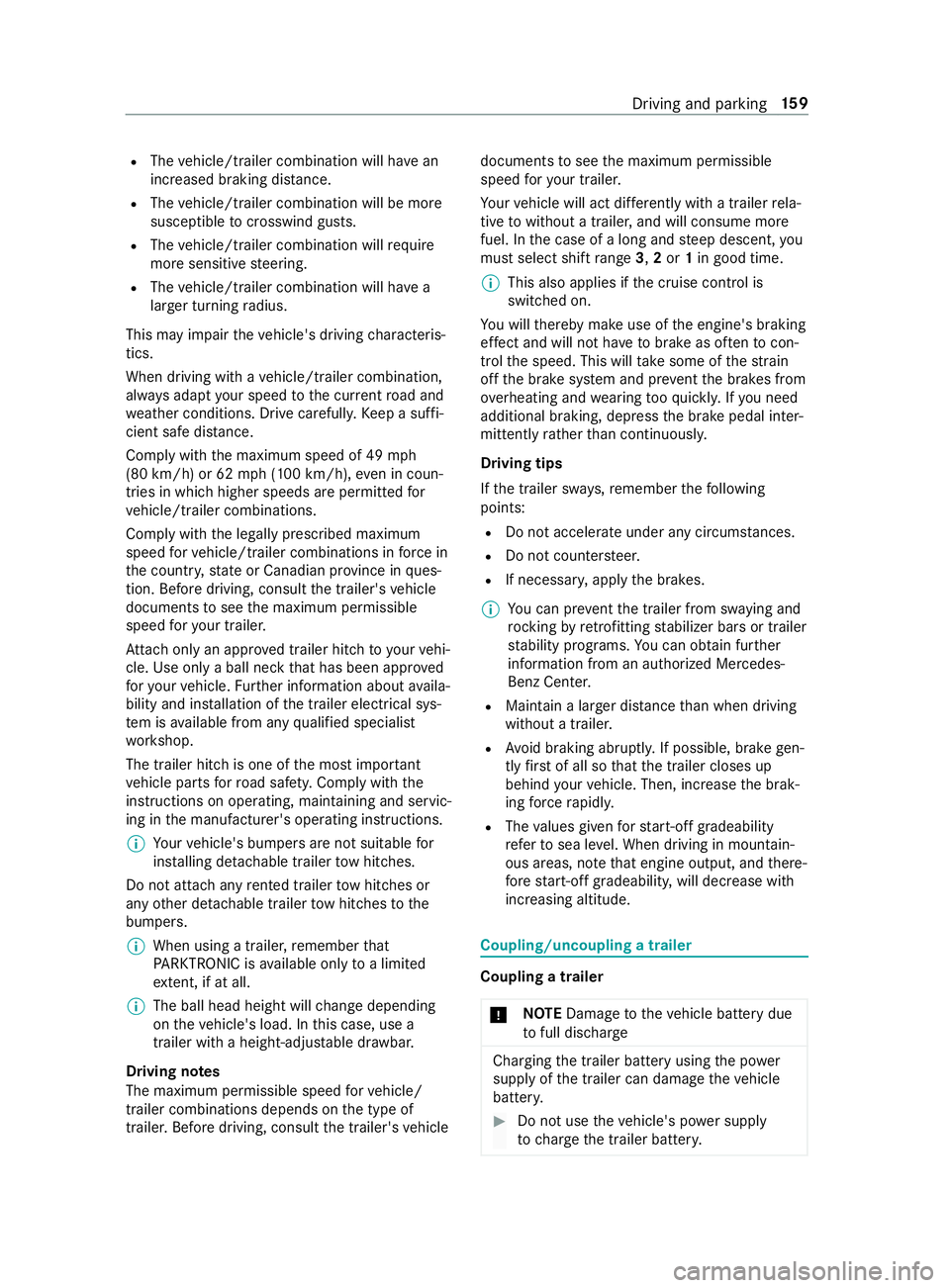
Cer
tain driving and driving saf ety sy stems use
sensors 1tomonitor the area in front of, behind
or next totheve hicle (depending on theve hicle's
equipment). 13 6
Driving and pa rking
Page 183 of 354
R
The vehicle/trailer combination will ha vean
inc reased braking dis tance.
R The vehicle/trailer combination will be more
susceptible tocrosswind gu sts.
R The vehicle/trailer combination will requ ire
more sensitive steering.
R The vehicle/trailer combination will ha ve a
lar ger turning radius.
This may impair theve hicle's driving characteris‐
tics.
When driving with a vehicle/trailer combination,
alw ays adapt your speed tothe cur rent road and
we ather conditions. Drive carefull y.Ke ep a suf fi‐
cient safe dis tance.
Co mply withthe maximum speed of 49 mph
(80 km/h) or 62 mph (100 km/h), even in coun‐
tries in which higher speeds are permitted for
ve hicle/trailer combinations.
Comply with the legally prescribed maximum
speed forve hicle/trailer combinations in forc e in
th e count ry,st ate or Canadian pr ovince in ques‐
tion. Before driving, consult the trailer's vehicle
documents tosee the maximum permissible
speed foryo ur trailer.
At tach only an appr oved trailer hitch to yourvehi‐
cle. Use only a ball neck that has been appr oved
fo ryo ur vehicle. Further information about availa‐
bility and ins tallation of the trailer electrical sys‐
te m is available from any qualified specialist
wo rkshop.
The trailer hitch is one of the most impor tant
ve hicle parts forro ad saf ety. Comply with the
instructions on operating, maintaining and servic‐
ing in the manufacturer's operating instructions.
% Yo
ur vehicle's bumpers are not suitable for
ins talling de tach able trailer tow hit ches.
Do not attach any rented trailer tow hit ches or
any other de tach able trailer tow hit ches tothe
bumpers.
% When using a trailer,
remember that
PA RKTRONIC is available only toa limited
ex tent, if at all.
% The ball head height will
change depending
on theve hicle's load. In this case, use a
trailer with a height-adjus table dr awbar.
Driving no tes
The maximum permissible speed forve hicle/
trailer combinations depends on the type of
trailer. Before driving, consult the trailer's vehicle documents
tosee the maximum permissible
speed foryo ur trailer.
Yo ur vehicle will act dif fere ntly wi tha trailer rela‐
tive towithout a trailer, and will consume more
fuel. In the case of a long and steep descent, you
must select shift range 3,2or 1in good time.
% This also applies if
the cruise cont rol is
switched on.
Yo u will thereby make use of the engine's braking
ef fect and will not ha vetobrake as of tento con‐
trol the speed. This will take some of thest ra in
off the brake sy stem and pr event the brakes from
ove rheating and wearing tooqu ickl y.Ifyo u need
additional braking, depress the brake pedal inter‐
mittently rath er than continuousl y.
Driving tips
If th e trailer sw ays, remember thefo llowing
points:
R Do not accelerate under any circums tances.
R Do not counter steer.
R If necessar y,apply the brakes.
% Yo
u can pr eventthe trailer from sw aying and
rock ingbyretrofitting stabilizer bars or trailer
st ability programs. You can obtain fur ther
information from an authorized Mercedes-
Benz Center.
R Maintain a lar ger dis tance than when driving
without a trailer.
R Avoid braking abruptl y.If possible, brake gen‐
tly firs t of all so that the trailer closes up
behind your vehicle. Then, increase the brak‐
ing forc era pidl y.
R The values given forst art-off gradeability
re ferto sea le vel. When driving in moun tain‐
ous areas, no tethat engine output, and there‐
fo re start-off gradeability, will dec rease with
inc reasing altitude. Coupling/uncoupling a trailer
Coupling a trailer
* NO
TEDama getotheve hicle battery due
to full discharge Charging
the trailer battery using the po wer
supply of the trailer can damage theve hicle
batter y. #
Do not use theve hicle's po wer supply
to charge the trailer batter y. Driving and pa
rking 15 9
Page 186 of 354
The permissible gross
weight forve hicle-trailer
combinations (GCWR) is calculated byadding the
gross weight of the trailer tothe gross vehicle
we ight including a driver's weight of appr ox‐
imately 150 lbs (68 kg). The maximum permissi‐
ble gross combination weight is vehicle-specific
and equipment-dependent. When driving with a
trailer, you should not exceed the maximum per‐
mitted permissible gross weight forve hicle-trailer
combinations (GCWR).
The permissible values, which must not be excee‐
ded, can be found in your vehicle documents and
on the identification plates of the trailer tow
hitch, the trailer and theve hicle. The values
appr ovedby the manufacturer can also be found
in the "Technical data" section. Where theva lues
dif fer, th e lo west value alw ays applies.
Loading the trailer
Use a dr awbar nose weight that is as close as
possible tothe maximum permissible nose‐
we ight. Do not undershoot the minimum permis‐
sible nose weight. Otherwise, the trailer may
become de tach ed.
R Distribute the load over theve hicle and the
trailer so as not toexceed either the maxi‐
mum permissible values forth e gross vehicle
we ight rating (GVWR) and gross trailer weight
(G TW ),th e permissible gross weight forve hi‐
cle-trailer combinations (GCWR), nor the max‐
imum permissible gross axle weight rating
(GAWR) and trailer dr awbar nose weight (TWR)
of your vehicle.
R Addth ere ar axle load tothe trailer dr awbar
nose weight of the trailer dr awbar on the ball
head (TWR). This will ensure that you do not
ex ceed the permissible gross axle weight rat‐
ing (G AWR).
R Addth eve hicle load tothe trailer dr awbar
nose weight of the trailer dr awbar on the ball
head (TWR). This will ensure that you do not
ex ceed the permissible gross vehicle weight
ra ting (GVWR).
Che cking theve hicle and trailer weight
R Make sure that thewe ights of theto wing
ve hicle and the trailer comply with the maxi‐
mum permissible values. Ha vethe car/t railer
combination weighed on a calibrated weigh‐
ing machine. The car/trailer combination
comprises theto wing vehicle including driver,
passengers and load as well as the laden
trailer. R
Check the maximum permissible gross axle
we ight rating of the front and rear axles
(GAWR), the gross trailer weight (G TW),the
permissible gross weight forve hicle-trailer
combinations (GCWR) and the trailer dr awbar
nose weight rating (TWR). Tr
ailer po wer supply Incor
rect cabling of the connector plug may inter‐
fe re with other electronic sy stems in theve hicle.
Mercedes-Benz therefore recommends that you
ha ve the cabling of the connector plug car ried
out at a qualified specialist workshop.
Yo u can connect accesso ries up toa maximum of
24 0 W tothe permanent po wer supply. Do not
ch arge a trailer battery using the po wer supp ly.
Yo ur vehicle may be equipped with a range of
electrical equipment for trailer operation.
Depending on your trailer, you may need an
adap terfo rth e electrical connection between the
trailer and your vehicle.
The trailer soc ket of your vehicle is equipped with
a permanent po wer supp lyat thefa ctor y.
The permanent po wer supp lyis supplied via
trailer soc ket pin 4.
No tethat the trailer's permanent po wer supp lyis
not switched off when theve hicle's on-board
electrical sy stem voltage is lo w.This could com‐
ple tely dischar geyour vehicle's star ter batter y.
Fu rther information on the electrical equipment
cur rently ins talled on your vehicle, and on ins tal‐
ling trailer elect rics, can be obtained at any quali‐
fi ed specialist workshop. 16 2
Driving and pa rking
Page 206 of 354
Te
lephone Te
lephony Te
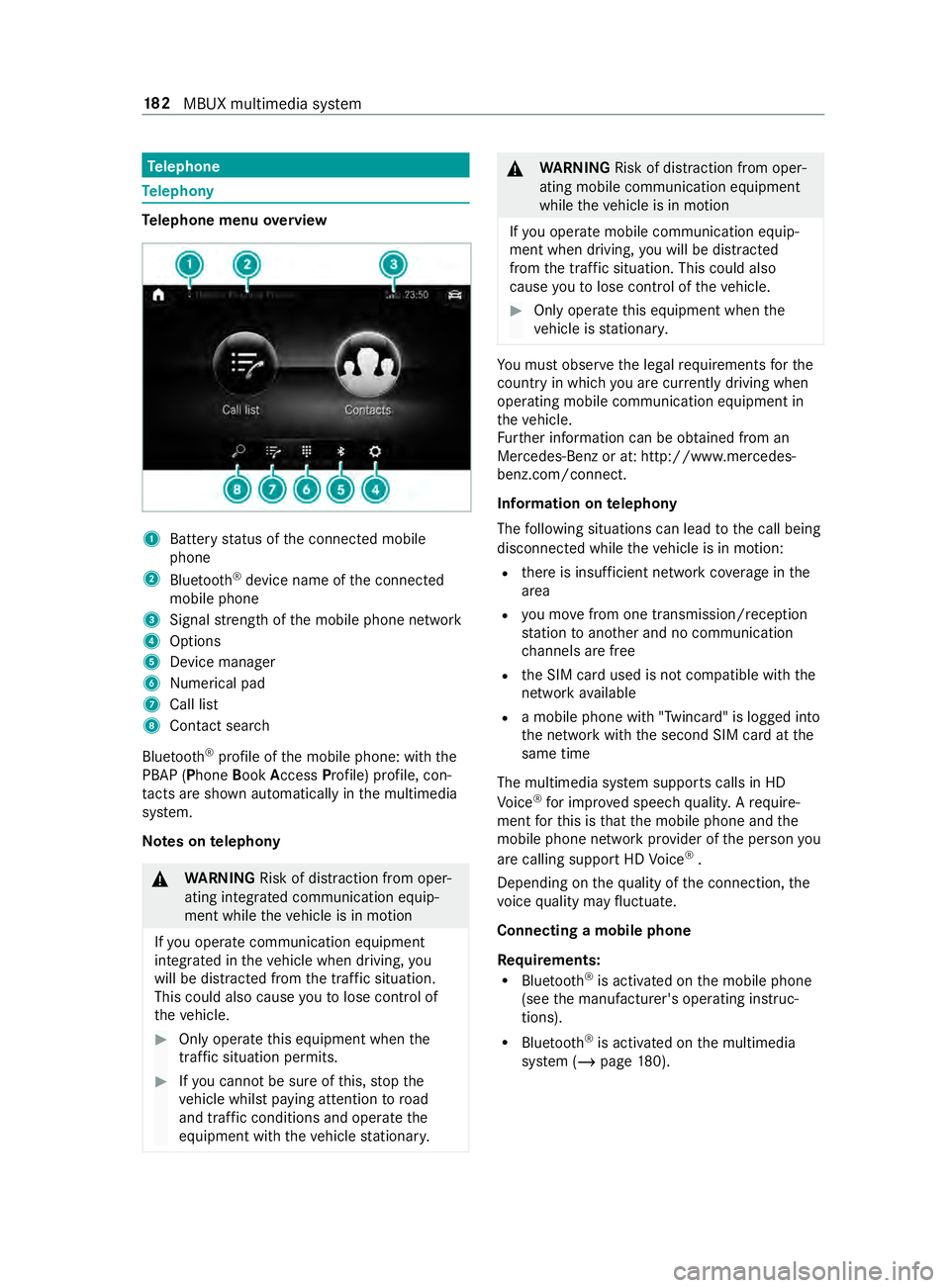
lephone menu overview 1
Battery status of the connected mobile
phone
2 Blue tooth ®
device name of the connected
mobile phone
3 Signal stre ngth of the mobile phone network
4 Options
5 Device manager
6 Nume rical pad
7 Call li st
8 Contact sea rch
Blu etoo th®
profile of the mobile phone: with the
PBAP (Phone BookAccess Profile) profile, con‐
ta cts are shown au tomatically in the multimedia
sy stem.
Note s ontelephony &
WARNING Risk of distraction from oper‐
ating integrated communication equip‐
ment while theve hicle is in motion
If yo u operate communication equipment
integ rated in theve hicle when driving, you
will be distracted from the tra ffic situation.
This could also cause youto lose control of
th eve hicle. #
Only operate this equipment when the
traf fic situation permits. #
Ifyo u cannot be sure of this, stop the
ve hicle whilst paying attention toroad
and traf fic conditions and ope rate the
equipment with theve hicle stationar y. &
WARNING Risk of distraction from oper‐
ating mobile communication equipment
while theve hicle is in motion
If yo u operate mobile communication equip‐
ment when driving, you will be distracted
from the traf fic situation. This could also
cause youto lose control of theve hicle. #
Only operate this equipment when the
ve hicle is stationar y. Yo
u must obse rveth e legal requirements forthe
country in whi chyou are cur rently driving when
ope rating mobile communication equipment in
th eve hicle.
Fu rther information can be obtained from an
Mercedes-Benz or at: http://www.mercedes-
benz.com/connect.
Information on telephony
The following situations can lead tothe call being
disconnected while theve hicle is in motion:
R there is insuf ficient network co verage inthe
area
R you mo vefrom one transmission/reception
st ation toano ther and no communication
ch annels are free
R the SIM card used is not compatible with the
network available
R a mobile phone with "Twincard" is logged into
the network with the second SIM card at the
same time
The multimedia sy stem supports calls in HD
Vo ice ®
for impr oved speech quality. A require‐
ment forth is is that the mobile phone and the
mobile phone network pr ovider of the person you
are calling support HD Voice ®
.
Depending on thequ ality of the connection, the
vo ice quality may fluctuate.
Connecting a mobile phone
Re quirements:
R Blue tooth ®
is activated on the mobile phone
(see the manufacturer's operating instruc‐
tions).
R Blue tooth ®
is activated on the multimedia
sy stem (/ page180). 18 2
MBUX multimedia sy stem