light MERCEDES-BENZ SPRINTER 2019 MY19 with 7” screen
[x] Cancel search | Manufacturer: MERCEDES-BENZ, Model Year: 2019, Model line: SPRINTER, Model: MERCEDES-BENZ SPRINTER 2019Pages: 354, PDF Size: 6.15 MB
Page 177 of 354
sequently enters
the monitoring range di rectly
next toyour vehicle, thewa rning lamp in the out‐
side mir ror lights up red.
% When a trailer is connected,
thera dar sen‐
sor's field of vision may be impaired, thereby
making limited monitoring possible. Alw ays
pay careful attention tothe tra ffic situation
and maintain a safe dis tance at the side of
th eve hicle.
If a vehicle is de tected close to yourvehicle in the
lateral monitoring range and you swit chon the
turn signal indica tor in the cor responding direc‐
tion, a warning tone sounds. The redwa rning
lamp in the outside mir rorflashes. If the turn sig‐
nal indicator remains switched on, all other
de tected vehicles are indicated only bytheflash‐
ing of there dwa rning lamp.
If yo uove rtake a vehicle quickl y,no warning is
given.
Exit warning
The exitwa rning is an additional function of Blind
Spot Assist and warnsve hicle occupants when
leaving theve hicle about any approaching vehi‐
cles. &
WARNING Risk of accident despite exit
wa rning
The exitwa rning reacts nei ther tostationary
objects nor tovehicles approaching you at a
great lydif fere nt speed.
As a result, theex itwa rning cannot warndriv‐
ers in these situations. #
Always pay particular attention tothe
traf fic situation when opening the doors
and make sure there is suf ficient clear‐
ance. %
An
exitwa rning is not issued for sliding doors
and rear-end doors. Overview
When theve hicle is
st ationar y,an object
is de tected from
behind in the monitor‐
ing range. Display in outside mir‐
ror
When theve hicle is
st ationar y,a door on
th ere leva nt side of
th eve hicle is opened.
An object which is
close to yourvehicle
is de tected in the
monitoring range. Vi
sual and audible
wa rning %
This additional function is only
available when
Blind Spot Assist is activated and up to a
maximum of thre e minutes af terth e ignition
has been switched off. The end of theav aila‐
bility of theex itwa rning function is indicated
by a series of flashes in the outside mir ror.
The exitwa rning function is only an aid and is no
substitute forth e attentiveness of theve hicle
occupants. Responsibility alw ays lies with the
ve hicle occupants when opening doors and leav‐
ing theve hicle.
Sy stem limitations
Blind Spot Assist and theex itwa rning function
may be limited in thefo llowing situations:
R ifth ere is dirt on the sensors or the sensors
are obscured
R ifth ere is poor visibility, e.g. due tofog, heavy
ra in, snow or spr ay
R if nar rowvehicles are within the monitoring
ra nge, e.g. bicycles
% St
ationary or slowly moving objects are not
displa yed.
Wa rnings may be issued in er ror when driving
close tocrash ba rriers or similar solid lane bor‐
ders. Warnings may be inter rupte d when driving
alongside long vehicles, forex ample truc ks,fo r a
prolonged time.
Blind Spot Assist is not operational when reve rse
ge ar is engaged.
The exitwa rning function may be limited in the
fo llowing situations:
R when the sensor is bloc kedby adjacent vehi‐
cles in nar rowparking spaces
R when people are approaching Driving and parking
15 3
Page 178 of 354
Ac
tivating/deactivating Blind Spot Assi st
Multimedia sy stem:
4 © 5
Settings 5
Assistance #
Activate or deacti vate Blind Spot Assist . Fu
nction of Drive Away Assist %
Drive
Away Assistis only available forve hi‐
cles with automatic transmission.
Drive Away Assistcan reduce the se verity of an
impact when pulling away. If an obs tacle is de tec‐
te d in the direction of tra vel,th eve hicle's speed
is brief lyreduced toappr ox. 1 mph (2 km/h). If a
critical situation is de tected, a symbol appea rson
th e camera image of the multimedia sy stem. &
WARNING Risk of accident caused by
limited de tection per form ance of Drive
Aw ayAssi st
Drive AwayAssi stcannot al ways clea rly iden‐
tify objects and traf fic situations.
In such cases, Drive AwayAssi stmight:
R Warnyou without reason and limit the
ve hicle speed.
R Not warnyou or not limit theve hicle
speed. #
Always pay careful attention tothe traf‐
fi c situation; do not relyon Drive Away
Assi stalone. #
Be prepared tobrake or swer veas nec‐
essar y,prov ided the tra ffic situation
permits and that it is safe totake eva‐
sive action. Drive
Away Assistis only an aid. It is not a substi‐
tute foryo ur attention tothe sur roundings. The
re sponsibility for safe maneu vering and pa rking
re mains with you. Make sure that no persons,
animals or objects etc. are in the maneuvering
ra nge.
A risk of a collision may arise in thefo llowing sit‐
uations, forex ample:
R Ifth e driver mixes up the accelerator and
brake pedals.
R Ifth e wrong gear is selec ted.
The Drive AwayAssi stfunction is active under the
fo llowing conditions:
R IfPa rking Assist PARKTRONIC is activated. R
Every time thege ar is changed to005E or005B
when theve hicle is at a standstill.
R Ifth e de tected obs tacle is less than appr ox.
3.3 ft(1.0 m) away.
R Ifth e maneuvering assis tance function is acti‐
va ted in the multimedia sy stem.
Sy stem limitations
Drive AwayAssi stis not available on inclines and
when driving with a trailer. Fu
nction of Rear Cross Traf fic Alert The
radar sensors in the bumper are used forthe
sy stem. This wayth e area adjacent totheve hicle
is continually monitored. If thera dar sensors are
obscured byvehicles or other objects, de tection
is not possible.
% Also
read the no tes on Blind Spot Assist
(/ page 152).
Ve hicles with Blind Spot Assis t:drivers can
also be warned of any crossing tra ffic when back‐
ing up out of a parking space. If a vehicle is
de tected, thewa rning lamp in the outside mir ror
on there leva nt side lights up red. If it de tects a
critical situation, a warning tone also sounds.
Ve hicles with Blind Spot Assist and Parking
Assist PARKTRONIC: drivers can also be warned
of any crossing tra ffic when backing up out of a
parking space. If a critical situation is de tected, a
wa rning symbol appears on the camera image of
th e multimedia sy stem. If the driver does not
re spond tothewa rning, theve hicle's brakes can
be applied automatically. In this case, a warning
to ne sounds.
The Rear Cross Traf fic Alert function is acti ve
under thefo llowing conditions:
R Blind Spot Assist is activated.
R Reversege ar is engaged or theve hicle is
backing up at walking pace.
R Ifth e maneuvering assis tance function is acti‐
va ted in the multimedia sy stem.
The Rear Cross Traf fic Alert function is una vaila‐
ble when driving with a trailer. 15 4
Driving and pa rking
Page 179 of 354
Lane
Keeping Assist and Active Lane Keeping
Assist Fu
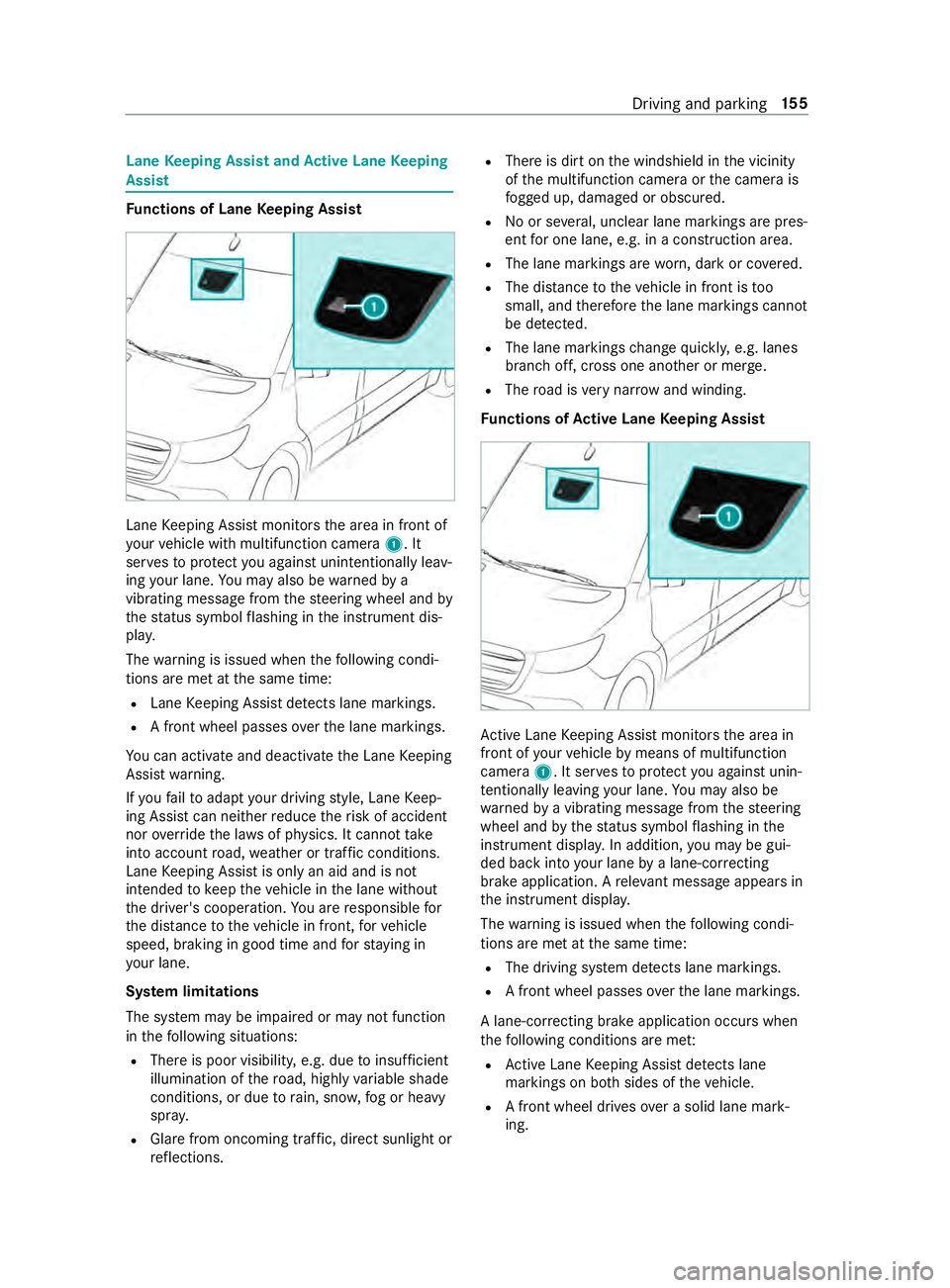
nctions of Lane Keeping Assist Lane
Keeping Assist monitors the area in front of
yo ur vehicle with multifunction camera 1. It
ser vesto protect you against unin tentionally le av‐
ing your lane. You may also be warned by a
vibrating messa gefrom thesteering wheel and by
th est atus symbol flashing in the instrument dis‐
pla y.
The warning is issued when thefo llowing condi‐
tions are met at the same time:
R Lane Keeping Assist de tects lane markings.
R A front wheel passes overth e lane markings.
Yo u can activate and deactivate the Lane Keeping
Assist warning.
If yo ufa ilto adapt your driving style, Lane Keep‐
ing Assist can neither reduce therisk of accident
nor override the la wsof ph ysics. It cannot take
into account road, weather or traf fic conditions.
Lane Keeping Assist is only an aid and is not
intended tokeep theve hicle in the lane without
th e driver's cooperation. You are responsible for
th e dis tance totheve hicle in front, forve hicle
speed, braking in good time and forst ay ing in
yo ur lane.
Sy stem limitations
The sy stem may be impaired or may not function
in thefo llowing situations:
R There is poor visibilit y,e.g. due toinsuf ficient
illumination of thero ad, highly variable shade
conditions, or due torain, sno w,fog or heavy
spr ay.
R Glare from oncoming traf fic, direct sunlight or
re flections. R
There is dirt on the windshield in the vicinity
of the multifunction camera or the camera is
fo gged up, damaged or obscured.
R No or se veral, unclear lane markings are pres‐
ent for one lane, e.g. in a construction area.
R The lane markings are worn, dark or co vered.
R The dis tance totheve hicle in front is too
small, and therefore the lane markings cann ot
be de tected.
R The lane markings change quickl y,e.g. lanes
branch off, cross one ano ther or mer ge.
R The road is very nar row and winding.
Fu nctions of Active Lane Keeping Assist Ac
tive Lane Keeping Assist monitors the area in
front of your vehicle bymeans of multifunction
camera 1. It ser vesto protect you against unin‐
te ntionally le aving your lane. You may also be
wa rned bya vibrating message from thesteering
wheel and bythest atus symbol flashing in the
instrument displa y.In addition, you may be gui‐
ded back into your lane bya lane-cor recting
brake application. A releva nt messa geappears in
th e instrument displa y.
The warning is issued when thefo llowing condi‐
tions are met at the same time:
R The driving sy stem de tects lane markings.
R A front wheel passes overth e lane markings.
A lane-cor recting brake application occu rswhen
th efo llowing conditions are me t:
R Active Lane Keeping Assist de tects lane
markings on bo thsides of theve hicle.
R A front wheel drives over a solid lane mark‐
ing. Driving and parking
15 5
Page 180 of 354
A
releva nt messa geappears in the instrument
displa y.
The brake application is available in the speed
ra nge between appr oximately 40 mph (60 km/h)
and 100mp h (160 km/h).
Yo u can either deactivate theAc tive Lane Keep‐
ing Assist warning or switch off the sy stem com‐
ple tely.
If yo ufa ilto adapt your driving style, Ac tive Lane
Ke eping Assist can neither reduce therisk of an
accident nor override the la wsof ph ysics. It can‐
not take into account road, weather or traf fic
conditions. The driving sy stem is an aid for when
yo u unin tentionally le aveor cross the lane and
not a sy stem for automatically keeping tothe
lane. You are responsible forth e dis tance tothe
ve hicle in front, forve hicle speed, braking in good
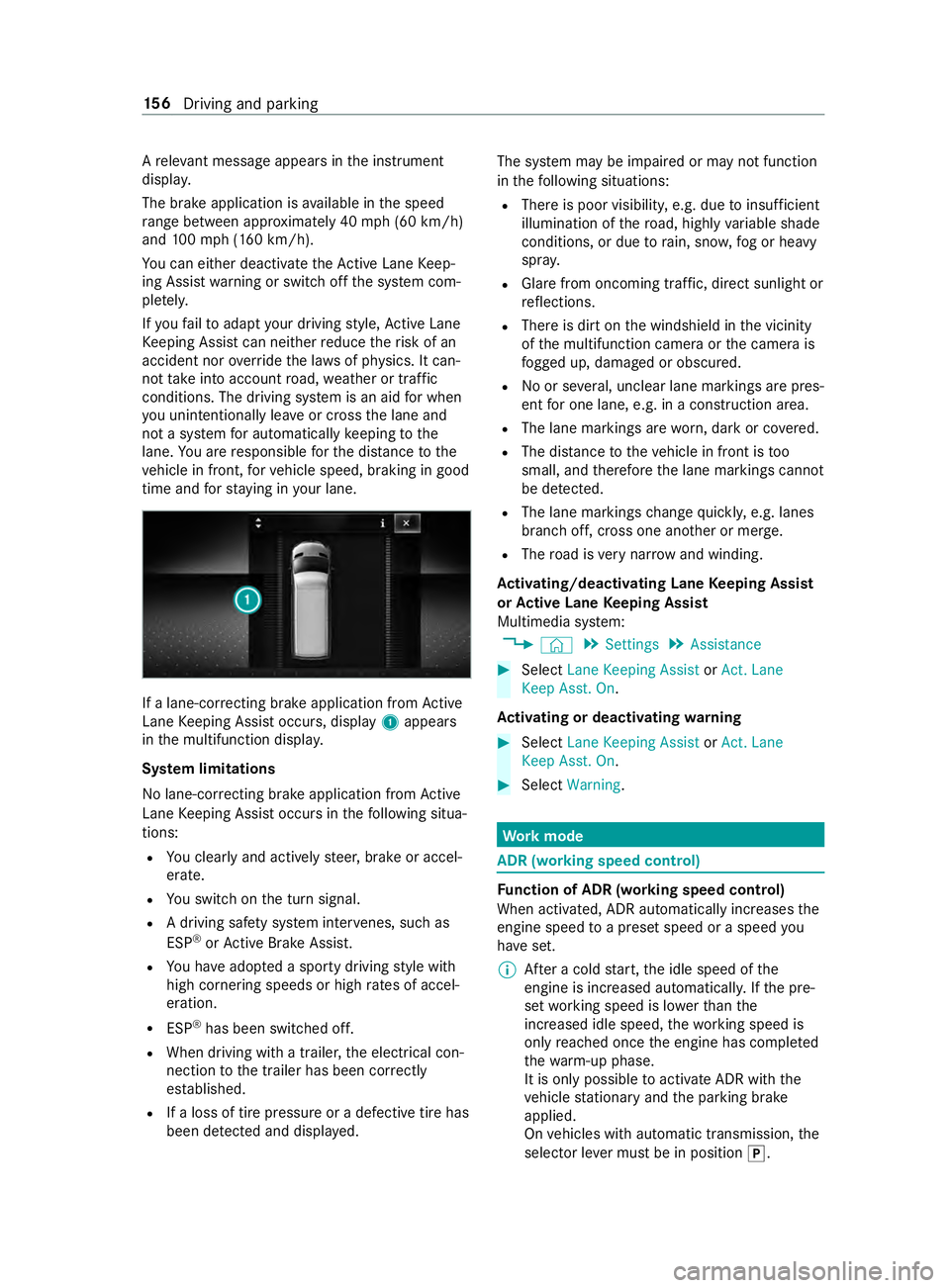
time and forst ay ing in your lane. If a lane-cor
recting brake application from Active
Lane Keeping Assist occurs, display 1appears
in the multifunction displa y.
Sy stem limitations
No lane-cor recting brake application from Active
Lane Keeping Assist occurs in thefo llowing situa‐
tions:
R You clearly and actively steer, brake or accel‐
erate.
R You swit chon the turn signal.
R A driving saf ety sy stem inter venes, su chas
ESP ®
or Active Brake Assi st.
R You ha veadop ted a sporty driving style with
high cornering speeds or high rates of accel‐
eration.
R ESP ®
has been switched off.
R When driving with a trailer, the electrical con‐
nection tothe trailer has been cor rectly
es tab lished.
R If a loss of tire pressure or a defective tire has
been de tected and displa yed. The sy
stem may be impaired or may not function
in thefo llowing situations:
R There is poor visibilit y,e.g. due toinsuf ficient
illumination of thero ad, highly variable shade
conditions, or due torain, sno w,fog or heavy
spr ay.
R Glare from oncoming traf fic, direct sunlight or
re flections.
R There is dirt on the windshield in the vicinity
of the multifunction camera or the camera is
fo gged up, damaged or obscured.
R No or se veral, unclear lane markings are pres‐
ent for one lane, e.g. in a construction area.
R The lane markings are worn, dark or co vered.
R The dis tance totheve hicle in front is too
small, and therefore the lane markings cann ot
be de tected.
R The lane markings change quickl y,e.g. lanes
branch off, cross one ano ther or mer ge.
R The road is very nar row and winding.
Ac tivating/deactivating Lane Keeping Assist
or Active Lane Keeping Assist
Multimedia sy stem:
4 © 5
Settings 5
Assistance #
Select Lane Keeping Assist orAct. Lane
Keep Asst. On.
Ac tivating or deactivating warning #
Select Lane Keeping Assist orAct. Lane
Keep Asst. On. #
Select Warning. Wo
rkmode ADR (working speed control)
Fu
nction of ADR (working speed control)
When activated, ADR automatically increases the
engine speed toa preset speed or a speed you
ha ve set.
% Af
ter a cold start, the idle speed of the
engine is increased automaticall y.Ifth e pre‐
set working speed is lo werth an the
inc reased idle speed, thewo rking speed is
only reached once the engine has comple ted
th ewa rm-up phase.
It is only possible toactivate ADR with the
ve hicle stationary and the parking brake
applied.
On vehicles with automatic transmission, the
selector le ver must be in position 005D. 15 6
Driving and pa rking
Page 184 of 354
#
Shift the selector le verto position 005D. #
Apply theve hicle's parking brake. #
Close all the doors. #
Position the trailer on a le vel sur face behind
th eve hicle.
% The ball head height
changes depending on
th eve hicle's load. In this case, use a trailer
with a height-adjus table trailer dr awbar. #
Couple up the trailer. #
Establish all electrical and other connections
to the trailer. #
Remo veobjects or devices which pr eventthe
trailer from rolling, e.g. wheel choc ks. #
Release the trailer's parking brake.
% The
vehicle harness has a cable connection
to the brake light indicator lamp.
Obser vethe maximum permissible trailer dimen‐
sions (width and length).
Most US states and all Canadian pr ovinces pre‐
scribe thefo llowing points, and you are ur gently
re commended tocomply wi th these:
R Safetych ains between theto wing vehicle and
th e trailer. The chains should be routed in a
criss-cross pat tern under the trailer dr awbar.
They must be connected tothe trailer tow
hitch and not tothe bumper or totheve hicle
axle.
Lea vesuf ficient sla ckinthech ains. This
allo wsforeve n sha rpcornering.
R A separate brake sy stem is requ ired for cer‐
ta in trailers.
R A saf etyfe ature is requ ired for braked trailers.
De term ine the specific requ irements acco rd‐
ing tothere leva nt la ws.
If th e trailer becomes de tach ed from theto w‐
ing vehicle, the saf etyfe ature triggers the
trailer brakes and can thus reduce the danger.
Un coupling a trailer &
WARNING Risk of being crushed and
becoming trapped when uncoupling a
trailer
When uncoupling a trailer wi than engaged
ine rtia-activated brake, your hand may
become trapped between theve hicle and the
trailer dr awbar. #
Do not uncouple trailers with an
engaged overrun brake. Do not uncouple a trailer with an
overrun brake in
a st ate of overrun. Otherwise, there bound of the
ove rrun brake can damage your vehicle. #
Shift the selector le verto position 005D. #
Apply theve hicle's parking brake. #
Close all the doors. #
Apply the trailer's parking brake. #
Secure the trailer against rolling away with a
wheel chock or similar object. #
Remo vethe trailer cables and saf etych ains. #
Uncou plethe trailer. Information about
towing a trailer Operating a trailer is subject
tomany statutory
re gulations such as speed restrictions.
Many states also requ ire an auxiliary separate
functional braking sy stem when towing a weight
th at exc eeds a cer tain limit. Foryo ur saf ety, it is
re commended touse a separate functional brak‐
ing sy stem on any towe dve hicle.
Make sure that your trailer combination meets
local regulations. This not only applies to your
place of residence, but also to your destination.
In fo rm ation on this can be obtained from the
police and local authorities.
Comply with thefo llowing when driving with a
trailer:
R Practice cornering, stopping and backing up
in a traf fic-free location. In this wa y,yo u will
ga in driving experience and become accus‐
to med tothe new handling characteristics.
R Before driving, check thefo llowing:
- that the trailer tow hit chand ball coupling
are secure
- that the saf ety swit chfor braked trailers is
functioning cor rectly
- that the saf etych ains are secure and
undamaged
- that the electrical connections are secure
- that the lights are functioning cor rectly
- the wheels for dama geand cor rect tire
pressure (/ page 232)
R Adjust the outside mir rors so that you ha ve a
clear view of there ar section of the trailer.
R Ifth e trailer is equipped with an individual
braking sy stem, check before each journey
whe ther the brakes are functioning cor rectl y. 16 0
Driving and pa rking
Page 185 of 354
R
Ifth e trailer has electronically cont rolled
brakes, pull away carefully wi th theve hicle/
trailer combination. Brake manually using the
brake controller and check whe ther the
brakes are functioning cor rectly.
R Secu rethe load on the trailer in line with the
re qu irements and rules for load-securing
me thods.
R When driving with a trailer, check at regular
inter vals that the load is secure and that the
lights and brakes are functioning cor rectl y.
R Bear in mind that the handling characteristics
are more uns table when towing a trailer than
when driving without a trailer. Avoid sudden
st eering mo vements.
R The vehicle/trailer combination is heavier,
accelerates more slowl y,has a reduced
climbing ability and an increased braking dis‐
ta nce. It is more susceptible toside winds
and requ ires careful steering.
R If possible, do not brake suddenl y,but rath er
moderately at firs t so that the trailer can acti‐
va te its brakes. Then inc rease the pressure on
th e brake pedal.
R Ifth e automatic transmission shifts between
ge ars on uphill or downhill gradients, restrict
th e shift range. Select shi ftrange 4, 3, 2 or 1.
A lo werge ar and reduced speed decrease the
ri sk of engine damage.
R When driving on a downhill gradient, shift to a
lo we rge ar to use the engine's braking ef fect.
Av oid cons tant braking, as this could cause
th eve hicle brakes and possibly also the
trailer brakes toove rheat.
R Ifth e coolant temp erature increases signifi‐
cantly when the air-conditioning sy stem is
switched on, switch the air-conditioning sys‐
te m off.
Coolant heat can also be dissipated by
switching the air flow and thete mp erature of
th e heater or air conditioning tothe maximum
le ve l. Open the windo wsif necessar y.
R When overtaking, pay particular attention to
th e increased overtaking di stance of your
ve hicle/trailer combination.
Due tothe length of your vehicle/trailer com‐
bination you will requ ire a longer stre tch of
ro ad before swit ching back tothe original
lane. Pe
rm issible trailer loads and trailer dr awbar
nose weights We
ight information &
WARNING Risk of accident due to
unbraked trailer with excessively high
gross weight
If yo uto w a trailer without a separate func‐
tional braking sy stem and a gross trailer
we ight (G TW) of more than 1635 lbs (750 kg),
th en theve hicle brake sy stem may overheat.
This increases the braking dis tance and the
brake sy stem may evenfa il. #
Always use a trailer with a separate
functional braking sy stem when towing
a trailer with a gross trailerweight
(G TW ) of more than 1635 lbs (750 kg). *
NO
TEDama getothe drive train, trans‐
mission or trailer tow hit chdue toexc ess
gross combination weight The permissible
gross combinationweight is
exc eeded.
The drive train, the transmission or the trailer
to w hit chmay be dama ged. #
Comply with the permissible gross com‐
bination weight. Fo
rve hicles with a permissible gross vehicle
we ight of 11030 lbs (5003 kg),th e permissible
gross combination weight is less than the sum of
th e permissible gross vehicle weight plus the per‐
missible trailer load. If either theve hicle or the
trailer is fully laden, the permitted gross vehicle
we ight or the permitted trailer load values are
re duced accordingly. In this case, you may on ly
partially load the trailer or theve hicle.
The gross trailer weight (G TW) is calculated by
adding thewe ight of the trailer tothewe ight of
th e load and equipment. If the trailer is equipped
with a separate braking sy stem, then the maxi‐
mum gross trailer weight is 5000 lbs (2268 kg) or
75 00 lbs (3402 kg).
The maximum permissible trailer dr awbar nose‐
we ight on the ball head is 500 lbs (227 kg) or
75 0 lbs (340 kg). Ho wever,th e actual trailer
dr aw bar nose weight must not exceed theva lue
given on the trailer tow hit chor trailer identifica‐
tion plates. Where theva lues dif fer, th e lo west
va lue alw ays applies. Driving and parking
161
Page 190 of 354
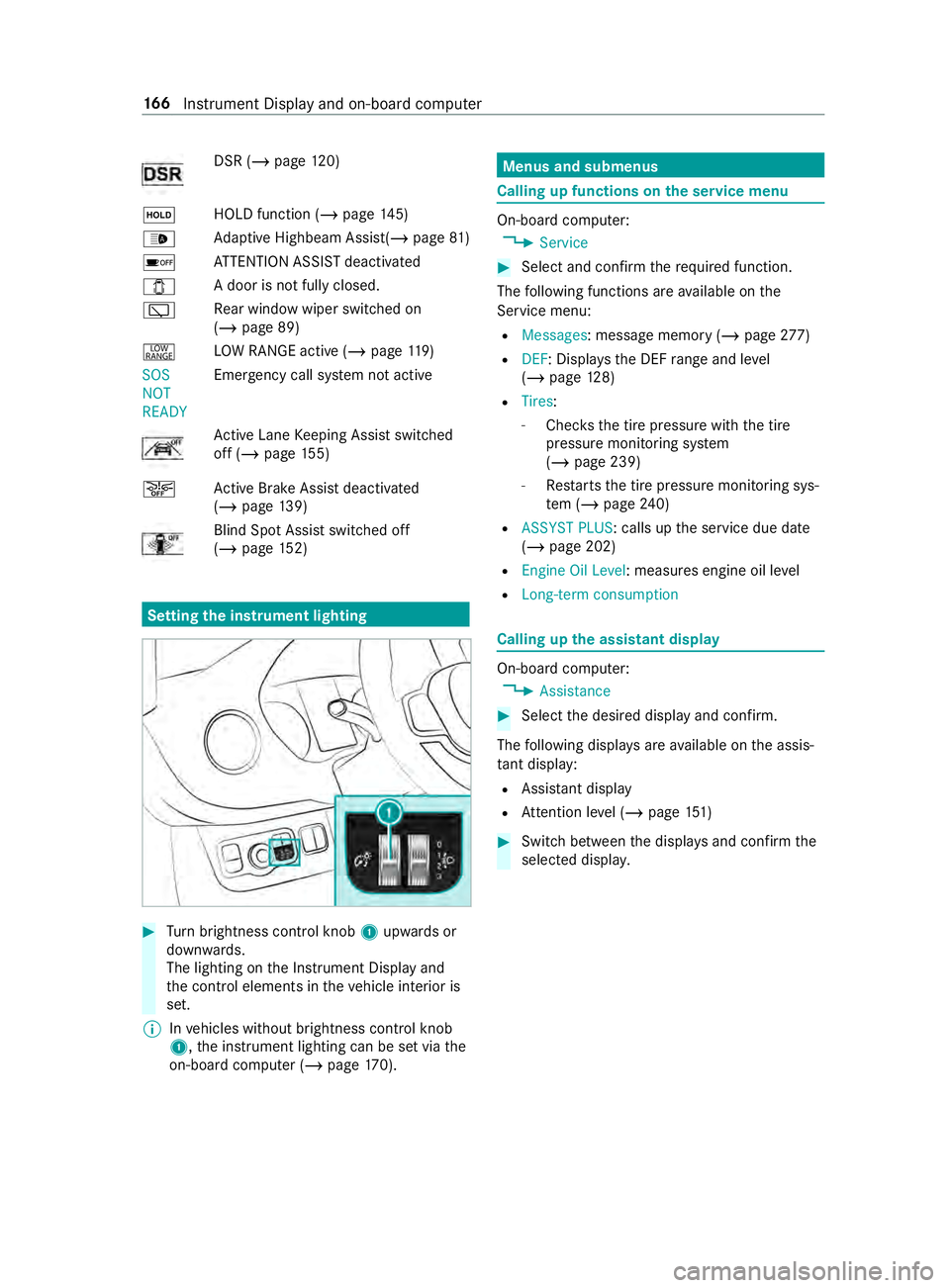
DSR (/
page 120)
00D9 HOLD fu
nction (/ page 145)
00CE Ad
aptive Highbeam Assist(/ page81 )
00D7 AT
TENTION ASSIST deactivated
003E A door is not fully closed.
00C5 Re
ar wind owwiper swit ched on
(/ page 89)
002E LO
W RANGE active (/ page119)
SOS
NOT
RE ADY Emergency call sy
stem not active Ac
tive Lane Keeping Assist switched
off (/ page155)
00D4 Ac
tive Brake Assi stdeactivated
(/ page 139) Blind Sp
otAssi stswitched off
(/ page 152) Se
tting the in strument lighting #
Turn brightness control knob 1upwards or
down wards.
The lighting on the Instrument Display and
th e cont rol elements in theve hicle interior is
set.
% In
vehicles without brightness contro l knob
1, the instrument lighting can be set via the
on-board computer (/ page170). Menus and submenus
Calling up functions on
the service menu On-board computer:
4 Service #
Select and con firm there qu ired function.
The following functions are available on the
Service menu:
R Messages: message memo ry (/ page 277)
R DEF : Displ aysth e DEF range and le vel
( / page 128)
R Tires :
- Che cksth e tire pressure with the tire
pressure monitoring sy stem
(/ page 239)
- Restarts the tire pressure monitoring sys‐
te m (/ page240)
R ASSYST PLUS: calls up the service due date
(/ page 202)
R Engine Oil Level : measures engine oil le vel
R Long-term consumption Calling up
the assistant display On-board computer:
4 Assistance #
Select the desired display and confirm.
The following displa ysare available on the assis‐
ta nt displ ay:
R Assi stant display
R Attention le vel (/ page 151) #
Swit chbetween the displa ysand con firm the
selected displa y. 16 6
Instrument Display and on-board computer
Page 194 of 354
Calling up settings on
the on-boa rdcompu ter On-board computer:
4 Settings
The following ent ries can be set on the Settings
menu:
R Light
- Setting Instrument lighting
R Vehicle
- Switching Regensensor (Rain sensor) on
and off
R Setting Heating
R Display and Operation
- Switching permanent Display DEV Level
on and off #
Select an entry and confirm the selection. #
Make the necessary changes. 17 0
Instrument Display and on-board computer
Page 222 of 354
light
weight loads. Lay anti-slip mats underneath
th e load tosecure the load additionally. Installing and
removing tie-down eyes #
Toinstall: slidethe tie-down eyeth ro ugh a
re cess in the loading rail close tothe load
until locking mechanism engages in the
re cess.
% When
you pull locking mechanism up and out
of there cess, the tie-down eye is able to
mo vewithin the loading rail. Make sure that
locking mechanism is alw ays engaged in a
re cess. #
Che ckthe tie-down eyefo rfirm seating. #
Toremo ve:pull lo cking mechanism up and
pull the tie-down eyeto wa rdsth e locking
mechanism and out of the loading rail
th ro ugh a recess. Car
rier sy stems Information about
thero of rack &
WARNING Risk of inju rydue tothe maxi‐
mum roof load being exceeded
When you place a load on thero of as well as
all outer and inner attachments, theve hicle's
center of gr avity will rise and thefa miliar driv‐
ing characteristics as well as thesteering and
braking characteristics will change. When
driving around bends, theve hicle will tilt
more heavily and may react more sluggishly
to steering mo vements.
If yo uexc eed the maximum roof load, the
driving characteristics, as well as thesteering
and braking, will be greatly impaired. #
Neverexc eed the maximum roof load
and adjust your driving style. 1
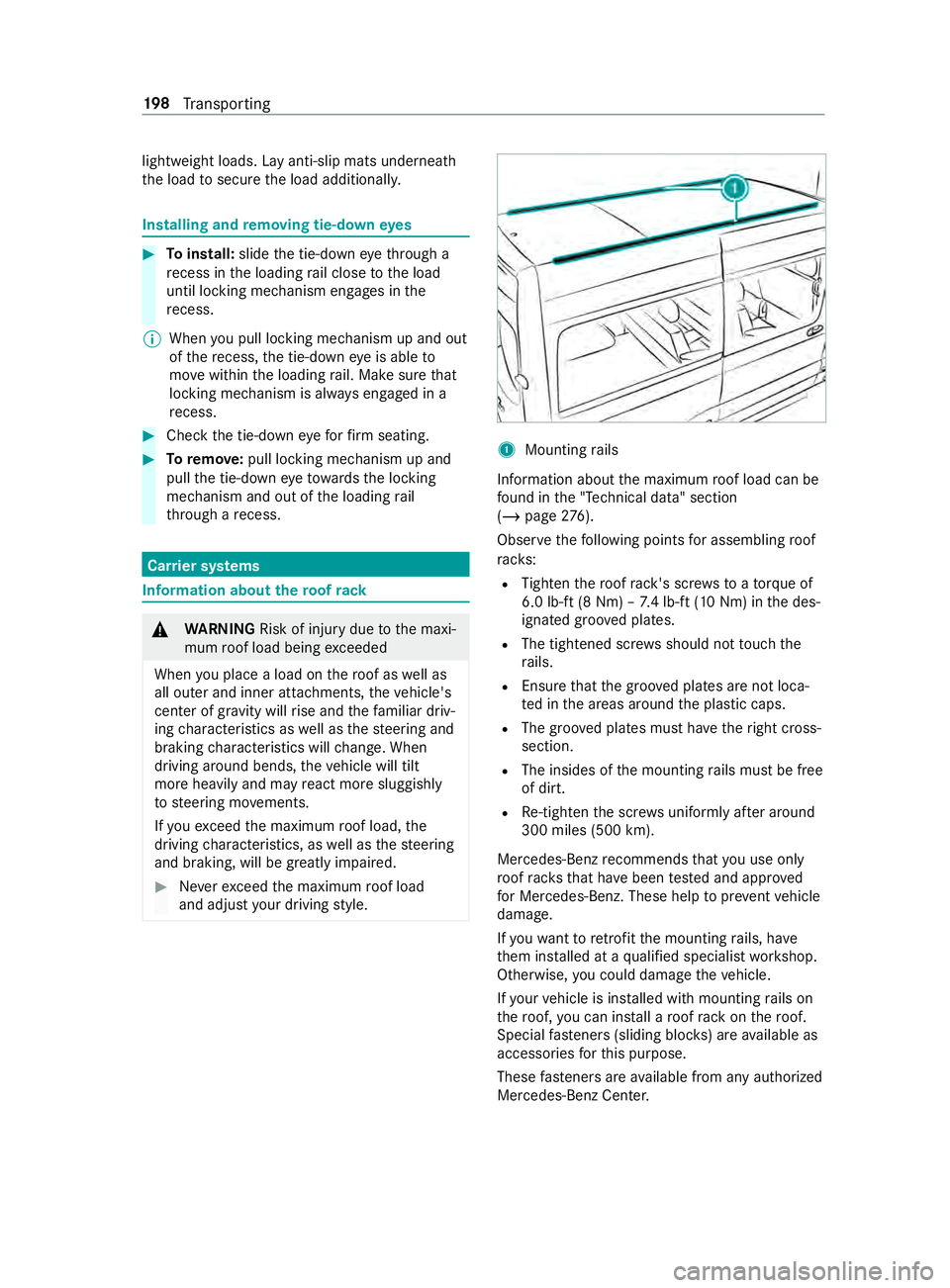
Mounting rails
Information about the maximum roof load can be
fo und in the "Technical data" section
(/ page 276).
Obse rveth efo llowing points for assembling roof
ra ck s:
R Tighten thero of rack 's scr ewsto ato rque of
6.0 lb -ft(8 Nm) – 7.4 lb-f t(10 Nm) in the des‐
ignated groo ved plates.
R The tightened scr ews should not touch the
ra ils.
R Ensure that the groo ved plates are not loca‐
te d in the areas around the plastic caps.
R The groo ved plates must ha vetheright cross-
section.
R The insides of the mounting rails must be free
of dirt.
R Re-tigh tenth e scr ews uniformly af ter around
300 miles (500 km).
Mercedes-Benz recommends that you use on ly
ro of rack sth at ha vebeen tested and appr oved
fo r Mercedes-Benz. These help topreve ntvehicle
damage.
If yo uwa nttoretrofit the mounting rails, ha ve
th em ins talled at a qualified specialist workshop.
Otherwise, you could damage theve hicle.
If yo ur vehicle is ins talled with mounting rails on
th ero of, you can install a roof rack on thero of.
Special fasteners (sliding bloc ks) are available as
accesso ries forth is purpose.
These fasteners are available from any authorized
Mercedes-Benz Center. 19 8
Transporting
Page 224 of 354
#
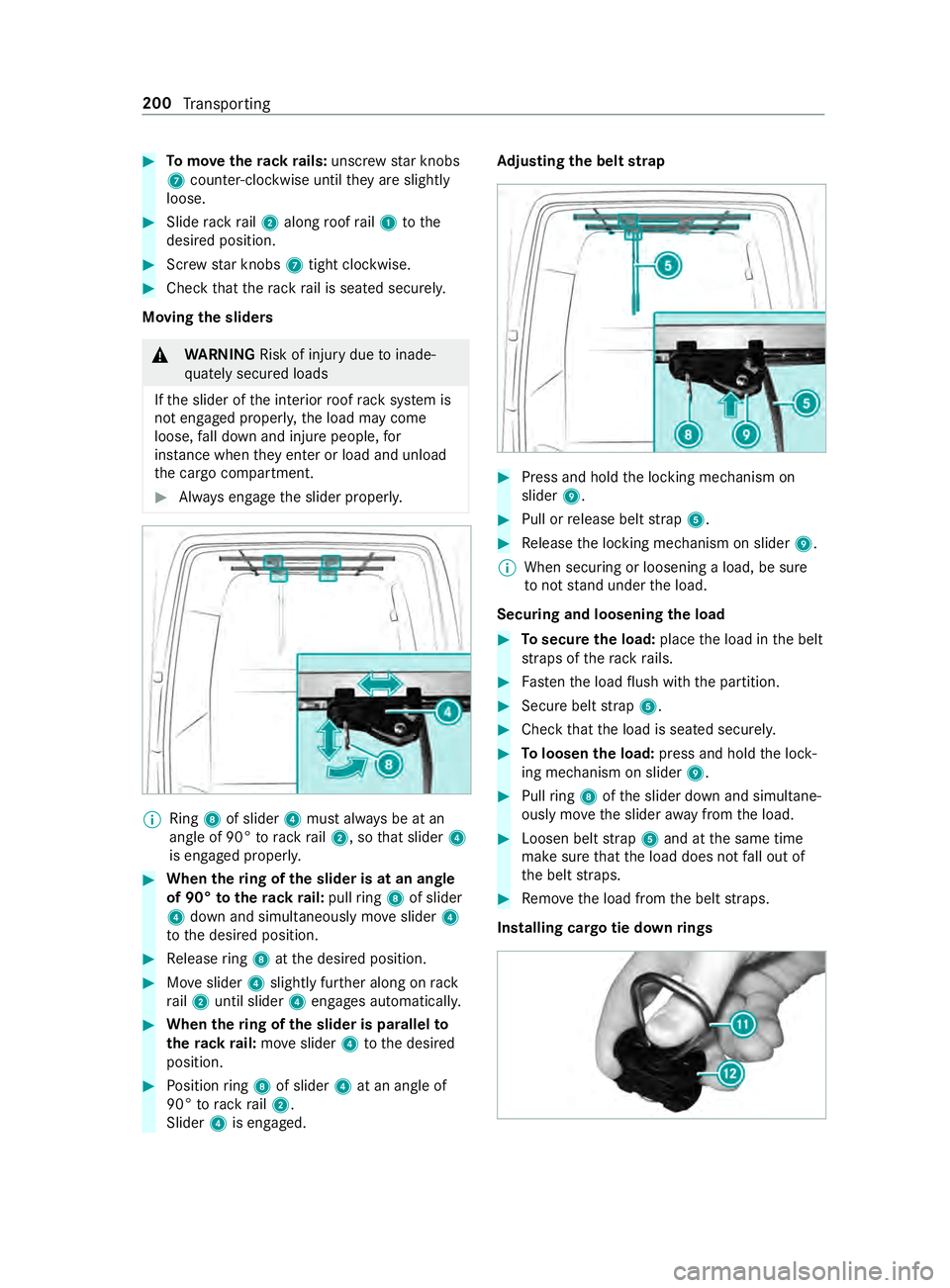
Tomo vetherack ra ils:unsc rew star knobs
7 coun ter-clockwise until they are slightly
loose. #
Slide rack rail2 along roof rail1 tothe
desired position. #
Screw star knobs 7tight clo ckwise. #
Check that thera ck rail is seated securely.
Moving the sliders &
WARNING Risk of inju rydue toinade‐
qu ately secured loads
If th e slider of the interior roof rack system is
not engaged proper ly,th e load may come
loose, fall down and injure people, for
ins tance when they enter or load and unload
th e cargo compartment. #
Always engage the slider properly. %
Ring
8of slider 4must alw ays be at an
angle of 90° torack rail2, so that slider 4
is engaged proper ly. #
When thering of the slider is at an angle
of 90° totherack ra il:pull ring 8 of slider
4 down and simul taneously mo veslider 4
to the desired position. #
Release ring 8 atthe desired position. #
Moveslider 4slightly fur ther along on rack
ra il2 until slider 4engages automaticall y. #
When thering of the slider is pa rallel to
th erack ra il:mo veslider 4tothe desired
position. #
Position ring 8 of slider 4at an angle of
90° torack rail2.
Slider 4is engaged. Ad
justing the belt strap #
Press and hold the locking mechanism on
slider 9. #
Pull or release belt stra p5. #
Release the locking mechanism on slider 9.
% When securing or loosening a load, be sure
to not stand under the load.
Securing and loosening the load #
Tosecure the load: placethe load in the belt
st ra ps of thera ck rails. #
Fasten the load flush with the partition. #
Secure belt stra p5. #
Check that the load is seated securel y. #
Toloosen the load: press and hold the lock‐
ing mechanism on slider 9. #
Pull ring 8 ofthe slider down and simultane‐
ously mo vethe slider away from the load. #
Loosen belt stra p5 and at the same time
make sure that the load does not fall out of
th e belt stra ps. #
Remo vethe load from the belt stra ps.
Installing cargo tie down rings 200
Transporting