key MITSUBISHI 3000GT 1991 Owner's Manual
[x] Cancel search | Manufacturer: MITSUBISHI, Model Year: 1991, Model line: 3000GT, Model: MITSUBISHI 3000GT 1991Pages: 1146, PDF Size: 76.68 MB
Page 503 of 1146
AUTOMATIC TRANSAXLE - Service Adiustment Procedures23-51
D9N007SPush button
II
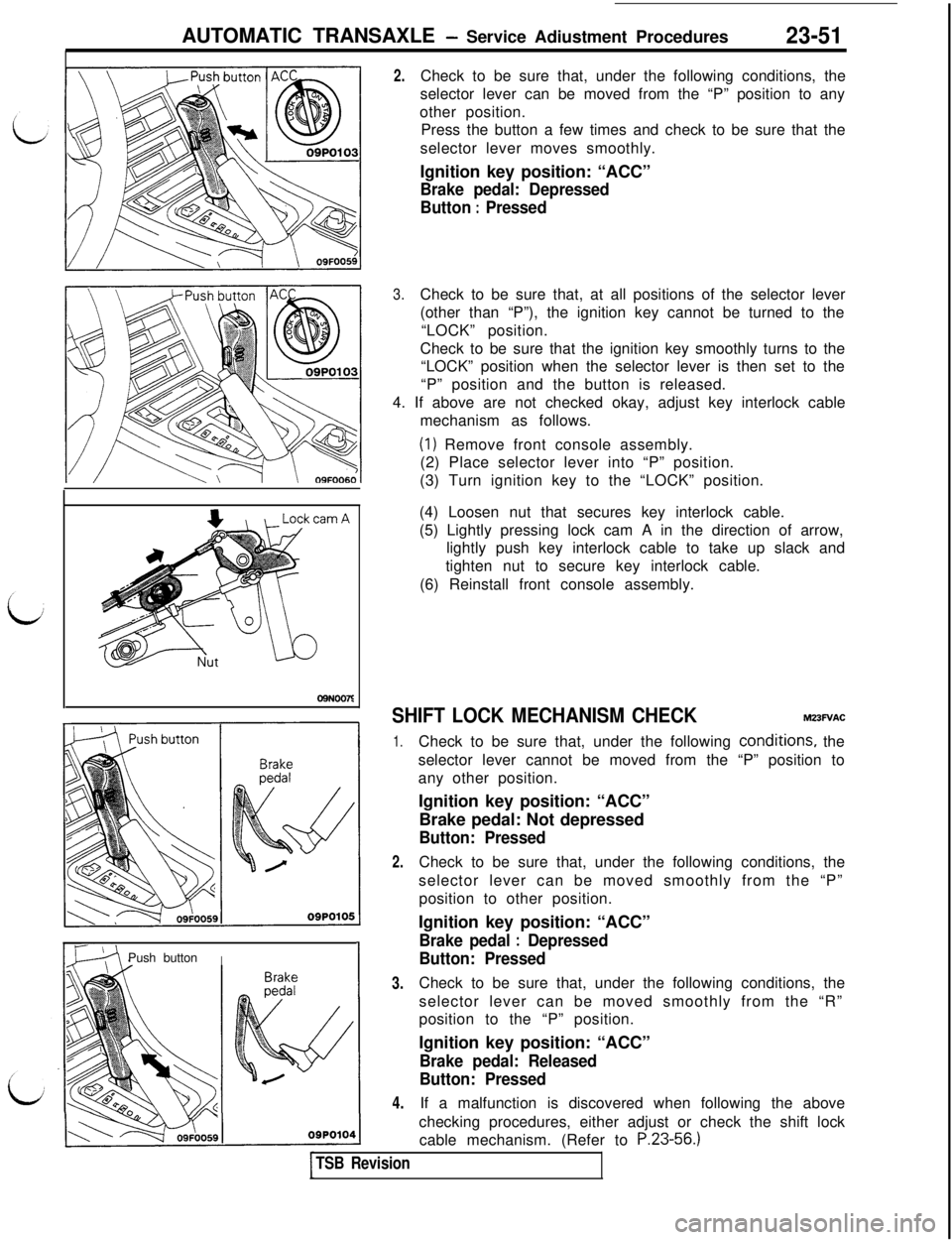
2.Check to be sure that, under the following conditions, the
selector lever can be moved from the “P” position to any
other position.
Press the button a few times and check to be sure that the
selector lever moves smoothly.
Ignition key position: “ACC”
Brake pedal: Depressed
Button
: Pressed
3.Check to be sure that, at all positions of the selector lever
(other than “P”), the ignition key cannot be turned to the
“LOCK” position.
Check to be sure that the ignition key smoothly turns to the
“LOCK” position when the selector lever is then set to the
“P” position and the button is released.
4. If above are not checked okay, adjust key interlock cable
mechanism as follows.
(1) Remove front console assembly.
(2) Place selector lever into “P” position.
(3) Turn ignition key to the “LOCK” position.
(4) Loosen nut that secures key interlock cable.
(5) Lightly pressing lock cam A in the direction of arrow,
lightly push key interlock cable to take up slack and
tighten nut to secure key interlock cable.
(6) Reinstall front console assembly.
SHIFT LOCK MECHANISM CHECKMZ3FVAC
1.
2.
3.
4.Check to be sure that, under the following
condi,tions, the
selector lever cannot be moved from the “P” position to
any other position.
Ignition key position: “ACC”
Brake pedal: Not depressed
Button: PressedCheck to be sure that, under the following conditions, the
selector lever can be moved smoothly from the “P”
position to other position.
Ignition key position: “ACC”
Brake pedal : Depressed
Button: PressedCheck to be sure that, under the following conditions, the
selector lever can be moved smoothly from the “R”
position to the “P” position.
Ignition key position: “ACC”
Brake pedal: Released
Button: PressedIf a malfunction is discovered when following the above
checking procedures, either adjust or check the shift lock
cable mechanism. (Refer to
P.23-56.)
TSB Revision
Page 505 of 1146
AUTOMATIC TRANSAXLE - Service Adjustment Procedures23-53 ~
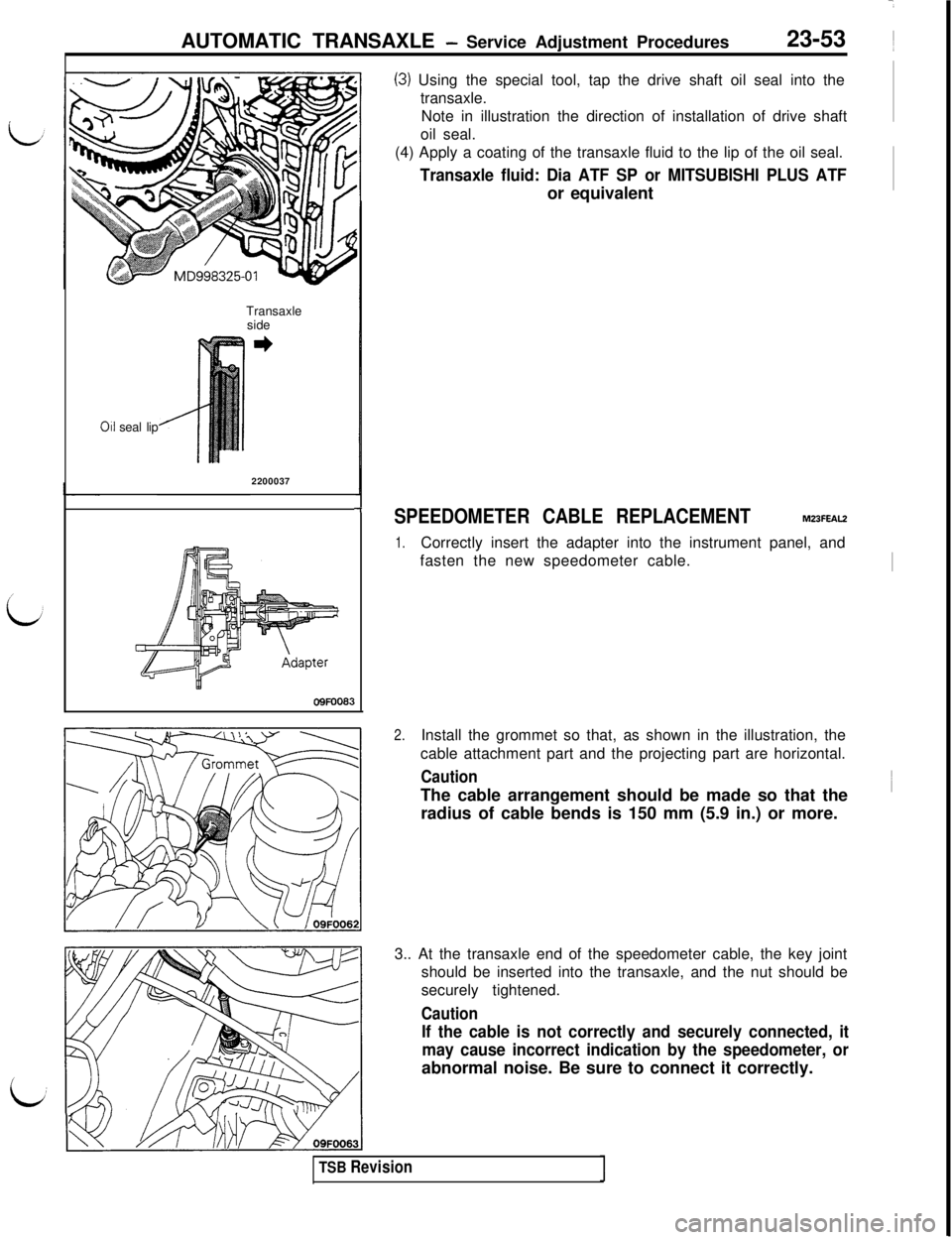
(3) Using the special tool, tap the drive shaft oil seal into the
transaxle.
Note in illustration the direction of installation of drive shaft
oil seal.
(4) Apply a coating of the transaxle fluid to the lip of the oil seal.
Transaxle fluid: Dia ATF SP or MITSUBISHI PLUS ATFor equivalent
Transaxle
side
011 seal lip
2200037
-fSPEEDOMETER CABLE REPLACEMENTM23FEAL2
1.Correctly insert the adapter into the instrument panel, and
fasten the new speedometer cable.
I
OQFOO83
2.Install the grommet so that, as shown in the illustration, the
cable attachment part and the projecting part are horizontal.
Caution1
The cable arrangement should be made so that the
’radius of cable bends is 150 mm (5.9 in.) or more.
3.. At the transaxle end of the speedometer cable, the key joint
should be inserted into the transaxle, and the nut should be
securely tightened.
Caution
If the cable is not correctly and securely connected, it
may cause incorrect indication by the speedometer, orabnormal noise. Be sure to connect it correctly.
TSB Revision
Page 506 of 1146

7 ft.lbs.
Transaxle control cabl")
23-54AUTOMATIC TRANSAXLE - Transaxle Control.
TRANSAXLE CONTROLM231A- _
REMOVAL AND INSTALLATION\
Pre-removal and Post-installation(Refer to GROUP
52A-Floor Console.)
7 ft.lbs.
Transaxle control cable removal steps
1. Air cleaner cover, Air intake hose2. CD amp. (Vehicles with CD player)l5. Connection for transaxle control cableassembly (Select lever assembly side)
6. Transaxle control cable, assembly
7. Clamp
8. Adjuster09FOO31
Selector lever assembly removal steps
1. Air cleaner cover, Air intake hosel +3. Connection for key-interlock cable(Selector lever assembly side)*+4. Connection for shift-lock cable(Selector lever assembly side)I)+5. Connection for transaxle control cable(Selector lever assembly side)9. Selector lever assembly
TSB Revision
Page 507 of 1146
AUTOMATIC TRANSAXLE - Transaxle Control
23-55
V’
1112 Nm9 ft.lbs.
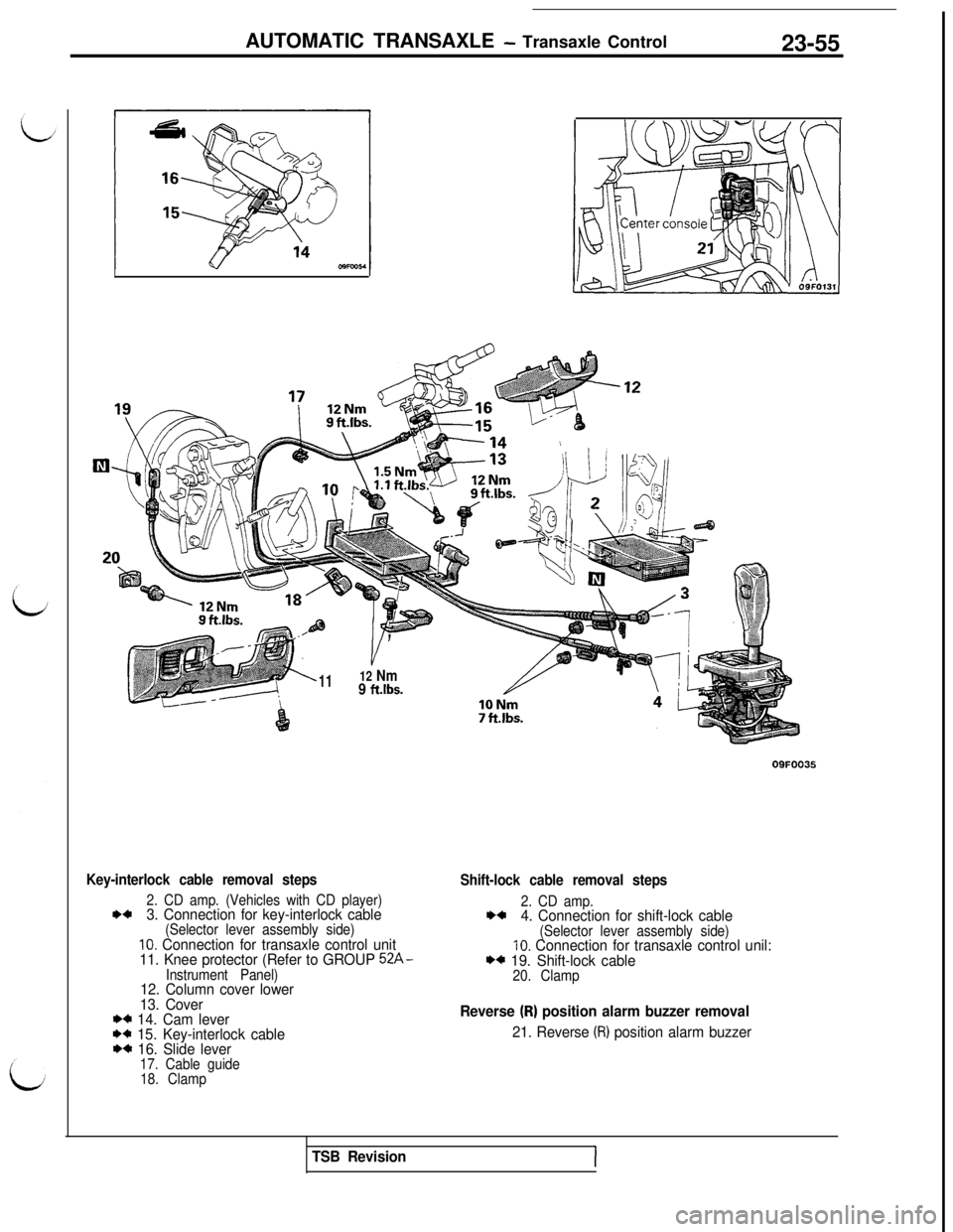
Key-interlock cable removal steps
2. CD amp. (Vehicles with CD player)I)+3. Connection for key-interlock cable(Selector lever assembly side)10. Connection for transaxle control unit
11. Knee protector (Refer to GROUP 52A-
Instrument Panel)12. Column cover lower
13. Cover
*C 14. Cam lever** 15. Key-interlock cableI)+ 16. Slide lever17. Cable guide
18. ClampOQFOO35
Shift-lock cable removal steps
2. CD amp.**4. Connection for shift-lock cable(Selector lever assembly side)10. Connection for transaxle control unil:*4 19. Shift-lock cable20. Clamp
Reverse (R) position alarm buzzer removal
21. Reverse (R) position alarm buzzer
TSB Revision
Page 508 of 1146
23-56AUTOMATIC TRANSAXLE - Transaxle ControlOQPOOQQ
09FOO5
INSPECTIONM231CAMl Check the control cable for function and for damage.
lCheck the outer cable (key interlock cable, shift lock cable)
’for damage and spring for breakage and tension.~J
lCheck the inner cable (key interlock cable, shift lock cable)
for extension.
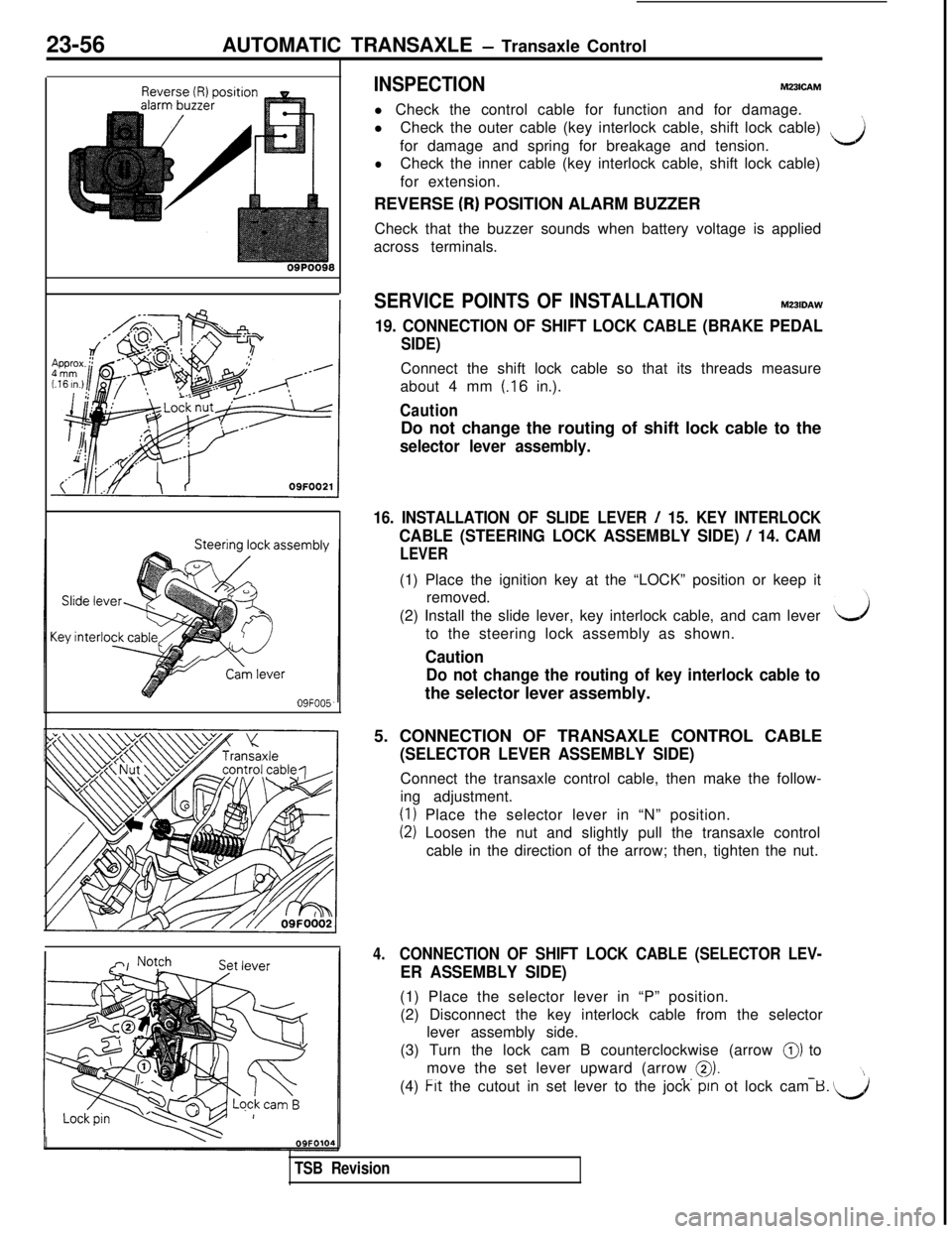
REVERSE
(R) POSITION ALARM BUZZER
Check that the buzzer sounds when battery voltage is applied
across terminals.
SERVICE POINTS OF INSTALLATIONM231DAW
19. CONNECTION OF SHIFT LOCK CABLE (BRAKE PEDAL
SIDE)Connect the shift lock cable so that its threads measure
about 4 mm
(.16 in.).
CautionDo not change the routing of shift lock cable to the
selector lever assembly.
16. INSTALLATION OF SLIDE LEVER / 15. KEY INTERLOCK
CABLE (STEERING LOCK ASSEMBLY SIDE) / 14. CAM
LEVER(1) Place the ignition key at the “LOCK” position or keep it
removed.
(2) Install the slide lever, key interlock cable, and cam lever
to the steering lock assembly as shown.
Caution
Do not change the routing of key interlock cable tothe selector lever assembly.
5. CONNECTION OF TRANSAXLE CONTROL CABLE
(SELECTOR LEVER ASSEMBLY SIDE)Connect the transaxle control cable, then make the follow-
ing adjustment.
(1) Place the selector lever in “N” position.
(2) Loosen the nut and slightly pull the transaxle control
cable in the direction of the arrow; then, tighten the nut.
4.CONNECTION OF SHIFT LOCK CABLE (SELECTOR LEV-
ER ASSEMBLY SIDE)(1) Place the selector lever in “P” position.
(2) Disconnect the key interlock cable from the selector
lever assembly side.
(3) Turn the lock cam B counterclockwise (arrow
0) to
move the set lever upward (arrow
0)._.-(4) Frt the cutout in set lever to the jock pm ot lock cam B. u
TSB Revision
Page 509 of 1146
AUTOMATIC TRANSAXLE - Transaxle Control23-57
09N0050Was
Nut
09N0049Was
Nut
0910046
I
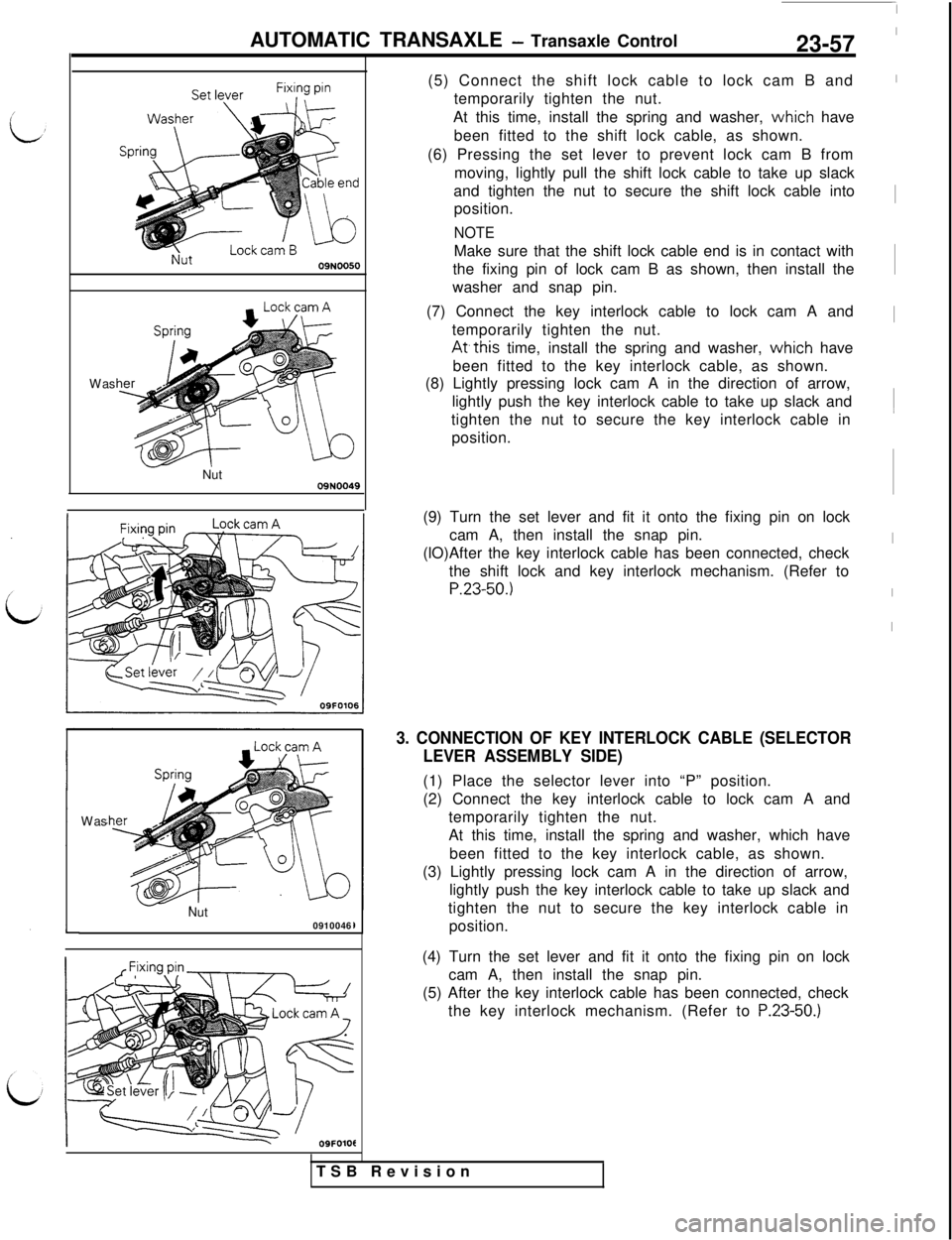
-09FOlOt(5) Connect the shift lock cable to lock cam B and
temporarily tighten the nut.
At this time, install the spring and washer,
vvhich have
been fitted to the shift lock cable, as shown.
(6) Pressing the set lever to prevent lock cam B from
moving, lightly pull the shift lock cable to take up slack
and tighten the nut to secure the shift lock cable into
position.
NOTEMake sure that the shift lock cable end is in contact with
the fixing pin of lock cam B as shown, then install the
washer and snap pin.
(7) Connect the key interlock cable to lock cam A and
temporarily tighten the nut.
At,this time, install the spring and washer, vvhich have
been fitted to the key interlock cable, as shown.
(8) Lightly pressing lock cam A in the direction of arrow,
lightly push the key interlock cable to take up slack and
tighten the nut to secure the key interlock cable in
position.
(9) Turn the set lever and fit it onto the fixing pin on lock
cam A, then install the snap pin.
(lO)After the key interlock cable has been connected, check
the shift lock and key interlock mechanism. (Refer to
P.23-50.)
3. CONNECTION OF KEY INTERLOCK CABLE (SELECTOR
LEVER ASSEMBLY SIDE)(1) Place the selector lever into “P” position.
(2) Connect the key interlock cable to lock cam A and
temporarily tighten the nut.
At this time, install the spring and washer, which have
been fitted to the key interlock cable, as shown.
(3) Lightly pressing lock cam A in the direction of arrow,
lightly push the key interlock cable to take up slack and
tighten the nut to secure the key interlock cable in
position.
(4) Turn the set lever and fit it onto the fixing pin on lock
cam A, then install the snap pin.
(5) After the key interlock cable has been connected, check
the key interlock mechanism. (Refer to
P.23-50.)TSB Revision
-1
I
I
I~
I~
I
I
I
Page 679 of 1146
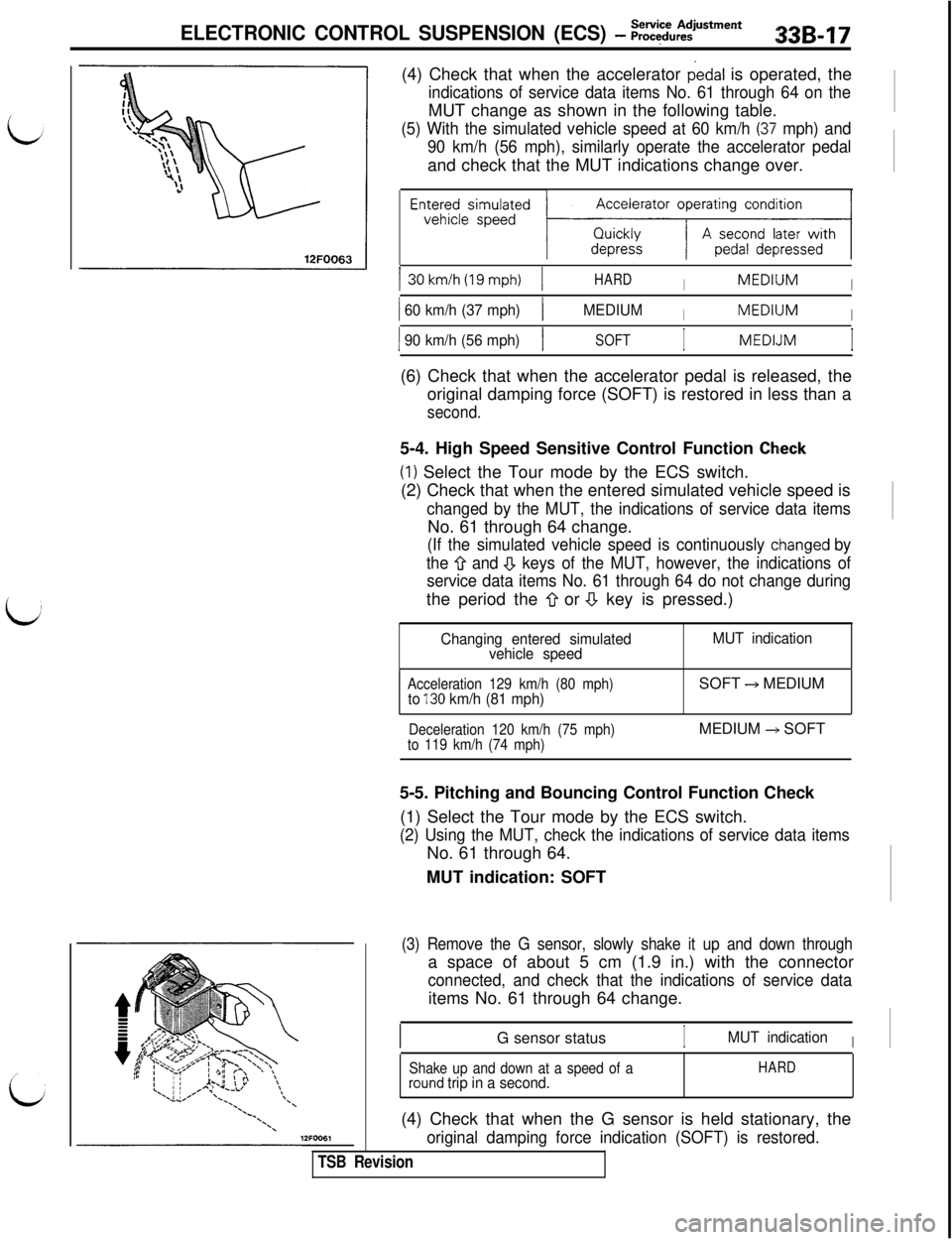
ELECTRONIC CONTROL SUSPENSION (ECS) - :;:~u:~men*33B17(4) Check that when the accelerator
dedal is operated, the
indications of service data items No. 61 through 64 on theMUT change as shown in the following table.
(5) With the simulated vehicle speed at 60 km/h (37’ mph) and
90 km/h (56 mph), similarly operate the accelerator pedaland check that the MUT indications change over.
Accelerator operating condition
EnE~~esismp~~ed ~;zz-KzxJ130km/h(19mph)
1HARDIMEDllJMI
1 60 km/h (37 mph)1MEDIUMIMEDllJMI
1 90 km/h (56 mph)1SOFTIMEDLJMI(6) Check that when the accelerator pedal is released, the
original damping force (SOFT) is restored in less than a
second.5-4. High Speed Sensitive Control Function
Chleck(I) Select the Tour mode by the ECS switch.
(2) Check that when the entered simulated vehicle speed is
changed by the MUT, the indications of service data itemsNo. 61 through 64 change.
(If the simulated vehicle speed is continuously cihanged by
the
Q and .!J keys of the MUT, however, the indications of
service data items No. 61 through 64 do not change duringthe period the
0 or a key is pressed.)
Changing entered simulated
vehicle speedMUT indication
Acceleration 129 km/h (80 mph)to 130 km/h (81 mph)SOFT + MEDIUM
Deceleration 120 km/h (75 mph)
to 119 km/h (74 mph)MEDIUM +, SOFT
5-5. Pitching and Bouncing Control Function Check
(1) Select the Tour mode by the ECS switch.
(2) Using the MUT, check the indications of service data itemsNo. 61 through 64.
MUT indication: SOFT
(3) Remove the G sensor, slowly shake it up and down througha space of about 5 cm (1.9 in.) with the connector
connected, and check that the indications of service dataitems No. 61 through 64 change.
G sensor status
IMUT indicationI
Shake up and down at a speed of arou.nd trip in a second.HARD(4) Check that when the G sensor is held stationary, the
original damping force indication (SOFT) is restored.
TSB Revision
Page 730 of 1146
35-8SERVICE BRAKES -Anti-lock Braking System Troubleshooting
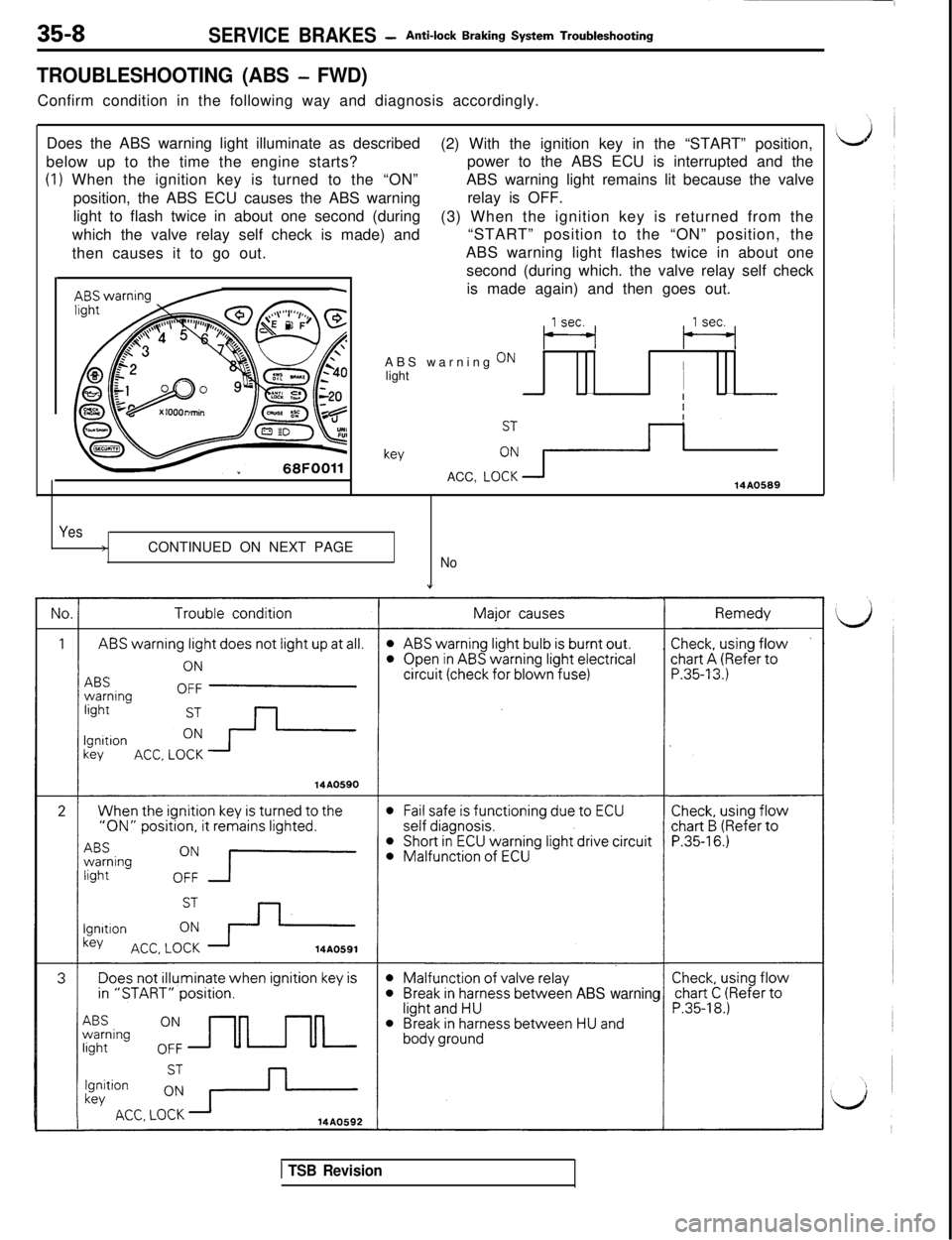
TROUBLESHOOTING (ABS - FWD)Confirm condition in the following way and diagnosis accordingly.
Does the ABS warning light illuminate as described
(2) With the ignition key in the “START” position,
below up to the time the engine starts?power to the ABS ECU is interrupted and the
(1) When the ignition key is turned to the “ON”ABS warning light remains lit because the valve
position, the ABS ECU causes the ABS warningrelay is OFF.
light to flash twice in about one second (during
(3) When the ignition key is returned from the
which the valve relay self check is made) and“START” position to the “ON” position, the
then causes it to go out.ABS warning light flashes twice in about one
second (during which. the valve relay self check
-is made again) and then goes out.
ABS warning
ONlightII
-I
keyACC,
LO!: +--14A0589
Yes>CONTINUED ON NEXT PAGE
No
”
weenABS warning
1 TSB Revision
Page 731 of 1146
SERVICE BRAKES -Anti-lock Braking System Troubleshooting
L’
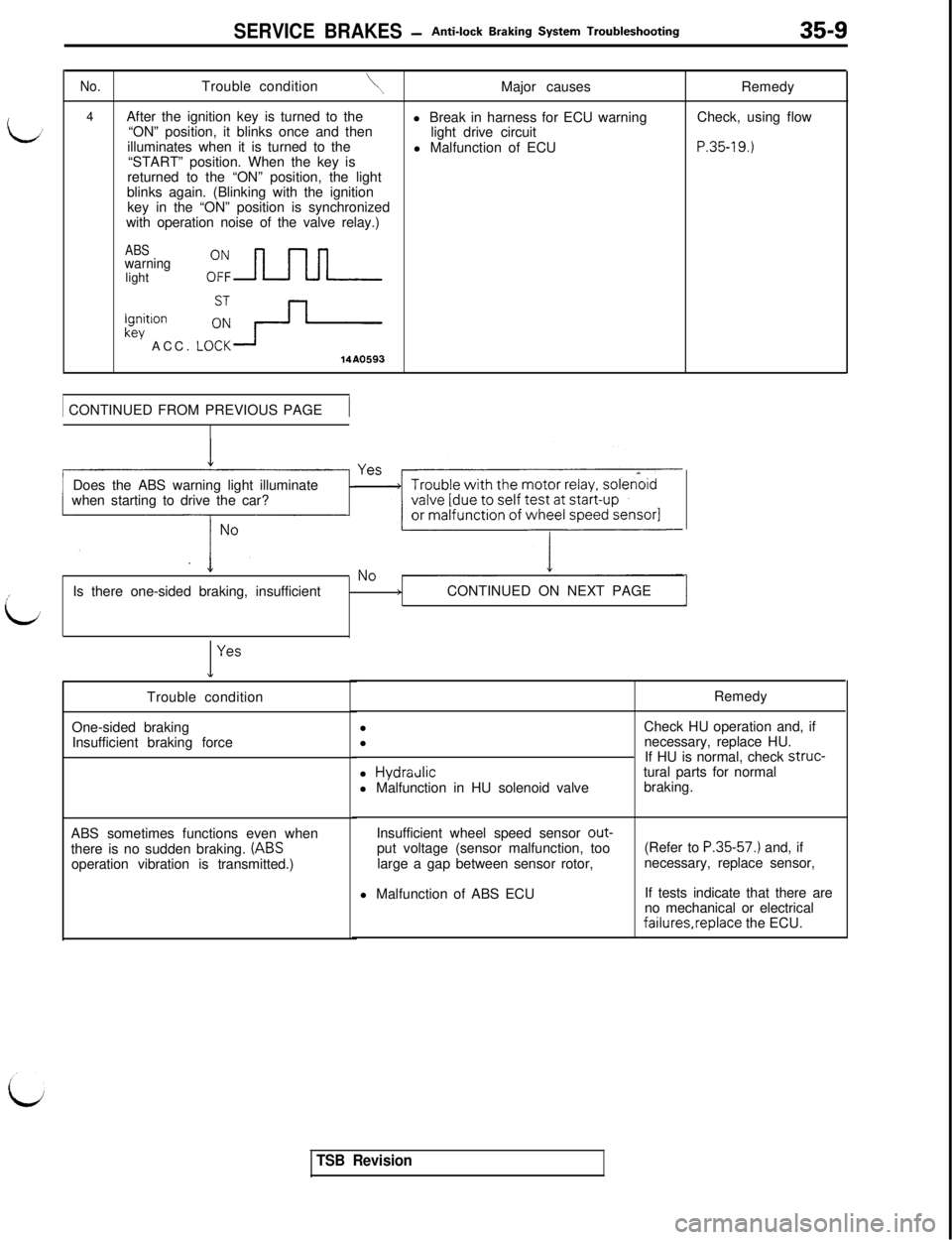
No.Trouble condition\4
After the ignition key is turned to the
“ON” position, it blinks once and then
illuminates when it is turned to the
“START” position. When the key is
returned to the “ON” position, the light
blinks again. (Blinking with the ignition
key in the “ON” position is synchronized
with operation noise of the valve relay.)
ABSwarninglight
key ACC. L::+
Ignition
14A05931 CONTINUED FROM PREVIOUS PAGE
1Major causes
l Break in harness for ECU warning
light drive circuit
l Malfunction of ECU
Does the ABS warning light illuminate
when starting to drive the car?
iIs there one-sided braking, insufficient
>CONTINUED ON NEXT PAGEI
I
YesTrouble condition
One-sided braking
Insufficient braking force
ABS sometimes functions even when
there is no sudden braking.
(ABSoperation vibration is transmitted.)Remedy
Check, using flow
P.35-19.)Remedy
l Check HU operation and, if
l necessary, replace HU.
If HU is normal, check struc-
l
HydraJicl Malfunction in HU solenoid valvetural parts for normal
braking.
Insufficient wheel speed sensor put voltage (sensor malfunction, too
large a gap between sensor rotor,
l Malfunction of ABS ECU(Refer to
P.35-57.) and, if
necessary, replace sensor,
If tests indicate that there are
no mechanical or electricalfaiIures,replace the ECU.
TSB Revision
Page 737 of 1146
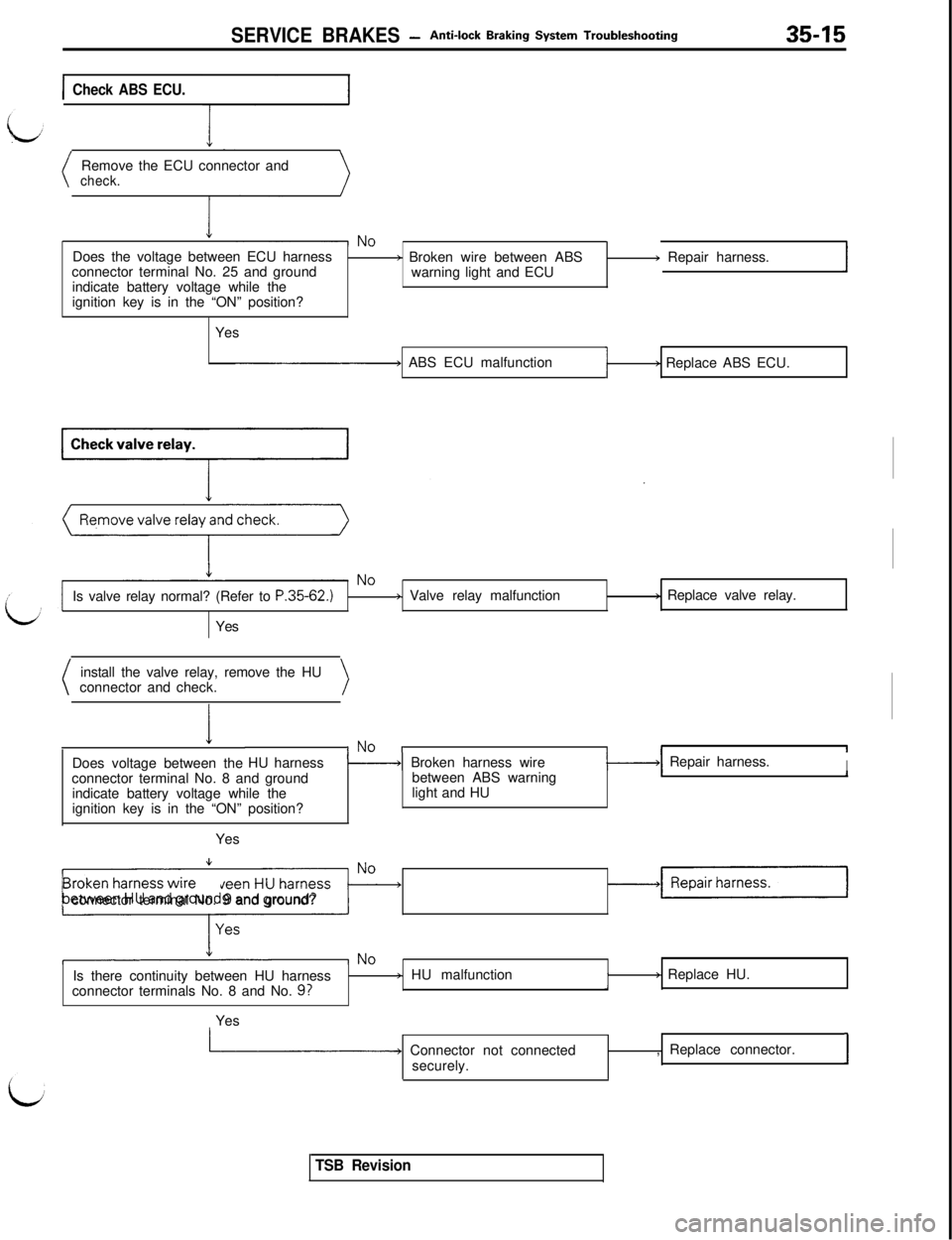
SERVICE BRAKES -Anti-lock Braking System Troubleshooting35-15
ICheck ABS ECU.Remove the ECU connector and
check.Does the voltage between ECU harness
connector terminal No. 25 and ground
indicate battery voltage while the
ignition key is in the “ON” position?
Yes
b Broken wire between ABS
warning light and ECU) Repair harness.
I ABS ECU malfunctionI) Replace ABS ECU.
Is valve relay normal? (Refer to
P.35-62.)Yes+ Valve relay malfunctionb Replace valve relay.
install the valve relay, remove the HU
connector and check.
IDoes voltage between theINO IHU harness\----+I Broken harness wireII1-1 Repair harness.I
Iconnector terminal No. 8 and ground
indicate battery voltage while the
ignition key is in the “ON” position?between ABS warning
light and HU1IYes
Is there continuity between HU harness
4:~~&?$?%$&ndconnector terminal No. 9 and ground?
Is there continuity between HU harness
connector terminals No. 8 and No.
9?
j HU malfunctionI> Replace HU.
Yes
L Connector not connected
securely., Replace connector.I
TSB Revision