light MITSUBISHI DIAMANTE 1900 Workshop Manual
[x] Cancel search | Manufacturer: MITSUBISHI, Model Year: 1900, Model line: DIAMANTE, Model: MITSUBISHI DIAMANTE 1900Pages: 408, PDF Size: 71.03 MB
Page 149 of 408
the temperature of the gas passing through +h
control valve. It converts the detected temf
Ierature
into an electrical voltage signal which is sent the ve-
hicle’s Powertrain Control Module (PCM). If the cir-
cuit of the EGR temperature sensor is broken, the
warning light will come on.
1. Remove the EGR temperature sensor from the
engine.
2. Place the EGR sensor into water. While in-
creasing the temperature of the water, measure the
sensor resistance. Compare the values to following
specifications:
a. 122°F 50°C
b. 212°F 100” )-11-14 kohms resistance
t P O-83 kohms resistance
3. If the resistance obtained varies significantly ,
.,. . .
i, replace the sensor, nom specmcaoom
Thermal Vacuum Valva
therm0 valve.
2. Connect a hand held vacuum pump to the vac-
uum hose on the therm0 valve.
3. Apply vacuum and check the air passage
through the therm0 vOrL’n %ults to the fnrm
lowinq specifications:
ant temperature of 122°F
vacuum leaks
lant temoerature of 176’F 4 n;rm.nnnn+ +h.n s,r,,~,,,,rn hnm frnm ‘h.n +hrotle
body EGR vacuum nipple. Connect a hand-held
vac-
uum pump to the nipple.
2. Start the engine, then slowly raise the speed
and compare with the following specifications.
a. For 1990-93 vehides, check to be sure the
vacuum raised proportionally with the rise in en-
gine s eed.
b. Ior 199450 vehicles, the vacuum reading
on the pump should remain constant.
EGR Solenoid
1990-93 L’EHICL ES
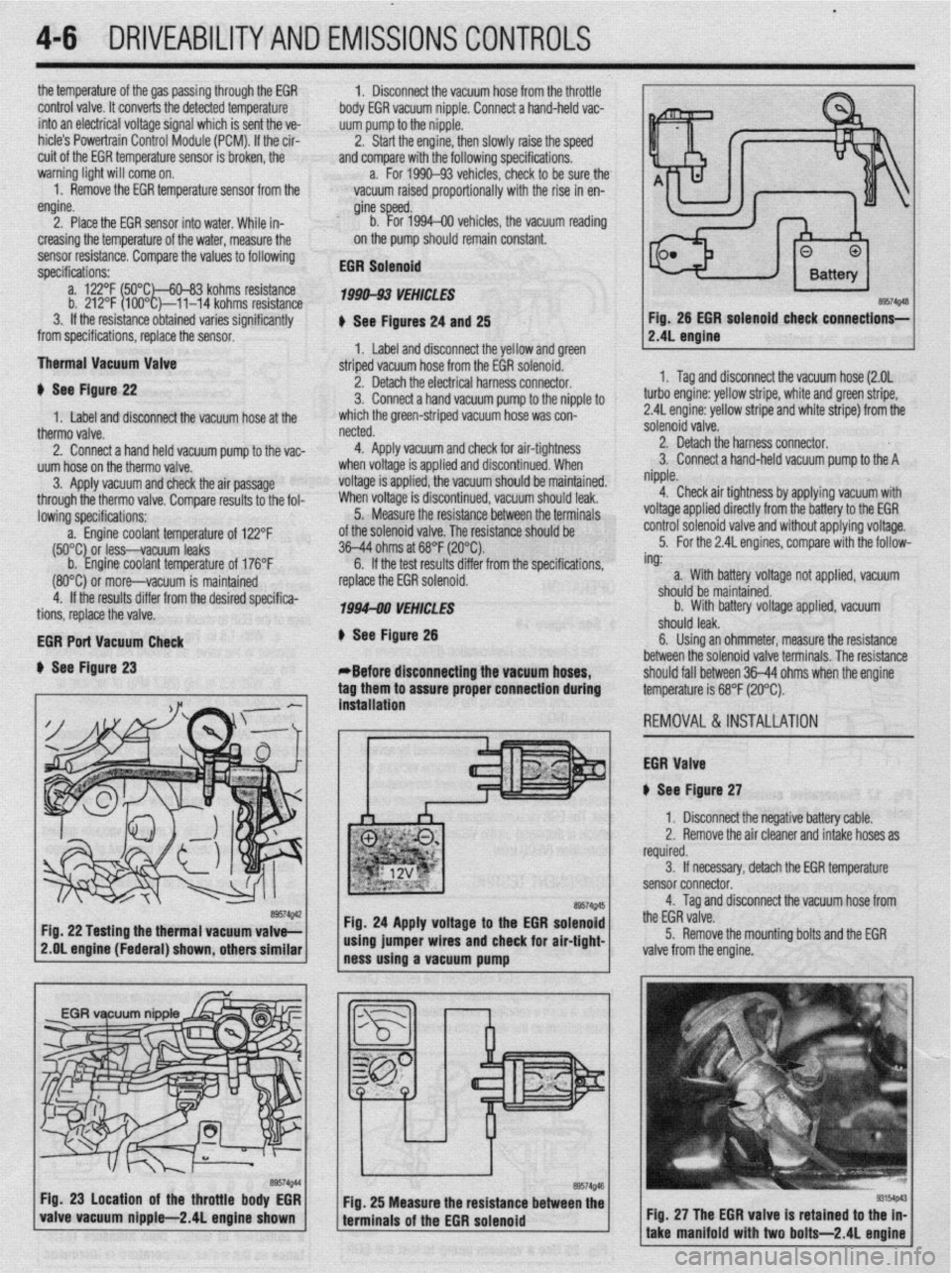
# See Figures 24 and 25
1. Label and disconnect the yellow and green
striped vacuum hose from the EGR solenoid.
netted.
4. Apply vacuum and check for air-tightness
when voltage is applied and discontinued. When
voltage is applied, the vacuum should be maintained.
When voltage is discontinued, vacuum should leak.
5. Measure the resistance between the terminals
of the solenoid valve. The resistance should be
36-44 ohms at 68°F (20°C).
6. If the test results differ from the soecifications.
4-6 DRIVEABILITYAND EMISSIONSCONTROLS
Fig. 26 EGR solenoid
check connections-
# See Figure 22
1. Label and disconnect the vacuum hose at the 2. Detach the electrical harness connector.
3. Connect a hand vacuum pump to the nipple to
which the green-striped vacuum hose was con-
(80°C) 0; more-vacuum is maintained
4. If the results differ from the desired specifica-
tions, replace the valve.
EGR Port Vacuum Check
+ See Figure 23 replace the EGR solenoid.
1994-00 VEHICLES
# See Figure 26
*Before disconnecting the vacuum hoses,
tag them to assure proper connection during
. . ** *. 1. Tag and disconnect the vacuum hose (2.OL
turbo engine: yellow stripe, white and green stripe,
2.4L engine: yellow stripe and white stripe) from the
solenoid valve.
2. Detach the harness connector.
3. Connect a hand-held vacuum pump to the A
nipple.
4. Check air tightness by applying vacuum with
voltage applied directly from the battery to the EGR
control solenoid valve and without applying voltage.
5. For the 2.4L engines, compare with the follow-
ing:
. .
roltage not applied, vacuum a. With battery
should be maintainr
b. With battery
.I III I
snoura
iea~.
sd. -
/oltage applied, vacuum
6. Using an ohmmeter, measure the resistance
between the solenoid valve terminals. The resistance
should fall between 36-44 ohms when the enaine
temperature is 68°F (20°C).
REMOVAL&INSTALLATION
EGR Valve
iI See Figure 27 mslatlanon
1 I Disconnect the negative battery cable.
2. Remove the air cleaner and intake hoses as
required.
3. If necessary, detach the EGR temperature
sensor connector.
4. Tag and disconnect the vacuum hose from
the EGR valve.
5. Remove the mounting bolts and the EGR
2.OL engine (Federal) shown, others similar
valve from the engine.
Fig. 27 The EGR valve is retained to t
take manifold with two bolts-2.4L e
Page 156 of 408
DRIVEABILITYAND EMISSIONS CONTROiS 4-13
4. If the voltaoe check in sbo 3 was OK. then
check the voltage-between GND’and SIG RTN termi-
nals and suddenly depress the accelerator, the volt-
age should rise and stay at 2.4 volts. If the voltage
OPERATION does not stay at 2.4 volts, replace the MAP sensor.
REMOVAL&INSTALLATION '
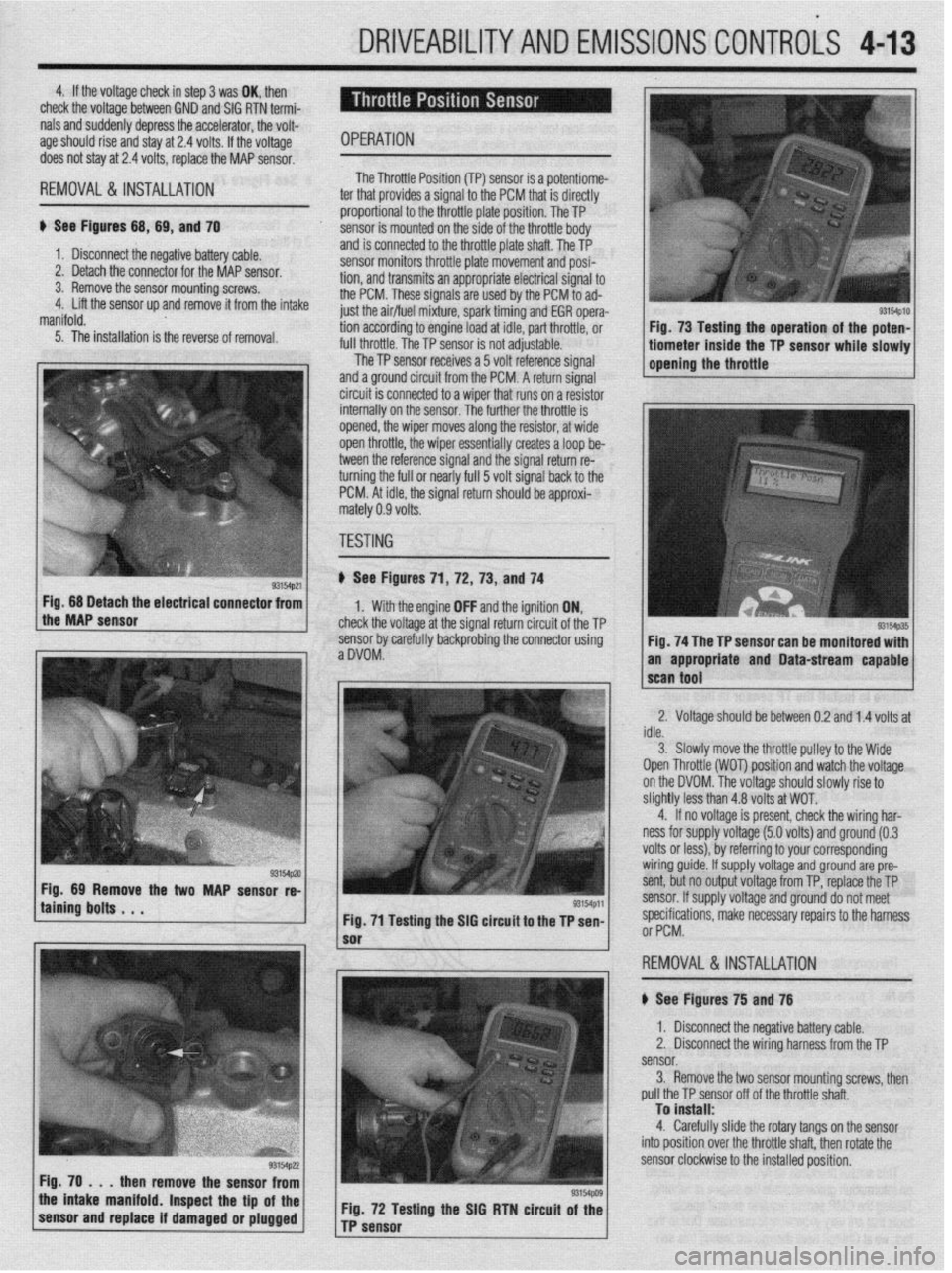
ti See Figures 68, 69, and 70
1. Disconnect the negative bat lery cable.
2. Detach the connector for thl e MAP sensor.
3. Remove the sensor mountir ig screws.
4. Lift the sensor up and remove it from the intake
manifold. The Throttle Posii
ti-* \*. Inn ITPl smsnr is 8 Dotentiome- , WI...,". *., . ter that provides a si gnal to the PCM that is directly
proportion: il to the throttle plate position. The TP
sensor is rr iounted on the side of the throttle body
and is connected to the throttle plate shaft. The TP
sensor monitors throttle plate movement and posi-
tion, and transmits an appropriate electrical signal to
the PCM. These signals grp IIQX-I hv rho PCM to ad-
just the air/flnI mivtlI “-- ------li
5. The installation is the reverse of removal. WI I dLfUl U full throttle The TP c
UyI ,,,,,,,:re, spark timing and EGR opera-
ng to engine load at idle, part throttle, or
The TP sensor is not adjustable.
..-
lensor receives a 5 volt reference signal
and a ground circuit from the PCM. A return signal
circuit is connected to a wiper that runs on a resistor
internally on the sensnr ThP fmth@r rho throttle is
opined the winnr mr oP -*lY”, .I,” ..,y’V, 111 Jves along the resistor, at wide
en throttle, the wiper essentially creates a loop be-
tween the reference signal and the signal return re-
turning the full or nearly full 5 volt signal back to the
PCM. At idle, the signal return should be approxi-
rnz
rtely 0.9 volts.
TF
iSTING
) See Figures 71 ,72, 73, and 74
1. With the engine OFF and the ignition ON,
check the voltage at the signal return circuit of the TP
sensor bv carefullv backorobina the connector using
aDVOM: . ” Fig. 68 Detach the electrical connector from
the MAP sensor
taining bolts . . . WMp,l
Fig. 71 Testing the SIG circuit to the TP sen-
then remove the sensor from
the intake manifold. Inspect the tip of the
sensor and replace if damaged or plugged Fig. 72 Testing the SIG RTN circuit of the
TP sensor
sm4p10 I Fig. 73 Testing the operation of the poten- 1
tiometer inside the TP sensor while slowly 1
opening the throttle
Fig. 74 The TP sensor can be monitored with
an appropriate and Data-stream capable
2. Voltage should be between 0.2 and 1.4 volts at
idle.
3. Slowlv move the throttle oullev to the Wide
Open Throttle (WOT) position and watch the voltage
on the DVOM. The voltage should slowly rise to
slightly less than 4.8 volts at WOT.
4. If no voltage is present, check the wiring har-
ness for supply voltage (5.0 volts) and ground (0.3
volts or less), by referring to your corresponding
wiring guide. If supply voltage and ground are pre-
sent, but no output voltage from TP, replace the TP
sensor. If supply voltage and ground do not meet
specifications, make necessarv reoairs to the harness
or PCM.
,
REMOVAL&INSTALLATION
# See Figures 75 and 76
1. Disconnect the negative battery cable.
2. Disconnect the wiring harness from the TP
sensor.
3. Remove the two sensor mounting screws, then
pull the TP sensor off of the throttle shaft.
To install:
4. Carefully slide the rotary tangs on the sensor
into position over the throttle shaft. then rotate the
sensor clockwise to the installed position.
Page 169 of 408
4-26 DRIVEABILITYAND EMISSIONS CONTROLS
The Powertrain Control Module (PCM) monitors
the signals of input and output sensors, some all the
time and others at certain times and processes each
signal. When the PCM notices that an irregularity has
continued for a specified time or longer from when
the irregular signal was initially monitored, the PCM
judges that a malfunction has occurred and will
memorize the malfunction code. The code is then
stored in the memory of the PCM and is accessible
through the data link (diagnostic connector) with the
use of an electronic scan tool or a voltmeter.
CHECK ENGINE/MALFUNCTION
INDICATOR LIGHT
Among the on-board diagnostic items, a check
engine/malfunction indicator light comes on to notify
the driver of a emission control component irregular-
ity. If the irregularity detected returns to normal or the
PCM judges that the component has returned to nor-
mal, the check engine/malfunction indicator light will
be turned off Moreover, if the ignition is turned OFF
and then the engine is restarted, the check
engine/malfunction indicator light will not be turned
on unttl a malfunction is detected.
The check engine/malfunction indicator light will
come on immediately after the ignition switch is
turned ON. The light should stay lit for 5 seconds
and then will go off. This Indicates that the check en-
gine/malfunction indicator lamp is operating nor-
mally. This does not signify a problem with the sys-
tem.
*The check engine/malfunction indicator
lamp will come on when the terminal for the
ignition timing adjustment is shorted to
ground. Therefore, it is not abnormal that the
light comes on even when the terminal for ig-
nition timing is shorted at time of ignition
timing adjustment.
To test the light, perform the following:
1. Turn the ignition switch ON. Inspect the check
engine/malfunction indicator lamp for Illumination.
2. The light should be lit for 5 seconds and then
should go out.
3. If the lamp does not illuminate, check for open
circuit In the harness, blown fuse or blown bulb.
SERVICE PRECAUTIONS
l Before attachrng or detaching the PCM harness
connectors, make sure the ignition switch is OFF and
the negative battery cable is disconnected to avoid
the possibility of damage to the PCM.
l When performing PCM input/output signal di-
agnosis, remove the pin terminal retainer from the
connectors to make it easier to insert tester probes
into the connector.
l When attaching or detaching pin connectors ,
from the PCM, take care not to bend or break any pin
terminals. Check that there are no bends or breaks on
PCM pin terminals before attempting any connec-
tions.
l Before replacing any PCM, perform the PCM
input/output signal diagnosis to make sure the PCM
is functioning properly.
l When measuring supply voltage of PCM-con-
trolled components with a circuit tester, separate 1
tester probe from another. If the 2 tester probes acci-
dentally make contact with each other during mea-
surement, a short circuit WIII result and damage the
PCM.
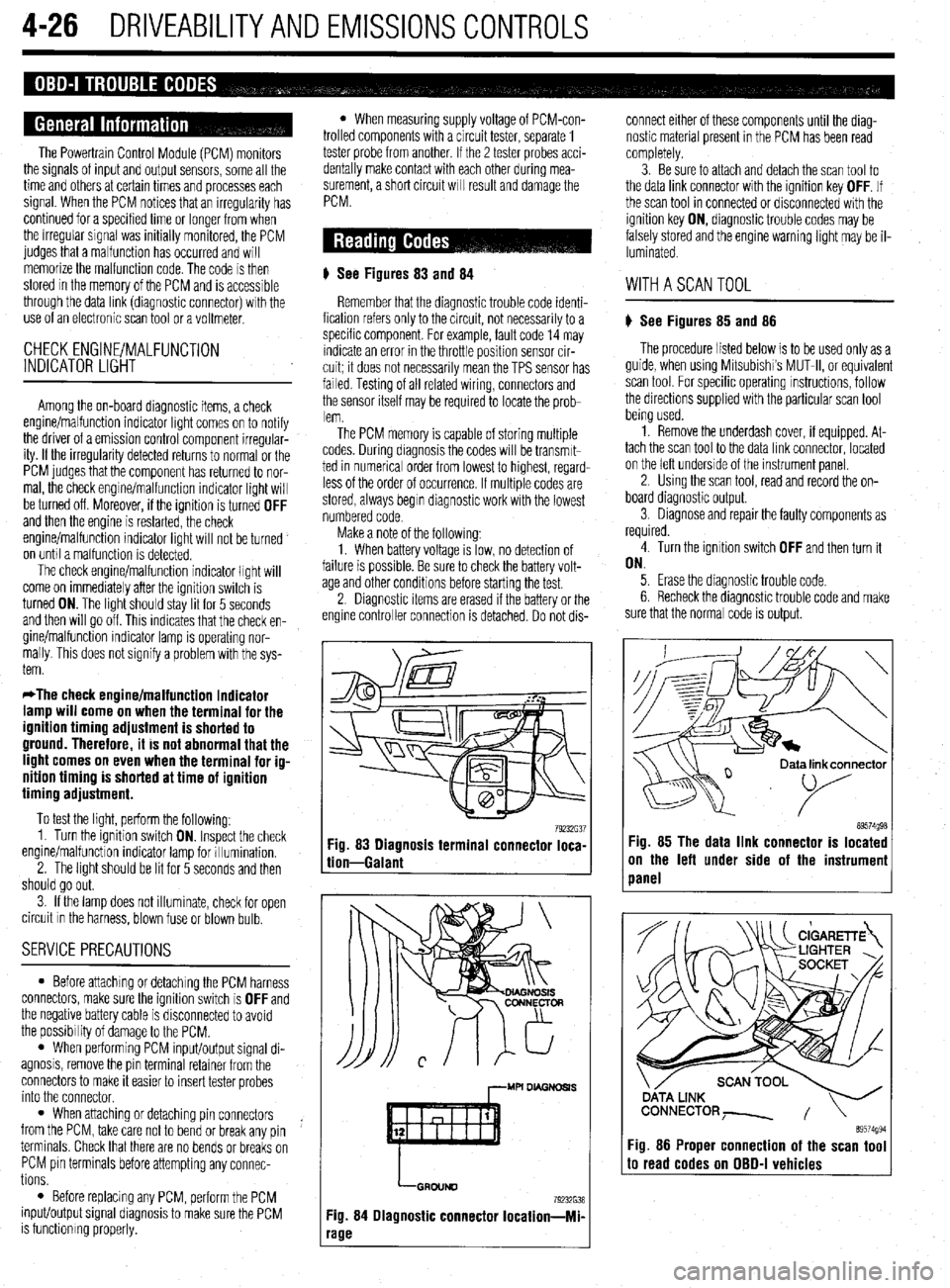
# See Figures 83
and 84
Remember that the diagnostic trouble code identi-
fication refers only to the circuit, not necessarily to a
specific component. For example, fault code 14 may
indicate an error in the throttle position sensor cir-
cuit; it does not necessarily mean the TPS sensor has
failed Testing of all related wiring, connectors and
the sensor itself may be required to locate the prob-
lem.
The PCM memory is capable of storing multiple
codes. During diagnosis the codes will be transmlt-
ted in numerical order from lowest to highest, regard-
less of the order of occurrence. If multiple codes are
stored, always begin diagnostic work with the lowest
numbered code
Make a note of the following:
1. When battery voltage IS low, no detection of
failure is possible. Be sure to check the battery volt-
age and other conditions before starting the test.
2. Diagnostic items are erased if the battery or the
engine controller connection is detached. Do not dis- connect either of these components until the diag-
nostic material present in the PCM has been read
completely.
3. Be sure to attach and detach the scan tool to
the data link connector with the ignition key OFF. If
the scan tool in connected or disconnected with the
ignition key ON, diagnostic trouble codes may be
falsely stored and the engine warning light may be il-
luminated. WITHASCANTOOL
) See Figures 85 and 86
The procedure listed below is to be used only as a
guide, when using Mitsubishi’s MUT-II, or equivalent
scan tool. For specific operating instructions, follow
the directions supplied with the particular scan tool
bemg used.
1. Remove the underdash cover, if equipped. At-
tach the scan tool to the data link connector, located
on the left underside of the instrument panel.
2. Using the scan tool, read and record the on-
board diagnostic output.
3. Diagnose and repair the faulty components as
required
4. Turn the ignition switch OFF and then turn it
ON.
5. Erase the diagnostic trouble code.
6 Recheck the diaanostic trouble code and make
sure that the normal &de is output.
79232G37 89574g98 Fig. 83 Diagnosis terminal connector loca-
tion-Galant Fig. 85 The data link connector is located
on the left under side of the instrumeni
panel
,--MU DL4GNDSl.S
LGRDIJND
79232638
Fig. 84 Diagnostic connector Iocation-Mi-
‘age
ata link connector
89574994 Fig. 86 Proper connection of the scan tool to read codes on OBD-I vehicles
Page 170 of 408
DRIVEABILITYAND EMISSIONS CONTROLS 4-27
WITHOUTASCANTOOL
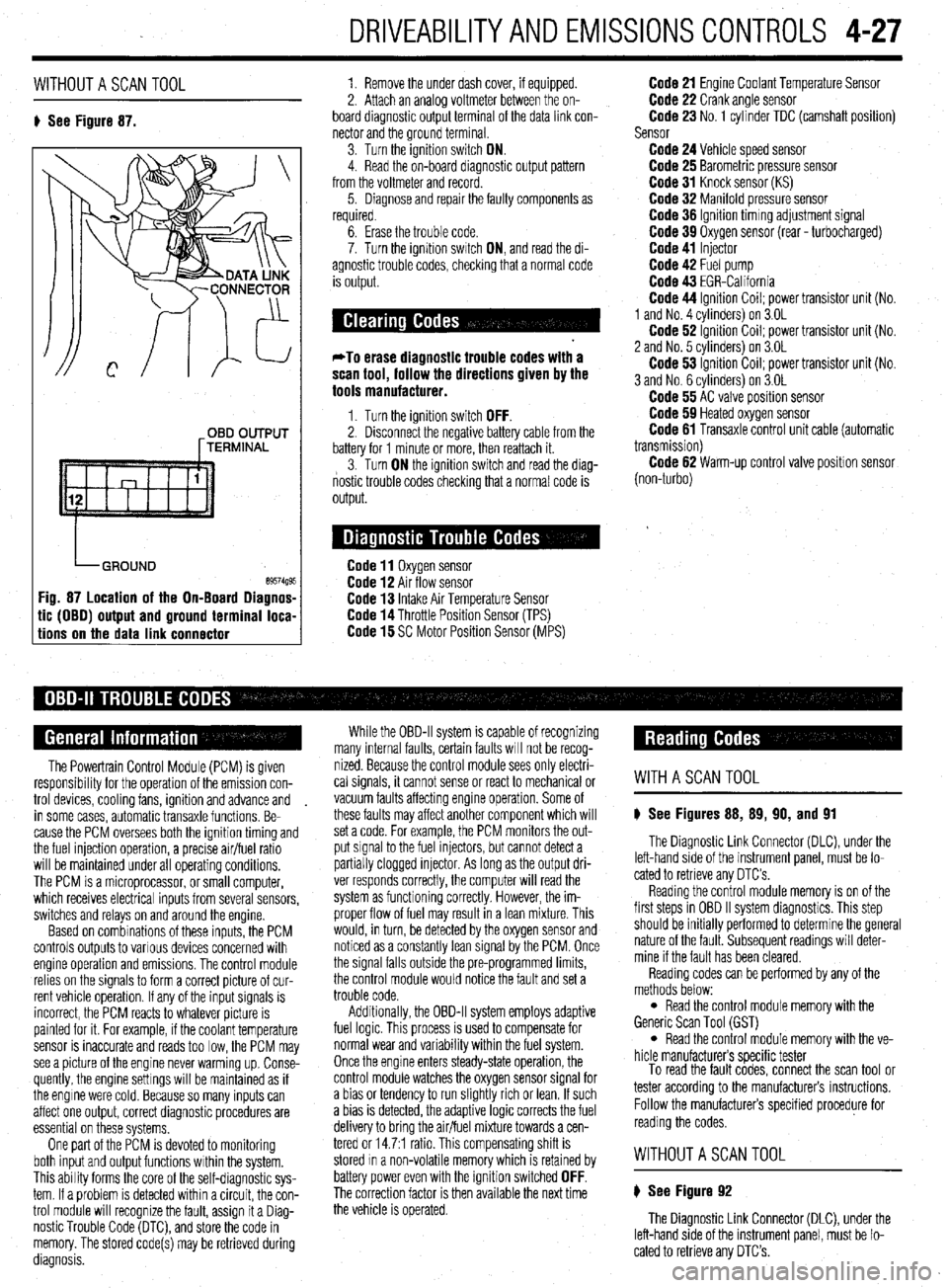
8 See Figure 87. 1. Remove the under dash cover, if equipped.
2. Attach an analoa voltmeter between the on-
board diagnostic outpit terminal of the data link con-
nector and the ground terminal
3. Turn the ignition switch ON.
4. Read the on-board diagnostic output pattern
from the voltmeter and record.
5. Diagnose and repair the faulty components as
required.
OBD OUTPUT
[TERMINAL
tic (OBO) output and ground terminal loca-
tions on the data link connector
6. Erase the trouble code.
7. Turn the ignition swatch ON, and read the di-
agnostic trouble codes, checking that a normal code
is output.
*To erase diagnostic trouble codes with a
scan tool, follow the directions given by the
tools manufacturer.
1. Turn the ignition switch OFF. 2. Disconnect the negative battery cable from the
battery for 1 minute or more, then reattach it.
3. Turn ON the ignition switch and read the diag-
nostic trouble codes checking that a normal code is
output.
Code 11 Oxygen sensor Code 12 Air flow sensor Code 13 Intake Air Temperature Sensor Code 14 Throttle Position Sensor (TPS) Code 15 SC Motor Position Sensor (MPS)
Code 21 Engine Coolant Temperature Sensor Code 22 Crank angle sensor Code 23 No. 1 cylinder TDC (camshaft position)
Sensor
Code 24 Vehicle speed sensor Code 25 Barometric pressure sensor Code 31 Knock sensor (KS) Code 32 Manifold pressure sensor Code 36 Ignition timmg adjustment signal Code 39 Oxygen sensor (rear - turbocharged) Code 41 Injector Code 42 Fuel pump Code 43 EGR-California Code 44 Ignition Coil; power transistor unit (No.
1 and No. 4 cvlinders) on 3.OL
Code 62 ignition Coil; power transistor unit (No.
2 and No. 5 cvlinders) on 3.OL
Code 53 ignition Coil; power transistor unit (No.
3 and No. 6 cylinders) on 3.OL
Code 55 AC valve position sensor Code 59 Heated oxygen sensor Code 61 Transaxle control unit cable (automatic
transmission)
Code 62 Warm-up control valve position sensor
(non-turbo)
The Powertrain Control Module (PCM) is given
responsibrlity for the operation of the emission con-
trol devices, cooling fans, ignition and advance and
in some cases, automatic transaxle functions. Be-
cause the PCM oversees both the ignition timing and
the fuel injection operation, a precise air/fuel ratio
will be maintained under all operating conditions,
The PCM is a microprocessor, or small computer,
which receives electrical inputs from several sensors,
switches and relays on and around the engine.
Based on combinations of these inputs, the PCM
controls outputs to various devices concerned with
engine operation and emissions. The control module
relies on the signals to form a correct picture of cur-
rent vehicle operation. If any of the input signals is
incorrect, the PCM reacts to whatever picture is
painted for it. For example, if the coolant temperature
sensor is inaccurate and reads too low, the PCM may
see a picture of the engine never warming up. Conse-
quently, the engine settings will be maintained as if
the engine were cold. Because so many inputs can
affect one output, correct diagnostic procedures are
essential on these systems,
One part of the PCM is devoted to monitoring
both input and output functions within the system.
This ability forms the core of the self-diagnostic sys-
tem. If a problem is detected within a circuit, the con-
trol module will recognize the fault, assign it a Diag-
nostic Trouble Code (DTC), and store the code in
memory. The stored code(s) may be retrieved during
diagnosis. While the OBD-II system is capable of recognizing
many internal faults, certain faults WIII not be recog-
nized. Because the control module sees only electri-
cal signals, it cannot sense or react to mechanical or
vacuum faults affecting engine operation. Some of
these faults may affect another component which will
set a code. For example, the PCM monitors the out-
put signal to the fuel injectors, but cannot detect a
partially clogged injector. As long as the output dri-
ver responds correctly, the computer will read the
system as functioning correctly. However, the im-
proper flow of fuel may result in a lean mixture. This
would, in turn, be detected by the oxygen sensor and
noticed as a constantly lean signal by the PCM. Once
the signal falls outside the pre-programmed limits,
the control module would notice the fault and set a
trouble code.
Additionally, the OBD-II system employs adaptive
fuel logic. This process is used to compensate for
normal wear and variability within the fuel system.
Once the engine enters steady-state operation, the
control module watches the oxygen sensor signal for
a bias or tendency to run slightly rich or lean. If such
a bias is detected, the adaptive logic corrects the fuel
delivery to bring the air/fuel mixture towards a cen-
tered or 14.7:1 ratio. This compensating shift is
stored In a non-volatile memory which is retained by
battery power even with the ignition switched
OFF. The correction factor is then available the next time
the vehicle is operated.
WITHASCANTOOL
8 See Figures 88, 89, 90, and 91
The Diagnostic Link Connector (DLC), under the
left-hand side of the instrument panel, must be lo-
cated to retrieve any OTC’s
Reading the control module memory is on of the
first steps in OBD II system diagnostics. This step
should be initially performed to determine the general
nature of the fault. Subsequent readings will deter-
mine if the fault has been cleared.
Reading codes can be performed by any of the
methods below:
l Read the control module memory with the
Generic Scan Tool (GST)
l Read the control module memory with the ve-
hicle manufacturers specific tester
To read the fault codes, connect the scan tool or
tester according to the manufacturers instructions.
Follow the manufacturers specified procedure for
reading the codes.
WITHOUTASCANTOOL
8 See Figure 92
The Diagnostic Link Connector (DLC), under the
left-hand side of the instrument panel, must be lo-
cated to retrieve any DTC’s.
Page 181 of 408
.
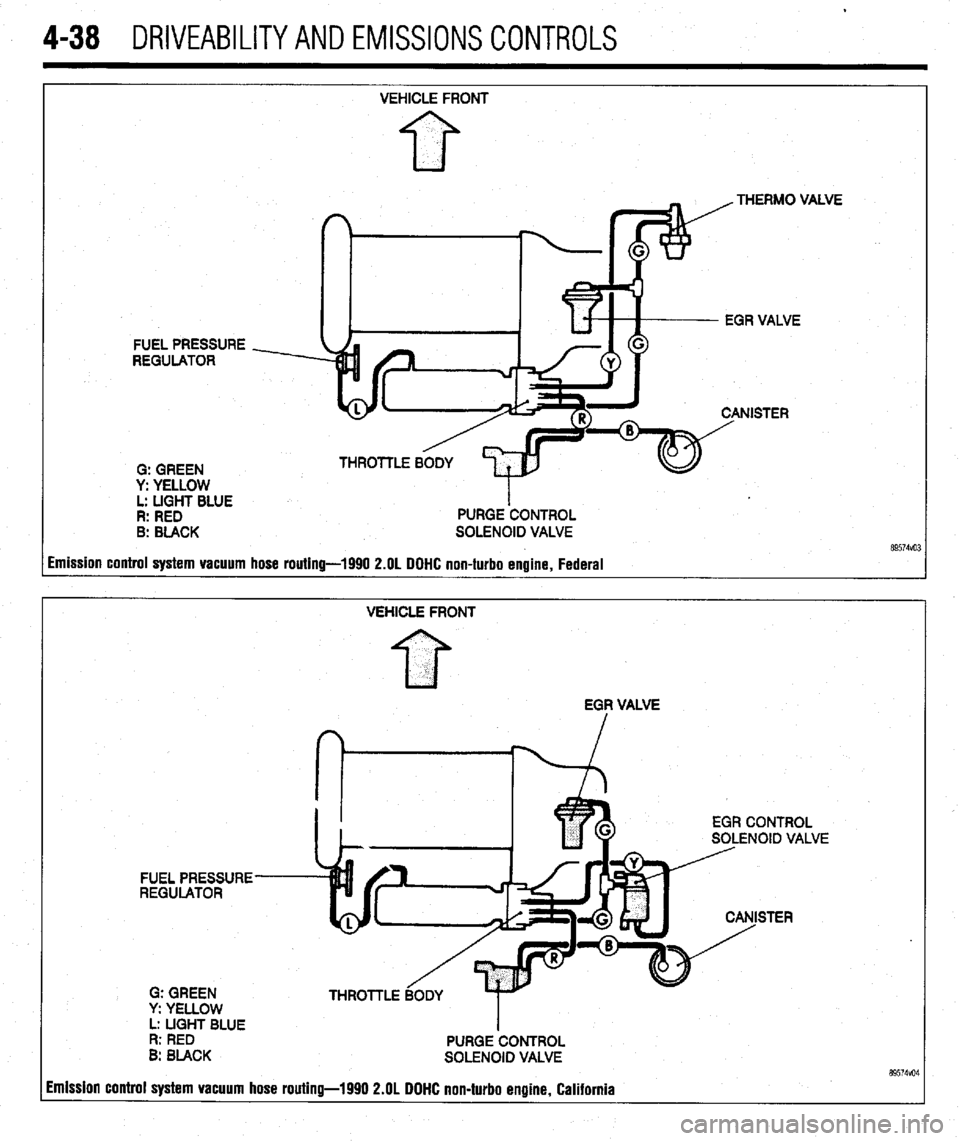
4-38 DRIVEABILITYAND EMISSIONS CONTROLS
FUEL PRESSURE
REGULATOR
0: GREEN
y: YELLOW
L: LIGHT BLUE
R: RED
B: BLACK VEHICLE FRONT
PURGE ‘CONTROL
SOLENOID VALVE .VE
imission control system vacuum hose routing-1990 2.OL DOHC non-turbo engine, Federal
VEHICLE FRONT
EGF VALVE
EGR CONTROL
SOLENOID VALVE
FUEL PRESSURE
REGULATOR
STER
G: GREEN
y: YELLOW
L: UGHT BLUE
I
R: RED
PURGE CONTROL
B: BLACK
SOLENOID VALVE 89574vo4 imission control system vacuum hose routing-1990 2.OL DOHC non-turbo engine, California
Page 182 of 408
.
DRIVEABILITYAND EMISSIONS CONTROLS 4-39
VEHICLE FRONT
FI
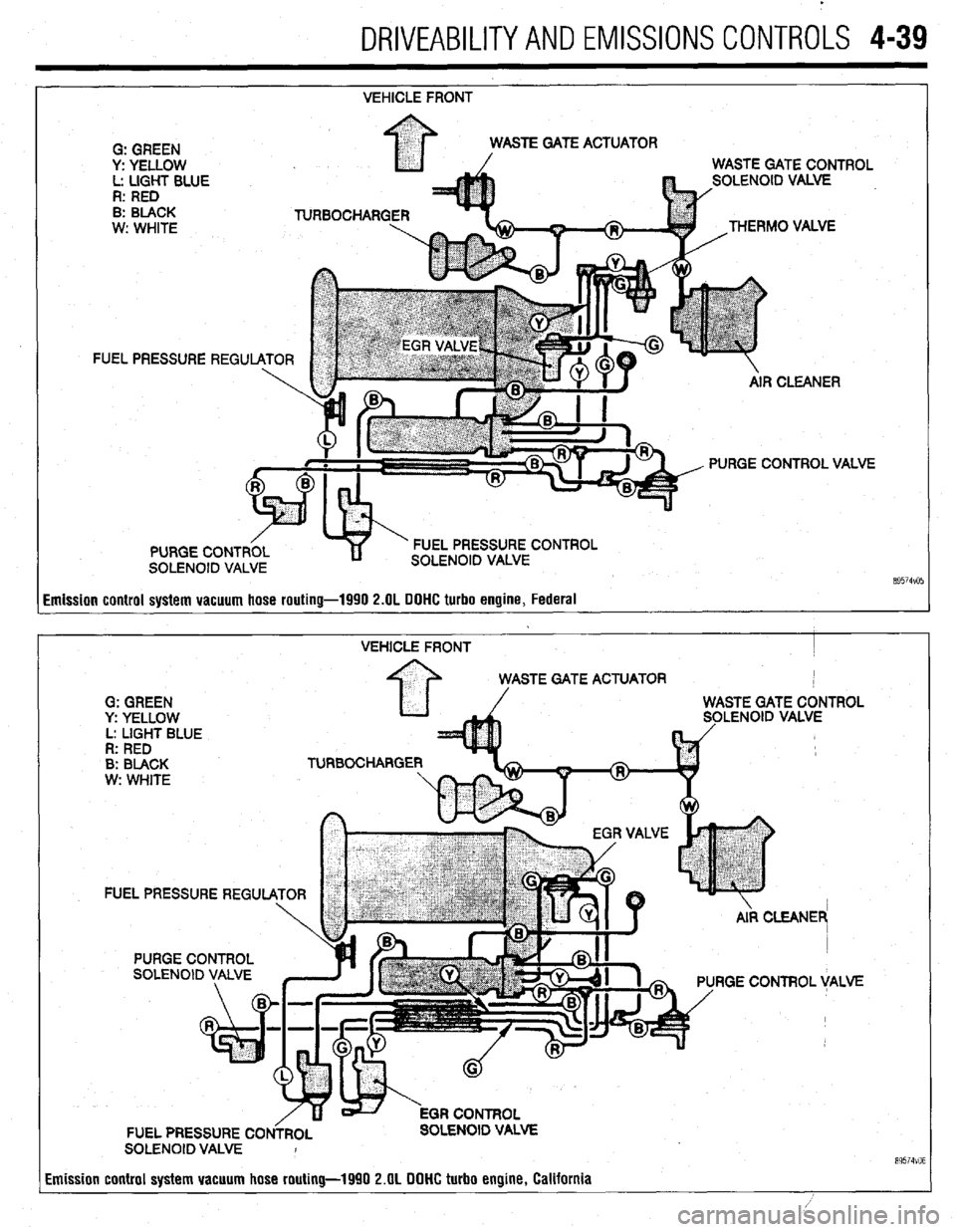
Emission control system vacuum hose routing-1990 2.OL DOHC turbo engine, Federal
VEHICLE FRONT I
STE GATE ACTUATOR
G: GREEN
y: YELLOW LENOID VALVE
L: LIGHT BLUE
R: RED
B: BLACK TURBOCHARGE
w: WHITE
FUEL PRESSURE REGU
RGE CONTROL VALVE
FUEL PRESSURE CO OLENOID VALVE
SOLENOID VALVE I
Emission control system vacuum hose routing-1990 2.OL DOHC turbo engine, California
89574VO6
Page 183 of 408
4-40 DRIVEABILITYAND EMISSIONS CONTROLS
EVAPORATIVE EMISSION PURGE SOLENOID
I
EVAPORATIVE
CANISTER THROlTLE BODY
THERMAL VACUUM VALVE $d yEAt FUEL PRESSURE
- REGULATOR
G: GREEN
y: YELLOW
L: LIGHT BLUE
R: RED VEHICLE FRONT
8: BLACK
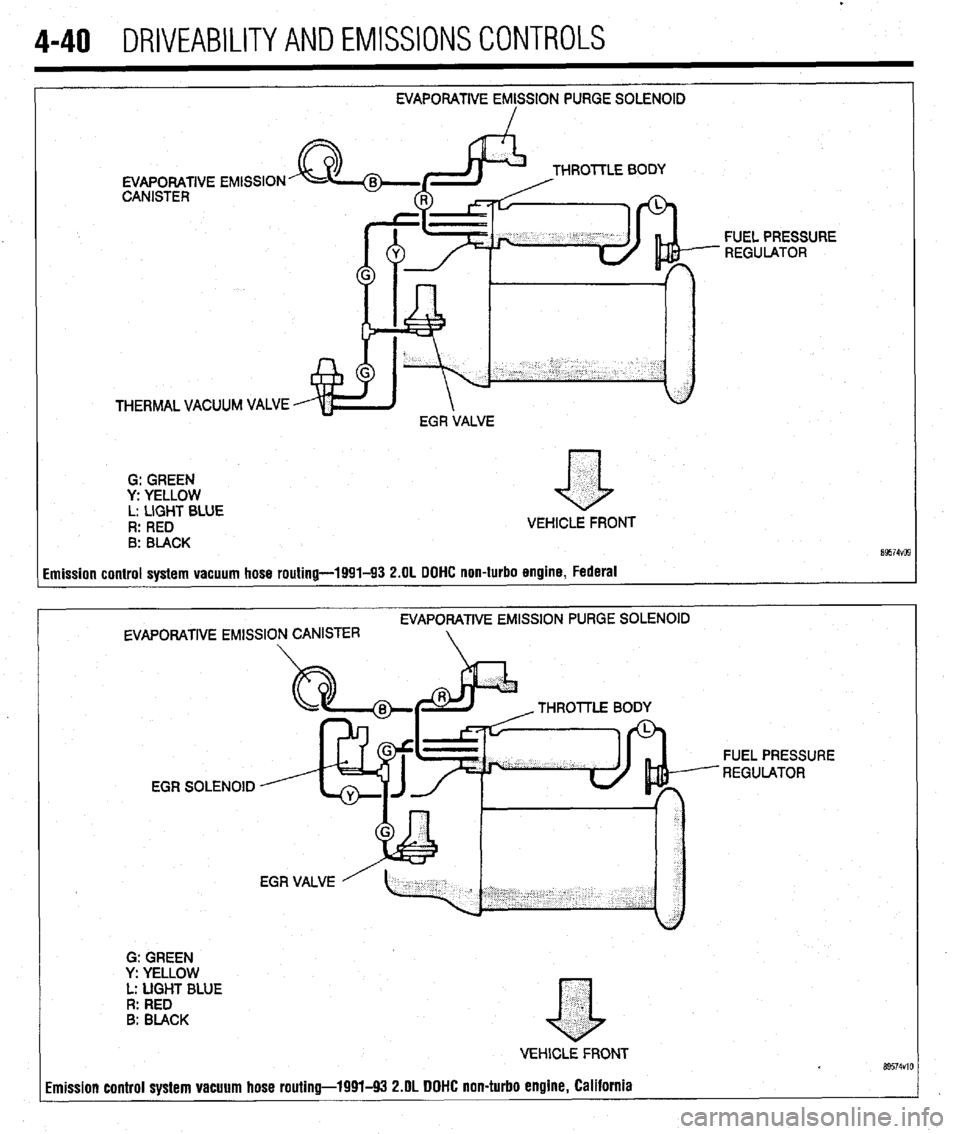
imission control system vacuum hose routing-1991-93 2.OL DOHC non-turbo engine, Federal
EVAPORATIVE EMlSSlON PURGE SOLENOID
EVAPORATIVE EMISSION CANISTER
G: GREEN
Y: YELLOW
L: UGHT BLUE
R: RED
B: BLACK THROllLE 80
EGR SOLENOID FUEL PRESSURE
REGULATOR
.
a
VEHlCLE FRONT Bs574VlO imission control system vacuum hose routing-1991-93 2.OL DOHC non-turbo engine, California
Page 186 of 408
DRIVEABILITYAND EMISSIONSCONTROL-S 4-43
L. Light blue
R. Red
B Black Fuel pressure
regulator
. Vehicle front
93154~33
I Fuel pressure
regulator
Vehicle front
93154V34
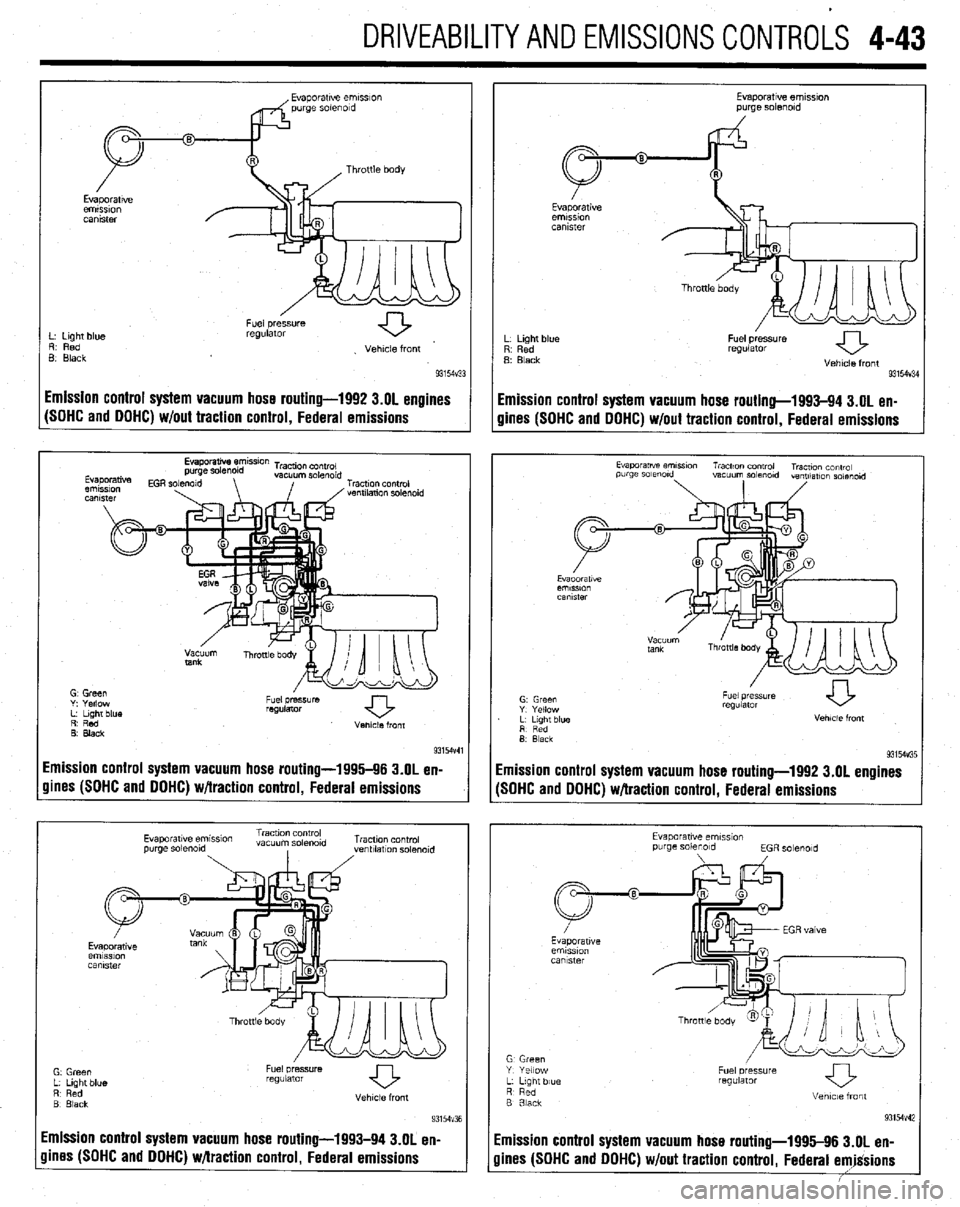
Emission control system vacuum hose routing-1992 3.01 engines
Emission control system vacuum hose routing-1993-94 3.OL en-
(SOHC and OOHC) w/out traction control, Federal emissions
gines (SOHC and DOHC) w/out traction control, Federal emissions
R’ Red
0. Black Venlcle front
9315-M
Emission control system vacuum hose routing-1996-96 3.OL en-
gines (SOHC and DOHC) w/traction control, Federal emissions
Evaporatwe em~smn Traction control
vacuum so&old Tracuon control
purge solmold
, ,ventllatlon solmold
Emission control system vacuum hose routing-1993-94 3.OL en-
Evaporatwe ernmon
purge solenoid
L Light blue
R Red
B Black
Fuel pressure
regulator
Vehicle front
931W3E
imission control system vacuum hose routing-1992 3.OL engines
SOHC and DOHC) w/traction control, Federal emissions
Evaporawe emss~on
purge solenoid
EGR solmold
G Green
Y Yellow
L L,gnt blue
R Red
B 3lack Fuel oressure
regUlatOr
Vetme front
93154v42
imission control system vacuum hose routing-1995-96 3.OL en-
lines (SOHC and DOHC) w/out traction control, Federal emjgsions
Page 192 of 408
FUEL SYSTEM 5-5,
21. Connect the negative battery cable. Refill the
cooling system.
REMOVAL & INSTALLATION
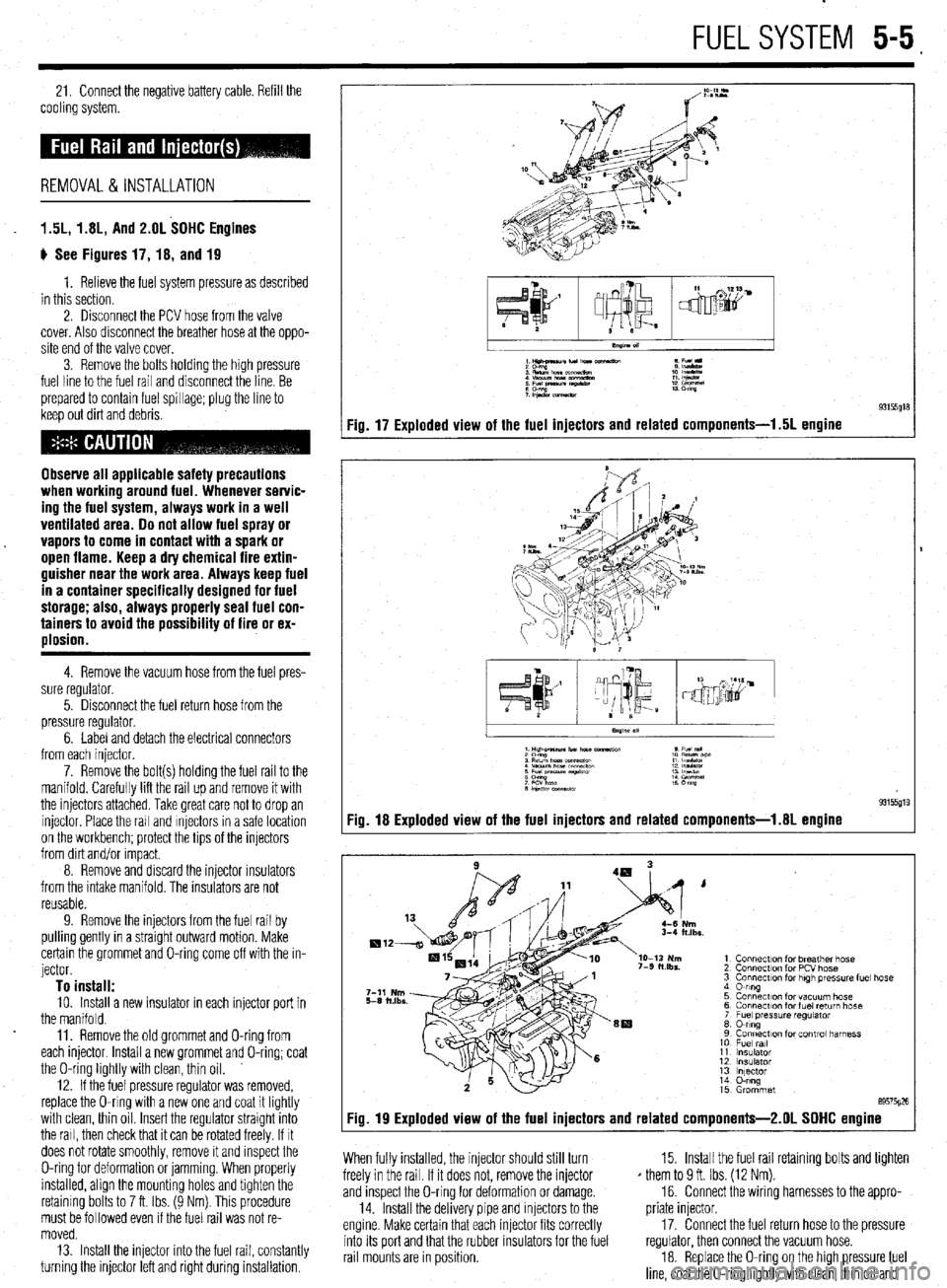
1.5L, 1.8L, And 2.OL SOHC Engines
ti See Figures 17, 18, and 19
1. Relieve the fuel system pressure as described
in this section.
2. Disconnect the PCV hose from the valve
cover. Also disconnect the breather hose at the oppo-
site end of the valve cover.
3. Remove the bolts holding the high pressure
fuel line to the fuel rail and disconnect the line. Be
prepared to contain fuel spillage; plug the line to
keep out dirt and debris.
Observe all applicable safety precautions
when working around fuel. Whenever servic-
ing the fuel system, always work in a well
ventilated area. 00 not allow fuel spray or
vapors to come in contact with a spark or
open flame. Keep a dry chemical fire extin-
guisher near the work area. Always keep fuel
in a container specifically designed for fuel
storage; also, always properly seal fuel con-
tainers to avoid the possibility of fire or ex-
plosion.
4. Remove the vacuum hose from the fuel pres-
sure regulator.
5. Disconnect the fuel return hose from the
pressure regulator.
6. Label and detach the electrical connectors
from each injector.
7. Remove the bolt(s) holding the fuel rail to the
manifold. Carefully lift the rail up and remove it with
the injectors attached. Take great care not to drop an
injector Place the rail and Injectors in a safe location
on the workbench; protect the tips of the injectors
from dirt and/or Impact.
8. Remove and discard the injector rnsulators
from the intake manifold. The insulators are not
reusable.
9. Remove the injectors from the fuel rail by
pulling gently in a straight outward motion. Make
certain the grommet and O-ring come off with the in-
jector.
To install: 10. Install a new insulator in each injector port in
the manifold.
11. Remove the old grommet and O-ring from
each injector Install a new grommet and O-ring; coat
the O-ring lightly with clean, thin oil.
12. If the fuel pressure regulator was removed,
replace the O-ring with a new one and coat it lightly
with clean, thin oil Insert the regulator straight into
the rail, then check that it can be rotated freely. If It
does not rotate smoothly, remove it and inspect the
O-ring for deformation or jamming. When properly
installed, align the mounting holes and tighten the
retaining bolts to 7 ft. Ibs. (9 Nm). This procedure
must be followed even if the fuel rail was not re-
moved.
13. Install the injector into the fuel rail, constantly
turning the injector left and right during installation.
1Hilt4naunfu(norc e Fu(l
:E%!,,.,.- 1: IEE
: Efgz tz!z? :: %%I
;P&.xmeaw 13 m
Fig. 17 Exploded view of the fuel injectors and related components-l .5L engine
I
.xs.
1 Connection for breather hose
2 Connection for PCV hose
3 Connection for high tm?ss”re fuel hose
4 0-ring
5 Connection for vacuum hose
6 Connecr~on for fuel return hose
7 Fuel pressure regulator
8 0-ring
9 Connection for control harness
10 Fuel ml
11 Insulator
12 insulator
13 lnlector
14 O-ring
15 Grommet
89575026
Fig. 19 Exploded view of the fuel injectors and related components-2.01 SOHC engine
When fully installed, the injector should still turn
freely in the rail. If it does not, remove the injector
and inspect the O-ring for deformation or damage.
14. Install the delivery pipe and injectors to the
engine. Make certain that each injector fits correctly
into its port and that the rubber insulators for the fuel
rail mounts are in position. 15. Install the fuel rail retaining bolts and tighten
* them to 9 ft. Ibs. (12 Nm).
16. Connect the wiring harnesses to the appro-
priate injector.
17. Connect the fuel return hose to the pressure
regulator, then connect the vacuum hose.
18. Replace the O-ring on the high pressure fuel
line, coat the O-ring lightly with clean, thin oil and
Page 193 of 408
install the line to the fuel rail. Tighten the mounting
bolts,
19. Attach the PCV hose and the breather hose if
thev were disconnected.
20. Connect the negative battery cable. Pressur-
ize the fuel system and inspect all connections for
I
leaks.
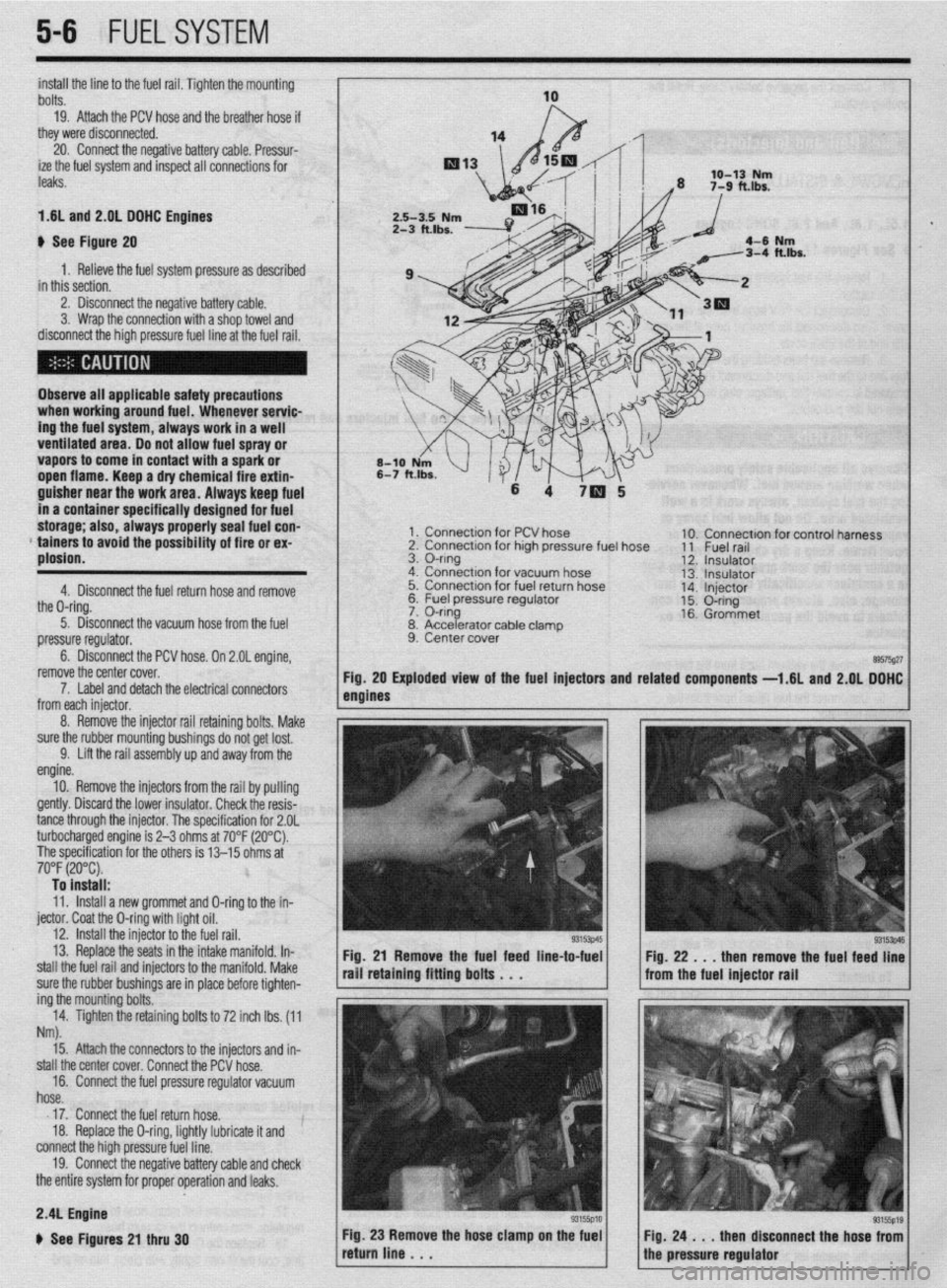
1.6L and 2.01 DOHC Engines
b See Figure 20
1. Relieve the fuel system pressure as described
in this section.
2. Disconnect the negative battery cable.
3. Wrap the connection with a shop towel and
disconnect the high pressure fuel line at the fuel rail.
Observe all applicable safety precautions
when working around fuel. Whenever servic-
ing the fuel system, always work in a well
ventilated area. Do not allow fuel spray or
vapors to come in contact with a spark or
open flame. Keep a dry chemical fire extin-
guisher near the work area. Always keep fuel
in a container specifically designed for fuel
storage; also, always properly seal fuel con-
* tainers to avoid the possibility of fire or ex-
plosion.
4. Disconnect the fuel return hose and remove
the O-ring.
5. Disconnect the vacuum hose from the fuel
pressure regulator.
6. Disconnect the PCV hose. On 2.OL engine,
remove the center cover.
1 x Connection for PCV hose
2. Connection for high pressure fuel hose
3. O-ring
4. Connection for vacuum hose
5. Connection for fuel return hose
&2 I=, 1c.1 nrncc*.ra regu,ator
lble clamD
7. Label and detach the electrical connectors
from each iniector.
8. Accelerator ca
9. Center cover . 10. Connection for control harness
11 Fuel rail
12. Insulator
13. Insulator
14. Injector
15. O-ring
16. Grommet
89575g27 Exploded view of the fuel injectors and related
components -1.6L and 2.QL DOHC
5-6 FUELSYSTEM
8. Remove the injector rail retaining bolts, Make
sure the rubber mounting bushings do not get lost.
9. Lift the rail assembly up and away from the
engine.
10. Remove the injectors from the rail by pulling
gently. Discard the lower insulator. Check the resis-
tance through the injector. The specification for 2.OL
turbocharged engine is 2-3 ohms at 70°F (20°C).
The specification for the others is 13-15 ohms at
70°F (20°C). To install:
11. Install a new grommet and O-ring to the in-
jector. Coat the O-ring with light oil.
12. install the injector to the fuel rail.
13. Replace the seats in the intake manifold. In-
stall the fuel rail and injectors to the manifold. Make
sure the rubber bushings are in place before tighten-
ing the mounting bolts.
14. Tighten the retaining bolts to 72 inch lbs. (11
Nm).
Fig. 21 Remove the fuel feed line-to-fuel
rail retaining fitting bolts . . .
15. Attach the connectors to the injectors and in-
stall the center cover. Connect the PCV hose.
16. Connect the fuel pressure regulator vacuum
hose.
17. Connect the fuel return hose.
18. Replace the O-ring, lightly lubricate it and
connect the high pressure fuel line.
19. Connect the negative battery cable and check
the entire system for proper operation and leaks. Fig. 22 . . . then remove the fuel feed line
from the fuel injector rail
2.4L Engine
b See Figures 21 thru 30