lock MITSUBISHI LANCER EVOLUTION 2007 Service Repair Manual
[x] Cancel search | Manufacturer: MITSUBISHI, Model Year: 2007, Model line: LANCER EVOLUTION, Model: MITSUBISHI LANCER EVOLUTION 2007Pages: 1449, PDF Size: 56.82 MB
Page 794 of 1449

CLUTCH -On-Vehicle Service21A-4
3. If the height of the clutch pedal is outside the standard
value, loosen the setting nut to adjust the pedal height
to the standard value.
Caution
Do not push in the master cylinder push rod at this
time, otherwise the clutch will not operate properly.
4. After completing the adjustments, confirm that the clutch
pedal free play (measured at the face of the pedal pad)
and the distance between the clutch pedal (the face of
the pedal pad) and the clutch pedal stopper or toeboard
when the clutch is disengaged are within the standard
value ranges.
Standard value (C): 4 - 13 mm
Standard value (D):
114.3 mm or more
100 mm or more
5. If the clutch pedal free play and the distance between
the clutch pedal and the clutch pedal stopper or toeboard
when the clutch is disengaged do not agree with the
standard values, it is probably the result of either air in
the hydraulic system or a faulty master cylinder, clutch
cylinder or clutch. Bleed the air, or disassemble and inspect
the master cylinder, clutch cylinder or clutch.
6. Turn back the carpet, etc.
BLEEDING
Specified fluid: Brake fluid DOT 3 or DOT 4
Caution
Use the specified brake fluid. Avoid using a mixture
of the specified fluid and other fluid.
CLUTCH PEDAL POSITION SWITCH
ADJUSTMENT
1. Adjust the clutch pedal. (Refer to P. 21A-3).
2. Disconnect the connector from clutch pedal position
switch.
3. Loosen the clutch pedal position switch by rotating approx.
quarter turn to counterclockwise.
4. Fix the clutch pedal in full stroke.
Clutch pedal Setting nut
13±2 N·m
Clutch pedal clevis pin play
C
Clutch
pedal
stopper
D D
Page 795 of 1449
CLUTCH -On-Vehicle Service/Clutch Pedal21A-5
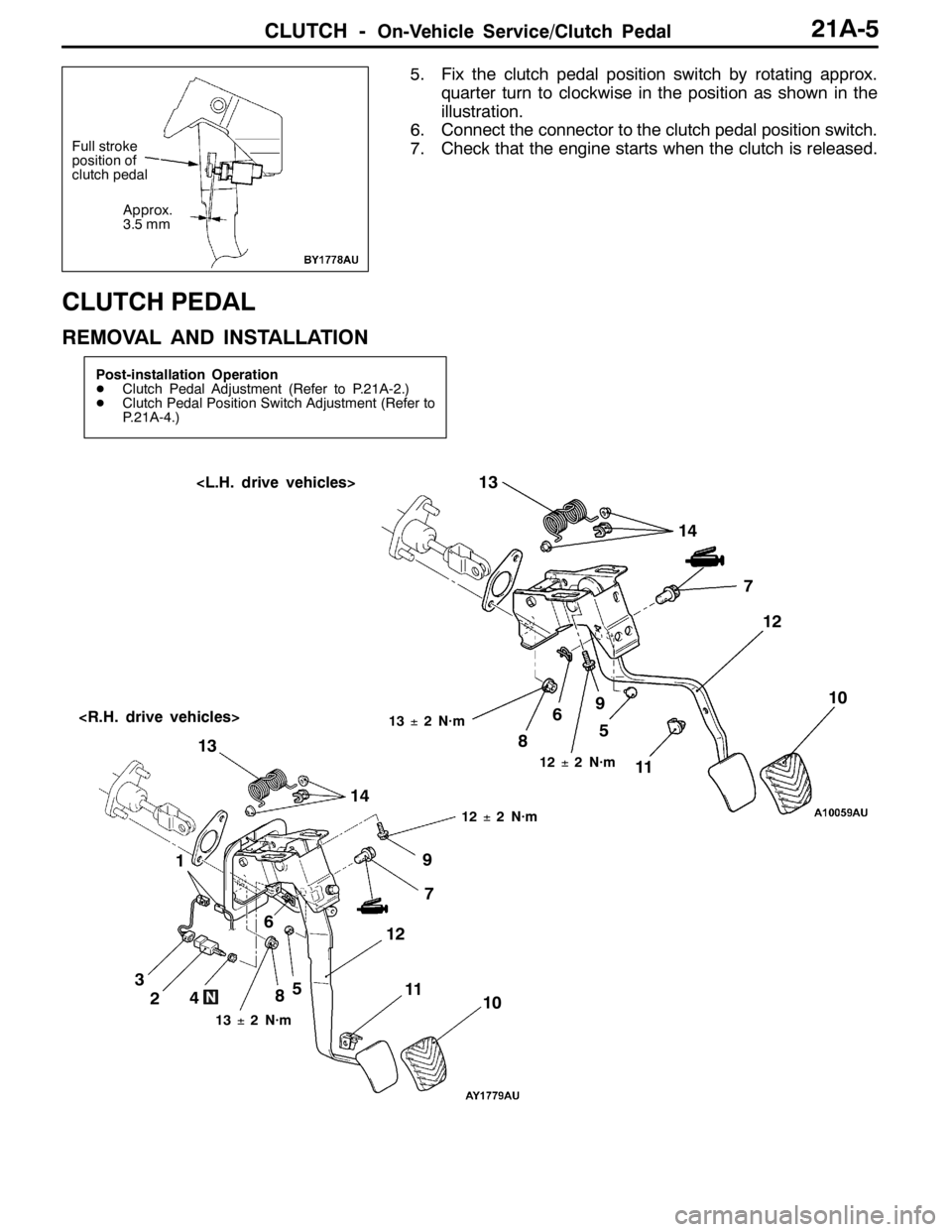
5. Fix the clutch pedal position switch by rotating approx.
quarter turn to clockwise in the position as shown in the
illustration.
6. Connect the connector to the clutch pedal position switch.
7. Check that the engine starts when the clutch is released.
CLUTCH PEDAL
REMOVAL AND INSTALLATION
Post-installation Operation
DClutch Pedal Adjustment (Refer to P.21A-2.)
DClutch Pedal Position Switch Adjustment (Refer to
P.21A-4.)
6713±2 N·m
1
12±2 N·m
8
11
2459
12±2 N·m
67
13±2 N·m
10 8
12 13
3145 910
1112 13
14
Full stroke
position of
clutch pedal
Approx.
3.5 mm
Page 810 of 1449

22A-2
MANUAL
TRANSMISSION
CONTENTS
GENERAL 3.................................
Outline of Changes 3...........................
GENERAL INFORMATION 3..................
SERVICE SPECIFICATION 3..................
LUBRICANTS 3..............................
SPECIAL TOOLS 4...........................
TROUBLESHOOTING
ON-VEHICLE SERVICE 40....................
Transmission Oil Check 40......................
Transmission Oil Replacement 40................
Transfer Oil Check 40..........................
Transfer Oil Replacement 40....................
Fluid Check
Bleeding
Hydraulic Pressure Check
Wheel Speed Sensor Output Voltage
Measurement
TRANSMISSION CONTROL* 46...............
TRANSFER ASSEMBLY 49...................
TRANSMISSION ASSEMBLY 52...............
4WD-ECU
SENSOR, SWITCH AND RELAY
AYC> 56.....................................
HYDRAULIC UNIT Refer to GROUP27B.......
WARNING REGARDING SERVICING OF SUPPLEMENTAL RESTRAINT SYSTEM (SRS) EQUIPPED VEHICLES
WARNING!
(1) Improper service or maintenance of any component of the SRS, or any SRS-related component, can lead to personal
injury or death to service personnel (from inadvertent firing of the air bag) or to driver and passenger (from rendering
the SRS inoperative).
(2) Service or maintenance of any SRS component or SRS-related component must be performed only at an authorized
MITSUBISHI dealer.
(3) MITSUBISHI dealer personnel must thoroughly review this manual, and especially its GROUP 52B - Supplemental
Restraint System (SRS) before beginning any service or maintenance of any component of the SRS or any SRS-related
component.
NOTE
The SRS includes the following components: SRS-ECU, SRS warning lamp, air bag module, clock spring, and interconnecting
wiring. Other SRS-related components (that may have to be removed/installed in connection with SRS service or maintenance) are
indicated in the table of contents by an asterisk (*).
Page 813 of 1449

MANUAL TRANSMISSION - Troubleshooting
TROUBLESHOOTING
BASIC TROUBLESHOOTING CONDITIONS
Refer to GROUP 00 - How to Use Troubleshooting/Inspection Service Points.
NOTE
Before starting the troubleshooting procedure, make sure that the following items have been checked
okay.
DIs the appropriate steering wheel installed at the center of the steering column shaft correctly?
DAre the tire, wheel size, specifications, air pressure, balance, and wear state normal?
DIs the wheel alignment normal?
DHas the engine, suspension, etc. been remodeled in such a way that it will affect the ACD and AYC
systems?
DIAGNOSIS FUNCTION
READING DIAGNOSIS CODE
Read a diagnosis code by the MUT-IIor ACD mode indicator
lamp. (Refer to GROUP 00 - How to Use Troubleshooting/
Inspection Service Points.)
NOTE
Connect the MUT-IIto the diagnosis connector (16-pin).
ERASING DIAGNOSIS CODES
When using the MUT-II
Connect the MUT-IIto the diagnosis connector (16-pin) and
erase the diagnosis code.
Caution
Turn the ignition switch to the “LOCK”(OFF) position
before connecting or disconnecting the MUT-II.
ACDmode indicator lamp
Page 834 of 1449
MANUAL TRANSMISSION - Troubleshooting
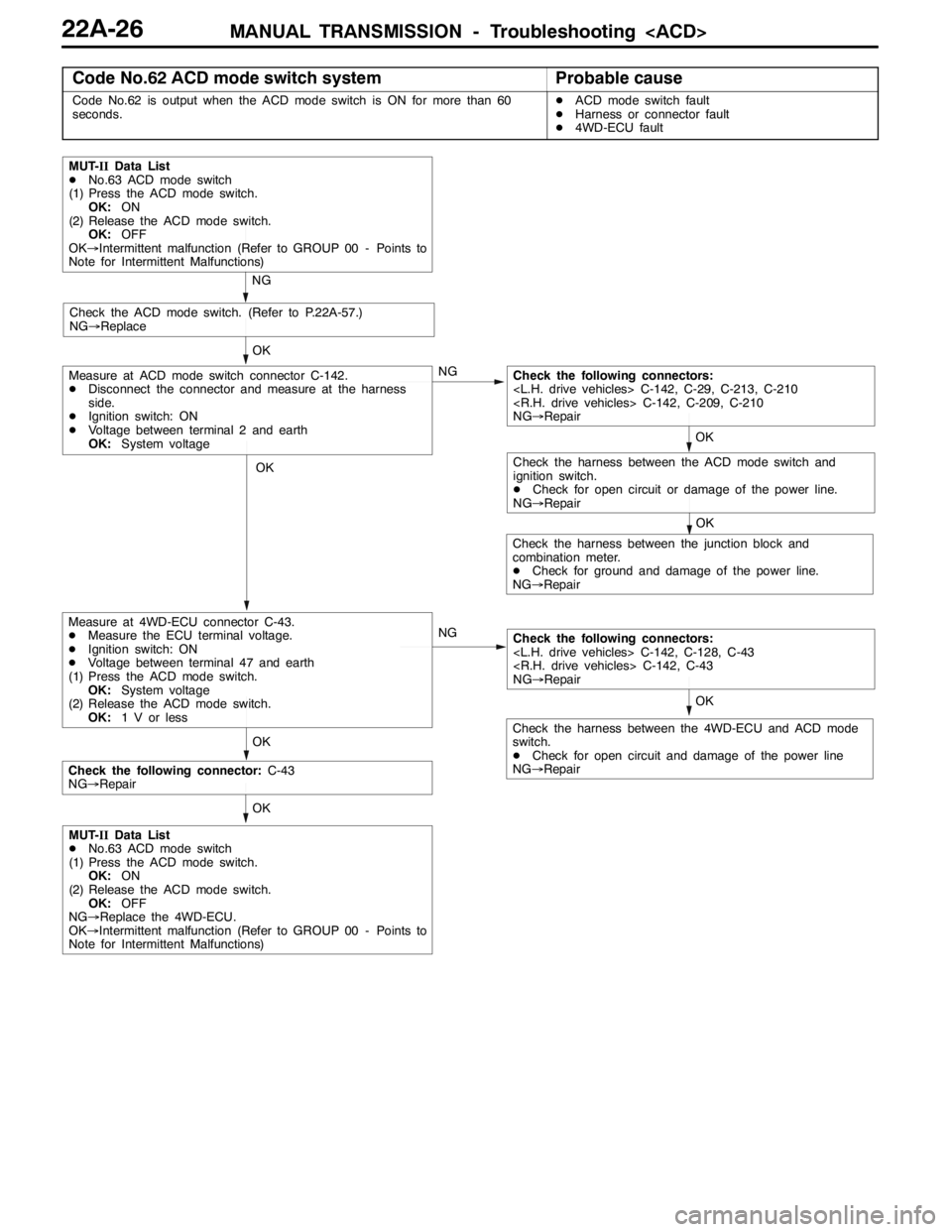
Code No.62 ACD mode switch systemProbable cause
Code No.62 is output when the ACD mode switch is ON for more than 60
seconds.DACD mode switch fault
DHarness or connector fault
D4WD-ECU fault
OK
OK
OK
NG
NG
MUT-IIData List
DNo.63 ACD mode switch
(1) Press the ACD mode switch.
OK:ON
(2) Release the ACD mode switch.
OK:OFF
OK→Intermittent malfunction (Refer to GROUP 00 - Points to
Note for Intermittent Malfunctions)
Check the ACD mode switch. (Refer to P.22A-57.)
NG→Replace
NG
OK
Check the following connectors:
NG→Repair
OK
Measure at ACD mode switch connector C-142.
DDisconnect the connector and measure at the harness
side.
DIgnition switch: ON
DVoltage between terminal 2 and earth
OK:System voltage
Measure at 4WD-ECU connector C-43.
DMeasure the ECU terminal voltage.
DIgnition switch: ON
DVoltage between terminal 47 and earth
(1) Press the ACD mode switch.
OK:System voltage
(2) Release the ACD mode switch.
OK:1 V or less
OK
Check the following connectors:
NG→Repair
OK
Check the harness between the junction block and
combination meter.
DCheck for ground and damage of the power line.
NG→Repair
Check the harness between the 4WD-ECU and ACD mode
switch.
DCheck for open circuit and damage of the power line
NG→Repair
Check the following connector:C-43
NG→Repair
Check the harness between the ACD mode switch and
ignition switch.
DCheck for open circuit or damage of the power line.
NG→Repair
MUT-IIData List
DNo.63 ACD mode switch
(1) Press the ACD mode switch.
OK:ON
(2) Release the ACD mode switch.
OK:OFF
NG→Replace the 4WD-ECU.
OK→Intermittent malfunction (Refer to GROUP 00 - Points to
Note for Intermittent Malfunctions)
Page 849 of 1449

MANUAL TRANSMISSION - On-vehicle Service22A-41
4. Fill with specified oil till the level comes to the lower portion
of oil filler plug hole.
Specified transfer oil:
MITSUBISHI Genuine Gear Oil Part No.8149630
EX, CASTROL HYPOY LS (GL-5, SAE 90),
SHELL-LSD (GL-5, SAE 80W - 90) or equivalent
Quantity:
0.55 L
0.6 L
5. Tighten the oil filler plug to the specified torque.
Tightening torque: 32±2 N·m
FLUID CHECK
1. Remove the maintenance lid located in the luggage
compartment.
2.
If the vehicle has been run, leave it for 90 min. or more
in an ordinary temperature (10_C–30_C) to allow the
accumulator internal pressure to drop.
NOTE
If the ambient temperature is 10_C or less, allow more
time to leave the vehicle to stand idle.
Set the MUT-IIto the 16-pin diagnosis connector. Turn ON
the ignition switch, perform MUT-IIactuator test (Item
No.03), forcibly drive the hydraulic unit and remove the
pressure in the accumulator.
Caution
Turn the ignition switch to the “LOCK”(OFF) position
before connecting or disconnecting the MUT-II.
NOTE
(1) In the actuator test (Item No. 03: Oil Level Check
Mode), the directional valve of the hydraulic unit is
moved to the left and right for 20 times, and then
the differential is cleared automatically. Drive can also
be cleared forcibly using the Clear key of the MUT-II.
(2) If the function has been stopped by fail-safe, the
hydraulic unit cannot be cleared forcibly.
3. Check that the fluid level in the oil reservoir is in the
range between MAX and MIN.
4. If the fluid level is lower than MIN, add the specified
fluid.
Specified fluid: Dia Queen ATF SP III
5. Reinstall the maintenance lid.
Page 850 of 1449

MANUAL TRANSMISSION - On-vehicle Service22A-42
BLEEDING
1. Lift up the vehicle.
2. Set the MUT-IIto the 16-pin diagnosis connector.
Caution
Turn the ignition switch to the “LOCK”(OFF) position
before connecting or disconnecting the MUT-II.
3. Turn the ignition switch to the “ON” position.
4. Set the steering wheel in the straight-ahead position.
5. Perform the MUT-IIactuator test (Item No.02), and forcibly
drive the hydraulic unit.
NOTE
(1) The actuator test (Item No.01: Bleeding Mode) will
be performed for 5 minutes, after which it will be
cleared automatically. Drive can also be cleared during
forced driving using the clear key of the MUT-II.
(2) If the hydraulic unit function has been stopped by
fail-safe, the hydraulic unit cannot be forcibly driven.
6. Remove the cap of the bleeder screw on the transfer,
and connect the vinyl hose.
7
.Slowly turn the steering wheel to the left or right from
the neutral state. Loosen the bleeder screw, and check
that air is discharged together with the fluid.
8
.After the air is discharged, tighten the bleeder screw,
and return the steering wheel to the neutral state.
Caution
During bleeding, replenish the fluid so that some
always remains in the oil reservoir.
9. Repeat steps 6 and 7 several 2 to 3 times, and after
checking that no more air mixes in, tighten the bleeder
screw at the specified torque.
Tightening torque: 5±1 N·m
10. After bleeding, check the fluid level. (Refer to P. 22A-41.)
Caution
If bleeding is not performed completely, noise may
be produced from the hydraulic unit, or the durability
of the pump, etc. may drop.
11. On vehicles with AYC, perform bleeding when the
hydraulic unit is removed. (Refer to GROUP 27B -
On-vehicle Service.)
ACD OPERATION CHECK
1. Lift up the vehicle.
2
.Set the MUT-IIto the 16-pin diagnosis connector.
Caution
Turn the ignition switch to the “LOCK”(OFF) position
before connecting or disconnecting the MUT-II.
3. Start the engine.
Bleeder screw
Front exhaust pipe
Page 851 of 1449

MANUAL TRANSMISSION - On-vehicle Service22A-43
4. Set the gear to the 2nd gear or above, operate the MUT-II,
and check from the service data (Item No.09) that the
wheel speed is within 10 km/h to 20 km/h.
NOTE
(1) Set the steering wheel to the neutral position
(2) The ACD may continue operating (operation sounds
can be heard) when the steering wheel is steered,
this is not a system fault. In this case, set the steering
wheel to the neutral position, and perform the following
operations to stop the ACD.
DRelease the clutch.
DSet the gear to “N”.
DStop the engine
5. Perform the MUT-IIactuator test (Item No.05), and forcibly
drive the transfer.
NOTE
(1) The actuator test (Item No. 05: ACD Operation Check
Mode) is performed for 1 minute, after which it will
be cleared automatically. Drive can also be cleared
during forced driving using the clear key of the MUT-II.
(2) If the hydraulic unit function has been stopped by
fail-safe, the transfer cannot be forcibly driven.
6. Check that the front and rear wheel speeds satisfy the
following in the MUT-IIactuator test (Item No.05).
The front wheel will be faster than the back wheels by
more than 2 km/h.
NOTE
If the above are not satisfied, check the oil pressure as
the system may be faulty.
HYDRAULIC PRESSURE CHECK
1. Lift up the vehicle.
2. Set the MUT-IIto the 16-pin diagnosis connector.
Caution
Turn the ignition switch to the “LOCK”(OFF) position
before connecting or disconnecting the MUT-II.
3. Disconnect the hydraulic unit and transfer connector
assembly, and connect the special tool to the hydraulic
unit.
4. Turn the ignition switch to “ON”.
5. Perform the MUT-IIactuator test (Item No.05), and forcibly
drive the hydraulic unit.
NOTE
(1) The actuator test (Item No. 05 ACD Operation Check
Mode) is performed for 1 minute, after which it will
be cleared automatically. Drive can also be cleared
during forced driving using the clear key of the MUT-II.
MD998330
MB991705
Page 856 of 1449
MANUAL TRANSMISSION - Transmission Control22A-48
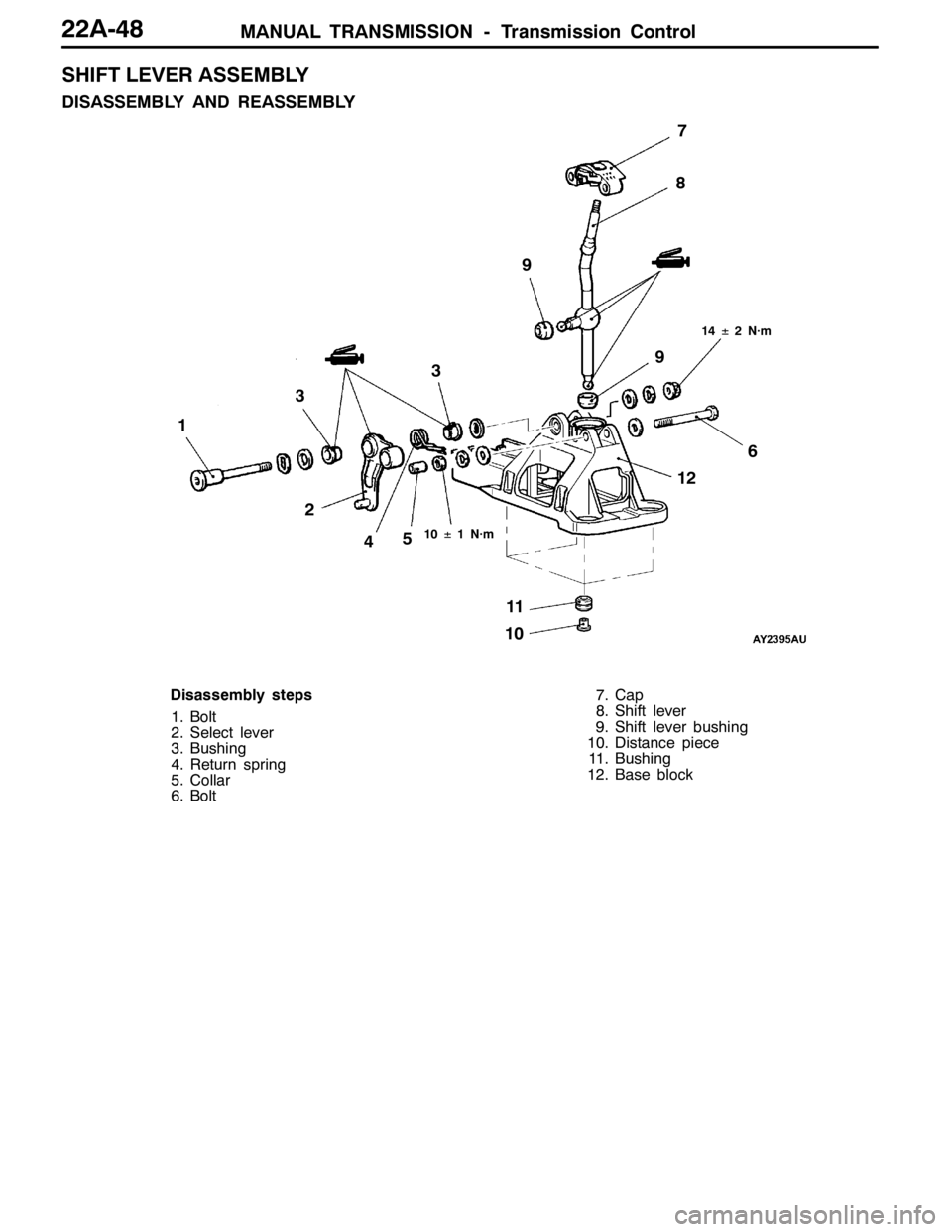
SHIFT LEVER ASSEMBLY
DISASSEMBLY AND REASSEMBLY
2
3
47
8
109
1
56 9
3
1112
14±2 N·m
10±1 N·m
Disassembly steps
1. Bolt
2. Select lever
3. Bushing
4. Return spring
5. Collar
6. Bolt7. Cap
8. Shift lever
9. Shift lever bushing
10. Distance piece
11. Bushing
12. Base block
Page 859 of 1449
MANUAL TRANSMISSION - Transfer Assembly22A-51
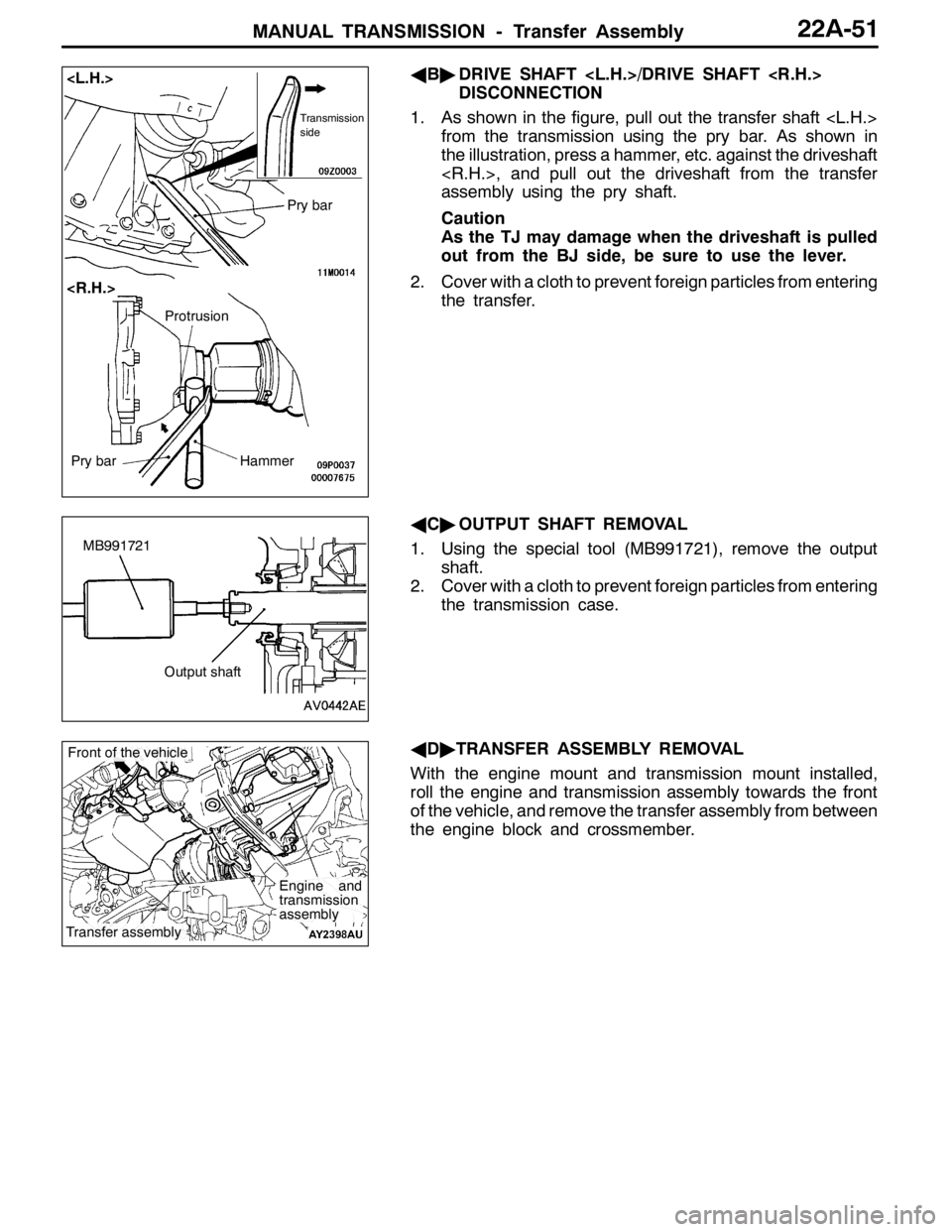
AB"DRIVE SHAFT
DISCONNECTION
1. As shown in the figure, pull out the transfer shaft
from the transmission using the pry bar. As shown in
the illustration, press a hammer, etc. against the driveshaft
assembly using the pry shaft.
Caution
As the TJ may damage when the driveshaft is pulled
out from the BJ side, be sure to use the lever.
2. Cover with a cloth to prevent foreign particles from entering
the transfer.
AC"OUTPUT SHAFT REMOVAL
1. Using the special tool (MB991721), remove the output
shaft.
2. Cover with a cloth to prevent foreign particles from entering
the transmission case.
AD"TRANSFER ASSEMBLY REMOVAL
With the engine mount and transmission mount installed,
roll the engine and transmission assembly towards the front
of the vehicle, and remove the transfer assembly from between
the engine block and crossmember.
Transmission
side
Pry bar
Pry barHammer
Protrusion
MB991721
Output shaft
Engine and
transmission
assembly
Transfer assembly
Front of the vehicle