lock MITSUBISHI LANCER EVOLUTION 2007 Service Repair Manual
[x] Cancel search | Manufacturer: MITSUBISHI, Model Year: 2007, Model line: LANCER EVOLUTION, Model: MITSUBISHI LANCER EVOLUTION 2007Pages: 1449, PDF Size: 56.82 MB
Page 966 of 1449
REAR AXLE -On-vehicle Service27B-20
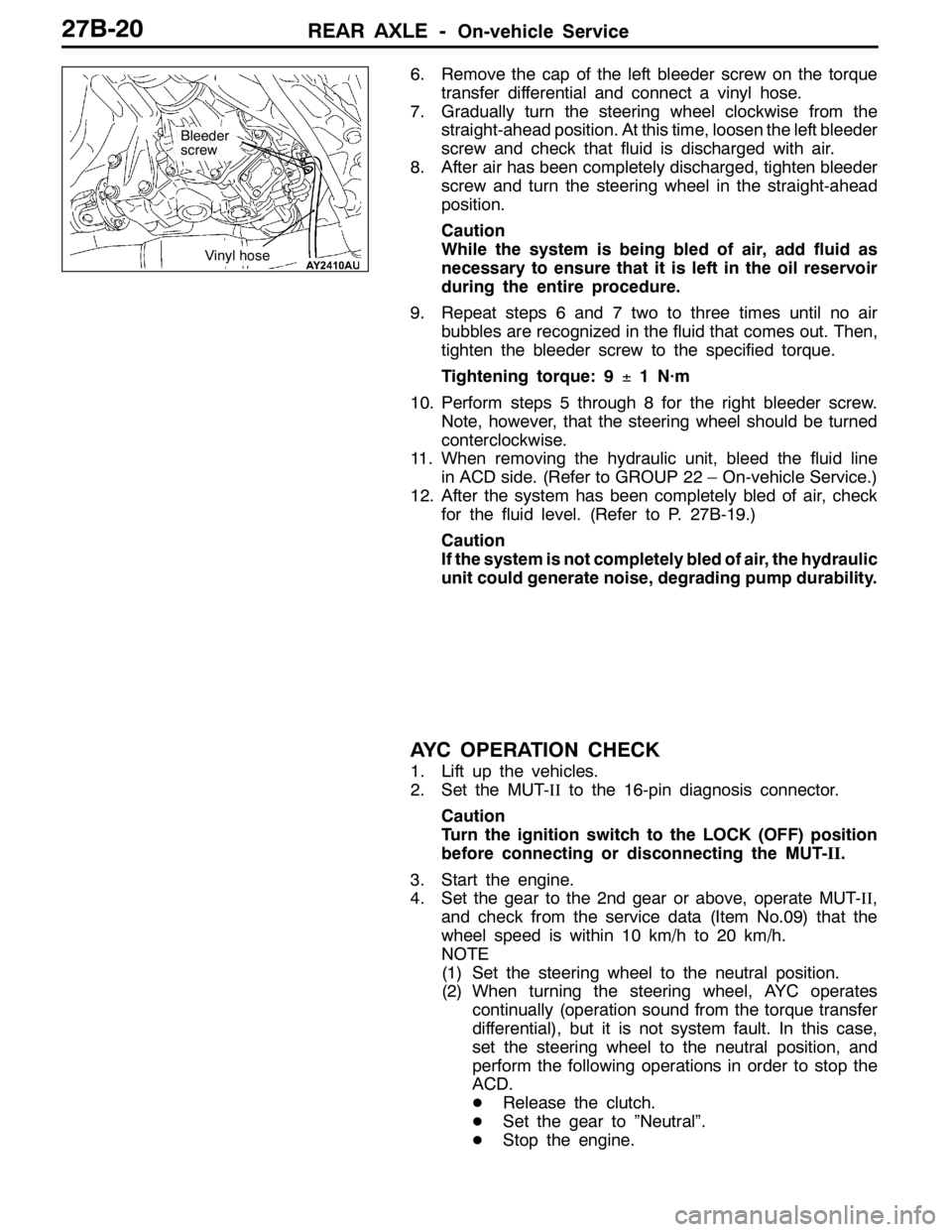
6. Remove the cap of the left bleeder screw on the torque
transfer differential and connect a vinyl hose.
7. Gradually turn the steering wheel clockwise from the
straight-ahead position. At this time, loosen the left bleeder
screw and check that fluid is discharged with air.
8. After air has been completely discharged, tighten bleeder
screw and turn the steering wheel in the straight-ahead
position.
Caution
While the system is being bled of air, add fluid as
necessary to ensure that it is left in the oil reservoir
during the entire procedure.
9. Repeat steps 6 and 7 two to three times until no air
bubbles are recognized in the fluid that comes out. Then,
tighten the bleeder screw to the specified torque.
Tightening torque: 9±1 N·m
10. Perform steps 5 through 8 for the right bleeder screw.
Note, however, that the steering wheel should be turned
conterclockwise.
11. When removing the hydraulic unit, bleed the fluid line
in ACD side. (Refer to GROUP 22 – On-vehicle Service.)
12. After the system has been completely bled of air, check
for the fluid level. (Refer to P. 27B-19.)
Caution
If the system is not completely bled of air, the hydraulic
unit could generate noise, degrading pump durability.
AYC OPERATION CHECK
1. Lift up the vehicles.
2. Set the MUT-IIto the 16-pin diagnosis connector.
Caution
Turn the ignition switch to the LOCK (OFF) position
before connecting or disconnecting the MUT-II.
3. Start the engine.
4. Set the gear to the 2nd gear or above, operate MUT-II,
and check from the service data (Item No.09) that the
wheel speed is within 10 km/h to 20 km/h.
NOTE
(1) Set the steering wheel to the neutral position.
(2) When turning the steering wheel, AYC operates
continually (operation sound from the torque transfer
differential), but it is not system fault. In this case,
set the steering wheel to the neutral position, and
perform the following operations in order to stop the
ACD.
DRelease the clutch.
DSet the gear to ”Neutral”.
DStop the engine.
Bleeder
screw
Vinyl hose
Page 967 of 1449
REAR AXLE -On-vehicle Service27B-21
5. Operate the MUT-II, drive the torque transfer differential
(item No.06 and 07) forcibly.
NOTE
(1) Drive the clutch operating mode forcibly for 1 minutes,
release the operation automatically. Drive can also
be cleared forcibly using the Clear key of MUT-II.
(2) If the hydraulic unit function has been stopped by
fail-safe, the torque transfer differential cannot be
forcibly driven.
6. Operating the MUT-II, by service data (item no.07 and 08),
check the condition of the wheel speed below.
The left rear wheel is faster 2km/h than right rear wheel.
The right rear wheel is faster 2km/h than left rear wheel.
NOTE
If the above are not satisfied, check the oil pressure as
the system may be faulty.
OIL PRESSURE CHECK
1. Lift up the vehicle.
2. Set the MUT-IIto the 16-pin diagnosis connector.
Caution
Turn the ignition switch to the LOCK (OFF) position
before connecting or disconnecting the MUT-II.
3. Turn the ignition switch to ON.
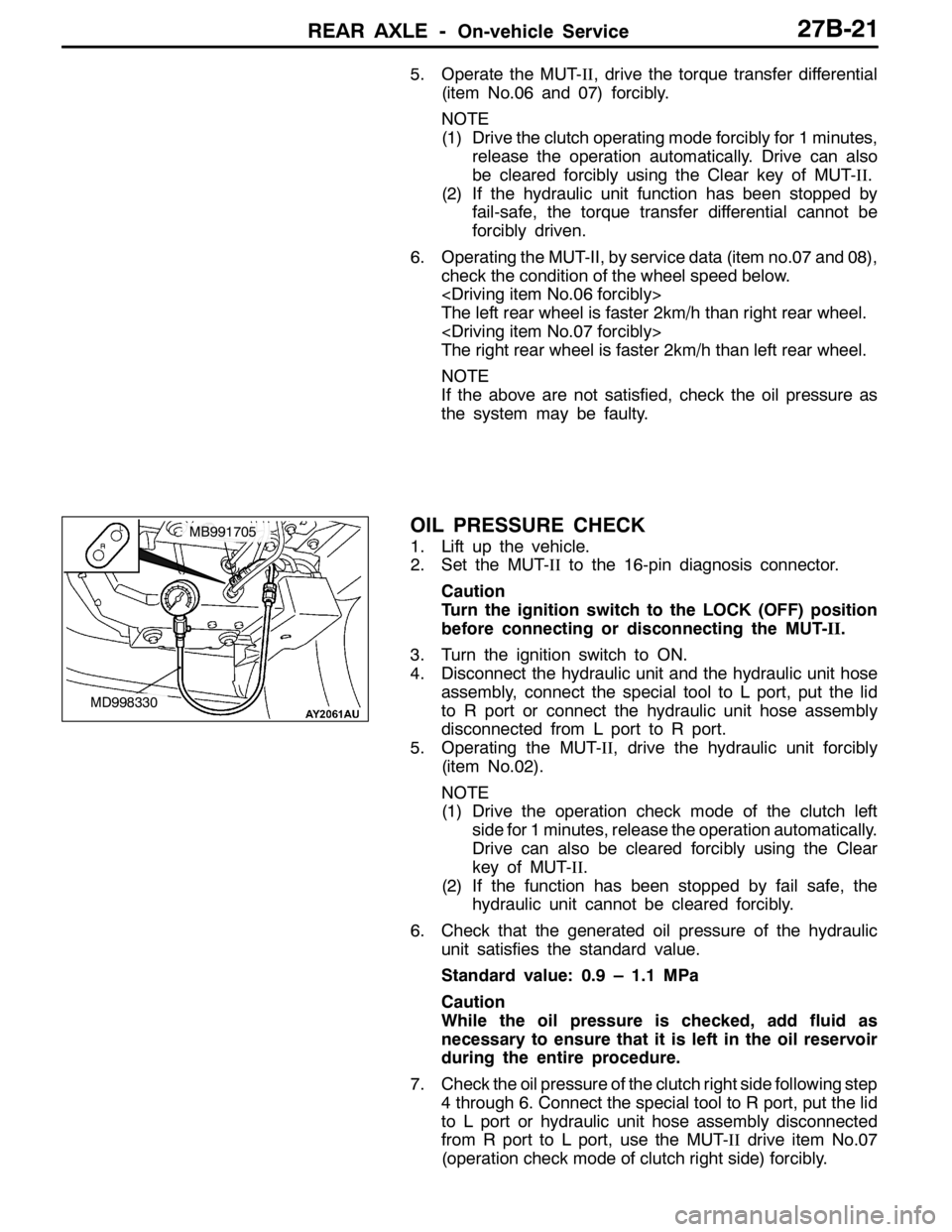
4. Disconnect the hydraulic unit and the hydraulic unit hose
assembly, connect the special tool to L port, put the lid
to R port or connect the hydraulic unit hose assembly
disconnected from L port to R port.
5. Operating the MUT-II, drive the hydraulic unit forcibly
(item No.02).
NOTE
(1) Drive the operation check mode of the clutch left
side for 1 minutes, release the operation automatically.
Drive can also be cleared forcibly using the Clear
key of MUT-II.
(2) If the function has been stopped by fail safe, the
hydraulic unit cannot be cleared forcibly.
6. Check that the generated oil pressure of the hydraulic
unit satisfies the standard value.
Standard value: 0.9 – 1.1 MPa
Caution
While the oil pressure is checked, add fluid as
necessary to ensure that it is left in the oil reservoir
during the entire procedure.
7. Check the oil pressure of the clutch right side following step
4 through 6. Connect the special tool to R port, put the lid
to L port or hydraulic unit hose assembly disconnected
from R port to L port, use the MUT-IIdrive item No.07
(operation check mode of clutch right side) forcibly.
MD998330
MB991705
Page 973 of 1449
REAR AXLE -Rear Hub Assembly27B-27
INSPECTION
WHEEL BEARING ROTATION STARTING TORQUE
CHECK
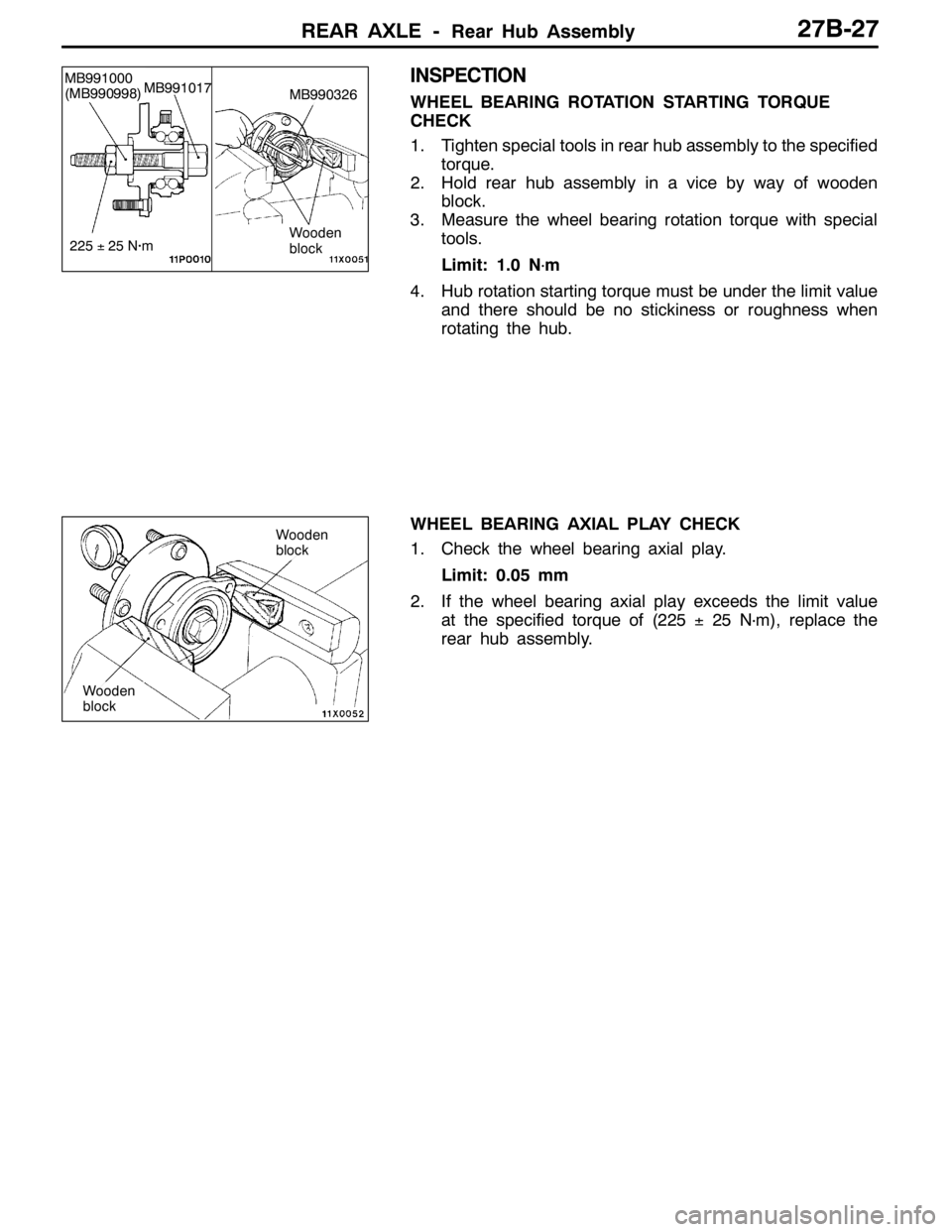
1. Tighten special tools in rear hub assembly to the specified
torque.
2. Hold rear hub assembly in a vice by way of wooden
block.
3. Measure the wheel bearing rotation torque with special
tools.
Limit: 1.0 N
·m
4. Hub rotation starting torque must be under the limit value
and there should be no stickiness or roughness when
rotating the hub.
WHEEL BEARING AXIAL PLAY CHECK
1. Check the wheel bearing axial play.
Limit: 0.05 mm
2. If the wheel bearing axial play exceeds the limit value
at the specified torque of (225±25 N
·m), replace the
rear hub assembly.
Wooden
block
MB991000
(MB990998)MB991017
225±25 N·m
MB990326
Wooden
block
Wooden
block
Page 983 of 1449

REAR AXLE -Differential Carrier
BUSHING REPLACEMENT
1. Remove and press fit the bush with special tool. (About
removal and press fitting the bush of the differential
support arm, refer to P. 27B-57.)
2. Press fit the bush so that the hollow of the bush is on
the position shown as the illustration.
3. Press fill the bush until the surface of the outer sleeve
of the bush, differential mounting bracket.
MB990641 Bush
Differential
mount
bracket
Steel block
Hollow
Page 984 of 1449
REAR AXLE -Differential Carrier
DISASSEMBLY
19
2
6
8
20
22
26
5
113
4
9
12
15
16
1314
10
21
1
23
24
25
18
17
7
897
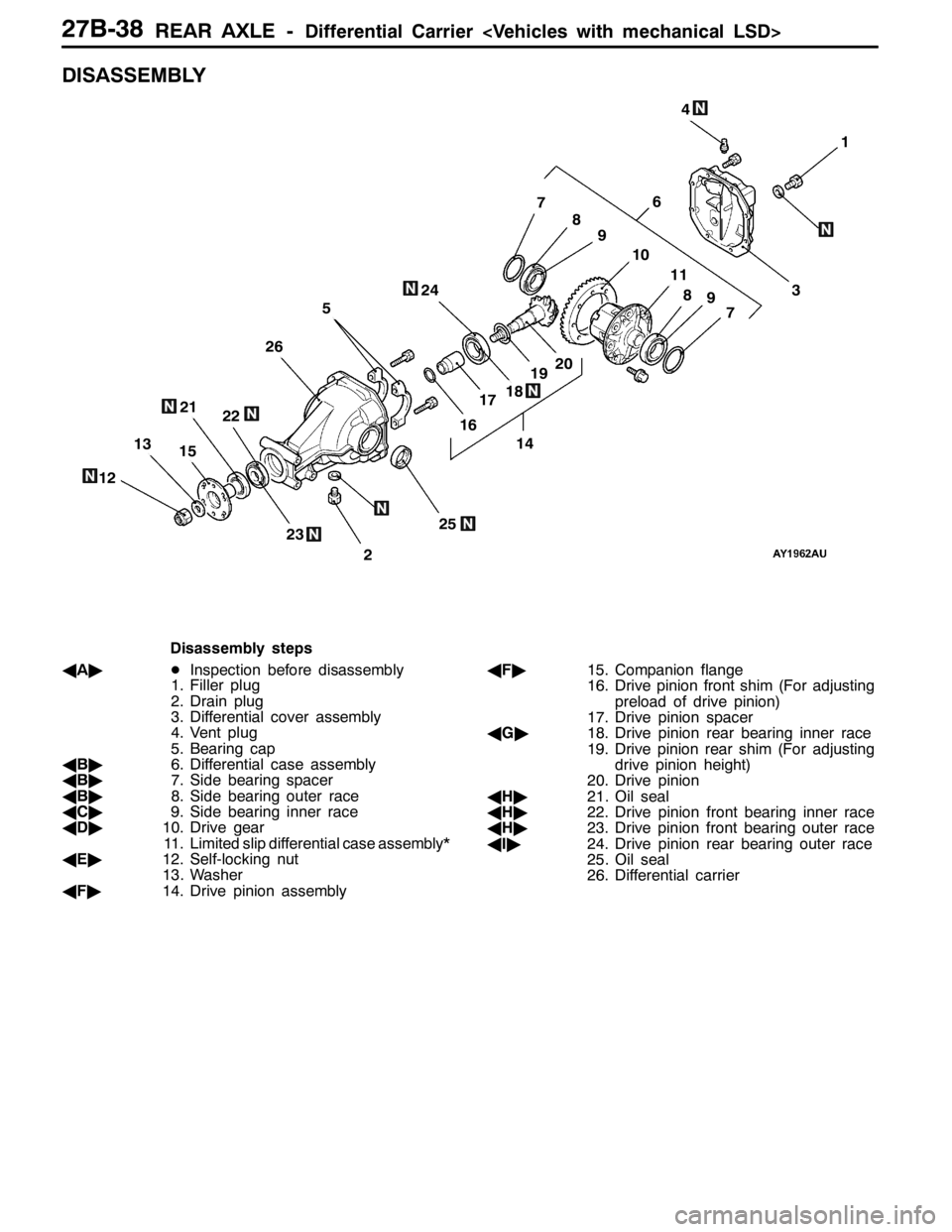
Disassembly steps
AA"DInspection before disassembly
1. Filler plug
2. Drain plug
3. Differential cover assembly
4. Vent plug
5. Bearing cap
AB"6. Differential case assembly
AB"7. Side bearing spacer
AB"8. Side bearing outer race
AC"9. Side bearing inner race
AD"10. Drive gear
11. Limited slip differential case assembly*
AE"12. Self-locking nut
13. Washer
AF"14. Drive pinion assemblyAF"15. Companion flange
16. Drive pinion front shim (For adjusting
preload of drive pinion)
17. Drive pinion spacer
AG"18. Drive pinion rear bearing inner race
19. Drive pinion rear shim (For adjusting
drive pinion height)
20. Drive pinion
AH"21. Oil seal
AH"22. Drive pinion front bearing inner race
AH"23. Drive pinion front bearing outer race
AI"24. Drive pinion rear bearing outer race
25. Oil seal
26. Differential carrier
Page 985 of 1449

REAR AXLE -Differential Carrier
DISASSEMBLY SERVICE POINTS
AA"INSPECTION BEFORE DISASSEMBLY
1. Remove the cover.
2. Hold the special tool in a vise, and install the differential
carrier assembly to the special tool.
DRIVE GEAR BACKLASH
1. With the drive pinion locked in place, use a dial gauge
to measure the drive gear backlash in four or more places
on the drive gear.
Standard value: 0.11 - 0.16 mm
2. If the backlash is not within the standard value, adjust
the final drive gear backlash. (Refer to P.27B-49.)
3. After the adjustment, inspect the drive gear tooth contact.
DRIVE GEAR RUNOUT
1. Measure the drive gear runout at the shoulder on the
reverse side of the drive gear.
Limit: 0.05 mm
2. When runout exceeds the limit value, check for foreign
object between drive gear rear side and differential case,
or for loose drive gear installation bolts.
3. When check (2) gives normal results, reposition drive
gear and differential case and remeasure.
4. If adjustment is impossible, replace differential case, or
replace drive gear and pinion as a set.
DRIVE GEAR TOOTH CONTACT
Check the tooth contact of drive gear by following the steps
below.
1. Apply a thin, uniform coat of machine blue to both surfaces
of the drive gear teeth.MB990909 and
MB991116
Page 987 of 1449
REAR AXLE -Differential Carrier
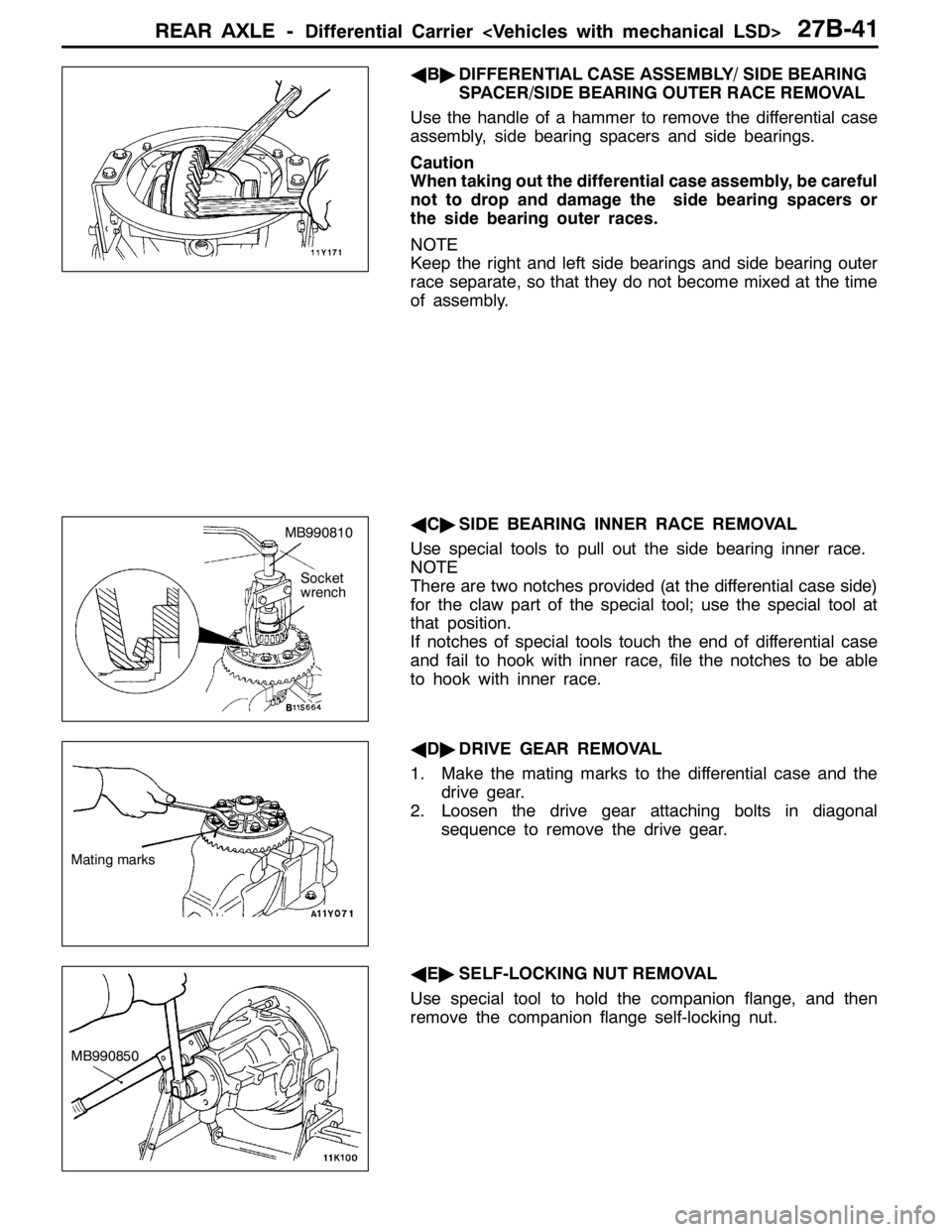
AB"DIFFERENTIAL CASE ASSEMBLY/ SIDE BEARING
SPACER/SIDE BEARING OUTER RACE REMOVAL
Use the handle of a hammer to remove the differential case
assembly, side bearing spacers and side bearings.
Caution
When taking out the differential case assembly, be careful
not to drop and damage the side bearing spacers or
the side bearing outer races.
NOTE
Keep the right and left side bearings and side bearing outer
race separate, so that they do not become mixed at the time
of assembly.
AC"SIDE BEARING INNER RACE REMOVAL
Use special tools to pull out the side bearing inner race.
NOTE
There are two notches provided (at the differential case side)
for the claw part of the special tool; use the special tool at
that position.
If notches of special tools touch the end of differential case
and fail to hook with inner race, file the notches to be able
to hook with inner race.
AD"DRIVE GEAR REMOVAL
1. Make the mating marks to the differential case and the
drive gear.
2. Loosen the drive gear attaching bolts in diagonal
sequence to remove the drive gear.
AE"SELF-LOCKING NUT REMOVAL
Use special tool to hold the companion flange, and then
remove the companion flange self-locking nut.
MB990810
Socket
wrench
Mating marks
MB990850
Page 989 of 1449
REAR AXLE -Differential Carrier
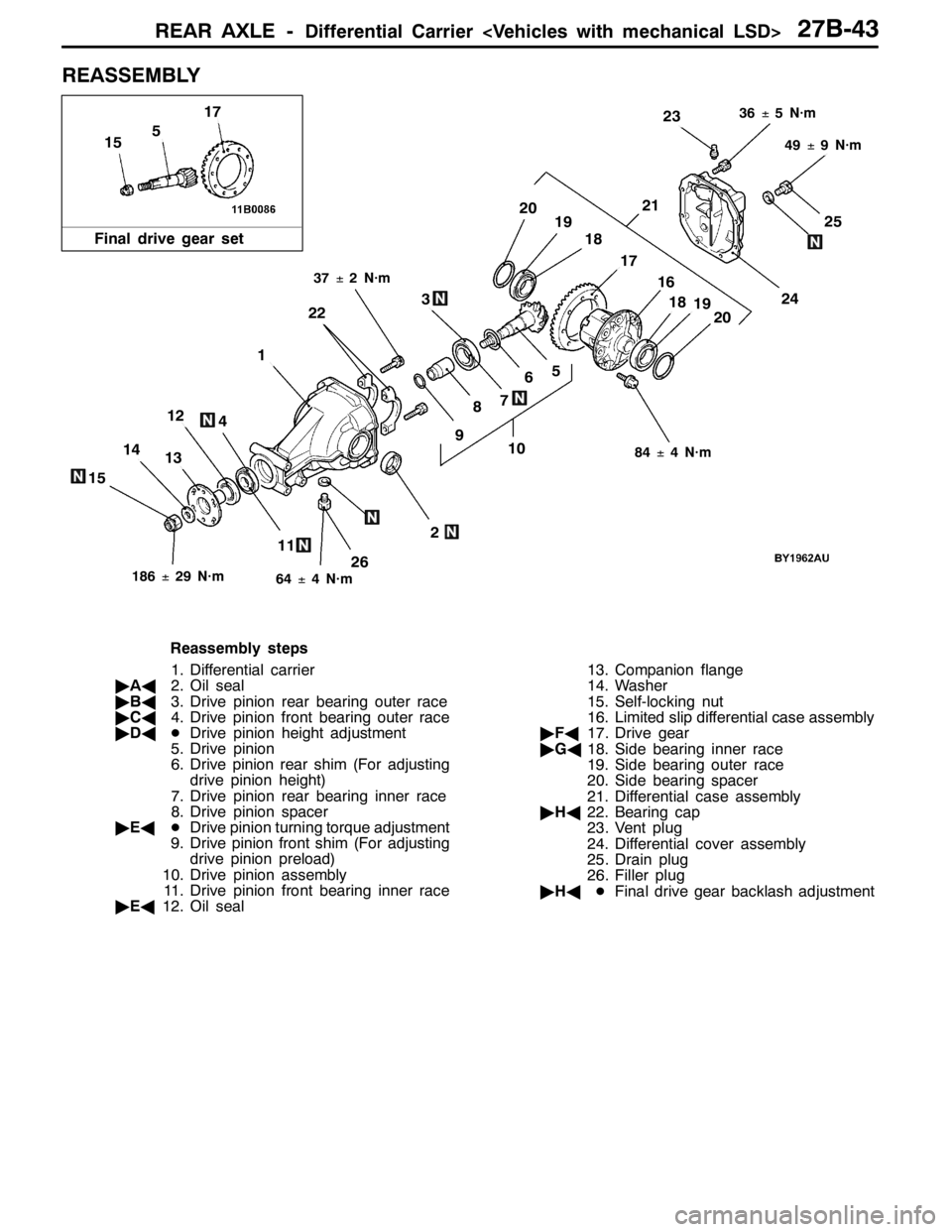
REASSEMBLY
11
14
26
25
1310
6
124
7
24
21
18
17
15
2019
9
3
8
5
2
1
22
23
16
191820
5
17
15
84±4 N·m
186±29 N·m64±4 N·m
49±9 N·m
37±2 N·m
36±5 N·m
Final drive gear set
Reassembly steps
1. Differential carrier
"AA2. Oil seal
"BA3. Drive pinion rear bearing outer race
"CA4. Drive pinion front bearing outer race
"DADDrive pinion height adjustment
5. Drive pinion
6. Drive pinion rear shim (For adjusting
drive pinion height)
7. Drive pinion rear bearing inner race
8. Drive pinion spacer
"EADDrive pinion turning torque adjustment
9. Drive pinion front shim (For adjusting
drive pinion preload)
10. Drive pinion assembly
11. Drive pinion front bearing inner race
"EA12. Oil seal13. Companion flange
14. Washer
15. Self-locking nut
16. Limited slip differential case assembly
"FA17. Drive gear
"GA18. Side bearing inner race
19. Side bearing outer race
20. Side bearing spacer
21. Differential case assembly
"HA22. Bearing cap
23. Vent plug
24. Differential cover assembly
25. Drain plug
26. Filler plug
"HADFinal drive gear backlash adjustment
Page 990 of 1449
REAR AXLE -Differential Carrier
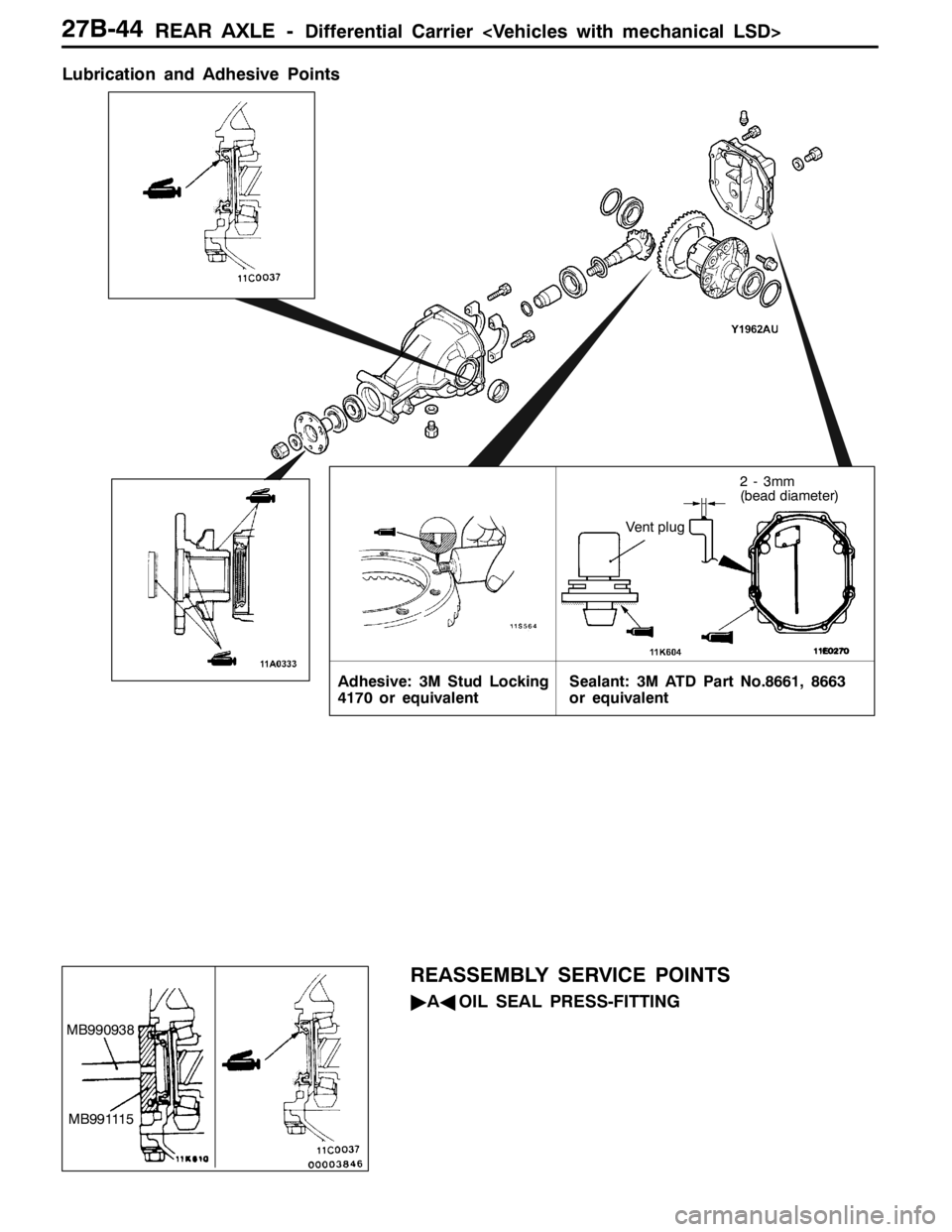
Lubrication and Adhesive Points
Vent plug
2 - 3mm
(bead diameter)
Adhesive: 3M Stud Locking
4170 or equivalentSealant: 3M ATD Part No.8661, 8663
or equivalent
REASSEMBLY SERVICE POINTS
"AAOIL SEAL PRESS-FITTING
MB990938
MB991115
Page 993 of 1449

REAR AXLE -Differential Carrier
3. Measure the drive pinion turning torque (without the oil
seal).
Standard value:
Bearing divisionTurning torque
New0.88 - 1.17 N·m
Caution
Take care not to fit gear oil on the bearing.
4. If the drive pinion turning torque is not within the standard
value, adjust the turning torque by replacing the drive
pinion front shim(s) or the drive pinion spacer.
NOTE
When selecting the drive pinion front shims, if the number
of shims is large, reduce the number of shims to a minimum
by selecting the drive pinion spacers.
Also, select the drive pinion spacer from the following
two types.
Height of drive pinion spacer mmIdentification colour
57.72-
57.08Red
5. Remove the companion flange and drive pinion again.
Then insert the drive pinion front bearing inner race into
the gear carrier. Use special tool to press-fit the oil seal.
6. Install the drive pinion assembly and companion flange
with mating marks properly aligned. Tighten the
companion flange self-locking nut to the specified torque
using special tool.
MB990326
MB990685
Identification
colour
MB990727
MB990850
186±29 N·m