lock MITSUBISHI LANCER EVOLUTION 2007 Service Repair Manual
[x] Cancel search | Manufacturer: MITSUBISHI, Model Year: 2007, Model line: LANCER EVOLUTION, Model: MITSUBISHI LANCER EVOLUTION 2007Pages: 1449, PDF Size: 56.82 MB
Page 1070 of 1449

BASIC BRAKE SYSTEM -Disc Brake35A-28
"AALOCK PIN/GUIDE PIN INSTALLATION
As shown in the illustration, align the identification mark on
the caliper body and the head mark of the guide pin/lock
pin, then install the guide pin/lock pin.
INSPECTION
DCheck the cylinder for wear, damage or rust.
DCheck the piston surface for wear, damage or rust.
DCheck the caliper body or sleeve for wear.
DCheck pad for damage or adhesion of grease, check
the backing metal for damage.
PAD WEAR CHECK
Measure thickness at the thinnest and worn area of the pad.
Replace the pad assembly if the pad thickness is less than
the limit value.
Standard value:
10.0 mm
9.0 mm
Limit: 2.0 mm
Caution
1. Always replace the brake pads as an axle set.
2. If an excessive difference is found in the thickness
between the right and left brake pads, check moving
parts.
Identification
mark ”L”
Front of
vehicle
Rear of
vehicle
Lock pin Lock pin
Guide pin Guide pin
Identification
mark ”G”
Identification
mark ”B”
Identification mark ”A”
Page 1075 of 1449
ABS <4WD> -Troubleshooting35B-5
ABS WARNING LAMP INSPECTION
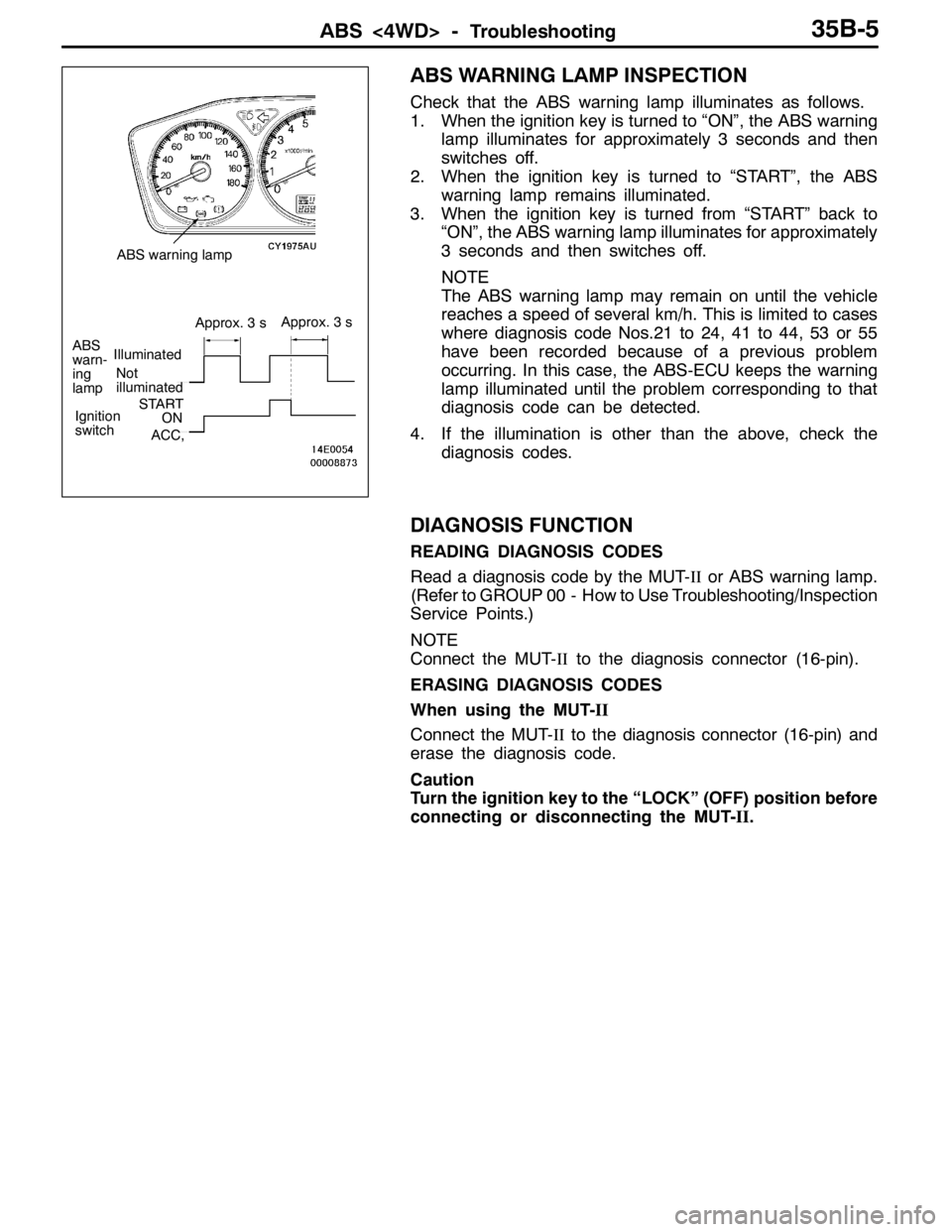
Check that the ABS warning lamp illuminates as follows.
1. When the ignition key is turned to “ON”, the ABS warning
lamp illuminates for approximately 3 seconds and then
switches off.
2. When the ignition key is turned to “START”, the ABS
warning lamp remains illuminated.
3. When the ignition key is turned from “START” back to
“ON”, the ABS warning lamp illuminates for approximately
3 seconds and then switches off.
NOTE
The ABS warning lamp may remain on until the vehicle
reaches a speed of several km/h. This is limited to cases
where diagnosis code Nos.21 to 24, 41 to 44, 53 or 55
have been recorded because of a previous problem
occurring. In this case, the ABS-ECU keeps the warning
lamp illuminated until the problem corresponding to that
diagnosis code can be detected.
4. If the illumination is other than the above, check the
diagnosis codes.
DIAGNOSIS FUNCTION
READING DIAGNOSIS CODES
Read a diagnosis code by the MUT-IIor ABS warning lamp.
(Refer to GROUP 00 - How to Use Troubleshooting/Inspection
Service Points.)
NOTE
Connect the MUT-IIto the diagnosis connector (16-pin).
ERASING DIAGNOSIS CODES
When using the MUT-II
Connect the MUT-IIto the diagnosis connector (16-pin) and
erase the diagnosis code.
Caution
Turn the ignition key to the “LOCK” (OFF) position before
connecting or disconnecting the MUT-II.
Not
illuminated
ABS
warn-
ing
lampIlluminated
Approx. 3 sApprox. 3 s
Ignition
switchSTARTON
ACC,
ABS warning lamp
Page 1076 of 1449
ABS <4WD> -Troubleshooting35B-6
When not using the MUT-II
NOTE
If the ABS-ECU function has been stopped because of fail-safe
operation, it will not be possible to erase the diagnosis codes.
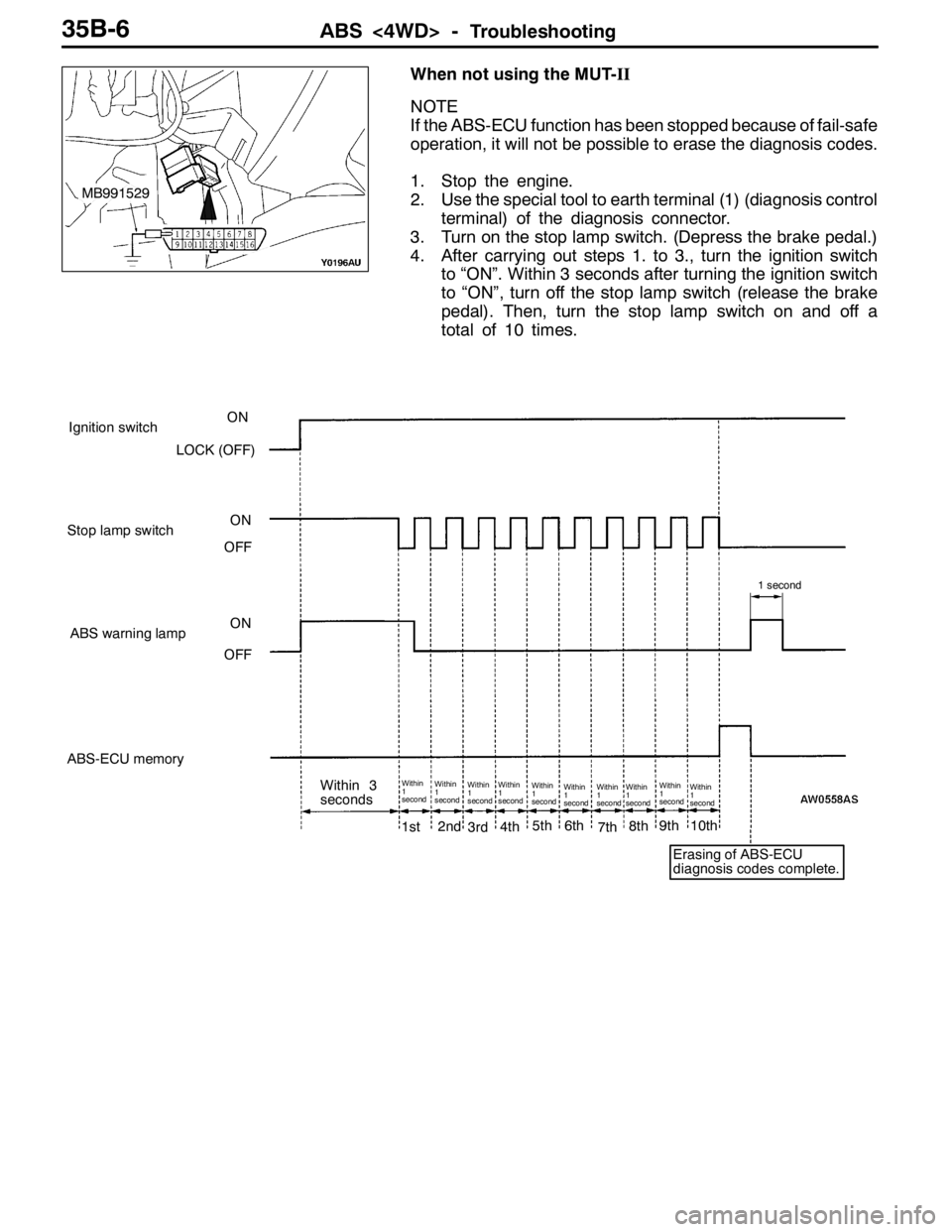
1. Stop the engine.
2. Use the special tool to earth terminal (1) (diagnosis control
terminal) of the diagnosis connector.
3. Turn on the stop lamp switch. (Depress the brake pedal.)
4. After carrying out steps 1. to 3., turn the ignition switch
to “ON”. Within 3 seconds after turning the ignition switch
to “ON”, turn off the stop lamp switch (release the brake
pedal). Then, turn the stop lamp switch on and off a
total of 10 times.
1st2nd3rd4th5th6th7th8th9th10th
Within
1
secondWithin
1
secondWithin
1
secondWithin
1
secondWithin
1
secondWithin
1
secondWithin
1
secondWithin
1
secondWithin
1
secondWithin
1
second
1 second
Ignition switchON
LOCK (OFF)
Stop lamp switchON
OFF
ABS warning lampON
OFF
ABS-ECU memory
Within 3
seconds
Erasing of ABS-ECU
diagnosis codes complete.
MB991529
Page 1079 of 1449
ABS <4WD> -Troubleshooting35B-9
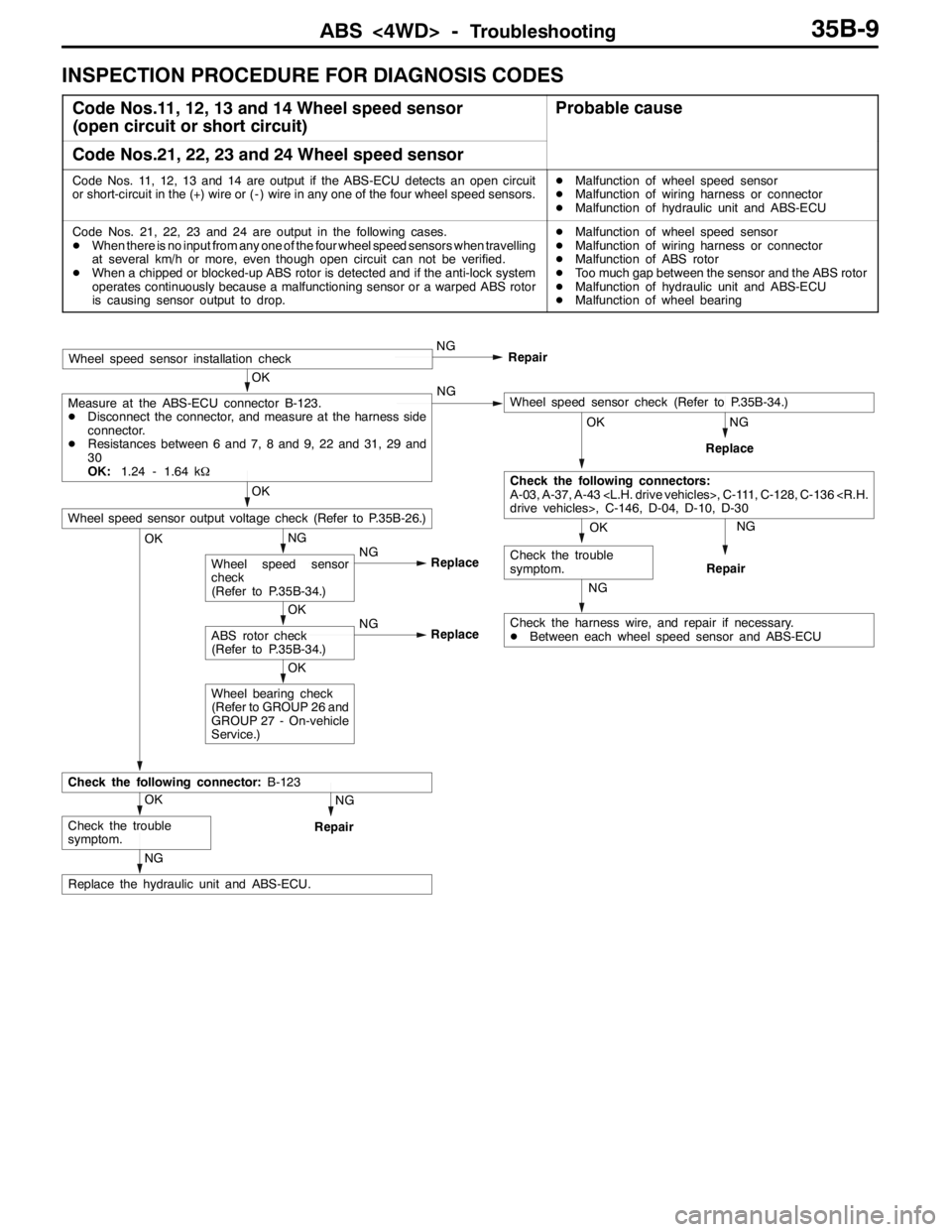
INSPECTION PROCEDURE FOR DIAGNOSIS CODES
Code Nos.11, 12, 13 and 14 Wheel speed sensor
(open circuit or short circuit)Probable cause
Code Nos.21, 22, 23 and 24 Wheel speed sensor
Code Nos. 11, 12, 13 and 14 are output if the ABS-ECU detects an open circuit
or short-circuit in the (+) wire or ( - ) wire in any one of the four wheel speed sensors.DMalfunction of wheel speed sensor
DMalfunction of wiring harness or connector
DMalfunction of hydraulic unit and ABS-ECU
Code Nos. 21, 22, 23 and 24 are output in the following cases.
DWhen there is no input from any one of the four wheel speed sensors when travelling
at several km/h or more, even though open circuit can not be verified.
DWhen a chipped or blocked-up ABS rotor is detected and if the anti-lock system
operates continuously because a malfunctioning sensor or a warped ABS rotor
is causing sensor output to drop.DMalfunction of wheel speed sensor
DMalfunction of wiring harness or connector
DMalfunction of ABS rotor
DToo much gap between the sensor and the ABS rotor
DMalfunction of hydraulic unit and ABS-ECU
DMalfunction of wheel bearing
NG
NG
Replace
OK
Check the harness wire, and repair if necessary.
DBetween each wheel speed sensor and ABS-ECU
NG
Repair
OK
Wheel bearing check
(Refer to GROUP 26 and
GROUP 27 - On-vehicle
Service.)
NG
Repair
NG
Replace the hydraulic unit and ABS-ECU.
OK
Check the trouble
symptom.
Check the following connector:B-123
OK
ABS rotor check
(Refer to P.35B-34.)NG
Replace
NG
Wheel speed sensor
check
(Refer to P.35B-34.)NG
Replace
OK
Wheel speed sensor output voltage check (Refer to P.35B-26.)OK
Check the trouble
symptom.
OK
Check the following connectors:
A-03, A-37, A-43
OK
Measure at the ABS-ECU connector B-123.
DDisconnect the connector, and measure at the harness side
connector.
DResistances between 6 and 7, 8 and 9, 22 and 31, 29 and
30
OK:1.24 - 1.64 kΩNGWheel speed sensor check (Refer to P.35B-34.)
Wheel speed sensor installation checkNG
Repair
Page 1085 of 1449

ABS <4WD> -Troubleshooting35B-15
INSPECTION CHART FOR TROUBLE SYMPTOMS
Trouble symptomsInspection procedure
No.Reference page
Communication between the MUT-IIand the whole system is not
possible.135B-16
Communication between the MUT-IIand the ABS-ECU is not possible.235B-17
When the ignition key is turned to “ON” (engine stopped), the ABS
warning lamp does not illuminate.335B-18
Even after the engine is started, the ABS warning lamp remains
illuminated.435B-18
In the inspection with MUT-II service data, the parking brake switch is not
turned ON or turn OFF.535B-19
The neutral position learning of the steering wheel sensor is not finished.635B-20
Faulty ABS operation735B-21
Caution
1. If steering movements are made when driving at high speed, or when driving on road surfaces
with low frictional resistance, or when passing over bumps, the ABS may operate even though
sudden braking is not being applied. Because of this, when getting information from the customer,
check if the problem occurred while driving under such conditions as these.
2. During ABS operation, the brake pedal may vibrate or may not be able to be depressed. Such
phenomena are due to intermittent changes in hydraulic pressure inside the brake line to prevent
the wheels from locking and is not an abnormality.
Page 1094 of 1449

ABS <4WD> -Troubleshooting35B-24
CHECK AT ABS-ECU
Use the following steps to remove the connector cover and
measure the terminal voltage.
1. Move the lock lever of the ABS-ECU connector as shown
in the illustration, and then disconnect the ABS-ECU
connector.
2. Push up and unlock the hooks of the ABS-ECU connector
shown in the illustration, then remove the connector cover.
TERMINAL VOLTAGE CHECK CHART
1. Measure the voltage between each terminal and earth
(terminal No.12).
2. The terminal layout is shown in the illustration.
Terminal No.Check itemChecking requirementsNormal condition
1Parking brake switch
input
Parking brake switch: ON1 V or less
input
Parking brake switch: OFFSystem voltage
2MUT-IIWhen the MUT-IIis connectedSerial communication with MUT-II
When the MUT-IIis not connected1 V or less
3ABS ON output to
4WD ECU
With ABS active (reference)(0.5 V or less)
4WD-ECU
With ABS not activeSystem voltage
4Steering wheel sensor
(ST-N) inputIgnition
switch: ONSteering wheel: Neutral
position and position
near by±360_0.8 - 2.1 V
Steering wheel: Except
for above2.7 - 4.4 V
5Diagnosis changeover
input
When the MUT-IIis connected0V
input
When the MUT-IIis not connectedApprox. 12 V
Lock lever
Page 1096 of 1449

ABS <4WD> -Troubleshooting/On-vehicle Service35B-26
RESISTANCE AND CONTINUITY BETWEEN
HARNESS-SIDE CONNECTOR TERMINALS
1. Turn the ignition key to the “LOCK” (OFF) position.
2. Disconnect the ABS-ECU connector.
3. Check the resistance and continuity between the terminals
indicated in the table below.
4. The terminal layout is shown in the illustration.
ABS-ECU terminal No.SignalNormal condition
6-7Wheel speed sensor (rear left)1.24 - 1.64 kΩ
8-9Wheel speed sensor (rear right)
22 - 31Wheel speed sensor (front left)
29 - 30Wheel speed sensor (front right)
12 - Body earthEarthContinuity
34 - Body earthEarth
ON-VEHICLE SERVICE
WHEEL SPEED SENSOR OUTPUT VOLTAGE
CHECK
1. Lift up the vehicle and release the parking brake.
2. Move the lock lever of the ABS-ECU connector as shown
in the illustration, and then disconnect the ABS-ECU
connector.
3. Push up and unlock the hooks of the ABS-ECU connector
shown in the illustration, then remove the connector cover.
Lock lever
Page 1098 of 1449

ABS <4WD> -On-vehicle Service35B-28
SymptomRemedy Probable causes
Noisy or disturbed waveformOpen circuit in sensorReplace sensor
Open circuit in harnessCorrect harness
Incorrectly mounted wheel speed sensorMount correctly
ABS rotor with missing or damaged teethReplace ABS rotor
Caution
Because the wheel speed sensor cables move together with the front and rear suspension, they
vibrate greatly when driving over poor road surfaces. As a result, the sensor harnesses should also
be shaken when monitoring of output waveforms of the wheel speed sensors in order to simulate
conditions such as driving over poor road surfaces.
HYDRAULIC UNIT CHECK
1. Jack up the vehicle and support the vehicle with rigid racks placed at the specified jack-up points
or place the wheels which are checked on the rollers of the braking force tester.
Caution
(1) The roller of the braking force tester and the tyre should be dry during testing.
(2) When testing the front brakes, apply the parking brake, and when testing the rear brakes,
stop the front wheels by chocking them.
2. Turn the ignition key to the “LOCK” (OFF) position and set the MUT-II.
Caution
Turn the ignition key to the “LOCK” (OFF) position before connecting or disconnecting the
MUT-II.
3. After checking that the shift lever is in neutral, start the engine.
4. Use the MUT-IIto force-drive the actuator.
NOTE
(1) During the actuator test, the ABS warning lamp will illuminate and the anti-skid control will be
cancelled.
(2) When the ABS has been interrupted by the fail-safe function, the MUT-IIactuator testing cannot
be carried out.
5. Turn the wheel by hand and check the change in braking force when the brake pedal is depressed.
When using the braking force tester, depress the brake pedal until the braking force is at the following
values, and check that the braking force decreases when the actuator is force-driven.
Front wheel785 - 981 N
Rear wheel588 - 784 N
Page 1099 of 1449

ABS <4WD> -On-vehicle Service35B-29
The result should be as shown in the following diagram.
Approx. 0.05 seconds
Pedal operationDepressed
Released
Solenoid valve
positionIncrease in pressure
Steady pressure
Reduction in pressure
Checking the
brake forceLock
Drag force when the pedal is freeMUT-IIactuator test
(Item No. 01, 02, 03, 04) start
2 seconds
1 seconds
6. If the result of inspection is abnormal, correct according to the following “Diagnosis Table.”
Diagnosis Table
No.MUT-II
display
OperationJudgementProbable
cause
Remedy
display
NormalAbnormal
cause
01FR VALVE(1) Depress the brake
pedal to lock wheel.
(2) Using the MUT-II,
select the wheel to be
checkedandforcethe
Brake force
released for 3
seconds after
locking.Wheel does
not lock when
brake pedal
is depressed.Clogged
brake line
other than
hydraulic unitCheck and
clean brake
line.
02FL VALVEchecked and force the
actuator to operate.
(3) Check the brake force
for the selected wheel
using a brake force
ttbttith
Clogged
hydraulic
circuit in
hydraulic unitReplace
hydraulic unit
assembly.
03RR VALVE
g
tester or by rotating the
wheel by hand.Brake force is
not released.Incorrect
hydraulic unit
brake tube
connectionConnect
correctly.
04RL VALVEHydraulic unit
solenoid
valve not
functioning
correctlyReplace
hydraulic unit
assembly.
7. After checking, turn the ignition switch to the “LOCK” (OFF) position and then disconnect the MUT-II.
REMEDY FOR A FLAT BATTERY
When booster cables are used to start the engine when the
battery is completely flat and then the vehicle is immediately
driven without waiting for the battery to recharge itself to
some extent, the engine may misfire, and driving might not
be possible. This happens because ABS consumes a great
amount of current for its self-check function. If this happens,
recharge the battery fully.
Caution
The vehicle posture will be unstable during braking, so
do not drive the vehicle with the ABS-ECU connector
disconnected or with the ABS not operating for any other
reason.
Page 1102 of 1449
ABS <4WD> -Hydraulic Unit and ABS-ECU35B-32
REMOVAL SERVICE POINTS
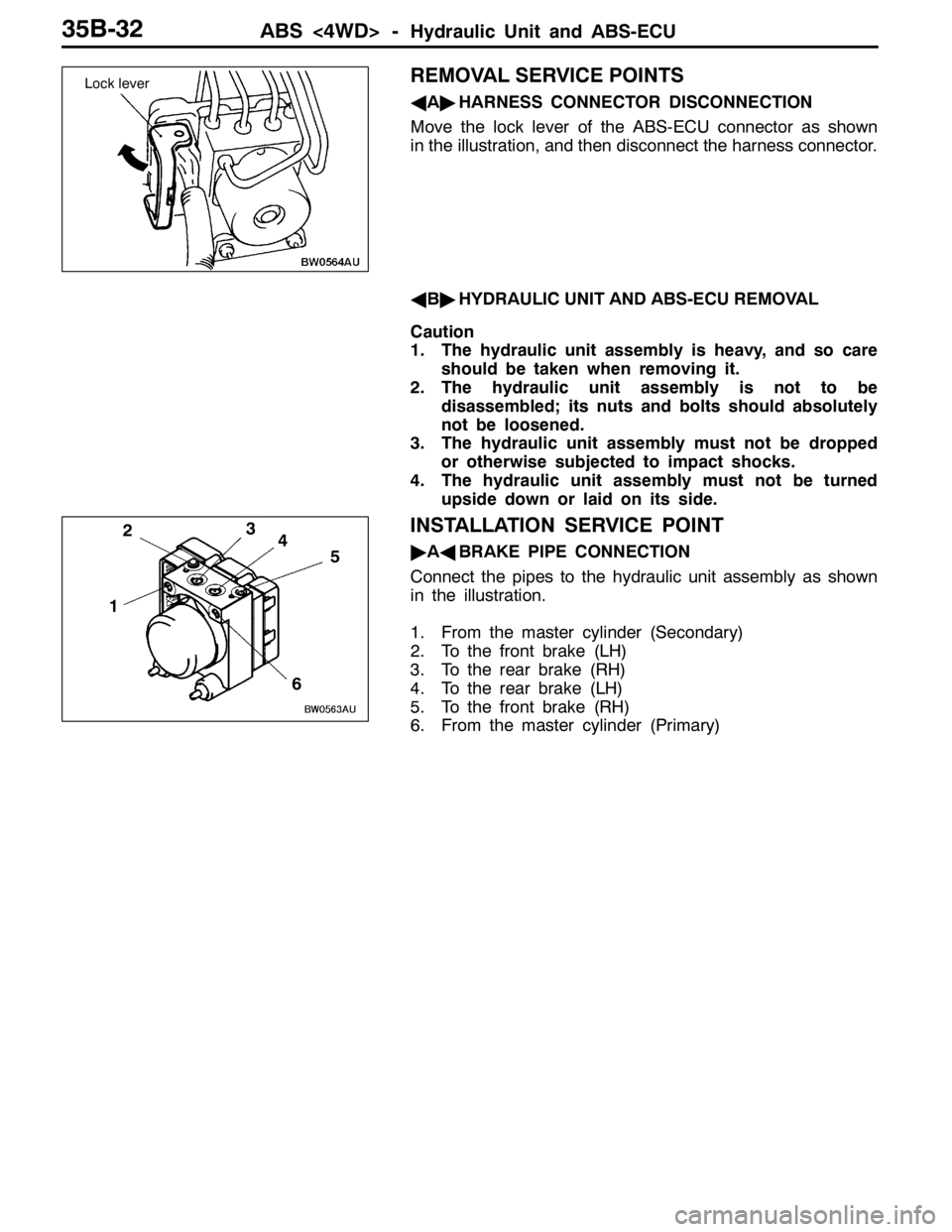
AA"HARNESS CONNECTOR DISCONNECTION
Move the lock lever of the ABS-ECU connector as shown
in the illustration, and then disconnect the harness connector.
AB"HYDRAULIC UNIT AND ABS-ECU REMOVAL
Caution
1. The hydraulic unit assembly is heavy, and so care
should be taken when removing it.
2. The hydraulic unit assembly is not to be
disassembled; its nuts and bolts should absolutely
not be loosened.
3. The hydraulic unit assembly must not be dropped
or otherwise subjected to impact shocks.
4. The hydraulic unit assembly must not be turned
upside down or laid on its side.
INSTALLATION SERVICE POINT
"AABRAKE PIPE CONNECTION
Connect the pipes to the hydraulic unit assembly as shown
in the illustration.
1. From the master cylinder (Secondary)
2. To the front brake (LH)
3. To the rear brake (RH)
4. To the rear brake (LH)
5. To the front brake (RH)
6. From the master cylinder (Primary)
Lock lever
1
234
5
6