At mode MITSUBISHI MONTERO 2000 Service Manual PDF
[x] Cancel search | Manufacturer: MITSUBISHI, Model Year: 2000, Model line: MONTERO, Model: MITSUBISHI MONTERO 2000Pages: 1839, PDF Size: 29.19 MB
Page 1309 of 1839

STEERING
Click on the applicable bookmark to selected the required model year.
www.WorkshopManuals.co.uk
Purchased from www.WorkshopManuals.co.uk
Page 1352 of 1839

BODY
Click on the applicable bookmark to selected the required model year.
www.WorkshopManuals.co.uk
Purchased from www.WorkshopManuals.co.uk
Page 1402 of 1839

BODY -SunroofBODY -Sunroof42-50
"
BA
SUNROOF MOTOR ASSEMBLY INSTALLATION
1. Install the roof lid glass assembly and the sunroof motor
assembly with the sunroof motor assembly in the
fully-closed position.
2. Connect the sunroof motor assembly harness connector
and the sunroof switch harness connector to the vehicle
wiring harness connector.
3. Operate the sunroof and check that it operates correctly.
1. Install the roof lid glass assembly and the sunroof motor
assembly with the sunroof motor assembly in the
fully-closed position.
2. Connect the sunroof motor assembly harness connector
and the sunroof switch harness connector to the vehicle
wiring harness connector.
3. Operate the sunroof switch to slide the roof lid glass
to the fully-open position, and then tilt it up in steps of
30 mm to the fully-open position and then keep pressing
the switch for 3 seconds or more.
4. Operate the sunroof switch (CLOSE) using the one-touch
function to slide the roof lid glass to the fully-closed
position.
5. Operate the sunroof switch (OPEN) using the one-touch
function to slide the roof lid glass to the fully-open position.
6. Operate the sunroof switch (CLOSE) using the one-touch
function to slide the roof lid glass to the fully-closed
position.
7. Press the tilt - up switch to operate the sunroof and check
that learning is complete.
NOTE
(1) During initialisation (learning mode), use only the
CLOSE/DOWN switch to move the roof lid glass from
the fully-closed position to the fully tilted open position.
During initialisation, the TILT UP switch will not work
when pressed. Furthermore, the sunroof-ECU will stop
running in learning mode as soon as the roof lid glass
is tilted up.
(2) When the clamping prevention mechanism is
cancelled, the operation is the same as when the
roof lid glass operates 30 mm at a time.
www.WorkshopManuals.co.uk
Purchased from www.WorkshopManuals.co.uk
Page 1407 of 1839

EXTERIOR
Click on the applicable bookmark to selected the required model year.
www.WorkshopManuals.co.uk
Purchased from www.WorkshopManuals.co.uk
Page 1456 of 1839

INTERIOR
Click on the applicable bookmark to selected the required model year.
www.WorkshopManuals.co.uk
Purchased from www.WorkshopManuals.co.uk
Page 1498 of 1839
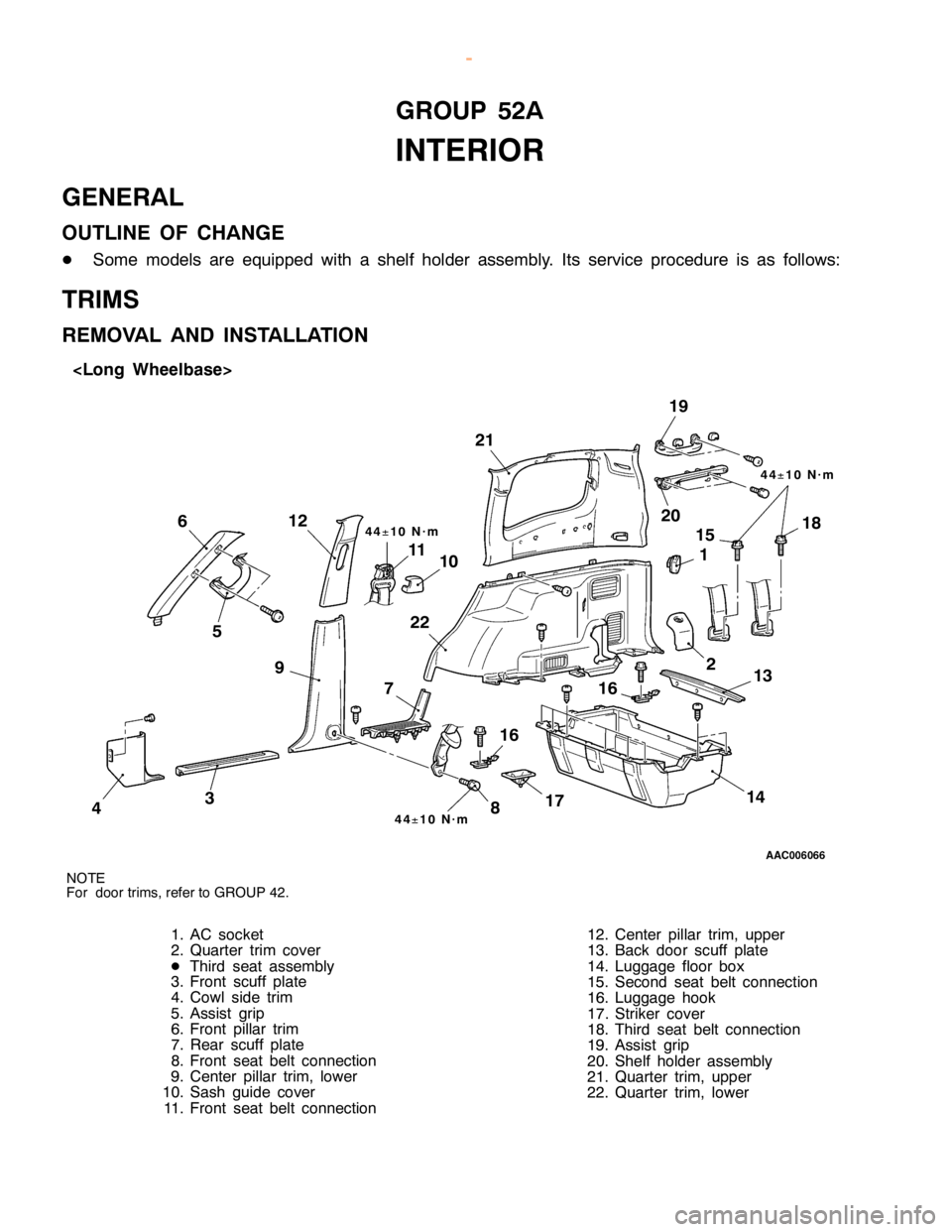
G
RO UP 52A
I N TE R IO R
G EN ER AL
O UTLIN E OF CHANG E
D Som e models are equip ped wit h a sh elf hold er asse m bly . Its se rv ic e pro ce dure is as fo llo w s:
T R IM S
R EM OVA L AND IN STA LLA TIO N
Page 1500 of 1839

SUPPLEMENTAL
RESTRAINT SYSTEM
(SRS)
Click on the applicable bookmark to selected the required model year.
www.WorkshopManuals.co.uk
Purchased from www.WorkshopManuals.co.uk
Page 1571 of 1839

CHASSIS ELECTRICAL
Click on the applicable bookmark to selected the required model year.
www.WorkshopManuals.co.uk
Purchased from www.WorkshopManuals.co.uk
Page 1577 of 1839
CHASSIS ELECTRICAL-Ignition Switch and Immobilizer
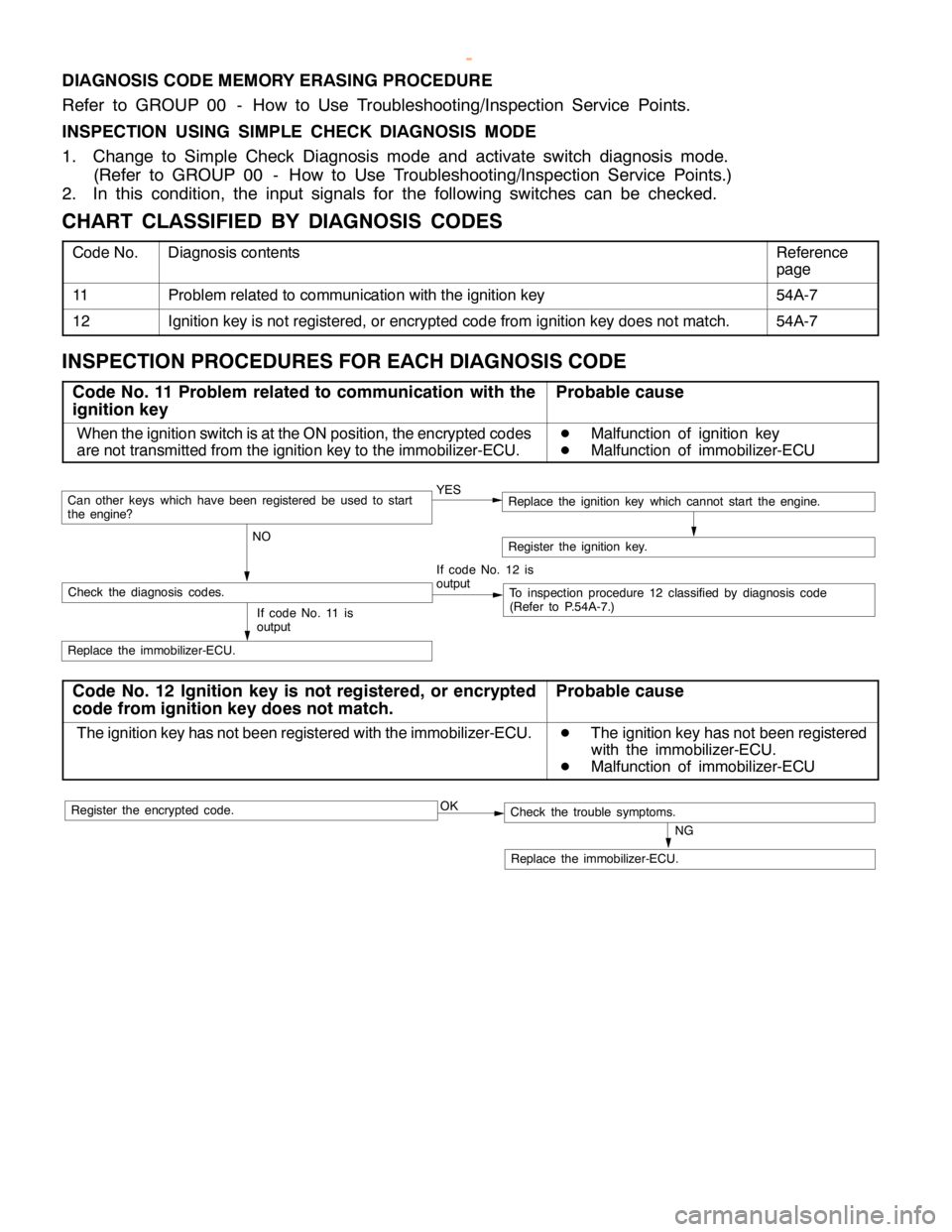
DIAGNOSIS CODE MEMORY ERASING PROCEDURE
Refer to GROUP 00 - How to Use Troubleshooting/Inspection Service Points.
INSPECTION USING SIMPLE CHECK DIAGNOSIS MODE
1. Change to Simple Check Diagnosis mode and activate switch diagnosis mode.
(Refer to GROUP 00 - How to Use Troubleshooting/Inspection Service Points.)
2. In this condition, the input signals for the following switches can be checked.
CHART CLASSIFIED BY DIAGNOSIS CODES
Code No.Diagnosis contentsReference
page
11Problem related to communication with the ignition key54A-7
12Ignition key is not registered, or encrypted code from ignition key does not match.54A-7
INSPECTION PROCEDURES FOR EACH DIAGNOSIS CODE
Code No. 11 Problem related to communication with the
ignition keyProbable cause
When the ignition switch is at the ON position, the encrypted codes
are not transmitted from the ignition key to the immobilizer-ECU.D
Malfunction of ignition key
D
Malfunction of immobilizer-ECU
YES
NOCan otherkeys which havebeen registered beused to start
the engine?
If code No. 12 is
output
Check the diagnosis codes.To inspection procedure 12 classified by diagnosis code
(Refer to P.54A-7.)
Replace the immobilizer-ECU.
Register the ignition key.
If code No. 11 is
output
Replace the ignition key which cannot start the engine.
Code No. 12 Ignition key is not registered, or encrypted
code from ignition key does not match.Probable cause
The ignition key has not been registered with the immobilizer-ECU.D
The ignition key has not been registered
with the immobilizer-ECU.
D
Malfunction of immobilizer-ECU
OK
NG
Replace the immobilizer-ECU.
Check the trouble symptoms.Register the encrypted code.
www.WorkshopManuals.co.uk
Purchased from www.WorkshopManuals.co.uk
Page 1624 of 1839

CHASSIS ELECTRICAL -Clock or Center Display54A-54
BEFORE REMOVING THE BATTERY
The Center display has a large amount of data unique to the vehicle in its memory. When the battery
cable is disconnected, that memory is affected as shown in the table below. Accordingly, it is necessary
to make sure that you take notes of important information before disconnecting the battery cable.
FunctionInput function/memoryWhen battery cable is disconnected
Clock set on displayCurrent timeRetains data for approx. 1 hour
Vehicle model setShort (3-door models)/long (5-door
models)Retains data for approx. 1 hour
Brightness set for displayPosition set on displayRetains data for approx. 1 hour
Unit set for trip computerkm or mile, L/100km or mpg or km/L
Average vehicle speed after resetRetains data for approx. 1 hour
Average vehicle speed on displayAverage vehicle speed after resetRetains data for approx. 1 hour
Average fuel consumption on displayAverage fuel consumption after resetRetains data for approx. 1 hour
Cruising range on displayCruising range, fuel economyRetains data for approx. 1 hour
Outside temperature on displayOutside temperature after the ignition
switch is turned to the OFF(LOCK)
position.Retains data for approx. 1 hour
* The outside temperature sensor
is located near the engine.
Therefore, incorrectly high
temperature may be displayed
when the battery cable is
reconnected within one hour.
DIAGNOSIS FUNCTION FOR CENTER DISPLAY
Center display has the following diagnosis function:
FunctionContents
Service functionThere are the following 4 diagnosis modes available
1. Check of vehicle informationThe vehicle, short (3-door models)/long (5-door models) set
2. Check of LCD segmentsThe LCD segments for display available to light on or not
3. Check of sensorsOutside temperature, voltage of fuel gauge unit, system voltage, fuel amount
remains, fuel economy calculated after supply of fuel
4. Check of units connected into
the center displayThe units connected on display
Voltage (%) on terminal for MUT-II
Vehicle speed signal sent by engine-ECU
Oscillating signal
www.WorkshopManuals.co.uk
Purchased from www.WorkshopManuals.co.uk