low NISSAN GT-R 2013 R35 Multi Function Display Owners Manual
[x] Cancel search | Manufacturer: NISSAN, Model Year: 2013, Model line: GT-R, Model: NISSAN GT-R 2013 R35Pages: 315, PDF Size: 6.96 MB
Page 259 of 315
NOTICE
Even when traveling a distance for
which there is a sufficient amount of
fuel, refuel when the gas gauge ap-
proaches empty or when the fuel warn-
ing light illuminates.
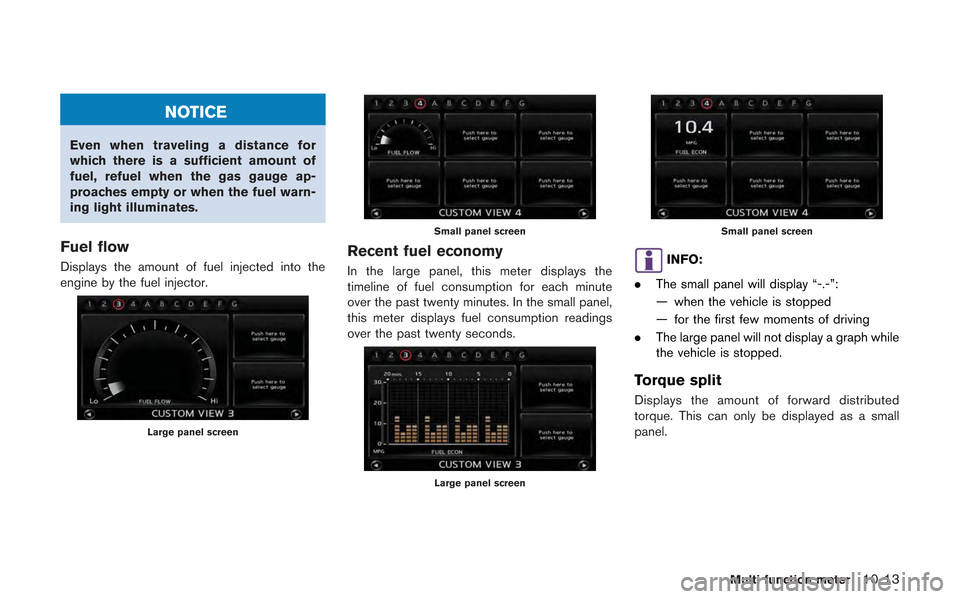
Fuel flow
Displays the amount of fuel injected into the
engine by the fuel injector.
Large panel screen
Small panel screen
Recent fuel economy
In the large panel, this meter displays the
timeline of fuel consumption for each minute
over the past twenty minutes. In the small panel,
this meter displays fuel consumption readings
over the past twenty seconds.
Large panel screen
Small panel screen
INFO:
. The small panel will display “-.-”:
— when the vehicle is stopped
— for the first few moments of driving
. The large panel will not display a graph while
the vehicle is stopped.
Torque split
Displays the amount of forward distributed
torque. This can only be displayed as a small
panel.
Multi function meter10-13
Page 264 of 315
10-18Multi function meter
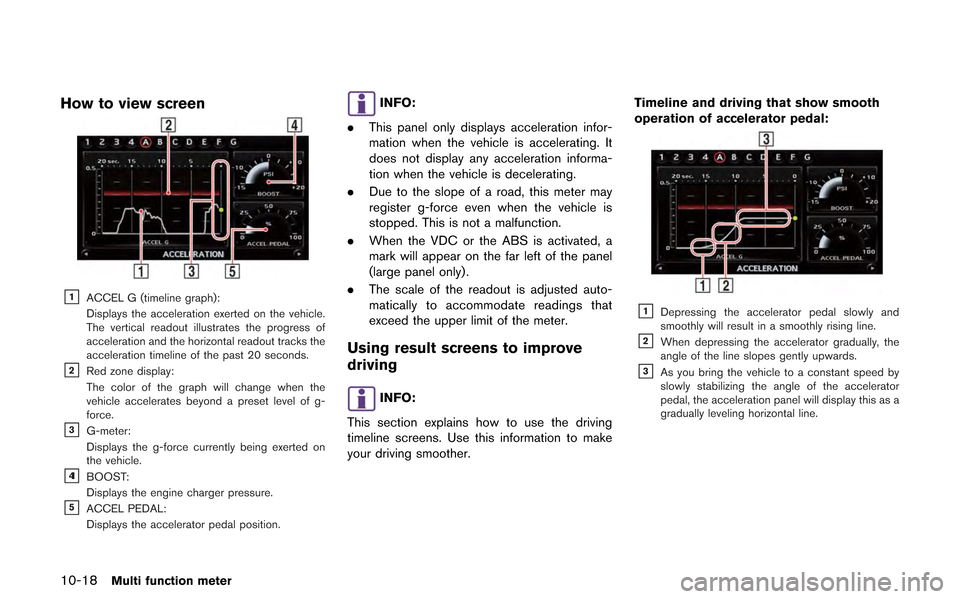
How to view screen
&1ACCEL G (timeline graph):
Displays the acceleration exerted on the vehicle.
The vertical readout illustrates the progress of
acceleration and the horizontal readout tracks the
acceleration timeline of the past 20 seconds.
&2Red zone display:
The color of the graph will change when the
vehicle accelerates beyond a preset level of g-
force.
&3G-meter:
Displays the g-force currently being exerted on
the vehicle.
&41BOOST:
Displays the engine charger pressure.
&5ACCEL PEDAL:
Displays the accelerator pedal position.
INFO:
. This panel only displays acceleration infor-
mation when the vehicle is accelerating. It
does not display any acceleration informa-
tion when the vehicle is decelerating.
. Due to the slope of a road, this meter may
register g-force even when the vehicle is
stopped. This is not a malfunction.
. When the VDC or the ABS is activated, a
mark will appear on the far left of the panel
(large panel only).
. The scale of the readout is adjusted auto-
matically to accommodate readings that
exceed the upper limit of the meter.
Using result screens to improve
driving
INFO:
This section explains how to use the driving
timeline screens. Use this information to make
your driving smoother. Timeline and driving that show smooth
operation of accelerator pedal:
&1Depressing the accelerator pedal slowly and
smoothly will result in a smoothly rising line.
&2When depressing the accelerator gradually, the
angle of the line slopes gently upwards.
&3As you bring the vehicle to a constant speed by
slowly stabilizing the angle of the accelerator
pedal, the acceleration panel will display this as a
gradually leveling horizontal line.
Page 266 of 315
10-20Multi function meter
INFO:
. The reading that the brake meter displays
when the pedal is being depressed may
vary, depending on the vehicle speed and
road conditions. The brake meter may not
display a reading of “100%” even when the
brake is being fully depressed. This is not a
malfunction.
. This panel only displays acceleration infor-
mation when the vehicle is decelerating. It
does not display any acceleration informa-
tion when the vehicle is accelerating.
. Due to the slope of a road, this meter may
register g-force even when the vehicle is
stopped. This is not a malfunction.
. When the VDC or the ABS is activated, a
mark will appear on the far left side of the
panel (large panel only) .
. The scale of the readout is adjusted auto-
matically to accommodate readings that
exceed the upper limit of the meter.Using result screens to improve
driving
INFO:
This section explains how to use the driving
timeline screens. Use this information to make
your driving smoother.
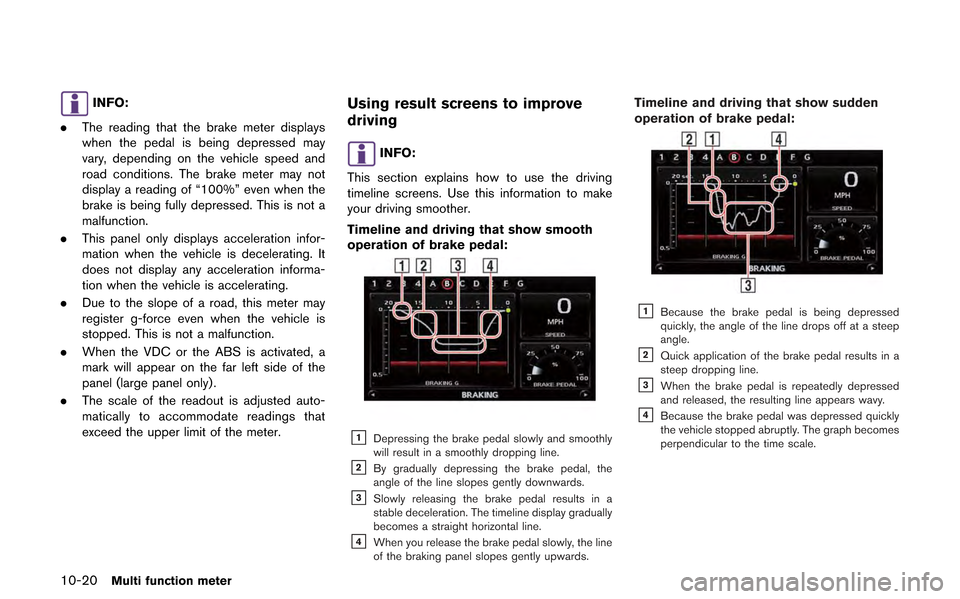
Timeline and driving that show smooth
operation of brake pedal:
&1Depressing the brake pedal slowly and smoothly
will result in a smoothly dropping line.
&2By gradually depressing the brake pedal, the
angle of the line slopes gently downwards.
&3Slowly releasing the brake pedal results in a
stable deceleration. The timeline display gradually
becomes a straight horizontal line.
&4When you release the brake pedal slowly, the line
of the braking panel slopes gently upwards.
Timeline and driving that show sudden
operation of brake pedal:
&1Because the brake pedal is being depressed
quickly, the angle of the line drops off at a steep
angle.
&2Quick application of the brake pedal results in a
steep dropping line.
&3When the brake pedal is repeatedly depressed
and released, the resulting line appears wavy.
&4Because the brake pedal was depressed quickly
the vehicle stopped abruptly. The graph becomes
perpendicular to the time scale.
Page 267 of 315
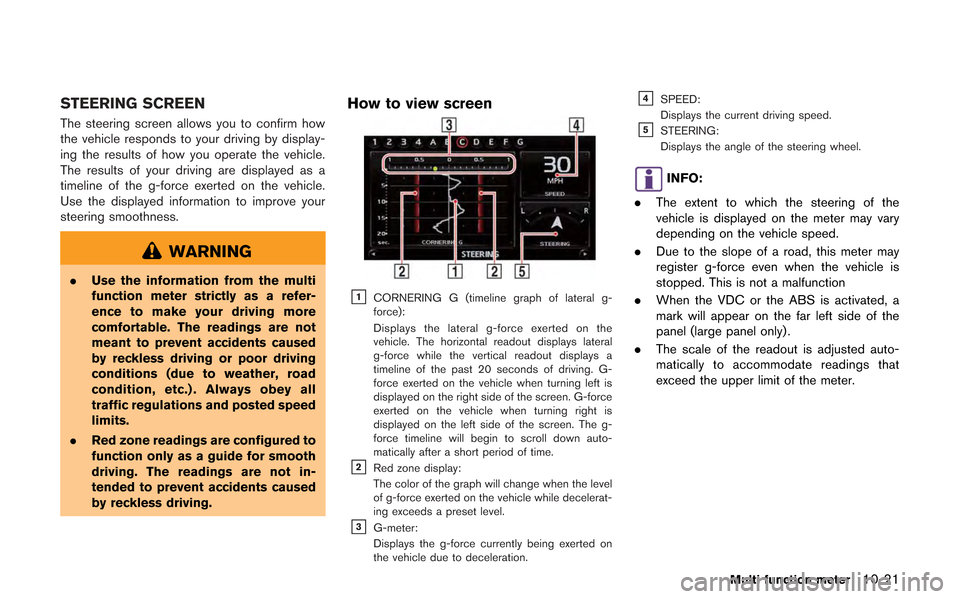
STEERING SCREEN
The steering screen allows you to confirm how
the vehicle responds to your driving by display-
ing the results of how you operate the vehicle.
The results of your driving are displayed as a
timeline of the g-force exerted on the vehicle.
Use the displayed information to improve your
steering smoothness.
WARNING
.Use the information from the multi
function meter strictly as a refer-
ence to make your driving more
comfortable. The readings are not
meant to prevent accidents caused
by reckless driving or poor driving
conditions (due to weather, road
condition, etc.) . Always obey all
traffic regulations and posted speed
limits.
. Red zone readings are configured to
function only as a guide for smooth
driving. The readings are not in-
tended to prevent accidents caused
by reckless driving.
How to view screen
&1CORNERING G (timeline graph of lateral g-
force):
Displays the lateral g-force exerted on the
vehicle. The horizontal readout displays lateral
g-force while the vertical readout displays a
timeline of the past 20 seconds of driving. G-
force exerted on the vehicle when turning left is
displayed on the right side of the screen. G-force
exerted on the vehicle when turning right is
displayed on the left side of the screen. The g-
force timeline will begin to scroll down auto-
matically after a short period of time.
&2Red zone display:
The color of the graph will change when the level
of g-force exerted on the vehicle while decelerat-
ing exceeds a preset level.
&3G-meter:
Displays the g-force currently being exerted on
the vehicle due to deceleration.
&4SPEED:
Displays the current driving speed.
&5STEERING:
Displays the angle of the steering wheel.
INFO:
. The extent to which the steering of the
vehicle is displayed on the meter may vary
depending on the vehicle speed.
. Due to the slope of a road, this meter may
register g-force even when the vehicle is
stopped. This is not a malfunction
. When the VDC or the ABS is activated, a
mark will appear on the far left side of the
panel (large panel only) .
. The scale of the readout is adjusted auto-
matically to accommodate readings that
exceed the upper limit of the meter.
Multi function meter10-21
Page 268 of 315
10-22Multi function meter
Using result screens to improve
driving
This section explains how to use the driving
timeline screens. Use this information to make
your driving smoother.
INFO:
The criteria for smooth driving may vary depend-
ing on road conditions. Use this information for
reference purposes only.
Timeline and driving that show smooth
handling when driving through S-curve:
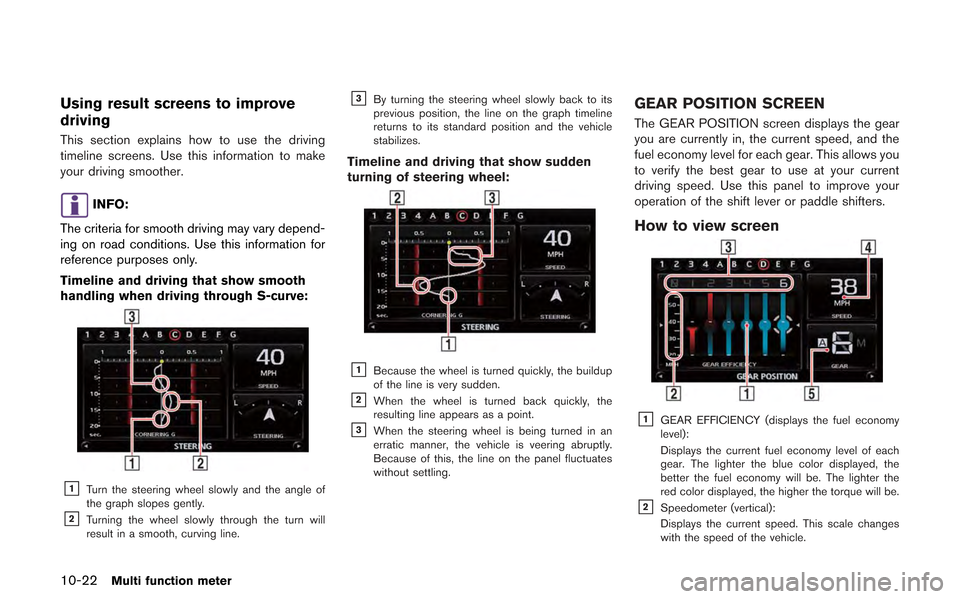
&1Turn the steering wheel slowly and the angle of
the graph slopes gently.
&2Turning the wheel slowly through the turn will
result in a smooth, curving line.
&3By turning the steering wheel slowly back to its
previous position, the line on the graph timeline
returns to its standard position and the vehicle
stabilizes.
Timeline and driving that show sudden
turning of steering wheel:
&1Because the wheel is turned quickly, the buildup
of the line is very sudden.
&2When the wheel is turned back quickly, the
resulting line appears as a point.
&3When the steering wheel is being turned in an
erratic manner, the vehicle is veering abruptly.
Because of this, the line on the panel fluctuates
without settling.
GEAR POSITION SCREEN
The GEAR POSITION screen displays the gear
you are currently in, the current speed, and the
fuel economy level for each gear. This allows you
to verify the best gear to use at your current
driving speed. Use this panel to improve your
operation of the shift lever or paddle shifters.
How to view screen
&1GEAR EFFICIENCY (displays the fuel economy
level):
Displays the current fuel economy level of each
gear. The lighter the blue color displayed, the
better the fuel economy will be. The lighter the
red color displayed, the higher the torque will be.
&2Speedometer (vertical):
Displays the current speed. This scale changes
with the speed of the vehicle.
Page 269 of 315
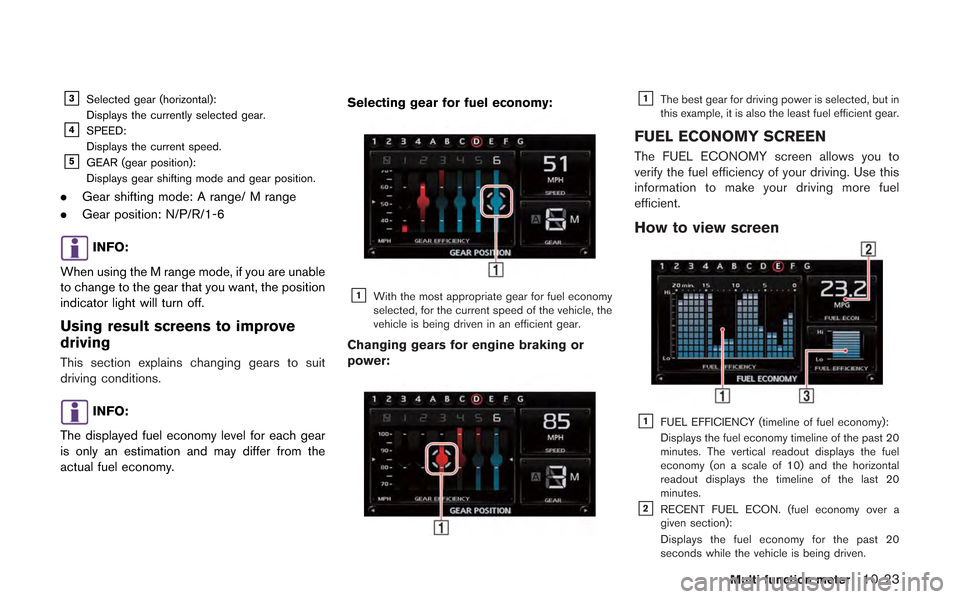
&3Selected gear (horizontal):
Displays the currently selected gear.
&4SPEED:
Displays the current speed.
&5GEAR (gear position):
Displays gear shifting mode and gear position.
.Gear shifting mode: A range/ M range
. Gear position: N/P/R/1-6
INFO:
When using the M range mode, if you are unable
to change to the gear that you want, the position
indicator light will turn off.
Using result screens to improve
driving
This section explains changing gears to suit
driving conditions.
INFO:
The displayed fuel economy level for each gear
is only an estimation and may differ from the
actual fuel economy. Selecting gear for fuel economy:
&1With the most appropriate gear for fuel economy
selected, for the current speed of the vehicle, the
vehicle is being driven in an efficient gear.
Changing gears for engine braking or
power:
&1The best gear for driving power is selected, but in
this example, it is also the least fuel efficient gear.
FUEL ECONOMY SCREEN
The FUEL ECONOMY screen allows you to
verify the fuel efficiency of your driving. Use this
information to make your driving more fuel
efficient.
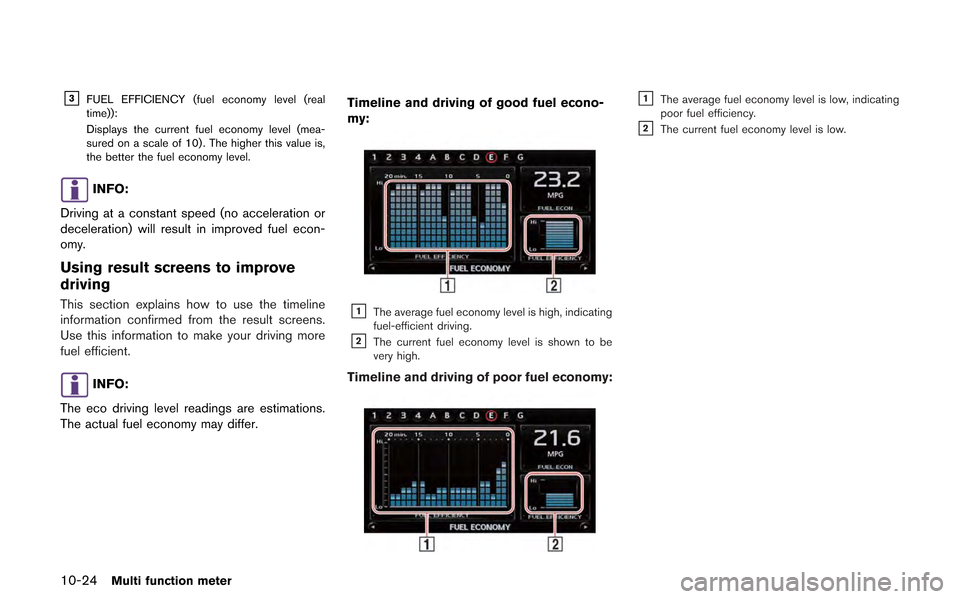
How to view screen
&1FUEL EFFICIENCY (timeline of fuel economy):
Displays the fuel economy timeline of the past 20
minutes. The vertical readout displays the fuel
economy (on a scale of 10) and the horizontal
readout displays the timeline of the last 20
minutes.
&2RECENT FUEL ECON. (fuel economy over a
given section):
Displays the fuel economy for the past 20
seconds while the vehicle is being driven.
Multi function meter10-23
Page 270 of 315
10-24Multi function meter
&3FUEL EFFICIENCY (fuel economy level (real
time)):
Displays the current fuel economy level (mea-
sured on a scale of 10) . The higher this value is,
the better the fuel economy level.
INFO:
Driving at a constant speed (no acceleration or
deceleration) will result in improved fuel econ-
omy.
Using result screens to improve
driving
This section explains how to use the timeline
information confirmed from the result screens.
Use this information to make your driving more
fuel efficient.
INFO:
The eco driving level readings are estimations.
The actual fuel economy may differ. Timeline and driving of good fuel econo-
my:
&1The average fuel economy level is high, indicating
fuel-efficient driving.
&2The current fuel economy level is shown to be
very high.
Timeline and driving of poor fuel economy:
&1The average fuel economy level is low, indicating
poor fuel efficiency.
&2The current fuel economy level is low.
Page 271 of 315
This allows you to measure/display the timeline
and waypoint history over a given time.
STOPWATCH SCREEN
With the STOP WATCH screen you can
measure a segment of time or passing time.
You can also display and save recorded time-
lines and data.
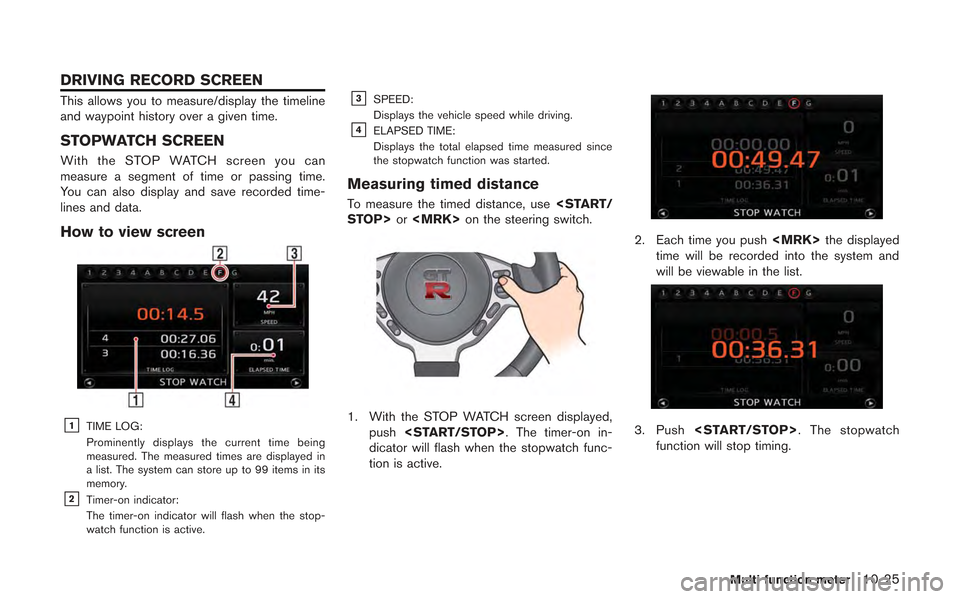
How to view screen
&1TIME LOG:
Prominently displays the current time being
measured. The measured times are displayed in
a list. The system can store up to 99 items in its
memory.
&2Timer-on indicator:
The timer-on indicator will flash when the stop-
watch function is active.
&3SPEED:
Displays the vehicle speed while driving.
&4ELAPSED TIME:
Displays the total elapsed time measured since
the stopwatch function was started.
Measuring timed distance
To measure the timed distance, use
1. With the STOP WATCH screen displayed,
push
dicator will flash when the stopwatch func-
tion is active.
2. Each time you push
time will be recorded into the system and
will be viewable in the list.
3. Push
function will stop timing.
Multi function meter10-25
DRIVING RECORD SCREEN
Page 273 of 315
![NISSAN GT-R 2013 R35 Multi Function Display Owners Manual 1. Insert the USB memory in the media slot.
2. Select [TIME LOG]. The list screen will bedisplayed.
3. Select the record you would like to display.The menu screen will be displayed.
4. Select [Transfe](/img/5/316/w960_316-272.png "NISSAN GT-R 2013 R35 Multi Function Display Owners Manual 1. Insert the USB memory in the media slot.
2. Select [TIME LOG]. The list screen will bedisplayed.
3. Select the record you would like to display.The menu screen will be displayed.
4. Select [Transfe")
1. Insert the USB memory in the media slot.
2. Select [TIME LOG]. The list screen will bedisplayed.
3. Select the record you would like to display.The menu screen will be displayed.
4. Select [Transfer Stop Watch Times to USB
Memory]. The time record is saved to the
USB memory.
NOTICE
Inserting objects other than a USB
memory into the USB connector can
cause damage. Do not insert anything
other than a USB memory into the USB
connector.
INFO:
. Time records are saved to the USB memory
in the CSV format.
. While records are being saved to the USB
memory, do not change the key position or
remove the USB memory. .
To save all records to the USB memory,
select [Transfer All Stop Watch Times to
USB Mem.].
Deleting records
Use the following procedure to delete time
records saved in the system.
1. Select [TIME LOG]. The list screen will be
displayed.
Multi function meter10-27
Page 275 of 315
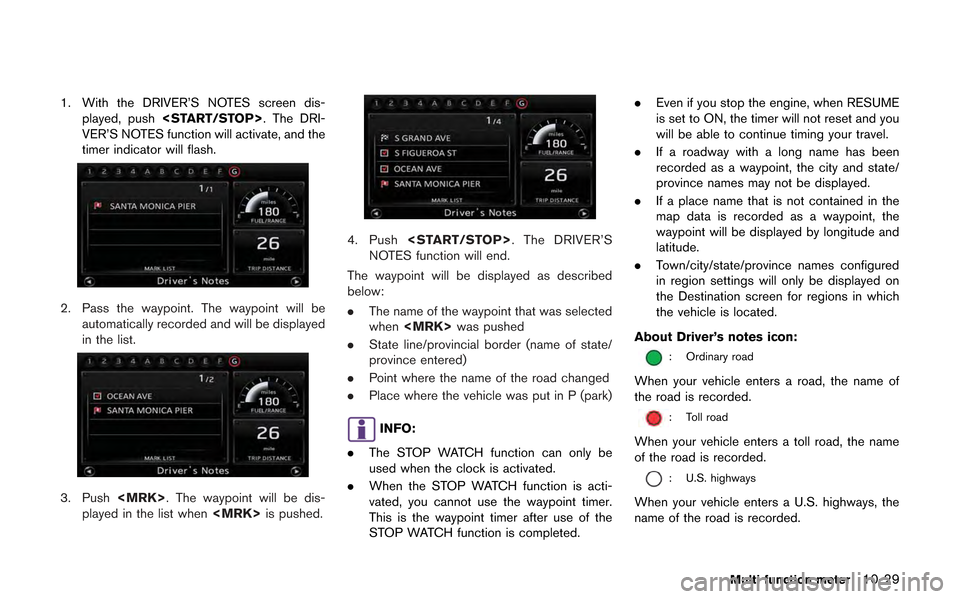
1. With the DRIVER’S NOTES screen dis-played, push
VER’S NOTES function will activate, and the
timer indicator will flash.
2. Pass the waypoint. The waypoint will be automatically recorded and will be displayed
in the list.
3. Push
played in the list when
4. Push
NOTES function will end.
The waypoint will be displayed as described
below:
. The name of the waypoint that was selected
when
. State line/provincial border (name of state/
province entered)
. Point where the name of the road changed
. Place where the vehicle was put in P (park)
INFO:
. The STOP WATCH function can only be
used when the clock is activated.
. When the STOP WATCH function is acti-
vated, you cannot use the waypoint timer.
This is the waypoint timer after use of the
STOP WATCH function is completed. .
Even if you stop the engine, when RESUME
is set to ON, the timer will not reset and you
will be able to continue timing your travel.
. If a roadway with a long name has been
recorded as a waypoint, the city and state/
province names may not be displayed.
. If a place name that is not contained in the
map data is recorded as a waypoint, the
waypoint will be displayed by longitude and
latitude.
. Town/city/state/province names configured
in region settings will only be displayed on
the Destination screen for regions in which
the vehicle is located.
About Driver’s notes icon:
: Ordinary road
When your vehicle enters a road, the name of
the road is recorded.
: Toll road
When your vehicle enters a toll road, the name
of the road is recorded.
: U.S. highways
When your vehicle enters a U.S. highways, the
name of the road is recorded.
Multi function meter10-29