low NISSAN GT-R 2013 R35 Multi Function Display Owners Manual
[x] Cancel search | Manufacturer: NISSAN, Model Year: 2013, Model line: GT-R, Model: NISSAN GT-R 2013 R35Pages: 315, PDF Size: 6.96 MB
Page 232 of 315
![NISSAN GT-R 2013 R35 Multi Function Display Owners Manual 8-18Voice recognition
to operate the learning function through this
tutorial.
1. Highlight [Adapting the System to YourVoice] and push <ENTER>. The tutorial
starts.
2. The voice guide demonstrates the](/img/5/316/w960_316-231.png "NISSAN GT-R 2013 R35 Multi Function Display Owners Manual 8-18Voice recognition
to operate the learning function through this
tutorial.
1. Highlight [Adapting the System to YourVoice] and push <ENTER>. The tutorial
starts.
2. The voice guide demonstrates the")
8-18Voice recognition
to operate the learning function through this
tutorial.
1. Highlight [Adapting the System to YourVoice] and push
starts.
2. The voice guide demonstrates the steps that have to be performed.
3. When the tutorial is completed, the system automatically switches to the Menu screen.
USING VOICE RECOGNITION SYS-
TEM
Initialization
When the ignition switch is pushed to the ON
position, Voice Recognition is initialized, which
takes a few seconds. When completed, the
system is ready to accept voice commands. If
<
>is pushed before the initialization com-
pletes, the display will show the message:
“System not ready”.
BEFORE STARTING
To get the best recognition performance out of
Voice Recognition, observe the following:
. The interior of the vehicle should be as quiet
as possible. Close the windows to eliminate
the surrounding noises (traffic noise and
vibration sounds, etc.), which may prevent
the system from correctly recognizing the
voice commands.
. Wait until the tone sounds before speaking a
command.
. Speak in a natural conversational voice
without pausing between words.
GIVING VOICE COMMANDS
1. Push <>located on the steering wheel.
2. A list of commands appears on the screen,
and the system announces, “Please say a
command”.
3. After the tone sounds and the icon on the screen changes from [
]to[], speak a
command.
Operating tips
. If the command is not recognized, the
system announces, “Please say again”.
Repeat the command in a clear voice.
. Push
previous screen.
. To cancel the command, push and hold
<
>. The message, “Voice canceled” will
be announced.
Page 233 of 315
![NISSAN GT-R 2013 R35 Multi Function Display Owners Manual .Push <>to stop the voice prompt and
give the command at once. Remember to
wait for the tone before speaking.
. To adjust the volume of the system feed-
back, push the volume control buttons [+] or
[â](/img/5/316/w960_316-232.png "NISSAN GT-R 2013 R35 Multi Function Display Owners Manual .Push <>to stop the voice prompt and
give the command at once. Remember to
wait for the tone before speaking.
. To adjust the volume of the system feed-
back, push the volume control buttons [+] or
[â")
.Push <>to stop the voice prompt and
give the command at once. Remember to
wait for the tone before speaking.
. To adjust the volume of the system feed-
back, push the volume control buttons [+] or
[−] on the steering wheel or use the audio
system volume control knob while the
system is making an announcement.
How to speak numbers
NISSAN Voice Recognition requires a certain
way to speak numbers when giving voice
commands. Refer to the following examples.
General rule:
Only single digits 0 (zero) to 9 can be used. For
example, to speak 500, “five zero zero” can be
used, but “five hundred” cannot.
Examples:
1-800-662-6200
“One eight zero zero six six two six two zero
zero”
Improving Recognition of Phone numbers:
Recognition of phone numbers can be improved
by speaking the phone number in 3 groups of
numbers. For example, to call 800-662-6200,
speak “Eight Zero Zero” first, and the system will
then ask to speak the next three digits. Then,
speak “Six Six Two”. After recognition, the system will then ask to speak the last 4 digits.
Speak, “Six Two Zero Zero”. Using this method
of phone digit entry can improve recognition
performance.
SYSTEM FEEDBACK ANNOUNCE-
MENT MODES
It is possible to select two modes, long or short,
for the announcement by the system.
How to set
1. Push
2. Highlight [Others] and push
3. Highlight [Voice Recognition] and push
4. Highlight [Minimize Voice Feedback] and
push
and the system announcement mode
switches to the short mode. 5. Push
screen. Push
Page 235 of 315
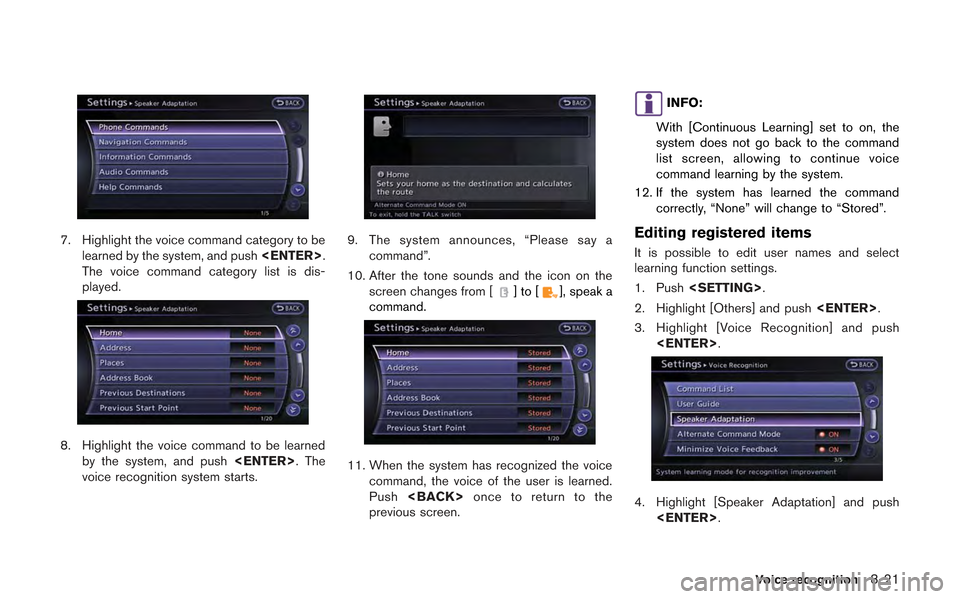
7. Highlight the voice command category to belearned by the system, and push
The voice command category list is dis-
played.
8. Highlight the voice command to be learned by the system, and push
voice recognition system starts.
9. The system announces, “Please say a command”.
10. After the tone sounds and the icon on the screen changes from [
]to[], speak a
command.
11. When the system has recognized the voice command, the voice of the user is learned.
Push
previous screen.
INFO:
With [Continuous Learning] set to on, the
system does not go back to the command
list screen, allowing to continue voice
command learning by the system.
12. If the system has learned the command correctly, “None” will change to “Stored”.
Editing registered items
It is possible to edit user names and select
learning function settings.
1. Push
2. Highlight [Others] and push
3. Highlight [Voice Recognition] and push
4. Highlight [Speaker Adaptation] and push
Voice recognition8-21
Page 240 of 315
9-2Monitor system
When the shift lever is shifted into the "R"
(Reverse) position, the monitor display shows
the view to the rear of the vehicle.
The system is designed as an aid to the driver in
detecting large stationary objects to help avoid
damaging the vehicle. The system will not detect
small objects below the bumper and may not
detect objects close to the bumper or on the
ground.
WARNING
.The RearView Monitor is a conve-
nience but it is not a substitute for
proper backing up. Always turn and
check that it is safe to do so before
backing up. Always back up slowly.
. Objects viewed in the RearView
Monitor differ from actual distance
because a wide-angle lens is used.
Objects in the RearView Monitor
will appear visually opposite like
ones viewed in the inside and out-
side mirrors.
. Make sure that the trunk is securely
closed when backing up.
. Underneath the bumper and the
corner areas of the bumper cannot
be viewed on the RearView monitor because of its monitoring range
limitation.
. Do not put anything on the camera.
The rear view camera is installed
above the license plate.
. When washing the vehicle with
high-pressure water, be sure not to
spray it around the camera. Other-
wise, water may enter the camera
unit causing water condensation on
the lens, a malfunction, fire or an
electric shock.
. Do not strike the camera. It is a
precision instrument. Otherwise, it
may malfunction or cause damage
resulting in a fire or an electric
shock.
CAUTION
There is a plastic cover over the camera.
Do not scratch the cover when cleaning
dirt or snow from the cover.
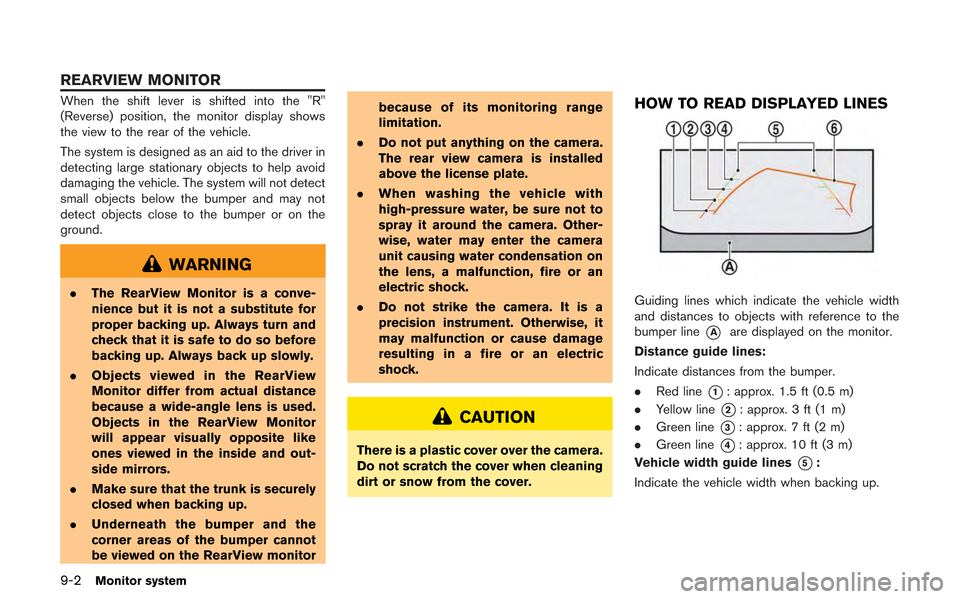
HOW TO READ DISPLAYED LINES
Guiding lines which indicate the vehicle width
and distances to objects with reference to the
bumper line
*Aare displayed on the monitor.
Distance guide lines:
Indicate distances from the bumper.
. Red line
*1: approx. 1.5 ft (0.5 m)
. Yellow line
*2: approx. 3 ft (1 m)
. Green line
*3: approx. 7 ft (2 m)
. Green line
*4: approx. 10 ft (3 m)
Vehicle width guide lines
*5:
Indicate the vehicle width when backing up.
REARVIEW MONITOR
Page 243 of 315
the object projects over the actual backing up
course.WARNING
.Always turn and check that it is safe
to park your car before backing up.
Always back up slowly.
. Use the displayed lines as a refer-
ence. The lines are highly affected
by the number of occupants, fuel
level, vehicle position, road condi-
tion and road grade.
. If the tires are replaced with differ-
ent sized tires, the predicted course
line may not be displayed correctly.
. On a snow-covered or slippery road,
there may be a difference between
the predicted course line and the
actual course line.
. If the battery is disconnected or
becomes discharged, the predicted
course lines may be displayed in-
correctly. If this occurs, drive the
vehicle on a straight road for more
than 5 minutes.
. When the steering wheel is turned
with the ignition switch in the ACC
position, the predicted course lines
may be displayed incorrectly. .
The displayed line will appear
slightly off to the right because the
rear view camera is not installed in
the rear center of the vehicle.
. The distance guide line and the
vehicle width guide line should be
used as a reference only when the
vehicle is on a level paved surface.
The distance viewed on the monitor
is for reference only and may be
different than the actual distance
between the vehicle and displayed
objects.
. When backing up the vehicle up a
hill, objects viewed in the monitor
are further than they appear. When
backing up the vehicle down a hill,
objects viewed in the monitor are
closer than they appear. Use the
inside mirror or glance over your
shoulder to properly judge dis-
tances to other objects.
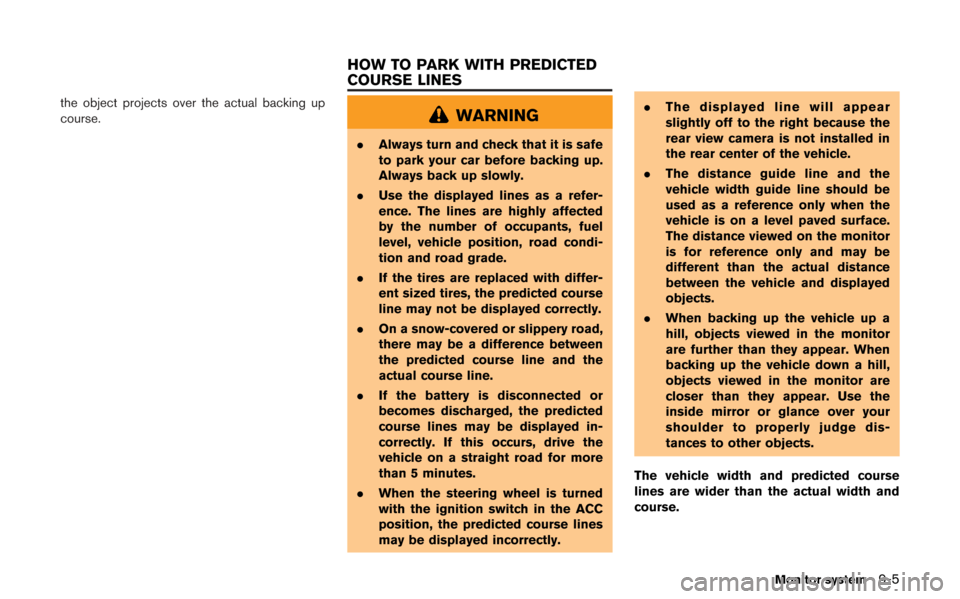
The vehicle width and predicted course
lines are wider than the actual width and
course.
Monitor system9-5
HOW TO PARK WITH PREDICTED
COURSE LINES
Page 244 of 315
9-6Monitor system
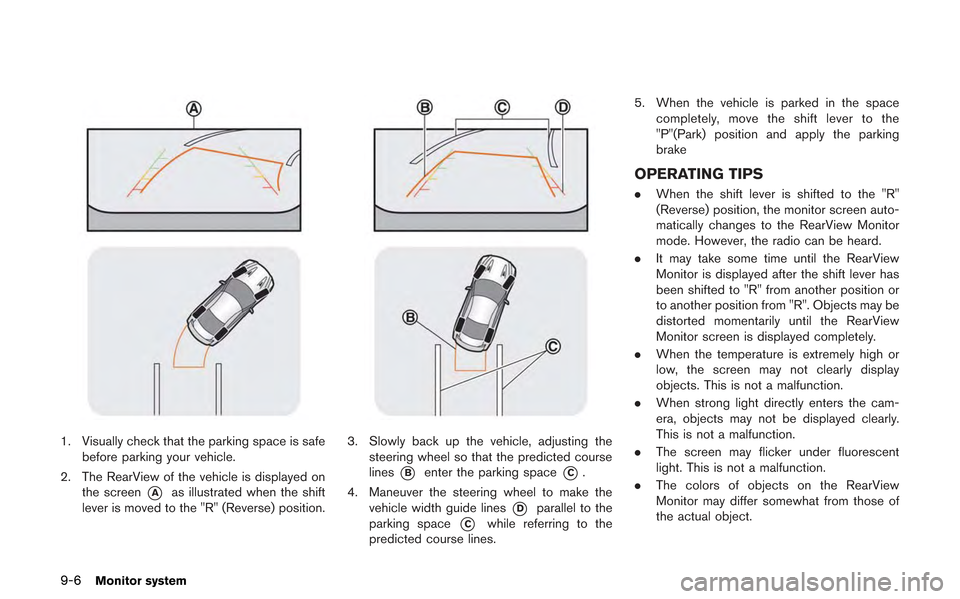
1. Visually check that the parking space is safebefore parking your vehicle.
2. The RearView of the vehicle is displayed on the screen
*Aas illustrated when the shift
lever is moved to the "R" (Reverse) position.
3. Slowly back up the vehicle, adjusting the steering wheel so that the predicted course
lines
*Benter the parking space*C.
4. Maneuver the steering wheel to make the vehicle width guide lines
*Dparallel to the
parking space
*Cwhile referring to the
predicted course lines. 5. When the vehicle is parked in the space
completely, move the shift lever to the
"P"(Park) position and apply the parking
brake
OPERATING TIPS
. When the shift lever is shifted to the "R"
(Reverse) position, the monitor screen auto-
matically changes to the RearView Monitor
mode. However, the radio can be heard.
. It may take some time until the RearView
Monitor is displayed after the shift lever has
been shifted to "R" from another position or
to another position from "R". Objects may be
distorted momentarily until the RearView
Monitor screen is displayed completely.
. When the temperature is extremely high or
low, the screen may not clearly display
objects. This is not a malfunction.
. When strong light directly enters the cam-
era, objects may not be displayed clearly.
This is not a malfunction.
. The screen may flicker under fluorescent
light. This is not a malfunction.
. The colors of objects on the RearView
Monitor may differ somewhat from those of
the actual object.
Page 245 of 315
.Objects on the monitor may not be clear in a
dark place or at night. This is not a
malfunction.
. If dirt, rain or snow attaches to the camera,
the RearView Monitor may not clearly dis-
play objects. Clean the camera.
. Do not use alcohol, benzine or thinner to
clean the camera. This will cause discolora-
tion. To clean the camera, wipe with a cloth
dampened with diluted mild cleaning agent
and then wipe with a dry cloth.
. Do not damage the camera as the monitor
screen may be adversely affected.
. Do not use wax on the camera window.
Wipe off any wax with a clean cloth
dampened with mild detergent diluted with
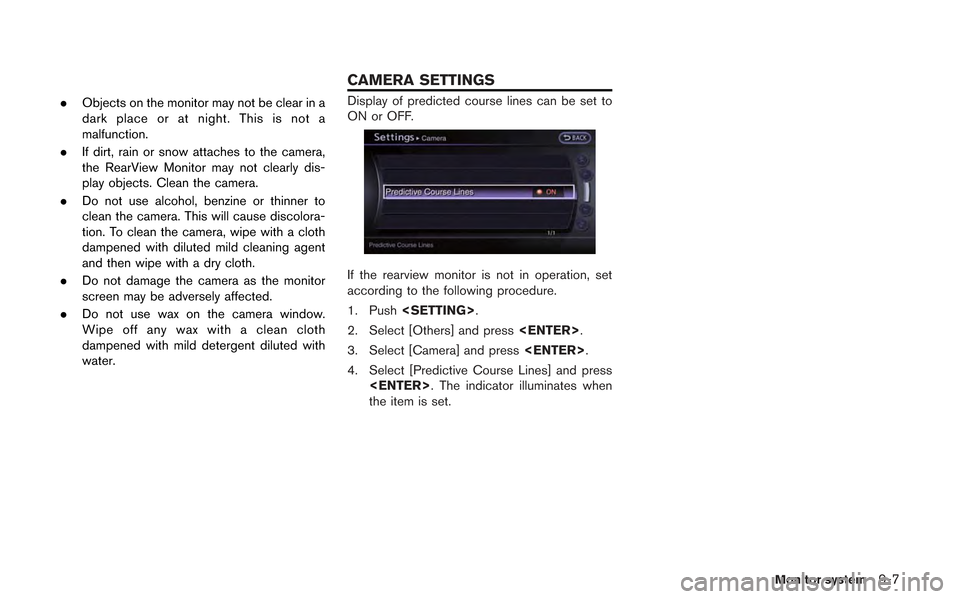
water.Display of predicted course lines can be set to
ON or OFF.
If the rearview monitor is not in operation, set
according to the following procedure.
1. Push
2. Select [Others] and press
3. Select [Camera] and press
4. Select [Predictive Course Lines] and press
the item is set.
Monitor system9-7
CAMERA SETTINGS
Page 248 of 315
10-2Multi function meter
The multi function meter allows you to see the
vehicle status and the results of driving opera-
tion.
SAFETY NOTES
For your driving safety please read the following
warnings.
WARNING
.Use the information from the multi
function meter strictly as a refer-
ence to make your driving more
comfortable. The readings are not
meant to prevent accidents caused
by reckless driving or poor driving
conditions (due to weather, road
condition, etc.) . Always obey all
traffic regulations and posted speed
limits.
. Operating the multi function meter
while driving can lead to a crash
resulting in serious injuries or
death. Always park the vehicle in a
safe place before operating the dis-
play screen.
. Look at the display screen only
briefly while driving. Keep your eyes
on the road. Inattentive driving may
lead to a crash resulting in serious injuries or death.
INFO:
. The information displayed on the multi
function meter is for reference purposes
only. Due to road conditions and tempera-
ture, the information displayed by the system
may vary from actual driving conditions.
. You can select the units that the multi
function meter displays.
“Language and unit settings”
(page 7-9)
MULTI FUNCTION METER LIST
The following information can be displayed on
the multi function meter.
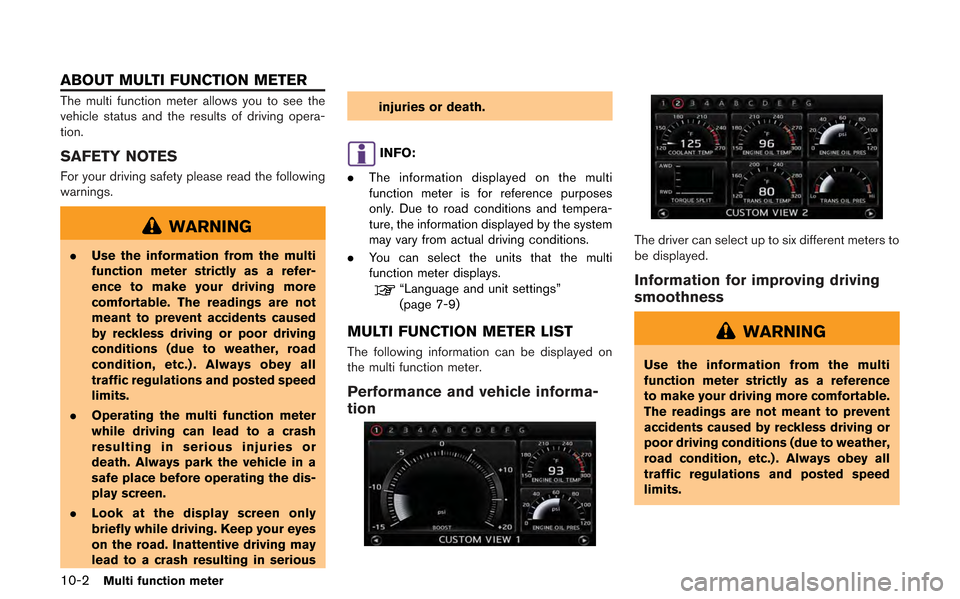
Performance and vehicle informa-
tion
The driver can select up to six different meters to
be displayed.
Information for improving driving
smoothness
WARNING
Use the information from the multi
function meter strictly as a reference
to make your driving more comfortable.
The readings are not meant to prevent
accidents caused by reckless driving or
poor driving conditions (due to weather,
road condition, etc.) . Always obey all
traffic regulations and posted speed
limits.
ABOUT MULTI FUNCTION METER
Page 253 of 315
Touchor. With each touch, the screens
will scroll through in order.
: The previous screen will be displayed.
: The next screen will be displayed.
This screen allows you to display the perfor-
mance and vehicle information, as needed, in
order for you to use your vehicle under optimum
conditions. You can display several vehicle
information panels at once. Each panel displays
digital gauges in the screen area.
SELECTING PANEL
Select the panel you would like to display and
then place it where you would like it to be
displayed. You can configure the screen to
display between 1 and 4 custom view panels.
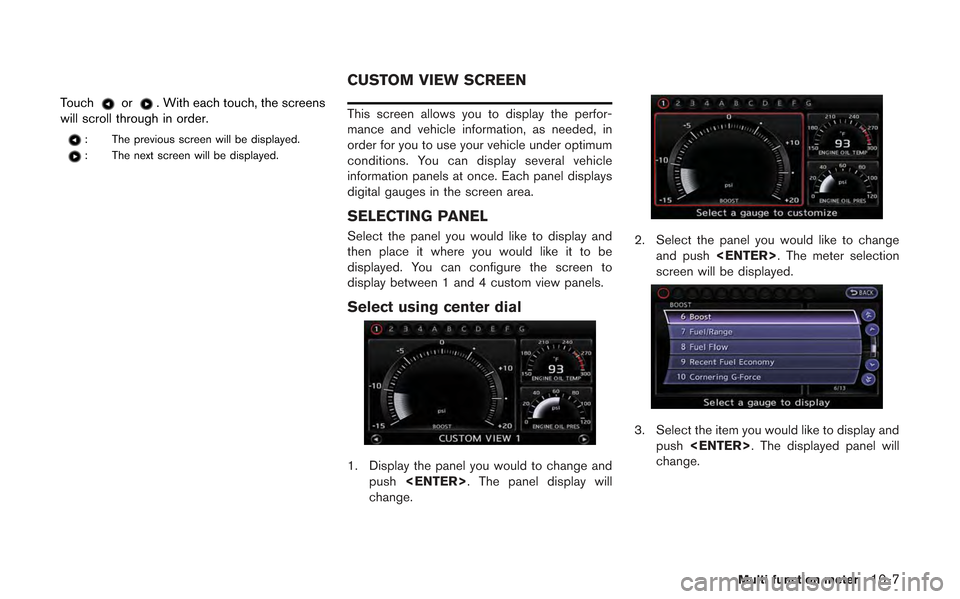
Select using center dial
1. Display the panel you would to change and push
change.
2. Select the panel you would like to change and push
screen will be displayed.
3. Select the item you would like to display and
push
change.
Multi function meter10-7
CUSTOM VIEW SCREEN
Page 254 of 315
10-8Multi function meter
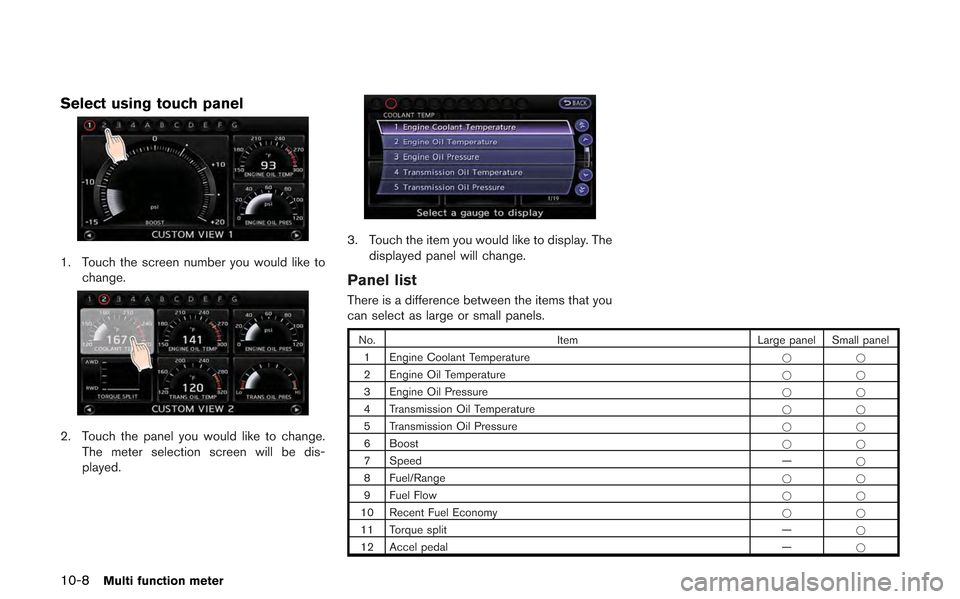
Select using touch panel
1. Touch the screen number you would like tochange.
2. Touch the panel you would like to change.The meter selection screen will be dis-
played.
3. Touch the item you would like to display. The
displayed panel will change.
Panel list
There is a difference between the items that you
can select as large or small panels.
No. Item Large panel Small panel
1 Engine Coolant Temperature **
2 Engine Oil Temperature **
3 Engine Oil Pressure **
4 Transmission Oil Temperature **
5 Transmission Oil Pressure **
6 Boost **
7 Speed —*
8 Fuel/Range **
9 Fuel Flow **
10 Recent Fuel Economy **
11 Torque split —*
12 Accel pedal —*