low NISSAN GT-R 2013 R35 Multi Function Display Manual Online
[x] Cancel search | Manufacturer: NISSAN, Model Year: 2013, Model line: GT-R, Model: NISSAN GT-R 2013 R35Pages: 315, PDF Size: 6.96 MB
Page 216 of 315
8-2Voice recognition
NISSAN Voice Recognition allows hands-free
operation of the navigation system and other
systems equipped on this vehicle, in one of two
modes, Standard Mode or Alternate Command
Mode. Standard Mode allows the operation of
Navigation, Phone, Audio, Information and Help.
The commands that are available are always
shown on the display and announced by the
system. To perform operations, simply follow the
prompts given by the system. In Standard Mode,
hands-free operation of Change map view,
Route selection and Bluetooth Audio, etc. is
not available through Voice Recognition.
Alternate Command Mode allows advanced
operations. When this mode is active, an
expanded list of commands can be spoken after
pushing<
>, and the voice command menu
prompts are turned off. Note that in this mode
the recognition success rate may be affected
because the number of available commands and
ways of speaking each command are increased.
Otherwise, it is recommended that Alternate
Command Mode be turned OFF and Standard
Mode be used for the best recognition perfor-
mance.
“Alternate Command Mode” (page 8-11)
INFO:
. To improve recognition success when Alter-
nate Command Mode is active, try using the
Speaker Adaptation function available in that
mode.
“Speaker adaptation” (page 8-20)
Otherwise, it is recommended that Alternate
Command Mode be turned OFF and Stan-
dard Mode be used for the best recognition
performance.
. For the voice commands for the audio,
phone and other systems, refer to the
vehicle Owner’s Manual. The following sec-
tions refer only to the navigation, phone and
information systems.
. If the air conditioner is set to “Auto”, the fan
speed is automatically lowered so that
commands can be recognized more easily.
CONFIRMING HOW TO USE VOICE
COMMANDS
When operating the voice recognition system
for the first time or if help is preferred to use the
system, the User Guide can be displayed.
It is possible to confirm how to use voice
commands by accessing a simplified User
Guide, which contains basic instructions and
tutorials for several voice commands.
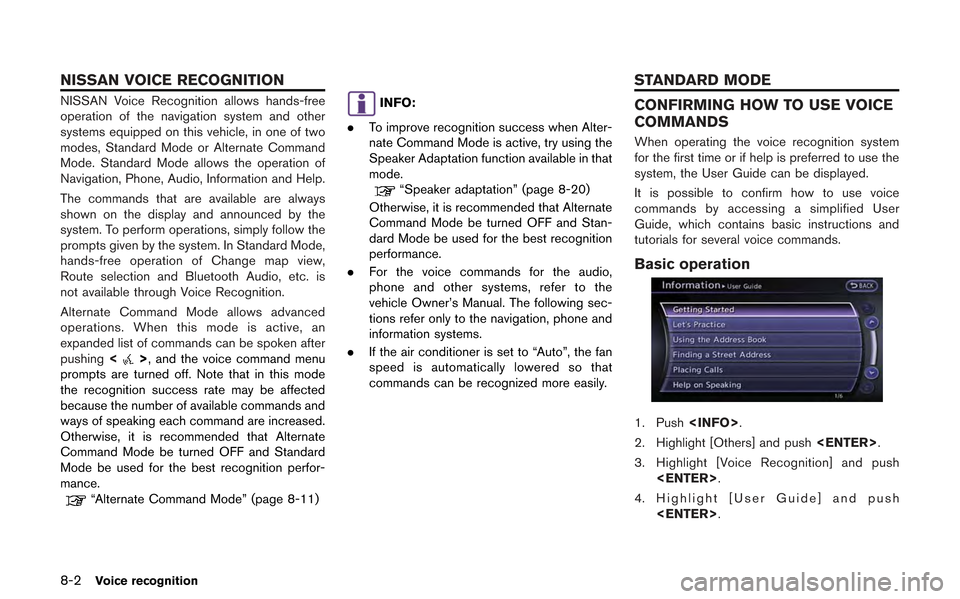
Basic operation
1. Push
2. Highlight [Others] and push
3. Highlight [Voice Recognition] and push
4. Highlight [User Guide] and push
NISSAN VOICE RECOGNITION STANDARD MODE
Page 217 of 315
![NISSAN GT-R 2013 R35 Multi Function Display Manual Online 5. Highlight the preferred item and push<ENTER>.
Available items
. [Getting Started]:
Describes the basics of how to operate the
voice recognition system.
. [Let’s Practice]:
Mode for practice follo](/img/5/316/w960_316-216.png "NISSAN GT-R 2013 R35 Multi Function Display Manual Online 5. Highlight the preferred item and push<ENTER>.
Available items
. [Getting Started]:
Describes the basics of how to operate the
voice recognition system.
. [Let’s Practice]:
Mode for practice follo")
5. Highlight the preferred item and push
Available items
. [Getting Started]:
Describes the basics of how to operate the
voice recognition system.
. [Let’s Practice]:
Mode for practice following the system
voice.
. [Using the Address Book]:
Tutorial for entering a destination by the
Address Book.
. [Finding a Street Address]:
Tutorial for entering a destination by street
address.
. [Placing Calls]:
Tutorial for making a phone call by voice
command operation. Refer to the vehicle
Owner’s Manual for details.
. [Help on Speaking]:
Displays useful tips regarding speaking for
correct command recognition by the system.INFO:
The Command List feature is only available when
Alternate Command Mode is active.
Getting Started
Before using the voice recognition system for
the first time, it is possible to confirm how to use
commands by viewing the Getting Started
section of the User Guide.
1. Highlight [Getting Started] and push
2. To confirm the page, scroll the screen using the up and down switches of the main
directional buttons or the center dial.
Practicing voice commands
Practice for using the voice recognition function
can be performed by repeating a phone number
after the system announces it.
1. Highlight [Let’s Practice] and push
2. Practice voice commands in accordance with the audio guidance.
Tutorials on operation of voice re-
cognition system
When selecting [Using the Address Book] or
[Placing Calls], the system displays tutorials on
how to perform these operations using voice
recognition.
Voice recognition8-3
Page 218 of 315
8-4Voice recognition
Useful tips for correct operation
It is possible to display useful speaking informa-
tion that may help the system to accept a voice
command correctly.
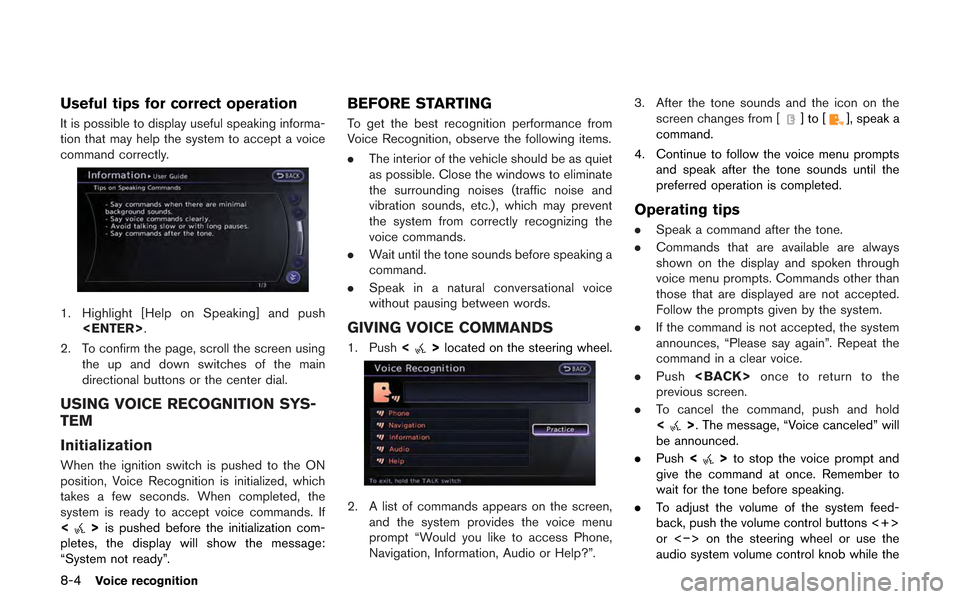
1. Highlight [Help on Speaking] and push
2. To confirm the page, scroll the screen using the up and down switches of the main
directional buttons or the center dial.
USING VOICE RECOGNITION SYS-
TEM
Initialization
When the ignition switch is pushed to the ON
position, Voice Recognition is initialized, which
takes a few seconds. When completed, the
system is ready to accept voice commands. If
<
>is pushed before the initialization com-
pletes, the display will show the message:
“System not ready”.
BEFORE STARTING
To get the best recognition performance from
Voice Recognition, observe the following items.
. The interior of the vehicle should be as quiet
as possible. Close the windows to eliminate
the surrounding noises (traffic noise and
vibration sounds, etc.), which may prevent
the system from correctly recognizing the
voice commands.
. Wait until the tone sounds before speaking a
command.
. Speak in a natural conversational voice
without pausing between words.
GIVING VOICE COMMANDS
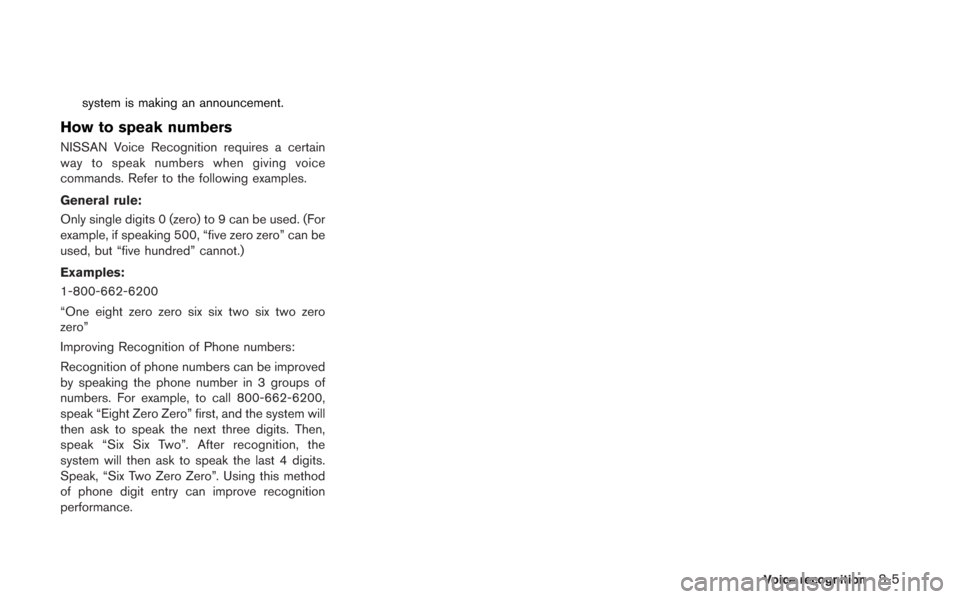
1. Push <>located on the steering wheel.
2. A list of commands appears on the screen,
and the system provides the voice menu
prompt “Would you like to access Phone,
Navigation, Information, Audio or Help?”. 3. After the tone sounds and the icon on the
screen changes from [
]to[], speak a
command.
4. Continue to follow the voice menu prompts and speak after the tone sounds until the
preferred operation is completed.
Operating tips
.Speak a command after the tone.
. Commands that are available are always
shown on the display and spoken through
voice menu prompts. Commands other than
those that are displayed are not accepted.
Follow the prompts given by the system.
. If the command is not accepted, the system
announces, “Please say again”. Repeat the
command in a clear voice.
. Push
previous screen.
. To cancel the command, push and hold
<
>. The message, “Voice canceled” will
be announced.
. Push <
>to stop the voice prompt and
give the command at once. Remember to
wait for the tone before speaking.
. To adjust the volume of the system feed-
back, push the volume control buttons <+>
or <−> on the steering wheel or use the
audio system volume control knob while the
Page 219 of 315
system is making an announcement.
How to speak numbers
NISSAN Voice Recognition requires a certain
way to speak numbers when giving voice
commands. Refer to the following examples.
General rule:
Only single digits 0 (zero) to 9 can be used. (For
example, if speaking 500, “five zero zero” can be
used, but “five hundred” cannot.)
Examples:
1-800-662-6200
“One eight zero zero six six two six two zero
zero”
Improving Recognition of Phone numbers:
Recognition of phone numbers can be improved
by speaking the phone number in 3 groups of
numbers. For example, to call 800-662-6200,
speak “Eight Zero Zero” first, and the system will
then ask to speak the next three digits. Then,
speak “Six Six Two”. After recognition, the
system will then ask to speak the last 4 digits.
Speak, “Six Two Zero Zero”. Using this method
of phone digit entry can improve recognition
performance.
Voice recognition8-5
Page 221 of 315
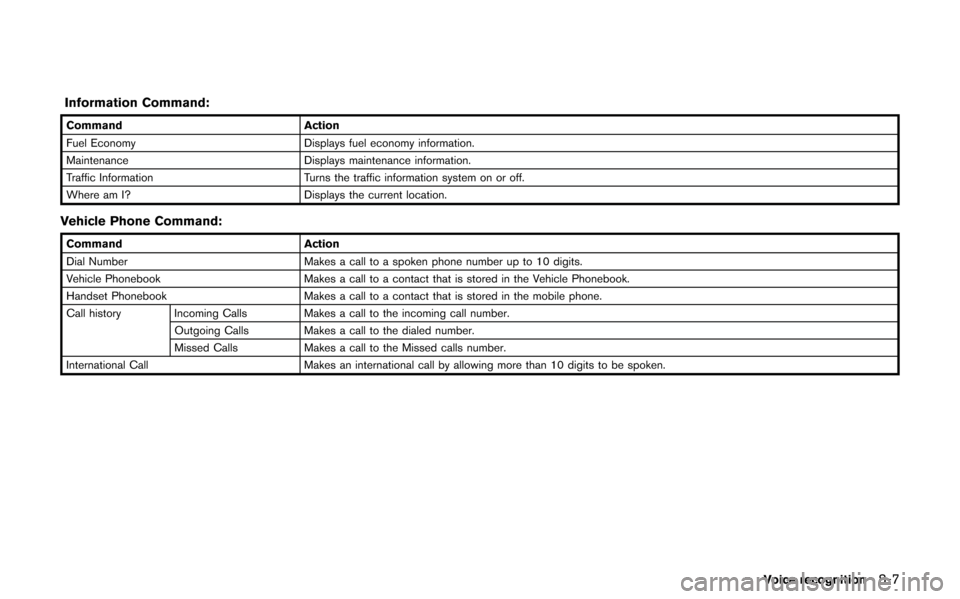
Information Command:
CommandAction
Fuel Economy Displays fuel economy information.
Maintenance Displays maintenance information.
Traffic Information Turns the traffic information system on or off.
Where am I? Displays the current location.
Vehicle Phone Command:
Command Action
Dial Number Makes a call to a spoken phone number up to 10 digits.
Vehicle Phonebook Makes a call to a contact that is stored in the Vehicle Phonebook.
Handset Phonebook Makes a call to a contact that is stored in the mobile phone.
Call history Incoming Calls Makes a call to the incoming call number. Outgoing Calls Makes a call to the dialed number.
Missed Calls Makes a call to the Missed calls number.
International Call Makes an international call by allowing more than 10 digits to be spoken.
Voice recognition8-7
Page 224 of 315
8-10Voice recognition
9. The system makes a call to 800-662-6200.
INFO:
. Speaking “800-662-6200” (10 continuous
digits) or “662-6200” (7 continuous digits)
is acceptable, if the area code is not
necessary. However the 3-3-4 digit group-
ing is recommended for improved recogni-
tion.
“How to speak numbers” (page 8-19)
. The NISSAN voice recognition system is not
limited to recognizing phone numbers of
only 7 or 10 digits. To dial a number in a
format other than the 3-3-4 digit grouping,
use the “International Call” command.
. If “Change Number” is spoken during phone
number entry, the system will automatically
request that the number be repeated using
the 3-3-4 format. In this case please speak the area code first and then follow the
prompts.
. Do not add a “1” in front of the area code
when speaking phone numbers.
. If the system does not recognize a voice
command, please try repeating the com-
mand using a natural voice. Speaking too
slowly or too loudly may further decrease
recognition performance.
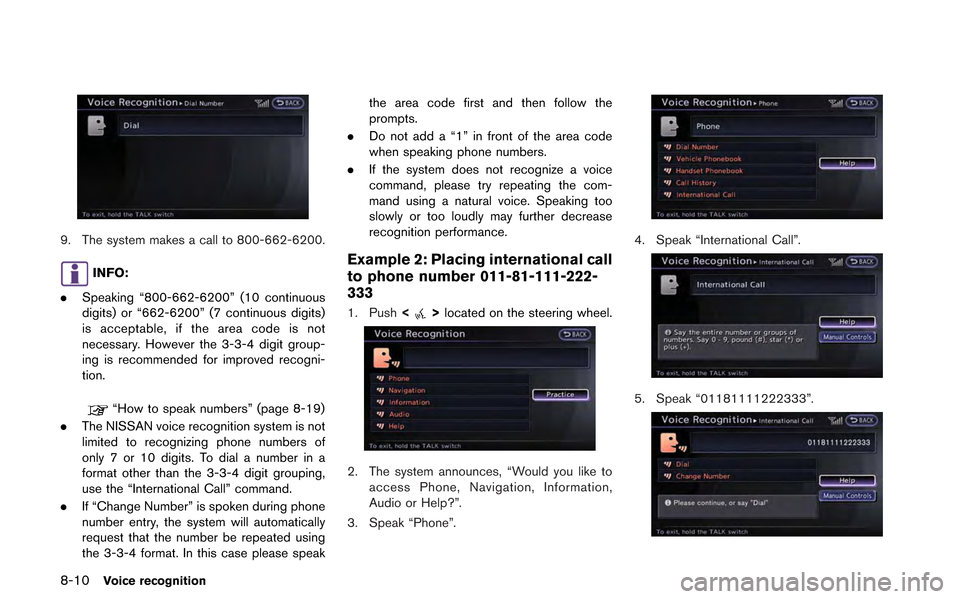
Example 2: Placing international call
to phone number 011-81-111-222-
333
1. Push <>located on the steering wheel.
2. The system announces, “Would you like to
access Phone, Navigation, Information,
Audio or Help?”.
3. Speak “Phone”.
4. Speak “International Call”.
5. Speak “01181111222333”.
Page 225 of 315
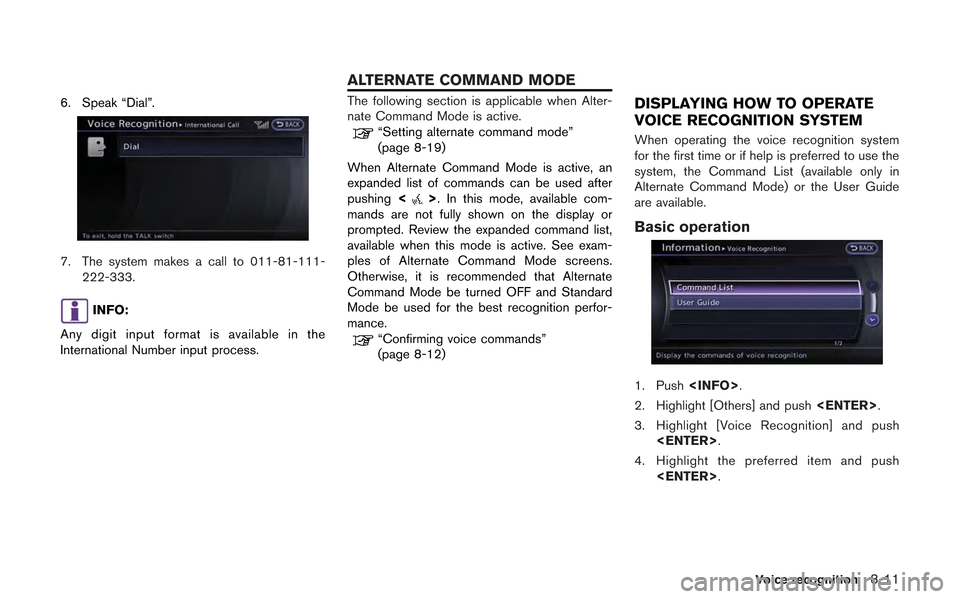
6. Speak “Dial”.
7. The system makes a call to 011-81-111-222-333.
INFO:
Any digit input format is available in the
International Number input process.
The following section is applicable when Alter-
nate Command Mode is active.
“Setting alternate command mode”
(page 8-19)
When Alternate Command Mode is active, an
expanded list of commands can be used after
pushing <
>. In this mode, available com-
mands are not fully shown on the display or
prompted. Review the expanded command list,
available when this mode is active. See exam-
ples of Alternate Command Mode screens.
Otherwise, it is recommended that Alternate
Command Mode be turned OFF and Standard
Mode be used for the best recognition perfor-
mance.
“Confirming voice commands”
(page 8-12)
DISPLAYING HOW TO OPERATE
VOICE RECOGNITION SYSTEM
When operating the voice recognition system
for the first time or if help is preferred to use the
system, the Command List (available only in
Alternate Command Mode) or the User Guide
are available.
Basic operation
1. Push
2. Highlight [Others] and push
3. Highlight [Voice Recognition] and push
4. Highlight the preferred item and push
Voice recognition8-11
ALTERNATE COMMAND MODE
Page 226 of 315
![NISSAN GT-R 2013 R35 Multi Function Display Manual Online 8-12Voice recognition
Available items
.[Command List]:
A list of voice commands that the system
can accept is displayed.
. [User Guide]:
A simplified operation manual of the voice
recognition system c](/img/5/316/w960_316-225.png "NISSAN GT-R 2013 R35 Multi Function Display Manual Online 8-12Voice recognition
Available items
.[Command List]:
A list of voice commands that the system
can accept is displayed.
. [User Guide]:
A simplified operation manual of the voice
recognition system c")
8-12Voice recognition
Available items
.[Command List]:
A list of voice commands that the system
can accept is displayed.
. [User Guide]:
A simplified operation manual of the voice
recognition system can be displayed and
how to use the voice commands can be
confirmed.
INFO:
The Command List feature is only available when
Alternate Command Mode is active.
Confirming voice commands
When controlling the system by voice com-
mands for the first time or if an appropriate voice
command is unknown, confirm using the voice
command lists.
The following information describes how to
display the navigation command list and the
help list. For information about the operations of
other functions, refer to the vehicle Owner’s
Manual. Example: Displaying the navigation com-
mand list:
1. Push
2. Highlight [Others] and push
3. Highlight [Voice Recognition] and push
5. Highlight the preferred item and push
Available items
.Phone Commands
.Navigation Commands
.Information Commands
.Audio Commands
.Help Commands
6. To confirm the list, scroll the screen using
the up and down switches of the main
directional buttons or the center dial.
7. Push
screen.
Page 228 of 315
8-14Voice recognition
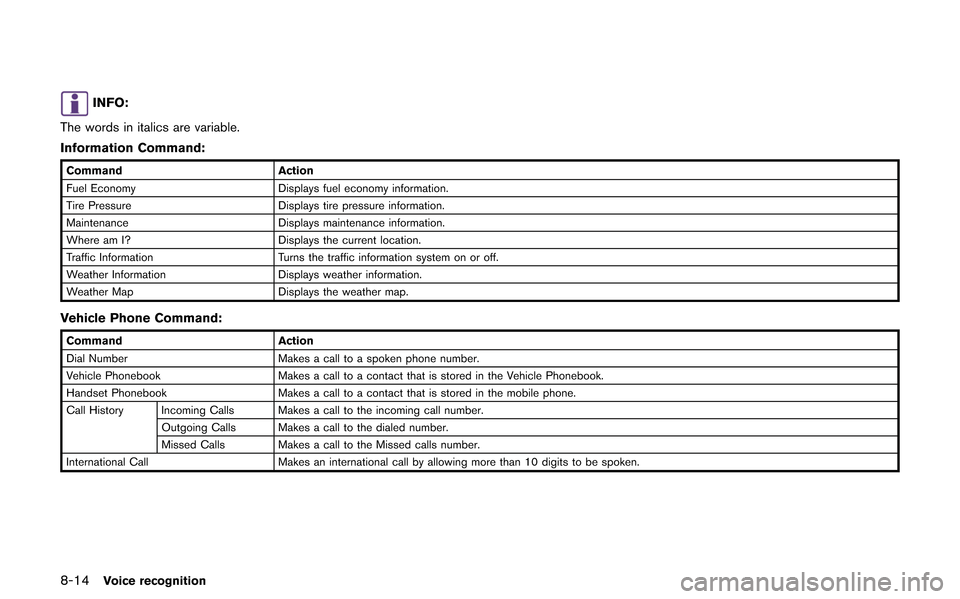
INFO:
The words in italics are variable.
Information Command:
Command Action
Fuel Economy Displays fuel economy information.
Tire Pressure Displays tire pressure information.
Maintenance Displays maintenance information.
Where am I? Displays the current location.
Traffic Information Turns the traffic information system on or off.
Weather Information Displays weather information.
Weather Map Displays the weather map.
Vehicle Phone Command:
Command Action
Dial Number Makes a call to a spoken phone number.
Vehicle Phonebook Makes a call to a contact that is stored in the Vehicle Phonebook.
Handset Phonebook Makes a call to a contact that is stored in the mobile phone.
Call History Incoming Calls Makes a call to the incoming call number. Outgoing Calls Makes a call to the dialed number.
Missed Calls Makes a call to the Missed calls number.
International Call Makes an international call by allowing more than 10 digits to be spoken.
Page 230 of 315
8-16Voice recognition
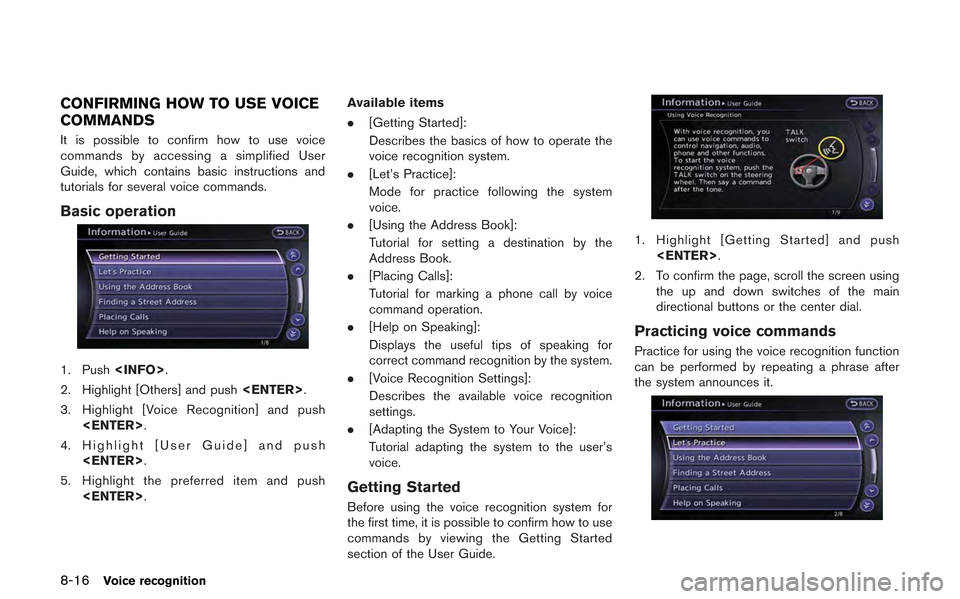
CONFIRMING HOW TO USE VOICE
COMMANDS
It is possible to confirm how to use voice
commands by accessing a simplified User
Guide, which contains basic instructions and
tutorials for several voice commands.
Basic operation
1. Push
2. Highlight [Others] and push
3. Highlight [Voice Recognition] and push
4. Highlight [User Guide] and push
5. Highlight the preferred item and push
.
[Getting Started]:
Describes the basics of how to operate the
voice recognition system.
. [Let’s Practice]:
Mode for practice following the system
voice.
. [Using the Address Book]:
Tutorial for setting a destination by the
Address Book.
. [Placing Calls]:
Tutorial for marking a phone call by voice
command operation.
. [Help on Speaking]:
Displays the useful tips of speaking for
correct command recognition by the system.
. [Voice Recognition Settings]:
Describes the available voice recognition
settings.
. [Adapting the System to Your Voice]:
Tutorial adapting the system to the user’s
voice.
Getting Started
Before using the voice recognition system for
the first time, it is possible to confirm how to use
commands by viewing the Getting Started
section of the User Guide.
1. Highlight [Getting Started] and push
2. To confirm the page, scroll the screen using the up and down switches of the main
directional buttons or the center dial.
Practicing voice commands
Practice for using the voice recognition function
can be performed by repeating a phrase after
the system announces it.