fuse NISSAN NAVARA 2005 Repair Repair Manual
[x] Cancel search | Manufacturer: NISSAN, Model Year: 2005, Model line: NAVARA, Model: NISSAN NAVARA 2005Pages: 3171, PDF Size: 49.59 MB
Page 1481 of 3171
CYLINDER HEAD
EM-99
C
D
E
F
G
H
I
J
K
L
MA
EM
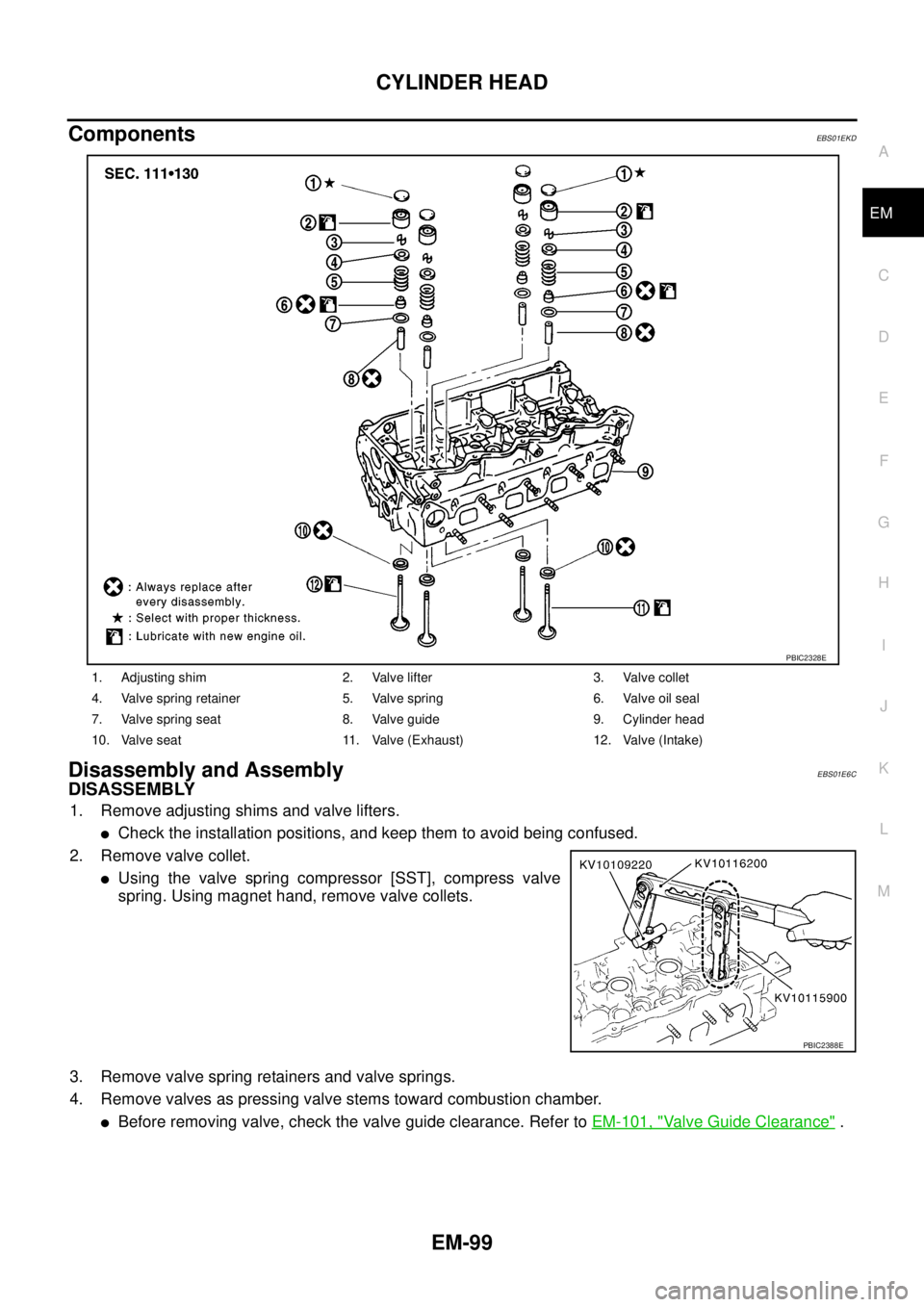
ComponentsEBS01EKD
Disassembly and AssemblyEBS01E6C
DISASSEMBLY
1. Remove adjusting shims and valve lifters.
lCheck the installation positions, and keep them to avoid being confused.
2. Remove valve collet.
lUsing the valve spring compressor [SST], compress valve
spring. Using magnet hand, remove valve collets.
3. Remove valve spring retainers and valve springs.
4. Remove valves as pressing valve stems toward combustion chamber.
lBefore removing valve, check the valve guide clearance. Refer toEM-101, "Valve Guide Clearance".
1. Adjusting shim 2. Valve lifter 3. Valve collet
4. Valve spring retainer 5. Valve spring 6. Valve oil seal
7. Valve spring seat 8. Valve guide 9. Cylinder head
10. Valve seat 11. Valve (Exhaust) 12. Valve (Intake)
PBIC2328E
PBIC2388E
Page 1639 of 3171
HOW TO USE THIS MANUAL
GI-17
C
D
E
F
G
H
I
J
K
L
MB
GI
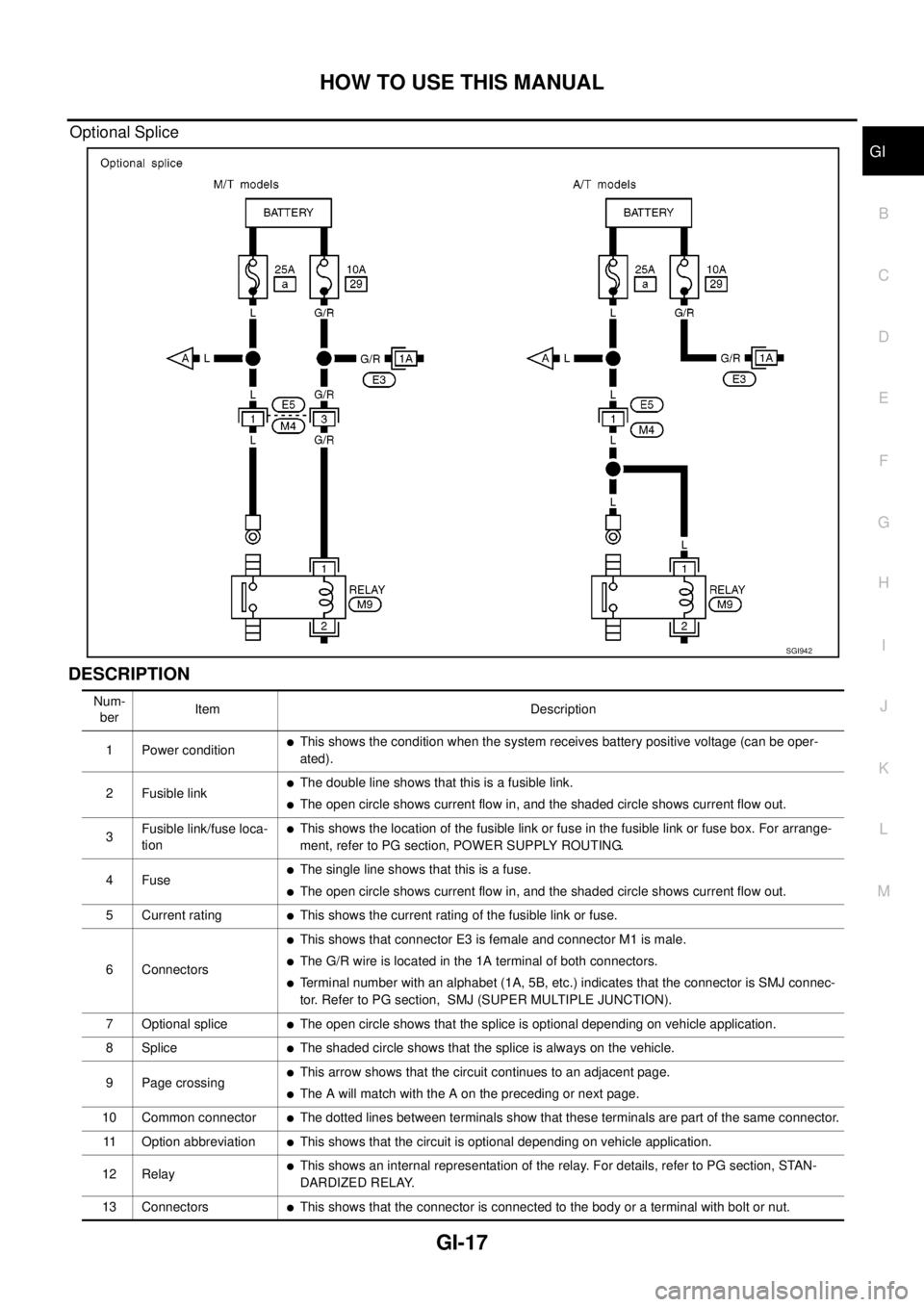
Optional Splice
DESCRIPTION
SGI942
Num-
berItem Description
1 Power condition
lThis shows the condition when the system receives battery positive voltage (can be oper-
ated).
2 Fusible link
lThe double line shows that this is a fusible link.
lThe open circle shows current flow in, and the shaded circle shows current flow out.
3Fusible link/fuse loca-
tion
lThis shows the location of the fusible link or fuse in the fusible link or fuse box. For arrange-
ment, refer to PG section, POWER SUPPLY ROUTING.
4Fuse
lThe single line shows that this is a fuse.
lThe open circle shows current flow in, and the shaded circle shows current flow out.
5 Current rating
lThis shows the current rating of the fusible link or fuse.
6 Connectors
lThis shows that connector E3 is female and connector M1 is male.
lThe G/R wire is located in the 1A terminal of both connectors.
lTerminal number with an alphabet (1A, 5B, etc.) indicates that the connector is SMJ connec-
tor. Refer to PG section, SMJ (SUPER MULTIPLE JUNCTION).
7 Optional splice
lThe open circle shows that the splice is optional depending on vehicle application.
8Splice
lThe shaded circle shows that the splice is always on the vehicle.
9 Page crossing
lThis arrow shows that the circuit continues to an adjacent page.
lThe A will match with the A on the preceding or next page.
10 Common connector
lThe dotted lines between terminals show that these terminals are part of the same connector.
11 Option abbreviation
lThis shows that the circuit is optional depending on vehicle application.
12 Relay
lThis shows an internal representation of the relay. For details, refer to PG section, STAN-
DARDIZED RELAY.
13 Connectors
lThis shows that the connector is connected to the body or a terminal with bolt or nut.
Page 1640 of 3171

GI-18
HOW TO USE THIS MANUAL
14 Wire color
lThis shows a code for the color of the wire.
B=Black
W=White
R=Red
G = Green
L=Blue
Y = Yellow
LG = Light GreenBR = Brown
OR or O = Orange
P=Pink
PU or V (Violet) = Purple
GY or GR = Gray
SB = Sky Blue
CH = Dark Brown
DG = Dark Green
When the wire color is striped, the base color is given first, followed by the stripe color as shown
below:
Example: L/W = Blue with White Stripe
15 Option description
lThis shows a description of the option abbreviation used on the page.
16 Switch
lThis shows that continuity exists between terminals 1 and 2 when the switch is in the A posi-
tion. Continuity exists between terminals 1 and 3 when the switch is in the B position.
17 Assembly parts
lConnector terminal in component shows that it is a harness incorporated assembly.
18 Cell code
lThis identifies each page of the wiring diagram by section, system and wiring diagram page
number.
19 Current flow arrow
lArrow indicates electric current flow, especially where the direction of standard flow (vertically
downward or horizontally from left to right) is difficult to follow.
lA double arrow “ ” shows that current can flow in either direction depending on cir-
cuit operation.
20 System branch
lThis shows that the system branches to another system identified by cell code (section and
system).
21 Page crossing
lThis arrow shows that the circuit continues to another page identified by cell code.
lThe C will match with the C on another page within the system other than the next or preced-
ing pages.
22 Shielded line
lThe line enclosed by broken line circle shows shield wire.
23Component box in
wave line
lThis shows that another part of the component is also shown on another page (indicated by
wave line) within the system.
24 Component name
lThis shows the name of a component.
25 Connector number
lThis shows the connector number.
lThe letter shows which harness the connector is located in.
lExample:M: main harness. For detail and to locate the connector, refer to PG section "Main
Harness", “Harness Layout”. A coordinate grid is included for complex harnesses to aid in
locating connectors.
26 Ground (GND)
lThe line spliced and grounded under wire color shows that ground line is spliced at the
grounded connector.
27 Ground (GND)
lThis shows the ground connection. For detailed ground distribution information, refer to
"Ground Distribution" in PG section.
28 Connector views
lThis area shows the connector faces of the components in the wiring diagram on the page.
29 Common component
lConnectors enclosed in broken line show that these connectors belong to the same compo-
nent.
30 Connector color
lThis shows a code for the color of the connector. For code meaning, refer to wire color codes,
Number 14 of this chart.
31Fusible link and fuse
box
lThis shows the arrangement of fusible link(s) and fuse(s), used for connector views of
"POWER SUPPLY ROUTING" in PG section.
The open square shows current flow in, and the shaded square shows current flow out.
32 Reference area
lThis shows that more information on the Super Multiple Junction (SMJ) and Joint Connectors
(J/C) exists on the PG section. Refer to "Reference Area" for details. Num-
berItem Description
Page 1649 of 3171
SERVICE INFORMATION FOR ELECTRICAL INCIDENT
GI-27
C
D
E
F
G
H
I
J
K
L
MB
GI
Cold or Hot Start Up
On some occasions an electrical incident may occur only when the car is started cold, or it may occur when
the car is restarted hot shortly after being turned off. In these cases you may have to keep the car overnight to
make a proper diagnosis.
CIRCUIT INSPECTION
Introduction
In general, testing electrical circuits is an easy task if it is approached in a logical and organized method.
Before beginning it is important to have all available information on the system to be tested. Also, get a thor-
ough understanding of system operation. Then you will be able to use the appropriate equipment and follow
the correct test procedure.
You may have to simulate vehicle vibrations while testing electrical components. Gently shake the wiring har-
ness or electrical component to do this.
NOTE:
Refer to “How to Check Terminal” to probe or check terminal.
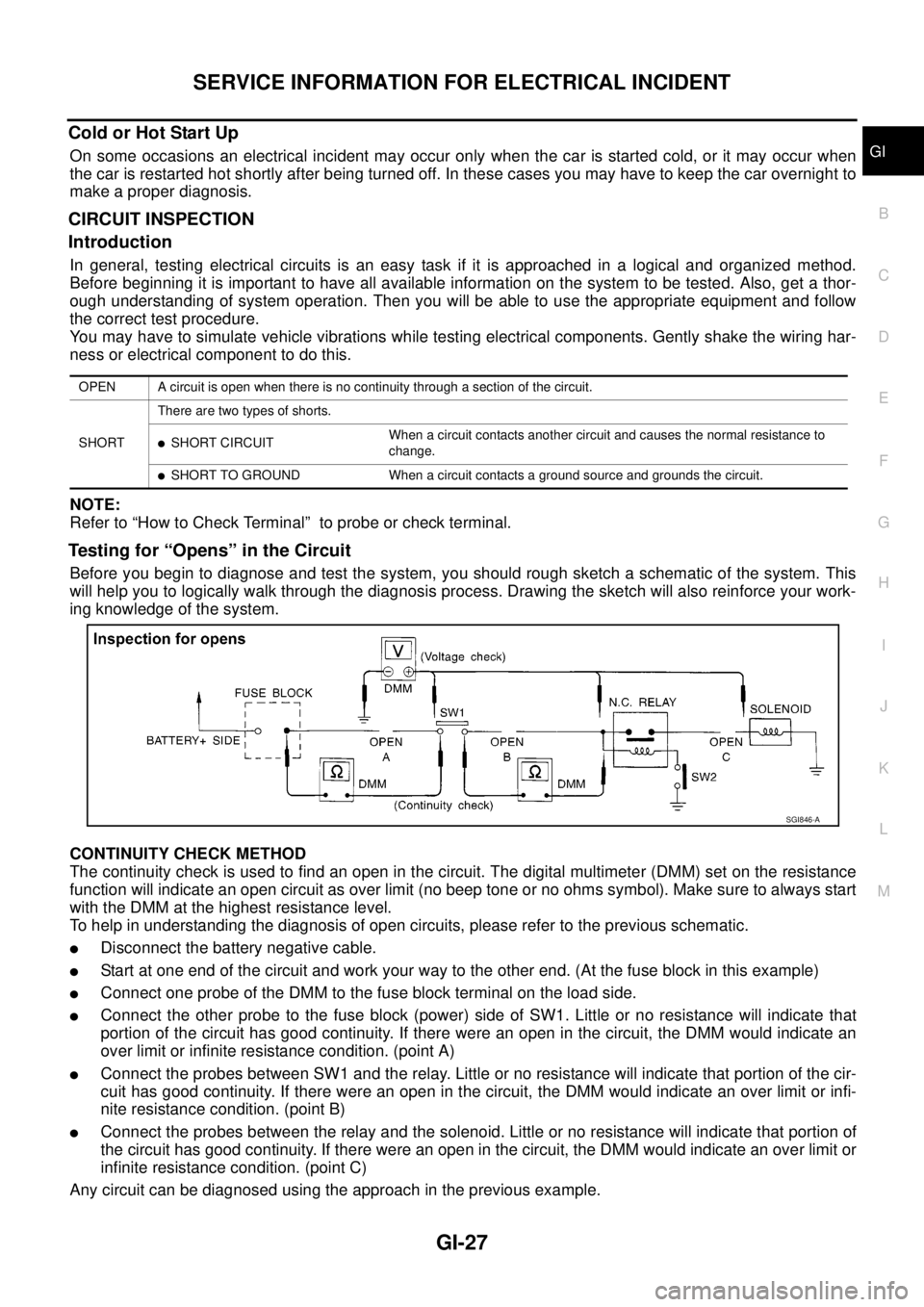
Testing for “Opens” in the Circuit
Before you begin to diagnose and test the system, you should rough sketch a schematic of the system. This
will help you to logically walk through the diagnosis process. Drawing the sketch will also reinforce your work-
ing knowledge of the system.
CONTINUITY CHECK METHOD
The continuity check is used to find an open in the circuit. The digital multimeter (DMM) set on the resistance
function will indicate an open circuit as over limit (no beep tone or no ohms symbol). Make sure to always start
with the DMM at the highest resistance level.
To help in understanding the diagnosis of open circuits, please refer to the previous schematic.
lDisconnect the battery negative cable.
lStart at one end of the circuit and work your way to the other end. (At the fuse block in this example)
lConnect one probe of the DMM to the fuse block terminal on the load side.
lConnect the other probe to the fuse block (power) side of SW1. Little or no resistance will indicate that
portion of the circuit has good continuity. If there were an open in the circuit, the DMM would indicate an
over limit or infinite resistance condition. (point A)
lConnect the probes between SW1 and the relay. Little or no resistance will indicate that portion of the cir-
cuit has good continuity. If there were an open in the circuit, the DMM would indicate an over limit or infi-
nite resistance condition. (point B)
lConnect the probes between the relay and the solenoid. Little or no resistance will indicate that portion of
the circuit has good continuity. If there were an open in the circuit, the DMM would indicate an over limit or
infinite resistance condition. (point C)
Any circuit can be diagnosed using the approach in the previous example.
OPEN A circuit is open when there is no continuity through a section of the circuit.
SHORTThere are two types of shorts.
lSHORT CIRCUITWhen a circuit contacts another circuit and causes the normal resistance to
change.
lSHORT TO GROUND When a circuit contacts a ground source and grounds the circuit.
SGI846-A
Page 1650 of 3171
GI-28
SERVICE INFORMATION FOR ELECTRICAL INCIDENT
VOLTAGE CHECK METHOD
To help in understanding the diagnosis of open circuits please refer to the previous schematic.
In any powered circuit, an open can be found by methodically checking the system for the presence of voltage.
This is done by switching the DMM to the voltage function.
lConnect one probe of the DMM to a known good ground.
lBegin probing at one end of the circuit and work your way to the other end.
lWith SW1 open, probe at SW1 to check for voltage.
voltage; open is further down the circuit than SW1.
no voltage; open is between fuse block and SW1 (point A).
lClose SW1 and probe at relay.
voltage; open is further down the circuit than the relay.
no voltage; open is between SW1 and relay (point B).
lClose the relay and probe at the solenoid.
voltage; open is further down the circuit than the solenoid.
no voltage; open is between relay and solenoid (point C).
Any powered circuit can be diagnosed using the approach in the previous example.
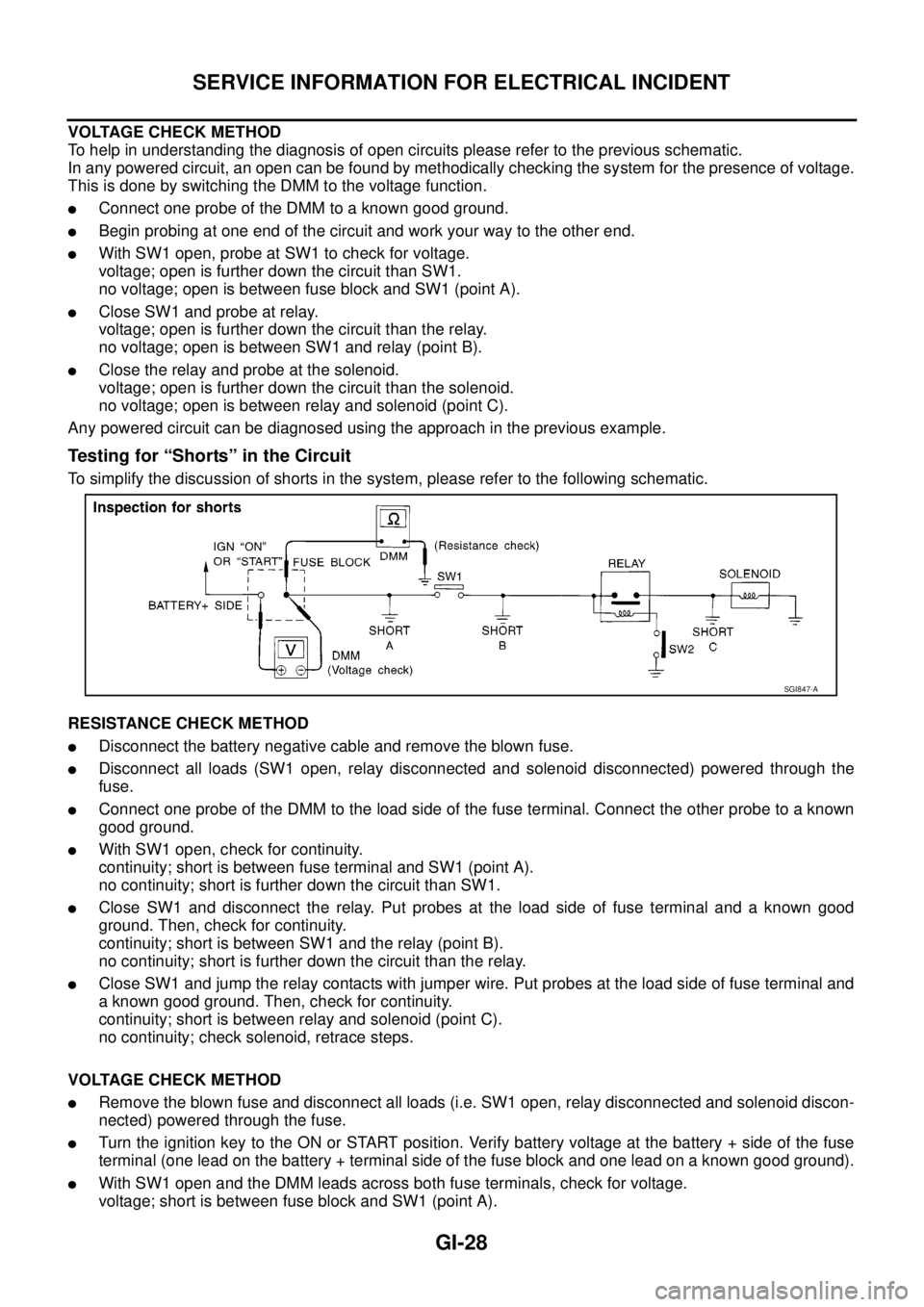
Testing for “Shorts” in the Circuit
To simplify the discussion of shorts in the system, please refer to the following schematic.
RESISTANCE CHECK METHOD
lDisconnect the battery negative cable and remove the blown fuse.
lDisconnect all loads (SW1 open, relay disconnected and solenoid disconnected) powered through the
fuse.
lConnect one probe of the DMM to the load side of the fuse terminal. Connect the other probe to a known
good ground.
lWith SW1 open, check for continuity.
continuity; short is between fuse terminal and SW1 (point A).
no continuity; short is further down the circuit than SW1.
lClose SW1 and disconnect the relay. Put probes at the load side of fuse terminal and a known good
ground. Then, check for continuity.
continuity; short is between SW1 and the relay (point B).
no continuity; short is further down the circuit than the relay.
lClose SW1 and jump the relay contacts with jumper wire. Put probes at the load side of fuse terminal and
a known good ground. Then, check for continuity.
continuity; short is between relay and solenoid (point C).
no continuity; check solenoid, retrace steps.
VOLTAGE CHECK METHOD
lRemove the blown fuse and disconnect all loads (i.e. SW1 open, relay disconnected and solenoid discon-
nected) powered through the fuse.
lTurn the ignition key to the ON or START position. Verify battery voltage at the battery + side of the fuse
terminal (one lead on the battery + terminal side of the fuse block and one lead on a known good ground).
lWith SW1 open and the DMM leads across both fuse terminals, check for voltage.
voltage; short is between fuse block and SW1 (point A).
SGI847-A
Page 1651 of 3171
SERVICE INFORMATION FOR ELECTRICAL INCIDENT
GI-29
C
D
E
F
G
H
I
J
K
L
MB
GI
no voltage; short is further down the circuit than SW1.
lWith SW1 closed, relay and solenoid disconnected and the DMM leads across both fuse terminals, check
for voltage.
voltage; short is between SW1 and the relay (point B).
no voltage; short is further down the circuit than the relay.
lWith SW1 closed, relay contacts jumped with fused jumper wire check for voltage.
voltage; short is down the circuit of the relay or between the relay and the disconnected solenoid (point C).
no voltage; retrace steps and check power to fuse block.
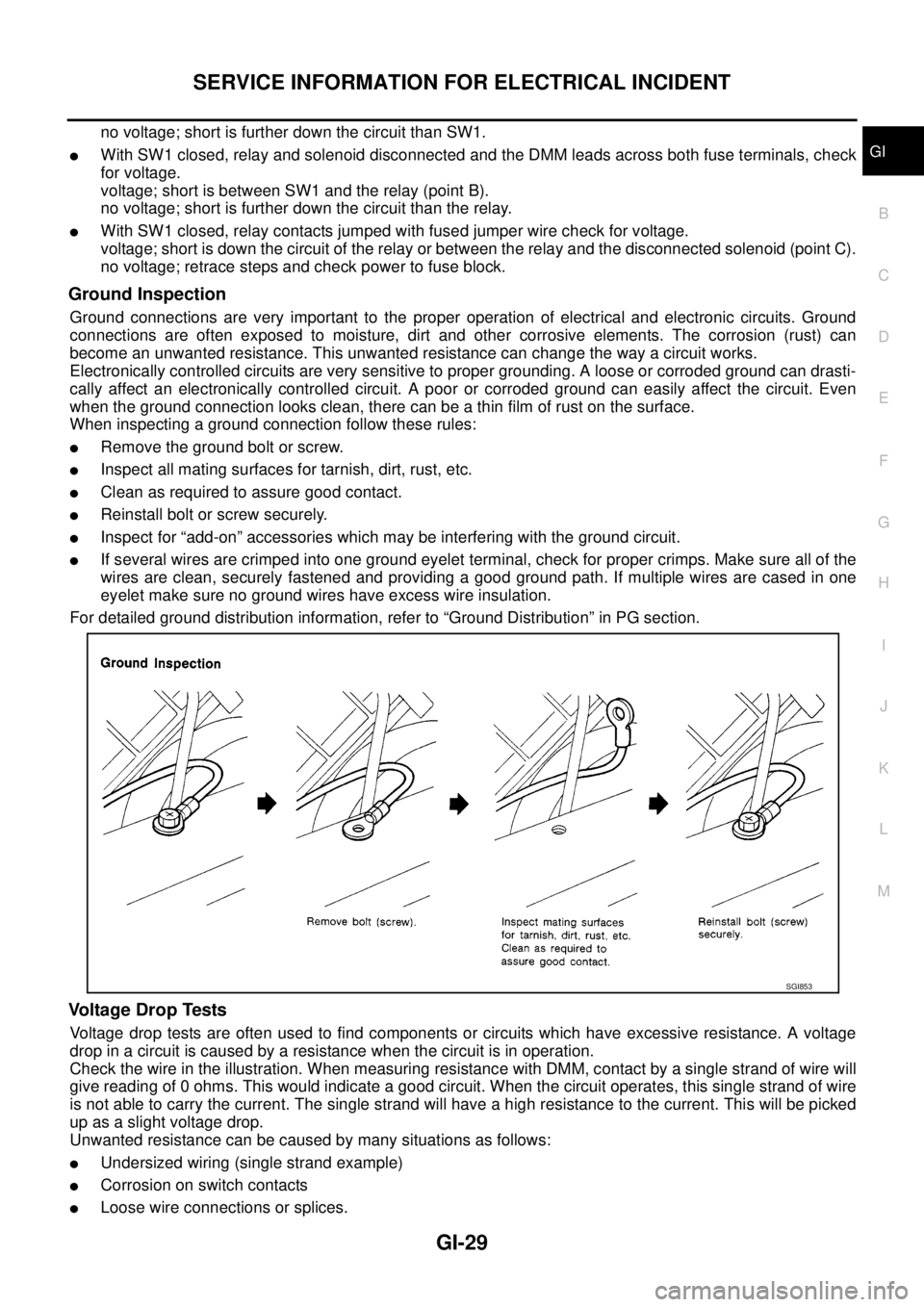
Ground Inspection
Ground connections are very important to the proper operation of electrical and electronic circuits. Ground
connections are often exposed to moisture, dirt and other corrosive elements. The corrosion (rust) can
become an unwanted resistance. This unwanted resistance can change the way a circuit works.
Electronically controlled circuits are very sensitive to proper grounding. A loose or corroded ground can drasti-
cally affect an electronically controlled circuit. A poor or corroded ground can easily affect the circuit. Even
when the ground connection looks clean, there can be a thin film of rust on the surface.
When inspecting a ground connection follow these rules:
lRemove the ground bolt or screw.
lInspect all mating surfaces for tarnish, dirt, rust, etc.
lClean as required to assure good contact.
lReinstall bolt or screw securely.
lInspect for “add-on” accessories which may be interfering with the ground circuit.
lIf several wires are crimped into one ground eyelet terminal, check for proper crimps. Make sure all of the
wires are clean, securely fastened and providing a good ground path. If multiple wires are cased in one
eyelet make sure no ground wires have excess wire insulation.
For detailed ground distribution information, refer to “Ground Distribution” in PG section.
Voltage Drop Tests
Voltage drop tests are often used to find components or circuits which have excessive resistance. A voltage
drop in a circuit is caused by a resistance when the circuit is in operation.
Check the wire in the illustration. When measuring resistance with DMM, contact by a single strand of wire will
give reading of 0 ohms. This would indicate a good circuit. When the circuit operates, this single strand of wire
is not able to carry the current. The single strand will have a high resistance to the current. This will be picked
up as a slight voltage drop.
Unwanted resistance can be caused by many situations as follows:
lUndersized wiring (single strand example)
lCorrosion on switch contacts
lLoose wire connections or splices.
SGI853
Page 1701 of 3171
POWER WINDOW SYSTEM
GW-15
C
D
E
F
G
H
J
K
L
MA
B
GW
POWER WINDOW SYSTEMPFP:25401
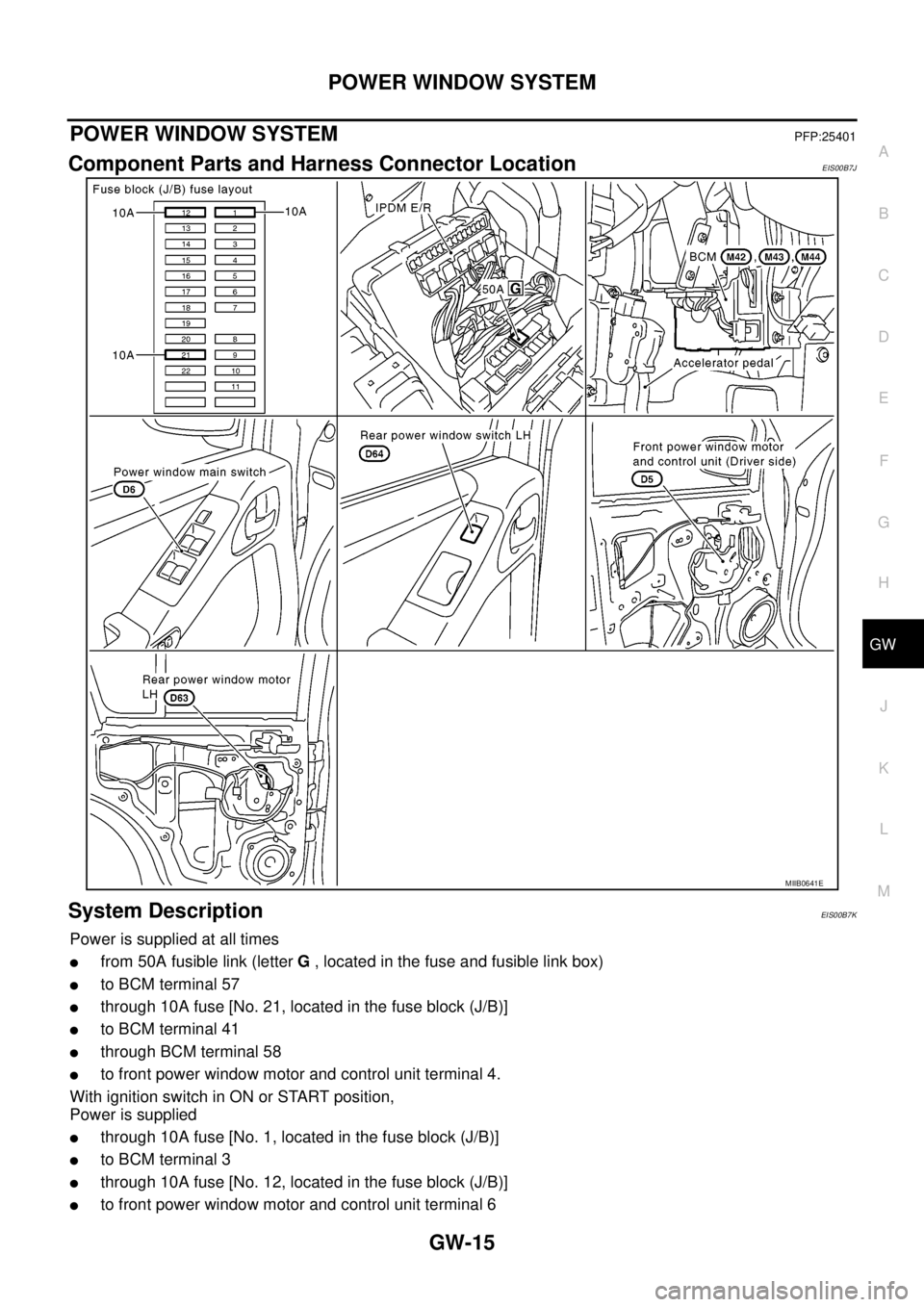
Component Parts and Harness Connector LocationEIS00B7J
System DescriptionEIS00B7K
Power is supplied at all times
lfrom 50A fusible link (letterG, located in the fuse and fusible link box)
lto BCM terminal 57
lthrough 10A fuse [No. 21, located in the fuse block (J/B)]
lto BCM terminal 41
lthrough BCM terminal 58
lto front power window motor and control unit terminal 4.
With ignition switch in ON or START position,
Power is supplied
lthrough 10A fuse [No. 1, located in the fuse block (J/B)]
lto BCM terminal 3
lthrough 10A fuse [No. 12, located in the fuse block (J/B)]
lto front power window motor and control unit terminal 6
MIIB0641E
Page 1711 of 3171
POWER WINDOW SYSTEM
GW-25
C
D
E
F
G
H
J
K
L
MA
B
GW
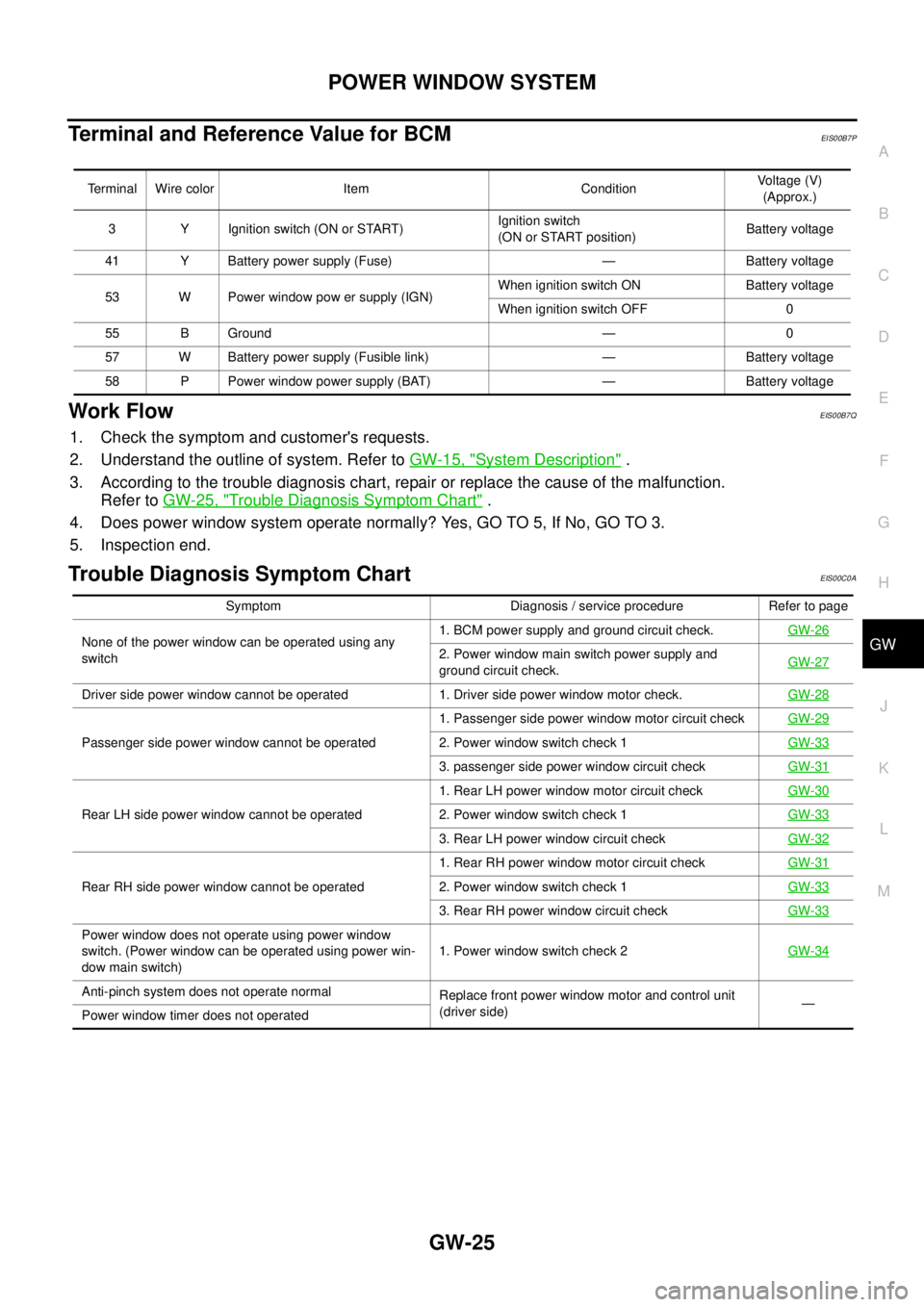
Terminal and Reference Value for BCMEIS00B7P
Work FlowEIS00B7Q
1. Check the symptom and customer's requests.
2. Understand the outline of system. Refer toGW-15, "
System Description".
3. According to the trouble diagnosis chart, repair or replace the cause of the malfunction.
Refer toGW-25, "
Trouble Diagnosis Symptom Chart".
4. Does power window system operate normally? Yes, GO TO 5, If No, GO TO 3.
5. Inspection end.
Trouble Diagnosis Symptom ChartEIS00C0A
Terminal Wire color Item ConditionVoltage (V)
(Approx.)
3 Y Ignition switch (ON or START)Ignition switch
(ON or START position)Battery voltage
41 Y Battery power supply (Fuse) — Battery voltage
53 W Power window pow er supply (IGN)When ignition switch ON Battery voltage
When ignition switch OFF 0
55 B Ground — 0
57 W Battery power supply (Fusible link) — Battery voltage
58 P Power window power supply (BAT) — Battery voltage
Symptom Diagnosis / service procedure Refer to page
None of the power window can be operated using any
switch1. BCM power supply and ground circuit check.GW-26
2. Power window main switch power supply and
ground circuit check.GW-27
Driver side power window cannot be operated 1. Driver side power window motor check.GW-28
Passenger side power window cannot be operated1. Passenger side power window motor circuit checkGW-292. Power window switch check 1GW-33
3. passenger side power window circuit checkGW-31
Rear LH side power window cannot be operated1. Rear LH power window motor circuit checkGW-302. Power window switch check 1GW-33
3. Rear LH power window circuit checkGW-32
Rear RH side power window cannot be operated1. Rear RH power window motor circuit checkGW-312. Power window switch check 1GW-33
3. Rear RH power window circuit checkGW-33
Power window does not operate using power window
switch. (Power window can be operated using power win-
dow main switch)1. Power window switch check 2GW-34
Anti-pinch system does not operate normal
Replace front power window motor and control unit
(driver side)—
Power window timer does not operated
Page 1712 of 3171
![NISSAN NAVARA 2005 Repair Repair Manual GW-26
POWER WINDOW SYSTEM
BCM Power Supply and Ground Circuit Check
EIS00B7T
1.CHECK FUSE
lCheck 10A fuse [No. 1, located in the fuse block (J/B)].
lCheck 10A fuse [No. 21, located in the fuse block (](/img/5/57362/w960_57362-1711.png "NISSAN NAVARA 2005 Repair Repair Manual GW-26
POWER WINDOW SYSTEM
BCM Power Supply and Ground Circuit Check
EIS00B7T
1.CHECK FUSE
lCheck 10A fuse [No. 1, located in the fuse block (J/B)].
lCheck 10A fuse [No. 21, located in the fuse block (")
GW-26
POWER WINDOW SYSTEM
BCM Power Supply and Ground Circuit Check
EIS00B7T
1.CHECK FUSE
lCheck 10A fuse [No. 1, located in the fuse block (J/B)].
lCheck 10A fuse [No. 21, located in the fuse block (J/B)].
lCheck 50A fusible link (letterGlocated in the fuse and fusible link box).
NOTE:
Refer toGW-15, "
Component Parts and Harness Connector Location".
OK or NG
OK >> GO TO 2.
NG >> If fuse is blown, be sure to eliminate cause of malfunction before installing new fuse.
2.CHECK POWER SUPPLY CIRCUIT
1. Turn ignition switch OFF.
2. Disconnect BCM connector.
3. Turn ignition switch ON.
4. Check voltage between BCM connector M42, 43, 44 terminal 3,
41, 57 and ground.
OK or NG
OK >> GO TO 3.
NG >> Repair or replace harness.
3.CHECK GROUND CIRCUIT
1. Turn ignition switch OFF.
2. Disconnect BCM.
3. Check continuity between BCM connector M44 terminal 55 and
ground.
OK or NG
OK >> Power supply and ground circuit is OK.
NG >> Repair or replace harness.3 - Ground : Battery voltage
41 - Ground : Battery voltage
57 - Ground : Battery voltage
MIIB0733E
55 - Ground : Continuity should exist.
MIIB0594E
Page 1714 of 3171
GW-28
POWER WINDOW SYSTEM
Driver Side Power Window Motor Check
EIS00C0C
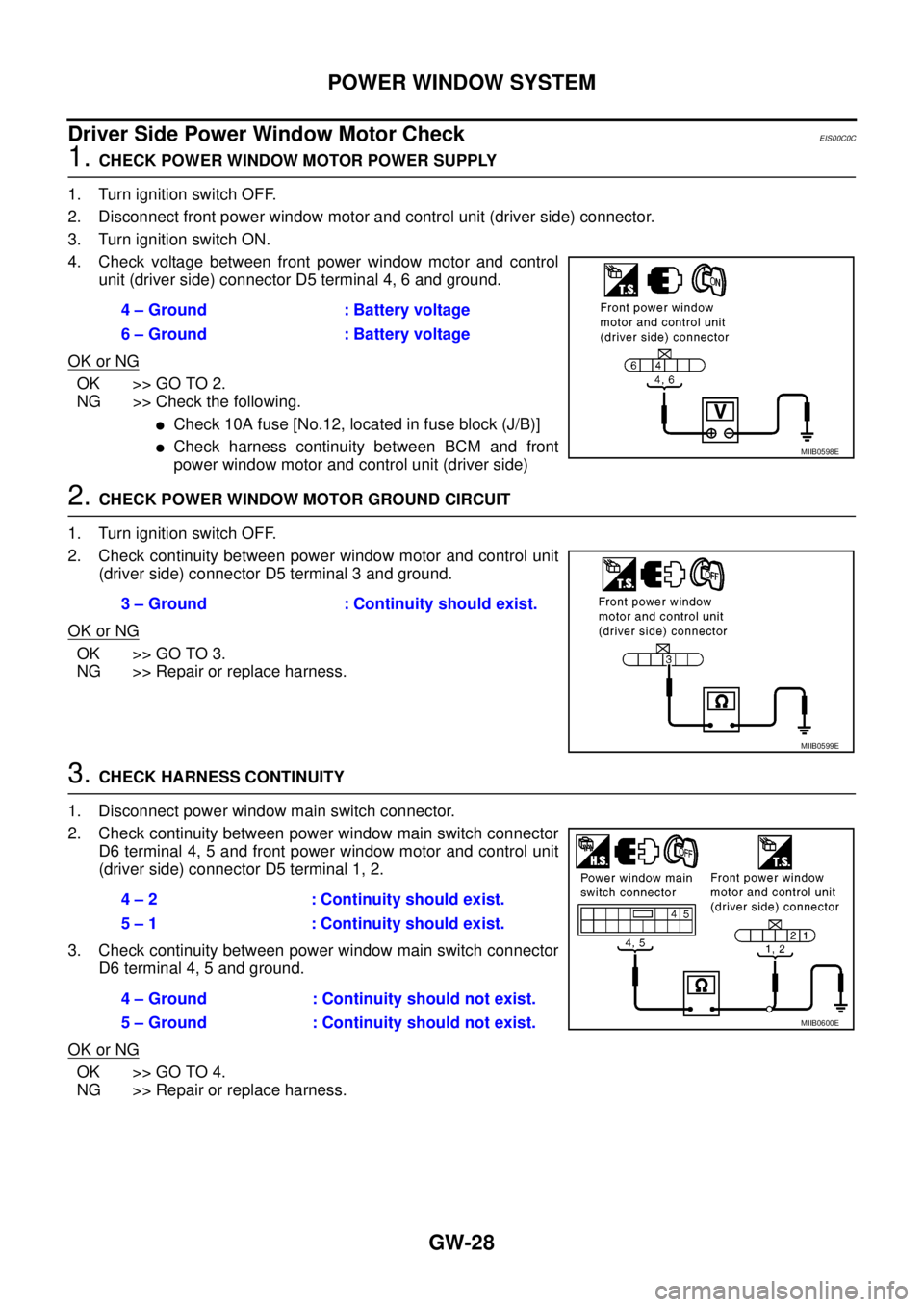
1.CHECK POWER WINDOW MOTOR POWER SUPPLY
1. Turn ignition switch OFF.
2. Disconnect front power window motor and control unit (driver side) connector.
3. Turn ignition switch ON.
4. Check voltage between front power window motor and control
unit (driver side) connector D5 terminal 4, 6 and ground.
OK or NG
OK >> GO TO 2.
NG >> Check the following.
lCheck 10A fuse [No.12, located in fuse block (J/B)]
lCheck harness continuity between BCM and front
power window motor and control unit (driver side)
2.CHECK POWER WINDOW MOTOR GROUND CIRCUIT
1. Turn ignition switch OFF.
2. Check continuity between power window motor and control unit
(driver side) connector D5 terminal 3 and ground.
OK or NG
OK >> GO TO 3.
NG >> Repair or replace harness.
3.CHECK HARNESS CONTINUITY
1. Disconnect power window main switch connector.
2. Check continuity between power window main switch connector
D6 terminal 4, 5 and front power window motor and control unit
(driver side) connector D5 terminal 1, 2.
3. Check continuity between power window main switch connector
D6 terminal 4, 5 and ground.
OK or NG
OK >> GO TO 4.
NG >> Repair or replace harness.4 – Ground : Battery voltage
6 – Ground : Battery voltage
MIIB0598E
3 – Ground : Continuity should exist.
MIIB0599E
4 – 2 : Continuity should exist.
5 – 1 : Continuity should exist.
4 – Ground : Continuity should not exist.
5 – Ground : Continuity should not exist.
MIIB0600E