ESP NISSAN NOTE 2016 Service User Guide
[x] Cancel search | Manufacturer: NISSAN, Model Year: 2016, Model line: NOTE, Model: NISSAN NOTE 2016Pages: 3641, PDF Size: 28.72 MB
Page 526 of 3641
![NISSAN NOTE 2016 Service User Guide BRC-78
< DTC/CIRCUIT DIAGNOSIS >[VDC/TCS/ABS]
C1115 WHEEL SENSOR
1.CHECK TIRE
Check the tire air pressure, wear and size. Refer to WT-54, "
Tire Air Pressure".
Is the inspection result normal?
YES >>](/img/5/57363/w960_57363-525.png "NISSAN NOTE 2016 Service User Guide BRC-78
< DTC/CIRCUIT DIAGNOSIS >[VDC/TCS/ABS]
C1115 WHEEL SENSOR
1.CHECK TIRE
Check the tire air pressure, wear and size. Refer to WT-54, \"
Tire Air Pressure\".
Is the inspection result normal?
YES >>")
BRC-78
< DTC/CIRCUIT DIAGNOSIS >[VDC/TCS/ABS]
C1115 WHEEL SENSOR
1.CHECK TIRE
Check the tire air pressure, wear and size. Refer to WT-54, "
Tire Air Pressure".
Is the inspection result normal?
YES >> GO TO 4.
NO >> Adjust air pressure or replace tire and GO TO 2.
2.CHECK DATA MONITOR (1)
With CONSULT
1. Erase “Self Diagnostic Result” of “ABS”
2. Turn the ignition switch OFF → ON → OFF.
NOTE:
Wait at least 10 seconds after turning ignition switch OFF or ON.
3. Start the engine.
4. Select “DATA MONITOR” of “ABS”, check “FR LH SENSOR”, “FR RH SENSOR”, “RR LH SENSOR” and
“RR RH SENSOR”.
NOTE:
Set the “DATA MONITOR” recording speed to “10 msec”.
5. Read the values (wheel speed) of both the norma l wheel sensors and malfunctioning wheel sensor.
NOTE:
Vehicle must be driven after repair or replacement to erase the previous DTCs.
Note the difference at 50 km/h (31 MPH) between the wheel speed detected by the malfunctioning wheel sen-
sor and the maximum/minimum wheel speed detected by t he normal wheel sensors, is the difference within
5%, respectively?
YES >> GO TO 3.
NO >> GO TO 4.
3.PERFORM SELF-DIAGNOSIS (1)
With CONSULT
1. Stop the vehicle.
2. Turn the ignition switch OFF. NOTE:
Wait at least 10 seconds after turning ignition switch OFF.
3. Start the engine. NOTE:
Wait at least 10 seconds after starting the engine.
4. Perform “Self Diagnostic Result” of “ABS”.
Is DTC
“C1115” detected?
YES >> GO TO 4.
NO >> Inspection End.
4.CHECK ABS ACTUATOR AND ELECTRIC UNIT (CONTROL UNIT) POWER SUPPLY AND GROUND CIR-
CUIT
Check the ABS actuator and electric unit (contro l unit) power supply and ground circuits. Refer to BRC-121,
"Diagnosis Procedure".
Is the inspection result normal?
YES >> GO TO 5.
NO >> Repair / replace harness, connector, fuse, or fusible link.
5.CHECK WHEEL SENSOR AND SENSOR ROTOR
1. Turn the ignition switch OFF.
2. Disconnect wheel sensor harness connector.
3. Remove dust and foreign matter adhered to the wheel sensor and sensor rotor with a vacuum dust collec- tor through the wheel sensor mounting hole.
CAUTION:
Install wheel sensor with no backlash and float, and tighten the mounting bolt to the specified
torque.
• Front: Refer to BRC-140, "
FRONT WHEEL SENSOR : Exploded View".
•Rear: Refer to BRC-141, "
REAR WHEEL SENSOR : Exploded View".
Revision: August 2015 2016 Versa Note
cardiagn.com
Page 527 of 3641
![NISSAN NOTE 2016 Service User Guide C1115 WHEEL SENSORBRC-79
< DTC/CIRCUIT DIAGNOSIS > [VDC/TCS/ABS]
C
D
E
G H
I
J
K L
M A
B
BRC
N
O P
>> GO TO 6.
6.CHECK WHEEL SENSOR
Check the wheel sensor for damage.
Is the inspection result normal?](/img/5/57363/w960_57363-526.png "NISSAN NOTE 2016 Service User Guide C1115 WHEEL SENSORBRC-79
< DTC/CIRCUIT DIAGNOSIS > [VDC/TCS/ABS]
C
D
E
G H
I
J
K L
M A
B
BRC
N
O P
>> GO TO 6.
6.CHECK WHEEL SENSOR
Check the wheel sensor for damage.
Is the inspection result normal?")
C1115 WHEEL SENSORBRC-79
< DTC/CIRCUIT DIAGNOSIS > [VDC/TCS/ABS]
C
D
E
G H
I
J
K L
M A
B
BRC
N
O P
>> GO TO 6.
6.CHECK WHEEL SENSOR
Check the wheel sensor for damage.
Is the inspection result normal?
YES >> GO TO 7.
NO >> GO TO 8.
7.CHECK WHEEL SENSOR OUTPUT SIGNAL
1. Disconnect ABS actuator and electric unit (control unit) harness connector.
2. Connect ABS active wheel sensor tester (SST: J-45741-A) to wheel sensor using appropriate adapter.
3. Turn the ABS active wheel sensor tester power switch ON. NOTE:
The green POWER indicator should illuminate. If the POWER indicator does not illuminate, replace the
battery in the ABS active wheel sensor tester before proceeding.
4. Spin the wheel of the vehicle by hand and observe the red SENSOR indicator on the ABS active wheel
sensor tester. The red SENSOR indicator should flash ON and OFF to indicate an output signal.
NOTE:
If the red SENSOR indicator illuminates but does not flash, reverse the polarity of the tester leads and
retest.
Does the ABS active wheel s ensor tester detect a signal?
YES >> GO TO 11.
NO >> GO TO 8.
8.REPLACE WHEEL SENSOR (1)
With CONSULT
1. Replace the wheel sensor.
- Front: Refer to BRC-140, "
FRONT WHEEL SENSOR : Removal and Installation".
- Rear: Refer to BRC-141, "
REAR WHEEL SENSOR : Removal and Installation".
2. Connect ABS actuator and electric unit (control unit) harness connector.
3. Erase “Self Diagnostic Result” of “ABS”
4. Turn the ignition switch OFF → ON → OFF.
NOTE:
Wait at least 10 seconds after turning ignition switch OFF or ON.
5. Start the engine.
6. Select “DATA MONITOR” of “ABS”, check “FR LH SENSOR”, “FR RH SENSOR”, “RR LH SENSOR” and “RR RH SENSOR”.
NOTE:
Set the “DATA MONITOR” recording speed to “10 msec”.
7. Read the values (wheel speed) of both the norma l wheel sensors and malfunctioning wheel sensor.
NOTE:
Vehicle must be driven after repair or replacement to erase the previous DTCs.
Note the difference at 50 km/h (31 MPH) between t he wheel speed detected by the malfunctioning wheel sen-
sor and the maximum/minimum wheel speed detected by the normal wheel sensors, is the difference within
5%, respectively?
YES >> GO TO 9.
NO >> GO TO 19.
9.PERFORM SELF-DIAGNOSIS (2)
With CONSULT
1. Stop the vehicle.
2. Turn the ignition switch OFF.
NOTE:
Wait at least 10 seconds after turning ignition switch OFF.
3. Start the engine. NOTE:
Wait at least 10 seconds after starting the engine.
4. Perform “Self Diagnostic Result” of “ABS”.
Revision: August 2015 2016 Versa Note
cardiagn.com
Page 528 of 3641
![NISSAN NOTE 2016 Service User Guide BRC-80
< DTC/CIRCUIT DIAGNOSIS >[VDC/TCS/ABS]
C1115 WHEEL SENSOR
Is DTC “C1115” detected?
YES >> GO TO 10.
NO >> Inspection End.
10.CHECK CONNECTOR
1. Turn the ignition switch OFF.
2. Check the AB](/img/5/57363/w960_57363-527.png "NISSAN NOTE 2016 Service User Guide BRC-80
< DTC/CIRCUIT DIAGNOSIS >[VDC/TCS/ABS]
C1115 WHEEL SENSOR
Is DTC “C1115” detected?
YES >> GO TO 10.
NO >> Inspection End.
10.CHECK CONNECTOR
1. Turn the ignition switch OFF.
2. Check the AB")
BRC-80
< DTC/CIRCUIT DIAGNOSIS >[VDC/TCS/ABS]
C1115 WHEEL SENSOR
Is DTC “C1115” detected?
YES >> GO TO 10.
NO >> Inspection End.
10.CHECK CONNECTOR
1. Turn the ignition switch OFF.
2. Check the ABS actuator and electric unit (contro l unit) harness connector for disconnection or looseness.
3. Check the wheel sensor harness connector for disconnection or looseness.
Is the inspection result normal?
YES >> GO TO 12.
NO >> Repair / replace harness or connector, securely lock the connector, and GO TO 11.
11 .CHECK DATA MONITOR (2)
With CONSULT
1. Erase “Self Diagnostic Result” of “ABS”
2. Turn the ignition switch OFF → ON → OFF.
NOTE:
Wait at least 10 seconds after turning ignition switch OFF or ON.
3. Start the engine.
4. Select “DATA MONITOR” of “ABS”, check “FR LH SENSOR”, “FR RH SENSOR”, “RR LH SENSOR” and
“RR RH SENSOR”.
NOTE:
Set the “DATA MONITOR” recording speed to “10 msec”.
5. Read the values (wheel speed) of both the norma l wheel sensors and malfunctioning wheel sensor.
NOTE:
Vehicle must be driven after repair or replacement to erase the previous DTCs.
Note the difference at 50 km/h (31 MPH) between the wheel speed detected by the malfunctioning wheel sen-
sor and the maximum/minimum wheel speed detected by t he normal wheel sensors, is the difference within
5%, respectively?
YES >> GO TO 12.
NO >> GO TO 13.
12.PERFORM SELF-DIAGNOSIS (3)
With CONSULT
1. Stop the vehicle.
2. Turn the ignition switch OFF.
NOTE:
Wait at least 10 seconds after turning ignition switch OFF.
3. Start the engine.
NOTE:
Wait at least 10 seconds after starting the engine.
4. Perform “Self Diagnostic Result” of “ABS”.
Is DTC
“C1115” detected?
YES >> GO TO 13.
NO >> Inspection End.
13.CHECK TERMINAL
1. Turn the ignition switch OFF.
2. Disconnect ABS actuator and electric unit (control unit) harness connector and then check the ABS actu-
ator and electric unit (control unit) pin terminal s for damage or loose connection with harness connector.
3. Disconnect wheel sensor harness connector and check each wheel sensor pin terminals for damage or loose connection with harness connector.
Is the inspection result normal?
YES >> GO TO 16.
NO >> Repair / replace harness, connector, or terminal, and GO TO 14.
14.CHECK DATA MONITOR (3)
With CONSULT
1. Connect ABS actuator and electric unit (control unit) harness connector.
Revision: August 2015 2016 Versa Note
cardiagn.com
Page 529 of 3641
![NISSAN NOTE 2016 Service User Guide C1115 WHEEL SENSORBRC-81
< DTC/CIRCUIT DIAGNOSIS > [VDC/TCS/ABS]
C
D
E
G H
I
J
K L
M A
B
BRC
N
O P
2. Connect wheel sensor harness connector.
3. Erase “Self Diagnostic Result” of “ABS”
4. Turn](/img/5/57363/w960_57363-528.png "NISSAN NOTE 2016 Service User Guide C1115 WHEEL SENSORBRC-81
< DTC/CIRCUIT DIAGNOSIS > [VDC/TCS/ABS]
C
D
E
G H
I
J
K L
M A
B
BRC
N
O P
2. Connect wheel sensor harness connector.
3. Erase “Self Diagnostic Result” of “ABS”
4. Turn")
C1115 WHEEL SENSORBRC-81
< DTC/CIRCUIT DIAGNOSIS > [VDC/TCS/ABS]
C
D
E
G H
I
J
K L
M A
B
BRC
N
O P
2. Connect wheel sensor harness connector.
3. Erase “Self Diagnostic Result” of “ABS”
4. Turn the ignition switch OFF → ON → OFF.
NOTE:
Wait at least 10 seconds after turning ignition switch OFF or ON.
5. Start the engine.
6. Select “DATA MONITOR” of “ABS”, check “FR LH SENSOR”, “FR RH SENSOR”, “RR LH SENSOR” and
“RR RH SENSOR”.
NOTE:
Set the “DATA MONITOR” recording speed to “10 msec”.
7. Read the values (wheel speed) of both the norma l wheel sensors and malfunctioning wheel sensor.
NOTE:
Vehicle must be driven after repair or replacement to erase the previous DTCs.
Note the difference at 50 km/h (31 MPH) between t he wheel speed detected by the malfunctioning wheel sen-
sor and the maximum/minimum wheel speed detected by the normal wheel sensors, is the difference within
5%, respectively?
YES >> GO TO 15.
NO >> GO TO 16.
15.PERFORM SELF-DIAGNOSIS (4)
With CONSULT
1. Stop the vehicle.
2. Turn the ignition switch OFF. NOTE:
Wait at least 10 seconds after turning ignition switch OFF.
3. Start the engine. NOTE:
Wait at least 10 seconds after starting the engine.
4. Perform “Self Diagnostic Result” of “ABS”.
Is DTC
“C 111 5” detected?
YES >> GO TO 16.
NO >> Inspection End.
16.CHECK WHEEL SENSOR HARNESS
1. Turn the ignition switch OFF.
2. Disconnect ABS actuator and electric unit (control unit) harness connector.
3. Disconnect wheel sensor harness connector.
4. Check the continuity between ABS actuator and electric unit (control unit) harness connector and wheel
sensor harness connector. (Check the continuity while turning steering wheel left and right, or while mov-
ing center harness in wheel housing.)
Power Supply Circuit
Signal Circuit
ABS actuator and electric unit (control unit) Wheel sensor
Continuity
Connector Terminal Connector Terminal
E33 36
E51 (Front LH wheel)
2Yes
27
E52 (Front RH wheel)
29 B22 (Rear LH wheel)
34 B35 (Rear RH wheel)
ABS actuator and electric unit (control unit) Wheel sensor
Continuity
Connector Terminal Connector Terminal
E33 37
E51 (Front LH wheel)
1Yes
26
E52 (Front RH wheel)
30 B22 (Rear LH wheel)
33 B35 (Rear RH wheel)
Revision: August 2015 2016 Versa Note
cardiagn.com
Page 530 of 3641
![NISSAN NOTE 2016 Service User Guide BRC-82
< DTC/CIRCUIT DIAGNOSIS >[VDC/TCS/ABS]
C1115 WHEEL SENSOR
5. Check the continuity between ABS actuator and el
ectric unit (control unit) harness connector and the
ground.
Power Supply Circuit
I](/img/5/57363/w960_57363-529.png "NISSAN NOTE 2016 Service User Guide BRC-82
< DTC/CIRCUIT DIAGNOSIS >[VDC/TCS/ABS]
C1115 WHEEL SENSOR
5. Check the continuity between ABS actuator and el
ectric unit (control unit) harness connector and the
ground.
Power Supply Circuit
I")
BRC-82
< DTC/CIRCUIT DIAGNOSIS >[VDC/TCS/ABS]
C1115 WHEEL SENSOR
5. Check the continuity between ABS actuator and el
ectric unit (control unit) harness connector and the
ground.
Power Supply Circuit
Is the inspection result normal?
YES >> GO TO 17.
NO >> Repair / replace harness or connector, and GO TO 17.
17.CHECK DATA MONITOR (4)
With CONSULT
1. Connect ABS actuator and electric unit (control unit) harness connector.
2. Connect wheel sensor harness connector.
3. Erase “Self Diagnostic Result” of “ABS”
4. Turn the ignition switch OFF → ON → OFF.
NOTE:
Wait at least 10 seconds after turning ignition switch OFF or ON.
5. Start the engine.
6. Select “DATA MONITOR” of “ABS”, check “FR LH SENSOR”, “FR RH SENSOR”, “RR LH SENSOR” and
“RR RH SENSOR”.
NOTE:
Set the “DATA MONITOR” recording speed to “10 msec”.
7. Read the values (wheel speed) of both the norma l wheel sensors and malfunctioning wheel sensor.
NOTE:
Vehicle must be driven after repair or replacement to erase the previous DTCs.
Note the difference at 50 km/h (31 MPH) between the wheel speed detected by the malfunctioning wheel sen-
sor and the maximum/minimum wheel speed detected by t he normal wheel sensors, is the difference within
5%, respectively?
YES >> GO TO 18.
NO >> Replace the ABS actuator and electric unit (control unit). Refer to BRC-144, "
Removal and Instal-
lation".
18.PERFORM SELF-DIAGNOSIS (5)
With CONSULT
1. Stop the vehicle.
2. Turn the ignition switch OFF.
NOTE:
Wait at least 10 seconds after turning ignition switch OFF.
3. Start the engine. NOTE:
Wait at least 10 seconds after starting the engine.
4. Perform “Self Diagnostic Result” of “ABS”.
Is DTC
“C1115” detected?
YES >> Replace the ABS actuator and electric unit (control unit). Refer to BRC-144, "Removal and Instal-
lation".
NO >> Inspection End.
19.REPLACE SENSOR ROTOR
With CONSULT
1. Replace the sensor rotor.
- Front: Refer to BRC-143, "
FRONT SENSOR ROTOR : Removal and Installation".
- Rear: Refer to BRC-143, "
REAR SENSOR ROTOR : Removal and Installation".
2. Erase “Self Diagnostic Result” of “ABS”
ABS actuator and electric unit (control unit)
—Continuity
Connector Terminal
E33 36
Ground No
27
29
34
Revision: August 2015
2016 Versa Note
cardiagn.com
Page 586 of 3641
![NISSAN NOTE 2016 Service User Guide BRC-138
< SYMPTOM DIAGNOSIS >[VDC/TCS/ABS]
VEHICLE JERKS DURING VDC/TCS/ABS CONTROL
VEHICLE JERKS DURING
VDC/TCS/ABS CONTROL
Diagnosis ProcedureINFOID:0000000012430923
1.SYMPTOM CHECK
Check if the ve](/img/5/57363/w960_57363-585.png "NISSAN NOTE 2016 Service User Guide BRC-138
< SYMPTOM DIAGNOSIS >[VDC/TCS/ABS]
VEHICLE JERKS DURING VDC/TCS/ABS CONTROL
VEHICLE JERKS DURING
VDC/TCS/ABS CONTROL
Diagnosis ProcedureINFOID:0000000012430923
1.SYMPTOM CHECK
Check if the ve")
BRC-138
< SYMPTOM DIAGNOSIS >[VDC/TCS/ABS]
VEHICLE JERKS DURING VDC/TCS/ABS CONTROL
VEHICLE JERKS DURING
VDC/TCS/ABS CONTROL
Diagnosis ProcedureINFOID:0000000012430923
1.SYMPTOM CHECK
Check if the vehicle jerks during VDC/TCS/ABS control.
Is the inspection result normal?
YES >> Inspection End.
NO >> GO TO 2.
2.CHECK SELF DIAGNOSTIC RESULT
Perform “Self Diagnostic Result” of “ABS” actuator and electric unit (control unit). Refer to BRC-31, "
CON-
SULT Function (ABS)".
Are self diagnostic results indicated?
YES >> Check corresponding items, make repairs, and perform ABS actuator and electric unit (control
unit) “Self Diagnostic Result” again. Refer to BRC-31, "
CONSULT Function (ABS)".
NO >> GO TO 3.
3.CHECK CONNECTOR
1. Turn ignition switch OFF.
2. Disconnect ABS actuator and electric unit (control unit) connector.
3. Check terminals for deformati on, disconnection, looseness, etc.
4. Securely reconnect connector and perform “Self Diagnostic Result” of “ABS”. Refer to BRC-31, "
CON-
SULT Function (ABS)".
Are self diagnostic results indicated?
YES >> If poor contact, damage, open or short circuit of connector terminal is found, repair or replace.
NO >> GO TO 4.
4.CHECK ECM AND TCM SELF DIAGNOSTIC RESULT
1. Perform ECM “Self Diagnostic Result”. Refer to EC-60, "
CONSULT Function".
2. Perform TCM “Self Diagnostic Result”. Refer to TM-93, "
CONSULT Function".
Are self diagnostic results indicated?
YES >> Check the corresponding items. • ECM: Refer to EC-87, "
DTCIndex".
• TCM: Refer to TM-93, "
CONSULT Function".
NO >> Replace ABS actuator and electric unit (control unit). Refer to BRC-144, "
Removal and Installa-
tion".
Revision: August 2015 2016 Versa Note
cardiagn.com
Page 616 of 3641
CHG
POWER GENERATION VOLTAGE VARIABLE CONTROL SYSTEM OPERATION
INSPECTION
CHG-21
< DTC/CIRCUIT DIAGNOSIS >
C
DE
F
G H
I
J
K L
B A
O P
N
POWER GENERATION VOLTAGE VARI
ABLE CONTROL SYSTEM OPER-
ATION INSPECTION
Diagnosis ProcedureINFOID:0000000012431250
Regarding Wiring Diagram information. Refer to CHG-9, "Wiring Diagram".
CAUTION:
When performing this inspection, always use a charged battery that has completed the battery inspec-
tion. (When the charging rate of the battery is low, the response speed of the voltage change will
become slow. This can cause an incorrect inspection.)
1.CHECK ECM (CONSULT)
Perform “Self Diagnostic Result” of “ECM” with CONSULT. Refer to EC-60, "
CONSULT Function".
Self
-diagnostic results content
No malfunction detected>> GO TO 2.
Malfunction detected>> Check applicable parts, and repair or replace corresponding parts.
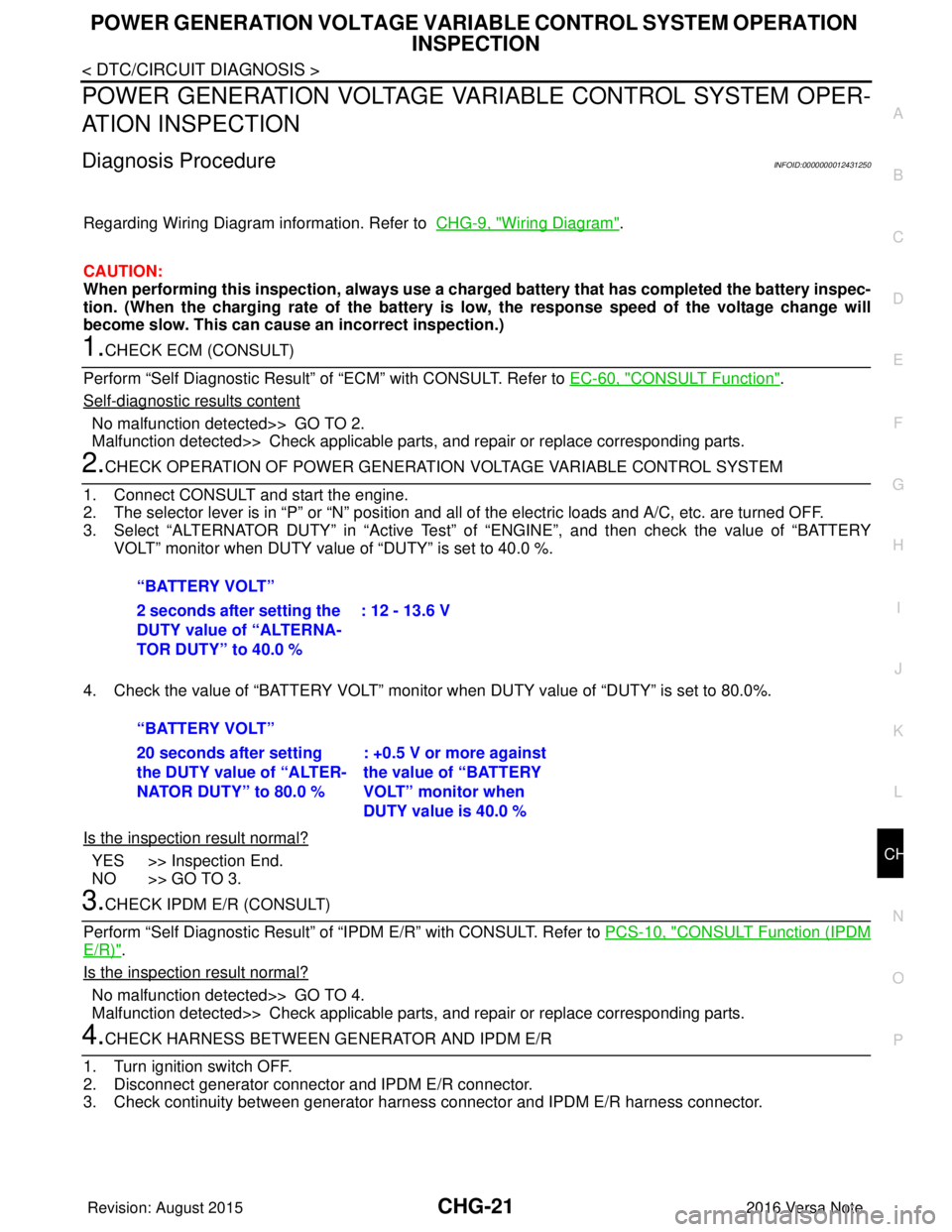
2.CHECK OPERATION OF POWER GENERATION VOLTAGE VARIABLE CONTROL SYSTEM
1. Connect CONSULT and start the engine.
2. The selector lever is in “P” or “N” position and a ll of the electric loads and A/C, etc. are turned OFF.
3. Select “ALTERNATOR DUTY” in “Active Test” of “ENGINE”, and then check the value of “BATTERY
VOLT” monitor when DUTY value of “DUTY” is set to 40.0 %.
4. Check the value of “BATTERY VOLT” monitor when DUTY value of “DUTY” is set to 80.0%.
Is the inspection result normal?
YES >> Inspection End.
NO >> GO TO 3.
3.CHECK IPDM E/R (CONSULT)
Perform “Self Diagnostic Result” of “I PDM E/R” with CONSULT. Refer to PCS-10, "
CONSULT Function (IPDM
E/R)".
Is the inspection result normal?
No malfunction detected>> GO TO 4.
Malfunction detected>> Check applicable parts, and repair or replace corresponding parts.
4.CHECK HARNESS BETWEEN GE NERATOR AND IPDM E/R
1. Turn ignition switch OFF.
2. Disconnect generator connector and IPDM E/R connector.
3. Check continuity between generator harne ss connector and IPDM E/R harness connector.
“BATTERY VOLT”
2 seconds after setting the
DUTY value of “ALTERNA-
TOR DUTY” to 40.0 %
: 12 - 13.6 V
“BATTERY VOLT”
20 seconds after setting
the DUTY value of “ALTER-
NATOR DUTY” to 80.0 % : +0.5 V or more against
the value of “BATTERY
VOLT” monitor when
DUTY value is 40.0 %
Revision: August 2015
2016 Versa Note
cardiagn.com
Page 712 of 3641
![NISSAN NOTE 2016 Service User Guide SYSTEM (INTELLIGENT KEY SYSTEM)DLK-23
< SYSTEM DESCRIPTION > [WITH INTELLIGENT KEY SYSTEM]
C
D
E
F
G H
I
J
L
M A
B
DLK
N
O P
DOOR LOCK FUNCTION
DOOR LOCK FUNCTION : System DescriptionINFOID:0000000012](/img/5/57363/w960_57363-711.png "NISSAN NOTE 2016 Service User Guide SYSTEM (INTELLIGENT KEY SYSTEM)DLK-23
< SYSTEM DESCRIPTION > [WITH INTELLIGENT KEY SYSTEM]
C
D
E
F
G H
I
J
L
M A
B
DLK
N
O P
DOOR LOCK FUNCTION
DOOR LOCK FUNCTION : System DescriptionINFOID:0000000012")
SYSTEM (INTELLIGENT KEY SYSTEM)DLK-23
< SYSTEM DESCRIPTION > [WITH INTELLIGENT KEY SYSTEM]
C
D
E
F
G H
I
J
L
M A
B
DLK
N
O P
DOOR LOCK FUNCTION
DOOR LOCK FUNCTION : System DescriptionINFOID:0000000012429984
SYSTEM DIAGRAM
DOOR REQUEST SWITCH OPERATION
When pressing the request switch, it is possible to lock and unlock the door by carrying the Intelligent Key.
OPERATION DESCRIPTION
• When the BCM detects that each door request switch is pressed, it starts the outside key antenna and inside
key antenna corresponding to the pressed door request swit ch and transmits the request signal to the Intelli-
gent Key. And then, check that the Intelligent Key is near the door.
• If the Intelligent Key is within the outside key antenna detection area, it receives the request signal and
transmits the key ID signal to the BCM via remote keyless entry receiver.
• BCM receives the key ID signal and compares it with the registered key ID.
• BCM transmits door lock/unlock signal and operates each door lock actuator. At the same time, BCM blinks
hazard warning lamp (lock: 2 times, unlock: 1 time) and sounds Intelligent Key buzzer (lock: 1 time, unlock:
1 time) as a reminder.
OPERATION CONDITION
If the following conditions are satisfied, door lock/unl ock operation is performed if the door request switch is
operated:
Key reminder The key reminder buzzer sounds a warning if the door is locked with the key left
inside the vehicle. DLK-27
WarningIf an action that does not meet the operating condition of the Intelligent Key sys-
tem is taken, the buzzer sounds to inform the driver.
DLK-27
Engine start
The engine can be turned on while carrying the Intelligent Key. DLK-22
Interior room lamp control Interior room lamp is controlled according to door lock/unlock state. DLK-20
FunctionDescriptionRefer
JMKIA6137GB
Revision: August 2015 2016 Versa Note
cardiagn.com
Page 823 of 3641
![NISSAN NOTE 2016 Service User Guide DLK-134
< SYMPTOM DIAGNOSIS >[WITH INTELLIGENT KEY SYSTEM]
SQUEAK AND RATTLE TROUBLE DIAGNOSES
SQUEAK AND RATTLE TROUBLE DIAGNOSES
Work FlowINFOID:0000000012430082
CUSTOMER INTERVIEW
Interview the cus](/img/5/57363/w960_57363-822.png "NISSAN NOTE 2016 Service User Guide DLK-134
< SYMPTOM DIAGNOSIS >[WITH INTELLIGENT KEY SYSTEM]
SQUEAK AND RATTLE TROUBLE DIAGNOSES
SQUEAK AND RATTLE TROUBLE DIAGNOSES
Work FlowINFOID:0000000012430082
CUSTOMER INTERVIEW
Interview the cus")
DLK-134
< SYMPTOM DIAGNOSIS >[WITH INTELLIGENT KEY SYSTEM]
SQUEAK AND RATTLE TROUBLE DIAGNOSES
SQUEAK AND RATTLE TROUBLE DIAGNOSES
Work FlowINFOID:0000000012430082
CUSTOMER INTERVIEW
Interview the customer if possible, to determine the conditions that exist when the noise occurs. Use the Diag-
nostic Worksheet during the interview to document the facts and conditions when the noise occurs and any
customer's comments; refer to
DLK-138, "
Diagnostic Worksheet". This information is necessary to duplicate
the conditions that exist when the noise occurs.
• The customer may not be able to provide a detailed description or the location of the noise. Attempt to obtain all the facts and conditions that exist w hen the noise occurs (or does not occur).
• If there is more than one noise in the vehicle, be sure to diagnose and repair the noise that the customer is
concerned about. This can be accomplished by test driving the vehicle with the customer.
• After identifying the type of noise, isolate the noise in terms of its characteristics. The noise characteristics
are provided so the customer, service adviser and technician are all speaking the same language when
defining the noise.
• Squeak —(Like tennis shoes on a clean floor)
Squeak characteristics include the light contact/fast movement/brought on by road conditions/hard surfaces
= higher pitch noise/softer surfaces = lower pitch noises/edge to surface = chirping.
• Creak—(Like walking on an old wooden floor)
Creak characteristics include firm contact/slow mo vement/twisting with a rotational movement/pitch depen-
dent on materials/often brought on by activity.
• Rattle—(Like shaking a baby rattle)
Rattle characteristics include the fast repeated contac t/vibration or similar movement/loose parts/missing
clip or fastener/incorrect clearance.
• Knock —(Like a knock on a door)
Knock characteristics include hollow sounding/someti mes repeating/often brought on by driver action.
• Tick—(Like a clock second hand) Tick characteristics include gentle contacting of light materials/loose components/can be caused by driver
action or road conditions.
• Thump—(Heavy, muffled knock noise) Thump characteristics include softer k nock/dead sound often brought on by activity.
• Buzz—(Like a bumble bee)
Buzz characteristics include hi gh frequency rattle/firm contact.
• Often the degree of acceptable noise level will vary depending upon the person. A noise that you may judge as acceptable may be very irritating to the customer.
• Weather conditions, especially humidity and temperat ure, may have a great effect on noise level.
DUPLICATE THE NOISE AND TEST DRIVE
If possible, drive the vehicle with the customer until the noise is duplicated. Note any additional information on
the Diagnostic Worksheet regarding the conditions or lo cation of the noise. This information can be used to
duplicate the same conditions when you confirm the repair.
SBT842
Revision: August 2015 2016 Versa Note
cardiagn.com
Page 951 of 3641
![NISSAN NOTE 2016 Service User Guide DLK-262
< SYMPTOM DIAGNOSIS >[WITHOUT INTELLIGENT KEY SYSTEM]
SQUEAK AND RATTLE TROUBLE DIAGNOSES
SQUEAK AND RATTLE TROUBLE DIAGNOSES
Work FlowINFOID:0000000012430228
CUSTOMER INTERVIEW
Interview the](/img/5/57363/w960_57363-950.png "NISSAN NOTE 2016 Service User Guide DLK-262
< SYMPTOM DIAGNOSIS >[WITHOUT INTELLIGENT KEY SYSTEM]
SQUEAK AND RATTLE TROUBLE DIAGNOSES
SQUEAK AND RATTLE TROUBLE DIAGNOSES
Work FlowINFOID:0000000012430228
CUSTOMER INTERVIEW
Interview the")
DLK-262
< SYMPTOM DIAGNOSIS >[WITHOUT INTELLIGENT KEY SYSTEM]
SQUEAK AND RATTLE TROUBLE DIAGNOSES
SQUEAK AND RATTLE TROUBLE DIAGNOSES
Work FlowINFOID:0000000012430228
CUSTOMER INTERVIEW
Interview the customer if possible, to determine the conditions that exist when the noise occurs. Use the Diag-
nostic Worksheet during the interview to document the facts and conditions when the noise occurs and any
customer's comments; refer to
DLK-266, "
Diagnostic Worksheet". This information is necessary to duplicate
the conditions that exist when the noise occurs.
• The customer may not be able to provide a detailed description or the location of the noise. Attempt to obtain all the facts and conditions that exist w hen the noise occurs (or does not occur).
• If there is more than one noise in the vehicle, be sure to diagnose and repair the noise that the customer is
concerned about. This can be accomplished by test driving the vehicle with the customer.
• After identifying the type of noise, isolate the noise in terms of its characteristics. The noise characteristics
are provided so the customer, service adviser and technician are all speaking the same language when
defining the noise.
• Squeak —(Like tennis shoes on a clean floor)
Squeak characteristics include the light contact/fast movement/brought on by road conditions/hard surfaces
= higher pitch noise/softer surfaces = lower pitch noises/edge to surface = chirping.
• Creak—(Like walking on an old wooden floor)
Creak characteristics include firm contact/slow mo vement/twisting with a rotational movement/pitch depen-
dent on materials/often brought on by activity.
• Rattle—(Like shaking a baby rattle)
Rattle characteristics include the fast repeated contac t/vibration or similar movement/loose parts/missing
clip or fastener/incorrect clearance.
• Knock —(Like a knock on a door)
Knock characteristics include hollow sounding/someti mes repeating/often brought on by driver action.
• Tick—(Like a clock second hand) Tick characteristics include gentle contacting of light materials/loose components/can be caused by driver
action or road conditions.
• Thump—(Heavy, muffled knock noise) Thump characteristics include softer k nock/dead sound often brought on by activity.
• Buzz—(Like a bumble bee)
Buzz characteristics include hi gh frequency rattle/firm contact.
• Often the degree of acceptable noise level will vary depending upon the person. A noise that you may judge as acceptable may be very irritating to the customer.
• Weather conditions, especially humidity and temperat ure, may have a great effect on noise level.
DUPLICATE THE NOISE AND TEST DRIVE
If possible, drive the vehicle with the customer until the noise is duplicated. Note any additional information on
the Diagnostic Worksheet regarding the conditions or lo cation of the noise. This information can be used to
duplicate the same conditions when you confirm the repair.
SBT842
Revision: August 2015 2016 Versa Note
cardiagn.com