NISSAN PATROL 2000 Electronic Repair Manual
PATROL 2000
NISSAN
NISSAN
https://www.carmanualsonline.info/img/5/57367/w960_57367-0.png
NISSAN PATROL 2000 Electronic Repair Manual
Page 689 of 1033
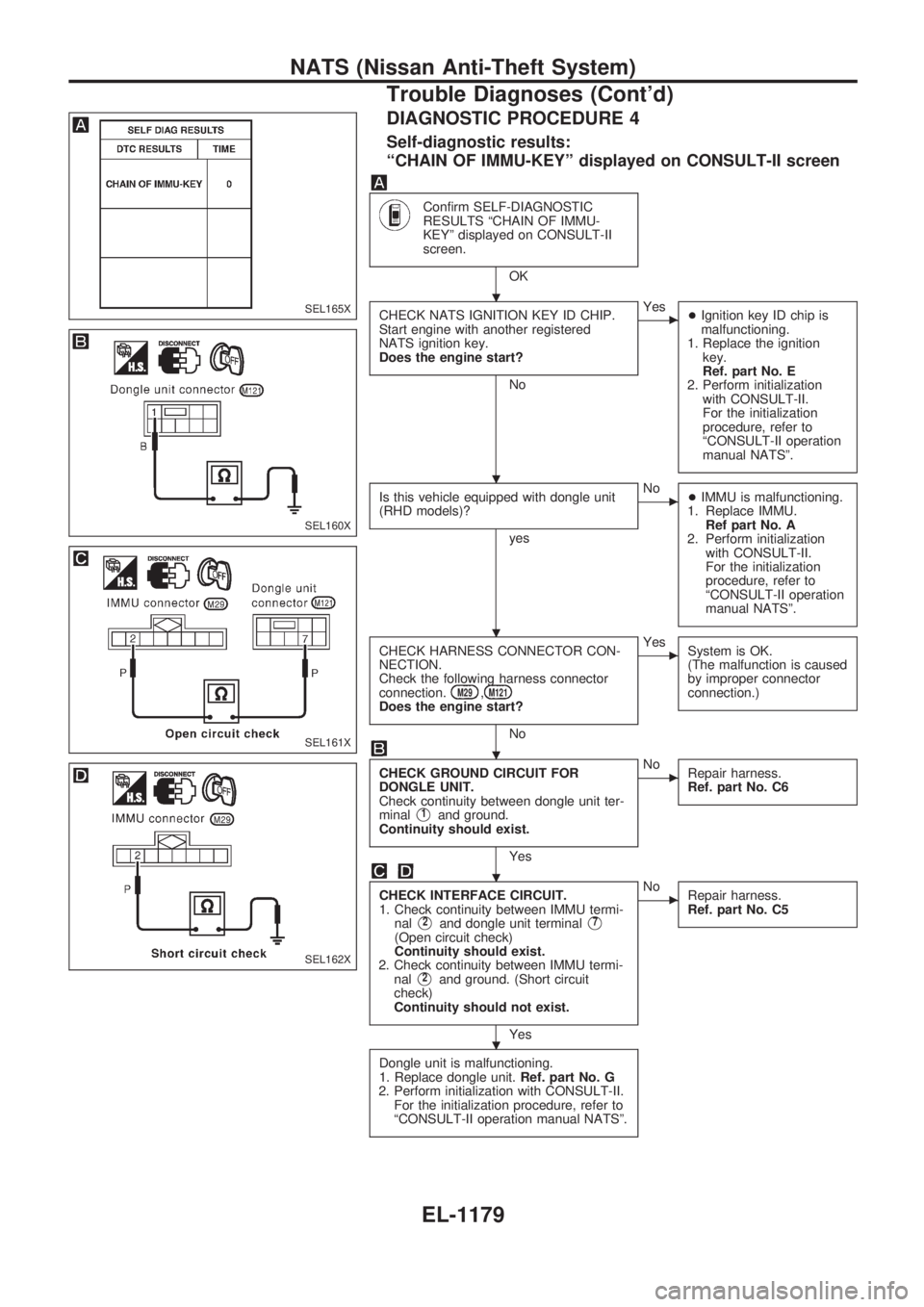
DIAGNOSTIC PROCEDURE 4
Self-diagnostic results:
ªCHAIN OF IMMU-KEYº displayed on CONSULT-II screen
Confirm SELF-DIAGNOSTIC
RESULTS ªCHAIN OF IMMU-
KEYº displayed on CONSULT-II
screen.
OK
CHECK NATS IGNITION KEY ID CHIP.
Start engine with another registered
NATS ignition key.
Does the engine start?
No
cYes
+Ignition key ID chip is
malfunctioning.
1. Replace the ignition
key.
Ref. part No. E
2. Perform initialization
with CONSULT-II.
For the initialization
procedure, refer to
ªCONSULT-II operation
manual NATSº.
Is this vehicle equipped with dongle unit
(RHD models)?
yes
cNo
+IMMU is malfunctioning.
1. Replace IMMU.
Ref part No. A
2. Perform initialization
with CONSULT-II.
For the initialization
procedure, refer to
ªCONSULT-II operation
manual NATSº.
CHECK HARNESS CONNECTOR CON-
NECTION.
Check the following harness connector
connection.
M29,M121Does the engine start?
No
cYes
System is OK.
(The malfunction is caused
by improper connector
connection.)
CHECK GROUND CIRCUIT FOR
DONGLE UNIT.
Check continuity between dongle unit ter-
minal
V1and ground.
Continuity should exist.
Yes
cNo
Repair harness.
Ref. part No. C6
CHECK INTERFACE CIRCUIT.
1. Check continuity between IMMU termi-
nal
V2and dongle unit terminalV7
(Open circuit check)
Continuity should exist.
2. Check continuity between IMMU termi-
nal
V2and ground. (Short circuit
check)
Continuity should not exist.
Yes
cNo
Repair harness.
Ref. part No. C5
Dongle unit is malfunctioning.
1. Replace dongle unit.Ref. part No. G
2. Perform initialization with CONSULT-II.
For the initialization procedure, refer to
ªCONSULT-II operation manual NATSº.
SEL165X
SEL160X
SEL161X
SEL162X
.
.
.
.
.
.
NATS (Nissan Anti-Theft System)
Trouble Diagnoses (Cont'd)
EL-1179
Page 690 of 1033
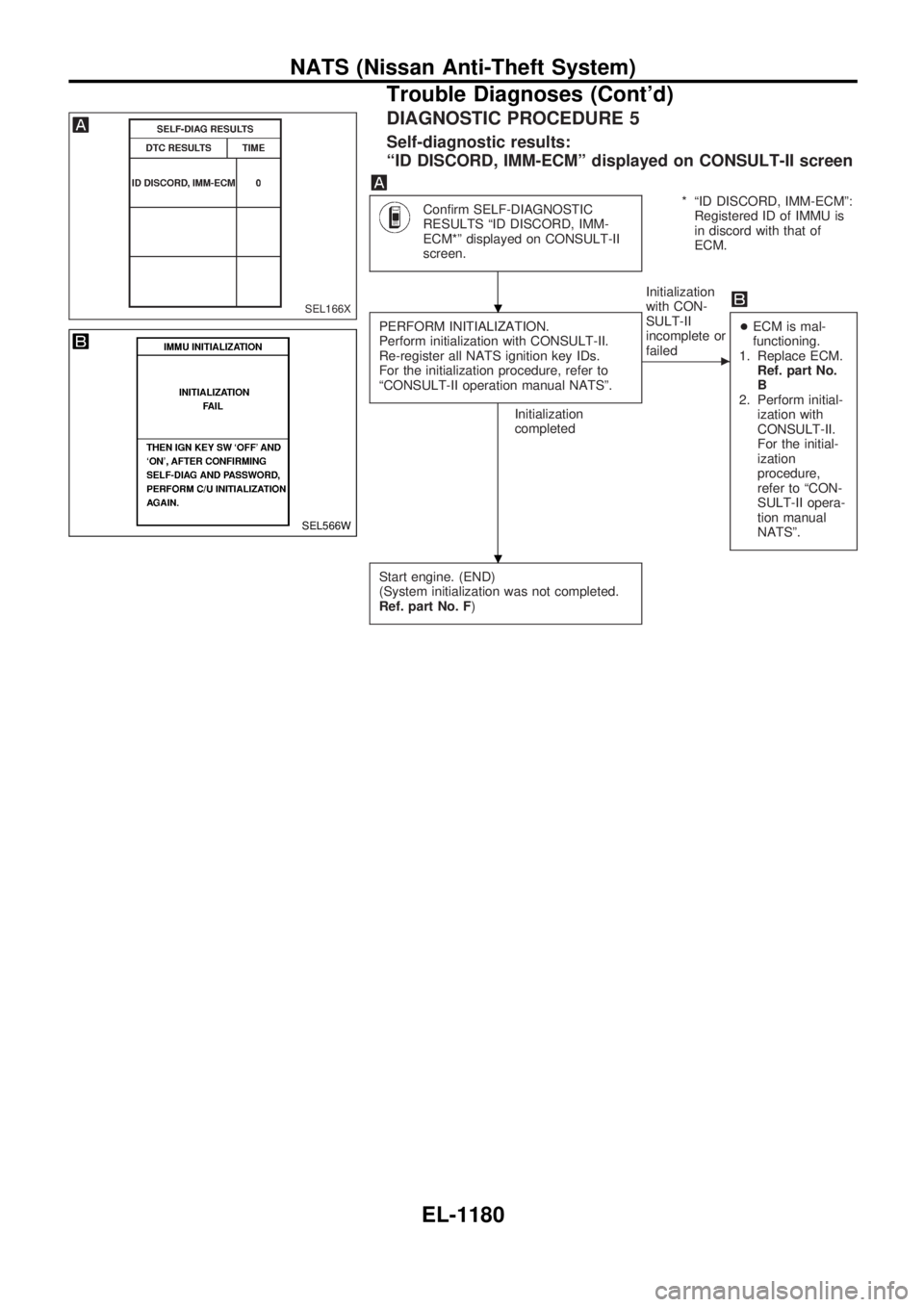
DIAGNOSTIC PROCEDURE 5
Self-diagnostic results:
ªID DISCORD, IMM-ECMº displayed on CONSULT-II screen
Confirm SELF-DIAGNOSTIC
RESULTS ªID DISCORD, IMM-
ECM*º displayed on CONSULT-II
screen.* ªID DISCORD, IMM-ECMº:
Registered ID of IMMU is
in discord with that of
ECM.
PERFORM INITIALIZATION.
Perform initialization with CONSULT-II.
Re-register all NATS ignition key IDs.
For the initialization procedure, refer to
ªCONSULT-II operation manual NATSº.
Initialization
completedInitialization
with CON-
SULT-II
incomplete or
failed
c
+ECM is mal-
functioning.
1. Replace ECM.
Ref. part No.
B
2. Perform initial-
ization with
CONSULT-II.
For the initial-
ization
procedure,
refer to ªCON-
SULT-II opera-
tion manual
NATSº.
Start engine. (END)
(System initialization was not completed.
Ref. part No. F)
SEL166X
SEL566W
.
.
NATS (Nissan Anti-Theft System)
Trouble Diagnoses (Cont'd)
EL-1180
Page 691 of 1033
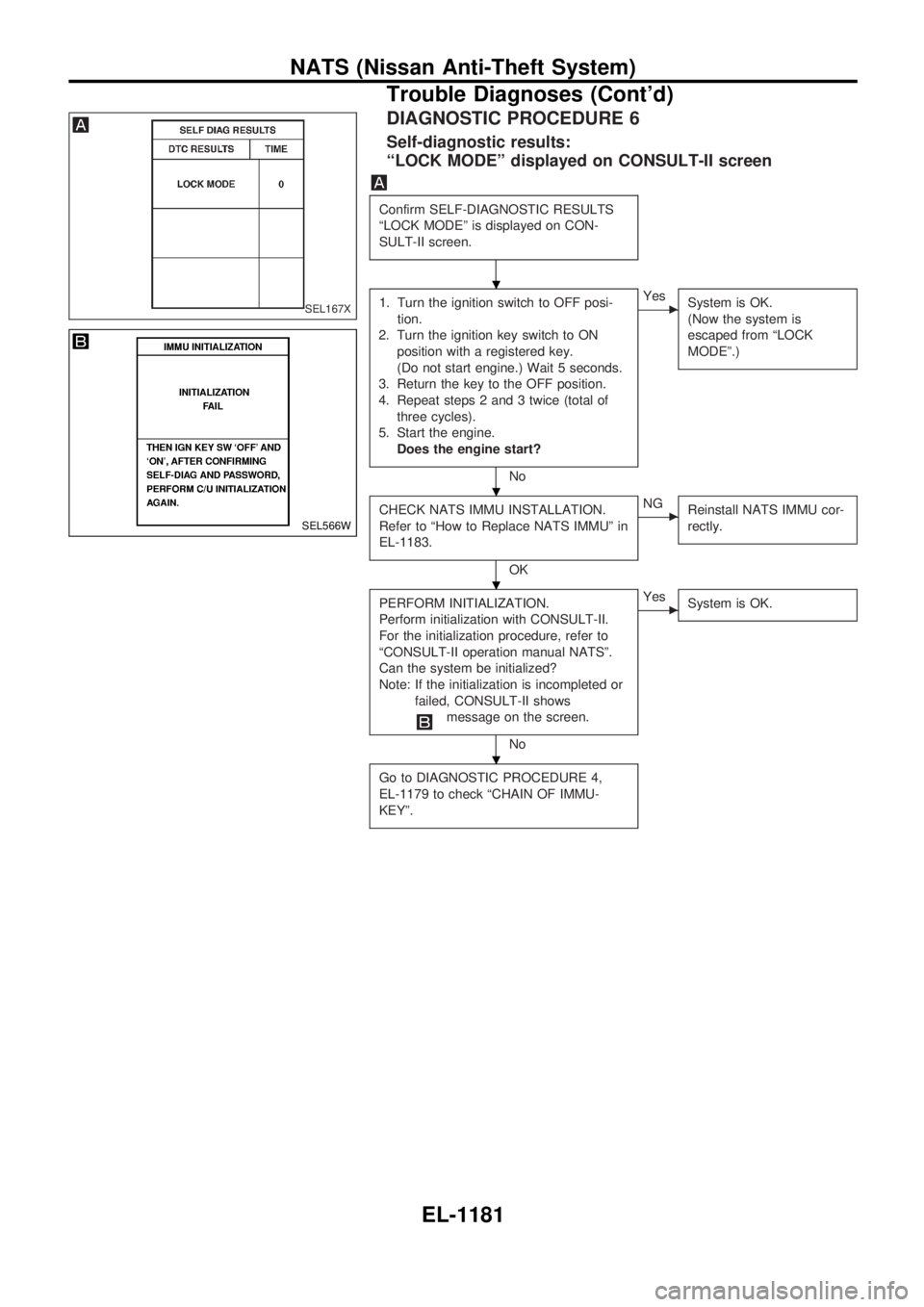
DIAGNOSTIC PROCEDURE 6
Self-diagnostic results:
ªLOCK MODEº displayed on CONSULT-II screen
Confirm SELF-DIAGNOSTIC RESULTS
ªLOCK MODEº is displayed on CON-
SULT-II screen.
1. Turn the ignition switch to OFF posi-
tion.
2. Turn the ignition key switch to ON
position with a registered key.
(Do not start engine.) Wait 5 seconds.
3. Return the key to the OFF position.
4. Repeat steps 2 and 3 twice (total of
three cycles).
5. Start the engine.
Does the engine start?
No
cYes
System is OK.
(Now the system is
escaped from ªLOCK
MODEº.)
CHECK NATS IMMU INSTALLATION.
Refer to ªHow to Replace NATS IMMUº in
EL-1183.
OK
cNG
Reinstall NATS IMMU cor-
rectly.
PERFORM INITIALIZATION.
Perform initialization with CONSULT-II.
For the initialization procedure, refer to
ªCONSULT-II operation manual NATSº.
Can the system be initialized?
Note: If the initialization is incompleted or
failed, CONSULT-II shows
message on the screen.
No
cYes
System is OK.
Go to DIAGNOSTIC PROCEDURE 4,
EL-1179 to check ªCHAIN OF IMMU-
KEYº.
SEL167X
SEL566W
.
.
.
.
NATS (Nissan Anti-Theft System)
Trouble Diagnoses (Cont'd)
EL-1181
Page 692 of 1033
![NISSAN PATROL 2000 Electronic Repair Manual DIAGNOSTIC PROCEDURE 7
ªSECURITY IND. DOES NOT LIGHT UPº
Check 7.5A fuse [No.24, located in the
fuse block (J/B)].
OK
cNG
Replace fuse.
NATS INITIALIZATION
1) Install the 7.5A fuse.
2) Perform initi](/img/5/57367/w960_57367-691.png "NISSAN PATROL 2000 Electronic Repair Manual DIAGNOSTIC PROCEDURE 7
ªSECURITY IND. DOES NOT LIGHT UPº
Check 7.5A fuse [No.24, located in the
fuse block (J/B)].
OK
cNG
Replace fuse.
NATS INITIALIZATION
1) Install the 7.5A fuse.
2) Perform initi")
DIAGNOSTIC PROCEDURE 7
ªSECURITY IND. DOES NOT LIGHT UPº
Check 7.5A fuse [No.24, located in the
fuse block (J/B)].
OK
cNG
Replace fuse.
NATS INITIALIZATION
1) Install the 7.5A fuse.
2) Perform initialization with CON-
SULT-II.
For the operation of
initialization, refer to ªCON-
SULT-II operation manual
NATSº.
Turn ignition switch ªOFFº.
Start engine and turn ignition switch
ªOFFº.
Check the security ind. lighting.
NG
cOK
END
Check voltage between security ind. con-
nector terminal
V1and ground.
Voltage: Battery voltage
OK
cNG
Check harness for open or
short between fuse and
security ind.
CHECK INDICATOR LAMP.
OK
cNG
Repair harness.
CHECK NATS IMMU FUNCTION.
1. Connect NATS IMMU connector.
2. Disconnect security ind. connector.
3. Check continuity between NATS IMMU
terminal
V6and ground.
Continuity should exist intermit-
tently.
OK
cNG
NATS IMMU is malfunc-
tioning. Replace IMMU.
Perform initializa-
tion with CON-
SULT-II.
For the operation
of initialization,
refer to ªCON-
SULT-II operation
manual NATSº.
Check harness for open or short between
security indicator and NATS IMMU.
SEL931UA
SEL164X
.
.
.
.
.
.
.
.
.
NATS (Nissan Anti-Theft System)
Trouble Diagnoses (Cont'd)
EL-1182
Page 695 of 1033
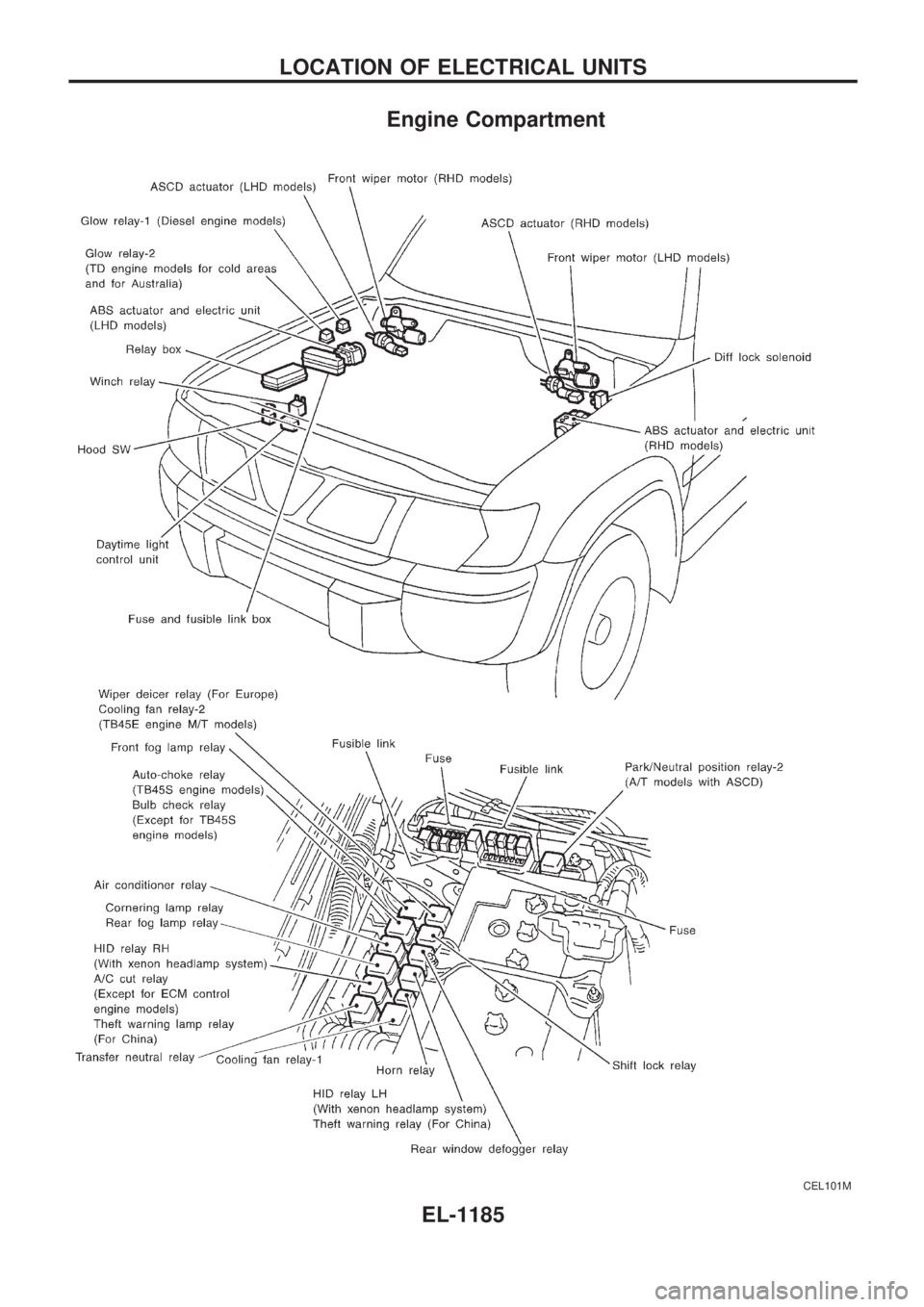
Engine Compartment
CEL101M
LOCATION OF ELECTRICAL UNITS
EL-1185
Page 701 of 1033
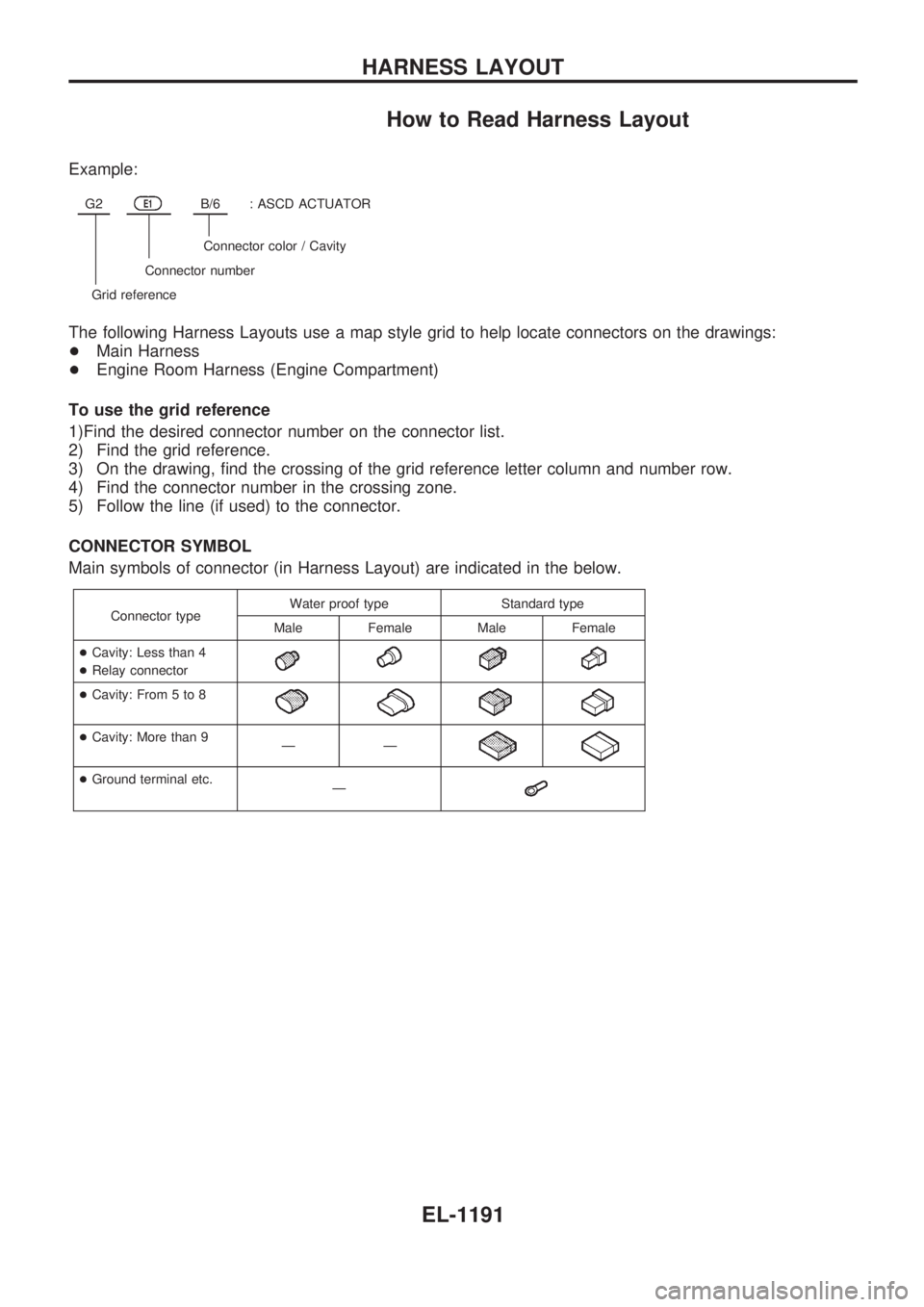
How to Read Harness Layout
Example:
G2E1B/6: ASCD ACTUATOR
Connector color / Cavity
Connector number
Grid reference
The following Harness Layouts use a map style grid to help locate connectors on the drawings:
+Main Harness
+Engine Room Harness (Engine Compartment)
To use the grid reference
1)Find the desired connector number on the connector list.
2) Find the grid reference.
3) On the drawing, find the crossing of the grid reference letter column and number row.
4) Find the connector number in the crossing zone.
5) Follow the line (if used) to the connector.
CONNECTOR SYMBOL
Main symbols of connector (in Harness Layout) are indicated in the below.
Connector typeWater proof type Standard type
Male Female Male Female
+Cavity: Less than 4
+Relay connector
+Cavity: From 5 to 8
+Cavity: More than 9
ÐÐ
+Ground terminal etc.
Ð
HARNESS LAYOUT
EL-1191
Page 710 of 1033
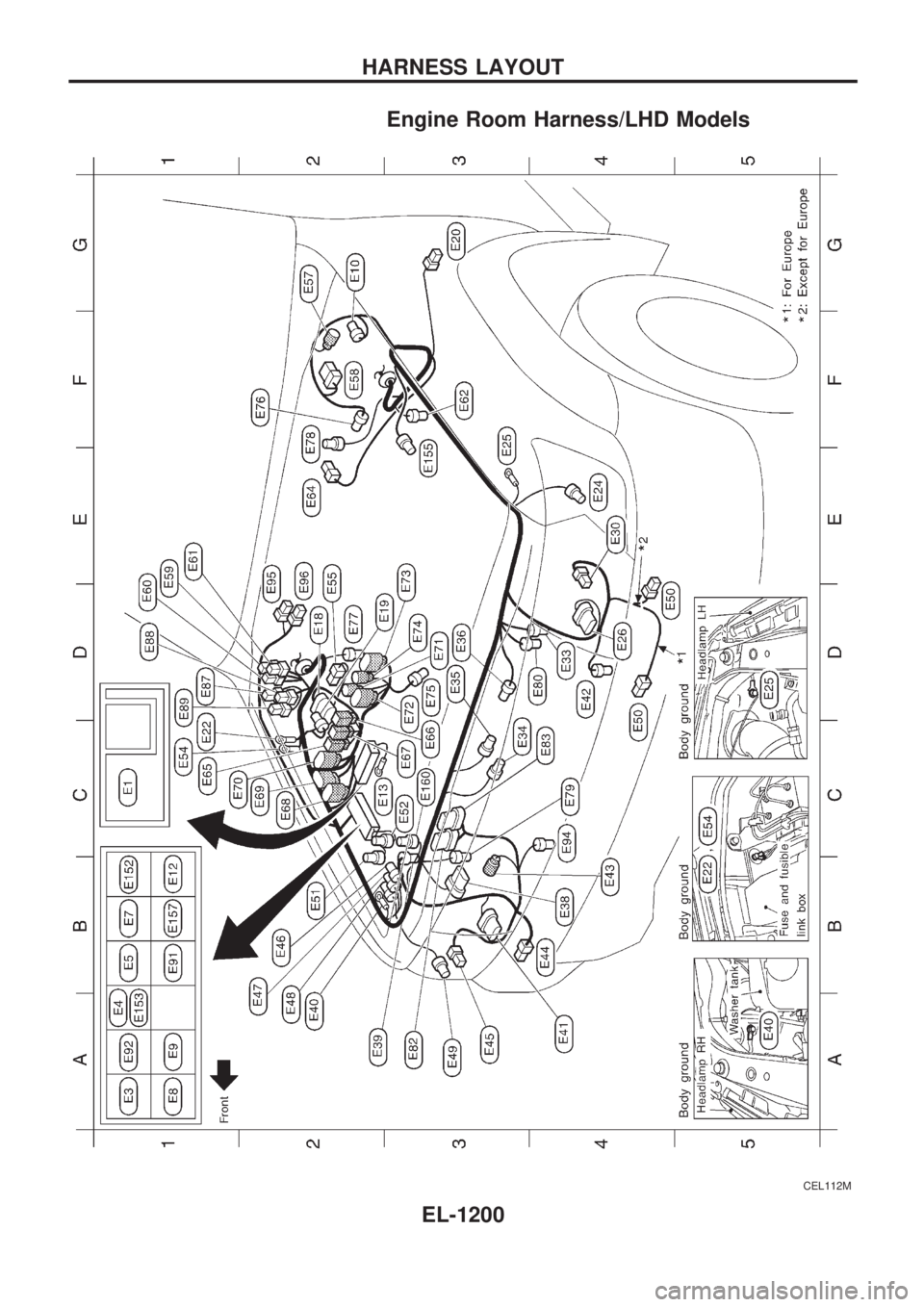
Engine Room Harness/LHD Models
CEL112M
HARNESS LAYOUT
EL-1200
Page 711 of 1033
CEL113M
HARNESS LAYOUT
Engine Room Harness/LHD Models (Cont'd)
EL-1201
Page 712 of 1033
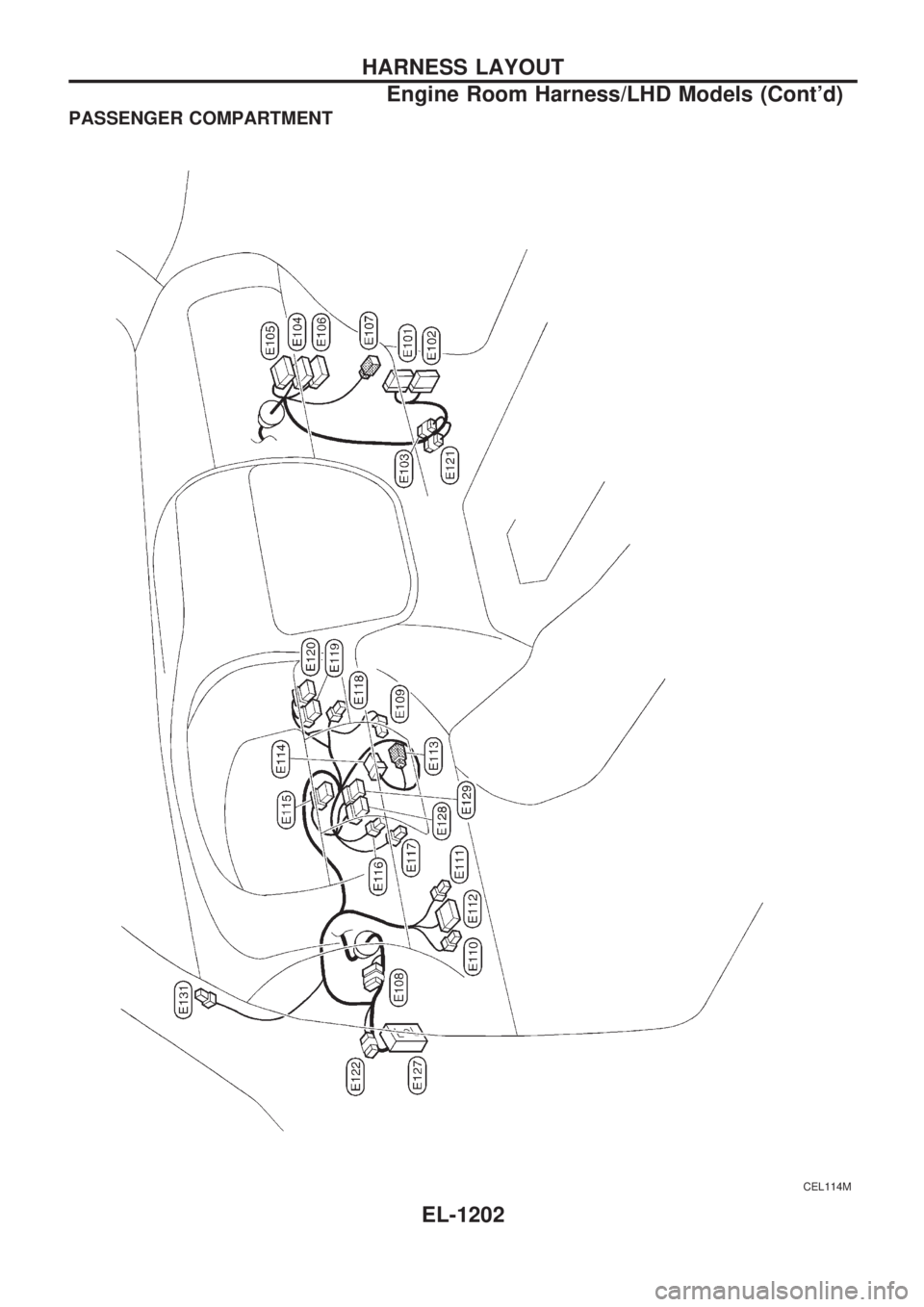
PASSENGER COMPARTMENT
CEL114M
HARNESS LAYOUT
Engine Room Harness/LHD Models (Cont'd)
EL-1202
Page 713 of 1033
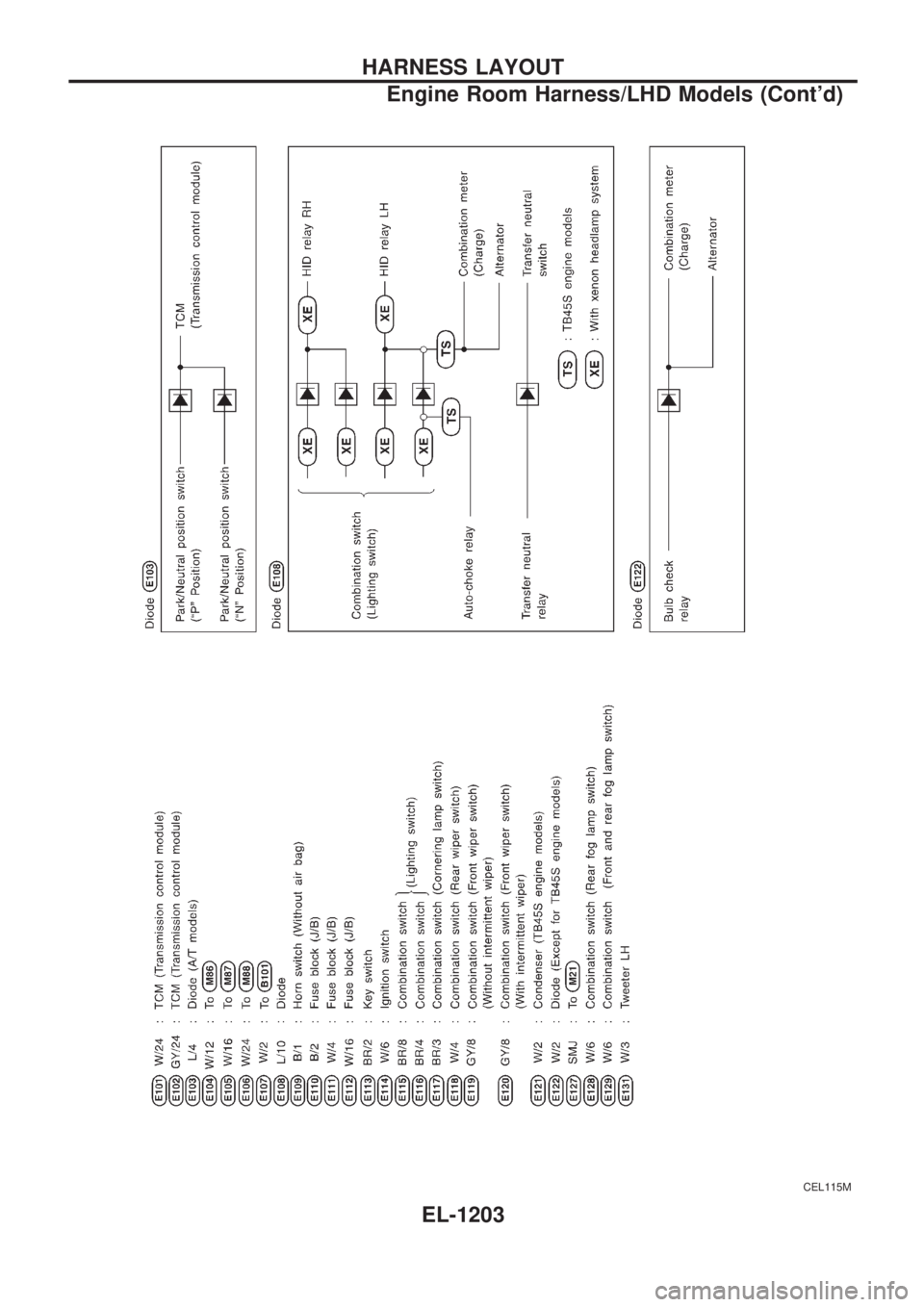
CEL115M
HARNESS LAYOUT
Engine Room Harness/LHD Models (Cont'd)
EL-1203