check engine NISSAN PRIMERA 1999 Electronic Repair Manual
[x] Cancel search | Manufacturer: NISSAN, Model Year: 1999, Model line: PRIMERA, Model: NISSAN PRIMERA 1999Pages: 2267, PDF Size: 35.74 MB
Page 1830 of 2267
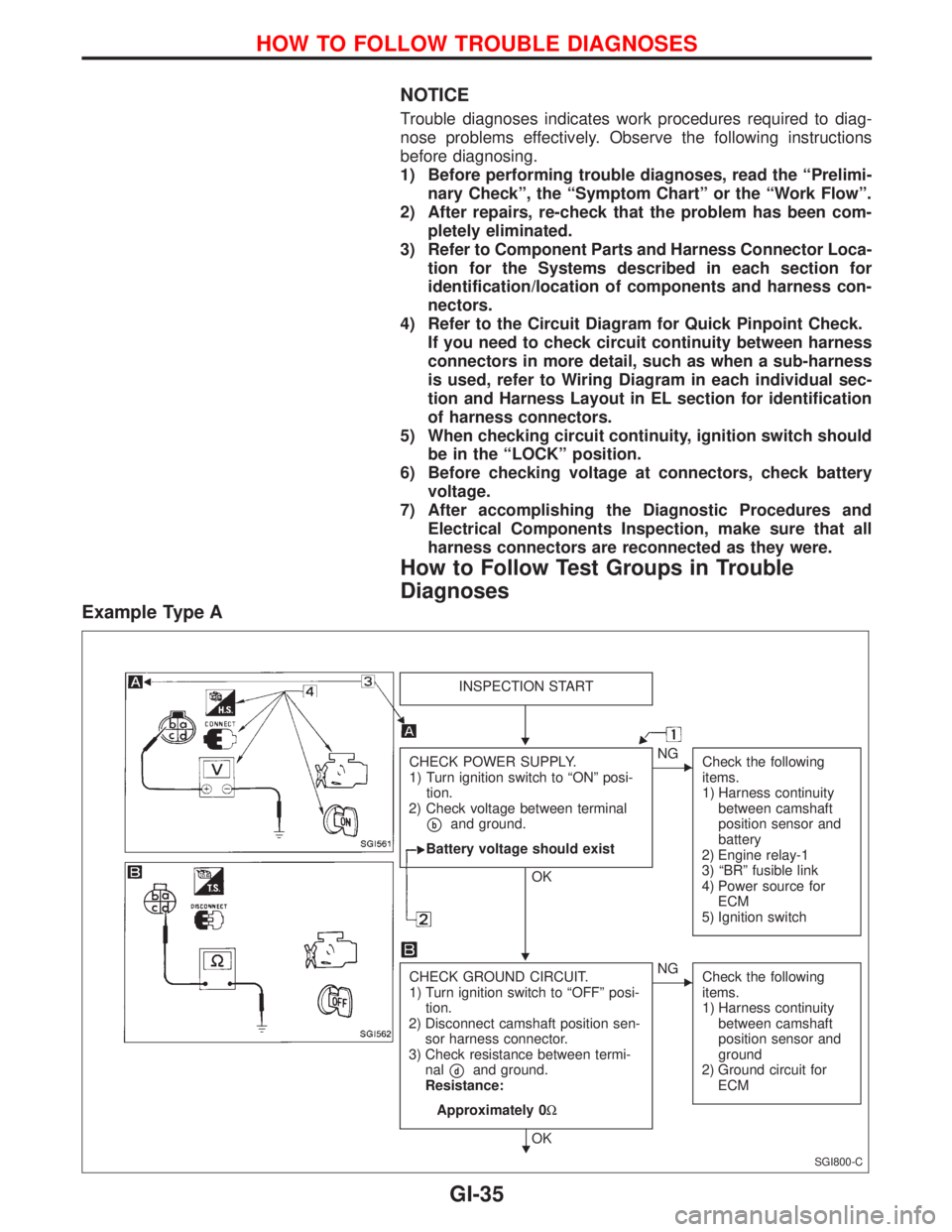
NOTICE
Trouble diagnoses indicates work procedures required to diag-
nose problems effectively. Observe the following instructions
before diagnosing.
1) Before performing trouble diagnoses, read the ªPrelimi-
nary Checkº, the ªSymptom Chartº or the ªWork Flowº.
2) After repairs, re-check that the problem has been com-
pletely eliminated.
3) Refer to Component Parts and Harness Connector Loca-
tion for the Systems described in each section for
identification/location of components and harness con-
nectors.
4) Refer to the Circuit Diagram for Quick Pinpoint Check.
If you need to check circuit continuity between harness
connectors in more detail, such as when a sub-harness
is used, refer to Wiring Diagram in each individual sec-
tion and Harness Layout in EL section for identification
of harness connectors.
5) When checking circuit continuity, ignition switch should
be in the ªLOCKº position.
6) Before checking voltage at connectors, check battery
voltage.
7) After accomplishing the Diagnostic Procedures and
Electrical Components Inspection, make sure that all
harness connectors are reconnected as they were.
How to Follow Test Groups in Trouble
Diagnoses
Example Type A
SGI800-C
INSPECTION START
CHECK POWER SUPPLY.
1) Turn ignition switch to ªONº posi-
tion.
2) Check voltage between terminal
pband ground.
Battery voltage should exist
OK
ENG
Check the following
items.
1) Harness continuity
between camshaft
position sensor and
battery
2) Engine relay-1
3) ªBRº fusible link
4) Power source for
ECM
5) Ignition switch
CHECK GROUND CIRCUIT.
1) Turn ignition switch to ªOFFº posi-
tion.
2) Disconnect camshaft position sen-
sor harness connector.
3) Check resistance between termi-
nal
pdand ground.
Resistance:
Approximately 0W
OK
ENG
Check the following
items.
1) Harness continuity
between camshaft
position sensor and
ground
2) Ground circuit for
ECM
H
H
H
HOW TO FOLLOW TROUBLE DIAGNOSES
GI-35
Page 1833 of 2267
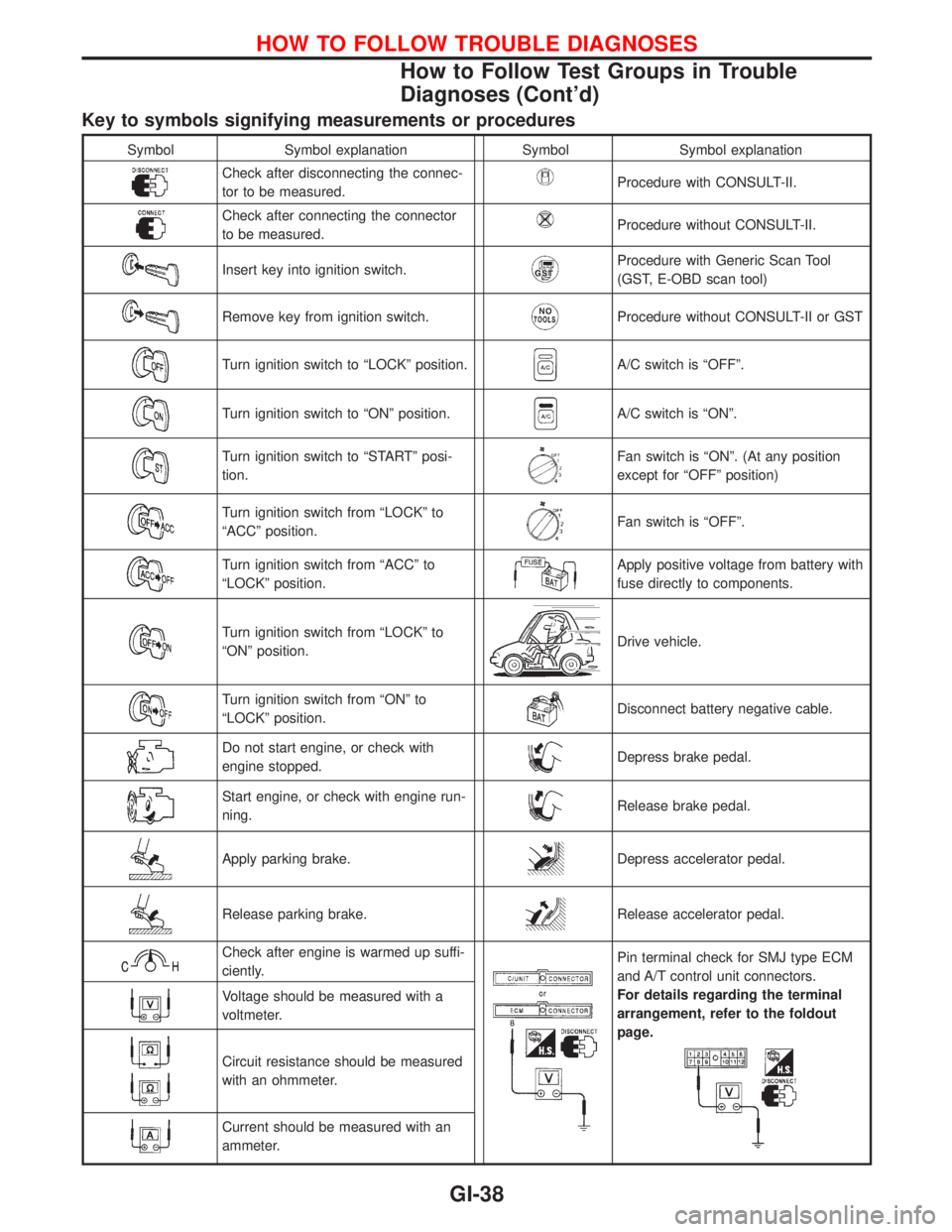
Key to symbols signifying measurements or procedures
Symbol Symbol explanation Symbol Symbol explanation
Check after disconnecting the connec-
tor to be measured.Procedure with CONSULT-II.
Check after connecting the connector
to be measured.Procedure without CONSULT-II.
Insert key into ignition switch.Procedure with Generic Scan Tool
(GST, E-OBD scan tool)
Remove key from ignition switch.Procedure without CONSULT-II or GST
Turn ignition switch to ªLOCKº position.A/C switch is ªOFFº.
Turn ignition switch to ªONº position.A/C switch is ªONº.
Turn ignition switch to ªSTARTº posi-
tion.Fan switch is ªONº. (At any position
except for ªOFFº position)
Turn ignition switch from ªLOCKº to
ªACCº position.Fan switch is ªOFFº.
Turn ignition switch from ªACCº to
ªLOCKº position.Apply positive voltage from battery with
fuse directly to components.
Turn ignition switch from ªLOCKº to
ªONº position.Drive vehicle.
Turn ignition switch from ªONº to
ªLOCKº position.Disconnect battery negative cable.
Do not start engine, or check with
engine stopped.Depress brake pedal.
Start engine, or check with engine run-
ning.Release brake pedal.
Apply parking brake.Depress accelerator pedal.
Release parking brake.Release accelerator pedal.
Check after engine is warmed up suffi-
ciently.Pin terminal check for SMJ type ECM
and A/T control unit connectors.
For details regarding the terminal
arrangement, refer to the foldout
page.
Voltage should be measured with a
voltmeter.
Circuit resistance should be measured
with an ohmmeter.
Current should be measured with an
ammeter.
HOW TO FOLLOW TROUBLE DIAGNOSES
How to Follow Test Groups in Trouble
Diagnoses (Cont'd)
GI-38
Page 1834 of 2267
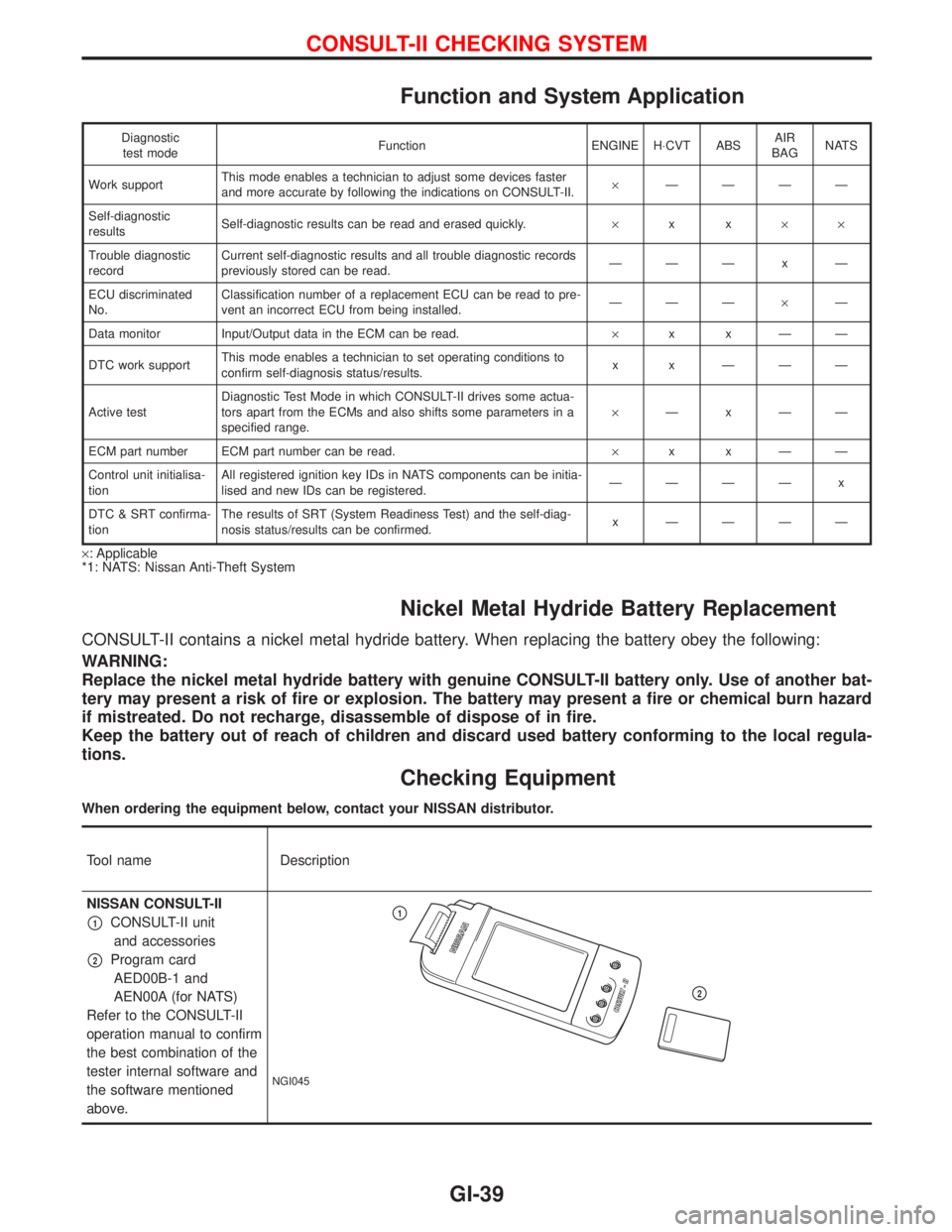
Function and System Application
Diagnostic
test modeFunction ENGINE H×CVT ABSAIR
BAGNATS
Work supportThis mode enables a technician to adjust some devices faster
and more accurate by following the indications on CONSULT-II.´ÐÐÐÐ
Self-diagnostic
resultsSelf-diagnostic results can be read and erased quickly.´xx´´
Trouble diagnostic
recordCurrent self-diagnostic results and all trouble diagnostic records
previously stored can be read.ÐÐÐxÐ
ECU discriminated
No.Classification number of a replacement ECU can be read to pre-
vent an incorrect ECU from being installed.ÐÐдÐ
Data monitor Input/Output data in the ECM can be read.´xxÐÐ
DTC work supportThis mode enables a technician to set operating conditions to
confirm self-diagnosis status/results.x x ÐÐÐ
Active testDiagnostic Test Mode in which CONSULT-II drives some actua-
tors apart from the ECMs and also shifts some parameters in a
specified range.´ÐxÐÐ
ECM part number ECM part number can be read.´xxÐÐ
Control unit initialisa-
tionAll registered ignition key IDs in NATS components can be initia-
lised and new IDs can be registered.ÐÐÐÐ x
DTC & SRT confirma-
tionThe results of SRT (System Readiness Test) and the self-diag-
nosis status/results can be confirmed.x ÐÐÐÐ
´: Applicable
*1: NATS: Nissan Anti-Theft System
Nickel Metal Hydride Battery Replacement
CONSULT-II contains a nickel metal hydride battery. When replacing the battery obey the following:
WARNING:
Replace the nickel metal hydride battery with genuine CONSULT-II battery only. Use of another bat-
tery may present a risk of fire or explosion. The battery may present a fire or chemical burn hazard
if mistreated. Do not recharge, disassemble of dispose of in fire.
Keep the battery out of reach of children and discard used battery conforming to the local regula-
tions.
Checking Equipment
When ordering the equipment below, contact your NISSAN distributor.
Tool name Description
NISSAN CONSULT-II
p1CONSULT-II unit
and accessories
p2Program card
AED00B-1 and
AEN00A (for NATS)
Refer to the CONSULT-II
operation manual to confirm
the best combination of the
tester internal software and
the software mentioned
above.
NGI045
p1
p2
CONSULT-II CHECKING SYSTEM
GI-39
Page 1847 of 2267
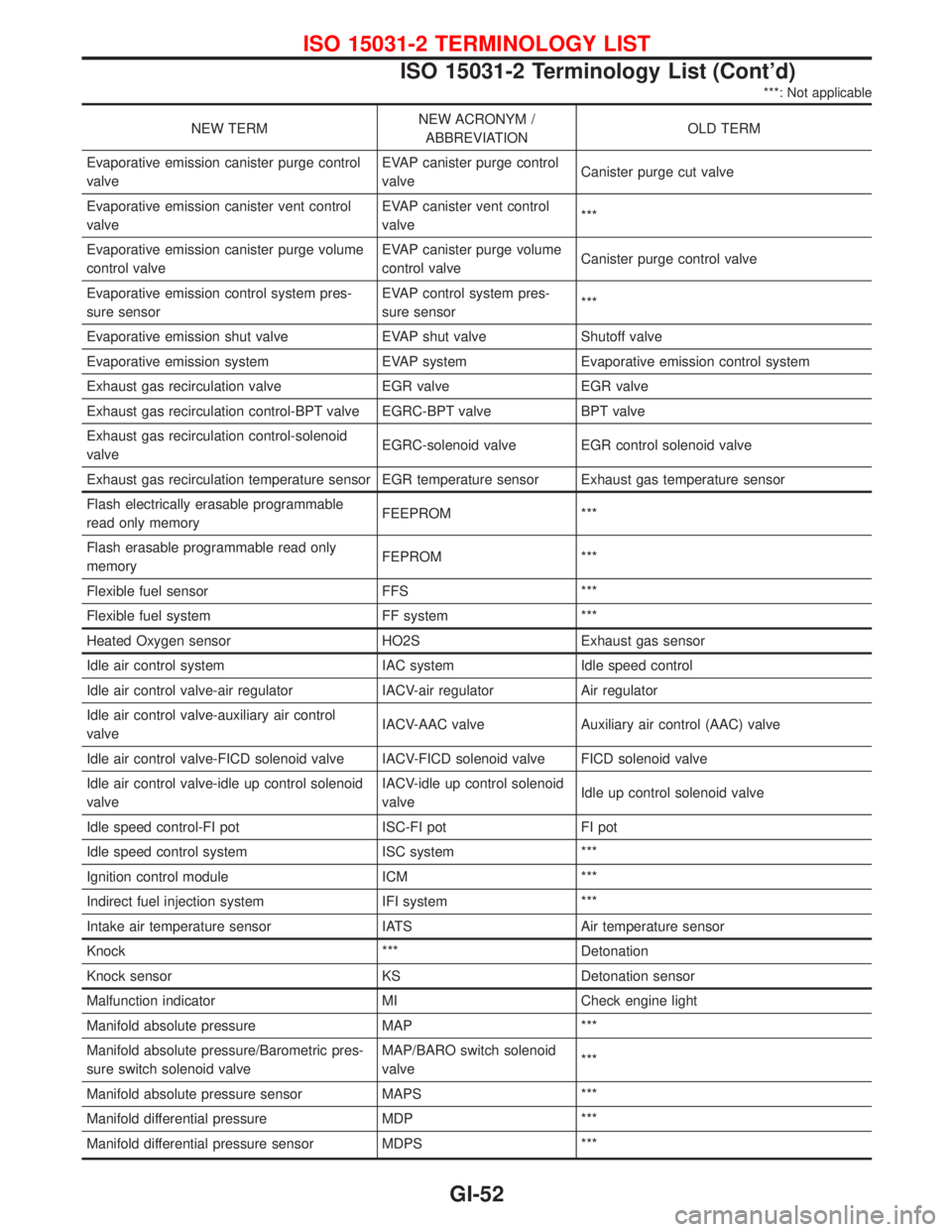
***: Not applicable
NEW TERMNEW ACRONYM /
ABBREVIATIONOLD TERM
Evaporative emission canister purge control
valveEVAP canister purge control
valveCanister purge cut valve
Evaporative emission canister vent control
valveEVAP canister vent control
valve***
Evaporative emission canister purge volume
control valveEVAP canister purge volume
control valveCanister purge control valve
Evaporative emission control system pres-
sure sensorEVAP control system pres-
sure sensor***
Evaporative emission shut valve EVAP shut valve Shutoff valve
Evaporative emission system EVAP system Evaporative emission control system
Exhaust gas recirculation valve EGR valve EGR valve
Exhaust gas recirculation control-BPT valve EGRC-BPT valve BPT valve
Exhaust gas recirculation control-solenoid
valveEGRC-solenoid valve EGR control solenoid valve
Exhaust gas recirculation temperature sensor EGR temperature sensor Exhaust gas temperature sensor
Flash electrically erasable programmable
read only memoryFEEPROM ***
Flash erasable programmable read only
memoryFEPROM ***
Flexible fuel sensor FFS ***
Flexible fuel system FF system ***
Heated Oxygen sensor HO2S Exhaust gas sensor
Idle air control system IAC system Idle speed control
Idle air control valve-air regulator IACV-air regulator Air regulator
Idle air control valve-auxiliary air control
valveIACV-AAC valve Auxiliary air control (AAC) valve
Idle air control valve-FICD solenoid valve IACV-FICD solenoid valve FICD solenoid valve
Idle air control valve-idle up control solenoid
valveIACV-idle up control solenoid
valveIdle up control solenoid valve
Idle speed control-FI pot ISC-FI pot FI pot
Idle speed control system ISC system ***
Ignition control module ICM ***
Indirect fuel injection system IFI system ***
Intake air temperature sensor IATS Air temperature sensor
Knock *** Detonation
Knock sensor KS Detonation sensor
Malfunction indicator MI Check engine light
Manifold absolute pressure MAP ***
Manifold absolute pressure/Barometric pres-
sure switch solenoid valveMAP/BARO switch solenoid
valve***
Manifold absolute pressure sensor MAPS ***
Manifold differential pressure MDP ***
Manifold differential pressure sensor MDPS ***
ISO 15031-2 TERMINOLOGY LIST
ISO 15031-2 Terminology List (Cont'd)
GI-52
Page 1856 of 2267
Precautions for Servicing Compressor
lPlug all openings to prevent moisture and foreign matter from entering.
lWhen the compressor is removed, store it in the same position as it is when mounted on the car.
lWhen replacing or repairing compressor, follow ªMaintenance of Lubricant Quantity in Compres-
sorº exactly. Refer to HA-102.
lKeep friction surfaces between clutch and pulley clean. If the surface is contaminated, with
lubricant, wipe it off by using a clean waste cloth moistened with thinner.
lAfter compressor service operation, turn the compressor shaft by hand more than five turns in
both directions. This will equally distribute lubricant inside the compressor. After the compres-
sor is installed, let the engine idle and operate the compressor for one hour.
lAfter replacing the compressor magnet clutch, apply voltage to the new one and check for nor-
mal operation.
Special Service Tools
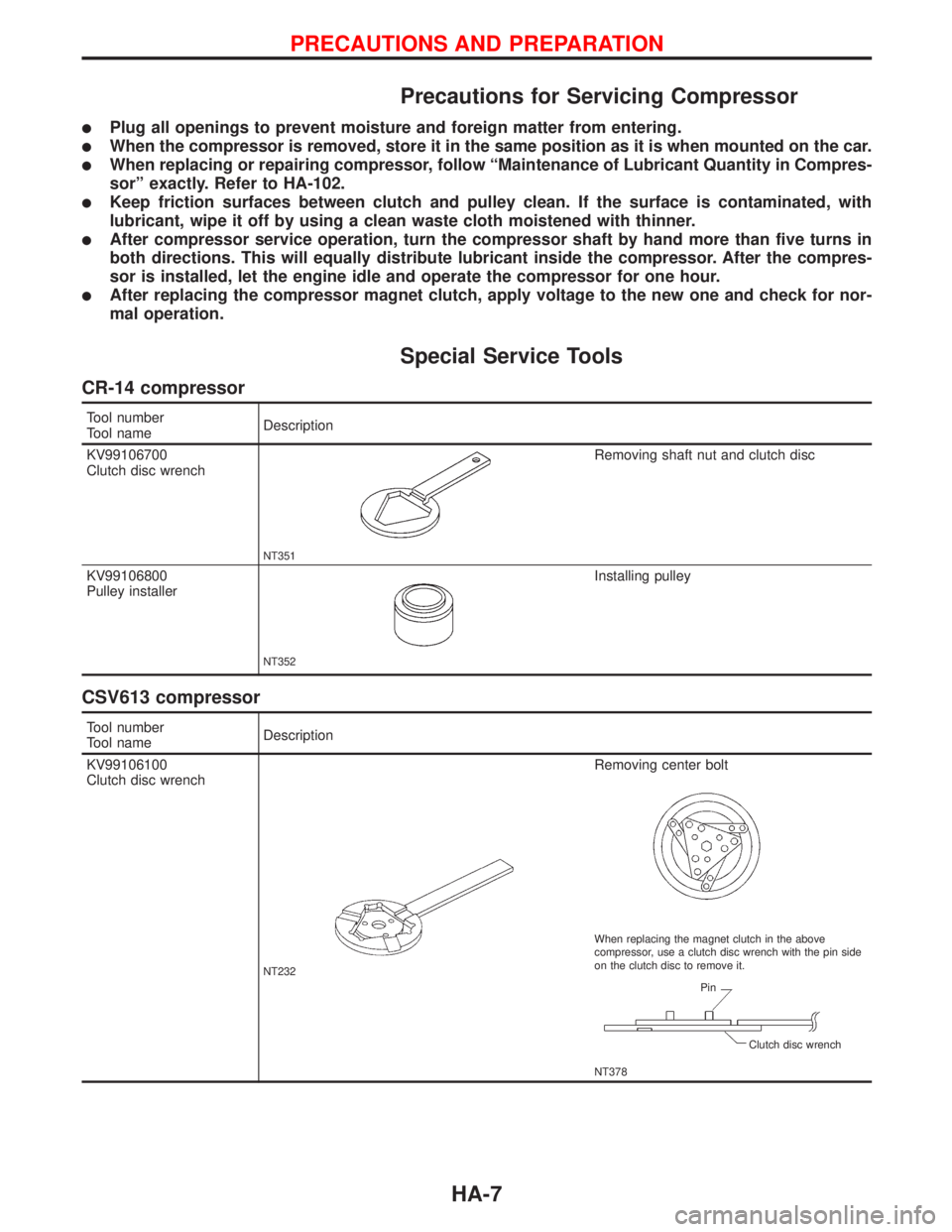
CR-14 compressor
Tool number
Tool nameDescription
KV99106700
Clutch disc wrench
NT351
Removing shaft nut and clutch disc
KV99106800
Pulley installer
NT352
Installing pulley
CSV613 compressor
Tool number
Tool nameDescription
KV99106100
Clutch disc wrench
NT232
Removing center bolt
NT378 When replacing the magnet clutch in the above
compressor, use a clutch disc wrench with the pin side
on the clutch disc to remove it.
Pin
Clutch disc wrench
PRECAUTIONS AND PREPARATION
HA-7
Page 1873 of 2267
Operational Check
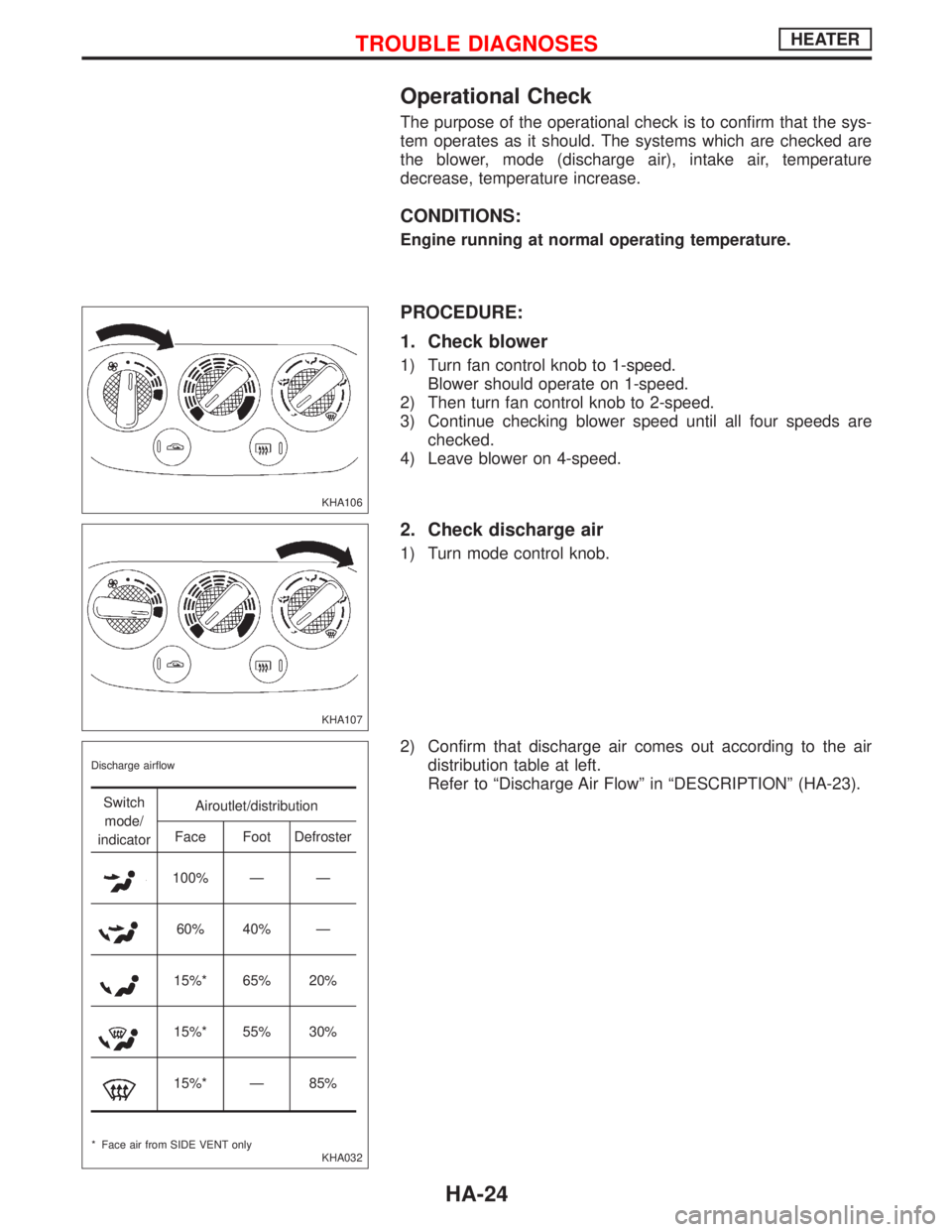
The purpose of the operational check is to confirm that the sys-
tem operates as it should. The systems which are checked are
the blower, mode (discharge air), intake air, temperature
decrease, temperature increase.
CONDITIONS:
Engine running at normal operating temperature.
PROCEDURE:
1. Check blower
1) Turn fan control knob to 1-speed.
Blower should operate on 1-speed.
2) Then turn fan control knob to 2-speed.
3) Continue checking blower speed until all four speeds are
checked.
4) Leave blower on 4-speed.
2. Check discharge air
1) Turn mode control knob.
2) Confirm that discharge air comes out according to the air
distribution table at left.
Refer to ªDischarge Air Flowº in ªDESCRIPTIONº (HA-23).
KHA106
KHA107
KHA032 Discharge airflow
Switch
mode/
indicatorAiroutlet/distribution
Face Foot Defroster
100% Ð Ð
60% 40% Ð
15%* 65% 20%
15%* 55% 30%
15%* Ð 85%
* Face air from SIDE VENT only
TROUBLE DIAGNOSESHEATER
HA-24
Page 1880 of 2267
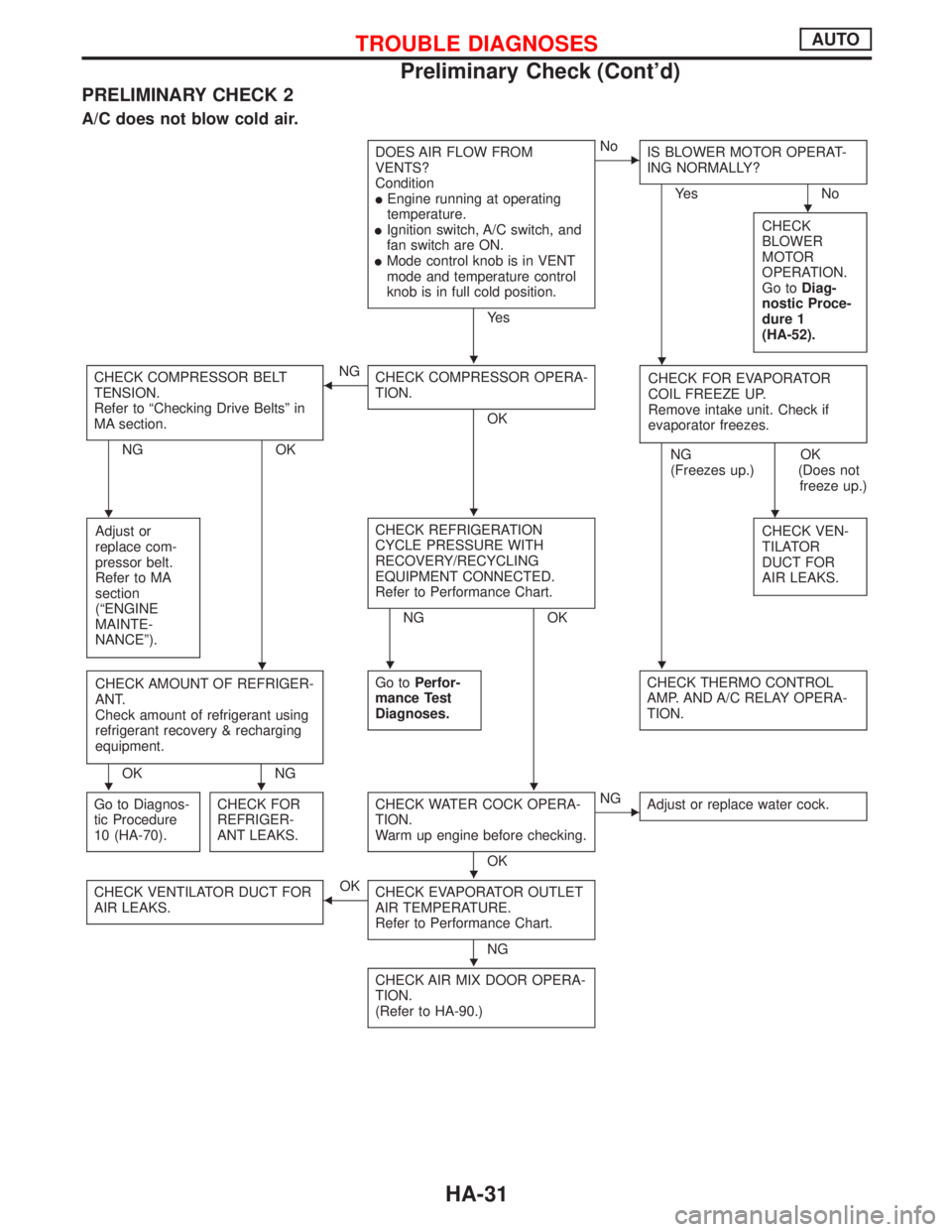
PRELIMINARY CHECK 2
A/C does not blow cold air.
DOES AIR FLOW FROM
VENTS?
Condition
lEngine running at operating
temperature.
lIgnition switch, A/C switch, and
fan switch are ON.
lMode control knob is in VENT
mode and temperature control
knob is in full cold position.
Ye s
ENo
IS BLOWER MOTOR OPERAT-
ING NORMALLY?
Ye s N o
CHECK
BLOWER
MOTOR
OPERATION.
Go toDiag-
nostic Proce-
dure 1
(HA-52).
CHECK COMPRESSOR BELT
TENSION.
Refer to ªChecking Drive Beltsº in
MA section.
NG OK
FNG
CHECK COMPRESSOR OPERA-
TION.
OKCHECK FOR EVAPORATOR
COIL FREEZE UP.
Remove intake unit. Check if
evaporator freezes.
NG
(Freezes up.)OK
(Does not
freeze up.)
Adjust or
replace com-
pressor belt.
Refer to MA
section
(ªENGINE
MAINTE-
NANCEº).
CHECK REFRIGERATION
CYCLE PRESSURE WITH
RECOVERY/RECYCLING
EQUIPMENT CONNECTED.
Refer to Performance Chart.
NG OKCHECK VEN-
TILATOR
DUCT FOR
AIR LEAKS.
CHECK AMOUNT OF REFRIGER-
ANT.
Check amount of refrigerant using
refrigerant recovery & recharging
equipment.
OK NGGo toPerfor-
mance Test
Diagnoses.
CHECK THERMO CONTROL
AMP. AND A/C RELAY OPERA-
TION.
Go to Diagnos-
tic Procedure
10 (HA-70).CHECK FOR
REFRIGER-
ANT LEAKS.CHECK WATER COCK OPERA-
TION.
Warm up engine before checking.
OK
ENG
Adjust or replace water cock.
CHECK VENTILATOR DUCT FOR
AIR LEAKS.FOK
CHECK EVAPORATOR OUTLET
AIR TEMPERATURE.
Refer to Performance Chart.
NG
CHECK AIR MIX DOOR OPERA-
TION.
(Refer to HA-90.)
H
HH
HHH
HHH
HHH
H
H
TROUBLE DIAGNOSESAUTO
Preliminary Check (Cont'd)
HA-31
Page 1881 of 2267
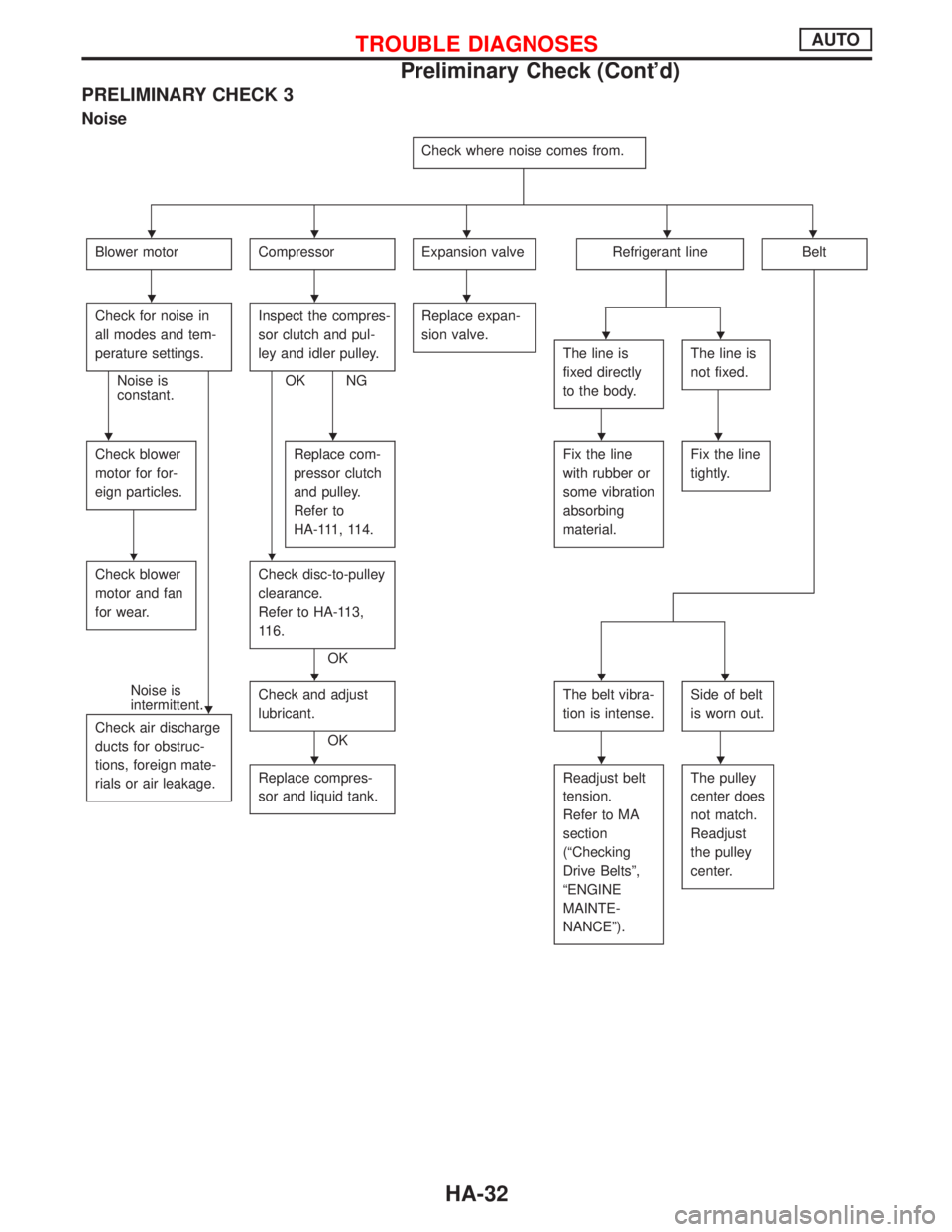
PRELIMINARY CHECK 3
Noise
Check where noise comes from.
Blower motorCompressorExpansion valveRefrigerant lineBelt
Check for noise in
all modes and tem-
perature settings.
Noise is
constant.Inspect the compres-
sor clutch and pul-
ley and idler pulley.OK NGReplace expan-
sion valve.
The line is
fixed directly
to the body.The line is
not fixed.
Check blower
motor for for-
eign particles.Replace com-
pressor clutch
and pulley.
Refer to
HA-111, 114.Fix the line
with rubber or
some vibration
absorbing
material.Fix the line
tightly.
Check blower
motor and fan
for wear.Check disc-to-pulley
clearance.
Refer to HA-113,
116.
OK
Noise is
intermittent.
Check air discharge
ducts for obstruc-
tions, foreign mate-
rials or air leakage.Check and adjust
lubricant.
OKThe belt vibra-
tion is intense.
Side of belt
is worn out.
Replace compres-
sor and liquid tank.Readjust belt
tension.
Refer to MA
section
(ªChecking
Drive Beltsº,
ªENGINE
MAINTE-
NANCEº).The pulley
center does
not match.
Readjust
the pulley
center.
HHHHH
HHH
HH
HHHH
HH
H
HHH
HHH
TROUBLE DIAGNOSESAUTO
Preliminary Check (Cont'd)
HA-32
Page 1885 of 2267
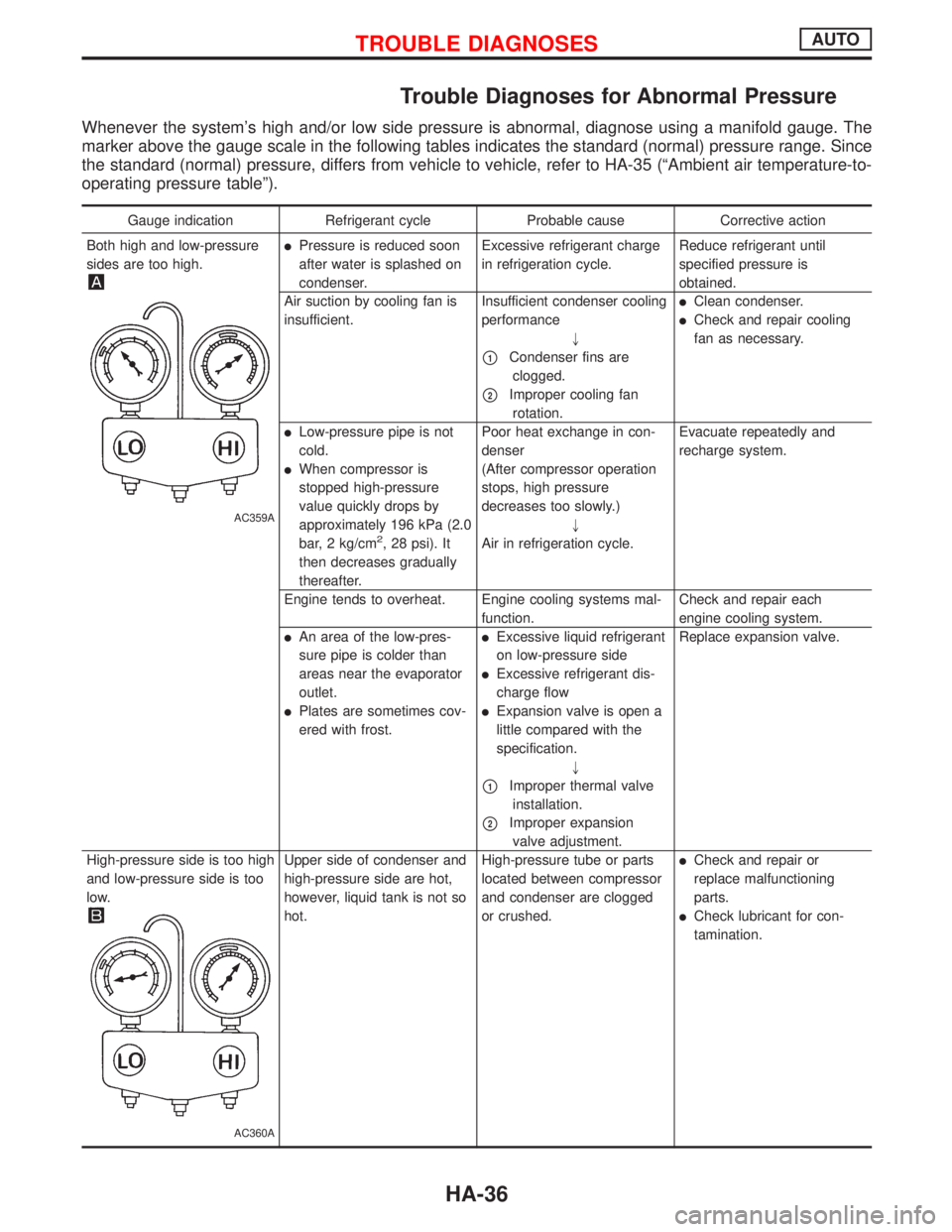
Trouble Diagnoses for Abnormal Pressure
Whenever the system's high and/or low side pressure is abnormal, diagnose using a manifold gauge. The
marker above the gauge scale in the following tables indicates the standard (normal) pressure range. Since
the standard (normal) pressure, differs from vehicle to vehicle, refer to HA-35 (ªAmbient air temperature-to-
operating pressure tableº).
Gauge indication Refrigerant cycle Probable cause Corrective action
Both high and low-pressure
sides are too high.
AC359A
lPressure is reduced soon
after water is splashed on
condenser.Excessive refrigerant charge
in refrigeration cycle.Reduce refrigerant until
specified pressure is
obtained.
Air suction by cooling fan is
insufficient.Insufficient condenser cooling
performance
"
p1Condenser fins are
clogged.
p2Improper cooling fan
rotation.
lClean condenser.
lCheck and repair cooling
fan as necessary.
lLow-pressure pipe is not
cold.
lWhen compressor is
stopped high-pressure
value quickly drops by
approximately 196 kPa (2.0
bar, 2 kg/cm
2, 28 psi). It
then decreases gradually
thereafter.Poor heat exchange in con-
denser
(After compressor operation
stops, high pressure
decreases too slowly.)
"
Air in refrigeration cycle.Evacuate repeatedly and
recharge system.
Engine tends to overheat. Engine cooling systems mal-
function.Check and repair each
engine cooling system.
lAn area of the low-pres-
sure pipe is colder than
areas near the evaporator
outlet.
lPlates are sometimes cov-
ered with frost.
lExcessive liquid refrigerant
on low-pressure side
lExcessive refrigerant dis-
charge flow
lExpansion valve is open a
little compared with the
specification.
"
p1Improper thermal valve
installation.
p2Improper expansion
valve adjustment.Replace expansion valve.
High-pressure side is too high
and low-pressure side is too
low.
AC360A
Upper side of condenser and
high-pressure side are hot,
however, liquid tank is not so
hot.High-pressure tube or parts
located between compressor
and condenser are clogged
or crushed.lCheck and repair or
replace malfunctioning
parts.
lCheck lubricant for con-
tamination.
TROUBLE DIAGNOSESAUTO
HA-36
Page 1914 of 2267
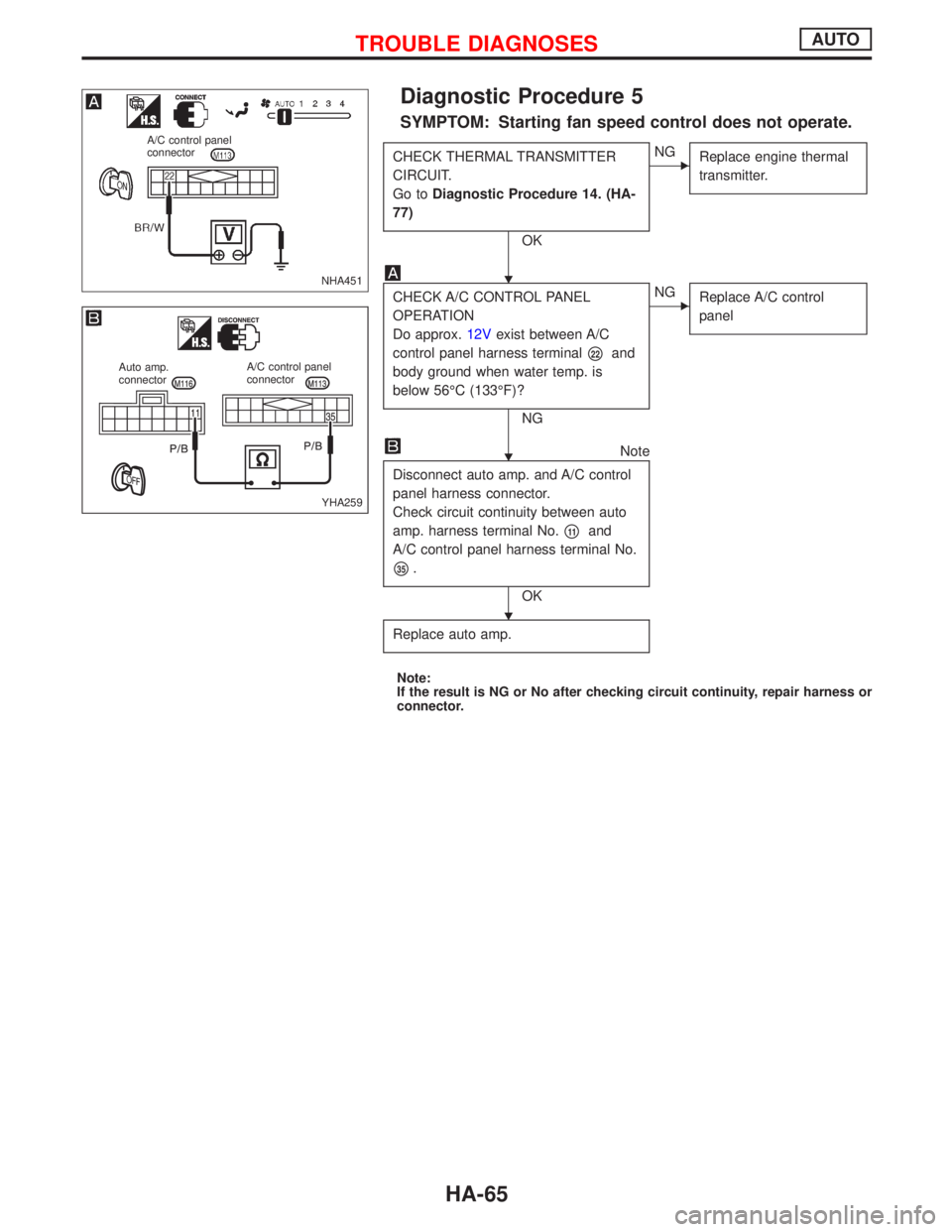
Diagnostic Procedure 5
SYMPTOM: Starting fan speed control does not operate.
CHECK THERMAL TRANSMITTER
CIRCUIT.
Go toDiagnostic Procedure 14. (HA-
77)
OK
ENG
Replace engine thermal
transmitter.
CHECK A/C CONTROL PANEL
OPERATION
Do approx.12Vexist between A/C
control panel harness terminal
p22and
body ground when water temp. is
below 56ÉC (133ÉF)?
NG
ENG
Replace A/C control
panel
Note
Disconnect auto amp. and A/C control
panel harness connector.
Check circuit continuity between auto
amp. harness terminal No.
p11and
A/C control panel harness terminal No.
p35.
OK
Replace auto amp.
Note:
If the result is NG or No after checking circuit continuity, repair harness or
connector.
NHA451
A/C control panel
connector
YHA259
Auto amp.
connectorA/C control panel
connector
H
H
H
TROUBLE DIAGNOSESAUTO
HA-65