change NISSAN SENTRA 2006 B15 / 5.G Navigation Manual
[x] Cancel search | Manufacturer: NISSAN, Model Year: 2006, Model line: SENTRA, Model: NISSAN SENTRA 2006 B15 / 5.GPages: 272, PDF Size: 5.53 MB
Page 195 of 272
![NISSAN SENTRA 2006 B15 / 5.G Navigation Manual
You can change the categories used for
searching facilities nearby.
The modified list of facilities can be used for
searching for a location using [Nearby Places].
“SETTING A NEARBY PLACE”
(page](/img/5/699/w960_699-194.png "NISSAN SENTRA 2006 B15 / 5.G Navigation Manual
You can change the categories used for
searching facilities nearby.
The modified list of facilities can be used for
searching for a location using [Nearby Places].
“SETTING A NEARBY PLACE”
(page")
You can change the categories used for
searching facilities nearby.
The modified list of facilities can be used for
searching for a location using [Nearby Places].
“SETTING A NEARBY PLACE”
(page 4-47)
NAV3055
Armada, Maxima, Murano, Pathfinder, Quest,Titan
NAV3029
350Z1. Highlight [Navigation] and push
.
NAV2988
2. Highlight [Nearby Places Custom Settings]
and push
CUSTOMIZING NEARBY PLACES
Storing a location/route
6-33
Page 209 of 272
![NISSAN SENTRA 2006 B15 / 5.G Navigation Manual
LANGUAGE AND UNIT SETTINGSThis allows you to change the language and
measurement unit used in the system.
NAV3031
Language settings1. Highlight [Language/Units] and push<ENTER> .
NAV3032
2. Highlight](/img/5/699/w960_699-208.png "NISSAN SENTRA 2006 B15 / 5.G Navigation Manual
LANGUAGE AND UNIT SETTINGSThis allows you to change the language and
measurement unit used in the system.
NAV3031
Language settings1. Highlight [Language/Units] and push<ENTER> .
NAV3032
2. Highlight")
LANGUAGE AND UNIT SETTINGSThis allows you to change the language and
measurement unit used in the system.
NAV3031
Language settings1. Highlight [Language/Units] and push
NAV3032
2. Highlight the preferred setting item and
push
selected item illuminates.
Available languages
— English
— Franc¸ ais
Other settings
8-7
Page 210 of 272
![NISSAN SENTRA 2006 B15 / 5.G Navigation Manual
NAV3033
3. A message is displayed. Confirm the con-tents of the message.
After confirming the message, highlight [Yes]
and push <ENTER> .
NAV3034
4. The program loading screen is displayed,
and the s](/img/5/699/w960_699-209.png "NISSAN SENTRA 2006 B15 / 5.G Navigation Manual
NAV3033
3. A message is displayed. Confirm the con-tents of the message.
After confirming the message, highlight [Yes]
and push <ENTER> .
NAV3034
4. The program loading screen is displayed,
and the s")
NAV3033
3. A message is displayed. Confirm the con-tents of the message.
After confirming the message, highlight [Yes]
and push
NAV3034
4. The program loading screen is displayed,
and the system initiates language setting.
Upon completion, the start-up screen is
automatically displayed.
CAUTION
Do not change the ignition switch posi-
tion while changing the language. Doing
so may cause a system malfunction.
8-8
Other settings
Page 212 of 272
![NISSAN SENTRA 2006 B15 / 5.G Navigation Manual
CLOCK SETTINGSThis allows you to change the clock settings.Basic operation1. Highlight [Clock] and push<ENTER>.
2. Highlight the preferred adjustment item.
3. Use the joystick to adjust to the prefer](/img/5/699/w960_699-211.png "NISSAN SENTRA 2006 B15 / 5.G Navigation Manual
CLOCK SETTINGSThis allows you to change the clock settings.Basic operation1. Highlight [Clock] and push<ENTER>.
2. Highlight the preferred adjustment item.
3. Use the joystick to adjust to the prefer")
CLOCK SETTINGSThis allows you to change the clock settings.Basic operation1. Highlight [Clock] and push
2. Highlight the preferred adjustment item.
3. Use the joystick to adjust to the preferred setting.
4. After setting, push
5. Push
previous screen. Push
Page 219 of 272
![NISSAN SENTRA 2006 B15 / 5.G Navigation Manual
CLOCK SETTINGSThis allows you to change the clock settings.Basic operation1. Highlight [Clock] and push<ENTER>.
2. Highlight the preferred adjustment item and push <ENTER> .
3. Use the joystick to ad](/img/5/699/w960_699-218.png "NISSAN SENTRA 2006 B15 / 5.G Navigation Manual
CLOCK SETTINGSThis allows you to change the clock settings.Basic operation1. Highlight [Clock] and push<ENTER>.
2. Highlight the preferred adjustment item and push <ENTER> .
3. Use the joystick to ad")
CLOCK SETTINGSThis allows you to change the clock settings.Basic operation1. Highlight [Clock] and push
2. Highlight the preferred adjustment item and push
3. Use the joystick to adjust to the preferred setting.
Push
to set ON/OFF.
4. After setting, push
to apply the setting.
5. Push
screen. Push
Page 221 of 272
![NISSAN SENTRA 2006 B15 / 5.G Navigation Manual
LANGUAGE AND UNIT SETTINGSThis allows you to change the language and
measurement unit used in the system.
NAV3009
Language settings1. Highlight [Language/Units] and push<ENTER> .
NAV3010
2. Highlight](/img/5/699/w960_699-220.png "NISSAN SENTRA 2006 B15 / 5.G Navigation Manual
LANGUAGE AND UNIT SETTINGSThis allows you to change the language and
measurement unit used in the system.
NAV3009
Language settings1. Highlight [Language/Units] and push<ENTER> .
NAV3010
2. Highlight")
LANGUAGE AND UNIT SETTINGSThis allows you to change the language and
measurement unit used in the system.
NAV3009
Language settings1. Highlight [Language/Units] and push
NAV3010
2. Highlight [Select Language] and push
Other settings
8-19
Page 222 of 272
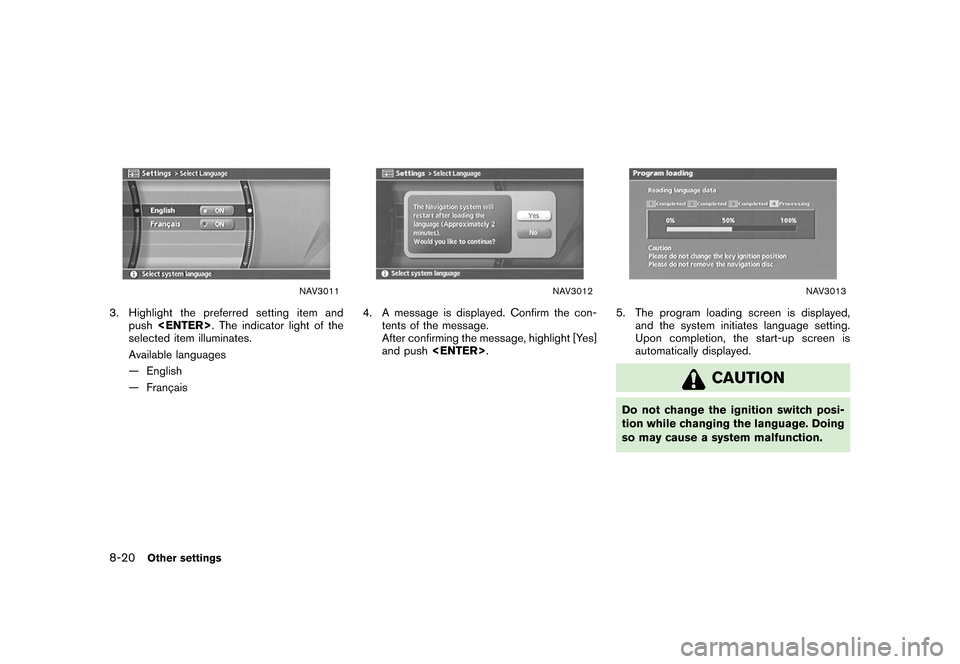
NAV3011
3. Highlight the preferred setting item andpush
selected item illuminates.
Available languages
— English
— Franc¸ ais
NAV3012
4. A message is displayed. Confirm the con-
tents of the message.
After confirming the message, highlight [Yes]
and push
NAV3013
5. The program loading screen is displayed,
and the system initiates language setting.
Upon completion, the start-up screen is
automatically displayed.
CAUTION
Do not change the ignition switch posi-
tion while changing the language. Doing
so may cause a system malfunction.
8-20
Other settings
Page 224 of 272
![NISSAN SENTRA 2006 B15 / 5.G Navigation Manual
This allows you to change the map color.
NAV3005
1. Highlight [Navigation] and push<ENTER>
.
2. Highlight [Map Color Settings] and push <ENTER> .
NAV3006
3. Highlight the preferred map color and push](/img/5/699/w960_699-223.png "NISSAN SENTRA 2006 B15 / 5.G Navigation Manual
This allows you to change the map color.
NAV3005
1. Highlight [Navigation] and push<ENTER>
.
2. Highlight [Map Color Settings] and push <ENTER> .
NAV3006
3. Highlight the preferred map color and push")
This allows you to change the map color.
NAV3005
1. Highlight [Navigation] and push
.
2. Highlight [Map Color Settings] and push
NAV3006
3. Highlight the preferred map color and push
lected color illuminates.
Available map colors
Warm: Sets warm colors for the map coloring.
Cool: Sets cool colors for the map color- ing.
INFO:
You can confirm the effect of your setting on the
preview displayed on the right side of the
screen.
MAP COLOR SETTINGS8-22
Other settings
Page 235 of 272
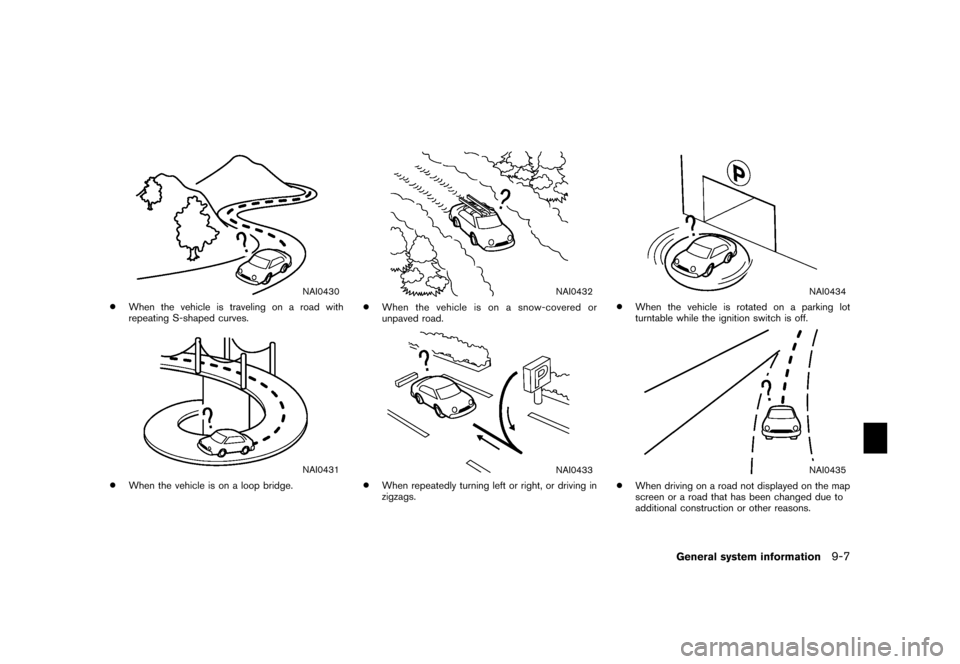
NAI0430
*
When the vehicle is traveling on a road with
repeating S-shaped curves.
NAI0431
*
When the vehicle is on a loop bridge.
NAI0432
*
When the vehicle is on a snow-covered or
unpaved road.
NAI0433
*
When repeatedly turning left or right, or driving in
zigzags.
NAI0434
*
When the vehicle is rotated on a parking lot
turntable while the ignition switch is off.
NAI0435
*
When driving on a road not displayed on the map
screen or a road that has been changed due to
additional construction or other reasons.
General system information
9-7
Page 238 of 272
.If waypoints are set, the system calculates
multiple routes between waypoints simulta-
neously, and the following may result.
— If one section between waypoints cannot
be calculated, none of the route will be
displayed.
— The route may not connect completely at some waypoints.
— The route may require a U-turn close to some waypoints.
. Route calculation may not be completed in
the following cases.
— If there is no main road within a range of
1.5 miles (2.5 km) from the vehicle, a
message saying so will appear on the
screen. Try recalculating when the vehi-
cle is closer to a main road.
— If there is no main road within a range of 1.5 miles (2.5 km) from the destination or
waypoint, a message saying so will
appear on the screen. Try setting the
location closer to a main road.
— If the vehicle is too close to the destination or if there are no roads to
the destination, a message saying so will
appear on the screen. — If it is impossible to reach the destination
or waypoints because of traffic regula-
tions, etc.
— If the only route to reach the destination or waypoints is extremely complicated.
— If the destination, current vehicle position or waypoint is within the “Avoid Area”.
— If a part of the route is included in the “Avoid Area”.
. The following may occur when the route is
displayed.
— If you calculate a route on a main road,
the starting point of the route may not
exactly match the current vehicle loca-
tion.
— The endpoint of the route may not exactly match the destination.
— If you calculate a route on a main road, the system may display a route from
another main road. This may be because
the position of the vehicle icon is not
accurate. In this case, park the vehicle in
a safe location and reset the vehicle
icon, or continue driving to see if the
position of the vehicle icon is automati-
cally adjusted before recalculating the
route. — There are cases in which the system
shows an indirect route to reach the
destination or waypoints, if you set them
from stored or facility information. In
order to correct this, you must be careful
about the traffic direction, especially
when lanes with different travel direc-
tions are shown separately, such as
interchanges and service areas.
— This system makes no distinction be- tween limited traffic control and total
control (blockage) . It may show an
indirect route even if the road is usable.
— Even if the freeway preference is set to OFF, a route that uses the freeway may
be suggested.
— Even if the preference is set to OFF, a route that uses a ferry line may be
suggested.
— Ferry lines, excluding those that are only for pedestrians, bicycles and motor-
cycles, are stored in this system. Take
into consideration the travel time re-
quired and operational condition before
deciding whether to use them or not.9-10
General system information