change NISSAN SENTRA 2006 B15 / 5.G Navigation Manual
[x] Cancel search | Manufacturer: NISSAN, Model Year: 2006, Model line: SENTRA, Model: NISSAN SENTRA 2006 B15 / 5.GPages: 272, PDF Size: 5.53 MB
Page 259 of 272
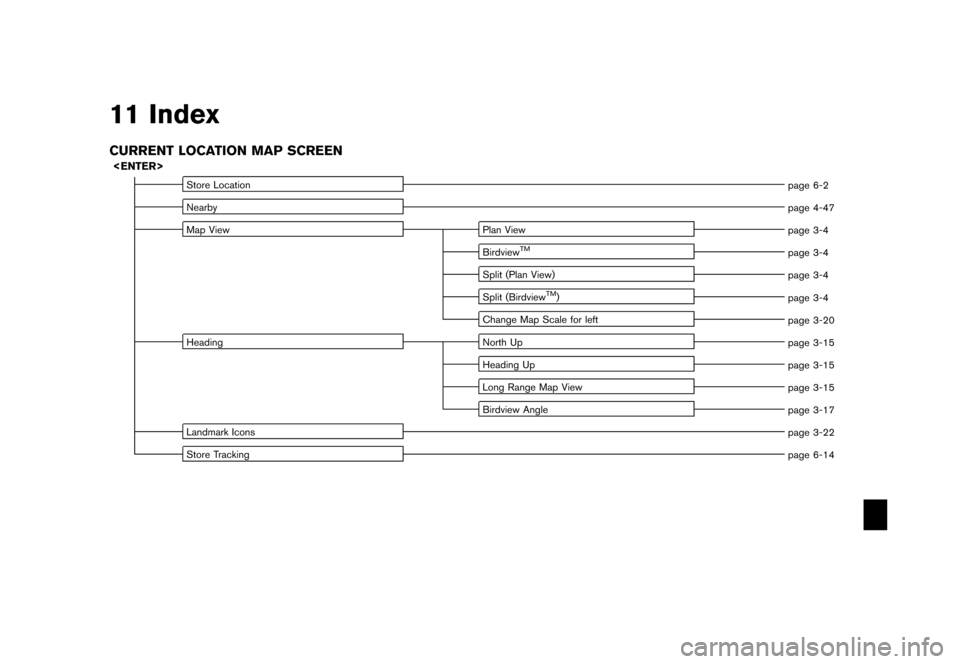
11 IndexCURRENT LOCATION MAP SCREEN
Store Locationpage 6-2
Nearby page 4-47
Map View Plan View
page 3-4
Birdview
TM
page 3-4
Split (Plan View) page 3-4
Split (Birdview
TM) page 3-4
Change Map Scale for left page 3-20
Heading North Up
page 3-15
Heading Up page 3-15
Long Range Map View page 3-15
Birdview Angle page 3-17
Landmark Icons page 3-22
Store Tracking page 6-14
Page 262 of 272
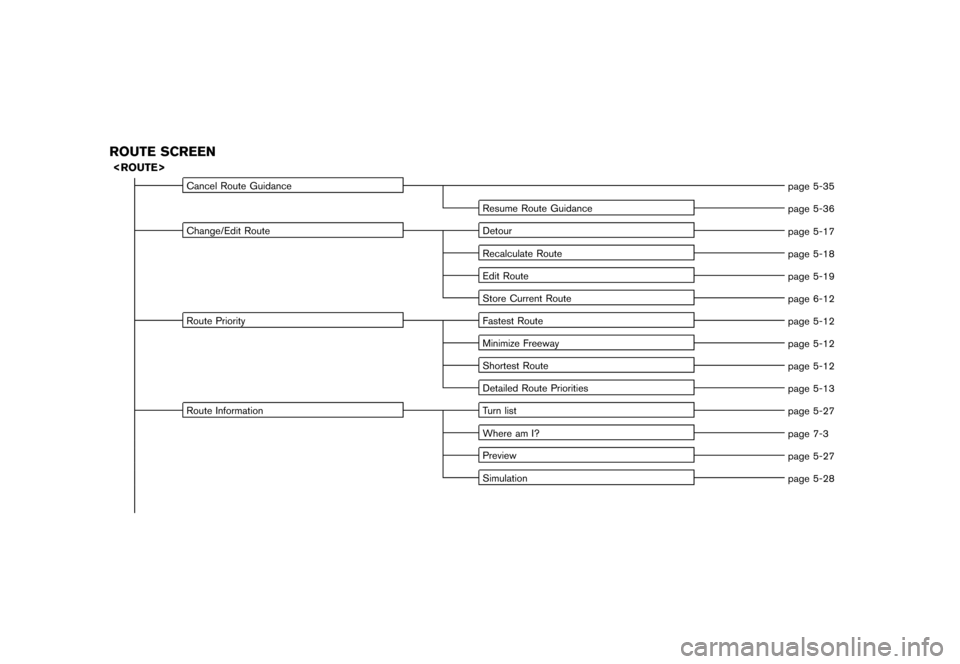
ROUTE SCREEN
Cancel Route Guidancepage 5-35
Resume Route Guidance page 5-36
Change/Edit Route Detour
page 5-17
Recalculate Route page 5-18
Edit Route page 5-19
Store Current Route page 6-12
Route Priority Fastest Route
page 5-12
Minimize Freeway page 5-12
Shortest Route page 5-12
Detailed Route Priorities page 5-13
Route Information Turn list
page 5-27
Where am I? page 7-3
Preview page 5-27
Simulation page 5-28
Page 271 of 272
A
About route guidance............................... 5-7
About the map DVD-ROM ........................ 9-15
Adding a destination or waypoint ................... 5-5
Adding additional destinations to a route ........ 4-52
Address book ........................................ 9-2
Adjusting the current vehicle location ............ 8-23
Adjusting the location of the destination ......... 4-51
Adjusting voice guidance volume ................. 2-38
Automatic reroute .................................... 9-2
Avoid area settings ............................ 6-7, 9-2
B
Background Color................................. 8-15
Basics of voice guidance ......................... 9-11
Birdview
TM................................. 3-3, 3-8, 9-3
Brightness ..................................... 8-4, 8-14
C
Change/edit route ................................. 5-15
Changing the Birdview
TM
angle .................. 3-17
Changing the scale of a map .............. 2-20, 3-12
Changing the scale of the left screen ............ 3-20
Character (letter and number) input screen ..... 2-24
Characteristics of a liquid crystal display ........ 9-20
Clock settings ............................... 8-10, 8-17
Confirming a route ............................ 5-4, 5-26
Confirming by simulation .......................... 5-28
Control panel ......................................... 2-3
Current vehicle location ............................. 9-3
Customer assistance .............................. 10-2
Customizing nearby places ....................... 6-33
D
Deleting a route............................. 2-34, 5-35
Deleting a stored item ............................. 6-28
Deleting a stored item individually ................ 6-28
Deleting all stored items .......................... 6-31
Deleting an individual item on the map .......... 6-30
Destination screen ................................... 4-2
Detailed route priorities ............................ 5-13
Detour ................................................ 9-2
Directions provided and the distances to
guide points ........................................ 9-11
Disc replacement .................................. 9-18
Display of current vehicle location .................. 9-3
Display settings ............................... 8-3, 8-13
Displaying landmark icons ......................... 3-22
E
Editing a route..................................... 5-19
Editing the address book ......................... 6-15
Editing the avoid area ............................. 6-27
Editing the stored home and location ............ 6-16
Editing the stored route ........................... 6-25
Editing the stored tracking ........................ 6-26
F
For safe operation................................... 1-2
Free zoom ................................... 2-20, 3-12
Functions disabled while driving .................. 2-14
G
Guidance screens and preview mode ............. 5-8
H
Heading up
......................................... 3-16
How to close the cover of the LCD ................ 2-6
How to handle the display ........................ 9-20
How to handle the DVD-ROM .................... 9-19
How to open the cover of the LCD ................ 2-5
How to order map DVD-ROM updates .......... 9-15
How to store your home .......................... 2-21
How to use this manual ............................. 1-2
How to view map screen .......................... 2-15
I
Incorrect display of vehicle position ................ 9-6
Information screen (350Z only) ..................... 7-2
L
Language setting
............................. 8-7, 8-17
Laser product ........................................ 1-4
List screen .......................................... 2-28
Long Range Map View ............................ 3-16
M
Maintenance of the display ........................ 9-20
Map color settings ................................. 8-22
Map DVD-ROM ............................. 9-15, 10-6
Map DVD-ROM drive location .................... 9-16
Map icons .......................................... 3-22
Map menu screen .................................. 2-11
Map scale .......................................... 3-13
Map screen types .................................. 2-16
Map scrolling information .......................... 3-10
Map symbols ....................................... 3-24