ECO mode NISSAN TEANA 2008 Service Manual
[x] Cancel search | Manufacturer: NISSAN, Model Year: 2008, Model line: TEANA, Model: NISSAN TEANA 2008Pages: 5121, PDF Size: 69.03 MB
Page 2823 of 5121
![NISSAN TEANA 2008 Service Manual BLOWER MOTOR
HAC-195
< COMPONENT DIAGNOSIS >[WITH 7 INCH DISPLAY]
C
D
E
F
G
H
J
K
L
MA
B
HAC
N
O
P
Is the inspection result normal?
YES >> GO TO 6.
NO >> Repair harness or connector.
6.CHECK A/C AUTO](/img/5/57391/w960_57391-2822.png "NISSAN TEANA 2008 Service Manual BLOWER MOTOR
HAC-195
< COMPONENT DIAGNOSIS >[WITH 7 INCH DISPLAY]
C
D
E
F
G
H
J
K
L
MA
B
HAC
N
O
P
Is the inspection result normal?
YES >> GO TO 6.
NO >> Repair harness or connector.
6.CHECK A/C AUTO")
BLOWER MOTOR
HAC-195
< COMPONENT DIAGNOSIS >[WITH 7 INCH DISPLAY]
C
D
E
F
G
H
J
K
L
MA
B
HAC
N
O
P
Is the inspection result normal?
YES >> GO TO 6.
NO >> Repair harness or connector.
6.CHECK A/C AUTO AMP. OUTPUT SIGNAL
1. Reconnect blower motor connector and A/C auto amp. connector.
2. Turn ignition switch ON.
3. Set MODE switch to the VENT position.
4. Check the output waveform between blower motor harness connector and ground using an oscilloscope,
while varying the fan speed from 1 to 7.
Is the inspection result normal?
YES >> Replace the blower motor.
NO >> Replace the A/C auto amp.
7.CHECK POWER VOLTAGE OF BLOWER RELAY
1. Turn the ignition switch OFF.
2. Remove the blower relay. Refer to PG-101, "
Fuse, Connector and Terminal Arrangement".
3. Turn the ignition switch ON.
4. Check the voltage between blower relay fuse block side terminal and ground. Refer to PG-101, "
Fuse,
Connector and Terminal Arrangement" for relay terminal assignment.
Is the inspection result normal?
YES >> GO TO 8.
NO >> Inspection the power supply circuit. Refer to PG-55, "
Wiring Diagram - IGNITION POWER SUP-
PLY -".
8.CHECK BLOWER RELAY
1. Turn the ignition switch OFF.
2. Install the blower relay. Refer to PG-101, "
Fuse, Connector and Terminal Arrangement".
3. Turn the ignition switch ON.
4. Check the operating sound of blower relay.
Blower motor A/C auto amp.
Continuity
Connector Terminal Connector Terminal
M98 2 M50 32 Existed
JPIIA1025GB
(+) (−)
Vo l ta g e
Blower relay —
1
Ground Battery voltage
3
Page 2894 of 5121

DIAGNOSIS SYSTEM (BCM)
INL-15
< FUNCTION DIAGNOSIS >
C
D
E
F
G
H
I
J
K
MA
B
INL
N
O
P
The BCM records the following condition at the moment a particular DTC is detected.
Vehicle Speed
Odo/Trip Meter
Vehicle Condition (BCM detected condition)
IGN Counter
IGN counter indicates the number of times that ignition switch is turned ON after DTC is detected.
The number is 0 when a malfunction is detected now.
The number increases like 1 → 2 → 3...38 → 39 after returning to the normal condition whenever ignition
switch OFF → ON.
The number is fixed to 39 until the self-diagnosis results are erased if it is over 39.
INT LAMP
CONSULT screen terms Description
SLEEP>LOCKWhile turning BCM status from low power consumption mode to normal mode (Power supply
position is “LOCK”.)
SLEEP>OFFWhile turning BCM status from low power consumption mode to normal mode (Power supply
position is “OFF”.)
LOCK>ACC While turning power supply position from “LOCK” to “ACC”
ACC>ON While turning power supply position from “ACC” to “IGN”
RUN>ACCWhile turning power supply position from “RUN” to “ACC” (Vehicle is stopping and selector
lever is except P position.)
CRANK>RUNWhile turning power supply position from “CRANKING” to “RUN” (From cranking up the en-
gine to run it)
RUN>URGENT While turning power supply position from “RUN“ to “ACC” (Emergency stop operation)
ACC>OFF While turning power supply position from “ACC” to “OFF”
OFF>LOCK While turning power supply position from “OFF” to “LOCK”
OFF>ACC While turning power supply position from “OFF” to “ACC”
ON>CRANK While turning power supply position from “IGN” to “CRANKING”
OFF>SLEEPWhile turning BCM status from normal mode (Power supply position is “OFF”.) to low power
consumption mode
LOCK>SLEEPWhile turning BCM status from normal mode (Power supply position is “LOCK”.) to low pow-
er consumption mode
LOCK Power supply position is “LOCK” (Ignition switch OFF with steering is locked.)
OFF Power supply position is “OFF” (Ignition switch OFF with steering is unlocked.)
ACC Power supply position is “ACC” (Ignition switch ACC)
ON Power supply position is “IGN” (Ignition switch ON with engine stopped)
ENGINE RUN Power supply position is “RUN” (Ignition switch ON with engine running)
CRANKING Power supply position is “CRANKING” (At engine cranking)
Page 3043 of 5121
SQUEAK AND RATTLE TROUBLE DIAGNOSES
IP-3
< SYMPTOM DIAGNOSIS >
C
D
E
F
G
H
I
K
L
MA
B
IP
N
O
P
If possible, drive the vehicle with the customer until the noise is duplicated. Note any additional information on
the Diagnostic Worksheet regarding the conditions or location of the noise. This information can be used to
duplicate the same conditions when the repair is reconfirmed.
If the noise can be duplicated easily during the test drive, to help identify the source of the noise, try to dupli-
cate the noise with the vehicle stopped by doing one or all of the following:
1) Close a door.
2) Tap or push/pull around the area where the noise appears to be coming from.
3) Rev the engine.
4) Use a floor jack to recreate vehicle “twist”.
5) At idle, apply engine load (electrical load, half-clutch on M/T model, drive position on A/T model).
6) Raise the vehicle on a hoist and hit a tire with a rubber hammer.
Drive the vehicle and attempt to duplicate the conditions the customer states exist when the noise occurs.
If it is difficult to duplicate the noise, drive the vehicle slowly on an undulating or rough road to stress the
vehicle body.
LOCATE THE NOISE AND IDENTIFY THE ROOT CAUSE
1. Narrow down the noise to a general area. To help pinpoint the source of the noise, use a listening tool
(Engine Ear or mechanics stethoscope).
2. Narrow down the noise to a more specific area and identify the cause of the noise by:
Removing the components in the area that is are suspected to be the cause of the noise.
Do not use too much force when removing clips and fasteners, otherwise clips and fastener can be broken
or lost during the repair, resulting in the creation of new noise.
Tapping or pushing/pulling the component that is are suspected to be the cause of the noise.
Do not tap or push/pull the component with excessive force, otherwise the noise will be eliminated only tem-
porarily.
Feeling for a vibration by hand by touching the component(s) that is are suspected to be the cause of the
noise.
Placing a piece of paper between components that is are suspected to be the cause of the noise.
Looking for loose components and contact marks.
Refer to IP-4, "
Inspection Procedure".
REPAIR THE CAUSE
If the cause is a loose component, tighten the component securely.
If the cause is insufficient clearance between components:
- Separate components by repositioning or loosening and retightening the component, if possible.
- Insulate components with a suitable insulator such as urethane pads, foam blocks, felt cloth tape or ure-
thane tape. These insulators are available through the authorized Nissan Parts Department.
CAUTION:
Never use excessive force as many components are constructed of plastic and may be damaged.
NOTE:
URETHANE PADS
Insulates connectors, harness, etc.
INSULATOR (Foam blocks)
Insulates components from contact. Can be used to fill space behind a panel.
INSULATOR (Light foam block)
FELT CLOTHTAPE
Used to insulate where movement does not occur. Ideal for instrument panel applications.
The following materials, not available through NISSAN Parts Department, can also be used to repair
squeaks and rattles.
UHMW(TEFLON) TAPE
Insulates where slight movement is present. Ideal for instrument panel applications.
SILICONE GREASE
Used in place of UHMW tape that is be visible or does not fit.
Note: Will only last a few months.
SILICONE SPRAY
Used when grease cannot be applied.
DUCT TAPE
Used to eliminate movement.
CONFIRM THE REPAIR
Page 3075 of 5121
![NISSAN TEANA 2008 Service Manual LAN-8
< FUNCTION DIAGNOSIS >[CAN FUNDAMENTAL]
TROUBLE DIAGNOSIS
TROUBLE DIAGNOSIS
Condition of Error DetectionINFOID:0000000003767670
“U1000” or “U1001” is indicated on SELF-DIAG RESULTS on CO](/img/5/57391/w960_57391-3074.png "NISSAN TEANA 2008 Service Manual LAN-8
< FUNCTION DIAGNOSIS >[CAN FUNDAMENTAL]
TROUBLE DIAGNOSIS
TROUBLE DIAGNOSIS
Condition of Error DetectionINFOID:0000000003767670
“U1000” or “U1001” is indicated on SELF-DIAG RESULTS on CO")
LAN-8
< FUNCTION DIAGNOSIS >[CAN FUNDAMENTAL]
TROUBLE DIAGNOSIS
TROUBLE DIAGNOSIS
Condition of Error DetectionINFOID:0000000003767670
“U1000” or “U1001” is indicated on SELF-DIAG RESULTS on CONSULT-III if CAN communication signal is
not transmitted or received between units for 2 seconds or more.
CAN COMMUNICATION SYSTEM ERROR
CAN communication line open (CAN-H, CAN-L, or both)
CAN communication line short (ground, between CAN communication lines, other harnesses)
Error of CAN communication control circuit of the unit connected to CAN communication line
WHEN “U1000” OR “U1001” IS INDICATED EVEN THOUGH CAN COMMUNICATION SYSTEM IS
NORMAL
Removal/installation of parts: Error may be detected when removing and installing CAN communication unit
and related parts while turning the ignition switch ON. (A DTC except for CAN communication may be
detected.)
Fuse blown out (removed): CAN communication of the unit may cease.
Voltage drop: Error may be detected if voltage drops due to discharged battery when turning the ignition
switch ON (Depending on the control unit which carries out CAN communication).
Error may be detected if the power supply circuit of the control unit, which carries out CAN communication,
malfunctions (Depending on the control unit which carries out CAN communication).
Error may be detected if reprogramming is not completed normally.
NOTE:
CAN communication system is normal if “U1000” or “U1001” is indicated on SELF-DIAG RESULTS of CON-
SULT-III under the above conditions. Erase the memory of the self-diagnosis of each unit.
Symptom When Error Occurs in CAN Communication SystemINFOID:0000000003767671
In CAN communication system, multiple units mutually transmit and receive signals. Each unit cannot transmit
and receive signals if any error occurs on CAN communication line. Under this condition, multiple control units
related to the root cause malfunction or go into fail-safe mode.
ERROR EXAMPLE
NOTE:
Each vehicle differs in symptom of each unit under fail-safe mode and CAN communication line wiring.
Refer to LAN-19, "
Abbreviation List" for the unit abbreviation.
Example: TCM branch line open circuit
SKIB8738E
Unit name Symptom
ECM Engine torque limiting is affected, and shift harshness increases.
BCM Reverse warning chime does not sound.
Page 3078 of 5121
![NISSAN TEANA 2008 Service Manual LAN
TROUBLE DIAGNOSIS
LAN-11
< FUNCTION DIAGNOSIS >[CAN FUNDAMENTAL]
C
D
E
F
G
H
I
J
K
L B A
O
P N
CAN Diagnosis with CONSULT-IIIINFOID:0000000003767672
CAN diagnosis on CONSULT-III extracts the root](/img/5/57391/w960_57391-3077.png "NISSAN TEANA 2008 Service Manual LAN
TROUBLE DIAGNOSIS
LAN-11
< FUNCTION DIAGNOSIS >[CAN FUNDAMENTAL]
C
D
E
F
G
H
I
J
K
L B A
O
P N
CAN Diagnosis with CONSULT-IIIINFOID:0000000003767672
CAN diagnosis on CONSULT-III extracts the root")
LAN
TROUBLE DIAGNOSIS
LAN-11
< FUNCTION DIAGNOSIS >[CAN FUNDAMENTAL]
C
D
E
F
G
H
I
J
K
L B A
O
P N
CAN Diagnosis with CONSULT-IIIINFOID:0000000003767672
CAN diagnosis on CONSULT-III extracts the root cause by receiving the following information.
Response to the system call
Control unit diagnosis information
Self-diagnosis
CAN diagnostic support monitor
Self-DiagnosisINFOID:0000000003767673
CAN Diagnostic Support MonitorINFOID:0000000003767674
MONITOR ITEM (CONSULT-III)
Unit name Symptom
ECM Engine torque limiting is affected, and shift harshness increases.
Engine speed drops.
BCM Reverse warning chime does not sound.
The front wiper moves under continuous operation mode even though the front
wiper switch being in the intermittent position.
The room lamp does not turn ON.
The engine does not start (if an error or malfunction occurs while turning the igni-
tion switch OFF.)
The steering lock does not release (if an error or malfunction occurs while turning
the ignition switch OFF.)
EPS control unit The steering effort increases.
Combination meter The tachometer and the speedometer do not move.
Warning lamps turn ON.
Indicator lamps do not turn ON.
ABS actuator and electric unit (control unit) Normal operation.
TCM No impact on operation.
IPDM E/RWhen the ignition switch is ON,
The headlamps (Lo) turn ON.
The cooling fan continues to rotate.
DTCSelf-diagnosis item
(CONSULT-III indication)DTC detection condition Inspection/Action
U1000 CAN COMM CIRCUITWhen ECM is not transmitting or receiving CAN
communication signal of OBD (emission-related
diagnosis) for 2 seconds or more.
Start the inspection. Re-
fer to the applicable sec-
tion of the indicated
control unit. When a control unit (except for ECM) is not
transmitting or receiving CAN communication
signal for 2 seconds or more.
U1001 CAN COMM CIRCUITWhen ECM is not transmitting or receiving CAN
communication signal other than OBD (emis-
sion-related diagnosis) for 2 seconds or more.
U1002 SYSTEM COMMWhen a control unit is not transmitting or receiv-
ing CAN communication signal for 2 seconds or
less.
U1010 CONTROL UNIT [CAN]
When an error is detected during the initial diag-
nosis for CAN controller of each control unit.Replace the control unit
indicating “U1010” or
“P0607”. P0607 ECM
Page 3079 of 5121
![NISSAN TEANA 2008 Service Manual LAN-12
< FUNCTION DIAGNOSIS >[CAN FUNDAMENTAL]
TROUBLE DIAGNOSIS
Example: CAN DIAG SUPPORT MNTR indication
Without PAST
With PAST
MONITOR ITEM (ON-BOARD DIAGNOSIS)
NOTE:
For some models, CAN communica](/img/5/57391/w960_57391-3078.png "NISSAN TEANA 2008 Service Manual LAN-12
< FUNCTION DIAGNOSIS >[CAN FUNDAMENTAL]
TROUBLE DIAGNOSIS
Example: CAN DIAG SUPPORT MNTR indication
Without PAST
With PAST
MONITOR ITEM (ON-BOARD DIAGNOSIS)
NOTE:
For some models, CAN communica")
LAN-12
< FUNCTION DIAGNOSIS >[CAN FUNDAMENTAL]
TROUBLE DIAGNOSIS
Example: CAN DIAG SUPPORT MNTR indication
Without PAST
With PAST
MONITOR ITEM (ON-BOARD DIAGNOSIS)
NOTE:
For some models, CAN communication diagnosis result is received from the vehicle monitor.
JSMIA0015GB
Item PRSNT Description
Initial diagnosisOK Normal at present
NG Control unit error (Except for some control units)
Transmission diagnosisOK Normal at present
UNKWNUnable to transmit signals for 2 seconds or more.
Diagnosis not performed
Control unit name
(Reception diagnosis)OK Normal at present
UNKWNUnable to receive signals for 2 seconds or more.
Diagnosis not performed
No control unit for receiving signals. (No applicable optional parts)
Item PRSNT PAST Description
Transmission diagnosisOKOK Normal at present and in the past
1 – 39Normal at present, but unable to transmit signals for 2 seconds or more
in the past. (The number indicates the number of ignition switch cycles
from OFF to ON.)
UNKWN 0 Unable to transmit signals for 2 seconds or more at present.
Control unit name
(Reception diagnosis)OKOK Normal at present and in the past
1 – 39Normal at present, but unable to receive signals for 2 seconds or more
in the past. (The number indicates the number of ignition switch cycles
from OFF to ON.)
UNKWN 0 Unable to receive signals for 2 seconds or more at present.
––Diagnosis not performed.
No control unit for receiving signals. (No applicable optional parts)
Page 3240 of 5121
SQUEAK AND RATTLE TROUBLE DIAGNOSES
MIR-7
< SYMPTOM DIAGNOSIS >
C
D
E
F
G
H
I
J
K
MA
B
MIR
N
O
P
If possible, drive the vehicle with the customer until the noise is duplicated. Note any additional information on
the Diagnostic Worksheet regarding the conditions or location of the noise. This information can be used to
duplicate the same conditions when the repair is reconfirmed.
If the noise can be duplicated easily during the test drive, to help identify the source of the noise, try to dupli-
cate the noise with the vehicle stopped by doing one or all of the following:
1) Close a door.
2) Tap or push/pull around the area where the noise appears to be coming from.
3) Rev the engine.
4) Use a floor jack to recreate vehicle “twist”.
5) At idle, apply engine load (electrical load, half-clutch on M/T model, drive position on A/T model).
6) Raise the vehicle on a hoist and hit a tire with a rubber hammer.
Drive the vehicle and attempt to duplicate the conditions the customer states exist when the noise occurs.
If it is difficult to duplicate the noise, drive the vehicle slowly on an undulating or rough road to stress the
vehicle body.
LOCATE THE NOISE AND IDENTIFY THE ROOT CAUSE
1. Narrow down the noise to a general area. To help pinpoint the source of the noise, use a listening tool
(Engine Ear or mechanics stethoscope).
2. Narrow down the noise to a more specific area and identify the cause of the noise by:
Removing the components in the area that is are suspected to be the cause of the noise.
Do not use too much force when removing clips and fasteners, otherwise clips and fastener can be broken
or lost during the repair, resulting in the creation of new noise.
Tapping or pushing/pulling the component that is are suspected to be the cause of the noise.
Do not tap or push/pull the component with excessive force, otherwise the noise will be eliminated only tem-
porarily.
Feeling for a vibration by hand by touching the component(s) that is are suspected to be the cause of the
noise.
Placing a piece of paper between components that is are suspected to be the cause of the noise.
Looking for loose components and contact marks.
Refer to MIR-8, "
Inspection Procedure".
REPAIR THE CAUSE
If the cause is a loose component, tighten the component securely.
If the cause is insufficient clearance between components:
- Separate components by repositioning or loosening and retightening the component, if possible.
- Insulate components with a suitable insulator such as urethane pads, foam blocks, felt cloth tape or ure-
thane tape. These insulators are available through the authorized Nissan Parts Department.
CAUTION:
Never use excessive force as many components are constructed of plastic and may be damaged.
NOTE:
URETHANE PADS
Insulates connectors, harness, etc.
INSULATOR (Foam blocks)
Insulates components from contact. Can be used to fill space behind a panel.
INSULATOR (Light foam block)
FELT CLOTHTAPE
Used to insulate where movement does not occur. Ideal for instrument panel applications.
The following materials, not available through NISSAN Parts Department, can also be used to repair
squeaks and rattles.
UHMW(TEFLON) TAPE
Insulates where slight movement is present. Ideal for instrument panel applications.
SILICONE GREASE
Used in place of UHMW tape that is be visible or does not fit.
Note: Will only last a few months.
SILICONE SPRAY
Used when grease cannot be applied.
DUCT TAPE
Used to eliminate movement.
CONFIRM THE REPAIR
Page 3286 of 5121
MWI-32
< FUNCTION DIAGNOSIS >
DIAGNOSIS SYSTEM (METER)
DIAGNOSIS SYSTEM (METER)
Diagnosis DescriptionINFOID:0000000003792550
SELF-DIAGNOSIS MODE
Information display LCD segment operation can be checked in self-diagnosis mode.
Meters/gauges can be checked in self-diagnosis mode.
OPERATION PROCEDURE
1. Turn ignition switch ON, and switch the trip meter to “trip A” or “trip B”.
NOTE:
If the diagnosis function is activated with “trip A” displayed, the mileage on “trip A” is reset to “0000.0”.
(The same way for “trip B”.)
2. Turn ignition switch OFF.
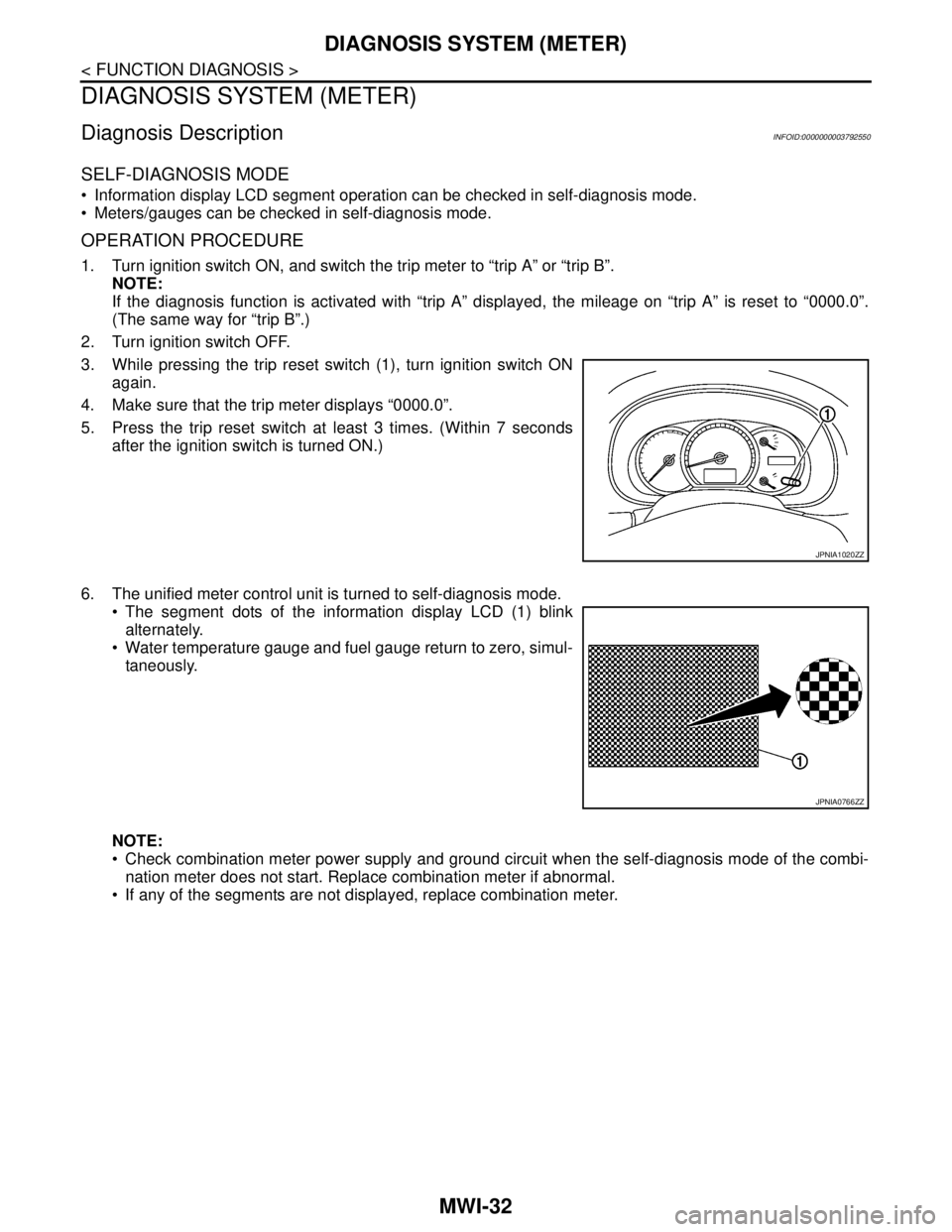
3. While pressing the trip reset switch (1), turn ignition switch ON
again.
4. Make sure that the trip meter displays “0000.0”.
5. Press the trip reset switch at least 3 times. (Within 7 seconds
after the ignition switch is turned ON.)
6. The unified meter control unit is turned to self-diagnosis mode.
The segment dots of the information display LCD (1) blink
alternately.
Water temperature gauge and fuel gauge return to zero, simul-
taneously.
NOTE:
Check combination meter power supply and ground circuit when the self-diagnosis mode of the combi-
nation meter does not start. Replace combination meter if abnormal.
If any of the segments are not displayed, replace combination meter.
JPNIA1020ZZ
JPNIA0766ZZ
Page 3289 of 5121
MWI
DIAGNOSIS SYSTEM (METER)
MWI-35
< FUNCTION DIAGNOSIS >
C
D
E
F
G
H
I
J
K
L
MB A
O
P
NOTE:
Some items are not available according to vehicle specification.
SPECIAL FUNCTION
Special menu
W/L ON HISTORY
Stores histories when warning/indicator lamp is turned on.
“W/L ON HISTORY” indicates the “TIME” when the warning/ indicator lamp is turned on.
The “TIME” above is :
SHIFT IND
[P, R, N, D, L]Status of shift position indicator detected from shift position signal and manual
mode indicator signal is received from TCM via CAN communication.
O/D OFF SW
[On/Off] Status of sport mode switch.
M RANGE SW
[On/Off]This item is displayed, but cannot be monitored.
NM RANGE SW
[On/Off]This item is displayed, but cannot be monitored.
AT SFT UP SW
[On/Off]This item is displayed, but cannot be monitored.
AT SFT DWN SW
[On/Off]This item is displayed, but cannot be monitored.
ST SFT UP SW
[On/Off]This item is displayed, but cannot be monitored.
ST SFT DWN SW
[On/Off]This item is displayed, but cannot be monitored.
PKB SW
[On/Off]Status of parking brake switch.
BUCKLE SW
[On/Off]Status of seat belt buckle switch.
BRAKE OIL SW
[On/Off]Status of brake fluid level switch.
DISTANCE
[km]Value of possible driving distance calculated by combination meter.
A/C AMP CONN
[On/Off]Input status of A/C auto amp. connection recognition signal.
ENTER SW
[On/Off]Status of (ENTER) switch.
SELECT SW
[On/Off]Status of (SELECT) switch.
OUTSIDE TEMP
[°C or °F]Ambient air temperature value converted from ambient sensor signal received
from ambient sensor.
NOTE:
This may not match with the temperature value indicated on the information dis-
play. (Because the information display value is a corrected value from the ambient
sensor input value.)
FUEL LOW SIG
[On/Off]Status of fuel level low warning signal to output to AV control unit via CAN com-
munication.
BUZZER
[On/Off]XBuzzer status (in the combination meter) is detected from the buzzer output signal
received from each unit via CAN communication and the warning output condition
of the combination meter. Display item [Unit]MAIN
SIGNALSDescription
Display item Description
W/L ON HISTORY Lighting history of warning lamp and indicator lamp can be checked.
Page 3293 of 5121
MWI
B2205 VEHICLE SPEED
MWI-39
< COMPONENT DIAGNOSIS >
C
D
E
F
G
H
I
J
K
L
MB A
O
P
B2205 VEHICLE SPEED
DescriptionINFOID:0000000003792558
Vehicle speed signal is transmitted from ABS actuator and electric unit (control unit) via CAN communication
to combination meter.
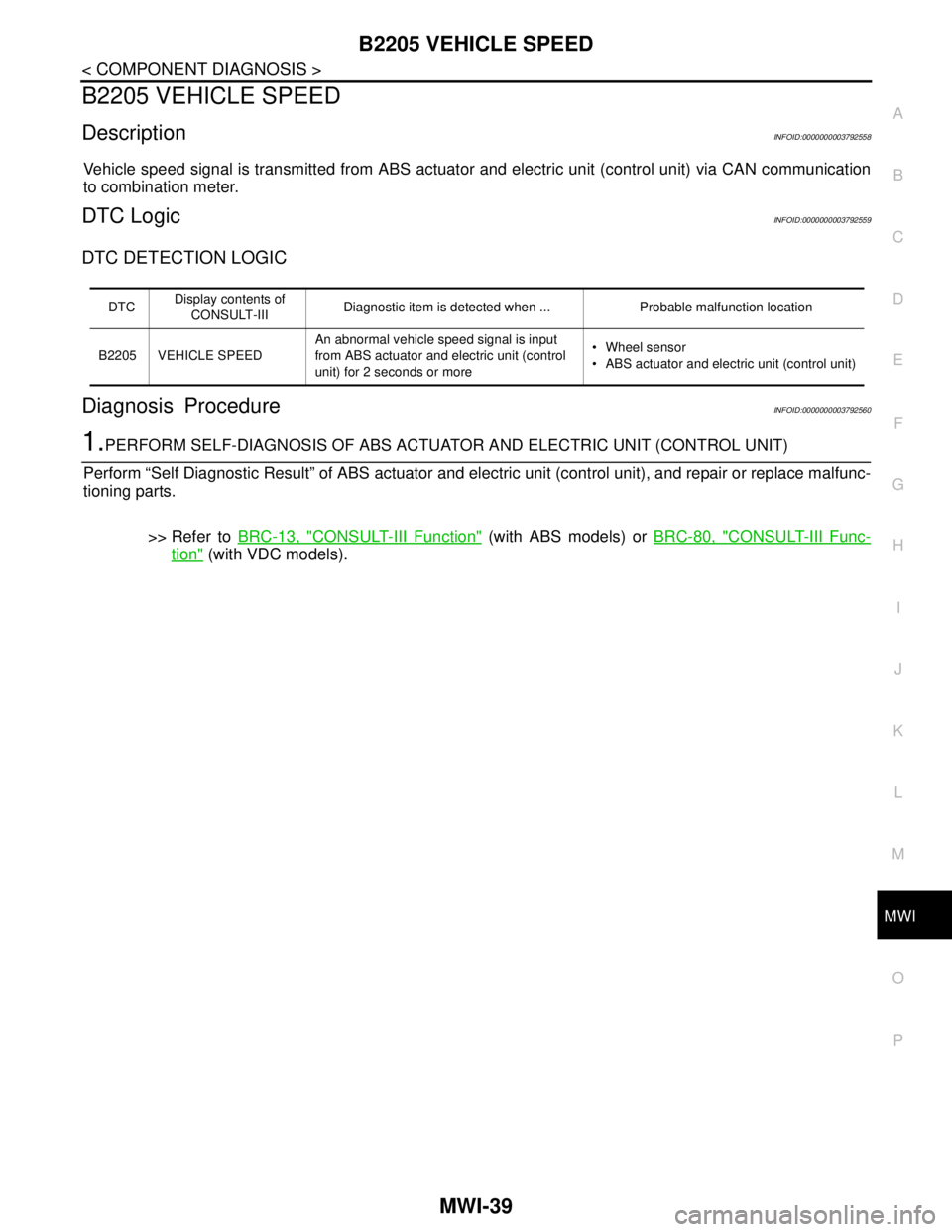
DTC LogicINFOID:0000000003792559
DTC DETECTION LOGIC
Diagnosis ProcedureINFOID:0000000003792560
1.PERFORM SELF-DIAGNOSIS OF ABS ACTUATOR AND ELECTRIC UNIT (CONTROL UNIT)
Perform “Self Diagnostic Result” of ABS actuator and electric unit (control unit), and repair or replace malfunc-
tioning parts.
>> Refer to BRC-13, "
CONSULT-III Function" (with ABS models) or BRC-80, "CONSULT-III Func-
tion" (with VDC models).
DTCDisplay contents of
CONSULT-IIIDiagnostic item is detected when ... Probable malfunction location
B2205 VEHICLE SPEEDAn abnormal vehicle speed signal is input
from ABS actuator and electric unit (control
unit) for 2 seconds or more Wheel sensor
ABS actuator and electric unit (control unit)