light NISSAN TEANA 2008 Service Manual
[x] Cancel search | Manufacturer: NISSAN, Model Year: 2008, Model line: TEANA, Model: NISSAN TEANA 2008Pages: 5121, PDF Size: 69.03 MB
Page 3091 of 5121
![NISSAN TEANA 2008 Service Manual LAN-24
< FUNCTION DIAGNOSIS >[CAN]
CAN COMMUNICATION SYSTEM
Ignition switch signal R T
Interlock/PNP switch signalTR
RT
Key ID signal R T
Key switch signal R T
Key warning lamp signal R T
Low beam req](/img/5/57391/w960_57391-3090.png "NISSAN TEANA 2008 Service Manual LAN-24
< FUNCTION DIAGNOSIS >[CAN]
CAN COMMUNICATION SYSTEM
Ignition switch signal R T
Interlock/PNP switch signalTR
RT
Key ID signal R T
Key switch signal R T
Key warning lamp signal R T
Low beam req")
LAN-24
< FUNCTION DIAGNOSIS >[CAN]
CAN COMMUNICATION SYSTEM
Ignition switch signal R T
Interlock/PNP switch signalTR
RT
Key ID signal R T
Key switch signal R T
Key warning lamp signal R T
Low beam request signalTR
Meter display signal R T
Oil pressure switch signalRT
RT
Position light request signal R T R
Rear fog lamp status signal R T
Rear window defogger control signalTR
RR R T
Sleep wake up signal R R T R
Starter control relay signalTR
Starter relay status signalRT
TR
Starting mode signal R T
Steering lock relay signalTR
RT
Stop lamp switch signalTR
Theft warning horn request signal T R
Trunk switch signal R R T
ABS operation signal TR
ABS warning lamp signal R T
Brake warning lamp signal R T
SLIP indicator lamp signal R T
VDC OFF indicator lamp signal R T
CVT position indicator signal R R R T
CVT self-diagnosis signal R T
Input shaft revolution signal R T
N range signalRT
Output shaft revolution signal R T
P range signal R R R T
Shift position signal R R T
Sport mode indicator signal R T
A/C compressor feedback signal R T
Control device (detention switch) signal R R T
Front wiper stop position signal R T
High beam status signal RT
Low beam status signal RT Signal name/Connecting unit
ECM
ADP
AV
HVAC
M&A
STRG
BCM
ABS
TCM
IPDM-E
Page 3176 of 5121

LU-4
< PRECAUTION >
PRECAUTIONS
PRECAUTION
PRECAUTIONS
Precaution for Liquid GasketINFOID:0000000003793117
LIQUID GASKET APPLICATION PROCEDURE
1. Remove old liquid gasket adhering to the liquid gasket application surface and the mating surface.
• Remove liquid gasket completely from the liquid gasket application surface, mounting bolts, and bolt
holes.
2. Wipe the liquid gasket application surface and the mating surface with white gasoline (lighting and heating
use) to remove adhering moisture, grease and foreign materials.
3. Apply liquid gasket to the liquid gasket application surface.
Use Genuine Liquid Gasket or equivalent.
Within 5 minutes of liquid gasket application, install the mating component.
If liquid gasket protrudes, wipe it off immediately.
Never retighten mounting bolts or nuts after the installation.
After 30 minutes or more have passed from the installation, fill engine oil and engine coolant.
Page 3212 of 5121

MA-24
< ON-VEHICLE MAINTENANCE >
CHASSIS MAINTENANCE
HEADLAMP AIMING ADJUSTMENT (XENON TYPE) : Aiming Adjustment Procedure
(Low Beam)
INFOID:0000000003862421
1. Place the screen.
NOTE:
Stop the vehicle at the perpendicular angle to the wall.
Set the screen so that it is perpendicular to a level load surface.
2. Face the vehicle squarely toward the screen and make the distance between the headlamp center and
the screen 10 m (32.8 ft).
3. Start the engine and illuminate the headlamp (LO).
NOTE:
Block light from the headlamp that is not being adjusted with a thick fabric or another object, so that it
does not reach the adjustment screen.
CAUTION:
Do not cover lens surface with tape, etc. because it is made from plastic.
4. Use the aiming adjustment screw to adjust the elbow point projected by the low beams on the screen, so
that it is within the aiming adjustment area.
A. Headlamp (LO) RH
(UP/DOWN) adjustment screwB. Headlamp (HI) RH
(UP/DOWN) adjustment screwC. Headlamp (LO) RH
(UP-OUTSIDE/DOWN-INSIDE)
adjustment screw
D. Headlamp (HI) RH
(UP-INSIDE/DOWN-OUTSIDE)
adjustment screwE. Headlamp (LO) LH
(UP/DOWN) adjustment screwF. Headlamp (HI) LH
(UP/DOWN) adjustment screw
G. H e a d l a m p ( L O ) L H
(UP-OUTSIDE/DOWN-INSIDE)
adjustment screwH. Headlamp (HI) LH
(UP-INSIDE/DOWN-OUTSIDE)
adjustment screw
: Vehicle center
Adjustment screw Screw driver rotation Facing direction
AHeadlamp (LO) RH
(UP/DOWN)Clockwise UP
Counterclockwise DOWN
BHeadlamp (HI) RH
(UP/DOWN)Clockwise UP
Counterclockwise DOWN
CHeadlamp (LO) RH
(UP-OUTSIDE/DOWN-INSIDE)Clockwise DOWN-INSIDE
Counterclockwise UP-OUTSIDE
DHeadlamp (HI) RH
(UP-INSIDE/DOWN-OUTSIDE)Clockwise DOWN-OUTSIDE
Counterclockwise UP-INSIDE
EHeadlamp (LO) LH
(UP/DOWN)Clockwise UP
Counterclockwise DOWN
FHeadlamp (HI) LH
(UP/DOWN)Clockwise UP
Counterclockwise DOWN
GHeadlamp (LO) LH
(UP-OUTSIDE/DOWN-INSIDE)Clockwise DOWN-INSIDE
Counterclockwise UP-OUTSIDE
HHeadlamp (HI) LH
(UP-INSIDE/DOWN-OUTSIDE)Clockwise DOWN-OUTSIDE
Counterclockwise UP-INSIDE
Page 3213 of 5121
CHASSIS MAINTENANCE
MA-25
< ON-VEHICLE MAINTENANCE >
C
D
E
F
G
H
I
J
K
L
MB
MAN
OA
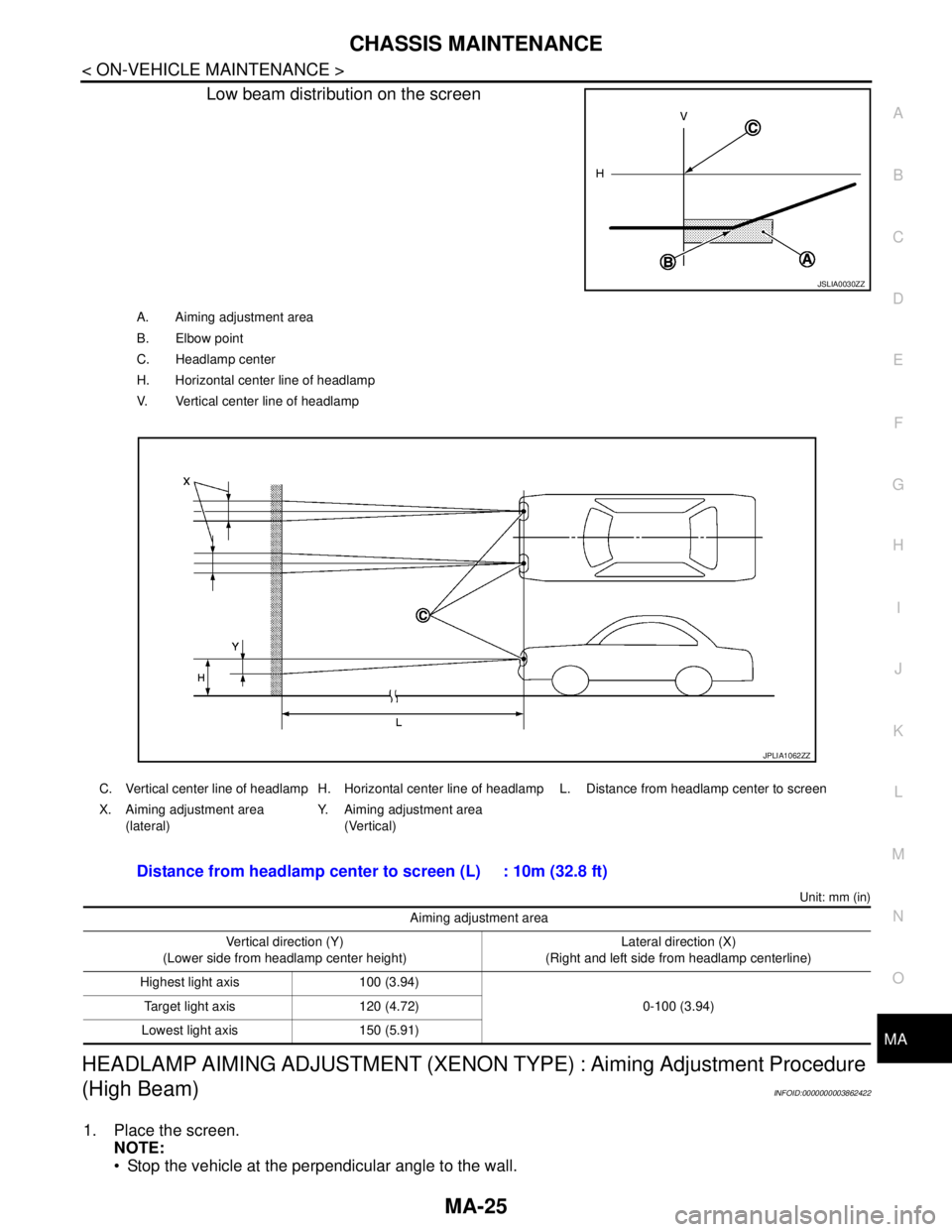
Low beam distribution on the screen
Unit: mm (in)
HEADLAMP AIMING ADJUSTMENT (XENON TYPE) : Aiming Adjustment Procedure
(High Beam)
INFOID:0000000003862422
1. Place the screen.
NOTE:
Stop the vehicle at the perpendicular angle to the wall.
JSLIA0030ZZ
A. Aiming adjustment area
B. Elbow point
C. Headlamp center
H. Horizontal center line of headlamp
V. Vertical center line of headlamp
C. Vertical center line of headlamp H. Horizontal center line of headlamp L. Distance from headlamp center to screen
X. Aiming adjustment area
(lateral)Y. Aiming adjustment area
(Vertical)
Distance from headlamp center to screen (L) : 10m (32.8 ft)
Aiming adjustment area
Vertical direction (Y)
(Lower side from headlamp center height)Lateral direction (X)
(Right and left side from headlamp centerline)
Highest light axis 100 (3.94)
0-100 (3.94) Target light axis 120 (4.72)
Lowest light axis 150 (5.91)
JPLIA1062ZZ
Page 3214 of 5121
MA-26
< ON-VEHICLE MAINTENANCE >
CHASSIS MAINTENANCE
Set the screen so that it is perpendicular to a level load surface.
2. Face the vehicle squarely toward the screen and make the distance between the headlamp center and
the screen 10 m (32.8 ft).
3. Start the engine and illuminate the headlamp (HI).
NOTE:
Block light from the headlamp that is not being adjusted with a thick fabric or another object, so that it
does not reach the adjustment screen.
CAUTION:
Do not cover lens surface with tape, etc. because it is made from plastic.
4. Use the aiming adjustment screw to adjust the elbow point projected by the low beams on the screen, so
that it is within the aiming adjustment area.
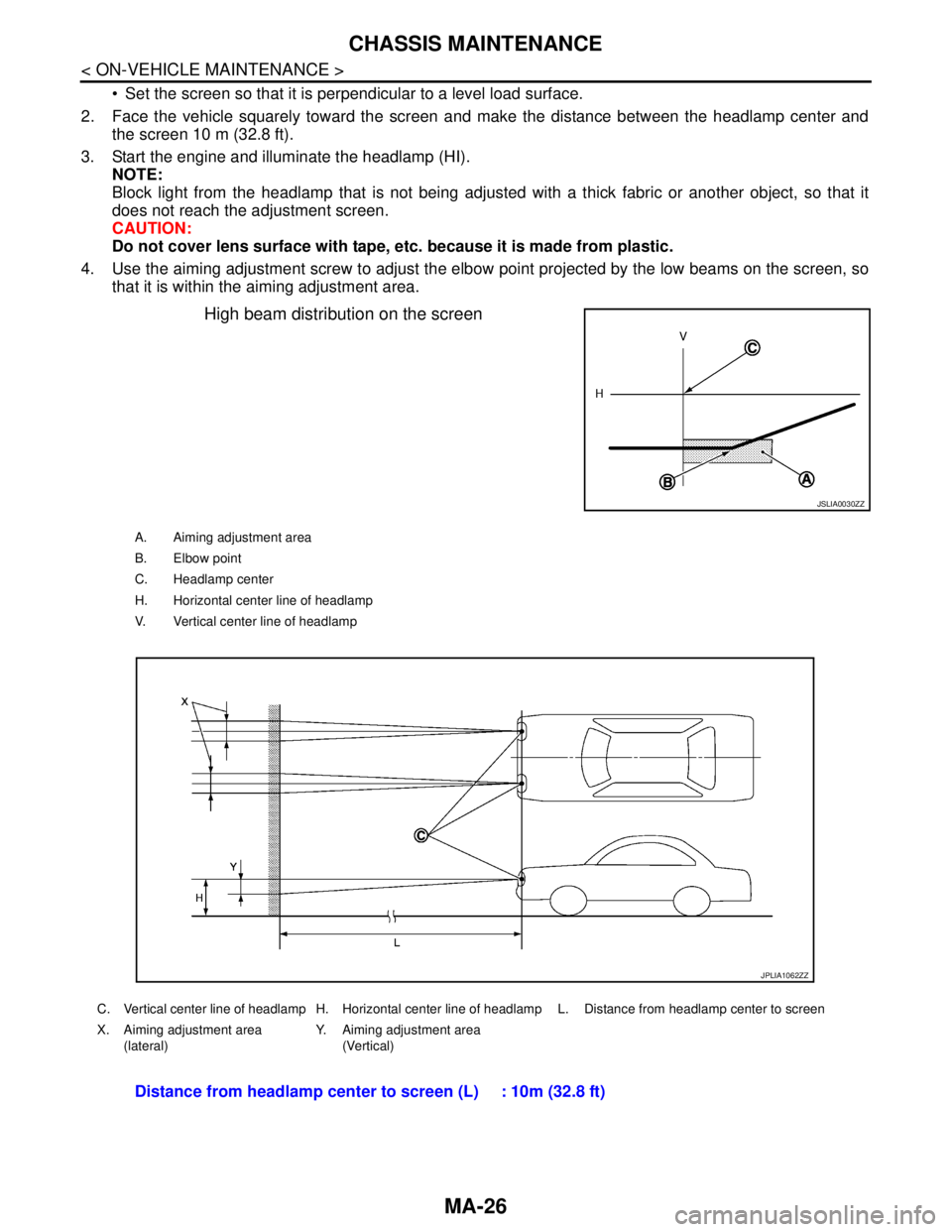
High beam distribution on the screen
JSLIA0030ZZ
A. Aiming adjustment area
B. Elbow point
C. Headlamp center
H. Horizontal center line of headlamp
V. Vertical center line of headlamp
C. Vertical center line of headlamp H. Horizontal center line of headlamp L. Distance from headlamp center to screen
X. Aiming adjustment area
(lateral)Y. Aiming adjustment area
(Vertical)
Distance from headlamp center to screen (L) : 10m (32.8 ft)
JPLIA1062ZZ
Page 3215 of 5121
CHASSIS MAINTENANCE
MA-27
< ON-VEHICLE MAINTENANCE >
C
D
E
F
G
H
I
J
K
L
MB
MAN
OA
Unit: mm (in)
HEADLAMP AIMING ADJUSTMENT (HALOGEN TYPE)
HEADLAMP AIMING ADJUSTMENT (HALOGEN TYPE) : DescriptionINFOID:0000000003862423
PREPARATION BEFORE ADJUSTING
NOTE:
For details, refer to the regulations in your own country.
Perform aiming if the vehicle front body has been repaired and/or the headlamp assembly has been
replaced.
Before performing aiming adjustment, check the following.
Adjust the tire pressure to the specification.
Fill with fuel, engine coolant and each oil.
Maintain the unloaded vehicle condition. (Remove luggage from the passenger compartment and the trunk
room.)
NOTE:
Do not remove the temporary tire, jack and on-vehicle tool.
Wipe out dirt on the headlamp.
CAUTION:
Never use organic solvent (thinner, gasoline etc.)
Ride alone on the driver seat.
Headlamp aiming switch sets to “0”.
AIMING ADJUSTMENT SCREW
Aiming adjustment area
Vertical direction (Y)
(Lower side from headlamp center height)Lateral direction (X)
(Right and left side from headlamp centerline)
Highest light axis 106 (4.17)
0-100 (3.94) Target light axis 120 (4.72)
Lowest light axis 164 (6.46)
Page 3217 of 5121
CHASSIS MAINTENANCE
MA-29
< ON-VEHICLE MAINTENANCE >
C
D
E
F
G
H
I
J
K
L
MB
MAN
OA
HEADLAMP AIMING ADJUSTMENT (HALOGEN TYPE) : Aiming Adjustment Proce-
dure (Low Beam)
INFOID:0000000003862424
1. Place the screen.
NOTE:
Stop the vehicle at the perpendicular angle to the wall.
Set the screen so that it is perpendicular to a level load surface.
2. Face the vehicle squarely toward the screen and make the distance between the headlamp center and
the screen 10 m (32.8 ft).
3. Start the engine and illuminate the headlamp (LO).
NOTE:
Block light from the headlamp that is not being adjusted with a thick fabric or another object, so that it
does not reach the adjustment screen.
CAUTION:
Do not cover lens surface with tape, etc. because it is made from plastic.
4. Use the aiming adjustment screw to adjust the elbow point projected by the low beams on the screen, so
that it is within the aiming adjustment area.
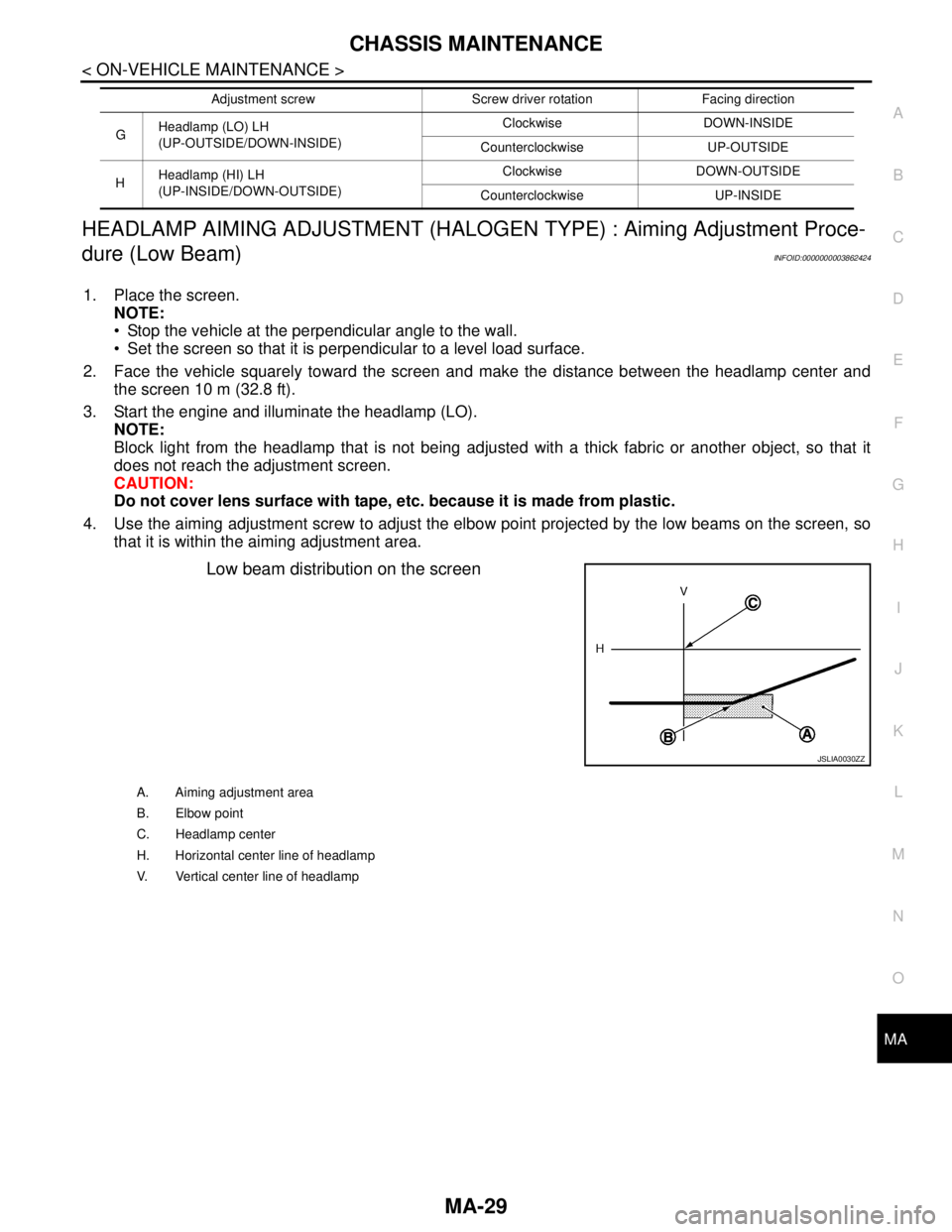
Low beam distribution on the screen
GHeadlamp (LO) LH
(UP-OUTSIDE/DOWN-INSIDE)Clockwise DOWN-INSIDE
Counterclockwise UP-OUTSIDE
HHeadlamp (HI) LH
(UP-INSIDE/DOWN-OUTSIDE)Clockwise DOWN-OUTSIDE
Counterclockwise UP-INSIDE Adjustment screw Screw driver rotation Facing direction
JSLIA0030ZZ
A. Aiming adjustment area
B. Elbow point
C. Headlamp center
H. Horizontal center line of headlamp
V. Vertical center line of headlamp
Page 3218 of 5121
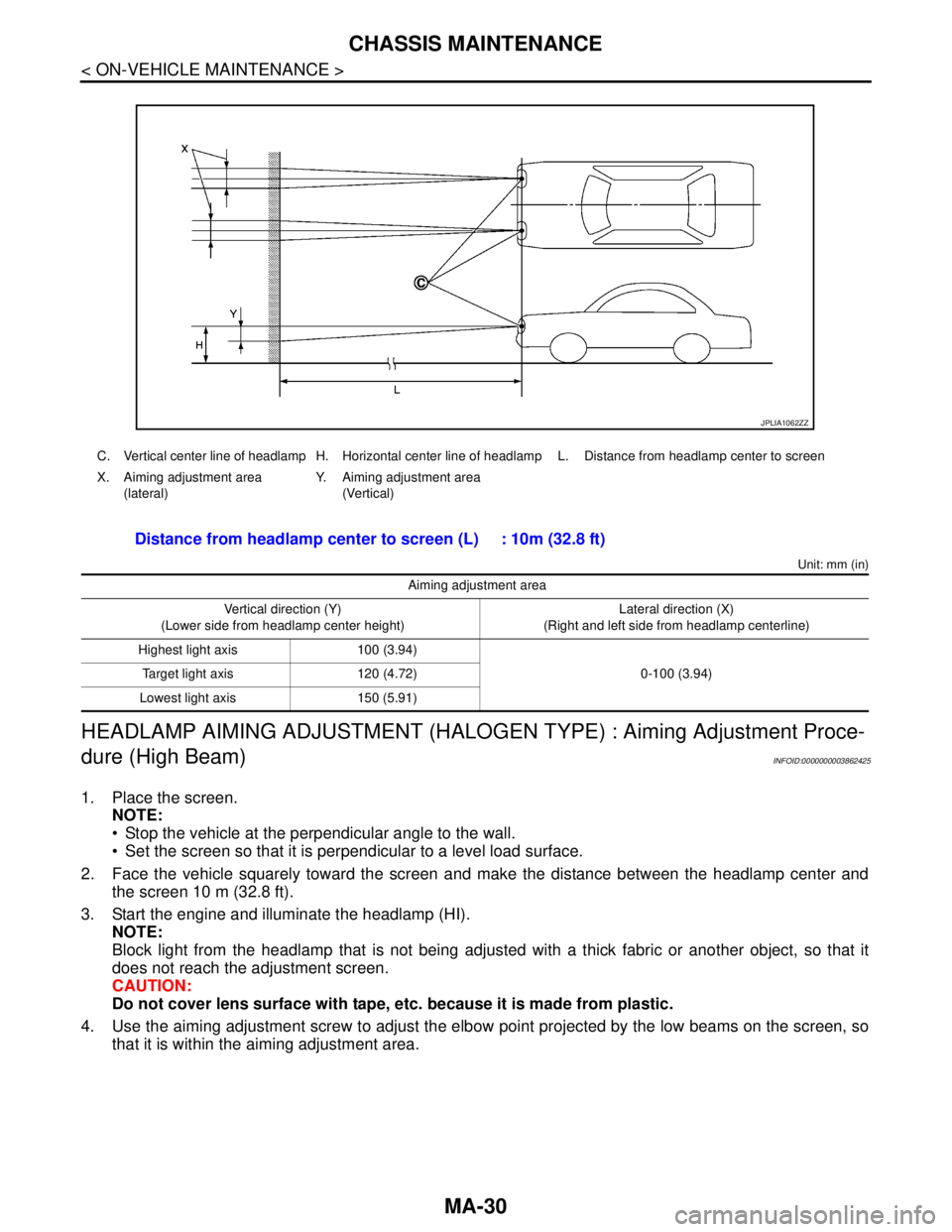
MA-30
< ON-VEHICLE MAINTENANCE >
CHASSIS MAINTENANCE
Unit: mm (in)
HEADLAMP AIMING ADJUSTMENT (HALOGEN TYPE) : Aiming Adjustment Proce-
dure (High Beam)
INFOID:0000000003862425
1. Place the screen.
NOTE:
Stop the vehicle at the perpendicular angle to the wall.
Set the screen so that it is perpendicular to a level load surface.
2. Face the vehicle squarely toward the screen and make the distance between the headlamp center and
the screen 10 m (32.8 ft).
3. Start the engine and illuminate the headlamp (HI).
NOTE:
Block light from the headlamp that is not being adjusted with a thick fabric or another object, so that it
does not reach the adjustment screen.
CAUTION:
Do not cover lens surface with tape, etc. because it is made from plastic.
4. Use the aiming adjustment screw to adjust the elbow point projected by the low beams on the screen, so
that it is within the aiming adjustment area.
C. Vertical center line of headlamp H. Horizontal center line of headlamp L. Distance from headlamp center to screen
X. Aiming adjustment area
(lateral)Y. Aiming adjustment area
(Vertical)
Distance from headlamp center to screen (L) : 10m (32.8 ft)
Aiming adjustment area
Vertical direction (Y)
(Lower side from headlamp center height)Lateral direction (X)
(Right and left side from headlamp centerline)
Highest light axis 100 (3.94)
0-100 (3.94) Target light axis 120 (4.72)
Lowest light axis 150 (5.91)
JPLIA1062ZZ
Page 3219 of 5121
CHASSIS MAINTENANCE
MA-31
< ON-VEHICLE MAINTENANCE >
C
D
E
F
G
H
I
J
K
L
MB
MAN
OA
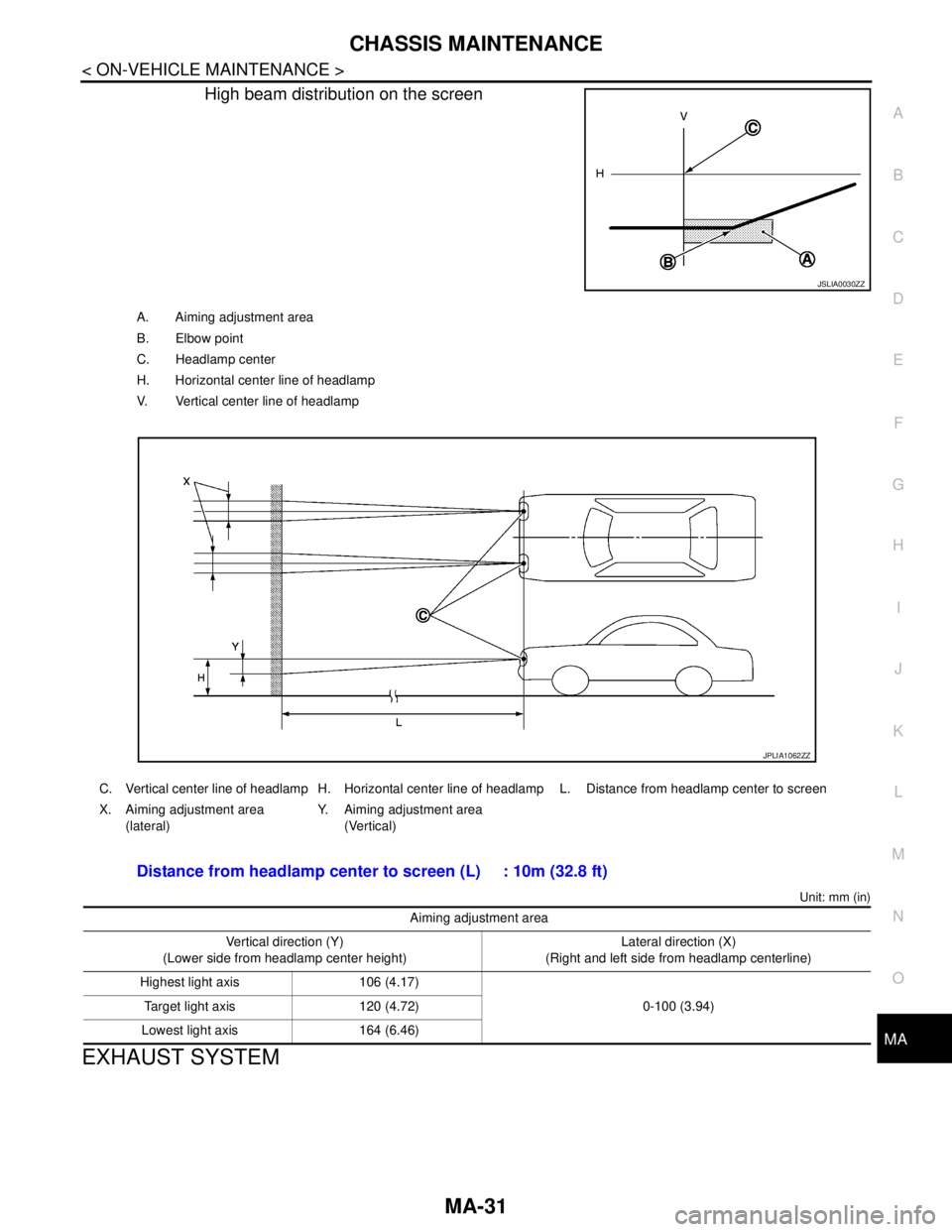
High beam distribution on the screen
Unit: mm (in)
EXHAUST SYSTEM
JSLIA0030ZZ
A. Aiming adjustment area
B. Elbow point
C. Headlamp center
H. Horizontal center line of headlamp
V. Vertical center line of headlamp
C. Vertical center line of headlamp H. Horizontal center line of headlamp L. Distance from headlamp center to screen
X. Aiming adjustment area
(lateral)Y. Aiming adjustment area
(Vertical)
Distance from headlamp center to screen (L) : 10m (32.8 ft)
Aiming adjustment area
Vertical direction (Y)
(Lower side from headlamp center height)Lateral direction (X)
(Right and left side from headlamp centerline)
Highest light axis 106 (4.17)
0-100 (3.94) Target light axis 120 (4.72)
Lowest light axis 164 (6.46)
JPLIA1062ZZ
Page 3239 of 5121
MIR-6
< SYMPTOM DIAGNOSIS >
SQUEAK AND RATTLE TROUBLE DIAGNOSES
SYMPTOM DIAGNOSIS
SQUEAK AND RATTLE TROUBLE DIAGNOSES
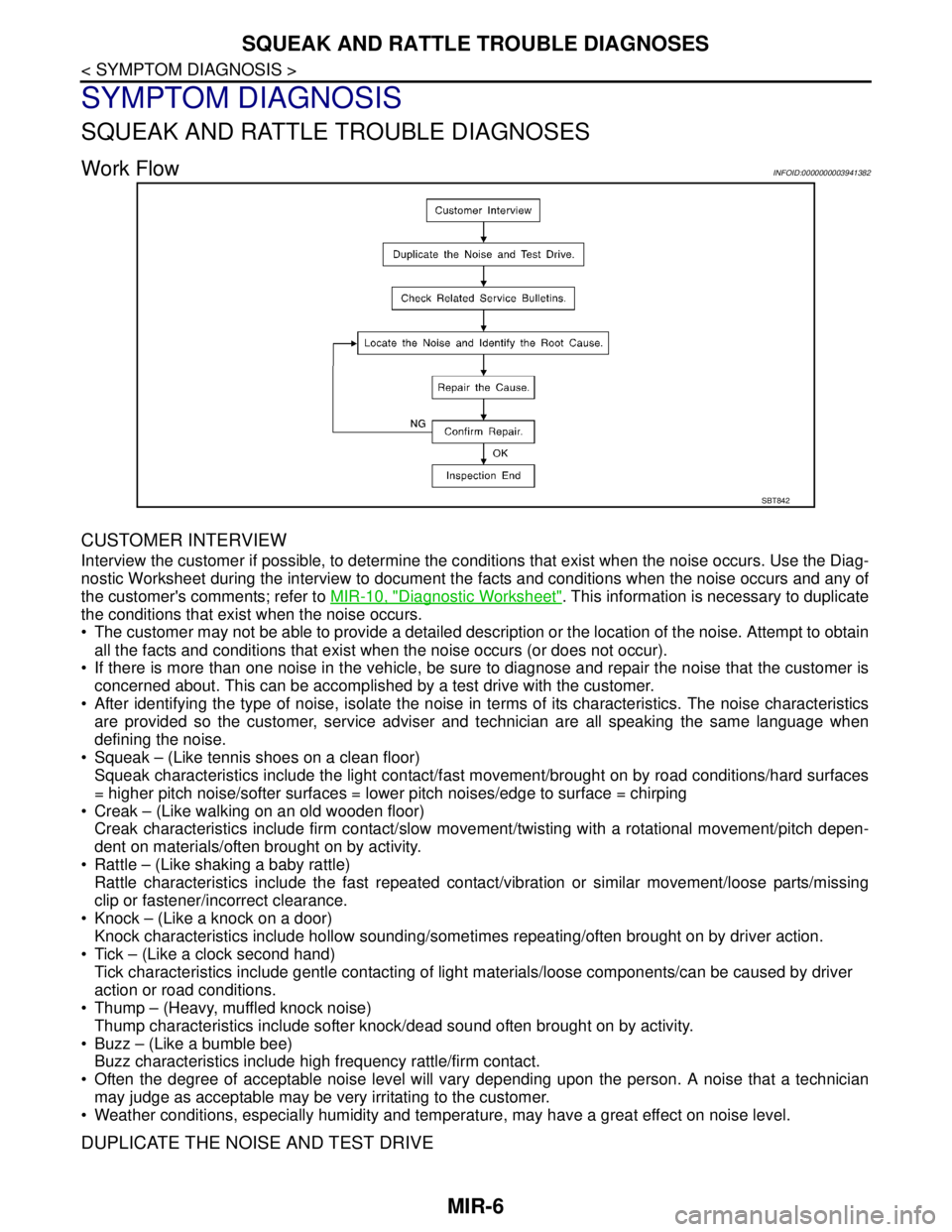
Work FlowINFOID:0000000003941382
CUSTOMER INTERVIEW
Interview the customer if possible, to determine the conditions that exist when the noise occurs. Use the Diag-
nostic Worksheet during the interview to document the facts and conditions when the noise occurs and any of
the customer's comments; refer to MIR-10, "
Diagnostic Worksheet". This information is necessary to duplicate
the conditions that exist when the noise occurs.
• The customer may not be able to provide a detailed description or the location of the noise. Attempt to obtain
all the facts and conditions that exist when the noise occurs (or does not occur).
If there is more than one noise in the vehicle, be sure to diagnose and repair the noise that the customer is
concerned about. This can be accomplished by a test drive with the customer.
After identifying the type of noise, isolate the noise in terms of its characteristics. The noise characteristics
are provided so the customer, service adviser and technician are all speaking the same language when
defining the noise.
Squeak – (Like tennis shoes on a clean floor)
Squeak characteristics include the light contact/fast movement/brought on by road conditions/hard surfaces
= higher pitch noise/softer surfaces = lower pitch noises/edge to surface = chirping
Creak – (Like walking on an old wooden floor)
Creak characteristics include firm contact/slow movement/twisting with a rotational movement/pitch depen-
dent on materials/often brought on by activity.
Rattle – (Like shaking a baby rattle)
Rattle characteristics include the fast repeated contact/vibration or similar movement/loose parts/missing
clip or fastener/incorrect clearance.
Knock – (Like a knock on a door)
Knock characteristics include hollow sounding/sometimes repeating/often brought on by driver action.
Tick – (Like a clock second hand)
Tick characteristics include gentle contacting of light materials/loose components/can be caused by driver
action or road conditions.
Thump – (Heavy, muffled knock noise)
Thump characteristics include softer knock/dead sound often brought on by activity.
Buzz – (Like a bumble bee)
Buzz characteristics include high frequency rattle/firm contact.
Often the degree of acceptable noise level will vary depending upon the person. A noise that a technician
may judge as acceptable may be very irritating to the customer.
Weather conditions, especially humidity and temperature, may have a great effect on noise level.
DUPLICATE THE NOISE AND TEST DRIVE
SBT842