Ioni NISSAN TEANA 2008 Service Manual
[x] Cancel search | Manufacturer: NISSAN, Model Year: 2008, Model line: TEANA, Model: NISSAN TEANA 2008Pages: 5121, PDF Size: 69.03 MB
Page 857 of 5121

BCS-40
< COMPONENT DIAGNOSIS >
COMBINATION SWITCH OUTPUT CIRCUIT
COMBINATION SWITCH OUTPUT CIRCUIT
Diagnosis ProcedureINFOID:0000000003809626
1.CHECK OUTPUT 1 - 5 SYSTEM CIRCUIT FOR OPEN
1. Turn the ignition switch OFF.
2. Disconnect the BCM and combination switch connectors.
NOTE:
BCM connector disconnects M123 only.
3. Check continuity between BCM harness connector and combination switch harness connector.
Does continuity exist?
YES >> GO TO 2.
NO >> Repair the harnesses or connectors.
2.CHECK OUTPUT 1 - 5 SYSTEM CIRCUIT FOR SHORT
Check for continuity between BCM harness connector and ground.
Does continuity exist?
YES >> Repair the harnesses or connectors.
NO >> GO TO 3.
3.CHECK COMBINATION SWITCH INTERNAL CIRCUIT
1. Connect the combination switch connector.
2. Turn ON any switch in the system that is malfunctioning.
3. Check voltage between combination switch harness connector and ground.
NOTE:
Check that the combination switch outputs a signal from combination switch input system.
SystemBCM Combination switch
Continuity
Connector Terminal Connector Terminal
OUTPUT 1
M123143
M10312
Existed OUTPUT 2 144 14
OUTPUT 3 145 5
OUTPUT 4 146 2
OUTPUT 5 142 8
SystemBCM
GroundContinuity
Connector Terminal
OUTPUT 1
M123143
Not existed OUTPUT 2 144
OUTPUT 3 145
OUTPUT 4 146
OUTPUT 5 142
Page 871 of 5121
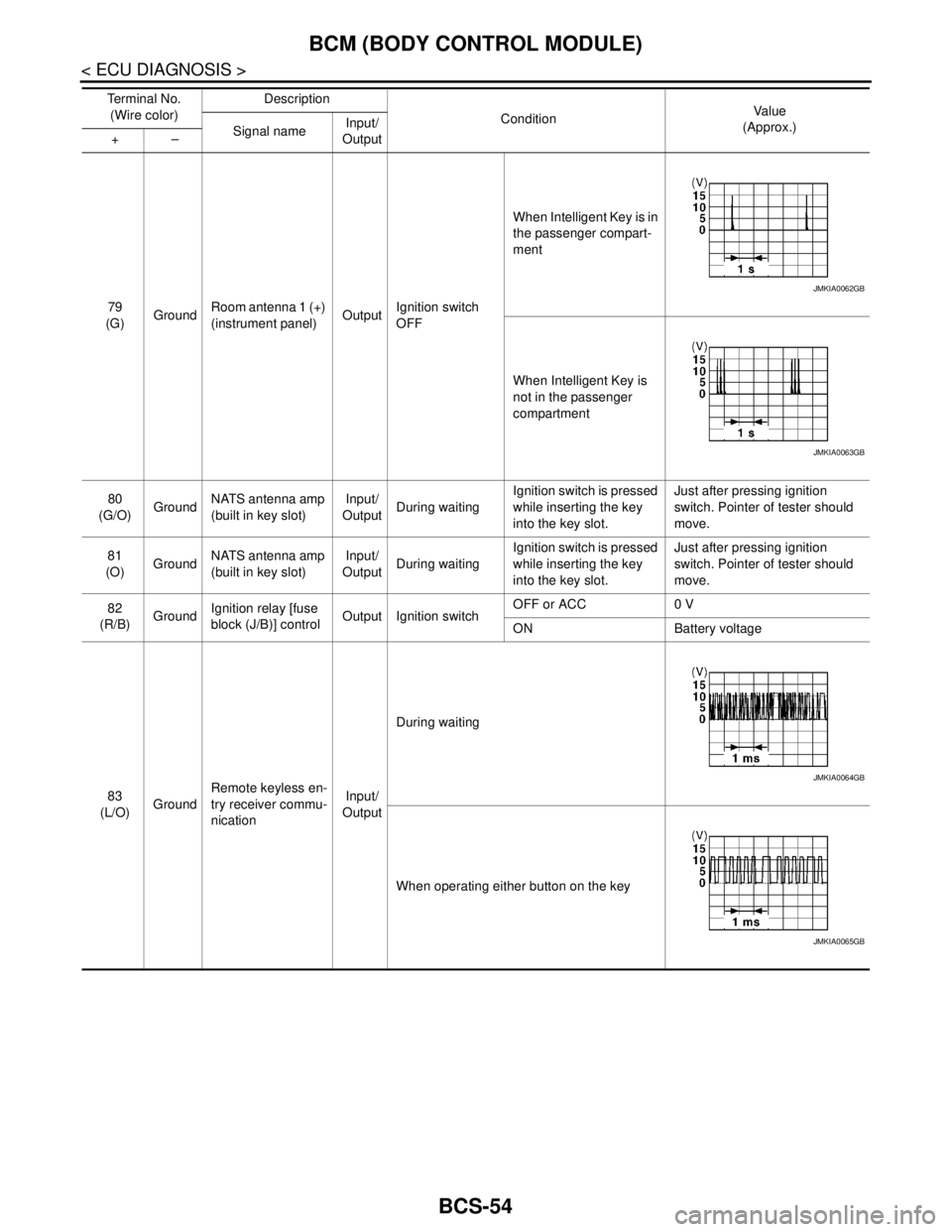
BCS-54
< ECU DIAGNOSIS >
BCM (BODY CONTROL MODULE)
79
(G)GroundRoom antenna 1 (+)
(instrument panel)OutputIgnition switch
OFFWhen Intelligent Key is in
the passenger compart-
ment
When Intelligent Key is
not in the passenger
compartment
80
(G/O)GroundNATS antenna amp
(built in key slot)Input/
OutputDuring waitingIgnition switch is pressed
while inserting the key
into the key slot.Just after pressing ignition
switch. Pointer of tester should
move.
81
(O)GroundNATS antenna amp
(built in key slot)Input/
OutputDuring waitingIgnition switch is pressed
while inserting the key
into the key slot.Just after pressing ignition
switch. Pointer of tester should
move.
82
(R/B)GroundIgnition relay [fuse
block (J/B)] controlOutput Ignition switchOFF or ACC 0 V
ON Battery voltage
83
(L/O)GroundRemote keyless en-
try receiver commu-
nicationInput/
OutputDuring waiting
When operating either button on the key Te r m i n a l N o .
(Wire color)Description
ConditionVa l u e
(Approx.)
Signal nameInput/
Output +–
JMKIA0062GB
JMKIA0063GB
JMKIA0064GB
JMKIA0065GB
Page 878 of 5121
BCS
BCM (BODY CONTROL MODULE)
BCS-61
< ECU DIAGNOSIS >
C
D
E
F
G
H
I
J
K
L B A
O
P N
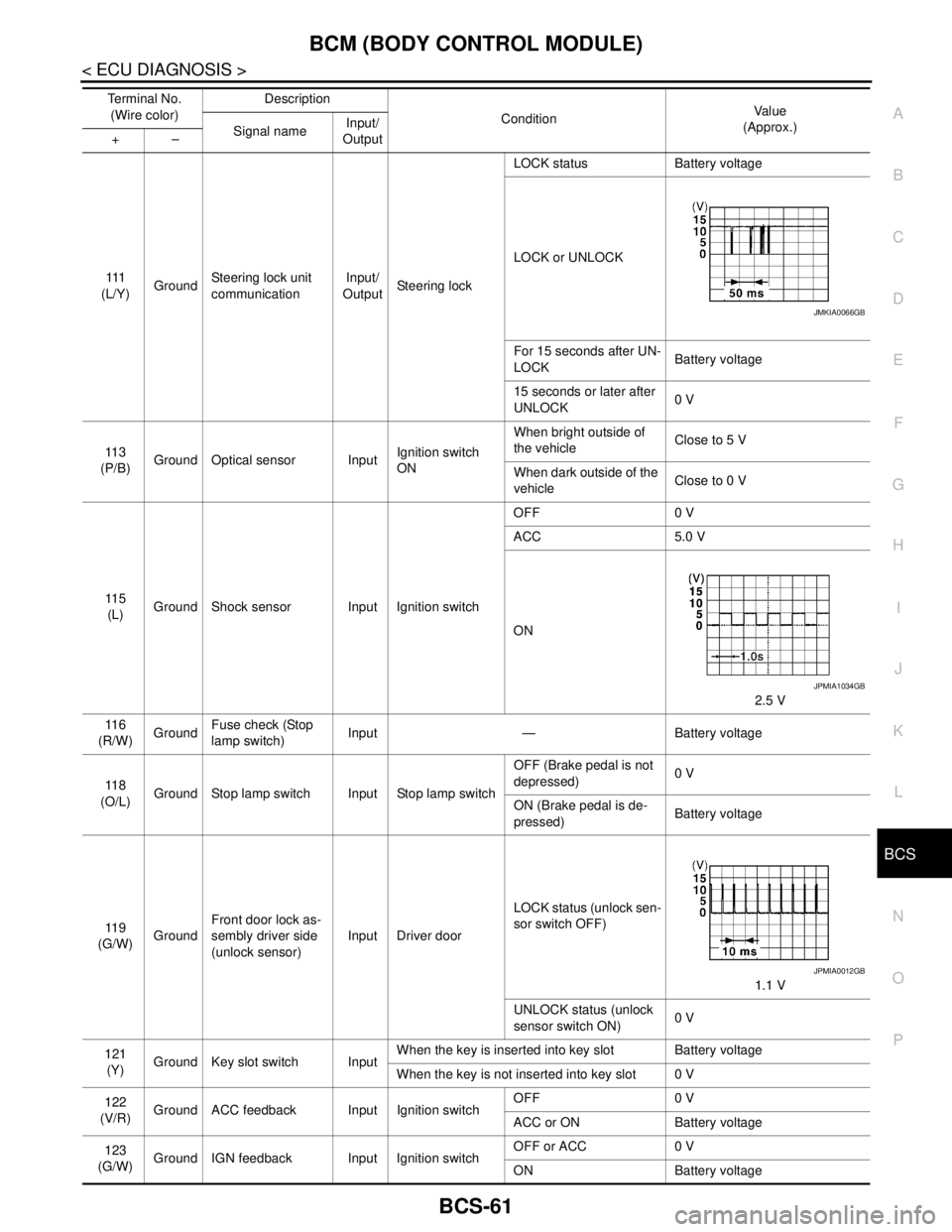
111
(L/Y)GroundSteering lock unit
communicationInput/
OutputSteering lockLOCK status Battery voltage
LOCK or UNLOCK
For 15 seconds after UN-
LOCKBattery voltage
15 seconds or later after
UNLOCK0 V
11 3
(P/B)Ground Optical sensor InputIgnition switch
ONWhen bright outside of
the vehicleClose to 5 V
When dark outside of the
vehicleClose to 0 V
11 5
(L)Ground Shock sensor Input Ignition switchOFF 0 V
ACC 5.0 V
ON
2.5 V
11 6
(R/W)GroundFuse check (Stop
lamp switch)Input — Battery voltage
11 8
(O/L)Ground Stop lamp switch Input Stop lamp switchOFF (Brake pedal is not
depressed)0 V
ON (Brake pedal is de-
pressed)Battery voltage
11 9
(G/W)GroundFront door lock as-
sembly driver side
(unlock sensor)Input Driver doorLOCK status (unlock sen-
sor switch OFF)
1.1 V
UNLOCK status (unlock
sensor switch ON)0 V
121
(Y)Ground Key slot switch InputWhen the key is inserted into key slot Battery voltage
When the key is not inserted into key slot 0 V
122
(V/R)Ground ACC feedback Input Ignition switchOFF 0 V
ACC or ON Battery voltage
123
(G/W)Ground IGN feedback Input Ignition switchOFF or ACC 0 V
ON Battery voltage Te r m i n a l N o .
(Wire color)Description
ConditionVa l u e
(Approx.)
Signal nameInput/
Output +–
JMKIA0066GB
JPMIA1034GB
JPMIA0012GB
Page 879 of 5121
BCS-62
< ECU DIAGNOSIS >
BCM (BODY CONTROL MODULE)
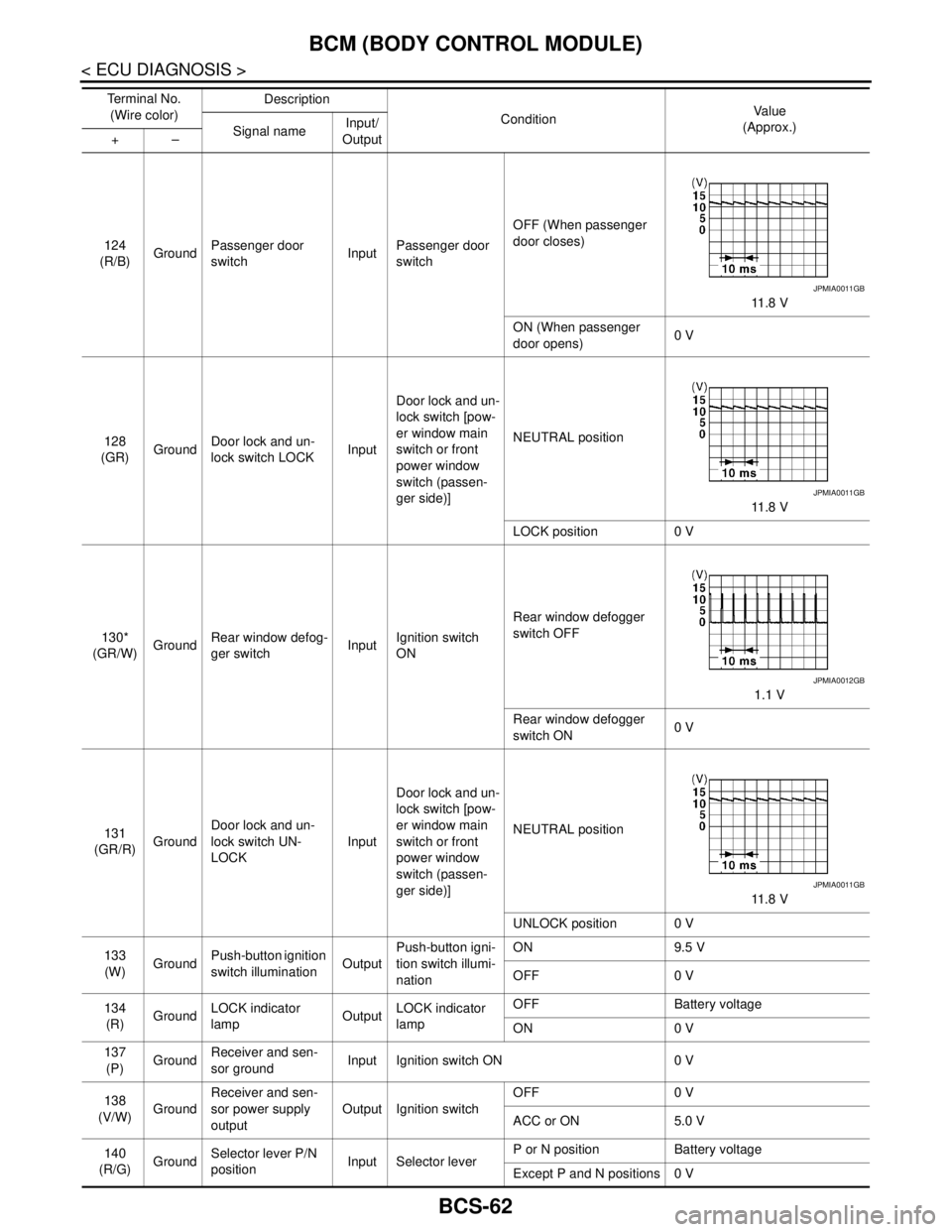
124
(R/B)GroundPassenger door
switchInputPassenger door
switchOFF (When passenger
door closes)
11 . 8 V
ON (When passenger
door opens)0 V
128
(GR)GroundDoor lock and un-
lock switch LOCKInputDoor lock and un-
lock switch [pow-
er window main
switch or front
power window
switch (passen-
ger side)]NEUTRAL position
11 . 8 V
LOCK position 0 V
130*
(GR/W)GroundRear window defog-
ger switchInputIgnition switch
ONRear window defogger
switch OFF
1.1 V
Rear window defogger
switch ON0 V
131
(GR/R)GroundDoor lock and un-
lock switch UN-
LOCKInputDoor lock and un-
lock switch [pow-
er window main
switch or front
power window
switch (passen-
ger side)]NEUTRAL position
11 . 8 V
UNLOCK position 0 V
133
(W)GroundPush-button ignition
switch illuminationOutputPush-button igni-
tion switch illumi-
nationON 9.5 V
OFF 0 V
134
(R)GroundLOCK indicator
lampOutputLOCK indicator
lampOFF Battery voltage
ON 0 V
137
(P)GroundReceiver and sen-
sor groundInput Ignition switch ON 0 V
138
(V/W)GroundReceiver and sen-
sor power supply
outputOutput Ignition switchOFF 0 V
ACC or ON 5.0 V
140
(R/G)GroundSelector lever P/N
positionInput Selector leverP or N position Battery voltage
Except P and N positions 0 V Te r m i n a l N o .
(Wire color)Description
ConditionVa l u e
(Approx.)
Signal nameInput/
Output +–
JPMIA0011GB
JPMIA0011GB
JPMIA0012GB
JPMIA0011GB
Page 893 of 5121

BCS-76
< SYMPTOM DIAGNOSIS >
COMBINATION SWITCH SYSTEM SYMPTOMS
SYMPTOM DIAGNOSIS
COMBINATION SWITCH SYSTEM SYMPTOMS
Symptom TableINFOID:0000000003809632
1. Perform “Data Monitor” of CONSULT-III to check for any malfunctioning item.
2. Check the malfunction combinations.
Malfunction item: ×
3. Identify the malfunctioning part from the agreed combination and repair or replace the part.
Malfunction
combinationData monitor item
FR WIPER HI
FR WIPER LOW
FR WASHER SW
FR WIPER INT
INT VOLUME
TURN SIGNAL R
TURN SIGNAL L
TAIL LAMP SW
HI BEAM SW
HEAD LAMP SW 1
HEAD LAMP SW 2
PASSING SW
AUTO LIGHT SW
FR FOG SW
RR FOG SW
A×× ××
B×× ××
C×××
D×× ×
E×××
F××
G××
H×× ××
I××××
J× ×××
K All Items
L If only one item is detected or the item is not applicable to the combinations A to K
Malfunction
combinationMalfunctioning part Repair or replace
A Combination switch INPUT 1 circuit
Inspect the combination switch input circuit applicable to the malfunctioning
part. Refer to BCS-38, "
Diagnosis Procedure". B Combination switch INPUT 2 circuit
C Combination switch INPUT 3 circuit
D Combination switch INPUT 4 circuit
E Combination switch INPUT 5 circuit
F Combination switch OUTPUT 1 circuit
Inspect the combination switch output circuit applicable to the malfunction-
ing part. Refer to BCS-40, "
Diagnosis Procedure". G Combination switch OUTPUT 2 circuit
H Combination switch OUTPUT 3 circuit
I Combination switch OUTPUT 4 circuit
J Combination switch OUTPUT 5 circuit
K BCM Replace BCM. Refer to BCS-78, "
Exploded View".
L Combination switch Replace the combination switch.
Page 895 of 5121
BCS-78
< ON-VEHICLE REPAIR >
BCM (BODY CONTROL MODULE)
ON-VEHICLE REPAIR
BCM (BODY CONTROL MODULE)
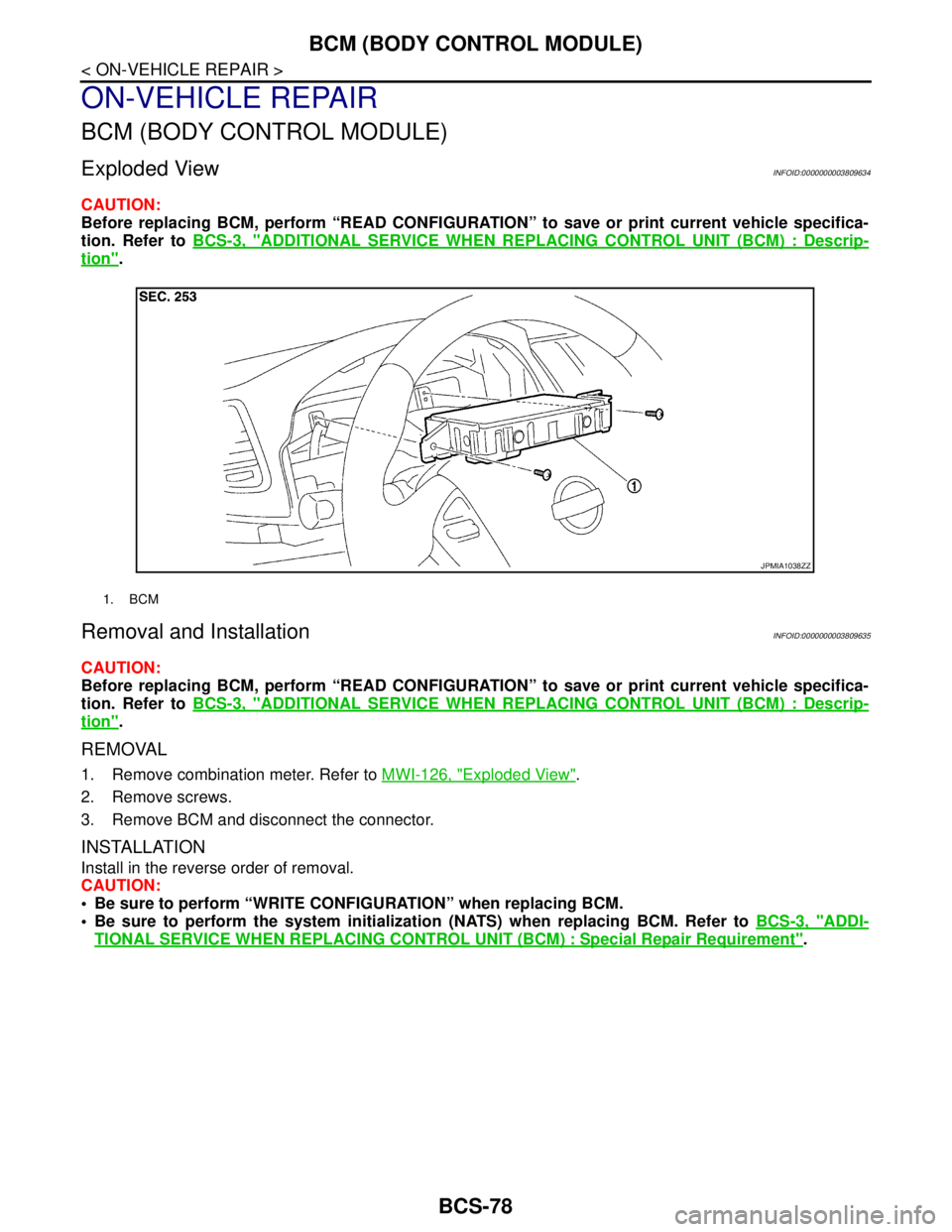
Exploded ViewINFOID:0000000003809634
CAUTION:
Before replacing BCM, perform “READ CONFIGURATION” to save or print current vehicle specifica-
tion. Refer to BCS-3, "
ADDITIONAL SERVICE WHEN REPLACING CONTROL UNIT (BCM) : Descrip-
tion".
Removal and InstallationINFOID:0000000003809635
CAUTION:
Before replacing BCM, perform “READ CONFIGURATION” to save or print current vehicle specifica-
tion. Refer to BCS-3, "
ADDITIONAL SERVICE WHEN REPLACING CONTROL UNIT (BCM) : Descrip-
tion".
REMOVAL
1. Remove combination meter. Refer to MWI-126, "Exploded View".
2. Remove screws.
3. Remove BCM and disconnect the connector.
INSTALLATION
Install in the reverse order of removal.
CAUTION:
Be sure to perform “WRITE CONFIGURATION” when replacing BCM.
Be sure to perform the system initialization (NATS) when replacing BCM. Refer to BCS-3, "
ADDI-
TIONAL SERVICE WHEN REPLACING CONTROL UNIT (BCM) : Special Repair Requirement".
1. BCM
JPMIA1038ZZ
Page 896 of 5121
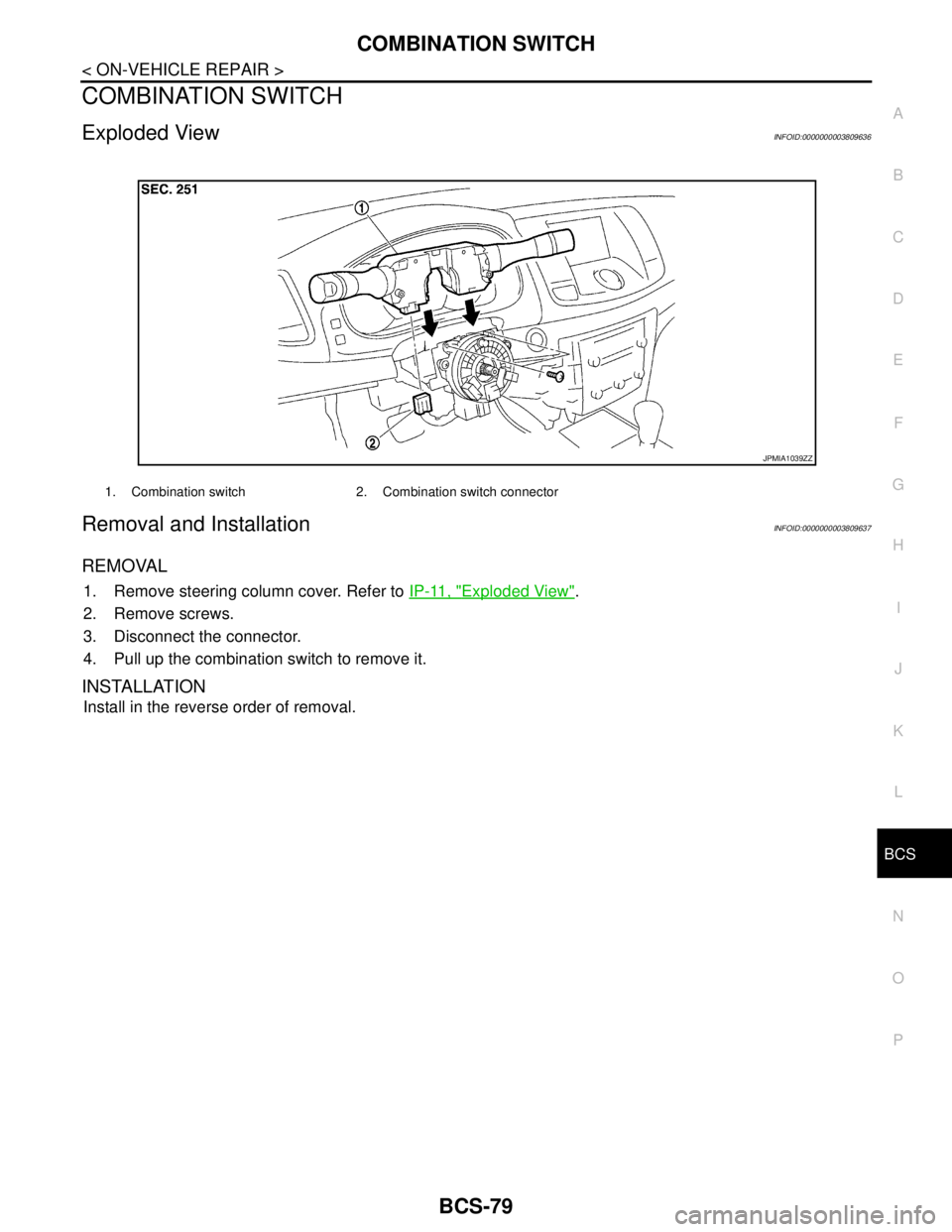
BCS
COMBINATION SWITCH
BCS-79
< ON-VEHICLE REPAIR >
C
D
E
F
G
H
I
J
K
L B A
O
P N
COMBINATION SWITCH
Exploded ViewINFOID:0000000003809636
Removal and InstallationINFOID:0000000003809637
REMOVAL
1. Remove steering column cover. Refer to IP-11, "Exploded View".
2. Remove screws.
3. Disconnect the connector.
4. Pull up the combination switch to remove it.
INSTALLATION
Install in the reverse order of removal.
1. Combination switch 2. Combination switch connector
JPMIA1039ZZ
Page 905 of 5121

BRAKE FLUID
BR-9
< ON-VEHICLE MAINTENANCE >
C
D
E
G
H
I
J
K
L
MA
B
BR
N
O
P
BRAKE FLUID
InspectionINFOID:0000000003811173
BRAKE FLUID LEVEL
Check that the fluid level in the sub tank is within the specified
range (MAX – MIN lines).
Visually check for any brake fluid leakage around the sub tank,
reservoir tank and hose.
Check the brake system for any leakage if the fluid level is
extremely low (lower than MIN).
Check the brake system for fluid leakage if the warning lamp
remains illuminated even after the parking brake is released.
BRAKE LINE
1. Check brake line (tubes and hoses) for cracks, deterioration or other damage. Replace any damaged
parts.
2. Check for fluid leakage by fully depressing brake pedal while
engine is running.
CAUTION:
If leakage occurs around joints, retighten or, if necessary,
replace damaged parts.
DrainingINFOID:0000000003811174
CAUTION:
Never spill or splash brake fluid on painted surfaces. Brake fluid may seriously damage paint. Wipe it
off immediately and wash with water if it gets on a painted surface.
Turn the ignition switch OFF and disconnect the ABS actuator and electric unit (control unit) con-
nector or the battery negative terminal before draining.
1. Connect a vinyl tube to the bleed valve.
2. Depress the brake pedal and loosen the bleeder valve to gradu-
ally discharge brake fluid.
RefillingINFOID:0000000003811175
CAUTION:
Turn the ignition switch OFF and disconnect the ABS actuator and electric unit (control unit) connec-
tor or the battery negative terminal before refilling.
1. Check that there is no foreign material in the sub tank, and refill with new brake fluid.
CAUTION:
Never reuse drained brake fluid.
JPFIA0007ZZ
SBR389C
BRA0007D
Page 907 of 5121

BRAKE MASTER CYLINDER
BR-11
< ON-VEHICLE MAINTENANCE >
C
D
E
G
H
I
J
K
L
MA
B
BR
N
O
P
BRAKE MASTER CYLINDER
InspectionINFOID:0000000003811177
FLUID LEAK
Check for brake fluid leakage from the master cylinder mounting face, reservoir tank mounting face, and brake
tube connections.
Page 908 of 5121

BR-12
< ON-VEHICLE MAINTENANCE >
BRAKE BOOSTER
BRAKE BOOSTER
InspectionINFOID:0000000003811178
OPERATION
Depress the brake pedal several times at 5-second intervals with the
engine stopped. Start the engine with the brake pedal fully
depressed. Check that the clearance between brake pedal and dash
lower panel decreases.
NOTE:
A slight impact with a small click may be felt on the pedal when the
brake pedal is fully depressed. This is a normal phenomenon due to
the brake system operation.
AIR TIGHT
Idle the engine for 1 minute to apply vacuum to the brake booster,
and stop the engine. Then depress the brake pedal several times
at 5-second intervals until the accumulated vacuum is released to
atmospheric pressure. Check that the clearance between brake
pedal and dash lower panel gradually increases (A → B → C) each
time the brake pedal is depressed during this operation.
Depress the brake pedal with the engine running. Then stop the
engine while holding down the brake pedal. Check that the brake
pedal stroke does not change after holding down the brake pedal
for 30 seconds or more.
NOTE:
A slight impact with a small click may be felt on the pedal when the
brake pedal is fully depressed. This is a normal phenomenon due
to the brake system operation.
BRA0037D
JPFIA0043ZZ
JPFIA0044ZZ