Ioni NISSAN TEANA 2008 Service Manual
[x] Cancel search | Manufacturer: NISSAN, Model Year: 2008, Model line: TEANA, Model: NISSAN TEANA 2008Pages: 5121, PDF Size: 69.03 MB
Page 806 of 5121
![NISSAN TEANA 2008 Service Manual AV-662
< ON-VEHICLE REPAIR >[BOSE AUDIO WITH NAVIGATION]
DVD PLAYER
DVD PLAYER
Exploded ViewINFOID:0000000003824765
REMOVAL
Refer to IP-11, "Exploded View".
DISASSEMBLY
Removal and InstallationINFOID:](/img/5/57391/w960_57391-805.png "NISSAN TEANA 2008 Service Manual AV-662
< ON-VEHICLE REPAIR >[BOSE AUDIO WITH NAVIGATION]
DVD PLAYER
DVD PLAYER
Exploded ViewINFOID:0000000003824765
REMOVAL
Refer to IP-11, \"Exploded View\".
DISASSEMBLY
Removal and InstallationINFOID:")
AV-662
< ON-VEHICLE REPAIR >[BOSE AUDIO WITH NAVIGATION]
DVD PLAYER
DVD PLAYER
Exploded ViewINFOID:0000000003824765
REMOVAL
Refer to IP-11, "Exploded View".
DISASSEMBLY
Removal and InstallationINFOID:0000000003824766
REMOVAL
1. Remove grove box. Refer to IP-12, "Removal and Installation"
2. Remove DVD player mounting screw, disconnect the DVD player connector.
3. Remove DVD player.
INSTALLATION
Installation is the reverse order of removal.
JPNIA1047ZZ
1. DVD player
Page 807 of 5121
![NISSAN TEANA 2008 Service Manual AV
AUXILIARY INPUT JACKS
AV-663
< ON-VEHICLE REPAIR >[BOSE AUDIO WITH NAVIGATION]
C
D
E
F
G
H
I
J
K
L
MB A
O
P
AUXILIARY INPUT JACKS
Exploded ViewINFOID:0000000003766007
REMOVAL
Refer to IP-22, "Remov](/img/5/57391/w960_57391-806.png "NISSAN TEANA 2008 Service Manual AV
AUXILIARY INPUT JACKS
AV-663
< ON-VEHICLE REPAIR >[BOSE AUDIO WITH NAVIGATION]
C
D
E
F
G
H
I
J
K
L
MB A
O
P
AUXILIARY INPUT JACKS
Exploded ViewINFOID:0000000003766007
REMOVAL
Refer to IP-22, \"Remov")
AV
AUXILIARY INPUT JACKS
AV-663
< ON-VEHICLE REPAIR >[BOSE AUDIO WITH NAVIGATION]
C
D
E
F
G
H
I
J
K
L
MB A
O
P
AUXILIARY INPUT JACKS
Exploded ViewINFOID:0000000003766007
REMOVAL
Refer to IP-22, "Removal and Installation".
DISASSEMBLY
Removal and InstallationINFOID:0000000003766008
REMOVAL
1. Remove console finisher. Refer to IP-22, "Removal and Installation".
2. Remove auxiliary mounting screws.
3. Remove auxiliary input jacks.
INSTALLATION
Installation is the reverse order of removal.
JPNIA1048ZZ
1. Auxiliary input jacks
Page 808 of 5121
![NISSAN TEANA 2008 Service Manual AV-664
< ON-VEHICLE REPAIR >[BOSE AUDIO WITH NAVIGATION]
MICROPHONE
MICROPHONE
Exploded ViewINFOID:0000000003766009
REMOVAL
Refer to INL-89, "Exploded View".
DISASSEMBLY
Removal and InstallationINFOID](/img/5/57391/w960_57391-807.png "NISSAN TEANA 2008 Service Manual AV-664
< ON-VEHICLE REPAIR >[BOSE AUDIO WITH NAVIGATION]
MICROPHONE
MICROPHONE
Exploded ViewINFOID:0000000003766009
REMOVAL
Refer to INL-89, \"Exploded View\".
DISASSEMBLY
Removal and InstallationINFOID")
AV-664
< ON-VEHICLE REPAIR >[BOSE AUDIO WITH NAVIGATION]
MICROPHONE
MICROPHONE
Exploded ViewINFOID:0000000003766009
REMOVAL
Refer to INL-89, "Exploded View".
DISASSEMBLY
Removal and InstallationINFOID:0000000003766010
REMOVAL
1. Remove map lamp assembly. Refer to INL-89, "Removal and Installation".
2. Remove microphone(1), stretching pawls of map lamp assem-
bly.
INSTALLATION
Installation is the reverse order of removal.
JSNIA0132ZZ
1. Microphone
JSNIA0132ZZ
Page 810 of 5121
![NISSAN TEANA 2008 Service Manual AV-666
< ON-VEHICLE REPAIR >[BOSE AUDIO WITH NAVIGATION]
GPS ANTENNA
Exploded View
INFOID:0000000003766012
Removal and InstallationINFOID:0000000003766013
REMOVAL
1. Remove rear parcel shelf finisher.](/img/5/57391/w960_57391-809.png "NISSAN TEANA 2008 Service Manual AV-666
< ON-VEHICLE REPAIR >[BOSE AUDIO WITH NAVIGATION]
GPS ANTENNA
Exploded View
INFOID:0000000003766012
Removal and InstallationINFOID:0000000003766013
REMOVAL
1. Remove rear parcel shelf finisher.")
AV-666
< ON-VEHICLE REPAIR >[BOSE AUDIO WITH NAVIGATION]
GPS ANTENNA
Exploded View
INFOID:0000000003766012
Removal and InstallationINFOID:0000000003766013
REMOVAL
1. Remove rear parcel shelf finisher. Refer to INT-43, "Removal and Installation".
2. Remove GPS antenna mounting screws, disconnect GPS antenna connector.
3. Remove GPS antenna.
INSTALLATION
Install in the reverse order of removal.
JPNIA1055ZZ
1. GPS antenna
Page 812 of 5121
![NISSAN TEANA 2008 Service Manual AV-668
< ON-VEHICLE REPAIR >[BOSE AUDIO WITH NAVIGATION]
TEL ANTENNA
Exploded View
INFOID:0000000003766015
Removal and InstallationINFOID:0000000003766016
REMOVAL
1. Remove rear parcel shelf finisher.](/img/5/57391/w960_57391-811.png "NISSAN TEANA 2008 Service Manual AV-668
< ON-VEHICLE REPAIR >[BOSE AUDIO WITH NAVIGATION]
TEL ANTENNA
Exploded View
INFOID:0000000003766015
Removal and InstallationINFOID:0000000003766016
REMOVAL
1. Remove rear parcel shelf finisher.")
AV-668
< ON-VEHICLE REPAIR >[BOSE AUDIO WITH NAVIGATION]
TEL ANTENNA
Exploded View
INFOID:0000000003766015
Removal and InstallationINFOID:0000000003766016
REMOVAL
1. Remove rear parcel shelf finisher. Refer to INT-43, "Removal and Installation".
2. Remove trunk front finisher. Refer toINT-57, "
Removal and Installation".
3. Remove TEL antenna mounting nit, disconnect the TEL antenna connector.
4. Remove TEL antenna.
INSTALLATION
Install in the reverse order of removal.
JPNIA1053ZZ
1. TEL antenna
Page 813 of 5121
![NISSAN TEANA 2008 Service Manual AV
CAMERA CONTROL UNIT
AV-669
< ON-VEHICLE REPAIR >[BOSE AUDIO WITH NAVIGATION]
C
D
E
F
G
H
I
J
K
L
MB A
O
P
CAMERA CONTROL UNIT
Exploded ViewINFOID:0000000003766017
Removal and InstallationINFOID:000](/img/5/57391/w960_57391-812.png "NISSAN TEANA 2008 Service Manual AV
CAMERA CONTROL UNIT
AV-669
< ON-VEHICLE REPAIR >[BOSE AUDIO WITH NAVIGATION]
C
D
E
F
G
H
I
J
K
L
MB A
O
P
CAMERA CONTROL UNIT
Exploded ViewINFOID:0000000003766017
Removal and InstallationINFOID:000")
AV
CAMERA CONTROL UNIT
AV-669
< ON-VEHICLE REPAIR >[BOSE AUDIO WITH NAVIGATION]
C
D
E
F
G
H
I
J
K
L
MB A
O
P
CAMERA CONTROL UNIT
Exploded ViewINFOID:0000000003766017
Removal and InstallationINFOID:0000000003766018
REMOVAL
1. Remove rear wheelhouse finisher RH. Refer to INT-57, "Removal and Installation".
2. Remove camera control unit mounting screws, disconnect the camera control unit connector.
3. Remove camera control unit.
INSTALLATION
1. Installation is the reverse order of removal.
2. Perform predicted course line center position adjustment. Refer to AV-400, "
PREDICTED COURSE LINE
CENTER POSITION ADJUSTMENT : Special Repair Requirement".
JPNIA1049ZZ
1. Camera control unit
Page 814 of 5121
![NISSAN TEANA 2008 Service Manual AV-670
< ON-VEHICLE REPAIR >[BOSE AUDIO WITH NAVIGATION]
REAR VIEW CAMERA
REAR VIEW CAMERA
Exploded ViewINFOID:0000000003766021
DISASSEMBLY
Removal and InstallationINFOID:0000000003766022
REMOVAL
1. R](/img/5/57391/w960_57391-813.png "NISSAN TEANA 2008 Service Manual AV-670
< ON-VEHICLE REPAIR >[BOSE AUDIO WITH NAVIGATION]
REAR VIEW CAMERA
REAR VIEW CAMERA
Exploded ViewINFOID:0000000003766021
DISASSEMBLY
Removal and InstallationINFOID:0000000003766022
REMOVAL
1. R")
AV-670
< ON-VEHICLE REPAIR >[BOSE AUDIO WITH NAVIGATION]
REAR VIEW CAMERA
REAR VIEW CAMERA
Exploded ViewINFOID:0000000003766021
DISASSEMBLY
Removal and InstallationINFOID:0000000003766022
REMOVAL
1. Remove trunk lid finisher inner. Refer to INT-59, "Removal and Installation".
2. Remove trunk lid finisher. Refer to EXT-38, "
Removal and Installation".
3. Remove rear view camera mounting clip, disconnect the rear view camera connector.
4. Remove rear view camera.
INSTALLATION
1. Installation is the reverse order of removal.
AdjustmentINFOID:0000000003901754
Adjust the guide line position if the guide line position is shifted after installing the rear view camera.
1. Draw lines on rearward area of the vehicle passing through the
following points: 200 mm (7.87 in) from both sides of the vehicle,
and 0.5 m (1.64 ft), 1.0 m (3.28 ft) from the rear end of the
bumper.
2. Set into “Adjust offset of rear view camera” mode of Confirma-
tion / Adjustment mode.
JPNIA1050ZZ
1. Rear view camera
2. Seal
Refer to GI-4, "
Components" for symbols in the figure.
SKIB3691E
Page 816 of 5121
![NISSAN TEANA 2008 Service Manual AV-672
< ON-VEHICLE REPAIR >[BOSE AUDIO WITH NAVIGATION]
STEERING ANGLE SENSOR
STEERING ANGLE SENSOR
Exploded ViewINFOID:0000000003766035
REMOVAL
Refer to SR-9, "Exploded View".
DISASSEMBLY
Removal an](/img/5/57391/w960_57391-815.png "NISSAN TEANA 2008 Service Manual AV-672
< ON-VEHICLE REPAIR >[BOSE AUDIO WITH NAVIGATION]
STEERING ANGLE SENSOR
STEERING ANGLE SENSOR
Exploded ViewINFOID:0000000003766035
REMOVAL
Refer to SR-9, \"Exploded View\".
DISASSEMBLY
Removal an")
AV-672
< ON-VEHICLE REPAIR >[BOSE AUDIO WITH NAVIGATION]
STEERING ANGLE SENSOR
STEERING ANGLE SENSOR
Exploded ViewINFOID:0000000003766035
REMOVAL
Refer to SR-9, "Exploded View".
DISASSEMBLY
Removal and InstallationINFOID:0000000003766036
REMOVAL
1. Remove spiral cable.
2. Remove steering angle sensor mounting screws.
3. Remove steering angle sensor.
INSTALLATION
Installation is the reverse order of removal.
JSNIA0135ZZ
1. Spiral cable
2. Steering angle sensor
Page 820 of 5121
BCS
INSPECTION AND ADJUSTMENT
BCS-3
< BASIC INSPECTION >
C
D
E
F
G
H
I
J
K
L B A
O
P N
BASIC INSPECTION
INSPECTION AND ADJUSTMENT
ADDITIONAL SERVICE WHEN REPLACING CONTROL UNIT (BCM)
ADDITIONAL SERVICE WHEN REPLACING CONTROL UNIT (BCM) : Description
INFOID:0000000003809644
BEFORE REPLACEMENT
When replacing BCM, save or print current vehicle specification with CONSULT-III configuration before
replacement.
NOTE:
If “READ CONFIGURATION” can not be used, use the “WRITE CONFIGURATION - Manual selection” after
replacing BCM.
AFTER REPLACEMENT
CAUTION:
• When replacing BCM, you must perform “WRITE CONFIGURATION” with CONSULT-III.
- Complete the procedure of “WRITE CONFIGURATION” in order.
- If you set incorrect “WRITE CONFIGURATION”, incidents might occur.
- Configuration is different for each vehicle model. Confirm configuration of each vehicle model.
When replacing BCM, perform the system initialization (NATS).
ADDITIONAL SERVICE WHEN REPLACING CONTROL UNIT (BCM) : Special Repair
Requirement
INFOID:0000000003809645
1.SAVING VEHICLE SPECIFICATION
CONSULT-III Configuration
Perform “READ CONFIGURATION” to save or print current vehicle specification. Refer to BCS-3, "
CONFIGU-
RATION (BCM) : Description".
NOTE:
If “READ CONFIGURATION” can not be used, use the “WRITE CONFIGURATION - Manual selection” after
replacing BCM.
>> GO TO 2.
2.REPLACE BCM
Replace BCM. Refer to BCS-78, "
Exploded View".
>> GO TO 3.
3.WRITING VEHICLE SPECIFICATION
CONSULT-III Configuration
Perform “WRITE CONFIGURATION - Config file” or “WRITE CONFIGURATION - Manual selection” to write
vehicle specification. Refer to BCS-4, "
CONFIGURATION (BCM) : Special Repair Requirement".
>> GO TO 4.
4.INITIALIZE BCM (NATS)
Perform BCM initialization. (NATS)
>> WORK END
CONFIGURATION (BCM)
CONFIGURATION (BCM) : DescriptionINFOID:0000000003809646
Vehicle specification needs to be written with CONSULT-III because it is not written after replacing BCM.
Page 823 of 5121
BCS-6
< FUNCTION DIAGNOSIS >
BODY CONTROL SYSTEM
FUNCTION DIAGNOSIS
BODY CONTROL SYSTEM
System DescriptionINFOID:0000000003809584
OUTLINE
BCM (Body Control Module) controls the various electrical components. It inputs the information required to
the control from CAN communication and the signal received from each switch and sensor.
BCM has combination switch reading function for reading the operation status of combination switches (light,
turn signal, wiper and washer) in addition to a function for controlling the operation of various electrical com-
ponents. It also has the signal transmission function as the passed point of signal and the power saving con-
trol function that reduces the power consumption with the ignition switch OFF.
BCM is equipped with the diagnosis function that performs the diagnosis with CONSULT-III and various set-
tings.
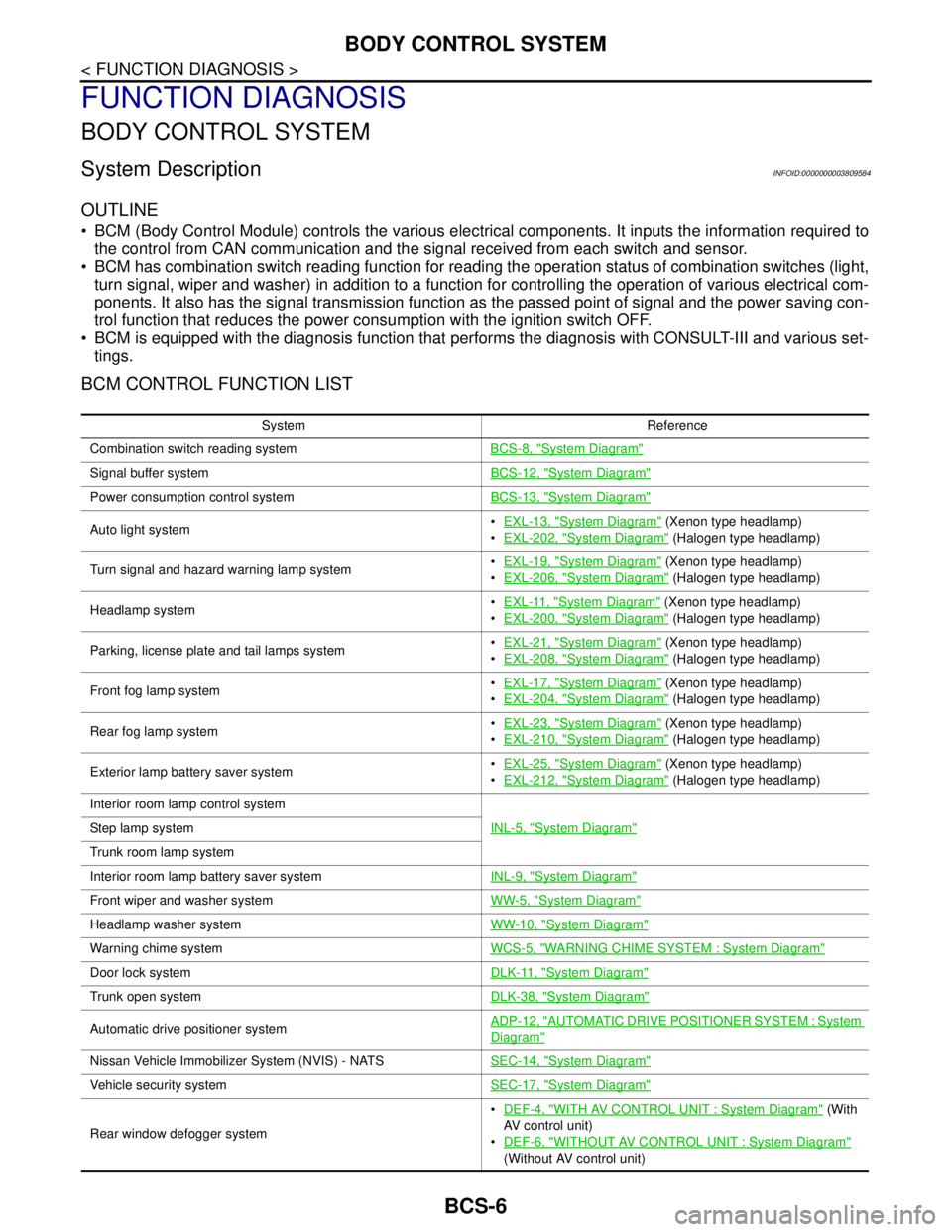
BCM CONTROL FUNCTION LIST
System Reference
Combination switch reading systemBCS-8, "
System Diagram"
Signal buffer systemBCS-12, "System Diagram"
Power consumption control systemBCS-13, "System Diagram"
Auto light systemEXL-13, "System Diagram" (Xenon type headlamp)
EXL-202, "
System Diagram" (Halogen type headlamp)
Turn signal and hazard warning lamp systemEXL-19, "
System Diagram" (Xenon type headlamp)
EXL-206, "
System Diagram" (Halogen type headlamp)
Headlamp systemEXL-11, "
System Diagram" (Xenon type headlamp)
EXL-200, "
System Diagram" (Halogen type headlamp)
Parking, license plate and tail lamps systemEXL-21, "
System Diagram" (Xenon type headlamp)
EXL-208, "
System Diagram" (Halogen type headlamp)
Front fog lamp systemEXL-17, "
System Diagram" (Xenon type headlamp)
EXL-204, "
System Diagram" (Halogen type headlamp)
Rear fog lamp systemEXL-23, "
System Diagram" (Xenon type headlamp)
EXL-210, "
System Diagram" (Halogen type headlamp)
Exterior lamp battery saver systemEXL-25, "
System Diagram" (Xenon type headlamp)
EXL-212, "
System Diagram" (Halogen type headlamp)
Interior room lamp control system
INL-5, "
System Diagram"Step lamp system
Trunk room lamp system
Interior room lamp battery saver systemINL-9, "
System Diagram"
Front wiper and washer systemWW-5, "System Diagram"
Headlamp washer systemWW-10, "System Diagram"
Warning chime systemWCS-5, "WARNING CHIME SYSTEM : System Diagram"
Door lock systemDLK-11, "System Diagram"
Trunk open systemDLK-38, "System Diagram"
Automatic drive positioner systemADP-12, "AUTOMATIC DRIVE POSITIONER SYSTEM : System
Diagram"
Nissan Vehicle Immobilizer System (NVIS) - NATSSEC-14, "System Diagram"
Vehicle security systemSEC-17, "System Diagram"
Rear window defogger systemDEF-4, "
WITH AV CONTROL UNIT : System Diagram" (With
AV control unit)
DEF-6, "
WITHOUT AV CONTROL UNIT : System Diagram"
(Without AV control unit)