Ioni NISSAN TEANA 2008 Service Manual
[x] Cancel search | Manufacturer: NISSAN, Model Year: 2008, Model line: TEANA, Model: NISSAN TEANA 2008Pages: 5121, PDF Size: 69.03 MB
Page 824 of 5121

BCS
BODY CONTROL SYSTEM
BCS-7
< FUNCTION DIAGNOSIS >
C
D
E
F
G
H
I
J
K
L B A
O
P N
Component Parts LocationINFOID:0000000003809585
Intelligent Key system/engine start systemDoor lock function
DLK-14, "INTELLIGENT KEY SYSTEM : System Diagram"
Trunk open function
Remote keyless entry
function
Key reminder function
Warning function
Engine start function
Power window systemPWC-7, "
SystemDiagram"
System Reference
1. BCM
A. Behind of combination meter
JPMIA1040ZZ
Page 825 of 5121
BCS-8
< FUNCTION DIAGNOSIS >
COMBINATION SWITCH READING SYSTEM
COMBINATION SWITCH READING SYSTEM
System DiagramINFOID:0000000003809586
System DescriptionINFOID:0000000003809587
OUTLINE
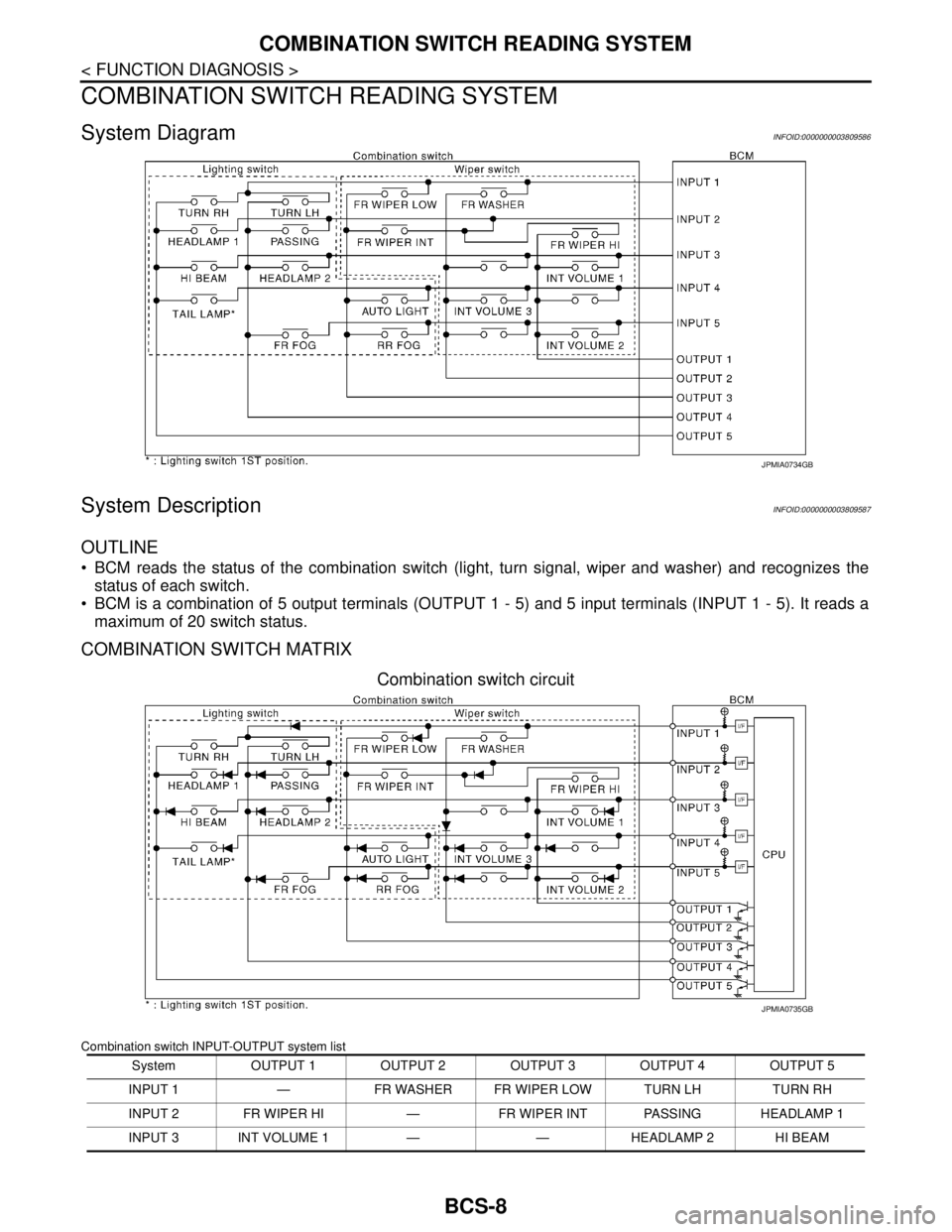
BCM reads the status of the combination switch (light, turn signal, wiper and washer) and recognizes the
status of each switch.
BCM is a combination of 5 output terminals (OUTPUT 1 - 5) and 5 input terminals (INPUT 1 - 5). It reads a
maximum of 20 switch status.
COMBINATION SWITCH MATRIX
Combination switch circuit
Combination switch INPUT-OUTPUT system list
JPMIA0734GB
System OUTPUT 1 OUTPUT 2 OUTPUT 3 OUTPUT 4 OUTPUT 5
INPUT 1 — FR WASHER FR WIPER LOW TURN LH TURN RH
INPUT 2 FR WIPER HI — FR WIPER INT PASSING HEADLAMP 1
INPUT 3 INT VOLUME 1 — — HEADLAMP 2 HI BEAM
JPMIA0735GB
Page 828 of 5121

BCS
COMBINATION SWITCH READING SYSTEM
BCS-11
< FUNCTION DIAGNOSIS >
C
D
E
F
G
H
I
J
K
L B A
O
P N
Component Parts LocationINFOID:0000000003809588
Wiper intermittent
dial positionIntermittent
operation delay
intervalINT VOLUME switch ON/OFF status
INT VOLUME 1 switch INT VOLUME 2 switch INT VOLUME 3 switch
1
Short
↑
↓
LongON ON ON
2ONONOFF
3ONOFFOFF
4 OFF OFF OFF
5OFFOFFON
6OFFONON
7OFFONOFF
1. Combination switch 2. BCM
A. Behind of combination meter
JPMIA1041ZZ
Page 829 of 5121
BCS-12
< FUNCTION DIAGNOSIS >
SIGNAL BUFFER SYSTEM
SIGNAL BUFFER SYSTEM
System DiagramINFOID:0000000003809589
System DescriptionINFOID:0000000003809590
OUTLINE
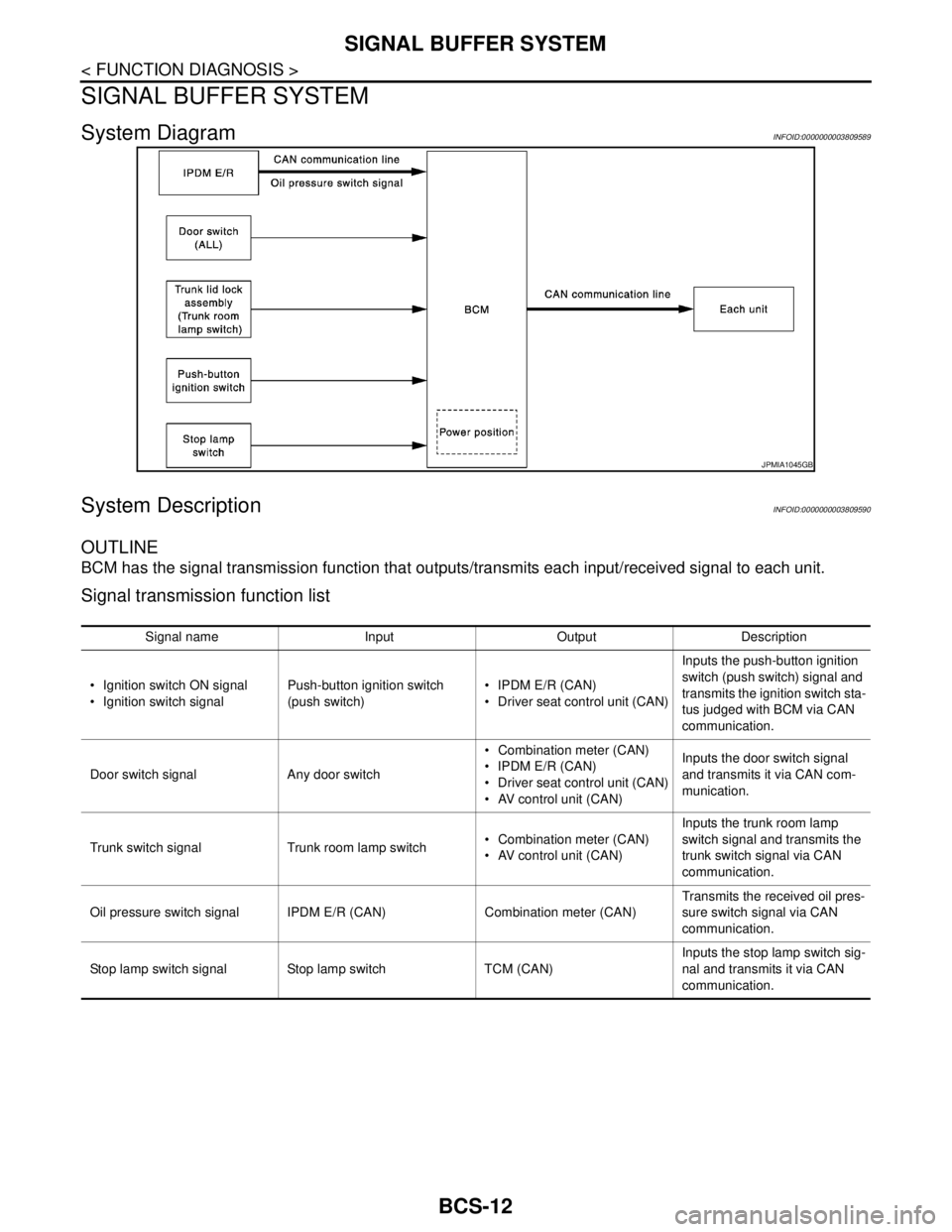
BCM has the signal transmission function that outputs/transmits each input/received signal to each unit.
Signal transmission function list
JPMIA1045GB
Signal name Input Output Description
Ignition switch ON signal
Ignition switch signalPush-button ignition switch
(push switch) IPDM E/R (CAN)
Driver seat control unit (CAN)Inputs the push-button ignition
switch (push switch) signal and
transmits the ignition switch sta-
tus judged with BCM via CAN
communication.
Door switch signal Any door switch Combination meter (CAN)
IPDM E/R (CAN)
Driver seat control unit (CAN)
AV control unit (CAN)Inputs the door switch signal
and transmits it via CAN com-
munication.
Trunk switch signal Trunk room lamp switch Combination meter (CAN)
AV control unit (CAN)Inputs the trunk room lamp
switch signal and transmits the
trunk switch signal via CAN
communication.
Oil pressure switch signal IPDM E/R (CAN) Combination meter (CAN)Transmits the received oil pres-
sure switch signal via CAN
communication.
Stop lamp switch signal Stop lamp switch TCM (CAN)Inputs the stop lamp switch sig-
nal and transmits it via CAN
communication.
Page 830 of 5121

BCS
POWER CONSUMPTION CONTROL SYSTEM
BCS-13
< FUNCTION DIAGNOSIS >
C
D
E
F
G
H
I
J
K
L B A
O
P N
POWER CONSUMPTION CONTROL SYSTEM
System DiagramINFOID:0000000003809591
System DescriptionINFOID:0000000003809592
OUTLINE
BCM incorporates a power saving control function that reduces the power consumption according to the
vehicle status.
BCM switches the status (control mode) by itself with the power saving control function. It performs the sleep
request to each unit (IPDM E/R, combination meter, driver seat control unit and automatic back door control
unit) that operates with the ignition switch OFF.
Normal mode (wake-up)- CAN communication is normally performed with other units
- Each control with BCM is operating properly
CAN communication sleep mode (CAN sleep)- CAN transmission is stopped
- Control with BCM only is operating
Low power consumption mode (BCM sleep)- Low power consumption control is active
- CAN transmission is stopped
LOW POWER CONSUMPTION CONTROL WITH BCM
BCM reduces the power consumption with the following operation in the low power consumption mode.
The reading interval of the each switches changes from 10 ms interval to 60 ms interval.
Sleep mode activation
BCM receives the sleep-ready signal (ready) from IPDM E/R and combination meter via CAN communica-
tion.
BCM transmits the sleep wake up signal (sleep) to each unit when all of the CAN sleep conditions are ful-
filled.
Each unit stops the transmission of CAN communication with the sleep wake up signal. BCM is in CAN com-
munication sleep mode.
BCM is in the low power consumption mode and perform the low power consumption control when all of the
BCM sleep conditions are fulfilled with CAN sleep condition.
JPMIA1046GB
Page 832 of 5121
BCS
POWER CONSUMPTION CONTROL SYSTEM
BCS-15
< FUNCTION DIAGNOSIS >
C
D
E
F
G
H
I
J
K
L B A
O
P N
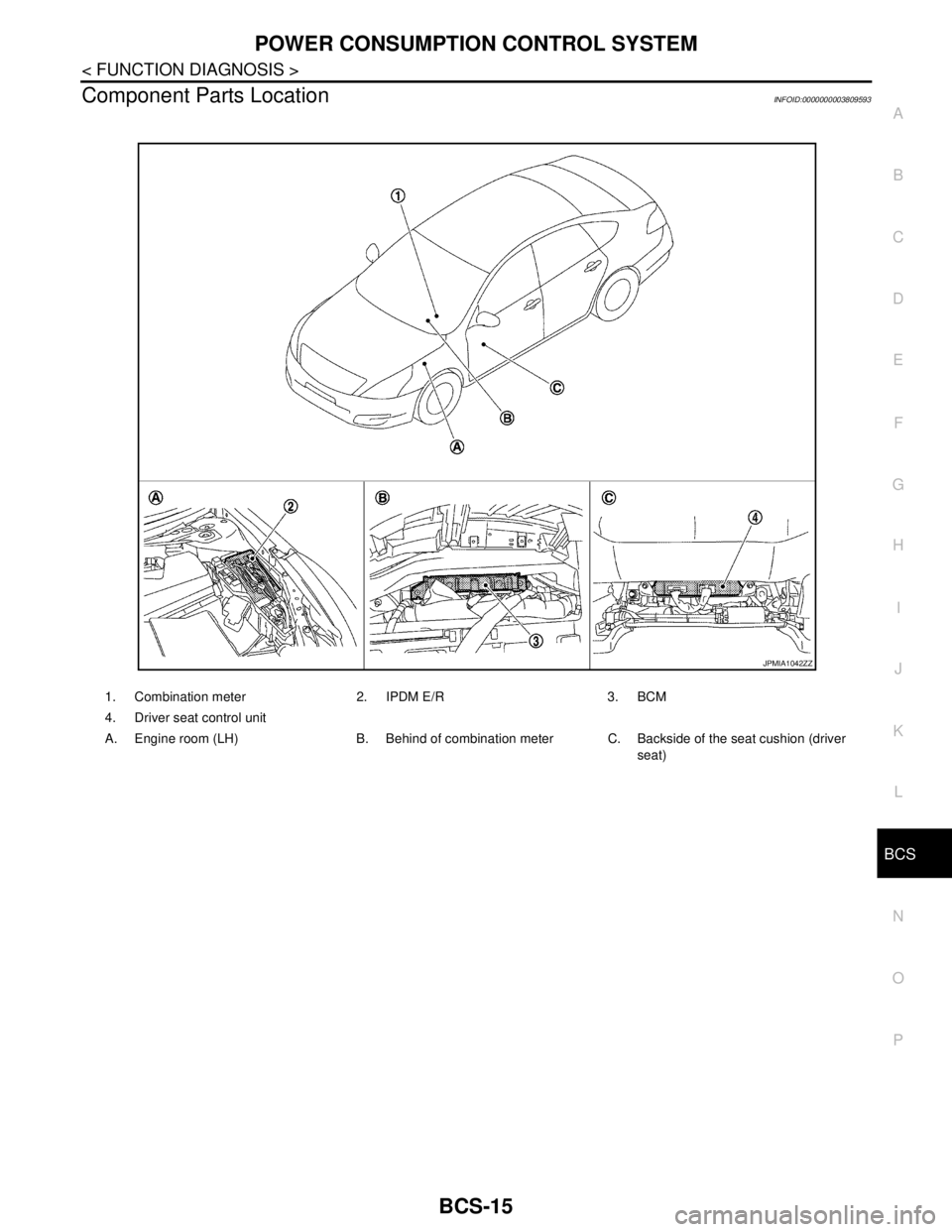
Component Parts LocationINFOID:0000000003809593
1. Combination meter 2. IPDM E/R 3. BCM
4. Driver seat control unit
A. Engine room (LH) B. Behind of combination meter C. Backside of the seat cushion (driver
seat)
JPMIA1042ZZ
Page 850 of 5121

BCS
U1000 CAN COMM CIRCUIT
BCS-33
< COMPONENT DIAGNOSIS >
C
D
E
F
G
H
I
J
K
L B A
O
P N
COMPONENT DIAGNOSIS
U1000 CAN COMM CIRCUIT
DescriptionINFOID:0000000003809614
CAN (Controller Area Network) is a serial communication line for real time applications. It is an on-vehicle mul-
tiplex communication line with high data communication speed and excellent error detection ability. Modern
vehicle is equipped with many electronic control unit, and each control unit shares information and links with
other control units during operation (not independent). In CAN communication, control units are connected
with 2 communication lines (CAN H-line, CAN L-line) allowing a high rate of information transmission with less
wiring. Each control unit transmits/receives data but selectively reads required data only.
CAN Communication Signal Chart. Refer to LAN-22, "
CAN Communication Signal Chart".
DTC LogicINFOID:0000000003809615
DTC DETECTION LOGIC
Diagnosis ProcedureINFOID:0000000003809616
1.PERFORM SELF DIAGNOSTIC
1. Turn ignition switch ON and wait for 2 seconds or more.
2. Check “Self Diagnostic Result”.
Is
“U1000: CAN COMM CIRCUIT” displayed?
YES >> Refer to LAN-14, "Trouble Diagnosis Flow Chart".
NO >> Refer to GI-35, "
Intermittent Incident".
DTCCONSULT-III display
descriptionDTC Detection Condition Possible cause
U1000 CAN COMM CIRCUITWhen BCM cannot communicate CAN com-
munication signal continuously for 2 seconds
or more.CAN communication system
Page 852 of 5121
BCS
U0415 VEHICLE SPEED SIG
BCS-35
< COMPONENT DIAGNOSIS >
C
D
E
F
G
H
I
J
K
L B A
O
P N
U0415 VEHICLE SPEED SIG
DescriptionINFOID:0000000003809619
U0415 is displayed if any unusual condition is present in the reception status of the vehicle speed signal from
the ABS actuator and electric unit (control unit).
DTC LogicINFOID:0000000003809620
DTC DETECTION LOGIC
DTC CONFIRMATION PROCEDURE
1.DTC CONFIRMATION
1. Erase the DTC.
2. Turn ignition switch OFF.
3. Perform the “Self Diagnostic Result” of CONSULT-III, when passed 2 seconds or more after the ignition
switch is turned ON.
Is any DTC detected?
YES >> Refer to BCS-35, "Diagnosis Procedure".
NO >> INSPECTION END
Diagnosis ProcedureINFOID:0000000003809621
1.ABS ACTUATOR AND ELECTRIC UNIT (CONTROL UNIT) SELF-DIAG RESULTS
Perform “Self-Diagnostic Result” of ABS actuator and electric unit (control unit) with CONSULT-III. Refer to
BRC-13, "
CONSULT-III Function" (ABS) or BRC-80, "CONSULT-III Function" (VDC/TCS/ABS).
Is any DTC detected?
YES >> Repair or replace the malfunctioning part.
NO >> Replace BCM. Refer to BCS-78, "
Exploded View".
DTC CONSULT-III display
descriptionDTC Detection Condition Probable cause
U0415 VEHICLE SPEED SIGWhen the vehicle speed signal received from
the ABS actuator and electric unit (control
unit) remains abnormal for 2 seconds or more. ABS actuator and electric unit (control unit)
BCM
Page 853 of 5121
BCS-36
< COMPONENT DIAGNOSIS >
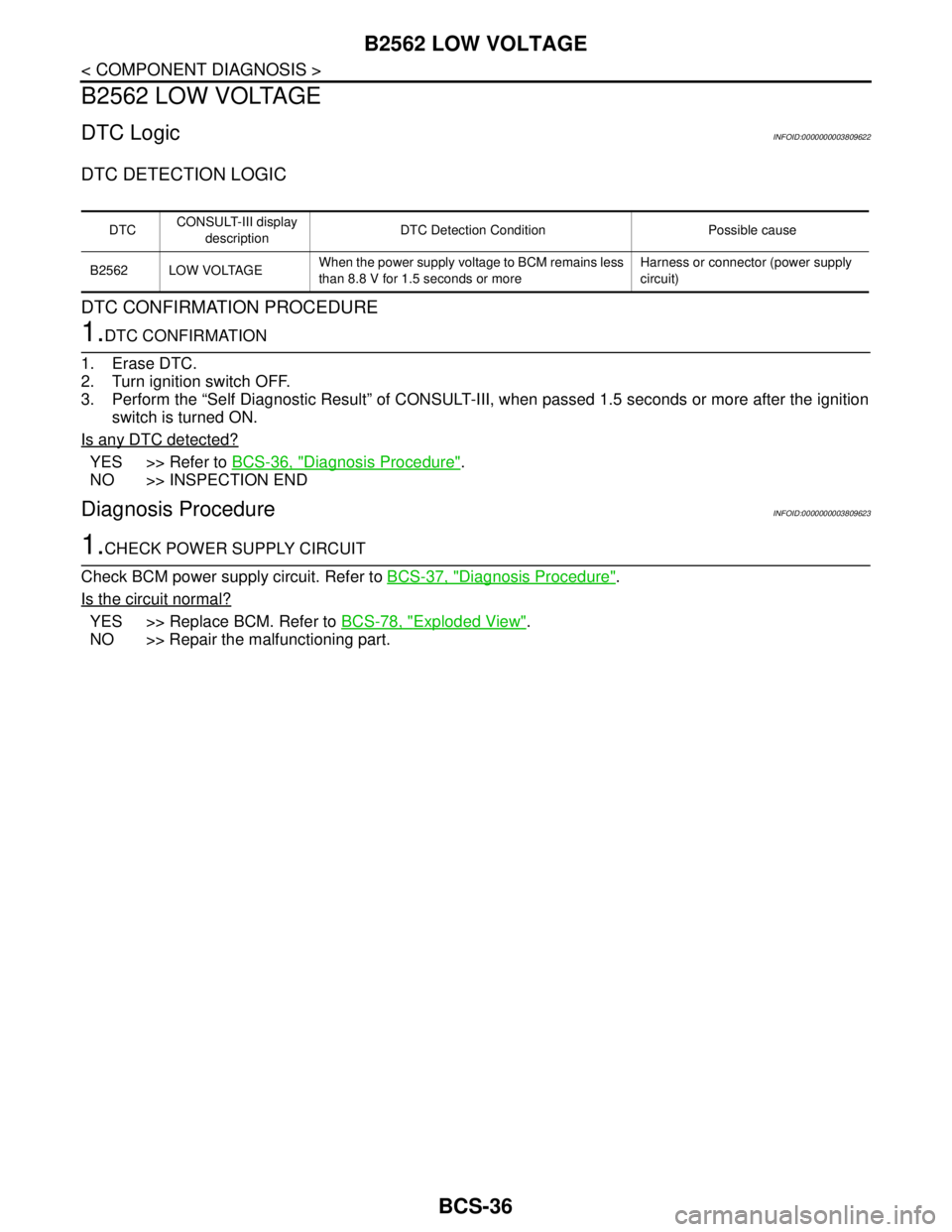
B2562 LOW VOLTAGE
B2562 LOW VOLTAGE
DTC LogicINFOID:0000000003809622
DTC DETECTION LOGIC
DTC CONFIRMATION PROCEDURE
1.DTC CONFIRMATION
1. Erase DTC.
2. Turn ignition switch OFF.
3. Perform the “Self Diagnostic Result” of CONSULT-III, when passed 1.5 seconds or more after the ignition
switch is turned ON.
Is any DTC detected?
YES >> Refer to BCS-36, "Diagnosis Procedure".
NO >> INSPECTION END
Diagnosis ProcedureINFOID:0000000003809623
1.CHECK POWER SUPPLY CIRCUIT
Check BCM power supply circuit. Refer to BCS-37, "
Diagnosis Procedure".
Is the circuit normal?
YES >> Replace BCM. Refer to BCS-78, "Exploded View".
NO >> Repair the malfunctioning part.
DTCCONSULT-III display
descriptionDTC Detection Condition Possible cause
B2562 LOW VOLTAGEWhen the power supply voltage to BCM remains less
than 8.8 V for 1.5 seconds or moreHarness or connector (power supply
circuit)
Page 856 of 5121
BCS
COMBINATION SWITCH INPUT CIRCUIT
BCS-39
< COMPONENT DIAGNOSIS >
C
D
E
F
G
H
I
J
K
L B A
O
P N
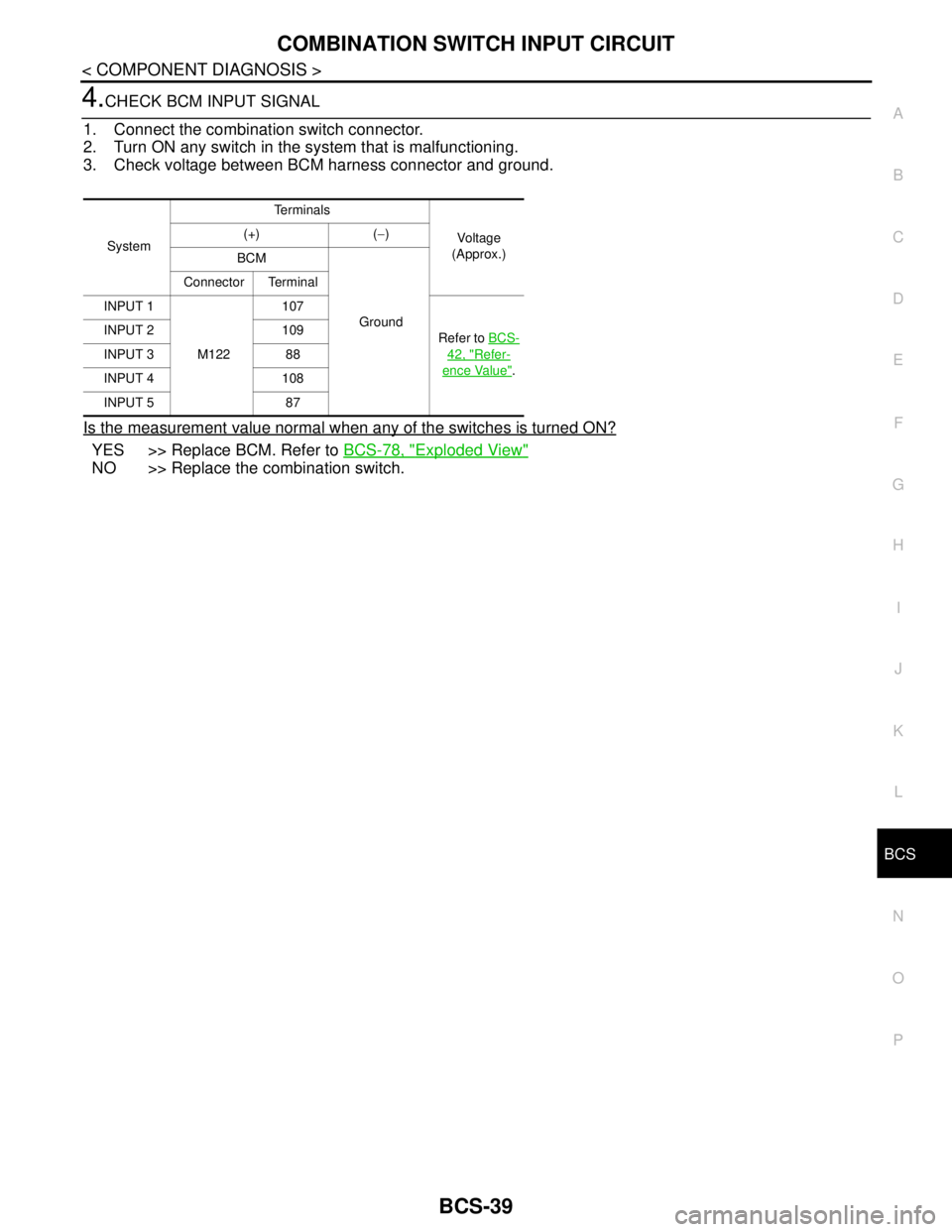
4.CHECK BCM INPUT SIGNAL
1. Connect the combination switch connector.
2. Turn ON any switch in the system that is malfunctioning.
3. Check voltage between BCM harness connector and ground.
Is the measurement value normal when any of the switches is turned ON?
YES >> Replace BCM. Refer to BCS-78, "Exploded View"
NO >> Replace the combination switch.
SystemTe r m i n a l s
Voltag e
(Approx.) (+) (−)
BCM
Ground Connector Terminal
INPUT 1
M122107
Refer to BCS-
42, "Refer-
ence Value". INPUT 2 109
INPUT 3 88
INPUT 4 108
INPUT 5 87