key NISSAN TEANA 2008 Service Manual
[x] Cancel search | Manufacturer: NISSAN, Model Year: 2008, Model line: TEANA, Model: NISSAN TEANA 2008Pages: 5121, PDF Size: 69.03 MB
Page 1458 of 5121
![NISSAN TEANA 2008 Service Manual DLK-242
< ON-VEHICLE REPAIR >[WITH INTELLIGENT KEY SYSTEM]
TRUNK LID OPENER REQUEST SWITCH
TRUNK LID OPENER REQUEST SWITCH
Exploded ViewINFOID:0000000003846685
Refer to EXT-38, "Exploded View".
Remova](/img/5/57391/w960_57391-1457.png "NISSAN TEANA 2008 Service Manual DLK-242
< ON-VEHICLE REPAIR >[WITH INTELLIGENT KEY SYSTEM]
TRUNK LID OPENER REQUEST SWITCH
TRUNK LID OPENER REQUEST SWITCH
Exploded ViewINFOID:0000000003846685
Refer to EXT-38, \"Exploded View\".
Remova")
DLK-242
< ON-VEHICLE REPAIR >[WITH INTELLIGENT KEY SYSTEM]
TRUNK LID OPENER REQUEST SWITCH
TRUNK LID OPENER REQUEST SWITCH
Exploded ViewINFOID:0000000003846685
Refer to EXT-38, "Exploded View".
Removal and InstallationINFOID:0000000003846686
REMOVAL
1. Remove the trunk lid finisher outer. Refer to EXT-38, "Removal and Installation".
2. Remove the trunk lid opener request switch mounting pawl (A),
and then remove trunk lid opener request switch (1) from inner
bracket.
INSTALLATION
Install in the reverse order of removal.
:Pawl
JMKIA2446ZZ
Page 1459 of 5121
![NISSAN TEANA 2008 Service Manual TRUNK LID OPENER SWITCH
DLK-243
< ON-VEHICLE REPAIR >[WITH INTELLIGENT KEY SYSTEM]
C
D
E
F
G
H
I
J
L
MA
B
DLK
N
O
P
TRUNK LID OPENER SWITCH
Exploded ViewINFOID:0000000003846687
Refer to EXT-38, "Explo](/img/5/57391/w960_57391-1458.png "NISSAN TEANA 2008 Service Manual TRUNK LID OPENER SWITCH
DLK-243
< ON-VEHICLE REPAIR >[WITH INTELLIGENT KEY SYSTEM]
C
D
E
F
G
H
I
J
L
MA
B
DLK
N
O
P
TRUNK LID OPENER SWITCH
Exploded ViewINFOID:0000000003846687
Refer to EXT-38, \"Explo")
TRUNK LID OPENER SWITCH
DLK-243
< ON-VEHICLE REPAIR >[WITH INTELLIGENT KEY SYSTEM]
C
D
E
F
G
H
I
J
L
MA
B
DLK
N
O
P
TRUNK LID OPENER SWITCH
Exploded ViewINFOID:0000000003846687
Refer to EXT-38, "Exploded View".
Removal and InstallationINFOID:0000000003846688
REMOVAL
1. Remove the instrument lower panel. Refer to IP-12, "Removal and Installation".
2. Remove the trunk lid opener switch from instrument driver lower
panel, and then remove pawl. Press trunk lid opener switch front
side to disengage from instrument driver lower panel.
INSTALLATION
Install in the reverse order of removal.
:Pawl
JMKIA2443ZZ
Page 1460 of 5121
![NISSAN TEANA 2008 Service Manual DLK-244
< ON-VEHICLE REPAIR >[WITH INTELLIGENT KEY SYSTEM]
REMOTE KEYLESS ENTRY RECEIVER
REMOTE KEYLESS ENTRY RECEIVER
Exploded ViewINFOID:0000000003795146
Removal and InstallationINFOID:0000000003795](/img/5/57391/w960_57391-1459.png "NISSAN TEANA 2008 Service Manual DLK-244
< ON-VEHICLE REPAIR >[WITH INTELLIGENT KEY SYSTEM]
REMOTE KEYLESS ENTRY RECEIVER
REMOTE KEYLESS ENTRY RECEIVER
Exploded ViewINFOID:0000000003795146
Removal and InstallationINFOID:0000000003795")
DLK-244
< ON-VEHICLE REPAIR >[WITH INTELLIGENT KEY SYSTEM]
REMOTE KEYLESS ENTRY RECEIVER
REMOTE KEYLESS ENTRY RECEIVER
Exploded ViewINFOID:0000000003795146
Removal and InstallationINFOID:0000000003795147
REMOVAL
1. Remove the instrument lower panel RH. Refer to IP-12, "Removal and Installation".
2. Remove the remote keyless entry receiver mounting screws (A),
and then remove remote keyless entry receiver (1).
INSTALLATION
Install in the reverse order of removal.
1. Remote keyless entry receiver
JMKIA2178ZZ
JMKIA2171ZZ
Page 1461 of 5121
![NISSAN TEANA 2008 Service Manual INTELLIGENT KEY BATTERY
DLK-245
< ON-VEHICLE REPAIR >[WITH INTELLIGENT KEY SYSTEM]
C
D
E
F
G
H
I
J
L
MA
B
DLK
N
O
P
INTELLIGENT KEY BATTERY
Removal and InstallationINFOID:0000000003795148
1. Release t](/img/5/57391/w960_57391-1460.png "NISSAN TEANA 2008 Service Manual INTELLIGENT KEY BATTERY
DLK-245
< ON-VEHICLE REPAIR >[WITH INTELLIGENT KEY SYSTEM]
C
D
E
F
G
H
I
J
L
MA
B
DLK
N
O
P
INTELLIGENT KEY BATTERY
Removal and InstallationINFOID:0000000003795148
1. Release t")
INTELLIGENT KEY BATTERY
DLK-245
< ON-VEHICLE REPAIR >[WITH INTELLIGENT KEY SYSTEM]
C
D
E
F
G
H
I
J
L
MA
B
DLK
N
O
P
INTELLIGENT KEY BATTERY
Removal and InstallationINFOID:0000000003795148
1. Release the lock knob at the back of the Intelligent Key and remove the mechanical key.
2. Insert a flat-bladed screwdriver (A) wrapped with a cloth into the
slit of the corner and twist it to separate the upper part from the
lower part.
CAUTION:
Never touch the circuit board or battery terminal.
The key fob is water-resistant. However, if it does get wet,
immediately wipe it dry.
3. Replace the battery with new one.
4. Align the tips of the upper and lower parts, and then push them
together until it is securely closed.
CAUTION:
When replacing battery, keep dirt, grease, and other for-
eign matter off the electrode contact area.
After replacing the battery, check that all Intelligent Key
functions work normally.
PIIB6221E
Battery replacement :Coin-type lithium battery
(CR2025)
PIIB6222E
Page 1473 of 5121
![NISSAN TEANA 2008 Service Manual EC-12
< BASIC INSPECTION >[VQ25DE, VQ35DE]
INSPECTION AND ADJUSTMENT
2. Rev engine between 2,000 and 3,000 rpm 2 or 3 times under no
load, then run engine at idle speed for about 1 minute.
3. Check id](/img/5/57391/w960_57391-1472.png "NISSAN TEANA 2008 Service Manual EC-12
< BASIC INSPECTION >[VQ25DE, VQ35DE]
INSPECTION AND ADJUSTMENT
2. Rev engine between 2,000 and 3,000 rpm 2 or 3 times under no
load, then run engine at idle speed for about 1 minute.
3. Check id")
EC-12
< BASIC INSPECTION >[VQ25DE, VQ35DE]
INSPECTION AND ADJUSTMENT
2. Rev engine between 2,000 and 3,000 rpm 2 or 3 times under no
load, then run engine at idle speed for about 1 minute.
3. Check idle speed.
For procedure, refer to EC-14, "
IDLE SPEED : Special Repair
Requirement".
For specification, refer to EC-414, "
Idle Speed".
Is the inspection result normal?
YES >> GO TO 10.
NO >> GO TO 4.
4.PERFORM ACCELERATOR PEDAL RELEASED POSITION LEARNING
1. Stop engine.
2. Perform EC-15, "
ACCELERATOR PEDAL RELEASED POSITION LEARNING : Special Repair Require-
ment".
>> GO TO 5.
5.PERFORM THROTTLE VALVE CLOSED POSITION LEARNING
Perform EC-16, "
THROTTLE VALVE CLOSED POSITION LEARNING : Special Repair Requirement".
>> GO TO 6.
6.PERFORM IDLE AIR VOLUME LEARNING
Perform EC-16, "
IDLE AIR VOLUME LEARNING : Special Repair Requirement".
Is Idle Air Volume Learning carried out successfully?
YES >> GO TO 7.
NO >> Follow the instruction of Idle Air Volume Learning. Then GO TO 4.
7.CHECK TARGET IDLE SPEED AGAIN
1. Start engine and warm it up to normal operating temperature.
2. Check idle speed.
For procedure, refer to EC-14, "
IDLE SPEED : Special Repair Requirement".
For specification, refer to EC-414, "
Idle Speed".
Is the inspection result normal?
YES >> GO TO 10.
NO >> GO TO 8.
8.DETECT MALFUNCTIONING PART
Check the Following.
Check camshaft position sensor (PHASE) and circuit. Refer to EC-223, "
Diagnosis Procedure".
Check crankshaft position sensor (POS) and circuit. Refer to EC-219, "
Diagnosis Procedure".
Is the inspection result normal?
YES >> GO TO 9.
NO >> 1. Repair or replace malfunctioning part.
2. GO TO 4.
9.CHECK ECM FUNCTION
1. Substitute with a non-malfunctioning ECM to check ECM function. (ECM may be the cause of the incident,
although this is rare.)
2. Perform initialization of NVIS (NATS) system and registration of all NVIS (NATS) ignition key IDs. Refer to
SEC-8, "
ECM RE-COMMUNICATING FUNCTION : Description".
>> GO TO 4.
10.CHECK IGNITION TIMING
1. Run engine at idle.
PBIA8513J
Page 1475 of 5121
![NISSAN TEANA 2008 Service Manual EC-14
< BASIC INSPECTION >[VQ25DE, VQ35DE]
INSPECTION AND ADJUSTMENT
2. GO TO 4.
18.CHECK ECM FUNCTION
1. Substitute with a non-malfunctioning ECM to check ECM function. (ECM may be the cause of the](/img/5/57391/w960_57391-1474.png "NISSAN TEANA 2008 Service Manual EC-14
< BASIC INSPECTION >[VQ25DE, VQ35DE]
INSPECTION AND ADJUSTMENT
2. GO TO 4.
18.CHECK ECM FUNCTION
1. Substitute with a non-malfunctioning ECM to check ECM function. (ECM may be the cause of the")
EC-14
< BASIC INSPECTION >[VQ25DE, VQ35DE]
INSPECTION AND ADJUSTMENT
2. GO TO 4.
18.CHECK ECM FUNCTION
1. Substitute with a non-malfunctioning ECM to check ECM function. (ECM may be the cause of the incident,
although this is rare.)
2. Perform initialization of NVIS (NATS) system and registration of all NVIS (NATS) ignition key IDs. Refer to
EC-14, "
ADDITIONAL SERVICE WHEN REPLACING CONTROL UNIT : Special Repair Requirement".
>> GO TO 4.
19.INSPECTION END
Did you replace ECM, referring this Basic Inspection procedure?
Ye s o r N o
Ye s > > G o t o EC-14, "ADDITIONAL SERVICE WHEN REPLACING CONTROL UNIT : Special Repair
Requirement".
No >>INSPECTION END
ADDITIONAL SERVICE WHEN REPLACING CONTROL UNIT
ADDITIONAL SERVICE WHEN REPLACING CONTROL UNIT : Description
INFOID:0000000003856445
When replacing ECM, the following procedure must be performed.
ADDITIONAL SERVICE WHEN REPLACING CONTROL UNIT : Special Repair Re-
quirement
INFOID:0000000003856446
1.PERFORM INITIALIZATION OF NVIS (NATS) SYSTEM AND REGISTRATION OF ALL NVIS (NATS) IGNI-
TION KEY IDS
Refer to SEC-8, "
ECM RE-COMMUNICATING FUNCTION : Description".
>> GO TO 2.
2.PERFORM ACCELERATOR PEDAL RELEASED POSITION LEARNING
Refer to EC-15, "
ACCELERATOR PEDAL RELEASED POSITION LEARNING : Special Repair Requirement".
>> GO TO 3.
3.PERFORM THROTTLE VALVE CLOSED POSITION LEARNING
Refer to EC-16, "
THROTTLE VALVE CLOSED POSITION LEARNING : Special Repair Requirement".
>> GO TO 4.
4.PERFORM IDLE AIR VOLUME LEARNING
Refer to EC-16, "
IDLE AIR VOLUME LEARNING : Special Repair Requirement".
>> END
IDLE SPEED
IDLE SPEED : DescriptionINFOID:0000000003856447
This describes how to check the idle speed. For the actual procedure, follow the instructions in “BASIC
INSPECTION”.
IDLE SPEED : Special Repair RequirementINFOID:0000000003856448
1.CHECK IDLE SPEED
With CONSULT-III
Page 1568 of 5121
![NISSAN TEANA 2008 Service Manual ON BOARD DIAGNOSTIC (OBD) SYSTEM
EC-107
< FUNCTION DIAGNOSIS >[VQ25DE, VQ35DE]
C
D
E
F
G
H
I
J
K
L
MA
EC
N
P O How to Display SRT Status
WITH CONSULT-III
Selecting “SRT STATUS” in “DTC CONFIRMAT](/img/5/57391/w960_57391-1567.png "NISSAN TEANA 2008 Service Manual ON BOARD DIAGNOSTIC (OBD) SYSTEM
EC-107
< FUNCTION DIAGNOSIS >[VQ25DE, VQ35DE]
C
D
E
F
G
H
I
J
K
L
MA
EC
N
P O How to Display SRT Status
WITH CONSULT-III
Selecting “SRT STATUS” in “DTC CONFIRMAT")
ON BOARD DIAGNOSTIC (OBD) SYSTEM
EC-107
< FUNCTION DIAGNOSIS >[VQ25DE, VQ35DE]
C
D
E
F
G
H
I
J
K
L
MA
EC
N
P O How to Display SRT Status
WITH CONSULT-III
Selecting “SRT STATUS” in “DTC CONFIRMATION” mode with CONSULT-III.
For items whose SRT codes are set, “CMPLT” is displayed on the CONSULT-III screen; for items whose SRT
codes are not set, “INCMP” is displayed.
NOTE:
Though displayed on the CONSULT-III screen, “HO2S HTR” is not SRT item.
WITH GST
Selecting Service $01 with GST (Generic Scan Tool)
MALFUNCTION INDICATOR (MI)
Description
The MI is located on the instrument panel.
1. The MI will illuminate when the ignition switch is turned ON with-
out the engine running. This is a bulb check.
If the MI does not illuminate, check MI circuit. Refer to EC-346,
"Component Function Check".
2. When the engine is started, the MI should go off.
If the MI remains on, the on board diagnostic system has
detected an engine system malfunction.
On Board Diagnostic System Function
The on board diagnostic system has the following three functions.
Diagnostic Test Mode I — Bulb Check
In this mode, the MI on the instrument panel should stay ON. If it remains OFF, check MI circuit. Refer to EC-
346, "Component Function Check".
Diagnostic Test Mode I — Malfunction Warning
SAT652J
Diagnostic Test
ModeKEY and ENG.
Sta tusFunction Explanation of Function
Mode I Ignition switch in
ON position
Engine stoppedBULB CHECK This function checks the MI bulb for damage (blown, open
circuit, etc.).
If the MI does not come on, check MI circuit.
Engine running MALFUNCTION
WARNINGWhen a malfunction is detected twice in two consecutive
driving cycles (two trip detection logic), the MI will illuminate
to inform the driver that a malfunction has been detected.
The following malfunctions will illuminate or blink the MI in
the 1st trip.
Misfire (Possible three way catalyst damage)
One trip detection diagnoses
Mode II Ignition switch in
ON position
Engine stoppedSELF-DIAGNOSTIC
RESULTSThis function allows DTCs and 1st trip DTCs to be read.
Page 1852 of 5121
![NISSAN TEANA 2008 Service Manual ECM
EC-391
< ECU DIAGNOSIS >[VQ25DE, VQ35DE]
C
D
E
F
G
H
I
J
K
L
MA
EC
N
P OPURG VOLUME CONT/V P0444 0444 — 2×EC-231
VEH SPEED SEN/CIRC*5P0500 0500 — 2×EC-234
PW ST P SEN/CIRC P0550 0550 — 2 â](/img/5/57391/w960_57391-1851.png "NISSAN TEANA 2008 Service Manual ECM
EC-391
< ECU DIAGNOSIS >[VQ25DE, VQ35DE]
C
D
E
F
G
H
I
J
K
L
MA
EC
N
P OPURG VOLUME CONT/V P0444 0444 — 2×EC-231
VEH SPEED SEN/CIRC*5P0500 0500 — 2×EC-234
PW ST P SEN/CIRC P0550 0550 — 2 â")
ECM
EC-391
< ECU DIAGNOSIS >[VQ25DE, VQ35DE]
C
D
E
F
G
H
I
J
K
L
MA
EC
N
P OPURG VOLUME CONT/V P0444 0444 — 2×EC-231
VEH SPEED SEN/CIRC*5P0500 0500 — 2×EC-234
PW ST P SEN/CIRC P0550 0550 — 2 —EC-236
ECM BACK UP/CIRCUIT P0603 0603 — 2×EC-238
ECM P0605 0605 — 1 or 2× or —EC-240
ECM P0607 0607 — 1×EC-242
SENSOR POWER/CIRC P0643 0643 — 1×EC-243
PNP SW/CIRC P0705 0705 — 2×TM-47
ATF TEMP SEN/CIRC P0710 0710 — 1×TM-50
INPUT SPD SEN/CIRC P0715 0715 — 2×TM-52
VEH SPD SEN/CIR AT*5P0720 0720 — 2×TM-55
TCC SOLENOID/CIRC P0740 0740 — 2×TM-62
A/T TCC S/V FNCTN P0744 0744 — 2×TM-64
L/PRESS SOL/CIRC P0745 0745 — 2×TM-66
PRS CNT SOL/A FCTN P0746 0746 — 1×TM-68
PRS CNT SOL/B FCTN P0776 0776 — 2×TM-70
PRS CNT SOL/B CIRC P0778 0778 — 2×TM-72
TR PRS SENS/A CIRC P0840 0840 — 2×TM-74
TR PRS SENS/B CIRC P0845 0845 — 2×TM-80
P-N POS SW/CIRCUIT P0850 0850 — 2×EC-245
TCS/CIRC P1212 1212 — 2 —EC-249
ENG OVER TEMP P1217 1217 — 1×EC-250
CTP LEARNING-B1 P1225 1225 — 2 —EC-254
CTP LEARNING-B1 P1226 1226 — 2 —EC-256
BAT CURRENT SENSOR P1550 1550 — 2 —EC-258
BAT CURRENT SENSOR P1551 1551 — 2 —EC-261
BAT CURRENT SENSOR P1552 1552 — 2 —EC-261
BAT CURRENT SENSOR P1553 1553 — 2 —EC-264
BAT CURRENT SENSOR P1554 1554 — 2 —EC-267
ASCD SW P1564 1564 — 1 —EC-270
ASCD BRAKE SW P1572 1572 — 1 —EC-273
ASCD VHL SPD SEN P1574 1574 — 1 —EC-278
LOCK MODE P1610 1610 — 2 —SEC-31
ID DISCORD IMM-ECM P1611 1611 — 2 —SEC-32
CHAIN OF ECM-IMMU P1612 1612 — 2 —SEC-34
CHAIN OF IMMU-KEY P1614 1614 — 2 —SEC-35
DIFFERENCE OF KEY P1615 1615 — 2 —SEC-38
CVT C/U FUNCT P1700 1700 — 1 —EC-280
IN PULY SPEED P1715 1715 — 2 —EC-281
V/SP SEN(A/T OUT) P1720 1720 — 2 —EC-283
LU-SLCT SOL/CIRC P1740 1740 — 2×TM-94
STEP MOTR CIRC P1777 1777 — 1×TM-97
Items
(CONSULT-III screen terms)DTC*
1
SRT code Trip MIReference
page CONSULT-III
GST*
2ECM*3
Page 1933 of 5121
EM-58
< ON-VEHICLE REPAIR >
TIMING CHAIN
21. Use a scraper to remove all traces of old liquid gasket from
water pump cover.
INSTALLATION
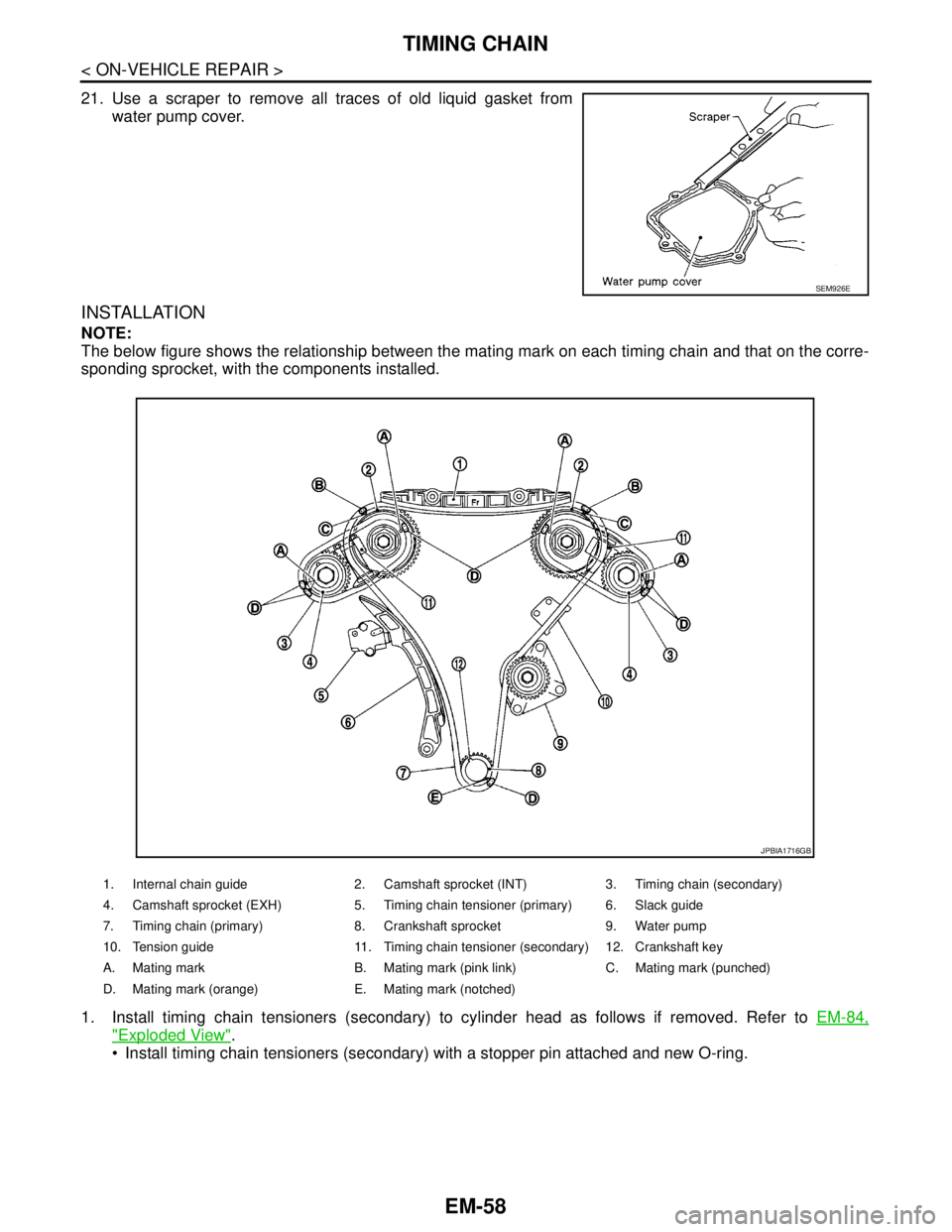
NOTE:
The below figure shows the relationship between the mating mark on each timing chain and that on the corre-
sponding sprocket, with the components installed.
1. Install timing chain tensioners (secondary) to cylinder head as follows if removed. Refer to EM-84,
"Exploded View".
Install timing chain tensioners (secondary) with a stopper pin attached and new O-ring.
SEM926E
1. Internal chain guide 2. Camshaft sprocket (INT) 3. Timing chain (secondary)
4. Camshaft sprocket (EXH) 5. Timing chain tensioner (primary) 6. Slack guide
7. Timing chain (primary) 8. Crankshaft sprocket 9. Water pump
10. Tension guide 11. Timing chain tensioner (secondary) 12. Crankshaft key
A. Mating mark B. Mating mark (pink link) C. Mating mark (punched)
D. Mating mark (orange) E. Mating mark (notched)
JPBIA1716GB
Page 1934 of 5121
TIMING CHAIN
EM-59
< ON-VEHICLE REPAIR >
C
D
E
F
G
H
I
J
K
L
MA
EM
N
P O
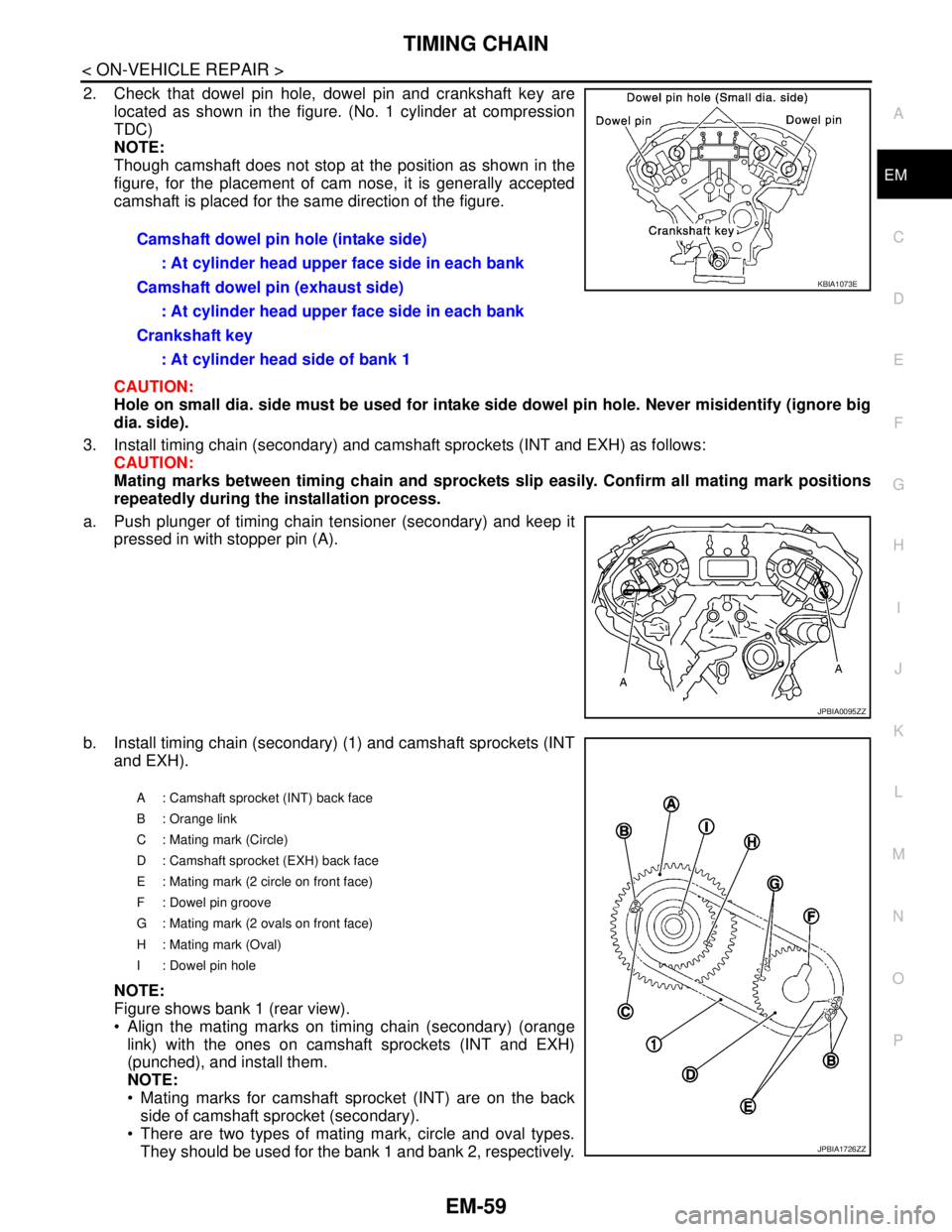
2. Check that dowel pin hole, dowel pin and crankshaft key are
located as shown in the figure. (No. 1 cylinder at compression
TDC)
NOTE:
Though camshaft does not stop at the position as shown in the
figure, for the placement of cam nose, it is generally accepted
camshaft is placed for the same direction of the figure.
CAUTION:
Hole on small dia. side must be used for intake side dowel pin hole. Never misidentify (ignore big
dia. side).
3. Install timing chain (secondary) and camshaft sprockets (INT and EXH) as follows:
CAUTION:
Mating marks between timing chain and sprockets slip easily. Confirm all mating mark positions
repeatedly during the installation process.
a. Push plunger of timing chain tensioner (secondary) and keep it
pressed in with stopper pin (A).
b. Install timing chain (secondary) (1) and camshaft sprockets (INT
and EXH).
NOTE:
Figure shows bank 1 (rear view).
Align the mating marks on timing chain (secondary) (orange
link) with the ones on camshaft sprockets (INT and EXH)
(punched), and install them.
NOTE:
Mating marks for camshaft sprocket (INT) are on the back
side of camshaft sprocket (secondary).
There are two types of mating mark, circle and oval types.
They should be used for the bank 1 and bank 2, respectively. Camshaft dowel pin hole (intake side)
: At cylinder head upper face side in each bank
Camshaft dowel pin (exhaust side)
: At cylinder head upper face side in each bank
Crankshaft key
: At cylinder head side of bank 1
KBIA1073E
JPBIA0095ZZ
A : Camshaft sprocket (INT) back face
B : Orange link
C : Mating mark (Circle)
D : Camshaft sprocket (EXH) back face
E : Mating mark (2 circle on front face)
F : Dowel pin groove
G : Mating mark (2 ovals on front face)
H : Mating mark (Oval)
I : Dowel pin hole
JPBIA1726ZZ