key NISSAN TEANA 2008 Service Manual
[x] Cancel search | Manufacturer: NISSAN, Model Year: 2008, Model line: TEANA, Model: NISSAN TEANA 2008Pages: 5121, PDF Size: 69.03 MB
Page 1973 of 5121
EM-98
< DISASSEMBLY AND ASSEMBLY >
CYLINDER HEAD
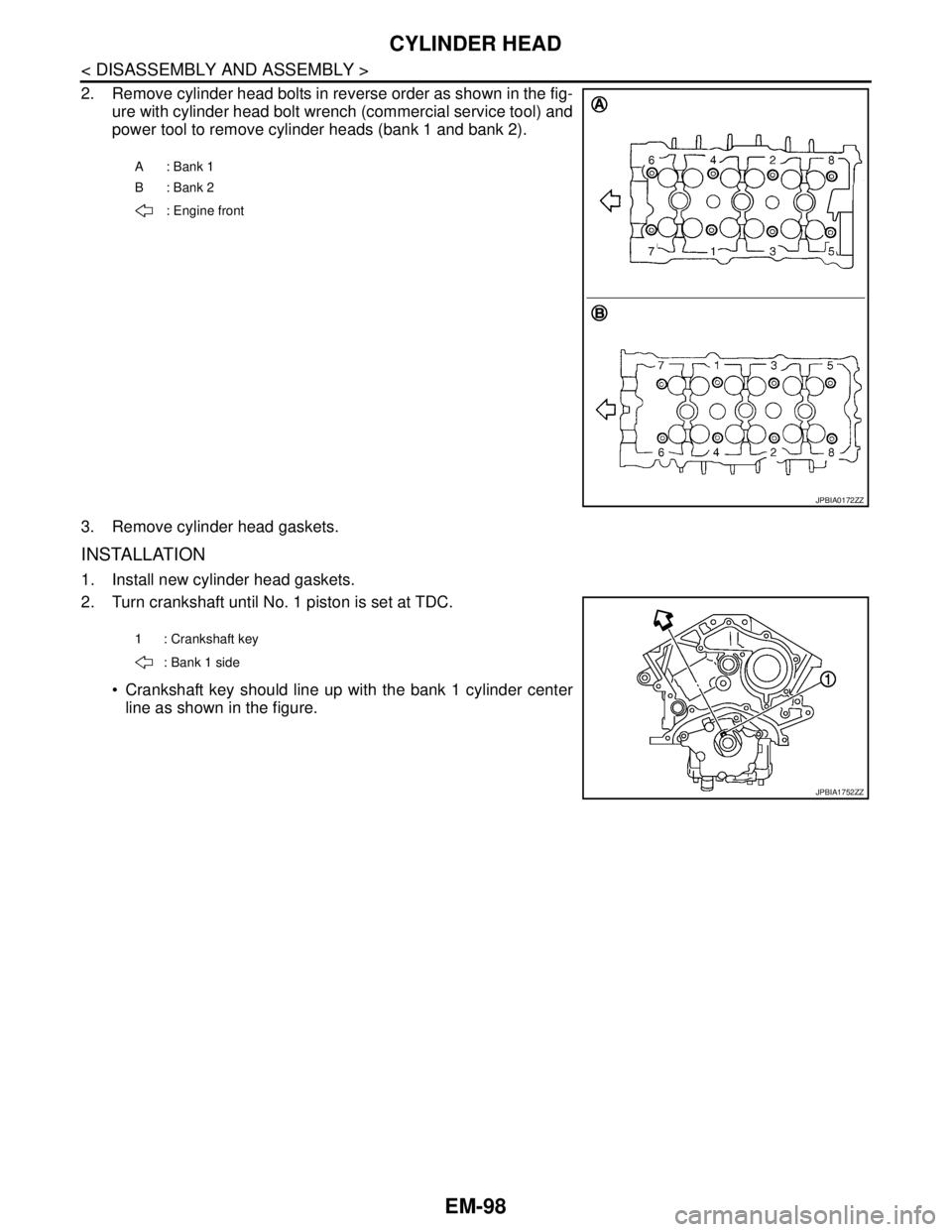
2. Remove cylinder head bolts in reverse order as shown in the fig-
ure with cylinder head bolt wrench (commercial service tool) and
power tool to remove cylinder heads (bank 1 and bank 2).
3. Remove cylinder head gaskets.
INSTALLATION
1. Install new cylinder head gaskets.
2. Turn crankshaft until No. 1 piston is set at TDC.
Crankshaft key should line up with the bank 1 cylinder center
line as shown in the figure.
A: Bank 1
B: Bank 2
: Engine front
JPBIA0172ZZ
1 : Crankshaft key
: Bank 1 side
JPBIA1752ZZ
Page 1983 of 5121

EM-108
< DISASSEMBLY AND ASSEMBLY >
CYLINDER BLOCK
VQ35DE
1. Reinforcement plate 2. Drive plate 3. Rear oil seal retainer
4. Cylinder block 5. Knock sensor 6. Sub harness
7. Thrust bearing (upper) 8. Main bearing (upper) 9. Crankshaft
10. Crankshaft key 11. Thrust bearing (lower) 12. Main bearing (lower)
13. Main bearing cap 14. Main bearing cap bolt 15. Main bearing beam
16. Baffle plate 17. Connecting rod bolt 18. Connecting rod bearing cap
19. Connecting rod bearing 20. Connecting rod 21. Snap ring
22. Piston pin 23. Piston 24. Oil ring
25. Second ring 26. Top ring 27. Pilot converter
A. Crankshaft side B. Chamfered C. Refer to EM-110
D. Front mark
Refer to GI-4, "
Components" for symbols in the figure.
Page 1984 of 5121
CYLINDER BLOCK
EM-109
< DISASSEMBLY AND ASSEMBLY >
C
D
E
F
G
H
I
J
K
L
MA
EM
N
P O
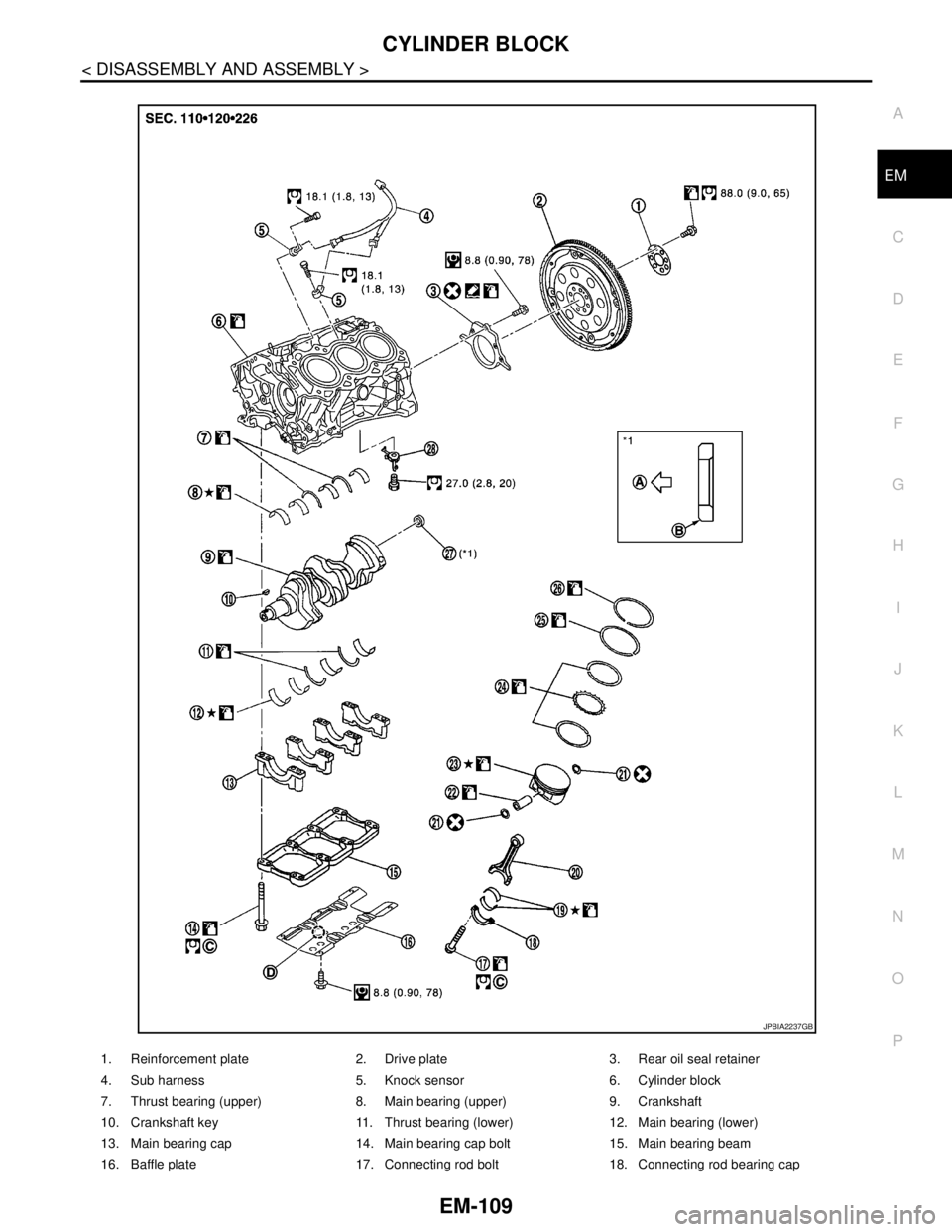
1. Reinforcement plate 2. Drive plate 3. Rear oil seal retainer
4. Sub harness 5. Knock sensor 6. Cylinder block
7. Thrust bearing (upper) 8. Main bearing (upper) 9. Crankshaft
10. Crankshaft key 11. Thrust bearing (lower) 12. Main bearing (lower)
13. Main bearing cap 14. Main bearing cap bolt 15. Main bearing beam
16. Baffle plate 17. Connecting rod bolt 18. Connecting rod bearing cap
JPBIA2237GB
Page 2056 of 5121
![NISSAN TEANA 2008 Service Manual DIAGNOSIS SYSTEM (BCM)
EXL-27
< FUNCTION DIAGNOSIS >[XENON TYPE]
C
D
E
F
G
H
I
J
K
MA
B
EXL
N
O
P
DIAGNOSIS SYSTEM (BCM)
COMMON ITEM
COMMON ITEM : CONSULT-III Function (BCM - COMMON ITEM)INFOID:000000](/img/5/57391/w960_57391-2055.png "NISSAN TEANA 2008 Service Manual DIAGNOSIS SYSTEM (BCM)
EXL-27
< FUNCTION DIAGNOSIS >[XENON TYPE]
C
D
E
F
G
H
I
J
K
MA
B
EXL
N
O
P
DIAGNOSIS SYSTEM (BCM)
COMMON ITEM
COMMON ITEM : CONSULT-III Function (BCM - COMMON ITEM)INFOID:000000")
DIAGNOSIS SYSTEM (BCM)
EXL-27
< FUNCTION DIAGNOSIS >[XENON TYPE]
C
D
E
F
G
H
I
J
K
MA
B
EXL
N
O
P
DIAGNOSIS SYSTEM (BCM)
COMMON ITEM
COMMON ITEM : CONSULT-III Function (BCM - COMMON ITEM)INFOID:0000000003894258
APPLICATION ITEM
CONSULT-III performs the following functions via CAN communication with BCM.
SYSTEM APPLICATION
BCM can perform the following functions for each system.
NOTE:
It can perform the diagnosis modes except the following for all sub system selection items.
×: Applicable item
NOTE:
*: This item is displayed, but is not used.
FREEZE FRAME DATA (FFD) AND IGN COUNTER
Freeze Frame Data
Diagnosis mode Function Description
Work Support Changes the setting for each system function.
Self Diagnostic Result Displays the diagnosis results judged by BCM.
CAN Diag Support MonitorMonitors the reception status of CAN communication viewed from BCM. Refer to CONSULT-III opera-
tion manual.
Data Monitor The BCM input/output signals are displayed.
Active Test The signals used to activate each device are forcibly supplied from BCM.
Ecu Identification The BCM part number is displayed.
Configuration Read and save the vehicle specification.
Write the vehicle specification when replacing BCM.
System Sub system selection itemDiagnosis mode
Work Support Data Monitor Active Test
Door lock DOOR LOCK×××
Rear window defogger REAR DEFOGGER××
Warning chime BUZZER××
Interior room lamp timer INT LAMP×××
Exterior lamp HEAD LAMP×××
Wiper and washer WIPER×××
Turn signal and hazard warning lamps FLASHER×××
— AIR CONDITONER*
Intelligent Key system
Engine start systemINTELLIGENT KEY×××
Combination switch COMB SW×
Body control system BCM×
NVIS - NATS IMMU××
Interior room lamp battery saver BATTERY SAVER×××
Trunk lid opener system TRUNK××
Vehicle security system THEFT ALM×××
— RETAINED PWR*×
Signal buffer system SIGNAL BUFFER××
— TPMS (AIR PRESSURE MONITOR)*×××
Page 2058 of 5121
![NISSAN TEANA 2008 Service Manual DIAGNOSIS SYSTEM (BCM)
EXL-29
< FUNCTION DIAGNOSIS >[XENON TYPE]
C
D
E
F
G
H
I
J
K
MA
B
EXL
N
O
P
*: Factory setting
DATA MONITOR
ILL DELAY SETMODE 1* 45 sec.
Sets delay timer function timer operation](/img/5/57391/w960_57391-2057.png "NISSAN TEANA 2008 Service Manual DIAGNOSIS SYSTEM (BCM)
EXL-29
< FUNCTION DIAGNOSIS >[XENON TYPE]
C
D
E
F
G
H
I
J
K
MA
B
EXL
N
O
P
*: Factory setting
DATA MONITOR
ILL DELAY SETMODE 1* 45 sec.
Sets delay timer function timer operation")
DIAGNOSIS SYSTEM (BCM)
EXL-29
< FUNCTION DIAGNOSIS >[XENON TYPE]
C
D
E
F
G
H
I
J
K
MA
B
EXL
N
O
P
*: Factory setting
DATA MONITOR
ILL DELAY SETMODE 1* 45 sec.
Sets delay timer function timer operation time.
(All doors closed) MODE 2Without the func-
tion
MODE 3 30 sec.
MODE 4 60 sec.
MODE 5 90 sec.
MODE 6 120 sec.
MODE 7 150 sec.
MODE 8 180 sec.
CUSTOM A/LIGHT SET-
TINGMODE 1* Normal
MODE 2 More sensitive setting than normal setting (Turns ON earlier than normal operation.)
MODE 3 More sensitive setting than MODE 2 (Turns ON earlier than MODE 2.)
MODE 4 Less sensitive setting than normal setting (Turns ON later than normal operation.) Service item Setting item Setting
Monitor item
[Unit]Description
PUSH SW
[On/Off]The switch status input from push-button ignition switch
ENGINE STATE
[Stop/Stall/Crank/Run]The engine status received from ECM with CAN communication
VEH SPEED 1
[km/h]The value of the vehicle speed received from combination meter with CAN commu-
nication
KEY SW-SLOT
[On/Off]Key switch status input from key slot
TURN SIGNAL R
[On/Off]
Each switch status that BCM detects from the combination switch reading function TURN SIGNAL L
[On/Off]
TAIL LAMP SW
[On/Off]
HI BEAM SW
[On/Off]
HEAD LAMP SW1
[On/Off]
HEAD LAMP SW2
[On/Off]
PASSING SW
[On/Off]
AUTO LIGHT SW
[On/Off]
FR FOG SW
[On/Off]
RR FOG SW
[On/Off]
DOOR SW-DR
[On/Off]The switch status input from front door switch (driver side)
DOOR SW-AS
[On/Off]The switch status input from front door switch (passenger side)
Page 2059 of 5121
![NISSAN TEANA 2008 Service Manual EXL-30
< FUNCTION DIAGNOSIS >[XENON TYPE]
DIAGNOSIS SYSTEM (BCM)
ACTIVE TEST
FLASHER
FLASHER : CONSULT-III Function (BCM - FLASHER)INFOID:0000000003773549
WORK SUPPORT
*: Factory setting
DATA MONITOR](/img/5/57391/w960_57391-2058.png "NISSAN TEANA 2008 Service Manual EXL-30
< FUNCTION DIAGNOSIS >[XENON TYPE]
DIAGNOSIS SYSTEM (BCM)
ACTIVE TEST
FLASHER
FLASHER : CONSULT-III Function (BCM - FLASHER)INFOID:0000000003773549
WORK SUPPORT
*: Factory setting
DATA MONITOR")
EXL-30
< FUNCTION DIAGNOSIS >[XENON TYPE]
DIAGNOSIS SYSTEM (BCM)
ACTIVE TEST
FLASHER
FLASHER : CONSULT-III Function (BCM - FLASHER)INFOID:0000000003773549
WORK SUPPORT
*: Factory setting
DATA MONITOR
DOOR SW-RR
[On/Off]The switch status input from rear door switch RH
DOOR SW- RL
[On/Off]The switch status input from rear door switch LH
DOOR SW-BK
[On/Off]NOTE:
The item is indicated, but not monitored.
OPTICAL SENSOR
[V]The value of exterior brightness voltage input from the optical sensor Monitor item
[Unit]Description
Test item Operation Description
TA I L L A M POnTransmits the position light request signal to IPDM E/R with CAN com-
munication to turn the tail lamp ON.
Off Stops the position light request signal transmission.
HEAD LAMPHiTransmits the high beam request signal with CAN communication to turn
the headlamp (HI).
LowTransmits the low beam request signal with CAN communication to turn
the headlamp (LO).
Off Stops the high & low beam request signal transmission.
FR FOG LAMPOnTransmits the front fog lights request signal to IPDM E/R with CAN com-
munication to turn the front fog lamp ON.
Off Stops the front fog lights request signal transmission.
RR FOG LAMPOn Outputs the voltage to turn the rear fog lamp ON.
Transmits the rear fog lamp status signal to the combination meter with
CAN communication to turn the rear fog lamp indicator lamp ON.
Off Stops the voltage to turn the rear fog lamp OFF.
Stops the rear fog lamp status signal transmission.
DAYTIME RUNNING LIGHTOn
NOTE:
The item is indicated, but cannot be tested.
Off
CORNERING LAMPRH
NOTE:
The item is indicated, but cannot be tested. LH
Off
ILL DIM SIGNALOn
NOTE:
The item is indicated, but cannot be tested.
Off
Service item Setting item Setting
HAZARD ANSWER
BACKLock Only* With locking only
Sets the hazard warning lamp answer back function
when the door is lock/unlock with the request switch or
the key fob. Unlk Only With unlocking only
Lock/Unlk With locking/unlocking
Off Without the function
Page 2060 of 5121
![NISSAN TEANA 2008 Service Manual DIAGNOSIS SYSTEM (BCM)
EXL-31
< FUNCTION DIAGNOSIS >[XENON TYPE]
C
D
E
F
G
H
I
J
K
MA
B
EXL
N
O
P
ACTIVE TEST
Monitor item
[Unit]Description
REQ SW-DR
[On/Off]The switch status input from the request](/img/5/57391/w960_57391-2059.png "NISSAN TEANA 2008 Service Manual DIAGNOSIS SYSTEM (BCM)
EXL-31
< FUNCTION DIAGNOSIS >[XENON TYPE]
C
D
E
F
G
H
I
J
K
MA
B
EXL
N
O
P
ACTIVE TEST
Monitor item
[Unit]Description
REQ SW-DR
[On/Off]The switch status input from the request")
DIAGNOSIS SYSTEM (BCM)
EXL-31
< FUNCTION DIAGNOSIS >[XENON TYPE]
C
D
E
F
G
H
I
J
K
MA
B
EXL
N
O
P
ACTIVE TEST
Monitor item
[Unit]Description
REQ SW-DR
[On/Off]The switch status input from the request switch (driver side)
REQ SW-AS
[On/Off]The switch status input from the request switch (passenger side)
PUSH SW
[On/Off]The switch status input from the push-button ignition switch
TURN SIGNAL R
[On/Off]
Each switch status that BCM detects from the combination switch reading function
TURN SIGNAL L
[On/Off]
HAZARD SW
[On/Off]The switch status input from the hazard switch
RKE-LOCK
[On/Off]Lock signal status received from the remote keyless entry receiver
RKE-UNLOCK
[On/Off]Unlock signal status received from the remote keyless entry receiver
RKE-PANIC
[On/Off]Panic alarm signal status received from the remote keyless entry receiver
Test item Operation Description
FLASHERRH Outputs the voltage to blink the right side turn signal lamps.
LH Outputs the voltage to blink the left side turn signal lamps.
Off Stops the voltage to turn the turn signal lamps OFF.
Page 2138 of 5121
![NISSAN TEANA 2008 Service Manual BCM (BODY CONTROL MODULE)
EXL-109
< ECU DIAGNOSIS >[XENON TYPE]
C
D
E
F
G
H
I
J
K
MA
B
EXL
N
O
P
DOOR SW-RLRear LH door closed Off
Rear LH door opened On
DOOR SW-BKNOTE:
The item is indicated, but not](/img/5/57391/w960_57391-2137.png "NISSAN TEANA 2008 Service Manual BCM (BODY CONTROL MODULE)
EXL-109
< ECU DIAGNOSIS >[XENON TYPE]
C
D
E
F
G
H
I
J
K
MA
B
EXL
N
O
P
DOOR SW-RLRear LH door closed Off
Rear LH door opened On
DOOR SW-BKNOTE:
The item is indicated, but not")
BCM (BODY CONTROL MODULE)
EXL-109
< ECU DIAGNOSIS >[XENON TYPE]
C
D
E
F
G
H
I
J
K
MA
B
EXL
N
O
P
DOOR SW-RLRear LH door closed Off
Rear LH door opened On
DOOR SW-BKNOTE:
The item is indicated, but not monitored. Off
CDL LOCK SWOther than power door lock switch LOCK Off
Power door lock switch LOCK On
CDL UNLOCK SWOther than power door lock switch UNLOCK Off
Power door lock switch UNLOCK On
KEY CYL LK-SWNOTE:
The item is indicated, but not monitored. Off
KEY CYL UN-SWNOTE:
The item is indicated, but not monitored. Off
KEY CYL SW-TRNOTE:
The item is indicated, but not monitored. Off
HAZARD SWHazard switch is OFF Off
Hazard switch is ON On
REAR DEF SW
NOTE:
At model with BOSE au-
dio system this item is in-
dicated, but is not
monitored.Rear window defogger switch is OFF Off
Rear window defogger switch is ON On
TR CANCEL SWNOTE:
The item is indicated, but not monitored. Off
TR/BD OPEN SWTrunk lid opener switch OFF Off
While the trunk lid opener switch is turned ON On
TRNK/HAT MNTRTrunk lid closed Off
Trunk lid opened On
RKE-LOCKLOCK button of the key is not pressed Off
LOCK button of the key is pressed On
RKE-UNLOCKUNLOCK button of the key is not pressed Off
UNLOCK button of the key is pressed On
RKE-TR/BDTRUNK OPEN button of the key is not pressed Off
TRUNK OPEN button of the key is pressed On
RKE-PANICNOTE:
The item is indicated, but not monitored. Off
RKE-P/W OPENNOTE:
The item is indicated, but not monitored. Off
RKE-MODE CHGLOCK/UNLOCK button of the key is not pressed and held simulta-
neouslyOff
LOCK/UNLOCK button of the key is pressed and held simulta-
neouslyOn
OPTICAL SENSORBright outside of the vehicle Close to 5 V
Dark outside of the vehicle Close to 0 V
REQ SW -DRDriver door request switch is not pressed Off
Driver door request switch is pressed On
REQ SW -ASPassenger door request switch is not pressed Off
Passenger door request switch is pressed On Monitor Item Condition Value/Status
Page 2140 of 5121
![NISSAN TEANA 2008 Service Manual BCM (BODY CONTROL MODULE)
EXL-111
< ECU DIAGNOSIS >[XENON TYPE]
C
D
E
F
G
H
I
J
K
MA
B
EXL
N
O
P
S/L UNLK-IPDMSteering is unlocked Off
Steering is locked On
S/L RELAY-REQIgnition switch in OFF or ACC](/img/5/57391/w960_57391-2139.png "NISSAN TEANA 2008 Service Manual BCM (BODY CONTROL MODULE)
EXL-111
< ECU DIAGNOSIS >[XENON TYPE]
C
D
E
F
G
H
I
J
K
MA
B
EXL
N
O
P
S/L UNLK-IPDMSteering is unlocked Off
Steering is locked On
S/L RELAY-REQIgnition switch in OFF or ACC")
BCM (BODY CONTROL MODULE)
EXL-111
< ECU DIAGNOSIS >[XENON TYPE]
C
D
E
F
G
H
I
J
K
MA
B
EXL
N
O
P
S/L UNLK-IPDMSteering is unlocked Off
Steering is locked On
S/L RELAY-REQIgnition switch in OFF or ACC position Off
Ignition switch in ON position On
VEH SPEED 1 While driving Equivalent to speedometer reading
VEH SPEED 2 While driving Equivalent to speedometer reading
DOOR STAT-DRDriver door is locked LOCK
Wait with selective UNLOCK operation (5 seconds) READY
Driver door is unlocked UNLOCK
DOOR STAT-ASPassenger door is locked LOCK
Wait with selective UNLOCK operation (5 seconds) READY
Passenger door is unlocked UNLOCK
ID OK FLAGIgnition switch in ACC or ON position Reset
Ignition switch in OFF position Set
PRMT ENG STRTThe engine start is prohibited Reset
The engine start is permitted Set
PRMT RKE STRTNOTE:
The item is indicated, but not monitored. Reset
KEY SW -SLOTThe key is not inserted into key slot Off
The key is inserted into key slot On
RKE OPE COUN1 During the operation of the key Operation frequency of the key
RKE OPE COUN2NOTE:
The item is indicated, but not monitored. —
CONFRM ID ALLThe key ID that the key slot receives does not accord with any key
ID registered to BCM.Ye t
The key ID that the key slot receives accords with any key ID regis-
tered to BCM.Done
CONFIRM ID4The key ID that the key slot receives does not accord with the fourth
key ID registered to BCM.Ye t
The key ID that the key slot receives accords with the fourth key ID
registered to BCM.Done
CONFIRM ID3The key ID that the key slot receives does not accord with the third
key ID registered to BCM.Ye t
The key ID that the key slot receives accords with the third key ID
registered to BCM.Done
CONFIRM ID2The key ID that the key slot receives does not accord with the sec-
ond key ID registered to BCM.Ye t
The key ID that the key slot receives accords with the second key
ID registered to BCM.Done
CONFIRM ID1The key ID that the key slot receives does not accord with the first
key ID registered to BCM.Ye t
The key ID that the key slot receives accords with the first key ID
registered to BCM.Done
TP 4The ID of fourth key is not registered to BCM Yet
The ID of fourth key is registered to BCM Done
TP 3The ID of third key is not registered to BCM Yet
The ID of third key is registered to BCM Done Monitor Item Condition Value/Status
Page 2141 of 5121
![NISSAN TEANA 2008 Service Manual EXL-112
< ECU DIAGNOSIS >[XENON TYPE]
BCM (BODY CONTROL MODULE)
TERMINAL LAYOUT
TP 2The ID of second key is not registered to BCM Yet
The ID of second key is registered to BCM Done
TP 1The ID of first](/img/5/57391/w960_57391-2140.png "NISSAN TEANA 2008 Service Manual EXL-112
< ECU DIAGNOSIS >[XENON TYPE]
BCM (BODY CONTROL MODULE)
TERMINAL LAYOUT
TP 2The ID of second key is not registered to BCM Yet
The ID of second key is registered to BCM Done
TP 1The ID of first")
EXL-112
< ECU DIAGNOSIS >[XENON TYPE]
BCM (BODY CONTROL MODULE)
TERMINAL LAYOUT
TP 2The ID of second key is not registered to BCM Yet
The ID of second key is registered to BCM Done
TP 1The ID of first key is not registered to BCM Yet
The ID of first key is registered to BCM Done Monitor Item Condition Value/Status
JPMIA0062ZZ