lock NISSAN TEANA 2008 Workshop Manual
[x] Cancel search | Manufacturer: NISSAN, Model Year: 2008, Model line: TEANA, Model: NISSAN TEANA 2008Pages: 5121, PDF Size: 69.03 MB
Page 349 of 5121
![NISSAN TEANA 2008 Workshop Manual AV
DIAGNOSIS SYSTEM (AV CONTROL UNIT)
AV-205
< FUNCTION DIAGNOSIS >[BOSE AUDIO WITHOUT NAVIGATION]
C
D
E
F
G
H
I
J
K
L
MB A
O
P Display Diagnosis
The tint of the color bar indication is as per the fol](/img/5/57391/w960_57391-348.png "NISSAN TEANA 2008 Workshop Manual AV
DIAGNOSIS SYSTEM (AV CONTROL UNIT)
AV-205
< FUNCTION DIAGNOSIS >[BOSE AUDIO WITHOUT NAVIGATION]
C
D
E
F
G
H
I
J
K
L
MB A
O
P Display Diagnosis
The tint of the color bar indication is as per the fol")
AV
DIAGNOSIS SYSTEM (AV CONTROL UNIT)
AV-205
< FUNCTION DIAGNOSIS >[BOSE AUDIO WITHOUT NAVIGATION]
C
D
E
F
G
H
I
J
K
L
MB A
O
P Display Diagnosis
The tint of the color bar indication is as per the following list if RGB signal error is detected.
Vehicle Signals
A comparison check can be made of each actual vehicle signal and
the signals recognized by the system.
Sp ea ke r Tes t
JSNIA0688GB
R (red) signal error : Light blue (Cyan) tint
G (green) signal error : Purple (Magenta) tint
B (blue) signal error : Yellow tint
JSNIA0149GB
Diagnosis item Display Vehicle status Remarks
Vehicle speedON Vehicle speed > 0 km/h (0 MPH)
Changes in indication may be delayed by approximately
1.5 seconds. This is normal. OFF Vehicle speed = 0 km/h (0 MPH)
Parking brakeON Parking brake is applied.
OFF Parking brake is released.
LightsON Light switch ON
Block the light beam from the auto light optical sensor.
OFF Light switch OFF
IgnitionON Ignition switch ON
—
OFF Ignition switch in ACC position
ReverseONShift the selector lever to “R” posi-
tion
Changes in indication may be delayed by approximately
1.5 seconds. This is normal.
OFFShift the selector lever other than
“R” position
Page 359 of 5121
![NISSAN TEANA 2008 Workshop Manual AV
DIAGNOSIS SYSTEM (AV CONTROL UNIT)
AV-215
< FUNCTION DIAGNOSIS >[BOSE AUDIO WITHOUT NAVIGATION]
C
D
E
F
G
H
I
J
K
L
MB A
O
P
For each signal, actual signal can be compared with the condition reco](/img/5/57391/w960_57391-358.png "NISSAN TEANA 2008 Workshop Manual AV
DIAGNOSIS SYSTEM (AV CONTROL UNIT)
AV-215
< FUNCTION DIAGNOSIS >[BOSE AUDIO WITHOUT NAVIGATION]
C
D
E
F
G
H
I
J
K
L
MB A
O
P
For each signal, actual signal can be compared with the condition reco")
AV
DIAGNOSIS SYSTEM (AV CONTROL UNIT)
AV-215
< FUNCTION DIAGNOSIS >[BOSE AUDIO WITHOUT NAVIGATION]
C
D
E
F
G
H
I
J
K
L
MB A
O
P
For each signal, actual signal can be compared with the condition recognized on the system.
SELECTION FROM MENU
Allows the technician to select which vehicle signals should be displayed and displays the status of the
selected vehicle signals.
Display Item Display Vehicle status Remarks
VHCL SPD SIGOn Vehicle speed >0 km/h (0 MPH)
Changes in indication may be delayed. This is
normal. Off Vehicle speed =0 km/h (0 MPH)
PKB SIGOn Parking brake is applied.
Off Parking brake is released.
ILLUM SIGOnBlock the light beam from the auto
light optical sensor when the light
switch is ON .
—
OffExpose the auto light optical sensor
to light when the light switch is OFF
or ON.
IGN SIGOn Ignition switch ON
Off Ignition switch in ACC position
REV SIGOn Selector lever in R position
Changes in indication may be delayed. This is
normal.
OffSelector lever in any position other
than R
Item to be selected Description
VHCL SPD SIG
The same as when “ALL SIGNALS”
is selected. PKB SIG
ILLUM SIG
IGN SIG
REV SIG
Page 520 of 5121
![NISSAN TEANA 2008 Workshop Manual AV-376
< SYMPTOM DIAGNOSIS >[BOSE AUDIO WITHOUT NAVIGATION]
NORMAL OPERATING CONDITION
Noise resulting from variations in field strength, such as fading noise and multi-path noise, or external noise f](/img/5/57391/w960_57391-519.png "NISSAN TEANA 2008 Workshop Manual AV-376
< SYMPTOM DIAGNOSIS >[BOSE AUDIO WITHOUT NAVIGATION]
NORMAL OPERATING CONDITION
Noise resulting from variations in field strength, such as fading noise and multi-path noise, or external noise f")
AV-376
< SYMPTOM DIAGNOSIS >[BOSE AUDIO WITHOUT NAVIGATION]
NORMAL OPERATING CONDITION
Noise resulting from variations in field strength, such as fading noise and multi-path noise, or external noise from trains and other
sources, is not a malfunction.
NOTE:
Fading noise: This noise occurs because of variations in the field strength in a narrow range due to mountains or buildings blocking
the signal.
Multi-path noise: This noise results from a time difference between the broadcast waves directly from the station arriving at the
antenna and the waves reflected by mountains or buildings. Move immediately to the next song
when playingWhen a non-MP3/WMA file has been given an extension of “.MP3”, “.WMA”, “.mp3”, or “.wma”,
or when play is prohibited by copyright protection, the player will skip to the next song.
The songs do not play back in the
desired order.The playback order is the order in which the files were written by the software, so the files might
not play in the desired order. Symptom Cause and Counter measure
Page 564 of 5121
![NISSAN TEANA 2008 Workshop Manual AV-420
< FUNCTION DIAGNOSIS >[BOSE AUDIO WITH NAVIGATION]
DIAGNOSIS SYSTEM (AV CONTROL UNIT)
NOTE:
*: On-board self-diagnosis is not supported. Only CONSULT-III is supported.
STARTING PROCEDURE
1. Sta](/img/5/57391/w960_57391-563.png "NISSAN TEANA 2008 Workshop Manual AV-420
< FUNCTION DIAGNOSIS >[BOSE AUDIO WITH NAVIGATION]
DIAGNOSIS SYSTEM (AV CONTROL UNIT)
NOTE:
*: On-board self-diagnosis is not supported. Only CONSULT-III is supported.
STARTING PROCEDURE
1. Sta")
AV-420
< FUNCTION DIAGNOSIS >[BOSE AUDIO WITH NAVIGATION]
DIAGNOSIS SYSTEM (AV CONTROL UNIT)
NOTE:
*: On-board self-diagnosis is not supported. Only CONSULT-III is supported.
STARTING PROCEDURE
1. Start the engine.
2. Turn the audio system OFF.
3. While pressing the “SETTING” button, turn the volume control
dial clockwise or counterclockwise for 40 clicks or more. (When
the self-diagnosis mode is started, a short beep will be heard.)
Shifting from current screen to previous screen is performed
by pressing “BACK” button.
Confirmation/
AdjustmentDisplay DiagnosisThe confirmations of the tint with the color spectrum bar display and
shading of color with the gradation bar display can be performed.
Vehicle SignalsDiagnosis of signals can be performed for vehicle speed, parking brake,
lights, ignition switch, and reverse.
Navigation/PhoneHandsfree Voice Mi-
crophone TestMicrophone speaker check can be performed.
Color Spectrum Bar A color tone can be checked by the color bar display.
Gradation Bar A light and shade can be checked by the gray scale display.
Touch Panel Touch panel response check can be performed.
Vehicle SignalsDiagnosis of signals can be performed for vehicle speed, parking brake,
lights, and reverse.
Confirm/Change
Bluetooth PasskeyThe passkey can be checked and changed.
Confirm/Change
Bluetooth Device
NameThe device name can be checked and changed.
Handsfree Sound
Quality SetNot available.
Speaker Test The connection of a speaker can be confirmed by test tone.
Climate Control
*Not used.
Error HistoryThe system malfunction and the frequency when occurred in the past are
displayed. When the malfunctioning item is selected, the time and place
that the selected malfunction last occurred are displayed.
Camera Cont.The signal connected to camera control unit can be checked and the
guiding line position that overlaps rear view camera image can be adjust-
ed.
Vehicle CAN Diagnosis The transmitting/receiving of CAN communication can be monitored.
AV COMM DiagnosisThe communication condition of each unit of Multi AV system can be
monitored.
Delete Unit Connection Log Erase the connection history of unit and error history.
Initialize Settings Initializes the AV control unit memory.Mode Description
JSNIA1290GB
Page 790 of 5121
![NISSAN TEANA 2008 Workshop Manual AV-646
< SYMPTOM DIAGNOSIS >[BOSE AUDIO WITH NAVIGATION]
NORMAL OPERATING CONDITION
Noise resulting from variations in field strength, such as fading noise and multi-path noise, or external noise from](/img/5/57391/w960_57391-789.png "NISSAN TEANA 2008 Workshop Manual AV-646
< SYMPTOM DIAGNOSIS >[BOSE AUDIO WITH NAVIGATION]
NORMAL OPERATING CONDITION
Noise resulting from variations in field strength, such as fading noise and multi-path noise, or external noise from")
AV-646
< SYMPTOM DIAGNOSIS >[BOSE AUDIO WITH NAVIGATION]
NORMAL OPERATING CONDITION
Noise resulting from variations in field strength, such as fading noise and multi-path noise, or external noise from trains and other
sources, is not a malfunction.
NOTE:
Fading noise: This noise occurs because of variations in the field strength in a narrow range due to mountains or buildings blocking
the signal.
Multi-path noise: This noise results from a time difference between the broadcast waves directly from the station arriving at the
antenna and the waves reflected by mountains or buildings.
RELATED TO NAVIGATION
As a result of a slight operating error, a normal symptom might be taken as a malfunction. Therefore, at first,
please check for yourself as per the following table.
Move immediately to the next song
when playing.When a non-MP3/WMA file has been given an extension of “.MP3”, “.WMA”, “.mp3”, or “.wma”,
or when play is prohibited by copyright protection, the player will skip to the next song.
The songs do not play back in the
desired order.The playback order is the order in which the files were written by the software, so the files might
not play in the desired order. Symptom Cause and Counter measure
Symptom Possible cause Possible solution
The map does not scroll even when
the vehicle is moving.The display is not set to the current location map. Set the display to the current location map.
The vehicle icon is not displayed. The display is not set to the current location map. Set the display to the current location map.
The GPS icon is not displayed. GPS signal cannot be received.Move the vehicle to an open area without
obstacle. If an object is placed on the up-
per area of GPS antenna, remove it.
No voice guidance is available.The route guidance was cancelled.If the route destination guidance has been
cancelled, reactivate the route guidance.
The volume is set very low. Adjust the volume of your voice guidance.
Some pixels in the display are dark-
er or brighter than others.This is an inherent characteristic of liquid crystal dis-
plays. Although the liquid crystal display is manufac-
tured with a technology of very high accuracy and it
has more than 99.99% effective pixels, a chip or a
permanent lighting of pixels might occur at 0.01% or
less.Please continue using the NAVI system,
as it is not a malfunction.
A mottle remains for a while after
turning the ignition switch ON.When it is cold, due to the characteristics of the liq-
uid crystal display backlight, a brightness mottle
might occur.It will disappear a few minutes later when
the backlight is warmed-up.
The screen is not clear.The adjustment of the contrast or the brightness is
inadequate.Adjust the contrast and the brightness of
the display.
The vehicle icon is not displayed in
the correct location. (The location
of the vehicle icon is misaligned
from the actual position.) The vehicle icon might be misaligned from the actual
position due to the satellite condition, the vehicle
condition (driving location or driving condition), etc.
Also, when the vehicle is traveling on a road whose
information is not stored in the map data, a new road
for example, the vehicle icon might be misaligned
from the actual position.Drive the vehicle for a while. The current
location is automatically corrected using
the map-matching and GPS information.
(It may take a few minutes.) If the GPS in-
formation is not used and the current loca-
tion is not corrected automatically, park the
vehicle in a safe location, and then correct
the current vehicle location.
Page 818 of 5121

BCS
BCS-1
ELECTRICAL & POWER CONTROL
C
D
E
F
G
H
I
J
K
L B
SECTION BCS
A
O
P N
CONTENTS
BODY CONTROL SYSTEM
BASIC INSPECTION ....................................3
INSPECTION AND ADJUSTMENT .....................3
ADDITIONAL SERVICE WHEN REPLACING
CONTROL UNIT (BCM) ...............................................
3
ADDITIONAL SERVICE WHEN REPLACING
CONTROL UNIT (BCM) : Description .......................
3
ADDITIONAL SERVICE WHEN REPLACING
CONTROL UNIT (BCM) : Special Repair Require-
ment ..........................................................................
3
CONFIGURATION (BCM) ...........................................3
CONFIGURATION (BCM) : Description ....................3
CONFIGURATION (BCM) : Special Repair Re-
quirement ..................................................................
4
CONFIGURATION (BCM) : Configuration list ...........5
FUNCTION DIAGNOSIS ...............................6
BODY CONTROL SYSTEM ................................6
System Description ...................................................6
Component Parts Location ........................................7
COMBINATION SWITCH READING SYSTEM
.....
8
System Diagram ........................................................8
System Description ...................................................8
Component Parts Location ......................................11
SIGNAL BUFFER SYSTEM ...............................12
System Diagram ......................................................12
System Description .................................................12
POWER CONSUMPTION CONTROL SYS-
TEM ....................................................................
13
System Diagram ......................................................13
System Description .................................................13
Component Parts Location ......................................15
DIAGNOSIS SYSTEM (BCM) ............................16
COMMON ITEM .........................................................16
COMMON ITEM : CONSULT-III Function (BCM -
COMMON ITEM) .....................................................
16
DOOR LOCK ..............................................................17
DOOR LOCK : CONSULT-III Function (BCM -
DOOR LOCK) ..........................................................
17
REAR WINDOW DEFOGGER ...................................18
REAR WINDOW DEFOGGER : CONSULT-III
Function (BCM - REAR DEFOGGER) .....................
18
BUZZER .....................................................................18
BUZZER : CONSULT-III Function (BCM - BUZZ-
ER) ..........................................................................
19
INT LAMP ...................................................................19
INT LAMP : CONSULT-III Function (BCM - INT
LAMP) ......................................................................
19
HEADLAMP ...............................................................21
HEADLAMP : CONSULT-III Function (BCM -
HEAD LAMP) ...........................................................
21
WIPER ........................................................................23
WIPER : CONSULT-III Function (BCM - WIPER) ....23
FLASHER ...................................................................24
FLASHER : CONSULT-III Function (BCM -
FLASHER) ...............................................................
24
INTELLIGENT KEY ....................................................25
INTELLIGENT KEY : CONSULT-III Function
(BCM - INTELLIGENT KEY) ....................................
25
COMB SW ..................................................................28
COMB SW : CONSULT-III Function (BCM -
COMB SW) ..............................................................
28
BCM ...........................................................................28
BCM : CONSULT-III Function (BCM - BCM) ...........28
IMMU ..........................................................................29
IMMU : CONSULT-III Function (BCM - IMMU) ........29
Page 822 of 5121

BCS
INSPECTION AND ADJUSTMENT
BCS-5
< BASIC INSPECTION >
C
D
E
F
G
H
I
J
K
L B A
O
P N
CONFIGURATION (BCM) : Configuration listINFOID:0000000003809648
⇔: Items which confirm vehicle specificationsMANUAL SETTING ITEM
NOTE
Items Setting value
AUTO LIGHT WITH —
RR FOG LAMP WITH —
AV C/U WITH ⇔ WITHOUT WITH: With BOSE audio system
WITHOUT: Without BOSE audio system
THEFT ALM AREA MODE3 —
H/L WASHER TIME 1 WITH —
H/L WASHER TIME 2 WITH —
I-KEY WITH —
Key Fob Type MODE10 —
HANDLE LHD —
AUTO SETTING ITEM
NOTE
Items Setting value
H/L BULB DEFAULT —
FR FOG LAMP WITH —
TRANSMISSION AT with ABS —
TR CANCL SW WITHOUT —
TPMS WITHOUT —
AUTO BACK DOOR WITHOUT —
FOG LAMP BULB SINGLE BULB —
D I L M P VA R I AT M O D E 4 —
LIGHT RECOG MODE4 —
FR FOG LOGIC MODE2 —
PANIC ALM TYPE MODE2 —
HAZARD SW TYPE MODE1 —
BCM AC CONTROL MODE1 —
RAIN SENSOR WITHOUT —
FOG ON WITH AUTO LIGHT WITHOUT —
AUTO LOCK&UNLOCK FUNC WITHOUT —
DROP WIP FUNCTION WITHOUT —
SELECTIVE UNLOCK SETTING WITHOUT —
SEAT BLT WARN WITHOUT —
SPEED SNS WIP WITH —
Page 823 of 5121
BCS-6
< FUNCTION DIAGNOSIS >
BODY CONTROL SYSTEM
FUNCTION DIAGNOSIS
BODY CONTROL SYSTEM
System DescriptionINFOID:0000000003809584
OUTLINE
BCM (Body Control Module) controls the various electrical components. It inputs the information required to
the control from CAN communication and the signal received from each switch and sensor.
BCM has combination switch reading function for reading the operation status of combination switches (light,
turn signal, wiper and washer) in addition to a function for controlling the operation of various electrical com-
ponents. It also has the signal transmission function as the passed point of signal and the power saving con-
trol function that reduces the power consumption with the ignition switch OFF.
BCM is equipped with the diagnosis function that performs the diagnosis with CONSULT-III and various set-
tings.
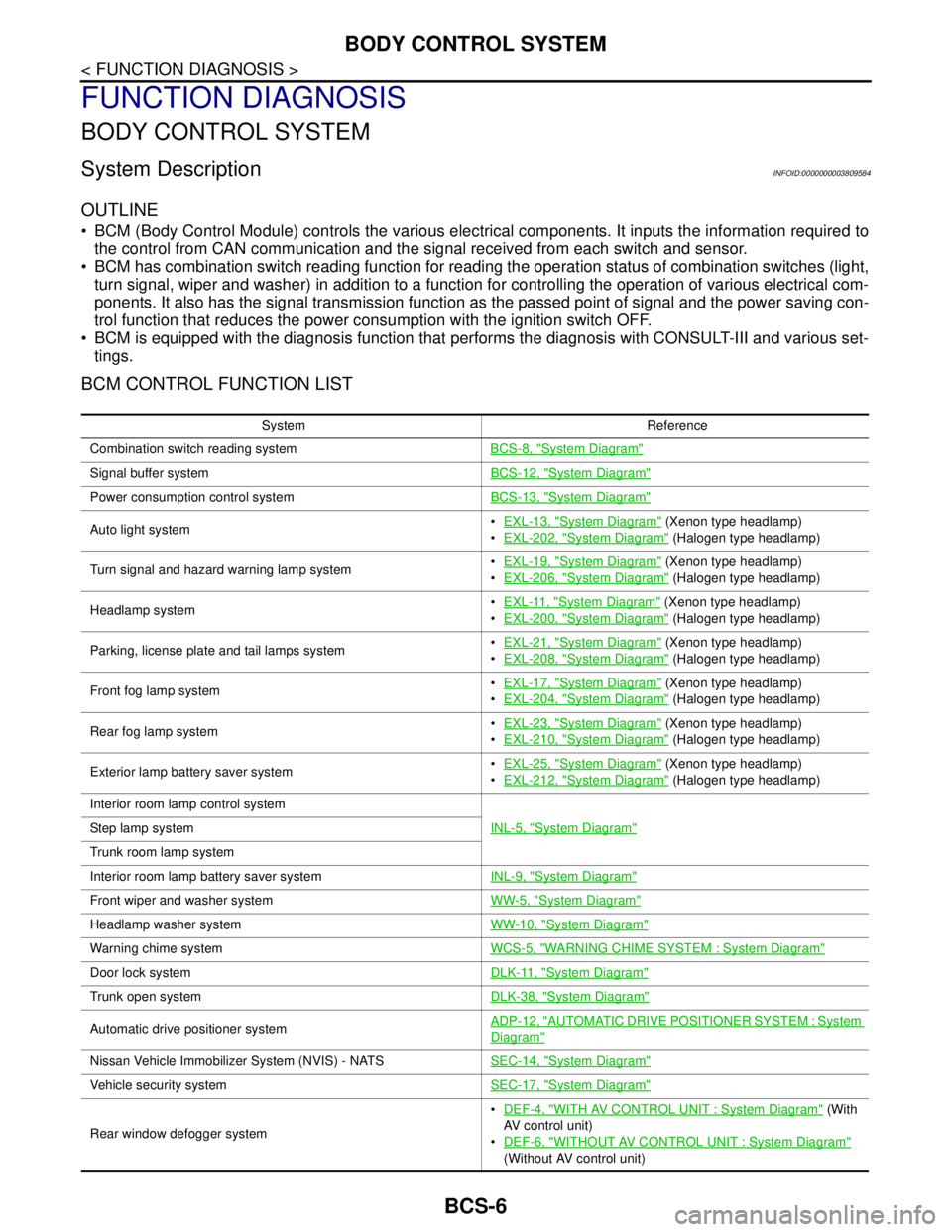
BCM CONTROL FUNCTION LIST
System Reference
Combination switch reading systemBCS-8, "
System Diagram"
Signal buffer systemBCS-12, "System Diagram"
Power consumption control systemBCS-13, "System Diagram"
Auto light systemEXL-13, "System Diagram" (Xenon type headlamp)
EXL-202, "
System Diagram" (Halogen type headlamp)
Turn signal and hazard warning lamp systemEXL-19, "
System Diagram" (Xenon type headlamp)
EXL-206, "
System Diagram" (Halogen type headlamp)
Headlamp systemEXL-11, "
System Diagram" (Xenon type headlamp)
EXL-200, "
System Diagram" (Halogen type headlamp)
Parking, license plate and tail lamps systemEXL-21, "
System Diagram" (Xenon type headlamp)
EXL-208, "
System Diagram" (Halogen type headlamp)
Front fog lamp systemEXL-17, "
System Diagram" (Xenon type headlamp)
EXL-204, "
System Diagram" (Halogen type headlamp)
Rear fog lamp systemEXL-23, "
System Diagram" (Xenon type headlamp)
EXL-210, "
System Diagram" (Halogen type headlamp)
Exterior lamp battery saver systemEXL-25, "
System Diagram" (Xenon type headlamp)
EXL-212, "
System Diagram" (Halogen type headlamp)
Interior room lamp control system
INL-5, "
System Diagram"Step lamp system
Trunk room lamp system
Interior room lamp battery saver systemINL-9, "
System Diagram"
Front wiper and washer systemWW-5, "System Diagram"
Headlamp washer systemWW-10, "System Diagram"
Warning chime systemWCS-5, "WARNING CHIME SYSTEM : System Diagram"
Door lock systemDLK-11, "System Diagram"
Trunk open systemDLK-38, "System Diagram"
Automatic drive positioner systemADP-12, "AUTOMATIC DRIVE POSITIONER SYSTEM : System
Diagram"
Nissan Vehicle Immobilizer System (NVIS) - NATSSEC-14, "System Diagram"
Vehicle security systemSEC-17, "System Diagram"
Rear window defogger systemDEF-4, "
WITH AV CONTROL UNIT : System Diagram" (With
AV control unit)
DEF-6, "
WITHOUT AV CONTROL UNIT : System Diagram"
(Without AV control unit)
Page 824 of 5121

BCS
BODY CONTROL SYSTEM
BCS-7
< FUNCTION DIAGNOSIS >
C
D
E
F
G
H
I
J
K
L B A
O
P N
Component Parts LocationINFOID:0000000003809585
Intelligent Key system/engine start systemDoor lock function
DLK-14, "INTELLIGENT KEY SYSTEM : System Diagram"
Trunk open function
Remote keyless entry
function
Key reminder function
Warning function
Engine start function
Power window systemPWC-7, "
SystemDiagram"
System Reference
1. BCM
A. Behind of combination meter
JPMIA1040ZZ
Page 831 of 5121

BCS-14
< FUNCTION DIAGNOSIS >
POWER CONSUMPTION CONTROL SYSTEM
Sleep condition
Wake-up operation
BCM changes from the low power consumption mode to the CAN communication sleep mode when the any
of the BCM wake-up conditions is fulfilled. Only the control with BCM is activated.
BCM transmits the sleep wake up signal (wake up) to each unit when any of the CAN wake-up conditions is
fulfilled. It changes from the low power consumption mode or the CAN communication sleep mode to the
normal mode.
Each unit starts the transmission of CAN communication with the sleep wake up signal. In addition, the com-
bination meter transmits the wake up signal to BCM via CAN communication to report the CAN communica-
tion start.
Wake-up condition
CAN sleep condition BCM sleep condition
Receiving the sleep-ready signal (ready) from all units
Ignition switch: OFF
Vehicle security system: Not operation
Warning chime: Not operation
Intelligent Key system buzzer: Not operation
Trunk room lamp switch status: No change
Stop lamp switch: OFF
Key slot (card switch) status: No change
Turn signal indicator lamp: Not operation
Exterior lamp: OFF
Door lock status: No change
CONSULT-III communication status: Not communication
Meter display signal: Non-transmission
Door switch status: No change
Rear window defogger: OFF Interior room lamp battery saver: Time out
Push-button ignition switch illumination: OFF
Nissan Vehicle Immobilizer System (NVIS) - NATS: Not opera-
tion
Remote keyless entry receiver communication status: No com-
munication
ACC indicator lamp: Not operation
ON indicator lamp: Not operation
BCM wake-up condition CAN wake-up condition
Trunk lid opener switch: OFF → ON
Remote keyless entry receiver: Receiving
Door lock and unlock switch:
NEUTRAL → LOCK, NEUTRAL → UNLOCK
Front door lock assembly driver side (unlock sensor):
OFF → ON, ON → OFF Receiving the sleep-ready signal (Not-ready) from any units
Key slot (key switch): OFF → ON, ON → OFF
Push-button ignition switch (push switch): OFF→ ON
Hazard switch: OFF → ON
PASSING switch: OFF → ON, ON → OFF
TAIL LAMP switch: OFF → ON
Driver door switch: OFF → ON, ON → OFF
Passenger door switch: OFF → ON, ON → OFF
Rear RH door switch: OFF → ON, ON → OFF
Rear LH door switch: OFF → ON, ON → OFF
Trunk room lamp switch: OFF → ON, ON → OFF
Driver door request switch: OFF → ON
Passenger door request switch: OFF → ON
Trunk lid request switch: OFF → ON
Stop lamp switch: ON