fold NISSAN TEANA 2008 Service Manual
[x] Cancel search | Manufacturer: NISSAN, Model Year: 2008, Model line: TEANA, Model: NISSAN TEANA 2008Pages: 5121, PDF Size: 69.03 MB
Page 160 of 5121
![NISSAN TEANA 2008 Service Manual AV-16
< FUNCTION DIAGNOSIS >[AUDIO SYSTEM]
DIAGNOSIS SYSTEM (AUDIO UNIT)
4. The diagnosis default screen of audio display unit is displayed.
NOTE:
Diagnosis default screen = All icons and segments of](/img/5/57391/w960_57391-159.png "NISSAN TEANA 2008 Service Manual AV-16
< FUNCTION DIAGNOSIS >[AUDIO SYSTEM]
DIAGNOSIS SYSTEM (AUDIO UNIT)
4. The diagnosis default screen of audio display unit is displayed.
NOTE:
Diagnosis default screen = All icons and segments of")
AV-16
< FUNCTION DIAGNOSIS >[AUDIO SYSTEM]
DIAGNOSIS SYSTEM (AUDIO UNIT)
4. The diagnosis default screen of audio display unit is displayed.
NOTE:
Diagnosis default screen = All icons and segments of the audio display unit are turned on.
5. Turning the TUNE/FOLDER dial clockwise displays the channel check mode. Pressing and holding the
AUDIO switch during each channel check or waiting approximately 1 second after finishing all channel
checks returns to the diagnosis default screen.
Channel check item
6. Self-diagnosis mode is canceled when the ignition switch is turned OFF.
KEY CHECK DIAGNOSIS FUNCTION
1. Turn ignition switch ON.
2. Turn the audio unit off.
3. While pressing the “1” button, turn the volume control dial clock-
wise or counterclockwise for 30 clicks or more.
4. The diagnosis default screen of audio display unit is displayed.
NOTE:
Diagnosis default screen = All icons and segments of the audio display unit are turned on.
5. Turning the TUNE/FOLDER dial counterclockwise displays the key check mode, and the pressed switch
name is shown. Pressing and holding the AUDIO switch during the key check returns to the diagnosis
default screen.
Mode Description
Channel checkChannel Check
Front Left
Connection of a speaker can be confirmed by test tone. Channel Check
Rear Left
Channel Check
Rear Right
Channel Check
Front Right
JSNIA1334GB
Page 161 of 5121
![NISSAN TEANA 2008 Service Manual AV
DIAGNOSIS SYSTEM (AUDIO UNIT)
AV-17
< FUNCTION DIAGNOSIS >[AUDIO SYSTEM]
C
D
E
F
G
H
I
J
K
L
MB A
O
P
Key check item (audio)
Key check item (steering switch)
6. Self-diagnosis mode is canceled when](/img/5/57391/w960_57391-160.png "NISSAN TEANA 2008 Service Manual AV
DIAGNOSIS SYSTEM (AUDIO UNIT)
AV-17
< FUNCTION DIAGNOSIS >[AUDIO SYSTEM]
C
D
E
F
G
H
I
J
K
L
MB A
O
P
Key check item (audio)
Key check item (steering switch)
6. Self-diagnosis mode is canceled when")
AV
DIAGNOSIS SYSTEM (AUDIO UNIT)
AV-17
< FUNCTION DIAGNOSIS >[AUDIO SYSTEM]
C
D
E
F
G
H
I
J
K
L
MB A
O
P
Key check item (audio)
Key check item (steering switch)
6. Self-diagnosis mode is canceled when the ignition switch is turned OFF.
AV COMMUNICATION DIAGNOSIS FUNCTION
1. Turn ignition switch ON.
2. Turn the audio unit off.
3. While pressing the “6” button, turn the volume control dial clock-
wise or counterclockwise for 30 clicks or more.
4. Returns to diagnosis default screen and displays “AV DIAGNOSIS”.
Mode Display item Switch name
Key checkEJECT “EJECT” switch
LOAD “LOAD” switch
POWER “ON·OFF” switch
VOLUME up “VOL up” switch
VOLUME down “VOL down” switch
1 Preset button “1” switch
2 Preset button “2” switch
3 Preset button “3” switch
4 Preset button “4” switch
5 Preset button “5” switch
6 Preset button “6” switch
AM·FM “AM·FM” switch
DISC “DISC” switch
AUX “AUX” switch
AUDIO “AUDIO” switch
TUNE/FOLDER up “TUNE/FOLDER up” switch
TUNE/FOLDER down “TUNE/FOLDER up” switch
DISP CLOCK “DISP CLOCK” switch
AUTO.P “AUTO.P”” switch
SCAN/RPT “SCAN RPT” switch
SEEK/TRACK down “SEEK” switch
SEEK/TRACK up “TRACK” switch
Mode Display item Switch name
Key checkSTR SOURCE “SOURCE” switch
STR VOL UP “VOL up” switch
STR VOL DOWN “VOL down” switch
STR UP “SEEK up” switch
STR DOWN “SEEK down” switch
JSNIA1335GB
Page 311 of 5121
![NISSAN TEANA 2008 Service Manual AV
NORMAL OPERATING CONDITION
AV-167
< SYMPTOM DIAGNOSIS >[BASE AUDIO AND DISPLAY SYSTEM]
C
D
E
F
G
H
I
J
K
L
MB A
O
P
NORMAL OPERATING CONDITION
DescriptionINFOID:0000000003882786
BASIC OPERATIONS
RE](/img/5/57391/w960_57391-310.png "NISSAN TEANA 2008 Service Manual AV
NORMAL OPERATING CONDITION
AV-167
< SYMPTOM DIAGNOSIS >[BASE AUDIO AND DISPLAY SYSTEM]
C
D
E
F
G
H
I
J
K
L
MB A
O
P
NORMAL OPERATING CONDITION
DescriptionINFOID:0000000003882786
BASIC OPERATIONS
RE")
AV
NORMAL OPERATING CONDITION
AV-167
< SYMPTOM DIAGNOSIS >[BASE AUDIO AND DISPLAY SYSTEM]
C
D
E
F
G
H
I
J
K
L
MB A
O
P
NORMAL OPERATING CONDITION
DescriptionINFOID:0000000003882786
BASIC OPERATIONS
RELATED TO AUDIO
The majority of the audio malfunctions are the result of outside causes (bad CD/cassette, electromagnetic
interference, etc.). Check the symptoms below to diagnose the malfunction.
The vehicle itself can be a source of noise if noise prevention parts or electrical equipment is malfunctioning.
Check if noise is caused and/or changed by engine speed, ignition switch turned to each position, and oper-
ation of each piece of electrical equipment, and then determine the cause.
NOTE:
CD-R is not guaranteed to play because they can contain compressed audio (MP3, WMA) or could be incor-
rectly mastered by the customer on a computer.
Check if the CDs carry the Compact Disc Logo. If not, the disc is not mastered to the red book Compact Disc
Standard and may not play.
Symptom Possible cause Possible solution
No image is displayed.The brightness is at the lowest setting. Adjust the brightness of the display.
The system in the video mode. Push
The display is turned off. Push
The screen is too dim. The move-
ment is slow.The temperature in the interior of the vehicle is low. Wait until the interior of the vehicle has
warmed up.
Some pixels in the display are dark-
er or brighter than others.This condition is an inherent characteristic of liquid
crystal displays.This is not a malfunction.
Some menu items cannot be se-
lected.Some menu items become unavailable while the ve-
hicle is driven.Park the vehicle in a safe location, and
then operate the multi AV system.
Symptom Cause and Counter measure
Cannot playCheck if the CD was inserted correctly.
Check if the CD is scratched or dirty.
Check if there is condensation inside the player, and if there is, wait until the condensation is gone
(about 1 hour) before using the player.
If there is a temperature increase error, the player will play correctly after it returns to the normal
temperature.
If there is a mixture of music CD files (CD-DA data) and MP3/WMA files on a CD, only the music
CD files (CD-DA data) will be played.
Files with extensions other than “.MP3”, “.WMA”, “.mp3”, or “.wma” cannot be played. In addition,
the character codes and number of characters for folder names and file names should be in com-
pliance with the specifications.
Check if the disc or the file is generated in an irregular format, This may occur depending on the
variation or the setting of MP3/WMA writing applications or other text editing applications.
Check if the finalization process, such as session close and disc close, is done for the disc.
Check if the CD is protected by copyright.
Poor sound quality Check if the CD is scratched or dirty.
It takes a relatively long time before
the music starts playing.If there are many folder or file levels on the MP3/WMA CD, or if it is a multisession disc, some
time may be required before the music starts playing.
Music cuts off or skipsThe writing software and hardware combination might not match, or the writing speed, writing
depth, writing width might not match the specifications. Try using the slowest writing speed.
Skipping with high bit rate files Skipping may occur with large quantities if data such as for high bit rate data.
Page 519 of 5121
![NISSAN TEANA 2008 Service Manual AV
NORMAL OPERATING CONDITION
AV-375
< SYMPTOM DIAGNOSIS >[BOSE AUDIO WITHOUT NAVIGATION]
C
D
E
F
G
H
I
J
K
L
MB A
O
P
NORMAL OPERATING CONDITION
DescriptionINFOID:0000000003765767
BASIC OPERATIONS
RE](/img/5/57391/w960_57391-518.png "NISSAN TEANA 2008 Service Manual AV
NORMAL OPERATING CONDITION
AV-375
< SYMPTOM DIAGNOSIS >[BOSE AUDIO WITHOUT NAVIGATION]
C
D
E
F
G
H
I
J
K
L
MB A
O
P
NORMAL OPERATING CONDITION
DescriptionINFOID:0000000003765767
BASIC OPERATIONS
RE")
AV
NORMAL OPERATING CONDITION
AV-375
< SYMPTOM DIAGNOSIS >[BOSE AUDIO WITHOUT NAVIGATION]
C
D
E
F
G
H
I
J
K
L
MB A
O
P
NORMAL OPERATING CONDITION
DescriptionINFOID:0000000003765767
BASIC OPERATIONS
RELATED TO AUDIO
The majority of the audio malfunctions are the result of outside causes (bad CD/cassette, electromagnetic
interference, etc.). Check the symptoms below to diagnose the malfunction.
The vehicle itself can be a source of noise if noise prevention parts or electrical equipment is malfunctioning.
Check if noise is caused and/or changed by engine speed, ignition switch turned to each position, and oper-
ation of each piece of electrical equipment, and then determine the cause.
NOTE:
CD-R is not guaranteed to play because they can contain compressed audio (MP3, WMA) or could be incor-
rectly mastered by the customer on a computer.
Check if the CDs carry the Compact Disc Logo. If not, the disc is not mastered to the red book Compact Disc
Standard and may not play.
Symptom Possible cause Possible solution
No image is displayed.The brightness is at the lowest setting. Adjust the brightness of the display.
The system in the video mode. Push
The display is turned off. Push
The screen is too dim. The move-
ment is slow.The temperature in the interior of the vehicle is low. Wait until the interior of the vehicle has
warmed up.
Some pixels in the display are dark-
er or brighter than others.This condition is an inherent characteristic of liquid
crystal displays.This is not a malfunction.
Some menu items cannot be se-
lected.Some menu items become unavailable while the ve-
hicle is driven.Park the vehicle in a safe location, and
then operate the multi AV system.
Symptom Cause and Counter measure
Cannot playCheck if the CD was inserted correctly.
Check if the CD is scratched or dirty.
Check if there is condensation inside the player, and if there is, wait until the condensation is gone
(about 1 hour) before using the player.
If there is a temperature increase error, the player will play correctly after it returns to the normal
temperature.
If there is a mixture of music CD files (CD-DA data) and MP3/WMA files on a CD, only the music
CD files (CD-DA data) will be played.
Files with extensions other than “.MP3”, “.WMA”, “.mp3”, or “.wma” cannot be played. In addition,
the character codes and number of characters for folder names and file names should be in com-
pliance with the specifications.
Check if the disc or the file is generated in an irregular format, This may occur depending on the
variation or the setting of MP3/WMA writing applications or other text editing applications.
Check if the finalization process, such as session close and disc close, is done for the disc.
Check if the CD is protected by copyright.
Poor sound quality Check if the CD is scratched or dirty.
It takes a relatively long time before
the music starts playing.If there are many folder or file levels on the MP3/WMA CD, or if it is a multi session disc, some
time may be required before the music starts playing.
Music cuts off or skipsThe writing software and hardware combination might not match, or the writing speed, writing
depth, writing width might not match the specifications. Try using the slowest writing speed.
Skipping with high bit rate files Skipping may occur with large quantities if data such as for high bit rate data.
Page 789 of 5121
![NISSAN TEANA 2008 Service Manual AV
NORMAL OPERATING CONDITION
AV-645
< SYMPTOM DIAGNOSIS >[BOSE AUDIO WITH NAVIGATION]
C
D
E
F
G
H
I
J
K
L
MB A
O
P
NORMAL OPERATING CONDITION
DescriptionINFOID:0000000003765977
NOTE:
For Navigation s](/img/5/57391/w960_57391-788.png "NISSAN TEANA 2008 Service Manual AV
NORMAL OPERATING CONDITION
AV-645
< SYMPTOM DIAGNOSIS >[BOSE AUDIO WITH NAVIGATION]
C
D
E
F
G
H
I
J
K
L
MB A
O
P
NORMAL OPERATING CONDITION
DescriptionINFOID:0000000003765977
NOTE:
For Navigation s")
AV
NORMAL OPERATING CONDITION
AV-645
< SYMPTOM DIAGNOSIS >[BOSE AUDIO WITH NAVIGATION]
C
D
E
F
G
H
I
J
K
L
MB A
O
P
NORMAL OPERATING CONDITION
DescriptionINFOID:0000000003765977
NOTE:
For Navigation system operation information, refer to Navigation system Owner's Manual.
BASIC OPERATIONS
RELATED TO AUDIO
The majority of the audio malfunctions are the result of outside causes (bad CD/cassette, electromagnetic
interference, etc.). Check the symptoms below to diagnose the malfunction.
The vehicle itself can be a source of noise if noise prevention parts or electrical equipment is malfunctioning.
Check if noise is caused and/or changed by engine speed, ignition switch turned to each position, and oper-
ation of each piece of electrical equipment, and then determine the cause.
NOTE:
CD-R is not guaranteed to play because they can contain compressed audio (MP3, WMA) or could be incor-
rectly mastered by the customer on a computer.
Check if the CDs carry the Compact Disc Logo. If not, the disc is not mastered to the red book Compact Disc
Standard and may not play.
Symptom Possible cause Possible solution
No image is displayed.The brightness is at the lowest setting. Adjust the brightness of the display.
The system in the video mode. Push
The display is turned off.
Push <> to turn on the display.
The screen is too dim. The move-
ment is slow.The temperature in the interior of the vehicle is low. Wait until the interior of the vehicle has
warmed up.
Some pixels in the display are dark-
er or brighter than others.This condition is an inherent characteristic of liquid
crystal displays.This is not a malfunction.
Some menu items cannot be se-
lected.Some menu items become unavailable while the ve-
hicle is driven.Park the vehicle in a safe location, and
then operate the multi AV system.
Symptom Cause and Counter measure
Cannot play.Check if the CD was inserted correctly.
Check if the CD is scratched or dirty.
Check if there is condensation inside the player, and if there is, wait until the condensation is gone
(about 1 hour) before using the player.
If there is a temperature increase error, the player will play correctly after it returns to the normal
temperature.
If there is a mixture of music CD files (CD-DA data) and MP3/WMA files on a CD, only the music
CD files (CD-DA data) will be played.
Files with extensions other than “.MP3”, “.WMA”, “.mp3”, or “.wma” cannot be played. In addition,
the character codes and number of characters for folder names and file names should be in com-
pliance with the specifications.
Check if the disc or the file is generated in an irregular format, This may occur depending on the
variation or the setting of MP3/WMA writing applications or other text editing applications.
Check if the finalization process, such as session close and disc close, is done for the disc.
Check if the CD is protected by copyright.
Poor sound quality. Check if the CD is scratched or dirty.
It takes a relatively long time before
the music starts playing.If there are many folder or file levels on the MP3/WMA disc, some time may be required before
the music starts playing.
Music cuts off or skips.The writing software and hardware combination might not match, or the writing speed, writing
depth, writing width might not match the specifications. Try using the slowest writing speed.
Skipping with high bit rate files. Skipping may occur with large quantities if data such as for high bit rate data.
Page 927 of 5121
VACUUM LINES
BR-31
< ON-VEHICLE REPAIR >
C
D
E
G
H
I
J
K
L
MA
B
BR
N
O
P
VACUUM LINES
Exploded ViewINFOID:0000000003811201
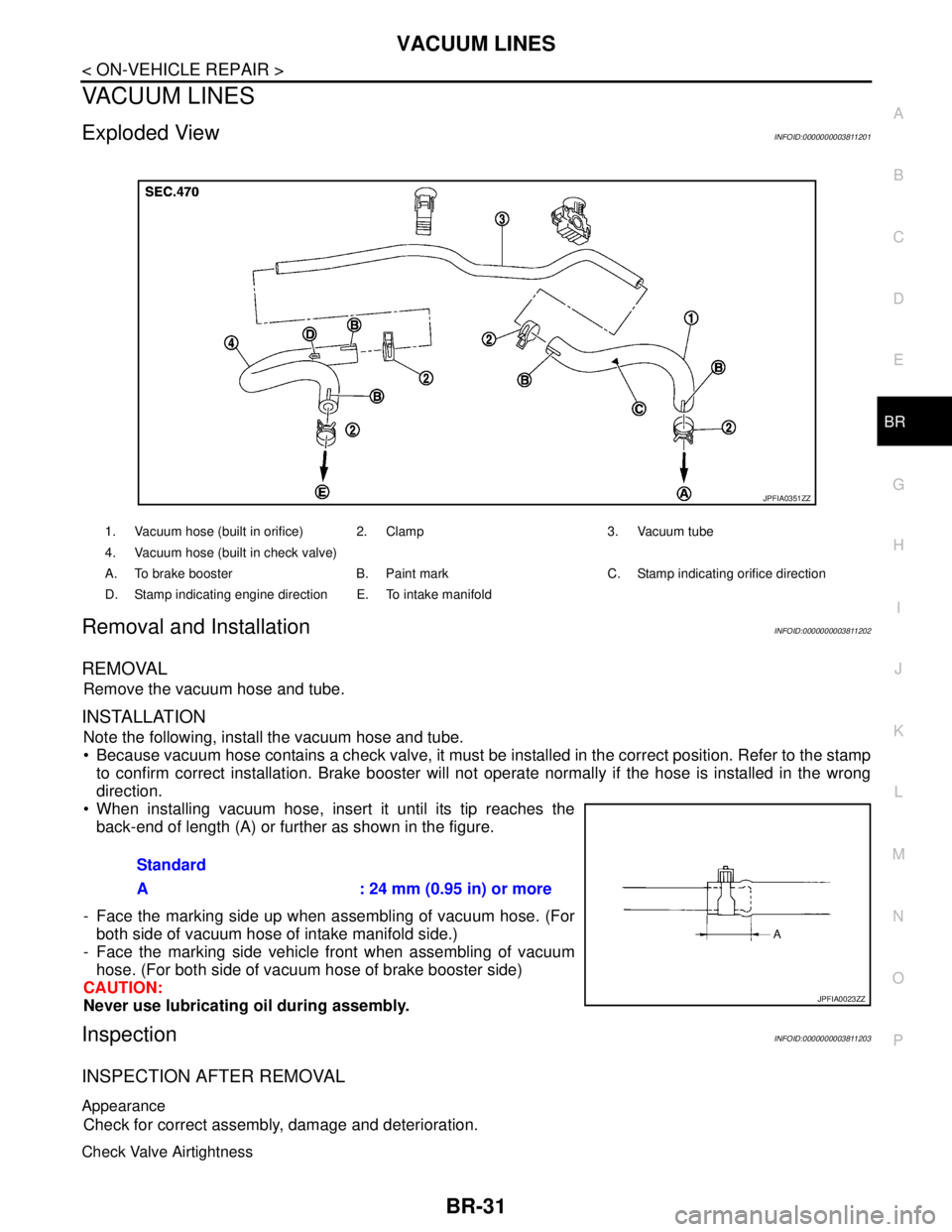
Removal and InstallationINFOID:0000000003811202
REMOVAL
Remove the vacuum hose and tube.
INSTALLATION
Note the following, install the vacuum hose and tube.
Because vacuum hose contains a check valve, it must be installed in the correct position. Refer to the stamp
to confirm correct installation. Brake booster will not operate normally if the hose is installed in the wrong
direction.
When installing vacuum hose, insert it until its tip reaches the
back-end of length (A) or further as shown in the figure.
- Face the marking side up when assembling of vacuum hose. (For
both side of vacuum hose of intake manifold side.)
- Face the marking side vehicle front when assembling of vacuum
hose. (For both side of vacuum hose of brake booster side)
CAUTION:
Never use lubricating oil during assembly.
InspectionINFOID:0000000003811203
INSPECTION AFTER REMOVAL
Appearance
Check for correct assembly, damage and deterioration.
Check Valve Airtightness
1. Vacuum hose (built in orifice) 2. Clamp 3. Vacuum tube
4. Vacuum hose (built in check valve)
A. To brake booster B. Paint mark C. Stamp indicating orifice direction
D. Stamp indicating engine direction E. To intake manifold
JPFIA0351ZZ
Standard
A : 24 mm (0.95 in) or more
JPFIA0023ZZ
Page 1490 of 5121
![NISSAN TEANA 2008 Service Manual MULTIPORT FUEL INJECTION SYSTEM
EC-29
< FUNCTION DIAGNOSIS >[VQ25DE, VQ35DE]
C
D
E
F
G
H
I
J
K
L
MA
EC
N
P O
MIXTURE RATIO FEEDBACK CONTROL (CLOSED LOOP CONTROL)
The mixture ratio feedback system prov](/img/5/57391/w960_57391-1489.png "NISSAN TEANA 2008 Service Manual MULTIPORT FUEL INJECTION SYSTEM
EC-29
< FUNCTION DIAGNOSIS >[VQ25DE, VQ35DE]
C
D
E
F
G
H
I
J
K
L
MA
EC
N
P O
MIXTURE RATIO FEEDBACK CONTROL (CLOSED LOOP CONTROL)
The mixture ratio feedback system prov")
MULTIPORT FUEL INJECTION SYSTEM
EC-29
< FUNCTION DIAGNOSIS >[VQ25DE, VQ35DE]
C
D
E
F
G
H
I
J
K
L
MA
EC
N
P O
MIXTURE RATIO FEEDBACK CONTROL (CLOSED LOOP CONTROL)
The mixture ratio feedback system provides the best air-fuel mixture ratio for driveability and emission control.
The three way catalyst (manifold) can better reduce CO, HC and NOx emissions. This system uses A/F sen-
sor 1 in the exhaust manifold to monitor whether the engine operation is rich or lean. The ECM adjusts the
injection pulse width according to the sensor voltage signal. For more information about A/F sensor 1, refer to
EC-163, "
Description". This maintains the mixture ratio within the range of stoichiometric (ideal air-fuel mix-
ture).
This stage is referred to as the closed loop control condition.
Heated oxygen sensor 2 is located downstream of the three way catalyst (manifold). Even if the switching
characteristics of A/F sensor 1 shift, the air-fuel ratio is controlled to stoichiometric by the signal from heated
oxygen sensor 2.
Open Loop Control
The open loop system condition refers to when the ECM detects any of the following conditions. Feedback
control stops in order to maintain stabilized fuel combustion.
- Deceleration and acceleration
- High-load, high-speed operation
- Malfunction of A/F sensor 1 or its circuit
- Insufficient activation of A/F sensor 1 at low engine coolant temperature
- High engine coolant temperature
- During warm-up
- After shifting from N to D
- When starting the engine
MIXTURE RATIO SELF-LEARNING CONTROL
The mixture ratio feedback control system monitors the mixture ratio signal transmitted from A/F sensor 1.
This feedback signal is then sent to the ECM. The ECM controls the basic mixture ratio as close to the theoret-
ical mixture ratio as possible. However, the basic mixture ratio is not necessarily controlled as originally
designed. Both manufacturing differences (i.e., mass air flow sensor hot wire) and characteristic changes dur-
ing operation (i.e., fuel injector clogging) directly affect mixture ratio.
Accordingly, the difference between the basic and theoretical mixture ratios is monitored in this system. This is
then computed in terms of “injection pulse duration” to automatically compensate for the difference between
the two ratios.
“Fuel trim” refers to the feedback compensation value compared against the basic injection duration. Fuel trim
includes short-term fuel trim and long-term fuel trim.
“Short-term fuel trim” is the short-term fuel compensation used to maintain the mixture ratio at its theoretical
value. The signal from A/F sensor 1 indicates whether the mixture ratio is RICH or LEAN compared to the the-
oretical value. The signal then triggers a reduction in fuel volume if the mixture ratio is rich, and an increase in
fuel volume if it is lean.
“Long-term fuel trim” is overall fuel compensation carried out over time to compensate for continual deviation
of the short-term fuel trim from the central value. Continual deviation will occur due to individual engine differ-
ences, wear over time and changes in the usage environment.
PBIB3020E
Page 1529 of 5121
![NISSAN TEANA 2008 Service Manual EC-68
< FUNCTION DIAGNOSIS >[VQ25DE, VQ35DE]
ELECTRONIC CONTROLLED ENGINE MOUNT
ELECTRONIC CONTROLLED ENGINE MOUNT
System DiagramINFOID:0000000003856486
1. Power valve actuator 1 2. VIAS control solen](/img/5/57391/w960_57391-1528.png "NISSAN TEANA 2008 Service Manual EC-68
< FUNCTION DIAGNOSIS >[VQ25DE, VQ35DE]
ELECTRONIC CONTROLLED ENGINE MOUNT
ELECTRONIC CONTROLLED ENGINE MOUNT
System DiagramINFOID:0000000003856486
1. Power valve actuator 1 2. VIAS control solen")
EC-68
< FUNCTION DIAGNOSIS >[VQ25DE, VQ35DE]
ELECTRONIC CONTROLLED ENGINE MOUNT
ELECTRONIC CONTROLLED ENGINE MOUNT
System DiagramINFOID:0000000003856486
1. Power valve actuator 1 2. VIAS control solenoid valve 1 3. VIAS control solenoid valve 2
4. Power valve actuator 2 5. Intake manifold collector
: From next figure
JMBIA0182ZZ
Page 1538 of 5121
![NISSAN TEANA 2008 Service Manual EVAPORATIVE EMISSION SYSTEM
EC-77
< FUNCTION DIAGNOSIS >[VQ25DE, VQ35DE]
C
D
E
F
G
H
I
J
K
L
MA
EC
N
P O
SYSTEM DESCRIPTION
The evaporative emission system is used to reduce hydrocarbons emitted into](/img/5/57391/w960_57391-1537.png "NISSAN TEANA 2008 Service Manual EVAPORATIVE EMISSION SYSTEM
EC-77
< FUNCTION DIAGNOSIS >[VQ25DE, VQ35DE]
C
D
E
F
G
H
I
J
K
L
MA
EC
N
P O
SYSTEM DESCRIPTION
The evaporative emission system is used to reduce hydrocarbons emitted into")
EVAPORATIVE EMISSION SYSTEM
EC-77
< FUNCTION DIAGNOSIS >[VQ25DE, VQ35DE]
C
D
E
F
G
H
I
J
K
L
MA
EC
N
P O
SYSTEM DESCRIPTION
The evaporative emission system is used to reduce hydrocarbons emitted into the atmosphere from the fuel
system. This reduction of hydrocarbons is accomplished by activated charcoals in the EVAP canister.
The fuel vapor in the sealed fuel tank is led into the EVAP canister which contains activated carbon and the
vapor is stored there when the engine is not operating or when refueling to the fuel tank.
The vapor in the EVAP canister is purged by the air through the purge line to the intake manifold when the
engine is operating. EVAP canister purge volume control solenoid valve is controlled by ECM. When the
engine operates, the flow rate of vapor controlled by EVAP canister purge volume control solenoid valve is
proportionally regulated as the air flow increases.
EVAP canister purge volume control solenoid valve also shuts off the vapor purge line during decelerating and
idling.
EVAPORATIVE EMISSION LINE DRAWING
JMBIA1464GB
Page 1539 of 5121
![NISSAN TEANA 2008 Service Manual EC-78
< FUNCTION DIAGNOSIS >[VQ25DE, VQ35DE]
EVAPORATIVE EMISSION SYSTEM
1. Intake manifold 2. EVAP canister purge volume control
solenoid valve
A. From EVAP canister
: Vehicle front
JMBIA1393ZZ](/img/5/57391/w960_57391-1538.png "NISSAN TEANA 2008 Service Manual EC-78
< FUNCTION DIAGNOSIS >[VQ25DE, VQ35DE]
EVAPORATIVE EMISSION SYSTEM
1. Intake manifold 2. EVAP canister purge volume control
solenoid valve
A. From EVAP canister
: Vehicle front
JMBIA1393ZZ")
EC-78
< FUNCTION DIAGNOSIS >[VQ25DE, VQ35DE]
EVAPORATIVE EMISSION SYSTEM
1. Intake manifold 2. EVAP canister purge volume control
solenoid valve
A. From EVAP canister
: Vehicle front
JMBIA1393ZZ