Its control NISSAN TEANA 2014 Service Manual
[x] Cancel search | Manufacturer: NISSAN, Model Year: 2014, Model line: TEANA, Model: NISSAN TEANA 2014Pages: 4801, PDF Size: 51.2 MB
Page 2142 of 4801
![NISSAN TEANA 2014 Service Manual
EM-144
< REMOVAL AND INSTALLATION >[VQ35DE]
AIR CLEANER AND AIR DUCT
AIR CLEANER AND AIR DUCT
Exploded ViewINFOID:0000000009460539
Removal and InstallationINFOID:0000000009460540
REMOVAL
1. Remove en](/img/5/57390/w960_57390-2141.png "NISSAN TEANA 2014 Service Manual
EM-144
< REMOVAL AND INSTALLATION >[VQ35DE]
AIR CLEANER AND AIR DUCT
AIR CLEANER AND AIR DUCT
Exploded ViewINFOID:0000000009460539
Removal and InstallationINFOID:0000000009460540
REMOVAL
1. Remove en")
EM-144
< REMOVAL AND INSTALLATION >[VQ35DE]
AIR CLEANER AND AIR DUCT
AIR CLEANER AND AIR DUCT
Exploded ViewINFOID:0000000009460539
Removal and InstallationINFOID:0000000009460540
REMOVAL
1. Remove engine room cover. Refer to
EM-143, "Removal and Installation".
2. Remove duct sub-cover and front air duct.
3. Disconnect the blow-by hose.
4. Disconnect the tube clamp at the electric throttle control actuator and at the air duct hose and resonator
assembly.
5. Remove air duct hose and resonator assembly.
6. Disconnect mass air flow sensor.
7. Remove mass air flow sensor from air cleaner assembly, as necessary. CAUTION:
Handle mass air flow sensor with care.
• Do not shock it.
• Do not disassemble it.
• Do not touch its sensor.
8. Disconnect transaxle breather hose.
9. Remove air cleaner assembly.
INSPECTION AFTER REMOVAL
Inspect air cleaner case assembly, front air duct, air duct hose and resonator assembly for cracks or tears.
Replace as necessary.
1. Air duct hose and resonator assembly 2. Duct sub-cover 3. Front air duct
4. Air cleaner assembly 5. Grommets 6. Air cleaner mounting bracket
7. Bracket 8. Mass air flow sensor A. To electric throttle control actuator
ALBIA0497ZZ
Revision: November 20132014 Altima NAM
Page 2174 of 4801
![NISSAN TEANA 2014 Service Manual
EM-176
< REMOVAL AND INSTALLATION >[VQ35DE]
FRONT TIMING CHAIN CASE
Do not damage the ring gear teeth, or the signal
plate teeth behind the ring gear, when installing
Tool.
22. Remove the crankshaft](/img/5/57390/w960_57390-2173.png "NISSAN TEANA 2014 Service Manual
EM-176
< REMOVAL AND INSTALLATION >[VQ35DE]
FRONT TIMING CHAIN CASE
Do not damage the ring gear teeth, or the signal
plate teeth behind the ring gear, when installing
Tool.
22. Remove the crankshaft")
EM-176
< REMOVAL AND INSTALLATION >[VQ35DE]
FRONT TIMING CHAIN CASE
Do not damage the ring gear teeth, or the signal
plate teeth behind the ring gear, when installing
Tool.
22. Remove the crankshaft pulley as follows:
a. Loosen crankshaft pulley and locate bolt seating surfac e at 10 mm (0.39 in) from its original position.
b. Position a pulley puller at recess hole of crankshaft pulley to remove crankshaft pulley.
CAUTION:
Do not use a puller claw on crankshaft pulley periphery.
23. Remove the power steering pump. Refer to ST-38, "Removal and Installation"
.
24. Remove the lower oil pan. Refer to EM-156, "Removal and Installation (Lower Oil Pan)"
.
25. Remove upper oil pan bolts (1) and (2) as shown. Refer to EM-
157, "Removal and Installation (Upper Oil Pan)".
26. Remove the generator. Refer to CHG-32, "Removal and Installation"
.
27. Disconnect the A/C tubes from the A/C compressor and position aside. Refer to HA-23, "Recycle Refriger-
ant".
28. Remove the A/C compressor bolts and the A/C compressor. Refer to HA-30, "COMPRESSOR : Removal
and Installation".
29. Remove the generator bracket. Refer to CHG-32, "Removal and Installation"
.
30. Support the engine with suitable jack and remove the RH engine insulator, mount and torque rod. Refer to EM-220, "Removal and Installation"
.
31. Disconnect the oil pressure switch harness connector.
32. Disconnect the intake valve timing control solenoid valve harness connector.
33. Remove the intake valve timing control solenoid valve cover bank 1 (RH) (A) and intake timing control solenoid valve cover
bank 2 (LH) (B).
• Loosen the intake valve timing control solenoid valve cover bolts in the reverse order as shown.
CAUTION:
The shaft in the intake valve ti ming control solenoid valve
cover is inserted into the center hole of the intake cam-
shaft sprocket. Remove the in take valve timing control
solenoid valve cover by pull ing straight out until the
intake valve timing control so lenoid valve cover disengages from the camshaft sprocket.
34. Remove the drive belt auto-tensioner. Refer to EM-134, "Removal and Installation"
.
35. If necessary, remove the water pump cover.
EMQ0477D
WBIA0259E
(C) : Dowel pin hole
JPBIA1639ZZ
Revision: November 20132014 Altima NAM
Page 2274 of 4801
EXL-8
< SYSTEM DESCRIPTION >
COMPONENT PARTS
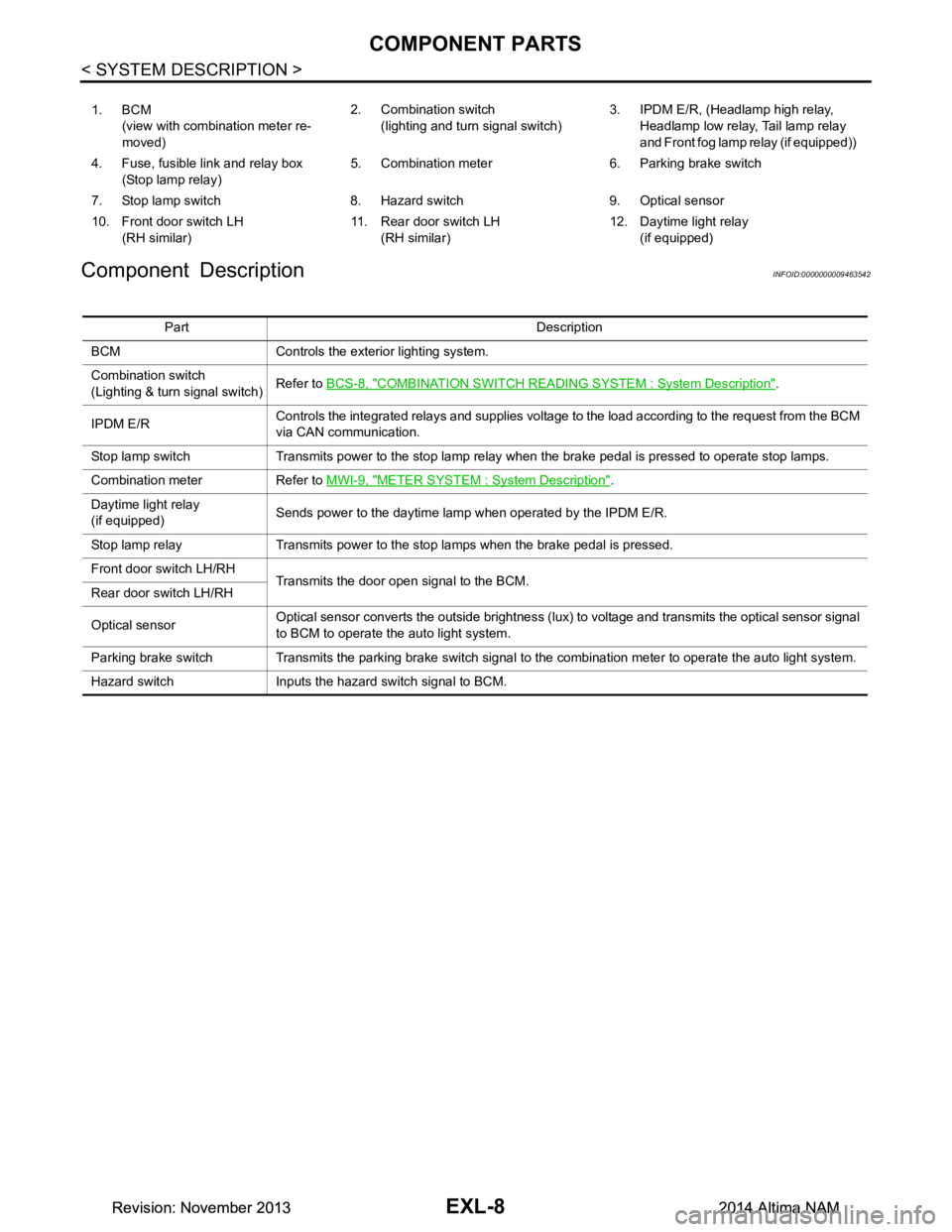
Component Description
INFOID:0000000009463542
1. BCM (view with combination meter re-
moved) 2. Combination switch
(lighting and turn signal switch) 3. IPDM E/R, (Headlamp high relay,
Headlamp low relay, Tail lamp relay
and Front fog lamp relay (if equipped))
4. Fuse, fusible link and relay box (Stop lamp relay) 5. Combination meter 6. Parking brake switch
7. Stop lamp switch 8. Hazard switch 9. Optical sensor
10. Front door switch LH (RH similar) 11. Rear door switch LH
(RH similar) 12. Daytime light relay
(if equipped)
Part Description
BCM Controls the exterior lighting system.
Combination switch
(Lighting & turn signal switch) Refer to
BCS-8, "COMBINATION SWITCH READIN G SYSTEM : System Description"
.
IPDM E/R Controls the integrated relays and supplies voltage to the load according to the request from the BCM
via CAN communication.
Stop lamp switch Transmits power to the stop lamp relay when the brake pedal is pressed to operate stop lamps.
Combination meter Refer to MWI-9, "METER SYSTEM : System Description"
.
Daytime light relay
(if equipped) Sends power to the daytime lamp when operated by the IPDM E/R.
Stop lamp relay Transmits power to the stop lamps when the brake pedal is pressed.
Front door switch LH/RH Transmits the door open signal to the BCM.
Rear door switch LH/RH
Optical sensor Optical sensor converts the outside brightness (lux) to voltage and transmits the optical sensor signal
to BCM to operate the auto light system.
Parking brake switch Transmits the parking brake switch signal to the combination meter to operate the auto light system.
Hazard switch Inputs the hazard switch signal to BCM.
Revision: November 20132014 Altima NAMRevision: November 20132014 Altima NAM
Page 2278 of 4801
EXL-12
< SYSTEM DESCRIPTION >
SYSTEM
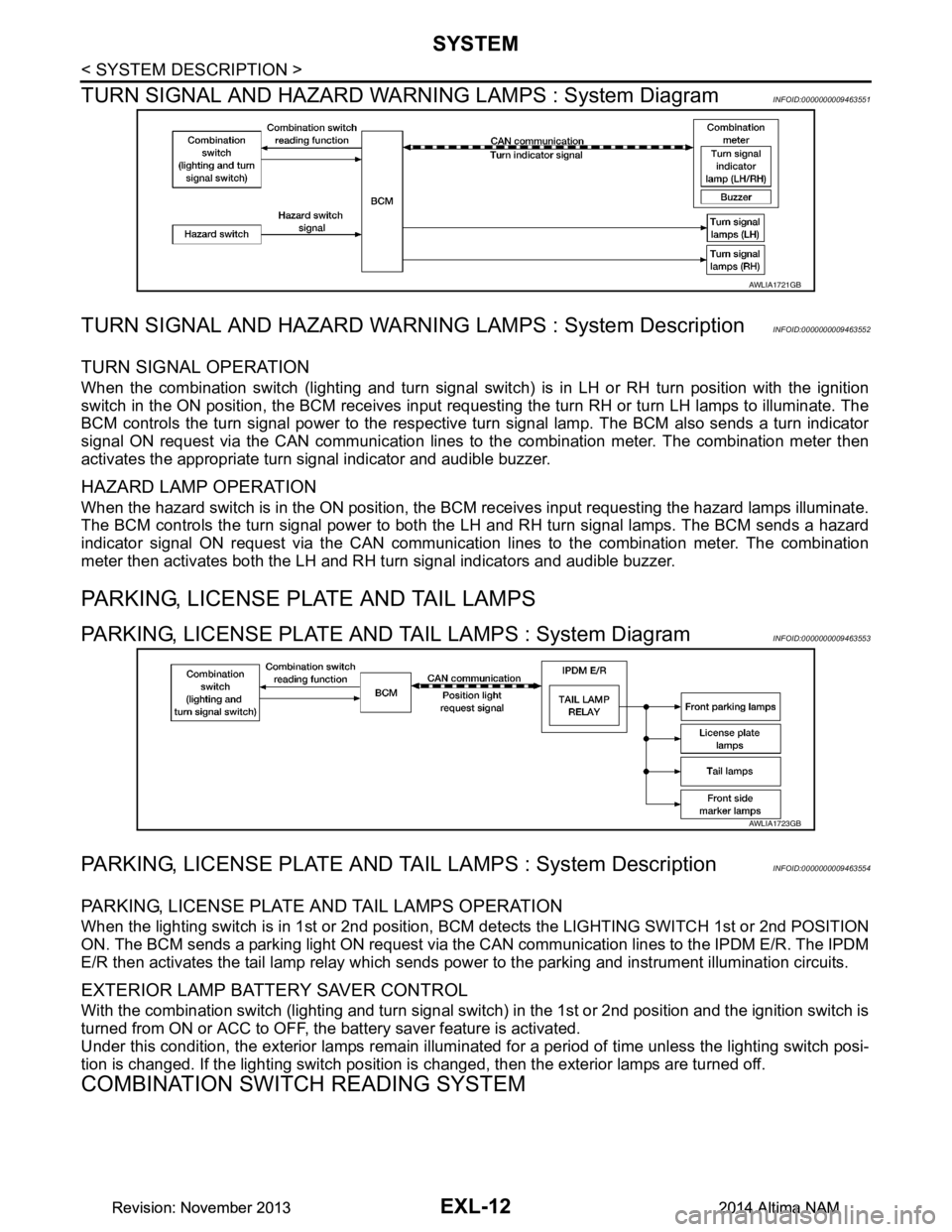
TURN SIGNAL AND HAZARD WARNI NG LAMPS : System Diagram
INFOID:0000000009463551
TURN SIGNAL AND HAZARD WARNING LAMPS : System DescriptionINFOID:0000000009463552
TURN SIGNAL OPERATION
When the combination switch (lighting and turn signal swit ch) is in LH or RH turn position with the ignition
switch in the ON position, the BCM receives input reques ting the turn RH or turn LH lamps to illuminate. The
BCM controls the turn signal power to the respective turn signal lamp. The BCM also sends a turn indicator
signal ON request via the CAN communication lines to the combination meter. The combination meter then
activates the appropriate turn signal indicator and audible buzzer.
HAZARD LAMP OPERATION
When the hazard switch is in the ON position, the BC M receives input requesting the hazard lamps illuminate.
The BCM controls the turn signal power to both the LH and RH turn signal lamps. The BCM sends a hazard
indicator signal ON request via the CAN communication lines to the combination meter. The combination
meter then activates both the LH and RH turn signal indicators and audible buzzer.
PARKING, LICENSE PLATE AND TAIL LAMPS
PARKING, LICENSE PLATE AND TAIL LAMPS : System DiagramINFOID:0000000009463553
PARKING, LICENSE PLATE AND TA IL LAMPS : System DescriptionINFOID:0000000009463554
PARKING, LICENSE PLATE AND TAIL LAMPS OPERATION
When the lighting switch is in 1st or 2nd position, BCM detects the LIGHTING SWITCH 1st or 2nd POSITION
ON. The BCM sends a parking light ON request via the CAN communication lines to the IPDM E/R. The IPDM
E/R then activates the tail lamp relay which sends power to the parking and instrument illumination circuits.
EXTERIOR LAMP BATTERY SAVER CONTROL
With the combination switch (lighting and turn signal switch) in the 1st or 2nd position and the ignition switch is
turned from ON or ACC to OFF, the battery saver feature is activated.
Under this condition, the exterior lamps remain illumi nated for a period of time unless the lighting switch posi-
tion is changed. If the lighting switch position is changed, then the exterior lamps are turned off.
COMBINATION SWITCH READING SYSTEM
AWLIA1721GB
AWLIA1723GB
Revision: November 20132014 Altima NAMRevision: November 20132014 Altima NAM
Page 2363 of 4801
XENON HEADLAMPEXL-97
< DTC/CIRCUIT DIAGNOSIS >
C
D E
F
G H
I
J
K
M A
B
EXL
N
O P
XENON HEADLAMP
DescriptionINFOID:0000000009463586
OPERATION
Refer to EXL-9, "HEADLAMP SYSTEM : System Description".
PRECAUTIONS FOR TROUBLE DIAGNOSIS
• Installation or removal of the connecto r must be done with the lighting switch OFF.
• When the lamp is illuminated (when the lighting switch is ON), do not touch the harness, HID control unit,
inside of the lamp, or the lamp metal parts.
• To check illumination, temporarily install lamp in the vehicle. Be sure to connect power at the vehicle-side
connector.
• If the malfunction can be traced directly to the electrical system, first check for items such as blown fuses
and fusible links, broken wires or loose connectors , pulled-out terminals, and improper connections.
• Do not work with wet hands.
• Using a tester for HID control unit circuit trouble diagnosis is prohibited.
• Disassembling the HID control unit or harnesses (bul b socket harness, ballast harness) is prohibited.
• Immediately after illumination, the light int ensity and color will fluctuate, this is normal.
• When the bulb has reached the end of its lifetime, the br ightness may drop significantly, it may flash repeat-
edly, or the light may turn a reddish color.
Diagnosis ProcedureINFOID:0000000009463587
1.CHECK XENON BULB
Install a known good bulb to the applicable headlamp. Check that the headlamp operates.
Is the inspection result normal?
YES >> Replace the xenon bulb.
NO >> GO TO 2.
2.CHECK HID CONTROL UNIT
Install a known good HID control unit to the appl icable headlamp. Check that the headlamp operates.
Is the inspection result normal?
YES >> Replace HID control unit.
NO >> Inspection End.
Revision: November 20132014 Altima NAMRevision: November 20132014 Altima NAM
Page 2529 of 4801

GI-1
GENERAL INFORMATION
C
D E
F
G H
I
J
K L
M B
GI
SECTION GI
N
O P
CONTENTS
GENERAL INFORMATION
HOW TO USE THIS MANU AL ......................3
HOW TO USE THIS MANUAL ....................... .....3
Description .......................................................... ......3
Terms ........................................................................3
Units ..........................................................................3
Contents ....................................................................3
Relation between Illustrations and Descriptions .......4
Components ..............................................................4
HOW TO FOLLOW TROUBLE DIAGNOSES .....6
Description ................................................................6
How to Follow Test Groups in Trouble Diagnosis ......6
Key to Symbols Signifying Measurements or Pro-
cedures ............................................................... ......
7
HOW TO READ WIRING DIAGRAMS ................9
Connector symbols ............................................. ......9
Sample/wiring diagram -example- ...........................10
Description ..............................................................11
ABBREVIATIONS .......................................... ....13
Abbreviation List .................................................. ....13
TIGHTENING TORQUE OF STANDARD
BOLTS ............................................................ ....
18
Description .......................................................... ....18
Tightening Torque Table (New Standard Includ-
ed) ....................................................................... ....
18
RECOMMENDED CHEMICAL PRODUCTS
AND SEALANTS ............................................ ....
21
Recommended Chemical Products and Sealants ....21
VEHICLE INFORMATION ............................22
IDENTIFICATION INFORMATION ................. ....22
Model Variation ................................................... ....22
Identification Number ..............................................23
Identification Plate ...................................................24
Engine Serial Number .............................................24
CVT Number ...........................................................25
Dimensions .......................................................... ....25
Wheels & Tires ........................................................25
PRECAUTION ..............................................26
PRECAUTIONS .................................................26
Description ........................................................... ....26
Precaution for Supplemental Restraint System
(SRS) "AIR BAG" and "SEAT BELT PRE-TEN-
SIONER" ............................................................. ....
26
Precautions For Xenon Headlamp Service .............26
Procedures without Cowl Top Cover .......................27
Cautions in Removing Battery Terminal and AV
Control Unit .......................................................... ....
27
General Precautions ................................................27
Three Way Catalyst .................................................29
Fuel (Regular Unleaded Gasoline Recommend-
ed) QR25DE ........................................................ ....
29
Fuel (Regular Unleaded Gasoline Recommend-
ed) VQ35DE ........................................................ ....
29
Multiport Fuel Injection System or Engine Control
System ................................................................. ....
29
Hoses ......................................................................29
Engine Oils ..............................................................30
Air Conditioning .......................................................31
LIFTING POINT .................................................32
Special Service Tool ................................................32
Pantograph Jack ......................................................32
Garage Jack and Safety Stand ................................33
2-Pole Lift ................................................................34
Board-on Lift ............................................................35
TOW TRUCK TOWING .....................................36
Tow Truck Towing ...................................................36
Vehicle Recovery (Freeing a Stuck Vehicle) ...........36
WIRING DIAGRAM ......................................38
CONSULT CHECKING SYSTEM .....................38
Wiring Diagram .................................................... ....38
Revision: November 20132014 Altima NAMRevision: November 20132014 Altima NAM
Page 2530 of 4801

GI-2
BASIC INSPECTION ...................................39
SERVICE INFORMATION FOR ELECTRICAL
INCIDENT ....................................................... ...
39
Work Flow ............................................................ ...39
Control Units and Electrical Parts ...........................39
How to Check Terminal ..........................................40
Intermittent Incident ............................................. ...43
Circuit Inspection ....................................................46
CONSULT CHECKING SYSTEM ......................51
Description ........................................................... ...51
Function and System Application ............................51
CONSULT Data Link Connector (DLC) Circuit .......51
Revision: November 20132014 Altima NAMRevision: November 20132014 Altima NAM
Page 2543 of 4801

ABBREVIATIONSGI-15
< HOW TO USE THIS MANUAL >
C
D E
F
G H
I
J
K L
M B
GI
N
O P
I
K
L
M
N
O
ABBREVIATION DESCRIPTION I/M Inspection and maintenanceIA Intake air
IAC Idle air control IAT Intake air temperature
IBA Intelligent brake assist IC Ignition control
ICC Intelligent cruise control
ICM Ignition control module
IPDM E/R Intelligent power distribution module engine room ISC Idle speed controlISS Input shaft speed ITS Information technology suite
ABBREVIATION DESCRIPTION KS Knock sensor
ABBREVIATION DESCRIPTION LBC Li-ion battery controller
LCD Liquid crystal display
LCU Local control unit LDP Lane departure prevention
LDW Lane departure warning LED Light emitting diode LH Left-hand
LIN Local interconnect network
ABBREVIATION DESCRIPTION M/T Manual transaxle/transmission
MAF Mass airflow
MAP Manifold absolute pressure
MDU Multi display unit MI Malfunction indicator
MIL Malfunction indicator lamp
MOD Moving object detection
ABBREVIATION DESCRIPTION NOX Nitrogen oxides
ABBREVIATION DESCRIPTION O2 Oxygen
O2S Oxygen sensor
OBD On board diagnostic OC Oxidation catalytic converter
OD Overdrive
Revision: November 20132014 Altima NAMRevision: November 20132014 Altima NAM
Page 2567 of 4801
SERVICE INFORMATION FOR ELECTRICAL INCIDENTGI-39
< BASIC INSPECTION >
C
D E
F
G H
I
J
K L
M B
GI
N
O PBASIC INSPECTION
SERVICE INFORMATION FO R ELECTRICAL INCIDENT
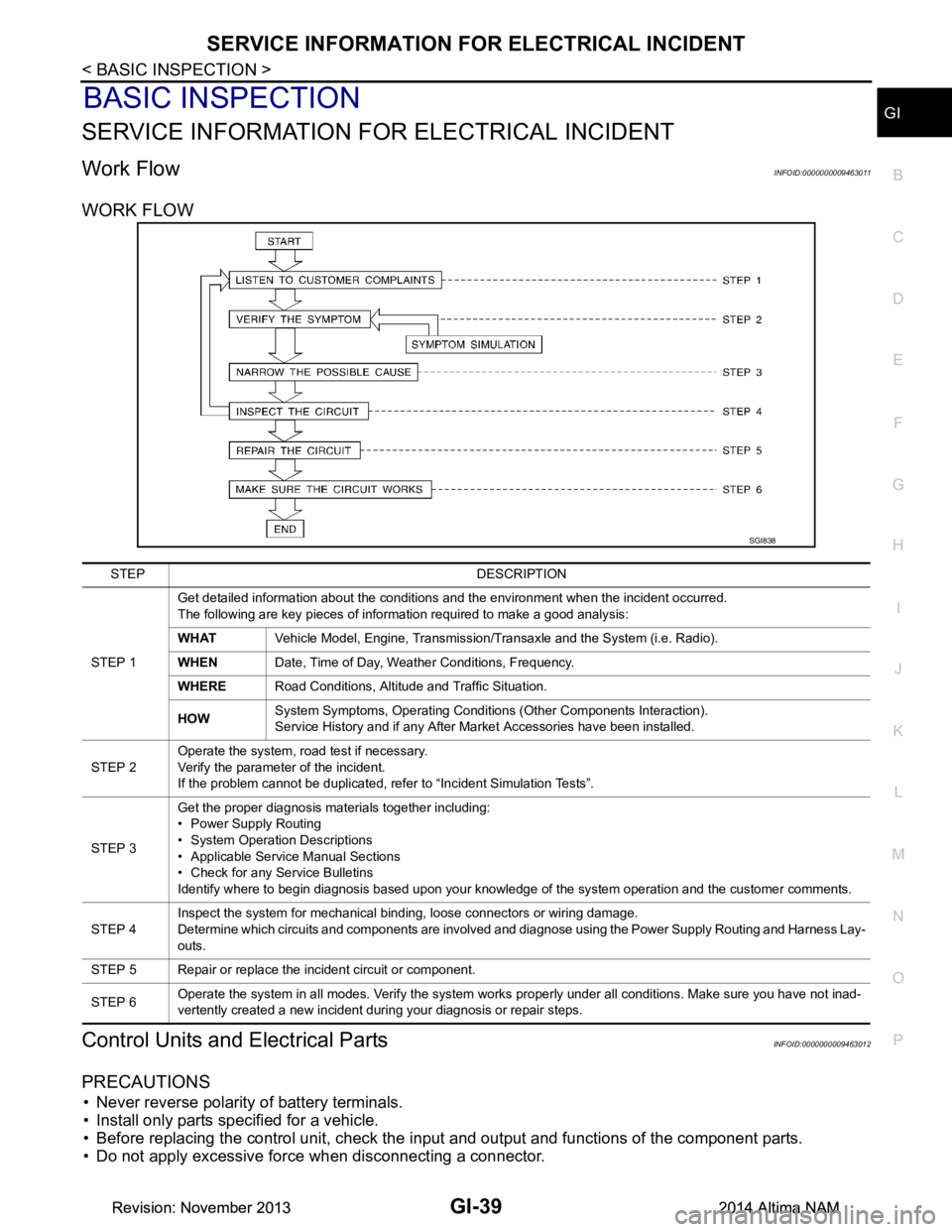
Work FlowINFOID:0000000009463011
WORK FLOW
Control Units and Electrical PartsINFOID:0000000009463012
PRECAUTIONS
• Never reverse polarity of battery terminals.
• Install only parts specified for a vehicle.
• Before replacing the control unit, check the i nput and output and functions of the component parts.
• Do not apply excessive force when disconnecting a connector.
SGI838
STEP DESCRIPTION
STEP 1 Get detailed information about the conditions and the environment when the incident occurred.
The following are key pieces of information required to make a good analysis:
WHAT Vehicle Model, Engine, Transmission/Transaxle and the System (i.e. Radio).
WHEN Date, Time of Day, Weather Conditions, Frequency.
WHERE Road Conditions, Altitude and Traffic Situation.
HOW System Symptoms, Operating Conditions (Other Components Interaction).
Service History and if any After Market Accessories have been installed.
STEP 2 Operate the system, road test if necessary.
Verify the parameter of the incident.
If the problem cannot be duplicated, refer to “Incident Simulation Tests”.
STEP 3 Get the proper diagnosis materials together including:
• Power Supply Routing
• System Operation Descriptions
• Applicable Service Manual Sections
• Check for any Service Bulletins
Identify where to begin diagnosis based upon your knowledge of the system operation and the customer comments.
STEP 4 Inspect the system for mechanical binding, loose connectors or wiring damage.
Determine which circuits and components are involved and diagnose using the Power Supply Routing and Harness Lay-
outs.
STEP 5 Repair or replace the incident circuit or component.
STEP 6 Operate the system in all modes. Verify the system works properly under all conditions. Make sure you have not inad-
vertently created a new incident during your diagnosis or repair steps.
Revision: November 20132014 Altima NAMRevision: November 20132014 Altima NAM
Page 2568 of 4801
GI-40
< BASIC INSPECTION >
SERVICE INFORMATION FOR ELECTRICAL INCIDENT
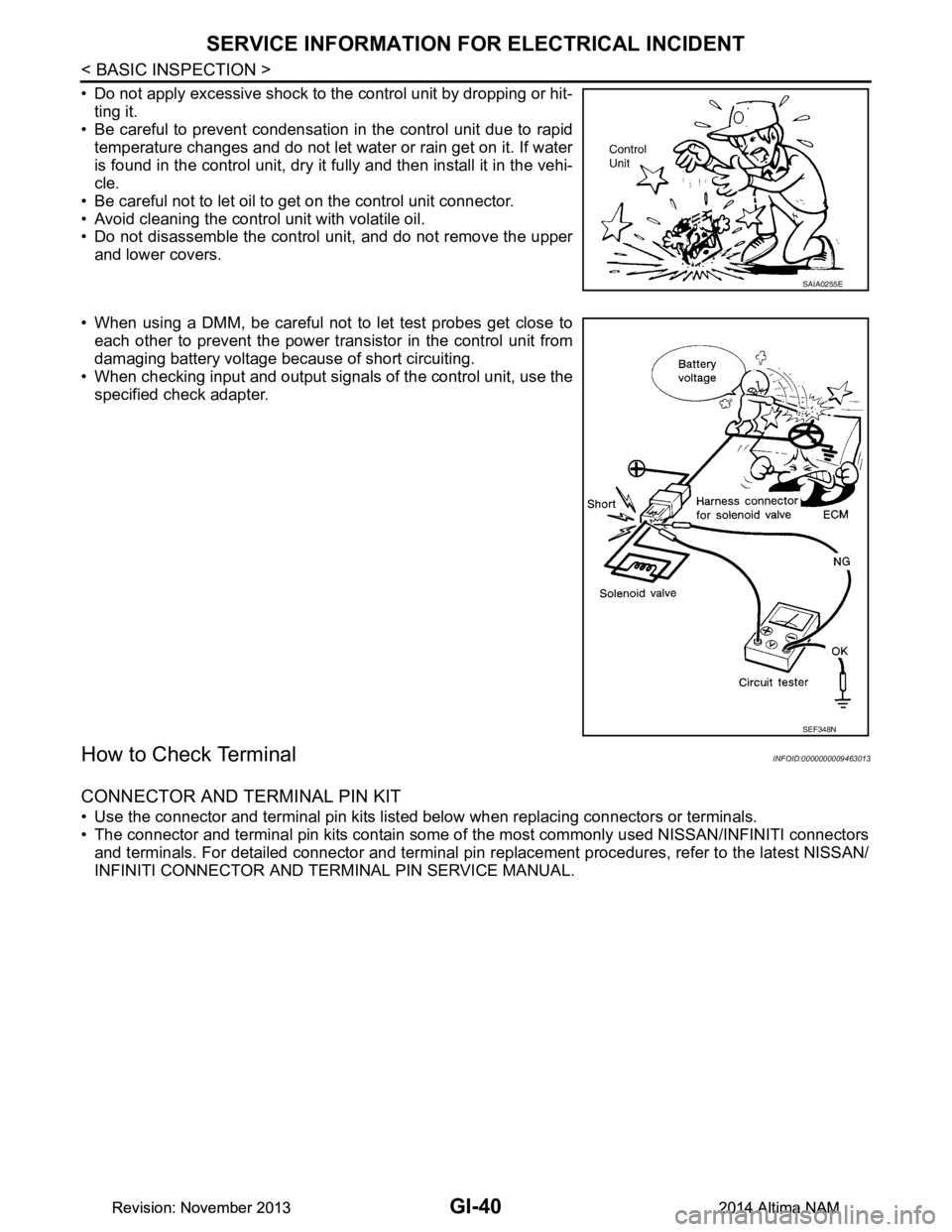
• Do not apply excessive shock to the control unit by dropping or hit-ting it.
• Be careful to prevent condensation in the control unit due to rapid
temperature changes and do not let water or rain get on it. If water
is found in the control unit, dry it fully and then install it in the vehi-
cle.
• Be careful not to let oil to get on the control unit connector.
• Avoid cleaning the control unit with volatile oil.
• Do not disassemble the control unit, and do not remove the upper
and lower covers.
• When using a DMM, be careful not to let test probes get close to each other to prevent the power tr ansistor in the control unit from
damaging battery voltage because of short circuiting.
• When checking input and output signals of the control unit, use the
specified check adapter.
How to Check TerminalINFOID:0000000009463013
CONNECTOR AND TERMINAL PIN KIT
• Use the connector and terminal pin kits listed below when replacing connectors or terminals.
• The connector and terminal pin kits contain some of the most commonly used NISSAN/INFINITI connectors
and terminals. For detailed connector and terminal pin r eplacement procedures, refer to the latest NISSAN/
INFINITI CONNECTOR AND TERMINAL PIN SERVICE MANUAL.
SAIA0255E
SEF348N
Revision: November 20132014 Altima NAMRevision: November 20132014 Altima NAM