Fuse NISSAN TERRANO 2004 Service Owners Manual
[x] Cancel search | Manufacturer: NISSAN, Model Year: 2004, Model line: TERRANO, Model: NISSAN TERRANO 2004Pages: 1833, PDF Size: 53.42 MB
Page 1627 of 1833
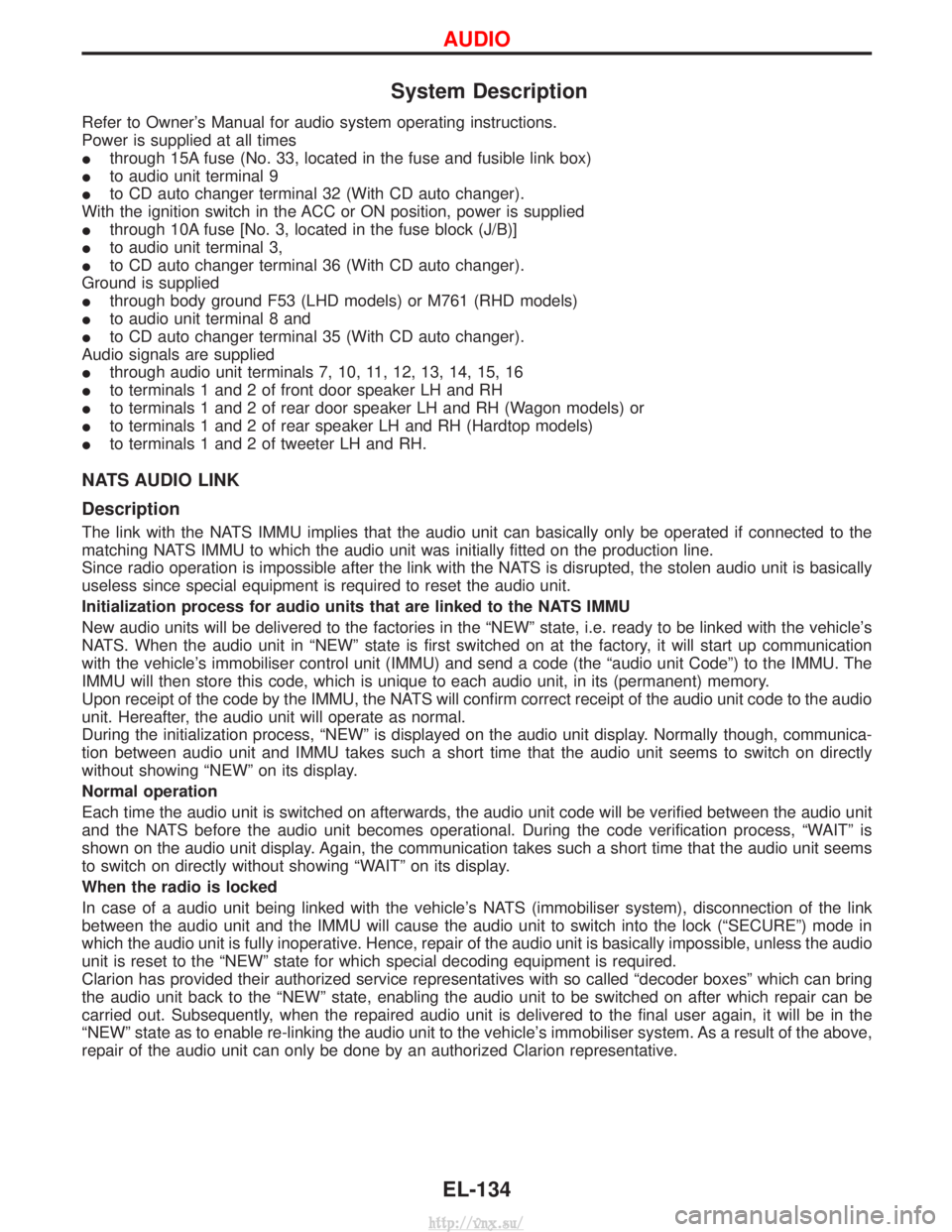
System Description
Refer to Owner's Manual for audio system operating instructions.
Power is supplied at all times
Ithrough 15A fuse (No. 33, located in the fuse and fusible link box)
I to audio unit terminal 9
I to CD auto changer terminal 32 (With CD auto changer).
With the ignition switch in the ACC or ON position, power is supplied
I through 10A fuse [No. 3, located in the fuse block (J/B)]
I to audio unit terminal 3,
I to CD auto changer terminal 36 (With CD auto changer).
Ground is supplied
I through body ground F53 (LHD models) or M761 (RHD models)
I to audio unit terminal 8 and
I to CD auto changer terminal 35 (With CD auto changer).
Audio signals are supplied
I through audio unit terminals 7, 10, 11, 12, 13, 14, 15, 16
I to terminals 1 and 2 of front door speaker LH and RH
I to terminals 1 and 2 of rear door speaker LH and RH (Wagon models) or
I to terminals 1 and 2 of rear speaker LH and RH (Hardtop models)
I to terminals 1 and 2 of tweeter LH and RH.
NATS AUDIO LINK
Description
The link with the NATS IMMU implies that the audio unit can basically only be operated if connected to the
matching NATS IMMU to which the audio unit was initially fitted on the production line.
Since radio operation is impossible after the link with the NATS is disrupted, the stolen audio unit is basically
useless since special equipment is required to reset the audio unit.
Initialization process for audio units that are linked to the NATS IMMU
New audio units will be delivered to the factories in the ªNEWº state, i.e. ready to be linked with the vehicle's
NATS. When the audio unit in ªNEWº state is first switched on at the factory, it will start up communication
with the vehicle's immobiliser control unit (IMMU) and send a code (the ªaudio unit Codeº) to the IMMU. The
IMMU will then store this code, which is unique to each audio unit, in its (permanent) memory.
Upon receipt of the code by the IMMU, the NATS will confirm correct receipt of the audio unit code to the audio
unit. Hereafter, the audio unit will operate as normal.
During the initialization process, ªNEWº is displayed on the audio unit display. Normally though, communica-
tion between audio unit and IMMU takes such a short time that the audio unit seems to switch on directly
without showing ªNEWº on its display.
Normal operation
Each time the audio unit is switched on afterwards, the audio unit code will be verified between the audio unit
and the NATS before the audio unit becomes operational. During the code verification process, ªWAITº is
shown on the audio unit display. Again, the communication takes such a short time that the audio unit seems
to switch on directly without showing ªWAITº on its display.
When the radio is locked
In case of a audio unit being linked with the vehicle's NATS (immobiliser system), disconnection of the link
between the audio unit and the IMMU will cause the audio unit to switch into the lock (ªSECUREº) mode in
which the audio unit is fully inoperative. Hence, repair of the audio unit is basically impossible, unless the audio
unit is reset to the ªNEWº state for which special decoding equipment is required.
Clarion has provided their authorized service representatives with so called ªdecoder boxesº which can bring
the audio unit back to the ªNEWº state, enabling the audio unit to be switched on after which repair can be
carried out. Subsequently, when the repaired audio unit is delivered to the final user again, it will be in the
ªNEWº state as to enable re-linking the audio unit to the vehicle's immobiliser system. As a result of the above,
repair of the audio unit can only be done by an authorized Clarion representative.
AUDIO
EL-134
http://vnx.su/
Page 1640 of 1833
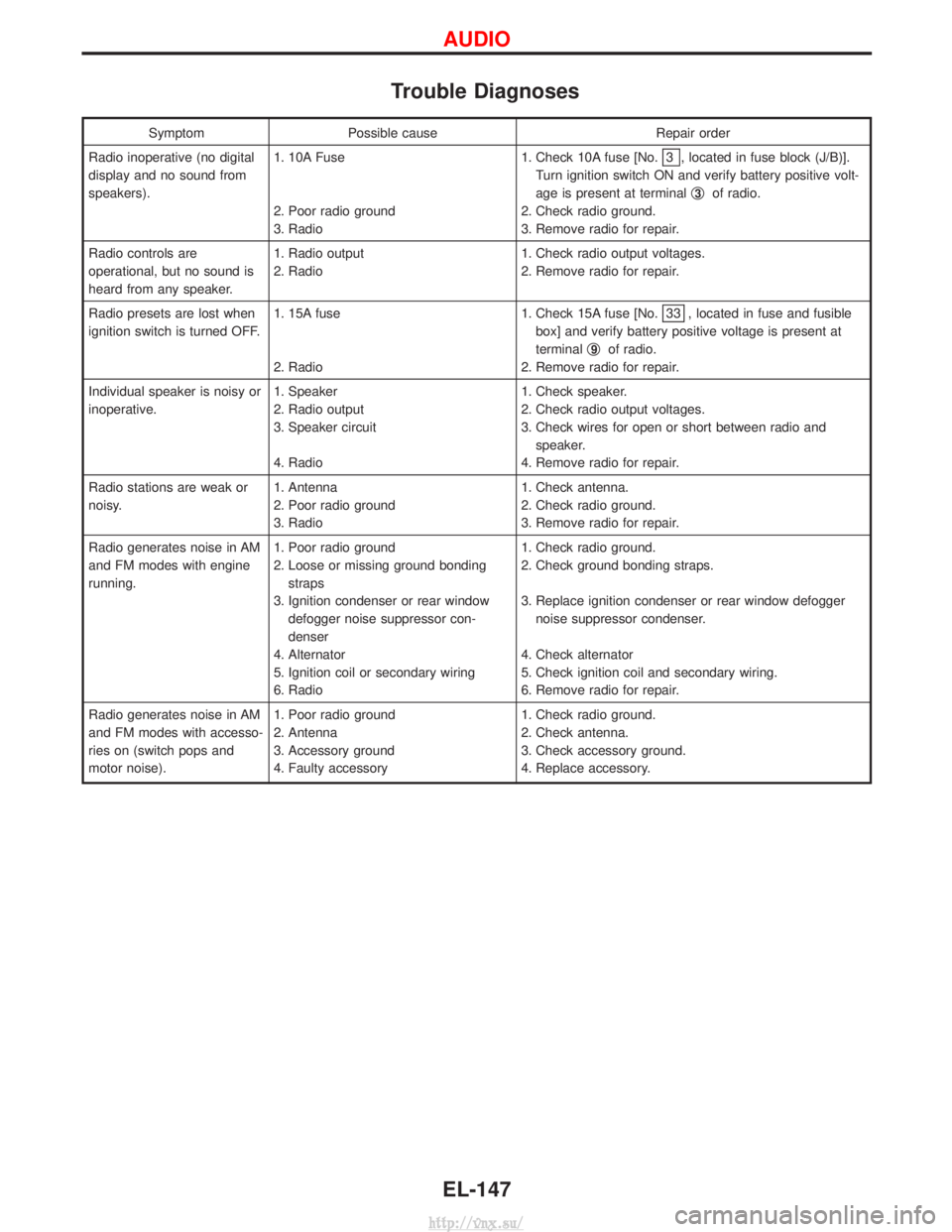
Trouble Diagnoses
SymptomPossible cause Repair order
Radio inoperative (no digital
display and no sound from
speakers). 1. 10A Fuse
2. Poor radio ground
3. Radio 1. Check 10A fuse [No.
3 , located in fuse block (J/B)].
Turn ignition switch ON and verify battery positive volt-
age is present at terminal q
3of radio.
2. Check radio ground.
3. Remove radio for repair.
Radio controls are
operational, but no sound is
heard from any speaker. 1. Radio output
2. Radio
1. Check radio output voltages.
2. Remove radio for repair.
Radio presets are lost when
ignition switch is turned OFF. 1. 15A fuse
2. Radio 1. Check 15A fuse [No.
33 , located in fuse and fusible
box] and verify battery positive voltage is present at
terminal q
9of radio.
2. Remove radio for repair.
Individual speaker is noisy or
inoperative. 1. Speaker
2. Radio output
3. Speaker circuit
4. Radio 1. Check speaker.
2. Check radio output voltages.
3. Check wires for open or short between radio and
speaker.
4. Remove radio for repair.
Radio stations are weak or
noisy. 1. Antenna
2. Poor radio ground
3. Radio 1. Check antenna.
2. Check radio ground.
3. Remove radio for repair.
Radio generates noise in AM
and FM modes with engine
running. 1. Poor radio ground
2. Loose or missing ground bonding
straps
3. Ignition condenser or rear window defogger noise suppressor con-
denser
4. Alternator
5. Ignition coil or secondary wiring
6. Radio 1. Check radio ground.
2. Check ground bonding straps.
3. Replace ignition condenser or rear window defogger
noise suppressor condenser.
4. Check alternator
5. Check ignition coil and secondary wiring.
6. Remove radio for repair.
Radio generates noise in AM
and FM modes with accesso-
ries on (switch pops and
motor noise). 1. Poor radio ground
2. Antenna
3. Accessory ground
4. Faulty accessory 1. Check radio ground.
2. Check antenna.
3. Check accessory ground.
4. Replace accessory.
AUDIO
EL-147
http://vnx.su/
Page 1649 of 1833
![NISSAN TERRANO 2004 Service Owners Manual System Description
Power is supplied at all times
Ifrom 40A fusible link (letter F, located in fuse and fusible link box)
I through circuit breaker [built-in fuse block (J/B)]
I to power window relay](/img/5/57394/w960_57394-1648.png "NISSAN TERRANO 2004 Service Owners Manual System Description
Power is supplied at all times
Ifrom 40A fusible link (letter F, located in fuse and fusible link box)
I through circuit breaker [built-in fuse block (J/B)]
I to power window relay")
System Description
Power is supplied at all times
Ifrom 40A fusible link (letter F, located in fuse and fusible link box)
I through circuit breaker [built-in fuse block (J/B)]
I to power window relay [built-in fuse block (J/B)].
With ignition switch in ON or START position, power is supplied
I to power window relay
Ground is supplied to power window relay
I through body grounds F36, F47 (LHD models) or M33, M754 (RHD models).
The power window relay is energized and power is supplied
I through power window relay
I to power window main switch terminal 1,
I to power window sub-switch front passenger side terminal 5,
I to power window sub-switch rear LH and RH terminal 5 (models with rear power window).
MANUAL OPERATION
Front Door (Driver Side)
Ground is supplied
Ito power window main switch terminal 3
I through body grounds B10 and B18.
WINDOW UP
When the driver's window switch in the power window main switch is pressed in the up position, power is
supplied
I through power window main switch terminal 9
I to driver side power window motor terminal 2.
Ground is supplied
I through power window main switch terminal 1
I to driver side power window motor terminal 8.
Then, the motor raises the window until the switch is released.
WINDOW DOWN
When the driver's window switch in the power window main switch is pressed in the down position, power is
supplied
I through power window main switch terminal 8
I to driver side power window motor terminal 1.
Ground is supplied
I to driver side power window motor terminal 2
I through power window main switch terminal 9.
Then, the motor lowers the window until the switch is released.
Front Door (Passenger Side)
Ground is supplied
I to power window main switch terminal 3
I through body grounds B10 and B18.
NOTE:
Numbers in parentheses are terminal numbers, when power window switch is pressed in the UP and DOWN
positions respectively.
POWER WINDOW MAIN SWITCH OPERATION
Power is supplied
I through power window main switch (5, 6)
I to power window sub-switch front passenger side (3, 4).
The subsequent operation is the same as the front power window sub-switch operation.
FRONT POWER WINDOW SUB-SWITCH OPERATION
Power is supplied
I through front power window sub-switch (1, 2)
I to power window motor front passenger side (2, 1).
Ground is supplied
I to front passenger side power window motor (1, 2)
I through front power window sub-switch (2, 1)
I to front power window sub-switch (4, 3)
POWER WINDOW
EL-156
http://vnx.su/
Page 1655 of 1833
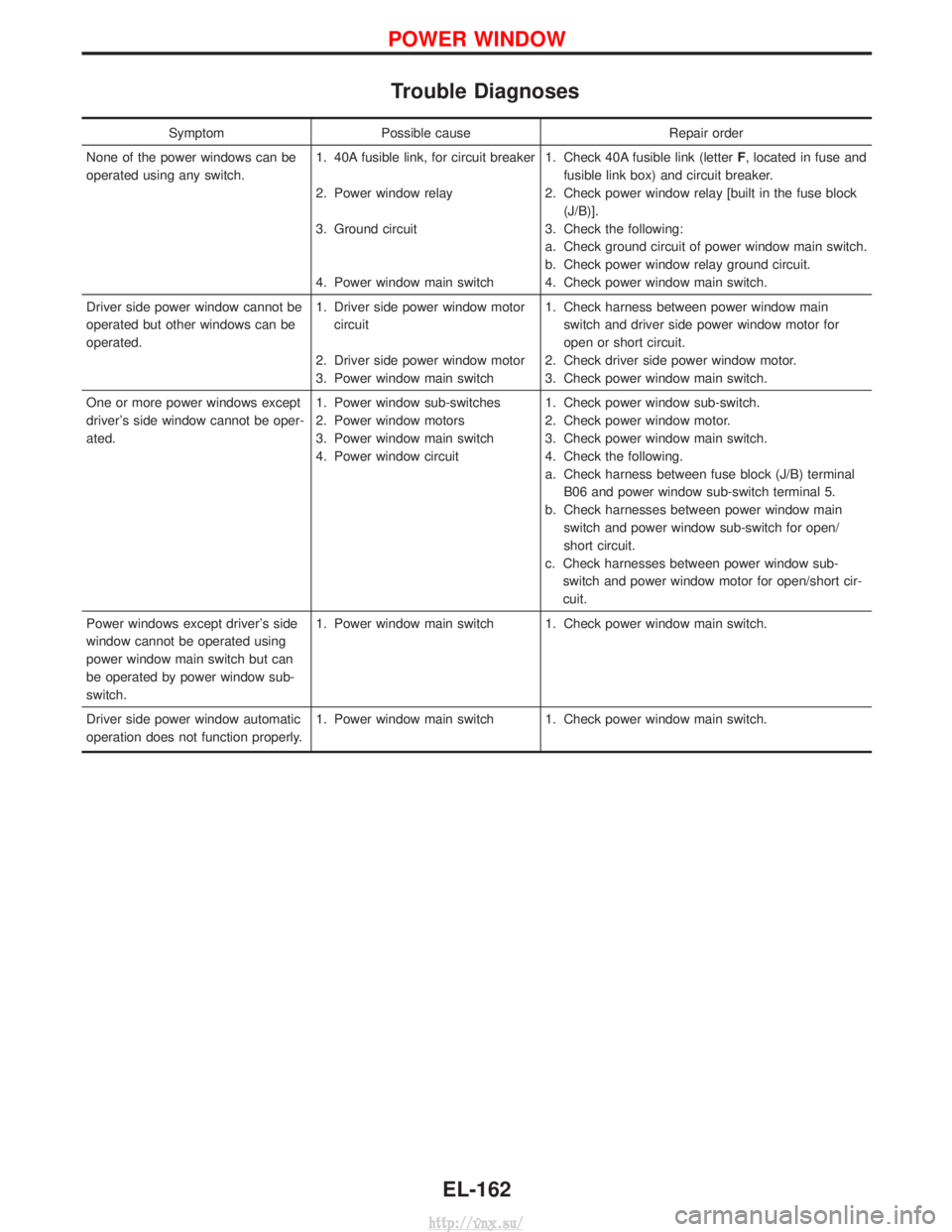
Trouble Diagnoses
SymptomPossible cause Repair order
None of the power windows can be
operated using any switch. 1. 40A fusible link, for circuit breaker
2. Power window relay
3. Ground circuit
4. Power window main switch1. Check 40A fusible link (letter
F, located in fuse and
fusible link box) and circuit breaker.
2. Check power window relay [built in the fuse block (J/B)].
3. Check the following:
a. Check ground circuit of power window main switch.
b. Check power window relay ground circuit.
4. Check power window main switch.
Driver side power window cannot be
operated but other windows can be
operated. 1. Driver side power window motor
circuit
2. Driver side power window motor
3. Power window main switch 1. Check harness between power window main
switch and driver side power window motor for
open or short circuit.
2. Check driver side power window motor.
3. Check power window main switch.
One or more power windows except
driver's side window cannot be oper-
ated. 1. Power window sub-switches
2. Power window motors
3. Power window main switch
4. Power window circuit1. Check power window sub-switch.
2. Check power window motor.
3. Check power window main switch.
4. Check the following.
a. Check harness between fuse block (J/B) terminal
B06 and power window sub-switch terminal 5.
b. Check harnesses between power window main switch and power window sub-switch for open/
short circuit.
c. Check harnesses between power window sub- switch and power window motor for open/short cir-
cuit.
Power windows except driver's side
window cannot be operated using
power window main switch but can
be operated by power window sub-
switch. 1. Power window main switch 1. Check power window main switch.
Driver side power window automatic
operation does not function properly. 1. Power window main switch 1. Check power window main switch.
POWER WINDOW
EL-162
http://vnx.su/
Page 1668 of 1833
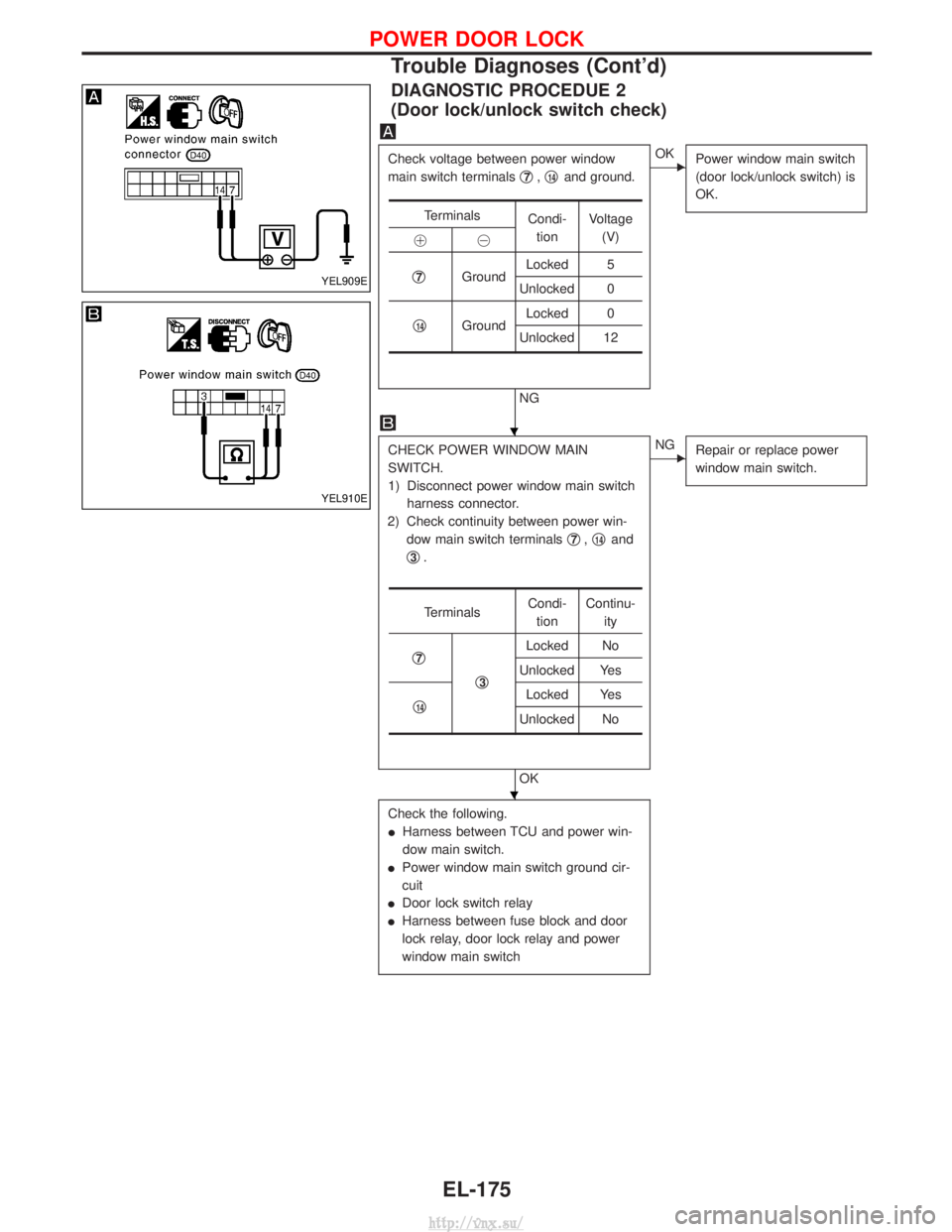
DIAGNOSTIC PROCEDUE 2
(Door lock/unlock switch check)
Check voltage between power window
main switch terminalsq
7,q14and ground.
NG
EOK
Power window main switch
(door lock/unlock switch) is
OK.
CHECK POWER WINDOW MAIN
SWITCH.
1) Disconnect power window main switch
harness connector.
2) Check continuity between power win- dow main switch terminals q
7,q14and
q
3.
OK
ENG Repair or replace power
window main switch.
Check the following.
IHarness between TCU and power win-
dow main switch.
I Power window main switch ground cir-
cuit
I Door lock switch relay
I Harness between fuse block and door
lock relay, door lock relay and power
window main switch
Terminals
Condi-
tion Voltage
(V)
!@
q
7Ground Locked 5
Unlocked 0
q
14Ground Locked 0
Unlocked 12
Terminals Condi-
tion Continu-
ity
q
7
q3
Locked No
Unlocked Yes
q
14Locked Yes
Unlocked No
YEL909E
YEL910E
H
H
POWER DOOR LOCK
Trouble Diagnoses (Cont'd)
EL-175
http://vnx.su/
Page 1670 of 1833
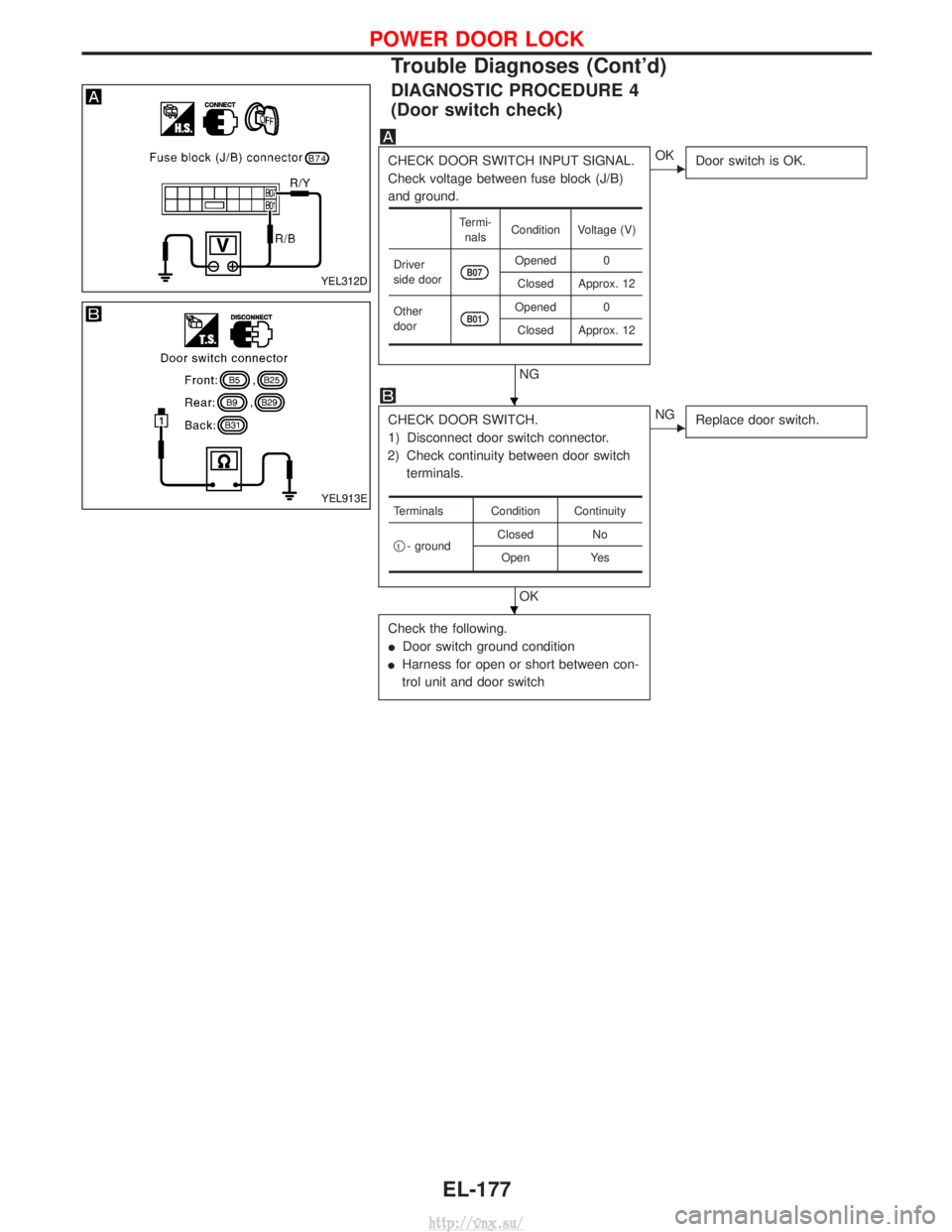
DIAGNOSTIC PROCEDURE 4
(Door switch check)
CHECK DOOR SWITCH INPUT SIGNAL.
Check voltage between fuse block (J/B)
and ground.
NG
EOKDoor switch is OK.
CHECK DOOR SWITCH.
1) Disconnect door switch connector.
2) Check continuity between door switch terminals.
OK
ENG Replace door switch.
Check the following.
IDoor switch ground condition
I Harness for open or short between con-
trol unit and door switch
Termi-
nals Condition Voltage (V)
Driver
side door
B07Opened 0 Closed Approx. 12
Other
door
B01Opened 0 Closed Approx. 12
Terminals Condition Continuity
q
1- ground Closed No
Open Yes
YEL312D
YEL913E
H
H
POWER DOOR LOCK
Trouble Diagnoses (Cont'd)
EL-177
http://vnx.su/
Page 1671 of 1833
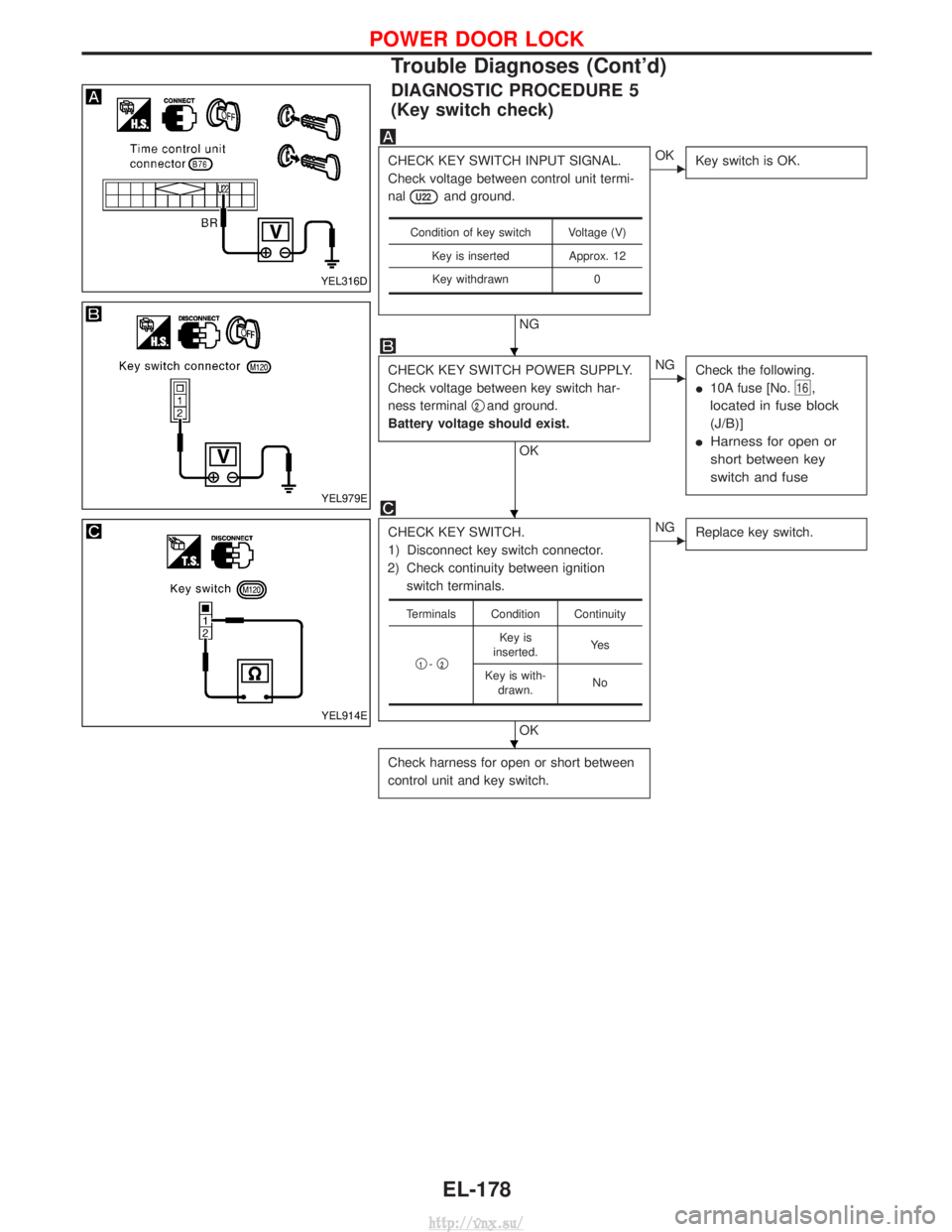
DIAGNOSTIC PROCEDURE 5
(Key switch check)
CHECK KEY SWITCH INPUT SIGNAL.
Check voltage between control unit termi-
nal
U22and ground.
NG
EOKKey switch is OK.
CHECK KEY SWITCH POWER SUPPLY.
Check voltage between key switch har-
ness terminal q
2and ground.
Battery voltage should exist.
OK
ENG Check the following.
I10A fuse [No.
16,
located in fuse block
(J/B)]
I Harness for open or
short between key
switch and fuse
CHECK KEY SWITCH.
1) Disconnect key switch connector.
2) Check continuity between ignition switch terminals.
OK
ENG Replace key switch.
Check harness for open or short between
control unit and key switch.
Condition of key switch Voltage (V)
Key is inserted Approx. 12Key withdrawn 0
Terminals Condition Continuity
q
1-q2
Key is
inserted. Ye s
Key is with- drawn. No
YEL316D
YEL979E
YEL914E
H
H
H
POWER DOOR LOCK
Trouble Diagnoses (Cont'd)
EL-178
http://vnx.su/
Page 1692 of 1833
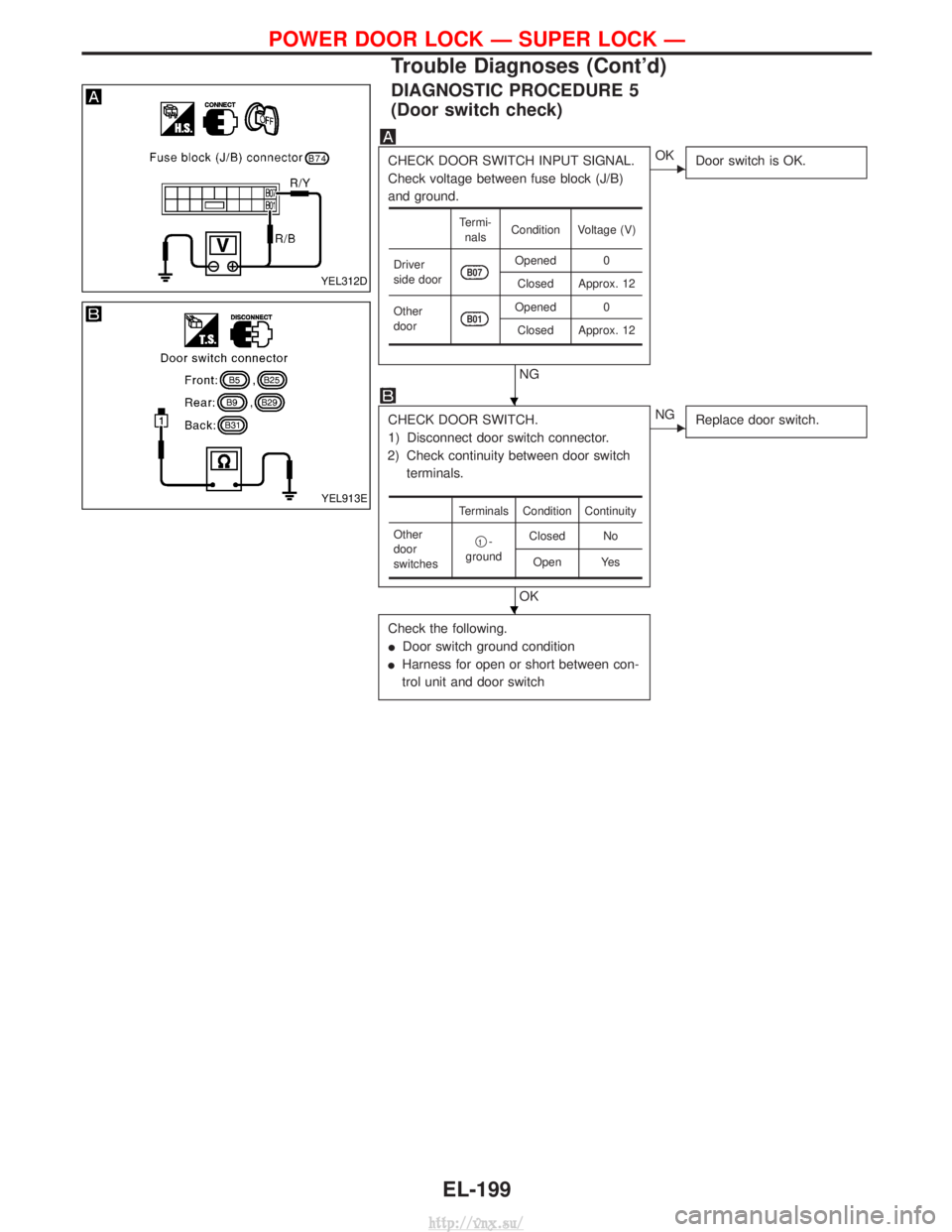
DIAGNOSTIC PROCEDURE 5
(Door switch check)
CHECK DOOR SWITCH INPUT SIGNAL.
Check voltage between fuse block (J/B)
and ground.
NG
EOKDoor switch is OK.
CHECK DOOR SWITCH.
1) Disconnect door switch connector.
2) Check continuity between door switch terminals.
OK
ENG Replace door switch.
Check the following.
IDoor switch ground condition
I Harness for open or short between con-
trol unit and door switch
Termi-
nals Condition Voltage (V)
Driver
side door
B07Opened 0 Closed Approx. 12
Other
door
B01Opened 0 Closed Approx. 12
Terminals Condition Continuity
Other
door
switches q
1-
ground Closed No
Open Yes
YEL312D
YEL913E
H
H
POWER DOOR LOCK Ð SUPER LOCK Ð
Trouble Diagnoses (Cont'd)
EL-199
http://vnx.su/
Page 1694 of 1833
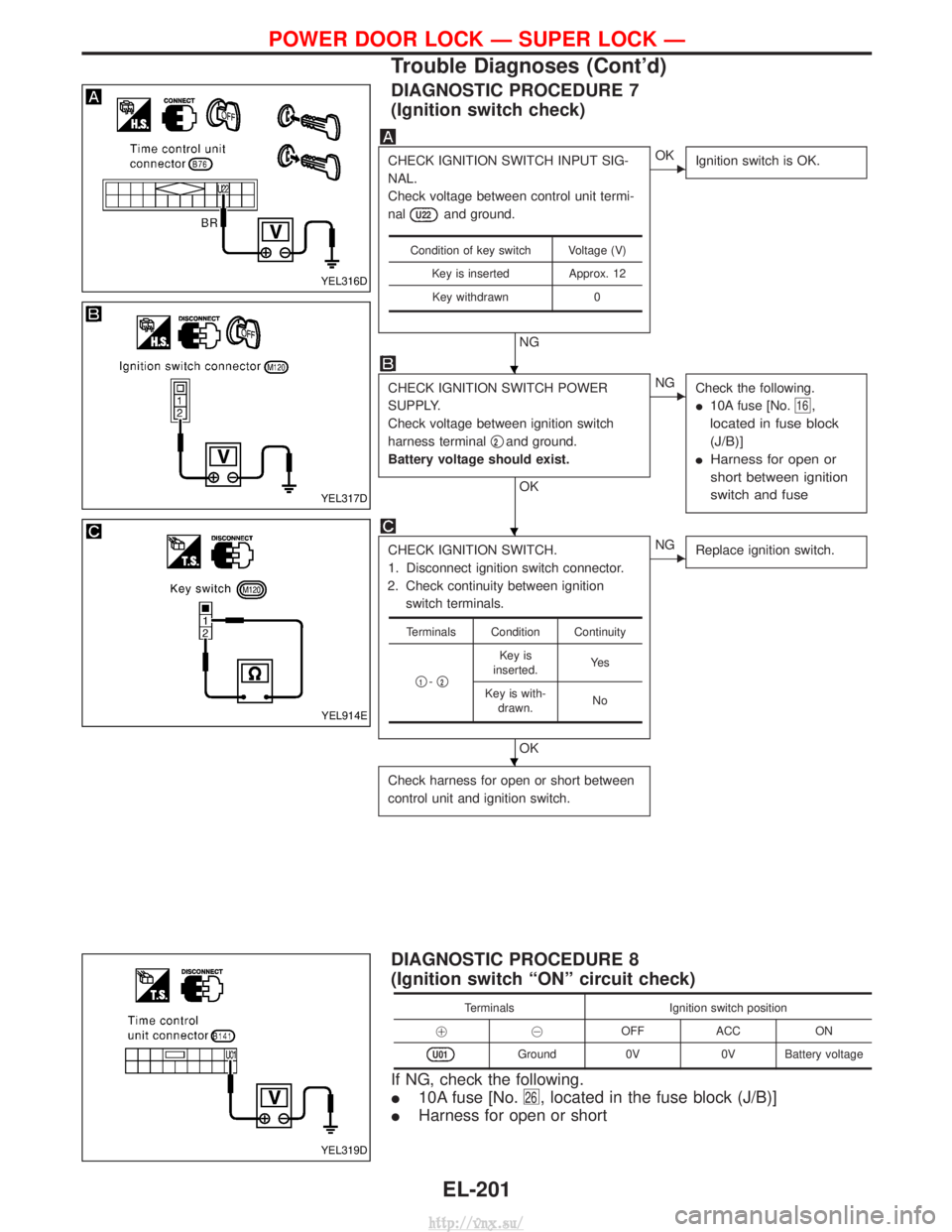
DIAGNOSTIC PROCEDURE 7
(Ignition switch check)
CHECK IGNITION SWITCH INPUT SIG-
NAL.
Check voltage between control unit termi-
nal
U22and ground.
NG
EOKIgnition switch is OK.
CHECK IGNITION SWITCH POWER
SUPPLY.
Check voltage between ignition switch
harness terminal q
2and ground.
Battery voltage should exist.
OK
ENG Check the following.
I10A fuse [No.
16,
located in fuse block
(J/B)]
I Harness for open or
short between ignition
switch and fuse
CHECK IGNITION SWITCH.
1. Disconnect ignition switch connector.
2. Check continuity between ignition switch terminals.
OK
ENG Replace ignition switch.
Check harness for open or short between
control unit and ignition switch.
Condition of key switch Voltage (V)
Key is inserted Approx. 12Key withdrawn 0
Terminals Condition Continuity
q
1-q2
Key is
inserted. Ye s
Key is with- drawn. No
DIAGNOSTIC PROCEDURE 8
(Ignition switch ªONº circuit check)
Terminals
Ignition switch position
!@ OFFACC ON
U01Ground 0V0V Battery voltage
If NG, check the following.
I10A fuse [No.
26, located in the fuse block (J/B)]
IHarness for open or short
YEL316D
YEL317D
YEL914E
YEL319D
H
H
H
POWER DOOR LOCK Ð SUPER LOCK Ð
Trouble Diagnoses (Cont'd)
EL-201
http://vnx.su/
Page 1695 of 1833
System Description
POWER AND GROUND
Power is supplied at all times
Ito time control unit terminal U09 and
I to door lock switch relay terminal 1
I through 10A fuse [No. 5, located in the fuse block (J/B)], and
I to key switch terminal 2
I through 10A fuse [No. 16, located in the fuse block (J/B)].
When the key switch is ON (ignition key is inserted in key cylinder), power is supplied
I through key switch terminal 1
I to time control unit terminal U22.
When the door switch driver side is ON (door is OPEN), ground is supplied
I to time control unit terminal U06
I through door switch driver side terminal 1 and case ground.
When any of the other door switches is ON (door is OPEN), ground is supplied
I to time control unit terminal U07
I through door switch terminal 1 and case ground.
When lock/unlock switch is LOCK, ground is supplied
I to power window main switch terminal 3
I through body grounds B10 and B18.
Door lock operation signal is supplied
I through power window main switch terminal 14
I to door lock switch relay terminal 2.
With power and ground supplied, door lock switch relay is energized, and the door lock operation signal is
supplied to time control unit terminal U35.
Door unlock operation signal is supplied
I through power window main switch terminal 7
I to time control unit terminal U37.
Remote controller signal is inputted to time control unit (The antenna of the system is combined with time
control unit).
FUNCTION
Multi-remote control system has the following function.
I Door lock (and set super lock)
I Door unlock (and release super lock)
I Hazard reminder
LOCK OPERATION
To lock door by multi-remote controller, the key switch must be at OFF.
When the LOCK signal is input to time control unit (the antenna of the system is combined with time control
unit), time control unit controls to lock doors and set super lock (models with super lock).
UNLOCK OPERATION
Normal Mode
When UNLOCK signal is input to time control unit (the antenna of the system is combined with time control
unit), time control unit controls to unlock doors and release super lock (models with super lock).
Anti Hi-jack Mode
When the UNLOCK signal is input to time control unit (the antenna of the system is combined with time con-
trol unit), time control unit controls to unlock driver's door and release super lock (models with super lock).
Then, if an unlock signal is sent from the remote controller again within 5 seconds, all other doors will be
unlocked.
HAZARD REMINDER
When the doors are locked or unlocked by multi-remote controller, supply power to turn lamps hazard reminder
flashes as follows
ILock operation: Flash once
I Unlock operation: Flash twice
MULTI-REMOTE CONTROL SYSTEM
EL-202
http://vnx.su/