turn signal NISSAN TIIDA 2007 Service Repair Manual
[x] Cancel search | Manufacturer: NISSAN, Model Year: 2007, Model line: TIIDA, Model: NISSAN TIIDA 2007Pages: 5883, PDF Size: 78.95 MB
Page 5402 of 5883
![NISSAN TIIDA 2007 Service Repair Manual TM-456
< SYMPTOM DIAGNOSIS >[TYPE 2 (4AT: RE4F03B)]
SYSTEM SYMPTOM
7.CHECK TCM
1. Check TCM input/output signals. Refer to TM-22, "
Input/Output Signal of TCM".
2. If NG, recheck TCM pin terminals for](/img/5/57395/w960_57395-5401.png "NISSAN TIIDA 2007 Service Repair Manual TM-456
< SYMPTOM DIAGNOSIS >[TYPE 2 (4AT: RE4F03B)]
SYSTEM SYMPTOM
7.CHECK TCM
1. Check TCM input/output signals. Refer to TM-22, \"
Input/Output Signal of TCM\".
2. If NG, recheck TCM pin terminals for")
TM-456
< SYMPTOM DIAGNOSIS >[TYPE 2 (4AT: RE4F03B)]
SYSTEM SYMPTOM
7.CHECK TCM
1. Check TCM input/output signals. Refer to TM-22, "
Input/Output Signal of TCM".
2. If NG, recheck TCM pin terminals for damage or loose connection with harness connector.
OK or NG
OK >>INSPECTION END
NG >> Repair or replace damaged parts.
A/T Does Not Shift: D4→ D3, When OD OFFINFOID:0000000001714361
SYMPTOM:
A/T does not shift from D
4 to D3 when OD OFF (OD OFF indicator lamp is on) on “Cruise Test — Part
3”.
1.CHECK CAN COMMUNICATION LINE
Perform self-diagnosis. Refer to XX-XX, "*****"
or TM-38, "Diagnosis Procedure without CONSULT-III".
Is a malfunction in CAN communication indicated in the results?
YES >> Check CAN communication line. Refer to XX-XX, "*****" (type 1) or XX-XX, "*****" (type 2).
NO >> GO TO 2.
2.CHECK OVERDRIVE CONTROL SWITCH CIRCUIT
With CONSULT-II
1. Turn ignition switch ON. (Do not start engine)
2. Select “TCM INPUT SIGNALS” in “DATA MONITOR” mode for “A/T” with CONSULT-II.
3. Read out “OVERDRIVE SW”.
Check the signal of the overdrive control switch is indicated properly.
Without CONSULT-II
1. Turn ignition switch ON. (Do not start engine)
2. Check voltage between A/T device harness connector terminal
and ground.
OK or NG
OK >> GO TO TM-450, "A/T Does Not Shift: D2→ D3".
NG >> Check overdrive control switch circuit. Refer to XX-XX, "*****"
(type 1) or XX-XX, "*****" (type 2).
A/T Does Not Shift: D3→ 22, When Selector Lever "D" → "2" PositionINFOID:0000000001714362
SYMPTOM:
A/T does not shift from D
3 to 22 when changing selector lever from “D” to “2” position on “Cruise Test
— Part 3”.
1.CHECK SYMPTOM
Check symptom. Refer to TM-183, "
Cruise Test - Part 1" or TM-185, "Cruise Test - Part 2".
Item nameOverdrive control switch
ConditionDisplay value
OVERDRIVE SWDepressed ON
Released OFF
Item Connector TerminalOverdrive
control switch
ConditionJudge-
ment
standard
(Approx.)
A/T device harness
connector (Overdrive
control switch)M38 1 - GroundReleasedBattery
voltage
Depressed 0V
SCIA5336E
Page 5403 of 5883
![NISSAN TIIDA 2007 Service Repair Manual SYSTEM SYMPTOM
TM-457
< SYMPTOM DIAGNOSIS >[TYPE 2 (4AT: RE4F03B)]
C
E
F
G
H
I
J
K
L
MA
B
TM
N
O
P
Is “A/T Does Not Shift: D1 →D2 or Does Not Kickdown: D4→ D2” OK?
YES (With CONSULT-II) >>GO T](/img/5/57395/w960_57395-5402.png "NISSAN TIIDA 2007 Service Repair Manual SYSTEM SYMPTOM
TM-457
< SYMPTOM DIAGNOSIS >[TYPE 2 (4AT: RE4F03B)]
C
E
F
G
H
I
J
K
L
MA
B
TM
N
O
P
Is “A/T Does Not Shift: D1 →D2 or Does Not Kickdown: D4→ D2” OK?
YES (With CONSULT-II) >>GO T")
SYSTEM SYMPTOM
TM-457
< SYMPTOM DIAGNOSIS >[TYPE 2 (4AT: RE4F03B)]
C
E
F
G
H
I
J
K
L
MA
B
TM
N
O
P
Is “A/T Does Not Shift: D1 →D2 or Does Not Kickdown: D4→ D2” OK?
YES (With CONSULT-II) >>GO TO 2.
YES (Without CONSULT-II) >>GO TO 3.
NO >> GO TO TM-448, "
A/T Does Not Shift: D1→ D2or Does Not Kickdown: D4→ D2".
2.CHECK PNP SWITCH CIRCUIT
With CONSULT-II
1. Turn ignition switch ON. (Do not start engine.)
2. Select “TCM INPUT SIGNALS” in “DATA MONITOR” mode for “A/T” with CONSULT-II.
3. Read out “P·N”, “R”, “D”, “2” and “1” position switches moving selector lever to each position.
OK or NG
OK >>INSPECTION END
NG >> Check PNP switch circuit. Refer to TM-46, "
Component Inspection".
3.CHECK PNP SWITCH CIRCUIT
Without CONSULT-II
1. Turn ignition switch ON. (Do not start engine.)
2. Check voltage between TCM connector terminals and ground
while moving selector lever through each position.
B: Battery voltage
0: 0V
OK or NG
Monitor item Condition Display value
PN POSI SWWhen setting selector lever to “N” or “P” posi-
tion.ON
When setting selector lever to other positions. OFF
R POSITION SWWhen setting selector lever to “R” position. ON
When setting selector lever to other positions. OFF
D POSITION SWWhen setting selector lever to “D” positions. ON
When setting selector lever to other positions. OFF
2 POSITION SWWhen setting selector lever to “2” position. ON
When setting selector lever to other positions. OFF
1 POSITION SWWhen setting selector lever to “1” position. ON
When setting selector lever to other positions. OFF
Selector lever positionTe r m i n a l
36 35 34 27 26
“P”, “N” B 0 0 0 0
“R” 0B000
“D” 0 0 B 0 0
“2” 0 0 0 B 0
“1” 0 0 0 0 B
SCIA7162E
Page 5404 of 5883
![NISSAN TIIDA 2007 Service Repair Manual TM-458
< SYMPTOM DIAGNOSIS >[TYPE 2 (4AT: RE4F03B)]
SYSTEM SYMPTOM
OK >>INSPECTION END
NG >> Check PNP switch circuit. Refer to TM-46, "
Component Inspection".
A/T Does Not Shift: 22→ 11, When Selec](/img/5/57395/w960_57395-5403.png "NISSAN TIIDA 2007 Service Repair Manual TM-458
< SYMPTOM DIAGNOSIS >[TYPE 2 (4AT: RE4F03B)]
SYSTEM SYMPTOM
OK >>INSPECTION END
NG >> Check PNP switch circuit. Refer to TM-46, \"
Component Inspection\".
A/T Does Not Shift: 22→ 11, When Selec")
TM-458
< SYMPTOM DIAGNOSIS >[TYPE 2 (4AT: RE4F03B)]
SYSTEM SYMPTOM
OK >>INSPECTION END
NG >> Check PNP switch circuit. Refer to TM-46, "
Component Inspection".
A/T Does Not Shift: 22→ 11, When Selector Lever "2" → "1" PositionINFOID:0000000001714363
SYMPTOM:
A/T does not shift from 2
2 to 11 when changing selector lever from “2” to “1” position on “Cruise Test
— Part 3”.
1.CHECK PNP SWITCH CIRCUIT
With CONSULT-II
1. Turn ignition switch ON. (Do not start engine.)
2. Select “TCM INPUT SIGNALS” in “DATA MONITOR” mode for “A/T” with CONSULT-II.
3. Read out “P·N”, “R”, “D”, “2” and “1” position switches moving selector lever to each position.
OK or NG
OK >> GO TO 3
NG >> Check PNP switch circuit. Refer to TM-46, "
Component Inspection".
2.CHECK PNP SWITCH CIRCUIT
Without CONSULT-II
1. Turn ignition switch ON. (Do not start engine.)
Monitor item Condition Display value
PN POSI SWWhen setting selector lever to “N” or “P” posi-
tion.ON
When setting selector lever to other positions. OFF
R POSITION SWWhen setting selector lever to “R” position. ON
When setting selector lever to other positions. OFF
D POSITION SWWhen setting selector lever to “D” positions. ON
When setting selector lever to other positions. OFF
2 POSITION SWWhen setting selector lever to “2” position. ON
When setting selector lever to other positions. OFF
1 POSITION SWWhen setting selector lever to “1” position. ON
When setting selector lever to other positions. OFF
Page 5406 of 5883
![NISSAN TIIDA 2007 Service Repair Manual TM-460
< SYMPTOM DIAGNOSIS >[TYPE 2 (4AT: RE4F03B)]
SYSTEM SYMPTOM
- Servo piston assembly
- Brake band
OK or NG
OK >> GO TO 7.
NG >> Repair or replace damaged parts.
7.CHECK SYMPTOM
Check again. Refe](/img/5/57395/w960_57395-5405.png "NISSAN TIIDA 2007 Service Repair Manual TM-460
< SYMPTOM DIAGNOSIS >[TYPE 2 (4AT: RE4F03B)]
SYSTEM SYMPTOM
- Servo piston assembly
- Brake band
OK or NG
OK >> GO TO 7.
NG >> Repair or replace damaged parts.
7.CHECK SYMPTOM
Check again. Refe")
TM-460
< SYMPTOM DIAGNOSIS >[TYPE 2 (4AT: RE4F03B)]
SYSTEM SYMPTOM
- Servo piston assembly
- Brake band
OK or NG
OK >> GO TO 7.
NG >> Repair or replace damaged parts.
7.CHECK SYMPTOM
Check again. Refer to TM-186, "
Cruise Test - Part 3".
OK or NG
OK >>INSPECTION END
NG >> GO TO 8.
8.CHECK TCM
1. Check TCM input/output signals. Refer to TM-22, "
Input/Output Signal of TCM".
2. If NG, recheck TCM pin terminals for damage or loose connection with harness connector.
OK or NG
OK >>INSPECTION END
NG >> Repair or replace damaged parts.
Vehicle Does Not Decelerate by Engine BrakeINFOID:0000000001714364
SYMPTOM:
Vehicle does not decelerate by engine brake when shifting from 2
2 (12) to 11“Cruise Test — Part 3”.
Vehicle does not decelerate by engine brake when OD OFF (OD OFF indicator lamp is on) on “Cruise
Test — Part 3”.
Vehicle does not decelerate by engine brake when shifting A/T from “D” to “2” position on “Cruise
Test — Part 3”.
1.CHECK CAN COMMUNICATION LINE
Perform self-diagnosis. Refer to XX-XX, "*****"
or TM-38, "Diagnosis Procedure without CONSULT-III".
Is a malfunction in CAN communication indicated in the results?
YES >> Check CAN communication line. Refer to XX-XX, "*****" (type 1) or XX-XX, "*****" (type 2).
NO >> GO TO 2.
2.CHECK OVERDRIVE CONTROL SWITCH CIRCUIT
With CONSULT-II
1. Turn ignition switch ON. (Do not start engine)
2. Select “TCM INPUT SIGNALS” in “DATA MONITOR” mode for “A/T” with CONSULT-II.
3. Read out “OVERDRIVE SW”.
Check the signal of the overdrive control switch is indicated properly.
Without CONSULT-II
1. Turn ignition switch ON. (Do not start engine)
SAT778B
Item nameOverdrive control switch
ConditionDisplay value
OVERDRIVE SWDepressed ON
Released OFF
Page 5407 of 5883
![NISSAN TIIDA 2007 Service Repair Manual SYSTEM SYMPTOM
TM-461
< SYMPTOM DIAGNOSIS >[TYPE 2 (4AT: RE4F03B)]
C
E
F
G
H
I
J
K
L
MA
B
TM
N
O
P
2. Check voltage between A/T device harness connector terminal
and ground.
OK or NG
OK (With CONSULT-](/img/5/57395/w960_57395-5406.png "NISSAN TIIDA 2007 Service Repair Manual SYSTEM SYMPTOM
TM-461
< SYMPTOM DIAGNOSIS >[TYPE 2 (4AT: RE4F03B)]
C
E
F
G
H
I
J
K
L
MA
B
TM
N
O
P
2. Check voltage between A/T device harness connector terminal
and ground.
OK or NG
OK (With CONSULT-")
SYSTEM SYMPTOM
TM-461
< SYMPTOM DIAGNOSIS >[TYPE 2 (4AT: RE4F03B)]
C
E
F
G
H
I
J
K
L
MA
B
TM
N
O
P
2. Check voltage between A/T device harness connector terminal
and ground.
OK or NG
OK (With CONSULT-II)>>GO TO 3.
OK (Without CONSULT-II)>>GO TO 4.
NG >> Check overdrive control switch circuit. Refer to XX-XX, "*****"
(type 1) or XX-XX, "*****" (type 2).
3.CHECK PNP SWITCH CIRCUIT
With CONSULT-II
1. Turn ignition switch ON. (Do not start engine.)
2. Select “TCM INPUT SIGNALS” in “DATA MONITOR” mode for
“A/T” with CONSULT-II.
3. Read out “P·N”, “R”, “D”, “2” and “1” position switches moving
selector lever to each position.
OK or NG
OK >> GO TO 5
NG >> Check PNP switch circuit. Refer to TM-46, "
Component Inspection".
4.CHECK PNP SWITCH CIRCUIT
Without CONSULT-II
1. Turn ignition switch ON. (Do not start engine.)
Item Connector TerminalOverdrive
control switch
ConditionJudge-
ment
standard
(Approx.)
A/T device harness
connector (Overdrive
control switch)M38 1 - GroundReleasedBattery
voltage
Depressed 0V
SCIA5336E
Monitor item Condition Display value
PN POSI SWWhen setting selector lever to “N” or “P” posi-
tion.ON
When setting selector lever to other positions. OFF
R POSITION SWWhen setting selector lever to “R” position. ON
When setting selector lever to other positions. OFF
D POSITION SWWhen setting selector lever to “D” positions. ON
When setting selector lever to other positions. OFF
2 POSITION SWWhen setting selector lever to “2” position. ON
When setting selector lever to other positions. OFF
1 POSITION SWWhen setting selector lever to “1” position. ON
When setting selector lever to other positions. OFF
SAT701J
Page 5412 of 5883
![NISSAN TIIDA 2007 Service Repair Manual TM-466
< PRECAUTION >[TYPE 2 (4AT: RE4F03B)]
PRECAUTIONS
Be sure to turn the ignition switch OFF and disconnect battery negative cable from battery negative
terminal before any repair or inspection](/img/5/57395/w960_57395-5411.png "NISSAN TIIDA 2007 Service Repair Manual TM-466
< PRECAUTION >[TYPE 2 (4AT: RE4F03B)]
PRECAUTIONS
Be sure to turn the ignition switch OFF and disconnect battery negative cable from battery negative
terminal before any repair or inspection")
TM-466
< PRECAUTION >[TYPE 2 (4AT: RE4F03B)]
PRECAUTIONS
Be sure to turn the ignition switch OFF and disconnect battery negative cable from battery negative
terminal before any repair or inspection work. The open/short circuit of related switches, sensors,
solenoid valves, etc. will cause the MIL to light up.
Be sure to connect and lock the connectors securely after work. A loose (unlocked) connector will
cause the MIL to light up due to an open circuit. (Be sure the connectors are free from water, grease,
dirt, bent terminals, etc.)
Be sure to route and secure the harnesses properly after work. Interference of the harness with a
bracket, etc. may cause the MIL to light up due to a short circuit.
Be sure to erase the unnecessary malfunction information (repairs completed) from the TCM and
ECM before returning the vehicle to the customer.
PrecautionINFOID:0000000001723047
Before connecting or disconnecting the TCM harness connec-
tor, turn ignition switch OFF and disconnect the battery cable
from the negative terminal. Failure to do so may damage the
TCM. Because battery voltage is applied to TCM even if igni-
tion switch is turned off.
When connecting or disconnecting pin connectors into or
from TCM, take care not to damage pin terminals (bend or
break).
Make sure that there are not any bends or breaks on TCM pin
terminal, when connecting pin connectors.
Before replacing TCM, perform TCM input/output signal
inspection and make sure whether TCM functions properly or
not. (See page XX-XX, "*****"
.)
After performing each TROUBLE DIAGNOSIS, perform “DTC
(Diagnostic Trouble Code) Confirmation Procedure”.
The DTC should not be displayed in the “DTC Confirmation
Procedure” if the repair is completed.
Before proceeding with disassembly, thoroughly clean the outside
of the transaxle. It is important to prevent the internal parts from
becoming contaminated by dirt or other foreign matter.
Disassembly should be done in a clean work area.
Use lint-free cloth or towels for wiping parts clean. Common shop
rags can leave fibers that could interfere with the operation of the A/T.
Place disassembled parts in order for easier and proper assembly.
All parts should be carefully cleaned with a general purpose, non-flammable solvent before inspection or
reassembly.
Gaskets, seals and O-rings should be replaced any time the A/T is disassembled.
It is very important to perform functional tests whenever they are indicated.
The valve body contains precision parts and requires extreme care when parts are removed and serviced.
Place disassembled valve body parts in order for easier and proper assembly. Care will also prevent springs
and small parts from becoming scattered or lost.
Properly installed valves, sleeves, plugs, etc. will slide along bores in valve body under their own weight.
SEF289H
AAT470A
MEF040DA
Page 5724 of 5883
WCS
WARNING CHIME SYSTEM
WCS-9
< FUNCTION DIAGNOSIS >
C
D
E
F
G
H
I
J
K
L
MB A
O
P
LIGHT REMINDER WARNING CHIME : Component DescriptionINFOID:0000000001722911
SEAT BELT WARNING CHIME
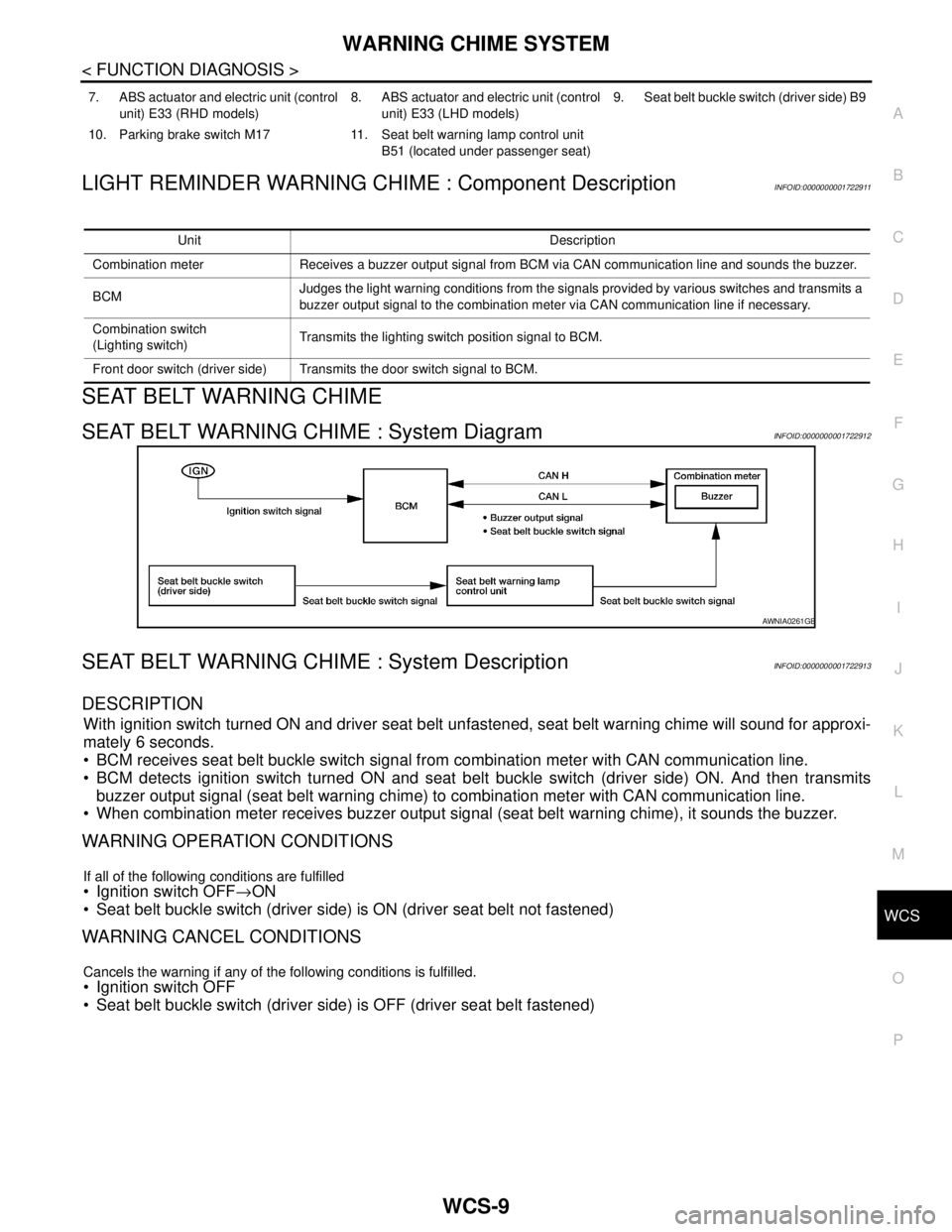
SEAT BELT WARNING CHIME : System DiagramINFOID:0000000001722912
SEAT BELT WARNING CHIME : System DescriptionINFOID:0000000001722913
DESCRIPTION
With ignition switch turned ON and driver seat belt unfastened, seat belt warning chime will sound for approxi-
mately 6 seconds.
BCM receives seat belt buckle switch signal from combination meter with CAN communication line.
BCM detects ignition switch turned ON and seat belt buckle switch (driver side) ON. And then transmits
buzzer output signal (seat belt warning chime) to combination meter with CAN communication line.
When combination meter receives buzzer output signal (seat belt warning chime), it sounds the buzzer.
WARNING OPERATION CONDITIONS
If all of the following conditions are fulfilled
Ignition switch OFF→ON
Seat belt buckle switch (driver side) is ON (driver seat belt not fastened)
WARNING CANCEL CONDITIONS
Cancels the warning if any of the following conditions is fulfilled.
Ignition switch OFF
Seat belt buckle switch (driver side) is OFF (driver seat belt fastened)
7. ABS actuator and electric unit (control
unit) E33 (RHD models)8. ABS actuator and electric unit (control
unit) E33 (LHD models)9. Seat belt buckle switch (driver side) B9
10. Parking brake switch M17 11. Seat belt warning lamp control unit
B51 (located under passenger seat)
Unit Description
Combination meter Receives a buzzer output signal from BCM via CAN communication line and sounds the buzzer.
BCMJudges the light warning conditions from the signals provided by various switches and transmits a
buzzer output signal to the combination meter via CAN communication line if necessary.
Combination switch
(Lighting switch)Transmits the lighting switch position signal to BCM.
Front door switch (driver side) Transmits the door switch signal to BCM.
AWNIA0261GB
Page 5730 of 5883
WCS
WARNING CHIME SYSTEM
WCS-15
< FUNCTION DIAGNOSIS >
C
D
E
F
G
H
I
J
K
L
MB A
O
P
KEY WARNING CHIME (WITHOUT INTELLIGENT KEY) : Component Description
INFOID:0000000001722923
PARKING BRAKE RELEASE WARNING CHIME
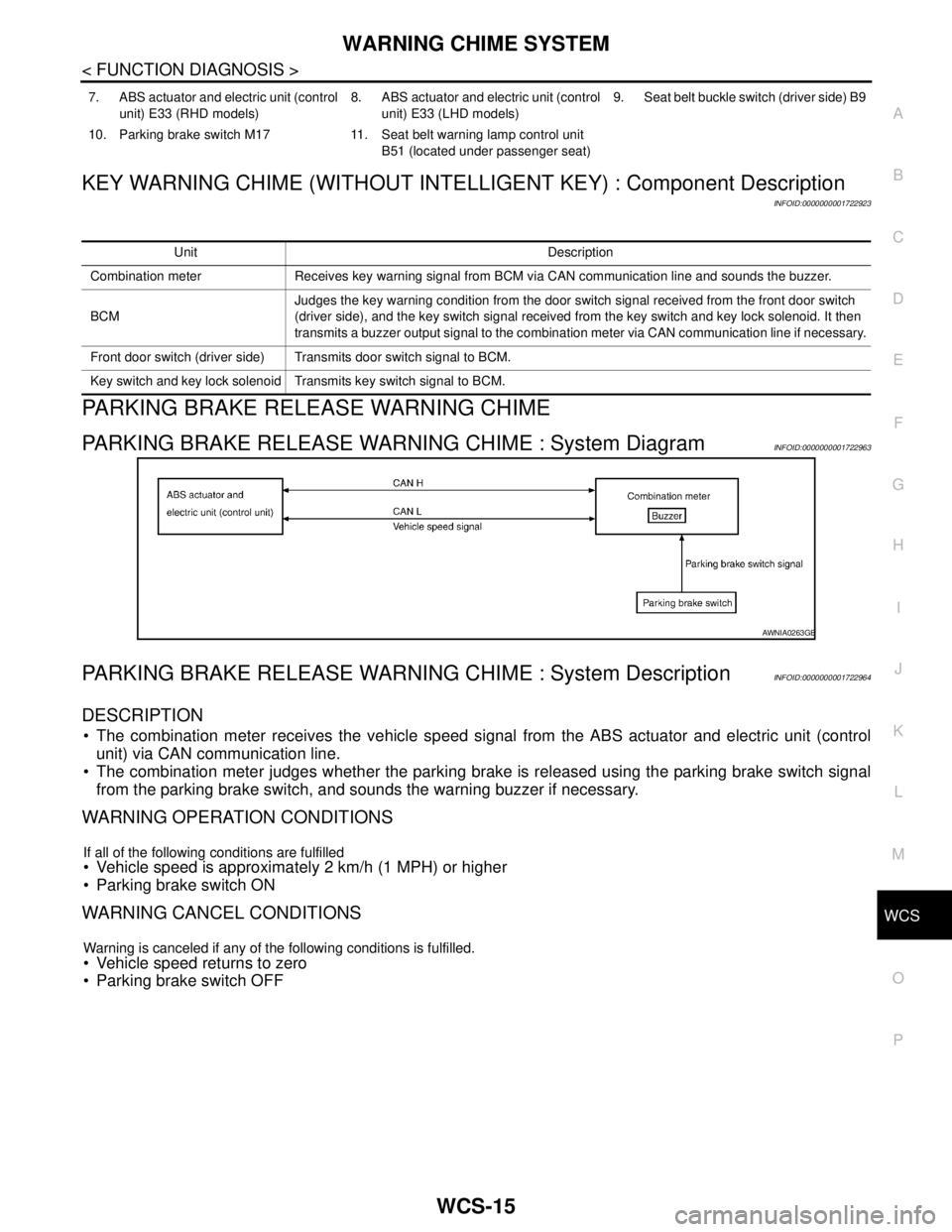
PARKING BRAKE RELEASE WARNING CHIME : System DiagramINFOID:0000000001722963
PARKING BRAKE RELEASE WARNING CHIME : System DescriptionINFOID:0000000001722964
DESCRIPTION
The combination meter receives the vehicle speed signal from the ABS actuator and electric unit (control
unit) via CAN communication line.
The combination meter judges whether the parking brake is released using the parking brake switch signal
from the parking brake switch, and sounds the warning buzzer if necessary.
WARNING OPERATION CONDITIONS
If all of the following conditions are fulfilled Vehicle speed is approximately 2 km/h (1 MPH) or higher
Parking brake switch ON
WARNING CANCEL CONDITIONS
Warning is canceled if any of the following conditions is fulfilled.
Vehicle speed returns to zero
Parking brake switch OFF
7. ABS actuator and electric unit (control
unit) E33 (RHD models)8. ABS actuator and electric unit (control
unit) E33 (LHD models)9. Seat belt buckle switch (driver side) B9
10. Parking brake switch M17 11. Seat belt warning lamp control unit
B51 (located under passenger seat)
Unit Description
Combination meter Receives key warning signal from BCM via CAN communication line and sounds the buzzer.
BCMJudges the key warning condition from the door switch signal received from the front door switch
(driver side), and the key switch signal received from the key switch and key lock solenoid. It then
transmits a buzzer output signal to the combination meter via CAN communication line if necessary.
Front door switch (driver side) Transmits door switch signal to BCM.
Key switch and key lock solenoid Transmits key switch signal to BCM.
AWNIA0263GB
Page 5733 of 5883

WCS-18
< FUNCTION DIAGNOSIS >
DIAGNOSIS SYSTEM (METER)
DIAGNOSIS SYSTEM (METER)
CONSULT-III Function (METER/M&A)INFOID:0000000001728303
CONSULT-III can display each diagnostic item using the diagnostic test modes shown following.
SELF-DIAG RESULTS
Display Item List
Refer to MWI-54, "DTC Index".
DATA MONITOR
Display Item List
X: Applicable
METER/M&A diagnosis mode Description
SELF-DIAG RESULTS Displays combination meter self-diagnosis results.
DATA MONITOR Displays combination meter input/output data in real time.
CAN DIAG SUPPORT MNTR The result of transmit/receive diagnosis of CAN communication can be read.
Display item [Unit]MAIN
SIGNALSSELECTION
FROM MENUDescription
SPEED METER [km/h] or [mph] X X Displays the value of vehicle speed signal.
SPEED OUTPUT [km/h] or [mph] X XDisplays the value of vehicle speed signal, which is transmitted to
each unit with CAN communication.
TACHO METER [rpm] X X Displays the value of engine speed signal, which is input from ECM.
W TEMP METER [°C] or [°F] X XDisplays the value of engine coolant temperature signal, which is in-
put from ECM.
FUEL METER [lit.] X XDisplays the value, which processes a resistance signal from fuel
gauge.
DISTANCE [km] or [mile] X XDisplays the value, which is calculated by vehicle speed signal, fuel
gauge and fuel consumption from ECM.
FUEL W/L [ON/OFF] X X Displays [ON/OFF] condition of low-fuel warning lamp.
C-ENG W/L [ON/OFF] X Displays [ON/OFF] condition of malfunction indicator lamp.
SEAT BELT W/L [ON/OFF] X Indicates [ON/OFF] condition of seat belt warning lamp.
BUZZER [ON/OFF] X X Displays [ON/OFF] condition of buzzer.
DOOR W/L [ON/OFF] X Displays [ON/OFF] condition of door warning lamp.
HI-BEAM IND [ON/OFF] X Displays [ON/OFF] condition of high beam indicator.
TURN IND [ON/OFF] X Displays [ON/OFF] condition of turn indicator.
FR FOG IND X Displays [ON/OFF] condition of front fog lamp indicator.
RR FOG IND X Displays [ON/OFF] condition of rear fog lamp indicator.
OIL W/L [ON/OFF] X Displays [ON/OFF] condition of oil pressure warning lamp.
LIGHT IND X Displays [ON/OFF] condition of exterior lamp indicator.
VDC/TCS IND [ON/OFF] X Displays [ON/OFF] condition of VDC OFF indicator lamp.
ABS W/L [ON/OFF] X Displays [ON/OFF] condition of ABS warning lamp.
SLIP IND [ON/OFF] X Displays [ON/OFF] condition of SLIP indicator lamp.
BRAKE W/L [ON/OFF] X Displays [ON/OFF] condition of brake warning lamp.*
OIL LEVEL IND X Displays [ON/OFF] condition of oil level indicator.
KEY G W/L [ON/OFF] X Displays [ON/OFF] condition of key green warning lamp.
KEY R W/L [ON/OFF] X Displays [ON/OFF] condition of key red warning lamp.
KEY KNOB W/L [ON/OFF] X Displays [ON/OFF] condition of key knob warning lamp.
PNP P SW X X Displays [ON/OFF] condition of inhibitor P switch.
Page 5737 of 5883

WCS-22
< COMPONENT DIAGNOSIS >
POWER SUPPLY AND GROUND CIRCUIT
Check that the following fuses and fusible link are not fusing.
Is the fuse fusing?
YES >> Replace the blown fuse or fusible link after repairing the affected circuit if a fuse or fusible link is
blown.
NO >> GO TO 2.
2. CHECK POWER SUPPLY CIRCUIT
1. Turn ignition switch OFF.
2. Disconnect BCM.
3. Check voltage between BCM harness connector and ground.
Is the measurement value normal?
YES >> GO TO 3
NO >> Repair or replace harness.
3. CHECK GROUND CIRCUIT
Check continuity between BCM harness connector and ground.
Does continuity exist?
YES >> INSPECTION END
NO >> Repair or replace harness.
Terminal No. Signal name Fuses and fusible link No.
22
Battery power supply9 (10A)
728 (10A)
74
G (40A)
79
24 Ignition power supply 55 (10A)
Te r m i n a l s
Ignition switch position
(+)
(−) BCM
OFF ACC ON
Connector Terminal
M1822
GroundBattery
voltageBattery
voltageBattery
voltage
24Approx.
0 VApprox.
0 VBattery
voltage
M2072
Battery
voltageBattery
voltageBattery
voltage 74
79
ALMIA0188ZZ
BCM
GroundContinuity
Connector Terminal
M18 2
Ye s
M20 70
ALMIA0189ZZ