brake PEUGEOT 108 2015 User Guide
[x] Cancel search | Manufacturer: PEUGEOT, Model Year: 2015, Model line: 108, Model: PEUGEOT 108 2015Pages: 271, PDF Size: 7.42 MB
Page 70 of 271
68
108_en_Chap05_conduite_ed01-2015
A few driving recommendations
Observe the driving regulations at all times and
remain vigilant whatever the traffic conditions.
Pay close attention to the traffic and keep your
hands on the wheel so that you are ready to
react at any time to any eventuality.
On a long journey, a break every two hours is
strongly recommended.
In difficult weather, drive smoothly, anticipate
the need to brake and increase the distance
from other vehicles.Never drive with the parking brake
applied - Risk of overheating and
damage to the braking system!
Do not park or run the engine when
stationary in areas where inflammable
substances and materials (dry grass,
dead leaves...) might come into contact
with the hot exhaust system - Risk of
fire!
Never leave a vehicle unsupervised
with the engine running. If you have
to leave your vehicle with the engine
running, apply the parking brake
and put the gearbox into neutral or
position
N, depending on the type of
gearbox.
Driving on flooded roads
We strongly advise against driving on flooded
roads, as this could cause serious damage
to the engine or gearbox, as well as to the
electrical systems of your vehicle.
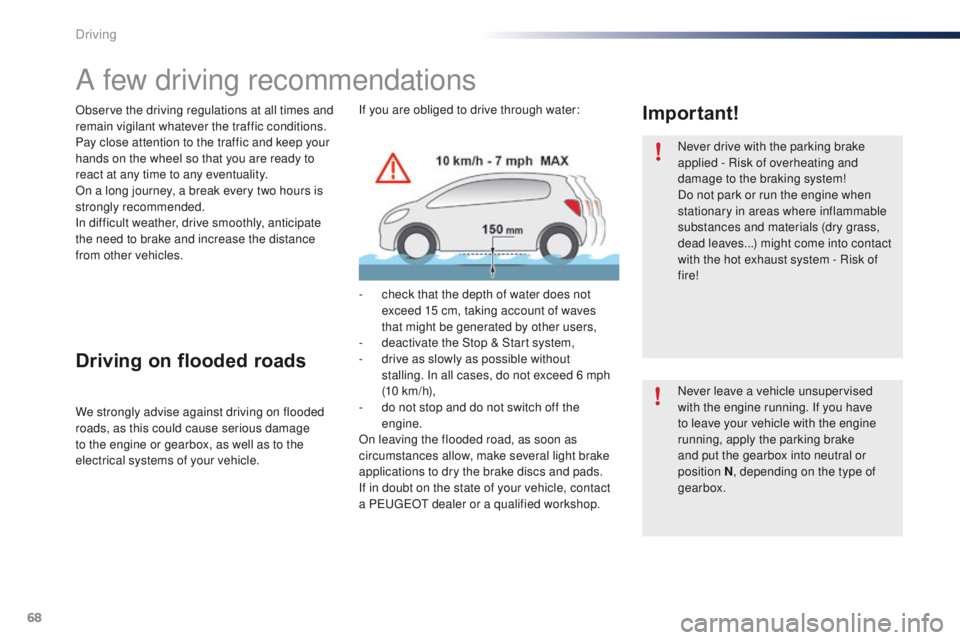
Important!If you are obliged to drive through water:
-
c
heck that the depth of water does not
exceed 15 cm, taking account of waves
that might be generated by other users,
-
d
eactivate the Stop & Start system,
-
d
rive as slowly as possible without
stalling. In all cases, do not exceed 6 mph
(10
km/h),
-
d
o not stop and do not switch off the
engine.
On leaving the flooded road, as soon as
circumstances allow, make several light brake
applications to dry the brake discs and pads.
If in doubt on the state of your vehicle, contact
a P
e
uge
Ot
dealer or a qualified workshop.
Driving
Page 71 of 271
69
108_en_Chap05_conduite_ed01-2015
Starting - switching off the engine with the key
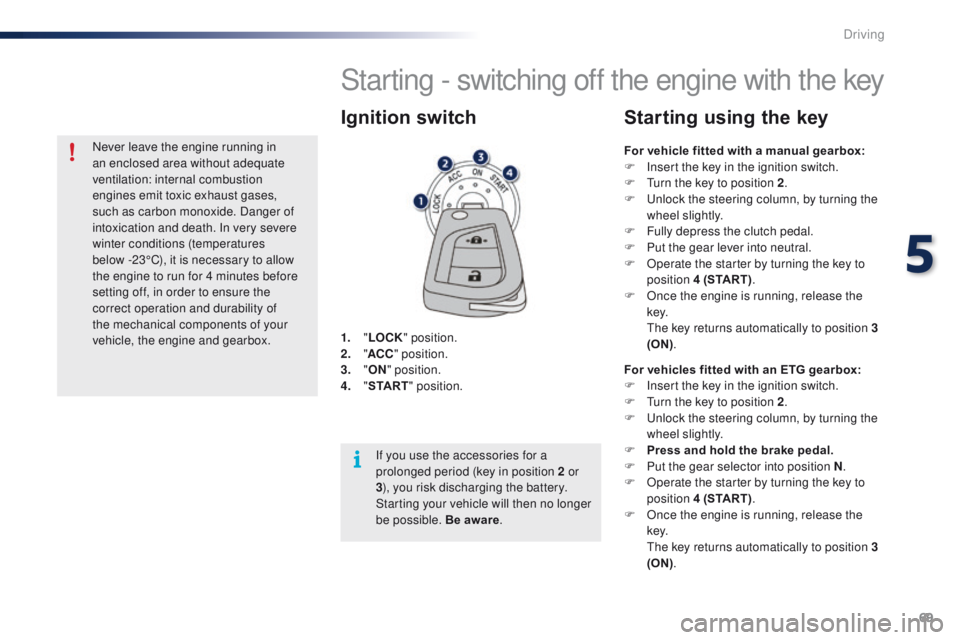
1. "LOCK " position.
2. " AC
C" position.
3.
"ON " position.
4.
" S
TA R T" position.
Ignition switch
For vehicle fitted with a manual gearbox:
F
I nsert the key in the ignition switch.
F
t
u
rn the key to position 2 .
F
u
n
lock the steering column, by turning the
wheel slightly.
F
F
ully depress the clutch pedal.
F
P
ut the gear lever into neutral.
F
O
perate the starter by turning the key to
position 4 (START) .
F
O
nce the engine is running, release the
key.
t
h
e key returns automatically to position 3
(ON) .
Starting using the key
For vehicles fitted with an ETG gearbox:
F
I nsert the key in the ignition switch.
F
t
u
rn the key to position 2 .
F
u
n
lock the steering column, by turning the
wheel slightly.
F
P
ress and hold the brake pedal.
F
P
ut the gear selector into position N .
F
O
perate the starter by turning the key to
position 4 (START) .
F
O
nce the engine is running, release the
key.
t
h
e key returns automatically to position 3
(ON) .
If you use the accessories for a
prolonged period (key in position 2 or
3
), you risk discharging the battery.
Starting your vehicle will then no longer
be possible. Be aware .
Never leave the engine running in
an enclosed area without adequate
ventilation: internal combustion
engines emit toxic exhaust gases,
such as carbon monoxide. Danger of
intoxication and death. In very severe
winter conditions (temperatures
below
-23°C), it is necessary to allow
the engine to run for 4 minutes before
setting off, in order to ensure the
correct operation and durability of
the mechanical components of your
vehicle, the engine and gearbox.
5
Driving
Page 73 of 271
71
108_en_Chap05_conduite_ed01-2015
Starting using
the electronic key
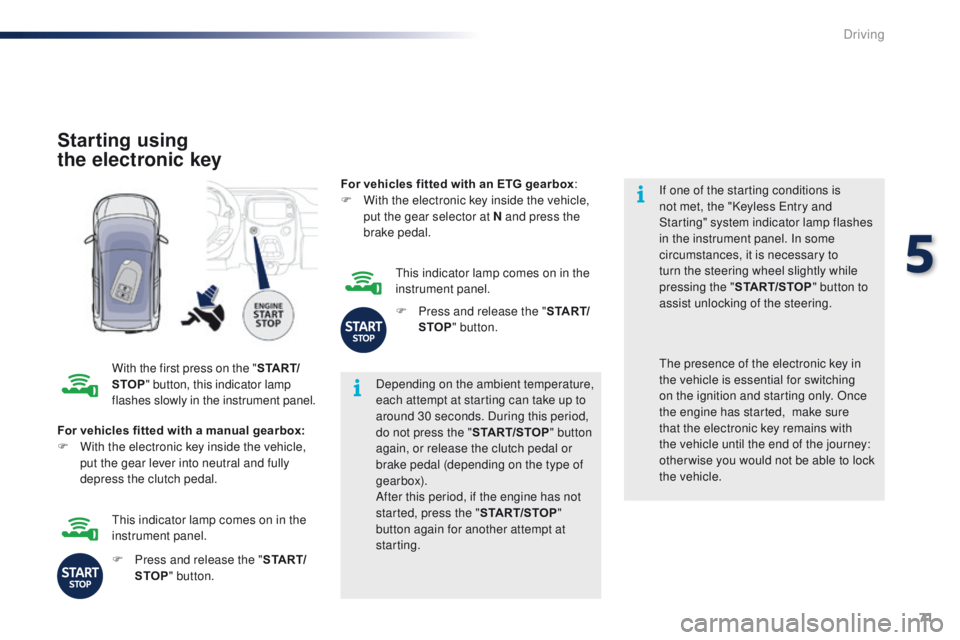
With the first press on the " S TA R T/
STOP " button, this indicator lamp
flashes slowly in the instrument panel. Depending on the ambient temperature,
each attempt at starting can take up to
around 30 seconds. During this period,
do not press the "
START/STOP" button
again, or release the clutch pedal or
brake pedal (depending on the type of
gearbox).
After this period, if the engine has not
started, press the " START/STOP"
button again for another attempt at
starting. If one of the starting conditions is
not met, the "Keyless
e
n
try and
Starting" system indicator lamp flashes
in the instrument panel. In some
circumstances, it is necessary to
turn the steering wheel slightly while
pressing the " START/STOP " button to
assist unlocking of the steering.
For vehicles fitted with a manual gearbox:
F
W
ith the electronic key inside the vehicle,
put the gear lever into neutral and fully
depress the clutch pedal.th e presence of the electronic key in
the vehicle is essential for switching
on the ignition and starting only. Once
the engine has started,
make sure
that the electronic key remains with
the vehicle until the end of the journey:
other wise you would not be able to lock
the vehicle.
F
P
ress and release the " S TA R T/
STOP " button.
th
is indicator lamp comes on in the
instrument panel. For vehicles fitted with an ETG gearbox
:
F
W
ith the electronic key inside the vehicle,
put the gear selector at N and press the
brake pedal.
th
is indicator lamp comes on in the
instrument panel.
F
P
ress and release the "
S TA R T/
STOP " button.
5
Driving
Page 74 of 271
72
108_en_Chap05_conduite_ed01-2015
there is an audible signal when the driver's
door is opened and the vehicle is not in "OFF"
mode. If the vehicle is not immobilised, the
engine will not stop.
Switching off using
the electronic key
F Immobilise the vehicle.
F
W ith a manual gearbox: put the gear lever
into neutral.
F
W
ith an etg gearbox: place the gear
selector at N .
F
W
ith the electronic key inside
the vehicle, press the " S TA R T/
STOP " button.
the
engine stops.
th
e steering locks when a door is opened or on
locking the vehicle.
F
P
ress the "START/STOP " button
again to change to " OFF" mode.
Emergency starting
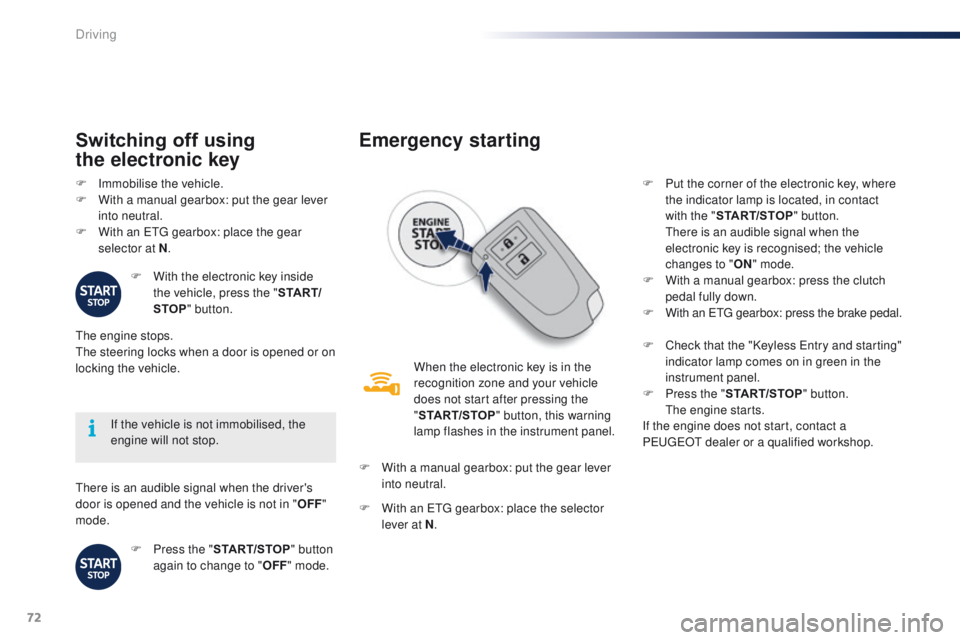
When the electronic key is in the
recognition zone and your vehicle
does not start after pressing the
"START/STOP " button, this warning
lamp flashes in the instrument panel.
F
W
ith a manual gearbox: put the gear lever
into neutral.
F
W
ith an etg gearbox: place the selector
lever at N . F
P
ut the corner of the electronic key, where
the indicator lamp is located, in contact
with the " START/STOP " button.
t
h
ere is an audible signal when the
electronic key is recognised; the vehicle
changes to " ON" mode.
F
W
ith a manual gearbox: press the clutch
pedal fully down.
F
W
ith an etg gearbox: press the brake pedal.
F
C
heck that the "Keyless e
n
try and starting"
indicator lamp comes on in green in the
instrument panel.
F
P
ress the "START/STOP " button.
t
h
e engine starts.
If the engine does not start, contact a
P
e
uge
Ot
dealer or a qualified workshop.
Driving
Page 76 of 271
74
108_en_Chap05_conduite_ed01-2015
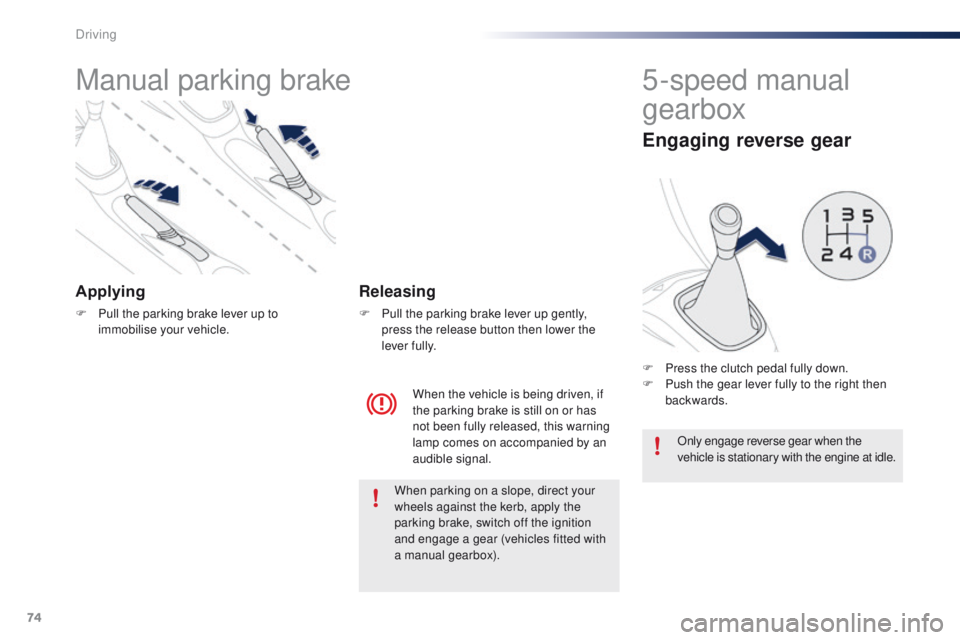
Manual parking brake
Applying
F Pull the parking brake lever up to immobilise your vehicle.
When the vehicle is being driven, if
the parking brake is still on or has
not been fully released, this warning
lamp comes on accompanied by an
audible signal.
Releasing
F Pull the parking brake lever up gently, press the release button then lower the
lever fully.
5-speed manual
gearbox
Engaging reverse gear
F Press the clutch pedal fully down.
F P ush the gear lever fully to the right then
backwards.
Only engage reverse gear when the
vehicle is stationary with the engine at idle.
When parking on a slope, direct your
wheels against the kerb, apply the
parking brake, switch off the ignition
and engage a gear (vehicles fitted with
a manual gearbox).
Driving
Page 77 of 271
75
108_en_Chap05_conduite_ed01-2015
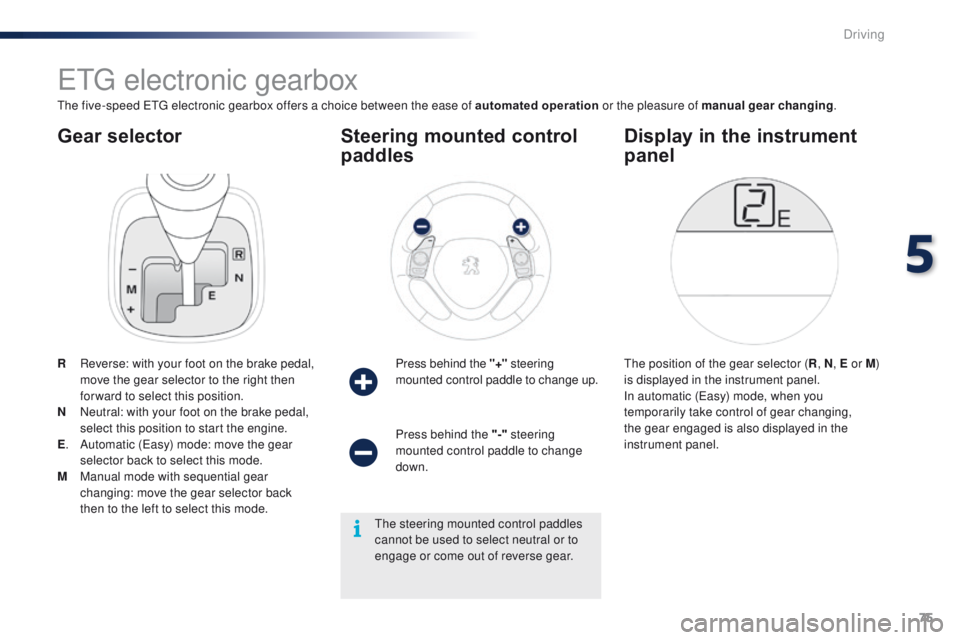
Gear selector
etg electronic gearbox
the five-speed etg electronic gearbox offers a choice between the ease of automated operation or the pleasure of manual gear changing.
R
R
everse: with your foot on the brake pedal,
move the gear selector to the right then
for ward to select this position.
N
N
eutral: with your foot on the brake pedal,
select this position to start the engine.
E .
A
utomatic (
ea
sy) mode: move the gear
selector back to select this mode.
M
M
anual mode with sequential gear
changing: move the gear selector back
then to the left to select this mode. Press behind the "+"
steering
mounted control paddle to change up.
Steering mounted control
paddles
the position of the gear selector ( R, N , E or M )
is displayed in the instrument panel.
In automatic (
ea
sy) mode, when you
temporarily take control of gear changing,
the gear engaged is also displayed in the
instrument panel.
Display in the instrument
panel
Press behind the "-" steering
mounted control paddle to change
down.
th
e steering mounted control paddles
cannot be used to select neutral or to
engage or come out of reverse gear.
5
Driving
Page 78 of 271
76
108_en_Chap05_conduite_ed01-2015
F With the parking brake applied, press the brake pedal then select position N .
F
S
tart the engine.
Moving off
if you do not press the brake pedal or
if the gear selector is not in position N ,
engine starting is not possible.
Never leave a child unsupervised inside
the vehicle with the engine running.F
Sel
ect position E using the gear selector.
th
e gearbox then operates in auto-active
mode, without any intervention required by the
driver.
It continuously selects the most suitable gear
for:
- op timised fuel consumption,
-
t
he driving style,
-
t
he profile of the road,
-
t
he load in the vehicle.
to o
btain optimum acceleration, when
overtaking another vehicle for example, press
firmly on the accelerator pedal going beyond
the point of resistance.
Automatic (EASY) mode
It is possible to change mode at any time, by
moving the gear selector from position E to
position M and the other way round.
F
W
ith your foot on the brake pedal, select
position R , E or M.
F
R
elease the parking brake.
F
P
rogressively release the brake pedal.
A
ccelerate away.
Creep function
this function makes manoeuvring the vehicle
at low speed easier (parking, traffic jams…).
After first placing the gear selector in
position
E, M or R , the vehicle moves off as
soon as you take your foot off the brake
pedal , at low speed, with the engine at idle.
th
e creep function may be temporarily
unavailable if the clutch temperature is
too high or the gradient too steep. An
audible signal gives a warning if the
clutch temperature is too high. Never select neutral N when the vehicle
is moving.
Driving
Page 80 of 271
78
108_en_Chap05_conduite_ed01-2015
to engage reverse, the vehicle must be
stationary with your foot on the brake pedal.
F
Sel
ect position R .
Reverse
there is an audible signal on engaging reverse.
th
e vehicle can be stopped whatever the
position of the gear selector ( N, E or R ).
However, there is an audible signal on opening
the driver's door if the gear selector is not at
position N .
Switching off
When the vehicle is stopped with the
engine running, always put the gear
selector to neutral N .
th
ere is a continuous audible signal
if you turn the ignition switch to " OFF"
with the vehicle in 2
nd, 3rd, 4th or 5th g e a r.
In this case return the ignition switch
to " ON ", move the gear selector to
position
N , then to position E , M or R,
then turn the ignition switch to " OFF". On a slope, use the brakes to
immobilise the vehicle and place the
gear selector in position N
, E or R.
With the ignition on, illumination
of this warning lamp indicates a
gearbox fault.
Contact a P
e
uge
Ot
dealer or a
qualified workshop.
If N
i
s flashing in the instrument panel
accompanied by an audible signal for
a long time:
Operating faults
In all cases, it is essential that you
apply the parking brake to immobilise
the vehicle.
Before doing anything under the
bonnet, check that the gear selector is
in neutral N and the parking brake is
applied.
Limits of operation
On a gradient, or when hill start assist is
activated, never hold the vehicle using the
accelerator : you could damage the clutch.
In these situations there is an audible signal.
F
M
ove the gear selector to position N .
F
W
ait 15 minutes to allow the clutch to cool
down before setting off. -
c
heck that the ignition switch is at the "
ON"
position,
-
p
lace the gear selector at N
, then move it
to E , M or R .
If 1 is flashing in the instrument panel:
-
p
lace the gear selector at E or M
, then
move it to N .
If R is flashing in the instrument panel:
-
p
lace the gear selector at R, then move it
to N .
Driving
Page 82 of 271
80
108_en_Chap05_conduite_ed01-2015
Hill start assist
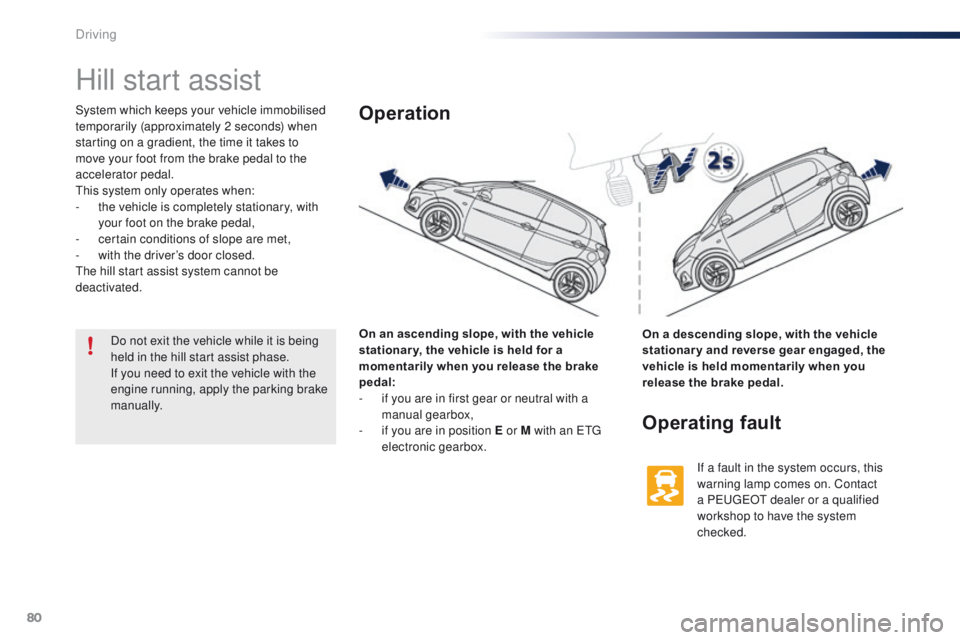
System which keeps your vehicle immobilised
temporarily (approximately 2 seconds) when
starting on a gradient, the time it takes to
move your foot from the brake pedal to the
accelerator pedal.
th
is system only operates when:
-
t
he vehicle is completely stationary, with
your foot on the brake pedal,
-
c
ertain conditions of slope are met,
-
w
ith the driver’s door closed.
th
e hill start assist system cannot be
deactivated.
On an ascending slope, with the vehicle
stationar y, the vehicle is held for a
momentarily when you release the brake
pedal:
-
i
f you are in first gear or neutral with a
manual gearbox,
-
i
f you are in position E or M with an etg
electronic gearbox.Operation
On a descending slope, with the vehicle
stationar y and reverse gear engaged, the
vehicle is held momentarily when you
release the brake pedal.
Operating fault
If a fault in the system occurs, this
warning lamp comes on. Contact
a P
e
uge
Ot
dealer or a qualified
workshop to have the system
checked.
Do not exit the vehicle while it is being
held in the hill start assist phase.
If you need to exit the vehicle with the
engine running, apply the parking brake
manually.
Driving
Page 107 of 271
105
108_en_Chap07_securite_ed01-2015
electronic Stability Control (eSC) incorporating
the following systems:
-
a
nti-lock braking system (ABS) and the
electronic brake force distribution (
eB
FD),
-
em
ergency braking assistance,
-
t
raction control (
tR
C),
-
d
ynamic stability control (DSC).
electronic stability control (eS C)
Definitions
Anti-lock braking system (ABS)
and electronic brake force
distribution (EBFD)
these systems improve the stability and
manoeuvrability of your vehicle when braking
and contribute towards better control in
corners, in particular on poor or slippery road
surfaces.
th
e ABS prevents wheel lock in the event of
emergency braking.
th
e electronic brake force distribution system
manages the braking pressure wheel by wheel.
Emergency braking assistance
In an emergency, this system enables you to
reach the optimum braking pressure more
quickly and therefore reduce the stopping
distance.
It is triggered according to the speed at which
the brake pedal is pressed.
t
h
is is felt by a
reduction in the resistance of the pedal and an
increase in the effectiveness of the braking.
Traction control (TRC)
this system optimises traction in order to limit
wheel slip by acting on the brakes of the driving
wheels and on the engine. It also improves
the directional stability of the vehicle on
acceleration.
Dynamic stability control (DSC)
If there is a difference between the path
followed by the vehicle and that required by the
driver, this system monitors each wheel and
automatically acts on the brake of one or more
wheels and on the engine to return the vehicle
to the required path, within the limits of the laws
of physics.
7
Safety