reset Peugeot 3008 Hybrid 4 2012 Owner's Manual - RHD (UK. Australia)
[x] Cancel search | Manufacturer: PEUGEOT, Model Year: 2012, Model line: 3008 Hybrid 4, Model: Peugeot 3008 Hybrid 4 2012Pages: 284, PDF Size: 14.08 MB
Page 43 of 284
41
CONSUMPTION OF YOUR HYBRID IN THE SCREEN
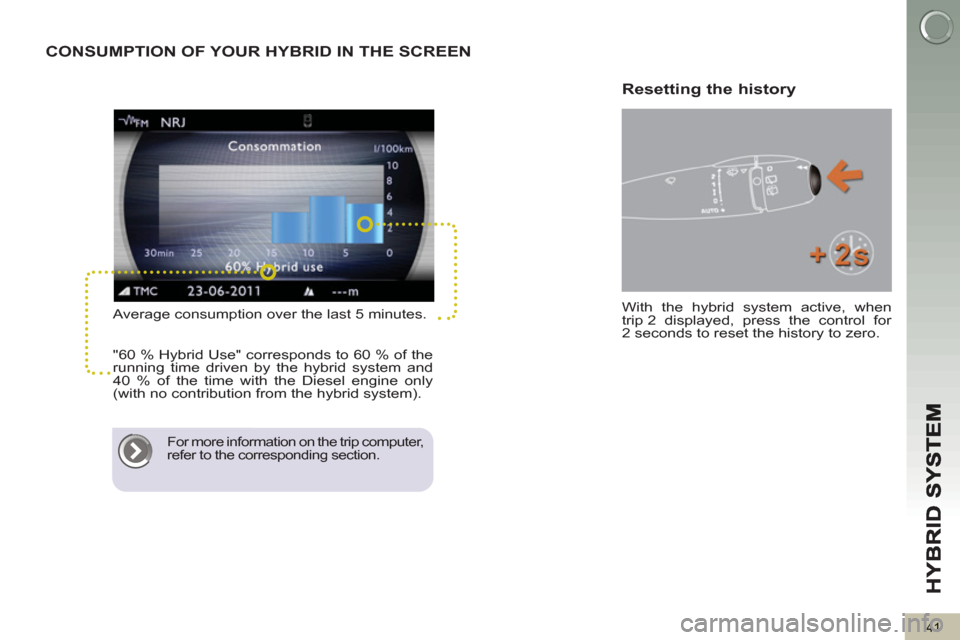
Average consumption over the last 5 minutes.
"60 % Hybrid Use" corresponds to 60 % of the
running time driven by the hybrid system and
40 % of the time with the Diesel engine only
(with no contribution from the hybrid system).
For more information on the trip computer,
refer to the corresponding section.
With the hybrid system active, when
trip 2 displayed, press the control for
2 seconds to reset the history to zero.
Resetting the history
Page 49 of 284
47
IN
S
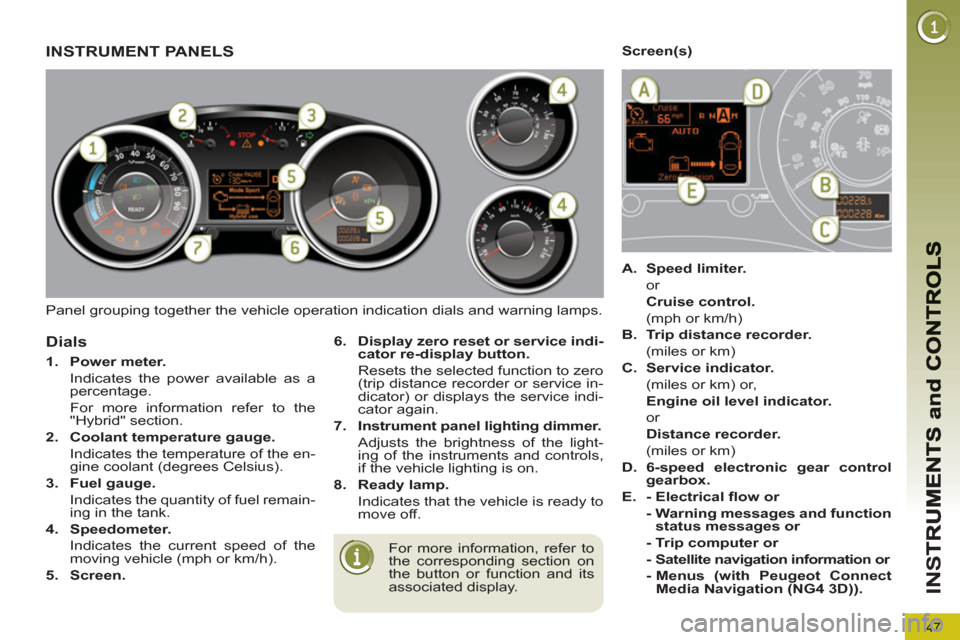
Panel grouping together the vehicle operation indication dials and warning lamps.
INSTRUMENT PANELS
For more information, refer to
the corresponding section on
the button or function and its
associated display.
Dials
6.
Display zero reset or service indi-
cator re-display button.
Resets the selected function to zero
(trip distance recorder or service in-
dicator) or displays the service indi-
cator again.
7.
Instrument panel lighting dimmer.
Adjusts the brightness of the light-
ing of the instruments and controls,
if the vehicle lighting is on.
8.
Ready lamp.
Indicates that the vehicle is ready to
move off.
1.
Power meter.
Indicates the power available as a
percentage .
For more information refer to the
"Hybrid" section.
2.
Coolant temperature gauge.
Indicates the temperature of the en-
gine coolant (degrees Celsius).
3.
Fuel gauge.
Indicates the quantity of fuel remain-
ing in the tank.
4.
Speedometer.
Indicates the current speed of the
moving vehicle (mph or km/h).
5.
Screen.
Screen(s)
A.
Speed limiter.
or
Cruise control.
(mph or km/h)
B.
Trip distance recorder.
(miles or km)
C.
Service indicator.
(miles or km) or,
Engine oil level indicator.
or
Distance recorder.
(miles or km)
D.
6-speed electronic gear control
gearbox.
E.
- Electrical fl ow or
- Warning messages and function
status messages
or
- Trip computer or
- Satellite navigation information or
- Menus (with Peugeot Connect
Media Navigation (NG4 3D)).
Page 61 of 284
59
IN
S
Following this operation, if you
wish to disconnect the battery,
lock the vehicle and wait at
least fi ve minutes for the zero reset
to be taken into account.
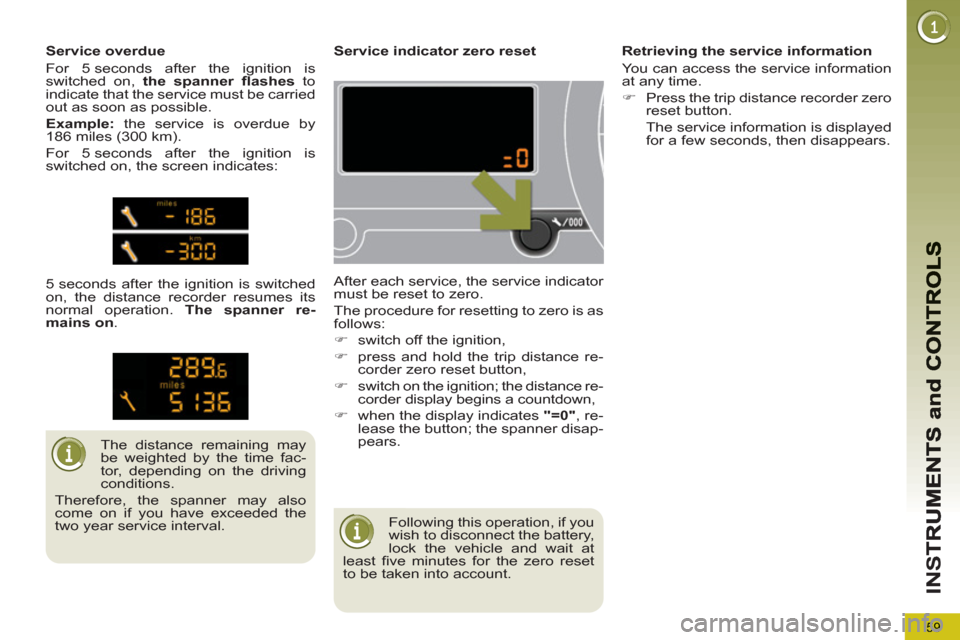
Service indicator zero reset
After each service, the service indicator
must be reset to zero.
The procedure for resetting to zero is as
follows:
)
switch off the ignition,
)
press and hold the trip distance re-
corder zero reset button,
)
switch on the ignition; the distance re-
corder display begins a countdown,
)
when the display indicates "=0"
, re-
lease the button; the spanner disap-
pears.
The distance remaining may
be weighted by the time fac-
tor, depending on the driving
conditions.
Therefore, the spanner may also
come on if you have exceeded the
two year service interval.
Service overdue
For 5 seconds after the ignition is
switched on, the spanner fl ashes
to
indicate that the service must be carried
out as soon as possible.
Example:
the service is overdue by
186 miles (300 km).
For 5 seconds after the ignition is
switched on, the screen indicates:
5 seconds after the ignition is switched
on, the distance recorder resumes its
normal operation. The spanner re-
mains on
.
Retrieving the service information
You can access the service information
at any time.
)
Press the trip distance recorder zero
reset button.
The service information is displayed
for a few seconds, then disappears.
Page 63 of 284
61
IN
S
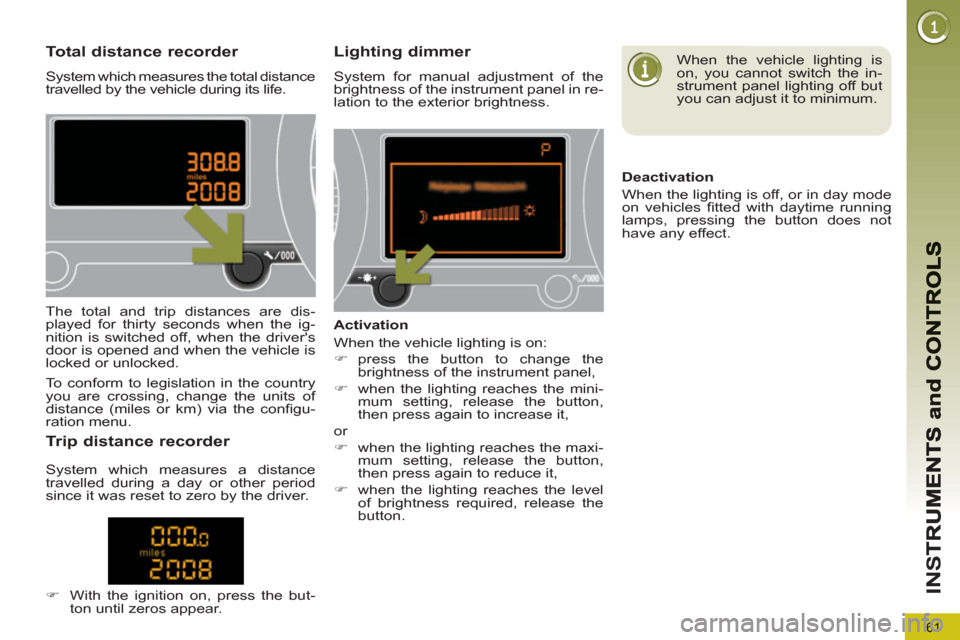
Total distance recorder
System which measures the total distance
travelled by the vehicle during its life.
Lighting dimmer
System for manual adjustment of the
brightness of the instrument panel in re-
lation to the exterior brightness.
The total and trip distances are dis-
played for thirty seconds when the ig-
nition is switched off, when the driver's
door is opened and when the vehicle is
locked or unlocked.
Tr ip distance recorder
)
With the ignition on, press the but-
ton until zeros appear.
Activation
When the vehicle lighting is on:
)
press the button to change the
brightness of the instrument panel,
)
when the lighting reaches the mini-
mum setting, release the button,
then press again to increase it,
or
)
when the lighting reaches the maxi-
mum setting, release the button,
then press again to reduce it,
)
when the lighting reaches the level
of brightness required, release the
button.
When the vehicle lighting is
on, you cannot switch the in-
strument panel lighting off but
you can adjust it to minimum.
Deactivation
When the lighting is off, or in day mode
on vehicles fi tted with daytime running
lamps, pressing the button does not
have any effect.
To conform to legislation in the country
you are crossing, change the units of
distance (miles or km) via the confi gu-
ration menu.
System which measures a distance
travelled during a day or other period
since it was reset to zero by the driver.
Page 71 of 284
69
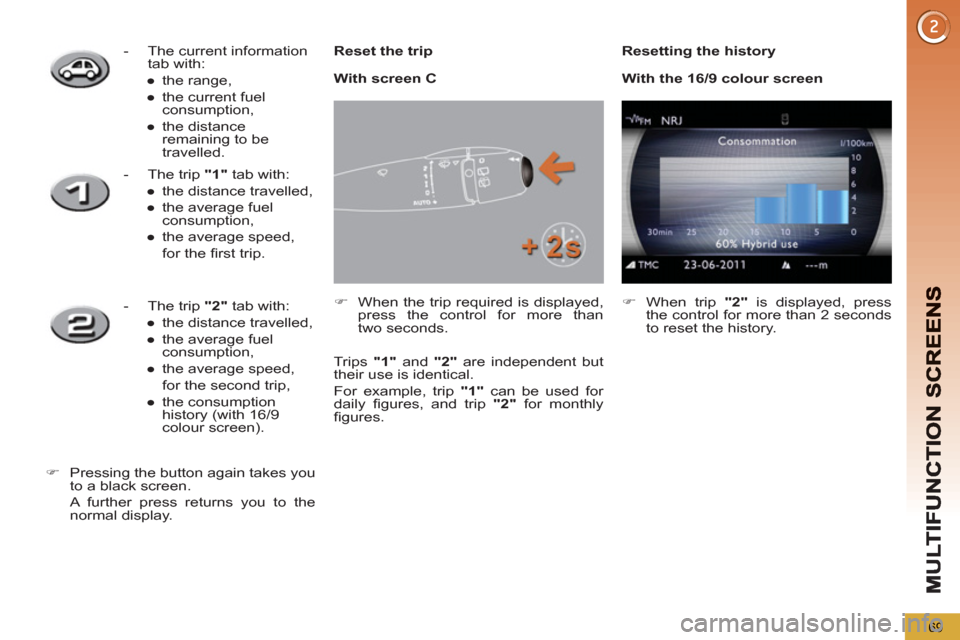
Reset the trip
)
When the trip required is displayed,
press the control for more than
two seconds.
Trips "1"
and "2"
are independent but
their use is identical.
For example, trip "1"
can be used for
daily fi gures, and trip "2"
for monthly
fi gures.
- The current information
tab with:
●
the range,
●
the current fuel
consumption,
●
the distance
remaining to be
travelled.
- The trip "1"
tab with:
●
the distance travelled,
●
the average fuel
consumption,
●
the average speed,
for the fi rst trip.
- The trip "2"
tab with:
●
the distance travelled,
●
the average fuel
consumption,
●
the average speed,
for the second trip,
●
the consumption
history (with 16/9
colour screen).
)
Pressing the button again takes you
to a black screen.
A further press returns you to the
normal display.
Resetting the history
With screen C
)
When trip "2"
is displayed, press
the control for more than 2 seconds
to reset the history.
With the 16/9 colour screen
Page 72 of 284
M
U
70
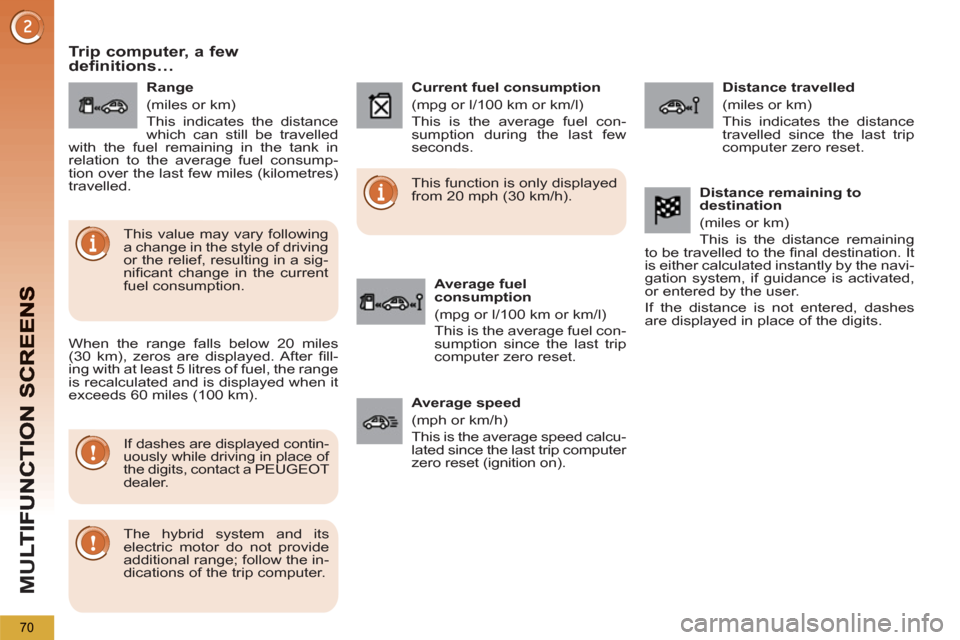
Trip computer, a fewdefinitions…
When the range falls below 20 miles
(30 km), zeros are displayed. After fi ll-
ing with at least 5 litres of fuel, the range
is recalculated and is displayed when it
exceeds 60 miles (100 km).
If dashes are displayed contin-
uously while driving in place of
the digits, contact a PEUGEOT
dealer.
This function is only displayed
from 20 mph (30 km/h).
This value may vary following
a change in the style of driving
or the relief, resulting in a sig-
nifi cant change in the current
fuel consumption.
Range
(miles or km)
This indicates the distance
which can still be travelled
with the fuel remaining in the tank in
relation to the average fuel consump-
tion over the last few miles (kilometres)
travelled.
Current fuel consumption
(mpg or l/100 km or km/l)
This is the average fuel con-
sumption during the last few
seconds.
Average fuel
consumption
(mpg or l/100 km or km/l)
This is the average fuel con-
sumption since the last trip
computer zero reset.
Distance travelled
(miles or km)
This indicates the distance
travelled since the last trip
computer zero reset.
Average speed
(mph or km/h)
This is the average speed calcu-
lated since the last trip computer
zero reset (ignition on).
Distance remaining to
destination
(miles or km)
This is the distance remaining
to be travelled to the fi nal destination. It
is either calculated instantly by the navi-
gation system, if guidance is activated,
or entered by the user.
If the distance is not entered, dashes
are displayed in place of the digits.
The hybrid system and its
electric motor do not provide
additional range; follow the in-
dications of the trip computer.
Page 212 of 284
210
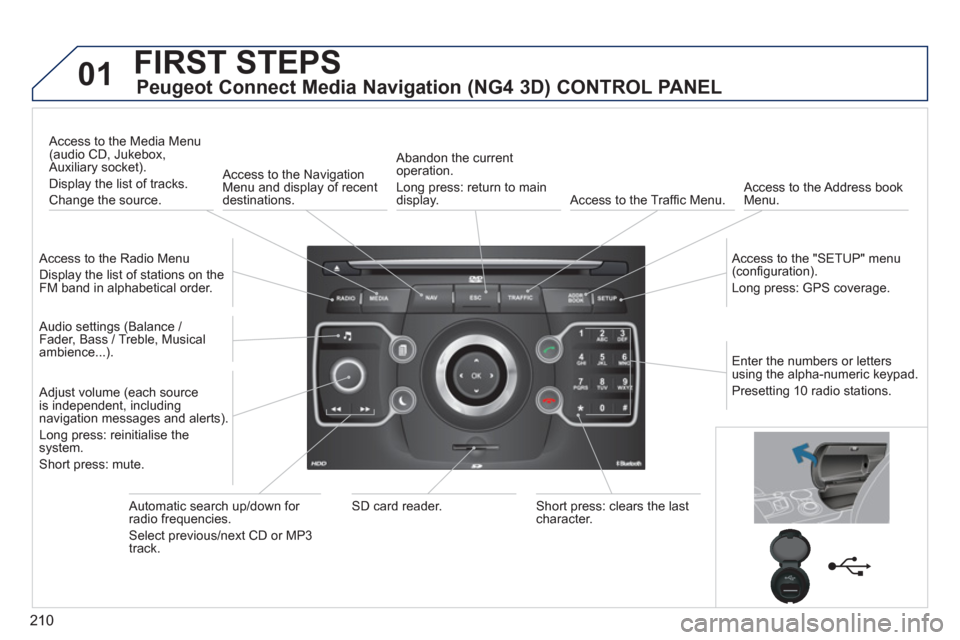
01FIRST STEPS
Peugeot Connect Media Navigation (NG4 3D) CONTROL PANEL
Access to the Radio Menu
Display the list of stations on the
FM band in alphabetical order.
Access to the Media Menu(audio CD, Jukebox,
Auxiliary socket).
Display the list o
f tracks.
Change the source.
Access to the NavigationMenu and display of recentdestinations.
Abandon the current
operation.
Long press: return to main
displa
y. Access to the Traffi c Menu.
Access to the Address book Menu.
A
ccess to the "SETUP" menu (confi guration).
Lon
g press: GPS coverage.
Audio settings (Balance /
Fader, Bass / Treble, Musical
ambience...
).
Adjust volume (each source
is independent, including
navigation messages and alerts).
Lon
g press: reinitialise thesystem.
Short press: mute.
Automatic search up/down for radio frequencies.
Select
previous/next CD or MP3
track.
SD card reader.Short press: clears the last character.
Enter the numbers or lettersusing the alpha-numeric keypad.
Presettin
g 10 radio stations.
Page 245 of 284
243
NAV
RADIO
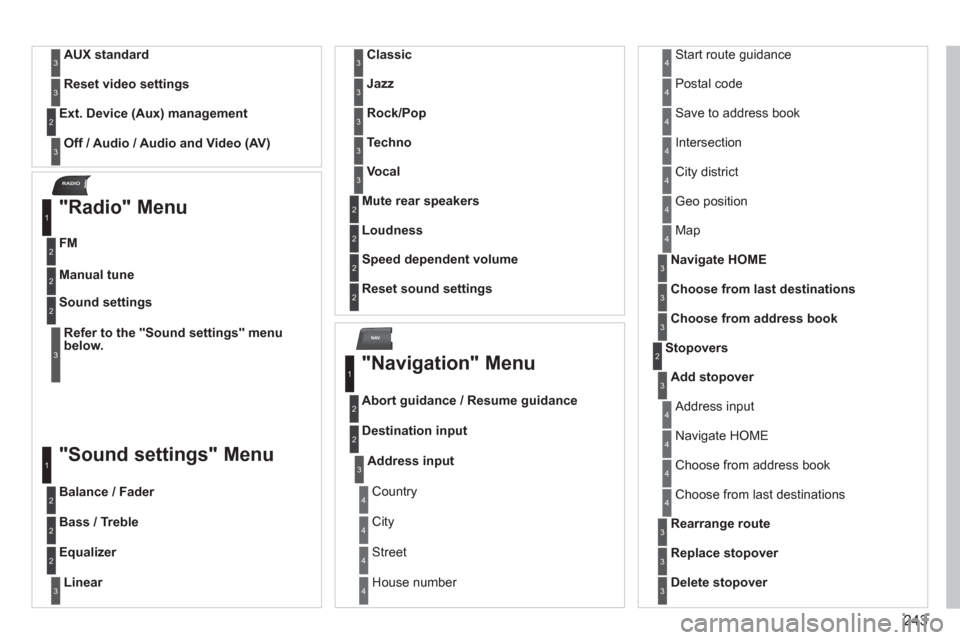
AUX standard3
Reset video settings3
Off / Audio / Audio and Video (AV)
Ext. Device (Aux) management2
3
"Radio" Menu
FM
1
2
Manual tune 2
Refer to the "Sound settings" menubelow.
Sound settings2
3
"Sound settings" Menu
Balance / Fader
1
2
Bass / Treble2
Equalizer 2
Linear3
Classic3
Jazz3
Rock/Pop3
Techno3
Vocal3
Mute rear speakers2
Loudness 2
Speed dependent volume2
Reset sound settings
2
"Navigation" Menu
Abort guidance / Resume guidance
1
2
Destination input2
Address input3
Country4
City 4
Street4
House number 4
Start route guidance4
Postal code4
Save to address book4
Intersection4
City district4
Geo position4
Map4
Navigate HOME3
Choose from last destinations3
Choose from address book3
Stopovers 2
Add stopover3
Address input4
Navigate HOME 4
Choose from address book4
Choose from last destinations 4
Rearrange route3
Replace stopover3
Delete stopover3
Page 248 of 284
246
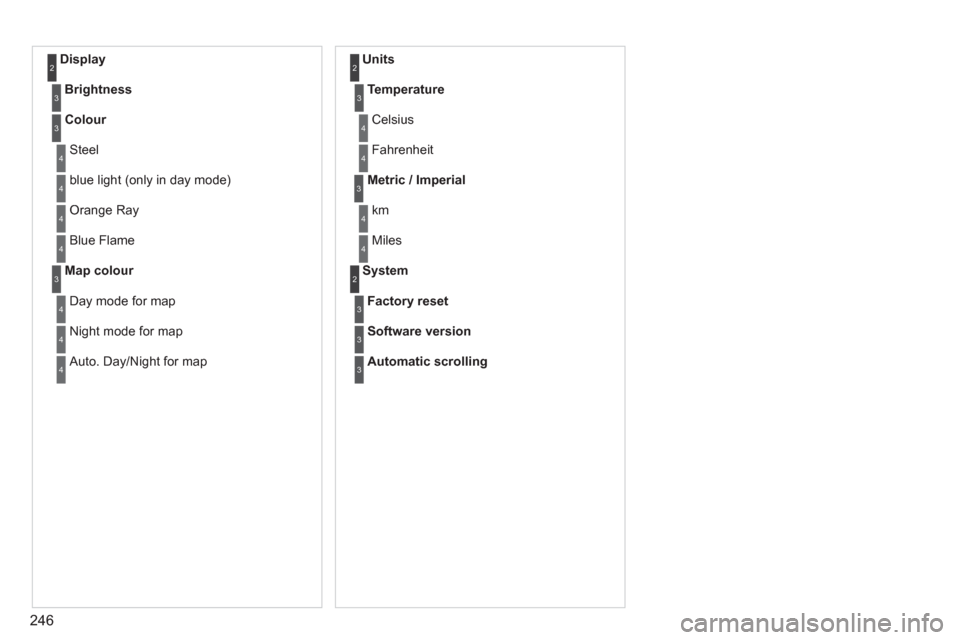
Display 2
Brightness3
Colour3
Steel4
blue light (only in day mode) 4
Orange Ray 4
Blue Flame4
Map colour3
Day mode for map4
Night mode for map4
Auto. Day/Night for map4
Units 2
Temperature3
Celsius 4
Fahrenheit 4
Metric / Imperial3
km4
Miles4
System 2
Factory reset3
Software version3
Automatic scrolling3
Page 275 of 284
ALPHABETICAL INDEX
273
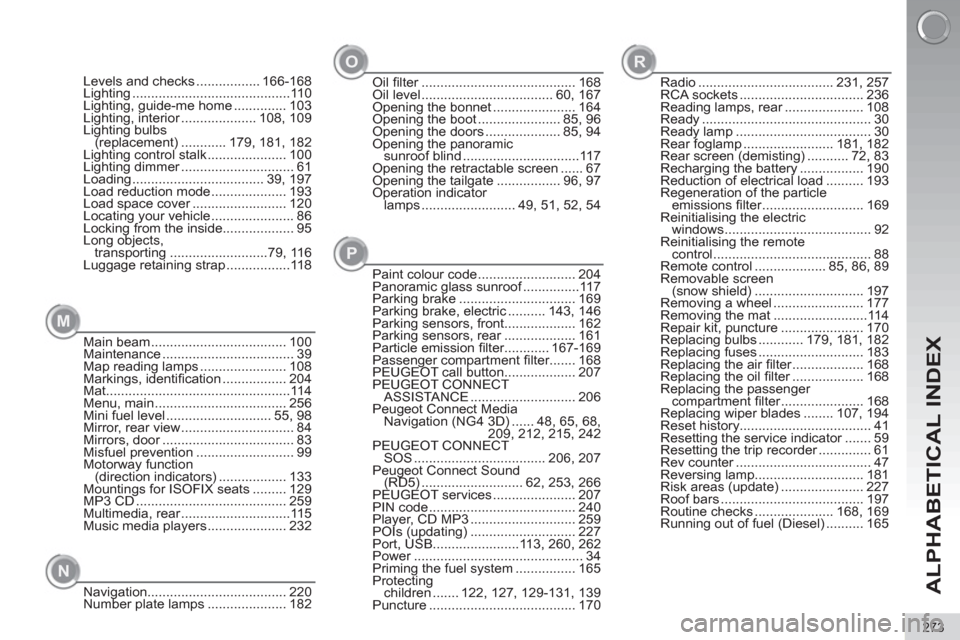
Main beam .................................... 100
Maintenance ................................... 39
Map reading lamps ....................... 108
Markings, identifi cation ................. 204
Mat .................................................114
Menu, main ................................... 256
Mini fuel level ............................ 55, 98
Mirror, rear view .............................. 84
Mirrors, door ................................... 83
Misfuel prevention .......................... 99
Motorway function
(direction indicators) .................. 133
Mountings for ISOFIX seats ......... 129
MP3 CD ........................................ 259
Multimedia, rear .............................115
Music media players ..................... 232
Navigation..................................... 220
Number plate lamps ..................... 182Paint colour code .......................... 204
Panoramic glass sunroof ...............117
Parking brake ............................... 169
Parking brake, electric .......... 143, 146
Parking sensors, front................... 162
Parking sensors, rear ................... 161
Particle emission fi lter............ 167-169
Passenger compartment fi lter....... 168
PEUGEOT call button ................... 207
PEUGEOT CONNECT
ASSISTANCE ............................ 206
Peugeot Connect Media
Navigation (NG4 3D) ...... 48, 65, 68,
209, 212, 215, 242
PEUGEOT CONNECT
SOS ................................... 206, 207
Peugeot Connect Sound
(RD5) ........................... 62, 253, 266
PEUGEOT services ...................... 207
PIN code ....................................... 240
Player, CD MP3 ............................ 259
POIs (updating) ............................ 227
Port, USB.......................113, 260, 262
Power ............................................. 34
Priming the fuel system ................ 165
Protecting
children ....... 122, 127, 129-131, 139
Puncture ....................................... 170 Oil fi lter ......................................... 168
Oil level ................................... 60, 167
Opening the bonnet ...................... 164
Opening the boot ...................... 85, 96
Opening the doors .................... 85, 94
Opening the panoramic
sunroof blind ...............................117
Opening the retractable screen ...... 67
Opening the tailgate ................. 96, 97
Operation indicator
lamps ......................... 49, 51, 52, 54 Levels and checks ................. 166-168
Lighting ..........................................110
Lighting, guide-me home .............. 103
Lighting, interior .................... 108, 109
Lighting bulbs
(replacement) ............ 179, 181, 182
Lighting control stalk ..................... 100
Lighting dimmer .............................. 61
Loading ................................... 39, 197
Load reduction mode .................... 193
Load space cover ......................... 120
Locating your vehicle ...................... 86
Locking from the inside................... 95
Long objects,
transporting ..........................79, 116
Luggage retaining strap .................118Radio .................................... 231, 257
RCA sockets ................................. 236
Reading lamps, rear ..................... 108
Ready ............................................. 30
Ready lamp .................................... 30
Rear foglamp ........................ 181, 182
Rear screen (demisting) ........... 72, 83
Recharging the battery ................. 190
Reduction of electrical load .......... 193
Regeneration of the particle
emissions fi lter ........................... 169
Reinitialising the electric
windows ....................................... 92
Reinitialising the remote
control .......................................... 88
Remote control ................... 85, 86, 89
Removable screen
(snow shield) ............................. 197
Removing a wheel ........................ 177
Removing the mat .........................114
Repair kit, puncture ...................... 170
Replacing bulbs ............ 179, 181, 182
Replacing fuses ............................ 183
Replacing the air fi lter ................... 168
Replacing the oil fi lter ................... 168
Replacing the passenger
compartment fi lter ...................... 168
Replacing wiper blades ........ 107, 194
Reset history................................... 41
Resetting the service indicator ....... 59
Resetting the trip recorder .............. 61
Rev counter .................................... 47
Reversing lamp............................. 181
Risk areas (update) ...................... 227
Roof bars ...................................... 197
Routine checks ..................... 168, 169
Running out of fuel (Diesel) .......... 165
M
NP OR